EP1521168A2 - Menus hiérarchiques sur place - Google Patents
Menus hiérarchiques sur place Download PDFInfo
- Publication number
- EP1521168A2 EP1521168A2 EP04103459A EP04103459A EP1521168A2 EP 1521168 A2 EP1521168 A2 EP 1521168A2 EP 04103459 A EP04103459 A EP 04103459A EP 04103459 A EP04103459 A EP 04103459A EP 1521168 A2 EP1521168 A2 EP 1521168A2
- Authority
- EP
- European Patent Office
- Prior art keywords
- menu
- parent
- level menu
- level
- submenu
- Prior art date
- Legal status (The legal status is an assumption and is not a legal conclusion. Google has not performed a legal analysis and makes no representation as to the accuracy of the status listed.)
- Ceased
Links
Images



Classifications
-
- G—PHYSICS
- G06—COMPUTING OR CALCULATING; COUNTING
- G06F—ELECTRIC DIGITAL DATA PROCESSING
- G06F3/00—Input arrangements for transferring data to be processed into a form capable of being handled by the computer; Output arrangements for transferring data from processing unit to output unit, e.g. interface arrangements
- G06F3/14—Digital output to display device ; Cooperation and interconnection of the display device with other functional units
-
- G—PHYSICS
- G06—COMPUTING OR CALCULATING; COUNTING
- G06F—ELECTRIC DIGITAL DATA PROCESSING
- G06F3/00—Input arrangements for transferring data to be processed into a form capable of being handled by the computer; Output arrangements for transferring data from processing unit to output unit, e.g. interface arrangements
- G06F3/01—Input arrangements or combined input and output arrangements for interaction between user and computer
- G06F3/048—Interaction techniques based on graphical user interfaces [GUI]
- G06F3/0481—Interaction techniques based on graphical user interfaces [GUI] based on specific properties of the displayed interaction object or a metaphor-based environment, e.g. interaction with desktop elements like windows or icons, or assisted by a cursor's changing behaviour or appearance
- G06F3/0482—Interaction with lists of selectable items, e.g. menus
-
- G—PHYSICS
- G06—COMPUTING OR CALCULATING; COUNTING
- G06F—ELECTRIC DIGITAL DATA PROCESSING
- G06F9/00—Arrangements for program control, e.g. control units
Definitions
- the present disclosure generally relates to menus, and more particularly, to a hierarchical in-place menu that replaces parent menus with submenus.
- Menu-driven applications provide a list of possible commands or options from which a user may choose, while command-driven applications require users to enter explicit commands. Thus, menu-driven applications are generally easier for the average user to learn than are command-driven applications.
- Menus are typically implemented as a list of textual or graphical choices (i.e., menu items) from which a user can choose. Thus, menus allow a user to select a menu item, for example, by pointing to the item with a mouse and then clicking on the item. Examples of other methods of selecting menu items include highlighting an item and then hitting the 'return' key or 'enter' key, and pressing on a menu item through a touch-sensitive screen.
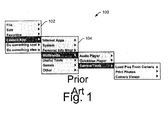
- Hierarchical menus 100 An example of a conventional hierarchical menu 100 is shown in Fig. 1.
- hierarchical menus 100 typically present a parent menu 102 that has selectable menu items. The selection of each menu item normally causes another menu, or submenu 104 to be displayed next to the currently displayed menu.
- a submenu 104 has additional menu choices that are related to the selected parent menu item which results in the display of the submenu.
- the depth of a hierarchical menu can extend in this manner to many levels of submenus.
- the example menu shown in Fig. 1 illustrates how conventional hierarchical menus 100 generally lay out from left to right across a display screen as menu choices are selected.
- This menu format provides various advantages such as retaining previous and current menus on the display screen at the same time.
- This provides a historical menu map as menu selections are made and their corresponding submenus are displayed across the screen. Users can therefore review previous menu selections that have been made while progressing to the most recently displayed menu, making it easier to move between different menu items and different menu levels.
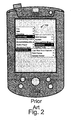
- Fig. 2 illustrates an example of how the hierarchical menu 100 of Fig. 1 might appear on the display screen of a small-screen device.
- hierarchical menus generally lay out across the display screen from left to right.
- the menus lay out across the screen in both directions, from left to right and back again.
- the menus typically begin to overlap one another, creating various problems.
- One problem is that the overlapping menus can be confusing to the user, as Fig. 2 is intended to illustrate. Overlapping menus can make it difficult for a user to discern previous menu selections which can, in turn, make it difficult to determine how to return to previous menus to make different menu selections.
- one of the intended benefits of a hierarchical menu can be undermined when the hierarchical menu is implemented on a small-screen device.
- Overlapping menus can also create problems with small-screen devices (and other devices) that employ pen-based or stylus-based touch-sensitive screens. With such devices, it is often difficult to maintain contact continuity between menus on the screen when the menus are overlapping. In other words, it is easy to move off of menus with small-screen, touch-based devices. If continuity is lost when moving from one menu to another, menus will often disappear from the screen, causing the user to have to go back and reactivate the menu from a prior menu. This problem becomes worse when using pen-based devices that "track”. "Tracking" is where a cursor on the screen follows (tracks) the movement of the pen as the pen moves over the screen even though the pen is not touching the screen. Tracking is lost if the pen is pulled too far away from the screen. Thus, pen-based devices that "track” tend to lose more menus when hierarchical menus are employed.
- An "in-place" hierarchical menu displays parent menus and submenus alternately. Selecting a parent menu option from within a parent menu, replaces the parent menu with a submenu.
- the submenu includes submenu options in addition to the previously selected parent menu option.
- the parent menu option can be selected from within the submenu to return to the parent.
- the parent menu includes a forward pointer associated with the parent menu option indicating that a selection of the parent menu option from the parent menu will replace the parent menu with a submenu.
- the submenu includes a backward pointer associated with the parent menu option indicating that a selection of the parent menu option from the submenu will replace the submenu with the parent menu.
- parent menus and submenus are displayed individually and alternately, providing an "in-place" hierarchical menu.
- Parent menu items selected from within parent menus are displayed within submenus above submenu items.
- Previously selected parent menu items are displayed within submenus with a backward pointer indicating that a selection of the parent menu item from within the submenu will replace the currently displayed submenu with the corresponding parent menu.
- Parent menu items within parent menus may be displayed with a forward pointer indicating that a selection of the parent menu item from within the parent menu will replace the parent menu with a corresponding submenu.
- Benefits of the disclosed hierarchical menu system include the ability to implement a hierarchical menu on devices having varying screen sizes, including small-screen devices.
- the disclosed hierarchical in-place menu permits the display of one hierarchical menu at a time, while still maintaining a history of previously selected menu items that enable a user to navigate within the hierarchical menu to any previously displayed menu.
- the disclosed hierarchical menu system permits application developers to design application menus in a typical hierarchical fashion while requiring at most, a simple operating system call to have their hierarchical menu implemented as a hierarchical in-place menu.
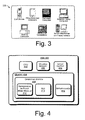
- Fig. 3 shows various examples of computing devices 300 that are suitable environments in which to implement hierarchical in-place menus.
- a computer 300 is typically capable of performing common computing functions, such as email, calendaring, task organization, word processing, Web browsing, and so on.
- Computer 300 may run an open platform operating system, such as the Windows® brand operating systems from Microsoft®.
- Computer 300 may be implemented as any one of various computing devices that has a display screen and supports a GUI (graphical user interface).
- Such computing devices can include, for example, cell phones, PDAs, pen-based and/or touch-based computers with touch-sensitive screens, notebooks, laptops, desktops, workstations, server and mainframe computers that include displays, and the like.
- One exemplary implementation of computer 300 is described in more detail below with reference to Fig. 9.
- computer 300 is generally discussed as being implemented as a small-screen, hand-held device such as, for example, a cell phone or a PDA (personal digital assistant; e.g., devices running Microsoft® 's PocketPC, Hewlett-Packard's Palmtop, 3Com's PalmPilot, etc.).
- PDA personal digital assistant
- Such devices generally provide more limited computing capabilities than a typical personal computer, such as information storage and retrieval capabilities for personal or business use, including keeping schedule calendars and address book information.
- Such devices usually offer some version of an operating system such as Windows CE, while various applications are generally available that provide limited functionality compared to full-fledged versions available for typical personal computers.
- a computer 300 implemented as a small-screen, hand-held mobile computer may include limited versions of email, phone, SMS (short message service), organizer and Web applications.
- Fig. 4 illustrates an exemplary embodiment of a computer 300 suitable for implementing a hierarchical in-place menu.
- Computer 300 is implemented generally as a small-screen device such as a PDA 300 (personal digital assistant) in the exemplary embodiment of Fig. 4.
- PDA 300 personal digital assistant
- PDA 300 includes a processor 400, a volatile memory 402 (i.e., RAM), and a nonvolatile memory 404 (e.g., ROM, hard disk, floppy disk, CD-ROM, etc.).
- Nonvolatile memory 404 generally provides storage of computer/processor-readable instructions, data structures, program modules and other data for PDA 300.
- PDA 300 may also include various input/output 406 devices.
- Input device 406 examples can include a mouse or track ball for moving a cursor and making selections, a touch-sensitive display screen, a stylus pen for making menu input selections on a touch-sensitive display screen displaying menu options and/or soft buttons of a GUI (graphical user interface), hard buttons on the PDA 300 structure, and so on.
- Output device 406 examples can include a display screen, a touch-sensitive display screen, an audio speaker, and so on.
- One exemplary implementation of a PDA 300 is described in more detail below with reference to Fig. 9.
- PDA 300 implements an operating system (OS) 408 on processor 400 from volatile memory 402.
- the OS 408 is stored in memory 404 and initially loaded from memory 404 into volatile memory 402 by a boot program (not shown).
- the OS 408 is generally configured to manage other application programs 410 that are also stored in memory 404 and executable on processor 400 from volatile memory 402.
- the OS 408 honors requests for services made by application programs 410 through predefined application program interfaces (APIs).
- APIs application program interfaces
- the OS 408 typically determines the order in which multiple applications 410 execute on processor 400 and the execution time allotted for each application 410, manages the sharing of memory 402 among multiple applications 410, handles input and output to and from attached hardware devices (e.g., hard disks, printers, dial-up ports), and so on.
- users can typically interact directly with the OS 408 through a user interface such as a command language or graphical user interface.
- PDA 300 typically implements various application programs 410 stored in memory 404 and executable on processor 400.
- applications 410 might include software programs implementing, for example, word processors, spread sheets, browsers, file share programs, database management systems (DBMS), peer-to-peer applications, multimedia players, computer-aided design tools and the like.
- Most applications 410 are menu-driven programs that provide a list of possible commands or options from which a user may choose in order to implement various application functions on the PDA 300.
- menu selections are made often depends upon the particular type of computer device 300 running an application 410. For example, entering a menu selection on a desktop computer 300 that has a mouse as an input device 406 may occur by pointing to a menu item with a mouse and then clicking on the item.
- Many small-screen computing devices 300 such as PDA 300 of Fig. 4, implement GUIs (graphical user interfaces) on touch-sensitive screens through which menu selections can be made by pressing a pen or stylus to desired menu choices.
- Other methods of selecting menu items include, for example, highlighting menu items and then hitting the 'return' key or 'enter' key.
- the menuing task is generally performed by a menuing subsystem of an operating system executing on a computer 300.
- a 'hierarchical in-place menu module' 412 is implemented as part of operating system 408.
- the menu module 412 is configured to receive menu calls from various applications 410 and to service those calls by displaying a menu on a display screen according to the parameters provided by the application 410 making the menu call.
- the menu module 412 also manages menu selections made under a GUI 414 supported by operating system 408.
- modules 412 and 414 are illustrated as being part of operating system 408, it is noted that such modules might also function as stand-alone modules stored in memory 404 and executable on processor 400.
- the functioning of modules 412 and 414 as part of operating system 408 is preferred, it is not intended as a limitation regarding their implementation by a computer 300.
- the 'hierarchical in-place menu module' 412 implements a hierarchical 'in-place' menu in accordance with application programs 410 that support hierarchical menus.
- menu module 412 is configured to implement those hierarchical menus as hierarchical 'in-place' menus.
- the implementation of a hierarchical menu as a hierarchical in-place menu can occur automatically for any application making a hierarchical menu call to operating system 408, or it can occur based on a specific request from an application 410 to implement the hierarchical menu as a hierarchical in-place menu.
- small-screen computer device manufacturers can configure devices to automatically provide hierarchical in-place menus for application developers. This enables application developers to design hierarchical menus in a typical manner without making any changes to their application source code. Alternatively, small-screen computer device manufacturers can configure devices to provide hierarchical in-place menus by default, or upon request for application developers. This enables application developers to design hierarchical menus in a typical manner and further allows them to determine if application menus will be implemented as hierarchical in-place menus by making a simple selection through their application source code.
- Fig. 5 illustrates an exemplary hierarchical in-place menu 500 that might be implemented on a computer 300 such as PDA 300 of Fig. 4.
- a hierarchical in-place menu 500 includes a top level or parent menu 502 that has selectable menu items.
- a selection of each parent menu item normally causes another menu, or submenu 504 to be displayed.
- the depth of a hierarchical in-place menu 500 can extend in this manner to many levels of submenus such as second, third, fourth and fifth levels, with submenus being parent menus to other submenus.
- a typical hierarchical menu e.g., menu 100 of Fig.
- the hierarchical in-place menu 500 does not display an additional menu (e.g., submenu 504) next to a currently displayed menu (e.g., parent menu 502). Instead, the hierarchical in-place menu 500 replaces the currently displayed menu (e.g., parent menu 502) with a new menu (e.g., submenu 504). It displays a new menu "in-place" of a currently displayed menu.
- the dashed lines 506 of Fig. 5 are intended to indicate that each of the menus of the hierarchical in-place menu 500 are displayed separately from one another. Menus in a hierarchical in-place menu 500 are not displayed at the same time on the same computer display screen. Instead, menus in a hierarchical in-place menu 500 replace one another on a computer display screen as menu items are selected. Accordingly, menu items in a parent menu (e.g., 502) can have associated forward pointers (e.g., arrows) that indicate that the selection of the menu item will result in the display of a submenu containing additional menu choices related to the menu item.
- forward pointers e.g., arrows
- parent menu item "Launch App" shown in parent menu 502 includes a forward pointer 508 that indicates a submenu will replace parent menu 502 upon selection of "Launch App" from within parent menu 502. It is instructive to note, that depending on which menu is currently being displayed, a menu can be both a parent menu and a submenu. This notion is generally applicable throughout this discussion.
- Submenu 504 is an example of a submenu that might replace parent menu 502 upon selection of "Launch App" from within parent menu 502. Submenu 504 additionally illustrates how a hierarchical in-place menu 500 retains previously selected parent menu items (e.g., "Launch App") and displays them within currently displayed menus (e.g., submenu 504) that result from the previously selected menu items.
- previously selected parent menu items e.g., "Launch App”
- Previously selected parent menu items are displayed within submenus (e.g., 504, 510, 512) above currently displayed submenu items.
- submenus e.g., 504, 510, 512
- there is a divider 514 such as a line dividing the previously selected parent items from the currently displayed submenu items.
- previously selected parent items displayed within submenus have associated backward pointers 516 indicating a parent menu will replace the currently displayed submenu upon selection of a previously selected parent item from within the submenu.
- a selection of "Launch App" within submenu 504 will result in the replacement of submenu 504 with previously displayed parent menu 502.
- "Launch App” within submenu 504 has an associated backward pointer (e.g., arrow) indicating that this selection will return the display back to the corresponding parent menu 502.
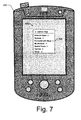
- Figs. 6 and 7 illustrate examples of how a hierarchical in-place menu 500 can be implemented on a small-screen computer device (or any size screen device).
- the display of a single menu box in a hierarchical "in-place" manner relieves the small screen from having to display the various different levels of a menu hierarchy across the screen, as is the case with conventional hierarchical menus (e.g., hierarchical menu 100 of Fig. 1).
- the hierarchical in-place menu 500 still provides a historical menu map through the display of previously selected menu items from parent menus, and thereby enables users to "jump back" to any place in the menu hierarchy.
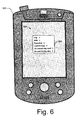
- Fig. 6 shows the parent menu 502 from Fig. 4 displayed as a singular menu box on the screen of a PDA 300.
- Fig. 7 shows the result of selecting the "Launch App" menu item from the parent menu 502. The result of this menu selection is the replacement of the parent menu 502 on the screen of the PDA 300 with a submenu 504 that includes submenu items related to the "Launch App" selection made from the parent menu 502.
- the submenu 504 of Fig. 7 illustrates how a hierarchical in-place menu 500 permits the implementation of hierarchical menus on small-screen devices while preserving a historical map of menu selections that allows a user to easily jump back to previous menus.
- Example methods for implementing a hierarchical in-place menu will now be described with primary reference to the flow diagram of Fig. 8.
- the methods apply generally to the exemplary embodiments discussed above with respect to Figs. 1 - 7.
- the elements of the described methods may be performed by any appropriate means including, for example, by hardware logic blocks on an ASIC or by the execution of processor-readable instructions defined on a processor-readable medium.
- a "processor-readable medium,” as used herein, can be any means that can contain, store, communicate, propagate, or transport instructions for use by or execution by a processor.
- a processor-readable medium can be, without limitation, an electronic, magnetic, optical, electromagnetic, infrared, or semiconductor system, apparatus, device, or propagation medium.
- processor-readable medium include, among others, an electrical connection (electronic) having one or more wires, a portable computer diskette (magnetic), a random access memory (RAM) (magnetic), a read-only memory (ROM) (magnetic), an erasable programmable-read-only memory (EPROM or Flash memory), an optical fiber (optical), a rewritable compact disc (CD-RW) (optical), and a portable compact disc read-only memory (CDROM) (optical).
- an electrical connection electronic having one or more wires
- a portable computer diskette magnetic
- RAM random access memory
- ROM read-only memory
- EPROM or Flash memory erasable programmable-read-only memory
- CD-RW rewritable compact disc
- CDROM portable compact disc read-only memory
- Fig. 8 shows an exemplary method 800 for implementing a hierarchical in-place menu on a computer device 300 such as a PDA or other similar device having a small display screen.
- the method 800 describes a hierarchical menu process that could continue well beyond the number of submenus that are discussed in the method itself.
- the extent of method 800 is not intended as a limitation. Rather, the extent of method 800 is intended to generally express the manner by which a hierarchical in-place menu can be implemented in lesser and greater degrees of size and complexity.
- a top level menu is displayed on a display screen of a computer, such as a small-screen PDA 300.
- the top level menu is also a parent menu to one or more submenus.
- the top level menu is typically initiated by a user input such as the click of a mouse or the pressing of a pen or stylus to a touch-sensitive display screen.
- a first menu selection is received from the top (or parent) level menu. The selection is a top level menu item displayed in the top level menu.
- a second level menu (or submenu) is displayed in place of the top level menu in response to the first menu selection.
- the top level menu is no longer displayed on the display screen.
- the second level menu includes the top level menu item that was selected in order to initiate the second level menu. Therefore, the second level menu retains a link to the previous menu in the hierarchy of menus.
- the second level menu also includes second level menu items.
- One or more of the second level menu items are links to additional levels of submenus that contain further menu choices related to the items in the second level menu that link to the additional menu levels.
- a second selection of the top level menu item is received from the second level menu.
- This second selection of the top level menu item from within the second level menu is tantamount to a user wanting to jump back in the menu hierarchy to the top level menu.
- the top level menu is displayed in place of the second level menu in response to the second selection.
- a second selection of a second level menu item is received from the second level menu.
- This second selection of the second level menu item from within the second level menu is tantamount to a user wanting to jump forward in the menu hierarchy to an additional submenu providing more choices related to the second level menu item.
- a third level menu is displayed in place of the second level menu in response to this second selection.
- the third level menu includes the top level menu item, the second level menu item, and third level menu items.
- the top level menu item and second level menu item provide links back to previous menus in the hierarchy of menus, while one or more of the third level menu items provide a link forward to an additional related submenu.
- a third selection of the top level menu item is received from within the third level menu.
- This third selection of the top level menu item from within the third level menu is tantamount to a user wanting to jump back in the menu hierarchy to the top level menu. Therefore, at block 818, the top level menu is displayed in place of the third level menu in response to this third selection.
- a third selection of the second level menu item is received from within the third level menu.
- This third selection of the second level menu item from within the third level menu is tantamount to a user wanting to jump back in the menu hierarchy to the second level menu. Therefore, at block 822, the second level menu is displayed in place of the third level menu in response to this third selection.
- a third selection of a third level menu item is received from within the third level menu.
- This third selection of a third level menu item from within the third level menu is tantamount to a user wanting to jump forward in the menu hierarchy to a new submenu that provides additional menu choices. Therefore, at block 826, a fourth level menu is displayed in place of the third level menu in response to this third selection.
- the fourth level menu includes the top level menu item, the second level menu item, the third level menu item, and fourth level menu items.
- Fig. 9 illustrates an exemplary computing environment suitable for implementing a computer 300 such as discussed above with reference to Figs. 1 - 8. Although one specific configuration is shown in Fig. 9, computer 300 may be implemented in other computing configurations.
- the computing environment 900 includes a general-purpose computing system in the form of a computer 902.
- the components of computer 902 can include, but are not limited to, one or more processors or processing units 904, a system memory 906, and a system bus 908 that couples various system components including the processor 904 to the system memory 906.
- the system bus 908 represents one or more of any of several types of bus structures, including a memory bus or memory controller, a peripheral bus, an accelerated graphics port, and a processor or local bus using any of a variety of bus architectures.
- An example of a system bus 908 would be a Peripheral Component Interconnects (PCI) bus, also known as a Mezzanine bus.
- PCI Peripheral Component Interconnects
- Computer 902 typically includes a variety of computer-readable media. Such media can be any available media that is accessible by computer 902 and includes both volatile and non-volatile media, removable and non-removable media.
- the system memory 906 includes computer readable media in the form of volatile memory, such as random access memory (RAM) 910, and/or non-volatile memory, such as read only memory (ROM) 912.
- RAM 910 typically contains data and/or program modules that are immediately accessible to and/or presently operated on by the processing unit 904.
- Computer 902 can also include other removable/non-removable, volatile/non-volatile computer storage media.
- Fig. 9 illustrates a hard disk drive 916 for reading from and writing to a non-removable, non-volatile magnetic media (not shown), a magnetic disk drive 918 for reading from and writing to a removable, non-volatile magnetic disk 920 (e.g., a "floppy disk"), and an optical disk drive 922 for reading from and/or writing to a removable, non-volatile optical disk 924 such as a CD-ROM, DVD-ROM, or other optical media.
- a hard disk drive 916 for reading from and writing to a non-removable, non-volatile magnetic media (not shown)
- a magnetic disk drive 918 for reading from and writing to a removable, non-volatile magnetic disk 920 (e.g., a "floppy disk")
- an optical disk drive 922 for reading from and/or writing to a removable, non-volatile optical
- the hard disk drive 916, magnetic disk drive 918, and optical disk drive 922 are each connected to the system bus 908 by one or more data media interfaces 926.
- the hard disk drive 916, magnetic disk drive 918, and optical disk drive 922 can be connected to the system bus 908 by a SCSI interface (not shown).
- the disk drives and their associated computer-readable media provide non-volatile storage of computer readable instructions, data structures, program modules, and other data for computer 902.
- a hard disk 916 a removable magnetic disk 920, and a removable optical disk 924
- other types of computer readable media which can store data that is accessible by a computer, such as magnetic cassettes or other magnetic storage devices, flash memory cards, CD-ROM, digital versatile disks (DVD) or other optical storage, random access memories (RAM), read only memories (ROM), electrically erasable programmable read-only memory (EEPROM), and the like, can also be utilized to implement the exemplary computing system and environment.
- RAM random access memories
- ROM read only memories
- EEPROM electrically erasable programmable read-only memory
- Any number of program modules can be stored on the hard disk 916, magnetic disk 920, optical disk 924, ROM 912, and/or RAM 910, including by way of example, an operating system 926, one or more application programs 928, other program modules 930, and program data 932.
- an operating system 926 may include an embodiment of a caching scheme for user network access information.
- Computer 902 can include a variety of computer/processor readable media identified as communication media.
- Communication media typically embodies computer readable instructions, data structures, program modules, or other data in a modulated data signal such as a carrier wave or other transport mechanism and includes any information delivery media.
- modulated data signal means a signal that has one or more of its characteristics set or changed in such a manner as to encode information in the signal.
- communication media includes wired media such as a wired network or direct-wired connection, and wireless media such as acoustic, RF, infrared, and other wireless media. Combinations of any of the above are also included within the scope of computer readable media.
- a user can enter commands and information into computer system 902 via input devices such as a keyboard 934 and a pointing device 936 (e.g., a "mouse").
- Other input devices 938 may include a microphone, joystick, game pad, satellite dish, serial port, scanner, and/or the like.
- input/output interfaces 940 that are coupled to the system bus 908, but may be connected by other interface and bus structures, such as a parallel port, game port, or a universal serial bus (USB).
- a monitor 942 or other type of display device can also be connected to the system bus 908 via an interface, such as a video adapter 944.
- other output peripheral devices can include components such as speakers (not shown) and a printer 946 which can be connected to computer 902 via the input/output interfaces 940.
- Computer 902 can operate in a networked environment using logical connections to one or more remote computers, such as a remote computing device 948.
- the remote computing device 948 can be a personal computer, portable computer, a server, a router, a network computer, a peer device or other common network node, and the like.
- the remote computing device 948 is illustrated as a portable computer that can include many or all of the elements and features described herein relative to computer system 902.
- Logical connections between computer 902 and the remote computer 948 are depicted as a local area network (LAN) 950 and a general wide area network (WAN) 952.
- LAN local area network
- WAN wide area network
- Such networking environments are commonplace in offices, enterprise-wide computer networks, intranets, and the Internet.
- the computer 902 When implemented in a LAN networking environment, the computer 902 is connected to a local network 950 via a network interface or adapter 954.
- the computer 902 When implemented in a WAN networking environment, the computer 902 typically includes a modem 956 or other means for establishing communications over the wide network 952.
- the modem 956, which can be internal or external to computer 902 can be connected to the system bus 908 via the input/output interfaces 940 or other appropriate mechanisms. It is to be appreciated that the illustrated network connections are exemplary and that other means of establishing communication link(s) between the computers 902 and 948 can be employed.
- remote application programs 958 reside on a memory device of remote computer 948.
- application programs and other executable program components such as the operating system, are illustrated herein as discrete blocks, although it is recognized that such programs and components reside at various times in different storage components of the computer system 902, and are executed by the data processor(s) of the computer.
Landscapes
- Engineering & Computer Science (AREA)
- Theoretical Computer Science (AREA)
- General Engineering & Computer Science (AREA)
- Physics & Mathematics (AREA)
- General Physics & Mathematics (AREA)
- Human Computer Interaction (AREA)
- Software Systems (AREA)
- User Interface Of Digital Computer (AREA)
- Digital Computer Display Output (AREA)
Applications Claiming Priority (2)
| Application Number | Priority Date | Filing Date | Title |
|---|---|---|---|
| US678806 | 1996-07-12 | ||
| US10/678,806 US7418670B2 (en) | 2003-10-03 | 2003-10-03 | Hierarchical in-place menus |
Publications (2)
| Publication Number | Publication Date |
|---|---|
| EP1521168A2 true EP1521168A2 (fr) | 2005-04-06 |
| EP1521168A3 EP1521168A3 (fr) | 2011-12-07 |
Family
ID=34314079
Family Applications (1)
| Application Number | Title | Priority Date | Filing Date |
|---|---|---|---|
| EP04103459A Ceased EP1521168A3 (fr) | 2003-10-03 | 2004-07-20 | Menus hiérarchiques sur place |
Country Status (5)
| Country | Link |
|---|---|
| US (1) | US7418670B2 (fr) |
| EP (1) | EP1521168A3 (fr) |
| JP (1) | JP2005115927A (fr) |
| KR (1) | KR20050033419A (fr) |
| CN (1) | CN100465864C (fr) |
Cited By (17)
| Publication number | Priority date | Publication date | Assignee | Title |
|---|---|---|---|---|
| EP1818769A1 (fr) * | 2006-02-13 | 2007-08-15 | Research In Motion Limited | Procédé et alignement fournissant un menu d'actions primaires sur un dispositif de communication portatif |
| WO2007143821A1 (fr) * | 2006-06-13 | 2007-12-21 | Research In Motion Limited | Menu d'actions principal sur un dispositif de communication portatif |
| WO2007038095A3 (fr) * | 2005-09-23 | 2008-11-13 | Disney Entpr Inc | Interface utilisateur graphique pour dispositif électronique |
| US7568169B2 (en) | 2006-02-13 | 2009-07-28 | Research In Motion Limited | Method and arrangement for a primary actions menu for email applications on a handheld electronic device |
| US7973765B2 (en) | 2004-06-21 | 2011-07-05 | Research In Motion Limited | Handheld wireless communication device |
| US7982712B2 (en) | 2004-06-21 | 2011-07-19 | Research In Motion Limited | Handheld wireless communication device |
| US7986301B2 (en) | 2004-06-21 | 2011-07-26 | Research In Motion Limited | Handheld wireless communication device |
| US8064946B2 (en) | 2004-06-21 | 2011-11-22 | Research In Motion Limited | Handheld wireless communication device |
| US8219158B2 (en) | 2004-06-21 | 2012-07-10 | Research In Motion Limited | Handheld wireless communication device |
| US8271036B2 (en) | 2004-06-21 | 2012-09-18 | Research In Motion Limited | Handheld wireless communication device |
| EP2518611A3 (fr) * | 2011-04-27 | 2012-12-19 | Furuno Electric Company Limited | Dispositif d'affichage d'informations, procédé d'affichage d'informations |
| US8341551B2 (en) | 2006-02-13 | 2012-12-25 | Research In Motion Limited | Method and arrangment for a primary actions menu for a contact data entry record of an address book application on a handheld electronic device |
| US8463315B2 (en) | 2004-06-21 | 2013-06-11 | Research In Motion Limited | Handheld wireless communication device |
| US8537117B2 (en) | 2006-02-13 | 2013-09-17 | Blackberry Limited | Handheld wireless communication device that selectively generates a menu in response to received commands |
| US8824669B2 (en) | 2001-12-21 | 2014-09-02 | Blackberry Limited | Handheld electronic device with keyboard |
| US8904286B2 (en) | 2006-02-13 | 2014-12-02 | Blackberry Limited | Method and arrangement for providing a primary actions menu on a wireless handheld communication device |
| WO2015108789A1 (fr) * | 2014-01-17 | 2015-07-23 | Microsoft Technology Licensing, Llc | Interface utilisateur de menu en étoile comportant le maintien d'un point d'entrée |
Families Citing this family (122)
| Publication number | Priority date | Publication date | Assignee | Title |
|---|---|---|---|---|
| US20120089499A1 (en) * | 2000-06-29 | 2012-04-12 | Balthaser Online, Inc. | Methods, systems, and processes for the design and creation of rich-media applications via the internet |
| WO2004066140A1 (fr) * | 2003-01-21 | 2004-08-05 | Sanyo Electric Co., Ltd. | Donnees d'un panneau de commande d'afficheur, et dispositif d'affichage de menus |
| US20040165012A1 (en) * | 2003-02-20 | 2004-08-26 | International Business Machines Corp. | Cascading menu with selectable offset |
| KR20040110155A (ko) * | 2003-06-18 | 2004-12-31 | 삼성테크윈 주식회사 | 폴더 아이콘들이 이동하는 휴대용 디지털 장치의 제어 방법 |
| US7787971B2 (en) * | 2003-12-02 | 2010-08-31 | Thermo Fisher Scientific (Asheville) Llc | Rotor selection interface and method |
| US20050131945A1 (en) * | 2003-12-16 | 2005-06-16 | International Business Machines Corporation | Compact interface for the display and navigation of object hierarchies |
| KR100595633B1 (ko) * | 2003-12-18 | 2006-06-30 | 엘지전자 주식회사 | 이동통신 단말기의 멀티미디어 메시지 작성 방법 |
| US7412665B2 (en) * | 2004-02-13 | 2008-08-12 | Microsoft Corporation | Menu management in an OLE document environment |
| BRPI0510756B1 (pt) * | 2004-05-14 | 2019-01-08 | Thomson Licensing | gerenciamento de trilha de auditoria para um sistema de menu em um produto digital de consumidor |
| US20070254703A1 (en) * | 2004-06-21 | 2007-11-01 | Griffin Jason T | Handheld wireless communication device |
| US20070254701A1 (en) * | 2004-06-21 | 2007-11-01 | Griffin Jason T | Handheld wireless communication device |
| US20070254721A1 (en) * | 2004-06-21 | 2007-11-01 | Griffin Jason T | Handheld wireless communication device |
| US20070254704A1 (en) * | 2004-06-21 | 2007-11-01 | Griffin Jason T | Handheld wireless communication device |
| US20070254705A1 (en) * | 2004-06-21 | 2007-11-01 | Griffin Jason T | Handheld wireless communication device |
| US20070254700A1 (en) * | 2004-06-21 | 2007-11-01 | Griffin Jason T | Handheld wireless communication device |
| US7873916B1 (en) * | 2004-06-22 | 2011-01-18 | Apple Inc. | Color labeling in a graphical user interface |
| US9213714B1 (en) * | 2004-06-22 | 2015-12-15 | Apple Inc. | Indicating hierarchy in a computer system with a graphical user interface |
| JP2006091987A (ja) * | 2004-09-21 | 2006-04-06 | Fuji Xerox Co Ltd | 電子機器およびそのメニュー表示制御方法 |
| FR2877452A1 (fr) * | 2004-10-28 | 2006-05-05 | Thomson Licensing Sa | Procede de selection d'un bouton dans une barre graphique, et recepteur mettant en oeuvre le procede |
| DE102005003680A1 (de) * | 2005-01-21 | 2006-07-27 | Siemens Ag | Verfahren zur Steuerung eines Geräts |
| JP2007052403A (ja) * | 2005-07-19 | 2007-03-01 | Canon Inc | 表示装置及び表示方法及びプログラム及び記憶媒体 |
| KR100984593B1 (ko) * | 2005-09-02 | 2010-09-30 | 애플 인크. | 개인 통신 장치에서의 파일 관리 |
| US20070089064A1 (en) * | 2005-10-13 | 2007-04-19 | International Business Machines Corporation | Method, system, and program product for accessing undisplayed data |
| CN1949161B (zh) * | 2005-10-14 | 2010-05-26 | 鸿富锦精密工业(深圳)有限公司 | 多层次菜单显示装置及显示控制方法 |
| KR100617691B1 (ko) * | 2005-10-31 | 2006-08-28 | 삼성전자주식회사 | 휴대단말기의 메뉴 디스플레이 방법 |
| US7546549B2 (en) * | 2005-11-15 | 2009-06-09 | Microsoft Corporation | Constrained creation of data hierarchies |
| US20070126877A1 (en) * | 2005-12-01 | 2007-06-07 | Hong-Seok Yang | Multifunctional video apparatus and method of providing user interface thereof |
| US7802203B2 (en) * | 2005-12-23 | 2010-09-21 | Sap Ag | Method for providing selectable alternate menu views |
| JP2007207186A (ja) * | 2006-02-06 | 2007-08-16 | Denso Corp | 操作システム |
| US20070192714A1 (en) * | 2006-02-13 | 2007-08-16 | Research In Motion Limited | Method and arrangement for providing a primary actions menu on a handheld communication device having a reduced alphabetic keyboard |
| US20070192713A1 (en) * | 2006-02-13 | 2007-08-16 | Research In Motion Limited | Method and arrangement for providing a primary actions menu on a handheld communication device having a full alphabetic keyboard |
| KR20070088029A (ko) * | 2006-02-24 | 2007-08-29 | 삼성전자주식회사 | 이동 단말기에서 사용자 인터페이스 제공 장치 및 방법 |
| US20070260982A1 (en) * | 2006-04-11 | 2007-11-08 | Invensys Systems, Inc. | Runtime human-machine interface for process control having enhanced graphical views of detailed control information |
| KR100816286B1 (ko) * | 2006-05-18 | 2008-03-24 | 삼성전자주식회사 | 휴대 단말기와 외부 장치를 이용한 디스플레이 장치 및방법 |
| USD556769S1 (en) * | 2006-06-30 | 2007-12-04 | Microsoft Corporation | Transitional graphic user interface for a display screen |
| USD556768S1 (en) * | 2006-06-30 | 2007-12-04 | Microsoft Corporation | Transitional graphic user interface for a display screen |
| USD556767S1 (en) * | 2006-06-30 | 2007-12-04 | Microsoft Corporation | Graphic user interface for a display screen |
| US20080016465A1 (en) * | 2006-07-14 | 2008-01-17 | Sony Ericsson Mobile Communications Ab | Portable electronic device with graphical user interface |
| DE102006034415A1 (de) * | 2006-07-25 | 2008-01-31 | Siemens Ag | Verfahren und Anordnung zum Bedienen von elektrischen Geräten |
| KR100826194B1 (ko) * | 2006-07-27 | 2008-04-30 | 엘지전자 주식회사 | 터치 패널형 리모트 콘트롤러 및 이 터치 패널형 리모트콘트롤러에서 기능을 수행하는 방법 |
| EP1883020B1 (fr) * | 2006-07-28 | 2013-05-22 | Dassault Systèmes | Procédé et système de navigation dans une base de données informatique |
| US8209631B2 (en) * | 2006-08-24 | 2012-06-26 | Nokia Corporation | User interface for an electronic device |
| US7805684B2 (en) * | 2006-09-01 | 2010-09-28 | Nokia Corporation | Mobile communications terminal |
| US8418217B2 (en) | 2006-09-06 | 2013-04-09 | Verizon Patent And Licensing Inc. | Systems and methods for accessing media content |
| KR100774927B1 (ko) | 2006-09-27 | 2007-11-09 | 엘지전자 주식회사 | 이동통신 단말기, 메뉴 및 아이템 선택방법 |
| US8464295B2 (en) * | 2006-10-03 | 2013-06-11 | Verizon Patent And Licensing Inc. | Interactive search graphical user interface systems and methods |
| US8316320B2 (en) * | 2006-10-03 | 2012-11-20 | Verizon Patent And Licensing Inc. | Expandable history tab in interactive graphical user interface systems and methods |
| CN101563665B (zh) * | 2006-12-13 | 2015-12-09 | 汤姆逊许可证公司 | 利用具有触摸元件的用户接口来操作再现设备的方法 |
| US8612877B2 (en) * | 2006-12-18 | 2013-12-17 | Blackberry Limited | Method for providing options associated with computer applications in a mobile device and a menu and application therefor |
| US20080163121A1 (en) * | 2006-12-29 | 2008-07-03 | Research In Motion Limited | Method and arrangement for designating a menu item on a handheld electronic device |
| US8015581B2 (en) * | 2007-01-05 | 2011-09-06 | Verizon Patent And Licensing Inc. | Resource data configuration for media content access systems and methods |
| US20080172614A1 (en) * | 2007-01-08 | 2008-07-17 | Varia Mobil Llc | Action-based menus for a portable media device |
| US7992106B2 (en) * | 2007-01-08 | 2011-08-02 | Varia Holdings Llc | Menu trails for a portable media player |
| US9547415B2 (en) | 2007-04-30 | 2017-01-17 | Oracle International Corporation | Suite-wide navigation |
| KR101367100B1 (ko) * | 2007-05-21 | 2014-02-25 | 삼성전자주식회사 | 응용 프로그램/메뉴 표시 장치 및 방법 |
| US20080294274A1 (en) * | 2007-05-22 | 2008-11-27 | Honeywell International Inc. | Special purpose controller interface with breadcrumb navigation support |
| US8074178B2 (en) * | 2007-06-12 | 2011-12-06 | Microsoft Corporation | Visual feedback display |
| EP2017707B1 (fr) * | 2007-07-06 | 2017-04-12 | Dassault Systèmes | Objet fenêtre d'interface utilisateur graphique et procédé pour la navigation parmi des objets associés |
| KR20090005680A (ko) * | 2007-07-09 | 2009-01-14 | 삼성전자주식회사 | 원통형 입체 형상의 메뉴를 제공하기 위한 gui 제공방법및 이를 적용한 멀티미디어 기기 |
| US8314789B2 (en) * | 2007-09-26 | 2012-11-20 | Autodesk, Inc. | Navigation system for a 3D virtual scene |
| US9304658B2 (en) * | 2007-12-30 | 2016-04-05 | Qualcomm Incorporated | On-screen menu buttons including multiple modes |
| KR101365174B1 (ko) * | 2008-01-11 | 2014-02-21 | 삼성전자주식회사 | 검색정보 생성방법 및 이를 적용한 영상기기 |
| US8997018B2 (en) * | 2008-03-04 | 2015-03-31 | Synaptics Incorporated | Presenting a menu |
| TWI353547B (en) * | 2008-03-14 | 2011-12-01 | Mstar Semiconductor Inc | Portable device operating method |
| JP5219705B2 (ja) * | 2008-09-12 | 2013-06-26 | 富士通テン株式会社 | 情報処理装置および情報処理方法 |
| WO2010045427A1 (fr) * | 2008-10-15 | 2010-04-22 | Inputive Corporation | Système et procédé de navigation totalement intégrée dans des applications |
| KR101004463B1 (ko) * | 2008-12-09 | 2010-12-31 | 성균관대학교산학협력단 | 터치 스크린의 드래그를 이용한 메뉴 선택을 지원하는 휴대용 단말 및 그 제어 방법 |
| JP5147667B2 (ja) * | 2008-12-11 | 2013-02-20 | 三菱電機株式会社 | 画像表示装置 |
| KR101552309B1 (ko) * | 2009-02-11 | 2015-09-11 | 삼성전자주식회사 | 휴대 단말기의 사용자 인터페이스 제공 방법 |
| CN101819499B (zh) * | 2009-02-27 | 2012-12-19 | 深圳富泰宏精密工业有限公司 | 触摸屏的选项执行系统及方法 |
| US8839297B2 (en) * | 2009-03-27 | 2014-09-16 | At&T Intellectual Property I, L.P. | Navigation of multimedia content |
| EP2417515A1 (fr) * | 2009-04-06 | 2012-02-15 | Koninklijke Philips Electronics N.V. | Procédé et dispositif de production d'affichage de menu |
| US20110066979A1 (en) * | 2009-09-14 | 2011-03-17 | Olympus Corporation | Nondestructive testing apparatus |
| CA2680602C (fr) * | 2009-10-19 | 2011-07-26 | Ibm Canada Limited - Ibm Canada Limitee | Systeme et methode permettant la generation et l'affichage de menus a contexte hybride |
| KR101626621B1 (ko) * | 2009-12-30 | 2016-06-01 | 엘지전자 주식회사 | 원형 디스플레이부를 구비한 이동 통신 단말기의 데이터 제어 방법 및 이를 적용한 이동 통신 단말기 |
| US20110179390A1 (en) * | 2010-01-18 | 2011-07-21 | Robert Paul Morris | Methods, systems, and computer program products for traversing nodes in path on a display device |
| JP5670137B2 (ja) * | 2010-09-28 | 2015-02-18 | 京セラ株式会社 | 携帯型電子機器及び携帯型電子機器の表示制御方法 |
| CN102004610A (zh) * | 2010-12-02 | 2011-04-06 | 无敌科技(西安)有限公司 | 以拖曳行为执行或结束程序的使用者界面、系统及其方法 |
| US8601395B2 (en) * | 2010-12-08 | 2013-12-03 | Sap Ag | Displaying a data set |
| US20120185802A1 (en) * | 2011-01-18 | 2012-07-19 | Yisia Young Suk Lee | Method and apparatus for retrieving and displaying information |
| US20130019175A1 (en) * | 2011-07-14 | 2013-01-17 | Microsoft Corporation | Submenus for context based menu system |
| JP2013033330A (ja) * | 2011-08-01 | 2013-02-14 | Sony Corp | 情報処理装置、情報処理方法およびプログラム |
| CN102541445A (zh) * | 2011-12-08 | 2012-07-04 | 华为技术有限公司 | 交互方法及交互设备 |
| US9928562B2 (en) | 2012-01-20 | 2018-03-27 | Microsoft Technology Licensing, Llc | Touch mode and input type recognition |
| US20130191781A1 (en) * | 2012-01-20 | 2013-07-25 | Microsoft Corporation | Displaying and interacting with touch contextual user interface |
| US20130286042A1 (en) * | 2012-04-26 | 2013-10-31 | Akihiko Ikeda | Tile icon display |
| JP5779602B2 (ja) * | 2012-05-30 | 2015-09-16 | 京セラドキュメントソリューションズ株式会社 | 電子機器及び画像形成装置 |
| US9658733B2 (en) * | 2012-08-03 | 2017-05-23 | Stickshift, LLC | User interface with selection patterns |
| CN103064592B (zh) * | 2013-01-09 | 2016-01-06 | 由芳 | 一种可拓展的菜单显示方法 |
| US9606700B2 (en) * | 2013-03-08 | 2017-03-28 | Information Resources, Inc. | Selection of hierarchically organized items |
| US9792014B2 (en) | 2013-03-15 | 2017-10-17 | Microsoft Technology Licensing, Llc | In-place contextual menu for handling actions for a listing of items |
| US20140289641A1 (en) * | 2013-03-20 | 2014-09-25 | Jerome Eymard Whitcroft | Adaptive User Interface |
| DE102014006700A1 (de) * | 2013-12-23 | 2015-06-25 | Sew-Eurodrive Gmbh & Co Kg | Navigationsvorrichtung und Verfahren zur Darstellung eines Navigationsbaums an einem Anzeigegerät |
| US9804767B2 (en) | 2014-06-27 | 2017-10-31 | Microsoft Technology Licensing, Llc | Light dismiss manager |
| USD758416S1 (en) * | 2014-08-28 | 2016-06-07 | Samsung Electronics Co., Ltd. | Display screen or portion thereof with graphical user interface |
| US20160132301A1 (en) | 2014-11-06 | 2016-05-12 | Microsoft Technology Licensing, Llc | Programmatic user interface generation based on display size |
| US10949075B2 (en) | 2014-11-06 | 2021-03-16 | Microsoft Technology Licensing, Llc | Application command control for small screen display |
| US10296168B2 (en) * | 2015-06-25 | 2019-05-21 | Northrop Grumman Systems Corporation | Apparatus and method for a multi-step selection interface |
| EP3109755A1 (fr) * | 2015-06-26 | 2016-12-28 | Doro AB | Activation de fonctions par association dynamique d'attributs et de fonctions et sélection de fonctions basée sur des attributs |
| US10430073B2 (en) | 2015-07-17 | 2019-10-01 | Crown Equipment Corporation | Processing device having a graphical user interface for industrial vehicle |
| US10310707B2 (en) | 2016-05-31 | 2019-06-04 | Kyocera Document Solutions Inc. | Remote-device-management user interface enabling automatic carryover of selected maintenance-process groups in transitioning among hierachized device groups |
| CN106325681A (zh) * | 2016-08-30 | 2017-01-11 | 乐视控股(北京)有限公司 | 菜单项切换的方法及装置 |
| CN107885532A (zh) * | 2016-09-28 | 2018-04-06 | 珠海金山办公软件有限公司 | 一种移动终端上工具栏的显示方法及装置 |
| WO2018098025A1 (fr) | 2016-11-22 | 2018-05-31 | Crown Equipment Corporation | Dispositif d'interface utilisateur pour véhicule industriel |
| CN110402424A (zh) * | 2017-02-01 | 2019-11-01 | 福特全球技术公司 | 车辆部件致动 |
| JP6885289B2 (ja) * | 2017-09-29 | 2021-06-09 | トヨタ自動車株式会社 | 表示制御装置 |
| US20190129576A1 (en) * | 2017-10-27 | 2019-05-02 | Lenovo Enterprise Solutions (Singapore) Pte. Ltd. | Processing of corresponding menu items in response to receiving selection of an item from the respective menu |
| JP7043931B2 (ja) * | 2018-03-30 | 2022-03-30 | ブラザー工業株式会社 | 画面作成プログラム、情報処理装置および画面作成方法 |
| WO2020018592A1 (fr) | 2018-07-17 | 2020-01-23 | Methodical Mind, Llc. | Système d'interface utilisateur graphique |
| CN114779994B (zh) * | 2018-12-13 | 2024-06-28 | 创新先进技术有限公司 | 选择编辑方法、装置、电子设备及计算机可读存储介质 |
| IL324661A (en) | 2019-12-27 | 2026-01-01 | Methodical Mind Llc | Graphical user interface system |
| CN115335801A (zh) | 2020-01-22 | 2022-11-11 | 方法思维有限责任公司 | 图形用户界面系统 |
| US11455078B1 (en) * | 2020-03-31 | 2022-09-27 | Snap Inc. | Spatial navigation and creation interface |
| JP7076516B2 (ja) * | 2020-10-26 | 2022-05-27 | 能美防災株式会社 | 火災受信機 |
| WO2022120079A1 (fr) * | 2020-12-03 | 2022-06-09 | VIDAA USA, Inc. | Appareil d'affichage |
| US12229342B2 (en) | 2020-12-22 | 2025-02-18 | Snap Inc. | Gesture control on an eyewear device |
| US11782577B2 (en) | 2020-12-22 | 2023-10-10 | Snap Inc. | Media content player on an eyewear device |
| EP4268066A1 (fr) | 2020-12-22 | 2023-11-01 | Snap Inc. | Lecteur de contenu multimédia sur un dispositif de lunetterie |
| US11797162B2 (en) | 2020-12-22 | 2023-10-24 | Snap Inc. | 3D painting on an eyewear device |
| US11762458B2 (en) * | 2021-02-15 | 2023-09-19 | Sony Group Corporation | Media display device control based on eye gaze |
| CA3226777A1 (fr) | 2021-07-21 | 2023-01-26 | Methodical Mind, Llc. | Module de guidage de systeme d'interface utilisateur graphique |
| US12236512B2 (en) | 2022-08-23 | 2025-02-25 | Snap Inc. | Avatar call on an eyewear device |
Citations (1)
| Publication number | Priority date | Publication date | Assignee | Title |
|---|---|---|---|---|
| US5485175A (en) * | 1989-12-12 | 1996-01-16 | Fujitsu Limited | Method and apparatus for continuously displaying a hierarchical menu with a permanent stationing setting/clearing icon |
Family Cites Families (6)
| Publication number | Priority date | Publication date | Assignee | Title |
|---|---|---|---|---|
| GB2271447A (en) | 1992-10-12 | 1994-04-13 | Ibm | Data processing system |
| CA2095452C (fr) | 1993-05-04 | 1997-03-18 | Phillip J. Beaudet | Menu de selection hierarchique dynamique |
| US6128012A (en) | 1996-09-19 | 2000-10-03 | Microsoft Corporation | User interface for a portable data management device with limited size and processing capability |
| US6236400B1 (en) * | 1998-04-02 | 2001-05-22 | Sun Microsystems, Inc. | Method and apparatus for controlling the display of hierarchical information |
| US6686938B1 (en) * | 2000-01-05 | 2004-02-03 | Apple Computer, Inc. | Method and system for providing an embedded application toolbar |
| JP4631150B2 (ja) * | 2000-10-31 | 2011-02-16 | ソニー株式会社 | 情報処理装置及び方法、並びに記録媒体 |
-
2003
- 2003-10-03 US US10/678,806 patent/US7418670B2/en not_active Expired - Lifetime
-
2004
- 2004-07-20 EP EP04103459A patent/EP1521168A3/fr not_active Ceased
- 2004-08-09 CN CNB2004100567121A patent/CN100465864C/zh not_active Expired - Lifetime
- 2004-08-13 KR KR1020040063909A patent/KR20050033419A/ko not_active Ceased
- 2004-09-03 JP JP2004257694A patent/JP2005115927A/ja active Pending
Patent Citations (1)
| Publication number | Priority date | Publication date | Assignee | Title |
|---|---|---|---|---|
| US5485175A (en) * | 1989-12-12 | 1996-01-16 | Fujitsu Limited | Method and apparatus for continuously displaying a hierarchical menu with a permanent stationing setting/clearing icon |
Cited By (25)
| Publication number | Priority date | Publication date | Assignee | Title |
|---|---|---|---|---|
| US8824669B2 (en) | 2001-12-21 | 2014-09-02 | Blackberry Limited | Handheld electronic device with keyboard |
| US8271036B2 (en) | 2004-06-21 | 2012-09-18 | Research In Motion Limited | Handheld wireless communication device |
| US7982712B2 (en) | 2004-06-21 | 2011-07-19 | Research In Motion Limited | Handheld wireless communication device |
| US8463315B2 (en) | 2004-06-21 | 2013-06-11 | Research In Motion Limited | Handheld wireless communication device |
| US7973765B2 (en) | 2004-06-21 | 2011-07-05 | Research In Motion Limited | Handheld wireless communication device |
| US8219158B2 (en) | 2004-06-21 | 2012-07-10 | Research In Motion Limited | Handheld wireless communication device |
| US7986301B2 (en) | 2004-06-21 | 2011-07-26 | Research In Motion Limited | Handheld wireless communication device |
| US8064946B2 (en) | 2004-06-21 | 2011-11-22 | Research In Motion Limited | Handheld wireless communication device |
| WO2007038095A3 (fr) * | 2005-09-23 | 2008-11-13 | Disney Entpr Inc | Interface utilisateur graphique pour dispositif électronique |
| US8539374B2 (en) | 2005-09-23 | 2013-09-17 | Disney Enterprises, Inc. | Graphical user interface for electronic devices |
| CN101410780B (zh) * | 2005-09-23 | 2011-10-19 | 迪斯尼实业公司 | 用于电子设备的图形用户界面 |
| EP1818769A1 (fr) * | 2006-02-13 | 2007-08-15 | Research In Motion Limited | Procédé et alignement fournissant un menu d'actions primaires sur un dispositif de communication portatif |
| US8689138B2 (en) | 2006-02-13 | 2014-04-01 | Blackberry Limited | Method and arrangment for a primary actions menu for applications with sequentially linked pages on a handheld electronic device |
| US8537117B2 (en) | 2006-02-13 | 2013-09-17 | Blackberry Limited | Handheld wireless communication device that selectively generates a menu in response to received commands |
| US8341551B2 (en) | 2006-02-13 | 2012-12-25 | Research In Motion Limited | Method and arrangment for a primary actions menu for a contact data entry record of an address book application on a handheld electronic device |
| US7669144B2 (en) | 2006-02-13 | 2010-02-23 | Research In Motion Limited | Method and arrangment for a primary actions menu including one menu item for applications on a handheld electronic device |
| US7568169B2 (en) | 2006-02-13 | 2009-07-28 | Research In Motion Limited | Method and arrangement for a primary actions menu for email applications on a handheld electronic device |
| US8904286B2 (en) | 2006-02-13 | 2014-12-02 | Blackberry Limited | Method and arrangement for providing a primary actions menu on a wireless handheld communication device |
| EP1840708A1 (fr) * | 2006-02-13 | 2007-10-03 | Research In Motion Limited | Procédé et alignement fournissant un menu d'actions primaires sur dispositif de communication portatif avec clavier alphabétique complet |
| WO2007143821A1 (fr) * | 2006-06-13 | 2007-12-21 | Research In Motion Limited | Menu d'actions principal sur un dispositif de communication portatif |
| EP2518611A3 (fr) * | 2011-04-27 | 2012-12-19 | Furuno Electric Company Limited | Dispositif d'affichage d'informations, procédé d'affichage d'informations |
| US8913066B2 (en) | 2011-04-27 | 2014-12-16 | Furuno Electric Co., Ltd. | Cross-application information display device, information display method |
| US9671930B2 (en) | 2011-04-27 | 2017-06-06 | Furuno Electric Co., Ltd. | Cross-application information display device, information display method for harmonizing display positions of menu items |
| WO2015108789A1 (fr) * | 2014-01-17 | 2015-07-23 | Microsoft Technology Licensing, Llc | Interface utilisateur de menu en étoile comportant le maintien d'un point d'entrée |
| US10198148B2 (en) | 2014-01-17 | 2019-02-05 | Microsoft Technology Licensing, Llc | Radial menu user interface with entry point maintenance |
Also Published As
| Publication number | Publication date |
|---|---|
| EP1521168A3 (fr) | 2011-12-07 |
| US7418670B2 (en) | 2008-08-26 |
| KR20050033419A (ko) | 2005-04-12 |
| CN1604025A (zh) | 2005-04-06 |
| CN100465864C (zh) | 2009-03-04 |
| JP2005115927A (ja) | 2005-04-28 |
| US20050076309A1 (en) | 2005-04-07 |
Similar Documents
| Publication | Publication Date | Title |
|---|---|---|
| US7418670B2 (en) | Hierarchical in-place menus | |
| US20220137758A1 (en) | Updating display of workspaces in a user interface for managing workspaces in response to user input | |
| US9116602B2 (en) | Providing customization of context based menus | |
| KR101733839B1 (ko) | 사용자 인터페이스에서의 작업 공간 관리 | |
| CN103649875B (zh) | 通过基于上下文的菜单上的动作来管理内容 | |
| US9292196B2 (en) | Modifying the presentation of clustered application windows in a user interface | |
| JP6151242B2 (ja) | イマーシブアプリケーションとしてのデスクトップ | |
| US20100146431A1 (en) | Object picker with window splitter | |
| US20120096396A1 (en) | Managing Workspaces in a User Interface | |
| US20100269060A1 (en) | Navigating A Plurality Of Instantiated Virtual Desktops | |
| CA2587020A1 (fr) | Interface utilisateur graphique dynamique pour un environnement bureau | |
| JP2014523050A (ja) | コンテキストベースメニューシステムのためのサブメニュー | |
| US20060064649A1 (en) | Systems and methods for navigation of a graphical user environment | |
| US20100205557A1 (en) | System, method and computer-readable medium for clean up of visually displayed icons | |
| AU2019202690B2 (en) | Managing workspaces in a user interface | |
| HK1170319B (en) | Managing workspaces in a user interface | |
| AU2013216607A1 (en) | Managing workspaces in a user interface | |
| HK1170319A (en) | Managing workspaces in a user interface | |
| HK1167033A (en) | Managing workspaces in a user interface |
Legal Events
| Date | Code | Title | Description |
|---|---|---|---|
| PUAI | Public reference made under article 153(3) epc to a published international application that has entered the european phase |
Free format text: ORIGINAL CODE: 0009012 |
|
| AK | Designated contracting states |
Kind code of ref document: A2 Designated state(s): AT BE BG CH CY CZ DE DK EE ES FI FR GB GR HU IE IT LI LU MC NL PL PT RO SE SI SK TR |
|
| AX | Request for extension of the european patent |
Extension state: AL HR LT LV MK |
|
| PUAL | Search report despatched |
Free format text: ORIGINAL CODE: 0009013 |
|
| AK | Designated contracting states |
Kind code of ref document: A3 Designated state(s): AT BE BG CH CY CZ DE DK EE ES FI FR GB GR HU IE IT LI LU MC NL PL PT RO SE SI SK TR |
|
| AX | Request for extension of the european patent |
Extension state: AL HR LT LV MK |
|
| RIC1 | Information provided on ipc code assigned before grant |
Ipc: G06F 3/033 20060101AFI20111101BHEP |
|
| 17P | Request for examination filed |
Effective date: 20120522 |
|
| AKX | Designation fees paid |
Designated state(s): AT BE BG CH CY CZ DE DK EE ES FI FR GB GR HU IE IT LI LU MC NL PL PT RO SE SI SK TR |
|
| RAP1 | Party data changed (applicant data changed or rights of an application transferred) |
Owner name: MICROSOFT TECHNOLOGY LICENSING, LLC |
|
| 17Q | First examination report despatched |
Effective date: 20170208 |
|
| 18R | Application refused |
Effective date: 20180310 |