EP1548552A1 - Gestion d'une taille d'écran insuffisante - Google Patents
Gestion d'une taille d'écran insuffisante Download PDFInfo
- Publication number
- EP1548552A1 EP1548552A1 EP03258093A EP03258093A EP1548552A1 EP 1548552 A1 EP1548552 A1 EP 1548552A1 EP 03258093 A EP03258093 A EP 03258093A EP 03258093 A EP03258093 A EP 03258093A EP 1548552 A1 EP1548552 A1 EP 1548552A1
- Authority
- EP
- European Patent Office
- Prior art keywords
- display
- movement
- area
- displacement
- pointing device
- Prior art date
- Legal status (The legal status is an assumption and is not a legal conclusion. Google has not performed a legal analysis and makes no representation as to the accuracy of the status listed.)
- Withdrawn
Links
Images



Classifications
-
- G—PHYSICS
- G06—COMPUTING OR CALCULATING; COUNTING
- G06F—ELECTRIC DIGITAL DATA PROCESSING
- G06F3/00—Input arrangements for transferring data to be processed into a form capable of being handled by the computer; Output arrangements for transferring data from processing unit to output unit, e.g. interface arrangements
- G06F3/01—Input arrangements or combined input and output arrangements for interaction between user and computer
- G06F3/048—Interaction techniques based on graphical user interfaces [GUI]
- G06F3/0487—Interaction techniques based on graphical user interfaces [GUI] using specific features provided by the input device, e.g. functions controlled by the rotation of a mouse with dual sensing arrangements, or of the nature of the input device, e.g. tap gestures based on pressure sensed by a digitiser
- G06F3/0488—Interaction techniques based on graphical user interfaces [GUI] using specific features provided by the input device, e.g. functions controlled by the rotation of a mouse with dual sensing arrangements, or of the nature of the input device, e.g. tap gestures based on pressure sensed by a digitiser using a touch-screen or digitiser, e.g. input of commands through traced gestures
-
- G—PHYSICS
- G06—COMPUTING OR CALCULATING; COUNTING
- G06F—ELECTRIC DIGITAL DATA PROCESSING
- G06F3/00—Input arrangements for transferring data to be processed into a form capable of being handled by the computer; Output arrangements for transferring data from processing unit to output unit, e.g. interface arrangements
- G06F3/01—Input arrangements or combined input and output arrangements for interaction between user and computer
- G06F3/048—Interaction techniques based on graphical user interfaces [GUI]
- G06F3/0484—Interaction techniques based on graphical user interfaces [GUI] for the control of specific functions or operations, e.g. selecting or manipulating an object, an image or a displayed text element, setting a parameter value or selecting a range
- G06F3/0485—Scrolling or panning
Definitions
- the present invention relates to a method in a data processing system for accessing large application display areas from a small physical display.
- the invention is particularly useful for a mobile communications handset.
- Mobile handsets now allow download of applications, with fixed or variable display sizes. With many different handsets, with different fixed display sizes, it is inevitable that there will be a mismatch of display size between handset and application. In other words, the application would ideally, if it could, present information in a larger format than is available on the handset.
- a mismatch between actual display area and ideal application display area is handled in a number of different ways by current well-known applications.
- scroll bars when the application display, or document, is too large to be fully shown on the physical display (handset, monitor etc.).
- the user can traverse to the undisplayed parts of the target document by clicking on arrows at the ends of scroll bars to move up and down, left and right within the application.
- the user can also "grab" the scroll bar slider using a mouse “click-and-hold” or a stylus touch, and drag it along the scroll bar to move through the document.
- the user can tap areas of the scroll bars to achieve page-by-page movement.
- the application display area is scaled to fit the handset display.
- An application with a display of, say 640 x 480 pixels (such as that presented by applications on a low resolution computer screen), must be shrunk in each dimension by 1 ⁇ 2 to fit on a typical PDA display of 320 x 240 pixels, so that the area presented is 1 ⁇ 4 the size. This leads to great loss of resolution, and some intensive computation to do this scaling. Both of these may be unacceptable in a mobile device.
- a portion of a viewable area (e.g. spread sheet, map, picture, photograph) being part of an application is displayed preferably so as to occupy the whole of a visual display.
- At least one area of the visual display is designated to trigger a displacement of the displayed area relative to the whole viewable area whereby a different portion of the viewable area is displayed.
- the "operation” could simply be movement of the pointer to the designated area, or a confirmatory action might be required, such as a click of a mouse or a "tap" of an external stylus.
- the designated area may be indicated by an icon overlying the displayed data, and there may be several areas, optionally with icons, for different displacement directions.
- the displacement may be incremental or apparently continuous. The displacement may continue until the pointer is moved out of the designated area, or one fixed displacement may occur each time the pointer operation occurs in the designated area.
- the designated area is preferably in an edge region of the display.
- the displacement may be larger/faster the closer is the pointer to the edge itself.
- the predetermined area(s) may be designated according to the relative "areas" of the whole viewable area and the portion being displayed, so that if the displayed data is incomplete in one dimension/direction only, only displacement in that dimension/direction is possible.
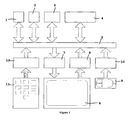
- the mouse and mouse control logic are typically only found on desktop or laptop computing systems.
- the touch sensitive screen with stylus is normally offered as an alternative to the mouse in a mobile or handheld system. It is unusual, though not unknown, to find a mouse AND a touch sensitive screen in the same system.
- Figure 1 also shows keypad 11 and keypad control logic 12 which are typically present in a mobile telephone but are not directly involved in the present invention.
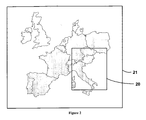
- this window 20 is moved around within the application area based on a combination of cursor position and mouse button actions in a mouse-based system, or on stylus “tap” or “slide” actions in a stylus + touch screen system. This is illustrated in Figure 3, where the handset display starts in position A.
- the apparent position of the handset display within the application data moves. In the figure it is shown moving to position B, displaying to the user a different part of the application data (map).
- the size mismatch between handset and application may only be in one dimension. The following rules describe how this is dealt with.
- the first is characterised by having areas of the screen where various actions of the cursor can cause movement.
- the second uses icons positioned on the display in the centre of these areas.
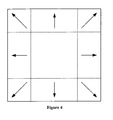
- trigger areas at the outside edges of the handset display are identified which cause movement in the specified direction. These areas are shown in Figure 4.
- the user moves a pointing device across the screen.
- the handset display area begins to "pan” across (or up/down) the application area in the direction of the side (or top/bottom) of the screen that the pointer is at, just like a camera panning across a landscape.
- the movement continues while the pointer is within (say) 1 ⁇ 4 screen width (or height) of the edge, and ceases when the pointer is moved back towards the centre of the screen.
- a potential refinement of this method is to make the movement accelerate as the pointer is moved nearer the edge than 1 ⁇ 4 screen width (or height), and decelerate as the pointer is moved away from the edge or the handset display approaches the edge of the available data.
- Movement ceases when the handset display area reaches the edge of the application area, as shown in figure 5. Keeping the pointer on the right hand edge will not produce further movement. An audio or visual alert to this fact may be presented to the user. In another embodiment, as the edge of the application area is approached, the rate of movement may be decreased if desired.
- movement icons are presented at the edges and comers of the handset display area overlaying the application display area, and these icons are used to cause movement in the specified direction in a similar fashion to the trigger areas described above.
- the movement icons replace the "trigger areas” discussed above and are, in effect, smaller “trigger areas” within the previously described “trigger areas”. This is illustrated in Figure 6.
- the handset display apparently moves within the available application display area in a particular direction, the actual movement is of the contents of the handset display in the exactly opposite direction, with presented display information being discarded as it drops off the edge opposite the pointer, and new display information being presented at the edge where the pointer is.
- the handset display starts moving across the application display area smoothly, with small increments made using a short time interval.
- the effect is of a movie camera panning across a scene.
- the handset display moves once across the available application display area, for a fixed increment.
- the movement may be instantaneous, or may be made over a short time period.
- the increment moved would typically be less than 1 ⁇ 2 handset screen width, to ensure the display can always be stopped in a useful position. Otherwise the part of the display the user may wish to manipulate may be in one edge movement area before the move, and in the opposite edge movement area after the move, making it difficult to position the desired part in the middle of the handset display.
- the handset display executed a series of single fixed displacements, each separated by a relatively long period of time compared to the time taken for one movement to complete.
- the time chosen would allow the user to have a snapshot of the display, to allow a decision to be made on whether to stop the movement or not.
- An example would be one movement every 1 ⁇ 2 second.
- the time separation between each displacement may be shortened to speed up the movement to allow rapid traversal of larger displacements.
- movement is triggered by one of a number of actions concerning mouse cursor position, mouse button “single-click”, mouse button “click-and-hold”, stylus “tap” and stylus “slide” (where the stylus is touched to the screen and moved across the screen while maintaining contact, similar to drag-and-drop in a mouse system).
- the movement triggered may be continuous and smooth in response to an ongoing trigger, or may be a single movement of a fixed amount in response to an ongoing trigger, as appropriate to the system and the cursor/stylus action.
- the movement continues in the new direction. For example, if the cursor is in an edge-trigger area and is slid to a comer trigger area, the movement changes appropriately to respond to the new trigger.
- the cursor moves on screen in response to movements of the mouse.
- the part of the application display area presented on the handset display changes in response to certain cursor actions in an area in proximity to one or more edges of the handset display screen, as if the handset display were moving across the available application display area.
- the movement may be continuous or a single movement. If the movement is continuous then it continues until the condition triggering the movement is removed or ended, or until the handset display reaches the edge of the application display area.
- the display moves in a similar way to the mouse system. Movement continues until the stylus is tapped on the screen outside of any trigger area.
- the stylus may already be in contact with the touch screen, and is moved to one of the trigger areas at the edge of the display to start movement. Movement is stopped by lifting the stylus, moving the stylus outside of all trigger areas, or by the handset display reaching the edge of the available area.
- the movement of the handset display does not depend on the movement of the pointer, but rather on its position.
- Movement of the handset by a fixed displacement is also possible here, either as a single movement or by executing a continuous series of jumps separated by a short pause each time.
- this mode of movement with this trigger will be very jerky, and not at all user-friendly.
- the speed of movement could be increased either based on the nearness to the edge, or by the length of time the mouse cursor remains in a movement area.
- Movement starts when a mouse button is single-clicked while the cursor is still within an edge trigger area. Movement may be continuous or alternatively it may be a single fixed displacement or a series of single fixed displacements every (say) 1 ⁇ 2 second.
- Continuous movement is stopped by a mouse single-click in the central area, or when the handset display reaches the edge of the available application display area.
- Movement may be continuous or alternatively it may be a single fixed displacement or a series of single fixed displacements every (say) 1 ⁇ 2 second if the mouse button continues to be held.
- the speed of movement could be increased either based on the nearness to the edge of the cursor, or by the length of time the mouse button is held.
- movement starts when the stylus is touched to the touch screen in a trigger area, and then lifted.
- the direction is determined by which area is tapped, and the movement style may be continuous movement or a single fixed displacement.
- movement may be a series of fixed displacements, but this may be less user-friendly and therefore less useful.
- the stylus is touched to the touch screen in a trigger area, but is then held in contact with the screen rather than lifted. Movement, either continuous or repeated fixed displacement, occurs while the stylus touches the trigger area, and ceases if the stylus is lifted, if the stylus is moved out of any trigger area, or if the handset display reaches the edge of the available area.
- a useful enhancement to the repeated fixed movement situation would be to shorten the time between each individual move the longer the stylus is held on the touch screen.
- the stylus is touched to the touch screen outside of any trigger area, and is then dragged into a trigger are without losing contact with the screen. This starts either continuous movement or repeated single shifts.
- the direction changes if the stylus is slid to a different trigger area.
- a useful enhancement to the situation would be to shorten the time between each individual move or speed up the continuous movement the nearer the stylus is to the edge of the handset screen.
- an icon can be regarded as a smaller "trigger area" in which case all of the foregoing options are possible. However, in preferred icon systems merely positioning the mouse cursor over a movement icon will cause no action.
- the movement is in the direction of the last icon that was single-clicked, and ceases when the mouse cursor is single-clicked anywhere except on a movement icon.
- the stylus can be tapped on any movement icon to cause movement in that direction.
- the movement mode can be a single fixed amount or continuous smooth movement.
- the direction changes if a different movement icon is tapped.
- Movement ceases if the stylus is tapped anywhere except on a movement icon, or if the handset display reaches the edge of the available area.
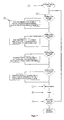
- the procedure of Figure 7 is invoked when a movement trigger occurs at step 101. It applies a displacement to the visible display based on the position of the movement trigger. For example, of the movement trigger occurred in the trigger area on the left hand side of the screen (102), the distance of the trigger event from the adjacent screen edge is determined and the amount of movement to be applied to the picture in the display is calculated from that (103). The calculation used may use a linear or logarithmic relationship between the distance from the edge and the displacement applied.
- the algorithm is simplified by making use of the fact that, if the trigger event is in the left hand trigger area, it cannot also be in the right hand trigger area at the same time. A similar assumption is made for the top and bottom trigger areas. If the trigger event is in a side area and is also in either top or bottom trigger area (i.e. it is in one of the comers), the displacement is a vector summation of the lateral and up/down displacements.
- the algorithm pauses for a pre-determined time (105). After this pause, the algorithm checks to see if the trigger event is still occurring (106) and, if it is, repeats the whole thing.
Landscapes
- Engineering & Computer Science (AREA)
- General Engineering & Computer Science (AREA)
- Theoretical Computer Science (AREA)
- Human Computer Interaction (AREA)
- Physics & Mathematics (AREA)
- General Physics & Mathematics (AREA)
- Position Input By Displaying (AREA)
- Controls And Circuits For Display Device (AREA)
Priority Applications (1)
| Application Number | Priority Date | Filing Date | Title |
|---|---|---|---|
| EP03258093A EP1548552A1 (fr) | 2003-12-22 | 2003-12-22 | Gestion d'une taille d'écran insuffisante |
Applications Claiming Priority (1)
| Application Number | Priority Date | Filing Date | Title |
|---|---|---|---|
| EP03258093A EP1548552A1 (fr) | 2003-12-22 | 2003-12-22 | Gestion d'une taille d'écran insuffisante |
Publications (1)
| Publication Number | Publication Date |
|---|---|
| EP1548552A1 true EP1548552A1 (fr) | 2005-06-29 |
Family
ID=34530810
Family Applications (1)
| Application Number | Title | Priority Date | Filing Date |
|---|---|---|---|
| EP03258093A Withdrawn EP1548552A1 (fr) | 2003-12-22 | 2003-12-22 | Gestion d'une taille d'écran insuffisante |
Country Status (1)
| Country | Link |
|---|---|
| EP (1) | EP1548552A1 (fr) |
Cited By (6)
| Publication number | Priority date | Publication date | Assignee | Title |
|---|---|---|---|---|
| EP1993032A2 (fr) * | 2007-05-15 | 2008-11-19 | High Tech Computer Corp. (HTC) | Dispositifs électroniques avec des mécanismes de navigation tactiles, et procédés associés |
| EP1998245A3 (fr) * | 2007-05-14 | 2009-01-14 | Samsung Electronics Co., Ltd. | Appareil et procédé d'entrée de caractères dans un terminal de communication mobile |
| EP2175353A1 (fr) * | 2008-10-07 | 2010-04-14 | Research In Motion Limited | Dispositif électronique portable et son procédé de contrôle |
| GB2477528A (en) * | 2010-02-04 | 2011-08-10 | Imagination Tech Ltd | A method of continuous scrolling on a touch screen |
| CN103197824A (zh) * | 2011-10-04 | 2013-07-10 | 索尼公司 | 信息处理装置、信息处理方法和计算机程序 |
| US8619041B2 (en) | 2008-10-07 | 2013-12-31 | Blackberry Limited | Portable electronic device and method of controlling same |
Citations (3)
| Publication number | Priority date | Publication date | Assignee | Title |
|---|---|---|---|---|
| JP2000180188A (ja) * | 1998-12-18 | 2000-06-30 | Kenwood Corp | ナビゲーション装置 |
| US20020067347A1 (en) * | 2000-10-11 | 2002-06-06 | International Business Machines Corporation | Data processor, I/O device, touch panel controlling method, recording medium, and program transmitter |
| US20030231164A1 (en) * | 2002-06-18 | 2003-12-18 | Blumer Larry L. | Keyboard controlled and activated pointing device for use with a windowing system display |
-
2003
- 2003-12-22 EP EP03258093A patent/EP1548552A1/fr not_active Withdrawn
Patent Citations (3)
| Publication number | Priority date | Publication date | Assignee | Title |
|---|---|---|---|---|
| JP2000180188A (ja) * | 1998-12-18 | 2000-06-30 | Kenwood Corp | ナビゲーション装置 |
| US20020067347A1 (en) * | 2000-10-11 | 2002-06-06 | International Business Machines Corporation | Data processor, I/O device, touch panel controlling method, recording medium, and program transmitter |
| US20030231164A1 (en) * | 2002-06-18 | 2003-12-18 | Blumer Larry L. | Keyboard controlled and activated pointing device for use with a windowing system display |
Non-Patent Citations (1)
| Title |
|---|
| PATENT ABSTRACTS OF JAPAN vol. 2000, no. 09 13 October 2000 (2000-10-13) * |
Cited By (9)
| Publication number | Priority date | Publication date | Assignee | Title |
|---|---|---|---|---|
| EP1998245A3 (fr) * | 2007-05-14 | 2009-01-14 | Samsung Electronics Co., Ltd. | Appareil et procédé d'entrée de caractères dans un terminal de communication mobile |
| US9176659B2 (en) | 2007-05-14 | 2015-11-03 | Samsung Electronics Co., Ltd. | Method and apparatus for inputting characters in a mobile communication terminal |
| EP1993032A2 (fr) * | 2007-05-15 | 2008-11-19 | High Tech Computer Corp. (HTC) | Dispositifs électroniques avec des mécanismes de navigation tactiles, et procédés associés |
| EP2175353A1 (fr) * | 2008-10-07 | 2010-04-14 | Research In Motion Limited | Dispositif électronique portable et son procédé de contrôle |
| US8619041B2 (en) | 2008-10-07 | 2013-12-31 | Blackberry Limited | Portable electronic device and method of controlling same |
| GB2477528A (en) * | 2010-02-04 | 2011-08-10 | Imagination Tech Ltd | A method of continuous scrolling on a touch screen |
| GB2477528B (en) * | 2010-02-04 | 2014-01-15 | Imagination Tech Ltd | Touch sensitive screen for scrolling through sets of data |
| CN103197824A (zh) * | 2011-10-04 | 2013-07-10 | 索尼公司 | 信息处理装置、信息处理方法和计算机程序 |
| EP2764424A4 (fr) * | 2011-10-04 | 2015-06-03 | Sony Corp | Dispositif de traitement d'informations, procédé de traitement d'informations et programme d'ordinateur |
Similar Documents
| Publication | Publication Date | Title |
|---|---|---|
| US11808562B2 (en) | Devices and methods for measuring using augmented reality | |
| KR101424294B1 (ko) | 터치스크린 장치의 사용자로부터 수신된 입력 및 제스쳐에 응답하여 동작을 수행하는 컴퓨터로 구현된 방법 및 컴퓨터판독가능 매체 | |
| US10367993B2 (en) | Changing of list views on mobile device | |
| JP3975472B2 (ja) | デジタルマップの拡大縮小表示方法、デジタルマップの拡大縮小表示装置、及びデジタルマップの拡大縮小表示プログラムを格納した格納媒体 | |
| US9335913B2 (en) | Cross slide gesture | |
| EP2225628B1 (fr) | Procédé et système pour déplacer un curseur et sélectionner des objets sur un écran tactile à l'aide d'un doigt de pointage | |
| US7966573B2 (en) | Method and system for improving interaction with a user interface | |
| CN101699387B (zh) | 非触摸式交互系统及方法 | |
| US8370772B2 (en) | Touchpad controlling method and touch device using such method | |
| US10599317B2 (en) | Information processing apparatus | |
| EP2657811B1 (fr) | Dispositif de traitement d'entrée tactile, dispositif de traitement d'informations, et procédé de commande d'entrée tactile | |
| EP2299351A2 (fr) | Appareil de traitement d'informations, procédé et programme de traitement d'informations | |
| US20140362119A1 (en) | One-handed gestures for navigating ui using touch-screen hover events | |
| EP2306281A2 (fr) | Appareil de traitement d'informations, procédé et programme de traitement d'informations | |
| US20120105367A1 (en) | Methods of using tactile force sensing for intuitive user interface | |
| EP2426584A1 (fr) | Appareil, procédé et programme de traitement d'informations | |
| US20170220241A1 (en) | Force touch zoom selection | |
| CN107728910B (zh) | 电子装置、显示屏控制系统及方法 | |
| US20140240232A1 (en) | Automatic Cursor Rotation | |
| EP1548552A1 (fr) | Gestion d'une taille d'écran insuffisante | |
| US8896561B1 (en) | Method for making precise gestures with touch devices | |
| US10915240B2 (en) | Method of selection and manipulation of graphical objects | |
| US20220391061A1 (en) | Portable electronic device and one-hand touch operation method thereof |
Legal Events
| Date | Code | Title | Description |
|---|---|---|---|
| PUAI | Public reference made under article 153(3) epc to a published international application that has entered the european phase |
Free format text: ORIGINAL CODE: 0009012 |
|
| AK | Designated contracting states |
Kind code of ref document: A1 Designated state(s): AT BE BG CH CY CZ DE DK EE ES FI FR GB GR HU IE IT LI LU MC NL PT RO SE SI SK TR |
|
| AX | Request for extension of the european patent |
Extension state: AL LT LV MK |
|
| 17P | Request for examination filed |
Effective date: 20050713 |
|
| AKX | Designation fees paid |
Designated state(s): AT BE BG CH CY CZ DE DK EE ES FI FR GB GR HU IE IT LI LU MC NL PT RO SE SI SK TR |
|
| STAA | Information on the status of an ep patent application or granted ep patent |
Free format text: STATUS: THE APPLICATION IS DEEMED TO BE WITHDRAWN |
|
| 18D | Application deemed to be withdrawn |
Effective date: 20060529 |