EP1571545A2 - Sicheres Drucken - Google Patents
Sicheres Drucken Download PDFInfo
- Publication number
- EP1571545A2 EP1571545A2 EP05251120A EP05251120A EP1571545A2 EP 1571545 A2 EP1571545 A2 EP 1571545A2 EP 05251120 A EP05251120 A EP 05251120A EP 05251120 A EP05251120 A EP 05251120A EP 1571545 A2 EP1571545 A2 EP 1571545A2
- Authority
- EP
- European Patent Office
- Prior art keywords
- printing
- print data
- port monitor
- printer
- Prior art date
- Legal status (The legal status is an assumption and is not a legal conclusion. Google has not performed a legal analysis and makes no representation as to the accuracy of the status listed.)
- Withdrawn
Links
Images



Classifications
-
- G—PHYSICS
- G06—COMPUTING OR CALCULATING; COUNTING
- G06F—ELECTRIC DIGITAL DATA PROCESSING
- G06F21/00—Security arrangements for protecting computers, components thereof, programs or data against unauthorised activity
- G06F21/60—Protecting data
- G06F21/606—Protecting data by securing the transmission between two devices or processes
- G06F21/608—Secure printing
Definitions
- the present invention relates to secure printing from a computer system running a WindowsTM operating system to a printing system connected to the computer system remotely over a network.
- the print data is encrypted before transmission over the network by the computer system using an encryption key.
- the printing system decrypts the received print data using a corresponding decryption key.
- the print data on the network is in encrypted form and therefore secure if captured from the network.
- Such encryption techniques are in general terms well known, but in practical systems there remain difficulties in how the encryption is implemented within the computer system.
- the present invention relates specifically to achieving secure printing from a computer system running a WindowsTM operating system.
- WindowsTM operating systems There are a family of WindowsTM operating systems produced by Microsoft Corporation. Further WindowsTM operating systems are due for release in the future. WindowsTM operating systems are of great importance because they are very widely used and currently account for the majority of the market in computer systems for home and business use.
- One type of implementation has used a modified printer driver, which is a program which generates print data under the control of an application.
- the printer driver performs the encryption and outputs encrypted print data which is subsequently transmitted over the network.
- Examples of this type of implementation are disclosed in EP-A-1,091,285 and US-5,633,932.
- EP-A-1,091,285 print data is encrypted by the printer driver on the local computer system and decrypted on the remote printer using the PostScript language.
- US-5,633,932 print data is encrypted by the printer driver on the local computer system, and to ensure that the print job is only printed in the presence of an authorized recipient, the printer has a device such as a smart card reader to provide the key required for decryption of the print job.
- Such a type of implementation in a printer driver has disadvantages. For a given printer driver, it restricts the range of printers on which secure printing is supported. Conversely, this type of implementation also requires a specialized printer driver for every target printer/language combination that needs to support this approach. Many printers will support multiple languages and the best language to use for any print job will be determined by the application that is being used. For example, black-and-white laser printers will typically support PostScript as well as PCL XL and PCL-5e.
- iPrint provided by Novell Inc. which is based on their print server technology NDPS (Novell Distributed Print Services).
- NDPS Novell Distributed Print Services
- This implementation has the disadvantage that it is restricted to this particular type of print server. To apply this type of implementation to a printer not supported by the NDPS server it would be necessary to develop a new print server and a new network print provider for the local computer system which involves a large amount of work and expense.
- a method of printing a document from a computer system having a WindowsTM operating system including a local print provider having a port monitor, to a printing system connected to the computer system remotely over a network, the method comprising:
- a computer system and a printing system connected to the computer system remotely over a network, wherein:
- a corresponding method and computer apparatus for securely transmitting print data for printing a document from a computer apparatus having a WindowsTM operating system, including a local print provider having a port monitor, to a printing system, as well as a corresponding port monitor which may be stored on a recording medium or in a memory.
- encryption of the transmitted print data is achieved by the port monitor which is executed within the local print provider of a WindowsTM operating system.
- the port monitor is arranged to transmit the print data remotely over a network using a secure transmission protocol.
- the transmitted data is encrypted by the port monitor in accordance with the secure transmission protocol.
- the port monitor in the local print provider of existing WindowsTM operating systems uses a transmission protocol which is not secure in particular Transmission Control Protocol/Internet Protocol (TCP/IP).
- TCP/IP Transmission Control Protocol/Internet Protocol
- the present invention provides a number of advantages over proposals for implementing encryption of print data set out above.
- port monitor allows secure printing to be used with print jobs created by any WindowsTM application without requiring direct invention from the user. It also allows the use of standard transmission protocols, such as Hypertext Transfer Protocol over Secure Socket Layer (HTTPS), on the printing system thereby avoiding the need for specialized hardware on the target printer.
- HTTPS Hypertext Transfer Protocol over Secure Socket Layer
- the present invention provides secure printing to all the printing systems supported by the computer system without the need to provide a modified printer driver for each one of the combinations of target printing system and languages supported by those printing systems, as in the type of implementation set out above in which the printer driver performs the encryption.
- the present invention may be easily applied when new printers are installed on the computer system without the need to provide a modified printer driver supporting encryption for that new printer.
- the present invention is relatively straightforward to implement. In practice, it merely requires a new port monitor to be included in the local print provider of the WindowsTM operating system to support a secure transmission protocol.
- the present invention provides the advantage of secure printing in a relatively simple manner without the need to implement a print server and corresponding network print provider, which is complicated and hence difficult and expensive.
- the secure transmission protocol is desirably HTTPS, but alternatively any other secure transmission protocol may be used, for example Internet Printing Protocol over Secure Socket Layer (IPP/SSL).
- IPP/SSL Internet Printing Protocol over Secure Socket Layer
- the print data comprises commands in a language executable by the printing system which may be generated by a printer driver called by an application on the computer system.
- the commands are executed in the printing system to perform the printing.
- Example of such languages which may be applied to the present invention include PostScript or PCL.
- the present invention is applicable to any WindowsTM operating system including a local print provider having a port monitor.
- the present invention may be applied to printing over any type of network, including a local network and the Internet.
- the present invention may be applied to a computer system which is a single computer apparatus running both the print-source program which generates the print data and the WindowsTM operating system, including a local print provider which transmits the print data.
- a computer system which is a single computer apparatus running both the print-source program which generates the print data and the WindowsTM operating system, including a local print provider which transmits the print data.
- Such local spooling in which the local print provider having the port monitor is local to computer apparatus which generates the print data is likely to be most common implementation of present invention.
- spooling could be used, in which case the computer system comprises a local client computer apparatus running the print-source program which generates the print data, and connected to a remote server computer apparatus running the WindowsTM operating system, including a local print provider which transmits the print data.
- This alternative is acceptable from the point of view of security provided that the connection between the client and the server is secure.
- the present invention may be applied to a printer system which is a single printer both running the server program which decrypts the print data and performing the actual printing. This option requires the printer to have an embedded server.
- the present invention may be applied to a printer system which comprises a server running the server program which decrypts the print data and a printer which performs the actual printing connected to the server over a secure connection, for example a network such as an Ethernet known to be secure or a parallel cable.
- a printer system which comprises a server running the server program which decrypts the print data and a printer which performs the actual printing connected to the server over a secure connection, for example a network such as an Ethernet known to be secure or a parallel cable.
- Fig. 1 shows a network 1 in which an embodiment of the present invention is implemented.
- the network 1 may be any type of network including, but not exclusively a local network or the Internet.
- the local computer 2 may be any type of computer, typically a personal computer, a lap-top or a portable device such as a personal digital assistant or a mobile telephone with a printing capability.
- the printers 3 and 4 may also be any type of printer including, but not exclusively, a laser printer, an inkjet printer, or a facsimile apparatus or photocopier capable of printing.
- the local computer 2 is a single computer apparatus which constitutes the computer system of the present invention in this embodiment.
- the first printer 3 is connected directly to the network.
- the second printer 4 is connected indirectly to the network 1 via a server 5.
- the server 5 is connected to the network 1 and the second printer 4 is connected to the server 5 over a secure connection 6.
- the printing system of the present invention is constituted by either (1) the first printer 3 or (2) the server 5 and the second printer 4 together.
- the local computer 2 has a conventional construction including a processor 21, a RAM 22, a ROM 23, a memory 24 which is typically a hard drive, a network interface 25 by which the local computer 2 is connected to the network 1, and a recording medium drive 26 capable of reading a removable recording medium 27.
- the recording medium 27 may be of any type including, but not exclusively, a magnetic storage medium such as a floppy disk, an optical recording medium such as a CD or DVD, a magneto-optical storage medium or a memory chip.
- the processor 21 may be a single processing unit or may include plural processing units.
- the memory 24 stores a large number of programs capable of execution by the processor 21, which programs may be initially stored on the recording medium 27 for installation onto the local computer 2. These programs include a WindowsTM operating system 7 and an application program 8 running under the WindowsTM operating system 7.
- the first printer 3 is of the type having an embedded server and has a conventional construction including a processor 31, a RAM 32, a ROM 33, optionally a memory 34 which is typically a hard drive, a network interface 35 by which the first printer 3 is connected to the network 1, and a printing device 36 which is capable of printing a document 37.
- the processor 31 may be a single processing unit or may include plural processing units.
- the ROM 33 or memory 34 stores programs capable of execution by the processor 31. These programs include a server program 9 which handles communications over the network 1 and a printer program 10 which controls the printer device 35 to print on the basis of print data.
- the second printer 4 and server 5 have a conventional construction.
- the second printer 4 includes a processor 41, a RAM 42, a ROM 43, optionally a memory 44 which is typically a hard drive, an interface 45 by which the second printer 4 is connected to the secure connection 6, and a printing device 46 which is capable of printing a document 47.
- the processor 41 may be a single processing unit or may include plural processing units.
- the ROM 43 or memory 44 stores a printer program 10, equivalent to the printer program 10 stored in the second printer 4, capable of execution by the processor 41 to control the printer device 46 to print on the basis of print data.
- the server 5 includes a processor 51, a RAM 52, a ROM 53, a memory 54 which is typically a hard drive, a network interface 55 by which the server 5 is connected to the network 1, and an interface 56 by which the server 5 is connected to the secure connection 6.
- the processor 51 may be a single processing unit or may include plural processing units.
- the memory 54 stores a server program 9, equivalent to the server program 9 stored in the second printer 4, capable of execution by the processor 51 to handle communications over the network 1.
- Secure printing from the local computer 2 over the network 1 to one of the remote printers 3 or 4 is performed as follows. For ease of reference, there will first be described printing to the first printer 3 as the target printer.
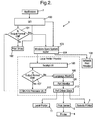
- the WindowsTM operating system 8 running on the local computer 2 includes elements to perform a printing process, as shown in Fig. 2. At the level of detail shown in Fig. 2, this printing process is the same as in existing WindowsTM operating systems and further information thereon may be obtained from the website of Microsoft Corporation (www.microsoft.com).
- Printing occurs under the control of the application program 7.
- the application program 7 calls the graphics device interface (GDI) 100 to produce a print job comprising print data for controlling the first printer 3.
- the print jobs are spooled by the WindowsTM operating system 8 as described below.
- the spooled print data may be in either a journal format such as EMF or it may be RAW print data. This is checked in step 101. If the format of the spooled print data is to be RAW print data, then the GDI 100 calls a printer driver 102 applicable to the first printer 3 to generate the print data.
- the printer driver 102 is a printer graphics DLL.
- the print data output from the printer driver 102 contains commands in a language that is executable by the first printer 3 to render the print job.
- the language may be any printer language depending on the type of the first printer 3.
- Printer languages vary from the relatively simple, such as those used for inkjet printers, to more complex languages such as PCL XL or PostScript.
- the print data is passed from the printer driver 102 to the spooler 103 back through the GDI 100.
- step 101 determines that the format of the spooled print data is to be a journal format, then the print data is directly output to the spooler 103.
- the spooler 103 includes a print request router 104.
- the print request router 104 routes the print data to the local print provider 105 which is part of the WindowsTM operating system 8.
- the print request router 104 may alternatively route print data to a network print provider 106, if provided on the local computer 2.
- secure printing over the network 1 may be achieved without the need for such a network print provider 106.
- the local print provider 105 puts print jobs into spooler files, manages despooling and directs print jobs to the relevant printer, in this case the first printer 3.
- the spool file is read and is checked in step 107 whether the output format is a journal format such as EMF. If not, then the print data is RAW print data and is sent, via the language monitor 108, to the port monitor 109.
- step 107 If in step 107 it is determined that the output format is a journal format, then the print job is sent to the EMF print processor 110 which sends the print job back to the GDI 100 for conversion to into a RAW format, with the help of the printer driver 102. The converted print data is then sent back through the local print provider 105 to the port monitor 109 via the language monitor 108 (without being respooled).
- the language monitor 108 provides a full duplex communications path between the print spooler 103 and bidirectional printers that are capable of providing software-accessible status information. It also adds printer control information, such as commands defined by the language of the print data, to the data stream.
- printer control information such as commands defined by the language of the print data, to the data stream.
- the language monitor 108 is optional.
- the port monitor 109 controls the port to which the target printer is connected.
- the destination printer is the first printer 3 or the second printer 4 remotely connected over the network 1, so the port controlled by the port monitor 109 is the network interface 25 of the local computer 2.
- the port monitor 109 transmits the print data over the network 1.
- the port monitor 109 implements the transmission protocol for such transmission.
- a port monitor is a generic interface to diverse port technologies.
- a port monitor abstracts the local port behaviour.
- the network interface 25 and the network 1 itself are transparent to the elements of the WindowsTM operating system 8 upstream of the port monitor. Every printer connection type will require a specific port monitor.
- the WindowsTM operating system 8 may also include port monitors that will support a local printer 11 locally connected to a serial, parallel or USB port and/or printers connected using TCP/IP. Other network protocols may require the installation of custom port monitors.
- the print data to be transmitted may be derived from either of the application 7 or the printer driver 102.
- any of these programs may be considered as the print-source program of the present invention.
- the port monitor 109 will receive calls from the spooler 103 that mark the beginning and end of each print job with one or more calls to write the print data in between. It is also possible for the port monitor 109 to receive a single packet of print data without calls to mark the start and end of a print job, but that will only occur when the language monitor 108 is using bidirectional requests to obtain printer status information. It is possible that the size of the data blocks received by the port monitor 109 will be larger than the target device can support, in which case the port monitor 109 sends the print data in smaller blocks that the device can support.
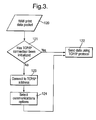
- Fig. 3 is a flowchart showing an outline of the operation of a TCP/IP port monitor 109 upon receipt of a block of data 120 to be sent to a printer.
- step 121 it is checked whether the port monitor 109 already has an open connection to the TCP/IP port of the printer. If so, then in step 122 the port monitor 109 immediately sends the block of print data 120 to the printer. If it is determined in step 121 that the port monitor 109 does not have an open connection, then the port monitor proceeds to steps 123 and 124 to set up the connection in accordance with the TCP/IP transmission protocol. In step 123, the port monitor 109 connects to the TCP/IP address of the printer. In step 124, the port monitor 109 selects the appropriate communications options. After that, the process proceeds to step 122 to send the block of print data 120 to the printer.
- the port monitor 109 is a custom port monitor which is configured to transmit the print data using a secure transmission protocol in which the port monitor 109 encrypts the print data.
- the secure transmission protocol may be HTTPS, IPP/SSL, or any other secure transmission protocol.
- the port monitor communicates with the server program 9 running on the first printer 3.
- the port monitor 109 an administrator creates a new port using the port monitor 109 for every target printer for which secure printing is required. The administrator configures the port so that the port monitor 109 has sufficient information to create and use a secure connection.
- HTTPS HyperText Transfer Protocol
- the port configuration includes the network address associated with the target printer (eg the address of the first printer 3 or the server 5 to which the second printer 4 is connected) and the client certificate to be used for encryption by the port monitor 109.
- a password may also be required to be input into the local computer 2.
- the port configuration settings are stored in the registry of the WindowsTM operating system 8. In order to avoid exposing the password for the private key in the certificate, the certificate may be re-encrypted with a new password generated by the port monitor 109.
- HTTPS uses HTTP (HyperText Transfer Protocol) combined with SSL for encryption.
- HTTP communication usually takes place over a TCP/IP connection.
- the basic steps required for establishing an HTTPS (or HTTP) connection are similar to those for TCP/IP connection as described above with reference to Fig. 3, except that a suitable HTTP request method must be used for communication. In this particular case, the POST request method is used to send the print data.
- the port monitor 109 When the port monitor 109 receives a request to transmit the packet of print data to the first printer 3, in step 131, it is checked whether the port monitor 109 a connection to the HTTPS port of the first printer 3 has already been initialised. If so, then, in step 132, the port monitor 109 encrypts the print data for inclusion in POST requests, and, in step 133, the print monitor 109 sends the packet of print data 130 to the first printer 3 using HTTPS POST requests. Then, in step 134, the port monitor 109 waits for confirmation that the POST request has been properly received before it attempts to send any more data to the print server.
- step 131 If it is determined in step 131 that the port monitor 109 does not have an open connection, then the port monitor proceeds to steps 135 to 137 to set up the connection in accordance with the HTTPS transmission protocol.
- step 135 the port monitor 109 connects to the HTTPS address which has been specified for the port.
- step 136 the port monitor 109 intialises the HTTPS POST request and selects suitable HTTP communication options as well as the required security options.
- the port monitor 109 selects the client certificate that the HTTPS library will use to encrypt the print data.
- the HTTPS library will use standard SSL handshaking in order to obtain the server public key that it will use to encrypt the print data.
- Fig. 5 is a flowchart of the SSL negotiation process performed by the print monitor 109 acting as a client and the server program 9 of the first printer 3 acting as a server.
- the print monitor 109 (client) has made an initial connection
- the print monitor 109 (client) and the server program 9 negotiate the encryption technique that will be used.
- the server program 9 authenticates itself to the print monitor 109 (client).
- the print monitor 109 (client) and the server program 9 exchange certificates. The certificates are used by the print monitor 109 (client) and the server program 9 to create digital signatures sent, in step 143, with the encrypted data.
- SSL uses public key cryptography to encrypt the data that is exchanged. Data is encrypted using both the sender's private key and the recipient's public key and will be decrypted by the recipient using its own private key and the sender's public key. In addition to this the certificates used are digitally signed by mutually trusted third parties in order to validate both recipient and sender.
- the port monitor proceeds to steps 132 to 134, as described above, to encrypt the packet of print data 130 and send it to the first printer 3 using HTTPS POST requests.
- the port monitor 109 uses a persistent HTTPS connection for each print job.
- the port monitor will close the connection when it processes a call to its EndDoc function.
- step 151 the server program 9 decrypts the data packet 150 in accordance with the HTTPS transmission protocol using the keys identified in the SSL negotiation process described above.
- the transmission of data from the port monitor 109 to the server program 9 may split up a POST request into smaller HTTPS packets.
- the POST request will include a Content-Length header that specifies the size of data included with the POST request.
- the server program 9 buffers the data until it has received all of the data specified by the POST request header as follows.
- step 152 the server program 9 checks whether it is processing a buffered POST request. If so, in step 153, the data packet 150 is added to the buffer. If not, the server program 9 parses the HTTP verb in step 154 and checks in step 155 if the verb is a POST verb. Assuming it is, the server program 9 proceeds to step 153 and buffers the data packet 150. In the event that it is determined in step 155 that the HTTP verb is not a POST verb, in step 156 the server program performs some other processing applicable to the request type.
- step 157 it is detected if the POST request is complete using the Content-Length header. If not, the server program 9 in step 158 waits for another data packet 150 to be received, and then restarts the processing shown in Fig. 6.
- the server program 9 starts a new print job when it has received the first complete POST request on an HTTPS connection. All subsequent POST requests on the same connection will be added to the print job. To achieve this, after it is determined in step 157 that the POST request is complete, it is checked in step 159 if a print job has already been started. If so, then in step 160 the POST request is added to the existing print job, the POST requests being added to the print job in the order that they are received from the port monitor 109. If not, in step 161, a new print job is started and then in step 160 the POST request is added to the new print job.
- step 160 two actions occur.
- One action is for the server program 9 in step 162 to send an HTTP response message to the port monitor 109.
- the other action is for the server program 9 in step 163 to check if the print job has ended. If so, the print job is finished in step 164. Otherwise, the server program 9 in step 165 waits for another POST request to be received, and then restarts the processing shown in Fig. 6.
- the server program 9 and the port monitor 109 will negotiate to close the HTTPS connection used for that print job.
- the printer program 10 uses the print data of the print jobs received by the server program 9 to print the document on the printing device 36.
- the commands contained in the print job are executed by the printer program to render the print job.
- the port monitor 109 is configured to communicate with the server program 9 on the server 5 instead of the server program 9 on the first printer 3, although the server programs themselves perform the same function on both the server 5 and the first printer 3.
- the print job received by the server 5 is transmitted over the secure connection 6 to the second printer 4 where the printer program 10 running on the second printer 4, which is fundamentally the same as the printer program running on the first printer, uses the print data in the print job to perform the printing on the printing device 46.
- the print job is spooled locally in the sense that the local print provider 105 is running on the same computer apparatus as the application program 7 from which printing occurs.
- the local computer 2 could be replaced by a computer system comprising a local computer apparatus which runs the application program 7 and a remote computer apparatus connected to the local computer apparatus over a secure connection and which runs the local print provider. This results in the print job being spooled to a remote print queue.
Landscapes
- Engineering & Computer Science (AREA)
- Theoretical Computer Science (AREA)
- Software Systems (AREA)
- General Health & Medical Sciences (AREA)
- Computer Hardware Design (AREA)
- Computer Security & Cryptography (AREA)
- Health & Medical Sciences (AREA)
- Physics & Mathematics (AREA)
- General Engineering & Computer Science (AREA)
- General Physics & Mathematics (AREA)
- Bioethics (AREA)
- Accessory Devices And Overall Control Thereof (AREA)
- Information Transfer Between Computers (AREA)
Applications Claiming Priority (2)
| Application Number | Priority Date | Filing Date | Title |
|---|---|---|---|
| GBGB0404714.8A GB0404714D0 (en) | 2004-03-02 | 2004-03-02 | Secure printing |
| GB0404714 | 2004-03-02 |
Publications (2)
| Publication Number | Publication Date |
|---|---|
| EP1571545A2 true EP1571545A2 (de) | 2005-09-07 |
| EP1571545A3 EP1571545A3 (de) | 2009-06-03 |
Family
ID=32088596
Family Applications (1)
| Application Number | Title | Priority Date | Filing Date |
|---|---|---|---|
| EP05251120A Withdrawn EP1571545A3 (de) | 2004-03-02 | 2005-02-25 | Sicheres Drucken |
Country Status (4)
| Country | Link |
|---|---|
| US (1) | US20050197967A1 (de) |
| EP (1) | EP1571545A3 (de) |
| JP (1) | JP2005310113A (de) |
| GB (1) | GB0404714D0 (de) |
Cited By (1)
| Publication number | Priority date | Publication date | Assignee | Title |
|---|---|---|---|---|
| CN113253953A (zh) * | 2021-06-03 | 2021-08-13 | 季华实验室 | 移动打印机控制方法、装置、电子设备及存储介质 |
Families Citing this family (11)
| Publication number | Priority date | Publication date | Assignee | Title |
|---|---|---|---|---|
| JP4614392B2 (ja) * | 2005-08-09 | 2011-01-19 | キヤノン株式会社 | 情報処理装置及びその制御方法、並びにコンピュータプログラム及びコンピュータ可読記憶媒体 |
| US7688466B2 (en) * | 2006-01-26 | 2010-03-30 | Microsoft Corporation | Smart display printer |
| US20080043274A1 (en) * | 2006-08-16 | 2008-02-21 | Lida Wang | Secure printing system with privilege table referenced across different domains |
| US8402277B2 (en) | 2006-09-12 | 2013-03-19 | Kyocera Document Solutions Inc. | Secure mailbox printing system with authentication on both host and device |
| US8176533B1 (en) * | 2006-11-06 | 2012-05-08 | Oracle America, Inc. | Complementary client and user authentication scheme |
| US8108711B2 (en) * | 2007-10-30 | 2012-01-31 | Microsoft Corporation | Systems and methods for hosting and testing services over a network |
| CN102047258A (zh) * | 2008-05-30 | 2011-05-04 | 惠普开发有限公司 | 安全化文档传输 |
| JP5795848B2 (ja) * | 2010-09-22 | 2015-10-14 | キヤノン株式会社 | 情報処理装置、その制御方法、及びプログラム |
| US9218145B2 (en) * | 2013-01-30 | 2015-12-22 | Hewlett-Packard Development Company, L.P. | Print job management |
| WO2015116235A1 (en) * | 2014-02-03 | 2015-08-06 | Hewlett-Packard Development Company, L.P. | Replacement text for textual content to be printed |
| JP7230676B2 (ja) * | 2019-05-13 | 2023-03-01 | 京セラドキュメントソリューションズ株式会社 | 画像形成システム |
Family Cites Families (11)
| Publication number | Priority date | Publication date | Assignee | Title |
|---|---|---|---|---|
| US5633932A (en) * | 1995-12-19 | 1997-05-27 | Intel Corporation | Apparatus and method for preventing disclosure through user-authentication at a printing node |
| EP0935182A1 (de) * | 1998-01-09 | 1999-08-11 | Hewlett-Packard Company | Sicheres Drucken |
| US6711677B1 (en) * | 1999-07-12 | 2004-03-23 | Hewlett-Packard Development Company, L.P. | Secure printing method |
| US6598087B1 (en) * | 1999-09-08 | 2003-07-22 | Ge Capital Commercial Finance, Inc. | Methods and apparatus for network-enabled virtual printing |
| US6862583B1 (en) * | 1999-10-04 | 2005-03-01 | Canon Kabushiki Kaisha | Authenticated secure printing |
| US6952780B2 (en) * | 2000-01-28 | 2005-10-04 | Safecom A/S | System and method for ensuring secure transfer of a document from a client of a network to a printer |
| JP2001215853A (ja) * | 2000-01-31 | 2001-08-10 | Canon Inc | 画像データ処理装置、画像データ記録装置、画像データ記録システム、画像データ記録方法及び記憶媒体 |
| US20030014368A1 (en) * | 2001-07-09 | 2003-01-16 | Travelers Express Inc. | Systems, methods and apparatus for secure printing of negotiable instruments |
| US6996235B2 (en) * | 2001-10-08 | 2006-02-07 | Pitney Bowes Inc. | Method and system for secure printing of documents via a printer coupled to the internet |
| US20030101342A1 (en) * | 2001-11-29 | 2003-05-29 | Hansen Von L. | Secure printing system and method |
| US7296157B2 (en) * | 2002-07-10 | 2007-11-13 | Electronics For Imaging, Inc. | Methods and apparatus for secure document printing |
-
2004
- 2004-03-02 GB GBGB0404714.8A patent/GB0404714D0/en not_active Ceased
-
2005
- 2005-02-25 EP EP05251120A patent/EP1571545A3/de not_active Withdrawn
- 2005-02-25 US US11/067,081 patent/US20050197967A1/en not_active Abandoned
- 2005-03-02 JP JP2005058077A patent/JP2005310113A/ja not_active Withdrawn
Cited By (1)
| Publication number | Priority date | Publication date | Assignee | Title |
|---|---|---|---|---|
| CN113253953A (zh) * | 2021-06-03 | 2021-08-13 | 季华实验室 | 移动打印机控制方法、装置、电子设备及存储介质 |
Also Published As
| Publication number | Publication date |
|---|---|
| US20050197967A1 (en) | 2005-09-08 |
| EP1571545A3 (de) | 2009-06-03 |
| JP2005310113A (ja) | 2005-11-04 |
| GB0404714D0 (en) | 2004-04-07 |
Similar Documents
| Publication | Publication Date | Title |
|---|---|---|
| US8564804B2 (en) | Information processing apparatus that does not transmit print job data when both encryption and saving in a printing apparatus are designated, and control method and medium therefor | |
| EP1548542B1 (de) | Sicheres Drucken | |
| US7831830B2 (en) | Methods and apparatus for secure document printing | |
| CN1326027C (zh) | 具有数据加密和解密的打印数据通信 | |
| US20090063860A1 (en) | Printer driver that encrypts print data | |
| US20050120211A1 (en) | Server apparatus, client apparatus, object administration system, object administration method, computer program, and storage medium | |
| JP4632409B2 (ja) | 画像形成装置、画像形成方法、プログラム | |
| EP1571545A2 (de) | Sicheres Drucken | |
| JP4513272B2 (ja) | 処理サービス提供装置 | |
| JP2004168052A (ja) | 印刷システム、印刷装置および印刷指示方法 | |
| US7552476B2 (en) | Security against replay attacks of messages | |
| JP6484319B2 (ja) | ループバックインターフェースを使用して安全性を提供する方法およびシステム | |
| JP4789432B2 (ja) | データ処理装置、データ処理装置の制御方法、コンピュータプログラム及び記憶媒体 | |
| JP2006224550A (ja) | 画像形成装置、情報処理装置及び画像形成システム | |
| JP4955908B2 (ja) | データ処理装置及び方法及びプログラム | |
| JP2005311811A (ja) | 画像形成装置または機密通信装置 | |
| JP4992219B2 (ja) | 送信情報照合装置および送信情報照合方法、並びに、管理対象デバイス | |
| JP4018645B2 (ja) | 印刷装置、データ処理方法、記憶媒体、プログラム | |
| JP4983047B2 (ja) | 電子データ格納装置、及びプログラム | |
| JP5293070B2 (ja) | ネットワーク対応画像形成装置及びプログラム | |
| JP2005258558A (ja) | 印刷制御装置および印刷装置および方法およびプログラム | |
| JP4704414B2 (ja) | 画像処理装置,送受信データ処理方法並びに送受信データ処理プログラム | |
| JP2006192849A (ja) | 印刷装置 | |
| JP2006167935A (ja) | 印刷装置 | |
| JP2007158716A (ja) | デバイス装置及びその制御方法、ネットワークシステム、制御プログラム、並びに媒体 |
Legal Events
| Date | Code | Title | Description |
|---|---|---|---|
| PUAI | Public reference made under article 153(3) epc to a published international application that has entered the european phase |
Free format text: ORIGINAL CODE: 0009012 |
|
| AK | Designated contracting states |
Kind code of ref document: A2 Designated state(s): AT BE BG CH CY CZ DE DK EE ES FI FR GB GR HU IE IS IT LI LT LU MC NL PL PT RO SE SI SK TR |
|
| AX | Request for extension of the european patent |
Extension state: AL BA HR LV MK YU |
|
| PUAL | Search report despatched |
Free format text: ORIGINAL CODE: 0009013 |
|
| AK | Designated contracting states |
Kind code of ref document: A3 Designated state(s): AT BE BG CH CY CZ DE DK EE ES FI FR GB GR HU IE IS IT LI LT LU MC NL PL PT RO SE SI SK TR |
|
| AX | Request for extension of the european patent |
Extension state: AL BA HR LV MK YU |
|
| AKX | Designation fees paid | ||
| REG | Reference to a national code |
Ref country code: DE Ref legal event code: 8566 |
|
| STAA | Information on the status of an ep patent application or granted ep patent |
Free format text: STATUS: THE APPLICATION IS DEEMED TO BE WITHDRAWN |
|
| 18D | Application deemed to be withdrawn |
Effective date: 20091204 |