EP1599031A2 - Appareil de traitement d'images - Google Patents
Appareil de traitement d'images Download PDFInfo
- Publication number
- EP1599031A2 EP1599031A2 EP05010795A EP05010795A EP1599031A2 EP 1599031 A2 EP1599031 A2 EP 1599031A2 EP 05010795 A EP05010795 A EP 05010795A EP 05010795 A EP05010795 A EP 05010795A EP 1599031 A2 EP1599031 A2 EP 1599031A2
- Authority
- EP
- European Patent Office
- Prior art keywords
- correction
- group
- processing apparatus
- image processing
- content
- Prior art date
- Legal status (The legal status is an assumption and is not a legal conclusion. Google has not performed a legal analysis and makes no representation as to the accuracy of the status listed.)
- Withdrawn
Links
Images



Classifications
-
- H—ELECTRICITY
- H04—ELECTRIC COMMUNICATION TECHNIQUE
- H04N—PICTORIAL COMMUNICATION, e.g. TELEVISION
- H04N1/00—Scanning, transmission or reproduction of documents or the like, e.g. facsimile transmission; Details thereof
- H04N1/46—Colour picture communication systems
- H04N1/56—Processing of colour picture signals
- H04N1/60—Colour correction or control
- H04N1/6011—Colour correction or control with simulation on a subsidiary picture reproducer
-
- H—ELECTRICITY
- H04—ELECTRIC COMMUNICATION TECHNIQUE
- H04N—PICTORIAL COMMUNICATION, e.g. TELEVISION
- H04N1/00—Scanning, transmission or reproduction of documents or the like, e.g. facsimile transmission; Details thereof
- H04N1/0035—User-machine interface; Control console
- H04N1/00405—Output means
- H04N1/00408—Display of information to the user, e.g. menus
- H04N1/0044—Display of information to the user, e.g. menus for image preview or review, e.g. to help the user position a sheet
- H04N1/00442—Simultaneous viewing of a plurality of images, e.g. using a mosaic display arrangement of thumbnails
-
- H—ELECTRICITY
- H04—ELECTRIC COMMUNICATION TECHNIQUE
- H04N—PICTORIAL COMMUNICATION, e.g. TELEVISION
- H04N1/00—Scanning, transmission or reproduction of documents or the like, e.g. facsimile transmission; Details thereof
- H04N1/0035—User-machine interface; Control console
- H04N1/00405—Output means
- H04N1/00408—Display of information to the user, e.g. menus
- H04N1/0044—Display of information to the user, e.g. menus for image preview or review, e.g. to help the user position a sheet
- H04N1/00442—Simultaneous viewing of a plurality of images, e.g. using a mosaic display arrangement of thumbnails
- H04N1/00453—Simultaneous viewing of a plurality of images, e.g. using a mosaic display arrangement of thumbnails arranged in a two dimensional array
-
- H—ELECTRICITY
- H04—ELECTRIC COMMUNICATION TECHNIQUE
- H04N—PICTORIAL COMMUNICATION, e.g. TELEVISION
- H04N1/00—Scanning, transmission or reproduction of documents or the like, e.g. facsimile transmission; Details thereof
- H04N1/0035—User-machine interface; Control console
- H04N1/00405—Output means
- H04N1/00408—Display of information to the user, e.g. menus
- H04N1/0044—Display of information to the user, e.g. menus for image preview or review, e.g. to help the user position a sheet
- H04N1/00461—Display of information to the user, e.g. menus for image preview or review, e.g. to help the user position a sheet marking or otherwise tagging one or more displayed image, e.g. for selective reproduction
Definitions
- the present invention relates to an image processing apparatus for applying various corrections such color density correction to image data.
- the apparatus reads out image data from a photographic film or various media, digitally processes the image data such as by applying color density correction or contrast correction to the image data, prints the corrected image data on paper and/or stores the image data in various media.
- the image data processing apparatus of the above type is usually equipped with a GUI (Graphical User Interface), thus providing a user with an environment allowing for ease of processing digital images, which processing usually tends to be complicated.
- GUI Graphic User Interface
- FIG. 3 illustrates an example of an operation screen of a conventional photo retouch.
- the operation screen of FIG. 3 (a so-called judgment screen) displays 6 frames (frame images 31) (2 rows ⁇ 3 columns) of image data in index mode.
- Correction-button areas 32 are arranged or displayed respectively below the frame images 31, each area having a color correction button and display portions (hereinafter simply referred to color correction buttons) 33y, 33m, 33c, a density correction button and display portion (hereinafter referred simply to a density correction button) 33d and a DSA button 34.
- the DSA is an abbreviation of Digital Scene Adjustment and a generic term relating to correction of contrast, chroma, sharpness and the like.
- the color correction buttons 33y, 33m, 33c are respectively designed to correct yellow (Y) components, magenta (M) components and cyan (C) components (hereinafter respectively referred simply to "Y", “M” and “C”) of each corresponding frame image 31.
- the density correction button 33d is designed to correct the density of an image (hereinafter referred simply to "D”).
- the DSA button 34 is designed to adjust contrast, chroma, sharpness and the like of each corresponding frame image 31.
- a mouse cursor (a pointer P) is moved to a frame image 31 to be corrected (a subject frame image) and clicked so as to highlight a corresponding button for activation of its correction mode, enabling input of correction items.
- a mouse cursor (a pointer P) is moved to a frame image 31 to be corrected (a subject frame image) and clicked so as to highlight a corresponding button for activation of its correction mode, enabling input of correction items.
- this activation state such as " ⁇ " key on a keyboard is pressed so as to stepwisely increase a corresponding color correction value or density correction value every time the key is pressed, while such as " ⁇ " key is pressed so as to stepwisely decrease a corresponding color correction value or density correction value every time the key is pressed.
- a correction value is changed, its changed content (an increase or decrease of a color component or density according to the correction value) is reflected in a screen.
- the changed correction value is displayed on the button (e.g., "-1", "1” or the like).
- a sign "N" represents a default state (a pre-correction state).
- the pointer P is moved to the DSA button 34 corresponding to a subject frame image 31 and clicked so as to pop up a DSA setting screen as illustrated in FIG. 6.
- the DSA setting screen allows for inputting of a correction value of each item, "CONTRAST”, “CHROMA” and “SHARPNESS”, as illustrated in FIG. 6, so that a user can input a correction value of each item through the mouse or keyboard. Since the content of each correction value inputted is instantly reflected in the subject frame image 31, the user can set a correction value in each item by the observation of the screen reflecting the ongoing status of the correction.
- "YES. OK" button is pressed or clicked so as to close the DSA setting screen and store the correction values set in the screen as the DSA of the corresponding frame image 31.
- the present invention has been conceived to solve the above problem. It is an object of the present invention to provide an image processing apparatus that is capable of promptly applying various corrections to image data, thus offering high operational efficiency.
- an image processing apparatus for reading out at least one image data stored in a storing means and displaying the same on a screen, and applying a given correction to image data of the at least one image data selected by a user via the screen.
- the image processing apparatus includes a group correction table having plural group information sources, each containing a correction group of plural different correction items and identification information for allowing for unique identification of the correction group, in which the image processing apparatus is designed so that the content of correction relating to a desired one of the group information sources can be reflected in batch manner in image data selected by a user.
- each correction group is preferably made up of general correction items, namely color density correction (correction applied to "Y", “M”, “C” and “D"), contrast, chroma and sharpness.
- group information sources are set to be categorized into three general standard corrections respectively for "FLASH SCENE”, “BACKLIGHT SCENE” and “COLOR FAILURE SCENE", correction can be made with improved efficiency.
- the identification information for unique identification of the group information sources is preferably associated with an operation key (e.g., "S" and "W") of a keyboard that is usually provided in the image processing apparatus.
- an operation key e.g., "S” and "W”
- the above correction reflection operation in batch manner may be achieved merely by pressing a corresponding operation key of the keyboard. This contributes to ease of use by the user and hence improved operation.
- a group-correction setting screen is preferably displayed so as to allow the user to check the content of the group correction table. It is also preferable that the content of correction relating to each of the group information sources of the group correction table can be changed according to needs and circumstances.
- the plural different correction items in the content of correction relating to each of the group information sources can be changed independently of each other via the group-correction setting screen.
- the content of correction relating to a desired one of the group information sources of the group correction table can be changed in batch manner to the content of correction relating to image data selected by the user.
- the content of correction applied to a frame image can be set in batch manner in the group correction table. This provides convenience in initial setting (e.g., for starting a program for the image processing, or any other cases where the group correction table is in default setting).
- the former manner is effective in fine adjustment after the setting in batch manner, or the like.
- Plural image data may be selected as subjects to which the content of correction relating to a desired one of the group information sources is reflected in batch manner. This further improves an efficiency in correction operation.
- This selection of plural image data (frame images) can be made irrespective of whether these data or frame images are successively arranged or adjacent to each other. Specifically, this can be achieved by a conventional manner which involves for example moving a mouse cursor to a subject frame image and clicked while pressing Ctrl key on the keyboard and then repeating the same until plural frame images are selected.
- the group correction table is preferably arranged so as to allow the user to selectively make each of the plural different correction items valid or invalid, in consideration of the fact that there are cases where some of the correction items are not used depending on the kind of a group information source to be set in the group correction table.
- a group correction table that is capable of setting and holding plural different group information sources, each containing a correction group of plural different correction items, and reflecting in batch manner the content of correction relating to a desired one of the group information sources in a selected image data.
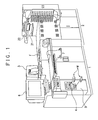
- FIG. 1 is an external view of a photo-processing system with an image processing apparatus according to one embodiment of the present invention.
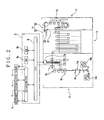
- FIG. 2 illustrates a schematic arrangement of the photo-processing system of the one embodiment.
- FIG. 3 illustrates an example of a judgment screen displayed on a monitor of the photo-processing system.
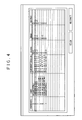
- FIG. 4 illustrates an example of a group-correction setting screen displayed on the monitor.
- FIG. 5 illustrates an example of a FUNCTION screen displayed on the monitor.
- FIG. 6 illustrates an example of a DSA setting screen displayed on a monitor.
- FIG. 7 illustrates an example of a FUNCTION screen displayed on a monitor of a conventional image processing apparatus.
- FIG. 1 is an external view of a photo-processing system with an image processing apparatus of this embodiment.
- FIG. 2 is a block diagram illustrating the inside structure of the photo-processing system.
- This photo-processing system includes an image processing apparatus 1 and a printing apparatus 2.
- the image processing apparatus 1 is designed to read out image data from a photographic film F or media M, digitally process the image data such as by applying color density correction or contrast correction thereto so as to generate image data for output.
- the printing apparatus 2 is designed to print an image on a photographic sensitive material PA based on the image data output from the image processing apparatus 1.
- the image processing apparatus 1 includes a scanner 3 for reading an image on the photographic film F or the like, a media drive 4 that is capable of reading and writing the media M such as CD-ROM, a memory card or the like, a main control unit 5 for controlling the entire operation of the photo-processing system as well as the image processing apparatus 1, a monitor 6 for displaying an image read out from the photographic film F or media M, and an input device 7 for receiving an operational command from the user.
- a scanner 3 for reading an image on the photographic film F or the like
- a media drive 4 that is capable of reading and writing the media M such as CD-ROM, a memory card or the like
- main control unit 5 for controlling the entire operation of the photo-processing system as well as the image processing apparatus 1
- a monitor 6 for displaying an image read out from the photographic film F or media M
- an input device 7 for receiving an operational command from the user.
- a CPU 8 Internally located in the main control unit 5 are a CPU 8 for main control and calculation, a ROM 9a for storing an image processing program or the like, a RAM 9b for use as a work area or the like for processing, and an I/O processing part 10 for performing I/O processing with respect to various outside devices (the scanner 3, the media drive 4, the monitor 6 and the input device 7).
- a CPU 8 Internally located in the main control unit 5 are a CPU 8 for main control and calculation, a ROM 9a for storing an image processing program or the like, a RAM 9b for use as a work area or the like for processing, and an I/O processing part 10 for performing I/O processing with respect to various outside devices (the scanner 3, the media drive 4, the monitor 6 and the input device 7).
- the printing apparatus 2 includes an exposing section 11 for exposing the photographic sensitive material PA based on image data whose image has been processed by the image processing apparatus 1, a development section 12 for developing the exposed photographic sensitive material PA, a drying section 13 for drying the developed photographic sensitive material PA, and a sorting section 14 for sorting photographs produced from the dried photographic sensitive material PA.
- the exposing section 11 pulls the photographic sensitive material PA out of a pair of magazines 15a, 15b, and conveys the same to the downstream side by conveying rollers 16.
- the photographic sensitive material PA is exposed by an exposing device 17 made up of a light source 17a of a halogen lamp or the like and an optical shutter 17c connected to the light source 17a via an optical fiber bundle 17b.
- the development section 12 applies treatments such as development, bleaching, fixing and stabilizing to the photographic sensitive material PA.
- the drying section 13 blows hot air through a hot-air supplying device 18 over the photographic sensitive material PA conveyed from the development section 12, thereby drying a developing solution attached to the photographic sensitive material PA.
- the sorting section 14 includes a size sorting part 19 for sorting pieces produced from the exposed, developed and dried photographic sensitive material PA by size, and an order sorting part 20 for sorting by order small pieces of the photographic sensitive material PA previously sorted by size.
- the size sorting part 19 discharges large pieces of the photographic sensitive material PA to a tray 21, and transfers small pieces of the photographic sensitive material PA to a conveyor 22.
- the order sorting part 20 sorts by order the pieces of the photographic sensitive material PA conveyed by the conveyor 22 into respective trays 23.
- the CPU 8 starts an image processing program installed in the ROM 9a of the main control unit 5, thereby allowing the monitor 6 to display a main screen (not illustrated).
- the user selects the reading source of image data, or selects the photographic film F or the media M from which image data is read out.
- the selected image data is stored in the RAM 9b (a memory means).
- a button for switching to a judgment screen on the main screen is selected and clicked by using such as a mouse 7b so as to switch the main screen to a judgment screen 30 as illustrated in FIG. 3.
- the judgment screen 30 is arranged to display in index mode plural frame images 31 read in (6 frame images in this embodiment) of 2 rows ⁇ 3 columns.
- the image processing by the image processing apparatus has a distinguished feature that plural different correction items are grouped for batch correction.
- the grouping is made for each combination of "COLOR DENSITY CORRECTION", “CONTRAST”, “CHROMA” and “SHARPNESS”.
- COLOR DENSITY CORRECTION is herein meant to include corrections to "Y”, “M”, “C” and "D”.
- This grouped information sources each are designed to deal with a given number of records (e.g., 8 records). Specifically, the group information sources are controlled by a table (a group correction table) made corresponding to previously fixed "assigned keys" (in this embodiment, "A”, "S”, “D”, “F”, “Q”, "W”, “E” and “R” of the keyboard 7a). Each record of the group correction table contains an item for inputting the name of each group, which can be optionally set by the user to allow for ease of identification of each record by name.
- the group correction table may be previously stored in the ROM 9a (at this moment, groups and names corresponding to the respective assigned keys are in empty or default state), and may be stored in the RAM 9b along with the start of the image processing program.
- the group correction table may be designed to be as a table resident in a nonvolatile memory from the very beginning. In the latter case, even after the program is terminated or the photo-processing system is turned off, the values set by the user are maintained.
- FIG. 4 illustrates a group-correction setting screen of this embodiment.
- the group-correction setting screen displays the set content of the current group correction table.
- the correction items each are provided with a check box for identification of whether a corresponding item is effective or not.
- a checked check box indicates that the corresponding correction item is effective.
- numerical values e.g., "0" and "+1" displayed next to "Y", "M", "C” and “D” respectively represent their correction values.
- Numerical values displayed in the respective items of "CONTRAST”, “CHROMA” and “SHARPNESS” also respectively represent their correction values.
- the user can change the content (in this embodiment, the content of all the items except the "assigned keys" of the group correction table by using the group-correction setting screen. Specifically, a record whose content is to be corrected or item to be corrected is selected such as by moving a cursor thereto and then checking a check box, inputting the name of a group, inputting a correction value and the like become possible by using the keyboard 7a, the mouse 7b and the like.
- a "YES. OK” button is pressed or clicked so as to reflect the changed name, correction value and the like in the group correction table while closing the group-correction setting screen.
- a "NO. CANCEL” button is pressed or clicked so as not to reflect the changed name, the correction value and the like in the group correction table, while closing the group-correction setting screen.
- the group-correction setting screen is displayed by pressing or clicking a "GROUP CORRECTION SETTING" button 51 arranged on a FUNCTION screen of FIG. 5.
- the FUNCTION screen is displayed by pressing or clicking a "F" button 35 on the judgment screen 30 of FIG. 3.
- While the content of the group correction table can be changed on the group-correction setting screen, it can also be changed on the judgment screen 30 of FIG. 3.
- the description will be made for a changing manner on the judgment screen 30.
- a mouse cursor (a pointer P) is moved to a subject frame image 31 (e.g., Rea101.BMP) and then clicked so as to hold the subject frame image 31 in the selected state.
- an operation associated with a key e.g., "W” assigned to the group information to be changed (e.g., setting for compensation for color failure 3, hereinafter referred simply to color failure setting 3) is performed so as to reflect in batch manner the changed content, which has been applied to Real01.BMP, in the respective items of correction of the color failure setting 3.
- an operation associated with a key such as a simple operation which involves pressing Shift key and an assigned key (herein “W”) at the same time, or right clicking a mouse so as to display assigned keys in index mode and selecting a corresponding key (herein "W") from the displayed keys.
- the changed content (the content of "Y”:0, “M”:0, “C”:-1, “D”:0 and DSA) of a corresponding frame image 31 (Rea101.BMP) can be instantly reflected in the items of correction of the color failure setting 3 in batch manner only through such a simple operation.
- the check boxes of "CONTRAST” and “SHARPNESS” are not checked so that these two items of correction are not changed.
- the group-correction setting screen is opened and the check boxes of "CONTRAST” and “SHARPNESS” are checked so as to make them effective for correction, the changing thereto can also be made in the batch correction.
- a mouse cursor (a pointer P) is moved to a subject frame image 31 (e.g., Rea104.BMP) and then clicked so as to hold the subject frame image 31 in the selected state.
- an assigned key e.g., "R” key
- the group information, for which the changed content is to be reflected e.g., setting for compensation for backlight, hereinafter referred simply to backlight setting 2
- backlight setting 2 setting for compensation for backlight
- a mouse cursor is moved to subject frame images 31 and clicked while pressing Ctrl key on the keyboard so as to hold these frame images 31 in the selected state, and then assigned keys corresponding to the group information for which the changed content is to be reflected are pressed so that the changed content relating to the group information is reflected in batch manner in those frame images 31.
- a group correction table that is capable of holding plural different groups, each made up of the respective items of correction, namely "COLOR DENSITY CORRECTION”, “CONTRAST”, “CHROMA” and “SHARPNESS”, respectively set corresponding to the information data relating respectively to assigned keys on the keyboard, so that the content of correction relating to a desired one of the groups set in the group correction table can be reflected in batch manner in a subject frame image, and hence a correction operation for frame images for which the same content of correction is to be applied can be promptly made.
- an improved correction operation can be achieved.
- the image processing apparatus of the present invention is not necessarily limited to this embodiment and therefore can be modified without departing from the scope of the present invention.
- the items of correction to be grouped are "COLOR DENSITY CORRECTION”, “CONTRAST”, “CHROMA” and “SHARPNESS” in the above embodiment, various items of correction can be combined with each other without the necessity to limit them to those items.
Landscapes
- Engineering & Computer Science (AREA)
- Multimedia (AREA)
- Signal Processing (AREA)
- Human Computer Interaction (AREA)
- Facsimile Image Signal Circuits (AREA)
- Image Processing (AREA)
- Television Signal Processing For Recording (AREA)
- Processing Or Creating Images (AREA)
- Color Image Communication Systems (AREA)
Applications Claiming Priority (2)
| Application Number | Priority Date | Filing Date | Title |
|---|---|---|---|
| JP2004147805 | 2004-05-18 | ||
| JP2004147805A JP2005333230A (ja) | 2004-05-18 | 2004-05-18 | 画像処理装置 |
Publications (2)
| Publication Number | Publication Date |
|---|---|
| EP1599031A2 true EP1599031A2 (fr) | 2005-11-23 |
| EP1599031A3 EP1599031A3 (fr) | 2007-02-14 |
Family
ID=34936658
Family Applications (1)
| Application Number | Title | Priority Date | Filing Date |
|---|---|---|---|
| EP05010795A Withdrawn EP1599031A3 (fr) | 2004-05-18 | 2005-05-18 | Appareil de traitement d'images |
Country Status (4)
| Country | Link |
|---|---|
| US (1) | US20050259284A1 (fr) |
| EP (1) | EP1599031A3 (fr) |
| JP (1) | JP2005333230A (fr) |
| CN (1) | CN1700090A (fr) |
Cited By (1)
| Publication number | Priority date | Publication date | Assignee | Title |
|---|---|---|---|---|
| EP1874064A1 (fr) * | 2006-06-30 | 2008-01-02 | THOMSON Licensing | Procède et appareil de correction de coleurs de sequences d'images |
Families Citing this family (5)
| Publication number | Priority date | Publication date | Assignee | Title |
|---|---|---|---|---|
| US20060274164A1 (en) | 1999-08-17 | 2006-12-07 | Nikon Corporation | Information processing apparatus, information processing system, image input apparatus, image input system and information exchange method |
| US7730043B1 (en) | 2006-06-29 | 2010-06-01 | Adobe Systems Incorporated | Incremental batch-mode editing of digital media objects |
| JP2010052170A (ja) * | 2008-08-26 | 2010-03-11 | Noritsu Koki Co Ltd | 画像処理装置、画像形成装置、画像処理方法及び画像処理プログラム |
| JP6098310B2 (ja) * | 2013-04-09 | 2017-03-22 | コニカミノルタ株式会社 | 色調整装置、及び色調整装置の制御プログラム |
| JP6244654B2 (ja) * | 2013-05-14 | 2017-12-13 | 船井電機株式会社 | 画像表示装置 |
Citations (1)
| Publication number | Priority date | Publication date | Assignee | Title |
|---|---|---|---|---|
| US20040021898A1 (en) * | 2000-10-19 | 2004-02-05 | Koji Ashizaki | Image printing order receiving system and image printing order receiving method |
Family Cites Families (8)
| Publication number | Priority date | Publication date | Assignee | Title |
|---|---|---|---|---|
| US5212546A (en) * | 1990-07-03 | 1993-05-18 | Electronics For Imaging, Inc. | Color correction system employing reference pictures |
| EP0920223A4 (fr) * | 1997-03-14 | 2002-11-27 | Sony Corp | Dispositif et procede de correction de couleurs, dispositif et procede de traitement d'image |
| DE69827703T2 (de) * | 1997-06-17 | 2005-05-25 | Seiko Epson Corp. | Verfahren und Vorrichtung zum Einstellen der Farbe |
| US7024035B1 (en) * | 1999-09-07 | 2006-04-04 | Fuji Photo Film Co., Ltd. | Method of setting region to be subjected to red eye correction and red eye correcting method |
| JP3744808B2 (ja) * | 2001-03-28 | 2006-02-15 | セイコーエプソン株式会社 | 画像処理装置、画像処理方法、プログラムおよび記録媒体 |
| JP2003234985A (ja) * | 2002-02-08 | 2003-08-22 | Fuji Photo Film Co Ltd | 画像保管方法およびシステム並びにプログラム |
| US7286256B2 (en) * | 2002-02-22 | 2007-10-23 | Eastman Kodak Company | Image application software providing a list of user selectable tasks |
| US7038888B2 (en) * | 2002-07-30 | 2006-05-02 | Seagate Technology Llc | Piezo-electric microactuator for dual stage actuator |
-
2004
- 2004-05-18 JP JP2004147805A patent/JP2005333230A/ja active Pending
-
2005
- 2005-05-13 US US11/129,281 patent/US20050259284A1/en not_active Abandoned
- 2005-05-18 CN CNA2005100713207A patent/CN1700090A/zh active Pending
- 2005-05-18 EP EP05010795A patent/EP1599031A3/fr not_active Withdrawn
Patent Citations (1)
| Publication number | Priority date | Publication date | Assignee | Title |
|---|---|---|---|---|
| US20040021898A1 (en) * | 2000-10-19 | 2004-02-05 | Koji Ashizaki | Image printing order receiving system and image printing order receiving method |
Cited By (3)
| Publication number | Priority date | Publication date | Assignee | Title |
|---|---|---|---|---|
| EP1874064A1 (fr) * | 2006-06-30 | 2008-01-02 | THOMSON Licensing | Procède et appareil de correction de coleurs de sequences d'images |
| WO2008000805A1 (fr) * | 2006-06-30 | 2008-01-03 | Thomson Licensing | Procédé et appareil pour corriger la couleur de séquences d'image |
| US8270714B2 (en) | 2006-06-30 | 2012-09-18 | Thomson Licensing | Method and apparatus for colour correction of image sequences |
Also Published As
| Publication number | Publication date |
|---|---|
| EP1599031A3 (fr) | 2007-02-14 |
| CN1700090A (zh) | 2005-11-23 |
| JP2005333230A (ja) | 2005-12-02 |
| US20050259284A1 (en) | 2005-11-24 |
Similar Documents
| Publication | Publication Date | Title |
|---|---|---|
| US5014123A (en) | Film image reading system | |
| JP3639117B2 (ja) | 画像処理装置 | |
| US20050259284A1 (en) | Image processing apparatus | |
| JP4022798B2 (ja) | 画像形成装置 | |
| US8218171B2 (en) | Print order accepting apparatus and printing system | |
| JP2004172867A (ja) | リプリントシステム及びこのシステムのためのコンピュータプログラム | |
| JP2001174929A (ja) | 写真処理装置用の動作設定装置 | |
| JP3642394B2 (ja) | 画像プリント装置 | |
| JP4662154B2 (ja) | 写真プリント装置 | |
| JP4139982B2 (ja) | 画像処理装置 | |
| JP2007036592A (ja) | 画像処理装置 | |
| JP3763143B2 (ja) | 写真プリント装置制御用プログラム及び写真プリントシステム | |
| JP3769748B2 (ja) | 写真プリント装置 | |
| JP2004171260A (ja) | リプリントシステム及びこのシステムのためのコンピュータプログラム | |
| JP4432701B2 (ja) | 画像形成装置 | |
| JP3793989B2 (ja) | 画像プリント装置 | |
| JP4635677B2 (ja) | プリント注文受付装置 | |
| JP4654941B2 (ja) | プリント装置 | |
| JP4478876B2 (ja) | 写真プリント装置 | |
| JP2007034237A (ja) | 画像処理装置 | |
| JP2003162012A (ja) | 写真処理装置 | |
| JP2002271614A (ja) | 画像処理装置及び画像露光装置 | |
| JP2001169088A (ja) | 画像形成装置 | |
| JP2001305670A (ja) | 写真処理装置 | |
| JP2005274846A (ja) | 画像処理装置 |
Legal Events
| Date | Code | Title | Description |
|---|---|---|---|
| PUAI | Public reference made under article 153(3) epc to a published international application that has entered the european phase |
Free format text: ORIGINAL CODE: 0009012 |
|
| AK | Designated contracting states |
Kind code of ref document: A2 Designated state(s): AT BE BG CH CY CZ DE DK EE ES FI FR GB GR HU IE IS IT LI LT LU MC NL PL PT RO SE SI SK TR |
|
| AX | Request for extension of the european patent |
Extension state: AL BA HR LV MK YU |
|
| PUAL | Search report despatched |
Free format text: ORIGINAL CODE: 0009013 |
|
| AK | Designated contracting states |
Kind code of ref document: A3 Designated state(s): AT BE BG CH CY CZ DE DK EE ES FI FR GB GR HU IE IS IT LI LT LU MC NL PL PT RO SE SI SK TR |
|
| AX | Request for extension of the european patent |
Extension state: AL BA HR LV MK YU |
|
| 17P | Request for examination filed |
Effective date: 20070814 |
|
| AKX | Designation fees paid |
Designated state(s): DE |
|
| 17Q | First examination report despatched |
Effective date: 20071019 |
|
| STAA | Information on the status of an ep patent application or granted ep patent |
Free format text: STATUS: THE APPLICATION IS DEEMED TO BE WITHDRAWN |
|
| 18D | Application deemed to be withdrawn |
Effective date: 20100420 |