EP1605340A2 - Computer-Maus mit integrierter Telefonfunktion - Google Patents
Computer-Maus mit integrierter Telefonfunktion Download PDFInfo
- Publication number
- EP1605340A2 EP1605340A2 EP05010108A EP05010108A EP1605340A2 EP 1605340 A2 EP1605340 A2 EP 1605340A2 EP 05010108 A EP05010108 A EP 05010108A EP 05010108 A EP05010108 A EP 05010108A EP 1605340 A2 EP1605340 A2 EP 1605340A2
- Authority
- EP
- European Patent Office
- Prior art keywords
- mouse
- computer
- control means
- telephone
- user
- Prior art date
- Legal status (The legal status is an assumption and is not a legal conclusion. Google has not performed a legal analysis and makes no representation as to the accuracy of the status listed.)
- Withdrawn
Links
Images


Classifications
-
- G—PHYSICS
- G06—COMPUTING OR CALCULATING; COUNTING
- G06F—ELECTRIC DIGITAL DATA PROCESSING
- G06F3/00—Input arrangements for transferring data to be processed into a form capable of being handled by the computer; Output arrangements for transferring data from processing unit to output unit, e.g. interface arrangements
- G06F3/01—Input arrangements or combined input and output arrangements for interaction between user and computer
- G06F3/03—Arrangements for converting the position or the displacement of a member into a coded form
- G06F3/033—Pointing devices displaced or positioned by the user, e.g. mice, trackballs, pens or joysticks; Accessories therefor
- G06F3/0354—Pointing devices displaced or positioned by the user, e.g. mice, trackballs, pens or joysticks; Accessories therefor with detection of two-dimensional [2D] relative movements between the device, or an operating part thereof, and a plane or surface, e.g. 2D mice, trackballs, pens or pucks
- G06F3/03543—Mice or pucks
Definitions
- the invention relates to a computer mouse with integrated Telephone function according to the preamble of claim 1 as well a method for controlling a computer according to Preamble of the independent claim.
- Computer mice are next to the computer keyboards main operating and control means for users of Computers (computers), in particular personal computers like PC and laptop.
- computers running in the Usually software applications that have one on the screen shown user interface with a cursor.
- the user can place the cursor by means of a conventional Computer mouse in the further also briefly called mouse.
- mouse the user manually moves the mouse a pad, e.g. on a so-called mousepad or just on the desk itself, and the movement will implemented within the mouse in electrical control signals. These signals arrive via a connection cable or wirelessly via a radio or infrared connection to the Computer and cause a corresponding movement of the Cursors on the user interface.
- the conventional mice have at least one more button that the user can operate, whereby a control signal is generated, the certain software steps are triggered, such as starting an application (user program such as e.g. Word processor or drawing program), one Program part (printing a document) or a individual program step (marking a text passage).
- an application user program such as e.g. Word processor or drawing program
- one Program part printing a document
- a individual program step marking a text passage
- the user can use the mouse various Initiate and carry out activities.
- a very important application, mainly using the mouse are browsers that control the access and the Enable surfing the Internet. In this context are also internet applications for communication too call, especially for email, instant messaging and Internet telephony.
- VoIP Voice over Internet Protocol
- Telecommunications equipment such as microphone and earphones
- the usually as a portable tableware, a so-called headset are formed.
- These Additional talking gear also needs to be connected to the computer be connected and its wearing is not uncommon as annoying felt.
- Mobile computer mouse So a combination of mobile phone and computer mouse, known.
- the mobile phone is over his Radio interface or other interface (e.g. USB, infrared) connected to a computer.
- Radio interface or other interface e.g. USB, infrared
- the mobile phone So has two modes of operation, namely Telfon réelle and Mouse operation. How to switch between these modes of operation is not described there.
- US-6285354 B1 is a combination of computer mouse and telephone handset known in both Mouse functions as well as telephone functions in one housing are integrated. It is a special one Computer mouse with integrated phone function.
- the mouse is connected via cable to the computer and has a hinged housing in which a microphone, an earphone and a telephone keypad are housed. To the The user has to open the case and make phone calls it's like a normal phone talkie to his head hold. Only then can the user through manual Operating the keypad to initiate a call or answer an incoming call.
- the construction is designed consuming because of the folding mechanism.
- the hinged hinge must be sturdy so that it can withstand the use of the mouse is not damaged or even destroyed becomes.
- the telephone function is switched on manually.
- the object of the invention is to use a computer mouse to introduce the aforementioned type, which is a simple Operation for controlling a computer as well as for the Making phone calls possible.
- the task is solved by a computer mouse with the Features of claim 1 or by a method with the Features of the independent claim.
- control means for the mouse cursor that is automatically switched between the Normal operation of the mouse, where it is used to control the Computer can be used, and a telephone operation, at using the mouse to make a phone call can be.
- the user does not have to manually Switch over. It is enough, if in the Normal operation of the mouse a particular, in particular abnormal, condition occurs to the control means recognize and take on occasion, at least part of the Activate telecommunications equipment. For example, in the Case of an optical mouse from the control means immediately the state is detected when the user removes the mouse from the mouse Document picks up because he is the mouse to make phone calls Wants to lead an ear.
- the detected to the Control means belonging light diode no light reflection more and it automatically turns the mouse into phone mode switched.
- the microphone and the Earphones switched active.
- the phone application will start automatically. It Thus, a condition is automatically detected, the at a normal phone the condition of the picked-up telephone handset (off-hook), and it automatically becomes one Activating the telephone function. The user thus becomes a very easy to use and comfortable Computer mouse with integrated phone function for Provided.
- control means preferably comprise one mechanical and / optical optical motion detection, the detects if a normal operation of the mouse is abnormal Condition occurs, the condition of a detached Telfon Anlageners (off-hook) corresponds.
- an optical motion detection by means of light-emitting and - detecting components and one therewith connected control, so that an abnormal Condition is detected when none of the light-emitting Component (e.g., laser diode) radiated light on the light-detecting component (light sensor) impinges and is detected.
- the light-emitting Component e.g., laser diode
- the controller switches immediately from normal mode to phone mode.
- Embodiment of the invention allows a very reliable Functioning and a very inexpensive realization.
- Motion detection can use other optical components, such as e.g. Light-emitting diodes and photosensitive transistors or the like can be used.
- This can also be mechanical components for Motion detection, such as Pressure or position sensors be used.
- other sensors such as Thermal sensors, in particular infrared sensors, and Contact or humidity sensors are used.
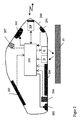
- Fig. 1 is a first embodiment of inventive computer mouse 100 with integrated Telephone function shown.
- the mouse 100 has both Control means for controlling a computer, especially for controlling a cursor, as well Telecommunication means for making telephone calls, in particular of so-called VoIP telephone calls (Voice over Internet Protocol).
- Control means for controlling a computer especially for controlling a cursor
- Telecommunication means for making telephone calls in particular of so-called VoIP telephone calls (Voice over Internet Protocol).
- VoIP telephone calls Voice over Internet Protocol
- the mouse 100 In normal operation, the mouse 100 is moved by the user and slides on a base 10.
- the control means also include optical motion detection (sampling by laser L and detector D), which control signals for generated the cursor of the PC (not shown).
- the mouse 100 has a laser diode L and an optical sensor D and a controller 110 for Signal processing and exchange of control data with the computer, e.g. a personal computer (PC) is.
- the movement of the mouse becomes a Control of the cursor controlled on the screen of the PC.
- the laser L transmits Light from which is reflected from the pad 10 and subsequently detected by the detector diode D.
- optical motion detection for Activation of the cursor can also be done by other, in particular by a mechanical motion detection be replaced, such as by a ball mechanism with Potentiometers. Especially advantageous is the illustrated optical detection.
- the mouse 100 also has at least one operating means and / or tactile element that the user uses with his fingers Served to perform actions like clicking or scrolling trigger.
- operating means and / or tactile element that the user uses with his fingers Served to perform actions like clicking or scrolling trigger.
- conventionally mouse buttons or Rolling wheel provided.
- it can also be other sensitive Operating means, such as a sensitive touchpad, a so-called touchpad.
- the mouse 100 also has a Such a touchpad 105th
- the touchpad 105 can So the essential control signals for the mouse cursor be generated.
- the PC can also be controlled if the user does not move the mouse itself or can move.
- the mouse is connected to the computer either via a cable or wirelessly.
- the mouse 100 has a radio part RF according to the Bluetooth standard, over the a wireless connection to the PC consists. Instead of such a radio interface can Of course also uses an infrared interface become.
- the various functions of the mouse will be 100 executed by a central controller 110, the over the radio part exchanges RF control data with the PC.
- Other components such as A / D converter and D / A converter or power supply with battery, are to Simplification of Fig. 1 not shown.
- the mouse now also has 100 Telecommunication means, in particular a Phone setup, so that the mouse 100 also called a phone can be used.
- the telephone device exists at least from a microphone 101 and / or an earphone 102.
- the mouse may also a speaker 103 and an alphanumeric Telephone keypad 104 included. This allows the mouse 100 in in full as a telephone including hands-free calling be used.
- the already existing control means used, the usually used only for cursor control, So in the example shown here, the optical Sampling means (laser L and detector D) and the Control 110:
- the mouse 100 In normal operation, the mouse 100 is initially on the pad 10 (e.g., desk surface) so that the light emitted by the laser L from the surface is reflected and reaches the detector D. Remove one now the mouse 100 from the surface 10, so comes off a certain distance h no more light on the detector D. This in turn recognizes the controller 110 and switches the Mouse 100 returns from normal operation to telephone operation. In order to So when you lift the mouse 100 is automatically the Phone function activated.
- the pad 10 e.g., desk surface
- controller 110 when detecting the lift an abnormal state recognizes and the telephone device, so the microphone 101, the earphone 102 and the telephone keypad 104 are active on.
- the controller can also Switch loudspeaker 103 on. Activating the individual components may also be dependent on PC users controlled functions are performed.
- the components of the telephone device then activated when the user has a Telecommunication program on the PC starts and the mouse takes off from the base.
- the Telecommunications programs from the controller 110 be started or at least influenced as soon as that Lifting the mouse 100 is detected.
- a VoiP application to be started automatically on the PC or individual processes, e.g. The call of a contact manager to be automatically triggered. This allows the user to move the mouse 100 from the Pad 10 (desk) takes off, immediately with the Telecommunications start themselves.
- a handsfree function is provided.
- the Handsfree function is switched on in particular then when the user mouse 100 on the desk 10 leaves and starts the telephone function with a mouse click. Or the handsfree function will be during a phone call then automatically turned on when the user mouse puts it back on the desk.
- the Handsfree function only switches the controller 110 the microphone 101 and the speaker 103 are active, not but also the earphone and the keyboard 104. There the microphone 101 on a tapered side and the Speaker 103 on the upper side of the mouse housing is an optimal acoustic transmission from and secured to the user.
- FIG. 2 is initially the structure of a second Embodiment of a mouse 200 according to the invention integrated telephone shown. Unlike the mouse from Fig. 1, this mouse 200 has the following further Components and functions:
- the mouse 200 has u.a. also an infrared sensor 206, with the proximity or the touch to a person recognized becomes. Based on the sensor 206, the controller 110 determines whether the mouse 200 is on the user's head and to be switched to telephone operation. In order to becomes a very safe function by simple means realized to detect the lifting of the mouse 200. These Lift-off detection may additionally or alternatively to the optical detection (see Fig. 1). Instead of Thermal sensors (infrared sensors) can also be used by others Sensors, such as capacitive sensors, ohmssche Resistance sensors or position sensors are used. Thereby, e.g. Touch contacts or positional positions detected and detected whether the mouse from the normal mode in the Phone mode to be switched.
- Sensors such as capacitive sensors, ohmssche Resistance sensors or position sensors are used. Thereby, e.g. Touch contacts or positional positions detected and detected whether the mouse from the normal mode in the Phone mode to be switched.
- the mouse 200 shown in FIG. 2 additionally has a signal lamp in the form of a LED 207, which is located on the top of the mouse housing is located and the one at incoming call lights up and / or flashes.
- the radio part RF is shown in the mouse 200 shown in FIG at the back end of the mouse and not at the front set end, as shown in Fig. 1. This other arrangement as well as the other components offer special advantages for using the mouse 200 as a telephone.
- the user N uses the Mouse 200 first in a known manner to the wireless Control of his computer. Will the user N now one Calling communication partner, the user raises N first the mouse 200 off the pad (desk) and puts the mouse 200 on his ear.
- the IR sensor 206 detects the heat emitted by the user N's head and transmits a signal to the controller 210.
- the Controller 210 now notes that mouse 200 is off-hook was and automatically switches the mouse accordingly 200 in the phone operation. In comparison to the example 1 takes place here in the example of FIG. 2 the Switching only when the user the mouse 200 on has led his ear, i. when he actually the typical telephone attitude has taken.
- the mouse 200 can be like an ordinary telephone handset to be used.
- Radio part RF is at the lower end of the Mouse 200 is located, it does not emit in the immediate vicinity of the Head off.
- the radio exposure of user N becomes So kept minimal.
- the distance between Radio part RF and PC slightly reduced what the. Radio transmission benefits.
- the PC operation also via a mouse wheel, a navigation pin (trackpoint), a trackball or other controls respectively. It is essential that the user N mouse 200 both as a control means for his computer, in particular for cursor control, can use as well can use as a telephone handset at the same time.
- a touchpad it is too possible that the contact surface as electrorestrictive (piezoelectric) surface is executed.
- a touchpad when touched a control voltage for can generate the cursor control, on the other hand can also by Apply or supply signal voltages the Surface of the touchpad to be excited to vibrate, so that the touchpad can serve as a signal generator. Consequently could with incoming calls the touchpad by Infeed of AC or pulsating Voltages ringing signals (beeps) similar to one Create piezoelectric element.
- Beeps Voltages ringing signals
- could at further Development of such a touchpad also audio signals be generated, so that the touchpad may also be as could serve speakers.
- the controller 210 switches off the phone function of the mouse 200 automatically. Instead, it may also be provided if that Telephone conversation was not terminated, that when lying the mouse 200 on the pad 10, the controller 210 the Phone does not shut off, but on one Handsfree telephone function toggles. The telephone then takes place via the speaker 203 and the microphone 201. The user N, via the hands-free kit telephoned, the mouse can then also simultaneously on the Pad 10 to move back and forth and thus to control use his computer. So the user N can also at Hands-free calling at the same time over the Telephone function and the mouse function of the mouse 200 feature.
- An incoming call is the user N through The signal LED 207 lights up. Thereupon can the user N lift the mouse and bring it upside down to to answer the call. This will be automatic again recognized. The user N can instead of lifting but also activate the handsfree function.
- the mouse according to the invention it is possible Simultaneously to call and a computer too serve. This is especially possible if the Mouse is used as a telephone handset, d. H. when the mouse is on Head of user N is present. In every situation of use So the user has the mouse according to the invention at the same time over the telephone function and also over the Mouse function. As a result, the mouse according to the invention particularly versatile.
- the mouse of the invention combines in an advantageous manner both the functionality of a mouse and the Functionalities of a telephone in full. Of the User does not need a separate phone and no separate Mouse more. This results in a considerable Space saving.
Landscapes
- Engineering & Computer Science (AREA)
- General Engineering & Computer Science (AREA)
- Theoretical Computer Science (AREA)
- Human Computer Interaction (AREA)
- Physics & Mathematics (AREA)
- General Physics & Mathematics (AREA)
- Position Input By Displaying (AREA)
- Telephone Function (AREA)
Abstract
Description
- Fig. 1,
- die eine erste Ausführungsform der erfindungsgemäßen Computermaus mit integriertem Telefon zeigt;
- Fig. 2,
- die eine zweite Ausführungsform der erfindungsgemäßen Computermaus mit integriertem Telefon zeigt; und
- Fig. 3,
- die die Computermaus gemäß Fig. 2, wie sie als drahtloses Telefon eingesetzt wird, zeigt.
Claims (10)
- Computer-Maus (100, 200) mit integrierter Telefonfunktion, wobei die Maus (100, 200) sowohl Steuerungsmittel (L, D, 110) zur Ansteuerung des Cursors eines Rechners als auch Telekommunikationsmittel (101, 102, 103, 104) zur Durchführung von Telefonaten aufweist, dadurch gekennzeichnet, dass
zur Aktivierung der Telefonfunktion diese zur Ansteuerung des Cursors vorgesehenen Steuerungsmittel (D, L, 110) ein Aktivieren zumindest eines Teils der Telekommunikationsmittel (101, 102) veranlassen. - Computer-Maus (100, 200) nach Anspruch 1, dadurch gekennzeichnet, dass die Steuerungsmittel (D, L, 110) eine mechanische oder optische Bewegungserkennung umfassen, die erkennt, wenn ein zum Normalbetrieb der Maus abnormaler Zustand auftritt, der dem Zustand eines abgenommenen Telefonhörers (off-hook) entspricht.
- Computer-Maus (100) nach Anspruch 2, dadurch gekennzeichnet, dass die Steuerungsmittel ein licht-emittierendes Bauteil (L), ein lichtdetektierendes Bauteil (D) und eine damit verbundene Steuerung (110) umfassen, die die Telefonfunktion der Maus (100) aktiviert, wenn das licht-detektierende Bauteil (D) kein von dem lichtemittierendem Bauteil (L) abgestrahltes Licht detektiert.
- Computer-Maus nach Anspruch 2, dadurch gekennzeichnet, dass die Steuerungsmittel vom Normalbetrieb der Maus in einen Telefonbetrieb umschalten und/oder eine Telekommunikationsapplikation, insbesondere eine VoIP-Applikation zur Internet-Telefonie, starten, sobald kein Licht mehr detektiert wird.
- Computer-Maus nach Anspruch 1, dadurch gekennzeichnet, dass die Steuerungsmittel (D, L, 110) der Maus (100, 200) auch ein manuelles Bedienmittel (105, 205) umfassen, das zumindest bei Aktivierung der Telefonfunktion durch den Benutzer zur Steuerung des Rechners, insbesondere zur Cursor-Steuerung, bedienbar ist.
- Computer-Maus nach Anspruch 5, dadurch gekennzeichnet, dass das manuelle Bedienmittel ein Berührungsfeld (105, 205) ist.
- Computer-Maus nach Anspruch 6, dadurch gekennzeichnet, dass das Berührungsfeld (105, 205) ein elektrorestriktives und/oder piezoelektrisches Bauteil ist, mittels dem die Steuerungsmittel (110) bei eingehenden Anrufen ein akustisches Signal, insbesondere ein Piepsen, erzeugen.
- Computer-Maus (200) nach Anspruch 1, dadurch gekennzeichnet, dass die Maus (200) zusätzlich mindestens einen Sensor (206), insbesondere einen Infrarotsensor, umfasst, der mit den Steuerungsmitteln (210) verbunden ist, und dass die Steuerungsmittel (210) die Telefonfunktion der Maus (200) in Abhängigkeit von einem Sensorsignal des Sensors (206) aktiviert.
- Computer-Maus (200) nach Anspruch 1, dadurch gekennzeichnet, dass die Telekommunikationsmittel zumindest ein Mikrofon (201) umfassen, das sich an einem Ende des Gehäuses der Maus (200) befindet, und dass die Maus (200) für eine Funkverbindung mit dem Rechner ein Funkteil (RF) umfasst, das sich an diesem Ende der Maus (200) befindet.
- Verfahren zum Steuern eines Rechners mittels einer Computer-Maus (100, 200) mit integrierter Telefonfunktion, wobei die Maus (100, 200) als Steuerungsmittel (L, D, 110) zur Steuerung des Rechners und auch als Telekommunikationsmittel (101, 102, 103, 104) zur Durchführung von Telefonaten verwendet wird, die mittels eines auf dem Rechner laufenden Programms und/oder einer Applikation ausgeführt werden,
dadurch gekennzeichnet, dass
die Telefonfunktion aktiviert wird, indem die Steuerungsmittel (D, L, 110) der Maus (100, 200) veranlassen, dass zumindest ein Teil der Telekommunikationsmittel (101, 102) aktiviert wird.
Applications Claiming Priority (2)
| Application Number | Priority Date | Filing Date | Title |
|---|---|---|---|
| DE102004023845 | 2004-05-13 | ||
| DE200410023845 DE102004023845B4 (de) | 2004-05-13 | 2004-05-13 | Computer-Maus mit integrierter Telefonfunktion |
Publications (2)
| Publication Number | Publication Date |
|---|---|
| EP1605340A2 true EP1605340A2 (de) | 2005-12-14 |
| EP1605340A3 EP1605340A3 (de) | 2007-03-14 |
Family
ID=35063322
Family Applications (1)
| Application Number | Title | Priority Date | Filing Date |
|---|---|---|---|
| EP05010108A Withdrawn EP1605340A3 (de) | 2004-05-13 | 2005-05-10 | Computer-Maus mit integrierter Telefonfunktion |
Country Status (2)
| Country | Link |
|---|---|
| EP (1) | EP1605340A3 (de) |
| DE (1) | DE102004023845B4 (de) |
Cited By (2)
| Publication number | Priority date | Publication date | Assignee | Title |
|---|---|---|---|---|
| CN108945375A (zh) * | 2018-05-29 | 2018-12-07 | 中船航海科技有限责任公司 | 一种船用操纵座椅切换鼠标面板及其控制方法 |
| US11128636B1 (en) | 2020-05-13 | 2021-09-21 | Science House LLC | Systems, methods, and apparatus for enhanced headsets |
Families Citing this family (2)
| Publication number | Priority date | Publication date | Assignee | Title |
|---|---|---|---|---|
| DE102011078121A1 (de) | 2011-06-27 | 2012-12-27 | Bundesdruckerei Gmbh | Computermaus und Verfahren zum Lesen von Daten aus einem Dokument |
| DE202018002534U1 (de) | 2018-05-18 | 2018-06-26 | Cuma Kilic | Vorrichtung zur Vornahme von Steuerfunktionen einer Computermaus auf einen Bildschirm |
Family Cites Families (9)
| Publication number | Priority date | Publication date | Assignee | Title |
|---|---|---|---|---|
| US5631669A (en) * | 1994-02-04 | 1997-05-20 | Stobbs; Gregory A. | Pointing device with integral microphone |
| US5706031A (en) * | 1994-11-14 | 1998-01-06 | Lucent Technologies Inc. | Computing and telecommunications interface system |
| US5805144A (en) * | 1994-12-14 | 1998-09-08 | Dell Usa, L.P. | Mouse pointing device having integrated touchpad |
| KR0143812B1 (ko) * | 1995-08-31 | 1998-08-01 | 김광호 | 전화기 겸용 무선 마우스 |
| US5847695A (en) * | 1996-01-04 | 1998-12-08 | Siemens Business Communication Systems, Inc. | Method and apparatus for implementing a dialpad on the surface of a mouse input device |
| WO2000024185A1 (en) * | 1998-10-20 | 2000-04-27 | Sang Jin Cho | P/c mouse both for its function and for a telephone set |
| US6285354B1 (en) * | 1998-11-30 | 2001-09-04 | Micron Technology, Inc. | Combination mouse and telephone handset |
| US6694391B2 (en) * | 2001-01-16 | 2004-02-17 | Dell Products L.P. | Combination computer mouse and telephony handset |
| DE20301184U1 (de) * | 2003-01-29 | 2003-04-17 | Haas Eric | Handy-Computer-Maus |
-
2004
- 2004-05-13 DE DE200410023845 patent/DE102004023845B4/de not_active Expired - Fee Related
-
2005
- 2005-05-10 EP EP05010108A patent/EP1605340A3/de not_active Withdrawn
Cited By (2)
| Publication number | Priority date | Publication date | Assignee | Title |
|---|---|---|---|---|
| CN108945375A (zh) * | 2018-05-29 | 2018-12-07 | 中船航海科技有限责任公司 | 一种船用操纵座椅切换鼠标面板及其控制方法 |
| US11128636B1 (en) | 2020-05-13 | 2021-09-21 | Science House LLC | Systems, methods, and apparatus for enhanced headsets |
Also Published As
| Publication number | Publication date |
|---|---|
| EP1605340A3 (de) | 2007-03-14 |
| DE102004023845A1 (de) | 2005-12-08 |
| DE102004023845B4 (de) | 2006-08-10 |
Similar Documents
| Publication | Publication Date | Title |
|---|---|---|
| DE69030620T2 (de) | Fernmeldegerät mit beweglicher bedienelementabdeckung | |
| DE60032374T2 (de) | Multifunktionales schnurloses telefongerät | |
| DE69835863T2 (de) | Handapparat für Funkgerät | |
| DE69032401T2 (de) | Fernmeldegerät mit spracherkennung und beweglicher bedienelementabdeckung | |
| DE69826091T2 (de) | Handapparat für Funkgerät | |
| US8416203B2 (en) | Method and apparatus for preventing on-screen keys from being accidentally touched and recording medium using the same | |
| DE69736059T2 (de) | Funktelefon | |
| US8988359B2 (en) | Moving buttons | |
| DE102007050177B4 (de) | Eingabevorrichtung, mit einer solchen ausgestattetes mobiles Endgerät sowie Benutzerschnittstelle desselben | |
| DE69929655T2 (de) | Kontextempfindliche Anzeige mit eingeblendeten Fenster für ein tragbares Telefongerät | |
| DE102016103160B4 (de) | Verfahren und Vorrichtung für eine Sprachsteuerungsbenutzerschnittstelle mit diskretem Betriebsmodus | |
| US20080045280A1 (en) | Methods and apparatus for controlling a mobile device by using a pivoting input switch | |
| DE212006000081U1 (de) | Benutzerschnittstelle zum Entsperren einer Vorrichtung durch Ausführen von Gesten auf einem Entsperrungsbild | |
| DE212007000076U1 (de) | Tragbare Vorrichtung mit Erkennung von Benutzeraktivitäten und automatisierten Antworten darauf | |
| DE112007001109T5 (de) | Verwaltung eingehender Telefonanrufe für eine tragbare Multifunktionsvorrichtung mit Berührungsbildschirmanzeige | |
| DE202013012673U1 (de) | Mobiles Endgerät | |
| CN106020363A (zh) | 一种利用方位手势触摸操作智能手表的方法及装置 | |
| CN101980136A (zh) | 一种手持终端滑动控制交互方法 | |
| CN105100460A (zh) | 一种声音操控智能终端的方法及系统 | |
| CN1716978A (zh) | 用于控制按键讲话(ptt)电话机的扬声器音量的装置和方法 | |
| CN102063251B (zh) | 一种移动终端及其快捷功能方法 | |
| CN106415764A (zh) | 按键结构和电子设备及其操控方法、装置 | |
| DE102004023845B4 (de) | Computer-Maus mit integrierter Telefonfunktion | |
| WO2002003664A1 (de) | Telefon mit einem kapazitiven umgebungssensor | |
| US9100470B2 (en) | Biasing component for raising and lowering a keyboard for a handheld communication device |
Legal Events
| Date | Code | Title | Description |
|---|---|---|---|
| PUAI | Public reference made under article 153(3) epc to a published international application that has entered the european phase |
Free format text: ORIGINAL CODE: 0009012 |
|
| AK | Designated contracting states |
Kind code of ref document: A2 Designated state(s): AT BE BG CH CY CZ DE DK EE ES FI FR GB GR HU IE IS IT LI LT LU MC NL PL PT RO SE SI SK TR |
|
| AX | Request for extension of the european patent |
Extension state: AL BA HR LV MK YU |
|
| RIN1 | Information on inventor provided before grant (corrected) |
Inventor name: GREVE, MICHAEL,C/O WEB.DE - COMBOTS Inventor name: COTTE, PIERRE-ALAIN |
|
| RAP1 | Party data changed (applicant data changed or rights of an application transferred) |
Owner name: COMBOTS PRODUCT GMBH & CO.KG |
|
| PUAL | Search report despatched |
Free format text: ORIGINAL CODE: 0009013 |
|
| AK | Designated contracting states |
Kind code of ref document: A3 Designated state(s): AT BE BG CH CY CZ DE DK EE ES FI FR GB GR HU IE IS IT LI LT LU MC NL PL PT RO SE SI SK TR |
|
| AX | Request for extension of the european patent |
Extension state: AL BA HR LV MK YU |
|
| AKX | Designation fees paid | ||
| STAA | Information on the status of an ep patent application or granted ep patent |
Free format text: STATUS: THE APPLICATION IS DEEMED TO BE WITHDRAWN |
|
| 18D | Application deemed to be withdrawn |
Effective date: 20070915 |
|
| REG | Reference to a national code |
Ref country code: DE Ref legal event code: 8566 |