EP1621984A2 - Wellenförmiges Linsensystem und Verfahren für Suchergebnisse - Google Patents
Wellenförmiges Linsensystem und Verfahren für Suchergebnisse Download PDFInfo
- Publication number
- EP1621984A2 EP1621984A2 EP05102260A EP05102260A EP1621984A2 EP 1621984 A2 EP1621984 A2 EP 1621984A2 EP 05102260 A EP05102260 A EP 05102260A EP 05102260 A EP05102260 A EP 05102260A EP 1621984 A2 EP1621984 A2 EP 1621984A2
- Authority
- EP
- European Patent Office
- Prior art keywords
- lens
- display
- interface
- computerized interface
- search
- Prior art date
- Legal status (The legal status is an assumption and is not a legal conclusion. Google has not performed a legal analysis and makes no representation as to the accuracy of the status listed.)
- Ceased
Links
Images





Classifications
-
- G—PHYSICS
- G06—COMPUTING OR CALCULATING; COUNTING
- G06F—ELECTRIC DIGITAL DATA PROCESSING
- G06F3/00—Input arrangements for transferring data to be processed into a form capable of being handled by the computer; Output arrangements for transferring data from processing unit to output unit, e.g. interface arrangements
- G06F3/01—Input arrangements or combined input and output arrangements for interaction between user and computer
- G06F3/048—Interaction techniques based on graphical user interfaces [GUI]
- G06F3/0481—Interaction techniques based on graphical user interfaces [GUI] based on specific properties of the displayed interaction object or a metaphor-based environment, e.g. interaction with desktop elements like windows or icons, or assisted by a cursor's changing behaviour or appearance
-
- G—PHYSICS
- G06—COMPUTING OR CALCULATING; COUNTING
- G06F—ELECTRIC DIGITAL DATA PROCESSING
- G06F3/00—Input arrangements for transferring data to be processed into a form capable of being handled by the computer; Output arrangements for transferring data from processing unit to output unit, e.g. interface arrangements
- G06F3/14—Digital output to display device ; Cooperation and interconnection of the display device with other functional units
Definitions
- the present invention relates generally to computer systems, and more particularly to a system and methods that provide enriched control and presentation of results to a user in accordance with a parameter controlled lens.
- the present invention relates to automatic and dynamic presentation of search result information in accordance with an adjustable viewing lens that balances the need to examine a plurality of search results while promoting, expanding, or highlighting information of interest within the lens.
- a "Wave Lens" technique is provided that is motivated in part by a tradeoff between showing more descriptive content in search results in view of the possible loss of other search results outside a selected window frame.
- the Wave Lens technique utilizes a fisheye lens (or area defining parameter) to compact the number of search results that can be seen without scrolling.
- additional page content can be progressively exposed based on mouse activity, such as hover or click.
- additional content e.g ., text insertion, thumbnails of the web page, information about size of result, download speed, recency of the page
- the Wave Lens technique allows the layout of a search result list to be dynamically adapted to user interaction. This includes providing various user parameters for controlling the lens and display content such as progressive exposure of more focal content, and optional de-emphasis of non-focal content.
- the subject invention provides a rich design space for interaction techniques, including distortion functions, additional content for presentation, and presentation algorithms.
- the present invention relates to a system and methodology for dynamic presentation of search result information within a selected area of a display.
- a computerized interface for data presentation includes a lens component associated with a portion of a user interface display, wherein the lens component defines an area to display information from at least one search result.
- a layout component displays a detailed subset of information within the lens component based upon the search result.
- user-supplied parameters support a lens viewing area that provides more detailed information for search items appearing in the lens. Search results appearing outside the lens may be de-emphasized or minimized in order to balance the need to examine a collection of results and minimize scrolling actions to observe the results while also promoting more detailed information from search items appearing in the lens.
- a component may be, but is not limited to being, a process running on a processor, a processor, an object, an executable, a thread of execution, a program, and/or a computer.
- an application running on a server and the server can be a component.
- One or more components may reside within a process and/or thread of execution and a component may be localized on one computer and/or distributed between two or more computers. Also, these components can execute from various computer readable media having various data structures stored thereon.
- the components may communicate via local and/or remote processes such as in accordance with a signal having one or more data packets (e.g., data from one component interacting with another component in a local system, distributed system, and/or across a network such as the Internet with other systems via the signal).
- a signal having one or more data packets (e.g., data from one component interacting with another component in a local system, distributed system, and/or across a network such as the Internet with other systems via the signal).
- the system 100 includes a user interface 110 that displays search results 114 from one or more search engines 120 that retrieve information from one or more databases 130.
- the search engines 120 can conduct local searches of information from the databases 130 and/or conduct remote searches such as across the Internet, for example.
- a layout component 140 controls display of the results 114 at the interface 110. This includes receiving user inputs 150 that operates, alters, and/or selects display of the results 114. Also, the user inputs 150 may select/adjust one or more parameters 160 that define operations of the interface 110 and display of results 114.
- parameters can include lens size, shape, location, magnification factor, rates for previewing text, as well as other parameters that are described in more detail below.
- the parameters 160 operate in part to define a parameter adjustable lens 170 (or lens) for viewing a particular result or results in more detail from a plurality of other results 114.
- the lens 170 may define an area around a search result 114 that is identified in a central area of a user's focus although substantially any area on the user interface 110 can be selected (e.g ., X and Y coordinates defining rectangular or square lens region, radius of a circle at given coordinates defining circular or elliptical region, and so forth).
- Result information inside the lens 170 can be provided in more detail such as with additional text or data while results outside of the lens can be de-emphasized (e.g ., minimized text or font size on results outside lens), if desired.
- the lens 170 can be substantially any size or shape suitable for defining an area within the user interface 110. Also, more than one lens can be defined for a given interface 114, if desired. Furthermore, substantially any type of information or content can be captured and presented to the user. For example, example content can include query-relevant text insertion, thumbnails of web pages, information about size of the result, download speed, recency of the page, and so forth.
- the wave lens system 100 can be designed to help users assess and interpret lists of search results.
- One aspect of design determines what information to present (e . g ., what text or other page attributes to show).
- Another aspect of design determines how to present the additional information (e . g ., what interaction control to use and the dynamics of presentation).
- the wave lens system allows for highly interactive progressive exposure of additional content for search results.
- the user interface 110 may include a display having one or more display objects including such aspects as configurable icons, buttons, sliders, input boxes, selection options, menus, tabs and so forth having multiple configurable dimensions, shapes, colors, text, data and sounds to facilitate operations with the system 100.
- the interface 110 can also include a plurality of other inputs or controls for adjusting and configuring one or more aspects of the present invention and as will be described in more detail below. This can include receiving user commands from a mouse, keyboard, speech input, web site, remote web service and/or other device such as a camera or video input to affect or modify operations of the interface or other aspects of the system 100.
- Figs. 2-6 illustrate various example user interfaces that illustrate one or more automated search displays and lens configurations. It is to be appreciated however, that the present invention is not limited to the examples shown and described herein. Furthermore, several aspects of the invention involve interaction and presentation dynamics which are difficult to illustrate in static screen shots. For example, as noted above, a lens region on a display can be located in various regions of the display and the lens shape can have various different sizes or shapes.
- an example results display 200 is illustrated depicting a lens region 210 for displaying more detailed information with respect to a given search result.
- a fisheye lens or other type
- the focal center can include one result item comprising a title, description, and URL of a web page, as shown in Fig. 2.
- the focal center 210 is flat in this example, since all the components (title, description, URL) receive the same magnification. Non-uniform magnification is also possible.
- a wave lens technique in accordance with the present invention constitutes a type of piecewise fisheye view.
- Parameter settings allow designers to not only change the magnification factor above and below the focal center independently, but also to fix a minimum font size so as to maintain readability of the text.
- a tradeoff prevails between the readability of search results, and fitting more results into a window frame.
- Fig. 2 demonstrates how parameters can be adjusted to generate a traditional fisheye view around a search result, where items above and below are gradually smaller so as to display more items in the window frame.
- a minimum font size in Fig. 2 can be set as 8 point San-Serif.
- the rate of magnification can be controlled by using the factor as a target and incrementally adjusting the zoom until the target is reached.
- the effect is animated text that enlarges and settles into its maximum size.
- the magnification rate controls the speed at which zooming occurs
- another parameter based on the shape of the magnification function, controls the size of the zoom increments.
- the text can quickly jump to the maximum magnification factor upon mouse action.
- Other geometric and exponential functions allow the text to grow and settle in at varying acceleration.
- a delay parameter controls the onset of the zoom. If the delay is set to zero and magnification is tied to a mouse hover event, as the cursor moves over each search result, a wave, with the result focused at the crest, appears to follow the direction of the mouse. Thus, the wave lens technique derives its name from this effect. In addition to being able to control the number of results visible without scrolling using a fisheye lens, the wave lens technique addresses the need for more description text by managing the progressive insertion of additional content based on mouse activity. Just as zooming can be initiated by a mouse hover or click event, so can the onset of content insertion. As such, it is incumbent upon the designer or to decide how best to couple content insertion with the gradual zooming of a focused result.
- content deletion can be keyed off a mouse hover, voice command, or click event, for example. Deletion does not extend beyond the original content of the search result.
- content deletion is tied to a mouse hover event, it can commence when the cursor enters a different search result item or when the current focus is lost. This flexibility allows a user to simply move the cursor outside of the window frame to initiate deletion.
- content deletion is tied to a mouse click event, it can begin when the user either clicks on the description or on another result.
- content deletion can proceed all at once or at a specified rate with a specified onset delay.
- the delay was found to be useful in cases where, if the extra content that is added tends to be lengthy, as the user zooms in on another item and de-magnifies the current focus, it tends to shrink the focus too quickly.
- One other parameter allows the inserted content to persist and continue to augment with further mouse activity, or to be deleted all at once.
- the wave lens technique can be implemented in DHTML using IE5 and DOM, for example.
- Client-side code can be written in JavaScript and a server-side ASP.NET C# web application pre-fetches web pages and extracts text for insertion.
- a control panel (not shown) allows designers to adjust the many flexible parameters in wave lens. For purposes of experiment, some of the parameters as summarized in Table 1 were fixed, which is described in more detail below.
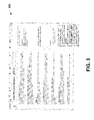
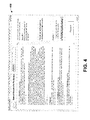
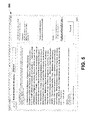
- Figs. 3-5 are example result pages having differing results and display criteria.
- Fig. 3 displays what is described below as a Normal view 300
- Fig. 4 displays an Instant view 400
- Fig. 5 displays a Dynamic view 600.
- Require Scrolling indicating whether or not the target result containing the answer required scrolling to be found
- Answer Location indicating whether or not the answer was readily available in the usual description text or required examining additional content invoked by mouse action.
- the interaction style is coordinated with the amount of text so as to progressively insert text into the description the longer the mouse hovers over a particular result.
- the new focus not only increases in magnification and content, but also the old focus shrinks back to its original state.
- the magnification factor for the dynamic view was set to 1.7.
- the onset of content deletion was delayed for 3 seconds and then advanced by phrases at a 100 millisecond rate, for example.
- the interaction style is a mouse click with no zoom ( i.e ., a magnification factor of 1).
- Table 1 summarizes the differences between the views. In the case of the Normal view, by "additional text or content,” the actual web page is described. Table 1. Summary of parameter settings for the Normal, Instant and Dynamic views.
- the Instant and the Dynamic views 400 and 500 were selected to examine the effect of animation as magnification and text content increased and decreased. It is noted that the Instant view 400 maintains the benefits of additional content without involving animated zoom, which characterizes the Dynamic view 500.
- a view that is typical of the current practice of using static style sheets to display search results which are called the Normal view as displayed in Fig. 3.
- the Normal view 300 the full web page (including both text and graphics) is shown when the title hyperlink is selected. The full web page replaces the list of search results, and a back button is used to return to the search results list.
- the Instant view 400 utilized a similar style sheet for the title, description, and URL as the Normal view.
- the Dynamic view 500 starts off looking similar to the Normal view, but changes as the user interacts with results to show more of some and less of others.
- Fig. 3 displays a Normal view
- Fig. 4 shows a fully expanded Instant view with the same style sheet as the Normal view
- Fig. 5 displays a fully expanded Dynamic view, which features the same additional content as the Instant view, but magnified. For that particular result, at a magnification rate of 50 milliseconds with a 1 second delay, and an insertion rate of 750 milliseconds with a 1.5 second delay, the full expansion took less than 4 seconds to complete. Note also that in the Dynamic view 500 of Fig. 5, the content of surrounding results can be reduced in size.
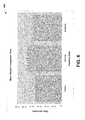
- Figs. 6-9 illustrate search performance results with respect to the various display modes described above with respect to Figs. 3-5.
- search completion time was defined as the total amount of time from receiving a particular test question to clicking a "Found It" button after having selected an answer in a drop down box.
- Fig. 6 shows mean search completion times for the three views. Participants completed search tasks in an average of 69.6 secs, 75.8 secs, and 92.0 secs for the Instant, Dynamic and Normal conditions, respectively. Both Wave Lens conditions were faster than the Normal condition in spite of the fact that participants were familiar with the Normal view. Post hoc multiple comparisons using a Tukey test revealed a significant difference between the Normal and Instant views (p ⁇ .05). The difference between the means of the Normal and Instant condition is 22.4 seconds, which represents a roughly 25% advantage.
- Fig. 7 shows mean search completion time for Require Scrolling and Fig. 8 shows the same for Answer Location.
- the difference between means is 14.6 and 25.8 secs respectively. While the main effect for Answer Location is not surprising, the main effect for Require Scrolling is somewhat unexpected given the low cost and quickness of scrolling.
- the Instant view outperformed the others on both quantitative and qualitative measures. Since the parameters for the Instant view were set to tease apart the benefit of providing additional page content from interaction style, it would seem that participants prefer to have all the content on demand rather than to try to fit more results in the window frame and progressively reveal additional content.
- the Dynamic view represents just one point in the parameter space, and other parameter settings can be adjusted for dynamic information presentation. For example, in one experiment, content was progressively deleted when the mouse was placed outside the focus region, which prompted several participants to comment that this was unexpected; it might be easier to delete text only when new text is inserted. Furthermore, spaces between search results where users can rest their mouse without initiating animated zoom can be highlighted, if desired.
- Fig. 9 displays a plot of the mean search completion time as participants received more search tasks in the Instant view, which shows a downward trend towards faster completion time. No item effect was observed, and questions were randomly generated.
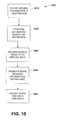
- Fig. 10 is a flow diagram illustrating a lens view process 1000 in accordance with an aspect of the present invention. While, for purposes of simplicity of explanation, the methodology is shown and described as a series of acts, it is to be understood and appreciated that the present invention is not limited by the order of acts, as some acts may, in accordance with the present invention, occur in different orders and/or concurrently with other acts from that shown and described herein. For example, those skilled in the art will understand and appreciate that a methodology could alternatively be represented as a series of interrelated states or events, such as in a state diagram. Moreover, not all illustrated acts may be required to implement a methodology in accordance with the present invention.
- one or more viewing parameters are defined for displaying and controlling output from search results. This can include defining a lens region for display, however, predetermined lens configurations can be provided (e.g., a lens that focuses at the top, middle or bottom of a display). As noted above, other parameters can include magnification factors, content addition and deletion rates, for example, as well as how content or data should be scrolled while being read by the user.
- an automated search is performed on one or more local or remote databases.
- results from the search are returned to a display area or buffer region in memory in preparation for display.
- returned search items (or item) falling in the defined lens region is magnified or highlighted or otherwise promoted over those items appearing outside the lens.
- this can include providing more detailed information for those items appearing inside the lens than conventional search results and showing such information in a bolded, highlighted, or other form to indicate items appearing in the lens.
- various user adjustments can be processed to alter the display characteristics of the lens and/or items appearing outside the lens. For example, the size or location of the lens can be adjusted as well as other parameters that affect how and when information is presented to the user from within the lens.
- an exemplary environment 1110 for implementing various aspects of the invention includes a computer 1112.
- the computer 1112 includes a processing unit 1114, a system memory 1116, and a system bus 1118.
- the system bus 1118 couples system components including, but not limited to, the system memory 1116 to the processing unit 1114.
- the processing unit 1114 can be any of various available processors. Dual microprocessors and other multiprocessor architectures also can be employed as the processing unit 1114.
- the system bus 1118 can be any of several types of bus structure(s) including the memory bus or memory controller, a peripheral bus or external bus, and/or a local bus using any variety of available bus architectures including, but not limited to, 16-bit bus, Industrial Standard Architecture (ISA), Micro-Channel Architecture (MSA), Extended ISA (EISA), Intelligent Drive Electronics (IDE), VESA Local Bus (VLB), Peripheral Component Interconnect (PCI), Universal Serial Bus (USB), Advanced Graphics Port (AGP), Personal Computer Memory Card International Association bus (PCMCIA), and Small Computer Systems Interface (SCSI).
- ISA Industrial Standard Architecture
- MSA Micro-Channel Architecture
- EISA Extended ISA
- IDE Intelligent Drive Electronics
- VLB VESA Local Bus
- PCI Peripheral Component Interconnect
- USB Universal Serial Bus
- AGP Advanced Graphics Port
- PCMCIA Personal Computer Memory Card International Association bus
- SCSI Small Computer Systems Interface
- the system memory 1116 includes volatile memory 1120 and nonvolatile memory 1122.
- the basic input/output system (BIOS) containing the basic routines to transfer information between elements within the computer 1112, such as during start-up, is stored in nonvolatile memory 1122.
- nonvolatile memory 1122 can include read only memory (ROM), programmable ROM (PROM), electrically programmable ROM (EPROM), electrically erasable ROM (EEPROM), or flash memory.
- Volatile memory 1120 includes random access memory (RAM), which acts as external cache memory.
- RAM is available in many forms such as synchronous RAM (SRAM), dynamic RAM (DRAM), synchronous DRAM (SDRAM), double data rate SDRAM (DDR SDRAM), enhanced SDRAM (ESDRAM), Synchlink DRAM (SLDRAM), and direct Rambus RAM (DRRAM).
- SRAM synchronous RAM
- DRAM dynamic RAM
- SDRAM synchronous DRAM
- DDR SDRAM double data rate SDRAM
- ESDRAM enhanced SDRAM
- SLDRAM Synchlink DRAM
- DRRAM direct Rambus RAM
- Computer 1112 also includes removable/non-removable, volatile/non-volatile computer storage media.
- Fig. 11 illustrates, for example a disk storage 1124.
- Disk storage 1124 includes, but is not limited to, devices like a magnetic disk drive, floppy disk drive, tape drive, Jaz drive, Zip drive, LS-100 drive, flash memory card, or memory stick.
- disk storage 1124 can include storage media separately or in combination with other storage media including, but not limited to, an optical disk drive such as a compact disk ROM device (CD-ROM), CD recordable drive (CD-R Drive), CD rewritable drive (CD-RW Drive) or a digital versatile disk ROM drive (DVD-ROM).
- CD-ROM compact disk ROM device
- CD-R Drive CD recordable drive
- CD-RW Drive CD rewritable drive
- DVD-ROM digital versatile disk ROM drive
- a removable or non-removable interface is typically used such as interface 1126.
- Fig 11 describes software that acts as an intermediary between users and the basic computer resources described in suitable operating environment 1110.
- Such software includes an operating system 1128.
- Operating system 1128 which can be stored on disk storage 1124, acts to control and allocate resources of the computer system 1112.
- System applications 1130 take advantage of the management of resources by operating system 1128 through program modules 1132 and program data 1134 stored either in system memory 1116 or on disk storage 1124. It is to be appreciated that the present invention can be implemented with various operating systems or combinations of operating systems.
- Input devices 1136 include, but are not limited to, a pointing device such as a mouse, trackball, stylus, touch pad, keyboard, microphone, joystick, game pad, satellite dish, scanner, TV tuner card, digital camera, digital video camera, web camera, and the like. These and other input devices connect to the processing unit 1114 through the system bus 1118 via interface port(s) 1138.
- Interface port(s) 1138 include, for example, a serial port, a parallel port, a game port, and a universal serial bus (USB).
- Output device(s) 1140 use some of the same type of ports as input device(s) 1136.
- a USB port may be used to provide input to computer 1112, and to output information from computer 1112 to an output device 1140.
- Output adapter 1142 is provided to illustrate that there are some output devices 1140 like monitors, speakers, and printers, among other output devices 1140, that require special adapters.
- the output adapters 1142 include, by way of illustration and not limitation, video and sound cards that provide a means of connection between the output device 1140 and the system bus 1118. It should be noted that other devices and/or systems of devices provide both input and output capabilities such as remote computer(s) 1144.
- Computer 1112 can operate in a networked environment using logical connections to one or more remote computers, such as remote computer(s) 1144.
- the remote computer(s) 1144 can be a personal computer, a server, a router, a network PC, a workstation, a microprocessor based appliance, a peer device or other common network node and the like, and typically includes many or all of the elements described relative to computer 1112. For purposes of brevity, only a memory storage device 1146 is illustrated with remote computer(s) 1144.
- Remote computer(s) 1144 is logically connected to computer 1112 through a network interface 1148 and then physically connected via communication connection 1150.
- Network interface 1148 encompasses communication networks such as local-area networks (LAN) and wide-area networks (WAN).
- LAN technologies include Fiber Distributed Data Interface (FDDI), Copper Distributed Data Interface (CDDI), Ethernet/IEEE 1102.3, Token Ring/IEEE 1102.5 and the like.
- WAN technologies include, but are not limited to, point-to-point links, circuit switching networks like Integrated Services Digital Networks (ISDN) and variations thereon, packet switching networks, and Digital Subscriber Lines (DSL).
- ISDN Integrated Services Digital Networks
- DSL Digital Subscriber Lines
- Communication connection(s) 1150 refers to the hardware/software employed to connect the network interface 1148 to the bus 1118. While communication connection 1150 is shown for illustrative clarity inside computer 1112, it can also be external to computer 1112.
- the hardware/software necessary for connection to the network interface 1148 includes, for exemplary purposes only, internal and external technologies such as, modems including regular telephone grade modems, cable modems and DSL modems, ISDN adapters, and Ethernet cards.
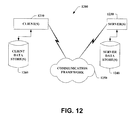
- Fig. 12 is a schematic block diagram of a sample-computing environment 1200 with which the present invention can interact.
- the system 1200 includes one or more client(s) 1210.
- the client(s) 1210 can be hardware and/or software ( e . g ., threads, processes, computing devices).
- the system 1200 also includes one or more server(s) 1230.
- the server(s) 1230 can also be hardware and/or software (e.g ., threads, processes, computing devices).
- the servers 1230 can house threads to perform transformations by employing the present invention, for example.
- One possible communication between a client 1210 and a server 1230 may be in the form of a data packet adapted to be transmitted between two or more computer processes.
- the system 1200 includes a communication framework 1250 that can be employed to facilitate communications between the client(s) 1210 and the server(s) 1230.
- the client(s) 1210 are operably connected to one or more client data store(s) 1260 that can be employed to store information local to the client(s) 1210.
- the server(s) 1230 are operably connected to one or more server data store(s) 1240 that can be employed to store information local to the servers 1230.
Landscapes
- Engineering & Computer Science (AREA)
- Theoretical Computer Science (AREA)
- General Engineering & Computer Science (AREA)
- Human Computer Interaction (AREA)
- Physics & Mathematics (AREA)
- General Physics & Mathematics (AREA)
- User Interface Of Digital Computer (AREA)
- Information Retrieval, Db Structures And Fs Structures Therefor (AREA)
Applications Claiming Priority (1)
| Application Number | Priority Date | Filing Date | Title |
|---|---|---|---|
| US10/809,172 US9335884B2 (en) | 2004-03-25 | 2004-03-25 | Wave lens systems and methods for search results |
Publications (2)
| Publication Number | Publication Date |
|---|---|
| EP1621984A2 true EP1621984A2 (de) | 2006-02-01 |
| EP1621984A3 EP1621984A3 (de) | 2010-10-06 |
Family
ID=34991636
Family Applications (1)
| Application Number | Title | Priority Date | Filing Date |
|---|---|---|---|
| EP05102260A Ceased EP1621984A3 (de) | 2004-03-25 | 2005-03-22 | Wellenförmiges Linsensystem und Verfahren für Suchergebnisse |
Country Status (10)
| Country | Link |
|---|---|
| US (1) | US9335884B2 (de) |
| EP (1) | EP1621984A3 (de) |
| JP (1) | JP5270063B2 (de) |
| KR (1) | KR101150138B1 (de) |
| CN (1) | CN1674007B (de) |
| AU (1) | AU2005201323B2 (de) |
| BR (1) | BRPI0501170A (de) |
| CA (1) | CA2502046A1 (de) |
| MX (1) | MXPA05003098A (de) |
| RU (1) | RU2374702C2 (de) |
Families Citing this family (61)
| Publication number | Priority date | Publication date | Assignee | Title |
|---|---|---|---|---|
| PL1625716T3 (pl) | 2003-05-06 | 2008-05-30 | Apple Inc | System i usługa przesyłania wiadomości |
| US20070198942A1 (en) * | 2004-09-29 | 2007-08-23 | Morris Robert P | Method and system for providing an adaptive magnifying cursor |
| US8677274B2 (en) * | 2004-11-10 | 2014-03-18 | Apple Inc. | Highlighting items for search results |
| US8468452B2 (en) * | 2004-12-15 | 2013-06-18 | Xerox Corporation | System and method for calling attention to a location of departure in a display |
| WO2006075032A1 (es) * | 2005-01-05 | 2006-07-20 | Musicstrands, S.A.U. | Sistema y método para recomendar elementos multimedia |
| US7693887B2 (en) * | 2005-02-01 | 2010-04-06 | Strands, Inc. | Dynamic identification of a new set of media items responsive to an input mediaset |
| WO2006084102A2 (en) | 2005-02-03 | 2006-08-10 | Musicstrands, Inc. | Recommender system for identifying a new set of media items responsive to an input set of media items and knowledge base metrics |
| US7797321B2 (en) | 2005-02-04 | 2010-09-14 | Strands, Inc. | System for browsing through a music catalog using correlation metrics of a knowledge base of mediasets |
| WO2006114451A1 (es) * | 2005-04-22 | 2006-11-02 | Musicstrands, S.A.U. | Sistema y método para adquirir y agregar datos sobre la reproducción de elementos o ficheros multimedia |
| US7543233B2 (en) * | 2005-06-01 | 2009-06-02 | Nokia Corporation | Device dream application for a mobile terminal |
| KR100772861B1 (ko) * | 2005-09-23 | 2007-11-02 | 삼성전자주식회사 | 원격 사용자 인터페이스를 제공하는 장치 및 방법 |
| US7877387B2 (en) * | 2005-09-30 | 2011-01-25 | Strands, Inc. | Systems and methods for promotional media item selection and promotional program unit generation |
| US20090070267A9 (en) * | 2005-09-30 | 2009-03-12 | Musicstrands, Inc. | User programmed media delivery service |
| US20070100800A1 (en) * | 2005-10-31 | 2007-05-03 | Rose Daniel E | Methods for visually enhancing the navigation of collections of information |
| US20070100883A1 (en) * | 2005-10-31 | 2007-05-03 | Rose Daniel E | Methods for providing audio feedback during the navigation of collections of information |
| US7693912B2 (en) * | 2005-10-31 | 2010-04-06 | Yahoo! Inc. | Methods for navigating collections of information in varying levels of detail |
| US20070100915A1 (en) * | 2005-10-31 | 2007-05-03 | Rose Daniel E | Methods for displaying dynamic suggestions in a user interface |
| JP4736728B2 (ja) * | 2005-11-11 | 2011-07-27 | 株式会社リコー | コンテンツ処理装置、コンテンツ処理プログラムおよびコンテンツ処理方法 |
| SG10201402464XA (en) * | 2005-12-07 | 2014-10-30 | 3Dlabs Inc Ltd | Methods for manipulating web pages |
| EP1963957A4 (de) | 2005-12-19 | 2009-05-06 | Strands Inc | Benutzer-zu-benutzer-empfehler |
| US20070244880A1 (en) | 2006-02-03 | 2007-10-18 | Francisco Martin | Mediaset generation system |
| WO2007095272A2 (en) * | 2006-02-10 | 2007-08-23 | Strands, Inc. | Systems and methods for prioritizing mobile media player files |
| WO2007092053A1 (en) | 2006-02-10 | 2007-08-16 | Strands, Inc. | Dynamic interactive entertainment |
| US8521611B2 (en) | 2006-03-06 | 2013-08-27 | Apple Inc. | Article trading among members of a community |
| KR20090077073A (ko) * | 2006-10-20 | 2009-07-14 | 스트랜즈, 아이엔씨. | 퍼스널 음악 추천 매핑 |
| US8108371B2 (en) * | 2006-11-30 | 2012-01-31 | Microsoft Corporation | Web engine search preview |
| US8671000B2 (en) | 2007-04-24 | 2014-03-11 | Apple Inc. | Method and arrangement for providing content to multimedia devices |
| US20080301573A1 (en) * | 2007-05-30 | 2008-12-04 | Liang-Yu Chi | System and method for indicating page component focus |
| US20080300872A1 (en) * | 2007-05-31 | 2008-12-04 | Microsoft Corporation | Scalable summaries of audio or visual content |
| US20080306933A1 (en) * | 2007-06-08 | 2008-12-11 | Microsoft Corporation | Display of search-engine results and list |
| US8253732B2 (en) * | 2008-01-03 | 2012-08-28 | International Business Machines Corporation | Method and system for remote visualization client acceleration |
| US8606952B2 (en) * | 2008-01-15 | 2013-12-10 | International Business Machines Corporation | Method and system for optimizing bandwidth usage in remote visualization |
| US9015620B1 (en) * | 2008-02-14 | 2015-04-21 | Sprint Communications Company L.P. | User interface navigation |
| US20090241058A1 (en) * | 2008-03-18 | 2009-09-24 | Cuill, Inc. | Apparatus and method for displaying search results with an associated anchor area |
| WO2009151814A1 (en) * | 2008-04-30 | 2009-12-17 | Strands, Inc. | Scaleable system and method for distributed prediction markets |
| US20090299945A1 (en) * | 2008-06-03 | 2009-12-03 | Strands, Inc. | Profile modeling for sharing individual user preferences |
| US20100169328A1 (en) * | 2008-12-31 | 2010-07-01 | Strands, Inc. | Systems and methods for making recommendations using model-based collaborative filtering with user communities and items collections |
| US8762886B2 (en) * | 2009-07-30 | 2014-06-24 | Lenovo (Singapore) Pte. Ltd. | Emulating fundamental forces of physics on a virtual, touchable object |
| US20110029904A1 (en) * | 2009-07-30 | 2011-02-03 | Adam Miles Smith | Behavior and Appearance of Touch-Optimized User Interface Elements for Controlling Computer Function |
| US20110029864A1 (en) * | 2009-07-30 | 2011-02-03 | Aaron Michael Stewart | Touch-Optimized Approach for Controlling Computer Function Using Touch Sensitive Tiles |
| US8656314B2 (en) | 2009-07-30 | 2014-02-18 | Lenovo (Singapore) Pte. Ltd. | Finger touch gesture for joining and unjoining discrete touch objects |
| US20110035701A1 (en) * | 2009-08-10 | 2011-02-10 | Williams Harel M | Focal point zoom |
| US20110060738A1 (en) | 2009-09-08 | 2011-03-10 | Apple Inc. | Media item clustering based on similarity data |
| US9600919B1 (en) * | 2009-10-20 | 2017-03-21 | Yahoo! Inc. | Systems and methods for assembling and/or displaying multimedia objects, modules or presentations |
| US9256361B2 (en) * | 2011-08-03 | 2016-02-09 | Ebay Inc. | Control of search results with multipoint pinch gestures |
| US8983905B2 (en) | 2011-10-03 | 2015-03-17 | Apple Inc. | Merging playlists from multiple sources |
| US10387503B2 (en) | 2011-12-15 | 2019-08-20 | Excalibur Ip, Llc | Systems and methods involving features of search and/or search integration |
| US10504555B2 (en) | 2011-12-20 | 2019-12-10 | Oath Inc. | Systems and methods involving features of creation/viewing/utilization of information modules such as mixed-media modules |
| US10296158B2 (en) | 2011-12-20 | 2019-05-21 | Oath Inc. | Systems and methods involving features of creation/viewing/utilization of information modules such as mixed-media modules |
| US9286390B2 (en) | 2011-12-30 | 2016-03-15 | Microsoft Technology Licensing, Llc | Presentation of rich search results in delineated areas |
| US11099714B2 (en) | 2012-02-28 | 2021-08-24 | Verizon Media Inc. | Systems and methods involving creation/display/utilization of information modules, such as mixed-media and multimedia modules |
| US9843823B2 (en) | 2012-05-23 | 2017-12-12 | Yahoo Holdings, Inc. | Systems and methods involving creation of information modules, including server, media searching, user interface and/or other features |
| US10303723B2 (en) | 2012-06-12 | 2019-05-28 | Excalibur Ip, Llc | Systems and methods involving search enhancement features associated with media modules |
| US10417289B2 (en) | 2012-06-12 | 2019-09-17 | Oath Inc. | Systems and methods involving integration/creation of search results media modules |
| CN103678265A (zh) * | 2012-09-17 | 2014-03-26 | 中兴通讯股份有限公司 | 一种列表类视图条目的插入或删除方法、装置及终端 |
| US10318582B2 (en) | 2015-03-30 | 2019-06-11 | Vmware Inc. | Indexing electronic documents |
| US10229209B2 (en) | 2015-03-30 | 2019-03-12 | Airwatch Llc | Providing search results based on enterprise data |
| US10089388B2 (en) * | 2015-03-30 | 2018-10-02 | Airwatch Llc | Obtaining search results |
| US10936653B2 (en) | 2017-06-02 | 2021-03-02 | Apple Inc. | Automatically predicting relevant contexts for media items |
| US20200004495A1 (en) | 2018-06-27 | 2020-01-02 | Apple Inc. | Generating a Customized Social-Driven Playlist |
| CN119847376A (zh) * | 2024-11-18 | 2025-04-18 | 优视科技(中国)有限公司 | 生成式内容的显示方法、设备、存储介质及程序产品 |
Citations (2)
| Publication number | Priority date | Publication date | Assignee | Title |
|---|---|---|---|---|
| US5995101A (en) | 1997-10-29 | 1999-11-30 | Adobe Systems Incorporated | Multi-level tool tip |
| US20020089520A1 (en) | 2000-12-19 | 2002-07-11 | Baar David J.P. | Method and system for enhanced detail-in-context viewing |
Family Cites Families (25)
| Publication number | Priority date | Publication date | Assignee | Title |
|---|---|---|---|---|
| JP3366014B2 (ja) | 1991-08-30 | 2003-01-14 | ソニー株式会社 | 画像表示方法及び装置 |
| EP0609030B1 (de) | 1993-01-26 | 1999-06-09 | Sun Microsystems, Inc. | Verfahren und Gerät zum Informationsanschauen in einer Rechnerdatenbank |
| JPH07262211A (ja) | 1994-03-18 | 1995-10-13 | Hitachi Ltd | 情報虫めがねによる情報検索方法 |
| JP3528451B2 (ja) | 1996-07-26 | 2004-05-17 | ソニー株式会社 | 電子番組ガイド表示制御装置及びその方法 |
| JPH11154153A (ja) | 1997-11-20 | 1999-06-08 | Sharp Corp | データ検索方法、データ検索装置、及びコンピュータに実行させるデータ検索プログラムを記録した記録媒体 |
| DE19811630C2 (de) | 1998-03-18 | 2002-11-21 | Siemens Ag | Datenadapter für Kommunikationseinrichtungen zum Fernübertragen von Nutzdaten, insbesondere von Paket- und/oder Sprachdaten |
| JP2000089877A (ja) | 1998-09-16 | 2000-03-31 | Ricoh Co Ltd | 表示装置とコンピュータ読み取り可能な記録媒体 |
| US7181438B1 (en) * | 1999-07-21 | 2007-02-20 | Alberti Anemometer, Llc | Database access system |
| US6615248B1 (en) | 1999-08-16 | 2003-09-02 | Pitney Bowes Inc. | Method and system for presenting content selection options |
| CN100373377C (zh) | 2000-04-27 | 2008-03-05 | 网上技术公司 | 用于检索来自多个不同数据库的搜索结果的方法 |
| US6845484B1 (en) * | 2000-04-27 | 2005-01-18 | International Business Machines Corporation | Technique and method which dynamically generates various depth levels of abstracts for text based data sources on demand |
| US6734883B1 (en) | 2000-05-25 | 2004-05-11 | International Business Machines Corporation | Spinlist graphical user interface control with preview and postview |
| CA2323569A1 (en) * | 2000-10-18 | 2002-04-18 | Advanced Numerical Methods Ltd. | Elastic presentation space |
| US7069518B2 (en) * | 2000-12-21 | 2006-06-27 | Xerox Corporation | Indexing methods, systems, and computer program products for virtual three-dimensional books |
| US8103737B2 (en) | 2001-03-07 | 2012-01-24 | International Business Machines Corporation | System and method for previewing hyperlinks with ‘flashback’ images |
| US20020129051A1 (en) | 2001-03-08 | 2002-09-12 | International Business Machines Corporation | Previewing portions of the hypertext World Wide Web documents linked to hyperlinks in received World Wide Web documents |
| US20040030741A1 (en) * | 2001-04-02 | 2004-02-12 | Wolton Richard Ernest | Method and apparatus for search, visual navigation, analysis and retrieval of information from networks with remote notification and content delivery |
| CA2345803A1 (en) | 2001-05-03 | 2002-11-03 | Idelix Software Inc. | User interface elements for pliable display technology implementations |
| US7047502B2 (en) * | 2001-09-24 | 2006-05-16 | Ask Jeeves, Inc. | Methods and apparatus for mouse-over preview of contextually relevant information |
| JP2003256476A (ja) | 2002-03-01 | 2003-09-12 | Toshiba Corp | 知識共有システム、知識共有システムに於ける検索結果表示方法および検索結果のコンテンツ評価方法 |
| JP2004062648A (ja) | 2002-07-30 | 2004-02-26 | Kyocera Corp | 表示制御装置及びこれに用いられる表示制御プログラム |
| JP4050559B2 (ja) | 2002-06-28 | 2008-02-20 | 富士通株式会社 | コンテンツ検索処理プログラム、コンテンツ検索処理プログラムを記録した記録媒体およびオペレータ問合せ処理システム |
| US20040125143A1 (en) * | 2002-07-22 | 2004-07-01 | Kenneth Deaton | Display system and method for displaying a multi-dimensional file visualizer and chooser |
| US7480863B2 (en) * | 2003-11-26 | 2009-01-20 | International Business Machines Corporation | Dynamic and intelligent hover assistance |
| US7366995B2 (en) * | 2004-02-03 | 2008-04-29 | Roland Wescott Montague | Combination tool that zooms in, zooms out, pans, rotates, draws, or manipulates during a drag |
-
2004
- 2004-03-25 US US10/809,172 patent/US9335884B2/en not_active Expired - Fee Related
-
2005
- 2005-03-18 MX MXPA05003098A patent/MXPA05003098A/es active IP Right Grant
- 2005-03-22 CA CA002502046A patent/CA2502046A1/en not_active Abandoned
- 2005-03-22 EP EP05102260A patent/EP1621984A3/de not_active Ceased
- 2005-03-23 BR BR0501170-1A patent/BRPI0501170A/pt not_active IP Right Cessation
- 2005-03-24 AU AU2005201323A patent/AU2005201323B2/en not_active Ceased
- 2005-03-24 RU RU2005108416/09A patent/RU2374702C2/ru not_active IP Right Cessation
- 2005-03-25 KR KR1020050024876A patent/KR101150138B1/ko not_active Expired - Fee Related
- 2005-03-25 JP JP2005088231A patent/JP5270063B2/ja not_active Expired - Fee Related
- 2005-03-25 CN CN2005100601610A patent/CN1674007B/zh not_active Expired - Fee Related
Patent Citations (2)
| Publication number | Priority date | Publication date | Assignee | Title |
|---|---|---|---|---|
| US5995101A (en) | 1997-10-29 | 1999-11-30 | Adobe Systems Incorporated | Multi-level tool tip |
| US20020089520A1 (en) | 2000-12-19 | 2002-07-11 | Baar David J.P. | Method and system for enhanced detail-in-context viewing |
Non-Patent Citations (1)
| Title |
|---|
| "IBM Technical Disclosure Bulletin", vol. 37, 1 March 1994, INTERNATIONAL BUSINESS MACHINES CORP., article "Electronic Magnifying Glasses" |
Also Published As
| Publication number | Publication date |
|---|---|
| KR20060044747A (ko) | 2006-05-16 |
| CN1674007A (zh) | 2005-09-28 |
| US20050216859A1 (en) | 2005-09-29 |
| MXPA05003098A (es) | 2005-09-28 |
| JP5270063B2 (ja) | 2013-08-21 |
| KR101150138B1 (ko) | 2012-06-08 |
| JP2005316962A (ja) | 2005-11-10 |
| BRPI0501170A (pt) | 2005-11-08 |
| CN1674007B (zh) | 2010-05-26 |
| CA2502046A1 (en) | 2005-09-25 |
| EP1621984A3 (de) | 2010-10-06 |
| RU2374702C2 (ru) | 2009-11-27 |
| AU2005201323A1 (en) | 2005-10-13 |
| AU2005201323B2 (en) | 2010-03-04 |
| RU2005108416A (ru) | 2006-10-10 |
| US9335884B2 (en) | 2016-05-10 |
Similar Documents
| Publication | Publication Date | Title |
|---|---|---|
| US9335884B2 (en) | Wave lens systems and methods for search results | |
| JP4592799B2 (ja) | 新たなオブジェクト検索uiおよびオブジェクト結果のドラッグ | |
| EP1283483B1 (de) | Verfahren und Systeme zur Dokumentennavigation unter Benutzung von verbesserten verkleinerten Darstellungen | |
| DE60318377T2 (de) | Unterstützung für Navigation und kontinuierliche Navigation von verknüpften Inhaltsdaten | |
| Paek et al. | Wavelens: A new view onto internet search results | |
| US7337396B2 (en) | Methods and systems for transitioning between thumbnails and documents based upon thumbnail appearance | |
| US6883138B2 (en) | Methods and systems for generating enhanced thumbnails usable for document navigation | |
| KR100341339B1 (ko) | 디스플레이 스크린 크기 및 윈도우 크기와 관련된 웹 페이지 적응 시스템 | |
| EP0766183B1 (de) | Überfliegen von elektronisch gespeicherten Informationen | |
| US20040205627A1 (en) | Methods and systems for generating enhanced thumbnails | |
| US6996774B2 (en) | Display of data element indicia based on data types | |
| US8555182B2 (en) | Interface for managing search term importance relationships | |
| EP2077509A1 (de) | Verfahren und System zur Anzeige von Suchergebnissen | |
| WO2004025420A2 (en) | Improved browser user interface | |
| WO2001057716A2 (en) | Clipping and manipulating elements contained in a web page |
Legal Events
| Date | Code | Title | Description |
|---|---|---|---|
| PUAI | Public reference made under article 153(3) epc to a published international application that has entered the european phase |
Free format text: ORIGINAL CODE: 0009012 |
|
| AK | Designated contracting states |
Kind code of ref document: A2 Designated state(s): AT BE BG CH CY CZ DE DK EE ES FI FR GB GR HU IE IS IT LI LT LU MC NL PL PT RO SE SI SK TR |
|
| AX | Request for extension of the european patent |
Extension state: AL BA HR LV MK YU |
|
| PUAL | Search report despatched |
Free format text: ORIGINAL CODE: 0009013 |
|
| AK | Designated contracting states |
Kind code of ref document: A3 Designated state(s): AT BE BG CH CY CZ DE DK EE ES FI FR GB GR HU IE IS IT LI LT LU MC NL PL PT RO SE SI SK TR |
|
| AX | Request for extension of the european patent |
Extension state: AL BA HR LV MK YU |
|
| 17P | Request for examination filed |
Effective date: 20110225 |
|
| AKX | Designation fees paid |
Designated state(s): AT BE BG CH CY CZ DE DK EE ES FI FR GB GR HU IE IS IT LI LT LU MC NL PL PT RO SE SI SK TR |
|
| 17Q | First examination report despatched |
Effective date: 20110818 |
|
| RAP1 | Party data changed (applicant data changed or rights of an application transferred) |
Owner name: MICROSOFT TECHNOLOGY LICENSING, LLC |
|
| APBK | Appeal reference recorded |
Free format text: ORIGINAL CODE: EPIDOSNREFNE |
|
| APBN | Date of receipt of notice of appeal recorded |
Free format text: ORIGINAL CODE: EPIDOSNNOA2E |
|
| APBR | Date of receipt of statement of grounds of appeal recorded |
Free format text: ORIGINAL CODE: EPIDOSNNOA3E |
|
| APAF | Appeal reference modified |
Free format text: ORIGINAL CODE: EPIDOSCREFNE |
|
| APBT | Appeal procedure closed |
Free format text: ORIGINAL CODE: EPIDOSNNOA9E |
|
| STAA | Information on the status of an ep patent application or granted ep patent |
Free format text: STATUS: THE APPLICATION HAS BEEN REFUSED |
|
| 18R | Application refused |
Effective date: 20190704 |