EP1640855A2 - Grafische Benutzeroberfläche mit Anpassung an mehreren Darstellungsgeräten - Google Patents
Grafische Benutzeroberfläche mit Anpassung an mehreren Darstellungsgeräten Download PDFInfo
- Publication number
- EP1640855A2 EP1640855A2 EP05108788A EP05108788A EP1640855A2 EP 1640855 A2 EP1640855 A2 EP 1640855A2 EP 05108788 A EP05108788 A EP 05108788A EP 05108788 A EP05108788 A EP 05108788A EP 1640855 A2 EP1640855 A2 EP 1640855A2
- Authority
- EP
- European Patent Office
- Prior art keywords
- gui
- resolution
- display device
- computer program
- display devices
- Prior art date
- Legal status (The legal status is an assumption and is not a legal conclusion. Google has not performed a legal analysis and makes no representation as to the accuracy of the status listed.)
- Withdrawn
Links
Images

Classifications
-
- G—PHYSICS
- G06—COMPUTING OR CALCULATING; COUNTING
- G06F—ELECTRIC DIGITAL DATA PROCESSING
- G06F3/00—Input arrangements for transferring data to be processed into a form capable of being handled by the computer; Output arrangements for transferring data from processing unit to output unit, e.g. interface arrangements
- G06F3/14—Digital output to display device ; Cooperation and interconnection of the display device with other functional units
- G06F3/1423—Digital output to display device ; Cooperation and interconnection of the display device with other functional units controlling a plurality of local displays, e.g. CRT and flat panel display
- G06F3/1431—Digital output to display device ; Cooperation and interconnection of the display device with other functional units controlling a plurality of local displays, e.g. CRT and flat panel display using a single graphics controller
-
- G—PHYSICS
- G06—COMPUTING OR CALCULATING; COUNTING
- G06F—ELECTRIC DIGITAL DATA PROCESSING
- G06F3/00—Input arrangements for transferring data to be processed into a form capable of being handled by the computer; Output arrangements for transferring data from processing unit to output unit, e.g. interface arrangements
- G06F3/01—Input arrangements or combined input and output arrangements for interaction between user and computer
- G06F3/048—Interaction techniques based on graphical user interfaces [GUI]
- G06F3/0481—Interaction techniques based on graphical user interfaces [GUI] based on specific properties of the displayed interaction object or a metaphor-based environment, e.g. interaction with desktop elements like windows or icons, or assisted by a cursor's changing behaviour or appearance
-
- G—PHYSICS
- G06—COMPUTING OR CALCULATING; COUNTING
- G06F—ELECTRIC DIGITAL DATA PROCESSING
- G06F9/00—Arrangements for program control, e.g. control units
- G06F9/06—Arrangements for program control, e.g. control units using stored programs, i.e. using an internal store of processing equipment to receive or retain programs
- G06F9/44—Arrangements for executing specific programs
- G06F9/451—Execution arrangements for user interfaces
-
- G—PHYSICS
- G09—EDUCATION; CRYPTOGRAPHY; DISPLAY; ADVERTISING; SEALS
- G09G—ARRANGEMENTS OR CIRCUITS FOR CONTROL OF INDICATING DEVICES USING STATIC MEANS TO PRESENT VARIABLE INFORMATION
- G09G2370/00—Aspects of data communication
- G09G2370/04—Exchange of auxiliary data, i.e. other than image data, between monitor and graphics controller
- G09G2370/042—Exchange of auxiliary data, i.e. other than image data, between monitor and graphics controller for monitor identification
Definitions
- the present invention relates generally to the field of editing, creating, viewing, and using digital media. More particularly, but not by way of limitation, the present invention relates to - programs for creating and editing digital multimedia works whose graphical user interfaces are adaptable to be displayed on multiple display devices resulting from different resolutions or usage scenarios.
- GUI graphic user interface
- the GUI of multimedia editing and replay programs has not improved as rapidly as has the associated hardware technology. That is, in most instances, the GUI of multimedia editing programs has not been changed in any material way in terms of layout or appearance in recent memory. Instead, an old GUI is typically patched to include new menu items when it is desired to add new functionality to an existing program. Further, and in spite of the fact that high resolution monitors are now more the rule than the exception, the GUI of most programs is based on the assumption that the user has VGA or similar resolution, resolution that is sufficient to allow a user to activate its functions when viewed on a big TV screen at a distance of ten feet or more. As a consequence, most media center software solutions feature a graphical user interface that utilizes big buttons and icons and large fonts.
- GUI design strategy is that the software designer is typically forced to create a deeply branched menu structure to include all of the desired functions.
- the target user for most consumer-level multimedia editing programs is not accustomed to navigating through a multitude of different menu branches, wherein program features that may have taken years to make their way into the software product are crowded together with options that date back many years.
- the casual user needs menu structures that are intuitive and easy to access. Predictably this can cause novice users to experience frustration and discouragement with the multimedia editing process.
- the user who has a high resolution display device is typically presented with menus that were designed for screens of lower resolution and thus will utilize only a portion of the available screen. This imposes restraints unnecessarily on the user for whom the menu structure could likely be radically simplified.
- a system and method for automatically selecting an appropriate GUI from at least two different GUIs depending on the resolution and usage scenario of an attached display is preferably carried out after an automatic detection of the resolution of an attached display device or, in some embodiments, after manual selection by the user of resolution / device type / usage scenario from a menu provided for this purpose.
- the system and method taught herein is primarily intended for use in the digital multimedia editing field.
- the preferred embodiment of the instant invention enables the user to interact with an underlying computer program via a graphical user interface that is customized / optimized for use on the user's current display device.
- a computer programmer or interface designer will begin by selecting at least two different screen resolutions that could potentially be encountered on a user's display device. Then, given these parameters, he or she will design separate GUIs that are optimised for use at each of the selected display resolutions. More particularly, the interface designer will preferably create at least two different GUIs, one of which will be suitable for use on a PC (i.e., a medium to high resolution device) and another GUI is designed for use on a TV (i.e., a relatively low resolution device).
- the term graphical user interface or GUI should be interpreted as broadly as possible to refer to a graphical front end to a computer program that allows a user to invoke program commands by using the mouse (and/or keyboard) and a remote control.
- the multiple GUIs will be written to storage along with the program that is controlled thereby.
- the program when executed on a user's computer, it will preferably initially determine the resolution and/or the type of any attached display device(s). This step is preferably performed automatically. This determination might return a range of possible resolutions (as opposed to a single / current resolution), the refresh rate, the type of the display device, etc. Given this sort of information the instant invention will be able to determine what type of GUI would be most appropriate.
- the resolution that is returned from the query matches one of the previously selected resolutions, a GUI that was optimized for such a display will be read, written to the screen, and used subsequently for interaction with the user.
- the highest matching resolution will preferably be used. If need be, the current display device resolution may need to be modified (e.g., automatically) to match the selected GUI resolution, but this step is optional. In some preferred embodiments, rather than changing the display device resolution to the best-match resolution for the GUIs supplied with the program, instead the GUI that matches the current device resolution will be used, even if other resolutions would be a better fit. If the attached display does not have a resolution that is the same as or comparable with one of the expected user screen resolutions, the program will preferably pick the best GUI for use in those particular circumstances. For example, this might be a GUI that is appropriate for use with the next smaller sized screen resolution. Further, if there are two or more displays connected to the user's computer, the user will preferably be able to select which he or she wants to use and, according to that selection, the instant invention will initiate the display of the appropriate GUI on the selected screen.
- two different GUIs will be prepared, one of which is designed for use on a display device that has typical PC screen resolution (e.g., SVGA or 800 by 600 resolution) and the another which is designed for use on a low resolution device such as a TV (e.g., with about 480 by 440).
- the information that is returned from the query of the attached display devices will be used to classify - each such device as either PC- or TV-resolution and the appropriate GUI selected accordingly.
- the query of the connected display device will preferably be carried out via conventional software and hardware interfaces well known to those of ordinary skill in the art.
- the results of this step will preferably not be displayed to the user, but instead they will be used internally to choose a GUI. Note, though, that in some instances it might be desirable to allow the user to override this automatic determination and manually select (e.g., from a menu) a different resolution.
- each of the GUIs will have been adapted to conform to the user's most likely usage. For example, if the user is operating the program via a display that is "low" resolution (e.g., "TV” or VGA resolution), it is likely that he or she intends to view (as opposed to edit) multimedia content.
- the GUI will preferably contain a file selection mechanism (e.g., a button) together with VCR-like controls for options such as play, rewind, fast-forward, etc.
- the GUI should include - in addition to the VCR buttons - conventional multimedia editing menu items such as file save, cut, paste, reorder/rearrange clips, insert transitions, apply video / audio effects, etc.
- the user will be given an opportunity to override the automatically determined resolution / GUI combination and choose a lower (or higher) resolution GUI. This might be desirable, for example, if the user intends to view (as opposed to edit) multimedia materials on a "high" resolution device. In such an instance, the user may only need the media control functions that would normally be provided for use with a lower resolution device. By overriding the program's initial GUI determination, the user could then reduce the interface complexity to the level actually needed. Additionally, in some embodiments the GUI choice might be configurable to be "locked" by the user.
- the lower resolution GUI could be designed to have the same functional capability as the higher resolution one, but such would likely require the lower resolution GUI to have menu items that are more deeply nested than, say, would be necessary in the higher-resolution counterpart.
- the lower resolution GUI will have relatively large buttons and icons and utilize larger fonts.
- a designer of a GUI for a lower resolution device will need to consider the fact that most of the users of these sorts of programs will sit at least 10 ft away from the TV screen. Therefore the selectable elements of the graphical user interface have to be easily recognizable and the user also needs to be able to initiate all functions of the software program.
- GUI for a high resolution device will not need a menu tree that is so deeply branching, as more options can be directly presented to the user on main screen display.
- the functionality of the GUIs provided with the program might vary depending on the resolution so that an interface that is optimised for a low resolution device screen might feature fewer functions than an interface optimised for a generic CRT or TFT display device.
- the instant invention will draw different GUIs simultaneously on each device according to the specifics of each display device. In the preferred arrangement, only one display device will initially be used and on that display device the selected graphical user interface will be drawn at the appropriate resolution. However, if the user wants to change for example from a TFT display screen (i.e., high resolution) to a low-resolution screen, he or she would preferably request a display device change and the instant invention would switch the current graphical user interface to the GUI optimized for the lower resolution device.
- a TFT display screen i.e., high resolution
- the program might be notified of the user's desire to change to a different monitor by way of a menu item or, in the event that multiple displays are connected to the computer and such displays are coordinated to display a single larger / virtual display, the program could be notified by simply moving the mouse pointer onto the chosen device.
- the approach of the instant invention makes it possible for a user to easily handle the complex setup / configuration tasks that may be required by multimedia editing software, with the bulk of the these tasks being handled by the programming of the instant invention.
- the GUI of a program that operates according to the instant invention will be one that presents its menu selections in a clear and straightforward manner.
- the fact that two different GUIs might be utilized simultaneously on two different display devices makes it possible for the user to interact with the underlying software program in the most efficient way possible given the limitations of the attached displays.
- Figure 1 illustrates a preferred environment for the instant invention.
- Figure 2 illustrates a preferred graphical user interface of the instant invention as might be appropriate for use with a generic TFT/CRT display device.
- Figure 3 illustrates a possible graphical user interface of the instant invention for use on a TV display.
- FIG. 4 contains a flowchart which describes some preferred steps of the instant invention.
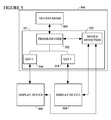
- Figure 5 illustrates a preferred system-level diagram that illustrates the main hardware components of the instant invention.
- the GUIs will preferably be stored in a database, a flat file, or in multiple individual files.
- the pre-designed GUIs will each generally feature the same basic function set, with the primary differences between them being the arrangement and size of the buttons, icons and fonts.
- each GUI will differ in functionality as is described more fully hereinafter.
- GUIs for each device will preferably have been stored within a database (to include both flat, hierarchical, etc., databases) or as separate files. Thus, each GUI can be separately accessed and read as required.
- At least a portion of the instant invention will be implemented in form of software running on a user's computer 100 which would typically include the personal computer and an attached display device.
- a computer 100 will have some amount of program memory and hard disk storage (whether internal or accessible via a network) as is conventionally utilized by such units.
- an external camera 110 of some sort might be utilized with - and will be preferably be connectible to - the computer so that video and/or graphic information can be transferred to and from the computer ( Figure 1).
- the camera 110 will be a digital video camera, although that is not a requirement, as it is contemplated that the user might wish to utilize still images from a digital still camera in the creation or in the viewing of his or her multimedia work.
- the camera might be integrated into the computer or some other electronic device and, thus, might not be a traditional single-purposes video or still camera.
- the camera will preferably be digital in nature, any sort of camera might be used, provided that the proper interfacing between it and the computer is utilized. Additionally a microphone 130 might be utilized so that the user can add voice-over narration to the multimedia work or the user might be able to control the functionality with speech input and a CD or DVD burner 120 might be useful for storing in-progress or completed works or stored media material available after using the software program. Additionally, given the modern trend toward incorporating advanced display controllers into computers, those of ordinary skill in the art will recognize that a display controller that has an additional TV tuner and TV output capabilities might be added to the computer, therefore enabling the computer to utilize an attached lower resolution conventional television 140.
- a user of the instant multimedia editing software will be presented with a computer screen display 200.
- Computer screen display 200 represents one preferred embodiment of the graphical user interface of the instant invention that would be appropriate for use on a generic CRT or TFT display device, wherein the graphical user interface contains a display of components of the sort generally indicated in this figure.
- menu sections 201 will be provided to allow a user to interact with the underlying program and would typically include options that allow the user to activate some familiar functions of multimedia viewing / editing programs, such as identifying multimedia material for input or to activate a help screen if questions occur.
- the on-screen GUI will preferably offer the user additional buttons 202 that provide access to various multimedia sources.
- buttons 202 will activate the corresponding media selection mode, wherein this mode allows the user to either edit the media material or alternatively to select the media material for display. For example, if "Video”, “Music” or “Photo” is selected a user would preferably be given the option of adding additional clips / images, sorting an existing collection, and/or playing available multimedia material. Selection of the buttons for "TV” or “Radio” will preferably cause the program to activate a hardware TV or radio tuner (if such is present). In the preferred embodiment, the user will be able to record and play TV material and/or listen to radio depending on the hardware capabilities of the computer that is running the instant program.
- the "Options" and “Settings” buttons 203 have been provided to allow the user to modify system wide settings and configurations.
- the GUI 200 might also be equipped with a file selection region of the screen 204 wherein the user will be able to browse, select, and utilize previously stored multimedia material.
- on-screen transport controls 206 are preferably styled to resemble their counterparts on a conventional VCR and provide a way for the user to use a computer mouse to control the playback of the multimedia work through the use of functions such as rewind, play, stop/record, fast forward etc.
- transport controls 206 are commonplace and well known in media editing programs. It is also typical in such programs to devote some portion of the screen to a view window 205 wherein the multimedia work may be played, i.e., the currently playing video work will appear in this region 205 while it is playing. Additionally it may also be desirable in some instances to expand the view window 205 to cover the entire screen.
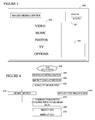
- FIG. 3 illustrates a preferred variation 300 of the GUI 200 that would be suitable for use on a low-resolution device such as a conventional TV screen.
- the selections that are available to the user via this GUI 300 are limited to only the main functions of the program (i.e., function list 302).
- function list 302 the main functions of the program
- representation of the menu items 302 have been increased in size to help counteract the effect of displaying them on a lower resolution device.
- Such an increase in menu item size will make it possible for a user to sit further away from the display as, for example, when he or she is intending to passively view the content that is controlled by the GUI.
- Such an increase in menu item size would, of course, make these items much easier to read and activate at a distance, thereby embracing the standard distance of a user to a TV screen.
- this figure potentially illustrates only the first layer of the program menu structure.
- the basic function set - of the underlying program that is operated by GUIs 200 and 300 is the same.
- the menu structure of the GUI 300 has been adapted to accommodate the graphical capabilities of a lower resolution display device, which means that the underlying menu structure has been designed to deliver the essential functions for viewing / playing multimedia to the user of the GUI, preferably without requiring the user to go deeper than three levels in the menu branches in order to access all of the program options.
- the date and time will be presented to the user in the top right corner of the user interface 301.
- the user interface contains a minimized view window 303 in which video material might be displayed as it is selected (e.g., it might act as a preview screen) or during actual playback. That being said, it is preferred that the user will be given the option of having the window 303 occupy the full screen during playback.
- Figure 4 illustrates an overview of some preferred steps of the instant invention as it would operate on a user's computer.
- the program will be started and initialize various internal variables according to methods well known to those of ordinary skill in the art.
- the instant invention will preferably determine whether or not any display devices are attached to the user's computer (step 410) which will typically be the case.
- the identification process will preferably be performed automatically in conjunction with the start up of the program. However, in some circumstances it might be desirable to let the user manually request this step (e.g., where new hardware has been recently been added to the computer).
- the instant invention will determine the resolution of the display device or devices identified previously. This test will preferably be performed in one of two different ways.
- the instant invention will initiate a query of the display devices according to methods well known to those of ordinary skill in the art. Information returned by that query will preferably include a listing of the preferred resolutions of that device.
- a second variant 440 will preferably implement a "brute force" testing procedure and would be appropriate, for example, where the attached display device did not have the capability to respond with a listing of its preferred resolutions.
- the controlling software will attempt to manually set the resolution of the attached device to a variety of different conventional resolutions (e.g., 640 by 480, 1280 by 960, etc.). In those instances where a "success" is reported by the display device (or, equivalently, an error condition is not reported) it will be assumed that the associated resolution is possible on this device.
- the instant invention preferably will compare the display device resolution(s) with the available GUIs and, more particularly, with the resolutions at which each has been optimized (step 450).
- each GUI will have one or more resolutions stored in connection with it.
- the stored resolutions will be those at which the associated GUI is best viewed.
- steps 410 through 450 will be generally referred to as an example of "determining the usage scenario" hereinafter. Additionally, this phrase should be understood to include instances where the user manually selects a display device type or overrides the automatic determination of any display-related parameters.
- device resolution is a preferred element of the parameters that describe the usage scenario, as is the brand/model of the display device.
- the user might wish to specify a contemplated usage distance, wherein the distance is measured from the user to the display device.
- the instant invention would use larger buttons, text sizes, etc.
- the usage scenario would include some indication by the user of how the program will be utilized (i.e., a mode of operation). That is, the user might indicate via a menu item that his or her intent was to experience (e.g., listen to and/or view) multimedia content, in which case a simplified GUI (e.g., one appropriate for use with a lower resolution device) would be presented no matter what the actual resolution of the display device is determined to be.
- a simplified GUI e.g., one appropriate for use with a lower resolution device
- the GUI that provides the most editing options for the device resolution will preferably be utilized.
- a GUI appropriate for that activity will be utilized.
- the instant invention selects the appropriate GUI from among the previously stored GUIs.
- the GUIs and associated resolutions will be stored together within a database. Note that at least two different graphical user interfaces will be accessible to the GUI section routine 400: one of which is optimized for viewing a generic TFT or CRT display device and the other of which is optimized for viewing on a TV screen or other low resolution screen.
- the instant invention next preferably assigns a graphical user interface to each connected display device 460 according to the results returned by the previous test 430 / 440 and matching 450 steps.
- the user will be able to designate which of the (potentially) multiple attached display devices will be used to control the underlying software.
- the assigned graphical user interfaces are then displayed to the user of the software program 470, either on the single available device, on one of the available devices (if two or more display devices are available), or on each of the available devices.
- the program will automatically switch the graphical user interfaces accordingly.
- switching between different screens (or different resolutions in a single-display system) will be possible at any time including, for example, during video playback, TV viewing, etc.
- Figures 5 illustrates a preferred system-level diagram that illustrates the main hardware components of the instant invention.
- the application 501 which is preferably a binary executable file
- the database that contains the pre-designed graphical user interfaces 505 are together stored in non-volatile storage such as a computer hard disk.
- One or more display devices 506 and 508 will be connected to the computer 500 as is conventionally done. Note that, although for purposes of illustration only two connected display devices are shown in Figure 5, it is possible that more than the two display devices will be so connected.
- the program module 503 responsible for communicating with the attached display devices 502 communicates through standard hardware interfaces well known to those of ordinary skill in the art.
- the communication between the module 503 and the connected display devices 506 / 508 will preferably return at least a listing of feasible resolutions for the attached devices but might also return such parameters as video refresh rate, whether or not the device is capable of displaying progressive scan video signals, etc.
- the returned display device parameter values are then compared with those of the previously stored GUIs within the GUI database 505. Once one or more GUIs 504 / 514 have been selected, the core program code 501 will communicate with the user / display device(s) by way of those interfaces.
- GUIs might be utilized and this is especially likely where two or more display devices are connected to the same PC and each such device is operating at a different video resolution.
- each display device will be assigned its own GUI and, depending on which display is currently active, interaction with the user will be carried out through the assigned GUI 504 / 514.
- the GUI database 505 preferably takes the form indicated below.
- each GUI in the database will have been reduced to its component parts for storage therein.
- the graphical images (both ornamental and functional) that are used to create the GUI will be stored in the database, as well as its graphical background (if any), and the button set that has been optimized for use with that GUI.
- the technical / programming specifications for the GUI will be stored in the database along with the graphic elements.
- the technical specifications might include information such as the preferred colour choices and dimensions of the fonts, buttons etc.
- the information that is stored with the GUI will preferably include some sort of description of the functionality that is to be associated with each button or menu item.
- a parameter field might be created that will be used to read a "rotation" parameter from a user (i.e., the "field type”), with the mechanism for obtaining this information being in the form of a "slider” (the “input mechanism”) that is to be located at screen coordinates (100,200) ("field location") and that is to be scaled from 0 to 360 ("parameter range”).
- a “slider” the “input mechanism”
- the instant invention will display multiple / different graphical user interfaces simultaneously on multiple display devices.
- the graphical user interface is also specifically adapted to the specifications of the hand held device after a detection step. That is, since the instant invention is potentially able to operate with any conceivable screen resolution (provided that the designer has made accommodations for such) the instant invention could potentially be used to create cross platform applications that have would display properly whether utilizing a conventional video display device or, for example, the screen of a handheld computer.
Landscapes
- Engineering & Computer Science (AREA)
- Theoretical Computer Science (AREA)
- General Engineering & Computer Science (AREA)
- Human Computer Interaction (AREA)
- Physics & Mathematics (AREA)
- General Physics & Mathematics (AREA)
- Software Systems (AREA)
- Computer Graphics (AREA)
- User Interface Of Digital Computer (AREA)
- Digital Computer Display Output (AREA)
Applications Claiming Priority (1)
| Application Number | Priority Date | Filing Date | Title |
|---|---|---|---|
| US10/949,626 US20060067654A1 (en) | 2004-09-24 | 2004-09-24 | Graphical user interface adaptable to multiple display devices |
Publications (2)
| Publication Number | Publication Date |
|---|---|
| EP1640855A2 true EP1640855A2 (de) | 2006-03-29 |
| EP1640855A3 EP1640855A3 (de) | 2008-08-13 |
Family
ID=35584765
Family Applications (1)
| Application Number | Title | Priority Date | Filing Date |
|---|---|---|---|
| EP05108788A Withdrawn EP1640855A3 (de) | 2004-09-24 | 2005-09-23 | Grafische Benutzeroberfläche mit Anpassung an mehreren Darstellungsgeräten |
Country Status (2)
| Country | Link |
|---|---|
| US (1) | US20060067654A1 (de) |
| EP (1) | EP1640855A3 (de) |
Cited By (38)
| Publication number | Priority date | Publication date | Assignee | Title |
|---|---|---|---|---|
| EP2093765A1 (de) | 2008-02-22 | 2009-08-26 | NTT DoCoMo, Inc. | Videobearbeitungsvorrichtung, Endgerät und GUI-Programmübertragungsverfahren |
| WO2011084857A1 (en) * | 2010-01-06 | 2011-07-14 | Apple Inc. | Apparatus and method having multiple application display modes including mode with display resolution of another apparatus |
| US8698845B2 (en) | 2010-01-06 | 2014-04-15 | Apple Inc. | Device, method, and graphical user interface with interactive popup views |
| US8806369B2 (en) | 2011-08-26 | 2014-08-12 | Apple Inc. | Device, method, and graphical user interface for managing and interacting with concurrently open software applications |
| US9052925B2 (en) | 2010-04-07 | 2015-06-09 | Apple Inc. | Device, method, and graphical user interface for managing concurrently open software applications |
| US9244606B2 (en) | 2010-12-20 | 2016-01-26 | Apple Inc. | Device, method, and graphical user interface for navigation of concurrently open software applications |
| US9513801B2 (en) | 2010-04-07 | 2016-12-06 | Apple Inc. | Accessing electronic notifications and settings icons with gestures |
| US9602729B2 (en) | 2015-06-07 | 2017-03-21 | Apple Inc. | Devices and methods for capturing and interacting with enhanced digital images |
| US9619076B2 (en) | 2012-05-09 | 2017-04-11 | Apple Inc. | Device, method, and graphical user interface for transitioning between display states in response to a gesture |
| US9645732B2 (en) | 2015-03-08 | 2017-05-09 | Apple Inc. | Devices, methods, and graphical user interfaces for displaying and using menus |
| US9674426B2 (en) | 2015-06-07 | 2017-06-06 | Apple Inc. | Devices and methods for capturing and interacting with enhanced digital images |
| US9684429B2 (en) | 2013-03-15 | 2017-06-20 | Apple Inc. | Device, method, and graphical user interface for managing concurrently open software applications |
| US9753639B2 (en) | 2012-05-09 | 2017-09-05 | Apple Inc. | Device, method, and graphical user interface for displaying content associated with a corresponding affordance |
| US9778771B2 (en) | 2012-12-29 | 2017-10-03 | Apple Inc. | Device, method, and graphical user interface for transitioning between touch input to display output relationships |
| US9785305B2 (en) | 2015-03-19 | 2017-10-10 | Apple Inc. | Touch input cursor manipulation |
| US9823831B2 (en) | 2010-04-07 | 2017-11-21 | Apple Inc. | Device, method, and graphical user interface for managing concurrently open software applications |
| US9823839B2 (en) | 2012-05-09 | 2017-11-21 | Apple Inc. | Device, method, and graphical user interface for displaying additional information in response to a user contact |
| US9886184B2 (en) | 2012-05-09 | 2018-02-06 | Apple Inc. | Device, method, and graphical user interface for providing feedback for changing activation states of a user interface object |
| US9959025B2 (en) | 2012-12-29 | 2018-05-01 | Apple Inc. | Device, method, and graphical user interface for navigating user interface hierarchies |
| US9990121B2 (en) | 2012-05-09 | 2018-06-05 | Apple Inc. | Device, method, and graphical user interface for moving a user interface object based on an intensity of a press input |
| US9996231B2 (en) | 2012-05-09 | 2018-06-12 | Apple Inc. | Device, method, and graphical user interface for manipulating framed graphical objects |
| US10042542B2 (en) | 2012-05-09 | 2018-08-07 | Apple Inc. | Device, method, and graphical user interface for moving and dropping a user interface object |
| US10048757B2 (en) | 2015-03-08 | 2018-08-14 | Apple Inc. | Devices and methods for controlling media presentation |
| US10078442B2 (en) | 2012-12-29 | 2018-09-18 | Apple Inc. | Device, method, and graphical user interface for determining whether to scroll or select content based on an intensity theshold |
| US10095396B2 (en) | 2015-03-08 | 2018-10-09 | Apple Inc. | Devices, methods, and graphical user interfaces for interacting with a control object while dragging another object |
| US10095391B2 (en) | 2012-05-09 | 2018-10-09 | Apple Inc. | Device, method, and graphical user interface for selecting user interface objects |
| US10126930B2 (en) | 2012-05-09 | 2018-11-13 | Apple Inc. | Device, method, and graphical user interface for scrolling nested regions |
| US10162452B2 (en) | 2015-08-10 | 2018-12-25 | Apple Inc. | Devices and methods for processing touch inputs based on their intensities |
| US10175757B2 (en) | 2012-05-09 | 2019-01-08 | Apple Inc. | Device, method, and graphical user interface for providing tactile feedback for touch-based operations performed and reversed in a user interface |
| US10175864B2 (en) | 2012-05-09 | 2019-01-08 | Apple Inc. | Device, method, and graphical user interface for selecting object within a group of objects in accordance with contact intensity |
| US10310732B2 (en) | 2013-03-15 | 2019-06-04 | Apple Inc. | Device, method, and graphical user interface for concurrently displaying a plurality of settings controls |
| US10437333B2 (en) | 2012-12-29 | 2019-10-08 | Apple Inc. | Device, method, and graphical user interface for forgoing generation of tactile output for a multi-contact gesture |
| US10496260B2 (en) | 2012-05-09 | 2019-12-03 | Apple Inc. | Device, method, and graphical user interface for pressure-based alteration of controls in a user interface |
| US10620781B2 (en) | 2012-12-29 | 2020-04-14 | Apple Inc. | Device, method, and graphical user interface for moving a cursor according to a change in an appearance of a control icon with simulated three-dimensional characteristics |
| US11068153B2 (en) | 2012-05-09 | 2021-07-20 | Apple Inc. | Device, method, and graphical user interface for displaying user interface objects corresponding to an application |
| US12461646B2 (en) | 2008-04-01 | 2025-11-04 | Litl Llc | System and method for streamlining user interaction with electronic content |
| US12461557B2 (en) | 2008-04-01 | 2025-11-04 | Litl Llc | Portable computer with multiple display configurations |
| US12591353B2 (en) | 2008-04-01 | 2026-03-31 | Litl Llc | Method and apparatus for managing digital media content |
Families Citing this family (23)
| Publication number | Priority date | Publication date | Assignee | Title |
|---|---|---|---|---|
| US8947543B2 (en) * | 2002-05-08 | 2015-02-03 | Hewlett-Packard Development Company, L.P. | System and method of personalizing a user interface of a portable electronic device |
| JP2006248217A (ja) * | 2005-02-09 | 2006-09-21 | Canon Inc | 情報処理装置及び情報処理方法並びにプログラム |
| US7683920B2 (en) * | 2005-09-14 | 2010-03-23 | Onkyo Corporation | Image sending/receiving device |
| US7311526B2 (en) * | 2005-09-26 | 2007-12-25 | Apple Inc. | Magnetic connector for electronic device |
| US8982181B2 (en) * | 2006-06-13 | 2015-03-17 | Newbery Revocable Trust Indenture | Digital stereo photographic system |
| JP5335610B2 (ja) * | 2009-08-17 | 2013-11-06 | キヤノン株式会社 | 画像処理装置及びその制御方法と通信システム |
| CN102446054B (zh) * | 2010-09-30 | 2014-09-10 | 国际商业机器公司 | 用于显示网页的方法和系统 |
| TWM408213U (en) * | 2010-12-28 | 2011-07-21 | Tse-Ming Chang | Smart synchronous internet and non-intenet song selection karaoke device |
| KR20120123208A (ko) * | 2011-04-19 | 2012-11-08 | 삼성전자주식회사 | 휴대단말기의 어플리케이션 해상도 조절 장치 및 방법 |
| JP5784353B2 (ja) * | 2011-04-25 | 2015-09-24 | オリンパス株式会社 | 画像表示装置 |
| US9817442B2 (en) * | 2012-02-28 | 2017-11-14 | Razer (Asia-Pacific) Pte. Ltd. | Systems and methods for presenting visual interface content |
| WO2014089807A1 (en) * | 2012-12-13 | 2014-06-19 | Thomson Licensing | Remote control of a camera module |
| US10445421B2 (en) | 2013-02-21 | 2019-10-15 | International Business Machines Corporation | Optimizing rendering of data tables |
| CN106063241B (zh) * | 2014-03-10 | 2019-02-15 | 京瓷办公信息系统株式会社 | 图像形成装置 |
| JP6379534B2 (ja) * | 2014-03-11 | 2018-08-29 | 株式会社リコー | 情報処理システム、クライアント装置、及び情報処理方法 |
| US9655027B1 (en) | 2014-07-11 | 2017-05-16 | ProSports Technologies, LLC | Event data transmission to eventgoer devices |
| US9760572B1 (en) | 2014-07-11 | 2017-09-12 | ProSports Technologies, LLC | Event-based content collection for network-based distribution |
| WO2016007962A1 (en) | 2014-07-11 | 2016-01-14 | ProSports Technologies, LLC | Camera feed distribution from event venue virtual seat cameras |
| US9498678B2 (en) | 2014-07-11 | 2016-11-22 | ProSports Technologies, LLC | Ball tracker camera |
| WO2016007967A1 (en) | 2014-07-11 | 2016-01-14 | ProSports Technologies, LLC | Ball tracker snippets |
| US9729644B1 (en) | 2014-07-28 | 2017-08-08 | ProSports Technologies, LLC | Event and fantasy league data transmission to eventgoer devices |
| US9699523B1 (en) | 2014-09-08 | 2017-07-04 | ProSports Technologies, LLC | Automated clip creation |
| US11848099B1 (en) | 2020-01-15 | 2023-12-19 | Navvis & Company, LLC | Unified ecosystem experience for managing multiple healthcare applications from a common interface with context passing between applications |
Citations (1)
| Publication number | Priority date | Publication date | Assignee | Title |
|---|---|---|---|---|
| US20030229900A1 (en) | 2002-05-10 | 2003-12-11 | Richard Reisman | Method and apparatus for browsing using multiple coordinated device sets |
Family Cites Families (23)
| Publication number | Priority date | Publication date | Assignee | Title |
|---|---|---|---|---|
| US5493335A (en) * | 1993-06-30 | 1996-02-20 | Eastman Kodak Company | Single sensor color camera with user selectable image record size |
| US5838938A (en) * | 1995-02-15 | 1998-11-17 | Sony Electronics, Inc. | Multimedia user interface employing components of color to indicate the values of variables |
| US6459425B1 (en) * | 1997-08-25 | 2002-10-01 | Richard A. Holub | System for automatic color calibration |
| US6628303B1 (en) * | 1996-07-29 | 2003-09-30 | Avid Technology, Inc. | Graphical user interface for a motion video planning and editing system for a computer |
| US6154600A (en) * | 1996-08-06 | 2000-11-28 | Applied Magic, Inc. | Media editor for non-linear editing system |
| US5990972A (en) * | 1996-10-22 | 1999-11-23 | Lucent Technologies, Inc. | System and method for displaying a video menu |
| US6211869B1 (en) * | 1997-04-04 | 2001-04-03 | Avid Technology, Inc. | Simultaneous storage and network transmission of multimedia data with video host that requests stored data according to response time from a server |
| JP3501939B2 (ja) * | 1997-06-04 | 2004-03-02 | シャープ株式会社 | アクティブマトリクス型画像表示装置 |
| US6573907B1 (en) * | 1997-07-03 | 2003-06-03 | Obvious Technology | Network distribution and management of interactive video and multi-media containers |
| US6313851B1 (en) * | 1997-08-27 | 2001-11-06 | Microsoft Corporation | User friendly remote system interface |
| US6028643A (en) * | 1997-09-03 | 2000-02-22 | Colorgraphic Communications Corporation | Multiple-screen video adapter with television tuner |
| US6429903B1 (en) * | 1997-09-03 | 2002-08-06 | Colorgraphic Communications Corporation | Video adapter for supporting at least one television monitor |
| US6237010B1 (en) * | 1997-10-06 | 2001-05-22 | Canon Kabushiki Kaisha | Multimedia application using flashpix file format |
| US6097441A (en) * | 1997-12-31 | 2000-08-01 | Eremote, Inc. | System for dual-display interaction with integrated television and internet content |
| US6215485B1 (en) * | 1998-04-03 | 2001-04-10 | Avid Technology, Inc. | Storing effects descriptions from a nonlinear editor using field chart and/or pixel coordinate data for use by a compositor |
| CN1269116A (zh) * | 1998-05-13 | 2000-10-04 | 松下电器产业株式会社 | 网络控制系统、控制器及设备 |
| JP3164070B2 (ja) * | 1998-07-24 | 2001-05-08 | 日本電気株式会社 | オブジェクト配置制御装置、方法及び記録媒体 |
| WO2001023994A1 (en) * | 1999-09-27 | 2001-04-05 | Koninklijke Philips Electronics N.V. | Handheld retrieves ui from server for control of apparatus via server |
| WO2002008948A2 (en) * | 2000-07-24 | 2002-01-31 | Vivcom, Inc. | System and method for indexing, searching, identifying, and editing portions of electronic multimedia files |
| US6802058B2 (en) * | 2001-05-10 | 2004-10-05 | International Business Machines Corporation | Method and apparatus for synchronized previewing user-interface appearance on multiple platforms |
| US20030063120A1 (en) * | 2001-09-28 | 2003-04-03 | Wong Hoi Lee Candy | Scalable graphical user interface architecture |
| US7952569B2 (en) * | 2002-08-08 | 2011-05-31 | Hewlett-Packard Development Company, L.P. | System and method of switching between multiple viewing modes in a multi-head computer system |
| US7574691B2 (en) * | 2003-03-17 | 2009-08-11 | Macrovision Corporation | Methods and apparatus for rendering user interfaces and display information on remote client devices |
-
2004
- 2004-09-24 US US10/949,626 patent/US20060067654A1/en not_active Abandoned
-
2005
- 2005-09-23 EP EP05108788A patent/EP1640855A3/de not_active Withdrawn
Patent Citations (1)
| Publication number | Priority date | Publication date | Assignee | Title |
|---|---|---|---|---|
| US20030229900A1 (en) | 2002-05-10 | 2003-12-11 | Richard Reisman | Method and apparatus for browsing using multiple coordinated device sets |
Cited By (64)
| Publication number | Priority date | Publication date | Assignee | Title |
|---|---|---|---|---|
| EP2093765A1 (de) | 2008-02-22 | 2009-08-26 | NTT DoCoMo, Inc. | Videobearbeitungsvorrichtung, Endgerät und GUI-Programmübertragungsverfahren |
| CN101515281B (zh) * | 2008-02-22 | 2011-11-09 | 株式会社Ntt都科摩 | 影像编辑装置、终端装置以及gui程序发送方法 |
| US12461646B2 (en) | 2008-04-01 | 2025-11-04 | Litl Llc | System and method for streamlining user interaction with electronic content |
| US12461557B2 (en) | 2008-04-01 | 2025-11-04 | Litl Llc | Portable computer with multiple display configurations |
| US12591353B2 (en) | 2008-04-01 | 2026-03-31 | Litl Llc | Method and apparatus for managing digital media content |
| WO2011084857A1 (en) * | 2010-01-06 | 2011-07-14 | Apple Inc. | Apparatus and method having multiple application display modes including mode with display resolution of another apparatus |
| EP2354928A1 (de) * | 2010-01-06 | 2011-08-10 | Apple Inc. | Vorrichtung und Verfahren mit mehreren Anwendungsanzeigemodi mit Modus zur Anzeige der Anwendung in der Auflösung einer anderen Vorrichtung |
| US8698845B2 (en) | 2010-01-06 | 2014-04-15 | Apple Inc. | Device, method, and graphical user interface with interactive popup views |
| KR101483349B1 (ko) | 2010-01-06 | 2015-01-15 | 애플 인크. | 다른 장치의 디스플레이 해상도를 가지는 모드를 포함하는 복수의 애플리케이션 디스플레이 모드를 갖는 장치 및 방법 |
| US9569102B2 (en) | 2010-01-06 | 2017-02-14 | Apple Inc. | Device, method, and graphical user interface with interactive popup views |
| US9052926B2 (en) | 2010-04-07 | 2015-06-09 | Apple Inc. | Device, method, and graphical user interface for managing concurrently open software applications |
| US10101879B2 (en) | 2010-04-07 | 2018-10-16 | Apple Inc. | Device, method, and graphical user interface for managing concurrently open software applications using a three-dimensional stack of images of open applications |
| US9513801B2 (en) | 2010-04-07 | 2016-12-06 | Apple Inc. | Accessing electronic notifications and settings icons with gestures |
| US9058186B2 (en) | 2010-04-07 | 2015-06-16 | Apple Inc. | Device, method, and graphical user interface for managing concurrently open software applications |
| US9823831B2 (en) | 2010-04-07 | 2017-11-21 | Apple Inc. | Device, method, and graphical user interface for managing concurrently open software applications |
| US10891023B2 (en) | 2010-04-07 | 2021-01-12 | Apple Inc. | Device, method and graphical user interface for shifting a user interface between positions on a touch-sensitive display in response to detected inputs |
| US9052925B2 (en) | 2010-04-07 | 2015-06-09 | Apple Inc. | Device, method, and graphical user interface for managing concurrently open software applications |
| US10156962B2 (en) | 2010-04-07 | 2018-12-18 | Apple Inc. | Device, method and graphical user interface for sliding an application view by a predefined amount of sliding based on a touch input to a predefined button of a multifunction device |
| US10901601B2 (en) | 2010-04-07 | 2021-01-26 | Apple Inc. | Device, method, and graphical user interface for managing concurrently open software applications |
| US10007400B2 (en) | 2010-12-20 | 2018-06-26 | Apple Inc. | Device, method, and graphical user interface for navigation of concurrently open software applications |
| US11880550B2 (en) | 2010-12-20 | 2024-01-23 | Apple Inc. | Device, method, and graphical user interface for navigation of concurrently open software applications |
| US11487404B2 (en) | 2010-12-20 | 2022-11-01 | Apple Inc. | Device, method, and graphical user interface for navigation of concurrently open software applications |
| US10261668B2 (en) | 2010-12-20 | 2019-04-16 | Apple Inc. | Device, method, and graphical user interface for navigation of concurrently open software applications |
| US12321569B2 (en) | 2010-12-20 | 2025-06-03 | Apple Inc. | Device, method, and graphical user interface for navigation of concurrently open software applications |
| US9244606B2 (en) | 2010-12-20 | 2016-01-26 | Apple Inc. | Device, method, and graphical user interface for navigation of concurrently open software applications |
| US10852914B2 (en) | 2010-12-20 | 2020-12-01 | Apple Inc. | Device, method, and graphical user interface for navigation of concurrently open software applications |
| US8806369B2 (en) | 2011-08-26 | 2014-08-12 | Apple Inc. | Device, method, and graphical user interface for managing and interacting with concurrently open software applications |
| US9207838B2 (en) | 2011-08-26 | 2015-12-08 | Apple Inc. | Device, method, and graphical user interface for managing and interacting with concurrently open software applications |
| US10191627B2 (en) | 2012-05-09 | 2019-01-29 | Apple Inc. | Device, method, and graphical user interface for manipulating framed graphical objects |
| US10095391B2 (en) | 2012-05-09 | 2018-10-09 | Apple Inc. | Device, method, and graphical user interface for selecting user interface objects |
| US9990121B2 (en) | 2012-05-09 | 2018-06-05 | Apple Inc. | Device, method, and graphical user interface for moving a user interface object based on an intensity of a press input |
| US10042542B2 (en) | 2012-05-09 | 2018-08-07 | Apple Inc. | Device, method, and graphical user interface for moving and dropping a user interface object |
| US9619076B2 (en) | 2012-05-09 | 2017-04-11 | Apple Inc. | Device, method, and graphical user interface for transitioning between display states in response to a gesture |
| US9886184B2 (en) | 2012-05-09 | 2018-02-06 | Apple Inc. | Device, method, and graphical user interface for providing feedback for changing activation states of a user interface object |
| US10496260B2 (en) | 2012-05-09 | 2019-12-03 | Apple Inc. | Device, method, and graphical user interface for pressure-based alteration of controls in a user interface |
| US9996231B2 (en) | 2012-05-09 | 2018-06-12 | Apple Inc. | Device, method, and graphical user interface for manipulating framed graphical objects |
| US10481690B2 (en) | 2012-05-09 | 2019-11-19 | Apple Inc. | Device, method, and graphical user interface for providing tactile feedback for media adjustment operations performed in a user interface |
| US11068153B2 (en) | 2012-05-09 | 2021-07-20 | Apple Inc. | Device, method, and graphical user interface for displaying user interface objects corresponding to an application |
| US10126930B2 (en) | 2012-05-09 | 2018-11-13 | Apple Inc. | Device, method, and graphical user interface for scrolling nested regions |
| US9823839B2 (en) | 2012-05-09 | 2017-11-21 | Apple Inc. | Device, method, and graphical user interface for displaying additional information in response to a user contact |
| US9753639B2 (en) | 2012-05-09 | 2017-09-05 | Apple Inc. | Device, method, and graphical user interface for displaying content associated with a corresponding affordance |
| US10175757B2 (en) | 2012-05-09 | 2019-01-08 | Apple Inc. | Device, method, and graphical user interface for providing tactile feedback for touch-based operations performed and reversed in a user interface |
| US10175864B2 (en) | 2012-05-09 | 2019-01-08 | Apple Inc. | Device, method, and graphical user interface for selecting object within a group of objects in accordance with contact intensity |
| US10078442B2 (en) | 2012-12-29 | 2018-09-18 | Apple Inc. | Device, method, and graphical user interface for determining whether to scroll or select content based on an intensity theshold |
| US9959025B2 (en) | 2012-12-29 | 2018-05-01 | Apple Inc. | Device, method, and graphical user interface for navigating user interface hierarchies |
| US9778771B2 (en) | 2012-12-29 | 2017-10-03 | Apple Inc. | Device, method, and graphical user interface for transitioning between touch input to display output relationships |
| US10437333B2 (en) | 2012-12-29 | 2019-10-08 | Apple Inc. | Device, method, and graphical user interface for forgoing generation of tactile output for a multi-contact gesture |
| US10101887B2 (en) | 2012-12-29 | 2018-10-16 | Apple Inc. | Device, method, and graphical user interface for navigating user interface hierarchies |
| US9857897B2 (en) | 2012-12-29 | 2018-01-02 | Apple Inc. | Device and method for assigning respective portions of an aggregate intensity to a plurality of contacts |
| US10620781B2 (en) | 2012-12-29 | 2020-04-14 | Apple Inc. | Device, method, and graphical user interface for moving a cursor according to a change in an appearance of a control icon with simulated three-dimensional characteristics |
| US11137898B2 (en) | 2013-03-15 | 2021-10-05 | Apple Inc. | Device, method, and graphical user interface for displaying a plurality of settings controls |
| US9684429B2 (en) | 2013-03-15 | 2017-06-20 | Apple Inc. | Device, method, and graphical user interface for managing concurrently open software applications |
| US12216897B2 (en) | 2013-03-15 | 2025-02-04 | Apple Inc. | Device, method, and graphical user interface for displaying a plurality of setting controls |
| US11989409B2 (en) | 2013-03-15 | 2024-05-21 | Apple Inc. | Device, method, and graphical user interface for displaying a plurality of settings controls |
| US10310732B2 (en) | 2013-03-15 | 2019-06-04 | Apple Inc. | Device, method, and graphical user interface for concurrently displaying a plurality of settings controls |
| US10095396B2 (en) | 2015-03-08 | 2018-10-09 | Apple Inc. | Devices, methods, and graphical user interfaces for interacting with a control object while dragging another object |
| US10048757B2 (en) | 2015-03-08 | 2018-08-14 | Apple Inc. | Devices and methods for controlling media presentation |
| US9645732B2 (en) | 2015-03-08 | 2017-05-09 | Apple Inc. | Devices, methods, and graphical user interfaces for displaying and using menus |
| US9785305B2 (en) | 2015-03-19 | 2017-10-10 | Apple Inc. | Touch input cursor manipulation |
| US9860451B2 (en) | 2015-06-07 | 2018-01-02 | Apple Inc. | Devices and methods for capturing and interacting with enhanced digital images |
| US9674426B2 (en) | 2015-06-07 | 2017-06-06 | Apple Inc. | Devices and methods for capturing and interacting with enhanced digital images |
| US9602729B2 (en) | 2015-06-07 | 2017-03-21 | Apple Inc. | Devices and methods for capturing and interacting with enhanced digital images |
| US11182017B2 (en) | 2015-08-10 | 2021-11-23 | Apple Inc. | Devices and methods for processing touch inputs based on their intensities |
| US10162452B2 (en) | 2015-08-10 | 2018-12-25 | Apple Inc. | Devices and methods for processing touch inputs based on their intensities |
Also Published As
| Publication number | Publication date |
|---|---|
| EP1640855A3 (de) | 2008-08-13 |
| US20060067654A1 (en) | 2006-03-30 |
Similar Documents
| Publication | Publication Date | Title |
|---|---|---|
| EP1640855A2 (de) | Grafische Benutzeroberfläche mit Anpassung an mehreren Darstellungsgeräten | |
| US7434165B2 (en) | Programmed apparatus and system of dynamic display of presentation files | |
| US10545636B2 (en) | Taskbar media player | |
| EP2302495B1 (de) | Anzeigevorrichtung und anzeigeverfahren für einen menübildschirm | |
| US11526252B2 (en) | Method and apparatus for navigating a hierarchical menu based user interface | |
| US9389756B2 (en) | Displaying a selectable item over a blurred user interface | |
| AU2004306754B2 (en) | System and method of playback and feature control for video players | |
| US7631274B2 (en) | Information processing apparatus | |
| CA2644111C (en) | Method and system for displaying search results | |
| US8739052B2 (en) | Media user interface layers and overlays | |
| US8243017B2 (en) | Menu overlay including context dependent menu icon | |
| US8239894B2 (en) | Electronic apparatus, display controlling method for electronic apparatus and graphical user interface | |
| US20070186180A1 (en) | Ubiquitous navbar user interface across multiple heterogeneous digital media devices | |
| EP2485137A2 (de) | Multimediaspieler und Verfahren zur Anzeige des Menübildschirms | |
| US9565387B2 (en) | Perspective scale video with navigation menu | |
| US20060224575A1 (en) | System and method for dynamic creation and management of lists on a distance user interface | |
| US20080158148A1 (en) | Programmable on screen display and remote control | |
| US20050268252A1 (en) | Switching between an arm's length user interface and a distance user interface | |
| US20130272673A1 (en) | System and method for guided video creation | |
| JP2009515234A (ja) | メディアユーザインタフェーススタートメニュー | |
| JP2003084884A (ja) | 情報処理装置および方法、並びにプログラム | |
| US20060093309A1 (en) | System and method for creating a photo movie | |
| US20100188351A1 (en) | Apparatus and method for playing of multimedia item | |
| EP2474895B1 (de) | Benutzerschnittstelle zur Erkundung von Medieninhalt | |
| WO2023093108A1 (zh) | 一种显示设备及文件展示方法 |
Legal Events
| Date | Code | Title | Description |
|---|---|---|---|
| PUAI | Public reference made under article 153(3) epc to a published international application that has entered the european phase |
Free format text: ORIGINAL CODE: 0009012 |
|
| AK | Designated contracting states |
Kind code of ref document: A2 Designated state(s): AT BE BG CH CY CZ DE DK EE ES FI FR GB GR HU IE IS IT LI LT LU LV MC NL PL PT RO SE SI SK TR |
|
| AX | Request for extension of the european patent |
Extension state: AL BA HR MK YU |
|
| PUAL | Search report despatched |
Free format text: ORIGINAL CODE: 0009013 |
|
| AK | Designated contracting states |
Kind code of ref document: A3 Designated state(s): AT BE BG CH CY CZ DE DK EE ES FI FR GB GR HU IE IS IT LI LT LU LV MC NL PL PT RO SE SI SK TR |
|
| AX | Request for extension of the european patent |
Extension state: AL BA HR MK YU |
|
| 17P | Request for examination filed |
Effective date: 20090205 |
|
| AKX | Designation fees paid |
Designated state(s): AT BE BG CH CY CZ DE DK EE ES FI FR GB GR HU IE IS IT LI LT LU LV MC NL PL PT RO SE SI SK TR |
|
| 17Q | First examination report despatched |
Effective date: 20100528 |
|
| STAA | Information on the status of an ep patent application or granted ep patent |
Free format text: STATUS: THE APPLICATION IS DEEMED TO BE WITHDRAWN |
|
| 18D | Application deemed to be withdrawn |
Effective date: 20140611 |