EP1643682A2 - Verfahren, Vorrichtung, System und Computerprogramm zur Übermittlung von Einstellungsdaten - Google Patents
Verfahren, Vorrichtung, System und Computerprogramm zur Übermittlung von Einstellungsdaten Download PDFInfo
- Publication number
- EP1643682A2 EP1643682A2 EP05256073A EP05256073A EP1643682A2 EP 1643682 A2 EP1643682 A2 EP 1643682A2 EP 05256073 A EP05256073 A EP 05256073A EP 05256073 A EP05256073 A EP 05256073A EP 1643682 A2 EP1643682 A2 EP 1643682A2
- Authority
- EP
- European Patent Office
- Prior art keywords
- setting data
- user
- target devices
- data
- setting
- Prior art date
- Legal status (The legal status is an assumption and is not a legal conclusion. Google has not performed a legal analysis and makes no representation as to the accuracy of the status listed.)
- Granted
Links
- 238000000034 method Methods 0.000 title claims abstract description 145
- 238000004590 computer program Methods 0.000 title claims description 7
- 230000005540 biological transmission Effects 0.000 description 150
- 238000012790 confirmation Methods 0.000 description 20
- 230000006870 function Effects 0.000 description 18
- 230000004044 response Effects 0.000 description 11
- 238000004891 communication Methods 0.000 description 4
- 238000010586 diagram Methods 0.000 description 4
- 230000000977 initiatory effect Effects 0.000 description 4
- 101001094649 Homo sapiens Popeye domain-containing protein 3 Proteins 0.000 description 2
- 101000608234 Homo sapiens Pyrin domain-containing protein 5 Proteins 0.000 description 2
- 101000578693 Homo sapiens Target of rapamycin complex subunit LST8 Proteins 0.000 description 2
- 108700028516 Lan-7 Proteins 0.000 description 2
- 102100027802 Target of rapamycin complex subunit LST8 Human genes 0.000 description 2
- 238000012545 processing Methods 0.000 description 2
- 238000007796 conventional method Methods 0.000 description 1
Images











Classifications
-
- H—ELECTRICITY
- H04—ELECTRIC COMMUNICATION TECHNIQUE
- H04L—TRANSMISSION OF DIGITAL INFORMATION, e.g. TELEGRAPHIC COMMUNICATION
- H04L41/00—Arrangements for maintenance, administration or management of data switching networks, e.g. of packet switching networks
- H04L41/08—Configuration management of networks or network elements
- H04L41/0866—Checking the configuration
- H04L41/0869—Validating the configuration within one network element
-
- H—ELECTRICITY
- H04—ELECTRIC COMMUNICATION TECHNIQUE
- H04L—TRANSMISSION OF DIGITAL INFORMATION, e.g. TELEGRAPHIC COMMUNICATION
- H04L41/00—Arrangements for maintenance, administration or management of data switching networks, e.g. of packet switching networks
- H04L41/08—Configuration management of networks or network elements
- H04L41/0803—Configuration setting
- H04L41/0813—Configuration setting characterised by the conditions triggering a change of settings
- H04L41/0816—Configuration setting characterised by the conditions triggering a change of settings the condition being an adaptation, e.g. in response to network events
-
- H—ELECTRICITY
- H04—ELECTRIC COMMUNICATION TECHNIQUE
- H04L—TRANSMISSION OF DIGITAL INFORMATION, e.g. TELEGRAPHIC COMMUNICATION
- H04L41/00—Arrangements for maintenance, administration or management of data switching networks, e.g. of packet switching networks
- H04L41/08—Configuration management of networks or network elements
- H04L41/0876—Aspects of the degree of configuration automation
- H04L41/0883—Semiautomatic configuration, e.g. proposals from system
-
- H—ELECTRICITY
- H04—ELECTRIC COMMUNICATION TECHNIQUE
- H04L—TRANSMISSION OF DIGITAL INFORMATION, e.g. TELEGRAPHIC COMMUNICATION
- H04L41/00—Arrangements for maintenance, administration or management of data switching networks, e.g. of packet switching networks
- H04L41/08—Configuration management of networks or network elements
- H04L41/0893—Assignment of logical groups to network elements
-
- H—ELECTRICITY
- H04—ELECTRIC COMMUNICATION TECHNIQUE
- H04L—TRANSMISSION OF DIGITAL INFORMATION, e.g. TELEGRAPHIC COMMUNICATION
- H04L41/00—Arrangements for maintenance, administration or management of data switching networks, e.g. of packet switching networks
- H04L41/22—Arrangements for maintenance, administration or management of data switching networks, e.g. of packet switching networks comprising specially adapted graphical user interfaces [GUI]
Definitions
- the technical field relates to a method, device, system and product for transmitting setting data to devices on a network.
- a conventional technique for transmitting setting data is to transmit the setting data from a single device to multiple devices at a time via a network.
- An example of such a single device is described in Japanese Patent Provisional Publication No. HEI 9-149076 (hereafter, referred to as JP HEI 9-149076).
- JP HEI 9-149076 setting data for facsimile devices is prepared in a server, and transmitted from the sever to the facsimile devices at a time.
- Pieces of setting data currently set to devices connected to the network are not always equal to one another. Therefore, there may be a case where, if new setting data is transmitted to the devices at a time, the new setting data for a certain device may be different from setting data previously set for the device, but identical to setting data previously set for another device.
- aspects are advantageous in that they provide at least one of a method, device, system and computer program product for transmitting setting data that for each of the devices allow a user to check whether a setting data update ns been made before transmitting setting data to the devices at a time.
- a method of transmitting setting data from a terminal device to target devices on a network includes the steps preparing new setting data for the plurality of target devices, obtaining current setting data to which the plurality of target devices are currently set, comparing the new setting data with the current setting data, and notifying a user of a result of the comparison.
- the method may include the step of allowing a user to decide whether to start transmitting the new setting data to the target devices after the step of the notifying.
- the user can decide whether to start the data transmission in accordance with the result of the comparing.
- the step of preparing new setting data may include the step of allowing the user to select the target devices from among the devices.
- the user can select the target devices.
- the step of obtaining the current setting data may obtain the current setting data from the target devices.
- the method may include the step of displaying error information when the step of obtaining the current setting data is not successfully completed.
- the user can appropriately deal with the problem before data transmission is performed, for example, by turning on power of the target device or checking the connection between the terminal device and the target device.
- the method may include the step of removing a device from the target devices in accordance with a user operation.
- the user can remove a device from the target devices if the user decides that the device does not need update of the setting data after the selection of the target devices is performed.
- the step of notifying the user of the result of the comparison may include displaying information identifying which portion of the new setting data is different from the current setting data for each of the target devices.
- the step of preparing the new setting data may include the steps of allowing the user to select a representative device from among the devices, and obtaining representative setting data to which the representative device is currently set.
- one of the representative setting data and modified setting data made by modifying the representative setting data may be used as the new setting data.
- the representative setting data or the modified representative setting data can be used as the new setting data, it is not necessary to manually input data to the terminal device.
- the method may include the step of allowing the user to designate one of a current data sending type and an updated data sending type.
- the user designates the current data sending type for example, all of the representative setting data may be transmitted to each of the target devices.
- setting data updated with respect to the representative setting data may be transmitted as the new setting data for each of the plurality of target devices.
- the representative device may be treated as one of the target devices in that the representative device undergoes the steps of comparing the new setting data with the current setting data, notifying the user of the result of the comparison, and starting to transmit the new setting data.
- the representative device Since the representative device is treated as one of the target devices, it becomes possible to transmit setting data made by modifying the representative setting data to the representative device as well as the target devices.
- the representative device may not be subject to the steps of comparing the new setting data with the current setting data, notifying the user of the result of the comparison, and starting to transmit the new setting data.
- the setting data of the representative device is securely protected.
- the method may include the step of transmitting setting data of setting items to the representative device, the setting data of setting items only being applied to the representative device.
- the setting data to be transmitted to the representative device may include data of items specific to the representative device.
- the preparing step of preparing the new setting data may include the step of allowing the user to select a representative device from among the plurality of devices.
- the representative device can be also selected as one of the plurality of target devices. If the representative device is selected as one of the plurality of target devices, the representative device may be treated as one of the plurality of target devices in the obtaining step, the comparing step and the notifying step.
- the representative device can be also targeted for the transmission of setting data, it is possible to apply the setting data, obtained by modifying the settings of the representative device, to the representative device in the setting data transmission for the target devices.
- the user is allowed to decide whether to include the representative device in the target devices.
- the method may include the step of transmitting the new setting data only to the representative device in accordance with a user instruction.
- the transmitting step of transmitting the new setting data only to the representative device may be performed if the representative device is included in the plurality of target devices and if the new setting data is modified after the new setting data is transmitted to at least one of the plurality of target devices.
- the transmitting step of transmitting the new setting data only to the representative device may be performed such that the user instruction is accepted if the representative device is included in the plurality of target devices and if the new setting data is modified after the new setting data is transmitted to at least one of the plurality of target devices, and that the user instruction is not accepted if the representative device is included in the plurality of target devices and if the new setting data is not modified after the new setting data is transmitted to at least one of the plurality of target devices.
- the user can know whether the new setting data is modified by judging a status (i.e., whether the user is in a state in which the user instruction is accepted), and is allowed to start the transmission of the modified new setting data, if necessary.
- the method may include the step of storing the result of the comparison in a log file.
- the user can know, for each of the target devices, whether settings of a device have been updated or not.
- the method may include the steps of allowing the user to modify the new setting data, and performing again the comparing and notifying steps with regard to the modified new setting data.
- the user can modify the new setting data after the user checks the result of the comparing.
- the allowing step may be performed after performing the step of notifying the user of a result of the comparison.
- the step of allowing the user to modify the new setting data may include allowing the user to select at least one advanced setting target device from among the target devices, and allowing the user to make an advanced setting for the selected at least one advanced setting target device.
- advanced setting data made by the advanced setting may be treated as the modified setting data.
- the method may include the step of transmitting the advanced setting data to the at least one advanced setting target device and transmitting the new setting data to the target devices other than the at least one advanced setting target device.
- the method may include the steps of allowing the user to input a cancellation command after performing the step of notifying the user of a result of the comparison, and repeating the method from the step of preparing new setting data.
- the user can input the cancellation command to stop data transmission if the user finds problems in the result of the comparing. If the user inputs the cancellation command, the method is performed again from the step of the allowing the user to select the plurality of target devices.
- Such a configuration enhances the usability in comparison with the case where, if a cancellation command is inputted, all of the steps for transmitting setting data from the terminal device to the plurality of target devices are performed from the beginning.
- the method may include the steps of allowing the user to input a refresh command after performing the step of notifying the user of a result of the comparison, and performing again the steps of the obtaining the current setting data, the comparing the new setting data with the current setting data, and the notifying the user of the result of the comparison if the refresh command is inputted by the user.
- the method may include the steps of allowing the user to input a search command after performing the step of notifying the user of a result of the comparison, and searching for devices to include devices among the target devices if the search command is inputted by the user.
- the method may include the step of performing again the steps of obtaining the current setting data, comparing the new setting data with the current setting data, and notifying the user of the result of the comparison if a search command is inputted by the user after the step of notifying the user of the result of the comparison and searched devices are included in the plurality of target devices.
- the comparing result is obtained with regard to the newly detected device after the search command is inputted.
- the step of allowing the user to select the target devices may include the steps of searching for devices to be included in the target devices, accepting a user designation of a device to be included in the target devices, and selecting a device found in the search for devices and the device designated by the user as the target devices.
- the new setting data may include a single piece of data
- the current setting data may include a plurality of pieces of data set to the target devices, respectively.
- a method of transmitting setting data to at least one target device on a network includes the steps of preparing new setting data for the at least one target device on the network, obtaining current setting data to which the at least one target device is currently set, comparing the new setting data with the current setting data, and notifying a user of a result of the comparison.
- a terminal device for transmitting setting data to target devices on a network.
- the terminal device is provided with a preparing system that prepares new setting data for the plurality of target devices, an obtaining system that obtains current setting data to which the target devices are currently set, a comparing system that compares the new setting data with the current setting data of the target devices, a notifying system that notifies a user of a comparison result provided by the comparing system, and a transmitting system that transmits the new setting data to the target devices in accordance with a user operation.
- a system for transmitting setting data to target devices on a network is provided with a preparing system that prepares new setting data for the target devices, an obtaining system that obtains current setting data to which the plurality of target devices are currently set, a comparing system that compares the new setting data with the current setting data of the target devices, a notifying system that notifies a user of a comparison result provided by the comparing system, and a transmitting system that transmits the new setting data to the target devices in accordance with a user operation.
- the device and method according to the present invention can be realized when appropriate programs are provided and executed by a computer.
- Such programs may be stored in recording medium such as a flexible disk, CD-ROM, memory cards and the like and distributed. Alternatively or optionally, such programs can be distributed through networks such as the Internet.
- Fig. 1 shows a general configuration of a network system in which a setting data transmission system is implemented according to the illustrative embodiment of the invention.
- the network system shown in Fig. 1 includes PCs (personal computers) 1A, 1B and 1 C, a router 2, printers 3, 4 and 5, and a LAN (local area network) 7 for connecting these nodes.
- PCs personal computers
- a router 2 printers 3, 4 and 5
- a LAN (local area network) 7 for connecting these nodes.
- the PCs 1A, 1B and 1C have the same configuration, and in Fig. 1, a block diagram of the PC 1A is illustrated as an example.
- the PC 1A includes a CPU (central processing unit) 101, a ROM (read only memory) 102, a RAM (random access memory) 103, an input device 105 such as a keyboard and a pointing device, a display unit 106, a storage device 107 such as a hard disc drive, and a network I/F (interface) 108 for connecting the PC 1A to the LAN 7.
- a multi-task operating system such as Windows ®, Linux ®, or MacOS ® is installed in the PCs 1A, 1B and 1C.
- the following example assumes that Windows ® is installed in the PCs 1A, 1B and 1C.
- the CPU 101 of the PC 1A executes tasks of programs in parallel on a time-division basis in accordance with a multi-task function of the OS.
- a setting data transmission process (which is explained in detail later) according to the illustrative embodiment is executed as one of such parallel tasks.
- the setting data transmission process is executed such that setting data is transmitted to more than one device at a time.
- the router 2 has the function of relaying data from one network to another network. Since the printers 3, 4 and 5 have the same configuration, in Fig. 1 a block diagram of the printer 3 is illustrated as an example. As shown in Fig. 1, the printer 3 includes s a CPU (central processing unit) 301, a ROM (read only memory) 302, a RAM (random access memory) 303, a NVRAM (non volatile RAM) 304, a display unit 306 on which various types of messages are displayed, a printing unit 307 having the function of printing images on a recording medium, and a network I/F (interface) 308 for connecting the printer 3 to the LAN 7. As described in detail later, in the setting data transmission process, the PC 1A (1B or 1C) operates, for example, to obtain setting data from one of the printers 3, 4 and 5 and to transmit setting data to the printers 3, 4 and 5 simultaneously.
- the PC 1A (1B or 1C) operates, for example, to obtain setting data from one of the printers 3, 4 and 5
- data transmission between the PCs and the printers is performed based on a simple network management protocol (SNMP).
- SNMP simple network management protocol
- Each of the printers 3 to 5 is configured to store a management information base (for example, a MIB 311 stored in the NVRAM 304 of the printer 3).
- the PC 1A sends a data acquisition request based on SNMP to a target printer (one of the printers 3 to 5).
- the target printer provides setting data in an MIB (e.g. the MIB 311 of the printer 3), which is managed by and stored in the target printer, for the PC 1A in response to the data acquisition request.
- the PC 1A For setting a target printer (one of the printers 3 to 5), the PC 1A sends a data setting request based on SNMP containing setting data to the target printer. Then, the target printer stores the received setting data in its own MIB (e.g. the MIB 311 of the printer 3) in response to the data setting request sent by the PC 1A.
- MIB e.g. the MIB 311 of the printer
- the setting data transmission process includes two types of transmission processes: a first type is a process for setting a principal function of a printing device (e.g. a printer, a multi-function product having a printing function); and a second type is a process for setting a network function of a NIC (a network interface card, for example, the network I/F 308 of the printer 3) provided in the printing device.
- a first type is a process for setting a principal function of a printing device (e.g. a printer, a multi-function product having a printing function); and a second type is a process for setting a network function of a NIC (a network interface card, for example, the network I/F 308 of the printer 3) provided in the printing device.
- a first type process is referred to as a first data setting transmission process
- the second type process is referred to as a second data setting transmission process.
- UI user interfaces of the first and second data setting transmission processes are explained.
- a user operates the PC 1A to initiate a device setting management tool.
- a device setting management tool initial screen 11 is displayed, for example as a window, on the display unit 106 of the PC 1A as shown in Fig. 2.
- a list of printing devices e.g. printers or multi-function products
- clicks a "Control" menu i.e.
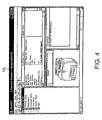
- a printer setting function initial screen 13 is displayed as shown in Fig. 4.
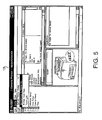
- the printer setting function initial screen 13 is used to perform the configuration of printing devices (e.g. printers or multi function products). As shown in Fig. 4, in the printer setting function initial screen 13, various types of current settings of the printing device selected in the device setting management tool initial screen 11 (i.e. the representative device) are displayed. By clicking a "Config" menu in a menu bar on the printer setting function initial screen 13, and then clicking a "Send Settings to Printer(s)" menu in a pull-down menu displayed under the "Config" menu (see Fig. 5), the PC 1A initiates the first data setting transmission process.
- printing devices e.g. printers or multi function products.
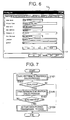
- a user For initiating the second data setting transmission process, a user double clicks one of printing devices listed in the device setting management tool initial screen 11 after opening the device setting management tool initial screen 11, or a user clicks a "Control" menu in the menu bar on the device setting management tool initial screen 11 and then clicks "Configure Print Server” in the pull-down menu. Then, a NIC setting dialog box 15 shown in Fig. 6 is displayed. By clicking a "Send" button 17 in a "General" tab on the NIC setting dialog box 15, the PC 1A initiates the second data setting transmission process.
- Fig. 7 is a general flowchart applied to both of the first and second data setting transmission process executed under control of the CPU 101 of the PC 1 A (1B or 1C). After the initiation of the first or second data setting transmission process, a "Send Settings to Printer(s)" dialog process (step S 101 ) is executed.
- Fig. 8 is a flowchart of the "Send Settings to Printer(s)" dialog process.
- the PC 1A displays a "Send Settings to Printer(s)" dialog box 21 on the display unit 106 as shown in Fig. 9 (step S201).
- the "Send Settings to Printer(s)" dialog box 21 includes a transmission target selection radio button 23, a transmission type changing instruction field 25, a device list indication field 27, a "Search” button 29, a "Remove” button 31, an additional device input text box 33, an "Add” button 35, an "OK” button 37, and a "Cancel” button 39.
- the transmission target selection radio button 23 is set to "Current Printer", and the transmission type changing instruction field 25, the device list indication field 27, the "Search” button 29, the “Remove” button 31, the additional device input text box 33, and the "Add” button 35 are grayed out (a grayed out item represents that the item can not accept operation).
- the grayed out representation of the transmission type changing instruction field 25 is released. If the grayed out representation is released, a selection among instructions of "1: Send all Current Values”, “2: Send all Update Values” and “3: Send Current and Update Values” is enabled in the transmission type changing instruction field 25.
- the grayed out representation of the "Remove” button 31 is also released if one or more devices are displayed in the device list indication field 27.
- the PC 1 A displays a device list (i.e. contents to be displayed in the device list indication field 27) of the "Send Settings to Printer(s)" in step S203.
- the device list indication field 27 is grayed out and no item is displayed in the device list indication field 27 in the initial condition (see Fig. 9). If the user sets the transmission target selection radio button 23 to the "Multiple Printers" in a later stage, the grayed out representation is released and a search to detect devices on the network is initiated automatically. Devices detected by the search are registered in the device list and are displayed on the device list indication field 27 as shown in Fig. 10.
- step S205 the PC1 accepts inputs of buttons and keys on the "Send Settings to Printer(s)" dialog box 21.
- step S205 the user can conduct the switching operation of the transmission target selection radio button 23, an address inputting operation in the additional device input text box 33, and a pressing operation of the "Search” button 29, the “Remove” button 31, the "Add” button 35, the “OK” button 37, or the "Cancel” button 39.
- step S207:YES If an address is inputted in the additional device input text box 33 (S207:YES), an inputting process for obtaining character strings inputted in the additional device input text box 33 is executed in step S209. Then, control returns to step S205.
- step S207:NO If an address is not inputted in the additional device input text box 33 (S207:NO), control proceeds to step S211 where it is judged whether the "Add" button 35 is pressed. If the "Add" button is pressed (S211:YES), a process for adding a device designated in the additional device input text box 33 to the device list is executed (S213).
- Fig. 11 is a flowchart illustrating the process executed in step S213.
- the PC 1A operates to obtain information including a node name and a location from a device having the address designated in the additional device input text box 33 (step S301). If the acquisition of the device information is successfully completed (S303: YES), the device is added to the device list (step S305). As a result, information regarding the device having the address designated in the additional device input text box 33 is additionally displayed in the device list indication field 27.
- the PC 1A displays a communication error message and waits for an input of either a "Retry” button or "Cancel” button (S307). If the user presses one of the "Retry” and “Cancel” buttons, control proceeds from step S307 to step S309. If the button pressed by the user is the "Retry” button (S309: Retry), control returns to S301. If the button pressed by the user is the "Cancel” button (S309: Cancel) or the step S305 is finished, the process of Fig. 11 terminates. The completion of the process shown in Fig. 11 corresponds to completion of step S213 in Fig. 8.
- step S213 control returns to step S203.
- step S215 it is judged whether the "Remove” button 31 is pressed. If the "Remove” button 31 is pressed (S215: YES), a designated device is removed from the device list (S217). Then, control returns to step S203.
- a user selects a device to be removed from devices listed in the device list indication field 27 and then presses the "Remove” button 31.
- step S219 it is judged whether the "Search” button 29 is pressed. If the "Search” button 29 is pressed (S219: YES), the PC 1A operates to search for devices on the network to update the device list (step S221). More specifically, in step S221, the PC 1A broadcasts a packet requesting responses from devices on the network according to SNMP, and waits for responses in a few seconds. If a device capable of responding to the packet exists on the network, the device sends a response back to the PC 1A. A device incapable of responding to the packet discards the received packet.
- the PC 1A recognizes devices which send responses back to the PC 1 A as devices to be targeted for the data setting transmission process, updates the device list with regard to the devices which responded, and then adds the devices which respond to the device list indication field 27. After the process of step S221 is finished, control returns to step S203.
- step S223 it is judged whether an operation for changing the transmission type instruction by using the transmission target selection radio button 23 and the transmission type changing instruction field 25 is conducted. If a user operation for changing the instruction of transmission type is conducted (S223: YES), representation of the transmission type changing instruction field 25 is changed in accordance with the changed transmission type, and then the "Send Settings to Printer(s)" dialog box 21 is refreshed (S225).
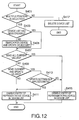
- step S227 a process of step S227, which is illustrated in detail in Fig. 12, is executed.
- step S227 an operation for searching for devices and an operation for updating the device list are executed on an as needed basis.
- step S401 the PC 1A judges whether "Multiple Printers" is selected with the transmission target selection radio button 23 (S401). If the "Multiple Printers" is selected (S401: YES), control proceeds to step S403. In step S403, it is judged whether the device list has been created. If the device list has not been created (S403: NO), the device list is created in step S405 and control proceeds to step S407. If the device list has been created (S403: YES), control proceeds to step 407.
- step S407 it is judged whether "Send all Current Value” is designated in the transmission type changing instruction field 25.
- step S409 it is judged whether "Send Current and Update Values” is selected in the transmission type changing instruction field 25. If the "Send all Current Value” is not designated (S407: NO) and “Send Current and Update Values” is not designated (S409: NO), the instruction designated in the transmission type changing instruction field 25 is "Send all Update Values".
- step S411 the device list is modified such that an entry of the representative device, which is selected as the representative device on the UI (i.e., the device setting management tool initial screen 11) displayed before the initiation of the data setting transmission process, is set as valid data.
- step S413 it is checked whether update settings not applied to the representative device exist. If the update settings not applied to the representative device exist (S413: YES), the device list is modified such that the entry of the representative device is set as valid data (S411). If the update settings have been applied to the representative device (S413: NO), control proceeds to step S415 where the entry of the representative device in the device list is designated as invalid data.
- step S415 If the "Send all Current Value" is designated in the transmission type changing instruction field 25 (S407: YES), control proceeds to step S415 where the entry of the representative device in the device list is designated as invalid data.
- step S401 If it is judged in step S401 that the "Multiple Printers" is not selected with the transmission target selection radio button 23 (S401: YES), the selection result on the transmission target selection radio button 23 is "Current Printer". In this case, the device list is deleted (S417). After completion of step S411, S415, or S417, the process of Fig. 12 terminates. The termination of the process of Fig. 12 corresponds to the termination of step S227 of Fig. 8.
- step S227 After completion of step S227, control returns to S203. If the user operation for changing the instruction of transmission type is not conducted (S223: NO), control proceeds to step S229. In step S229, it is judged whether the "OK" button 37 is pressed. In step S231, it is judged whether the "Cancel” button 39 is pressed. If the "OK" button 37 or the “Cancel” button is pressed (S229: YES or S231: YES), control proceeds to step S233. In step S233, the "Send Settings to Printer(s)" dialog box 21 is wiped out.
- the "Cancel” button 39 is used to instruct the PC 1A to stop a current process, and the "OK” button 37 is used to instruct the PC 1A to continue a current process.
- the selection result between the "OK” button 37 and the "Cancel” button 39 is used in step S 103 of Fig. 7.
- step S231 If it is judged in step S231 that the "Cancel" button 39 is not pressed (S231: NO), control returns to step S205 since no effective operation is conducted.
- step S233 After completion of step S233, the process for "Send Settings to Printer(s)" terminates and also the step S101 of Fig. 7 terminates.
- step S101 the PC 1A judges whether the button pressed in step S205 is the "OK” button 37 (S103). If the "OK" button 37 is not pressed (S103: NO), the data setting transmission process terminates since in this case the pressed button is the "Cancel” button 39.
- a transmission confirmation dialog process is executed in step S105.
- Fig. 13 is a flowchart illustrating the transmission confirmation dialog process.
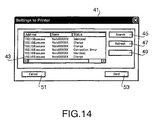
- the PC 1A displays a transmission confirmation dialog box 41 on the display unit 106 as shown in Fig. 14.
- the transmission confirmation dialog box 41 information on whether setting data is to be changed, and information on whether devices are in an operable state are displayed for each of the devices.
- the transmission confirmation dialog box 41 includes a device list display field 43, a "Search” button 45, a "Refresh” button 47, a "Remove” button 49, a "Cancel” button 51, and a "Send” button 53.
- information regarding the device list is displayed on the device list display field 43 in step S505.
- Fig. 15 is a flowchart illustrating the device setting acquisition process.
- the PC 1A initializes a variable i (the number) indicating a device currently targeted for acquisition of device setting (S601).
- the variable i is used to process devices one by one from the top of the device list. It is noted that a device list used in the device setting acquisition process is created in the "Send Settings to Printer(s)" dialog process, and the device list may be modified in the device setting acquisition process.
- step S603 the PC 1A judges whether all of the devices in the device list have been processed. Specifically, in step S603 the PC 1A judges whether a condition i>n (where n represents the total number of devices in the device list) holds. If all of the devices in the device list have not been processed (S603: NO), control proceeds to step S605. In step S605, setting data is obtained from a current device (a device designated by the variable i).
- the acquisition of setting data from the current device is executed as follows.
- the PC 1A sends a data acquisition request to the current device based on SNMP.
- the current device (which has received the data acquisition request) sends setting data stored in the MIB (e.g. the MIB 311 of the printer 3) managed by the current device to the PC 1A in response to the data acquisition request.
- Setting items to be obtained from the current device vary depending on the transmission type designated in the transmission type changing instruction field 25 of the "Send Settings to Printer(s)" dialog box 21. That is, if the transmission type is "Send all Current Values" or "Send Current and Update Values", setting data of all of the setting items is obtained from the current device.
- setting items means items which are predetermined, for each of device models, as target items to be processed in the data setting transmission process and do not cover all of setting items supported by a current device.
- step S607 the PC 1A judges whether the setting data is successfully obtained from the current device. If the setting data is successfully obtained (S607: YES), the obtained setting data is registered in the device list (in a corresponding entry of the device list) (S609). Status information "Identical” is also registered in the corresponding entry of the device list if all of the obtained setting data is identical to setting data to be sent to the current device. Status information "Change” is registered in the corresponding entry of the device list if all of the obtained setting data is not identical to setting data to be sent to the current device.
- step S611 error information is registered in the corresponding entry of the device list. Specifically, in this case, status information "Connection error" may be registered in the corresponding entry of the device list. If the process in step S609 or S611 is finished, the variable i indicates that the current device is updated (S613). Then, control returns to step S603. For example, the variable i may be incremented by one in step S613.
- step S503 displays contents of the device list on transmission confirmation dialog box 41.
- step S503 information of each device is displayed in the device list display field 43, and one of the statuses ("Identical”, “Change”, “Connection error") is also displayed in the device list display field 43 for each device.
- the PC 1A accepts inputs from buttons on the transmission confirmation dialog box 41 (S507).
- the PC 1A allows the user to operate one of the "Search” button 45, "Refresh” button 47, “Remove” button 49, "Cancel” button 51, and "Send” button 53.
- a designated device is removed from the device list (S511).
- the designation of a device to be removed from the device list is performed by selecting a device on the device list display field 43 and then pressing the "Remove” button 49.
- the "Remove” button 49 is grayed out in an initial condition as shown in Fig. 14, and the grayed out representation of the "Remove” button 49 is released when one of the devices is designated in the device list display field 43 (see Fig.16).
- step S509 If the "Remove” button 49 is not pressed (S509: NO), control proceeds to step S513 where it is judged whether the "Refresh” button 47 is pressed. If the "Refresh” button 47 is pressed (S515: YES), control returns to step S503 to execute again the device setting acquisition process. Consequently, the information in the device list display field 43 is updated.
- step S515 the PC 1A judges whether the "Search” button 45 is pressed. If the "Search” button 45 is pressed (S515: YES), control proceeds to step S517.
- step S517 the PC 1A searches for devices on the network to update the device list. More specifically, in step S517, the PC 1A broadcasts a packet requesting responses from devices on the network according to SNMP, and waits for responses in a few seconds. If a device capable of responding to the packet exists on the network, the device sends a response back to the PC 1A. A device incapable of responding to the packet discards the received packet.
- the PC 1A recognizes devices which send responses back to the PC 1A as devices to be targeted for the data setting transmission process, updates the device list with regard to devises which respond, and then refreshes information in the device list display field 43. After the process of step S517 is finished, control returns to step S503.
- step S519 it is judged whether the "Send” button 53 is pressed. If the "Send” button 53 is pressed (S519: YES), the contents of the device list containing the statuses ("Identical”, “Change”, “Connection error") is recorded in a log file (S521), and the transmission confirmation dialog box 41 is wiped out (S523). Then, the transmission confirmation dialog process terminates.
- step S519 If it is judged in step S519 that the "Send” button 53 is not pressed (S519: NO), control proceeds to step S527 where the PC 1A judges whether the "Cancel” button 51 is pressed. If the "Cancel” button 51 is pressed (S527: YES), the transmission confirmation dialog box 41 is wiped out (S523). Then, the transmission confirmation dialog process terminates.
- step S523 is executed in both of the cases where the "Send” button 53 is pressed and where the "Cancel” button 51 is pressed, but the step S521 is executed only in the case where the "Send " button 53 is pressed. Pressing the “Send " button 53 instructs the PC 1A to continue the transmission confirmation dialog process, and pressing the "Cancel” button 51 instructs the PC 1 A to stop the transmission confirmation dialog process. Information on whether the "Send" button 53 is pressed or the "Cancel” button 51 is pressed is used in step S107 of Fig. 7 as described later.
- step S527 If it is judged in step S527 that the "Cancel" button 51 is not pressed (S527: NO), control proceeds to step S529. If it is judged in step S529 that no device in the device list display field 43 is double clicked (S529: NO), control returns to step S507 since no effective operation is made by the user. If a device in the device list display field 43 is double clicked (S529: YES), the PC 1 A executes an advanced setting change window process.
- the advanced setting change window process is a process for making settings for each device on an individual basis. To a device which is not subjected to the advanced setting change window process, setting data identical to the representative device or setting data which is modified in the above mentioned process is transmitted. On the other hand, to a device which is subjected to the advanced setting change window process, setting data set in the advanced setting change window process is transmitted.
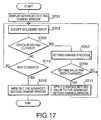
- Fig. 17 is a flowchart illustrating the advanced setting change window process.
- the PC 1A displays an advanced setting change window (S701).
- the setting items are different between the first data setting transmission process for setting the principal function of a target device and the second data setting transmission process for setting the NIC (network interface card) of the target device.
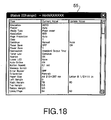
- an advanced setting change window 55 as shown in Fig.18 is displayed in the case of the first data setting transmission process
- an advanced setting change window 57 as shown in Fig. 19 is displayed in the case of the second data setting transmission process.
- each of the advanced setting change windows 55 and 57 various items are displayed in an "Item” box for which setting values are to be transmitted to a device targeted for the advanced setting (a target device), setting values (current setting values) obtained from the target device are displayed in a "Current Value” box, and setting values to be updated are displayed in an "Update value” box.
- An item whose setting value in the "Update value” box is blank represents that an "Update value” and a "Current value” of such an item are identical to each other. If a device represented as a "Connection Error" in the device list display field 43 has been selected for the advanced setting change window process, all of fields in the "Current value” box and "Update value” box are represented as blanks.
- step S703 the PC 1A accepts the input from the input device 105 (e.g. a mouse and keys). If one of items in the advanced setting change window 55 or the advanced setting change window 57 has been double clicked in step S703, the PC 1A judges that a setting value is changed (S705: YES). Then, the PC 1A executes a setting change process.
- the input device 105 e.g. a mouse and keys.
- Fig. 20 is a flowchart illustrating the setting change process.
- the PC 1A displays a setting change dialog box. Contents to be displayed in the setting change dialog box changes depending on the type of item double clicked in the advanced setting change window 55 or the advanced setting change window 57.
- Fig. 21 shows a setting change dialog box 61 which is displayed if the item "PaperSize" in the advanced setting change window 55 is double clicked.
- the setting change dialog box 61 includes a setting value selection box 63, an "OK” button 65 and a “Cancel” button 67.
- the setting value selection box 63, the "OK” button 65 and the “Cancel” button 67 are included in the setting change dialog box for all of the items in the advanced setting change windows 55 and 57.
- the PC 1A accepts the input from the input device 105 (e.g. a mouse and keys) in step S803. If one of setting values in the setting value selection box 63 is clicked, the PC 1A judges that a user operation for changing the setting value has been conducted (S805: YES). Then, the PC 1A applies the change of the setting value to the representation in the setting value selection box 63 (S807). Next, control returns to step S803.
- the input device 105 e.g. a mouse and keys
- step S809 it is judged whether the "OK" button 65 is pressed. If the "OK" button 65 is pressed (S809: YES), the changed setting value is applied to a corresponding entry (i.e. an entry corresponding to the device targeted for the advanced setting) in the device list (S811). Thus, the setting data designated in the setting change process is registered in the corresponding entry in the device list.
- the setting data set by the advanced setting is unique to the device targeted for the advanced setting, the setting data set by the advanced setting is stored separately from changed setting data common to the other devices.
- the setting change dialog box 61 is wiped out (S813). Then, the setting change process terminates.
- step S809 If it is judged in step S809 that the "OK" button 65 is not pressed (S809: NO), control proceeds to step S815. In step S815, it is judged whether the "Cancel" button 67 is pressed. If the "Cancel” button 67 is pressed (S815: YES), step S813 is processed and then the setting change process terminates. If the "Cancel” button 67 is not pressed (S815: NO), control returns to step S803 since no effective operation is conducted.
- step S709 it is judged whether setting values have been changed. Specifically, in step S709, the PC 1A judges whether the "OK" button 65 has been pressed or the "Cancel” button 67 has been pressed. If the setting values have been changed (S709: YES), changed setting values are applied to the advanced setting change windows 55 and 57 (S711). Then, control returns to step S703.
- step S709 If the setting values have not been changed (S709: NO), control returns to step S703 without executing step S711.
- step S713 it is judged whether an end command (e.g. clicking a "x" button at the upper right position of a window, or pressing of "Alt” + “F4" keys) is inputted. If the end command is not inputted (S713: NO), control returns to step S703 since no effective operation is conducted. If the end command is inputted (S713: YES), the advanced setting change window 55 or 57 is wiped out (S715), and then the advanced setting change window process terminates.
- an end command e.g. clicking a "x" button at the upper right position of a window, or pressing of "Alt” + “F4" keys
- step S531 As shown in Fig. 13, after the advanced setting change window process shown in Fig. 17 (i.e. step S531) is finished, control returns to step S507.
- step S105 if the transmission confirmation dialog process of steps S501 to S531 is finished (i.e. step S105 is finished) by the operation of pressing the "Send” button 53 or the "Cancel” button 51, control proceeds to step S107 where the PC 1A judges whether the "Send” button 53 has been pressed. If the "Send” button 53 has not been pressed (S107: NO), control returns to step S101 to start again the data setting transmission process since in this case the "Cancel" button 51 has been pressed.
- Fig. 22 is a flowchart illustrating the setting data package transmission process.
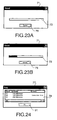
- the PC 1A displays a transmission progress dialog box 71 which is shown in Figs. 23A and 23B (S901).
- the transmission progress dialog box 71 includes a progress bar indication field 73 and a "Cancel" button 75.
- the transmission progress dialog box 71 the progress of data transmission is represented. In an initial state, no progress bar is displayed in the progress bar indication field 73 (see Fig. 23A).
- the PC 1A After the transmission progress dialog box 71 is displayed, the PC 1A initializes a variable i indicating the number of a target device being subjected to the setting data package transmission process (S903).
- step S905 the PC 1A judges whether all of the devices have been processed. Specifically, in step S905 the PC 1A judges whether a condition i>n (where n represents the total number of devices in the device list) holds. If all of the devices in the device list have not been processed (S905: NO), control proceeds to step S907. In step S907, the PC 1A judges whether the advanced setting has been conducted.
- step S909 the setting values common to all of the devices in the device list are sent to the target device (the i-th device) by using setting values obtained from the representative device (i.e. the representative device selected on the user interface (UI) displayed before the initiation of the data setting transmission process) (S909).
- the data transmission is executed as follows. If the transmission type designated in the transmission type changing instruction field 25 is the "Send all Current Values", setting data identical to that of the representative device is transmitted to the target device.
- transmission type designated in the transmission type changing instruction field 25 is the "Send all Update Values"
- updated setting data which is updated with respect to current settings of the representative device is transmitted to the target device.
- transmission type designated in the transmission type changing instruction field 25 is the "Send Current and Update Values"
- both of the setting data identical to that of the representative device and the updated setting data which is updated with respect to current settings of the representative device are transmitted to the target device.
- update setting values set in the advanced setting change window process are transmitted to the target device (S911).
- the processes in steps S909 and S911 are executed in accordance with SNMP. That is, the PC 1A sends a data set request to the target device (the i-th device).
- the target device stores the setting values in the MIB (e.g. the MIB 311 in the case of the printer 3), which is managed by the target device, in accordance with the data set request transmitted from the PC 1A.
- the PC 1A judges whether the target device (being subjected to the setting data package transmission process) is the representative device (S913). If the target device is the representative device (S913: YES), changed setting values with regard to items to be applied only to the representative device are transmitted the target device (S915). The items to be applied only to the representative device are determined in advance.
- the items to be applied only to the representative device are "Node Name” (a node name of the NIC), "Password” (an administrator password), service filter settings, "IP Address” (an IP address of the NIC), “Subnet Mask” (a subnet mask of the NIC), “Gateway” (gateway (router) address settings), "IP Config” (settings of a scheme of IP address acquisition), "Printer E-mail Address” (an E-mail address assigned to a printer/MFP), "POP3 account name” (an account name of a mail box used to access an E-mail sever), "POP3 account Password” (a password for the account of the mail box) because these items have to be set on a network interface card - by - network interface card basis.
- step S917 it is judged whether the "Cancel" button is pressed. If the "Cancel” button is not pressed (S917: NO), the PC 1A judges whether the setting data transmission is successfully finished (S919). If the setting data transmission is successfully finished (S919: YES), success information (e.g. letters "OK”) indicating that the setting data transmission is successfully finished for the target device is written in the device list (S921). If the setting data transmission is not successfully finished (S919: NO), failure information (e.g. letters "NG”) indicating that the setting data transmission is not successfully finished for the target device and information about factors that cause transmission errors are written in the device list (S923).
- success information e.g. letters "OK
- the variable (the number) indicating the target device is updated in step S925, for example, by incrementing the variable i by one.
- the progress bar displayed in the progress bar indication field 73 in the transmission progress dialog box 71 is updated (S927).
- step S905 the progress bar having the length obtained from the above expression is displayed in the progress bar indication field 73 as shown in Fig. 23B.
- control returns to step S905.
- steps S905 to S927 all of the devices in the device list are processed. If all of the devices have been processed, the judgment result in step S905 becomes "YES".
- the variable i which is counted up from 1 to n is used to indicate the target device
- another scheme for example, a scheme in which a pointer indicating an address of an entry of the target device
- the PC 1A wipes out the transmission progress dialog box 71 (S931). Then, the PC 1A displays a transmission result dialog box 77 (see Fig. 24), and waits for an operation of the "OK" button 81 (S933). As shown in Fig. 24, the transmission result dialog box 77 includes a transmission result indication field 79 and an "OK" button 81. In the transmission result indication field 79, the success information, the failure information and communication error factors are displayed.
- the display of "Connection Error” represents that the connection to a device ends in failure and the setting of the device has not been completed
- the display of "Password incorrect” represents that the setting of a device is impossible because of an incorrect password.
- Such representation of information (success or error information) in the transmission result indication field 79 allows the user to recognize a problem regarding setting data update and to deal with a problem appropriately.
- step S935 the transmission result dialog box 77 is wiped out. Then, the setting data package transmission process shown in Fig. 22 terminates.
- step S109 i.e. the setting data package transmission process shown in Fig. 22
- step S109 i.e. the setting data package transmission process shown in Fig. 22
- step S917 of Fig. 22 If it is judged in step S917 of Fig. 22 that the "Cancel" button is pressed (S917: YES), the PC 1A wipes out the transmission result dialog box 77 (S935). Then, the setting data package transmission process terminates. Therefore, in the case where the judgment result of step S917 is "YES", the process of step S109 of Fig. 17 also terminates.
- the PC 1A operates to execute the second data setting transmission process to transmit the setting data. Meanwhile, as shown in Fig. 6, inputting fields for various types of items are provided in the NIC setting dialog box 15 so as to accept user operations for inputting setting data. If the user operation is conducted on the NIC setting dialog box 15, there is a possibility that setting values different from the setting values transmitted by the second data setting transmission process are inputted to the NIC setting dialog box 15.
- a NIC setting dialog displaying process is executed as follows.
- Fig. 25 is a flowchart illustrating the NIC setting dialog displaying process.
- the PC 1A displays the NIC setting dialog box (S1001).
- the PC 1A accepts the inputs from the input device (e.g. a mouse and keys).
- the PC 1A judges whether the "OK” button is pressed in step S1005, judges whether the "Cancel” button is pressed in step S1007, and judges whether the "Send” button is pressed in step S1009.
- step S 1009 If it is judged in step S 1009 that the "Send” button is pressed (S1005: NO, S 1007: NO, S1009: YES), the second data setting transmission process described above is executed (S1011). Then, control returns to step S1003.
- step S1009 If it is judged in step S1009 that the "Send" button is not pressed (S1005: NO, S1007: NO, S 1009: NO), another process for treating user operations for changing settings is executed (S 1013). Then, control returns to step S1003.
- the NIC setting dialog displaying process includes the step S1013, there is a possibility that a user has inputted setting values in the NIC setting dialog box when it is judged in step S1005 that the "OK" button is pressed. If the user has inputted setting values in the NIC setting dialog box, it is necessary to transmit the setting values inputted by the user in the NIC setting dialog box to the representative device independently of the process of step S1011.
- step S1005 if it is judged in step S1005 that the "OK" button is pressed (S1005: YES), the PC 1A judges whether unapplied setting values exist in the input fields of the NIC setting dialog box (S1015). If unapplied setting values exist (S1015: YES), the PC 1A transmits the unapplied setting values to the representative device (S1017). Next, the PC 1A wipes out the NIC setting dialog box 15 (S1019). Then, the NIC setting dialog displaying process terminates.
- step S1007 If it is judged in step S1007 that the "Cancel" button is pressed (S1007: YES), the PC 1A wipes out the NIC setting dialog box 15 (S1019). Then, the NIC setting dialog displaying process terminates.
- setting data identical to that of the representative device and/or changed setting data (updated with respect to settings of the representative device) are transmitted to more than one device at a time (in the setting data package transmission process).
- the transmission confirmation dialog box 41 is displayed so as to allow a user to recognize in advance whether setting values are to be actually changed for each of the devices.
- the data setting transmission process may be configured such that the representative device is excluded in advance from the targets for the data setting transmission process.
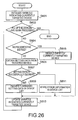
- a configuration for excluding the current device from the targets for the data setting transmission process is attained by a configuration shown in Figs. 26 and 27.
- Fig. 26 is a variation of the device setting acquisition process shown in Fig. 15.
- Fig. 27 is a variation of the setting data package transmission process of Fig. 22.
- steps S604 and S615 are added to the device setting acquisition process of Fig. 15.
- step S604 the PC 1A judges whether the target device (the i-th device) is the representative device (S604). If it is judged in step S604 that the target device is the representative device (S604: YES), control proceeds to step S615. In step S615, the PC 1A disables an entry corresponding to the representative device in the device list so that steps S605 to S611 are not executed for the representative device. That is, the entry of the representative device is designated as an invalid entry. After the step S615 is finished, control proceeds to step S613. If it is judged in step S604 that the target device is not the representative device (S604: NO), control proceeds to step S605.
- step S906 is added to the process of Fig. 22 and steps S913 and S915 are omitted from the process of Fig. 22.
- step S905 if it is judged in step S905 that all of the devices have not been processed (S905: NO), the PC 1 A judges whether an entry corresponding to the target device in the device list is invalid. If it is judged in step S906 that the entry is invalid (S906: YES), control proceeds to step S917 without executing the steps 907 to S911.
- the data setting transmission process is targeted for printing devices such as a printer
- the illustrative embodiment can be also applied to various types of devices, for example, a scanner, an image obtaining device (such as a network camera), an image communication device (such as a facsimile device), a communication routing device (such as a network point), an information sever device (such as a network storage), which are typically used in such a situation that setting values are substantially common to more than one device.
- the PC 1A contributes to the data setting transmission process. That is, only the PC 1A functions as a setting data transmitting device.
- setting data transmission function may be distributed over at least two nodes. If such a distributed system is configured such that output data of a functional block implemented in one node is used as input data to be inputted to a functional block implemented in another node, the distributed system is implemented as a network system that also functions similarly to the data transmission device. For example, such a distributed system on a network may be implemented by use of PCs 1A, 1B and 1C.
- the setting data to be transmitted to the target devices in the device list are prepared by obtaining the current setting data currently set to the representative device, such setting data to be transmitted to the target devices may be inputted manually by a user.
- samples of setting data to be transmitted to the target devices may be prepared in advance in the PC 1A (1B or 1C), and one of the samples may be selected as the setting data to be transmitted to the target devices.
- a management server having the function of obtaining current setting data currently set to the target devices in the device list from the target devices through the network may be connected to the network.
- the current setting data of the target devices is obtained from the management server without directly accessing the target devices.
Landscapes
- Engineering & Computer Science (AREA)
- Computer Networks & Wireless Communication (AREA)
- Signal Processing (AREA)
- Computer And Data Communications (AREA)
Applications Claiming Priority (1)
| Application Number | Priority Date | Filing Date | Title |
|---|---|---|---|
| JP2004284000A JP4192877B2 (ja) | 2004-09-29 | 2004-09-29 | 設定データ伝送プログラム、設定データ伝送装置、および設定データ伝送システム |
Publications (3)
| Publication Number | Publication Date |
|---|---|
| EP1643682A2 true EP1643682A2 (de) | 2006-04-05 |
| EP1643682A3 EP1643682A3 (de) | 2006-06-07 |
| EP1643682B1 EP1643682B1 (de) | 2009-08-26 |
Family
ID=35615607
Family Applications (1)
| Application Number | Title | Priority Date | Filing Date |
|---|---|---|---|
| EP05256073A Ceased EP1643682B1 (de) | 2004-09-29 | 2005-09-29 | Verfahren, Vorrichtung, System und Komputerprogramm zur Übermittlung von Einstellungsdaten |
Country Status (4)
| Country | Link |
|---|---|
| US (1) | US8190719B2 (de) |
| EP (1) | EP1643682B1 (de) |
| JP (1) | JP4192877B2 (de) |
| DE (1) | DE602005016196D1 (de) |
Cited By (2)
| Publication number | Priority date | Publication date | Assignee | Title |
|---|---|---|---|---|
| CN102843485A (zh) * | 2011-06-22 | 2012-12-26 | 佳能株式会社 | 图像形成装置及用于图像形成装置的启动控制方法 |
| CN103220447A (zh) * | 2011-12-16 | 2013-07-24 | 佳能株式会社 | 信息处理系统、图像形成设备和管理方法 |
Families Citing this family (84)
| Publication number | Priority date | Publication date | Assignee | Title |
|---|---|---|---|---|
| US8004421B2 (en) | 2006-05-10 | 2011-08-23 | Schlumberger Technology Corporation | Wellbore telemetry and noise cancellation systems and method for the same |
| JP4506732B2 (ja) * | 2006-07-20 | 2010-07-21 | ブラザー工業株式会社 | 情報処理装置、機器設定システム、及びプログラム |
| JP4953753B2 (ja) * | 2006-10-17 | 2012-06-13 | キヤノン株式会社 | 情報処理装置及びその制御方法、プログラム |
| JP4829822B2 (ja) * | 2007-03-19 | 2011-12-07 | 株式会社リコー | 遠隔機器管理システム |
| JP4858435B2 (ja) * | 2007-12-28 | 2012-01-18 | ブラザー工業株式会社 | 端末装置及びプログラム |
| US8347319B2 (en) * | 2008-05-22 | 2013-01-01 | Microsoft Corporation | Device display object infrastructure |
| JP5322661B2 (ja) * | 2009-01-07 | 2013-10-23 | キヤノン株式会社 | 画像処理システム、画像処理装置、画像処理装置の制御方法、及び制御プログラム |
| JP2011081762A (ja) * | 2009-03-10 | 2011-04-21 | Ricoh Co Ltd | 機器設定装置及び機器設定装置における機器再設定方法 |
| US20110087869A1 (en) * | 2009-10-08 | 2011-04-14 | Kabushiki Kaisha Toshiba | Image forming apparatus, image forming system, and method of configuring image forming apparatus |
| JP5577871B2 (ja) | 2010-06-16 | 2014-08-27 | ブラザー工業株式会社 | 機能実行装置 |
| JP2012008702A (ja) * | 2010-06-23 | 2012-01-12 | Canon Inc | ネットワークデバイス、デバイス制御装置、ネットワークシステム、並びにプログラム |
| EP2631807A1 (de) * | 2010-10-21 | 2013-08-28 | Nec Corporation | Konfigurationssystem, server, endgerät, konfigurationsverfahren und konfigurationsprogramm |
| JP5817238B2 (ja) * | 2011-06-20 | 2015-11-18 | 株式会社リコー | 情報処理システム、情報処理装置、情報管理方法、及び情報管理プログラム |
| JP5899985B2 (ja) * | 2012-02-07 | 2016-04-06 | コニカミノルタ株式会社 | 画像形成システム、画像形成装置、画像形成方法および画像形成プログラム |
| US9391839B2 (en) * | 2014-06-11 | 2016-07-12 | Amplisine Labs, LLC | Ad hoc wireless mesh network |
| JP2016034084A (ja) * | 2014-07-31 | 2016-03-10 | キヤノン株式会社 | 管理装置、管理システム、管理装置の制御方法、管理システムの制御方法、及びプログラム |
| US9781004B2 (en) | 2014-10-16 | 2017-10-03 | Cisco Technology, Inc. | Discovering and grouping application endpoints in a network environment |
| US9794783B2 (en) * | 2015-01-16 | 2017-10-17 | Jeffrey Huang | Machine-to-machine visual code generation and recognition method and system for device communications |
| CN105553688A (zh) * | 2015-10-29 | 2016-05-04 | 小米科技有限责任公司 | 设置设备工作状态的方法、装置及系统 |
| JP2018041146A (ja) * | 2016-09-05 | 2018-03-15 | キヤノン株式会社 | 管理装置、制御方法、プログラム |
| JP6784163B2 (ja) * | 2016-12-14 | 2020-11-11 | コニカミノルタ株式会社 | 電子機器設定装置およびプログラム |
| JP6801431B2 (ja) * | 2016-12-19 | 2020-12-16 | コニカミノルタ株式会社 | 電子機器設定装置およびプログラム |
| US10826788B2 (en) | 2017-04-20 | 2020-11-03 | Cisco Technology, Inc. | Assurance of quality-of-service configurations in a network |
| US10623264B2 (en) | 2017-04-20 | 2020-04-14 | Cisco Technology, Inc. | Policy assurance for service chaining |
| US10560328B2 (en) | 2017-04-20 | 2020-02-11 | Cisco Technology, Inc. | Static network policy analysis for networks |
| US10505816B2 (en) | 2017-05-31 | 2019-12-10 | Cisco Technology, Inc. | Semantic analysis to detect shadowing of rules in a model of network intents |
| US10693738B2 (en) | 2017-05-31 | 2020-06-23 | Cisco Technology, Inc. | Generating device-level logical models for a network |
| US10623271B2 (en) | 2017-05-31 | 2020-04-14 | Cisco Technology, Inc. | Intra-priority class ordering of rules corresponding to a model of network intents |
| US10581694B2 (en) | 2017-05-31 | 2020-03-03 | Cisco Technology, Inc. | Generation of counter examples for network intent formal equivalence failures |
| US10554483B2 (en) | 2017-05-31 | 2020-02-04 | Cisco Technology, Inc. | Network policy analysis for networks |
| US10439875B2 (en) | 2017-05-31 | 2019-10-08 | Cisco Technology, Inc. | Identification of conflict rules in a network intent formal equivalence failure |
| US10812318B2 (en) | 2017-05-31 | 2020-10-20 | Cisco Technology, Inc. | Associating network policy objects with specific faults corresponding to fault localizations in large-scale network deployment |
| US20180351788A1 (en) | 2017-05-31 | 2018-12-06 | Cisco Technology, Inc. | Fault localization in large-scale network policy deployment |
| US11150973B2 (en) | 2017-06-16 | 2021-10-19 | Cisco Technology, Inc. | Self diagnosing distributed appliance |
| US11469986B2 (en) | 2017-06-16 | 2022-10-11 | Cisco Technology, Inc. | Controlled micro fault injection on a distributed appliance |
| US10686669B2 (en) | 2017-06-16 | 2020-06-16 | Cisco Technology, Inc. | Collecting network models and node information from a network |
| US10904101B2 (en) | 2017-06-16 | 2021-01-26 | Cisco Technology, Inc. | Shim layer for extracting and prioritizing underlying rules for modeling network intents |
| US11645131B2 (en) | 2017-06-16 | 2023-05-09 | Cisco Technology, Inc. | Distributed fault code aggregation across application centric dimensions |
| US10587621B2 (en) | 2017-06-16 | 2020-03-10 | Cisco Technology, Inc. | System and method for migrating to and maintaining a white-list network security model |
| US10547715B2 (en) | 2017-06-16 | 2020-01-28 | Cisco Technology, Inc. | Event generation in response to network intent formal equivalence failures |
| US10498608B2 (en) | 2017-06-16 | 2019-12-03 | Cisco Technology, Inc. | Topology explorer |
| US10574513B2 (en) | 2017-06-16 | 2020-02-25 | Cisco Technology, Inc. | Handling controller and node failure scenarios during data collection |
| US11283680B2 (en) | 2017-06-19 | 2022-03-22 | Cisco Technology, Inc. | Identifying components for removal in a network configuration |
| US10333787B2 (en) | 2017-06-19 | 2019-06-25 | Cisco Technology, Inc. | Validation of L3OUT configuration for communications outside a network |
| US10218572B2 (en) | 2017-06-19 | 2019-02-26 | Cisco Technology, Inc. | Multiprotocol border gateway protocol routing validation |
| US10567228B2 (en) | 2017-06-19 | 2020-02-18 | Cisco Technology, Inc. | Validation of cross logical groups in a network |
| US10812336B2 (en) | 2017-06-19 | 2020-10-20 | Cisco Technology, Inc. | Validation of bridge domain-L3out association for communication outside a network |
| US10652102B2 (en) | 2017-06-19 | 2020-05-12 | Cisco Technology, Inc. | Network node memory utilization analysis |
| US10700933B2 (en) | 2017-06-19 | 2020-06-30 | Cisco Technology, Inc. | Validating tunnel endpoint addresses in a network fabric |
| US10623259B2 (en) | 2017-06-19 | 2020-04-14 | Cisco Technology, Inc. | Validation of layer 1 interface in a network |
| US10805160B2 (en) | 2017-06-19 | 2020-10-13 | Cisco Technology, Inc. | Endpoint bridge domain subnet validation |
| US10536337B2 (en) | 2017-06-19 | 2020-01-14 | Cisco Technology, Inc. | Validation of layer 2 interface and VLAN in a networked environment |
| US10432467B2 (en) | 2017-06-19 | 2019-10-01 | Cisco Technology, Inc. | Network validation between the logical level and the hardware level of a network |
| US10505817B2 (en) | 2017-06-19 | 2019-12-10 | Cisco Technology, Inc. | Automatically determining an optimal amount of time for analyzing a distributed network environment |
| US11343150B2 (en) | 2017-06-19 | 2022-05-24 | Cisco Technology, Inc. | Validation of learned routes in a network |
| US10411996B2 (en) | 2017-06-19 | 2019-09-10 | Cisco Technology, Inc. | Validation of routing information in a network fabric |
| US10528444B2 (en) | 2017-06-19 | 2020-01-07 | Cisco Technology, Inc. | Event generation in response to validation between logical level and hardware level |
| US10437641B2 (en) | 2017-06-19 | 2019-10-08 | Cisco Technology, Inc. | On-demand processing pipeline interleaved with temporal processing pipeline |
| US10547509B2 (en) | 2017-06-19 | 2020-01-28 | Cisco Technology, Inc. | Validation of a virtual port channel (VPC) endpoint in the network fabric |
| US10560355B2 (en) | 2017-06-19 | 2020-02-11 | Cisco Technology, Inc. | Static endpoint validation |
| US10567229B2 (en) | 2017-06-19 | 2020-02-18 | Cisco Technology, Inc. | Validating endpoint configurations between nodes |
| US10644946B2 (en) | 2017-06-19 | 2020-05-05 | Cisco Technology, Inc. | Detection of overlapping subnets in a network |
| US10341184B2 (en) | 2017-06-19 | 2019-07-02 | Cisco Technology, Inc. | Validation of layer 3 bridge domain subnets in in a network |
| US10348564B2 (en) | 2017-06-19 | 2019-07-09 | Cisco Technology, Inc. | Validation of routing information base-forwarding information base equivalence in a network |
| US10554493B2 (en) | 2017-06-19 | 2020-02-04 | Cisco Technology, Inc. | Identifying mismatches between a logical model and node implementation |
| US10673702B2 (en) | 2017-06-19 | 2020-06-02 | Cisco Technology, Inc. | Validation of layer 3 using virtual routing forwarding containers in a network |
| US10587456B2 (en) | 2017-09-12 | 2020-03-10 | Cisco Technology, Inc. | Event clustering for a network assurance platform |
| US10587484B2 (en) | 2017-09-12 | 2020-03-10 | Cisco Technology, Inc. | Anomaly detection and reporting in a network assurance appliance |
| US10554477B2 (en) | 2017-09-13 | 2020-02-04 | Cisco Technology, Inc. | Network assurance event aggregator |
| US10333833B2 (en) | 2017-09-25 | 2019-06-25 | Cisco Technology, Inc. | Endpoint path assurance |
| US11102053B2 (en) | 2017-12-05 | 2021-08-24 | Cisco Technology, Inc. | Cross-domain assurance |
| US10873509B2 (en) | 2018-01-17 | 2020-12-22 | Cisco Technology, Inc. | Check-pointing ACI network state and re-execution from a check-pointed state |
| US10572495B2 (en) | 2018-02-06 | 2020-02-25 | Cisco Technology Inc. | Network assurance database version compatibility |
| US10812315B2 (en) | 2018-06-07 | 2020-10-20 | Cisco Technology, Inc. | Cross-domain network assurance |
| US10659298B1 (en) | 2018-06-27 | 2020-05-19 | Cisco Technology, Inc. | Epoch comparison for network events |
| US11019027B2 (en) | 2018-06-27 | 2021-05-25 | Cisco Technology, Inc. | Address translation for external network appliance |
| US11218508B2 (en) | 2018-06-27 | 2022-01-04 | Cisco Technology, Inc. | Assurance of security rules in a network |
| US11044273B2 (en) | 2018-06-27 | 2021-06-22 | Cisco Technology, Inc. | Assurance of security rules in a network |
| US10911495B2 (en) | 2018-06-27 | 2021-02-02 | Cisco Technology, Inc. | Assurance of security rules in a network |
| US10904070B2 (en) | 2018-07-11 | 2021-01-26 | Cisco Technology, Inc. | Techniques and interfaces for troubleshooting datacenter networks |
| US10826770B2 (en) | 2018-07-26 | 2020-11-03 | Cisco Technology, Inc. | Synthesis of models for networks using automated boolean learning |
| US10616072B1 (en) | 2018-07-27 | 2020-04-07 | Cisco Technology, Inc. | Epoch data interface |
| JP7234653B2 (ja) * | 2019-01-25 | 2023-03-08 | ブラザー工業株式会社 | プログラム |
| US11929981B2 (en) * | 2021-09-15 | 2024-03-12 | Honeywell International Inc. | Batch assignment of IP addresses in a building control network |
Citations (1)
| Publication number | Priority date | Publication date | Assignee | Title |
|---|---|---|---|---|
| JPH09149076A (ja) | 1995-09-22 | 1997-06-06 | Canon Inc | データ通信装置及び方法 |
Family Cites Families (28)
| Publication number | Priority date | Publication date | Assignee | Title |
|---|---|---|---|---|
| US5872928A (en) * | 1995-02-24 | 1999-02-16 | Cabletron Systems, Inc. | Method and apparatus for defining and enforcing policies for configuration management in communications networks |
| US9197599B1 (en) * | 1997-09-26 | 2015-11-24 | Verizon Patent And Licensing Inc. | Integrated business system for web based telecommunications management |
| US6041347A (en) * | 1997-10-24 | 2000-03-21 | Unified Access Communications | Computer system and computer-implemented process for simultaneous configuration and monitoring of a computer network |
| US20020049693A1 (en) | 1997-11-21 | 2002-04-25 | Hewlett-Packard Company | Batch configuration of network devices |
| US6701358B1 (en) * | 1999-04-02 | 2004-03-02 | Nortel Networks Limited | Bulk configuring a virtual private network |
| DE60026788T2 (de) | 1999-05-13 | 2006-10-12 | Canon K.K. | Vorrichtung zum Suchen eines Gerätes in einem Netzwerk |
| JP2001086118A (ja) | 1999-09-16 | 2001-03-30 | Nec Corp | コンピュータ機器遠隔管理方法 |
| US6850973B1 (en) * | 1999-09-29 | 2005-02-01 | Fisher-Rosemount Systems, Inc. | Downloadable code in a distributed process control system |
| JP2001256154A (ja) | 2000-03-10 | 2001-09-21 | Ricoh Co Ltd | ネットワーク機器システム |
| JP3743371B2 (ja) * | 2000-03-27 | 2006-02-08 | セイコーエプソン株式会社 | ネットワークに接続されたデバイスの管理システム |
| JP2001312432A (ja) | 2000-05-01 | 2001-11-09 | Canon Inc | ネットワークサーバ及びその制御方法 |
| US6988133B1 (en) * | 2000-10-31 | 2006-01-17 | Cisco Technology, Inc. | Method and apparatus for communicating network quality of service policy information to a plurality of policy enforcement points |
| US7249170B2 (en) * | 2000-12-06 | 2007-07-24 | Intelliden | System and method for configuration, management and monitoring of network resources |
| DK1360796T3 (da) * | 2001-01-26 | 2010-05-10 | American Power Conv Corp | Fremgangsmåde og system til at indstille et sæt netværksapparater som kan forbindes for at tilvejebringe forbedret samarbejde, skalerbarhed og pålidelighed |
| US7277943B1 (en) * | 2001-04-10 | 2007-10-02 | Cisco Technology, Inc. | Devices, software and methods for allocating jitter buffer memory based on network region of network endpoint |
| US20020165945A1 (en) * | 2001-05-07 | 2002-11-07 | Randy Buswell | Method and system for registry flying in a network |
| JP2002342041A (ja) | 2001-05-14 | 2002-11-29 | Nec Corp | 印刷装置、ネットワークi/f装置、ネットワーク設定方法、およびそのプログラム |
| US8060587B2 (en) * | 2001-10-05 | 2011-11-15 | International Business Machines Corporation | Methods and apparatus for launching device specific applications on storage area network components |
| JP3617499B2 (ja) | 2002-03-13 | 2005-02-02 | ブラザー工業株式会社 | 電子機器、プログラム |
| US7370093B2 (en) * | 2002-03-07 | 2008-05-06 | Brother Kogyo Kabushiki Kaisha | Electronic apparatus and system capable of assigning appropriate address |
| US7823148B2 (en) * | 2002-05-22 | 2010-10-26 | Oracle America, Inc. | System and method for performing patch installation via a graphical user interface |
| JP2004030062A (ja) | 2002-06-24 | 2004-01-29 | Canon Inc | ネットワーク管理装置、ネットワーク管理方法及びネットワーク管理プログラム |
| JP3804585B2 (ja) * | 2002-07-03 | 2006-08-02 | 株式会社日立製作所 | ネットワーク構築システムおよび構築方法 |
| JP2004054657A (ja) | 2002-07-22 | 2004-02-19 | Canon Inc | ネットワークデバイス管理装置 |
| JP4188074B2 (ja) * | 2002-12-19 | 2008-11-26 | 株式会社沖データ | ネットワーク経由パラメータ設定コンピュータ |
| US7249189B2 (en) * | 2003-01-09 | 2007-07-24 | Alcatel | Network management programmable configuration management framework |
| WO2004081758A2 (en) * | 2003-03-12 | 2004-09-23 | Digex, Inc. | System and method for maintaining installed software compliance with build standards |
| US20050204022A1 (en) * | 2004-03-10 | 2005-09-15 | Keith Johnston | System and method for network management XML architectural abstraction |
-
2004
- 2004-09-29 JP JP2004284000A patent/JP4192877B2/ja not_active Expired - Fee Related
-
2005
- 2005-09-29 DE DE602005016196T patent/DE602005016196D1/de not_active Expired - Lifetime
- 2005-09-29 US US11/237,969 patent/US8190719B2/en not_active Expired - Fee Related
- 2005-09-29 EP EP05256073A patent/EP1643682B1/de not_active Ceased
Patent Citations (1)
| Publication number | Priority date | Publication date | Assignee | Title |
|---|---|---|---|---|
| JPH09149076A (ja) | 1995-09-22 | 1997-06-06 | Canon Inc | データ通信装置及び方法 |
Cited By (6)
| Publication number | Priority date | Publication date | Assignee | Title |
|---|---|---|---|---|
| CN102843485A (zh) * | 2011-06-22 | 2012-12-26 | 佳能株式会社 | 图像形成装置及用于图像形成装置的启动控制方法 |
| CN102843485B (zh) * | 2011-06-22 | 2015-08-05 | 佳能株式会社 | 图像形成装置及用于图像形成装置的启动控制方法 |
| CN103220447A (zh) * | 2011-12-16 | 2013-07-24 | 佳能株式会社 | 信息处理系统、图像形成设备和管理方法 |
| EP2605122A3 (de) * | 2011-12-16 | 2013-08-21 | Canon Kabushiki Kaisha | Informationsverarbeitungssystem, Bilderzeugungsvorrichtung, Verwaltungsverfahren und Speichermedium |
| US8891121B2 (en) | 2011-12-16 | 2014-11-18 | Canon Kabushiki Kaisha | Information processing system for resetting of configuration data |
| CN103220447B (zh) * | 2011-12-16 | 2016-07-13 | 佳能株式会社 | 信息处理系统、图像形成设备和管理方法 |
Also Published As
| Publication number | Publication date |
|---|---|
| EP1643682A3 (de) | 2006-06-07 |
| US8190719B2 (en) | 2012-05-29 |
| DE602005016196D1 (de) | 2009-10-08 |
| JP4192877B2 (ja) | 2008-12-10 |
| US20060242272A1 (en) | 2006-10-26 |
| JP2006099362A (ja) | 2006-04-13 |
| EP1643682B1 (de) | 2009-08-26 |
Similar Documents
| Publication | Publication Date | Title |
|---|---|---|
| EP1643682B1 (de) | Verfahren, Vorrichtung, System und Komputerprogramm zur Übermittlung von Einstellungsdaten | |
| EP1670177B1 (de) | Übertragen von Einstellungsdaten | |
| JP3891167B2 (ja) | ネットワーク装置管理システム、ネットワーク装置管理装置、およびネットワーク装置管理プログラム | |
| JP4702410B2 (ja) | 印刷機器選択装置および印刷機器選択プログラム | |
| EP1460529A2 (de) | Desktop Assistent für mobiles Drucken | |
| CN106484337B (zh) | 信息处理装置及其控制方法、以及打印系统 | |
| EP1860547B1 (de) | Ferngespeicherter Druckauftragsabruf | |
| EP3582100B1 (de) | Sprachgesteuertes drucksystem mit server | |
| EP1670176B1 (de) | Senden von Einstelldaten | |
| CN104253924A (zh) | 打印接收到的打印数据的图像形成装置、系统及控制方法 | |
| US20110191817A1 (en) | Host apparatus, image forming apparatus, and method of managing security settings | |
| EP1669871B1 (de) | Verfahren, Vorrichtung und entsprechendes rechnerlesbares Medium zur Übertragung von Konfigurationsdaten | |
| JP6344907B2 (ja) | 情報処理装置、システムおよび情報処理装置の制御方法 | |
| US20050228891A1 (en) | Parameter processing apparatus and parameter setting method for same | |
| JP4743262B2 (ja) | 印刷設定項目を設定するための印刷設定装置が実行する方法およびプログラム | |
| US8810817B2 (en) | Storage medium in which information processing program is stored, information processing apparatus, and information processing system | |
| EP1435570B1 (de) | Verfahren zur Betriebsmodusnotifizierung. | |
| US20110055689A1 (en) | Method of performing at least one operation in image forming apparatus, and image forming apparatus and host device to perform the method | |
| JP2005038016A (ja) | データ処理装置、データ処理方法、データ処理プログラム、及び画像形成装置 | |
| CN121210592A (zh) | 信息处理系统、程序制品及信息处理方法 | |
| JP6672591B2 (ja) | 情報処理装置、サービス享受方法、およびコンピュータプログラム | |
| JP7844240B2 (ja) | 情報処理装置、情報処理装置の制御方法ならびにプログラム | |
| JP4407357B2 (ja) | パラメータ処理装置およびそのパラメータ設定方法 | |
| JP6752303B2 (ja) | プログラム | |
| JP4564862B2 (ja) | 電子メール端末、要求メール処理方法、要求メール処理プログラム、要求メール処理プログラムを記録した記録媒体、要求メール処理システム |
Legal Events
| Date | Code | Title | Description |
|---|---|---|---|
| PUAI | Public reference made under article 153(3) epc to a published international application that has entered the european phase |
Free format text: ORIGINAL CODE: 0009012 |
|
| AK | Designated contracting states |
Kind code of ref document: A2 Designated state(s): AT BE BG CH CY CZ DE DK EE ES FI FR GB GR HU IE IS IT LI LT LU LV MC NL PL PT RO SE SI SK TR |
|
| AX | Request for extension of the european patent |
Extension state: AL BA HR MK YU |
|
| PUAL | Search report despatched |
Free format text: ORIGINAL CODE: 0009013 |
|
| AK | Designated contracting states |
Kind code of ref document: A3 Designated state(s): AT BE BG CH CY CZ DE DK EE ES FI FR GB GR HU IE IS IT LI LT LU LV MC NL PL PT RO SE SI SK TR |
|
| AX | Request for extension of the european patent |
Extension state: AL BA HR MK YU |
|
| 17P | Request for examination filed |
Effective date: 20061205 |
|
| AKX | Designation fees paid |
Designated state(s): DE FR GB |
|
| 17Q | First examination report despatched |
Effective date: 20070716 |
|
| GRAP | Despatch of communication of intention to grant a patent |
Free format text: ORIGINAL CODE: EPIDOSNIGR1 |
|
| GRAS | Grant fee paid |
Free format text: ORIGINAL CODE: EPIDOSNIGR3 |
|
| GRAA | (expected) grant |
Free format text: ORIGINAL CODE: 0009210 |
|
| AK | Designated contracting states |
Kind code of ref document: B1 Designated state(s): DE FR GB |
|
| REG | Reference to a national code |
Ref country code: GB Ref legal event code: FG4D |
|
| REF | Corresponds to: |
Ref document number: 602005016196 Country of ref document: DE Date of ref document: 20091008 Kind code of ref document: P |
|
| PLBE | No opposition filed within time limit |
Free format text: ORIGINAL CODE: 0009261 |
|
| STAA | Information on the status of an ep patent application or granted ep patent |
Free format text: STATUS: NO OPPOSITION FILED WITHIN TIME LIMIT |
|
| 26N | No opposition filed |
Effective date: 20100527 |
|
| REG | Reference to a national code |
Ref country code: FR Ref legal event code: PLFP Year of fee payment: 12 |
|
| REG | Reference to a national code |
Ref country code: FR Ref legal event code: PLFP Year of fee payment: 13 |
|
| REG | Reference to a national code |
Ref country code: FR Ref legal event code: PLFP Year of fee payment: 14 |
|
| PGFP | Annual fee paid to national office [announced via postgrant information from national office to epo] |
Ref country code: FR Payment date: 20180817 Year of fee payment: 14 |
|
| PGFP | Annual fee paid to national office [announced via postgrant information from national office to epo] |
Ref country code: GB Payment date: 20180828 Year of fee payment: 14 |
|
| GBPC | Gb: european patent ceased through non-payment of renewal fee |
Effective date: 20190929 |
|
| PG25 | Lapsed in a contracting state [announced via postgrant information from national office to epo] |
Ref country code: FR Free format text: LAPSE BECAUSE OF NON-PAYMENT OF DUE FEES Effective date: 20190930 Ref country code: GB Free format text: LAPSE BECAUSE OF NON-PAYMENT OF DUE FEES Effective date: 20190929 |
|
| REG | Reference to a national code |
Ref country code: DE Ref legal event code: R079 Ref document number: 602005016196 Country of ref document: DE Free format text: PREVIOUS MAIN CLASS: H04L0012240000 Ipc: H04L0041000000 |
|
| PGFP | Annual fee paid to national office [announced via postgrant information from national office to epo] |
Ref country code: DE Payment date: 20210812 Year of fee payment: 17 |
|
| REG | Reference to a national code |
Ref country code: DE Ref legal event code: R119 Ref document number: 602005016196 Country of ref document: DE |
|
| PG25 | Lapsed in a contracting state [announced via postgrant information from national office to epo] |
Ref country code: DE Free format text: LAPSE BECAUSE OF NON-PAYMENT OF DUE FEES Effective date: 20230401 |