EP1645973A2 - Procédé et système permettant de vérifier l'exactitude orthographique et grammaticale d'un document - Google Patents
Procédé et système permettant de vérifier l'exactitude orthographique et grammaticale d'un document Download PDFInfo
- Publication number
- EP1645973A2 EP1645973A2 EP05076897A EP05076897A EP1645973A2 EP 1645973 A2 EP1645973 A2 EP 1645973A2 EP 05076897 A EP05076897 A EP 05076897A EP 05076897 A EP05076897 A EP 05076897A EP 1645973 A2 EP1645973 A2 EP 1645973A2
- Authority
- EP
- European Patent Office
- Prior art keywords
- spelling
- sentence
- grammar
- program module
- words
- Prior art date
- Legal status (The legal status is an assumption and is not a legal conclusion. Google has not performed a legal analysis and makes no representation as to the accuracy of the status listed.)
- Granted
Links
Images




Classifications
-
- G—PHYSICS
- G06—COMPUTING OR CALCULATING; COUNTING
- G06F—ELECTRIC DIGITAL DATA PROCESSING
- G06F40/00—Handling natural language data
- G06F40/20—Natural language analysis
- G06F40/232—Orthographic correction, e.g. spell checking or vowelisation
-
- G—PHYSICS
- G06—COMPUTING OR CALCULATING; COUNTING
- G06F—ELECTRIC DIGITAL DATA PROCESSING
- G06F40/00—Handling natural language data
- G06F40/20—Natural language analysis
- G06F40/253—Grammatical analysis; Style critique
Definitions
- This invention relates to a system and method for verifying the accuracy of spelling of words in an electronic document and verifying the accuracy of the grammatical composition of sentences in an electronic document.
- Documents prepared by non-professional writers often contain a number of errors. Some of these errors are simple spelling errors. Other errors may be somewhat more complex, such as orthographic errors or grammatical errors. Documents containing errors may reflect negatively on the writer of the document. For example, the recipient of a document containing errors may make the presumption that the writer lacks proper education, that the writer is lazy, that the writer prepared the document hastily or that the writer has other negative characteristics. Most writers want to avoid having these presumptions made about them and, thus, try to prepare their documents as accurately as possible.
- Word processor program modules have been effective in helping users eliminate many errors in their documents.
- most modem word processor program modules provide effective tools for proofing the composition of electronic documents.
- Two tools are spell checker program modules and grammar checker program modules. These tools help the writer of electronic documents correct many of the errors in their electronic documents.
- spell checker program modules include a dictionary, or a list of words, to support spell check operations.
- the spell checker program module compares the words in the document with the dictionary to determine if the words in the document correspond to, or match, words in the dictionary. If a word does not correspond to a word in the dictionary, then an indication is provided to the user that the word is not in the dictionary and, therefore, may be misspelled.
- many spell checker program modules provide other features, such as lists of suggestions to replace the misspelled word, indications of words that have been repeated and, indications of words that may need to be capitalized.
- grammar checker program modules check documents for sentences that may have grammatical errors or a weak writing style. If the grammar checker program module detects a possible error, then an indication is provided to the user. Grammar checker program modules typically check for subject-verb agreement, proper punctuation, passive verbs, etc. For many errors, the grammar checker program module will provide suggestions on ways to correct the sentence or improve the writing style of the sentence.
- Spell checker program modules and grammar checker program modules were "stand-alone" products when they were initially introduced to personal computer users.
- spell checker program modules or grammar checker program modules were separate program modules from each other and from the word processor program module.
- These "stand-alone" program modules would scan documents of various formats, present errors, and suggest corrections, usually through a user interface, or dialog box.
- the spell checker and grammar checker became integrated with word processor program modules.
- the manufacturer of the word processor program module would license the spell checker program module or grammar checker program module from an independent software vendor and provide a separate user interfaces for spelling and grammar.
- the separate user interfaces for spell checker and grammar checker program modules have several drawbacks for users of word processor program modules.
- One drawback of separate user interfaces for spell checking and grammar checking is that the distinction between spelling and grammar is unnatural to the user. Separate spell checking and grammar checking is counterintuitive to the manual process of proofing a document. For example, rarely does a writer say to a friend, "Please proofread my document and point out all the spelling errors, but do not point out any of the grammatical errors.” Instead, manual proofing of a document typically includes checking the document for spelling errors and grammatical errors. However, in many word processor program modules, the spell checking and grammar checking are performed separately and the results are displayed to the user in separate user interfaces.
- a second drawback of separate user interfaces for spell checker and grammar checker program modules is that the user of the word processor program module must become familiar with two separate user interfaces and the two separate sets of commands associated with these user interfaces.
- the spell checker user interface and grammar checker user interface are often inconsistent in operation. For example, in “WORD”, version 7.0, a word processor program manufactured by Microsoft Corporation of Redmond, Washington, a misspelled word is displayed in a spelling dialog, but the sentence in which the misspelled word appears is not displayed in the dialog. On the other hand, in "WORD”, version 7.0, the grammar dialog displays the entire sentence in which the grammatical error appears.
- Another drawback of the separate methods for spell checking and grammar checking a document is that users are often reluctant to conduct a full review of a document. To conduct a full review, the user must execute a spell check, return to the beginning of the document, and then execute a grammar check. This is a very unnatural process for users. In addition, some users forget to return to the beginning of a document and conduct a grammar check after conducting a spell check. Therefore, many users do not conduct a grammar check. Users that do not conduct a grammar check may write documents that contain errors that would have been readily detected by a grammar checker. Some of these undetected errors are errors that the user expects to be found by the spell checker, but they are not.
- a combined spelling and grammar dialog box is used to display possible spelling errors and grammatical errors to the user.
- the user only has to learn a few commands because the command buttons for spelling errors and grammatical errors are similar.
- the command buttons in the combined spelling and grammar dialog box are displayed in a logical manner. For example, command buttons representing the function of ignoring an error are arranged together and command buttons representing the function of executing a change are arranged together.
- the user only has to remember one command to both spell check and grammar check an electronic document and, thus, users will be encouraged to execute a complete proof of their documents.
- the present invention provides a method for verifying the accuracy of spelling and grammatical composition of sentences in an electronic document.
- the method includes extracting one of the sentences from the document.
- the spelling of the words in the document are checked.
- the grammatical composition of the sentence is checked.
- the step of extracting one of the plurality of sentences from the document can be accomplished through sentence-breaking.
- sentence-breaking involves finding the beginning and end of a sentence in a buffer of text. Sentence-breaking is necessary because grammar checker program modules often require a single, complete sentence to effectively grammar check.
- the step of extracting can also be accomplished by calling a grammar checker program module, transferring a buffer of text to the grammar checker program module and receiving sentence indices from the grammar checker program module.
- the sentence indices indicate a beginning point and an end point for a sentence.
- the step of checking the spelling of the words in the sentence can include the step of determining whether any of the words is a misspelled word. If any of the words is misspelled, then an indication of the misspelled word is provided. In response to this indication, the user can input a command that indicates the changes to be made to the misspelled word or the changes to be made to the sentence.
- the step of checking the spelling of the words in the sentence also can include calling a spell checker program module and transferring one of the words of the sentence to the spell checker program module.
- the spell checker program module spell checks the word and, in response, receives spelling data.
- the spelling data is indicative of whether the spelling of the word is satisfactory or unsatisfactory. If unsatisfactory, then spelling error type information and suggestions are requested and received from the spell checker program module.
- the spelling error type information and suggestions are displayed to the user in a combined spelling and grammar dialog box. The user can then enter a command input to indicate any changes to the document.
- the spell checking steps are repeated until every word in the sentence has been spell checked.
- the present invention provides a method for spell checking and grammar checking a document.
- a sentence is parsed from the document. It is determined whether any of the words in the sentence are misspelled and an indication, such as presenting the misspelled word in red, bold typeface, is provided for any misspelled words.
- the user can then provide an input command that is indicative of the changes to be made to any misspelled words, such as ignore, change, etc. These steps are repeated until all of the misspelled words in the sentence have been indicated to the user.
- the sentence that was parsed from the document is grammatically proper. If not, an indication is provided to designate the portion of the sentence that is improper. For instance, the improper word or words may be displayed to the user in green, bold typeface. The user, in response, can provide an input command that indicates any changes for the sentence or document. Each grammatically improper portion of the sentence can be separately displayed.
- the present invention is directed to a method and system for verifying the accuracy of the spelling of words in a document and the grammatical composition of sentences in a document.
- the preferred embodiment of the present invention is represented by "WORD", version 8.0, which is a word processing application program produced by Microsoft Corporation of Redmond, Washington. Briefly described, the preferred program allows users to create and edit electronic documents by entering characters, symbols, graphical objects, and commands.
- the preferred program includes a spell checker program module and a grammar checker program module. After a document has been created, a user may proof the document by conducting both spell checking and grammar checking operations in response to entering a single command.
- the processes and operations performed by the computer include the manipulation of signals by a PU or remote server and the maintenance of these signals within data structures resident in one or more of the local or remote memory storage devices.
- Such data structures impose a physical organization upon the collection of data stored within a memory storage device and represent specific electrical or magnetic elements.
- a process is generally conceived to be a sequence of computer-executed steps leading to a desired result. These steps generally require physical manipulations of physical quantities. Usually, though not necessarily, these quantities take the form of electrical, magnetic, or optical signals capable of being stored, transferred, combined, compared, or otherwise manipulated. It is conventional for those skilled in the art to refer to these signals as bits, bytes, words, values, elements, symbols, characters, terms, numbers, points, records, objects, images, files or the like. It should be kept in mind, however, that these and similar terms should be associated with appropriate physical quantities for computer operations, and that these terms are merely conventional labels applied to physical quantities that exist within and during operation of the computer.
- manipulations within the computer are often referred to in terms such as adding, calling, comparing, receiving, sending, transferring, transmitting, etc. which are often associated with manual operations performed by a human operator.
- the operations described herein are machine operations performed in conjunction with various input provided by a human operator or user that interacts with the computer.
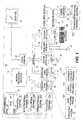
- FIGs. 1 and 2 illustrate various aspects of the preferred computing environment in which the present invention is designed to operate. Those skilled in the art will immediately appreciate that Figs. 1 and 2 and the associated discussion are intended to provide a brief, general description of the preferred computer hardware and program modules, and that additional information is readily available in the appropriate programming manuals, user's guides, and similar publications.
- Fig. I illustrates a conventional personal computer 10 suitable for supporting the operation of the preferred embodiment of the present invention.
- the personal computer 10 operates in a networked environment with logical connections to a remote computer 11 .
- the logical connections between the personal computer 10 and the remote computer 11 are represented by a local area network 12 and a wide area network 13 .
- the remote computer 11 may function as a file server or compute server.
- the personal computer 10 includes a processing unit (PU) 14 , such as the 80486 or "PENTIUM” microprocessors manufactured by Intel Corporation of Santa Clara, California.
- the personal computer also includes system memory 15 (including read only memory (ROM) 16 and random access memory (RAM) 17 ), which is connected to the PU 14 by a system bus 18 .
- the preferred computer 10 utilizes a BIOS 19, which is stored in ROM 16 .
- BIOS 19 is a set of basic routines that helps to transfer information between elements within the personal computer 10.
- a local hard disk drive 20 is connected to the system bus 18 via a hard disk drive interface 21 .
- a floppy disk drive 22 which is used to read or write to a floppy disk 23 , is connected to the system bus 18 via a floppy disk drive interface 24 .
- a CD-ROM drive 25 which is used to read a CD-ROM disk 26 , is connected to the system bus 18 via a CD-ROM interface 27.
- a user enters commands and information into the personal computer 10 by using a keyboard 28 and/or pointing device, such as a mouse 29 , which are connected to the system bus 18 via a serial port interface 30.
- Other types of pointing devices include track pads, track balls, and other devices suitable for positioning a cursor on a computer monitor 31.
- the monitor 31 or other kind of display device is connected to the system bus 18 via a video adapter 32 .
- the remote computer 11 in this networked environment is connected to a remote memory storage device 33 .
- This remote memory storage device 33 is typically a large capacity device such as a hard disk drive, CD-ROM drive, magneto-optical drive or the like.
- the personal computer 10 is connected to the remote computer 11 by a network interface 34, which is used to communicate over the local area network 12.
- the personal computer 10 is also connected to the remote computer 11 by a modem 35 , which is used to communicate over the wide area network 13 , such as the Internet.
- the modem 35 is connected to the system bus 18 via the serial port interface 30.
- the modem 35 also can be connected to the public switched telephone network (PSTN) or community antenna television (CATV) network.
- PSTN public switched telephone network
- CATV community antenna television
- program modules such as an operating system 36 , application programs 37, and data are provided to the personal computer 10 via one of the local or remote memory storage devices, which may include the local hard disk drive 20 , floppy disk 23 , CD-ROM 26 , RAM 17, ROM 16 , and the remote memory storage device 33 .
- the application programs 37 may include a number of different programs such as a word processing program 37a , a spell checker program 37b, and a grammar checker program 37c .
- the local hard disk drive 20 is used to store data and programs, including the operating system and programs.
- Fig. 2 is a simplified block diagram illustrating the interaction between the computer hardware 200, the operating system 36, and a typical application program 37n .
- BIOS Basic Input/Output System
- the PU 14 executes the operating system 36 and causes the visual elements associated with the user interface of the operating system 36 to be displayed on the monitor 31 .
- the operating system 36 in conjunction with the BIOS 19 (Fig. 1) and associated device drivers, provides the basic interface between the computer's resources, the user, and the application program 37n .
- the operating system 36 interprets and carries out instructions issued by the user. For example, when the user wants to load an application program 37n , the operating system 36 interprets the instruction (e.g., double clicking on the application program's icon) and causes the PU 14 to load the program code into RAM 17 from either the local hard disk drive 20, floppy disk 23, CD-ROM 26, or the remote memory storage device 33 .
- the application program 37a is loaded into the RAM 17 , it is executed by the PU 14. In case of large programs, the PU 14 loads various portions of program modules into RAM 17 as needed.
- the preferred embodiment of the present invention is embodied in the "WORD" program, version 8.0, which is designed to operate in conjunction with Microsoft Corporation's "WINDOWS 95” or “WINDOWS NT” operating systems, or the operating system “MacOS” used in "MACINTOSH” computers manufactured by Apple Computer, Inc.
- WORD WORD
- WINDOWS 95 or "WINDOWS NT” operating systems
- MacOS used in "MACINTOSH” computers manufactured by Apple Computer, Inc.
- the invention can readily be implemented in other operating systems, such as Microsoft Corporation's "WINDOWS 3.1 " operating system or IBM Corporation's "OS/2” operating system.
- the operating system 36 provides a variety of functions or services that allow an application program 37a to easily deal with various types of input/output (I/O). This allows the application program 37n to issue relatively simple function calls that cause the operating system 36 to perform the steps required to accomplish various tasks, such as displaying text on the monitor 31 (Fig. 1) or printing text on an attached printer (not shown). Generally described (with reference to Fig. 2), the application program 37n communicates with the operating system 36 by calling predefined functions provided by the operating system 36 . The operating system 36 responds by providing the requested information in a message or by executing the requested task.
- I/O input/output
- the preferred program module includes a grammar checker program module.
- the primary interaction between the preferred program and the grammar checker program module involves grammar checking related tasks.
- the preferred grammar checker program module conforms to the Common Grammar Application Programming Interface (CGAPI).
- CGAPI Common Grammar Application Programming Interface
- the CGAPI is designed to make it easy for programmers to write applications that can utilize the grammar checker program module while being independent of the underlying grammar checker program module.
- the CGAPI provides functions that can be used to implement sophisticated grammar checking features with a relatively small amount of code.
- CGAPI provides a wide variety of features and functions in addition to those included in the brief description presented above.
- CGAPI Common Grammar Application Programming Interface
- the preferred program module includes a spell checker program module.
- the primary interaction between the preferred program and the spell checker program module involves spell checking related tasks.
- the preferred spell checker program module conforms to the Common Speller Application Programming Interface (CSAPI).
- CSAPI Common Speller Application Programming Interface
- the CSAPI is designed to make it easy for programmers to write applications that can utilize the spell checking program module while being independent of the underlying spell checker program module.
- the CSAPI provides functions that can be used to implement sophisticated spell checking features with a relatively small amount of code.
- CSAPI provides a wide variety of features and functions in addition to those included in the brief description presented above.
- CSAPI Common Speller Application Programming Interface
- word processor program modules include spell checker program modules and grammar checker program modules.
- a user of one of these word processor program modules may spell check their document, i.e., check the accuracy of the spelling of their document, by executing a spell check command.
- the user had to execute a separate grammar check command to grammar check their document, i.e., check the accuracy of the grammatical composition of the document.
- two different commands have to be executed to proof a document by spell checking and grammar checking a document.
- Dirty text refers to text that has not been spell checked and/or text that has not been grammar checked.
- Dirty text is identified by flags, one flag for spell checking and one flag for grammar checking. For example, after a sentence has been spell checked and grammar checked, it is marked with a "clean" spell check flag and a "clean" grammar check flag. The flags indicate that the text does not need to be checked again by the spell and grammar check functions. It is possible for text to be "clean" for spell checking and "dirty” for grammar checking, and vice versa.
- the spell checker program module and grammar checker program module each have a separate user interface, or dialog.
- the commands associated with most spelling dialogs do not closely correspond to the commands of most grammar dialogs. Users must learn two different sets of commands for the spelling dialog and grammar dialog. The time and effort involved in learning two sets of commands and in executing two different checks, often makes users unlikely to execute both a spell check and grammar check when proofing a document. Thus, errors that may have been corrected by executing both a spell check and a grammar check often remain undetected.
- the present invention provides a system for verifying the accuracy of spelling and grammatical composition of an electronic document.
- the user selects the command "Spelling and Grammar" via a menu, toolbar or keyboard.
- the first sentence in the document is located and, in response, each word in the first sentence is spell checked by the spell checker program module.
- the sentence containing each spelling error, if any, detected by the spell checker program module is separately displayed to the user in a combined spelling and grammar screen display on the monitor with the spelling error displayed in red.
- the user may enter commands to change the misspelled word, ignore the possible misspelling, or other commands as will be further described below.
- the grammatical composition of the first sentence is checked for errors by the grammar checker program module. If any grammatical errors are detected, they are separately displayed to the user in the combined spelling and grammar dialog box. For each possible grammatical error, the user enters commands to make changes to the sentence, to leave the sentence unchanged, or other commands as will be further described below.
- next sentence is selected for examination, the words of the next sentence are spell checked and then the sentence is grammar checked.
- the preferred program can repeat the tasks described above to check the entire document in a sentence-by-sentence manner until the entire document has been proofed.
- Figs. 3 and 4 are illustrations of a combined spelling and grammar dialog box that is displayed when the user selects the "Spelling and Grammar" command in the preferred application program and a possible error is subsequently found in the document being checked.
- the combined spelling and grammar dialog box illustrated in Fig. 3 is an example of the layout of the combined spelling and grammar dialog box presented in response to detecting an error by the spell checker program module.
- the combined spelling and grammar dialog box illustrated in Fig. 4 is an example of the layout of the combined spelling and grammar dialog box for an error detected by the grammar checker program module.
- a user of the preferred application program wants to check an electronic document for spelling errors and grammatical errors
- the user executes the "Spelling and Grammar” command.
- the "Spelling and Grammar” command can be executed by selecting a command from a menu or toolbar displayed on the monitor 31.
- the "Spelling and Grammar” command can also be executed by entering a command on the keyboard 28.
- an user interface called a combined spelling and grammar dialog box is displayed on the monitor 31 when a possible spelling error or grammatical error has been detected.
- the combined spelling and grammar dialog box 300 that is displayed for errors found by the spell checker program module is shown in Fig. 3.
- the combined spelling and grammar dialog box includes an error title line 305 , a sentence 307, a rich text edit control (RTEC) field 310 , a misspelled word 315, a suggestions list box 317 , a suggestion list 320 , a check grammar box 322 , and command buttons 325, 330, 335, 340, 345, 350, 355, 360, and 365 .
- RTEC rich text edit control
- the command buttons include an Ignore button 325, an Ignore All button 330 , an Add button 335 , a Change button 340, a Change All button 345, an Auto Correct button 350 , an Options button 355 , an Undo button 360, and a Cancel button 365 .
- the type of error that is found is displayed in the error title line 305 .
- the type of error in the sentence is a spelling error and thus, "Spelling Error” is displayed in the error title line 305 .
- Other error types include, but are not limited to, "Improper Capitalization” and "Repeated Word”.
- the sentence 307 in which a spelling error has been detected is displayed in the RTEC field 310 .
- the misspelled word is displayed in the user interface.
- the preferred application program provides the user a context in which to decide whether the misspelled word is actually misspelled or is spelled correctly. For example, those skilled in the art will understand that some words, such as proper names, may not be recognized by the spell checker program module and may be flagged as spelling errors even though they are correctly spelled.
- the user is better able to make the determination whether the spell checker program module has improperly flagged a correctly spelled word.
- the user is able to make modifications inside the sentence 307.
- a misspelled word 315 in sentence 307 is displayed.
- the misspelled word 315 is displayed in red, bold typeface.
- the misspelled word 315 is a word that does not match any of the words in the dictionaries of the spell checker program module and may possibly be misspelled.
- the misspelled word 315 may also be a word with which the spell checker program module detects a problem, such as a word that is repeated or that has improper capitalization.
- a blinking cursor (not shown) is displayed to the right of the possible misspelled word 315 in the preferred application program.
- the blinking cursor allows the user to immediately make changes to the sentence 307 by typing on the keyboard 28 without first having to enter a command, such as clicking the mouse 29 , to begin editing the sentence.
- the sentence 307 in the rich text edit control field 310 may be changed in a number of ways by virtue of rich text editing. For example, the color, formatting, font, etc. of the sentence 307 may be changed in the RTEC field 310 without exiting the spell check session and returning to the preferred application program module.
- the combined spelling and grammar dialog box 300 includes a suggestion list box 317 .
- the suggestion list box 317 includes a plurality of suggestions 320 to replace the possible spelling error in the sentence 307.
- the list of suggestions 320 includes "engine” and "ensign” to replace the misspelled word 315 "engin”.
- the combined spelling and grammar dialog box 300 also includes a check grammar box 322 .
- the check grammar box 322 may be selected by the user to turn the grammar checker program module on and off. If the grammar checker program module is turned on, the user may select the grammar checker box 322 to turn the grammar checker program module off. If the grammar checker program module is turned off, the user may select the grammar checker box 322 to turn the grammar checker program module on. Thus, the user has the ability to opt out of grammar checking.
- the combined spelling and grammar dialog box 300 also includes a plurality of command buttons 325-365 as mentioned above. Once the spelling and grammar dialog 300 is displayed, the user may select one of the command buttons 325-365 such as by clicking the mouse 29 on one of these command buttons. The operations that occur when each command button is selected will be described below.
- the current instance of the misspelled word 315 is skipped and the misspelled word remains unchanged. For example, in Fig. 3, if the user selects the Ignore button, then the misspelled word 315 "engin” would remain unchanged, but future occurrences of the word "engin” would be flagged by the spell checker program module. In addition, if the user selects the Ignore button 325, then the current instance of the misspelled word 315 is marked as "clean" for spelling.
- the Ignore All button 330 is positioned below the Ignore button 325 in the combined spelling and grammar dialog box 300. If the user selects the Ignore All button 330 for a spelling error, all instances of the misspelled word 315 subsequently found in the document (or other documents) are skipped by the spell checker program module until the spell checker program module is quit. For example, in Fig. 3, if the user selects the Ignore All button 330, then every instance of the word "engin” in all documents will be skipped by the spell checking program module until the program module is quit. In other words, the spell checking program module will not flag the word "engin” as a misspelled word in any document that is being checked as long as the program module remains running. However, the spell checker program module will still check these words for other errors such as repeated words.
- the Add button 335 is positioned below the Ignore All button 330 in the combined spelling and grammar dialog box 300. If the user selects the Add button 335 for a spelling error, then the misspelled word is added to the custom dictionary. The spell checking program module will then skip over every instance of the misspelled word, even in documents other than the present document that is being spell checked and even after the program module has been quit and restarted.
- the Change button 340 is positioned below the Add button 335 in the combined spelling and grammar dialog box 300 . If the user selects the Change button 340 , the misspelled word 315 will be replaced with the word that has been selected by the user from the suggestions 320 in the suggestion list box 317 . However, in the preferred application program, if the user has made changes to the sentence 307 in the rich text edit control 310 , then selecting the Change button will incorporate these changes into the document. For example, in Fig. 3, if the user has selected the suggestion "engine” from the suggestion list box 317 and then selects the Change button, without editing the sentence in the rich text edit control field, then the misspelled word "engin” will be replaced with the suggestion "engine”. However, again referring to Fig. 3, if the user has edited the sentence 307 in the rich text edit control field, then selecting the Change button 340 will incorporate these changes into the document.
- the Change All button 345 is positioned below the Change button 340 . If the user selects the Change All button 345 , then every occurrence of the misspelled word in the document will be changed to the suggestion 320 selected by the user from the suggestion list box 317 . For example, in Fig. 3, if the user selects the suggestion "engine” from the suggestion list box 317 and selects the Change All button, then all instances of the word "engin" in the document will be changed to "engine”.
- the AutoCorrect button 350 is positioned below the Change All button 345 in the combined spelling and grammar dialog box 300 . If the user selects the AutoCorrect button 350 , then every time that the user types the misspelled word 315 in the document (or in any other document until the user deletes the AutoCorrect entry) the misspelled word will be automatically changed to the suggestion 320 selected by the user from the suggestion list box 317 . For example, in Fig. 3, if the user selects "engine” from the suggestion list box 317 and then selects the "AutoCorrect” button, then every time the user types "engin” the word “engin” will automatically be replaced with "engine” without any further action on the user's part.
- the Options button 355 the Undo button 360
- the Cancel button 365 the last change executed by the user will be undone. If the user selects the Cancel button 365 , then the proofing session is terminated.
- the combined spelling and grammar dialog box 300 shown in Fig. 3 is displayed when the spell checker program module detects an error.
- the combined spelling and grammar dialog box changes slightly as shown in Fig. 4.
- the layout of the combined spelling and grammar dialog box is the same for spelling errors and grammar errors with the exception of the command buttons.
- the rest of the combined spelling and grammar dialog box 400 will be briefly described to show the similarity in function and layout of the dialog for spelling errors and grammatical errors.
- the combined spelling and grammar dialog box 400 includes an error title line 405 that displays the type of grammatical error found by the grammar checker program module, such as "Subject-Verb Agreement".
- the sentence 407 in which a grammatical error has been found is displayed in a RTEC field 410 .
- the grammatically incorrect word or words 415 are displayed in green, bold typeface by the preferred application program.
- the combined spelling and grammar dialog box 400 includes a suggestion list box 417 that includes suggestions 420 for replacing the grammatically incorrect word 415 .
- the combined spelling and grammar dialog box 400 also includes a check grammar box 422 and command buttons 455 , 460 and 465 that function in a manner similar to elements 322 , 355 , 360 , and 365 described above in reference to Fig. 3.
- the combined spelling and grammar dialog box has a similar layout whether the error is a spelling error (Fig. 3) or a grammatical error (Fig. 4).
- the combined spelling and grammar dialog box 400 displayed to the user includes an Ignore button 425 , an Ignore All button 425 and a Change button 440 in the same locations as for spelling errors.
- the combined spelling and grammar dialog box 400 does not include a Change All button or an AutoCorrect button.
- the Add button which is displayed for spelling errors, is replaced with a "Next Sentence" button 470 for grammar checking.
- the functions of the Ignore button 425 , the Ignore All button 430 , the Change button 440 , and the Next Sentence button 470 for grammatical errors will be described below in reference to Fig. 4.
- the current instance of a grammatical error is skipped. For example, in Fig. 4, the current instance of the subject-verb agreement grammatical error "have" will be skipped if the Ignore button 425 is selected by the user.
- the function associated with the Ignore button 425 is similar to the function for the Ignore button 325 which, when selected, causes the spell checker program module to skip the current instance of the spelling error.
- Every instance of the grammatical error generated by the present grammar rule will be ignored by the grammar checker program module. For example, in Fig. 4, if the user selects the Ignore All button 430 , then every instance of a grammatical error involving the same particular subject-verb agreement grammar rule will be skipped by the grammar checker program module for this document.
- the function associated with the Ignore All button 430 is similar to the function for the Ignore All button 330 for spelling errors.
- the grammatical error will be replaced with the word that has been selected by the user from the suggestions 420 in the suggestion list box 417 .
- selecting the Change button 440 will incorporate these changes into the document. For example, in Fig. 4, if the user has selected the suggestion "has” from the suggestion list box 417 and then selects the Change button 440 without editing the sentence in the RTEC field 410 , then the current instance of the grammatical error "have” will be replaced with the suggestion "has".
- selecting the Change button 440 will incorporate these changes into the document. It will be appreciated that the function associated with the Change button 440 is similar to the function for the Change button 340 .
- the grammar checker program module ignores every grammatical error in the sentence 407 .
- any changes made to the sentence 407 in the RTEC field 410 will also be incorporated into the document when the user selects the Next Sentence button 470 because this is the action that most users expect when they makes changes in the RTEC field 410 .
- command buttons for the combined spelling and grammar dialog box is logical based on the grouping of command buttons having similar functions. For example, buttons that ignore an error, such as the Ignore button 325, 425, the Ignore All button 330, 430, the Add button 335 and Next Sentence button 470 , are displayed together in the combined spelling and grammar dialog box. Also, the buttons that make changes to the sentence such as the Change button 340, 440, the Change All button 345 and the AutoCorrect button 350 are displayed together in the combined spelling and grammar dialog box.
- the combined spelling and grammar dialog box switches automatically between the layout shown in Fig. 3 and the layout shown in Fig. 4 based upon whether the error being displayed is spelling related or grammar related. The user is not required to spell check the document and then grammar check the document.
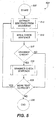
- Fig. 5 is a flow diagram illustrating the preferred method 500 by which the accuracy of the spelling and grammatical composition of a document is verified.
- the present invention is a computer-implemented process that is carried out by the computer in response to input from the user and instructions provided by the preferred application program module, the preferred spell checker program module, and the preferred grammar checker program module.
- the method 500 begins at start step 505 and proceeds to step 510 when the user selects the "Spelling and Grammar" command.
- the user selects the "Spelling and Grammar” command when the user wants to check an electronic document for spelling errors and grammatical errors.
- the "Spelling and Grammar” command can be executed by selecting a command from a menu or toolbar of the user interface displayed on the monitor 31 .
- the user can position a cursor over the desired command button or menu item and select the down position of the mouse button, i.e., by clicking the mouse.
- the "Spelling and Grammar” command can also be executed by entering a command on the keyboard 28 .
- a sentence is extracted from the document.
- a sentence is extracted by separating the document into sentences.
- sentence-breaking involves finding the beginning and end of a sentence in a buffer of text.
- Sentence-breaking is often necessary because grammar checker program modules often require a single, complete sentence to effectively grammar check.
- Most word processor program modules contain functionality to sentence-break a document into sentences.
- the sentence-breaking is performed by the grammar checker program module, as will be more fully described in reference to Fig. 6.
- the sentence is spell checked at step 515 .
- the sentence is grammar checked at step 520 .
- a more detailed description of the steps of the preferred method will be described below in reference to Figs. 6-8.
- Fig. 6 is a flow diagram illustrating the preferred process to execute step 510 of Fig. 5, i.e., extracting a sentence from the document.
- the process begins when the user selects the "Spelling and Grammar" command and the grammar checker program module is called to initiate a grammar checking session.
- the grammar checker program module is preferably called by the preferred application program.
- commands to the grammar checker program module are preferably made by using functions described in the Common Grammar Application Programming Interface (CGAPI), which is published by Microsoft Corporation of Redmond, Washington.
- CGAPI Common Grammar Application Programming Interface
- the preferred CGAPI function to initiate a grammar checking session is GramInit.
- a buffer of text from the document being proofed is transferred to the grammar checker program module at step 610 .
- the grammar checker program module determines the beginning and end of a sentence from the buffer of text that was transferred to the grammar checker program module in step 610 .
- the sentence that is located by the grammar checker program module is the sentence that will be spell checked and grammar checked.
- the CGAPI function GramCheck is initiated.
- an argument called "grammar check command code", or gcc is initiated which lets the application program module choose between tasks such as verify buffer, report sentence limits, generate statistics, etc.
- the grammar checker program module sends sentence indices indicative of the beginning point and end point of the sentence to the preferred application program module at step 620.
- steps 605-620 is a sentence-breaking process.
- the sentence-breaking is performed by the grammar checker program module as described above.
- the sentence-breaking can be performed in another manner such as by the preferred application program module.
- a sentence is extracted from the document, the sentence is spell checked at step 515 .
- the preferred steps for the process 515 of spell checking the sentence are illustrated in the flow diagram of Fig. 7.
- the spell checker program module is called at step 705 and a spell checking session is initiated.
- the spell checker program module is called by the preferred application program module.
- commands to the spell checker program module are preferably made by using the functions described in the Common Spelling Application Programming Interface (CSAPI), which is published by Microsoft Corporation.
- CSAPI Common Spelling Application Programming Interface
- a word in the sentence is sent to the spell checker program module at step 710 .
- the preferred application program module is able to determine the words in a sentence based on the spaces and other punctuation (e.g., hyphens, dashes, etc.) between words in a sentence.
- the preferred application program module then sends a word of the sentence to the spell checker program module.
- the first word of the sentence is sent to the spell checker program module and, in turn, each succeeding word in the sentence is sent to the spell checker program module after the preceding word has been spell checked.
- the spell checker program module can break the sentence into words based upon the spaces and other punctuation between the words in the sentence.
- the spell checker program module verifies the accuracy of the spelling of the word.
- a spell checker program includes a standard dictionary with a list of words that are found in a standard dictionary.
- spell checker program modules typically include custom dictionaries. These custom dictionaries include terms entered by a user of the spell checker program module, such as specialized terms, acronyms, abbreviations, and any other terms entered by the user.
- a spell checker program module checks the spelling of a word by comparing the word to the list of words in the standard dictionary and custom dictionaries. If the word does not correspond to one of the words in the standard dictionary or custom dictionaries, then the spell checker program module flags the word as a word that is possibly misspelled.
- most spell checker program modules also check for inaccuracies in the word, such as a word that has been repeated or a word with improper capitalization.
- the spell checker program module verifies the accuracy of the spelling of the word at step 715 in response to a CSAPI function from the preferred application program module.
- the preferred CSAPI function to check the spelling of one or more words is SpellCheck.
- the spell checker program module After the spell checker program module has verified the accuracy of the spelling of the word, the spell checker program module sends spelling data to the preferred application program module at step 720 .
- the spelling data is indicative of whether or not the word sent to the spell checker at step 710 corresponds to a word in a dictionary of the spell checker program module.
- the preferred application program module receives the spelling data from the spell checker program module.
- the preferred application program module reviews the spelling data to determine whether the word is satisfactory.
- the spelling data is binary data that either indicates the word is satisfactory or unsatisfactory. If the spelling data indicates that the word is unsatisfactory, then the method proceeds to step 730 .
- the preferred application program module consults a structure called a Spell Check Return Status field in a Spell Return Buffer (SRB) to determine the type of spelling error.
- SRB Spell Return Buffer
- the SRB includes a field called a Spell Check Return Status (SCRS).
- SCRS is an integer code that the application program module consults to determine the error type information.
- the error type information indicates the type of spelling error detected by the spell checker program module. For example, most typical spell checker program modules include the ability to detect possible errors such as "word not in dictionary”, "repeated word”, and "capitalization”.
- the preferred application program After receiving the error type information at step 730, the preferred application program consults another part of the SRB to locate a string buffer containing suggestions from the spell checker program module at step 735 .
- the suggestions are the information that is displayed in the suggestions list box 317 as shown in Fig. 3.
- the preferred application program module After receiving suggestions from the spell checker program module at step 735 , the preferred application program module displays the combined spelling and grammar dialog box such as is shown in Fig. 3. The entire sentence in which the spelling error occurs is displayed. The word in which the possible spelling error occurs is displayed in red, bold typeface in the preferred application program module.
- the suggestions received at step 735 are displayed in the suggestions list box 317 as shown in Fig. 3.
- the error type information received at step 730 is displayed in the error title line 305 as shown in Fig. 3.
- step 745 input from the user is received.
- the user inputs a command by selecting one of the command buttons, 325, 330, 335, 340, 345, 350, 355, 360 , or 365 described in reference to Fig. 3.
- the preferred application program performs the appropriate steps in response to the user selecting one of these command buttons.
- the method proceeds to decision step 750 .
- decision step 725 if the word was determined to be satisfactory, then the method also proceeds to decision step 750 .
- step 745 it should be understood that after input is received from the user at step 745 that the word may be rechecked using the method outlined in steps 705-745. This allows the spell checker program module to flag repeated words or to recheck a word entered by the user.
- step 750 it is determined whether there is another word in the sentence to spell check. If the preferred application program determines there is another word in the sentence to spell check, then the method returns to step 710 . If it is determined there are no more words in the sentence to spell check, then the method proceeds to step 520 of Fig. 5 for grammar checking of the sentence. It is important to note that spell checking of the sentence is preferably completed before grammar checking a sentence. This is because most grammar checker program modules require a sentence with properly spelled words in order to recognize the words and determine whether the words are nouns, verbs, adjectives, adverbs, etc.
- the sentence is grammar checked at step 520.
- the preferred process for grammar checking the sentence is illustrated in the flow diagram of Fig. 8.
- the grammar checker program module is called at step 805 and a grammar checking session is initiated.
- the grammar checker program module is called by the preferred application program module.
- commands to the grammar checker program module are preferably made using the functions described in the Common Grammar Application Programming Interface (CGAPI) published by Microsoft Corporation.
- CGAPI Common Grammar Application Programming Interface
- the CGAPI function to call a grammar checker and initiate a grammar checking session is Gramlnit.
- the sentence is sent to the grammar checker program module at step 810 . It is important to note that the sentence sent to the grammar checker program module incorporates any changes made to the sentence in the spell checking process described in reference to Fig. 7. For example, if the sentence originally was "The boy is sikc.” and was corrected to "The boy is sick.” in the spell checking process, then the corrected sentence "The boy is sick.” would be sent to the grammar checker at step 810.
- the grammar checker program module verifies the accuracy of the grammatical composition of the sentence.
- a grammar checker program module verifies the accuracy of the grammatical composition of a sentence by applying common grammar rules such as subject-verb agreement. If the sentence violates one of the rules in the grammar checker program module, then the grammar checker program module flags the sentence as a sentence that is possibly grammatically incorrect.
- the grammar checker program module verifies the accuracy of the grammatical composition of the sentence at step 815 in response to a CGAPI function from the preferred application program module.
- the CGAPI function to check the grammar of a sentence is GramCheck.
- the grammar checker program module After the grammar checker program module has verified the accuracy of the grammatical composition of the sentence, the grammar checker program module sends grammar data to the preferred application program module at step 820 .
- the grammar data is indicative of whether or not the sentence sent to the grammar checker at step 810 violates a grammar rule of the grammar checker.
- the preferred application program module receives the grammar data from the grammar checker program module.
- the preferred application program module reviews the grammar data to determine whether the sentence is satisfactory. The preferred application program determines whether there were any errors found during the grammar check session. If any grammatical errors were found in the grammar check session, then the method proceeds to step 830 .
- the preferred application program module requests and receives grammatical error type information from the grammar checker program module.
- the CGAPI function to request information about the type of grammar error is GramGetError.
- the GramGetError function returns a Grammar Error Buffer (GEB) which includes grammar error type information and suggestions.
- GEB Grammar Error Buffer
- the grammar error type information is determined by reading a field set by the grammar checker program module to correspond to the type of error found by the grammar checker program module. For example, most typical grammar checker program modules detect possible errors such as "subject-verb agreement". A field will be set to different values by the grammar checker program module to identify the type of grammatical error in the sentence.
- the preferred application program After receiving the information about the type of grammatical error at step 830 , the preferred application program consults the grammatical suggestions in the GEB at step 835 .
- the grammatical suggestions are the information that is displayed in the suggestions list box 417 shown in Fig. 4.
- the preferred application program module After receiving grammatical suggestions from the grammar checker program module, the preferred application program module, at step 840, displays the combined spelling and grammar dialog box such as is shown in Fig. 4. The entire sentence in which the grammatical error occurs is displayed. The word in which the possible grammatical error occurs is displayed in green, bold typeface by the preferred application program module.
- the suggestions 420 received at step 835 are displayed in the suggestions list box 417 .
- step 845 input commands from the user are received.
- the input is one of the command buttons 425, 430, 440, 455, 460, 465 or 470 described in reference to Fig. 4.
- the preferred application program performs the appropriate steps in response to the user selecting one of the command buttons as was described in reference to Fig. 4.
- step 850 it is determined whether there are any other grammatical errors in the sentence. If there are any more grammatical errors, then the method returns to step 830 . If there are not any more grammatical errors in the sentence, then the method proceeds to step 525 of Fig. 5.
- Idle time checking refers to the process of checking in a document for errors while waiting for a command input from the user. For example, if the spell checker program module detects a spelling error, the combined spelling and grammar dialog box will be displayed to the user. While waiting for a response to the user, i.e., a command input, the spell checker program module will check the rest of the sentence for errors. During this idle time, more of the sentence may be checked and the process of proofing the document takes less time.
- the present invention provides an improved system for verifying the accuracy of spelling and grammatical composition of an electronic document.
- the user simply has to execute one command to proof the document.
- the present invention provides an improved user interface, the combined spelling and grammar dialog box.
- the user only has to become familiar with a few commands in the combined spelling and grammar dialog box to search for and correct spelling or grammatical errors.
- the layout of the command buttons for the combined spelling and grammar dialog box is arranged logically based on common functions shared by a grouping of commands.
- a spell checker program module and a grammar checker program module can be implemented with other "document proofing" tools, such as a consistency checker program module or a style checker program module.
- a spell checker program module and a style checker program module could be implemented such that the spelling and style errors are checked and the errors found by these program modules are presented in a combined dialog box.
Landscapes
- Engineering & Computer Science (AREA)
- Theoretical Computer Science (AREA)
- Health & Medical Sciences (AREA)
- Artificial Intelligence (AREA)
- Audiology, Speech & Language Pathology (AREA)
- Computational Linguistics (AREA)
- General Health & Medical Sciences (AREA)
- Physics & Mathematics (AREA)
- General Engineering & Computer Science (AREA)
- General Physics & Mathematics (AREA)
- Machine Translation (AREA)
- Document Processing Apparatus (AREA)
Applications Claiming Priority (2)
| Application Number | Priority Date | Filing Date | Title |
|---|---|---|---|
| US08/666,227 US6085206A (en) | 1996-06-20 | 1996-06-20 | Method and system for verifying accuracy of spelling and grammatical composition of a document |
| EP97931260A EP0978054B1 (fr) | 1996-06-20 | 1997-06-20 | Procede et systeme permettant de verifier l'exactitude orthographique et grammaticale d'un document |
Related Parent Applications (1)
| Application Number | Title | Priority Date | Filing Date |
|---|---|---|---|
| EP97931260A Division EP0978054B1 (fr) | 1996-06-20 | 1997-06-20 | Procede et systeme permettant de verifier l'exactitude orthographique et grammaticale d'un document |
Publications (3)
| Publication Number | Publication Date |
|---|---|
| EP1645973A2 true EP1645973A2 (fr) | 2006-04-12 |
| EP1645973A3 EP1645973A3 (fr) | 2006-07-19 |
| EP1645973B1 EP1645973B1 (fr) | 2009-06-10 |
Family
ID=24673333
Family Applications (2)
| Application Number | Title | Priority Date | Filing Date |
|---|---|---|---|
| EP97931260A Expired - Lifetime EP0978054B1 (fr) | 1996-06-20 | 1997-06-20 | Procede et systeme permettant de verifier l'exactitude orthographique et grammaticale d'un document |
| EP05076897A Expired - Lifetime EP1645973B1 (fr) | 1996-06-20 | 1997-06-20 | Procédé et système permettant de vérifier l'exactitude orthographique et grammaticale d'un document |
Family Applications Before (1)
| Application Number | Title | Priority Date | Filing Date |
|---|---|---|---|
| EP97931260A Expired - Lifetime EP0978054B1 (fr) | 1996-06-20 | 1997-06-20 | Procede et systeme permettant de verifier l'exactitude orthographique et grammaticale d'un document |
Country Status (6)
| Country | Link |
|---|---|
| US (1) | US6085206A (fr) |
| EP (2) | EP0978054B1 (fr) |
| AT (2) | ATE307357T1 (fr) |
| CA (1) | CA2258711C (fr) |
| DE (2) | DE69739451D1 (fr) |
| WO (1) | WO1997049043A1 (fr) |
Cited By (1)
| Publication number | Priority date | Publication date | Assignee | Title |
|---|---|---|---|---|
| US10419312B2 (en) | 2017-03-21 | 2019-09-17 | Motorola Solutions, Inc. | System, device, and method for real-time conflict identification and resolution, and information corroboration, during interrogations |
Families Citing this family (136)
| Publication number | Priority date | Publication date | Assignee | Title |
|---|---|---|---|---|
| US6026416A (en) * | 1996-05-30 | 2000-02-15 | Microsoft Corp. | System and method for storing, viewing, editing, and processing ordered sections having different file formats |
| US7297856B2 (en) | 1996-07-10 | 2007-11-20 | Sitrick David H | System and methodology for coordinating musical communication and display |
| DE19735278A1 (de) * | 1997-08-14 | 1999-02-18 | Rolf Wadewitz | Elektronisches Datenerfassungsverfahren und Datenverarbeitungssystem |
| US6782510B1 (en) * | 1998-01-27 | 2004-08-24 | John N. Gross | Word checking tool for controlling the language content in documents using dictionaries with modifyable status fields |
| US6424983B1 (en) * | 1998-05-26 | 2002-07-23 | Global Information Research And Technologies, Llc | Spelling and grammar checking system |
| GB2340263A (en) | 1998-07-30 | 2000-02-16 | Ibm | User interface having entry filters to modify data input to structured entry fields |
| US7272604B1 (en) | 1999-09-03 | 2007-09-18 | Atle Hedloy | Method, system and computer readable medium for addressing handling from an operating system |
| US6785869B1 (en) * | 1999-06-17 | 2004-08-31 | International Business Machines Corporation | Method and apparatus for providing a central dictionary and glossary server |
| GB0006721D0 (en) * | 2000-03-20 | 2000-05-10 | Mitchell Thomas A | Assessment methods and systems |
| US6889361B1 (en) * | 2000-06-13 | 2005-05-03 | International Business Machines Corporation | Educational spell checker |
| US6662157B1 (en) * | 2000-06-19 | 2003-12-09 | International Business Machines Corporation | Speech recognition system for database access through the use of data domain overloading of grammars |
| US6583798B1 (en) * | 2000-07-21 | 2003-06-24 | Microsoft Corporation | On-object user interface |
| US7254773B2 (en) * | 2000-12-29 | 2007-08-07 | International Business Machines Corporation | Automated spell analysis |
| US20020087604A1 (en) * | 2001-01-04 | 2002-07-04 | International Business Machines Corporation | Method and system for intelligent spellchecking |
| US6732333B2 (en) | 2001-01-16 | 2004-05-04 | Scott Selby | System and method for managing statistical data regarding corrections to word processing documents |
| US7076731B2 (en) * | 2001-06-02 | 2006-07-11 | Microsoft Corporation | Spelling correction system and method for phrasal strings using dictionary looping |
| US6978275B2 (en) * | 2001-08-31 | 2005-12-20 | Hewlett-Packard Development Company, L.P. | Method and system for mining a document containing dirty text |
| US7491690B2 (en) * | 2001-11-14 | 2009-02-17 | Northwestern University | Self-assembly and mineralization of peptide-amphiphile nanofibers |
| US20030101046A1 (en) * | 2001-11-28 | 2003-05-29 | Mark Krasnov | Word, expression, and sentence translation management tool |
| WO2003070749A2 (fr) * | 2002-02-15 | 2003-08-28 | Northwestern University | Auto-assemblage de nanofibres amphiphiles peptidiques dans des conditions physiologiques |
| US20040076930A1 (en) | 2002-02-22 | 2004-04-22 | Steinberg Linda S. | Partal assessment design system for educational testing |
| US7689431B1 (en) * | 2002-04-17 | 2010-03-30 | Winway Corporation | Context specific analysis |
| SE0201177L (sv) * | 2002-04-18 | 2003-10-19 | Interactive Inst | Kontroll av textsträng |
| EP1376394A1 (fr) * | 2002-06-20 | 2004-01-02 | Sun Microsystems, Inc. | Procédé et systèmes pour traitement d'éléments de texte |
| AU2003262760A1 (en) | 2002-08-21 | 2004-03-11 | Northwestern University | Charged peptide-amphiphile solutions and self-assembled peptide nanofiber networks formed therefrom |
| US7554021B2 (en) * | 2002-11-12 | 2009-06-30 | Northwestern University | Composition and method for self-assembly and mineralization of peptide amphiphiles |
| AU2003298647A1 (en) | 2002-11-14 | 2004-06-15 | Claussen, Randal, C. | Synthesis and self-assembly of abc triblock bola peptide |
| MXPA05005100A (es) * | 2002-11-14 | 2005-12-14 | Educational Testing Service | Evaluacion automatica del uso excesivamente repetitivo de palabras en un ensayo. |
| US7783486B2 (en) * | 2002-11-22 | 2010-08-24 | Roy Jonathan Rosser | Response generator for mimicking human-computer natural language conversation |
| EP1606065A4 (fr) * | 2003-02-11 | 2010-09-29 | Univ Northwestern | Procedes et matieres pour revetements de surface nanocristallins et liaison de nanofibres d'amphiphiles peptidiques sur ceux-ci |
| US20050175242A1 (en) * | 2003-04-24 | 2005-08-11 | Fujitsu Limited | Online handwritten character input device and method |
| US20040250209A1 (en) * | 2003-06-05 | 2004-12-09 | Gail Norcross | Automated composition assistant |
| US9715678B2 (en) | 2003-06-26 | 2017-07-25 | Microsoft Technology Licensing, Llc | Side-by-side shared calendars |
| US7890852B2 (en) | 2003-06-26 | 2011-02-15 | International Business Machines Corporation | Rich text handling for a web application |
| US7716593B2 (en) * | 2003-07-01 | 2010-05-11 | Microsoft Corporation | Conversation grouping of electronic mail records |
| US8799808B2 (en) | 2003-07-01 | 2014-08-05 | Microsoft Corporation | Adaptive multi-line view user interface |
| US7707255B2 (en) | 2003-07-01 | 2010-04-27 | Microsoft Corporation | Automatic grouping of electronic mail |
| US7657832B1 (en) * | 2003-09-18 | 2010-02-02 | Adobe Systems Incorporated | Correcting validation errors in structured documents |
| US7483833B2 (en) | 2003-10-21 | 2009-01-27 | Koninklijke Philips Electronics N.V. | Intelligent speech recognition with user interfaces |
| US10437964B2 (en) | 2003-10-24 | 2019-10-08 | Microsoft Technology Licensing, Llc | Programming interface for licensing |
| US20050125217A1 (en) * | 2003-10-29 | 2005-06-09 | Gadi Mazor | Server-based spell check engine for wireless hand-held devices |
| US7544661B2 (en) * | 2003-12-05 | 2009-06-09 | Northwestern University | Self-assembling peptide amphiphiles and related methods for growth factor delivery |
| EP1696944A4 (fr) * | 2003-12-05 | 2008-11-05 | Univ Northwestern | Amphphiles peptides ramifies, composes epitopes les concernant, et certaines de leurs structures auto-assemblees |
| US7761794B1 (en) * | 2004-01-22 | 2010-07-20 | Cisco Technology, Inc. | Integrated audit and configuration techniques |
| US7912904B2 (en) * | 2004-03-31 | 2011-03-22 | Google Inc. | Email system with conversation-centric user interface |
| US7269621B2 (en) | 2004-03-31 | 2007-09-11 | Google Inc. | Method system and graphical user interface for dynamically updating transmission characteristics in a web mail reply |
| US7814155B2 (en) | 2004-03-31 | 2010-10-12 | Google Inc. | Email conversation management system |
| US9819624B2 (en) | 2004-03-31 | 2017-11-14 | Google Inc. | Displaying conversations in a conversation-based email system |
| WO2005098788A2 (fr) * | 2004-04-02 | 2005-10-20 | Sri International | Systeme et procede de creation d'evaluations |
| US7464022B2 (en) * | 2004-05-19 | 2008-12-09 | Sap Ag | Word processing with artificial language validation |
| US7664748B2 (en) * | 2004-07-12 | 2010-02-16 | John Eric Harrity | Systems and methods for changing symbol sequences in documents |
| US7979501B1 (en) | 2004-08-06 | 2011-07-12 | Google Inc. | Enhanced message display |
| US8117542B2 (en) | 2004-08-16 | 2012-02-14 | Microsoft Corporation | User interface for displaying selectable software functionality controls that are contextually relevant to a selected object |
| US7895531B2 (en) | 2004-08-16 | 2011-02-22 | Microsoft Corporation | Floating command object |
| US8146016B2 (en) | 2004-08-16 | 2012-03-27 | Microsoft Corporation | User interface for displaying a gallery of formatting options applicable to a selected object |
| US7703036B2 (en) | 2004-08-16 | 2010-04-20 | Microsoft Corporation | User interface for displaying selectable software functionality controls that are relevant to a selected object |
| US9015621B2 (en) | 2004-08-16 | 2015-04-21 | Microsoft Technology Licensing, Llc | Command user interface for displaying multiple sections of software functionality controls |
| US8255828B2 (en) | 2004-08-16 | 2012-08-28 | Microsoft Corporation | Command user interface for displaying selectable software functionality controls |
| US20060074909A1 (en) * | 2004-09-28 | 2006-04-06 | Bradley Fredericks | Automated resume evaluation system |
| US7747966B2 (en) | 2004-09-30 | 2010-06-29 | Microsoft Corporation | User interface for providing task management and calendar information |
| US7694222B2 (en) * | 2004-12-08 | 2010-04-06 | Steen David A | Document composition system and method |
| US7788085B2 (en) * | 2004-12-17 | 2010-08-31 | Xerox Corporation | Smart string replacement |
| AU2006206194A1 (en) * | 2005-01-21 | 2006-07-27 | Northwestern University | Methods and compositions for encapsulation of cells |
| US7693705B1 (en) | 2005-02-16 | 2010-04-06 | Patrick William Jamieson | Process for improving the quality of documents using semantic analysis |
| US8122354B1 (en) | 2005-02-25 | 2012-02-21 | The Mathworks, Inc. | Systems and methods for providing an indicator of detection of input related to an element of a user interface |
| US8202098B2 (en) * | 2005-02-28 | 2012-06-19 | Educational Testing Service | Method of model scaling for an automated essay scoring system |
| WO2006096614A2 (fr) * | 2005-03-04 | 2006-09-14 | Northwestern University | Epitopes angiogeniques de liaison a l'heparine, amphiphiles peptidiques, compositions auto-assemblees et procedes d'utilisation associes |
| US20060224994A1 (en) * | 2005-04-01 | 2006-10-05 | International Business Machines Corporation | Method, system and computer program product for preventing inadvertent selection within a graphical user interface |
| US9002725B1 (en) | 2005-04-20 | 2015-04-07 | Google Inc. | System and method for targeting information based on message content |
| US7584093B2 (en) | 2005-04-25 | 2009-09-01 | Microsoft Corporation | Method and system for generating spelling suggestions |
| US7886290B2 (en) | 2005-06-16 | 2011-02-08 | Microsoft Corporation | Cross version and cross product user interface |
| US8239882B2 (en) | 2005-08-30 | 2012-08-07 | Microsoft Corporation | Markup based extensibility for user interfaces |
| US9542667B2 (en) | 2005-09-09 | 2017-01-10 | Microsoft Technology Licensing, Llc | Navigating messages within a thread |
| US7739259B2 (en) | 2005-09-12 | 2010-06-15 | Microsoft Corporation | Integrated search and find user interface |
| US8627222B2 (en) | 2005-09-12 | 2014-01-07 | Microsoft Corporation | Expanded search and find user interface |
| US7949714B1 (en) | 2005-12-05 | 2011-05-24 | Google Inc. | System and method for targeting advertisements or other information using user geographical information |
| US8601004B1 (en) | 2005-12-06 | 2013-12-03 | Google Inc. | System and method for targeting information items based on popularities of the information items |
| US8006180B2 (en) * | 2006-01-10 | 2011-08-23 | Mircrosoft Corporation | Spell checking in network browser based applications |
| US7831911B2 (en) | 2006-03-08 | 2010-11-09 | Microsoft Corporation | Spell checking system including a phonetic speller |
| EP2024863B1 (fr) | 2006-05-07 | 2018-01-10 | Varcode Ltd. | Systeme et procede pour ameliorer la gestion de la qualite dans une chaine logistique de produits |
| US7562811B2 (en) | 2007-01-18 | 2009-07-21 | Varcode Ltd. | System and method for improved quality management in a product logistic chain |
| US9727989B2 (en) | 2006-06-01 | 2017-08-08 | Microsoft Technology Licensing, Llc | Modifying and formatting a chart using pictorially provided chart elements |
| US8605090B2 (en) | 2006-06-01 | 2013-12-10 | Microsoft Corporation | Modifying and formatting a chart using pictorially provided chart elements |
| US7627562B2 (en) * | 2006-06-13 | 2009-12-01 | Microsoft Corporation | Obfuscating document stylometry |
| US8014996B1 (en) | 2006-09-11 | 2011-09-06 | WordRake Holdings, LLC | Computer processes for analyzing and improving document readability by identifying passive voice |
| US8201086B2 (en) * | 2007-01-18 | 2012-06-12 | International Business Machines Corporation | Spellchecking electronic documents |
| US7991609B2 (en) * | 2007-02-28 | 2011-08-02 | Microsoft Corporation | Web-based proofing and usage guidance |
| US8881004B2 (en) * | 2007-03-30 | 2014-11-04 | Blackberry Limited | Use of multiple data sources for spell check function, and associated handheld electronic device |
| US8076295B2 (en) * | 2007-04-17 | 2011-12-13 | Nanotope, Inc. | Peptide amphiphiles having improved solubility and methods of using same |
| WO2008135962A2 (fr) | 2007-05-06 | 2008-11-13 | Varcode Ltd. | Système et procédé de gestion de qualité utilisant des indicateurs de code à barres |
| US8484578B2 (en) | 2007-06-29 | 2013-07-09 | Microsoft Corporation | Communication between a document editor in-space user interface and a document editor out-space user interface |
| US8201103B2 (en) | 2007-06-29 | 2012-06-12 | Microsoft Corporation | Accessing an out-space user interface for a document editor program |
| US8762880B2 (en) | 2007-06-29 | 2014-06-24 | Microsoft Corporation | Exposing non-authoring features through document status information in an out-space user interface |
| JP5638948B2 (ja) | 2007-08-01 | 2014-12-10 | ジンジャー ソフトウェア、インコーポレイティッド | インターネットコーパスを用いた、文脈依存言語の自動的な修正および改善 |
| US7949516B2 (en) | 2007-08-31 | 2011-05-24 | Research In Motion Limited | Handheld electronic device and method employing logical proximity of characters in spell checking |
| US8540156B2 (en) | 2007-11-14 | 2013-09-24 | Varcode Ltd. | System and method for quality management utilizing barcode indicators |
| US20090148073A1 (en) * | 2007-12-07 | 2009-06-11 | International Business Machines Corporation | Allowing users to automatically change typographical letter case using application independent functionality |
| US9588781B2 (en) | 2008-03-31 | 2017-03-07 | Microsoft Technology Licensing, Llc | Associating command surfaces with multiple active components |
| US20090326938A1 (en) * | 2008-05-28 | 2009-12-31 | Nokia Corporation | Multiword text correction |
| US20090300126A1 (en) * | 2008-05-30 | 2009-12-03 | International Business Machines Corporation | Message Handling |
| US11704526B2 (en) | 2008-06-10 | 2023-07-18 | Varcode Ltd. | Barcoded indicators for quality management |
| US9665850B2 (en) | 2008-06-20 | 2017-05-30 | Microsoft Technology Licensing, Llc | Synchronized conversation-centric message list and message reading pane |
| US8402096B2 (en) | 2008-06-24 | 2013-03-19 | Microsoft Corporation | Automatic conversation techniques |
| KR20100041136A (ko) * | 2008-10-13 | 2010-04-22 | 삼성전자주식회사 | 인쇄제어장치 및 프린트 티켓 제어방법 |
| US8543913B2 (en) * | 2008-10-16 | 2013-09-24 | International Business Machines Corporation | Identifying and using textual widgets |
| US8799353B2 (en) | 2009-03-30 | 2014-08-05 | Josef Larsson | Scope-based extensibility for control surfaces |
| MX2011010780A (es) * | 2009-04-13 | 2011-10-28 | Univ Northwestern | Andamios novedosos basados en peptido para la regeneracion de cartilagos y metodos para su uso. |
| US8473443B2 (en) * | 2009-04-20 | 2013-06-25 | International Business Machines Corporation | Inappropriate content detection method for senders |
| US9046983B2 (en) | 2009-05-12 | 2015-06-02 | Microsoft Technology Licensing, Llc | Hierarchically-organized control galleries |
| US9298697B2 (en) * | 2010-01-26 | 2016-03-29 | Apollo Education Group, Inc. | Techniques for grammar rule composition and testing |
| KR20120125310A (ko) * | 2010-02-01 | 2012-11-14 | 진저 소프트웨어 인코퍼레이티드 | 특히 소형 키보드 디바이스를 위한 인터넷 코퍼스를 사용하는 자동 문맥 감응식 언어 교정 |
| US20110239111A1 (en) * | 2010-03-24 | 2011-09-29 | Avaya Inc. | Spell checker interface |
| US9002700B2 (en) * | 2010-05-13 | 2015-04-07 | Grammarly, Inc. | Systems and methods for advanced grammar checking |
| US8302014B2 (en) | 2010-06-11 | 2012-10-30 | Microsoft Corporation | Merging modifications to user interface components while preserving user customizations |
| US9069580B2 (en) * | 2011-06-13 | 2015-06-30 | International Business Machines Corporation | Application documentation effectiveness monitoring and feedback |
| US8583654B2 (en) | 2011-07-27 | 2013-11-12 | Google Inc. | Indexing quoted text in messages in conversations to support advanced conversation-based searching |
| US9176937B2 (en) * | 2012-04-05 | 2015-11-03 | International Business Machines Corporation | Ensuring user interface specification accurately describes user interface after updates to user interface |
| WO2013191662A1 (fr) * | 2012-06-22 | 2013-12-27 | National University Of Singapore | Procédé de correction d'erreurs grammaticales d'une phrase d'entrée |
| US8807422B2 (en) | 2012-10-22 | 2014-08-19 | Varcode Ltd. | Tamper-proof quality management barcode indicators |
| US10878179B2 (en) * | 2014-07-30 | 2020-12-29 | Lenovo (Singapore) Pte. Ltd. | Simplified text correction on a touch screen |
| CN107615027B (zh) | 2015-05-18 | 2020-03-27 | 发可有限公司 | 用于可激活质量标签的热致变色墨水标记 |
| US10697837B2 (en) | 2015-07-07 | 2020-06-30 | Varcode Ltd. | Electronic quality indicator |
| DE202015006393U1 (de) | 2015-09-11 | 2017-03-31 | eStatik Software GmbH | System zur Identifizierung und Kennzeichnung eines mathematischen Ausdrucks in einem elektronischen Text-Dokument |
| DE102015011911A1 (de) | 2015-09-11 | 2017-03-16 | eStatik Software GmbH | Verfahren und System zur Identifizierung und Kennzeichnung eines mathematischen Ausdrucks in einem elektronischen Textdokument |
| DE112015006922A5 (de) | 2015-09-21 | 2018-10-25 | eStatik Software GmbH | Verfahren und system zur zweckbestimmten verarbeitung eines mathematischen ausdrucks in einem elektronischen dokument |
| US11727198B2 (en) | 2016-02-01 | 2023-08-15 | Microsoft Technology Licensing, Llc | Enterprise writing assistance |
| JP2018067159A (ja) * | 2016-10-19 | 2018-04-26 | 京セラドキュメントソリューションズ株式会社 | 画像処理装置及び画像形成装置 |
| US10089297B2 (en) * | 2016-12-15 | 2018-10-02 | Microsoft Technology Licensing, Llc | Word order suggestion processing |
| US10394344B2 (en) | 2017-11-07 | 2019-08-27 | International Business Machines Corporation | Character input error correction |
| US10339192B1 (en) | 2017-11-30 | 2019-07-02 | Growpath, Inc. | Systems and methods for matching buzzwords in a client management system |
| CN108595410B (zh) * | 2018-03-19 | 2023-03-24 | 小船出海教育科技(北京)有限公司 | 手写作文的自动批改方法及装置 |
| US11386266B2 (en) * | 2018-06-01 | 2022-07-12 | Apple Inc. | Text correction |
| JP2020026086A (ja) * | 2018-08-10 | 2020-02-20 | 京セラドキュメントソリューションズ株式会社 | 画像形成装置 |
| KR20210089347A (ko) * | 2020-01-08 | 2021-07-16 | 엘지전자 주식회사 | 음성 인식 장치 및 음성데이터를 학습하는 방법 |
| US11636274B2 (en) * | 2020-05-14 | 2023-04-25 | Google Llc | Systems and methods to identify most suitable grammar suggestions among suggestions from a machine translation model |
| US12190045B1 (en) * | 2021-05-14 | 2025-01-07 | Gitsy | Automated assistant for enhanced proofreading |
Family Cites Families (4)
| Publication number | Priority date | Publication date | Assignee | Title |
|---|---|---|---|---|
| NL9100849A (nl) * | 1991-05-16 | 1992-12-16 | Oce Nederland Bv | Werkwijze voor het met behulp van een computersysteem corrigeren van een fout in een, in een natuurlijke taal gestelde zin, alsmede een inrichting geschikt voor het uitvoeren van deze werkwijze. |
| US5437036A (en) * | 1992-09-03 | 1995-07-25 | Microsoft Corporation | Text checking application programming interface |
| US5706502A (en) * | 1996-03-25 | 1998-01-06 | Sun Microsystems, Inc. | Internet-enabled portfolio manager system and method |
| US6012075A (en) * | 1996-11-14 | 2000-01-04 | Microsoft Corporation | Method and system for background grammar checking an electronic document |
-
1996
- 1996-06-20 US US08/666,227 patent/US6085206A/en not_active Expired - Lifetime
-
1997
- 1997-06-20 WO PCT/US1997/010635 patent/WO1997049043A1/fr not_active Ceased
- 1997-06-20 CA CA002258711A patent/CA2258711C/fr not_active Expired - Lifetime
- 1997-06-20 DE DE69739451T patent/DE69739451D1/de not_active Expired - Lifetime
- 1997-06-20 EP EP97931260A patent/EP0978054B1/fr not_active Expired - Lifetime
- 1997-06-20 DE DE69734400T patent/DE69734400T2/de not_active Expired - Lifetime
- 1997-06-20 AT AT97931260T patent/ATE307357T1/de not_active IP Right Cessation
- 1997-06-20 AT AT05076897T patent/ATE433585T1/de not_active IP Right Cessation
- 1997-06-20 EP EP05076897A patent/EP1645973B1/fr not_active Expired - Lifetime
Non-Patent Citations (1)
| Title |
|---|
| "Activating Multiple Spelling Dictionaries Concurrently", IBM TECHNICAL DISCLOSURE BULLETIN, vol. 32, no. 9A, 1 February 1990 (1990-02-01), pages 295 |
Cited By (1)
| Publication number | Priority date | Publication date | Assignee | Title |
|---|---|---|---|---|
| US10419312B2 (en) | 2017-03-21 | 2019-09-17 | Motorola Solutions, Inc. | System, device, and method for real-time conflict identification and resolution, and information corroboration, during interrogations |
Also Published As
| Publication number | Publication date |
|---|---|
| DE69734400T2 (de) | 2006-04-27 |
| US6085206A (en) | 2000-07-04 |
| EP0978054A1 (fr) | 2000-02-09 |
| EP1645973B1 (fr) | 2009-06-10 |
| DE69734400D1 (de) | 2005-11-24 |
| EP0978054B1 (fr) | 2005-10-19 |
| DE69739451D1 (de) | 2009-07-23 |
| WO1997049043A1 (fr) | 1997-12-24 |
| CA2258711A1 (fr) | 1997-12-24 |
| ATE307357T1 (de) | 2005-11-15 |
| CA2258711C (fr) | 2006-10-17 |
| ATE433585T1 (de) | 2009-06-15 |
| EP1645973A3 (fr) | 2006-07-19 |
Similar Documents
| Publication | Publication Date | Title |
|---|---|---|
| US6085206A (en) | Method and system for verifying accuracy of spelling and grammatical composition of a document | |
| US6012075A (en) | Method and system for background grammar checking an electronic document | |
| US5940847A (en) | System and method for automatically correcting multi-word data entry errors | |
| US4674065A (en) | System for detecting and correcting contextual errors in a text processing system | |
| US6889361B1 (en) | Educational spell checker | |
| EP0315956B1 (fr) | Dispositif pour former des écrans d'aide à l'utilisateur pour des ordinateurs ou des systèmes informatisés | |
| US5465358A (en) | System for enhancing user efficiency in initiating sequence of data processing system user inputs using calculated probability of user executing selected sequences of user inputs | |
| US5649222A (en) | Method for background spell checking a word processing document | |
| US5392386A (en) | Method and apparatus for adding functionality to computer programs executing under graphical user interfaces | |
| US6326953B1 (en) | Method for converting text corresponding to one keyboard mode to text corresponding to another keyboard mode | |
| EP0514305A2 (fr) | Procédé et dispositif pour faciliter la traduction contextuelle de langues au sein d'application de logiciel interactif | |
| US20060195435A1 (en) | System and method for providing query assistance | |
| US7143350B2 (en) | Method and system for character sequence checking according to a selected language | |
| US8006181B2 (en) | System for handling novel words in a spellchecking module | |
| EP0093249A2 (fr) | Système pour la détection et la correction d'erreurs dans un système de traitement de texte | |
| US7240339B2 (en) | Syntax checker with real-time feedback | |
| WO2002101578A1 (fr) | Systeme destine a assister la saisie de texte par production automatique d'espaces | |
| JP2788274B2 (ja) | 文書処理装置および文書処理装置の文書処理方法 | |
| US7379862B1 (en) | Method and apparatus for analyzing and debugging natural language parses | |
| US6779934B2 (en) | Printer having a spell checking feature | |
| JP4050745B2 (ja) | 文章入力システム | |
| JPS60164864A (ja) | デ−タ処理装置 | |
| JP4028656B2 (ja) | 文字表示方法及び表示装置 | |
| KR100424009B1 (ko) | 입력오류 표시기능을 가진 번역장치 및 방법 | |
| JPH0516068B2 (fr) |
Legal Events
| Date | Code | Title | Description |
|---|---|---|---|
| PUAI | Public reference made under article 153(3) epc to a published international application that has entered the european phase |
Free format text: ORIGINAL CODE: 0009012 |
|
| 17P | Request for examination filed |
Effective date: 20050825 |
|
| AC | Divisional application: reference to earlier application |
Ref document number: 0978054 Country of ref document: EP Kind code of ref document: P |
|
| AK | Designated contracting states |
Kind code of ref document: A2 Designated state(s): AT BE CH DE DK ES FI FR GB GR IE IT LI LU MC NL PT SE |
|
| PUAL | Search report despatched |
Free format text: ORIGINAL CODE: 0009013 |
|
| RIC1 | Information provided on ipc code assigned before grant |
Ipc: G06F 17/24 20060101ALI20060401BHEP Ipc: G06F 17/27 20060101AFI20060217BHEP |
|
| AK | Designated contracting states |
Kind code of ref document: A3 Designated state(s): AT BE CH DE DK ES FI FR GB GR IE IT LI LU MC NL PT SE |
|
| PUAF | Information related to the publication of a search report (a3 document) modified or deleted |
Free format text: ORIGINAL CODE: 0009199SEPU |
|
| PUAL | Search report despatched |
Free format text: ORIGINAL CODE: 0009013 |
|
| D17D | Deferred search report published (deleted) | ||
| AK | Designated contracting states |
Kind code of ref document: A3 Designated state(s): AT BE CH DE DK ES FI FR GB GR IE IT LI LU MC NL PT SE |
|
| 17Q | First examination report despatched |
Effective date: 20060828 |
|
| AKX | Designation fees paid |
Designated state(s): AT BE CH DE DK ES FI FR GB GR IE IT LI LU MC NL PT SE |
|
| GRAP | Despatch of communication of intention to grant a patent |
Free format text: ORIGINAL CODE: EPIDOSNIGR1 |
|
| RIN1 | Information on inventor provided before grant (corrected) |
Inventor name: DOMINI, MARIA-NANCY A. Inventor name: FEIN, RONALD A. Inventor name: KRUEGER, ANTHONY D. |
|
| GRAS | Grant fee paid |
Free format text: ORIGINAL CODE: EPIDOSNIGR3 |
|
| GRAA | (expected) grant |
Free format text: ORIGINAL CODE: 0009210 |
|
| AC | Divisional application: reference to earlier application |
Ref document number: 0978054 Country of ref document: EP Kind code of ref document: P |
|
| AK | Designated contracting states |
Kind code of ref document: B1 Designated state(s): AT BE CH DE DK ES FI FR GB GR IE IT LI LU MC NL PT SE |
|
| REG | Reference to a national code |
Ref country code: GB Ref legal event code: FG4D |
|
| REG | Reference to a national code |
Ref country code: CH Ref legal event code: EP |
|
| REG | Reference to a national code |
Ref country code: IE Ref legal event code: FG4D |
|
| REF | Corresponds to: |
Ref document number: 69739451 Country of ref document: DE Date of ref document: 20090723 Kind code of ref document: P |
|
| PG25 | Lapsed in a contracting state [announced via postgrant information from national office to epo] |
Ref country code: FI Free format text: LAPSE BECAUSE OF FAILURE TO SUBMIT A TRANSLATION OF THE DESCRIPTION OR TO PAY THE FEE WITHIN THE PRESCRIBED TIME-LIMIT Effective date: 20090610 Ref country code: AT Free format text: LAPSE BECAUSE OF FAILURE TO SUBMIT A TRANSLATION OF THE DESCRIPTION OR TO PAY THE FEE WITHIN THE PRESCRIBED TIME-LIMIT Effective date: 20090610 |
|
| NLV1 | Nl: lapsed or annulled due to failure to fulfill the requirements of art. 29p and 29m of the patents act | ||
| PG25 | Lapsed in a contracting state [announced via postgrant information from national office to epo] |
Ref country code: SE Free format text: LAPSE BECAUSE OF FAILURE TO SUBMIT A TRANSLATION OF THE DESCRIPTION OR TO PAY THE FEE WITHIN THE PRESCRIBED TIME-LIMIT Effective date: 20090910 Ref country code: NL Free format text: LAPSE BECAUSE OF FAILURE TO SUBMIT A TRANSLATION OF THE DESCRIPTION OR TO PAY THE FEE WITHIN THE PRESCRIBED TIME-LIMIT Effective date: 20090610 |
|
| PG25 | Lapsed in a contracting state [announced via postgrant information from national office to epo] |
Ref country code: MC Free format text: LAPSE BECAUSE OF NON-PAYMENT OF DUE FEES Effective date: 20090630 Ref country code: ES Free format text: LAPSE BECAUSE OF FAILURE TO SUBMIT A TRANSLATION OF THE DESCRIPTION OR TO PAY THE FEE WITHIN THE PRESCRIBED TIME-LIMIT Effective date: 20090921 |
|
| REG | Reference to a national code |
Ref country code: CH Ref legal event code: PL |
|
| PG25 | Lapsed in a contracting state [announced via postgrant information from national office to epo] |
Ref country code: BE Free format text: LAPSE BECAUSE OF FAILURE TO SUBMIT A TRANSLATION OF THE DESCRIPTION OR TO PAY THE FEE WITHIN THE PRESCRIBED TIME-LIMIT Effective date: 20090610 |
|
| PG25 | Lapsed in a contracting state [announced via postgrant information from national office to epo] |
Ref country code: PT Free format text: LAPSE BECAUSE OF FAILURE TO SUBMIT A TRANSLATION OF THE DESCRIPTION OR TO PAY THE FEE WITHIN THE PRESCRIBED TIME-LIMIT Effective date: 20091010 |
|
| PLBE | No opposition filed within time limit |
Free format text: ORIGINAL CODE: 0009261 |
|
| STAA | Information on the status of an ep patent application or granted ep patent |
Free format text: STATUS: NO OPPOSITION FILED WITHIN TIME LIMIT |
|
| PG25 | Lapsed in a contracting state [announced via postgrant information from national office to epo] |
Ref country code: IE Free format text: LAPSE BECAUSE OF NON-PAYMENT OF DUE FEES Effective date: 20090620 Ref country code: CH Free format text: LAPSE BECAUSE OF NON-PAYMENT OF DUE FEES Effective date: 20090630 Ref country code: LI Free format text: LAPSE BECAUSE OF NON-PAYMENT OF DUE FEES Effective date: 20090630 Ref country code: DK Free format text: LAPSE BECAUSE OF FAILURE TO SUBMIT A TRANSLATION OF THE DESCRIPTION OR TO PAY THE FEE WITHIN THE PRESCRIBED TIME-LIMIT Effective date: 20090610 |
|
| 26N | No opposition filed |
Effective date: 20100311 |
|
| PG25 | Lapsed in a contracting state [announced via postgrant information from national office to epo] |
Ref country code: GR Free format text: LAPSE BECAUSE OF FAILURE TO SUBMIT A TRANSLATION OF THE DESCRIPTION OR TO PAY THE FEE WITHIN THE PRESCRIBED TIME-LIMIT Effective date: 20090911 |
|
| PG25 | Lapsed in a contracting state [announced via postgrant information from national office to epo] |
Ref country code: IT Free format text: LAPSE BECAUSE OF FAILURE TO SUBMIT A TRANSLATION OF THE DESCRIPTION OR TO PAY THE FEE WITHIN THE PRESCRIBED TIME-LIMIT Effective date: 20090610 |
|
| PG25 | Lapsed in a contracting state [announced via postgrant information from national office to epo] |
Ref country code: LU Free format text: LAPSE BECAUSE OF NON-PAYMENT OF DUE FEES Effective date: 20090620 |
|
| REG | Reference to a national code |
Ref country code: GB Ref legal event code: 732E Free format text: REGISTERED BETWEEN 20150115 AND 20150121 |
|
| REG | Reference to a national code |
Ref country code: DE Ref legal event code: R081 Ref document number: 69739451 Country of ref document: DE Owner name: MICROSOFT TECHNOLOGY LICENSING, LLC, REDMOND, US Free format text: FORMER OWNER: MICROSOFT CORP., REDMOND, WASH., US Effective date: 20150126 |
|
| REG | Reference to a national code |
Ref country code: FR Ref legal event code: TP Owner name: MICROSOFT TECHNOLOGY LICENSING, LLC, US Effective date: 20150724 |
|
| REG | Reference to a national code |
Ref country code: FR Ref legal event code: PLFP Year of fee payment: 20 |
|
| PGFP | Annual fee paid to national office [announced via postgrant information from national office to epo] |
Ref country code: DE Payment date: 20160614 Year of fee payment: 20 Ref country code: GB Payment date: 20160615 Year of fee payment: 20 |
|
| PGFP | Annual fee paid to national office [announced via postgrant information from national office to epo] |
Ref country code: FR Payment date: 20160516 Year of fee payment: 20 |
|
| REG | Reference to a national code |
Ref country code: DE Ref legal event code: R071 Ref document number: 69739451 Country of ref document: DE |
|
| REG | Reference to a national code |
Ref country code: GB Ref legal event code: PE20 Expiry date: 20170619 |
|
| PG25 | Lapsed in a contracting state [announced via postgrant information from national office to epo] |
Ref country code: GB Free format text: LAPSE BECAUSE OF EXPIRATION OF PROTECTION Effective date: 20170619 |