EP1657629A2 - Procédé, dispositif et programme de traitement de saisie, et appareil de traitement d'informations - Google Patents
Procédé, dispositif et programme de traitement de saisie, et appareil de traitement d'informations Download PDFInfo
- Publication number
- EP1657629A2 EP1657629A2 EP06001841A EP06001841A EP1657629A2 EP 1657629 A2 EP1657629 A2 EP 1657629A2 EP 06001841 A EP06001841 A EP 06001841A EP 06001841 A EP06001841 A EP 06001841A EP 1657629 A2 EP1657629 A2 EP 1657629A2
- Authority
- EP
- European Patent Office
- Prior art keywords
- time period
- screen
- touching
- processing
- input
- Prior art date
- Legal status (The legal status is an assumption and is not a legal conclusion. Google has not performed a legal analysis and makes no representation as to the accuracy of the status listed.)
- Ceased
Links
Images



Classifications
-
- G—PHYSICS
- G06—COMPUTING OR CALCULATING; COUNTING
- G06F—ELECTRIC DIGITAL DATA PROCESSING
- G06F3/00—Input arrangements for transferring data to be processed into a form capable of being handled by the computer; Output arrangements for transferring data from processing unit to output unit, e.g. interface arrangements
- G06F3/01—Input arrangements or combined input and output arrangements for interaction between user and computer
- G06F3/048—Interaction techniques based on graphical user interfaces [GUI]
- G06F3/0487—Interaction techniques based on graphical user interfaces [GUI] using specific features provided by the input device, e.g. functions controlled by the rotation of a mouse with dual sensing arrangements, or of the nature of the input device, e.g. tap gestures based on pressure sensed by a digitiser
- G06F3/0488—Interaction techniques based on graphical user interfaces [GUI] using specific features provided by the input device, e.g. functions controlled by the rotation of a mouse with dual sensing arrangements, or of the nature of the input device, e.g. tap gestures based on pressure sensed by a digitiser using a touch-screen or digitiser, e.g. input of commands through traced gestures
-
- G—PHYSICS
- G06—COMPUTING OR CALCULATING; COUNTING
- G06F—ELECTRIC DIGITAL DATA PROCESSING
- G06F3/00—Input arrangements for transferring data to be processed into a form capable of being handled by the computer; Output arrangements for transferring data from processing unit to output unit, e.g. interface arrangements
- G06F3/01—Input arrangements or combined input and output arrangements for interaction between user and computer
- G06F3/048—Interaction techniques based on graphical user interfaces [GUI]
- G06F3/0481—Interaction techniques based on graphical user interfaces [GUI] based on specific properties of the displayed interaction object or a metaphor-based environment, e.g. interaction with desktop elements like windows or icons, or assisted by a cursor's changing behaviour or appearance
-
- G—PHYSICS
- G06—COMPUTING OR CALCULATING; COUNTING
- G06F—ELECTRIC DIGITAL DATA PROCESSING
- G06F3/00—Input arrangements for transferring data to be processed into a form capable of being handled by the computer; Output arrangements for transferring data from processing unit to output unit, e.g. interface arrangements
- G06F3/01—Input arrangements or combined input and output arrangements for interaction between user and computer
- G06F3/048—Interaction techniques based on graphical user interfaces [GUI]
- G06F3/0484—Interaction techniques based on graphical user interfaces [GUI] for the control of specific functions or operations, e.g. selecting or manipulating an object, an image or a displayed text element, setting a parameter value or selecting a range
- G06F3/0485—Scrolling or panning
-
- G—PHYSICS
- G06—COMPUTING OR CALCULATING; COUNTING
- G06F—ELECTRIC DIGITAL DATA PROCESSING
- G06F3/00—Input arrangements for transferring data to be processed into a form capable of being handled by the computer; Output arrangements for transferring data from processing unit to output unit, e.g. interface arrangements
- G06F3/01—Input arrangements or combined input and output arrangements for interaction between user and computer
- G06F3/048—Interaction techniques based on graphical user interfaces [GUI]
- G06F3/0487—Interaction techniques based on graphical user interfaces [GUI] using specific features provided by the input device, e.g. functions controlled by the rotation of a mouse with dual sensing arrangements, or of the nature of the input device, e.g. tap gestures based on pressure sensed by a digitiser
- G06F3/0488—Interaction techniques based on graphical user interfaces [GUI] using specific features provided by the input device, e.g. functions controlled by the rotation of a mouse with dual sensing arrangements, or of the nature of the input device, e.g. tap gestures based on pressure sensed by a digitiser using a touch-screen or digitiser, e.g. input of commands through traced gestures
- G06F3/04883—Interaction techniques based on graphical user interfaces [GUI] using specific features provided by the input device, e.g. functions controlled by the rotation of a mouse with dual sensing arrangements, or of the nature of the input device, e.g. tap gestures based on pressure sensed by a digitiser using a touch-screen or digitiser, e.g. input of commands through traced gestures for inputting data by handwriting, e.g. gesture or text
Definitions
- the present invention relates to an input processing method for a touch input device for processing touch input operations made by touching a panel, an input processing device and programs (which may be stored on a storage medium) for implementing same, and an information processing apparatus provided with same.
- a touch input device such as a tablet (touch pad), digitizer, or the like
- a tablet or digitizer is located above or below a monitor screen, such as a CRT, liquid-crystal display, or the like, and it senses the position at which a pointing device, such as a pen, or the like, makes contact with the screen. If these elements are integrated with the screen, then the device is called a touch panel or touch screen.
- a pressure-sensitive tablet is a resistance film made from a transparent electrode, which is affixed to the surface of the monitor screen. The position of touching of the pen is detected by measuring the electric potential created by the touching of the pen dividing the resistance of the film.
- an electromagnetic induction tablet is located below the screen, and it detects the position of touching of the pen by detecting the magnetism generated by the pen tip.
- a method for detecting the point of touching in addition to a pressure-sensitive tablet or electromagnetic induction tablet, a variety of other methods have been achieved, for instance, a method which utilizes ultrasonic waves, such as an ultrasonic surface elastic wave touch panel, or the like.
- processing corresponding to a left click on a mouse such as indicating the position of a pointer (or cursor) on the screen, selecting menus by operating icons, starting up software, or the like, is assigned to input operations using these touch input devices.
- various devices for processing input operations corresponding to processing other than a left click have been proposed.
- the map display device disclosed in Japanese Patent Laid-open No. (Hei)5-241506 has a function for changing the scale of a map displayed on a screen, according to the time period for which a touch panel is pressed.
- the input device disclosed in Japanese Patent Laid-open No. (Hei)11-53115 has a function for moving a cursor on a screen by means of a touch input operation.
- the device switches between a method whereby movement commands are input by moving an input pen, or the like, while pressing it against a touch panel, thereby causing a cursor to move relatively with respect to movement of the pen, and a method whereby movement commands are input by pressing the pen against a desired position on the touch panel for a desired period of time, thereby causing a cursor to move in the direction of the position where the panel is pressed, at a speed corresponding to the distance from the cursor to the desired position, selectively, according to the period of time for which the pen is pressed against the panel.
- the data input device disclosed in Japanese Patent Laid-open No. (Hei)11-45141 comprises a function for identifying input operations when a touch panel is pressed for a prescribed period of time or more, in order to prevent incorrect input operations.
- processing corresponding to the right click of a mouse should be assigned to the touch input operation.
- mouse devices provided with a middle switch or wheel between left switch (for left click operation) and right switch (for right click operation) have become common. Therefore, preferably, processing corresponding to click operations of the middle switch or wheel (hereinafter, called a middle click) are assigned also.
- scroll processing is often assigned to the middle click operation (including rotation of the wheel), preferably, scroll processing should also be realized by means of a touch input operation.
- the effect of a touch input is switched among a plurality of mouse input operations according to the touching time period against a touch panel. Therefore, it is possible to carry out processing corresponding to a plurality of mouse input operations, selectively, by means of a single input operation, namely, a touch input operation, thereby improving the ease of operation.
- the direction of scrolling of a screen can be switched according to the touching time period against a touch panel. Consequently, it is possible to perform upward scrolling and downward scrolling, selectively, for example, by means of a single input operation, namely, a touch input operation, thereby improving the ease of operation.
- an input processing method for processing touch input operations to a panel comprising a detecting step for detecting a touching time period against the panel , and a selecting step for selecting one of a plurality of processes corresponding to mouse input operations according to the detected touching time period.
- the plurality of processes corresponding to the mouse input operations includes, for example, a process corresponding to a left click and a process corresponding to a right click in the aforementioned mouse input operations.
- a process corresponding to a middle click may also be included.
- an input processing method for processing touch input operations to a panel comprising a step for detecting a touching time period against a panel, and a selecting step for selecting either a scrolling process in a first direction or a scrolling process in a second direction on a screen according to the detected touching time period.
- the aforementioned first and second directions are, respectively, an upward direction and downward direction.
- an input processing method for processing touch input operations to a panel comprising a step for detecting a touching time period against the panel, and a selecting step for selecting either a process corresponding to one of a plurality of mouse input operations or a screen scrolling process according to the detected touching time period.
- the selecting step in the aforementioned third aspect selects the direction of scrolling on a screen according to the detected touching time period.
- the process corresponding to one of the mouse input operations is a process corresponding to a left click in the aforementioned mouse input operations.
- the aforementioned input processing method may also comprise a display step for changing an icon displayed on the screen, while the panel is being touched, each time that the process selected in accordance with the touching time period changes.
- the touch panel may be incorporated with the screen (for example, provided as a layer superimposed on, or underneath, the screen).
- Fig. 1 is a perspective diagram of an information processing apparatus to which an input processing method according to an embodiment of the present invention is applied.
- a notebook personal computer 1 is depicted as one example of an information processing apparatus.
- the notebook personal computer 1 comprises a liquid crystal display 12, and a touch panel (tablet) 10 forming a touch input device is superimposed on the liquid crystal display 12 in this embodiment.
- Fig. 2A is a diagram for describing a pressure-sensitive touch panel and Fig. 2B shows an electromagnetic induction touch panel.
- a pressure-sensitive touch panel is constituted by a transparent film and glass, and is positioned over the liquid crystal display 12.
- the resistance value thereof changes.
- the point of contact is detected on the basis of this resistance value.
- the electromagnetic induction touch panel is comprised of a sensor plate having a sensor coil, which is located below the liquid crystal display 12. The position of the pen 14 is detected by detecting the magnetic force generated by the tip of the pen 14, by means of the sensor coil.
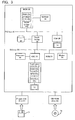
- Fig. 3 is a block composition diagram of the information processing apparatus 1 in Fig. 1.
- a multi-chip module (MCM) 32, south bridge 38 and video graphics array (VGA) controller 36 are connected to a PCI (Peripheral Component Interconnect) bus 30.
- the south bridge 38, a keyboard controller (KBC) 51, ROM (Read Only Memory) 54 and modem 56 are connected to an ISA (Industry Standard Architecture) bus 50.
- the south bridge 38 is connected to a hard disk drive (HDD) 40 forming an auxiliary memory device, which controls writing and reading of data to and from the HDD 40.
- the HDD 40 stores a program for implementing the input processing method according to the present invention, which is described hereinafter.
- a keyboard 41 and a touch panel controller 52 are connected to the keyboard controller 51.
- the multi-chip module 32 comprises a CPU 32a, north bridge 32b, and secondary cache memory (RAM) 32c.
- the multi-chip module 32 is also connected to a SDRAM (synchronous DRAM) 34 forming a main memory.
- SDRAM 34 operates in synchronization with a system bus clock.
- the north bridge 32b is a PCI system controller for controlling data communication between the CPU 32a, secondary cache memory 32c, main memory 34, PCI bus, and the like.
- the south bridge 38 is a bridge for connecting the PCI bus 30 and ISA bus 50, and it controls data communication between the PCI bus 30 and ISA bus 50.
- the VGA controller 36 controls the liquid crystal display 12 according to VGA standards.
- the touch panel controller 52 comprises an MPU 52a, memory (RAM) 52b and interface circuit 52c, and it controls touch input operations by means of the touch panel 10.
- a program for carrying out the input processing method according to the present invention as stored in the HDD 40 is loaded into the memory 52a or SDRAM 34, and implemented by the MPU 52a and CPU 32a.
- the ROM 54 stores an initial program loader.
- the information processing apparatus 1 is provided with a serial port, parallel port, communications port, CRT connector, mouse connector, FDD adapter for connecting to a floppy disk drive (FDD) 61, and the like.
- the floppy disk drive 61 may be provided inside the information processing apparatus 1.
- the information processing apparatus 1 is provided with a CD-ROM drive adapter, and may be connected to a CD-ROM drive 62.
- the CD-ROM drive 62 may be provided inside the information processing apparatus 1.
- a program for implementing the input processing method according to the present invention may be stored on a transportable storage medium, such as a floppy disk 71, CD-ROM 72, or the like, and this program may be supplied to the information processing apparatus 1 by means of the FDD drive 61, CD-ROM drive 62, or the like. Moreover, the program may also be supplied by means of a communications circuit connected to the modem 56.
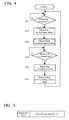
- Fig. 4 is a processing flowchart for the MPU 52a which implements the input processing method according to this embodiment of the present invention, and it depicts a flowchart of the program executed by the MPU 52a.
- step S11 if the MPU 52a detects that the pen is touching the touch panel 10, then at step S12, the point of touching of the pen is detected in the form of an X co-ordinate value and Y co-ordinate value for an XY co-ordinate system set on the touch panel 10.
- the MPU 52a generates touching status data, as illustrated later with reference to Fig. 5(a), and this data is transmitted to the CPU 32a.
- Fig. 5 is a diagram showing an example of status data.
- Status data comprises a flag for identifying a touching state and a non-touching state, the flag being set to a status bit of '1' in the case of a touching state, and the flag being set to a status bit of '0' in the case of a non-touching state.
- status data where the flag is set to '1' will be called 'touching status data'
- status data where the flag is set to '0' will be called 'non-touching status data'.
- the XY co-ordinate values at which the touching status or non-touching status was detected are specified as co-ordinate data.
- step S14 if the MPU 52a detects a non-touching state between the pen and the touch panel 10, then at step S15, the point of touching of the pen is detected in terms of an X co-ordinate value and Y co-ordinate value of the XY co-ordinate system set on the touch panel 10. Thereupon, at step S16, the MPU 52a generates non-touching status data as in Fig. 5 described above, and transmits this data to the CPU 32a.
- Fig. 6 is a first processing flowchart for the CPU 32a when implementing the input processing method according to this embodiment of the present invention, and it depicts the program executed by the CPU 32a.
- This program is executed by being loaded into the system memory SDRAM 34 from the HDD 40.
- the CPU 32a executes left click processing and right click processing, selectively, according to the period of time for which the pen is touching the touch panel 10.
- step S101 if the CPU 32a receives touching status data from the MPU 52a of the touch panel controller 52, then at step S102, the pointer is moved to a position corresponding to the co-ordinates data contained in the touching status data, and the timing at which this data is received is recorded in the SDRAM 34 (step S103).
- the timing at which the status data is received is measured by using the system clock provided inside the information processing apparatus.
- step S104 if the CPU 32a receives non-touching status data from the MPU 52a, then at step S105, the timing at which this data is received is also recorded in the SDRAM 34. Moreover, at step S106, the CPU 32a detects the touching time period T from the difference between the respective timings at which the touching status data and non-touching status data was received. The CPU 32a executes left click processing and right click processing, selectively, in accordance with the touching time period T thus detected. In other words, at step S107, if the touching time period T is less than a first time period T1, then left click processing is selected (step S108), and if the touching time period T is equal to or more than the first time period T1, then right click processing is selected (step S109).
- the processing corresponding to a left click involves, for example, specifying the position of a pointer or cursor displayed on a screen, selecting a menu by controlling an icon, or starting up a software application, or the like.
- the processing corresponding to the right click varies depending on the application program being executed, and it may involve, for example, displaying an operational menu at the position of the pointer or cursor, or the like.
- Fig. 7A and 7B are examples of a screen display of the apparatus.
- Fig. 7A is an example of a screen in a case where left click processing is executed
- Fig. 7B is an example of a screen in a case where right click processing is executed.
- Fig. 7A shows a case where a pointer 3 is moved to the top left of a screen and an icon 4 in that position is selected, by means of left click processing.
- Fig. 7B shows a case where an operational menu 5 is displayed at the position of the pointer 3, by means of right click processing.
- processing may also be added whereby a second time period T2 (where T2 > T1) is set, and if the touching time period T is equal to or greater than this second time period, then processing corresponding to a middle click is selected.
- the order in which processing sequences are selected according to the length of the touching time period is not limited to that described above.
- the order may be devised in such a manner that if the touching time period T is less than the first time period T1, then right click processing is selected and if it is equal to or greater than the first time period T1, then left click processing is selected.
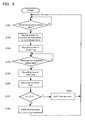
- Fig. 8 is a second processing flowchart for the CPU 32a when executing an input processing method according to this embodiment of the present invention, and it depicts a program executed by the CPU 32a.
- This program is executed by loading it from the HDD 40 into the system memory SDRAM 34.
- the CPU 32a executes left click processing and scroll processing, selectively, in accordance with the touching time period of the pen against the touch panel 10.
- step S201 if CPU 32a receives touching status data from the MPU 52a of the touch panel controller 52, then at step S202, the pointer is moved to a position corresponding to the co-ordinate data contained in the touching status data, and the timing at which this data is received is recorded in the SDRAM 34 (step S203).
- step S204 the CPU 32a determines whether or not the screen is currently in a scrolling operation, and if it is in a scrolling operation, then at step S205, the scrolling operation is terminated.
- step S206 if the CPU 32a receives non-touching status data from the MPU 52a, then at step S207, the timing at which this data is received is recorded in the SDRAM 34. Further, at step S208, the CPU 52a detects the touching time period T from the difference between the respective timings at which the touching status data and non-touching status data is received. The CPU 52a executes left click processing and scroll processing, selectively, in accordance with the touching time period T thus detected. Specifically, at step S209, if the touching time period T is less than a first time period T1, no processing is executed. In other words, at step S202, the pointer or cursor is only moved to the touching position. In this way, processing whereby only movement of the pointer or cursor is carried out when the screen is touched may also be included.
- step S210 if the touching time period T is greater than the first time period T1 and less than a second time period T2 (where T2 > T1), then left click processing is selected (step S211). Moreover, at step S212, if the touching time period T is greater than the second time period T2 and less than a third time period T3 (where T3 > T2), then upward scroll processing for scrolling the screen in an upward direction is selected (step S213), and if the touching time period T is equal to or greater than a third time period T3, then downward scroll processing for scrolling the screen in a downward direction is selected (step S214).
- processing may be added whereby a fourth time period T4 (where T4 > T3) is set, and if the touching time period T is greater than the fourth time period, then processing corresponding to a middle click is selected.
- the order in which processing is selected according to the length of the touching time period is not limited to that described above.
- the order of the downward scroll processing and upward scroll processing may be reversed.
- a plurality of processing sequences are implemented, selectively, according to the touching time period of a touch input operation.
- the processing selection changes whilst the pen is in contact with the touch panel. Therefore, preferably, it should be possible for the user to identify the processing that is to be selected according to the touching time period.
- the icon display of the pointer and cursor may be changed according to the touching time period. Thereby, the user is able to identify the processing that is to be selected when the pen returns to a non-touching state.
- Fig. 9 is a processing flowchart for changing the icon display of a pointer in accordance with the processing in Fig. 8, and it depicts the program executed by the CPU 32a. This program is executed by being loaded from the HDD 40 into the system memory SDRAM 34.
- Fig. 10 is a diagram illustrating an example of a pointer icon. As shown in Fig. 10A, normally, the pointer icon has, for example, an arrow shape pointing in an upward and leftward direction.
- a timer is started, using a timer function of the system clock. The timer measures the period of time T that has elapsed since the touching status data was received.
- step S303 if the CPU 32a receives non-touching status data, then the timer is stopped and reset (step S313). Moreover, if the pointer icon has changed, then it returns to the normal icon (arrow pointing in an upward and leftward direction).
- the pointer icon changes to a first icon as illustrated in Fig. 10D (step S305).
- the first icon has the shape of a mouse, and is displayed in such a manner that the colour of the left switch portion thereof differs from the colour of the other portions thereof. Thereby, the user is able to identify that left click processing is to be selected if a non-touching state is resumed while the first icon is being displayed.
- step S307 If the elapsed time period T becomes greater than the aforementioned second time period T2 (step S307), then the pointer icon changes to a second icon as illustrated in Fig. 10B (step S308).
- the second icon has an arrow shape pointing in an upward direction. Thereby, the user is able to identify that upward scroll processing is to be selected if a non-touching state is resumed while the second icon is being displayed.
- the pointer icon changes to a third icon as illustrated in Fig. 10C (step S311).
- the third icon has an arrow shape pointing in a downward direction.
- Fig. 10E shows an icon corresponding to right click processing
- Fig. 10F shows an icon corresponding to middle click processing.
- the touching time period T is detected on the basis of the difference between the respective timings at which the touching status data and non-touching status data is received, but as illustrated by the processing in Fig. 9 described above, the touching time period T may be detected using the timer function of the system clock.
- the embodiment described above relates to a case where a pen is used to make contact with a touch panel, but the invention is not limited to this.
- the present invention may also be applied to cases where a finger is used to touch the touch panel.
- the touch panel is incorporated with a display screen of an information processing apparatus; however, the touch panel may be provided separately from the display screen, for example as a touch pad or a graphics tablet.
- the present invention it is possible to switch between a plurality of mouse input operations according to the time period of touching against a touch panel. Therefore, it is possible to implement processing corresponding to a plurality of mouse input operations, selectively, by means of a single input operation, namely, a touch input operation, thereby improving ease of operation. Furthermore, it is also possible to implement, for example, upward scrolling and downward scrolling, selectively, by means of a single input operation, namely, a touch input operation, thereby improving ease of operation.
Landscapes
- Engineering & Computer Science (AREA)
- General Engineering & Computer Science (AREA)
- Theoretical Computer Science (AREA)
- Human Computer Interaction (AREA)
- Physics & Mathematics (AREA)
- General Physics & Mathematics (AREA)
- Position Input By Displaying (AREA)
- User Interface Of Digital Computer (AREA)
Applications Claiming Priority (2)
| Application Number | Priority Date | Filing Date | Title |
|---|---|---|---|
| JP25764099A JP3998376B2 (ja) | 1999-09-10 | 1999-09-10 | 入力処理方法及びそれを実施する入力処理装置 |
| EP00305257A EP1085403B1 (fr) | 1999-09-10 | 2000-06-21 | Procédé et appareil donnant des réponses visuelles durant une entrée de données de l'utilisateur dépendante du temps |
Related Parent Applications (1)
| Application Number | Title | Priority Date | Filing Date |
|---|---|---|---|
| EP00305257A Division EP1085403B1 (fr) | 1999-09-10 | 2000-06-21 | Procédé et appareil donnant des réponses visuelles durant une entrée de données de l'utilisateur dépendante du temps |
Publications (2)
| Publication Number | Publication Date |
|---|---|
| EP1657629A2 true EP1657629A2 (fr) | 2006-05-17 |
| EP1657629A3 EP1657629A3 (fr) | 2007-05-30 |
Family
ID=17309057
Family Applications (3)
| Application Number | Title | Priority Date | Filing Date |
|---|---|---|---|
| EP06001840A Ceased EP1657628A3 (fr) | 1999-09-10 | 2000-06-21 | Procédé, dispositif et programme de traitement de saisie, et appareil de traitement d'informations |
| EP06001841A Ceased EP1657629A3 (fr) | 1999-09-10 | 2000-06-21 | Procédé, dispositif et programme de traitement de saisie, et appareil de traitement d'informations |
| EP00305257A Expired - Lifetime EP1085403B1 (fr) | 1999-09-10 | 2000-06-21 | Procédé et appareil donnant des réponses visuelles durant une entrée de données de l'utilisateur dépendante du temps |
Family Applications Before (1)
| Application Number | Title | Priority Date | Filing Date |
|---|---|---|---|
| EP06001840A Ceased EP1657628A3 (fr) | 1999-09-10 | 2000-06-21 | Procédé, dispositif et programme de traitement de saisie, et appareil de traitement d'informations |
Family Applications After (1)
| Application Number | Title | Priority Date | Filing Date |
|---|---|---|---|
| EP00305257A Expired - Lifetime EP1085403B1 (fr) | 1999-09-10 | 2000-06-21 | Procédé et appareil donnant des réponses visuelles durant une entrée de données de l'utilisateur dépendante du temps |
Country Status (5)
| Country | Link |
|---|---|
| US (1) | US6657615B2 (fr) |
| EP (3) | EP1657628A3 (fr) |
| JP (1) | JP3998376B2 (fr) |
| CN (1) | CN1117312C (fr) |
| DE (1) | DE60029888T2 (fr) |
Families Citing this family (66)
| Publication number | Priority date | Publication date | Assignee | Title |
|---|---|---|---|---|
| GB9722766D0 (en) | 1997-10-28 | 1997-12-24 | British Telecomm | Portable computers |
| JP5039911B2 (ja) * | 2000-10-11 | 2012-10-03 | インターナショナル・ビジネス・マシーンズ・コーポレーション | データ処理装置、入出力装置、タッチパネルの制御方法、記憶媒体及びプログラム伝送装置 |
| US6904570B2 (en) * | 2001-06-07 | 2005-06-07 | Synaptics, Inc. | Method and apparatus for controlling a display of data on a display screen |
| JP2003058318A (ja) * | 2001-08-16 | 2003-02-28 | Mitsubishi Electric Corp | 監視制御装置及びこの監視制御装置に用いるイベント検出用記録媒体 |
| US6690365B2 (en) | 2001-08-29 | 2004-02-10 | Microsoft Corporation | Automatic scrolling |
| JP2003173226A (ja) * | 2001-11-27 | 2003-06-20 | Internatl Business Mach Corp <Ibm> | 情報処理装置、プログラム及び座標入力方法 |
| JP2005513575A (ja) * | 2001-12-29 | 2005-05-12 | タイグエン エンタープライズ カンパニーリミテッド | 誘導層に薄膜アンテナ列を格子状に内蔵したタッチ制御型ディスプレイ |
| US7933945B2 (en) | 2002-06-27 | 2011-04-26 | Openpeak Inc. | Method, system, and computer program product for managing controlled residential or non-residential environments |
| US8116889B2 (en) * | 2002-06-27 | 2012-02-14 | Openpeak Inc. | Method, system, and computer program product for managing controlled residential or non-residential environments |
| US20090231299A1 (en) * | 2002-09-16 | 2009-09-17 | Taiguen Technology (Shen Zhen) Co., Ltd. | Touch control display screen apparatus with a built-in electromagnetic induction layer of wire lattice |
| CN2567694Y (zh) * | 2002-09-16 | 2003-08-20 | 台均实业有限公司 | 内置导线网格电磁感应层的触摸控制显示屏 |
| US7987489B2 (en) | 2003-01-07 | 2011-07-26 | Openpeak Inc. | Legacy device bridge for residential or non-residential networks |
| KR100510728B1 (ko) * | 2003-03-28 | 2005-08-30 | 엘지.필립스 엘시디 주식회사 | Em 센서를 구비한 액정 표시 장치 |
| TWI237206B (en) * | 2003-05-23 | 2005-08-01 | Compal Electronics Inc | Touch panel with magnetic display unit |
| TWI237200B (en) * | 2003-10-24 | 2005-08-01 | High Tech Comp Corp | Coordinate positioning equipment for thin film positioning equipment and its method |
| US7106312B2 (en) * | 2003-11-10 | 2006-09-12 | Microsoft Corporation | Text input window with auto-growth |
| US7401300B2 (en) * | 2004-01-09 | 2008-07-15 | Nokia Corporation | Adaptive user interface input device |
| JP4624745B2 (ja) * | 2004-09-08 | 2011-02-02 | オリンパス株式会社 | カメラおよび撮像操作方法 |
| JP4583893B2 (ja) * | 2004-11-19 | 2010-11-17 | 任天堂株式会社 | ゲームプログラムおよびゲーム装置 |
| JP4244040B2 (ja) | 2005-03-10 | 2009-03-25 | 任天堂株式会社 | 入力処理プログラムおよび入力処理装置 |
| CN100375000C (zh) * | 2005-05-08 | 2008-03-12 | 联想(北京)有限公司 | 一种恢复用户操作的方法 |
| CN100405273C (zh) * | 2005-07-15 | 2008-07-23 | 义隆电子股份有限公司 | 触控板的重叠功能区域侦测方法 |
| CN100501647C (zh) * | 2005-08-12 | 2009-06-17 | 深圳华为通信技术有限公司 | 手机键盘及其使用方法 |
| JP4394062B2 (ja) * | 2005-10-28 | 2010-01-06 | アルプス電気株式会社 | パッド型入力装置 |
| US8564544B2 (en) * | 2006-09-06 | 2013-10-22 | Apple Inc. | Touch screen device, method, and graphical user interface for customizing display of content category icons |
| US7844915B2 (en) | 2007-01-07 | 2010-11-30 | Apple Inc. | Application programming interfaces for scrolling operations |
| US8120586B2 (en) | 2007-05-15 | 2012-02-21 | Htc Corporation | Electronic devices with touch-sensitive navigational mechanisms, and associated methods |
| TWI393053B (zh) | 2007-09-29 | 2013-04-11 | Htc Corp | 瀏覽影像的方法 |
| US8674946B2 (en) * | 2007-10-04 | 2014-03-18 | Alpine Electronics, Inc. | Method and apparatus for controlling timing of status change of electronics apparatus based on user's finger location and input speed |
| TWI368161B (en) * | 2007-12-21 | 2012-07-11 | Htc Corp | Electronic apparatus and input interface thereof |
| TW200941307A (en) * | 2008-03-24 | 2009-10-01 | Acer Inc | Extended cursor generating method and device |
| JP2009245239A (ja) | 2008-03-31 | 2009-10-22 | Sony Corp | ポインタ表示装置、ポインタ表示検出方法、ポインタ表示検出プログラム及び情報機器 |
| DE102008023405B4 (de) | 2008-05-13 | 2020-10-01 | Volkswagen Ag | Kraftfahrzeug mit einem Display sowie Verfahren zum Betrieb eines Kraftfahrzeuges mit einem Display |
| US20090322686A1 (en) * | 2008-06-25 | 2009-12-31 | Parakrama Jayasinghe | Control And Navigation For A Device Implementing a Touch Screen |
| US8624843B2 (en) * | 2008-08-13 | 2014-01-07 | Allen Ku | Keyboard apparatus integrated with combined touch input module |
| US20100039388A1 (en) * | 2008-08-13 | 2010-02-18 | Allen Ku | Keyboard apparatus integrated with touch input module |
| US9524094B2 (en) | 2009-02-20 | 2016-12-20 | Nokia Technologies Oy | Method and apparatus for causing display of a cursor |
| US20100289751A1 (en) * | 2009-05-13 | 2010-11-18 | Stephen Chen | Operation method for a trackpad equipped with pushbutton function |
| US8434003B2 (en) | 2009-05-21 | 2013-04-30 | Sony Computer Entertainment Inc. | Touch control with dynamically determined buffer region and active perimeter |
| EP2480957B1 (fr) | 2009-09-22 | 2017-08-09 | Apple Inc. | Dispositif, procédé et interface utilisateur graphique pour manipuler des objets d'interface utilisateur |
| US8799826B2 (en) | 2009-09-25 | 2014-08-05 | Apple Inc. | Device, method, and graphical user interface for moving a calendar entry in a calendar application |
| US8780069B2 (en) | 2009-09-25 | 2014-07-15 | Apple Inc. | Device, method, and graphical user interface for manipulating user interface objects |
| US8832585B2 (en) | 2009-09-25 | 2014-09-09 | Apple Inc. | Device, method, and graphical user interface for manipulating workspace views |
| US8766928B2 (en) | 2009-09-25 | 2014-07-01 | Apple Inc. | Device, method, and graphical user interface for manipulating user interface objects |
| US8539385B2 (en) | 2010-01-26 | 2013-09-17 | Apple Inc. | Device, method, and graphical user interface for precise positioning of objects |
| US8539386B2 (en) | 2010-01-26 | 2013-09-17 | Apple Inc. | Device, method, and graphical user interface for selecting and moving objects |
| US8612884B2 (en) | 2010-01-26 | 2013-12-17 | Apple Inc. | Device, method, and graphical user interface for resizing objects |
| CN103197891B (zh) * | 2010-04-16 | 2015-11-25 | 联想(北京)有限公司 | 对象显示方法和对象显示装置 |
| US8972879B2 (en) | 2010-07-30 | 2015-03-03 | Apple Inc. | Device, method, and graphical user interface for reordering the front-to-back positions of objects |
| US9098182B2 (en) | 2010-07-30 | 2015-08-04 | Apple Inc. | Device, method, and graphical user interface for copying user interface objects between content regions |
| US9081494B2 (en) | 2010-07-30 | 2015-07-14 | Apple Inc. | Device, method, and graphical user interface for copying formatting attributes |
| US8797283B2 (en) | 2010-11-22 | 2014-08-05 | Sony Computer Entertainment America Llc | Method and apparatus for performing user-defined macros |
| US8907903B2 (en) | 2011-01-13 | 2014-12-09 | Sony Computer Entertainment America Llc | Handing control of an object from one touch input to another touch input |
| JP5136675B2 (ja) * | 2011-06-09 | 2013-02-06 | ソニー株式会社 | ポインタ表示装置、ポインタ表示検出方法及び情報機器 |
| JP5498445B2 (ja) * | 2011-06-30 | 2014-05-21 | 株式会社ゼンリンデータコム | 携帯端末、コンピュータプログラム |
| CA2826288C (fr) | 2012-01-06 | 2019-06-04 | Microsoft Corporation | Soutien de differents modeles d'evenement sau moyen d'une seule source d'entree |
| US9928562B2 (en) | 2012-01-20 | 2018-03-27 | Microsoft Technology Licensing, Llc | Touch mode and input type recognition |
| US9134814B2 (en) * | 2012-04-05 | 2015-09-15 | Seiko Epson Corporation | Input device, display system and input method |
| JP6145963B2 (ja) * | 2012-04-05 | 2017-06-14 | セイコーエプソン株式会社 | プロジェクター、表示システム、及びプロジェクターの制御方法 |
| US9632648B2 (en) | 2012-07-06 | 2017-04-25 | Lg Electronics Inc. | Mobile terminal, image display device and user interface provision method using the same |
| CN102968245B (zh) * | 2012-10-29 | 2016-12-21 | Tcl集团股份有限公司 | 鼠标触摸协同控制方法、装置及智能电视交互方法、系统 |
| US8949735B2 (en) | 2012-11-02 | 2015-02-03 | Google Inc. | Determining scroll direction intent |
| JP6297787B2 (ja) * | 2013-04-25 | 2018-03-20 | 京セラ株式会社 | 携帯電子機器 |
| JP6102474B2 (ja) * | 2013-05-01 | 2017-03-29 | 富士通株式会社 | 表示装置、入力制御方法、及び入力制御プログラム |
| KR102219857B1 (ko) * | 2014-03-18 | 2021-02-24 | 삼성전자주식회사 | 전자 장치 및 그 동작 방법 |
| CN106873824A (zh) * | 2016-12-31 | 2017-06-20 | 歌尔科技有限公司 | 使用触摸屏模拟鼠标操作的方法和装置及头戴显示设备 |
Citations (2)
| Publication number | Priority date | Publication date | Assignee | Title |
|---|---|---|---|---|
| US5850212A (en) | 1997-02-19 | 1998-12-15 | Nishibori; Masahiro | System for changing modes and cursor appearance by a single button |
| WO1999028811A1 (fr) | 1997-12-04 | 1999-06-10 | Northern Telecom Limited | Interface gestuelle contextuelle |
Family Cites Families (15)
| Publication number | Priority date | Publication date | Assignee | Title |
|---|---|---|---|---|
| JP2502050B2 (ja) | 1985-06-07 | 1996-05-29 | 株式会社島津製作所 | 電子線マイクロアナライザ |
| GB8700870D0 (en) | 1987-01-15 | 1987-02-18 | Amp Italia | Electrical tabreceptacle |
| JPH0736142B2 (ja) | 1991-10-10 | 1995-04-19 | インターナショナル・ビジネス・マシーンズ・コーポレイション | 移動指示手段の運動停止を認識する方法および情報処理装置 |
| JPH05241506A (ja) | 1992-02-28 | 1993-09-21 | Nec Home Electron Ltd | 地図表示装置 |
| CN1059303C (zh) | 1994-07-25 | 2000-12-06 | 国际商业机器公司 | 在个人通讯设备的显示屏幕上标记文本的装置和方法 |
| US5764218A (en) | 1995-01-31 | 1998-06-09 | Apple Computer, Inc. | Method and apparatus for contacting a touch-sensitive cursor-controlling input device to generate button values |
| JP3390292B2 (ja) * | 1995-07-25 | 2003-03-24 | アルプス電気株式会社 | 座標検出装置 |
| JP3727399B2 (ja) * | 1996-02-19 | 2005-12-14 | ミサワホーム株式会社 | 画面表示式キー入力装置 |
| US6107997A (en) * | 1996-06-27 | 2000-08-22 | Ure; Michael J. | Touch-sensitive keyboard/mouse and computing device using the same |
| US6208329B1 (en) * | 1996-08-13 | 2001-03-27 | Lsi Logic Corporation | Supplemental mouse button emulation system, method and apparatus for a coordinate based data input device |
| US6380929B1 (en) * | 1996-09-20 | 2002-04-30 | Synaptics, Incorporated | Pen drawing computer input device |
| US5995083A (en) | 1996-11-20 | 1999-11-30 | Alps Electric Co., Ltd. | Coordinates input apparatus |
| JP3769885B2 (ja) | 1997-07-25 | 2006-04-26 | 松下電工株式会社 | データ入力装置 |
| JP3212914B2 (ja) | 1997-07-30 | 2001-09-25 | 群馬日本電気株式会社 | 入力装置 |
| KR19990015738A (ko) * | 1997-08-08 | 1999-03-05 | 윤종용 | 터치패드 입력 제어기능을 갖는 휴대형 컴퓨터 |
-
1999
- 1999-09-10 JP JP25764099A patent/JP3998376B2/ja not_active Expired - Fee Related
-
2000
- 2000-03-30 US US09/539,442 patent/US6657615B2/en not_active Expired - Lifetime
- 2000-06-12 CN CN00118346A patent/CN1117312C/zh not_active Expired - Fee Related
- 2000-06-21 EP EP06001840A patent/EP1657628A3/fr not_active Ceased
- 2000-06-21 EP EP06001841A patent/EP1657629A3/fr not_active Ceased
- 2000-06-21 DE DE60029888T patent/DE60029888T2/de not_active Expired - Lifetime
- 2000-06-21 EP EP00305257A patent/EP1085403B1/fr not_active Expired - Lifetime
Patent Citations (2)
| Publication number | Priority date | Publication date | Assignee | Title |
|---|---|---|---|---|
| US5850212A (en) | 1997-02-19 | 1998-12-15 | Nishibori; Masahiro | System for changing modes and cursor appearance by a single button |
| WO1999028811A1 (fr) | 1997-12-04 | 1999-06-10 | Northern Telecom Limited | Interface gestuelle contextuelle |
Also Published As
| Publication number | Publication date |
|---|---|
| US20030122774A1 (en) | 2003-07-03 |
| JP2001084103A (ja) | 2001-03-30 |
| EP1657629A3 (fr) | 2007-05-30 |
| JP3998376B2 (ja) | 2007-10-24 |
| EP1657628A2 (fr) | 2006-05-17 |
| US6657615B2 (en) | 2003-12-02 |
| DE60029888D1 (de) | 2006-09-21 |
| EP1085403A3 (fr) | 2001-06-13 |
| EP1085403B1 (fr) | 2006-08-09 |
| CN1117312C (zh) | 2003-08-06 |
| EP1657628A3 (fr) | 2007-05-30 |
| EP1085403A2 (fr) | 2001-03-21 |
| DE60029888T2 (de) | 2006-12-21 |
| CN1288189A (zh) | 2001-03-21 |
Similar Documents
| Publication | Publication Date | Title |
|---|---|---|
| EP1657629A2 (fr) | Procédé, dispositif et programme de traitement de saisie, et appareil de traitement d'informations | |
| US6930672B1 (en) | Input processing method and input control apparatus | |
| US7088344B2 (en) | Data processor, I/O device, touch panel controlling method, recording medium, and program transmitter | |
| JP5490508B2 (ja) | タッチセンサを有する装置、触感呈示方法及び触感呈示プログラム | |
| AU2010235941B2 (en) | Interpreting touch contacts on a touch surface | |
| US7411579B2 (en) | Information processing apparatus having function of changing orientation of screen image | |
| US8681115B2 (en) | Information processing apparatus and input control method | |
| WO2021143805A1 (fr) | Procédé de traitement de widget et appareil associé | |
| EP2154603A2 (fr) | Appareil, procédé et programme d'affichage | |
| JP2009110286A (ja) | 情報処理装置、ランチャー起動制御プログラムおよびランチャー起動制御方法 | |
| US20130063385A1 (en) | Portable information terminal and method for controlling same | |
| US20040100451A1 (en) | Electronic apparatus and operation mode switching method | |
| US20060061550A1 (en) | Display size emulation system | |
| US20130159934A1 (en) | Changing idle screens | |
| JP4171509B2 (ja) | 入力処理方法及びそれを実施する入力処理装置 | |
| JP4904239B2 (ja) | 入力処理方法及び入力制御装置 | |
| AU2013205165B2 (en) | Interpreting touch contacts on a touch surface | |
| JP4904240B2 (ja) | 入力処理方法及び入力制御装置 | |
| HK1169182A (en) | Selective rejection of touch contacts in an edge region of a touch surface |
Legal Events
| Date | Code | Title | Description |
|---|---|---|---|
| PUAI | Public reference made under article 153(3) epc to a published international application that has entered the european phase |
Free format text: ORIGINAL CODE: 0009012 |
|
| AC | Divisional application: reference to earlier application |
Ref document number: 1085403 Country of ref document: EP Kind code of ref document: P |
|
| AK | Designated contracting states |
Kind code of ref document: A2 Designated state(s): DE FR GB |
|
| PUAL | Search report despatched |
Free format text: ORIGINAL CODE: 0009013 |
|
| AK | Designated contracting states |
Kind code of ref document: A3 Designated state(s): DE FR GB |
|
| 17P | Request for examination filed |
Effective date: 20071126 |
|
| AKX | Designation fees paid |
Designated state(s): DE FR GB |
|
| 17Q | First examination report despatched |
Effective date: 20080114 |
|
| RAP1 | Party data changed (applicant data changed or rights of an application transferred) |
Owner name: APPLE INC. |
|
| APBK | Appeal reference recorded |
Free format text: ORIGINAL CODE: EPIDOSNREFNE |
|
| APBN | Date of receipt of notice of appeal recorded |
Free format text: ORIGINAL CODE: EPIDOSNNOA2E |
|
| APAF | Appeal reference modified |
Free format text: ORIGINAL CODE: EPIDOSCREFNE |
|
| APBT | Appeal procedure closed |
Free format text: ORIGINAL CODE: EPIDOSNNOA9E |
|
| STAA | Information on the status of an ep patent application or granted ep patent |
Free format text: STATUS: THE APPLICATION HAS BEEN REFUSED |
|
| 18R | Application refused |
Effective date: 20110308 |