EP1662382A2 - Procédé pour la constrution d'une interface d'utilisateur - Google Patents
Procédé pour la constrution d'une interface d'utilisateur Download PDFInfo
- Publication number
- EP1662382A2 EP1662382A2 EP05257240A EP05257240A EP1662382A2 EP 1662382 A2 EP1662382 A2 EP 1662382A2 EP 05257240 A EP05257240 A EP 05257240A EP 05257240 A EP05257240 A EP 05257240A EP 1662382 A2 EP1662382 A2 EP 1662382A2
- Authority
- EP
- European Patent Office
- Prior art keywords
- component
- speech
- data corresponding
- conversion
- converting
- Prior art date
- Legal status (The legal status is an assumption and is not a legal conclusion. Google has not performed a legal analysis and makes no representation as to the accuracy of the status listed.)
- Granted
Links
Images







Classifications
-
- G—PHYSICS
- G06—COMPUTING OR CALCULATING; COUNTING
- G06F—ELECTRIC DIGITAL DATA PROCESSING
- G06F8/00—Arrangements for software engineering
- G06F8/30—Creation or generation of source code
- G06F8/38—Creation or generation of source code for implementing user interfaces
-
- G—PHYSICS
- G10—MUSICAL INSTRUMENTS; ACOUSTICS
- G10L—SPEECH ANALYSIS TECHNIQUES OR SPEECH SYNTHESIS; SPEECH RECOGNITION; SPEECH OR VOICE PROCESSING TECHNIQUES; SPEECH OR AUDIO CODING OR DECODING
- G10L15/00—Speech recognition
- G10L15/22—Procedures used during a speech recognition process, e.g. man-machine dialogue
- G10L2015/226—Procedures used during a speech recognition process, e.g. man-machine dialogue using non-speech characteristics
- G10L2015/228—Procedures used during a speech recognition process, e.g. man-machine dialogue using non-speech characteristics of application context
Definitions
- the present invention relates to a method for constructing a multimodal user interface (multimodal UI).
- a multimodal UI enables a user to input information through a modality desired by the user among a plurality of modalities, such as GUI input and speech input, and thus is very convenient for the user. Therefore, a tool for easily constructing such a multimodal UI has been demanded. Particularly, when a UI compatible with both GUI input and speech input is constructed, redundant operations are likely to be often performed, e.g., the same operation is performed on each of a GUI and a speech UI. For example, assume that an author constructs a UI in which a pull-down menu having items "A", "B", and “C” is placed on a screen and these items "A", "B", and “C” can also be input in speech.
- the author generates a pull-down menu having items "A”, “B”, and “C” and binds an input result to a result storage area. Also, the author generates a speech recognition grammar to input the items “A”, “B”, and “C” in speech so as to generate a speech input component and binds an input result to a result storage area. In this way, the author has to repeat a similar operation on the items "A”, “B”, and “C”. Under these circumstances, a technique for reducing the redundant operations and easily constructing a multimodal UI is required.
- Japanese Patent Laid-Open No. 2003-167598 discloses a technique for realizing a multimodal UI without constructing a speech UI by interpreting the logic of a GUI.
- operation as a multimodal UI depends on the interpreting technique, and thus a multimodal UI desired by the author cannot always be realized.
- the present invention has been made in view of these circumstances and is directed to easily constructing a multimodal UI.
- the present invention is directed to simplifying redundant operations performed by an author when the author constructs a UI compatible with both GUI input and speech input.
- a method for constructing a user interface includes: a selecting step of selecting one or a plurality of first components, a receiving step of receiving instructions to convert the first component into a second component, the type of the second component being different from the type of the first component, a converting step of converting the data corresponding to the first component into the data corresponding to the second component, and a display controlling step of controlling displaying the second component to which the data converted in the converting step is related.
- an apparatus for constructing a user interface includes: selecting means for selecting one or a plurality of first components, receiving means for receiving instructions to convert the first component into a second component, the type of the second component being different from the type of the first component, converting means for converting the data corresponding to the first component into the data corresponding to the second component, and display controlling means for controlling displaying the second component to which the data converted by the converting means is related.
- Fig. 1 is a block diagram showing the module configuration of a method for constructing a multimodal UI according to a first embodiment of the present invention.
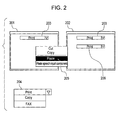
- Fig. 2 illustrates an example in which a component is not converted in the method according to the first embodiment.
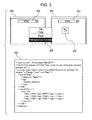
- Fig. 3 illustrates an example of the method according to the first embodiment.
- Fig. 4 illustrates an example of a method for constructing a multimodal UI according to a second embodiment of the present invention.
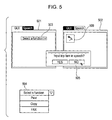
- Fig. 5 illustrates another example of the method according to the second embodiment.
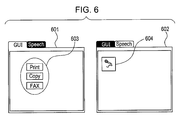
- Fig. 6 illustrates another example of the method according to the second embodiment.
- Fig. 7 illustrates another example of the method according to the second embodiment.
- Fig. 8 illustrates another example of the method according to the second embodiment.
- Fig. 9 illustrates another example of the method according to the second embodiment.
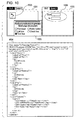
- Fig. 10 illustrates another example of the method according to the second embodiment.
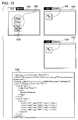
- Fig. 11 illustrates an example in which a data model is set in the method according to the second embodiment.
- Fig. 12 illustrates an example in which an item is added to a component in a method for constructing a multimodal UI according to a third embodiment of the present invention.
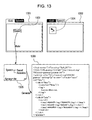
- Fig. 13 illustrates an example in which a synonym list is used in a method for constructing a multimodal UI according to a fourth embodiment of the present invention.
- Fig. 14 illustrates another example in which a synonym list is used in the method according to the fourth embodiment.
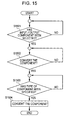
- Fig. 15 is a flowchart illustrating the method for constructing a multimodal UI according to the first embodiment.
- Fig. 16 is a flowchart illustrating the method for constructing a multimodal UI according to the second embodiment.
- Fig. 17 is a flowchart illustrating a converting process in the method according to the first embodiment.
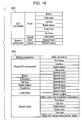
- Fig. 18 includes tables defining the correspondence between components before conversion and components after conversion in the method according to the second embodiment.
- Fig. 1 is a block diagram showing a module configuration of a method for constructing a multimodal UI according to a first embodiment.
- the module configuration includes an input unit 101, a storage unit 102, a control unit 103, a component converting unit 104, a display unit 105, a speech recognition grammar analyzing unit 106, and a speech recognition grammar generating unit 107.
- the input unit 101 includes an input device, such as buttons, a keyboard, a mouse, a touch panel, a pen, or a tablet, and functions such as an input interface to input various instructions to the apparatus.
- an input device such as buttons, a keyboard, a mouse, a touch panel, a pen, or a tablet, and functions such as an input interface to input various instructions to the apparatus.
- the storage unit 102 includes a hard disk drive to store various information and a storage medium, such as a compact disk read only memory (CD-ROM) or a digital versatile disk read only memory (DVD-ROM), to provide various information to an information processing system. Further, the hard disk drive and the storage medium store various application programs, user interface control programs, and various data required to execute the respective programs. These programs and data are read into this system under control by the control unit 103 in the subsequent stage.
- a storage medium such as a compact disk read only memory (CD-ROM) or a digital versatile disk read only memory (DVD-ROM)
- the control unit 103 includes a work memory, a central processing unit (CPU), or a microprocessing unit (MPU), and executes various processes by reading programs and data stored in the storage unit 102.
- CPU central processing unit
- MPU microprocessing unit
- the component converting unit 104 converts an input/output component under control by the control unit 103.
- the display unit 105 includes a display device, such as a liquid crystal display, and displays various information composed of images and characters.
- a touch panel display device can also be used as the display unit 105.
- the display unit 105 has the function of a GUI input unit (a function of inputting various instructions to the system).
- the speech recognition grammar analyzing unit 106 analyzes a speech recognition grammar and extracts a recognition vocabulary.
- the speech recognition grammar generating unit 107 generates a speech recognition grammar to recognize a given vocabulary.
- a multimodal UI is edited in an editing screen 201.
- a component 203 placed on the editing screen 201 is a pull-down component having items "Print”, “Copy”, and "FAX”, as denoted by reference numeral 204.
- an editing screen 202 is obtained.
- a pull-down component 206 having the same items (204) as those of the component 203 is placed, as in a known authoring tool.
- a speech input component 302 having the items of the component 203 as its recognition vocabulary is placed on the screen, unlike in the known authoring tool.
- a speech recognition grammar 303 of the speech input component 302 is generated.
- This speech recognition grammar 303 accepts speeches "print”, "copy”, and "FAX”. In this manner, the data corresponding to the component 203 is converted into the data corresponding to the speech input component 302.
- the speech recognition grammar 303 is described based on a specification SRGS of W3C (World Wide Web Consortium) (http://www.w3.org/TR/speech-grammar/). However, the describing method is not limited to the SRGS.
- step S1501 no input/output component has been selected in step S1501.
- step S1501 the process waits until instructions to convert the type of the component are provided (step S1502).
- step S1502 the type of the component is not converted. Therefore, a component of the same type is pasted as in the known art.
- step S1503 the process waits until the type of the component after conversion is specified (step S1503).
- the component converting unit 104 converts the component (step S1504).
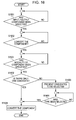
- the process of converting a component performed by the component converting unit 104 is described below with reference to the flowchart shown in Fig. 17. Program for running this flowchart is stored in the storage unit 102 and is executed by the control unit 103.
- a component to be converted is analyzed in step S1701. For example, when the component is a pull-down component denoted by reference numeral 204 in Fig. 2, items "Print”, “Copy”, and "FAX" are extracted.
- the speech recognition grammar analyzing unit 106 extracts a list of recognition results (interpretation results) that can be output by using the speech recognition grammar of the speech input component.
- the list of recognition results is extracted by analyzing the speech recognition grammar based on the specification of the speech recognition grammar.
- the speech recognition grammar is analyzed by using a known technique. In the example of the speech recognition grammar 303 shown in Fig. 3, "print”, “copy”, and "FAX" are extracted.
- the extraction is performed on every component. When two or more same items are extracted, those items are combined into one.
- the speech recognition grammar generating unit 107 When the component is to be converted to a speech input component (YES in step S1702), the speech recognition grammar generating unit 107 generates a speech recognition grammar (step S1703).
- the speech recognition grammar can be generated by using a known technique after a recognition vocabulary has been specified.
- the speech recognition grammar is generated by using the items extracted in step S1701 as a recognition vocabulary.
- the component is converted (step S1704).
- a pull-down component having the items extracted in step S1701 (in the above example, "Print”, “Copy”, and "FAX" is generated.
- the speech recognition grammar generated in step S1703 is used.
- the data model is set in the converted component (step S1706). More specifically, the data model set in the items before conversion is set in the corresponding items after conversion (a specific example is described in the following second embodiment by using Fig. 11).
- a component is copied and pasted.
- the component can be cut and pasted or can be dragged and dropped on another screen. Further, "Conversion" can be selected from the menu.
- the author can move or copy an existing component regardless of the type of the component. Accordingly, redundant operations can be reduced.
- a method for constructing a multimodal UI according to a second embodiment of the present invention is described.
- a case where the modality of a component after conversion is specified is described.
- an authoring tool for constructing a multimodal UI is used as an example.
- a multimodal UI is edited in an editing screen 401.
- the editing screen 401 has a GUI editing screen for editing a GUI component and a speech UI editing screen for editing a speech component.
- a component 403 placed on the GUI editing screen of the editing screen 401 is a pull-down component and has items "Print", “Copy”, and "FAX" as denoted by reference numeral 204 in Fig. 2.
- an editing screen 402 is obtained.
- a speech input component 405 having the items of the component 403 as its recognition vocabulary is placed on the speech UI editing screen of the editing screen 402.
- the pull-down menu can include only options as in the menu 204 shown in Fig. 2.
- the pull-down menu can include an item other than options, e.g., "Select a function" at the top, as in a menu 504 shown in Fig. 5.
- the top item "Select a function" is not an option and thus is not input in speech. Whether the top item should be input in speech can be asked of the author. In the example shown in Fig.
- a speech recognition grammar of the speech input component 405 generated at this time is the same as the speech recognition grammar 303 shown in Fig. 3 and accepts speeches "print", “copy”, and "FAX".
- step S1501 After instructions to convert an input/output component have been provided (YES in step S1501 and YES in step S1502), the process waits until the modality of a component after conversion is specified (step S1601).
- the modality of the component after conversion is speech.
- step S1601 After the modality of the component after conversion has been specified (YES in step S1601), candidate types of the component after conversion are listed. As shown in Fig. 18, input/output components (table 1801) and candidates of input/output components after conversion corresponding to components before conversion (table 1802) are defined in advance in the storage unit 102. Then, the candidate types are listed by referring to the table 1802. When there is only one candidate type (YES in step S1602), the component is converted in the same manner as in the first embodiment (step S1504). In the example shown in Fig. 4, the table 1802 shown in Fig. 18 indicates that the candidate type after conversion corresponding to a pull-down component before conversion is only one, that is, a speech input component. Therefore, the component is converted to a speech input component.
- step S1602 whether the top item "Print” should be input in speech can be asked of the author (404 in Fig. 4).
- step S1603 the candidates are presented so that the author can select one of them (step S1603).
- step S1504 the component is converted in the same manner as in the first embodiment (step S1504).
- FIG. 5 shows an example in which the top item is not included in a recognition vocabulary when a pull-down component is converted.
- a multimodal UI is edited in an editing screen 501 as in the editing screen 401 shown in Fig. 4.
- a component 503 placed on a GUI editing screen of the editing screen 501 is a pull-down component and has items "Select a function", "Print”, “Copy”, and "FAX” as shown in a menu 504.
- an editing screen 502 is obtained. Since the component is pasted on the speech UI editing screen, the modality of the converted component is speech (YES in step S1601). According to the table 1802 shown in Fig.
- a component after conversion is determined to be a speech input component (YES in step S1602), and thus a speech input component 506 having the items of the component 503 as its recognition vocabulary is placed on the speech UI editing screen of the editing screen 502.
- a speech input component 506 having the items of the component 503 as its recognition vocabulary is placed on the speech UI editing screen of the editing screen 502.
- a speech recognition grammar of the speech input component 506 generated at this time is the same as the speech recognition grammar 303 shown in Fig. 3 and accepts speeches "print", "copy”, and "FAX".
- Fig. 6 shows an example in which a plurality of components are converted.
- buttons "Print”, “Copy”, and “FAX” are placed on a GUI editing screen of an editing screen 601.
- an editing screen 602 is obtained.
- the modality of the components after conversion is speech (YES in step S1601).
- the component after conversion is determined to be a speech input component (YES in step S1602), and thus a speech input component 604 having the items of the three components (603) as its recognition vocabulary is placed on the speech UI editing screen.
- a speech recognition grammar of the speech input component 604 generated at this time is the same as the speech input grammar 303 shown in Fig. 3 and accepts speeches "print", "copy”, and "FAX".
- Fig. 7 shows another example of converting a plurality of components.
- a label (text) "function” and buttons “Print”, “Copy”, and “FAX” are placed on a GUI editing screen of an editing screen 701.
- an editing screen 702 is obtained. Since the components are pasted on the speech UI editing screen, the modality of the component after conversion is speech (YES in step S1601).
- the component after conversion is determined to be a speech input component (YES in step S1602), and thus a speech input component 704 having the items of the four components (703) as its recognition vocabulary is placed on the speech UI editing screen.
- a speech recognition grammar of the speech input component 704 generated at this time can accept speeches “function”, “print”, “copy”, and “FAX”.
- a method for extracting a recognition vocabulary can vary depending on the type of component. For example, an item extracted from a label can be added at the top of a vocabulary extracted from another component. When such extraction is performed, speeches “print”, “copy”, “FAX”, “function print”, “function copy”, and “function FAX” are accepted as shown in the speech recognition grammar 705.
- Fig. 8 shows an example in which a component after conversion has a plurality of candidate types.
- a speech input component 803 having the speech recognition grammar 303 shown in Fig. 3 is placed on a speech UI editing screen of an editing screen 801.
- an editing screen 802 is obtained. Since the component is pasted on the GUI editing screen, the modality of the component after conversion is GUI (YES in step S1601).
- candidate types of the component after conversion are pull-down, list box, radio button, check box, text box, and plural GUI components (button, label). Therefore, candidate types of the component are presented as shown in lists 804 and 805 (S1603).
- buttons (806) corresponding to the recognition vocabulary of the speech input component 803 "Print”, “Copy”, and "FAX" are placed on the GUI editing screen of the editing screen 802.
- the recognition vocabulary is listed up by analyzing the speech recognition grammar using a known technique, as described above.
- Fig. 9 shows another example in which a component after conversion has a plurality of candidate types.
- a speech input component 904 having the speech recognition grammar 303 shown in Fig. 3 is placed on a speech UI editing screen of an editing screen 901.
- an editing screen 902 is obtained.
- a pull-down component 906 having the recognition vocabulary of the speech input component 904 as its items is placed on the GUI editing screen 902.
- an interpretation name of interpreting the recognition vocabulary can be output in the form of a label (text).
- results "print", "copy”, and "FAX" are output with an interpretation name "function".
- a screen 903 is an example in which the interpretation name "function" (907) is output as a label.
- Fig. 10 shows another example in which a component after conversion has a plurality of candidate types.
- a speech input component 1003 having a speech recognition grammar 1004 is placed on a speech UI editing screen of an editing screen 1001.
- an editing screen 1002 is obtained. Since the component is pasted on the GUI editing screen, the modality of the component after conversion is GUI (YES in step S1601).
- candidate types of the component after conversion are pull-down, list box, radio button, check box, text box, and plural GUI components (button, label). Therefore, the candidate types of the component are presented in a list 1005 (step S1603).
- a text box is selected (step S1604), and thus labels and text boxes (1006) corresponding to the recognition vocabulary of the speech input component 1003 are placed on the GUI editing screen 1002.
- the speech recognition grammar 1004 accepts a speech "from any of Tokyo, Yokohama, Osaka, and Kobe to any of Tokyo, Yokohama, Osaka, and Kobe".
- the vocabulary after "from”, that is, “any of Tokyo, Yokohama, Osaka, and Kobe” is associated with an interpretation name "from”.
- the vocabulary after "to”, that is, “any of Tokyo, Yokohama, Osaka, and Kobe” is associated with an interpretation name "to”.
- These interpretation names are output as interpretation results. In this way, since two interpretation results (from and to) are output, two text boxes are placed.
- the labels on the left of the text boxes indicate the interpretation names, as in the example shown in Fig. 10.
- Fig. 11 shows an example in which a component to be converted has bind setting to a data model.
- the example shown in Fig. 11 is basically the same as that shown in Fig. 10 but is different in that the speech input component 1103 has a bind setting 1105 to a data model 1104.
- the data model is a definition of data that should be obtained from a user through a UI.
- two pieces of character string data are defined by an ⁇ app: Departure> tag indicating a departure place and an ⁇ app: Destination> tag indicating a destination.
- the bind setting is a definition: which value is bound to which data model.
- “Tokyo” is set to a data model defined by the ⁇ app: Departure> tag
- "Yokohama” is set to a data model defined by the ⁇ app: Destination> tag.
- step S1705 YES
- the author can move or copy an existing component regardless of the type of the component, as in the first embodiment. Accordingly, redundant operations can be reduced.
- a method for constructing a multimodal UI according to a third embodiment of the present invention is described.
- conversion is performed while instructions to add an input/output component to another input/output component are provided.
- an authoring tool for constructing a multimodal UI is used as an example.
- buttons "Print”, “Copy”, and “FAX” are placed on a GUI editing screen 1201.
- a speech input component 604 generated by selecting, copying, and pasting the three components (603) is placed on a speech UI editing screen 1202 (also see Fig. 6 in the second embodiment).
- step S1701 Since the button 1203 indicates "Mail” (step S1701), a recognition vocabulary "mail” is added to the speech recognition grammar 303 of the speech input component 604 generated by conversion, so that a speech recognition grammar 1205 is generated (YES in step S1702 and proceeds to step S1703). Accordingly, the speech recognition grammar 1205 accepts speeches "print”, “copy”, “FAX”, and "mail".
- step S1704 the speech recognition grammar of the speech input component is changed to the speech recognition grammar 1205.
- step S1705 setting is performed as described above in the second embodiment (step S1706).
- the modality of the added component is different from that of the existing component.
- both modalities can be the same, e.g., an item of a button can be added to an item of a pull-down component.
- the author can add an item of a component by using an existing component. Accordingly, redundant operations can be reduced.
- a method for constructing a multimodal UI according to a fourth embodiment of the present invention is described.
- a component is converted while considering a synonym.
- an authoring tool for constructing a multimodal UI is used as an example.
- a button "Speech” 1303 is placed on a GUI editing screen 1301.
- a speech input component 1304 is generated as described above in the second embodiment.
- this embodiment is different in that a synonym list 1305 stored in the storage unit 102 is referred to when the component to be converted is analyzed (step S1701).
- the synonym is added to the recognition vocabulary.
- synonyms of "speech” e.g., "sound” and "acoustics
- the speech input component 1304 can accept not only “speech” but also its synonyms "sound” and "acoustics”.
- a speech input component 1403 is placed on a speech UI editing screen 1401.
- the speech input component 1403 has the speech recognition grammar 1306.
- the synonym list 1305 is referred to during analysis of the component to be converted (step S1701), as in the above-described example.
- the recognition vocabulary of the speech recognition grammar 1306 includes synonyms ("speech", "sound”, and "acoustics"), so that a term at the top of a synonym tree is selected and the synonyms are combined together.
- only “Speech” is extracted as a result of analyzing the speech input component, and a button "Speech" 1404 is placed on the GUI editing screen 1402.
- a component is converted while considering synonyms. Therefore, the author need not add a synonym after conversion and redundant operations can be reduced. Furthermore, related terms such as near-synonyms can be applied in addition to synonyms.
- the present invention can also be carried out by supplying a storage medium storing program code of software realizing the function of the above-described embodiments to a system or an apparatus and by allowing a computer (or CPU or MPU) of the system or the apparatus to read and execute the program code.
- the program code read from the storage medium realizes the function of the above-described embodiments, and thus the storage medium storing the program code constitutes an example of the present invention.
- Examples of the storage medium for supplying the program codes include a flexible disk, a hard disk, an optical disk, a magneto-optical disk, a CD-ROM, a CD-R, a magnetic tape, a nonvolatile memory card, and a ROM.
- the function of the above-described embodiments can be realized by allowing the computer to execute the read program code. Also, the function of the above-described embodiments can be realized by allowing an operating system (OS) or the like operating in the computer to execute part or all of actual processing based on instructions of the program code.
- OS operating system
- a CPU or the like provided in the function expanding board or the function expanding unit can execute part or all of actual processing based on the instructions of the program code. With this processing, the function of the above-described embodiments can be realized.
Landscapes
- Engineering & Computer Science (AREA)
- Software Systems (AREA)
- General Engineering & Computer Science (AREA)
- Theoretical Computer Science (AREA)
- Human Computer Interaction (AREA)
- Physics & Mathematics (AREA)
- General Physics & Mathematics (AREA)
- User Interface Of Digital Computer (AREA)
- Stored Programmes (AREA)
- Diaphragms For Electromechanical Transducers (AREA)
- Separation By Low-Temperature Treatments (AREA)
- Input From Keyboards Or The Like (AREA)
Applications Claiming Priority (1)
| Application Number | Priority Date | Filing Date | Title |
|---|---|---|---|
| JP2004342249A JP2006155035A (ja) | 2004-11-26 | 2004-11-26 | ユーザインタフェースの構築方法 |
Publications (3)
| Publication Number | Publication Date |
|---|---|
| EP1662382A2 true EP1662382A2 (fr) | 2006-05-31 |
| EP1662382A3 EP1662382A3 (fr) | 2007-10-31 |
| EP1662382B1 EP1662382B1 (fr) | 2010-04-21 |
Family
ID=35852141
Family Applications (1)
| Application Number | Title | Priority Date | Filing Date |
|---|---|---|---|
| EP05257240A Expired - Lifetime EP1662382B1 (fr) | 2004-11-26 | 2005-11-24 | Procédé pour la constrution d'une interface d'utilisateur |
Country Status (6)
| Country | Link |
|---|---|
| US (1) | US20060117265A1 (fr) |
| EP (1) | EP1662382B1 (fr) |
| JP (1) | JP2006155035A (fr) |
| CN (1) | CN100353317C (fr) |
| AT (1) | ATE465444T1 (fr) |
| DE (1) | DE602005020731D1 (fr) |
Cited By (1)
| Publication number | Priority date | Publication date | Assignee | Title |
|---|---|---|---|---|
| WO2007149735A3 (fr) * | 2006-06-21 | 2008-05-22 | Symbol Technologies Inc | Environnement de développement intégré et procédés associés |
Families Citing this family (7)
| Publication number | Priority date | Publication date | Assignee | Title |
|---|---|---|---|---|
| US7739612B2 (en) | 2005-09-12 | 2010-06-15 | Microsoft Corporation | Blended editing of literal and non-literal values |
| US7962344B2 (en) * | 2007-06-29 | 2011-06-14 | Microsoft Corporation | Depicting a speech user interface via graphical elements |
| US8060831B2 (en) * | 2007-06-29 | 2011-11-15 | Microsoft Corporation | User interface visual cue for use with literal and non-literal values |
| US20090144262A1 (en) * | 2007-12-04 | 2009-06-04 | Microsoft Corporation | Search query transformation using direct manipulation |
| US12566589B2 (en) | 2023-09-11 | 2026-03-03 | Bank Of America Corporation | System and method for determining data feed sources for interactive automated code generation and modification |
| US20250085839A1 (en) * | 2023-09-11 | 2025-03-13 | Bank Of America Corporation | System and method for interactive automated modification of transformed data sets |
| US12578933B2 (en) | 2023-09-11 | 2026-03-17 | Bank Of America Corporation | System and method for interactive automated code generation and modification for data processing |
Citations (3)
| Publication number | Priority date | Publication date | Assignee | Title |
|---|---|---|---|---|
| US5386564A (en) | 1993-02-24 | 1995-01-31 | Hewlett-Packard Company | Conversion of data and objects across classes in an object management system |
| EP0833243A2 (fr) | 1996-09-30 | 1998-04-01 | Kabushiki Kaisha Toshiba | Méthode et appareil pour éditer une interface utilisateur graphique |
| US5864819A (en) | 1996-11-08 | 1999-01-26 | International Business Machines Corporation | Internal window object tree method for representing graphical user interface applications for speech navigation |
Family Cites Families (13)
| Publication number | Priority date | Publication date | Assignee | Title |
|---|---|---|---|---|
| JPH0962469A (ja) * | 1995-08-30 | 1997-03-07 | Toshiba Corp | 画面設計装置 |
| JPH09114623A (ja) * | 1995-10-13 | 1997-05-02 | Toshiba Corp | ユーザインタフェース設計ツール |
| US6002402A (en) * | 1997-04-09 | 1999-12-14 | Symantec Corporation | System and method for producing a drag-and-drop object from a popup menu item |
| US6434523B1 (en) * | 1999-04-23 | 2002-08-13 | Nuance Communications | Creating and editing grammars for speech recognition graphically |
| US6374226B1 (en) * | 1999-08-06 | 2002-04-16 | Sun Microsystems, Inc. | System and method for interfacing speech recognition grammars to individual components of a computer program |
| US20030023639A1 (en) * | 2001-04-03 | 2003-01-30 | Openpath Software Corp. | Application generator for creating web pages |
| GB0110326D0 (en) * | 2001-04-27 | 2001-06-20 | Ibm | Method and apparatus for interoperation between legacy software and screen reader programs |
| US7610547B2 (en) * | 2001-05-04 | 2009-10-27 | Microsoft Corporation | Markup language extensions for web enabled recognition |
| US8196031B2 (en) * | 2001-10-19 | 2012-06-05 | Gh, Llc | Content independent document navigation system and method |
| JP3880383B2 (ja) * | 2001-12-04 | 2007-02-14 | キヤノン株式会社 | 音声認識装置及びその方法、プログラム |
| JP3884951B2 (ja) * | 2001-12-14 | 2007-02-21 | キヤノン株式会社 | 情報処理装置及びその方法、プログラム |
| US20040111272A1 (en) * | 2002-12-10 | 2004-06-10 | International Business Machines Corporation | Multimodal speech-to-speech language translation and display |
| US20050193328A1 (en) * | 2004-02-27 | 2005-09-01 | Microsoft Corporation | Hypertext navigation for shared displays |
-
2004
- 2004-11-26 JP JP2004342249A patent/JP2006155035A/ja not_active Withdrawn
-
2005
- 2005-11-17 US US11/281,036 patent/US20060117265A1/en not_active Abandoned
- 2005-11-24 DE DE602005020731T patent/DE602005020731D1/de not_active Expired - Lifetime
- 2005-11-24 EP EP05257240A patent/EP1662382B1/fr not_active Expired - Lifetime
- 2005-11-24 AT AT05257240T patent/ATE465444T1/de not_active IP Right Cessation
- 2005-11-25 CN CNB2005101241627A patent/CN100353317C/zh not_active Expired - Fee Related
Patent Citations (3)
| Publication number | Priority date | Publication date | Assignee | Title |
|---|---|---|---|---|
| US5386564A (en) | 1993-02-24 | 1995-01-31 | Hewlett-Packard Company | Conversion of data and objects across classes in an object management system |
| EP0833243A2 (fr) | 1996-09-30 | 1998-04-01 | Kabushiki Kaisha Toshiba | Méthode et appareil pour éditer une interface utilisateur graphique |
| US5864819A (en) | 1996-11-08 | 1999-01-26 | International Business Machines Corporation | Internal window object tree method for representing graphical user interface applications for speech navigation |
Cited By (1)
| Publication number | Priority date | Publication date | Assignee | Title |
|---|---|---|---|---|
| WO2007149735A3 (fr) * | 2006-06-21 | 2008-05-22 | Symbol Technologies Inc | Environnement de développement intégré et procédés associés |
Also Published As
| Publication number | Publication date |
|---|---|
| EP1662382B1 (fr) | 2010-04-21 |
| DE602005020731D1 (de) | 2010-06-02 |
| CN100353317C (zh) | 2007-12-05 |
| JP2006155035A (ja) | 2006-06-15 |
| US20060117265A1 (en) | 2006-06-01 |
| ATE465444T1 (de) | 2010-05-15 |
| EP1662382A3 (fr) | 2007-10-31 |
| CN1782994A (zh) | 2006-06-07 |
Similar Documents
| Publication | Publication Date | Title |
|---|---|---|
| US9959260B2 (en) | System and method for creating a presentation using natural language | |
| US6349299B1 (en) | System and method for storing electronic contact information into an electronic address book | |
| JP3938121B2 (ja) | 情報処理装置及びその制御方法、プログラム | |
| CN100399241C (zh) | 自动文本生成 | |
| US5761641A (en) | Method and system for creating voice commands for inserting previously entered information | |
| CN101604243A (zh) | 显示上下文相关软件功能控件的用户界面 | |
| US20050132301A1 (en) | Information processing apparatus, control method therefor, and program | |
| US20070073652A1 (en) | Lightweight reference user interface | |
| CN100368960C (zh) | 信息处理方法和设备 | |
| CN1952926A (zh) | 用于从受控对话语法创建混合主导语法的方法和设备 | |
| JPH09134282A (ja) | プログラム作成方法 | |
| JP2006228210A (ja) | 既存のコンテンツを用いた、タスクを実行するためのアクティブコンテンツウィザード実行可能ファイルの生成 | |
| EP1662382B1 (fr) | Procédé pour la constrution d'une interface d'utilisateur | |
| CN1779782B (zh) | 用户界面设计装置和方法 | |
| US20040119739A1 (en) | User-customizable dialog box | |
| US8092221B2 (en) | Screen reader list view presentation method | |
| US7603269B2 (en) | Speech recognition grammar creating apparatus, control method therefor, program for implementing the method, and storage medium storing the program | |
| JP2003157095A (ja) | 音声認識装置及びその方法、プログラム | |
| US9645798B1 (en) | Using program code to generate help information, and using help information to generate program code | |
| US20070133027A1 (en) | Method and system for color highlighting of text | |
| CN100517196C (zh) | 显示上下文相关软件功能控件的用户界面 | |
| JP2022020149A (ja) | 情報処理装置およびプログラム | |
| JP2001344230A (ja) | マルチメディア文書生成装置及び方法、及びこれらをコンピュータに実行させるプログラムを記録した記録媒体 | |
| US20060287860A1 (en) | Printing to a text-to-speech output device | |
| CN112580305B (zh) | 为创作文字作品提供写作引导的方法和文字处理设备 |
Legal Events
| Date | Code | Title | Description |
|---|---|---|---|
| PUAI | Public reference made under article 153(3) epc to a published international application that has entered the european phase |
Free format text: ORIGINAL CODE: 0009012 |
|
| AK | Designated contracting states |
Kind code of ref document: A2 Designated state(s): AT BE BG CH CY CZ DE DK EE ES FI FR GB GR HU IE IS IT LI LT LU LV MC NL PL PT RO SE SI SK TR |
|
| AX | Request for extension of the european patent |
Extension state: AL BA HR MK YU |
|
| RIN1 | Information on inventor provided before grant (corrected) |
Inventor name: OMI, HIROMI Inventor name: HIROTA, MAKOTO Inventor name: YAMADA, MASAYUKI |
|
| PUAL | Search report despatched |
Free format text: ORIGINAL CODE: 0009013 |
|
| AK | Designated contracting states |
Kind code of ref document: A3 Designated state(s): AT BE BG CH CY CZ DE DK EE ES FI FR GB GR HU IE IS IT LI LT LU LV MC NL PL PT RO SE SI SK TR |
|
| AX | Request for extension of the european patent |
Extension state: AL BA HR MK YU |
|
| 17P | Request for examination filed |
Effective date: 20080502 |
|
| 17Q | First examination report despatched |
Effective date: 20080602 |
|
| AKX | Designation fees paid |
Designated state(s): AT BE BG CH CY CZ DE DK EE ES FI FR GB GR HU IE IS IT LI LT LU LV MC NL PL PT RO SE SI SK TR |
|
| GRAP | Despatch of communication of intention to grant a patent |
Free format text: ORIGINAL CODE: EPIDOSNIGR1 |
|
| GRAS | Grant fee paid |
Free format text: ORIGINAL CODE: EPIDOSNIGR3 |
|
| GRAA | (expected) grant |
Free format text: ORIGINAL CODE: 0009210 |
|
| AK | Designated contracting states |
Kind code of ref document: B1 Designated state(s): AT BE BG CH CY CZ DE DK EE ES FI FR GB GR HU IE IS IT LI LT LU LV MC NL PL PT RO SE SI SK TR |
|
| REG | Reference to a national code |
Ref country code: GB Ref legal event code: FG4D |
|
| REG | Reference to a national code |
Ref country code: CH Ref legal event code: EP |
|
| REG | Reference to a national code |
Ref country code: IE Ref legal event code: FG4D |
|
| REF | Corresponds to: |
Ref document number: 602005020731 Country of ref document: DE Date of ref document: 20100602 Kind code of ref document: P |
|
| REG | Reference to a national code |
Ref country code: NL Ref legal event code: VDEP Effective date: 20100421 |
|
| LTIE | Lt: invalidation of european patent or patent extension |
Effective date: 20100421 |
|
| PG25 | Lapsed in a contracting state [announced via postgrant information from national office to epo] |
Ref country code: LT Free format text: LAPSE BECAUSE OF FAILURE TO SUBMIT A TRANSLATION OF THE DESCRIPTION OR TO PAY THE FEE WITHIN THE PRESCRIBED TIME-LIMIT Effective date: 20100421 Ref country code: NL Free format text: LAPSE BECAUSE OF FAILURE TO SUBMIT A TRANSLATION OF THE DESCRIPTION OR TO PAY THE FEE WITHIN THE PRESCRIBED TIME-LIMIT Effective date: 20100421 Ref country code: SE Free format text: LAPSE BECAUSE OF FAILURE TO SUBMIT A TRANSLATION OF THE DESCRIPTION OR TO PAY THE FEE WITHIN THE PRESCRIBED TIME-LIMIT Effective date: 20100421 Ref country code: ES Free format text: LAPSE BECAUSE OF FAILURE TO SUBMIT A TRANSLATION OF THE DESCRIPTION OR TO PAY THE FEE WITHIN THE PRESCRIBED TIME-LIMIT Effective date: 20100801 |
|
| PG25 | Lapsed in a contracting state [announced via postgrant information from national office to epo] |
Ref country code: LV Free format text: LAPSE BECAUSE OF FAILURE TO SUBMIT A TRANSLATION OF THE DESCRIPTION OR TO PAY THE FEE WITHIN THE PRESCRIBED TIME-LIMIT Effective date: 20100421 Ref country code: FI Free format text: LAPSE BECAUSE OF FAILURE TO SUBMIT A TRANSLATION OF THE DESCRIPTION OR TO PAY THE FEE WITHIN THE PRESCRIBED TIME-LIMIT Effective date: 20100421 Ref country code: IS Free format text: LAPSE BECAUSE OF FAILURE TO SUBMIT A TRANSLATION OF THE DESCRIPTION OR TO PAY THE FEE WITHIN THE PRESCRIBED TIME-LIMIT Effective date: 20100821 Ref country code: AT Free format text: LAPSE BECAUSE OF FAILURE TO SUBMIT A TRANSLATION OF THE DESCRIPTION OR TO PAY THE FEE WITHIN THE PRESCRIBED TIME-LIMIT Effective date: 20100421 Ref country code: SI Free format text: LAPSE BECAUSE OF FAILURE TO SUBMIT A TRANSLATION OF THE DESCRIPTION OR TO PAY THE FEE WITHIN THE PRESCRIBED TIME-LIMIT Effective date: 20100421 |
|
| PG25 | Lapsed in a contracting state [announced via postgrant information from national office to epo] |
Ref country code: GR Free format text: LAPSE BECAUSE OF FAILURE TO SUBMIT A TRANSLATION OF THE DESCRIPTION OR TO PAY THE FEE WITHIN THE PRESCRIBED TIME-LIMIT Effective date: 20100722 Ref country code: CY Free format text: LAPSE BECAUSE OF FAILURE TO SUBMIT A TRANSLATION OF THE DESCRIPTION OR TO PAY THE FEE WITHIN THE PRESCRIBED TIME-LIMIT Effective date: 20100428 Ref country code: PL Free format text: LAPSE BECAUSE OF FAILURE TO SUBMIT A TRANSLATION OF THE DESCRIPTION OR TO PAY THE FEE WITHIN THE PRESCRIBED TIME-LIMIT Effective date: 20100421 |
|
| PG25 | Lapsed in a contracting state [announced via postgrant information from national office to epo] |
Ref country code: DK Free format text: LAPSE BECAUSE OF FAILURE TO SUBMIT A TRANSLATION OF THE DESCRIPTION OR TO PAY THE FEE WITHIN THE PRESCRIBED TIME-LIMIT Effective date: 20100421 Ref country code: EE Free format text: LAPSE BECAUSE OF FAILURE TO SUBMIT A TRANSLATION OF THE DESCRIPTION OR TO PAY THE FEE WITHIN THE PRESCRIBED TIME-LIMIT Effective date: 20100421 Ref country code: PT Free format text: LAPSE BECAUSE OF FAILURE TO SUBMIT A TRANSLATION OF THE DESCRIPTION OR TO PAY THE FEE WITHIN THE PRESCRIBED TIME-LIMIT Effective date: 20100823 |
|
| PLBE | No opposition filed within time limit |
Free format text: ORIGINAL CODE: 0009261 |
|
| STAA | Information on the status of an ep patent application or granted ep patent |
Free format text: STATUS: NO OPPOSITION FILED WITHIN TIME LIMIT |
|
| PG25 | Lapsed in a contracting state [announced via postgrant information from national office to epo] |
Ref country code: SK Free format text: LAPSE BECAUSE OF FAILURE TO SUBMIT A TRANSLATION OF THE DESCRIPTION OR TO PAY THE FEE WITHIN THE PRESCRIBED TIME-LIMIT Effective date: 20100421 Ref country code: CZ Free format text: LAPSE BECAUSE OF FAILURE TO SUBMIT A TRANSLATION OF THE DESCRIPTION OR TO PAY THE FEE WITHIN THE PRESCRIBED TIME-LIMIT Effective date: 20100421 Ref country code: BE Free format text: LAPSE BECAUSE OF FAILURE TO SUBMIT A TRANSLATION OF THE DESCRIPTION OR TO PAY THE FEE WITHIN THE PRESCRIBED TIME-LIMIT Effective date: 20100421 Ref country code: RO Free format text: LAPSE BECAUSE OF FAILURE TO SUBMIT A TRANSLATION OF THE DESCRIPTION OR TO PAY THE FEE WITHIN THE PRESCRIBED TIME-LIMIT Effective date: 20100421 |
|
| 26N | No opposition filed |
Effective date: 20110124 |
|
| PG25 | Lapsed in a contracting state [announced via postgrant information from national office to epo] |
Ref country code: IT Free format text: LAPSE BECAUSE OF FAILURE TO SUBMIT A TRANSLATION OF THE DESCRIPTION OR TO PAY THE FEE WITHIN THE PRESCRIBED TIME-LIMIT Effective date: 20100421 |
|
| PG25 | Lapsed in a contracting state [announced via postgrant information from national office to epo] |
Ref country code: MC Free format text: LAPSE BECAUSE OF NON-PAYMENT OF DUE FEES Effective date: 20101130 |
|
| REG | Reference to a national code |
Ref country code: CH Ref legal event code: PL |
|
| PG25 | Lapsed in a contracting state [announced via postgrant information from national office to epo] |
Ref country code: LI Free format text: LAPSE BECAUSE OF NON-PAYMENT OF DUE FEES Effective date: 20101130 Ref country code: CH Free format text: LAPSE BECAUSE OF NON-PAYMENT OF DUE FEES Effective date: 20101130 |
|
| REG | Reference to a national code |
Ref country code: FR Ref legal event code: ST Effective date: 20110801 |
|
| REG | Reference to a national code |
Ref country code: DE Ref legal event code: R119 Ref document number: 602005020731 Country of ref document: DE Effective date: 20110601 Ref country code: DE Ref legal event code: R119 Ref document number: 602005020731 Country of ref document: DE Effective date: 20110531 |
|
| PG25 | Lapsed in a contracting state [announced via postgrant information from national office to epo] |
Ref country code: FR Free format text: LAPSE BECAUSE OF NON-PAYMENT OF DUE FEES Effective date: 20101130 Ref country code: IE Free format text: LAPSE BECAUSE OF NON-PAYMENT OF DUE FEES Effective date: 20101124 |
|
| PG25 | Lapsed in a contracting state [announced via postgrant information from national office to epo] |
Ref country code: BG Free format text: LAPSE BECAUSE OF FAILURE TO SUBMIT A TRANSLATION OF THE DESCRIPTION OR TO PAY THE FEE WITHIN THE PRESCRIBED TIME-LIMIT Effective date: 20100421 Ref country code: HU Free format text: LAPSE BECAUSE OF FAILURE TO SUBMIT A TRANSLATION OF THE DESCRIPTION OR TO PAY THE FEE WITHIN THE PRESCRIBED TIME-LIMIT Effective date: 20101022 Ref country code: LU Free format text: LAPSE BECAUSE OF NON-PAYMENT OF DUE FEES Effective date: 20101124 |
|
| PG25 | Lapsed in a contracting state [announced via postgrant information from national office to epo] |
Ref country code: TR Free format text: LAPSE BECAUSE OF FAILURE TO SUBMIT A TRANSLATION OF THE DESCRIPTION OR TO PAY THE FEE WITHIN THE PRESCRIBED TIME-LIMIT Effective date: 20100421 |
|
| PG25 | Lapsed in a contracting state [announced via postgrant information from national office to epo] |
Ref country code: BG Free format text: LAPSE BECAUSE OF FAILURE TO SUBMIT A TRANSLATION OF THE DESCRIPTION OR TO PAY THE FEE WITHIN THE PRESCRIBED TIME-LIMIT Effective date: 20100721 |
|
| PG25 | Lapsed in a contracting state [announced via postgrant information from national office to epo] |
Ref country code: DE Free format text: LAPSE BECAUSE OF FAILURE TO SUBMIT A TRANSLATION OF THE DESCRIPTION OR TO PAY THE FEE WITHIN THE PRESCRIBED TIME-LIMIT Effective date: 20110531 |
|
| PGFP | Annual fee paid to national office [announced via postgrant information from national office to epo] |
Ref country code: GB Payment date: 20141124 Year of fee payment: 10 |
|
| GBPC | Gb: european patent ceased through non-payment of renewal fee |
Effective date: 20151124 |
|
| PG25 | Lapsed in a contracting state [announced via postgrant information from national office to epo] |
Ref country code: GB Free format text: LAPSE BECAUSE OF NON-PAYMENT OF DUE FEES Effective date: 20151124 |