EP1674977A2 - Druckempfindliche grafische Bedienungselemente - Google Patents
Druckempfindliche grafische Bedienungselemente Download PDFInfo
- Publication number
- EP1674977A2 EP1674977A2 EP05112245A EP05112245A EP1674977A2 EP 1674977 A2 EP1674977 A2 EP 1674977A2 EP 05112245 A EP05112245 A EP 05112245A EP 05112245 A EP05112245 A EP 05112245A EP 1674977 A2 EP1674977 A2 EP 1674977A2
- Authority
- EP
- European Patent Office
- Prior art keywords
- pressure
- amount
- input
- control
- response
- Prior art date
- Legal status (The legal status is an assumption and is not a legal conclusion. Google has not performed a legal analysis and makes no representation as to the accuracy of the status listed.)
- Granted
Links
Images






Classifications
-
- G—PHYSICS
- G06—COMPUTING OR CALCULATING; COUNTING
- G06F—ELECTRIC DIGITAL DATA PROCESSING
- G06F3/00—Input arrangements for transferring data to be processed into a form capable of being handled by the computer; Output arrangements for transferring data from processing unit to output unit, e.g. interface arrangements
- G06F3/01—Input arrangements or combined input and output arrangements for interaction between user and computer
- G06F3/048—Interaction techniques based on graphical user interfaces [GUI]
- G06F3/0487—Interaction techniques based on graphical user interfaces [GUI] using specific features provided by the input device, e.g. functions controlled by the rotation of a mouse with dual sensing arrangements, or of the nature of the input device, e.g. tap gestures based on pressure sensed by a digitiser
- G06F3/0488—Interaction techniques based on graphical user interfaces [GUI] using specific features provided by the input device, e.g. functions controlled by the rotation of a mouse with dual sensing arrangements, or of the nature of the input device, e.g. tap gestures based on pressure sensed by a digitiser using a touch-screen or digitiser, e.g. input of commands through traced gestures
-
- G—PHYSICS
- G06—COMPUTING OR CALCULATING; COUNTING
- G06F—ELECTRIC DIGITAL DATA PROCESSING
- G06F3/00—Input arrangements for transferring data to be processed into a form capable of being handled by the computer; Output arrangements for transferring data from processing unit to output unit, e.g. interface arrangements
- G06F3/01—Input arrangements or combined input and output arrangements for interaction between user and computer
- G06F3/03—Arrangements for converting the position or the displacement of a member into a coded form
- G06F3/041—Digitisers, e.g. for touch screens or touch pads, characterised by the transducing means
- G06F3/0412—Digitisers structurally integrated in a display
-
- G—PHYSICS
- G06—COMPUTING OR CALCULATING; COUNTING
- G06F—ELECTRIC DIGITAL DATA PROCESSING
- G06F3/00—Input arrangements for transferring data to be processed into a form capable of being handled by the computer; Output arrangements for transferring data from processing unit to output unit, e.g. interface arrangements
- G06F3/01—Input arrangements or combined input and output arrangements for interaction between user and computer
- G06F3/048—Interaction techniques based on graphical user interfaces [GUI]
- G06F3/0481—Interaction techniques based on graphical user interfaces [GUI] based on specific properties of the displayed interaction object or a metaphor-based environment, e.g. interaction with desktop elements like windows or icons, or assisted by a cursor's changing behaviour or appearance
- G06F3/04812—Interaction techniques based on cursor appearance or behaviour, e.g. being affected by the presence of displayed objects
-
- G—PHYSICS
- G06—COMPUTING OR CALCULATING; COUNTING
- G06F—ELECTRIC DIGITAL DATA PROCESSING
- G06F3/00—Input arrangements for transferring data to be processed into a form capable of being handled by the computer; Output arrangements for transferring data from processing unit to output unit, e.g. interface arrangements
- G06F3/01—Input arrangements or combined input and output arrangements for interaction between user and computer
- G06F3/048—Interaction techniques based on graphical user interfaces [GUI]
- G06F3/0484—Interaction techniques based on graphical user interfaces [GUI] for the control of specific functions or operations, e.g. selecting or manipulating an object, an image or a displayed text element, setting a parameter value or selecting a range
- G06F3/04842—Selection of displayed objects or displayed text elements
-
- G—PHYSICS
- G06—COMPUTING OR CALCULATING; COUNTING
- G06F—ELECTRIC DIGITAL DATA PROCESSING
- G06F3/00—Input arrangements for transferring data to be processed into a form capable of being handled by the computer; Output arrangements for transferring data from processing unit to output unit, e.g. interface arrangements
- G06F3/01—Input arrangements or combined input and output arrangements for interaction between user and computer
- G06F3/048—Interaction techniques based on graphical user interfaces [GUI]
- G06F3/0484—Interaction techniques based on graphical user interfaces [GUI] for the control of specific functions or operations, e.g. selecting or manipulating an object, an image or a displayed text element, setting a parameter value or selecting a range
- G06F3/04847—Interaction techniques to control parameter settings, e.g. interaction with sliders or dials
-
- G—PHYSICS
- G06—COMPUTING OR CALCULATING; COUNTING
- G06F—ELECTRIC DIGITAL DATA PROCESSING
- G06F3/00—Input arrangements for transferring data to be processed into a form capable of being handled by the computer; Output arrangements for transferring data from processing unit to output unit, e.g. interface arrangements
- G06F3/01—Input arrangements or combined input and output arrangements for interaction between user and computer
- G06F3/048—Interaction techniques based on graphical user interfaces [GUI]
- G06F3/0484—Interaction techniques based on graphical user interfaces [GUI] for the control of specific functions or operations, e.g. selecting or manipulating an object, an image or a displayed text element, setting a parameter value or selecting a range
- G06F3/0485—Scrolling or panning
- G06F3/04855—Interaction with scrollbars
-
- G—PHYSICS
- G06—COMPUTING OR CALCULATING; COUNTING
- G06F—ELECTRIC DIGITAL DATA PROCESSING
- G06F3/00—Input arrangements for transferring data to be processed into a form capable of being handled by the computer; Output arrangements for transferring data from processing unit to output unit, e.g. interface arrangements
- G06F3/01—Input arrangements or combined input and output arrangements for interaction between user and computer
- G06F3/048—Interaction techniques based on graphical user interfaces [GUI]
- G06F3/0487—Interaction techniques based on graphical user interfaces [GUI] using specific features provided by the input device, e.g. functions controlled by the rotation of a mouse with dual sensing arrangements, or of the nature of the input device, e.g. tap gestures based on pressure sensed by a digitiser
- G06F3/0488—Interaction techniques based on graphical user interfaces [GUI] using specific features provided by the input device, e.g. functions controlled by the rotation of a mouse with dual sensing arrangements, or of the nature of the input device, e.g. tap gestures based on pressure sensed by a digitiser using a touch-screen or digitiser, e.g. input of commands through traced gestures
- G06F3/04883—Interaction techniques based on graphical user interfaces [GUI] using specific features provided by the input device, e.g. functions controlled by the rotation of a mouse with dual sensing arrangements, or of the nature of the input device, e.g. tap gestures based on pressure sensed by a digitiser using a touch-screen or digitiser, e.g. input of commands through traced gestures for inputting data by handwriting, e.g. gesture or text
-
- C—CHEMISTRY; METALLURGY
- C03—GLASS; MINERAL OR SLAG WOOL
- C03C—CHEMICAL COMPOSITION OF GLASSES, GLAZES OR VITREOUS ENAMELS; SURFACE TREATMENT OF GLASS; SURFACE TREATMENT OF FIBRES OR FILAMENTS MADE FROM GLASS, MINERALS OR SLAGS; JOINING GLASS TO GLASS OR OTHER MATERIALS
- C03C2217/00—Coatings on glass
- C03C2217/20—Materials for coating a single layer on glass
- C03C2217/28—Other inorganic materials
- C03C2217/282—Carbides, silicides
-
- C—CHEMISTRY; METALLURGY
- C03—GLASS; MINERAL OR SLAG WOOL
- C03C—CHEMICAL COMPOSITION OF GLASSES, GLAZES OR VITREOUS ENAMELS; SURFACE TREATMENT OF GLASS; SURFACE TREATMENT OF FIBRES OR FILAMENTS MADE FROM GLASS, MINERALS OR SLAGS; JOINING GLASS TO GLASS OR OTHER MATERIALS
- C03C2218/00—Methods for coating glass
- C03C2218/10—Deposition methods
- C03C2218/15—Deposition methods from the vapour phase
- C03C2218/154—Deposition methods from the vapour phase by sputtering
-
- C—CHEMISTRY; METALLURGY
- C03—GLASS; MINERAL OR SLAG WOOL
- C03C—CHEMICAL COMPOSITION OF GLASSES, GLAZES OR VITREOUS ENAMELS; SURFACE TREATMENT OF GLASS; SURFACE TREATMENT OF FIBRES OR FILAMENTS MADE FROM GLASS, MINERALS OR SLAGS; JOINING GLASS TO GLASS OR OTHER MATERIALS
- C03C2218/00—Methods for coating glass
- C03C2218/30—Aspects of methods for coating glass not covered above
- C03C2218/32—After-treatment
- C03C2218/328—Partly or completely removing a coating
-
- C—CHEMISTRY; METALLURGY
- C03—GLASS; MINERAL OR SLAG WOOL
- C03C—CHEMICAL COMPOSITION OF GLASSES, GLAZES OR VITREOUS ENAMELS; SURFACE TREATMENT OF GLASS; SURFACE TREATMENT OF FIBRES OR FILAMENTS MADE FROM GLASS, MINERALS OR SLAGS; JOINING GLASS TO GLASS OR OTHER MATERIALS
- C03C2218/00—Methods for coating glass
- C03C2218/30—Aspects of methods for coating glass not covered above
- C03C2218/355—Temporary coating
Definitions
- This invention relates generally to managing input to computers. More particularly, the invention allows for acting on a user's input in accordance with the physical pressure exerted by the user when providing the input.
- a digitizer may be attached to or otherwise integrated with the display surface of a display device.
- the display device may further be separate from or integral with a computing device.
- a tablet computer typically has an integral display device with a digitizer.
- a digitizer may take the form of an external peripheral such as a digitizing tablet.
- digitizers are able to detect the amount of pressure exerted by the user when making contact with a stylus. This information may be passed to the computing device in the form of a magnitude, perhaps as an eight-bit number. Typically, however, most operating systems, applications, and other software ignore this information, primarily interpreting contact pressure as a single click, regardless of magnitude. Notable exceptions include Adobe's Photoshop® and similar graphics programs, which use pressure on a digitizer tablet to simulate the varying strokes of a virtual paint brush.
- a first embodiment of the invention provides a computer-implemented method for adjusting a displayed control.
- An input from a digitizer, pressure sensitive mouse, etc. is received at a location corresponding to the displayed control.
- the amount of pressure applied by the user is determined, and the displayed control is adjusted depending on the amount of pressure applied.
- a second embodiment of the invention provides a computer-implemented method for responding to a user interaction.
- a tap is received upon a display device, and it is determined whether the tap was a hard tap. If a hard tap, one function is performed, but if not, a separate function is performed.
- a third embodiment of the invention provides a computer-implemented method for performing a function responding to a tap.
- the tap is received and location, pressure, and length of time of the tap are analyzed to determine if the tap is a hard tap. If the pressure exceeds a certain threshold within a certain amount of time, the tap is found to be a hard tap, and a particular function is performed. Failing the test, a different function is performed.
- a fourth embodiment of the invention provides a computer-implemented method for interacting with displayed objects.
- the amount of pressure plays a role in determining the quantity/type/etc of objects to be selected.
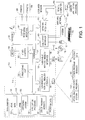
- Figure 1 an operating environment that may be used for one or more aspects of an illustrative embodiment of the invention.
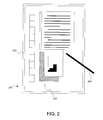
- Figure 2 is a plan view of a digitizer display of an illustrative computing device.
- Figure 3 depicts a graph of pressure over time and visual feedback provided by an illustrative embodiment of the invention.
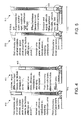
- Figure 4 illustrates movement of a scrollbar provided by an illustrative embodiment of the invention.
- Figure 5 illustrates movement of a scrollbar provided by an illustrative embodiment of the invention.
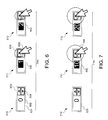
- Figure 6 illustrates incrementing a spinner control in a manner provided by an illustrative embodiment of the invention.
- Figure 7 illustrates incrementing a spinner control in a manner provided by an illustrative embodiment of the invention.
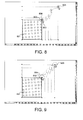
- Figure 8 illustrates resizing of an object in a manner provided by an illustrative embodiment of the invention.
- Figure 9 illustrates resizing of an object in a manner provided by an illustrative embodiment of the invention.
- Figure 10 is a flowchart for a method for adjusting a displayed control provided by an illustrative embodiment of the invention.
- Figure 11 illustrates selecting text in a manner provided by an illustrative embodiment of the invention.
- Figure 12 illustrates selecting drawing objects in a manner provided by an illustrative embodiment of the invention.
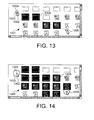
- Figure 13 illustrates using encounter selection to select file and folder objects in a manner provided by an illustrative embodiment of the invention.
- Figure 14 illustrates using an encounter selection to select file and folder objects in a manner provided by an illustrative embodiment of the invention.
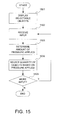
- Figure 15 is a flowchart for a method for selecting displayed objects provided by an illustrative embodiment of the invention.
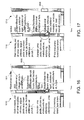
- Figure 16 illustrates movement of a scrollbar provided by an illustrative embodiment of the invention.
- Figure 17 illustrates movement of a scrollbar provided by an illustrative embodiment of the invention.
- Figure 18 illustrates selection of a file provided by an illustrative embodiment of the invention.
- Figure 19 illustrate displaying a context sensitive menu provided by an illustrative embodiment of the invention.
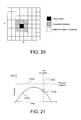
- Figure 20 depicts a distance threshold for determining a type of tap provided by an illustrative embodiment of the invention.
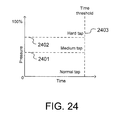
- Figure 21 depicts a graph of input pressure over time not resulting in a hard tap as provided by an illustrative embodiment of the invention.
- Figure 22 depicts a graph of input pressure over time resulting in a hard tap as provided by an illustrative embodiment of the invention.
- Figure 23 depicts a graph of input pressure over time not resulting in a hard tap as provided by an illustrative embodiment of the invention.
- Figure 24 depicts various input pressure thresholds over time for determining a type of tap as provided by an illustrative embodiment of the invention.
- Figure 25 is a flowchart for a method for responding to a user interaction provided by an illustrative embodiment of the invention.
- FIG. 1 illustrates an example of a suitable computing system environment 100 in which the invention may be implemented.
- the computing system environment 100 is only one example of a suitable computing environment and is not intended to suggest any limitation as to the scope of use or functionality of the invention. Neither should computing environment 100 be interpreted as having any dependency or requirement relating to any one or combination of components illustrated in illustrative operating environment 100.
- the invention is operational with numerous other general purpose or special purpose computing system environments or configurations.
- Examples of well known computing systems, environments, and/or configurations that may be suitable for use with the invention include, but are not limited to, personal computers (PCs); server computers; hand-held and other portable devices such as personal digital assistants (PDAs), tablet PCs or laptop PCs; multiprocessor systems; microprocessor-based systems; set top boxes; programmable consumer electronics; network PCs; minicomputers; mainframe computers; distributed computing environments that include any of the above systems or devices; and the like.
- PCs personal computers
- server computers hand-held and other portable devices
- PDAs personal digital assistants
- tablet PCs or laptop PCs multiprocessor systems
- microprocessor-based systems set top boxes
- programmable consumer electronics network PCs
- minicomputers minicomputers
- mainframe computers distributed computing environments that include any of the above systems or devices; and the like.
- the invention may be described in the general context of computer-executable instructions, such as program modules, being executed by a computer.
- program modules include routines, programs, objects, components, data structures, etc. that perform particular tasks or implement particular abstract data types.
- the invention may also be practiced in distributed computing environments where tasks are performed by remote processing devices that are linked through a communications network.
- program modules may be located in both local and remote computer storage media including memory storage devices.
- illustrative computing system environment 100 includes a general purpose computing device in the form of a computer 110.
- Components of computer 110 may include, but are not limited to, a processing unit 120, a system memory 130, and a system bus 121 that couples various system components including system memory 130 to processing unit 120.
- System bus 121 may be any of several types of bus structures including a memory bus or memory controller, a peripheral bus, and a local bus using any of a variety of bus architectures.
- such architectures include Industry Standard Architecture (ISA) bus, Micro Channel Architecture (MCA) bus, Enhanced ISA (EISA) bus, Video Electronics Standards Association (VESA) local bus, Advanced Graphics Port (AGP) bus, and Peripheral Component Interconnect (PCI) bus, also known as Mezzanine bus.
- ISA Industry Standard Architecture
- MCA Micro Channel Architecture
- EISA Enhanced ISA
- VESA Video Electronics Standards Association
- AGP Advanced Graphics Port
- PCI Peripheral Component Interconnect
- Computer 110 typically includes a variety of computer readable media.
- Computer readable media can be any available media that can be accessed by computer 110 such as volatile, nonvolatile, removable, and non-removable media.
- Computer readable media may include computer storage media and communication media.
- Computer storage media may include volatile, nonvolatile, removable, and non-removable media implemented in any method or technology for storage of information such as computer-readable instructions, data structures, program modules or other data.
- Computer storage media includes, but is not limited to, random-access memory (RAM), read-only memory (ROM), electrically-erasable programmable ROM (EEPROM), flash memory or other memory technology, compact-disc ROM (CD-ROM), digital video disc (DVD) or other optical disk storage, magnetic cassettes, magnetic tape, magnetic disk storage or other magnetic storage devices, or any other medium which can be used to store the desired information and which can accessed by computer 110.
- Communication media typically embodies computer-readable instructions, data structures, program modules or other data in a modulated data signal such as a carrier wave or other transport mechanism and includes any information delivery media.
- modulated data signal means a signal that has one or more of its characteristics set or changed in such a manner as to encode information in the signal.
- communication media includes wired media such as a wired network or direct-wired connection, and wireless media such as acoustic, radio frequency (RF) such as BLUETOOTH standard wireless links, infrared and other wireless media.
- RF radio frequency
- the system memory 130 includes computer storage media in the form of volatile and/or nonvolatile memory such as ROM 131 and RAM 132.
- a basic input/output system (BIOS) 133 containing the basic routines that help to transfer information between elements within computer 110, such as during start-up, is typically stored in ROM 131.
- RAM 132 typically contains data and/or program modules that are immediately accessible to and/or presently being operated on by processing unit 120.
- FIG. 1 illustrates software including operating system 134, application programs 135, other program modules 136, and program data 137.
- Computer 110 may also include other computer storage media.
- FIG. 1 illustrates a hard disk drive 141 that reads from or writes to non-removable, nonvolatile magnetic media, a magnetic disk drive 151 that reads from or writes to a removable, nonvolatile magnetic disk 152, and an optical disk drive 155 that reads from or writes to a removable, nonvolatile optical disk 156 such as a CD-ROM, DVD, or other optical media.
- Other computer storage media that can be used in the illustrative operating environment include, but are not limited to, magnetic tape cassettes, flash memory cards, digital video tape, solid state RAM, solid state ROM, and the like.
- the hard disk drive 141 is typically connected to the system bus 121 through a non-removable memory interface such as interface 140, and magnetic disk drive 151 and optical disk drive 155 are typically connected to the system bus 121 by a removable memory interface, such as interface 150.
- hard disk drive 141 is illustrated as storing an operating system 144, application programs 145, other program modules 146, and program data 147. Note that these components can either be the same as or different from operating system 134, application programs 135, other program modules 136, and program data 137, respectively. Operating system 144, application programs 145, other program modules 146, and program data 147 are given different numbers in FIG. 1 to illustrate that, at a minimum, they are different copies.
- a user may enter commands and information into computer 110 through input devices such as a keyboard 162 and pointing device 161, commonly referred to as a mouse, trackball or touch pad. Such pointing devices may provide pressure information, providing not only a location of input, but also the pressure exerted while clicking or touching the device.
- Other input devices may include a microphone, joystick, game pad, satellite dish, scanner, or the like.
- processing unit 120 may be coupled to processing unit 120 through a user input interface 160 that is coupled to system bus 121, but may be connected by other interface and bus structures, such as a parallel port, game port, universal serial bus (USB), or IEEE 1394 serial bus (FIREWIRE).
- a monitor 184 or other type of display device is also coupled to the system bus 121 via an interface, such as a video adapter 183.
- Video adapter 183 may comprise advanced 2D or 3D graphics capabilities, in addition to its own specialized processor and memory.
- Computer 110 may also include a digitizer 185 to allow a user to provide input using a stylus 186. Digitizer 185 may either be integrated into monitor 184 or another display device, or be part of a separate device, such as a digitizer pad. Computer 110 may also include other peripheral output devices such as speakers 189 and a printer 188, which may be connected through an output peripheral interface 187.
- Digitizer 185 may either be integrated into monitor 184 or another display device, or be part of a separate device, such as a digitizer pad.
- Computer 110 may also include other peripheral output devices such as speakers 189 and a printer 188, which may be connected through an output peripheral interface 187.
- Computer 110 may operate in a networked environment using logical connections to one or more remote computers, such as a remote computer 180.
- Remote computer 180 may be a personal computer, a server, a router, a network PC, a peer device or other common network node, and typically includes many or all of the elements described above relative to computer 110, although only a memory storage device 181 has been illustrated in FIG. 1.
- the logical connections depicted in FIG. 1 include a local area network (LAN) 171 and a wide area network (WAN) 173, but may also include other networks.
- LAN local area network
- WAN wide area network
- Such networking environments are commonplace in offices, enterprise-wide computer networks, intranets and the Internet.
- computer 110 When used in a LAN networking environment, computer 110 is coupled to the LAN 171 through a network interface or adapter 170.
- computer 110 When used in a WAN networking environment, computer 110 may include a modem 172 or another device for establishing communications over WAN 173, such as the Internet. Modem 172, which may be internal or external, may be connected to system bus 121 via user input interface 160 or another appropriate mechanism.
- program modules depicted relative to computer 110, or portions thereof may be stored remotely such as in remote storage device 181.
- FIG. 1 illustrates remote application programs 182 as residing on memory device 181. It will be appreciated that the network connections shown are illustrative and other means of establishing a communications link between the computers may be used.
- FIG. 2 illustrates a computing device that may be used with an embodiment of the invention.
- the computing device here is a tablet computer 201, which minimally includes a computer display 202 with an integral digitizer 203, and which may receive input via a user pressing a stylus 204 against the digitizer.
- Computer 110 may be embodied as tablet computer 201.
- tablet computers are used throughout this document as illustrative computing devices, tablet computers are only one among many possible computing devices that may be used to implement the invention.
- Alternative embodiments may comprise, by way of example, personal computers (PCs), laptop computers, handheld computer such as personal digital assistants (PDAs), cell phones, home electronic equipment, or any other computing device having or being coupled to an input device that detects input pressure, such as a digitizer or a pressure-sensitive pointing device such as a pressure-sensitive mouse, pressure-sensitive trackball, or pressure-sensitive joystick.
- PCs personal computers
- PDAs personal digital assistants
- cell phones such as a digitizer or a pressure-sensitive pointing device such as a pressure-sensitive mouse, pressure-sensitive trackball, or pressure-sensitive joystick.
- pressure-sensitive is intended to refer to a pressure-sensitive input device that is capable of detecting (either directly or indirectly) and distinguishing between different amounts of applied input pressure, as opposed to merely being able to distinguish between input versus non-input.
- the digitizer 203 relays to computer 201 data representing both a two-dimensional location of the contact, as well as an amount of the pressure applied.
- the amount of pressure may be represented as a magnitude (e.g., a numeric value along a range of numeric values), a pressure category (e.g., light, medium, heavy, etc.), or in any other manner.
- Digitizer 203 may continuously update this information over time as stylus 204 moves around the display surface and as the contact pressure increases or decreases.
- Stylus 204 may be any type of stylus, such as a man-made object or a human body part, such as a fingertip.
- a man-made stylus may include, but are not limited to, a passive- or active-type pen-like stylus such as is conventionally provided with many PDAs and tablet computers.
- FIG. 3 An illustrative graph 301 of contact pressure over time is shown in FIG. 3, which also depicts two forms of visual feedback provided on the display 202 by illustrative embodiments of the invention.
- stylus 204 is pressed against the surface of the display 202, and thus against the integrated digitizer 203 as well.
- the contact pressure from the stylus 204 is gradually increased and then decreased over time, as depicted in graph 301, which is typical of a tap of the stylus 204 against the digitizer 203.
- the timeframe spanned by graph 301 may be just a fraction of a second, although the timeframe may be shorter or longer.
- the magnitude or other representation of the applied pressure may be sampled over time at various sample moments.
- stylus 204 has just started pressing against digitizer 203 at point 311.
- the slight depression in the surface of digitizer 203 is detected as representative of the applied pressure, and the amount of pressure is shown as pressure magnitude 312 along graph 301.
- This value may be passed to the computer (not shown), which may modify its behavior depending on the pressure, and also may provide feedback to a user on the display.
- Pressure may be detected in any of a number of ways, such as by directly measuring the pressure or by estimating the pressure in accordance with other variables, such as the amount of surface area physically affected by the pressing of the tip of the stylus 204 against the digitizer 203.
- Computer 110 may provide visual, tactile, and/or audible feedback to the user in accordance with the amount of pressure applied by the stylus 204.
- the pressure feedback provided by computer 110 may thus take many forms, any of which may alert the user to the level of pressure currently being exerted.
- visual forms of feedback may involve modifying the shape, color, size, or transparency of a cursor or an underlying control presented on display 202.
- visual feedback may take the form of a pressure gauge, which may be depicted at a fixed location on display 202.
- Audible forms of feedback may involve producing a series of clicks or varying the pitch of a sound in conjunction with the changing pressure.
- Tactile forms of feedback may include one or more intensities or frequencies of vibration of stylus 204 or a housing of computer 110.
- FIG. 3 depicts two illustrative visual embodiments for providing pressure feedback to a user, but there are many other ways to provide this information.
- the value of pressure magnitude 312 is relayed to computer 110, which may display a cursor 313 at a location corresponding to the point of contact of stylus 204 on the display.
- cursor halo 314 the shape and/or size (e.g., diameter) of which is dependent upon the current amount pressure being applied.
- computer 110 may retain the appearance of a cursor 315, and instead modify the appearance of an underlying displayed control 316, which is exemplified here as a button.
- cursors may vary, and can include hourglasses, pinwheels, insertion points, and so forth.
- a host of underlying displayed elements can be placed under the cursor and be similarly modified.
- stylus 204 further depresses digitizer 203 at point 321, which is recorded as pressure magnitude 322.
- Point 321 may be in the same location on digitizer 203 as point 311 or a different location.
- cursor halo 324 expands or otherwise changes size and/or shape to indicate the higher pressure to the user.
- the color of the button 326 darkens (or otherwise changes its appearance) noticeably in response to varying levels of applied pressure.
- digitizer 203 at point 331 is further depressed, registering as pressure magnitude 332.
- point 331 may be the same location as points 311 and/or 321, or may be a different location, as will be discussed further.
- cursor halo 334 expands further to reflect the increase in pressure, or, in the second example, feedback button 336 darkens considerably.
- stylus 204 is beginning to lift away from digitizer 203 at point 341, which registers as pressure magnitude 342.
- cursor halo 344 begins to deflate in size, or, in the second example, button 346 begins to lighten in color or otherwise alter its appearance in a manner different from when the pressure was increasing.
- point 341 may be the same location as points 311, 321, and/or 331, or may be in a different location.
- pressure feedback may not be desirable if and when computer 110 is not presently using the pressure information.
- a first application may utilize pressure information but a second application may not.
- pressure feedback may be provided.
- second application is being executed and/or is in focus
- pressure feedback may not be provided.
- conventional cursors and controls may be used both when pressure is and is not relevant. Feedback, such as the inclusion of a halo around a cursor, may therefore not only provide information on the current level of pressure being applied, but may also relay the fact that pressure is presently relevant. By viewing a cursor halo, or a color varying control, the user may be informed that additional input can be provided through the use of pressure. This selective providing of pressure feedback may allow controllable pressure input to be an easily-discoverable feature even for an amateur user, through simple trial and error.
- Calibration may be an integral part of pressure sensitive input. Differing digitizers may translate force differently. As such, an operating system or application which allows for the use of pressure input may provide a calibration routine or pressure settings dialog. This may assist in standardizing input from various types of hardware. Additionally, it may allow weak or disabled individuals to vary the sensitivity of pressure measurements to accommodate their strength.
- pressure information may be used to distinguish between which window receives an input.
- a softer contact may indicate a normal input to the current window, whereas a harder contact may be directed to another application, such as a media player playing in the background.
- Enabling such uses of pressure enable a power user to work more efficiently by providing a larger input "vocabulary" without needlessly complicating the interface.
- average users who opt not to use pressure or users of devices without pressure sensitivity will not see their experience degrade.
- an input device may detect the surface area of contact, the temperature at the point of contact, or dampness at the point of contact. Each may be used to supplement an input and control device behavior.
- a device receiving pressure information uses that information to augment the input it receives.
- This information can be used in a wide variety of ways, including pressure-sensitive controls, pressure-sensitive selection, and through the use of a variable-pressure tap, as will be discussed in detail.
- Controls in a graphical user interface present intuitive input metaphors that allow users to manipulate and maneuver through data. Such controls are common elements found in graphical computer operating systems, individual applications, and other forms of software. Examples of known controls include, but are not limited to, scrollbars, spinner controls, resize handles, checkboxes, pull down menus, and buttons.
- controls may be augmented through the use of pressure data, providing users with an additional way to interact with displayed controls. For example, by making controls pressure-sensitive, users may be presented with a more manipulable user interface that responds faster and more accurately to their commands and that may more closely operate in accordance with the user's intent.
- Value-based controls i.e., controls that manipulate an underlying numeric, alphabetic, or alphanumeric value
- repeating controls i.e., controls that repeat the same action when continuously selected, may also be better served by the addition of pressure sensitivity.
- pressure sensitive controls are set forth below.
- FIG. 4 illustrates movement of a vertical scrollbar 403 provided by an illustrative embodiment of the invention.
- Scrollbar 403 graphically displays and updates an underlying index value indicating a current position within a corresponding document 404.
- FIG. 4 is divided into two arbitrary "frames" 410, 411 for explanatory purposes only.
- the frames 410, 411 show the same displayed graphical user interface as it changes over time, starting with portion 410 and ending with portion 411.
- a cursor 401 indicates that the user is presently activating the down arrow button of vertical scrollbar 403.
- Scrollbar 403 indicates the vertical placement of document 404 according to the vertical location of a thumb control 405.
- the size of cursor halo 402 signifies a relatively small amount of pressure being applied.
- the user has continued to activate the down arrow button, and the displayed portion of document 404 has scrolled down (which is actually implemented by moving document 404 up), as indicated by the new location of thumb control 405. Because of the small amount pressure applied by the user, the computer scrolls scrollbar 403 relatively slowly.
- FIG. 5 illustrates the same embodiment depicted in FIG. 4, and like FIG. 4 is also divided into two time-lapsed frames 510, 511, where the amount of time that passes between frames 510 and 511 is the same as the amount of time that passes between frames 410 and 411.
- scrollbar 403 is at the same starting point as in frame 410, but this time, the user is pressing harder with stylus 204, as indicated by a larger cursor halo 502.
- thumb control 405 indicates that the displayed portion of document 404 has scrolled down further than it did in FIG. 4. Because of the greater amount of pressure applied by the user when activating the down arrow button, computer 110 scrolls scrollbar 403 faster.
- the scrolling speed of scrollbar 403 is dependent upon the amount of pressure applied to the down arrow button of scrollbar 403. The same may apply to the up arrow button of scrollbar 403, as well as the left and right arrow buttons of a horizontal scrollbar.
- the scrolling speed of scrollbar 403 may have any relationship to the applied pressure, such as a linear relationship or a nonlinear relationship.
- FIG. 6 illustrates incrementing a spinner control 601 provided by an illustrative embodiment of the invention.
- Spinner control 601 has an entry field 602, where a user can view or change a numeric value, and up arrow button 603 and down arrow button 604, the selection of which respectively increments or decrements the value in the entry field.
- FIG. 6 is also divided into frames 610, 611, 612, which show the same graphical user interface changing over time from left to right in that figure.
- entry field 602 contains an initial value 0.
- this activation is indicated by arrow cursor 605 with cursor halo 606.
- FIG. 7 illustrates the same embodiment depicted in FIG. 6, and like FIG. 6 is also divided into three time-lapsed frames 710, 711, 712, where the amount of time that passes between frames 710 and 711 is the same as the amount of time that passes between frames 610 and 611, and the amount of time that passes between frames 711 and 712 is the same as the amount of time that passes between frames 611 and 612.
- spinner control 601 has been reset to the same initial value as in frame 610.
- second frame 711 when greater pressure is applied to activate up arrow button 603, the value in entry field 602 is updated using a larger increment and/or at a greater rate than in FIG. 6. The higher pressure is indicated by the larger cursor halo 706.
- the higher pressure continues updating the value using the larger increment and/or at a greater rate.
- the value of a spinner control may increase or decrease by an increment and/or at a rate that depends linearly or nonlinearly upon the applied pressure.
- pressure sensitivity may be used to control the rate of adjustment of a value or index.
- the pressure applied remained constant, that does not need to be the case. Indeed, a user may continuously and dynamically increase and decrease the pressure applied when providing an input in order to affect the operation of the control. As the pressure changes, so does the affect on the control, such as the rate of change.
- the value need not be numeric, and could be chosen from any defined set, such as a set of characters, words, colors, patterns, and so forth, depending on the particular need.
- a color selection can be made by using pressure to speed and slow the rate of change among a selection of colors and/or to control the intensity or other property of a color.
- Another embodiment may involve selecting a state in a pull down menu and using pressure to speed and slow the movement of the list.
- FIG. 8 illustrates resizing a drawing object 801 using an illustrative embodiment of the invention.
- the context here may be a drawing application or other program that allows users to resize objects.
- drawing object 801 is being resized by a user.
- Arrow cursor 803 having cursor halo 804 is positioned over resize handle 802 at one corner of object 801.
- Light pressure is applied by the user, as indicated by the small cursor halo 804.
- the application allows the user to resize following a smooth, freeform path.
- resize handle 802 has been repositioned at location 805.
- FIG. 9 illustrates the same embodiment of the invention depicted in FIG. 8. The difference here is that the user is applying more pressure, as indicated by larger cursor halo 904. Because of this greater pressure, the application may cause the movement of resize handle 802 to be non-smooth, such as by constraining it to fixed positions on a predetermined grid, for example. Here, resize handle 802 is relocated at location 905. Along the way, resize handle 802 is limited to locations along a fixed grid, which may or may not be visible to the user. Alternatively, the amount of pressure applied may affect the grid increment by which object 801 can be resized. In addition, an operating system or application may reverse the relationship, and constrain resize movement to a grid when less pressure is applied and allowing freeform resizing only when more pressure is applied.
- the pressure-sensitive control (i.e., resize handle 802) disclosed in FIGS. 8 and 9 is not necessarily limited to resizing objects. It may apply to other controls such as for moving objects, for example. It may also be used for resizing or repositioning windows in an operating system or application. Ultimately, the technique can be used in any instance where values defining an object's screen position, shape, size, and/or any other property are being modified.
- other forms of pressure-sensitive controls may be implemented. For example, a button or other control that performs an action when activated and that repeats the action when continuously activated may be pressure-sensitive. Such a repeating control may repeat the action faster when greater pressure is applied to the input, and likewise slow down the rate of repetition when less pressure is applied.
- An additional implementation involves the use of harder pressure to vary the behavior of a drag operation. For example, dragging a drawing object while pressing harder may cause the object to paste in repeated fashion, similar to a rubber stamp effect; the harder the drag, the more frequent the repeating stamp
- FIG. 10 illustrates a method for adjusting a displayed control provided by an illustrative embodiment of the invention.
- computer 110 displays a pressure sensitive control on display 202, for example a scrollbar, resize handle, button, spinner control, and so forth.
- a user directs input to the control, coupled with pressure applied by the user with stylus 204, computer 110 receives the input, as in step 1002.
- computer 110 determines the amount of pressure applied by the user.
- computer 110 may, at this point, compare the pressure applied to an amount applied previously in order to determine its relative magnitude.
- computer 110 moves or modifies the respective control (including adjusting any underlying value) in accordance with the amount of pressure applied.
- a greater amount of pressure from the user may cause adjustments to the control carried out in a first manner, perhaps by speeding up or using larger increments, whereas less pressure may cause adjustments to occur in a second manner, such as slower adjustments, or even cause the control to behave as if not pressure-sensitive.
- computer 110 determines whether the user input continues, and if so, performs steps 1002-1005 again. Otherwise, the method terminates and/or awaits another user input.
- Item selection is a common activity for users of graphical computer operating systems, applications, and other software, and activity that can benefit from pressure sensitivity. Selecting choices from a list, words in a document, files in a folder, etc. are tasks with which most users are familiar. Pressure sensitivity enhances the process of item selection, for example when the use of double or triple mouse clicks are needed to broaden a selection but no mouse is available, such as with a tablet computer. For example, by pressing harder, a user signals that he wants to select a larger number of items. A user need not attempt a notoriously difficult double or triple click with a stylus on a tablet computer.
- FIG. 11 illustrates selecting text in a word processing application in a manner provided by an illustrative embodiment of the invention.
- FIG. 11 is divided into three frames 1100, 1110, 1120.
- Frames 1100, 1110, and 1120 illustrate how a graphical user interface may react to different applied pressures.
- first frame 1100 a word 1102 in paragraph 1101 is being selected by cursor 1103 having cursor halo 1104.
- cursor 1103 having cursor halo 1104.
- a user applies a small amount of pressure to select word 1101.
- the user may simply place an insertion point in the middle of word 1102.
- FIG. 12 illustrates selecting drawing objects in a drawing software program in a manner provided by an illustrative embodiment of the invention.
- FIG. 12 is divided into three frames 1200, 1210, 1220 that illustrate how a graphical user interface may react to different applied pressures.
- drawing object 1201 is selected by a user using a small amount of pressure, as indicated by cursor 1202 having a small cursor halo 1203.
- Selected object 1201 may be surrounded by a selection tool embodied as a selection border 1204.
- Each drawing object within the selection border 1204 is part of the selection.
- the size of the selection border 1204 depends upon the amount of applied pressure.
- selection border 1204 grows in accordance with the higher applied pressure, and in this case grows sufficiently large so as to encompass more objects, including, for example, object 1215.
- Cursor halo 1213 reflects the increasing pressure applied by the user.
- selection border 1204 grows larger still, encompassing more drawing objects in this case including, for example, object 1226.
- Selection border 1204 may be constrained to grow to encompass only objects connected or adjacent to the originally-selected object, or may be configured to also encompass objects not connected or adjacent to the originally-selected object. As before, reducing the pressure applied may return the selection to a smaller number of objects.
- U.S. Patent Application Publication No. 20040021701 A1 entitled “Freeform Encounter Selection Tool,” which is hereby incorporated by reference as to its disclosure of an encounter selection tool, discloses a freeform encounter selection tool for a computer system with a graphical user interface that allows a user to draw a freeform selection path so as to select one or more items along or near the path. As the user drags a pointing device such as a stylus or a mouse, a freeform selection path is created so that the encounter selection tool selects graphical items that are encountered.
- a pointing device such as a stylus or a mouse
- FIG. 13 illustrates using an encounter selection tool to select file and folder objects by an illustrative embodiment of the invention.
- a subset of a collection 1301 of files and folders is selected by dragging cursor 1302, having cursor halo 1303, from start point 1304 to end point 1306.
- Folders and files encountered along the path of the cursor, for example folder 1305, are selected and highlighted as shown.
- the user may then perform a common function among all of the files, such as throwing them away.
- the cursor halo the user is only pressing lightly when he uses the encounter select tool. This leads to a relatively narrow selection path. In this embodiment, the lighter the pressure, the narrower the selection path, and thus in general the fewer the number of objects selected along the selection path.
- FIG. 14 illustrates the same collection 1301 of files and folders presented in FIG. 13.
- the user presses harder while moving cursor 1302 from start point 1304 to end point 1306, as reflected in larger cursor halo 1403.
- the result of the increased pressure is that a wider selection path is created and a larger number of objects is selected, including, for example, document 1405.
- this embodiment has been discussed with regard to a freeform selection path that follows movement of the cursor 1306, the selection path may take other forms such as a linear path that extends between the start point 1304 and the end point 1306, regardless of the path the cursor 1306 takes between the start and end points 1304, 1306.
- FIG. 15 illustrates one method for selecting displayed objects provided by an illustrative embodiment of the invention.
- step 1501 a collection of selectable items such as characters, drawing objects, file icons, etc. is displayed.
- a user selects at least one of the items with stylus 204, and the stylus input is received in step 1502.
- step 1503 the amount of pressure applied by the user with the stylus 204 is determined so that, in step 1504, the identities of which items are selected can be modified. For example, when a user presses harder during a selection operation, the selection path widens, and so more of the items may be selected. If there is more input from the user, at decision 1505, the steps continue. Otherwise, the method terminates normally or awaits further user input.
- a lasso selection tool which is familiar from its use in graphics editing software, may be enhanced with pressure information.
- lasso selection allows a user to encircle in freeform fashion a graphic of interest and cut or copy it.
- a user by pressing harder while encircling a selected graphic of interest, may control the amount of feathering used to soften the edges of the graphic of interest when it is cut or copied, or whether to select objects only partially within the lasso (e.g., lower pressure does not select such objects while higher pressure does select such objects).
- pressure based selection may allow for a selection zoom. For example, while pressing harder on a pixel to select it, the screen may zoom in further allowing greater detail to be displayed. The user can then achieve more precision while selecting neighboring pixels.
- Tapping a digitizer is a common form of user interaction with a computing device, such as a tablet computer, which can be enhanced by exploiting pressure information available from the digitizer.
- the term tap includes the contact and removal of a stylus, such as a pen, finger, or any other pointing implement, with the surface of the digitizer.
- a tap is interpreted as equivalent to a mouse click, regardless of how much force was used to impact the digitizer.
- Pressure information can be used, however, to distinguish normal taps from hard taps, enabling new sources of user input. For example, a tap with an applied pressure within a given first pressure range may be considered a normal tap, whereas a tap with an applied pressure within a given higher second pressure range may be considered a hard tap.
- a normal tap may, for example, be interpreted as a simple click
- a hard tap may, for example, be used to trigger additional functionality.
- a hard tap may be interpreted as a double-tap (notoriously difficult on digitizer displays), or as a right click, or as a trigger for an on-screen keyboard for tapping out words and sentences, or as a request to launch an application, or as a middle click (on a three button mouse), or as a scroll wheel click, and so forth.
- FIGs. 16 and 17 illustrate one embodiment of hard taps.
- FIGs. 16 and 17 are each divided into two arbitrary frames 1610, 1611, 1710, 1711 that show how a displayed graphical user interface is affected by different types of taps.
- FIG. 16 depicts movement of a scrollbar under conditions of a normal tap provided by an illustrative embodiment of the invention.
- first frame 1610 a user taps on scrollbar 1603, the tap being indicated by the temporary placement of cursor 1601 and starburst halo 1602.
- the starburst halo 1602 may signify to the user that a tap is being received as opposed to a press-and-hold.
- the small starburst halo 1602 indicates, in this case, that the tap was not very hard.
- the results of the tap are viewable.
- Document 1604 has scrolled down one page, and the thumb control 1605 has shifted down.
- First frame 1710 of FIG. 17 illustrates the same starting position of document 1604 and thumb control 1605.
- a user taps the same location on scrollbar 1603 as before, but this time taps harder.
- the starburst halo 1702 that temporarily appears is larger, indicating that a harder tap was registered than in FIG. 16. Rather than page down as before, the hard tap in this case triggers a different function.
- thumb control 1605 jumps directly to the location of the harder tap. This can be useful for a user who wants to go directly to a portion of document 1604 without waiting for the scrollbar to page down.
- FIGs. 18 and 19 illustrate a second embodiment of hard and normal taps.
- the figures are each divided into two arbitrary frames 1810, 1811, 1910, 1911 that show how the effect of different types of taps.
- first frame 1810 of FIG. 18 a file 1801 receives a single normal tap, as signified by cursor 1802 with starburst halo 1803.
- second frame 1811 computer 110 interprets the normal tap as a left click and file 1804 is highlighted.
- the first frame 1910 of FIG. 19 differs from that of FIG. 18 in that file 1801 receives a hard tap, as signified by larger starburst halo 1903.
- computer 110 performs a separate action in second frame 1911, treating the hard tap as a right click, and displaying the context sensitive menu rather than selecting the file.
- variable-pressure tap embodiments described above are only a few of the uses of such an enhancement.
- the starburst halo described above is merely demonstrative.
- other forms of visual feedback include changing the color or transparency of the point of impact rather than changing the cursor.
- audio feedback may distinguish a hard tap from another tap or input.
- the existence of a particular sound, or the volume of a sound, or a particular pitch may provide the feedback needed by a user to distinguish tap types.
- the methods for evaluating a hard tap and distinguishing hard taps from other forms of input are set forth in some detail below.
- Distinguishing a hard tap from other user inputs on a digitizer may involve determining whether the tip of stylus 204 maintains a substantially constant position on the surface of digitizer 203.
- a tap that moves across the surface of digitizer 203 is more likely an intended drag operation rather than a tap, and so a distance threshold may be used to ensure that the point of contact does not move too far.
- a distance threshold is depicted in FIG. 20, which provides an illustrative layout for a distance threshold on an X-Y coordinate plane defining locations on the surface of digitizer 203.
- the initial point of contact is represented by the black unit square in the middle of the figure. Unit squares in FIG.
- Each unit square (or other shaped area) may represent a pixel on the underlying display and/or a minimum resolvable area that may be sensed by digitizer 203, or any other unit of area, whether arbitrary or whether defined in accordance with properties of display 202 and/or digitizer 203.
- the immediately adjacent squares or pixels form a distance threshold.
- stylus 204 may initially impact the pressure-sensitive surface of digitizer 203 at the black square, and stylus 204 may immediately thereafter slide just a little bit.
- a hard tap is not registered by computer 110.
- This distance threshold is configurable. If a user has a difficult time holding a pointing implement steady, she may be able to adjust the distance threshold, such as by increasing the distance threshold to include a larger range of acceptable contact points.
- FIG. 21 depicts a graph 2101 of input pressure over time not resulting in a hard tap as provided by an illustrative embodiment of the invention.
- the tap has stayed within the appropriate distance threshold, but by the time the contact passes time threshold 2102 (perhaps set at 1/4 of a second or another amount of time) at point 2104, the magnitude of pressure has not passed pressure threshold 2103.
- computer 110 may interpret the input as a normal tap or some other type of input.
- FIG. 22 depicts a graph 2201 of input pressure over time resulting in a hard tap as provided by an illustrative embodiment of the invention.
- the contact being graphed has surpassed a pressure threshold 2203 at a point 2204 before reaching a time threshold 2202. This may therefore be registered as a hard tap, and the operating system or application can process it as such. If the operating system or application does not take advantage of hard taps, then the tap can be interpreted as a normal tap.
- FIG. 23 depicts a graph 2301 of input pressure over time in which the tap input does not register as a hard tap as provided by an illustrative embodiment of the invention.
- the contact with the surface of digitizer 203 eventually exceeds a pressure threshold 2303, but not within a time threshold 2302.
- time threshold 2302 When the time of contact exceeds time threshold 2302 at a point 2304, similar to the example in FIG. 21, the input can be passed on as something other than a hard tap, such as a normal tap.
- time and pressure thresholds used to detect a hard tap may be user- or software-configurable. Individual users can perfect their successful use of the hard tap by adjusting the pressure threshold and time threshold. For example, a particular user may not be able to achieve the pressure magnitude needed, and can adjust the pressure and/or time thresholds as desired, such as to adjust the pressure threshold lower to allow for "softer" hard taps. Pressure and/or time thresholds may further be automatically adjusted through a calibration routine.
- computer 110 via a user interface, may request that the user execute what the user considers to be a normal tap as well as a hard tap.
- Computer 100 may measure the pressure and time properties of the user's input and automatically determine appropriate time and/or pressure thresholds in accordance with those properties.
- FIG. 24 depicts a set of pressure ranges over time as provided by an illustrative embodiment of the invention.
- taps not exceeding a pressure threshold 2401 within time threshold 2403 will be considered normal taps.
- Taps exceeding a pressure threshold 2401, but not exceeding a higher pressure threshold 2402 within time threshold 2403 will be interpreted as medium taps.
- taps exceeding pressure threshold 2402 will be interpreted as hard taps.
- Medium taps may be useful in some interface environments. Individual applications may provide different thresholds depending on their need, overriding thresholds set by the operating system.
- FIG. 25 us a flowchart for a method for responding to a user interaction provided by an illustrative embodiment of the invention.
- computer 110 receives a stylus input upon digitizer 203, providing data about the tap including location and pressure over time. Given this information, at decision 2502, computer 110 determines whether the contact location has moved within a predetermined threshold distance from its initial point. If not, then no tap is found, as the input may be the beginning of a drag operation, or possibly handwriting. Alternatively, computer 110 may decide that such an input is a normal tap. If stylus 204 remains within the threshold distance during the input, then at decision 2503, computer 110 determines whether the applied pressure exceeds a predetermined threshold pressure within a predetermined time threshold. If not, then a normal tap is detected and the appropriate function is executed at step 2505. If the threshold pressure was reached within the time threshold, then a hard tap is detected and the appropriate function is executed at step 2504.
Landscapes
- Engineering & Computer Science (AREA)
- General Engineering & Computer Science (AREA)
- Theoretical Computer Science (AREA)
- Human Computer Interaction (AREA)
- Physics & Mathematics (AREA)
- General Physics & Mathematics (AREA)
- User Interface Of Digital Computer (AREA)
- Controls And Circuits For Display Device (AREA)
- Position Input By Displaying (AREA)
Applications Claiming Priority (1)
| Application Number | Priority Date | Filing Date | Title |
|---|---|---|---|
| US11/017,115 US7619616B2 (en) | 2004-12-21 | 2004-12-21 | Pressure sensitive controls |
Publications (3)
| Publication Number | Publication Date |
|---|---|
| EP1674977A2 true EP1674977A2 (de) | 2006-06-28 |
| EP1674977A3 EP1674977A3 (de) | 2012-05-09 |
| EP1674977B1 EP1674977B1 (de) | 2015-03-11 |
Family
ID=35845144
Family Applications (1)
| Application Number | Title | Priority Date | Filing Date |
|---|---|---|---|
| EP05112245.5A Expired - Lifetime EP1674977B1 (de) | 2004-12-21 | 2005-12-15 | Verfahren zum Ändern der Größe grafische Objekte mit Krafteingänge |
Country Status (5)
| Country | Link |
|---|---|
| US (3) | US7619616B2 (de) |
| EP (1) | EP1674977B1 (de) |
| JP (1) | JP2006185443A (de) |
| KR (1) | KR20060071353A (de) |
| CN (2) | CN101593077B (de) |
Cited By (112)
| Publication number | Priority date | Publication date | Assignee | Title |
|---|---|---|---|---|
| WO2008030970A3 (en) * | 2006-09-06 | 2008-07-31 | Apple Inc | Email client for a portable multifunction device |
| WO2008128096A3 (en) * | 2007-04-11 | 2009-04-16 | Next Holdings Inc | Touch screen system with hover and click input methods |
| WO2009053833A1 (en) * | 2007-10-25 | 2009-04-30 | Nokia Corp. | Apparatus and method for zooming objects on a display |
| EP2255275A1 (de) * | 2008-03-19 | 2010-12-01 | Sony Ericsson Mobile Communications AB | Bidirektionales berührungsempfindliches display |
| US8055022B2 (en) | 2000-07-05 | 2011-11-08 | Smart Technologies Ulc | Passive touch system and method of detecting user input |
| US8089462B2 (en) | 2004-01-02 | 2012-01-03 | Smart Technologies Ulc | Pointer tracking across multiple overlapping coordinate input sub-regions defining a generally contiguous input region |
| US8149221B2 (en) | 2004-05-07 | 2012-04-03 | Next Holdings Limited | Touch panel display system with illumination and detection provided from a single edge |
| US8228304B2 (en) | 2002-11-15 | 2012-07-24 | Smart Technologies Ulc | Size/scale orientation determination of a pointer in a camera-based touch system |
| EP2217988A4 (de) * | 2007-12-04 | 2012-08-01 | Nokia Corp | Benutzeroberfläche |
| US8274496B2 (en) | 2004-04-29 | 2012-09-25 | Smart Technologies Ulc | Dual mode touch systems |
| US8289299B2 (en) | 2003-02-14 | 2012-10-16 | Next Holdings Limited | Touch screen signal processing |
| US8325134B2 (en) | 2003-09-16 | 2012-12-04 | Smart Technologies Ulc | Gesture recognition method and touch system incorporating the same |
| US8339378B2 (en) | 2008-11-05 | 2012-12-25 | Smart Technologies Ulc | Interactive input system with multi-angle reflector |
| EP2473897A4 (de) * | 2009-09-02 | 2013-01-23 | Amazon Tech Inc | Benutzeroberfläche für berührungsbildschirme |
| US8384693B2 (en) | 2007-08-30 | 2013-02-26 | Next Holdings Limited | Low profile touch panel systems |
| US8405637B2 (en) | 2008-01-07 | 2013-03-26 | Next Holdings Limited | Optical position sensing system and optical position sensor assembly with convex imaging window |
| US8436827B1 (en) | 2011-11-29 | 2013-05-07 | Google Inc. | Disambiguating touch-input based on variation in characteristic such as speed or pressure along a touch-trail |
| US8456451B2 (en) | 2003-03-11 | 2013-06-04 | Smart Technologies Ulc | System and method for differentiating between pointers used to contact touch surface |
| US8456418B2 (en) | 2003-10-09 | 2013-06-04 | Smart Technologies Ulc | Apparatus for determining the location of a pointer within a region of interest |
| EP2171565A4 (de) * | 2007-07-27 | 2013-07-03 | Samsung Electronics Co Ltd | Drucksensorgruppenvorrichtung und verfahren für taktile erfassung |
| GB2498508A (en) * | 2011-10-31 | 2013-07-24 | Promethean Ltd | Positional manipulation of an object in a GUI beyond that permitted by an associated application |
| WO2013169849A3 (en) * | 2012-05-09 | 2014-03-20 | Industries Llc Yknots | Device, method, and graphical user interface for displaying user interface objects corresponding to an application |
| WO2013169865A3 (en) * | 2012-05-09 | 2014-04-17 | Yknots Industries Llc | Device, method, and graphical user interface for moving a user interface object based on an intensity of a press input |
| WO2013169851A3 (en) * | 2012-05-09 | 2014-06-26 | Yknots Industries Llc | Device, method, and graphical user interface for facilitating user interaction with controls in a user interface |
| EP2474891A4 (de) * | 2009-08-31 | 2014-07-09 | Sony Corp | Informationsverarbeitungsvorrichtung, informationsverarbeitungsverfahren und programm |
| WO2013169842A3 (en) * | 2012-05-09 | 2014-07-10 | Yknots Industries Llc | Device, method, and graphical user interface for selecting object within a group of objects |
| WO2014105277A3 (en) * | 2012-12-29 | 2014-08-28 | Yknots Industries Llc | Device, method, and graphical user interface for moving a cursor according to a change in an appearance of a control icon with simulated three-dimensional characteristics |
| US8902193B2 (en) | 2008-05-09 | 2014-12-02 | Smart Technologies Ulc | Interactive input system and bezel therefor |
| EP2811386A1 (de) * | 2013-06-04 | 2014-12-10 | Sony Corporation | Verfahren und Vorrichtung zur Steuerung einer Schnittstelle, basierend auf Berührungsvorgängen |
| EP2325739A3 (de) * | 2009-11-20 | 2015-05-20 | Sony Corporation | Informationsverarbeitungsvorrichtung und Informationsverarbeitungsverfahren |
| EP2879037A1 (de) * | 2013-11-27 | 2015-06-03 | LG Electronics Inc. | Mobiles Endgerät und Steuerungsverfahren dafür |
| WO2015090514A1 (de) * | 2013-12-19 | 2015-06-25 | Audi Ag | Verfahren zum auswählen eines textabschnitts auf einem berührungssensitiven bildschirm und anzeige- und bedienvorrichtung |
| EP2930597A3 (de) * | 2014-04-11 | 2015-11-25 | Lg Electronics Inc. | Mobiles Endgerät und Verfahren zur Steuerung davon |
| EP2488932B1 (de) * | 2009-10-14 | 2015-11-25 | Sony Computer Entertainment Inc. | Berührungsschnittstelle mit mikrophon zur bestimmung einer berührungsstärke |
| JP2016505978A (ja) * | 2012-12-29 | 2016-02-25 | アップル インコーポレイテッド | コンテンツをスクロールするか選択するかを判定するためのデバイス、方法、及びグラフィカルユーザインタフェース |
| EP2527966A4 (de) * | 2010-01-22 | 2016-03-09 | Korea Electronics Technology | Verfahren zur bereitstellung einer benutzeroberfläche auf basis von berührungsdruck und elektronische vorrichtung damit |
| EP3035286A1 (de) * | 2014-12-18 | 2016-06-22 | Thomson Licensing | Verfahren und Vorrichtung zur Objektkonturierung in einem Bild |
| EP2212761A4 (de) * | 2007-10-18 | 2016-08-10 | Microsoft Technology Licensing Llc | Dreidimensionale objektsimulation unter verwendung von audio-, visueller und taktiler rückmeldung |
| US9459781B2 (en) | 2014-08-02 | 2016-10-04 | Apple Inc. | Context-specific user interfaces for displaying animated sequences |
| US9483755B2 (en) | 2008-03-04 | 2016-11-01 | Apple Inc. | Portable multifunction device, method, and graphical user interface for an email client |
| US9524050B2 (en) | 2011-11-29 | 2016-12-20 | Google Inc. | Disambiguating touch-input based on variation in pressure along a touch-trail |
| EP2442224A3 (de) * | 2010-10-15 | 2017-03-15 | Samsung Electronics Co., Ltd. | Verfahren und Vorrichtung zur Auswahl eines Menüpunkts |
| US9602729B2 (en) | 2015-06-07 | 2017-03-21 | Apple Inc. | Devices and methods for capturing and interacting with enhanced digital images |
| US9612741B2 (en) | 2012-05-09 | 2017-04-04 | Apple Inc. | Device, method, and graphical user interface for displaying additional information in response to a user contact |
| US9619076B2 (en) | 2012-05-09 | 2017-04-11 | Apple Inc. | Device, method, and graphical user interface for transitioning between display states in response to a gesture |
| US9632664B2 (en) | 2015-03-08 | 2017-04-25 | Apple Inc. | Devices, methods, and graphical user interfaces for manipulating user interface objects with visual and/or haptic feedback |
| US9639184B2 (en) | 2015-03-19 | 2017-05-02 | Apple Inc. | Touch input cursor manipulation |
| US9645732B2 (en) | 2015-03-08 | 2017-05-09 | Apple Inc. | Devices, methods, and graphical user interfaces for displaying and using menus |
| US9665206B1 (en) | 2013-09-18 | 2017-05-30 | Apple Inc. | Dynamic user interface adaptable to multiple input tools |
| US9674426B2 (en) | 2015-06-07 | 2017-06-06 | Apple Inc. | Devices and methods for capturing and interacting with enhanced digital images |
| US9753639B2 (en) | 2012-05-09 | 2017-09-05 | Apple Inc. | Device, method, and graphical user interface for displaying content associated with a corresponding affordance |
| US9778771B2 (en) | 2012-12-29 | 2017-10-03 | Apple Inc. | Device, method, and graphical user interface for transitioning between touch input to display output relationships |
| US9785305B2 (en) | 2015-03-19 | 2017-10-10 | Apple Inc. | Touch input cursor manipulation |
| EP2367097B1 (de) * | 2010-03-19 | 2017-11-22 | BlackBerry Limited | Tragbare elektronische Vorrichtung und Steuerungsverfahren dafür |
| US9830048B2 (en) | 2015-06-07 | 2017-11-28 | Apple Inc. | Devices and methods for processing touch inputs with instructions in a web page |
| US9880735B2 (en) | 2015-08-10 | 2018-01-30 | Apple Inc. | Devices, methods, and graphical user interfaces for manipulating user interface objects with visual and/or haptic feedback |
| US9886184B2 (en) | 2012-05-09 | 2018-02-06 | Apple Inc. | Device, method, and graphical user interface for providing feedback for changing activation states of a user interface object |
| US9891811B2 (en) | 2015-06-07 | 2018-02-13 | Apple Inc. | Devices and methods for navigating between user interfaces |
| US9916075B2 (en) | 2015-06-05 | 2018-03-13 | Apple Inc. | Formatting content for a reduced-size user interface |
| US9959025B2 (en) | 2012-12-29 | 2018-05-01 | Apple Inc. | Device, method, and graphical user interface for navigating user interface hierarchies |
| US9990107B2 (en) | 2015-03-08 | 2018-06-05 | Apple Inc. | Devices, methods, and graphical user interfaces for displaying and using menus |
| US9996231B2 (en) | 2012-05-09 | 2018-06-12 | Apple Inc. | Device, method, and graphical user interface for manipulating framed graphical objects |
| US10037138B2 (en) | 2012-12-29 | 2018-07-31 | Apple Inc. | Device, method, and graphical user interface for switching between user interfaces |
| US10042542B2 (en) | 2012-05-09 | 2018-08-07 | Apple Inc. | Device, method, and graphical user interface for moving and dropping a user interface object |
| US10048757B2 (en) | 2015-03-08 | 2018-08-14 | Apple Inc. | Devices and methods for controlling media presentation |
| US10055121B2 (en) | 2015-03-07 | 2018-08-21 | Apple Inc. | Activity based thresholds and feedbacks |
| US10067653B2 (en) | 2015-04-01 | 2018-09-04 | Apple Inc. | Devices and methods for processing touch inputs based on their intensities |
| US10095391B2 (en) | 2012-05-09 | 2018-10-09 | Apple Inc. | Device, method, and graphical user interface for selecting user interface objects |
| US10095396B2 (en) | 2015-03-08 | 2018-10-09 | Apple Inc. | Devices, methods, and graphical user interfaces for interacting with a control object while dragging another object |
| US10126930B2 (en) | 2012-05-09 | 2018-11-13 | Apple Inc. | Device, method, and graphical user interface for scrolling nested regions |
| WO2018213387A1 (en) * | 2017-05-16 | 2018-11-22 | Apple Inc | Devices, methods, and graphical user interfaces for seamless transition of user interface behaviors |
| EP3364637A4 (de) * | 2015-12-22 | 2018-12-05 | Huawei Technologies Co., Ltd. | Verfahren und vorrichtung zur filtrierung eines objekts mithilfe von druck |
| US10162452B2 (en) | 2015-08-10 | 2018-12-25 | Apple Inc. | Devices and methods for processing touch inputs based on their intensities |
| US10175757B2 (en) | 2012-05-09 | 2019-01-08 | Apple Inc. | Device, method, and graphical user interface for providing tactile feedback for touch-based operations performed and reversed in a user interface |
| US10200598B2 (en) | 2015-06-07 | 2019-02-05 | Apple Inc. | Devices and methods for capturing and interacting with enhanced digital images |
| US10235035B2 (en) | 2015-08-10 | 2019-03-19 | Apple Inc. | Devices, methods, and graphical user interfaces for content navigation and manipulation |
| US10248308B2 (en) | 2015-08-10 | 2019-04-02 | Apple Inc. | Devices, methods, and graphical user interfaces for manipulating user interfaces with physical gestures |
| US10254948B2 (en) | 2014-09-02 | 2019-04-09 | Apple Inc. | Reduced-size user interfaces for dynamically updated application overviews |
| US10275087B1 (en) | 2011-08-05 | 2019-04-30 | P4tents1, LLC | Devices, methods, and graphical user interfaces for manipulating user interface objects with visual and/or haptic feedback |
| US10272294B2 (en) | 2016-06-11 | 2019-04-30 | Apple Inc. | Activity and workout updates |
| US10304347B2 (en) | 2015-08-20 | 2019-05-28 | Apple Inc. | Exercised-based watch face and complications |
| US10310728B2 (en) | 2011-01-14 | 2019-06-04 | Apple, Inc. | Presenting e-mail on a touch device |
| US10346030B2 (en) | 2015-06-07 | 2019-07-09 | Apple Inc. | Devices and methods for navigating between user interfaces |
| US10416800B2 (en) | 2015-08-10 | 2019-09-17 | Apple Inc. | Devices, methods, and graphical user interfaces for adjusting user interface objects |
| US10437333B2 (en) | 2012-12-29 | 2019-10-08 | Apple Inc. | Device, method, and graphical user interface for forgoing generation of tactile output for a multi-contact gesture |
| US10452253B2 (en) | 2014-08-15 | 2019-10-22 | Apple Inc. | Weather user interface |
| US10613743B2 (en) | 2014-09-02 | 2020-04-07 | Apple Inc. | User interface for receiving user input |
| US10620590B1 (en) | 2019-05-06 | 2020-04-14 | Apple Inc. | Clock faces for an electronic device |
| EP3549005A4 (de) * | 2016-12-26 | 2020-07-29 | Alcatel Lucent | Vorrichtung mit druckempfindlicher anzeige und verfahren zur verwendung solch einer vorrichtung |
| US10771606B2 (en) | 2014-09-02 | 2020-09-08 | Apple Inc. | Phone user interface |
| US10795562B2 (en) | 2010-03-19 | 2020-10-06 | Blackberry Limited | Portable electronic device and method of controlling same |
| US10802703B2 (en) | 2015-03-08 | 2020-10-13 | Apple Inc. | Sharing user-configurable graphical constructs |
| US10838586B2 (en) | 2017-05-12 | 2020-11-17 | Apple Inc. | Context-specific user interfaces |
| US10852905B1 (en) | 2019-09-09 | 2020-12-01 | Apple Inc. | Techniques for managing display usage |
| US10872318B2 (en) | 2014-06-27 | 2020-12-22 | Apple Inc. | Reduced size user interface |
| US11061372B1 (en) | 2020-05-11 | 2021-07-13 | Apple Inc. | User interfaces related to time |
| US11301130B2 (en) | 2019-05-06 | 2022-04-12 | Apple Inc. | Restricted operation of an electronic device |
| US11327650B2 (en) | 2018-05-07 | 2022-05-10 | Apple Inc. | User interfaces having a collection of complications |
| US11372659B2 (en) | 2020-05-11 | 2022-06-28 | Apple Inc. | User interfaces for managing user interface sharing |
| US11526256B2 (en) | 2020-05-11 | 2022-12-13 | Apple Inc. | User interfaces for managing user interface sharing |
| EP3959721A4 (de) * | 2019-04-26 | 2023-01-18 | Sony Interactive Entertainment LLC | Spiele-controller mit touchpad-eingabe |
| US11604571B2 (en) | 2014-07-21 | 2023-03-14 | Apple Inc. | Remote user interface |
| US11694590B2 (en) | 2020-12-21 | 2023-07-04 | Apple Inc. | Dynamic user interface with time indicator |
| US11720239B2 (en) | 2021-01-07 | 2023-08-08 | Apple Inc. | Techniques for user interfaces related to an event |
| US11921992B2 (en) | 2021-05-14 | 2024-03-05 | Apple Inc. | User interfaces related to time |
| US11960701B2 (en) | 2019-05-06 | 2024-04-16 | Apple Inc. | Using an illustration to show the passing of time |
| US12045014B2 (en) | 2022-01-24 | 2024-07-23 | Apple Inc. | User interfaces for indicating time |
| US12175065B2 (en) | 2016-06-10 | 2024-12-24 | Apple Inc. | Context-specific user interfaces for relocating one or more complications in a watch or clock interface |
| US12182373B2 (en) | 2021-04-27 | 2024-12-31 | Apple Inc. | Techniques for managing display usage |
| US12578975B2 (en) | 2022-09-15 | 2026-03-17 | Apple Inc. | User interfaces for indicating time |
| US12602154B2 (en) | 2024-01-18 | 2026-04-14 | Apple Inc. | User interfaces integrating hardware buttons |
| US12619345B2 (en) | 2024-09-23 | 2026-05-05 | Apple Inc. | User interfaces related to time |
Families Citing this family (259)
| Publication number | Priority date | Publication date | Assignee | Title |
|---|---|---|---|---|
| US8508508B2 (en) | 2003-02-14 | 2013-08-13 | Next Holdings Limited | Touch screen signal processing with single-point calibration |
| US8456447B2 (en) | 2003-02-14 | 2013-06-04 | Next Holdings Limited | Touch screen signal processing |
| DE102006029506B4 (de) * | 2005-10-28 | 2018-10-11 | Volkswagen Ag | Eingabevorrichtung |
| US20070188474A1 (en) * | 2006-02-16 | 2007-08-16 | Zaborowski Philippe S | Touch-sensitive motion device |
| CN100517205C (zh) * | 2006-04-21 | 2009-07-22 | 邱波 | 用于it领域的同时多维、增速、省空间的系统显示方法 |
| KR100826194B1 (ko) * | 2006-07-27 | 2008-04-30 | 엘지전자 주식회사 | 터치 패널형 리모트 콘트롤러 및 이 터치 패널형 리모트콘트롤러에서 기능을 수행하는 방법 |
| US20080024454A1 (en) * | 2006-07-31 | 2008-01-31 | Paul Everest | Three-dimensional touch pad input device |
| JP2008033739A (ja) * | 2006-07-31 | 2008-02-14 | Sony Corp | 力覚フィードバックおよび圧力測定に基づくタッチスクリーンインターラクション方法および装置 |
| US20080082928A1 (en) * | 2006-09-29 | 2008-04-03 | Sbc Knowledge Ventures, L.P. | Method for viewing information in a communication device |
| US20080158152A1 (en) * | 2006-12-27 | 2008-07-03 | Lenovo (Singapore) Pte. Ltd. | Cursor jump control with a touchpad |
| KR20080063041A (ko) * | 2006-12-29 | 2008-07-03 | 삼성전자주식회사 | 사용자 인터페이스 방법 및 장치 |
| KR101496451B1 (ko) * | 2007-01-19 | 2015-03-05 | 엘지전자 주식회사 | 단말기 및 이를 이용한 스크롤 바의 표시방법 |
| KR100854650B1 (ko) | 2007-02-08 | 2008-08-27 | (주) 아이.에스.브이. | 크기 조절 광학 펜형 마우스 및 그에 의한 크기 조절 방법 |
| GB2446702A (en) * | 2007-02-13 | 2008-08-20 | Qrg Ltd | Touch Control Panel with Pressure Sensor |
| US20100127983A1 (en) * | 2007-04-26 | 2010-05-27 | Pourang Irani | Pressure Augmented Mouse |
| JP5210547B2 (ja) * | 2007-05-29 | 2013-06-12 | 任天堂株式会社 | 移動制御プログラムおよび移動制御装置 |
| US20090002324A1 (en) * | 2007-06-27 | 2009-01-01 | Nokia Corporation | Method, Apparatus and Computer Program Product for Providing a Scrolling Mechanism for Touch Screen Devices |
| WO2009008161A1 (ja) * | 2007-07-11 | 2009-01-15 | Access Co., Ltd. | 携帯情報端末 |
| KR20090019161A (ko) * | 2007-08-20 | 2009-02-25 | 삼성전자주식회사 | 전자 장치 및 이를 조작하는 방법 |
| AU2008280953A1 (en) | 2007-08-30 | 2009-03-19 | Next Holdings Ltd | Optical touchscreen with improved illumination |
| US8619038B2 (en) * | 2007-09-04 | 2013-12-31 | Apple Inc. | Editing interface |
| US10126942B2 (en) | 2007-09-19 | 2018-11-13 | Apple Inc. | Systems and methods for detecting a press on a touch-sensitive surface |
| US10203873B2 (en) | 2007-09-19 | 2019-02-12 | Apple Inc. | Systems and methods for adaptively presenting a keyboard on a touch-sensitive display |
| US20090125811A1 (en) * | 2007-11-12 | 2009-05-14 | Microsoft Corporation | User interface providing auditory feedback |
| JP4533421B2 (ja) * | 2007-11-22 | 2010-09-01 | シャープ株式会社 | 表示装置 |
| TW200925957A (en) * | 2007-12-14 | 2009-06-16 | Htc Corp | Function switch methods and systems, and machine readable medium thereof |
| US20090164493A1 (en) * | 2007-12-24 | 2009-06-25 | Johnsgard Todd J | Apparatus and methods for editing content on a wireless device |
| BRPI0804355A2 (pt) * | 2008-03-10 | 2009-11-03 | Lg Electronics Inc | terminal e método de controle do mesmo |
| KR100945521B1 (ko) * | 2008-03-26 | 2010-03-09 | (주)펜앤프리 | 문서 정보 입력 방법 및 시스템 |
| US8600164B2 (en) * | 2008-03-28 | 2013-12-03 | Smart Technologies Ulc | Method and tool for recognizing a hand-drawn table |
| US8634645B2 (en) * | 2008-03-28 | 2014-01-21 | Smart Technologies Ulc | Method and tool for recognizing a hand-drawn table |
| US8130207B2 (en) * | 2008-06-18 | 2012-03-06 | Nokia Corporation | Apparatus, method and computer program product for manipulating a device using dual side input devices |
| KR101522974B1 (ko) * | 2008-07-22 | 2015-05-27 | 삼성전자주식회사 | 컨텐츠 관리 방법 및 그 전자기기 |
| US10983665B2 (en) * | 2008-08-01 | 2021-04-20 | Samsung Electronics Co., Ltd. | Electronic apparatus and method for implementing user interface |
| JP4600548B2 (ja) * | 2008-08-27 | 2010-12-15 | ソニー株式会社 | 再生装置、再生方法、およびプログラム |
| US8490026B2 (en) * | 2008-10-27 | 2013-07-16 | Microsoft Corporation | Painting user controls |
| KR101569176B1 (ko) * | 2008-10-30 | 2015-11-20 | 삼성전자주식회사 | 오브젝트 실행 방법 및 장치 |
| KR101151028B1 (ko) * | 2008-11-03 | 2012-05-30 | 크루셜텍 (주) | 포인팅 디바이스가 구비된 단말장치 및 화면 제어 방법 |
| JP5332519B2 (ja) * | 2008-11-05 | 2013-11-06 | 日本電気株式会社 | タッチパネル、操作検出方法および電子機器 |
| US9600447B2 (en) | 2008-12-01 | 2017-03-21 | Adobe Systems Incorporated | Methods and systems for page layout using a virtual art director |
| US8205168B1 (en) * | 2008-12-01 | 2012-06-19 | Adobe Systems Incorporated | Methods and systems for page navigation of dynamically laid-out systems |
| JP4743268B2 (ja) * | 2008-12-15 | 2011-08-10 | ソニー株式会社 | 情報処理装置、情報処理方法およびプログラム |
| US20150205111A1 (en) | 2014-01-21 | 2015-07-23 | Osterhout Group, Inc. | Optical configurations for head worn computing |
| US9952664B2 (en) | 2014-01-21 | 2018-04-24 | Osterhout Group, Inc. | Eye imaging in head worn computing |
| US9400390B2 (en) | 2014-01-24 | 2016-07-26 | Osterhout Group, Inc. | Peripheral lighting for head worn computing |
| US9965681B2 (en) | 2008-12-16 | 2018-05-08 | Osterhout Group, Inc. | Eye imaging in head worn computing |
| US9715112B2 (en) | 2014-01-21 | 2017-07-25 | Osterhout Group, Inc. | Suppression of stray light in head worn computing |
| US9229233B2 (en) | 2014-02-11 | 2016-01-05 | Osterhout Group, Inc. | Micro Doppler presentations in head worn computing |
| US9298007B2 (en) | 2014-01-21 | 2016-03-29 | Osterhout Group, Inc. | Eye imaging in head worn computing |
| US8407606B1 (en) * | 2009-01-02 | 2013-03-26 | Perceptive Pixel Inc. | Allocating control among inputs concurrently engaging an object displayed on a multi-touch device |
| JP5173870B2 (ja) * | 2009-01-28 | 2013-04-03 | 京セラ株式会社 | 入力装置 |
| US8633901B2 (en) * | 2009-01-30 | 2014-01-21 | Blackberry Limited | Handheld electronic device having a touchscreen and a method of using a touchscreen of a handheld electronic device |
| EP2214087B1 (de) | 2009-01-30 | 2015-07-08 | BlackBerry Limited | Tragbare elektronische Vorrichtung mit einem Berührungsbildschirm und Verfahren zur Verwendung eines Berührungsbildschirms einer tragbaren elektronischen Vorrichtung |
| US8482520B2 (en) * | 2009-01-30 | 2013-07-09 | Research In Motion Limited | Method for tap detection and for interacting with and a handheld electronic device, and a handheld electronic device configured therefor |
| JP4723656B2 (ja) * | 2009-02-03 | 2011-07-13 | 京セラ株式会社 | 入力装置 |
| JP5734546B2 (ja) * | 2009-02-25 | 2015-06-17 | 京セラ株式会社 | オブジェクト表示装置 |
| US10180746B1 (en) | 2009-02-26 | 2019-01-15 | Amazon Technologies, Inc. | Hardware enabled interpolating sensor and display |
| US9740341B1 (en) | 2009-02-26 | 2017-08-22 | Amazon Technologies, Inc. | Capacitive sensing with interpolating force-sensitive resistor array |
| TWI452488B (zh) * | 2009-05-18 | 2014-09-11 | Pixart Imaging Inc | 應用於感測系統的控制方法 |
| CN101907950B (zh) * | 2009-06-03 | 2013-06-19 | 原相科技股份有限公司 | 应用于感测系统的控制方法 |
| US9244562B1 (en) * | 2009-07-31 | 2016-01-26 | Amazon Technologies, Inc. | Gestures and touches on force-sensitive input devices |
| US9785272B1 (en) | 2009-07-31 | 2017-10-10 | Amazon Technologies, Inc. | Touch distinction |
| JP5310389B2 (ja) * | 2009-08-27 | 2013-10-09 | ソニー株式会社 | 情報処理装置、情報処理方法、及びプログラム |
| JP5304544B2 (ja) * | 2009-08-28 | 2013-10-02 | ソニー株式会社 | 情報処理装置、情報処理方法、及びプログラム |
| US8743053B2 (en) * | 2009-08-31 | 2014-06-03 | Adobe Systems Incorporation | Restricting cursor movement to track an existing path |
| JP5278259B2 (ja) * | 2009-09-07 | 2013-09-04 | ソニー株式会社 | 入力装置、入力方法及びプログラム |
| KR20110047349A (ko) * | 2009-10-30 | 2011-05-09 | 주식회사 팬택 | 휴대용 단말기에서 터치와 가압을 이용하는 사용자 인터페이스 장치 및 방법 |
| US8810524B1 (en) | 2009-11-20 | 2014-08-19 | Amazon Technologies, Inc. | Two-sided touch sensor |
| WO2011082645A1 (zh) | 2010-01-06 | 2011-07-14 | 华为终端有限公司 | 显示图片/界面的方法及终端 |
| US9069416B2 (en) * | 2010-03-25 | 2015-06-30 | Google Inc. | Method and system for selecting content using a touchscreen |
| DE102011006344B4 (de) | 2010-03-31 | 2020-03-12 | Joyson Safety Systems Acquisition Llc | Insassenmesssystem |
| JP5805974B2 (ja) | 2010-03-31 | 2015-11-10 | ティーケー ホールディングス,インコーポレーテッド | ステアリングホイールセンサ |
| JP5759230B2 (ja) | 2010-04-02 | 2015-08-05 | ティーケー ホールディングス,インコーポレーテッド | 手センサを有するステアリング・ホイール |
| CA2792987C (en) * | 2010-04-21 | 2014-09-09 | Research In Motion Limited | Method of interacting with a scrollable area on a portable electronic device |
| JP2011238125A (ja) * | 2010-05-12 | 2011-11-24 | Sony Corp | 画像処理装置および方法、並びにプログラム |
| JP5598104B2 (ja) * | 2010-06-10 | 2014-10-01 | ソニー株式会社 | 情報処理装置、情報処理方法及びコンピュータプログラム |
| US9106194B2 (en) * | 2010-06-14 | 2015-08-11 | Sony Corporation | Regulation of audio volume and/or rate responsive to user applied pressure and related methods |
| US20110316805A1 (en) * | 2010-06-28 | 2011-12-29 | Youji Yamada | Electronic device |
| JP5573487B2 (ja) | 2010-08-20 | 2014-08-20 | ソニー株式会社 | 情報処理装置、プログラム及び操作制御方法 |
| TWI414980B (zh) * | 2010-09-10 | 2013-11-11 | Chip Goal Electronics Corp | 虛擬觸控裝置與相關方法 |
| US8970540B1 (en) * | 2010-09-24 | 2015-03-03 | Amazon Technologies, Inc. | Memo pad |
| US20120089942A1 (en) * | 2010-10-07 | 2012-04-12 | Research In Motion Limited | Method and portable electronic device for presenting text |
| EP2447818A1 (de) * | 2010-10-07 | 2012-05-02 | Research in Motion Limited | Verfahren und tragbares elektronisches Gerät zur Textdarstellung |
| US9262002B2 (en) * | 2010-11-03 | 2016-02-16 | Qualcomm Incorporated | Force sensing touch screen |
| CN102479044B (zh) * | 2010-11-29 | 2017-04-19 | 联想(北京)有限公司 | 电子设备和用于移动显示对象的方法 |
| JP5705243B2 (ja) * | 2011-02-10 | 2015-04-22 | 京セラ株式会社 | 電子機器及び電子機器の制御方法 |
| JP5452738B2 (ja) * | 2011-02-10 | 2014-03-26 | 京セラ株式会社 | 入力装置 |
| US8612808B2 (en) | 2011-05-05 | 2013-12-17 | International Business Machines Corporation | Touch-sensitive user input device failure prediction |
| US9798408B2 (en) | 2011-05-27 | 2017-10-24 | Kyocera Corporation | Electronic device |
| US8587542B2 (en) * | 2011-06-01 | 2013-11-19 | Motorola Mobility Llc | Using pressure differences with a touch-sensitive display screen |
| JP5855537B2 (ja) * | 2011-06-28 | 2016-02-09 | 京セラ株式会社 | 電子機器 |
| US8836653B1 (en) | 2011-06-28 | 2014-09-16 | Google Inc. | Extending host device functionality using a mobile device |
| US20130005469A1 (en) * | 2011-06-30 | 2013-01-03 | Imerj LLC | Dual screen game module |
| WO2013035229A1 (ja) * | 2011-09-05 | 2013-03-14 | Necカシオモバイルコミュニケーションズ株式会社 | 携帯端末装置、携帯端末制御方法及びプログラム |
| US9069460B2 (en) * | 2011-09-12 | 2015-06-30 | Google Technology Holdings LLC | Using pressure differences with a touch-sensitive display screen |
| US9612670B2 (en) | 2011-09-12 | 2017-04-04 | Microsoft Technology Licensing, Llc | Explicit touch selection and cursor placement |
| JP2013080412A (ja) * | 2011-10-05 | 2013-05-02 | Sony Corp | 情報処理装置、情報処理方法、及びプログラム |
| JP2013089132A (ja) * | 2011-10-20 | 2013-05-13 | Kyocera Corp | 装置、方法及びプログラム |
| JP5801689B2 (ja) * | 2011-10-27 | 2015-10-28 | 京セラ株式会社 | 電子機器 |
| CN103092386A (zh) * | 2011-11-07 | 2013-05-08 | 联想(北京)有限公司 | 一种电子设备及其触控方法 |
| US9367230B2 (en) * | 2011-11-08 | 2016-06-14 | Microsoft Technology Licensing, Llc | Interaction models for indirect interaction devices |
| JP5160683B2 (ja) * | 2011-12-08 | 2013-03-13 | 京セラ株式会社 | 入力装置および入力装置の制御方法 |
| US9250720B2 (en) * | 2012-02-29 | 2016-02-02 | Adobe Systems Incorporated | Method and apparatus for filtering pressure data from a pressure-sensitive device |
| US9870066B2 (en) | 2012-03-02 | 2018-01-16 | Microsoft Technology Licensing, Llc | Method of manufacturing an input device |
| US9134807B2 (en) | 2012-03-02 | 2015-09-15 | Microsoft Technology Licensing, Llc | Pressure sensitive key normalization |
| US8935774B2 (en) | 2012-03-02 | 2015-01-13 | Microsoft Corporation | Accessory device authentication |
| US9075566B2 (en) | 2012-03-02 | 2015-07-07 | Microsoft Technoogy Licensing, LLC | Flexible hinge spine |
| US9459790B2 (en) | 2012-03-05 | 2016-10-04 | Adobe Systems Incorporated | Method and apparatus for controlling dot rendering on a touch screen |
| US20130257792A1 (en) * | 2012-04-02 | 2013-10-03 | Synaptics Incorporated | Systems and methods for determining user input using position information and force sensing |
| US8814674B2 (en) * | 2012-05-24 | 2014-08-26 | Supercell Oy | Graphical user interface for a gaming system |
| GB2511668A (en) | 2012-04-12 | 2014-09-10 | Supercell Oy | System and method for controlling technical processes |
| WO2013154720A1 (en) | 2012-04-13 | 2013-10-17 | Tk Holdings Inc. | Pressure sensor including a pressure sensitive material for use with control systems and methods of using the same |
| US20130300590A1 (en) | 2012-05-14 | 2013-11-14 | Paul Henry Dietz | Audio Feedback |
| US10031556B2 (en) | 2012-06-08 | 2018-07-24 | Microsoft Technology Licensing, Llc | User experience adaptation |
| US9487388B2 (en) | 2012-06-21 | 2016-11-08 | Nextinput, Inc. | Ruggedized MEMS force die |
| JP5644813B2 (ja) * | 2012-06-22 | 2014-12-24 | キヤノンマーケティングジャパン株式会社 | 画像表示装置、画像表示方法、プログラム |
| JP6133554B2 (ja) * | 2012-06-25 | 2017-05-24 | 京セラ株式会社 | 電子機器、機器及び方法 |
| US9032818B2 (en) | 2012-07-05 | 2015-05-19 | Nextinput, Inc. | Microelectromechanical load sensor and methods of manufacturing the same |
| US20140028554A1 (en) * | 2012-07-26 | 2014-01-30 | Google Inc. | Recognizing gesture on tactile input device |
| WO2014043664A1 (en) | 2012-09-17 | 2014-03-20 | Tk Holdings Inc. | Single layer force sensor |
| WO2014097930A1 (ja) * | 2012-12-17 | 2014-06-26 | 三菱電機株式会社 | 映像処理装置および映像処理システム |
| CN103049205A (zh) * | 2012-12-19 | 2013-04-17 | 东莞宇龙通信科技有限公司 | 移动终端和移动终端的操控方法 |
| US10216402B2 (en) * | 2012-12-21 | 2019-02-26 | Nokia Technologies Oy | Method and apparatus for related user inputs |
| US9354786B2 (en) | 2013-01-04 | 2016-05-31 | Apple Inc. | Moving a virtual object based on tapping |
| US9086796B2 (en) | 2013-01-04 | 2015-07-21 | Apple Inc. | Fine-tuning an operation based on tapping |
| CN104020936B (zh) * | 2013-03-01 | 2018-07-10 | 北京三星通信技术研究有限公司 | 一种终端及其控制方法 |
| US9304549B2 (en) | 2013-03-28 | 2016-04-05 | Microsoft Technology Licensing, Llc | Hinge mechanism for rotatable component attachment |
| CN103513882B (zh) * | 2013-05-31 | 2016-12-28 | 展讯通信(上海)有限公司 | 一种触控设备的控制方法、装置及触控设备 |
| US20140359433A1 (en) * | 2013-06-04 | 2014-12-04 | Microsoft Corporation | Text selection paragraph snapping |
| US9639199B2 (en) | 2013-06-07 | 2017-05-02 | Samsung Electronics Co., Ltd. | Method and device for controlling a user interface |
| DE102013009906B4 (de) * | 2013-06-13 | 2021-02-25 | Audi Ag | Verfahren zur Handschrifterkennung mittels eines berührungsempfindlichen Kraftwagen-Bediensystems und berührungsempfindliches Kraftwagen-Bediensystem |
| US10289302B1 (en) | 2013-09-09 | 2019-05-14 | Apple Inc. | Virtual keyboard animation |
| US20150091815A1 (en) * | 2013-10-01 | 2015-04-02 | Avaya Inc. | Method and Apparatus to Support Visually Impaired Users of Touchscreen Based User Interfaces |
| JP6031080B2 (ja) | 2013-11-29 | 2016-11-24 | 株式会社 ハイディープHiDeep Inc. | 仮想タッチパッド操作方法及びこれを行う端末機 |
| JP6243828B2 (ja) | 2013-11-29 | 2017-12-06 | 株式会社 ハイディープHiDeep Inc. | タッチレベルに伴うフィードバック方法、及びこれを行うタッチ入力装置 |
| US20150160851A1 (en) * | 2013-12-10 | 2015-06-11 | Kabushiki Kaisha Toshiba | Electronic device, method, and storage medium |
| CN105934661B (zh) | 2014-01-13 | 2019-11-05 | 触控解决方案股份有限公司 | 微型强化圆片级mems力传感器 |
| US11227294B2 (en) | 2014-04-03 | 2022-01-18 | Mentor Acquisition One, Llc | Sight information collection in head worn computing |
| US9529195B2 (en) | 2014-01-21 | 2016-12-27 | Osterhout Group, Inc. | See-through computer display systems |
| TWI499944B (zh) * | 2014-01-17 | 2015-09-11 | Egalax Empia Technology Inc | Active stylus with switching function |
| US10191279B2 (en) | 2014-03-17 | 2019-01-29 | Osterhout Group, Inc. | Eye imaging in head worn computing |
| US9671613B2 (en) | 2014-09-26 | 2017-06-06 | Osterhout Group, Inc. | See-through computer display systems |
| US9829707B2 (en) | 2014-08-12 | 2017-11-28 | Osterhout Group, Inc. | Measuring content brightness in head worn computing |
| US9746686B2 (en) | 2014-05-19 | 2017-08-29 | Osterhout Group, Inc. | Content position calibration in head worn computing |
| US9299194B2 (en) | 2014-02-14 | 2016-03-29 | Osterhout Group, Inc. | Secure sharing in head worn computing |
| US9594246B2 (en) | 2014-01-21 | 2017-03-14 | Osterhout Group, Inc. | See-through computer display systems |
| US9939934B2 (en) | 2014-01-17 | 2018-04-10 | Osterhout Group, Inc. | External user interface for head worn computing |
| US20160019715A1 (en) | 2014-07-15 | 2016-01-21 | Osterhout Group, Inc. | Content presentation in head worn computing |
| US11103122B2 (en) | 2014-07-15 | 2021-08-31 | Mentor Acquisition One, Llc | Content presentation in head worn computing |
| US9810906B2 (en) | 2014-06-17 | 2017-11-07 | Osterhout Group, Inc. | External user interface for head worn computing |
| US10649220B2 (en) | 2014-06-09 | 2020-05-12 | Mentor Acquisition One, Llc | Content presentation in head worn computing |
| US9448409B2 (en) | 2014-11-26 | 2016-09-20 | Osterhout Group, Inc. | See-through computer display systems |
| US20150277118A1 (en) | 2014-03-28 | 2015-10-01 | Osterhout Group, Inc. | Sensor dependent content position in head worn computing |
| US10254856B2 (en) | 2014-01-17 | 2019-04-09 | Osterhout Group, Inc. | External user interface for head worn computing |
| US9841599B2 (en) | 2014-06-05 | 2017-12-12 | Osterhout Group, Inc. | Optical configurations for head-worn see-through displays |
| US9575321B2 (en) | 2014-06-09 | 2017-02-21 | Osterhout Group, Inc. | Content presentation in head worn computing |
| US10684687B2 (en) | 2014-12-03 | 2020-06-16 | Mentor Acquisition One, Llc | See-through computer display systems |
| US11737666B2 (en) | 2014-01-21 | 2023-08-29 | Mentor Acquisition One, Llc | Eye imaging in head worn computing |
| US9766463B2 (en) | 2014-01-21 | 2017-09-19 | Osterhout Group, Inc. | See-through computer display systems |
| US9746676B2 (en) | 2014-01-21 | 2017-08-29 | Osterhout Group, Inc. | See-through computer display systems |
| US9836122B2 (en) | 2014-01-21 | 2017-12-05 | Osterhout Group, Inc. | Eye glint imaging in see-through computer display systems |
| US9532715B2 (en) | 2014-01-21 | 2017-01-03 | Osterhout Group, Inc. | Eye imaging in head worn computing |
| US20150206173A1 (en) | 2014-01-21 | 2015-07-23 | Osterhout Group, Inc. | Eye imaging in head worn computing |
| US20150205135A1 (en) | 2014-01-21 | 2015-07-23 | Osterhout Group, Inc. | See-through computer display systems |
| US11669163B2 (en) | 2014-01-21 | 2023-06-06 | Mentor Acquisition One, Llc | Eye glint imaging in see-through computer display systems |
| US11487110B2 (en) | 2014-01-21 | 2022-11-01 | Mentor Acquisition One, Llc | Eye imaging in head worn computing |
| US9494800B2 (en) | 2014-01-21 | 2016-11-15 | Osterhout Group, Inc. | See-through computer display systems |
| US9651784B2 (en) | 2014-01-21 | 2017-05-16 | Osterhout Group, Inc. | See-through computer display systems |
| US12093453B2 (en) | 2014-01-21 | 2024-09-17 | Mentor Acquisition One, Llc | Eye glint imaging in see-through computer display systems |
| US9753288B2 (en) | 2014-01-21 | 2017-09-05 | Osterhout Group, Inc. | See-through computer display systems |
| US11892644B2 (en) | 2014-01-21 | 2024-02-06 | Mentor Acquisition One, Llc | See-through computer display systems |
| US9846308B2 (en) | 2014-01-24 | 2017-12-19 | Osterhout Group, Inc. | Haptic systems for head-worn computers |
| US9401540B2 (en) | 2014-02-11 | 2016-07-26 | Osterhout Group, Inc. | Spatial location presentation in head worn computing |
| US20150241964A1 (en) | 2014-02-11 | 2015-08-27 | Osterhout Group, Inc. | Eye imaging in head worn computing |
| KR20150104808A (ko) * | 2014-03-06 | 2015-09-16 | 삼성전자주식회사 | 피드백을 출력하는 전자 장치 및 방법 |
| US20160187651A1 (en) | 2014-03-28 | 2016-06-30 | Osterhout Group, Inc. | Safety for a vehicle operator with an hmd |
| US10853589B2 (en) | 2014-04-25 | 2020-12-01 | Mentor Acquisition One, Llc | Language translation with head-worn computing |
| US9423842B2 (en) | 2014-09-18 | 2016-08-23 | Osterhout Group, Inc. | Thermal management for head-worn computer |
| US9651787B2 (en) | 2014-04-25 | 2017-05-16 | Osterhout Group, Inc. | Speaker assembly for headworn computer |
| US9672210B2 (en) | 2014-04-25 | 2017-06-06 | Osterhout Group, Inc. | Language translation with head-worn computing |
| US10663740B2 (en) | 2014-06-09 | 2020-05-26 | Mentor Acquisition One, Llc | Content presentation in head worn computing |
| EP3126952B1 (de) * | 2014-06-24 | 2023-07-12 | Apple Inc. | Eingabevorrichtung und benutzerschnittstelleninteraktionen |
| CN104063280B (zh) | 2014-06-25 | 2017-09-12 | 华为技术有限公司 | 一种智能终端的控制方法 |
| CN105205083A (zh) * | 2014-06-27 | 2015-12-30 | 国际商业机器公司 | 用于利用进度条中的关键点来浏览内容的方法和设备 |
| JP5983708B2 (ja) * | 2014-11-06 | 2016-09-06 | キヤノンマーケティングジャパン株式会社 | 画像表示装置、画像表示方法、プログラム |
| US9684172B2 (en) | 2014-12-03 | 2017-06-20 | Osterhout Group, Inc. | Head worn computer display systems |
| USD743963S1 (en) | 2014-12-22 | 2015-11-24 | Osterhout Group, Inc. | Air mouse |
| USD751552S1 (en) | 2014-12-31 | 2016-03-15 | Osterhout Group, Inc. | Computer glasses |
| USD753114S1 (en) | 2015-01-05 | 2016-04-05 | Osterhout Group, Inc. | Air mouse |
| US20160239985A1 (en) | 2015-02-17 | 2016-08-18 | Osterhout Group, Inc. | See-through computer display systems |
| US10878775B2 (en) | 2015-02-17 | 2020-12-29 | Mentor Acquisition One, Llc | See-through computer display systems |
| US20160259544A1 (en) * | 2015-03-04 | 2016-09-08 | Artem Polikarpov | Systems And Methods For Virtual Periphery Interaction |
| AU2016101438B4 (en) * | 2015-03-08 | 2017-05-11 | Apple Inc. | Devices, methods, and graphical user interfaces for manipulating user interface objects with visual and/or haptic feedback |
| DK201500581A1 (en) * | 2015-03-08 | 2017-01-16 | Apple Inc | Devices, Methods, and Graphical User Interfaces for Displaying and Using Menus |
| US10126846B2 (en) * | 2015-04-09 | 2018-11-13 | Blackberry Limited | Portable electronic device including touch-sensitive display and method of controlling selection of information |
| CN104915141A (zh) * | 2015-05-28 | 2015-09-16 | 努比亚技术有限公司 | 对象信息的预览方法及装置 |
| US10466119B2 (en) | 2015-06-10 | 2019-11-05 | Nextinput, Inc. | Ruggedized wafer level MEMS force sensor with a tolerance trench |
| US11003246B2 (en) | 2015-07-22 | 2021-05-11 | Mentor Acquisition One, Llc | External user interface for head worn computing |
| US10139966B2 (en) | 2015-07-22 | 2018-11-27 | Osterhout Group, Inc. | External user interface for head worn computing |
| DK179388B1 (en) * | 2015-08-10 | 2018-05-28 | Apple Inc | Devices, methods, and graphical user interfaces for manipulating user interface objects with visual and/or haptic feedback |
| DK179389B1 (en) * | 2015-08-10 | 2018-05-28 | Apple Inc | Devices, methods, and graphical user interfaces for manipulating user interface objects with visual and/or haptic feedback |
| JP6500180B2 (ja) * | 2015-08-20 | 2019-04-17 | 株式会社Joled | 画像処理装置、表示装置および電子機器 |
| WO2017029749A1 (ja) * | 2015-08-20 | 2017-02-23 | キヤノン株式会社 | 情報処理装置、その制御方法、プログラム、及び記憶媒体 |
| CN105208202B (zh) * | 2015-08-27 | 2017-08-01 | 广东欧珀移动通信有限公司 | 一种联系人管理方法及移动终端 |
| CN105045519B (zh) * | 2015-08-27 | 2018-06-26 | 广东欧珀移动通信有限公司 | 一种用户终端的屏幕控制方法及用户终端 |
| CN105045492B (zh) * | 2015-08-27 | 2018-05-29 | 广东欧珀移动通信有限公司 | 一种睡眠播放时长设置方法及终端设备 |
| CN105045489B (zh) * | 2015-08-27 | 2018-05-29 | 广东欧珀移动通信有限公司 | 一种按钮控制方法及装置 |
| CN105100917A (zh) * | 2015-08-27 | 2015-11-25 | 广东欧珀移动通信有限公司 | 一种多媒体内容的播放控制方法及终端设备 |
| US20170068374A1 (en) * | 2015-09-09 | 2017-03-09 | Microsoft Technology Licensing, Llc | Changing an interaction layer on a graphical user interface |
| CN105224221B (zh) * | 2015-09-09 | 2019-01-25 | 魅族科技(中国)有限公司 | 一种终端设备及标记方法 |
| CN105224198A (zh) * | 2015-09-09 | 2016-01-06 | 魅族科技(中国)有限公司 | 一种页面控制方法、页面控制装置及终端 |
| KR101722207B1 (ko) * | 2015-11-09 | 2017-03-31 | 삼성전자주식회사 | 오브젝트 실행 방법 및 장치 |
| KR101749933B1 (ko) * | 2015-11-12 | 2017-06-22 | 엘지전자 주식회사 | 이동 단말기 및 그 제어방법 |
| CN105426089A (zh) * | 2015-11-19 | 2016-03-23 | 上海与德通讯技术有限公司 | 滚动条功能的实现方法、模块及应用其的调节方法 |
| JP6079857B2 (ja) * | 2015-11-25 | 2017-02-15 | セイコーエプソン株式会社 | 情報処理装置 |
| CN105373309B (zh) * | 2015-11-26 | 2019-10-08 | 努比亚技术有限公司 | 文本选择方法及移动终端 |
| EP3334132A4 (de) * | 2015-12-28 | 2018-07-11 | Huawei Technologies Co., Ltd. | Verfahren und vorrichtung zur einstellung einer burn-after-reading-nachricht durch kräftige berührung |
| CN105653090B (zh) * | 2015-12-29 | 2018-09-14 | 宇龙计算机通信科技(深圳)有限公司 | 一种滚动条控制方法及装置 |
| KR20170085419A (ko) * | 2016-01-14 | 2017-07-24 | 삼성전자주식회사 | 터치 입력에 기반한 동작 방법 및 그 전자 장치 |
| CN105549851A (zh) * | 2016-01-29 | 2016-05-04 | 上海与德通讯技术有限公司 | 一种压力等级的设定方法及模块 |
| CN105786343B (zh) * | 2016-02-15 | 2019-05-24 | 努比亚技术有限公司 | 一种触控操作的实现方法及终端 |
| US10667981B2 (en) | 2016-02-29 | 2020-06-02 | Mentor Acquisition One, Llc | Reading assistance system for visually impaired |
| CN105807959B (zh) * | 2016-03-10 | 2018-08-24 | 浙江大学 | 一种具有多级压感反馈的可自定义功能的无线鼠标 |
| CN107179863A (zh) * | 2016-03-10 | 2017-09-19 | 中兴通讯股份有限公司 | 一种触摸屏的控制方法、装置及终端 |
| WO2017156697A1 (zh) * | 2016-03-15 | 2017-09-21 | 华为技术有限公司 | 人机交互的方法、设备和用户图形界面 |
| CN105847704A (zh) * | 2016-04-01 | 2016-08-10 | 广东欧珀移动通信有限公司 | 控制方法、控制装置及电子装置 |
| US10824253B2 (en) | 2016-05-09 | 2020-11-03 | Mentor Acquisition One, Llc | User interface systems for head-worn computers |
| US10684478B2 (en) | 2016-05-09 | 2020-06-16 | Mentor Acquisition One, Llc | User interface systems for head-worn computers |
| US10466491B2 (en) | 2016-06-01 | 2019-11-05 | Mentor Acquisition One, Llc | Modular systems for head-worn computers |
| EP4113268B1 (de) | 2016-05-18 | 2024-04-17 | Apple Inc. | Vorrichtungen, verfahren und grafische benutzeroberflächen zur nachrichtenübermittlung |
| DK201670641A1 (en) * | 2016-05-18 | 2017-12-04 | Apple Inc | Devices, Methods, and Graphical User Interfaces for Messaging |
| US11320982B2 (en) | 2016-05-18 | 2022-05-03 | Apple Inc. | Devices, methods, and graphical user interfaces for messaging |
| US10368208B2 (en) | 2016-06-12 | 2019-07-30 | Apple Inc. | Layers in messaging applications |
| CN106227389A (zh) * | 2016-08-12 | 2016-12-14 | 乐视控股(北京)有限公司 | 一种基于屏幕压力感应的富文本编辑控件调用方法及装置 |
| KR101895594B1 (ko) * | 2016-12-13 | 2018-09-06 | 주식회사 하이딥 | 터치 압력 기능을 가진 애플리케이션을 구분하기 위한 오브젝트 표시 방법 및 이를 이용한 모바일 단말 |
| JP6971573B2 (ja) * | 2016-12-27 | 2021-11-24 | キヤノン株式会社 | 電子機器、その制御方法およびプログラム |
| EP4701393A2 (de) | 2017-02-09 | 2026-02-25 | Nextinput, Inc. | Integrierte digitale kraftsensoren und zugehörige verfahren zur herstellung |
| US11243125B2 (en) | 2017-02-09 | 2022-02-08 | Nextinput, Inc. | Integrated piezoresistive and piezoelectric fusion force sensor |
| US10936067B1 (en) | 2017-02-13 | 2021-03-02 | Snap, Inc. | Generating a response that depicts haptic characteristics |
| KR101869261B1 (ko) * | 2017-03-27 | 2018-06-21 | 삼성전자주식회사 | 오브젝트 실행 방법 및 장치 |
| DK201770372A1 (en) * | 2017-05-16 | 2019-01-08 | Apple Inc. | TACTILE FEEDBACK FOR LOCKED DEVICE USER INTERFACES |
| US10712930B2 (en) * | 2017-05-28 | 2020-07-14 | International Business Machines Corporation | 3D touch based user interface value pickers |
| JP6754329B2 (ja) * | 2017-07-13 | 2020-09-09 | ソニー株式会社 | 画像表示装置、ヘッドマウントディスプレイ、情報表示装置、表示処理方法及びプログラム |
| EP3655740A4 (de) | 2017-07-19 | 2021-07-14 | Nextinput, Inc. | Spannungstransferstapelung in einem mems-kraftsensor |
| WO2019023309A1 (en) | 2017-07-25 | 2019-01-31 | Nextinput, Inc. | FORCE SENSOR AND INTEGRATED FINGERPRINTS |
| US11243126B2 (en) | 2017-07-27 | 2022-02-08 | Nextinput, Inc. | Wafer bonded piezoresistive and piezoelectric force sensor and related methods of manufacture |
| KR102363707B1 (ko) * | 2017-08-03 | 2022-02-17 | 삼성전자주식회사 | 압력 센서를 포함하는 전자 장치 및 전자 장치 제어 방법 |
| US10152141B1 (en) | 2017-08-18 | 2018-12-11 | Osterhout Group, Inc. | Controller movement tracking with light emitters |
| US11579028B2 (en) | 2017-10-17 | 2023-02-14 | Nextinput, Inc. | Temperature coefficient of offset compensation for force sensor and strain gauge |
| US11385108B2 (en) | 2017-11-02 | 2022-07-12 | Nextinput, Inc. | Sealed force sensor with etch stop layer |
| WO2019099821A1 (en) | 2017-11-16 | 2019-05-23 | Nextinput, Inc. | Force attenuator for force sensor |
| US10891033B2 (en) * | 2018-08-24 | 2021-01-12 | Microsoft Technology Licensing, Llc | System and method for enhanced touch selection of content |
| CN109445678A (zh) * | 2018-09-12 | 2019-03-08 | 深圳点猫科技有限公司 | 一种基于教育资源平台的笔记记录方法及系统 |
| US10962427B2 (en) | 2019-01-10 | 2021-03-30 | Nextinput, Inc. | Slotted MEMS force sensor |
| JP7267764B2 (ja) * | 2019-02-08 | 2023-05-02 | キヤノン株式会社 | 電子機器、電子機器の制御方法、プログラム、及び、記憶媒体 |
| US11599218B2 (en) * | 2020-08-27 | 2023-03-07 | Adobe Inc. | Customizing a touch input pressure sensitivity via a continuous-variable input element |
| CN112732214B (zh) * | 2021-01-22 | 2023-01-06 | 维沃移动通信有限公司 | 控制方法、电子设备和可读存储介质 |
| CN113552982A (zh) * | 2021-07-22 | 2021-10-26 | 青岛海信网络科技股份有限公司 | 数据输入方法及电子设备 |
| JP2025006962A (ja) * | 2023-06-30 | 2025-01-17 | 横河電機株式会社 | 情報処理装置、制御方法、及び制御プログラム |
Citations (4)
| Publication number | Priority date | Publication date | Assignee | Title |
|---|---|---|---|---|
| US20010024195A1 (en) | 2000-03-21 | 2001-09-27 | Keisuke Hayakawa | Page information display method and device and storage medium storing program for displaying page information |
| US20020180763A1 (en) | 2001-06-05 | 2002-12-05 | Shao-Tsu Kung | Touch screen using pressure to control the zoom ratio |
| JP2004280532A (ja) | 2003-03-17 | 2004-10-07 | Kureo:Kk | 選択領域制御装置、選択領域制御方法及び選択領域制御プログラム |
| JP2004287640A (ja) | 2003-03-20 | 2004-10-14 | Hitachi Ltd | 入力表示装置 |
Family Cites Families (33)
| Publication number | Priority date | Publication date | Assignee | Title |
|---|---|---|---|---|
| JPH0820924B2 (ja) | 1986-04-30 | 1996-03-04 | 株式会社東芝 | 筆跡表示装置 |
| US4914624A (en) | 1988-05-06 | 1990-04-03 | Dunthorn David I | Virtual button for touch screen |
| US4918262A (en) | 1989-03-14 | 1990-04-17 | Ibm Corporation | Touch sensing display screen signal processing apparatus and method |
| US5184120A (en) | 1991-04-04 | 1993-02-02 | Motorola, Inc. | Menu selection using adaptive force sensing resistor |
| JPH07117868B2 (ja) | 1991-04-30 | 1995-12-18 | インターナショナル・ビジネス・マシーンズ・コーポレイション | タツチ型作動キーボード定義方法及び装置 |
| US5475401A (en) | 1993-04-29 | 1995-12-12 | International Business Machines, Inc. | Architecture and method for communication of writing and erasing signals from a remote stylus to a digitizing display |
| EP0626635B1 (de) * | 1993-05-24 | 2003-03-05 | Sun Microsystems, Inc. | Graphische Benutzerschnittstelle mit Verfahren zur Schnittstellebildung mit fernsteuernden Einrichtungen |
| US5574840A (en) | 1994-08-29 | 1996-11-12 | Microsoft Corporation | Method and system for selecting text utilizing a plurality of text using switchable minimum granularity of selection |
| JPH08179888A (ja) * | 1994-12-21 | 1996-07-12 | Hitachi Ltd | 大画面ディスプレイ用入力装置 |
| US5708460A (en) | 1995-06-02 | 1998-01-13 | Avi Systems, Inc. | Touch screen |
| EP0758769B1 (de) | 1995-08-11 | 2003-01-15 | Sharp Kabushiki Kaisha | Belegverarbeitungsvorrichtung |
| US5930813A (en) | 1995-12-21 | 1999-07-27 | Adobe Systems Incorporated | Method and system for designating objects |
| US6954899B1 (en) * | 1997-04-14 | 2005-10-11 | Novint Technologies, Inc. | Human-computer interface including haptically controlled interactions |
| JPH11203044A (ja) | 1998-01-16 | 1999-07-30 | Sony Corp | 情報処理システム |
| JPH11355617A (ja) * | 1998-06-05 | 1999-12-24 | Fuji Photo Film Co Ltd | 画像表示器付きカメラ |
| US7032171B1 (en) | 1998-12-31 | 2006-04-18 | International Business Machines Corporation | System and method for selecting and processing information in an electronic document |
| US6552719B2 (en) | 1999-01-07 | 2003-04-22 | Microsoft Corporation | System and method for automatically switching between writing and text input modes |
| US6147683A (en) * | 1999-02-26 | 2000-11-14 | International Business Machines Corporation | Graphical selection marker and method for lists that are larger than a display window |
| US20070018970A1 (en) * | 2000-12-22 | 2007-01-25 | Logitech Europe S.A. | Optical slider for input devices |
| US7012595B2 (en) | 2001-03-30 | 2006-03-14 | Koninklijke Philips Electronics N.V. | Handheld electronic device with touch pad |
| US6801191B2 (en) | 2001-04-27 | 2004-10-05 | Matsushita Electric Industrial Co., Ltd. | Input device and inputting method with input device |
| US7730401B2 (en) | 2001-05-16 | 2010-06-01 | Synaptics Incorporated | Touch screen with user interface enhancement |
| US6636203B1 (en) * | 2001-05-17 | 2003-10-21 | Palm, Inc. | Keyboard equivalent pad overlay encasement for a handheld electronic device |
| JP2003015857A (ja) * | 2001-07-05 | 2003-01-17 | Canon Inc | 表示制御装置、表示制御方法、および記憶媒体 |
| US6803929B2 (en) | 2001-07-05 | 2004-10-12 | International Business Machines Corporation | Method, apparatus and computer program product for moving or copying information |
| CN100339810C (zh) * | 2002-12-03 | 2007-09-26 | 联想(北京)有限公司 | 一种压感电子输入系统 |
| CN1245679C (zh) * | 2002-12-13 | 2006-03-15 | 英华达(上海)电子有限公司 | 具有移动感觉反馈的输入设备 |
| US7685538B2 (en) | 2003-01-31 | 2010-03-23 | Wacom Co., Ltd. | Method of triggering functions in a computer application using a digitizer having a stylus and a digitizer system |
| US20050057531A1 (en) | 2003-09-17 | 2005-03-17 | Joseph Patino | Method and system for generating characters |
| US8164573B2 (en) | 2003-11-26 | 2012-04-24 | Immersion Corporation | Systems and methods for adaptive interpretation of input from a touch-sensitive input device |
| US20060001654A1 (en) * | 2004-06-30 | 2006-01-05 | National Semiconductor Corporation | Apparatus and method for performing data entry with light based touch screen displays |
| US8692772B2 (en) | 2004-07-06 | 2014-04-08 | Logitech Europe S.A. | Communication zone on a keyboard |
| CN100572862C (zh) | 2004-07-21 | 2009-12-23 | 伊格尔工业股份有限公司 | 密封装置 |
-
2004
- 2004-12-21 US US11/017,115 patent/US7619616B2/en active Active
-
2005
- 2005-12-15 EP EP05112245.5A patent/EP1674977B1/de not_active Expired - Lifetime
- 2005-12-20 CN CN200910139411.8A patent/CN101593077B/zh not_active Expired - Fee Related
- 2005-12-20 CN CNB2005101361510A patent/CN100524183C/zh not_active Expired - Fee Related
- 2005-12-21 KR KR1020050126843A patent/KR20060071353A/ko not_active Withdrawn
- 2005-12-21 JP JP2005368686A patent/JP2006185443A/ja active Pending
-
2009
- 2009-11-16 US US12/619,208 patent/US8212790B2/en not_active Expired - Fee Related
-
2012
- 2012-07-02 US US13/539,687 patent/US9116612B2/en not_active Expired - Fee Related
Patent Citations (4)
| Publication number | Priority date | Publication date | Assignee | Title |
|---|---|---|---|---|
| US20010024195A1 (en) | 2000-03-21 | 2001-09-27 | Keisuke Hayakawa | Page information display method and device and storage medium storing program for displaying page information |
| US20020180763A1 (en) | 2001-06-05 | 2002-12-05 | Shao-Tsu Kung | Touch screen using pressure to control the zoom ratio |
| JP2004280532A (ja) | 2003-03-17 | 2004-10-07 | Kureo:Kk | 選択領域制御装置、選択領域制御方法及び選択領域制御プログラム |
| JP2004287640A (ja) | 2003-03-20 | 2004-10-14 | Hitachi Ltd | 入力表示装置 |
Non-Patent Citations (1)
| Title |
|---|
| "IBM Technical Disclosure Bulletin", vol. 33, 1 June 1990, INTERNATIONAL BUSINESS MACHINES CORP., article "Pressure-Sensitive Icons", pages: 277,288 |
Cited By (279)
| Publication number | Priority date | Publication date | Assignee | Title |
|---|---|---|---|---|
| US8378986B2 (en) | 2000-07-05 | 2013-02-19 | Smart Technologies Ulc | Passive touch system and method of detecting user input |
| US8055022B2 (en) | 2000-07-05 | 2011-11-08 | Smart Technologies Ulc | Passive touch system and method of detecting user input |
| US8228304B2 (en) | 2002-11-15 | 2012-07-24 | Smart Technologies Ulc | Size/scale orientation determination of a pointer in a camera-based touch system |
| US8289299B2 (en) | 2003-02-14 | 2012-10-16 | Next Holdings Limited | Touch screen signal processing |
| US8456451B2 (en) | 2003-03-11 | 2013-06-04 | Smart Technologies Ulc | System and method for differentiating between pointers used to contact touch surface |
| US8325134B2 (en) | 2003-09-16 | 2012-12-04 | Smart Technologies Ulc | Gesture recognition method and touch system incorporating the same |
| US8456418B2 (en) | 2003-10-09 | 2013-06-04 | Smart Technologies Ulc | Apparatus for determining the location of a pointer within a region of interest |
| US8576172B2 (en) | 2004-01-02 | 2013-11-05 | Smart Technologies Ulc | Pointer tracking across multiple overlapping coordinate input sub-regions defining a generally contiguous input region |
| US8089462B2 (en) | 2004-01-02 | 2012-01-03 | Smart Technologies Ulc | Pointer tracking across multiple overlapping coordinate input sub-regions defining a generally contiguous input region |
| US8274496B2 (en) | 2004-04-29 | 2012-09-25 | Smart Technologies Ulc | Dual mode touch systems |
| US8149221B2 (en) | 2004-05-07 | 2012-04-03 | Next Holdings Limited | Touch panel display system with illumination and detection provided from a single edge |
| US8253695B2 (en) | 2006-09-06 | 2012-08-28 | Apple Inc. | Email client for a portable multifunction device |
| WO2008030970A3 (en) * | 2006-09-06 | 2008-07-31 | Apple Inc | Email client for a portable multifunction device |
| WO2008128096A3 (en) * | 2007-04-11 | 2009-04-16 | Next Holdings Inc | Touch screen system with hover and click input methods |
| US8115753B2 (en) | 2007-04-11 | 2012-02-14 | Next Holdings Limited | Touch screen system with hover and click input methods |
| EP2171565A4 (de) * | 2007-07-27 | 2013-07-03 | Samsung Electronics Co Ltd | Drucksensorgruppenvorrichtung und verfahren für taktile erfassung |
| US8384693B2 (en) | 2007-08-30 | 2013-02-26 | Next Holdings Limited | Low profile touch panel systems |
| EP2212761A4 (de) * | 2007-10-18 | 2016-08-10 | Microsoft Technology Licensing Llc | Dreidimensionale objektsimulation unter verwendung von audio-, visueller und taktiler rückmeldung |
| WO2009053833A1 (en) * | 2007-10-25 | 2009-04-30 | Nokia Corp. | Apparatus and method for zooming objects on a display |
| EP2217988A4 (de) * | 2007-12-04 | 2012-08-01 | Nokia Corp | Benutzeroberfläche |
| US8405637B2 (en) | 2008-01-07 | 2013-03-26 | Next Holdings Limited | Optical position sensing system and optical position sensor assembly with convex imaging window |
| US8405636B2 (en) | 2008-01-07 | 2013-03-26 | Next Holdings Limited | Optical position sensing system and optical position sensor assembly |
| US9483755B2 (en) | 2008-03-04 | 2016-11-01 | Apple Inc. | Portable multifunction device, method, and graphical user interface for an email client |
| US11936607B2 (en) | 2008-03-04 | 2024-03-19 | Apple Inc. | Portable multifunction device, method, and graphical user interface for an email client |
| US12273315B2 (en) | 2008-03-04 | 2025-04-08 | Apple Inc. | Portable multifunction device, method, and graphical user interface for an email client |
| US12316596B2 (en) | 2008-03-04 | 2025-05-27 | Apple Inc. | Portable multifunction device, method, and graphical user interface for an email client |
| US11057335B2 (en) | 2008-03-04 | 2021-07-06 | Apple Inc. | Portable multifunction device, method, and graphical user interface for an email client |
| EP2255275A1 (de) * | 2008-03-19 | 2010-12-01 | Sony Ericsson Mobile Communications AB | Bidirektionales berührungsempfindliches display |
| US8902193B2 (en) | 2008-05-09 | 2014-12-02 | Smart Technologies Ulc | Interactive input system and bezel therefor |
| US8339378B2 (en) | 2008-11-05 | 2012-12-25 | Smart Technologies Ulc | Interactive input system with multi-angle reflector |
| EP2474891A4 (de) * | 2009-08-31 | 2014-07-09 | Sony Corp | Informationsverarbeitungsvorrichtung, informationsverarbeitungsverfahren und programm |
| EP2473897A4 (de) * | 2009-09-02 | 2013-01-23 | Amazon Tech Inc | Benutzeroberfläche für berührungsbildschirme |
| EP2488932B1 (de) * | 2009-10-14 | 2015-11-25 | Sony Computer Entertainment Inc. | Berührungsschnittstelle mit mikrophon zur bestimmung einer berührungsstärke |
| EP2325739A3 (de) * | 2009-11-20 | 2015-05-20 | Sony Corporation | Informationsverarbeitungsvorrichtung und Informationsverarbeitungsverfahren |
| EP2527966A4 (de) * | 2010-01-22 | 2016-03-09 | Korea Electronics Technology | Verfahren zur bereitstellung einer benutzeroberfläche auf basis von berührungsdruck und elektronische vorrichtung damit |
| EP2367097B1 (de) * | 2010-03-19 | 2017-11-22 | BlackBerry Limited | Tragbare elektronische Vorrichtung und Steuerungsverfahren dafür |
| US12008228B2 (en) | 2010-03-19 | 2024-06-11 | Blackberry Limited | Portable electronic device including touch-sensitive display and method of navigating displayed information |
| US10795562B2 (en) | 2010-03-19 | 2020-10-06 | Blackberry Limited | Portable electronic device and method of controlling same |
| EP2442224A3 (de) * | 2010-10-15 | 2017-03-15 | Samsung Electronics Co., Ltd. | Verfahren und Vorrichtung zur Auswahl eines Menüpunkts |
| US10310728B2 (en) | 2011-01-14 | 2019-06-04 | Apple, Inc. | Presenting e-mail on a touch device |
| US10345961B1 (en) | 2011-08-05 | 2019-07-09 | P4tents1, LLC | Devices and methods for navigating between user interfaces |
| US10338736B1 (en) | 2011-08-05 | 2019-07-02 | P4tents1, LLC | Devices, methods, and graphical user interfaces for manipulating user interface objects with visual and/or haptic feedback |
| US10664097B1 (en) | 2011-08-05 | 2020-05-26 | P4tents1, LLC | Devices, methods, and graphical user interfaces for manipulating user interface objects with visual and/or haptic feedback |
| US10365758B1 (en) | 2011-08-05 | 2019-07-30 | P4tents1, LLC | Devices, methods, and graphical user interfaces for manipulating user interface objects with visual and/or haptic feedback |
| US10386960B1 (en) | 2011-08-05 | 2019-08-20 | P4tents1, LLC | Devices, methods, and graphical user interfaces for manipulating user interface objects with visual and/or haptic feedback |
| US10540039B1 (en) | 2011-08-05 | 2020-01-21 | P4tents1, LLC | Devices and methods for navigating between user interface |
| US10649571B1 (en) | 2011-08-05 | 2020-05-12 | P4tents1, LLC | Devices, methods, and graphical user interfaces for manipulating user interface objects with visual and/or haptic feedback |
| US10656752B1 (en) | 2011-08-05 | 2020-05-19 | P4tents1, LLC | Gesture-equipped touch screen system, method, and computer program product |
| US10275087B1 (en) | 2011-08-05 | 2019-04-30 | P4tents1, LLC | Devices, methods, and graphical user interfaces for manipulating user interface objects with visual and/or haptic feedback |
| GB2498508A (en) * | 2011-10-31 | 2013-07-24 | Promethean Ltd | Positional manipulation of an object in a GUI beyond that permitted by an associated application |
| WO2013081745A1 (en) * | 2011-11-29 | 2013-06-06 | Google Inc. | Disambiguating touch-input based on variation in characteristic such as speed or pressure along a touch-trail |
| US9524050B2 (en) | 2011-11-29 | 2016-12-20 | Google Inc. | Disambiguating touch-input based on variation in pressure along a touch-trail |
| US8436827B1 (en) | 2011-11-29 | 2013-05-07 | Google Inc. | Disambiguating touch-input based on variation in characteristic such as speed or pressure along a touch-trail |
| WO2013169865A3 (en) * | 2012-05-09 | 2014-04-17 | Yknots Industries Llc | Device, method, and graphical user interface for moving a user interface object based on an intensity of a press input |
| US9886184B2 (en) | 2012-05-09 | 2018-02-06 | Apple Inc. | Device, method, and graphical user interface for providing feedback for changing activation states of a user interface object |
| US9612741B2 (en) | 2012-05-09 | 2017-04-04 | Apple Inc. | Device, method, and graphical user interface for displaying additional information in response to a user contact |
| US9619076B2 (en) | 2012-05-09 | 2017-04-11 | Apple Inc. | Device, method, and graphical user interface for transitioning between display states in response to a gesture |
| US10775994B2 (en) | 2012-05-09 | 2020-09-15 | Apple Inc. | Device, method, and graphical user interface for moving and dropping a user interface object |
| US10782871B2 (en) | 2012-05-09 | 2020-09-22 | Apple Inc. | Device, method, and graphical user interface for providing feedback for changing activation states of a user interface object |
| US11354033B2 (en) | 2012-05-09 | 2022-06-07 | Apple Inc. | Device, method, and graphical user interface for managing icons in a user interface region |
| US10592041B2 (en) | 2012-05-09 | 2020-03-17 | Apple Inc. | Device, method, and graphical user interface for transitioning between display states in response to a gesture |
| US10095391B2 (en) | 2012-05-09 | 2018-10-09 | Apple Inc. | Device, method, and graphical user interface for selecting user interface objects |
| US10496260B2 (en) | 2012-05-09 | 2019-12-03 | Apple Inc. | Device, method, and graphical user interface for pressure-based alteration of controls in a user interface |
| US10481690B2 (en) | 2012-05-09 | 2019-11-19 | Apple Inc. | Device, method, and graphical user interface for providing tactile feedback for media adjustment operations performed in a user interface |
| US9753639B2 (en) | 2012-05-09 | 2017-09-05 | Apple Inc. | Device, method, and graphical user interface for displaying content associated with a corresponding affordance |
| US10996788B2 (en) | 2012-05-09 | 2021-05-04 | Apple Inc. | Device, method, and graphical user interface for transitioning between display states in response to a gesture |
| US11023116B2 (en) | 2012-05-09 | 2021-06-01 | Apple Inc. | Device, method, and graphical user interface for moving a user interface object based on an intensity of a press input |
| US11314407B2 (en) | 2012-05-09 | 2022-04-26 | Apple Inc. | Device, method, and graphical user interface for providing feedback for changing activation states of a user interface object |
| US9823839B2 (en) | 2012-05-09 | 2017-11-21 | Apple Inc. | Device, method, and graphical user interface for displaying additional information in response to a user contact |
| WO2013169851A3 (en) * | 2012-05-09 | 2014-06-26 | Yknots Industries Llc | Device, method, and graphical user interface for facilitating user interaction with controls in a user interface |
| US11221675B2 (en) | 2012-05-09 | 2022-01-11 | Apple Inc. | Device, method, and graphical user interface for providing tactile feedback for operations performed in a user interface |
| US12340075B2 (en) | 2012-05-09 | 2025-06-24 | Apple Inc. | Device, method, and graphical user interface for selecting user interface objects |
| US11068153B2 (en) | 2012-05-09 | 2021-07-20 | Apple Inc. | Device, method, and graphical user interface for displaying user interface objects corresponding to an application |
| WO2013169849A3 (en) * | 2012-05-09 | 2014-03-20 | Industries Llc Yknots | Device, method, and graphical user interface for displaying user interface objects corresponding to an application |
| US10775999B2 (en) | 2012-05-09 | 2020-09-15 | Apple Inc. | Device, method, and graphical user interface for displaying user interface objects corresponding to an application |
| US10884591B2 (en) | 2012-05-09 | 2021-01-05 | Apple Inc. | Device, method, and graphical user interface for selecting object within a group of objects |
| WO2013169842A3 (en) * | 2012-05-09 | 2014-07-10 | Yknots Industries Llc | Device, method, and graphical user interface for selecting object within a group of objects |
| US11010027B2 (en) | 2012-05-09 | 2021-05-18 | Apple Inc. | Device, method, and graphical user interface for manipulating framed graphical objects |
| US10908808B2 (en) | 2012-05-09 | 2021-02-02 | Apple Inc. | Device, method, and graphical user interface for displaying additional information in response to a user contact |
| US11947724B2 (en) | 2012-05-09 | 2024-04-02 | Apple Inc. | Device, method, and graphical user interface for providing tactile feedback for operations performed in a user interface |
| US10942570B2 (en) | 2012-05-09 | 2021-03-09 | Apple Inc. | Device, method, and graphical user interface for providing tactile feedback for operations performed in a user interface |
| US9971499B2 (en) | 2012-05-09 | 2018-05-15 | Apple Inc. | Device, method, and graphical user interface for displaying content associated with a corresponding affordance |
| US10969945B2 (en) | 2012-05-09 | 2021-04-06 | Apple Inc. | Device, method, and graphical user interface for selecting user interface objects |
| US12045451B2 (en) | 2012-05-09 | 2024-07-23 | Apple Inc. | Device, method, and graphical user interface for moving a user interface object based on an intensity of a press input |
| US12067229B2 (en) | 2012-05-09 | 2024-08-20 | Apple Inc. | Device, method, and graphical user interface for providing feedback for changing activation states of a user interface object |
| US9990121B2 (en) | 2012-05-09 | 2018-06-05 | Apple Inc. | Device, method, and graphical user interface for moving a user interface object based on an intensity of a press input |
| US10191627B2 (en) | 2012-05-09 | 2019-01-29 | Apple Inc. | Device, method, and graphical user interface for manipulating framed graphical objects |
| US9996231B2 (en) | 2012-05-09 | 2018-06-12 | Apple Inc. | Device, method, and graphical user interface for manipulating framed graphical objects |
| US10175757B2 (en) | 2012-05-09 | 2019-01-08 | Apple Inc. | Device, method, and graphical user interface for providing tactile feedback for touch-based operations performed and reversed in a user interface |
| US10042542B2 (en) | 2012-05-09 | 2018-08-07 | Apple Inc. | Device, method, and graphical user interface for moving and dropping a user interface object |
| US10175864B2 (en) | 2012-05-09 | 2019-01-08 | Apple Inc. | Device, method, and graphical user interface for selecting object within a group of objects in accordance with contact intensity |
| US10168826B2 (en) | 2012-05-09 | 2019-01-01 | Apple Inc. | Device, method, and graphical user interface for transitioning between display states in response to a gesture |
| US10126930B2 (en) | 2012-05-09 | 2018-11-13 | Apple Inc. | Device, method, and graphical user interface for scrolling nested regions |
| US10114546B2 (en) | 2012-05-09 | 2018-10-30 | Apple Inc. | Device, method, and graphical user interface for displaying user interface objects corresponding to an application |
| US10073615B2 (en) | 2012-05-09 | 2018-09-11 | Apple Inc. | Device, method, and graphical user interface for displaying user interface objects corresponding to an application |
| US10437333B2 (en) | 2012-12-29 | 2019-10-08 | Apple Inc. | Device, method, and graphical user interface for forgoing generation of tactile output for a multi-contact gesture |
| US9965074B2 (en) | 2012-12-29 | 2018-05-08 | Apple Inc. | Device, method, and graphical user interface for transitioning between touch input to display output relationships |
| WO2014105277A3 (en) * | 2012-12-29 | 2014-08-28 | Yknots Industries Llc | Device, method, and graphical user interface for moving a cursor according to a change in an appearance of a control icon with simulated three-dimensional characteristics |
| US10101887B2 (en) | 2012-12-29 | 2018-10-16 | Apple Inc. | Device, method, and graphical user interface for navigating user interface hierarchies |
| US10078442B2 (en) | 2012-12-29 | 2018-09-18 | Apple Inc. | Device, method, and graphical user interface for determining whether to scroll or select content based on an intensity theshold |
| US9857897B2 (en) | 2012-12-29 | 2018-01-02 | Apple Inc. | Device and method for assigning respective portions of an aggregate intensity to a plurality of contacts |
| US10620781B2 (en) | 2012-12-29 | 2020-04-14 | Apple Inc. | Device, method, and graphical user interface for moving a cursor according to a change in an appearance of a control icon with simulated three-dimensional characteristics |
| US12135871B2 (en) | 2012-12-29 | 2024-11-05 | Apple Inc. | Device, method, and graphical user interface for switching between user interfaces |
| US9959025B2 (en) | 2012-12-29 | 2018-05-01 | Apple Inc. | Device, method, and graphical user interface for navigating user interface hierarchies |
| CN105144057B (zh) * | 2012-12-29 | 2019-05-17 | 苹果公司 | 用于根据具有模拟三维特征的控制图标的外观变化来移动光标的设备、方法和图形用户界面 |
| US10915243B2 (en) | 2012-12-29 | 2021-02-09 | Apple Inc. | Device, method, and graphical user interface for adjusting content selection |
| US9778771B2 (en) | 2012-12-29 | 2017-10-03 | Apple Inc. | Device, method, and graphical user interface for transitioning between touch input to display output relationships |
| US10175879B2 (en) | 2012-12-29 | 2019-01-08 | Apple Inc. | Device, method, and graphical user interface for zooming a user interface while performing a drag operation |
| US10037138B2 (en) | 2012-12-29 | 2018-07-31 | Apple Inc. | Device, method, and graphical user interface for switching between user interfaces |
| CN105144057A (zh) * | 2012-12-29 | 2015-12-09 | 苹果公司 | 用于根据具有模拟三维特征的控制图标的外观变化来移动光标的设备、方法和图形用户界面 |
| US10185491B2 (en) | 2012-12-29 | 2019-01-22 | Apple Inc. | Device, method, and graphical user interface for determining whether to scroll or enlarge content |
| US9996233B2 (en) | 2012-12-29 | 2018-06-12 | Apple Inc. | Device, method, and graphical user interface for navigating user interface hierarchies |
| JP2016505978A (ja) * | 2012-12-29 | 2016-02-25 | アップル インコーポレイテッド | コンテンツをスクロールするか選択するかを判定するためのデバイス、方法、及びグラフィカルユーザインタフェース |
| US12050761B2 (en) | 2012-12-29 | 2024-07-30 | Apple Inc. | Device, method, and graphical user interface for transitioning from low power mode |
| US10282067B2 (en) | 2013-06-04 | 2019-05-07 | Sony Corporation | Method and apparatus of controlling an interface based on touch operations |
| EP2811386A1 (de) * | 2013-06-04 | 2014-12-10 | Sony Corporation | Verfahren und Vorrichtung zur Steuerung einer Schnittstelle, basierend auf Berührungsvorgängen |
| US9665206B1 (en) | 2013-09-18 | 2017-05-30 | Apple Inc. | Dynamic user interface adaptable to multiple input tools |
| US9557844B2 (en) | 2013-11-27 | 2017-01-31 | Lg Electronics Inc. | Mobile terminal and controlling method thereof |
| EP2879037A1 (de) * | 2013-11-27 | 2015-06-03 | LG Electronics Inc. | Mobiles Endgerät und Steuerungsverfahren dafür |
| US9933936B2 (en) | 2013-11-27 | 2018-04-03 | Lg Electronics Inc. | Mobile terminal and controlling method thereof |
| WO2015090514A1 (de) * | 2013-12-19 | 2015-06-25 | Audi Ag | Verfahren zum auswählen eines textabschnitts auf einem berührungssensitiven bildschirm und anzeige- und bedienvorrichtung |
| US11003333B2 (en) | 2013-12-19 | 2021-05-11 | Audi Ag | Methods for selecting a section of text on a touch-sensitive screen, and display and operator control apparatus |
| US9600122B2 (en) | 2014-04-11 | 2017-03-21 | Lg Electronics Inc. | Mobile terminal and method for controlling the same |
| EP2930597A3 (de) * | 2014-04-11 | 2015-11-25 | Lg Electronics Inc. | Mobiles Endgerät und Verfahren zur Steuerung davon |
| US9977541B2 (en) | 2014-04-11 | 2018-05-22 | Lg Electronics Inc. | Mobile terminal and method for controlling the same |
| US9977539B2 (en) | 2014-04-11 | 2018-05-22 | Lg Electronics Inc. | Mobile terminal and method for controlling the same |
| US11720861B2 (en) | 2014-06-27 | 2023-08-08 | Apple Inc. | Reduced size user interface |
| US12299642B2 (en) | 2014-06-27 | 2025-05-13 | Apple Inc. | Reduced size user interface |
| US10872318B2 (en) | 2014-06-27 | 2020-12-22 | Apple Inc. | Reduced size user interface |
| US12361388B2 (en) | 2014-06-27 | 2025-07-15 | Apple Inc. | Reduced size user interface |
| US11250385B2 (en) | 2014-06-27 | 2022-02-15 | Apple Inc. | Reduced size user interface |
| US12093515B2 (en) | 2014-07-21 | 2024-09-17 | Apple Inc. | Remote user interface |
| US11604571B2 (en) | 2014-07-21 | 2023-03-14 | Apple Inc. | Remote user interface |
| US12554382B2 (en) | 2014-07-21 | 2026-02-17 | Apple Inc. | Remote user interface |
| US12430013B2 (en) | 2014-08-02 | 2025-09-30 | Apple Inc. | Context-specific user interfaces |
| US9582165B2 (en) | 2014-08-02 | 2017-02-28 | Apple Inc. | Context-specific user interfaces |
| US9459781B2 (en) | 2014-08-02 | 2016-10-04 | Apple Inc. | Context-specific user interfaces for displaying animated sequences |
| US11740776B2 (en) | 2014-08-02 | 2023-08-29 | Apple Inc. | Context-specific user interfaces |
| US10990270B2 (en) | 2014-08-02 | 2021-04-27 | Apple Inc. | Context-specific user interfaces |
| US9804759B2 (en) | 2014-08-02 | 2017-10-31 | Apple Inc. | Context-specific user interfaces |
| US9547425B2 (en) | 2014-08-02 | 2017-01-17 | Apple Inc. | Context-specific user interfaces |
| US10606458B2 (en) | 2014-08-02 | 2020-03-31 | Apple Inc. | Clock face generation based on contact on an affordance in a clock face selection mode |
| US10496259B2 (en) | 2014-08-02 | 2019-12-03 | Apple Inc. | Context-specific user interfaces |
| US12229396B2 (en) | 2014-08-15 | 2025-02-18 | Apple Inc. | Weather user interface |
| US11922004B2 (en) | 2014-08-15 | 2024-03-05 | Apple Inc. | Weather user interface |
| US11042281B2 (en) | 2014-08-15 | 2021-06-22 | Apple Inc. | Weather user interface |
| US10452253B2 (en) | 2014-08-15 | 2019-10-22 | Apple Inc. | Weather user interface |
| US11550465B2 (en) | 2014-08-15 | 2023-01-10 | Apple Inc. | Weather user interface |
| US10613743B2 (en) | 2014-09-02 | 2020-04-07 | Apple Inc. | User interface for receiving user input |
| US11700326B2 (en) | 2014-09-02 | 2023-07-11 | Apple Inc. | Phone user interface |
| US10613745B2 (en) | 2014-09-02 | 2020-04-07 | Apple Inc. | User interface for receiving user input |
| US10254948B2 (en) | 2014-09-02 | 2019-04-09 | Apple Inc. | Reduced-size user interfaces for dynamically updated application overviews |
| US10771606B2 (en) | 2014-09-02 | 2020-09-08 | Apple Inc. | Phone user interface |
| WO2016096505A1 (en) * | 2014-12-18 | 2016-06-23 | Thomson Licensing | Method and device for object delineation in an image |
| EP3035286A1 (de) * | 2014-12-18 | 2016-06-22 | Thomson Licensing | Verfahren und Vorrichtung zur Objektkonturierung in einem Bild |
| US10055121B2 (en) | 2015-03-07 | 2018-08-21 | Apple Inc. | Activity based thresholds and feedbacks |
| US10409483B2 (en) | 2015-03-07 | 2019-09-10 | Apple Inc. | Activity based thresholds for providing haptic feedback |
| US10268341B2 (en) | 2015-03-08 | 2019-04-23 | Apple Inc. | Devices, methods, and graphical user interfaces for manipulating user interface objects with visual and/or haptic feedback |
| US10338772B2 (en) | 2015-03-08 | 2019-07-02 | Apple Inc. | Devices, methods, and graphical user interfaces for manipulating user interface objects with visual and/or haptic feedback |
| US9632664B2 (en) | 2015-03-08 | 2017-04-25 | Apple Inc. | Devices, methods, and graphical user interfaces for manipulating user interface objects with visual and/or haptic feedback |
| US10095396B2 (en) | 2015-03-08 | 2018-10-09 | Apple Inc. | Devices, methods, and graphical user interfaces for interacting with a control object while dragging another object |
| US10067645B2 (en) | 2015-03-08 | 2018-09-04 | Apple Inc. | Devices, methods, and graphical user interfaces for manipulating user interface objects with visual and/or haptic feedback |
| US10402073B2 (en) | 2015-03-08 | 2019-09-03 | Apple Inc. | Devices, methods, and graphical user interfaces for interacting with a control object while dragging another object |
| US10268342B2 (en) | 2015-03-08 | 2019-04-23 | Apple Inc. | Devices, methods, and graphical user interfaces for manipulating user interface objects with visual and/or haptic feedback |
| US9645732B2 (en) | 2015-03-08 | 2017-05-09 | Apple Inc. | Devices, methods, and graphical user interfaces for displaying and using menus |
| US10387029B2 (en) | 2015-03-08 | 2019-08-20 | Apple Inc. | Devices, methods, and graphical user interfaces for displaying and using menus |
| US10048757B2 (en) | 2015-03-08 | 2018-08-14 | Apple Inc. | Devices and methods for controlling media presentation |
| US10802703B2 (en) | 2015-03-08 | 2020-10-13 | Apple Inc. | Sharing user-configurable graphical constructs |
| US10613634B2 (en) | 2015-03-08 | 2020-04-07 | Apple Inc. | Devices and methods for controlling media presentation |
| US12019862B2 (en) | 2015-03-08 | 2024-06-25 | Apple Inc. | Sharing user-configurable graphical constructs |
| US12436662B2 (en) | 2015-03-08 | 2025-10-07 | Apple Inc. | Devices, methods, and graphical user interfaces for manipulating user interface objects with visual and/or haptic feedback |
| US10860177B2 (en) | 2015-03-08 | 2020-12-08 | Apple Inc. | Devices, methods, and graphical user interfaces for manipulating user interface objects with visual and/or haptic feedback |
| US11977726B2 (en) | 2015-03-08 | 2024-05-07 | Apple Inc. | Devices, methods, and graphical user interfaces for interacting with a control object while dragging another object |
| US11112957B2 (en) | 2015-03-08 | 2021-09-07 | Apple Inc. | Devices, methods, and graphical user interfaces for interacting with a control object while dragging another object |
| US9645709B2 (en) | 2015-03-08 | 2017-05-09 | Apple Inc. | Devices, methods, and graphical user interfaces for manipulating user interface objects with visual and/or haptic feedback |
| US9990107B2 (en) | 2015-03-08 | 2018-06-05 | Apple Inc. | Devices, methods, and graphical user interfaces for displaying and using menus |
| US10180772B2 (en) | 2015-03-08 | 2019-01-15 | Apple Inc. | Devices, methods, and graphical user interfaces for manipulating user interface objects with visual and/or haptic feedback |
| US11054990B2 (en) | 2015-03-19 | 2021-07-06 | Apple Inc. | Touch input cursor manipulation |
| US10222980B2 (en) | 2015-03-19 | 2019-03-05 | Apple Inc. | Touch input cursor manipulation |
| US10599331B2 (en) | 2015-03-19 | 2020-03-24 | Apple Inc. | Touch input cursor manipulation |
| US9785305B2 (en) | 2015-03-19 | 2017-10-10 | Apple Inc. | Touch input cursor manipulation |
| US9639184B2 (en) | 2015-03-19 | 2017-05-02 | Apple Inc. | Touch input cursor manipulation |
| US11550471B2 (en) | 2015-03-19 | 2023-01-10 | Apple Inc. | Touch input cursor manipulation |
| US10152208B2 (en) | 2015-04-01 | 2018-12-11 | Apple Inc. | Devices and methods for processing touch inputs based on their intensities |
| US10067653B2 (en) | 2015-04-01 | 2018-09-04 | Apple Inc. | Devices and methods for processing touch inputs based on their intensities |
| US10572132B2 (en) | 2015-06-05 | 2020-02-25 | Apple Inc. | Formatting content for a reduced-size user interface |
| US9916075B2 (en) | 2015-06-05 | 2018-03-13 | Apple Inc. | Formatting content for a reduced-size user interface |
| US10455146B2 (en) | 2015-06-07 | 2019-10-22 | Apple Inc. | Devices and methods for capturing and interacting with enhanced digital images |
| US9860451B2 (en) | 2015-06-07 | 2018-01-02 | Apple Inc. | Devices and methods for capturing and interacting with enhanced digital images |
| US9602729B2 (en) | 2015-06-07 | 2017-03-21 | Apple Inc. | Devices and methods for capturing and interacting with enhanced digital images |
| US10303354B2 (en) | 2015-06-07 | 2019-05-28 | Apple Inc. | Devices and methods for navigating between user interfaces |
| US9674426B2 (en) | 2015-06-07 | 2017-06-06 | Apple Inc. | Devices and methods for capturing and interacting with enhanced digital images |
| US10346030B2 (en) | 2015-06-07 | 2019-07-09 | Apple Inc. | Devices and methods for navigating between user interfaces |
| US9706127B2 (en) | 2015-06-07 | 2017-07-11 | Apple Inc. | Devices and methods for capturing and interacting with enhanced digital images |
| US11835985B2 (en) | 2015-06-07 | 2023-12-05 | Apple Inc. | Devices and methods for capturing and interacting with enhanced digital images |
| US10200598B2 (en) | 2015-06-07 | 2019-02-05 | Apple Inc. | Devices and methods for capturing and interacting with enhanced digital images |
| US11681429B2 (en) | 2015-06-07 | 2023-06-20 | Apple Inc. | Devices and methods for capturing and interacting with enhanced digital images |
| US10705718B2 (en) | 2015-06-07 | 2020-07-07 | Apple Inc. | Devices and methods for navigating between user interfaces |
| US9916080B2 (en) | 2015-06-07 | 2018-03-13 | Apple Inc. | Devices and methods for navigating between user interfaces |
| US9830048B2 (en) | 2015-06-07 | 2017-11-28 | Apple Inc. | Devices and methods for processing touch inputs with instructions in a web page |
| US11231831B2 (en) | 2015-06-07 | 2022-01-25 | Apple Inc. | Devices and methods for content preview based on touch input intensity |
| US11240424B2 (en) | 2015-06-07 | 2022-02-01 | Apple Inc. | Devices and methods for capturing and interacting with enhanced digital images |
| US9891811B2 (en) | 2015-06-07 | 2018-02-13 | Apple Inc. | Devices and methods for navigating between user interfaces |
| US12346550B2 (en) | 2015-06-07 | 2025-07-01 | Apple Inc. | Devices and methods for capturing and interacting with enhanced digital images |
| US10841484B2 (en) | 2015-06-07 | 2020-11-17 | Apple Inc. | Devices and methods for capturing and interacting with enhanced digital images |
| US10963158B2 (en) | 2015-08-10 | 2021-03-30 | Apple Inc. | Devices, methods, and graphical user interfaces for manipulating user interface objects with visual and/or haptic feedback |
| US10698598B2 (en) | 2015-08-10 | 2020-06-30 | Apple Inc. | Devices, methods, and graphical user interfaces for manipulating user interface objects with visual and/or haptic feedback |
| US11327648B2 (en) | 2015-08-10 | 2022-05-10 | Apple Inc. | Devices, methods, and graphical user interfaces for manipulating user interface objects with visual and/or haptic feedback |
| US9880735B2 (en) | 2015-08-10 | 2018-01-30 | Apple Inc. | Devices, methods, and graphical user interfaces for manipulating user interface objects with visual and/or haptic feedback |
| US10248308B2 (en) | 2015-08-10 | 2019-04-02 | Apple Inc. | Devices, methods, and graphical user interfaces for manipulating user interfaces with physical gestures |
| US10884608B2 (en) | 2015-08-10 | 2021-01-05 | Apple Inc. | Devices, methods, and graphical user interfaces for content navigation and manipulation |
| US11182017B2 (en) | 2015-08-10 | 2021-11-23 | Apple Inc. | Devices and methods for processing touch inputs based on their intensities |
| US10235035B2 (en) | 2015-08-10 | 2019-03-19 | Apple Inc. | Devices, methods, and graphical user interfaces for content navigation and manipulation |
| US10209884B2 (en) | 2015-08-10 | 2019-02-19 | Apple Inc. | Devices, Methods, and Graphical User Interfaces for Manipulating User Interface Objects with Visual and/or Haptic Feedback |
| US10754542B2 (en) | 2015-08-10 | 2020-08-25 | Apple Inc. | Devices, methods, and graphical user interfaces for manipulating user interface objects with visual and/or haptic feedback |
| US10203868B2 (en) | 2015-08-10 | 2019-02-12 | Apple Inc. | Devices, methods, and graphical user interfaces for manipulating user interface objects with visual and/or haptic feedback |
| US11740785B2 (en) | 2015-08-10 | 2023-08-29 | Apple Inc. | Devices, methods, and graphical user interfaces for manipulating user interface objects with visual and/or haptic feedback |
| US10416800B2 (en) | 2015-08-10 | 2019-09-17 | Apple Inc. | Devices, methods, and graphical user interfaces for adjusting user interface objects |
| US12386501B2 (en) | 2015-08-10 | 2025-08-12 | Apple Inc. | Devices, methods, and graphical user interfaces for manipulating user interface objects with visual and/or haptic feedback |
| US10162452B2 (en) | 2015-08-10 | 2018-12-25 | Apple Inc. | Devices and methods for processing touch inputs based on their intensities |
| US10304347B2 (en) | 2015-08-20 | 2019-05-28 | Apple Inc. | Exercised-based watch face and complications |
| US12243444B2 (en) | 2015-08-20 | 2025-03-04 | Apple Inc. | Exercised-based watch face and complications |
| US11908343B2 (en) | 2015-08-20 | 2024-02-20 | Apple Inc. | Exercised-based watch face and complications |
| US11580867B2 (en) | 2015-08-20 | 2023-02-14 | Apple Inc. | Exercised-based watch face and complications |
| US11112938B2 (en) | 2015-12-22 | 2021-09-07 | Huawei Technologies Co., Ltd. and Huawei Technologies Co., Ltd. | Method and apparatus for filtering object by using pressure |
| EP3364637A4 (de) * | 2015-12-22 | 2018-12-05 | Huawei Technologies Co., Ltd. | Verfahren und vorrichtung zur filtrierung eines objekts mithilfe von druck |
| US12175065B2 (en) | 2016-06-10 | 2024-12-24 | Apple Inc. | Context-specific user interfaces for relocating one or more complications in a watch or clock interface |
| US11918857B2 (en) | 2016-06-11 | 2024-03-05 | Apple Inc. | Activity and workout updates |
| US10272294B2 (en) | 2016-06-11 | 2019-04-30 | Apple Inc. | Activity and workout updates |
| US11161010B2 (en) | 2016-06-11 | 2021-11-02 | Apple Inc. | Activity and workout updates |
| US11148007B2 (en) | 2016-06-11 | 2021-10-19 | Apple Inc. | Activity and workout updates |
| US11660503B2 (en) | 2016-06-11 | 2023-05-30 | Apple Inc. | Activity and workout updates |
| US12274918B2 (en) | 2016-06-11 | 2025-04-15 | Apple Inc. | Activity and workout updates |
| EP3549005A4 (de) * | 2016-12-26 | 2020-07-29 | Alcatel Lucent | Vorrichtung mit druckempfindlicher anzeige und verfahren zur verwendung solch einer vorrichtung |
| US11775141B2 (en) | 2017-05-12 | 2023-10-03 | Apple Inc. | Context-specific user interfaces |
| US10838586B2 (en) | 2017-05-12 | 2020-11-17 | Apple Inc. | Context-specific user interfaces |
| US12468434B2 (en) | 2017-05-12 | 2025-11-11 | Apple Inc. | Methods and user interfaces for editing a clock face |
| US11327634B2 (en) | 2017-05-12 | 2022-05-10 | Apple Inc. | Context-specific user interfaces |
| EP4446862A3 (de) * | 2017-05-16 | 2025-01-08 | Apple Inc. | Vorrichtungen, verfahren und grafische benutzeroberflächen für nahtlosen übergang von benutzeroberflächenverhaltensweisen |
| WO2018213387A1 (en) * | 2017-05-16 | 2018-11-22 | Apple Inc | Devices, methods, and graphical user interfaces for seamless transition of user interface behaviors |
| US11928483B2 (en) | 2017-05-16 | 2024-03-12 | Apple Inc. | Devices, methods, and graphical user interfaces for seamless transition of user interface behaviors |
| US11977411B2 (en) | 2018-05-07 | 2024-05-07 | Apple Inc. | Methods and systems for adding respective complications on a user interface |
| US11327650B2 (en) | 2018-05-07 | 2022-05-10 | Apple Inc. | User interfaces having a collection of complications |
| EP3959721A4 (de) * | 2019-04-26 | 2023-01-18 | Sony Interactive Entertainment LLC | Spiele-controller mit touchpad-eingabe |
| US10620590B1 (en) | 2019-05-06 | 2020-04-14 | Apple Inc. | Clock faces for an electronic device |
| US12572254B2 (en) | 2019-05-06 | 2026-03-10 | Apple Inc. | Clock faces for an electronic device |
| US11131967B2 (en) | 2019-05-06 | 2021-09-28 | Apple Inc. | Clock faces for an electronic device |
| US10788797B1 (en) | 2019-05-06 | 2020-09-29 | Apple Inc. | Clock faces for an electronic device |
| US11340757B2 (en) | 2019-05-06 | 2022-05-24 | Apple Inc. | Clock faces for an electronic device |
| US11960701B2 (en) | 2019-05-06 | 2024-04-16 | Apple Inc. | Using an illustration to show the passing of time |
| US12265703B2 (en) | 2019-05-06 | 2025-04-01 | Apple Inc. | Restricted operation of an electronic device |
| US11340778B2 (en) | 2019-05-06 | 2022-05-24 | Apple Inc. | Restricted operation of an electronic device |
| US11301130B2 (en) | 2019-05-06 | 2022-04-12 | Apple Inc. | Restricted operation of an electronic device |
| US12373079B2 (en) | 2019-09-09 | 2025-07-29 | Apple Inc. | Techniques for managing display usage |
| US10936345B1 (en) | 2019-09-09 | 2021-03-02 | Apple Inc. | Techniques for managing display usage |
| US10908559B1 (en) | 2019-09-09 | 2021-02-02 | Apple Inc. | Techniques for managing display usage |
| US10852905B1 (en) | 2019-09-09 | 2020-12-01 | Apple Inc. | Techniques for managing display usage |
| US10878782B1 (en) | 2019-09-09 | 2020-12-29 | Apple Inc. | Techniques for managing display usage |
| US12099713B2 (en) | 2020-05-11 | 2024-09-24 | Apple Inc. | User interfaces related to time |
| US11061372B1 (en) | 2020-05-11 | 2021-07-13 | Apple Inc. | User interfaces related to time |
| US11442414B2 (en) | 2020-05-11 | 2022-09-13 | Apple Inc. | User interfaces related to time |
| US12333123B2 (en) | 2020-05-11 | 2025-06-17 | Apple Inc. | User interfaces for managing user interface sharing |
| US11526256B2 (en) | 2020-05-11 | 2022-12-13 | Apple Inc. | User interfaces for managing user interface sharing |
| US12008230B2 (en) | 2020-05-11 | 2024-06-11 | Apple Inc. | User interfaces related to time with an editable background |
| US11372659B2 (en) | 2020-05-11 | 2022-06-28 | Apple Inc. | User interfaces for managing user interface sharing |
| US11842032B2 (en) | 2020-05-11 | 2023-12-12 | Apple Inc. | User interfaces for managing user interface sharing |
| US11822778B2 (en) | 2020-05-11 | 2023-11-21 | Apple Inc. | User interfaces related to time |
| US12422977B2 (en) | 2020-05-11 | 2025-09-23 | Apple Inc. | User interfaces with a character having a visual state based on device activity state and an indication of time |
| US11694590B2 (en) | 2020-12-21 | 2023-07-04 | Apple Inc. | Dynamic user interface with time indicator |
| US12456406B2 (en) | 2020-12-21 | 2025-10-28 | Apple Inc. | Dynamic user interface with time indicator |
| US11720239B2 (en) | 2021-01-07 | 2023-08-08 | Apple Inc. | Techniques for user interfaces related to an event |
| US12182373B2 (en) | 2021-04-27 | 2024-12-31 | Apple Inc. | Techniques for managing display usage |
| US12547300B2 (en) | 2021-05-14 | 2026-02-10 | Apple Inc. | User interfaces related to time |
| US11921992B2 (en) | 2021-05-14 | 2024-03-05 | Apple Inc. | User interfaces related to time |
| US12045014B2 (en) | 2022-01-24 | 2024-07-23 | Apple Inc. | User interfaces for indicating time |
| US12493267B2 (en) | 2022-01-24 | 2025-12-09 | Apple Inc. | User interfaces for indicating time |
| US12578975B2 (en) | 2022-09-15 | 2026-03-17 | Apple Inc. | User interfaces for indicating time |
| US12602154B2 (en) | 2024-01-18 | 2026-04-14 | Apple Inc. | User interfaces integrating hardware buttons |
| US12619345B2 (en) | 2024-09-23 | 2026-05-05 | Apple Inc. | User interfaces related to time |
Also Published As
| Publication number | Publication date |
|---|---|
| US7619616B2 (en) | 2009-11-17 |
| US8212790B2 (en) | 2012-07-03 |
| JP2006185443A (ja) | 2006-07-13 |
| CN1808362A (zh) | 2006-07-26 |
| KR20060071353A (ko) | 2006-06-26 |
| CN101593077A (zh) | 2009-12-02 |
| CN100524183C (zh) | 2009-08-05 |
| US20120274591A1 (en) | 2012-11-01 |
| US20100060605A1 (en) | 2010-03-11 |
| EP1674977A3 (de) | 2012-05-09 |
| CN101593077B (zh) | 2015-08-05 |
| US9116612B2 (en) | 2015-08-25 |
| EP1674977B1 (de) | 2015-03-11 |
| US20060132457A1 (en) | 2006-06-22 |
Similar Documents
| Publication | Publication Date | Title |
|---|---|---|
| US7619616B2 (en) | Pressure sensitive controls | |
| US7683889B2 (en) | Pressure based selection | |
| US7629966B2 (en) | Hard tap | |
| US12277308B2 (en) | Interactions between an input device and an electronic device | |
| US6791536B2 (en) | Simulating gestures of a pointing device using a stylus and providing feedback thereto | |
| CN106095215B (zh) | 触摸输入光标操控 | |
| US7486282B2 (en) | Size variant pressure eraser | |
| JP3546337B2 (ja) | 計算システム用ユーザ・インタフェース装置及びグラフィック・キーボード使用方法 | |
| CN100585546C (zh) | 数据处理系统、压力敏感触摸屏以及便于用户与数据处理系统相互作用的方法 | |
| US9244562B1 (en) | Gestures and touches on force-sensitive input devices | |
| CN101198925B (zh) | 用于触敏输入设备的手势 | |
| US20110060985A1 (en) | System and Method for Collecting a Signature Using a Smart Device | |
| JP2012048623A (ja) | 情報処理装置、パラメータ設定方法、及びプログラム | |
| KR20110036005A (ko) | 가상 터치패드 | |
| CN111708478A (zh) | 键盘输入的消歧 | |
| CN101636711A (zh) | 利用多点感测设备作姿态 | |
| JP2006164238A (ja) | タッチパッド入力情報の処理方法及びタッチパッド入力情報の処理装置 | |
| CN106104450B (zh) | 选择图形用户界面某一部分的方法 | |
| WO2009119716A1 (ja) | 情報処理システム、情報処理装置、方法及びプログラム | |
| Tu et al. | Text Pin: Improving text selection with mode-augmented handles on touchscreen mobile devices | |
| CN102789358A (zh) | 图像输出显示方法、装置以及一种显示设备 | |
| KR100764765B1 (ko) | 정보통신 단말기의 도움말 출력버튼 구현방법 |
Legal Events
| Date | Code | Title | Description |
|---|---|---|---|
| PUAI | Public reference made under article 153(3) epc to a published international application that has entered the european phase |
Free format text: ORIGINAL CODE: 0009012 |
|
| AK | Designated contracting states |
Kind code of ref document: A2 Designated state(s): AT BE BG CH CY CZ DE DK EE ES FI FR GB GR HU IE IS IT LI LT LU LV MC NL PL PT RO SE SI SK TR |
|
| AX | Request for extension of the european patent |
Extension state: AL BA HR MK YU |
|
| PUAL | Search report despatched |
Free format text: ORIGINAL CODE: 0009013 |
|
| AK | Designated contracting states |
Kind code of ref document: A3 Designated state(s): AT BE BG CH CY CZ DE DK EE ES FI FR GB GR HU IE IS IT LI LT LU LV MC NL PL PT RO SE SI SK TR |
|
| AX | Request for extension of the european patent |
Extension state: AL BA HR MK YU |
|
| RIC1 | Information provided on ipc code assigned before grant |
Ipc: G06F 3/033 20060101ALI20120404BHEP Ipc: G06F 3/048 20060101AFI20120404BHEP |
|
| 17P | Request for examination filed |
Effective date: 20121109 |
|
| AKX | Designation fees paid |
Designated state(s): AT BE BG CH CY CZ DE DK EE ES FI FR GB GR HU IE IS IT LI LT LU LV MC NL PL PT RO SE SI SK TR |
|
| 17Q | First examination report despatched |
Effective date: 20130507 |
|
| REG | Reference to a national code |
Ref country code: DE Ref legal event code: R079 Ref document number: 602005046026 Country of ref document: DE Free format text: PREVIOUS MAIN CLASS: G06F0003033000 Ipc: G06F0003041000 |
|
| RIC1 | Information provided on ipc code assigned before grant |
Ipc: G06F 3/0484 20130101ALI20140806BHEP Ipc: G06F 3/041 20060101AFI20140806BHEP Ipc: G06F 3/0488 20130101ALI20140806BHEP |
|
| GRAP | Despatch of communication of intention to grant a patent |
Free format text: ORIGINAL CODE: EPIDOSNIGR1 |
|
| INTG | Intention to grant announced |
Effective date: 20140924 |
|
| GRAS | Grant fee paid |
Free format text: ORIGINAL CODE: EPIDOSNIGR3 |
|
| GRAA | (expected) grant |
Free format text: ORIGINAL CODE: 0009210 |
|
| AK | Designated contracting states |
Kind code of ref document: B1 Designated state(s): AT BE BG CH CY CZ DE DK EE ES FI FR GB GR HU IE IS IT LI LT LU LV MC NL PL PT RO SE SI SK TR |
|
| REG | Reference to a national code |
Ref country code: GB Ref legal event code: FG4D |
|
| REG | Reference to a national code |
Ref country code: CH Ref legal event code: EP |
|
| RAP2 | Party data changed (patent owner data changed or rights of a patent transferred) |
Owner name: MICROSOFT TECHNOLOGY LICENSING, LLC |
|
| REG | Reference to a national code |
Ref country code: IE Ref legal event code: FG4D |
|
| REG | Reference to a national code |
Ref country code: AT Ref legal event code: REF Ref document number: 715662 Country of ref document: AT Kind code of ref document: T Effective date: 20150415 |
|
| REG | Reference to a national code |
Ref country code: NL Ref legal event code: T3 |
|
| REG | Reference to a national code |
Ref country code: DE Ref legal event code: R096 Ref document number: 602005046026 Country of ref document: DE Effective date: 20150625 |
|
| PG25 | Lapsed in a contracting state [announced via postgrant information from national office to epo] |
Ref country code: LT Free format text: LAPSE BECAUSE OF FAILURE TO SUBMIT A TRANSLATION OF THE DESCRIPTION OR TO PAY THE FEE WITHIN THE PRESCRIBED TIME-LIMIT Effective date: 20150311 Ref country code: SE Free format text: LAPSE BECAUSE OF FAILURE TO SUBMIT A TRANSLATION OF THE DESCRIPTION OR TO PAY THE FEE WITHIN THE PRESCRIBED TIME-LIMIT Effective date: 20150311 Ref country code: FI Free format text: LAPSE BECAUSE OF FAILURE TO SUBMIT A TRANSLATION OF THE DESCRIPTION OR TO PAY THE FEE WITHIN THE PRESCRIBED TIME-LIMIT Effective date: 20150311 Ref country code: ES Free format text: LAPSE BECAUSE OF FAILURE TO SUBMIT A TRANSLATION OF THE DESCRIPTION OR TO PAY THE FEE WITHIN THE PRESCRIBED TIME-LIMIT Effective date: 20150311 |
|
| REG | Reference to a national code |
Ref country code: AT Ref legal event code: MK05 Ref document number: 715662 Country of ref document: AT Kind code of ref document: T Effective date: 20150311 |
|
| REG | Reference to a national code |
Ref country code: LT Ref legal event code: MG4D |
|
| PG25 | Lapsed in a contracting state [announced via postgrant information from national office to epo] |
Ref country code: GR Free format text: LAPSE BECAUSE OF FAILURE TO SUBMIT A TRANSLATION OF THE DESCRIPTION OR TO PAY THE FEE WITHIN THE PRESCRIBED TIME-LIMIT Effective date: 20150612 Ref country code: LV Free format text: LAPSE BECAUSE OF FAILURE TO SUBMIT A TRANSLATION OF THE DESCRIPTION OR TO PAY THE FEE WITHIN THE PRESCRIBED TIME-LIMIT Effective date: 20150311 |
|
| PG25 | Lapsed in a contracting state [announced via postgrant information from national office to epo] |
Ref country code: PT Free format text: LAPSE BECAUSE OF FAILURE TO SUBMIT A TRANSLATION OF THE DESCRIPTION OR TO PAY THE FEE WITHIN THE PRESCRIBED TIME-LIMIT Effective date: 20150713 Ref country code: EE Free format text: LAPSE BECAUSE OF FAILURE TO SUBMIT A TRANSLATION OF THE DESCRIPTION OR TO PAY THE FEE WITHIN THE PRESCRIBED TIME-LIMIT Effective date: 20150311 Ref country code: SK Free format text: LAPSE BECAUSE OF FAILURE TO SUBMIT A TRANSLATION OF THE DESCRIPTION OR TO PAY THE FEE WITHIN THE PRESCRIBED TIME-LIMIT Effective date: 20150311 Ref country code: RO Free format text: LAPSE BECAUSE OF FAILURE TO SUBMIT A TRANSLATION OF THE DESCRIPTION OR TO PAY THE FEE WITHIN THE PRESCRIBED TIME-LIMIT Effective date: 20150311 Ref country code: CZ Free format text: LAPSE BECAUSE OF FAILURE TO SUBMIT A TRANSLATION OF THE DESCRIPTION OR TO PAY THE FEE WITHIN THE PRESCRIBED TIME-LIMIT Effective date: 20150311 |
|
| REG | Reference to a national code |
Ref country code: FR Ref legal event code: PLFP Year of fee payment: 11 |
|
| PG25 | Lapsed in a contracting state [announced via postgrant information from national office to epo] |
Ref country code: AT Free format text: LAPSE BECAUSE OF FAILURE TO SUBMIT A TRANSLATION OF THE DESCRIPTION OR TO PAY THE FEE WITHIN THE PRESCRIBED TIME-LIMIT Effective date: 20150311 Ref country code: PL Free format text: LAPSE BECAUSE OF FAILURE TO SUBMIT A TRANSLATION OF THE DESCRIPTION OR TO PAY THE FEE WITHIN THE PRESCRIBED TIME-LIMIT Effective date: 20150311 Ref country code: IS Free format text: LAPSE BECAUSE OF FAILURE TO SUBMIT A TRANSLATION OF THE DESCRIPTION OR TO PAY THE FEE WITHIN THE PRESCRIBED TIME-LIMIT Effective date: 20150711 |
|
| REG | Reference to a national code |
Ref country code: DE Ref legal event code: R097 Ref document number: 602005046026 Country of ref document: DE |
|
| PG25 | Lapsed in a contracting state [announced via postgrant information from national office to epo] |
Ref country code: IT Free format text: LAPSE BECAUSE OF FAILURE TO SUBMIT A TRANSLATION OF THE DESCRIPTION OR TO PAY THE FEE WITHIN THE PRESCRIBED TIME-LIMIT Effective date: 20150311 |
|
| PLBE | No opposition filed within time limit |
Free format text: ORIGINAL CODE: 0009261 |
|
| STAA | Information on the status of an ep patent application or granted ep patent |
Free format text: STATUS: NO OPPOSITION FILED WITHIN TIME LIMIT |
|
| PG25 | Lapsed in a contracting state [announced via postgrant information from national office to epo] |
Ref country code: DK Free format text: LAPSE BECAUSE OF FAILURE TO SUBMIT A TRANSLATION OF THE DESCRIPTION OR TO PAY THE FEE WITHIN THE PRESCRIBED TIME-LIMIT Effective date: 20150311 |
|
| 26N | No opposition filed |
Effective date: 20151214 |
|
| PG25 | Lapsed in a contracting state [announced via postgrant information from national office to epo] |
Ref country code: SI Free format text: LAPSE BECAUSE OF FAILURE TO SUBMIT A TRANSLATION OF THE DESCRIPTION OR TO PAY THE FEE WITHIN THE PRESCRIBED TIME-LIMIT Effective date: 20150311 |
|
| PG25 | Lapsed in a contracting state [announced via postgrant information from national office to epo] |
Ref country code: BE Free format text: LAPSE BECAUSE OF NON-PAYMENT OF DUE FEES Effective date: 20151231 |
|
| PG25 | Lapsed in a contracting state [announced via postgrant information from national office to epo] |
Ref country code: LU Free format text: LAPSE BECAUSE OF FAILURE TO SUBMIT A TRANSLATION OF THE DESCRIPTION OR TO PAY THE FEE WITHIN THE PRESCRIBED TIME-LIMIT Effective date: 20151215 Ref country code: MC Free format text: LAPSE BECAUSE OF FAILURE TO SUBMIT A TRANSLATION OF THE DESCRIPTION OR TO PAY THE FEE WITHIN THE PRESCRIBED TIME-LIMIT Effective date: 20150311 |
|
| REG | Reference to a national code |
Ref country code: CH Ref legal event code: PL |
|
| PG25 | Lapsed in a contracting state [announced via postgrant information from national office to epo] |
Ref country code: BE Free format text: LAPSE BECAUSE OF FAILURE TO SUBMIT A TRANSLATION OF THE DESCRIPTION OR TO PAY THE FEE WITHIN THE PRESCRIBED TIME-LIMIT Effective date: 20150311 |
|
| REG | Reference to a national code |
Ref country code: IE Ref legal event code: MM4A |
|
| PG25 | Lapsed in a contracting state [announced via postgrant information from national office to epo] |
Ref country code: LI Free format text: LAPSE BECAUSE OF NON-PAYMENT OF DUE FEES Effective date: 20151231 Ref country code: CH Free format text: LAPSE BECAUSE OF NON-PAYMENT OF DUE FEES Effective date: 20151231 Ref country code: IE Free format text: LAPSE BECAUSE OF NON-PAYMENT OF DUE FEES Effective date: 20151215 |
|
| REG | Reference to a national code |
Ref country code: FR Ref legal event code: PLFP Year of fee payment: 12 |
|
| PG25 | Lapsed in a contracting state [announced via postgrant information from national office to epo] |
Ref country code: BG Free format text: LAPSE BECAUSE OF FAILURE TO SUBMIT A TRANSLATION OF THE DESCRIPTION OR TO PAY THE FEE WITHIN THE PRESCRIBED TIME-LIMIT Effective date: 20150311 Ref country code: HU Free format text: LAPSE BECAUSE OF FAILURE TO SUBMIT A TRANSLATION OF THE DESCRIPTION OR TO PAY THE FEE WITHIN THE PRESCRIBED TIME-LIMIT; INVALID AB INITIO Effective date: 20051215 |
|
| PG25 | Lapsed in a contracting state [announced via postgrant information from national office to epo] |
Ref country code: CY Free format text: LAPSE BECAUSE OF FAILURE TO SUBMIT A TRANSLATION OF THE DESCRIPTION OR TO PAY THE FEE WITHIN THE PRESCRIBED TIME-LIMIT Effective date: 20150311 |
|
| PG25 | Lapsed in a contracting state [announced via postgrant information from national office to epo] |
Ref country code: TR Free format text: LAPSE BECAUSE OF FAILURE TO SUBMIT A TRANSLATION OF THE DESCRIPTION OR TO PAY THE FEE WITHIN THE PRESCRIBED TIME-LIMIT Effective date: 20150311 |
|
| REG | Reference to a national code |
Ref country code: FR Ref legal event code: PLFP Year of fee payment: 13 |
|
| PGFP | Annual fee paid to national office [announced via postgrant information from national office to epo] |
Ref country code: FR Payment date: 20171113 Year of fee payment: 13 |
|
| PGFP | Annual fee paid to national office [announced via postgrant information from national office to epo] |
Ref country code: GB Payment date: 20171213 Year of fee payment: 13 |
|
| GBPC | Gb: european patent ceased through non-payment of renewal fee |
Effective date: 20181215 |
|
| PG25 | Lapsed in a contracting state [announced via postgrant information from national office to epo] |
Ref country code: FR Free format text: LAPSE BECAUSE OF NON-PAYMENT OF DUE FEES Effective date: 20181231 |
|
| PG25 | Lapsed in a contracting state [announced via postgrant information from national office to epo] |
Ref country code: GB Free format text: LAPSE BECAUSE OF NON-PAYMENT OF DUE FEES Effective date: 20181215 |
|
| PGFP | Annual fee paid to national office [announced via postgrant information from national office to epo] |
Ref country code: NL Payment date: 20211116 Year of fee payment: 17 |
|
| P01 | Opt-out of the competence of the unified patent court (upc) registered |
Effective date: 20230505 |
|
| REG | Reference to a national code |
Ref country code: NL Ref legal event code: MM Effective date: 20230101 |
|
| PG25 | Lapsed in a contracting state [announced via postgrant information from national office to epo] |
Ref country code: NL Free format text: LAPSE BECAUSE OF NON-PAYMENT OF DUE FEES Effective date: 20230101 |
|
| PGFP | Annual fee paid to national office [announced via postgrant information from national office to epo] |
Ref country code: DE Payment date: 20231121 Year of fee payment: 19 |
|
| REG | Reference to a national code |
Ref country code: DE Ref legal event code: R119 Ref document number: 602005046026 Country of ref document: DE |
|
| PG25 | Lapsed in a contracting state [announced via postgrant information from national office to epo] |
Ref country code: DE Free format text: LAPSE BECAUSE OF NON-PAYMENT OF DUE FEES Effective date: 20250701 |