EP1705557A2 - Berührungseingabeprogramm und Berührungseingabevorrichtung - Google Patents
Berührungseingabeprogramm und Berührungseingabevorrichtung Download PDFInfo
- Publication number
- EP1705557A2 EP1705557A2 EP05112070A EP05112070A EP1705557A2 EP 1705557 A2 EP1705557 A2 EP 1705557A2 EP 05112070 A EP05112070 A EP 05112070A EP 05112070 A EP05112070 A EP 05112070A EP 1705557 A2 EP1705557 A2 EP 1705557A2
- Authority
- EP
- European Patent Office
- Prior art keywords
- displaying
- handwriting input
- reversing
- display
- accepting
- Prior art date
- Legal status (The legal status is an assumption and is not a legal conclusion. Google has not performed a legal analysis and makes no representation as to the accuracy of the status listed.)
- Ceased
Links
Images





Classifications
-
- G—PHYSICS
- G06—COMPUTING OR CALCULATING; COUNTING
- G06F—ELECTRIC DIGITAL DATA PROCESSING
- G06F3/00—Input arrangements for transferring data to be processed into a form capable of being handled by the computer; Output arrangements for transferring data from processing unit to output unit, e.g. interface arrangements
- G06F3/01—Input arrangements or combined input and output arrangements for interaction between user and computer
- G06F3/048—Interaction techniques based on graphical user interfaces [GUI]
- G06F3/0487—Interaction techniques based on graphical user interfaces [GUI] using specific features provided by the input device, e.g. functions controlled by the rotation of a mouse with dual sensing arrangements, or of the nature of the input device, e.g. tap gestures based on pressure sensed by a digitiser
- G06F3/0488—Interaction techniques based on graphical user interfaces [GUI] using specific features provided by the input device, e.g. functions controlled by the rotation of a mouse with dual sensing arrangements, or of the nature of the input device, e.g. tap gestures based on pressure sensed by a digitiser using a touch-screen or digitiser, e.g. input of commands through traced gestures
- G06F3/04883—Interaction techniques based on graphical user interfaces [GUI] using specific features provided by the input device, e.g. functions controlled by the rotation of a mouse with dual sensing arrangements, or of the nature of the input device, e.g. tap gestures based on pressure sensed by a digitiser using a touch-screen or digitiser, e.g. input of commands through traced gestures for inputting data by handwriting, e.g. gesture or text
-
- A—HUMAN NECESSITIES
- A63—SPORTS; GAMES; AMUSEMENTS
- A63F—CARD, BOARD, OR ROULETTE GAMES; INDOOR GAMES USING SMALL MOVING PLAYING BODIES; VIDEO GAMES; GAMES NOT OTHERWISE PROVIDED FOR
- A63F2300/00—Features of games using an electronically generated display having two or more dimensions, e.g. on a television screen, showing representations related to the game
- A63F2300/10—Features of games using an electronically generated display having two or more dimensions, e.g. on a television screen, showing representations related to the game characterized by input arrangements for converting player-generated signals into game device control signals
- A63F2300/1068—Features of games using an electronically generated display having two or more dimensions, e.g. on a television screen, showing representations related to the game characterized by input arrangements for converting player-generated signals into game device control signals being specially adapted to detect the point of contact of the player on a surface, e.g. floor mat, touch pad
- A63F2300/1075—Features of games using an electronically generated display having two or more dimensions, e.g. on a television screen, showing representations related to the game characterized by input arrangements for converting player-generated signals into game device control signals being specially adapted to detect the point of contact of the player on a surface, e.g. floor mat, touch pad using a touch screen
-
- A—HUMAN NECESSITIES
- A63—SPORTS; GAMES; AMUSEMENTS
- A63F—CARD, BOARD, OR ROULETTE GAMES; INDOOR GAMES USING SMALL MOVING PLAYING BODIES; VIDEO GAMES; GAMES NOT OTHERWISE PROVIDED FOR
- A63F2300/00—Features of games using an electronically generated display having two or more dimensions, e.g. on a television screen, showing representations related to the game
- A63F2300/30—Features of games using an electronically generated display having two or more dimensions, e.g. on a television screen, showing representations related to the game characterized by output arrangements for receiving control signals generated by the game device
- A63F2300/301—Features of games using an electronically generated display having two or more dimensions, e.g. on a television screen, showing representations related to the game characterized by output arrangements for receiving control signals generated by the game device using an additional display connected to the game console, e.g. on the controller
-
- G—PHYSICS
- G06—COMPUTING OR CALCULATING; COUNTING
- G06F—ELECTRIC DIGITAL DATA PROCESSING
- G06F2200/00—Indexing scheme relating to G06F1/04 - G06F1/32
- G06F2200/16—Indexing scheme relating to G06F1/16 - G06F1/18
- G06F2200/161—Indexing scheme relating to constructional details of the monitor
- G06F2200/1614—Image rotation following screen orientation, e.g. switching from landscape to portrait mode
Definitions
- the present invention relates to a touch input program and a touch input device. More specifically, the present invention relates to a touch input program and a touch input device that accept an input operation associated with an image shown in a display, through a touch panel.
- This type of conventional device is one disclosed in Japanese Patent Laying-open No. 2002-215304 laid-open on August 2, 2002 .
- This prior art includes a liquid crystal panel with a touch panel.
- this panel displays such images as icons, dialog boxes, etc. on the left side in order to prevent those images from being hidden from view by the user's right hand.
- the coordination system of the liquid crystal panel is rotated by 180 degrees, and also the coordination system of the touch panel provided on the liquid crystal panel is turned by 180 degrees. That is, a left-handed operator performs an input operation with the main body that is rotated by 180 degrees, that is, is turned upside down. This improves the usability of this device for a left-handed operator.
- some touch panels accept not only selection of a desired icon, option or the like from the liquid crystal panel but also a handwriting input operation of an arbitrary character.
- the conventional art does not support this handwriting input technique at all.
- a storage medium according to the present invention of claim 1 is a storage medium storing a touch input program to be executed by a processor of a touch input device having a first display and a second display arranged on respective left and right sides with respect to a predetermined axis and a touch panel provided on the second display.
- the touch input program comprises a setting step, a determining step, a first reversing step, a first accepting step and a second displaying step.
- a reverse input mode is set in response to a predetermined operation.
- the determining step it is determined whether or not the reverse input mode is set in the setting step.
- first character data is reversed vertically and horizontally when result of determination in the determining step is affirmative.
- the first displaying step an image is displayed on the first display based on the first character data reversed in the first reversing step.
- a handwriting input operation associated with the image displayed in the first displaying step is accepted through the touch panel.
- an image based on handwriting input data corresponding to the handwriting input operation accepted in the first accepting step is displayed on the second display.
- the touch input apparatus to which the present invention of claim 1 (10: reference numeral corresponding to the one in the description of the embodiment. The same applies to the following reference numerals.) has the first display (12) and the second display (14) arranged on respective left and right sides with respect to the predetermined axis (Y) and the touch panel (20) provided on the second display.
- a processor (42) of the touch input device executes the touch input program according to the present invention of claim 1.
- the reverse input mode is set in the setting step (S1) in response to a predetermined operation. It is determined in the determining step (S3) whether the reverse input mode is set or not in the setting step.
- the first character data is reversed vertically and horizontally when the result of determination in the determining step is affirmative.
- the image based on the first character data reversed in the first reversing step is displayed on the first display in the first displaying step (S13).
- the handwriting input operation associated with the image displayed in the first displaying step is accepted in the first accepting step (S 17) through the touch panel.
- the image based on the handwriting input data corresponding to the handwriting input operation accepted in the first accepting step is displayed on the second display in the second displaying step (S 19).
- the first character data in response to the setting of the reverse input mode in the setting step, is reversed vertically and horizontally in the first reversing step, and the image based on the reversed first character data is displayed on the first display in the first displaying step.
- the handwriting input operation associated with the image displayed in the first displaying step is accepted in the first accepting step through the touch panel, the image based on the input handwriting input data, that is, based on the unreversed handwriting input data is displayed on the second display in the second displaying step.
- the touch trace will never be displayed upside down on the game apparatus that is turned upside down. This allows a left-handed operator to perform an accurate handwriting input operation.
- the storage medium according to the present invention of claim 2 depends on claim 1 and further comprises a second reversing step and a first processing step.
- the second reversing step handwriting input data corresponding to the handwriting input operation accepted in the first accepting step is reversed vertically and horizontally.
- the first processing step a character recognition process is executed based on the handwriting input data reversed in the second reversing step.
- the handwriting input data corresponding to the handwriting input operation accepted in the first accepting step is reversed vertically and horizontally in the second reversing step (S19).
- the character recognition process is executed based on the handwriting input data reversed in the second reversing step in the first processing step (S23).
- the storage medium according to the present invention of claim 3 depends on claim 2 and further comprises a third reversing step and a third displaying step.
- the third reversing step second character data corresponding to the character information recognized by the process of the first processing step is reversed vertically and horizontally.
- the third displaying step an image based on the second character data reversed in the third reversing step is further displayed on the first display.
- the second character data corresponding to the character information recognized by the process of the first processing step is reversed vertically and horizontally in the third reversing step (S27).
- the image based on the second character data reversed in the third reversing step is further displayed on the first display in the third displaying step (S29).
- the second character data corresponding to the recognized character information is reversed, and the image based on the reversed second character data is further displayed on the first display. This makes it easy to verify whether or not the handwriting input operation is accurate and whether or not the second character is suitable for the first character.
- a storage medium depends on claim 3, and the touch input program further comprises a fourth displaying step, a second accepting step, a fifth displaying step, a second processing step, and a sixth displaying step.
- the fourth displaying step an image based on the first character data is displayed on the first display when the result of determination in the determining step is negative.
- a handwriting input operation associated with the image displayed in the fourth displaying step is accepted through the touch panel.
- an image based on the handwriting input data corresponding to the handwriting input operation accepted in the second accepting step is displayed on the second display.
- the character recognition process is performed based on the handwriting input data corresponding to the handwriting input operation accepted in the second accepting step.
- an image based on the third character data corresponding to the character information recognized by the process of the second processing step is further displayed on the first display.
- the image is displayed in the fourth displaying step (S37) based on the first character data when the result of determination in the determining step is negative.
- the handwriting input operation associated with the image displayed in the fourth displaying step is accepted in the second accepting step (S41) through the touch panel.
- the image based on the handwriting input data corresponding to the handwriting input operation accepted in the second accepting step is displayed on the second display in the fifth displaying step (S43).
- the character recognition process based on the handwriting input data corresponding to the handwriting input operation accepted in the second accepting step is executed in the second processing step (S45).
- the image based on the third character data corresponding to the character information recognized by the process of the second processing step is further displayed on the first display in the sixth displaying step (S49).
- the right-handed operator can perform an appropriate handwriting input operation without any predetermined operation.
- claims 9 to 12 allow the left-handed operator to perform an accurate handwriting input operation on the touch input device in the upside-down state, as in the case of the present invention of claims 1 to 4.
- a game apparatus 10 of one embodiment of the present invention includes a first liquid crystal display (LCD) 12 and a second LCD 14.
- the LCD 12 and the LCD 14 are stored in a housing 16 so as to be arranged in predetermined positions.
- the housing 16 is formed by an upper housing 16a and a lower housing 16b.
- the LCD 12 is stored in the upper housing 16a while the LCD 14 is stored in the lower housing 16b. Accordingly, the LCD 12 and the LCD 14 are closely arranged so as to be longitudinally (vertically) parallel with each other.
- an EL (Electronic Luminescence) display may be used in place of the LCD.
- the upper housing 16a has a plane shape larger in size than a plane shape of the LCD 12, and has an opening formed so as to expose a display surface of the LCD 12 from one main surface thereof.
- the lower housing 16b has a plane shape similar in size to the upper housing 16a, and has an opening formed at an approximately lateral center thereof so as to expose a display surface of the LCD 14.
- the upper housing 16a is provided with a sound release hole 22a on the right side and a sound release hole 22b on the left side in a symmetrical manner so that the LCD 12 is located between these holes.
- an operating switch 18 (18a, 18b, 18c, 18d, 18e, 18f, 18h, 18g, 18L and 18R) is arranged on the housing 16.
- the upper housing 16a and the lower housing 16b are rotatably connected at a lower side (lower edge) of the upper housing 16a and a part of an upper side (upper edge) of the lower housing 16b. Accordingly, in a case of not playing a game, for example, the upper housing 16a is rotated and folded in such a manner that the display surface of the LCD 12 and the display surface of the LCD 14 are face to face with each other. This makes it possible to prevent damage such as flaws from being caused to the display surface of the LCD 12 and the display surface of the LCD 14.
- the upper housing 16a and the lower housing 16b may be provided integrally (fixedly) to form the housing 16, instead of being rotatably connected with each other.
- the operating switch 18 includes a direction instructing switch (cross switch) 18a, a start switch 18b, a select switch 18c, an action switch (A button) 18d, an action switch (B button) 18e, an action switch (X button) 18f, an action switch (Y button) 18g, a power switch 18h, an action switch (L button) 18L, and an action switch (R button) 18R.
- the switches 18a and 18h are positioned at the left of the LCD 14 on one main surface of the lower housing 16b.
- the switches 18b to 18g are positioned at the right of the LCD 14 on the one main surface of the lower housing 16b.
- the switches 18L and 18R are placed at the left and right sides on a part of upper end (top surface) of the lower housing 16b outside a connection part with the upper housing 16a so that the connection part is located therebetween.
- a direction designating switch 18a functions as a digital joystick, and is utilized for designating a moving direction of a player character (or player object) capable of being operated by a player, designating a moving direction of a cursor and so forth by operating one of four depression portions.
- the start switch 18b is formed by a push button and utilized for starting (restarting) and temporarily stopping (pausing) a game, and so forth.
- the select switch 18c is formed by a push button and used for selecting a game mode, etc.
- the action switch 18d i.e. the A button is formed by a push button, and allows the player character to perform an arbitrary action other than direction designation, such as hitting (punching), throwing, holding (obtaining), riding, jumping, etc.
- an action game it is possible to designate jumping, punching, operating a weapon, etc.
- a role-playing game (RPG) or a simulation RPG it is possible to designate obtaining a game item, selecting and deciding a weapon or a command, etc.
- the action switch 18e i.e. the B button is formed by a push button and utilized for changing the game mode selected by the select switch 18c, canceling the action decided by the A button, and so forth.
- the action switch 18e i.e. X button and the action switch 18f, i.e. Y button are formed by push buttons and used as auxiliary buttons in the case where it is impossible to make the game progress only with the push button A and the push button B. As a matter of course, it is not necessarily required to use the X button and the Y button in playing the game.
- the power switch 18h is a switch for powering on or off the game apparatus 10.
- the action switch 18L (left depression button) and the action switch 18R (right depression button) are formed by push buttons.
- the left depression button (L button) 18L and the right depression button (R button) 18R can be used for the same operations as those with the A button 18d and the B button 18e, and also used for operations subsidiary to the A button 18d and the B button 18e.
- the game apparatus 10 is also a game apparatus using a touch panel, and the LCD14 is provided with a touch panel 20 on top surface thereof
- the touch panel 20 may be any one of resistance film type, optical type (infrared ray type) and electrostatic capacitive coupling type, for example.
- the touch panel 20 detects the coordinate position of the stick 24 or the like, and outputs corresponding coordinate data.
- a resolution of the display screen of the LCD 14 is 228 dots ⁇ 192 dots (the same or the approximate same applies to the LCD 12), and a detection accuracy of the touch panel 20 is also rendered 228 dots ⁇ 192 dots in correspondence to the resolution of the display screen.
- the detection accuracy of the touch panel 20 may be either lower or higher than the resolution of the display screen.
- the LCD 14 with the touch panel 20 displays a game screen to be viewed and operated by the player
- the LCD 12 displays a game screen to be viewed by the player.
- the LCD 12 displays an image in which an object is moving on a lattice-shaped path formed by horizontal lines and vertical lines. Displayed in the game screen on the LCD 14 are only vertical lines as if the lattice is not completely prepared.
- the player performs an operation in such a manner as to draw horizontal lines on the touch panel 20 by touching the touch panel 20 directly with the stick 24 or the like. In this manner, the player draws on the LCD 14 the rest of the path to be displayed on the LCD 12 in order to complete the path for guiding the moving object to a predetermined position.
- the LCD 14 may be used for other various input operations according to the kinds of the game and, for example, it is possible to display character information, icons, etc. on the display screen of the LCD 14 so that the player can select a command.
- the game apparatus 10 has the LCD 12 and the LCD 14 as a display part of two screens, and either of them is provided with the touch panel 20 on the display screen thereof (LCD 14 in this embodiment).
- the game apparatus 10 has the two screens (LCDs 12 and 14) and the two operating parts (18 and 20).
- the stick 24 can be stored in a housing portion (housing slot) (not shown) provided on one side (right-of-center portion) of the upper housing 16a, for example, and taken out therefrom as necessary. In the case of not providing the stick 24, it is not necessary to provide the housing portion as well.
- the game apparatus 10 includes a memory card (or game cartridge) 26.
- the memory card 26 is detachable and inserted into a loading slot (not shown) provided on a rear surface or an upper edge (side) of the lower housing 16b.
- a connector 46 is provided in the back of the loading slot for connection with a connector (not shown) provided at a leading edge of the memory card 26 in the loading direction.
- the connectors are connected with each other, which allows the memory card 26 to be accessible to a CPU core 42 (see Figure 2) of the game apparatus 10.
- a right speaker 30a is provided at a position corresponding to the sound release hole 22a and a left speaker 30b is provided at a position corresponding to the sound release hole 22b inside the lower housing 16b (see Figure 2).
- a battery accommodating box is provided on a rear surface of the lower housing 16b, and a power switch, a volume control, an external expansion connector, an earphone jack, etc. are provided on a bottom surface of the lower housing 16b.
- FIG. 2 is a block diagram showing an electrical configuration of the game apparatus 10.
- the game apparatus 10 includes an electronic circuit board 40 on which circuit components such as the CPU core 42, etc. are packaged.
- the CPU core 42 is connected via a bus 44 with the connector 46, a RAM 48, a first GPU (graphics processing unit) 52, a second GPU 54, an I/F circuit 50, and an LCD controller 60, and a wireless communication unit 64.
- the connector 46 is detachably connected with the memory card 26 as described above.
- the memory card 26 includes a ROM 26a and a RAM 26b. Although not illustrated, the ROM 26a and the RAM 26b are connected with each other via a bus, and also connected with the connector (not shown) to be connected with the connector 46. Accordingly, the CPU core 42 gains access to the ROM 26a and the RAM 26b.
- the ROM 26a stores in advance a game program for a game to be executed by the game apparatus 10, image data for character images, background images, item images, message images, etc., sound data for sound effects, BGM, game characters' onomatopoeic sounds.
- the backup RAM 26b saves data on the game in progress and data on the result of the game.
- the RAM 48 is utilized as a buffer memory or a working memory. That is, the CPU core 42 loads the game program, the image data, the sound data, etc. stored in the ROM 26a of the memory card 26 into the RAM 48, and executes the loaded game program.
- the CPU core 42 stores in the RAM 48 temporary data such as game data and flag data in accordance with the progress of the game.
- the game program, the image data, the sound data, etc. are loaded from the ROM 26a collectively at a time, or partially and sequentially as required, and are stored in the RAM 48.
- Each of the GPU 52 and the GPU 54 forms a part of a rendering means and is composed of a single chip ASIC, for example.
- the GPU 52 or 54 When receiving a graphics command (rendering instruction) from the CPU core 42, the GPU 52 or 54 generates game image data according to the graphics command.
- the CPU core 42 here provides each of the GPU 52 and the GPU 54 with an image generating program (included in the game program) required to generate the game image data, in addition to the graphics command.
- data required for execution of the graphics command is stored in the RAM 48 and obtained by the GPU 52 or 54.
- the GPU 52 is connected with a VRAM 56
- the GPU 54 is connected with a VRAM 58.
- the GPU 52 renders the generated game image data in the VRAM 56
- the GPU 54 renders the generated game image data in the VRAM 58.
- the VRAMs 56 and 58 are connected to an LCD controller 60.
- the LCD controller 60 includes a register 62.
- the register 62 is composed of one bit, for example, and stores a data value of "0" or "1" under an instruction from the CPU core 42.
- the LCD controller 60 outputs the game image data rendered in the VRAM 56 to the LCD 14, and outputs the game image data rendered in the VRAM 58 to the LCD 12.
- the LCD controller 60 outputs the game image data rendered in the VRAM 56 to the LCD 12, and outputs the game image data rendered in the VRAM 58 to the LCD 14.
- the I/F circuit 50 is connected with the operating switch 18, the touch panel 20, the right speaker 30a and the left speaker 30b.
- the operating switch 18 is composed of the above described switches 18a, 18b, 18c, 18d, 18e, 18f, 18g, 18h, 18L and 18R.
- operation data a corresponding operation signal (operation data) is input to the CPU core 42 via the I/F circuit 50.
- Coordinate data detected by the touch panel 20 is also input into the CPU core 42 via the I/F circuit 50.
- the CPU core 42 also reads the sound data necessary for the game such as BGM, sound effects and game characters' onomatopoeic sounds from the RAM 48, and outputs it from the right speaker 30a and the left speaker 30b via the I/F circuit 50.
- radio signals are exchanged with an opponent's game apparatus through the wireless communication unit 64. More specifically, the wireless communication unit 64 modulates communication data for the opponent into a radio signal and transmits it via an antenna (not shown), and also receives a radio signal from the opponent's game apparatus via the same antenna and demodulates it.
- FIG. 3 shows one example of a memory map of the RAM 48.
- the RAM 48 includes a game program storage area 70 for storing a program loaded from the ROM 26a of the memory card 26.
- the program to be loaded includes a question displaying program 72, a touch-on/off detecting program 74, a touch trace temporarily storing program 76, a left-handedness detecting program 78, a left-handed display data generating program 80, a coordinate converting program 82, a character recognizing program 84, an answer displaying program 86, etc.
- the program storage area 70 stores various kinds of other programs required for the progress of the game, including a program for generating/outputting game images and game sounds.
- the question displaying program 72 is a program for displaying a question on the LCD 12.
- the touch-on/off detecting program 74 is a program for detecting a touch-on to and touch-off from the touch panel 20 and turning on/off a touch-on flag in accordance with the result of detection.
- the touch trace temporarily storing program 76 is a program for temporarily storing a touch trace (handwriting input data) from the touch-on to the touch-off.
- the left-handedness detecting program 78 is a program for detecting left-handedness based on manipulation of the operation switch 18.
- the left-handed display data generating program is a program for, when left-handedness is detected, rearranging screen map data and turning on reverse flags (including a vertical reverse flag and a horizontal reverse flag).
- the coordinate converting program 82 is a program for, when the reverse flags are turned on, subjecting display data (including question data and answer data) and handwriting input data to coordinate conversion.
- the character recognizing program 84 is a program for recognizing characters corresponding to the touch trace.
- the answer displaying program 86 is a program for displaying an answer on the LCD 12.
- the RAM 48 includes a data storage area 90.
- the data storage area 90 has a touch-on flag storage area 92, a touch trace temporary storage area 94, a converted touch trace temporary storage area 96, a recognition result temporary storage area 98, a screen map data storage area 100, a background (BG) data record area 102, an object (OBJ) data storage area 104, and a recognition dictionary data storage area 106.
- the touch-on flag storage means 92 is an area for storing a touch-on flag.
- the touch-on flag is turned on by the touch-on/off detecting program 74 when a touch-on is detected, and turned off by the touch-on/off detecting program 74 when a touch-off is detected.
- the touch trace temporary storage area 94 is an area for temporarily storing a touch trace detected by the touch panel 20.
- the converted touch trace temporary storage area 96 is an area for temporarily storing the touch trace subjected to a conversion process (the converted touch trace) by the coordinate converting program 82.
- the recognition result temporary storage area 98 is an area for temporarily storing result of recognition by the character recognizing program 84.
- the screen map data storage area 100 is an area for storing screen map data.
- the BG data record area 102 is an area for storing data of unit images that forms BG (background) map data. Each of BG1 data, BG2 data, ... stored in this area 102 includes image data and reverse flags.
- the screen map data is data showing the position at which each of the unit images (BG1, BG2, etc.) is to be displayed. For example, by storing in advance one piece of BG1 data as image data and designating the BG1 data a plurality of times on the screen map, it is possible to provide a large background image by means of just the one piece of image data.
- the OBJ data storage area 104 is an area for storing OBJ (object) data.
- Each of OBJ1 data, OBJ2 data, ... stored in this area 102 includes image data, reverse flags and coordinate data.
- the OBJ data is formed by adding coordinate data to a unit image. Just by writing the coordinate data into the OBJ data, it is possible to display the OBJ image in the designated position. Accordingly, the display of the present invention can be easily provided either by combining screen map data and BG data for image generation or by writing coordinate data directly into OBJ data for image generation. As a matter of course, image generation may be carried out by a combination of the both methods.
- the recognition dictionary data storage area 106 is an area for storing recognition dictionary data referred to by the character recognition program 84.
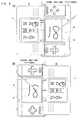
- the game apparatus 10 such structured as described above is operated in a state shown in Figure 4 (A) or Figure 4 (B) for playing a calculation game.
- the LCD 14 equipped with the touch panel 20 is arranged on the right side of an axis Y, and the LCD 12 is arranged on the left side of the axis Y.
- the LCD 14 is located on the left of the axis Y and the LCD 12 on the right of the axis Y.
- the state of Figure 4 (A) corresponds to the normal input mode suitable for right-handers
- the state of Figure 4 (B) corresponds to the reverse input mode suitable for left-handers.
- the normal input mode is selected as a default.
- the reverse input mode can be set by performing an operation of selecting the reverse input mode via the select switch 18c.
- the recognition result is compared with the right answer. If the result is in agreement with the right answer, the right answer mark "o " is displayed together with the result. If the result is not in agreement with the right answer, a corrected result is waited for over a predetermined time. If there is no agreement between the two even after a lapse of the time, the cursor will move to the next question.
- Figure 5 (A) to Figure 5 (C) indicates the conversion of image data
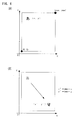
- Figure 6 (A) and Figure 6 (B) shows the conversion of coordinate data.
- the original image data " " shown in Figure 5 (A) is horizontally reversed for a start as shown in Figure 5 (B), and then is vertically reversed as shown in Figure 5 (C).
- the accompanying coordinate conversion process is carried out on the screen map data (BG map data) in such a manner as shown in Figure 7 (A) and Figure 7 (B).
- the BG data corresponding to the characters “ “, “ “ and “ “” are indicated with identifiers "001", “002” and “003", respectively.
- the screen map data shown in Figure 7 (A) that is, the map data for the areas corresponding to the words" " and “ " at the upper left part of the screen are converted into BG data shown in Figure 7 (B).
- the coordinate conversion process is carried out on the touch trace (handwriting input data) in such a manner as shown in Figure 8 (A) and Figure 8 (B).
- a group of coordinate data (x1, y1), (x2, y2), (x3, y3), (x4, y4), ... indicative of the touch trace shown in Figure 8 (A), that is, the reversed characters "21" are converted into a group of coordinate data (x1', y1'), (x2', y2'), (x3', y3'), (x4', y4'), ...
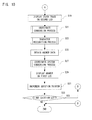
- step S1 initial settings are made for the game in a step S1. More specifically, preparations for the start of game processes are made such as the initialization of the touch panel, the setting of default values for the operating switches and the initialization of flags, pointers, etc. used for the game processes.
- step S3 the CPU core 42 determines whether the current input mode is the reverse input mode or not. If NO, the CPU core 42 executes steps S35 to S53 (described later).
- the CPU core 42 turns on all vertical reverse flags and horizontal reverse flags for the BG data stored in the BG data storage area 102, and also turns on all vertical reverse flags and horizontal reverse flags for the OBJ data stored in the OBJ data storage area 104.
- the CPU core 42 rearranges screen map data stored in the screen data storage area 100.
- the CPU core 42 obtains data designated by the pointer, that is, BG data and OBJ data for a question to be next presented, from the BG data storage area 102 and the OBJ data storage area 104, respectively.
- a step S11 the CPU core 42 subjects the obtained BG/OBJ data to the coordinate conversion process.
- image data forming the BG/OBJ data for example, an image of the character " " shown in Figure 5 (A) is reversed vertically and horizontally as shown in Figure 5 (C).
- coordinate data forming the OBJ data for example, (x, y) shown in Figure 6 (A) is converted into (x', y') as shown in Figure 6 (B).
- a step S 13 the CPU core 42 displays on the LCD 12 a question image based on the converted BG/OBJ data.
- the CPU core 42 determines whether or not a touch input has been performed to the touch panel 20. If NO, the process returns to the step S13. Additionally, the presence or absence of a touch input is determined according to the touch-on/off flag.
- step S 15 If YES in the step S 15, the CPU core 42 stores a touch trace detected by the touch panel 20 in the touch trace temporary storage area 94 in a step S17. Then, the process moves to a step S19.
- the CPU core 42 displays on the LCD 14 a touch trace stored in the touch trace temporary storage area 94, that is, a touch trace based on a group of coordinate data (x1, y1), (x2, y2), ....
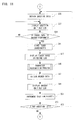
- the CPU core 42 subjects the touch trace stored in the touch trace temporary area 94 to the coordinate conversion process.
- the converted coordinate data group that is, the converted touch trace is stored in the converted touch trace temporary storage area 96.
- step S23 the CPU core 42 performs the character recognition process on the converted touch trace stored in the converted touch trace temporary storage area 96. Accordingly, the characters "21" are recognized from the touch trace shown in Figure 8 (A), for example.
- the result of the process of step S23, i.e. character information, is stored in the recognition result temporary storage area 98.
- the process moves to a step S25 to obtain the character information stored in the recognition result temporary storage area 98, i.e. BG/OBJ data for an answer.
- the CPU core 42 subjects the obtained BG/OBJ data to the coordinate conversion process. This process includes the same arithmetic operation as in the step S11.
- the CPU core 42 displays on the LCD 12 an answer image based on the converted BG/OBJ data.
- a step S31 the CPU core 42 increments the pointer for designating a question.
- a step S33 the CPU core 42 determines whether or not there exists any question yet to be presented. If concluding to be YES, the CPU core 42 returns the process to the step S9. If concluding to be NO in the step S33, the CPU core 42 terminates this game process.
- the CPU core 42 performs such a process as described below.
- the CPU core 42 obtains the BG data and the OBJ data for a next question, that is, the BG data and the OBJ data designated by the pointer, from the BG data storage area 102 and the OBJ data storage area 104, respectively.
- the CPU core 42 displays on the LCD 12 a question image based on the obtained BG/OBJ data.
- the CPU core 42 determines whether or not a touch input has been performed to the touch panel 20. If NO, the CPU core 42 returns the process to the step S37.
- step S39 the CPU core 42 stores a touch trace detected by the touch panel 20 in the touch trace temporary storage area 94 in a step S41.
- step S43 the CPU core 42 displays on the LCD 14 a touch trace detected by the touch panel.
- step S45 the CPU core 42 performs the character recognition process on the touch trace within the touch trace temporary storage area 94.
- the result of the process of step S45 that is, the character information, is stored in the recognition result temporary storage area 98.
- a step S47 the CPU core 42 obtains BG/OBJ data corresponding to the character information in the recognition result temporary storage area 98, that is, an answer.
- the CPU core 42 displays on the LCD 12 an answer image based on the obtained BG/OBJ data.
- the CPU core 42 increments the pointer indicating a question.
- a step S53 the CPU core 42 determines whether or not there exists any question yet to be presented. If concluding to be YES, the CPU core 42 returns the process to the step S35. If concluding to be NO in the step S53, the CPU core 42 ends this game process.
- the game apparatus 10 of this embodiment has the first LCD 12 and the second LCD 14 arranged on respective left and right sides with respect to a predetermined axis (Y: see Figure 4 (A) and Figure 4 (B)) and the touch panel 20 provided on the second display 14.
- the CPU core 42 of the game apparatus 10 processes touch input programs corresponding to Figure 9 to Figure 11 (including the programs 72 to 86 listed in Figure 3).
- the reverse input mode is set in the step S 1 in response to a switch operation. It is determined in the step S3 whether the reverse input mode is set or not. If the result of determination in the step S3 is affirmative, the BG/OBJ data corresponding to the question is reversed in the step S11 (see Figure 5 (A) to Figure 5 (C), Figure 6 (A), Figure 6 (B), Figure 7 (A) and Figure 7 (B)). The image based on the reversed BG/OBJ data is displayed on the first LCD 12 in the step S 13.
- the handwriting input operation associated with the image displayed in the step S 13 is accepted through the touch panel 20 in the step S 17.
- the image based on the handwriting input data corresponding to the handwriting input operation accepted in the step S17 is displayed on the second LCD 14 in the step S19.
- step S21 the handwriting input data corresponding to the handwriting input operation accepted in the step S17 is reversed (see Figure 8 (A) and Figure 8 (B)).
- step S23 the character recognition process is performed on the basis of the reversed handwriting input data.
- step S27 the character information recognized by the process of the step S23, that is, the BG/OBJ data corresponding to the answer is reversed vertically and horizontally.
- step S29 the image based on the BG/OBJ data reversed in the step S27 is further displayed on the first LCD 12.
- the BG/OBJ data corresponding to the question is reversed, the image based on the reversed BG/OBJ data is displayed on the first LCD 12, and the handwriting input operation associated with the image is accepted. Accordingly, the image based on the handwriting input data corresponding to the accepted handwriting input operation, that is, the image based on the unreversed handwriting input data is displayed on the second LCD 14.
- the touch trace will never be displayed upside down on the game apparatus 10 that is turned upside down (see Figure 4 (B)). This allows a left-handed operator to perform an accurate handwriting input operation.
- the handwriting input data is reversed vertically and horizontally, and the character recognition process is performed on the basis of the reversed handwriting input data. This makes it possible perform the appropriate character recognition process.
- the BG/OBJ data corresponding to the recognized character information, that is, the answer is reversed vertically and horizontally, and the image based on the reversed data is further displayed on the first LCD 12. This makes it easy to verify whether the handwriting input operation is accurate or not and whether the answer to the question is correct or not.
- the above description is intended for the case in which the present invention is applied to the game apparatus 10, as an example.
- the present invention is applicable to every kind of touch input device that has two displays arranged in such a manner that their main axes are in parallel to each other and a touch panel provided on either of the two displays.
Landscapes
- Engineering & Computer Science (AREA)
- General Engineering & Computer Science (AREA)
- Theoretical Computer Science (AREA)
- Human Computer Interaction (AREA)
- Physics & Mathematics (AREA)
- General Physics & Mathematics (AREA)
- User Interface Of Digital Computer (AREA)
- Position Input By Displaying (AREA)
- Devices For Indicating Variable Information By Combining Individual Elements (AREA)
Applications Claiming Priority (1)
| Application Number | Priority Date | Filing Date | Title |
|---|---|---|---|
| JP2005085639A JP4683970B2 (ja) | 2005-03-24 | 2005-03-24 | タッチ入力プログラムおよびタッチ入力装置 |
Publications (2)
| Publication Number | Publication Date |
|---|---|
| EP1705557A2 true EP1705557A2 (de) | 2006-09-27 |
| EP1705557A3 EP1705557A3 (de) | 2008-05-07 |
Family
ID=35846293
Family Applications (1)
| Application Number | Title | Priority Date | Filing Date |
|---|---|---|---|
| EP05112070A Ceased EP1705557A3 (de) | 2005-03-24 | 2005-12-13 | Berührungseingabeprogramm und Berührungseingabevorrichtung |
Country Status (3)
| Country | Link |
|---|---|
| US (2) | US7634136B2 (de) |
| EP (1) | EP1705557A3 (de) |
| JP (1) | JP4683970B2 (de) |
Cited By (1)
| Publication number | Priority date | Publication date | Assignee | Title |
|---|---|---|---|---|
| US11360603B2 (en) | 2016-09-06 | 2022-06-14 | Semiconductor Energy Laboratory Co., Ltd. | Electronic device, image display method, program, and display system |
Families Citing this family (63)
| Publication number | Priority date | Publication date | Assignee | Title |
|---|---|---|---|---|
| JP5220278B2 (ja) * | 2006-01-27 | 2013-06-26 | 任天堂株式会社 | ゲーム装置および手書き入力プログラム |
| US9937577B2 (en) | 2006-12-20 | 2018-04-10 | Lincoln Global, Inc. | System for a welding sequencer |
| US9104195B2 (en) | 2006-12-20 | 2015-08-11 | Lincoln Global, Inc. | Welding job sequencer |
| US10994358B2 (en) | 2006-12-20 | 2021-05-04 | Lincoln Global, Inc. | System and method for creating or modifying a welding sequence based on non-real world weld data |
| JP4582810B2 (ja) * | 2006-12-25 | 2010-11-17 | カシオ計算機株式会社 | 電子辞書装置 |
| JP4727609B2 (ja) * | 2007-03-16 | 2011-07-20 | 東芝テック株式会社 | ハンディーターミナル |
| US8177441B2 (en) | 2007-08-29 | 2012-05-15 | Nintendo Co., Ltd. | Imaging apparatus |
| US8917985B2 (en) * | 2007-08-29 | 2014-12-23 | Nintendo Co., Ltd. | Imaging apparatus |
| JP4260215B1 (ja) * | 2007-08-29 | 2009-04-30 | 任天堂株式会社 | 撮像装置 |
| CN101510138B (zh) * | 2008-02-16 | 2012-07-11 | 旭丽电子(广州)有限公司 | 显示装置及应用其处理或操作影像对象的方法 |
| US8130275B2 (en) | 2008-06-13 | 2012-03-06 | Nintendo Co., Ltd. | Information-processing apparatus, and storage medium storing a photographing application launch program executed by information-processing apparatus |
| JP4181211B1 (ja) | 2008-06-13 | 2008-11-12 | 任天堂株式会社 | 情報処理装置およびそれにおいて実行される起動用プログラム |
| AT507021B1 (de) * | 2008-07-04 | 2010-04-15 | Fronius Int Gmbh | Vorrichtung zur simulation eines schweissprozesses |
| US9483959B2 (en) | 2008-08-21 | 2016-11-01 | Lincoln Global, Inc. | Welding simulator |
| US8911237B2 (en) | 2008-08-21 | 2014-12-16 | Lincoln Global, Inc. | Virtual reality pipe welding simulator and setup |
| US8747116B2 (en) | 2008-08-21 | 2014-06-10 | Lincoln Global, Inc. | System and method providing arc welding training in a real-time simulated virtual reality environment using real-time weld puddle feedback |
| US9280913B2 (en) | 2009-07-10 | 2016-03-08 | Lincoln Global, Inc. | Systems and methods providing enhanced education and training in a virtual reality environment |
| US9318026B2 (en) | 2008-08-21 | 2016-04-19 | Lincoln Global, Inc. | Systems and methods providing an enhanced user experience in a real-time simulated virtual reality welding environment |
| US8834168B2 (en) | 2008-08-21 | 2014-09-16 | Lincoln Global, Inc. | System and method providing combined virtual reality arc welding and three-dimensional (3D) viewing |
| US8884177B2 (en) | 2009-11-13 | 2014-11-11 | Lincoln Global, Inc. | Systems, methods, and apparatuses for monitoring weld quality |
| US8851896B2 (en) | 2008-08-21 | 2014-10-07 | Lincoln Global, Inc. | Virtual reality GTAW and pipe welding simulator and setup |
| US8915740B2 (en) | 2008-08-21 | 2014-12-23 | Lincoln Global, Inc. | Virtual reality pipe welding simulator |
| US9330575B2 (en) | 2008-08-21 | 2016-05-03 | Lincoln Global, Inc. | Tablet-based welding simulator |
| US9196169B2 (en) | 2008-08-21 | 2015-11-24 | Lincoln Global, Inc. | Importing and analyzing external data using a virtual reality welding system |
| US8848100B2 (en) | 2008-10-01 | 2014-09-30 | Nintendo Co., Ltd. | Information processing device, information processing system, and launch program and storage medium storing the same providing photographing functionality |
| US8274013B2 (en) | 2009-03-09 | 2012-09-25 | Lincoln Global, Inc. | System for tracking and analyzing welding activity |
| KR101598336B1 (ko) * | 2009-05-29 | 2016-02-29 | 엘지전자 주식회사 | 공간리모콘의 페어링방법 및 동작방법 |
| KR101545490B1 (ko) * | 2009-05-29 | 2015-08-21 | 엘지전자 주식회사 | 영상표시장치 및 그 동작방법 |
| US8704958B2 (en) * | 2009-06-01 | 2014-04-22 | Lg Electronics Inc. | Image display device and operation method thereof |
| US20100306688A1 (en) * | 2009-06-01 | 2010-12-02 | Cho Su Yeon | Image display device and operation method therefor |
| KR101572843B1 (ko) * | 2009-06-03 | 2015-11-30 | 엘지전자 주식회사 | 영상 표시 장치 및 그 동작 방법 |
| US9773429B2 (en) | 2009-07-08 | 2017-09-26 | Lincoln Global, Inc. | System and method for manual welder training |
| US9221117B2 (en) | 2009-07-08 | 2015-12-29 | Lincoln Global, Inc. | System for characterizing manual welding operations |
| US9011154B2 (en) | 2009-07-10 | 2015-04-21 | Lincoln Global, Inc. | Virtual welding system |
| US10748447B2 (en) | 2013-05-24 | 2020-08-18 | Lincoln Global, Inc. | Systems and methods providing a computerized eyewear device to aid in welding |
| JP4823342B2 (ja) * | 2009-08-06 | 2011-11-24 | 株式会社スクウェア・エニックス | タッチパネル式ディスプレイを持った携帯型コンピュータ |
| US8569655B2 (en) | 2009-10-13 | 2013-10-29 | Lincoln Global, Inc. | Welding helmet with integral user interface |
| WO2011049881A2 (en) * | 2009-10-19 | 2011-04-28 | Barnes & Noble, Inc. | Apparatus and method for control of multiple displays from a single virtual frame buffer |
| US8569646B2 (en) | 2009-11-13 | 2013-10-29 | Lincoln Global, Inc. | Systems, methods, and apparatuses for monitoring weld quality |
| US9468988B2 (en) | 2009-11-13 | 2016-10-18 | Lincoln Global, Inc. | Systems, methods, and apparatuses for monitoring weld quality |
| US20120113019A1 (en) * | 2010-11-10 | 2012-05-10 | Anderson Michelle B | Portable e-reader and method of use |
| WO2012075629A1 (en) * | 2010-12-08 | 2012-06-14 | Nokia Corporation | User interface |
| CA2821671C (en) | 2010-12-13 | 2018-01-09 | Edison Welding Institute, Inc. | Welding training system |
| JP5599741B2 (ja) * | 2011-02-21 | 2014-10-01 | シャープ株式会社 | 電子機器、コンテンツ表示方法、およびコンテンツ表示プログラム |
| JP2013118468A (ja) * | 2011-12-02 | 2013-06-13 | Sony Corp | 画像処理装置および画像処理方法 |
| US20160093233A1 (en) | 2012-07-06 | 2016-03-31 | Lincoln Global, Inc. | System for characterizing manual welding operations on pipe and other curved structures |
| US9767712B2 (en) | 2012-07-10 | 2017-09-19 | Lincoln Global, Inc. | Virtual reality pipe welding simulator and setup |
| JP6026199B2 (ja) * | 2012-09-25 | 2016-11-16 | 任天堂株式会社 | タッチ入力システム、タッチ入力装置、タッチ入力制御プログラムおよびタッチ入力制御方法 |
| JP2014174672A (ja) * | 2013-03-07 | 2014-09-22 | Toshiba Corp | 情報処理装置及び情報処理プログラム |
| US10930174B2 (en) | 2013-05-24 | 2021-02-23 | Lincoln Global, Inc. | Systems and methods providing a computerized eyewear device to aid in welding |
| JP6150652B2 (ja) * | 2013-07-29 | 2017-06-21 | キヤノン株式会社 | 撮像装置、撮像装置の制御方法及びプログラム並びに記録媒体 |
| US20150072323A1 (en) | 2013-09-11 | 2015-03-12 | Lincoln Global, Inc. | Learning management system for a real-time simulated virtual reality welding training environment |
| US10083627B2 (en) | 2013-11-05 | 2018-09-25 | Lincoln Global, Inc. | Virtual reality and real welding training system and method |
| US9836987B2 (en) | 2014-02-14 | 2017-12-05 | Lincoln Global, Inc. | Virtual reality pipe welding simulator and setup |
| CN106233358A (zh) | 2014-06-02 | 2016-12-14 | 林肯环球股份有限公司 | 用于人工焊工培训的系统和方法 |
| JP6661013B2 (ja) * | 2016-07-06 | 2020-03-11 | シャープ株式会社 | タッチパネル制御装置および電子機器 |
| EP3319066A1 (de) | 2016-11-04 | 2018-05-09 | Lincoln Global, Inc. | Magnetische frequenzwahl für elektromagnetische positionsverfolgung |
| US10913125B2 (en) | 2016-11-07 | 2021-02-09 | Lincoln Global, Inc. | Welding system providing visual and audio cues to a welding helmet with a display |
| US20180130226A1 (en) | 2016-11-07 | 2018-05-10 | Lincoln Global, Inc. | System and method for calibrating a welding trainer |
| US10997872B2 (en) | 2017-06-01 | 2021-05-04 | Lincoln Global, Inc. | Spring-loaded tip assembly to support simulated shielded metal arc welding |
| US11557223B2 (en) | 2018-04-19 | 2023-01-17 | Lincoln Global, Inc. | Modular and reconfigurable chassis for simulated welding training |
| US11475792B2 (en) | 2018-04-19 | 2022-10-18 | Lincoln Global, Inc. | Welding simulator with dual-user configuration |
| JP7521372B2 (ja) * | 2020-10-15 | 2024-07-24 | セイコーエプソン株式会社 | 表示方法、及び表示装置 |
Citations (1)
| Publication number | Priority date | Publication date | Assignee | Title |
|---|---|---|---|---|
| JPH0997311A (ja) * | 1995-10-02 | 1997-04-08 | Matsushita Electric Ind Co Ltd | 手書きパターン認識装置 |
Family Cites Families (28)
| Publication number | Priority date | Publication date | Assignee | Title |
|---|---|---|---|---|
| US5237651A (en) * | 1987-08-21 | 1993-08-17 | Eden Group Limited | Electronic personal organizer |
| US5050221A (en) * | 1989-02-13 | 1991-09-17 | Ricoh Company, Ltd. | Image generating apparatus |
| US5550938A (en) * | 1989-04-17 | 1996-08-27 | Omron Corporation | Cordless image scanner |
| US5049862A (en) | 1989-10-06 | 1991-09-17 | Communication Intelligence Corporation ("Cic") | Keyless flat panel portable computer--computer aided notebook |
| US5063600A (en) * | 1990-05-14 | 1991-11-05 | Norwood Donald D | Hybrid information management system for handwriting and text |
| JPH04311275A (ja) * | 1991-04-09 | 1992-11-04 | Canon Inc | 画像形成装置および画像形成装置の制御方法 |
| JP3190074B2 (ja) | 1991-09-11 | 2001-07-16 | 株式会社東芝 | 手書き入力装置 |
| JP3579061B2 (ja) * | 1992-08-31 | 2004-10-20 | 株式会社東芝 | 表示装置 |
| JP2986047B2 (ja) * | 1993-04-29 | 1999-12-06 | インターナショナル・ビジネス・マシーンズ・コーポレイション | ディジタル入力用表示装置並びに入力処理装置および方法 |
| US5668570A (en) * | 1993-06-29 | 1997-09-16 | Ditzik; Richard J. | Desktop computer with adjustable flat panel screen |
| US5546538A (en) * | 1993-12-14 | 1996-08-13 | Intel Corporation | System for processing handwriting written by user of portable computer by server or processing by the computer when the computer no longer communicate with server |
| JPH07325881A (ja) * | 1994-05-31 | 1995-12-12 | Fujitsu Ltd | 文字入力装置 |
| JPH07334287A (ja) * | 1994-06-02 | 1995-12-22 | Brother Ind Ltd | 小形電子機器 |
| JPH07334625A (ja) * | 1994-06-06 | 1995-12-22 | Nec Corp | 文字列入力装置 |
| US5838302A (en) * | 1995-02-24 | 1998-11-17 | Casio Computer Co., Ltd. | Data inputting devices for inputting typed and handwritten data in a mixed manner |
| JP3063580B2 (ja) * | 1995-08-24 | 2000-07-12 | 松下電器産業株式会社 | イメージセンサー内蔵携帯端末装置 |
| EP0766168A3 (de) * | 1995-09-28 | 1997-11-19 | Hewlett-Packard Company | Ikonen für Anzeigevorrichtungen mit dual Orientierungsschicht |
| JP2000505220A (ja) | 1996-05-30 | 2000-04-25 | ヘンセル,マーチン | 少なくとも二つのディスプレイを有するコンピュータ |
| US5847698A (en) * | 1996-09-17 | 1998-12-08 | Dataventures, Inc. | Electronic book device |
| US6552719B2 (en) * | 1999-01-07 | 2003-04-22 | Microsoft Corporation | System and method for automatically switching between writing and text input modes |
| US6459424B1 (en) * | 1999-08-10 | 2002-10-01 | Hewlett-Packard Company | Touch-sensitive input screen having regional sensitivity and resolution properties |
| US6661920B1 (en) * | 2000-01-19 | 2003-12-09 | Palm Inc. | Method and apparatus for multiple simultaneously active data entry mechanisms on a computer system |
| US6822635B2 (en) * | 2000-01-19 | 2004-11-23 | Immersion Corporation | Haptic interface for laptop computers and other portable devices |
| NL1014720C2 (nl) | 2000-03-22 | 2001-09-25 | Guza Tessunyi | Elektronische aktentas. |
| JP2002023938A (ja) | 2000-07-05 | 2002-01-25 | Jekku:Kk | 手書き文字入力システム及び記録媒体 |
| JP2002215304A (ja) | 2001-01-17 | 2002-08-02 | Sharp Corp | タッチパネルコンピュータ |
| JP3793201B2 (ja) * | 2004-01-28 | 2006-07-05 | 任天堂株式会社 | ゲーム装置およびゲームプログラム |
| US20060183505A1 (en) * | 2005-02-15 | 2006-08-17 | Willrich Scott Consulting Group, Inc. | Digital mobile planner |
-
2005
- 2005-03-24 JP JP2005085639A patent/JP4683970B2/ja not_active Expired - Fee Related
- 2005-12-13 US US11/299,822 patent/US7634136B2/en active Active
- 2005-12-13 EP EP05112070A patent/EP1705557A3/de not_active Ceased
-
2009
- 2009-07-13 US US12/501,544 patent/US7860315B2/en not_active Expired - Lifetime
Patent Citations (1)
| Publication number | Priority date | Publication date | Assignee | Title |
|---|---|---|---|---|
| JPH0997311A (ja) * | 1995-10-02 | 1997-04-08 | Matsushita Electric Ind Co Ltd | 手書きパターン認識装置 |
Cited By (3)
| Publication number | Priority date | Publication date | Assignee | Title |
|---|---|---|---|---|
| US11360603B2 (en) | 2016-09-06 | 2022-06-14 | Semiconductor Energy Laboratory Co., Ltd. | Electronic device, image display method, program, and display system |
| US11874994B2 (en) | 2016-09-06 | 2024-01-16 | Semiconductor Energy Laboratory Co., Ltd. | Electronic device, image display method, program, and display system |
| US12287937B2 (en) | 2016-09-06 | 2025-04-29 | Semiconductor Energy Laboratory Co., Ltd. | Electronic device, image display method, program, and display system |
Also Published As
| Publication number | Publication date |
|---|---|
| JP2006268432A (ja) | 2006-10-05 |
| US7634136B2 (en) | 2009-12-15 |
| EP1705557A3 (de) | 2008-05-07 |
| US7860315B2 (en) | 2010-12-28 |
| US20060214924A1 (en) | 2006-09-28 |
| US20090273582A1 (en) | 2009-11-05 |
| JP4683970B2 (ja) | 2011-05-18 |
Similar Documents
| Publication | Publication Date | Title |
|---|---|---|
| US7634136B2 (en) | Touch input program and touch input device | |
| US8306330B2 (en) | Game apparatus and storage medium storing a handwriting input program | |
| US7825904B2 (en) | Information processing apparatus and storage medium storing item selecting program | |
| US20060109259A1 (en) | Storage medium storing image display program, image display processing apparatus and image display method | |
| US8851986B2 (en) | Game program and game apparatus | |
| US8146018B2 (en) | Gesture-based control of multiple game characters and other animated objects | |
| JP3833228B2 (ja) | ゲーム装置およびゲームプログラム | |
| US20060073899A1 (en) | Game apparatus, storage medium storing game program and game controlling method | |
| US7425175B2 (en) | Match game program | |
| US8342849B2 (en) | Display updating program and display updating apparatus | |
| US20170203212A1 (en) | Information processing program and information processing apparatus | |
| US9370711B2 (en) | Storage medium storing game program and game apparatus | |
| EP1854520B1 (de) | Spielprogramm und Spielgerät | |
| JP5000132B2 (ja) | トレーニングプログラム、トレーニング装置、トレーニングシステム、トレーニング制御方法、ゲームプログラム、ゲーム装置、ゲームシステムおよびゲーム制御方法 | |
| JP5603305B2 (ja) | 手書き学習支援プログラムおよび手書き文字認識プログラム | |
| JP4061278B2 (ja) | ゲーム装置およびゲームプログラム | |
| JP5009349B2 (ja) | 手書き学習支援プログラムおよび手書き学習支援装置 | |
| JP5053538B2 (ja) | 手書き学習支援プログラムおよび手書き文字認識プログラム | |
| JP5449432B2 (ja) | ゲームプログラムおよびゲーム装置 | |
| JP4447046B2 (ja) | 手書き学習支援プログラムおよび手書き学習支援装置 | |
| JP2006284861A (ja) | 手書き学習支援プログラムおよび手書き学習支援装置 |
Legal Events
| Date | Code | Title | Description |
|---|---|---|---|
| PUAI | Public reference made under article 153(3) epc to a published international application that has entered the european phase |
Free format text: ORIGINAL CODE: 0009012 |
|
| AK | Designated contracting states |
Kind code of ref document: A2 Designated state(s): AT BE BG CH CY CZ DE DK EE ES FI FR GB GR HU IE IS IT LI LT LU LV MC NL PL PT RO SE SI SK TR |
|
| AX | Request for extension of the european patent |
Extension state: AL BA HR MK YU |
|
| PUAL | Search report despatched |
Free format text: ORIGINAL CODE: 0009013 |
|
| AK | Designated contracting states |
Kind code of ref document: A3 Designated state(s): AT BE BG CH CY CZ DE DK EE ES FI FR GB GR HU IE IS IT LI LT LU LV MC NL PL PT RO SE SI SK TR |
|
| AX | Request for extension of the european patent |
Extension state: AL BA HR MK YU |
|
| RIC1 | Information provided on ipc code assigned before grant |
Ipc: G06F 3/048 20060101ALN20080401BHEP Ipc: G06F 1/16 20060101AFI20080401BHEP |
|
| 17P | Request for examination filed |
Effective date: 20081106 |
|
| AKX | Designation fees paid |
Designated state(s): DE FR GB |
|
| 17Q | First examination report despatched |
Effective date: 20110526 |
|
| RAP1 | Party data changed (applicant data changed or rights of an application transferred) |
Owner name: NINTENDO CO., LTD. |
|
| STAA | Information on the status of an ep patent application or granted ep patent |
Free format text: STATUS: THE APPLICATION HAS BEEN REFUSED |
|
| 18R | Application refused |
Effective date: 20160701 |