EP1717667A1 - Interface utilisateur avec des touches dures émulées - Google Patents
Interface utilisateur avec des touches dures émulées Download PDFInfo
- Publication number
- EP1717667A1 EP1717667A1 EP05026878A EP05026878A EP1717667A1 EP 1717667 A1 EP1717667 A1 EP 1717667A1 EP 05026878 A EP05026878 A EP 05026878A EP 05026878 A EP05026878 A EP 05026878A EP 1717667 A1 EP1717667 A1 EP 1717667A1
- Authority
- EP
- European Patent Office
- Prior art keywords
- keyboard
- emulated
- microchambers
- reconfigurable
- key
- Prior art date
- Legal status (The legal status is an assumption and is not a legal conclusion. Google has not performed a legal analysis and makes no representation as to the accuracy of the status listed.)
- Withdrawn
Links
Images




Classifications
-
- G—PHYSICS
- G06—COMPUTING OR CALCULATING; COUNTING
- G06F—ELECTRIC DIGITAL DATA PROCESSING
- G06F3/00—Input arrangements for transferring data to be processed into a form capable of being handled by the computer; Output arrangements for transferring data from processing unit to output unit, e.g. interface arrangements
- G06F3/01—Input arrangements or combined input and output arrangements for interaction between user and computer
- G06F3/02—Input arrangements using manually operated switches, e.g. using keyboards or dials
- G06F3/0202—Constructional details or processes of manufacture of the input device
-
- G—PHYSICS
- G06—COMPUTING OR CALCULATING; COUNTING
- G06F—ELECTRIC DIGITAL DATA PROCESSING
- G06F3/00—Input arrangements for transferring data to be processed into a form capable of being handled by the computer; Output arrangements for transferring data from processing unit to output unit, e.g. interface arrangements
- G06F3/01—Input arrangements or combined input and output arrangements for interaction between user and computer
- G06F3/02—Input arrangements using manually operated switches, e.g. using keyboards or dials
- G06F3/023—Arrangements for converting discrete items of information into a coded form, e.g. arrangements for interpreting keyboard generated codes as alphanumeric codes, operand codes or instruction codes
- G06F3/0238—Programmable keyboards
Definitions
- Many electronic devices typically include some form of user interface to provide an input to the electronic device.
- a user operates a keyboard to enter data into a computer, a keypad to enter a phone number into a telephone, a remote control to operate a television set, or, a touch screen to enter data into a PDA.
- the proliferation of such user interfaces has led to various efforts aimed at producing an integrated interface that combines several interfaces into a single unit. For example, among television remotes, a lot of effort has been directed towards producing a "universal" remote that combines the functionality of multiple remote controls. Similarly, efforts have been directed towards providing in hand-held devices such as cell phones and PDAs, a smart user interface that can emulate various input devices based upon a selection carried out by the user.
- a PDA may have a touch screen that can be used to emulate a telephone-keypad functionality, or can, alternatively, be used to emulate a QWERTY keyboard for entering e-mail text.
- a hard key can be designed to operate as a "dual-function" key that depends upon a function setting carried out by using an additional function-selector key.
- an additional function-selector key is the VCR/TV selector key of a TV remote control.
- each of the devices that are controlled via a multi-function user interface may have unique operating modes that are not shared with other devices, necessitating the use of a significant number of "single-function" hard keys.
- several operating modes of a VCR are unique to the VCR, while several operating modes of a TV are unique to the TV, thereby requiring one set of dedicated, single-function keys for the VCR, and a second dedicated set for the TV.
- the hard key approach does not provide an optimal solution because it requires a large keypad to accommodate a large number of hard keys.
- One approach that was taken to overcome such a limitation is to replace a hard key keypad with a "touch-screen" containing soft keys.
- the touch-screen solution alleviates the need for providing a large keypad because two different key functions can be provided in the same display area by selecting either one or another touch-screen display. Therefore, a VCR touch-screen would display various controls for a VCR, while a TV touch-screen would replace the VCR touch-screen whenever the user decides to use the remote control to control the TV rather than the VCR.
- the touch-screen solution also suffers from certain handicaps.
- a key-activation feedback such as the key-click of the mechanical keys of a QWERTY keyboard
- This handicap can be attributed to the multiplicity of positions that various control icons can have upon a touch-screen display.
- the location of the PLAY button icon upon a VCR touch-screen may not coincide with any of the control icons that are generated upon a TV touch-screen. Consequently, neither the TV nor the VCR control button icons can be designed to provide key-activation feedback in the form of a tactile response to finger pressure.
- tactile feedback is used to confirm the user's keystroke operation, thereby promoting speed and accuracy.
- soft-keys can also be operated using a stylus.
- the stylus approach provides certain advantages, especially for accommodating handwritten entries.
- the stylus solution needs additional hardware in the form of the stylus, which can be easily lost or misplaced.
- a stylus operator requires practice for carrying out handwritten data entry with an acceptable level of accuracy. This can lead to nervousness and frustration among novice users, many of whom are more familiar and more comfortable with a conventional QWERTY keyboard that provides tactile feedback.
- text entry using a QWERTY keyboard is significantly quicker than text entry using a stylus.
- One or more keyboards are emulated on the reconfigurable keyboard of a reconfigurable interface.
- the reconfigurable keyboard has an array of microchambers. Each microchamber is operable to change from a first height to a second height.
- the exemplary embodiment additionally includes a keyboard emulator controller operable to set a first group of the microchambers in the array to the second height.
- the first group of microchambers collectively constitutes a first emulated hard key that emulates a first key of a first user-selected keyboard.
- FIG. 1 shows a first exemplary embodiment of a device incorporating a reconfigurable keyboard of the present disclosure.
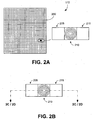
- FIG. 2A shows a first exemplary system that uses an array of microchambers for implementing the reconfigurable keyboard shown in FIG. 1.
- FIG. 2B shows three adjacent microchambers contained in the array of microchambers illustrated in FIG. 2A.
- FIG. 2C illustrates one exemplary system for activating one of the three microchambers shown in FIG. 2B.
- FIG. 2D illustrates another exemplary system for activating one of the three microchambers shown in FIG. 2B.
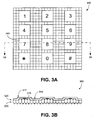
- FIG. 3A shows the array shown in FIG. 2A configured, in a first exemplary embodiment, as a telephone keypad.
- FIG. 3B shows a cross-sectional view of the telephone keypad depicted in FIG. 3A.
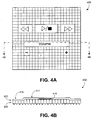
- FIG. 4A shows the array shown in FIG. 2A configured, in a second exemplary embodiment, as a music-player keypad.
- FIG. 4B shows a cross-sectional view of the music-player keypad depicted in FIG. 4A.
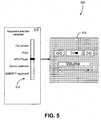
- FIG. 5 shows the array shown in FIG. 2A communicatively coupled with a keyboard emulator controller having a selector to select one of several keyboards for emulation by the array of microchambers.
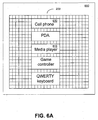
- FIG. 6A shows the array of microchambers configured as a selector to select one of several keyboards for emulation by the array of microchambers.
- FIG. 6B shows the array of microchambers shown in FIG. 6A configured as the selected keyboard.
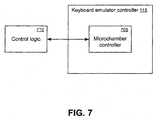
- FIG. 7 shows an exemplary embodiment of a microchamber controller that is a part of a keyboard emulator controller of a reconfigurable keyboard.
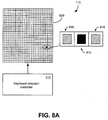
- FIG. 8A shows a second exemplary system that incorporates a sensory feedback array for implementing the reconfigurable keyboard shown in FIG. 1.
- FIG. 8B shows the array shown in FIG. 8A configured, in a first exemplary embodiment, as a telephone keypad.
- FIG. 8C shows a cross-sectional view of the telephone keypad depicted in FIG. 8B.
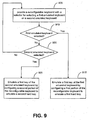
- FIG. 9 is a flowchart of one exemplary method of keyboard emulation using a reconfigurable keyboard.
- the various embodiments generally describe systems and methods related to a reconfigurable interface that emulates a user-specified keyboard by generating hard keys associated with the user-specified keyboard. Furthermore, in one exemplary embodiment, the hard keys provide tactile feedback to the user of the reconfigurable interface.
- FIG. 1 shows an exemplary embodiment of a device 100 having a reconfigurable interface 120.
- Interface 120 includes a reconfigurable keyboard 110 containing a keyboard emulator controller 115.
- Reconfigurable keyboard 110 is communicatively coupled to a display 105 that provides a video display of images, text, and/or data, in response to user input through keyboard 110.
- Device 100 shown in FIG. 1 represents, in general, a hand-held device or any other device having one or more hard keys operable by the user.
- PDA personal digital assistant
- PC desktop personal computer
- laptop and a hand-held remote control.
- keyboard is intended for purposes of explanation only, and, consequently, the term encompasses various interfaces such as the keypad of a PDA, the keypad of a cellular phone, the data-entry tablet of a computer, and the control panel of a media player such as an MP3 player.
- device 100 is shown to include a display 105.
- display 105 may be omitted, and in yet another alternative embodiment, keyboard emulator controller 115 may be located external to keyboard 110.
- FIG. 2A illustrates an array 200 of microchambers used in a first exemplary embodiment of reconfigurable keyboard 110.
- a microchamber may be broadly described as an enclosure having a height that can be controllably varied to generate upon reconfigurable keyboard 110 an emulated hard key that emulates a key of a user-selected keyboard.
- a first group of adjacent microchambers collectively provides one keypad surface equivalent to one hard key.
- Several such groups of adjacent microchambers may be used to emulate several hard keys. For example, if the ESC key of a QWERTY keyboard has a 2 cm 2 keypad surface area and each microchamber provides a 0.5 cm 2 keypad surface area, four such adjacent microchambers collectively provide the keypad surface area corresponding to the ESC key.
- each microchamber is configured in a first embodiment, to provide a 1 mm 2 keypad surface area, thereby allowing 24 adjacent microchambers to collectively provide the keypad surface area corresponding to one PDA key.
- each microchamber may be configured to provide a 4 mm 2 keypad surface area, thereby allowing 6 adjacent microchambers to collectively provide the keypad surface area corresponding to one PDA key.
- Each microchamber of array 200 is generally configured to have two different heights - a first height corresponding to an unused surface of a keyboard and a second height corresponding to an emulated hard key.
- Three adjacent microchambers 205, 210, and 215 of array 200 are shown in FIGs. 2A, 2B, 2C, and 2D and are used below to describe the configuration of an emulated hard key.
- FIG. 2C shows a cross-sectional view of the three microchambers, with microchambers 205 and 215 each configured to have a first height, and microchamber 210 configured to have a second height that is greater than the first height.
- microchamber 210 constitutes one of a group of microchambers that collectively constitute a raised emulated hard key
- microchambers 205 and 215 constitute two of a group of microchambers that collectively constitute an inactive surface of the reconfigurable keyboard.
- the inactive surface of the reconfigurable keyboard corresponds to the inactive surface of a conventional keyboard, for example, the peripheral surface around hard keys of the keyboard.
- FIG. 2D shows a cross-sectional view of the three microchambers, with microchambers 205 and 215 each configured to have a first height, and microchamber 210 configured to have a second height that is less than the first height.
- microchamber 210 constitutes one of a group of microchambers that collectively constitute a recessed emulated hard key, while microchambers 205 and 215 constitute two of a group of microchambers that collectively constitute an inactive surface of the reconfigurable keyboard.
- various groups of microchambers can be configured to be in one of three, rather than two, alternative positions: up (convex), flat, and down (concave).
- the up position denotes a raised emulated hard key
- the down position a recessed emulated hard key
- the flat position the inactive surface of the reconfigurable keyboard.
- both the raised and recessed emulated hard keys are used for hard key functions
- the recessed emulated hard keys provide a place-holder functionality that makes it easier for the user's fingertips to locate functional raised emulated hard keys.
- microchambers 205, 210, and 215 have ports 221, 222, and 223 respectively located at their bases.
- the ports are connected to a manifold 244 that carries air to the microchambers. Air is injected or removed from microchamber 210 via port 222 thereby raising or lowering, respectively, the upper surface 211 of microchamber 210 and configuring microchamber 210 as one microchamber of a group of microchambers that constitute a raised or recessed, respectively, emulated hard key.
- the upper surface 211 of microchamber 210 constitutes one portion of the keypad surface associated with reconfigurable keyboard 110.
- Microchamber 210 can be subsequently reconfigured to constitute the inactive surface of the reconfigurable keyboard by removing or injecting air via port 222.
- bi-stable valves 241, 242, and 243 are optionally incorporated into each of the various ports.
- each of the bi-stable valves In a first position, each of the bi-stable valves allows air to flow from manifold 244 into the associated microchamber, and in a second position prevents air from exiting the microchamber.
- the bi-stable valves are operated sequentially, to allow a common air supply to configure each of the microchambers individually, thereby reducing the peak load on the common air supply.
- the bi-stable valves draw negligible current from an electrical source when in an inactive state, thereby reducing the electrical requirements for operating the reconfigurable keyboard.
- a pressure sensor (not shown) may be incorporated into each of the microchambers.
- the pressure sensor detects application of finger pressure upon the raised portion of the microchamber. This aspect will be explained in more detail below using other figures.
- a fluid such as a liquid, a gel, an inert gas, or a viscous liquid is used to change the height of microchamber 210.
- ports 221, 222, and 223 are employed to carry out this operation.
- each-of the microchambers is filled with an electrogel.
- the amount of electrogel introduced into, and removed from, each microchamber, is controlled to provide either the first height or the second height of the microchamber.
- each microchamber contains a piezo-electric material that changes its dimension when a voltage is applied to the material.
- the change in dimension can be used to increase or decrease the height of the microchamber.
- FIGs. 2A, 2B, 2C, and 2D will now be described in more detail. Firstly, while ports 221, 222, and 223 are shown located at the bottom of each microchamber, such ports can be located at other convenient locations with reference to each microchamber. Secondly, each microchamber is illustrated as having a cubic shape. This has been done merely for purposes of explanation, and alternative embodiments will have other shapes such as cylindrical, rhomboidal, and oval shapes.
- FIGs. 3A and 3B illustrate a first example of an array 200 of microchambers configured as a telephone keypad 300.
- each of the 12 keys of a conventional telephone keypad has been emulated by raising the top surfaces of each of 16 adjacent microchambers to form a raised, square keypad corresponding to each of the telephone keys.
- the telephone key with numeral "7" 340 has been emulated by activating a 4 x 4 array of adjacent microchambers.
- Figure 3B provides a cross-sectional view of keypad 300.
- Keypad 300 is composed of an array 200 of microchambers upon which is superimposed a flexible display screen 320.
- Raised surface 317 corresponds to the raised keypad of numeral "7,” and numeric display 316 corresponds to the label "7.”
- Display screen 320 typically comprises a flexible sheet of material.
- display screen 320 is a flexible touch-pad coupled to a suitable display driver (not shown).
- the display screen displays characters, such as the label "7," at appropriate locations on the touch-pad depending upon the nature of the emulated keyboard. Consequently, while the label "7" is displayed in alignment with raised surface 317 for emulating the telephone keypad, display 320 can also be further used to display, at the same location, or elsewhere, alphanumeric characters associated with a QWERTY keyboard when such a keyboard is emulated by array 200.
- display screen 320 is located underneath array 200.
- the material of microchambers of array 200 is transparent, so that the labels displayed by the display screen are visible to the user of the keyboard.
- the emulated keypads may, optionally, provide tactile feedback.
- the microchambers located below the raised surface 317 are each configured to undergo a momentary reduction in microchamber volume before returning to a quiescent volume.
- This may be implemented using a pressure sensor located in each or some of the microchambers. The pressure sensor senses pressure and releases a defined volume of the air contained in the microchamber when finger pressure causes the pressure in the microchamber to exceed a threshold pressure. Subsequently, after a suitable delay, the air in the microchambers is replenished to bring the activated microchambers back to their quiescent height.
- a pressure sensor located in microchamber 210 senses pressure applied to surface 211. When this pressure exceeds a certain threshold, bi-stable valve 242 is operated to release a defined volume of air from microchamber 210. Subsequently, after a suitable delay, bi-stable valve 242 is operated again to re-fill the microchamber 210 with air.
- a pressure sensor is again located in each or some of the microchambers.
- the pressure sensor detects a finger pressure that causes the pressure in the chamber to exceed a threshold pressure.
- a suitable voltage is applied to the electrogel, causing the electrogel to have a reduced stiffness. Consequently, the key “gives” under finger-pressure.
- a second voltage is applied to the electrogel causing the electrogel to revert to its original stiffness, thereby providing tactile feedback.
- a pressure sensor is used to detect a finger pressure that causes the pressure in the chamber to exceed a threshold pressure. When such a finger pressure is detected, a voltage is applied to cause the piezo-electric element to vibrate. The vibration provides tactile feedback to the user of the keyboard.
- other forms of feedback such as audio feedback or visual feedback, are employed to confirm key depression.
- audio feedback can be implemented in the form of a beeping sound
- visual feedback can be implemented as a change in the appearance of the emulated hard key.
- FIGs. 4A and 4B illustrate a second exemplary embodiment of an array 200 of microchambers configured as a media-player keypad 400.
- keypad 400 has rectangular keys.
- the "volume" key has been emulated by activating 32 microchambers in a 2 x 16 array.
- FIG. 4B which is a cross-sectional view of keypad 400 along the "volume” key, shows a display screen 420 superimposed upon the array 200 of microchambers.
- Raised surface 417 corresponds to the raised keypad of the "volume” key, while text display 416 corresponds to the label “Volume.”
- Unraised surface 418 which is located above inactive microchambers, constitutes the inactive surface of keypad 400.
- the embodiment shown in FIG. 4A may also include tactile feedback as an optional feature.
- FIG. 5 shows a keyboard emulator controller 515 communicatively coupled to an array 200 of microchambers.
- the keyboard emulator controller 515 includes a selector 512, which is, for example, a slide-switch in one embodiment and a group of hard keys in another embodiment. Selector 512 is operated to select one of several keyboards for emulation by the array 200 of microchambers. In the example illustrated in FIG. 5, external selector 512 has been set to select emulation of an MP3 player. Consequently, keyboard emulator controller 515 configures array 200 to emulate an MP3 player keypad.
- FIGs. 6A and 6B provide an alternative embodiment of a keyboard emulator controller.
- keyboard emulator controller 650 incorporates array 200 of microchambers configured to provide the user a set of selector keys for selecting one of several keyboards for emulation by array 200 of microchambers. Once the user makes a selection, array 200 of microchambers is transformed by the keyboard emulator controller 650 into the appropriate emulated keyboard. For example, if media player 615 is selected, array 200 of microchambers is transformed into the media player keyboard shown in FIG. 6B.
- FIG. 7 shows an exemplary embodiment of a microchamber controller 705 incorporated into keyboard emulator controller 115.
- Microchamber controller 705 comprises a system that facilitates the activation and de-activation of one or more microchambers of the array 200 of microchambers.
- a system may include, among various elements, one or more of the following: a gas injection system, a gas release system, a fluid injection system, a fluid release system, and a voltage generator system to apply voltage to a piezoelectric element or to an electrogel contained in a microchamber.
- the system further includes, if desired, a system to provide tactile feedback to the emulated keys as was explained above.
- microchamber controller 705 includes manifold 244, bi-stable valves such as bi-stable valve 242, and ports such as port 222 which were described above with reference to FIGs. 2C and 2D.
- Microchamber controller 705 is communicatively coupled to control logic 710, which provides various logical functions that are used to operate microchamber controller 705.
- control logic 710 includes a system to obtain data from the pressure sensors and provide control signals for generating tactile feedback.
- Other functions include various touch-pad functions such as label generation and key activation sensing.
- control logic 710 is external to keyboard emulator controller 115 and in another embodiment is an integral part of keyboard emulator controller 115.
- control logic 710 may be a part of the logic circuitry contained in a device, such as device 100 shown in FIG.1.
- device 100 is a PDA for example
- control logic 710 is integrated into the microcontroller circuit contained inside the PDA.
- control logic 710 can be integrated into the microcontroller circuit of a cellular phone. This type of integration permits optimal design of a new device having a reconfigurable keyboard, or permits retrofitting an existing device with a reconfigurable keyboard.
- FIG. 8A shows an exemplary system that incorporates a sensory feedback array 820 for implementing the reconfigurable keyboard 110 shown in FIG. 1.
- a sensory feedback array generally comprises a collection of sensory feedback elements providing various touch-related and vision-related indicators associated with the emulated hard keys of a reconfigurable keyboard.
- a first group of such sensory feedback elements collectively provides one keypad surface area equivalent to one emulated hard key.
- Several such groups of adjacent sensory feedback elements are used to emulate multiple hard keys.
- each of the sensory feedback elements includes a vibrator such as a piezo-electric crystal or a nano-device.
- Keyboard emulator controller 115 provides an electrical stimulus to the first group of sensory feedback elements corresponding to the emulated hard key.
- the electrical stimulus causes the sensory feedback elements to vibrate with a first vibration characteristic, for example, a low frequency vibration. This vibration can be felt through the user's fingertips when the user places his or her finger against these vibrating sensory feedback elements, thereby indicating the presence of an emulated hard key.
- the sensory feedback elements of the inactive surface of the keyboard do not provide such a vibration.
- sensory feedback elements 805, 810, and 815 are shown in FIG. 8A, with sensory feedback element 810 configured to provide sensory feedback associated with an emulated hard key.
- sensory feedback elements 805 and 815 are not configured to provide sensory feedback because they are not associated with an emulated hard key. Therefore, when the user places his or her finger against these two sensory feedback elements no sensory feedback is provided.
- sensory feedback element 810 which is a part of the first group of sensory feedback elements corresponding to the emulated hard key, sensory feedback is provided via the first vibration.
- a pressure sensor (not shown) is located under or above sensory feedback element 810.
- the pressure sensor When the user applies finger pressure to operate the emulated hard key, the pressure sensor is used to detect finger pressure greater than a preset threshold. When the finger pressure is greater than the preset threshold, the pressure sensor communicates this information to keyboard emulator controller 115. Keyboard emulator controller 115 then provides a second electrical stimulus to the group of sensory feedback elements, including sensory feedback element 810.
- the second electrical stimulus causes the sensory feedback elements to vibrate with a second vibration characteristic, for example, a high frequency vibration. This vibration can be felt through the user's fingertips and is indicative of key operation.
- the second vibration additionally provides tactile feedback to the user because the second vibration is generated only when finger pressure corresponding to key operation is applied upon the emulated hard key.
- each of the sensory feedback elements 805, 810, and 815 comprises an electrode that provides an electric charge under control of the keyboard emulator controller 115.
- sensory feedback element 810 provides such a charge. Consequently, when the user places his or her finger against sensory feedback element 810, the electric charge provides an electrical stimulus that is felt as a mild electric shock by the user, thereby indicating the presence of an emulated hard key.
- a pressure sensor is used to detect a finger pressure greater than a preset threshold.
- keyboard emulator controller 115 When the finger pressure is greater than the preset threshold, which is indicative of a key operation, keyboard emulator controller 115 provides a stimulus to the sensory feedback elements for generating a second sensory feedback such as a vibration, a temperature change, a change in visual appearance, change in size etc.
- the second sensory feedback additionally provides tactile feedback to the user because the second sensory feedback is generated only when the user operates the emulated hard key.
- the temperature of each of the sensory feedback elements 805, 810, and 815 is controlled by keyboard emulator controller 115.
- sensory feedback element 810 is configured to provide first sensory feedback in the form of a first temperature. Consequently, when the user places his or her finger against sensory feedback element 810, heat is transferred between sensory feedback element 810 and the user's finger thereby indicating the presence of the emulated hard key.
- a pressure sensor is used to detect a finger pressure greater than a preset threshold which indicates key operation of the emulated hard key.
- keyboard emulator controller 115 provides a stimulus to the sensory feedback elements for generating a second sensory feedback such as a vibration, a temperature change, a change in visual appearance, change in size etc.
- This second sensory feedback additionally provides tactile feedback to the user because the second sensory feedback is generated only when the user operates the emulated hard key.
- each of the sensory feedback elements 805, 810, and 815 is controlled by the keyboard emulator controller 115.
- sensory feedback element 810 provides a first visual appearance indicative of the presence of an emulated hard key.
- sensory feedback element 810 displays a blue color indicative of the presence of the emulated hard key
- sensory feedback elements 805 and 815 each display a gray color indicative of the inactive surface of the reconfigurable keyboard.
- a pressure sensor is used to detect key operation, and initiate second sensory feedback, for example, by changing the color of sensory feedback element 810 from the blue color to a red color thereby indicating key operation.
- the red color additionally provides tactile feedback indicating key operation.
- emulated hard key presence and emulated hard key operation indicators are used in various embodiments.
- a vibrator may be used as the presence indicator of an emulated hard key, together with a visual indicator for indicating key operation.
- FIGs. 8B and 8C illustrate a first example of a sensory feedback array 820 configured as a telephone keypad 800.
- each of the 12 telephone keys has been emulated by 16 adjacent sensory feedback elements that form a square key corresponding to each of the telephone keys.
- the telephone key with numeral "7" has been emulated by activating a 4 x 4 array of adjacent sensory feedback elements 817.
- Figure 8C shows a cross-sectional view of keypad 800.
- Keypad 800 includes an array 200 of sensory feedback elements and a display screen 850 overlaying array 200.
- the surface of keypad 800 is flat.
- sensory feedback elements 817 located under the label "7" provide a vibration to indicate the presence of an emulated hard key.
- sensory feedback elements 817 provide a second vibration to indicate key operation.
- sensory feedback elements 817 may provide a sensation of heat when the user operates the key.
- sensory feedback elements 818 that correspond to an inactive surface of keypad 800 will not provide a sensory feedback when the user places his or her fingertips upon this inactive surface even if a label is present upon this inactive surface.
- a label may correspond to a brand name or a model number of the product and does not have an emulated hard key located under the label.
- Display screen 850 typically comprises a flexible sheet of material that may be similar to the one described above using FIG. 3B.
- Embodiments may further include other sensory feedback indicators such as, a variation in the texture of the keypad surface, a "stickiness" of the keypad surface, and a variation in the stiffness of the keypad surface. These embodiments may also incorporate audible and visual feedback indicators.
- Fig. 9 shows a flowchart of one exemplary method of keyboard emulation using a reconfigurable keyboard such as the keyboard shown in FIG.1.
- a reconfigurable keyboard and a selector for selecting a first emulated keyboard or a second emulated keyboard are provided.
- the first emulated keyboard may be a telephone keypad, while the second emulated keyboard corresponds to a PDA.
- Query block 910 determines whether the first emulated keyboard has been selected.
- a first key of the first emulated keyboard is emulated by configuring at least a portion of the reconfigurable keyboard to emulate a first hard key.
- the action of block 915 pertains to generating an emulated hard key of the first emulated keyboard by, for example, raising the height of a portion of the reconfigurable keyboard. Consequently, if the first emulated keyboard is a telephone keypad, the emulated hard key corresponds to a raised numerical key, for example, numeral "7.”
- query block 920 determines whether the second emulated keyboard has been selected.
- a first key of the second emulated keyboard is emulated by configuring at least a portion of the reconfigurable keyboard to emulate a second hard key.
- the action of block 925 pertains to generating an emulated hard key of the second emulated keyboard by, for example, raising the height of a portion of the reconfigurable keyboard. Therefore, if the second emulated keyboard is a PDA keypad, the generated emulated hard key is a raised key corresponding to a text alphabet, for example, the alphabet "A.”
Landscapes
- Engineering & Computer Science (AREA)
- General Engineering & Computer Science (AREA)
- Theoretical Computer Science (AREA)
- Human Computer Interaction (AREA)
- Physics & Mathematics (AREA)
- General Physics & Mathematics (AREA)
- Input From Keyboards Or The Like (AREA)
Applications Claiming Priority (1)
| Application Number | Priority Date | Filing Date | Title |
|---|---|---|---|
| US11/113,930 US7382357B2 (en) | 2005-04-25 | 2005-04-25 | User interface incorporating emulated hard keys |
Publications (1)
| Publication Number | Publication Date |
|---|---|
| EP1717667A1 true EP1717667A1 (fr) | 2006-11-02 |
Family
ID=35522398
Family Applications (1)
| Application Number | Title | Priority Date | Filing Date |
|---|---|---|---|
| EP05026878A Withdrawn EP1717667A1 (fr) | 2005-04-25 | 2005-12-08 | Interface utilisateur avec des touches dures émulées |
Country Status (2)
| Country | Link |
|---|---|
| US (1) | US7382357B2 (fr) |
| EP (1) | EP1717667A1 (fr) |
Cited By (18)
| Publication number | Priority date | Publication date | Assignee | Title |
|---|---|---|---|---|
| WO2008124336A1 (fr) * | 2007-04-04 | 2008-10-16 | Motorola, Inc. | Procédé et appareil pour réguler une surface de texture de peau sur un dispositif utilisant un gaz |
| WO2008124337A1 (fr) * | 2007-04-04 | 2008-10-16 | Motorola, Inc. | Procédé et appareil pour réguler une surface de texture de peau sur un dispositif utilisant une commande hydraulique |
| EP2012219A1 (fr) | 2007-06-19 | 2009-01-07 | Research In Motion Limited | Clavier dýécran tactile avec réponse tactile et procédé associé |
| WO2009067572A2 (fr) | 2007-11-20 | 2009-05-28 | Motorola, Inc. | Procédé et appareil de commande d'un clavier d'un dispositif |
| WO2009117632A1 (fr) * | 2008-03-21 | 2009-09-24 | Sprint Communications Company L.P. | Pavé fournissant une rétroaction pour des dispositifs à écran tactile |
| GB2463012A (en) * | 2008-08-27 | 2010-03-03 | Roke Manor Research | Touch sensitive display with an actuator grid providing soft key feedback |
| WO2010038157A3 (fr) * | 2008-09-30 | 2010-09-30 | Sony Ericsson Mobile Communications Ab | Interface tactile tridimensionnelle |
| US7876199B2 (en) | 2007-04-04 | 2011-01-25 | Motorola, Inc. | Method and apparatus for controlling a skin texture surface on a device using a shape memory alloy |
| FR2953304A1 (fr) * | 2009-11-30 | 2011-06-03 | Renault Sa | Dispositif interactif de commande polymorphe active |
| EP2354895A1 (fr) | 2010-01-28 | 2011-08-10 | Hannspree, Inc. | Dispositif d'affichage sensible au toucher |
| DE102011013599A1 (de) * | 2011-03-10 | 2012-09-13 | GM Global Technology Operations LLC (n. d. Gesetzen des Staates Delaware) | Anzeigebedienfeld für ein Fahrzeug |
| WO2012164207A1 (fr) * | 2011-05-30 | 2012-12-06 | Commissariat à l'énergie atomique et aux énergies alternatives | Dispositif d'affichage a surface deformable et a capteurs de position. |
| EP2034393A3 (fr) * | 2007-09-07 | 2013-01-23 | Sony Mobile Communications Japan, Inc. | Dispositif d'interface utilisateur et assistant numerique personnel |
| WO2013072557A1 (fr) * | 2011-11-15 | 2013-05-23 | Nokia Corporation | Clavier avec rétroaction électro-tactile |
| WO2013124800A3 (fr) * | 2012-02-24 | 2014-01-30 | Nokia Corporation | Interfaces utilisateur, et appareil et procédés associés |
| US8761846B2 (en) | 2007-04-04 | 2014-06-24 | Motorola Mobility Llc | Method and apparatus for controlling a skin texture surface on a device |
| US9195329B2 (en) | 2007-05-04 | 2015-11-24 | Blackberry Limited | Touch-sensitive device |
| EP3477612A1 (fr) * | 2017-10-27 | 2019-05-01 | Vestel Elektronik Sanayi ve Ticaret A.S. | Dispositif et procédé de commande à distance |
Families Citing this family (186)
| Publication number | Priority date | Publication date | Assignee | Title |
|---|---|---|---|---|
| DE10324579A1 (de) * | 2003-05-30 | 2004-12-16 | Daimlerchrysler Ag | Bedienvorrichtung |
| JP4531358B2 (ja) * | 2003-07-10 | 2010-08-25 | 株式会社エヌ・ティ・ティ・ドコモ | タッチパネルディスプレイ装置 |
| FR2871270B1 (fr) * | 2004-06-07 | 2006-08-11 | Commissariat Energie Atomique | Dispositif d'affichage tactile |
| KR100714725B1 (ko) * | 2005-08-29 | 2007-05-07 | 삼성전자주식회사 | 입력 정보의 노출을 방지하기 위한 입력 장치 및 입력 방법 |
| US20070097595A1 (en) * | 2005-09-08 | 2007-05-03 | Nokia Corporation | Multipurpose programmable adjustable keyboard (MPAK) |
| US7659887B2 (en) * | 2005-10-20 | 2010-02-09 | Microsoft Corp. | Keyboard with a touchpad layer on keys |
| DE102005054845A1 (de) * | 2005-11-15 | 2007-05-16 | Dewert Antriebs Systemtech | Elektrogeräteanordnung, insbesondere für ein Möbel |
| JP4555265B2 (ja) * | 2006-07-28 | 2010-09-29 | アルプス電気株式会社 | 入力装置 |
| US8411029B2 (en) * | 2007-06-05 | 2013-04-02 | Dell Products L.P. | Gaming keyboard and related methods |
| US7689699B2 (en) * | 2007-06-07 | 2010-03-30 | The Boeing Company | Method and apparatus for executing web services through a high assurance guard |
| US20080303796A1 (en) * | 2007-06-08 | 2008-12-11 | Steven Fyke | Shape-changing display for a handheld electronic device |
| US20090002328A1 (en) | 2007-06-26 | 2009-01-01 | Immersion Corporation, A Delaware Corporation | Method and apparatus for multi-touch tactile touch panel actuator mechanisms |
| US8065624B2 (en) * | 2007-06-28 | 2011-11-22 | Panasonic Corporation | Virtual keypad systems and methods |
| US20090015547A1 (en) * | 2007-07-12 | 2009-01-15 | Franz Roger L | Electronic Device with Physical Alert |
| US20090015560A1 (en) * | 2007-07-13 | 2009-01-15 | Motorola, Inc. | Method and apparatus for controlling a display of a device |
| US20090033617A1 (en) * | 2007-08-02 | 2009-02-05 | Nokia Corporation | Haptic User Interface |
| US20090132093A1 (en) * | 2007-08-21 | 2009-05-21 | Motorola, Inc. | Tactile Conforming Apparatus and Method for a Device |
| US8026906B2 (en) * | 2007-09-07 | 2011-09-27 | F-Origin, Inc. | Integrated force sensitive lens and software |
| WO2009036293A1 (fr) * | 2007-09-12 | 2009-03-19 | Macfarlane Scott S | Claviers hautement compacts |
| WO2009049331A2 (fr) * | 2007-10-08 | 2009-04-16 | Van Der Westhuizen Willem Mork | Interface utilisateur |
| US8232976B2 (en) * | 2010-03-25 | 2012-07-31 | Panasonic Corporation Of North America | Physically reconfigurable input and output systems and methods |
| US10488926B2 (en) * | 2007-11-21 | 2019-11-26 | Immersion Corporation | Method and apparatus for providing a fixed relief touch screen with locating features using deformable haptic surfaces |
| US9170649B2 (en) * | 2007-12-28 | 2015-10-27 | Nokia Technologies Oy | Audio and tactile feedback based on visual environment |
| US8456438B2 (en) | 2008-01-04 | 2013-06-04 | Tactus Technology, Inc. | User interface system |
| US9588683B2 (en) | 2008-01-04 | 2017-03-07 | Tactus Technology, Inc. | Dynamic tactile interface |
| US8199124B2 (en) * | 2009-01-05 | 2012-06-12 | Tactus Technology | User interface system |
| US20150205417A1 (en) * | 2008-01-04 | 2015-07-23 | Tactus Technology, Inc. | Dynamic tactile interface |
| US9552065B2 (en) | 2008-01-04 | 2017-01-24 | Tactus Technology, Inc. | Dynamic tactile interface |
| US9760172B2 (en) | 2008-01-04 | 2017-09-12 | Tactus Technology, Inc. | Dynamic tactile interface |
| US9557915B2 (en) | 2008-01-04 | 2017-01-31 | Tactus Technology, Inc. | Dynamic tactile interface |
| US9720501B2 (en) | 2008-01-04 | 2017-08-01 | Tactus Technology, Inc. | Dynamic tactile interface |
| US8922510B2 (en) | 2008-01-04 | 2014-12-30 | Tactus Technology, Inc. | User interface system |
| US9298261B2 (en) | 2008-01-04 | 2016-03-29 | Tactus Technology, Inc. | Method for actuating a tactile interface layer |
| US9128525B2 (en) | 2008-01-04 | 2015-09-08 | Tactus Technology, Inc. | Dynamic tactile interface |
| US9063627B2 (en) | 2008-01-04 | 2015-06-23 | Tactus Technology, Inc. | User interface and methods |
| US9052790B2 (en) | 2008-01-04 | 2015-06-09 | Tactus Technology, Inc. | User interface and methods |
| US8970403B2 (en) | 2008-01-04 | 2015-03-03 | Tactus Technology, Inc. | Method for actuating a tactile interface layer |
| US9423875B2 (en) | 2008-01-04 | 2016-08-23 | Tactus Technology, Inc. | Dynamic tactile interface with exhibiting optical dispersion characteristics |
| US8947383B2 (en) | 2008-01-04 | 2015-02-03 | Tactus Technology, Inc. | User interface system and method |
| US8553005B2 (en) | 2008-01-04 | 2013-10-08 | Tactus Technology, Inc. | User interface system |
| US9013417B2 (en) | 2008-01-04 | 2015-04-21 | Tactus Technology, Inc. | User interface system |
| US8547339B2 (en) | 2008-01-04 | 2013-10-01 | Tactus Technology, Inc. | System and methods for raised touch screens |
| US8570295B2 (en) | 2008-01-04 | 2013-10-29 | Tactus Technology, Inc. | User interface system |
| US8922502B2 (en) * | 2008-01-04 | 2014-12-30 | Tactus Technology, Inc. | User interface system |
| US8243038B2 (en) * | 2009-07-03 | 2012-08-14 | Tactus Technologies | Method for adjusting the user interface of a device |
| US9274612B2 (en) | 2008-01-04 | 2016-03-01 | Tactus Technology, Inc. | User interface system |
| US9430074B2 (en) | 2008-01-04 | 2016-08-30 | Tactus Technology, Inc. | Dynamic tactile interface |
| US8154527B2 (en) * | 2008-01-04 | 2012-04-10 | Tactus Technology | User interface system |
| US9612659B2 (en) | 2008-01-04 | 2017-04-04 | Tactus Technology, Inc. | User interface system |
| US9367132B2 (en) | 2008-01-04 | 2016-06-14 | Tactus Technology, Inc. | User interface system |
| US8179375B2 (en) * | 2008-01-04 | 2012-05-15 | Tactus Technology | User interface system and method |
| US20090195512A1 (en) * | 2008-02-05 | 2009-08-06 | Sony Ericsson Mobile Communications Ab | Touch sensitive display with tactile feedback |
| US8022933B2 (en) * | 2008-02-21 | 2011-09-20 | Sony Corporation | One button remote control with haptic feedback |
| FR2930655B1 (fr) * | 2008-04-29 | 2013-02-08 | Commissariat Energie Atomique | Interface a retour d'effort a sensation amelioree |
| US9513705B2 (en) | 2008-06-19 | 2016-12-06 | Tactile Displays, Llc | Interactive display with tactile feedback |
| US8115745B2 (en) * | 2008-06-19 | 2012-02-14 | Tactile Displays, Llc | Apparatus and method for interactive display with tactile feedback |
| US8217908B2 (en) * | 2008-06-19 | 2012-07-10 | Tactile Displays, Llc | Apparatus and method for interactive display with tactile feedback |
| US8665228B2 (en) | 2008-06-19 | 2014-03-04 | Tactile Displays, Llc | Energy efficient interactive display with energy regenerative keyboard |
| JP2011528826A (ja) * | 2008-07-23 | 2011-11-24 | リサーチ イン モーション リミテッド | タッチスクリーンのキーシミュレーションに対する触覚フィードバック |
| US20100020036A1 (en) * | 2008-07-23 | 2010-01-28 | Edward Hui | Portable electronic device and method of controlling same |
| KR101469619B1 (ko) * | 2008-08-14 | 2014-12-08 | 삼성전자주식회사 | 단말기의 표시모듈 동작 제어 방법 및 장치 |
| KR20100027464A (ko) * | 2008-09-02 | 2010-03-11 | 삼성전자주식회사 | 단말기의 입력모듈과 그의 동작 제어 방법 및 장치 |
| US20100137845A1 (en) | 2008-12-03 | 2010-06-03 | Immersion Corporation | Tool Having Multiple Feedback Devices |
| US10585493B2 (en) | 2008-12-12 | 2020-03-10 | Apple Inc. | Touch sensitive mechanical keyboard |
| JP4746085B2 (ja) * | 2008-12-25 | 2011-08-10 | 京セラ株式会社 | 入力装置 |
| US9588684B2 (en) | 2009-01-05 | 2017-03-07 | Tactus Technology, Inc. | Tactile interface for a computing device |
| WO2010078597A1 (fr) * | 2009-01-05 | 2010-07-08 | Tactus Technology, Inc. | Système d'interface utilisateur |
| US8686951B2 (en) | 2009-03-18 | 2014-04-01 | HJ Laboratories, LLC | Providing an elevated and texturized display in an electronic device |
| JP5658235B2 (ja) * | 2009-05-07 | 2015-01-21 | イマージョン コーポレーションImmersion Corporation | 触覚フィードバックによる形状変化ディスプレイの形成方法及び装置 |
| WO2010146580A1 (fr) * | 2009-06-14 | 2010-12-23 | Micropointing Ltd. | Dispositif de saisie actionné au doigt |
| US9024908B2 (en) * | 2009-06-30 | 2015-05-05 | Microsoft Technology Licensing, Llc | Tactile feedback display screen overlay |
| CN105260110A (zh) * | 2009-07-03 | 2016-01-20 | 泰克图斯科技公司 | 用户界面增强系统 |
| US8395591B2 (en) * | 2009-07-22 | 2013-03-12 | Empire Technology Development Llc | Electro-osmotic tactile display |
| KR101070137B1 (ko) * | 2009-08-21 | 2011-10-05 | 삼성전기주식회사 | 터치 피드백 패널, 이를 포함하는 터치 스크린 장치 및 전자 장치 |
| WO2011024434A1 (fr) * | 2009-08-27 | 2011-03-03 | 京セラ株式会社 | Dispositif conférant une sensation tactile et procédé de commande de dispositif conférant une sensation tactile |
| JP2011048685A (ja) * | 2009-08-27 | 2011-03-10 | Kyocera Corp | 入力装置 |
| US8487759B2 (en) | 2009-09-30 | 2013-07-16 | Apple Inc. | Self adapting haptic device |
| US20110107958A1 (en) * | 2009-11-12 | 2011-05-12 | Apple Inc. | Input devices and methods of operation |
| DE102009052928A1 (de) * | 2009-11-12 | 2011-05-19 | Bayerische Motoren Werke Aktiengesellschaft | Bedieneinheit und Verfahren zur Ansteuerung der Bedieneinheit |
| CA2779916C (fr) | 2009-12-18 | 2015-02-10 | Honda Motor Co., Ltd. | Bloc morphable pour commande tactile |
| WO2011087817A1 (fr) | 2009-12-21 | 2011-07-21 | Tactus Technology | Système d'interface utilisateur |
| US20110148774A1 (en) * | 2009-12-23 | 2011-06-23 | Nokia Corporation | Handling Tactile Inputs |
| US9239623B2 (en) | 2010-01-05 | 2016-01-19 | Tactus Technology, Inc. | Dynamic tactile interface |
| US8619035B2 (en) * | 2010-02-10 | 2013-12-31 | Tactus Technology, Inc. | Method for assisting user input to a device |
| US20110199342A1 (en) | 2010-02-16 | 2011-08-18 | Harry Vartanian | Apparatus and method for providing elevated, indented or texturized sensations to an object near a display device or input detection using ultrasound |
| US10719131B2 (en) | 2010-04-05 | 2020-07-21 | Tactile Displays, Llc | Interactive display with tactile feedback |
| US20200393907A1 (en) | 2010-04-13 | 2020-12-17 | Tactile Displays, Llc | Interactive display with tactile feedback |
| US8836643B2 (en) * | 2010-06-10 | 2014-09-16 | Qualcomm Incorporated | Auto-morphing adaptive user interface device and methods |
| KR20120017851A (ko) * | 2010-08-20 | 2012-02-29 | 삼성전자주식회사 | 휴대용 단말기의 터치 입력 장치 및 방법 |
| KR101149469B1 (ko) | 2010-10-04 | 2012-05-24 | 고려대학교 산학협력단 | 피드백을 제공하는 입력 장치 및 방법 |
| US8558723B2 (en) * | 2010-10-04 | 2013-10-15 | Hewlett-Packard Development Company, L.P. | Updating a keyboard configuration |
| WO2012054781A1 (fr) | 2010-10-20 | 2012-04-26 | Tactus Technology | Système et procédé d'interface utilisateur |
| CN103109255A (zh) * | 2010-10-20 | 2013-05-15 | 泰克图斯科技公司 | 用户接口系统 |
| US8780060B2 (en) | 2010-11-02 | 2014-07-15 | Apple Inc. | Methods and systems for providing haptic control |
| KR20120068416A (ko) * | 2010-12-17 | 2012-06-27 | 한국전자통신연구원 | 시촉각 정보 제공 장치 및 방법, 그리고 그를 구비한 단말 |
| US9866660B2 (en) | 2011-03-21 | 2018-01-09 | Apple Inc. | Electronic devices with concave displays |
| US9178970B2 (en) | 2011-03-21 | 2015-11-03 | Apple Inc. | Electronic devices with convex displays |
| US8816977B2 (en) | 2011-03-21 | 2014-08-26 | Apple Inc. | Electronic devices with flexible displays |
| US8717151B2 (en) | 2011-05-13 | 2014-05-06 | Qualcomm Incorporated | Devices and methods for presenting information to a user on a tactile output surface of a mobile device |
| US20130021235A1 (en) * | 2011-07-21 | 2013-01-24 | Frederick Umminger | Apparatus, system, and method for providing feedback sensations of texture and hardness-softness to a controller |
| US20130021232A1 (en) * | 2011-07-21 | 2013-01-24 | Frederick Umminger | Apparatus, system, and method for providing feedback sensations of temperature, texture, and hardness-softness to a controller |
| US20130021233A1 (en) * | 2011-07-21 | 2013-01-24 | Frederick Umminger | Apparatus, system, and method for providing feedback sensations of temperature and hardness-softness to a controller |
| US9785251B2 (en) | 2011-09-14 | 2017-10-10 | Apple Inc. | Actuation lock for a touch sensitive mechanical keyboard |
| US9454239B2 (en) | 2011-09-14 | 2016-09-27 | Apple Inc. | Enabling touch events on a touch sensitive mechanical keyboard |
| US9041652B2 (en) | 2011-09-14 | 2015-05-26 | Apple Inc. | Fusion keyboard |
| US9390676B2 (en) | 2011-09-21 | 2016-07-12 | International Business Machines Corporation | Tactile presentation of information |
| US9965107B2 (en) * | 2011-10-28 | 2018-05-08 | Atmel Corporation | Authenticating with active stylus |
| US9164598B2 (en) | 2011-10-28 | 2015-10-20 | Atmel Corporation | Active stylus with surface-modification materials |
| US8581870B2 (en) | 2011-12-06 | 2013-11-12 | Apple Inc. | Touch-sensitive button with two levels |
| US9354748B2 (en) | 2012-02-13 | 2016-05-31 | Microsoft Technology Licensing, Llc | Optical stylus interaction |
| US20130215038A1 (en) * | 2012-02-17 | 2013-08-22 | Rukman Senanayake | Adaptable actuated input device with integrated proximity detection |
| US9360893B2 (en) | 2012-03-02 | 2016-06-07 | Microsoft Technology Licensing, Llc | Input device writing surface |
| US9075566B2 (en) | 2012-03-02 | 2015-07-07 | Microsoft Technoogy Licensing, LLC | Flexible hinge spine |
| US8935774B2 (en) | 2012-03-02 | 2015-01-13 | Microsoft Corporation | Accessory device authentication |
| US8873227B2 (en) | 2012-03-02 | 2014-10-28 | Microsoft Corporation | Flexible hinge support layer |
| USRE48963E1 (en) | 2012-03-02 | 2022-03-08 | Microsoft Technology Licensing, Llc | Connection device for computing devices |
| US9134807B2 (en) | 2012-03-02 | 2015-09-15 | Microsoft Technology Licensing, Llc | Pressure sensitive key normalization |
| US9064654B2 (en) | 2012-03-02 | 2015-06-23 | Microsoft Technology Licensing, Llc | Method of manufacturing an input device |
| US9426905B2 (en) | 2012-03-02 | 2016-08-23 | Microsoft Technology Licensing, Llc | Connection device for computing devices |
| US9870066B2 (en) | 2012-03-02 | 2018-01-16 | Microsoft Technology Licensing, Llc | Method of manufacturing an input device |
| US9323334B2 (en) * | 2012-03-07 | 2016-04-26 | Samsung Electronics Co., Ltd. | Control system with ridge interface and method of operation thereof |
| CN103309453A (zh) * | 2012-03-09 | 2013-09-18 | 联想(北京)有限公司 | 键盘及具有该键盘的笔记本 |
| US20130300590A1 (en) | 2012-05-14 | 2013-11-14 | Paul Henry Dietz | Audio Feedback |
| US9858774B1 (en) | 2012-06-01 | 2018-01-02 | Jonathan M. Crofford | Haptic device capable of managing distributed force |
| US9142105B1 (en) | 2012-06-01 | 2015-09-22 | Jonathan M. Crofford | Haptic device capable of managing distributed force |
| US9063693B2 (en) | 2012-06-13 | 2015-06-23 | Microsoft Technology Licensing, Llc | Peripheral device storage |
| US9073123B2 (en) | 2012-06-13 | 2015-07-07 | Microsoft Technology Licensing, Llc | Housing vents |
| US9459160B2 (en) | 2012-06-13 | 2016-10-04 | Microsoft Technology Licensing, Llc | Input device sensor configuration |
| US9684382B2 (en) | 2012-06-13 | 2017-06-20 | Microsoft Technology Licensing, Llc | Input device configuration having capacitive and pressure sensors |
| US8964379B2 (en) | 2012-08-20 | 2015-02-24 | Microsoft Corporation | Switchable magnetic lock |
| CN104662497A (zh) | 2012-09-24 | 2015-05-27 | 泰克图斯科技公司 | 动态触觉界面和方法 |
| US9405417B2 (en) * | 2012-09-24 | 2016-08-02 | Tactus Technology, Inc. | Dynamic tactile interface and methods |
| US8654030B1 (en) | 2012-10-16 | 2014-02-18 | Microsoft Corporation | Antenna placement |
| CN104870123B (zh) | 2012-10-17 | 2016-12-14 | 微软技术许可有限责任公司 | 金属合金注射成型突起 |
| US9330544B2 (en) * | 2012-11-20 | 2016-05-03 | Immersion Corporation | System and method for simulated physical interactions with haptic effects |
| US9176538B2 (en) | 2013-02-05 | 2015-11-03 | Microsoft Technology Licensing, Llc | Input device configurations |
| US10578499B2 (en) | 2013-02-17 | 2020-03-03 | Microsoft Technology Licensing, Llc | Piezo-actuated virtual buttons for touch surfaces |
| CN105144035B (zh) | 2013-04-26 | 2019-03-22 | 意美森公司 | 利用触觉单元阵列模拟有形用户界面交互和手势 |
| US9335830B2 (en) * | 2013-06-26 | 2016-05-10 | International Business Machines Corporation | Keyboard with macro keys made up of positionally adjustable micro keys |
| US9557813B2 (en) | 2013-06-28 | 2017-01-31 | Tactus Technology, Inc. | Method for reducing perceived optical distortion |
| KR101484230B1 (ko) * | 2013-07-24 | 2015-01-16 | 현대자동차 주식회사 | 차량용 터치 디스플레이 장치 및 그 구동 방법 |
| JP6102665B2 (ja) | 2013-09-30 | 2017-03-29 | オムロン株式会社 | 操作ユニットおよび遊技機 |
| WO2015047372A1 (fr) | 2013-09-30 | 2015-04-02 | Pearl Capital Developments Llc | Actionneurs magnétiques pour réponse haptique |
| JP2015066351A (ja) * | 2013-09-30 | 2015-04-13 | オムロン株式会社 | 操作ユニットおよび遊技機 |
| CN103713833A (zh) * | 2013-12-26 | 2014-04-09 | 京东方科技集团股份有限公司 | 一种电子设备及按键提示方法 |
| US9448631B2 (en) | 2013-12-31 | 2016-09-20 | Microsoft Technology Licensing, Llc | Input device haptics and pressure sensing |
| US20150199011A1 (en) * | 2014-01-14 | 2015-07-16 | Microsoft Corporation | Attractive and repulsive force feedback |
| US9471143B2 (en) | 2014-01-20 | 2016-10-18 | Lenovo (Singapore) Pte. Ltd | Using haptic feedback on a touch device to provide element location indications |
| US9182823B2 (en) * | 2014-01-21 | 2015-11-10 | Lenovo (Singapore) Pte. Ltd. | Actuating haptic element of a touch-sensitive device |
| US9759854B2 (en) | 2014-02-17 | 2017-09-12 | Microsoft Technology Licensing, Llc | Input device outer layer and backlighting |
| US10120420B2 (en) | 2014-03-21 | 2018-11-06 | Microsoft Technology Licensing, Llc | Lockable display and techniques enabling use of lockable displays |
| AU2014391723B2 (en) | 2014-04-21 | 2018-04-05 | Apple Inc. | Apportionment of forces for multi-touch input devices of electronic devices |
| US10324733B2 (en) | 2014-07-30 | 2019-06-18 | Microsoft Technology Licensing, Llc | Shutdown notifications |
| US9513671B2 (en) | 2014-08-01 | 2016-12-06 | Microsoft Technology Licensing, Llc | Peripheral retention device |
| US10191986B2 (en) | 2014-08-11 | 2019-01-29 | Microsoft Technology Licensing, Llc | Web resource compatibility with web applications |
| US9705637B2 (en) | 2014-08-19 | 2017-07-11 | Microsoft Technology Licensing, Llc | Guard band utilization for wireless data communication |
| US9397723B2 (en) | 2014-08-26 | 2016-07-19 | Microsoft Technology Licensing, Llc | Spread spectrum wireless over non-contiguous channels |
| US9424048B2 (en) | 2014-09-15 | 2016-08-23 | Microsoft Technology Licensing, Llc | Inductive peripheral retention device |
| US20160100465A1 (en) * | 2014-10-07 | 2016-04-07 | Logitech Europe S.A. | System and method for software and peripheral integration |
| US9092766B1 (en) | 2014-10-28 | 2015-07-28 | Poynt Co. | Payment terminal system and method of use |
| AU2016100399B4 (en) | 2015-04-17 | 2017-02-02 | Apple Inc. | Contracting and elongating materials for providing input and output for an electronic device |
| US10416799B2 (en) | 2015-06-03 | 2019-09-17 | Microsoft Technology Licensing, Llc | Force sensing and inadvertent input control of an input device |
| US10222889B2 (en) | 2015-06-03 | 2019-03-05 | Microsoft Technology Licensing, Llc | Force inputs and cursor control |
| DE102015113694B4 (de) * | 2015-08-19 | 2021-09-09 | Preh Gmbh | Kapazitives Bedienelement mit verbesserter Störunanfälligkeit |
| CN107925333B (zh) | 2015-09-08 | 2020-10-23 | 苹果公司 | 用于在电子设备中使用的线性致动器 |
| US10061385B2 (en) | 2016-01-22 | 2018-08-28 | Microsoft Technology Licensing, Llc | Haptic feedback for a touch input device |
| US10039080B2 (en) | 2016-03-04 | 2018-07-31 | Apple Inc. | Situationally-aware alerts |
| US10268272B2 (en) | 2016-03-31 | 2019-04-23 | Apple Inc. | Dampening mechanical modes of a haptic actuator using a delay |
| US9981183B2 (en) | 2016-05-19 | 2018-05-29 | Immersion Corporation | Haptic peripheral having a haptically-enhanced user input element including a mechanical key and an integrated smart material actuator for providing haptic effects |
| US10401962B2 (en) | 2016-06-21 | 2019-09-03 | Immersion Corporation | Haptically enabled overlay for a pressure sensitive surface |
| US10591993B2 (en) * | 2016-09-21 | 2020-03-17 | Apple Inc. | Haptic structure for providing localized haptic output |
| EP3520054A4 (fr) | 2016-10-03 | 2020-05-27 | Poynt Co. | Système et procédé d'assistance d'utilisateur handicapé |
| JP6839519B2 (ja) * | 2016-10-25 | 2021-03-10 | 東プレ株式会社 | キーボード閾値変更装置及びキーボード |
| US10234960B1 (en) * | 2017-04-18 | 2019-03-19 | Apple Inc. | Variable response key and keyboard |
| US10622538B2 (en) | 2017-07-18 | 2020-04-14 | Apple Inc. | Techniques for providing a haptic output and sensing a haptic input using a piezoelectric body |
| DE102017218120A1 (de) * | 2017-10-11 | 2019-04-11 | Robert Bosch Gmbh | Verfahren zur Bereitstellung einer haptischen Rückmeldung an einen Bediener einer berührungssensitiven Anzeigeeinrichtung |
| US11023014B2 (en) | 2018-01-12 | 2021-06-01 | Microsoft Technology Licensing, Llc | Orientation specific control |
| US10817074B2 (en) * | 2018-10-19 | 2020-10-27 | International Business Machines Corporation | Adaptive keyboard |
| DE102019200090A1 (de) * | 2019-01-07 | 2020-07-09 | Continental Automotive Gmbh | Bedienvorrichtung zur Bedienung mindestens eines Gerätes und Verfahren zur Bedienung einer solchen Bedienvorrichtung |
| US11380470B2 (en) | 2019-09-24 | 2022-07-05 | Apple Inc. | Methods to control force in reluctance actuators based on flux related parameters |
| US11294469B2 (en) * | 2020-01-31 | 2022-04-05 | Dell Products, Lp | System and method for processing user input via a reconfigurable haptic interface assembly for displaying a modified keyboard configuration |
| US11977683B2 (en) | 2021-03-12 | 2024-05-07 | Apple Inc. | Modular systems configured to provide localized haptic feedback using inertial actuators |
| US11416081B1 (en) * | 2021-09-08 | 2022-08-16 | Tactotek Oy | Integral 3D structure for creating UI, related device and methods of manufacture and use |
| US11809631B2 (en) | 2021-09-21 | 2023-11-07 | Apple Inc. | Reluctance haptic engine for an electronic device |
| US11705030B2 (en) * | 2021-12-02 | 2023-07-18 | Toyota Motor Engineering & Manufacturing North America, Inc. | Adaptable and deformable three-dimensional display with lighting emitting elements |
| KR20260035365A (ko) * | 2024-09-05 | 2026-03-13 | 삼성디스플레이 주식회사 | 차량용 표시장치 및 이를 제어하는 방법 |
Citations (6)
| Publication number | Priority date | Publication date | Assignee | Title |
|---|---|---|---|---|
| WO1993003468A1 (fr) * | 1991-08-05 | 1993-02-18 | Anagnostopoulos A Panagiotis | Procede et dispositifs de communication par voie tactile |
| US5717423A (en) * | 1994-12-30 | 1998-02-10 | Merltec Innovative Research | Three-dimensional display |
| DE10128908A1 (de) * | 2001-06-15 | 2002-12-19 | Christoph Doerrer | Eingabefeld mit haptischer Rückmeldung zur Bedienung technischer Geräte |
| US6509892B1 (en) * | 1999-12-17 | 2003-01-21 | International Business Machines Corporation | Method, system and program for topographical interfacing |
| EP1292086A1 (fr) * | 2001-09-06 | 2003-03-12 | Telefonaktiebolaget Lm Ericsson | Dispositif électronique avec un écran tactile |
| US20030235452A1 (en) * | 2002-06-21 | 2003-12-25 | Microsoft Corporation | Method and system for using a keyboard overlay with a touch-sensitive display screen |
Family Cites Families (8)
| Publication number | Priority date | Publication date | Assignee | Title |
|---|---|---|---|---|
| US5165897A (en) * | 1990-08-10 | 1992-11-24 | Tini Alloy Company | Programmable tactile stimulator array system and method of operation |
| AU6018494A (en) * | 1993-05-21 | 1994-12-20 | Arthur D. Little Enterprises, Inc. | User-configurable control device |
| FR2810779B1 (fr) * | 2000-06-21 | 2003-06-13 | Commissariat Energie Atomique | Element a relief evolutif |
| US6657617B2 (en) * | 2001-06-25 | 2003-12-02 | International Business Machines Corporation | Method, apparatus and computer program product for three dimensional text creation |
| US6937229B2 (en) * | 2001-08-28 | 2005-08-30 | Kevin Murphy | Keycap for displaying a plurality of indicia |
| FI20021162A0 (fi) * | 2002-06-14 | 2002-06-14 | Nokia Corp | Elektroninen laite ja menetelmä sen näppäimistön hallintaan |
| US7253807B2 (en) * | 2002-09-25 | 2007-08-07 | Uievolution, Inc. | Interactive apparatuses with tactiley enhanced visual imaging capability and related methods |
| US7138985B2 (en) * | 2002-09-25 | 2006-11-21 | Ui Evolution, Inc. | Tactilely enhanced visual image display |
-
2005
- 2005-04-25 US US11/113,930 patent/US7382357B2/en active Active
- 2005-12-08 EP EP05026878A patent/EP1717667A1/fr not_active Withdrawn
Patent Citations (6)
| Publication number | Priority date | Publication date | Assignee | Title |
|---|---|---|---|---|
| WO1993003468A1 (fr) * | 1991-08-05 | 1993-02-18 | Anagnostopoulos A Panagiotis | Procede et dispositifs de communication par voie tactile |
| US5717423A (en) * | 1994-12-30 | 1998-02-10 | Merltec Innovative Research | Three-dimensional display |
| US6509892B1 (en) * | 1999-12-17 | 2003-01-21 | International Business Machines Corporation | Method, system and program for topographical interfacing |
| DE10128908A1 (de) * | 2001-06-15 | 2002-12-19 | Christoph Doerrer | Eingabefeld mit haptischer Rückmeldung zur Bedienung technischer Geräte |
| EP1292086A1 (fr) * | 2001-09-06 | 2003-03-12 | Telefonaktiebolaget Lm Ericsson | Dispositif électronique avec un écran tactile |
| US20030235452A1 (en) * | 2002-06-21 | 2003-12-25 | Microsoft Corporation | Method and system for using a keyboard overlay with a touch-sensitive display screen |
Cited By (24)
| Publication number | Priority date | Publication date | Assignee | Title |
|---|---|---|---|---|
| US7876199B2 (en) | 2007-04-04 | 2011-01-25 | Motorola, Inc. | Method and apparatus for controlling a skin texture surface on a device using a shape memory alloy |
| WO2008124337A1 (fr) * | 2007-04-04 | 2008-10-16 | Motorola, Inc. | Procédé et appareil pour réguler une surface de texture de peau sur un dispositif utilisant une commande hydraulique |
| US8761846B2 (en) | 2007-04-04 | 2014-06-24 | Motorola Mobility Llc | Method and apparatus for controlling a skin texture surface on a device |
| WO2008124336A1 (fr) * | 2007-04-04 | 2008-10-16 | Motorola, Inc. | Procédé et appareil pour réguler une surface de texture de peau sur un dispositif utilisant un gaz |
| US9195329B2 (en) | 2007-05-04 | 2015-11-24 | Blackberry Limited | Touch-sensitive device |
| EP2012219A1 (fr) | 2007-06-19 | 2009-01-07 | Research In Motion Limited | Clavier dýécran tactile avec réponse tactile et procédé associé |
| EP2034393A3 (fr) * | 2007-09-07 | 2013-01-23 | Sony Mobile Communications Japan, Inc. | Dispositif d'interface utilisateur et assistant numerique personnel |
| WO2009067572A2 (fr) | 2007-11-20 | 2009-05-28 | Motorola, Inc. | Procédé et appareil de commande d'un clavier d'un dispositif |
| US8866641B2 (en) | 2007-11-20 | 2014-10-21 | Motorola Mobility Llc | Method and apparatus for controlling a keypad of a device |
| EP2223197A4 (fr) * | 2007-11-20 | 2013-09-11 | Motorola Mobility Llc | Procédé et appareil de commande d'un clavier d'un dispositif |
| US8786555B2 (en) * | 2008-03-21 | 2014-07-22 | Sprint Communications Company L.P. | Feedback-providing keypad for touchscreen devices |
| WO2009117632A1 (fr) * | 2008-03-21 | 2009-09-24 | Sprint Communications Company L.P. | Pavé fournissant une rétroaction pour des dispositifs à écran tactile |
| GB2463012A (en) * | 2008-08-27 | 2010-03-03 | Roke Manor Research | Touch sensitive display with an actuator grid providing soft key feedback |
| WO2010038157A3 (fr) * | 2008-09-30 | 2010-09-30 | Sony Ericsson Mobile Communications Ab | Interface tactile tridimensionnelle |
| WO2011067493A3 (fr) * | 2009-11-30 | 2012-10-26 | Renault Sas | Dispositif interactif de commande polymorphe actif |
| FR2953304A1 (fr) * | 2009-11-30 | 2011-06-03 | Renault Sa | Dispositif interactif de commande polymorphe active |
| EP2354895A1 (fr) | 2010-01-28 | 2011-08-10 | Hannspree, Inc. | Dispositif d'affichage sensible au toucher |
| DE102011013599A1 (de) * | 2011-03-10 | 2012-09-13 | GM Global Technology Operations LLC (n. d. Gesetzen des Staates Delaware) | Anzeigebedienfeld für ein Fahrzeug |
| FR2976110A1 (fr) * | 2011-05-30 | 2012-12-07 | Commissariat Energie Atomique | Dispositif d'affichage a surface deformable et a capteurs de position |
| WO2012164207A1 (fr) * | 2011-05-30 | 2012-12-06 | Commissariat à l'énergie atomique et aux énergies alternatives | Dispositif d'affichage a surface deformable et a capteurs de position. |
| US9285841B2 (en) | 2011-05-30 | 2016-03-15 | Commissariat A L'energie Atomique Et Aux Energies Alternatives | Display device having a deformable surface and position sensors |
| WO2013072557A1 (fr) * | 2011-11-15 | 2013-05-23 | Nokia Corporation | Clavier avec rétroaction électro-tactile |
| WO2013124800A3 (fr) * | 2012-02-24 | 2014-01-30 | Nokia Corporation | Interfaces utilisateur, et appareil et procédés associés |
| EP3477612A1 (fr) * | 2017-10-27 | 2019-05-01 | Vestel Elektronik Sanayi ve Ticaret A.S. | Dispositif et procédé de commande à distance |
Also Published As
| Publication number | Publication date |
|---|---|
| US20060238510A1 (en) | 2006-10-26 |
| US7382357B2 (en) | 2008-06-03 |
Similar Documents
| Publication | Publication Date | Title |
|---|---|---|
| US7382357B2 (en) | User interface incorporating emulated hard keys | |
| CA2599071C (fr) | Appareil electronique portatif avec des dispositifs multiples d'activation par pression | |
| CN101133385B (zh) | 手持电子设备、手持设备及其操作方法 | |
| EP2165247B1 (fr) | Dispositif d'entrée de données et dispositif électronique portable | |
| CN103440040B (zh) | 用于提供触感的方法和装置 | |
| US20030184574A1 (en) | Touch screen interface with haptic feedback device | |
| HK1257711A1 (zh) | 手持计算设备 | |
| US20100315345A1 (en) | Tactile Touch Screen | |
| CN102163076A (zh) | 用于提供自形变的触觉和视觉信息的设备以及其方法 | |
| EP1449057A1 (fr) | Clavier agrandi | |
| JP2002351614A (ja) | 座標入力装置、表示装置及び電子機器 | |
| JP2013175149A (ja) | センサ装置、入力装置、電子機器及び情報処理方法 | |
| KR101013467B1 (ko) | 촉감제시 터치스크린 및 이를 구비한 디스플레이 장치 | |
| GB2463012A (en) | Touch sensitive display with an actuator grid providing soft key feedback | |
| US20120320085A1 (en) | Display outputting image | |
| JP6205043B1 (ja) | キーボード、情報処理装置、フィードバック方法、及びプログラム | |
| KR101376194B1 (ko) | 시촉각 정보 제공 장치 및 방법 | |
| GB2470418A (en) | Haptic information delivery | |
| KR20100107996A (ko) | 터치면을 구비한 펜형 촉감 제시 장치와 그를 이용한 촉감 인터페이스 시스템 | |
| CN104166482B (zh) | 一种电子设备和输入装置 | |
| JP2016143392A (ja) | 入力装置、押しボタン装置、及び電子機器 | |
| KR20040099872A (ko) | 투명 키패드 장치 | |
| CN115840503A (zh) | 触感控制方法及装置、可穿戴设备、存储介质 | |
| HK1104862B (en) | Hand held electronic device with multiple touch sensing devices | |
| KR20060008743A (ko) | 터치패드가 장착된 디스플레이장치 |
Legal Events
| Date | Code | Title | Description |
|---|---|---|---|
| PUAI | Public reference made under article 153(3) epc to a published international application that has entered the european phase |
Free format text: ORIGINAL CODE: 0009012 |
|
| AK | Designated contracting states |
Kind code of ref document: A1 Designated state(s): AT BE BG CH CY CZ DE DK EE ES FI FR GB GR HU IE IS IT LI LT LU LV MC NL PL PT RO SE SI SK TR |
|
| AX | Request for extension of the european patent |
Extension state: AL BA HR MK YU |
|
| RAP1 | Party data changed (applicant data changed or rights of an application transferred) |
Owner name: AGILENT TECHNOLOGIES, INC. |
|
| 17P | Request for examination filed |
Effective date: 20070426 |
|
| 17Q | First examination report despatched |
Effective date: 20070614 |
|
| AKX | Designation fees paid |
Designated state(s): GB |
|
| REG | Reference to a national code |
Ref country code: DE Ref legal event code: 8566 |
|
| RBV | Designated contracting states (corrected) |
Designated state(s): DE GB |
|
| RAP1 | Party data changed (applicant data changed or rights of an application transferred) |
Owner name: AVAGO TECHNOLOGIES ECBU IP (SINGAPORE) PTE. LTD. |
|
| STAA | Information on the status of an ep patent application or granted ep patent |
Free format text: STATUS: THE APPLICATION IS DEEMED TO BE WITHDRAWN |
|
| 18D | Application deemed to be withdrawn |
Effective date: 20090918 |