EP1762927A2 - Procédé de dynamisation d'une barre de menus d'un appareil de traitement des données en fonction d'évènements - Google Patents
Procédé de dynamisation d'une barre de menus d'un appareil de traitement des données en fonction d'évènements Download PDFInfo
- Publication number
- EP1762927A2 EP1762927A2 EP06019086A EP06019086A EP1762927A2 EP 1762927 A2 EP1762927 A2 EP 1762927A2 EP 06019086 A EP06019086 A EP 06019086A EP 06019086 A EP06019086 A EP 06019086A EP 1762927 A2 EP1762927 A2 EP 1762927A2
- Authority
- EP
- European Patent Office
- Prior art keywords
- menu
- display
- program object
- information
- program
- Prior art date
- Legal status (The legal status is an assumption and is not a legal conclusion. Google has not performed a legal analysis and makes no representation as to the accuracy of the status listed.)
- Ceased
Links
Images




Classifications
-
- G—PHYSICS
- G06—COMPUTING OR CALCULATING; COUNTING
- G06F—ELECTRIC DIGITAL DATA PROCESSING
- G06F3/00—Input arrangements for transferring data to be processed into a form capable of being handled by the computer; Output arrangements for transferring data from processing unit to output unit, e.g. interface arrangements
- G06F3/01—Input arrangements or combined input and output arrangements for interaction between user and computer
- G06F3/048—Interaction techniques based on graphical user interfaces [GUI]
- G06F3/0481—Interaction techniques based on graphical user interfaces [GUI] based on specific properties of the displayed interaction object or a metaphor-based environment, e.g. interaction with desktop elements like windows or icons, or assisted by a cursor's changing behaviour or appearance
- G06F3/0482—Interaction with lists of selectable items, e.g. menus
Definitions
- the present invention relates to methods for dynamically switching the display area of menu items of a menu bar, for event-switching between menu items in a menu bar, and assigning a background area of a display for outputting a program item.
- menu bars of displays of data processing devices are known, which are used to start programs and usually consist of a series of juxtaposed menu items, such as menu icons that symbolize a program object (usually an application program) and clicking on them by means of a mouse or other suitable instrumentation (buttons, touch-sensitive screen, scroll wheel), the associated program object is started.
- Implementations of such menu bars can be found, for example, in various operating systems for computers.
- Various types of menu bars are also found in mobile computing devices, such as personal digital assistant (PDAs) or cell phones, where quick access to the available program functionality must be ensured on a small display area.
- PDAs personal digital assistant
- menu icons modified by the program object after starting the assigned program object to display certain information determined by the program object.
- the program icon of an activity display of the CPU (Central Processing Unit) of the data processing device called or the reduced representation of the currently processed by the program object document and the like.
- menu bars are only very dynamized by usually differing between non-running and running programs at most and representing additional information while the program is running.
- menu bars of a single program in such a way that, when activated, a menu with various selection options is opened, each of which, upon activation, starts a function within the program object to which the menu bar belongs.
- these menu items are assigned only within a single program and are not to be understood as menu bars within the meaning of the present invention, which are used to start program objects and not the operation of individual program objects.
- the available display area is usually so limited that it would be desirable to make more flexible use of the menu bar and its assigned functions.
- the invention is therefore based on the object to provide methods that allow a more dynamic and information-dense exploitation of a menu bar of a data processing device, in particular a mobile phone.
- the invention is based on the principle of equipping the menu bar and the menus accessible via the menu bar with additional functionalities.
- the method disclosed in the context of the various aspects of the invention represents a form of control of a data processing device or of its display area.
- the invention is directed to a method of dynamically switching the display area of menu items of a menu bar of a display of a computing device, characterized by the steps of: activating one of the menu items by a user, displaying a display area to the menu item; Executing a program object representing summary information about the menu item in the display area; Determining the presence of a switching condition; upon satisfaction of the switching condition, displaying a predetermined menu selection to a program object which may be the same program object as that for displaying the summary information or another in the display area.
- a menu bar is to be understood as meaning an area on the display of a data processing device which contains menu items which are, for example, menu symbols assigned to a program object.
- a menu item is a subarea of a menu bar that has been assigned to a specific program object and upon which activation a reaction can take place, for example the execution of a program object or the display of a display area, for example a drop-down menu with one or more selection options.
- the display area of a menu item is the area of the display of a data processing device that is used to display a menu item when a menu item is activated Menu selection with selections is determined.
- An activation of a menu item by a user is understood to make it clear to the operating system by means of an available input function that functionality should run to the activated menu item. This can be done, for example, in touch screens by touching the screen at the point of the menu item, by clicking with a mouse, with key operation by jumping an activation cursor to the menu item to be activated, and the like.
- the display area to the menu item is displayed.
- a representation of the individual submenus of a menu selection would immediately appear here to make various functions invocable. Instead, however, according to the invention, first a program object (or a function of the program object assigned to the menu item) is executed which displays, that is to say displays, overview information about the menu item in the display area.
- the method according to the invention waits for the occurrence of a so-called switchover condition. If or as soon as the switching condition is met, a predetermined menu selection is displayed for a program object as known in the art. The menu selection is displayed in the same display area in which the overview information was previously displayed.
- a switching condition may be that the user does not activate any other menu item within a predetermined period of time While other toggle conditions may be that the user activates the display area, such as by clicking with a mouse, touching a touch-sensitive screen within the display area or using a scroll down key and like.
- the two switching operations can also be combined with each other, so that regardless of an inactivity of the user after a predetermined period of time, for example, 1 to 5 seconds, hide the summary information and the menu selection is displayed.
- the menu selection comprises at least one selection option, upon activation of which a program object is called which displays information in a defined area of the display, a window manager program object for managing the display of the data processing device always displaying this area of the display directly in front of a screen background displays behind other windows displayed by the window manager program object.
- This preferred embodiment of the present invention provides further dynamization of the menu bar such that a menu selection point serves to reserve a particular area of a screen background for displaying information from a program project. This is the program object associated with the menu item of a menu selection, which then uses that area to display information regardless of the appearance of windows and the like of the program object directly on the screen background.
- a window manager program object is a program object or a component of an operating system which assumes the administration of the individual pixels of the display of a data processing device.
- the term as such is in the state of Technically familiar to professionals and window managers are used as the central administrative entity for graphical user interface content.
- Graphical user interfaces which work with windows for displaying information, represent a so-called screen background at those points of the display where there are currently no windows.
- the background of the screen can be generated by displaying pixels in a specific, uniform background color can, however, also include the presentation of graphic motifs such as pictures or photos, which are no longer displayed in the places where windows are to appear. This gives the impression of a background in front of which the program object windows are located.
- the corresponding windows of the program objects are displayed instead of the background.
- the information presentation now takes place without a window of a selected program object directly on the screen background.
- the program object can thus store, for example, a text or graphic information directly in front of the image background without it having to display a window.
- the user can not move the display of the information on the screen background so that he always knows where it is, but on the other hand can put the windows of started programs over the area so that the information displayed in the defined area of the display is no longer visible ,
- At least one of the menu items of the menu bar is a menu icon, as commonly used to represent program objects. It is also possible to display the menu items partly or in total as text areas, for example with the name of the program object assigned to the menu item.
- the method in the event that at least one of the menu items of the menu bar is a menu icon, the method is characterized in that upon determining the presence of a relevant event to a program object associated with the menu icon, an event menu icon is displayed instead of the normal menu icon. It is also conceivable that an event menu symbol or an event menu text is displayed instead of a menu text as a menu item.
- This third form of dynamization of the menu bar according to the present invention allows the user to grasp at a glance whether a new relevant event exists for a particular program object by merely looking at the menu bar and not starting or at least not foregrounding the program object the ad has to bring. The user may then start or bring the program object to the foreground in response to the appearance of the event symbol or event text to gain more knowledge of the event.
- the summary information may preferably include a program icon and / or program name to clarify which program the menu icon is.
- the overview information is further preferably an information considered most relevant at the time of activation (the menu icon and the display area) of the program object.
- the menu items can be assigned to a wide variety of program objects.
- preferred combinations of specific program objects and overview information for these program objects are presented, with particular emphasis on programs that are frequently used for small devices such as PDAs and mobile phones.
- the invention is not limited to the examples mentioned.
- the examples described below can be present or implemented either individually or in any combination.
- a menu item may be assigned to an alarm program object and the summary information may include an alarm time, preferably the next alarm time. It can also be displayed that the alarm time has been reached.
- an alarm time By reaching an alarm time is to be understood that a program object determines that a clock in the data processing device coincides with an alarm time, while the presence of an active alarm should mean that the reaching of the alarm time has already been exceeded.
- Alarms are used in mobile computing devices to remind the user of appointments and the like or to wake him up by audible signals. The user can enter alarm times into the device, which are then monitored and signaled by the corresponding program object.
- a menu item may be assigned to a clock program object (which serves to determine and display times) and the summary information may include the current time.
- a menu item may be assigned to a weather program object for evaluating and displaying weather information obtained over a network, and the summary information may include the temperature and / or cloudiness at a given location and / or the current location of the computing device.
- the network may be the Internet, another data network, or a wireless network such as a Wi-Fi IP network, a GSM or UMTS network.
- a menu item may be assigned to a push management program object for managing data objects and / or program objects available via a network
- the overview information may include information about a most recent data object and / or program object available in the network.
- the user can see what new data or programs are available to him on a server of the network and then they can be sent by request.
- This allows a choice of via push technology of program or data objects sent over a network.
- the network corresponds to the one specified above. It is equally possible to use the display of the overview information for program and data objects already sent by push technology to the data processing device.
- a menu item may be assigned a charge management program object for calculating charges incurred in toll services usable with the data processing apparatus, and the summary information may include charging information for services used.
- Paid services may, for example, be billing information on a mobile phone via telephone calls or transmitted data information, or in the use of external services such as the presentation of weather information, navigation data and the like.
- the present invention is not limited to particular menu items. Of course, the invention is also applicable to other menu items.
- the data processing device may preferably be a mobile phone, and a menu item may be assigned to a management program object for managing missed calls at the data processing device, and the summary information may include information on the last missed call (or missed calls).
- the information about the last missed call is preferably the time of the call and / or the telephone number of the caller and / or a name information available to the caller in the data processing device.
- a menu item is assigned to a message program object and the summary information may include the receipt of a new message and / or the sender of the message and / or the subject of the message.
- the Message may be an email, SMS, MMS, or other type of message available over a network.
- a menu item may be assigned to an appointment management program object and the summary information may include appointments of the current day or the next appointment with time and / or activity assigned to the appointment.
- a further method according to the invention is provided for event-dependent switching between menu symbols in a menu bar of a display of a data processing device, the method being characterized by the following steps: displaying standard menu symbols to program objects in the menu bar; Determining the presence of a relevant event to one of the program objects; and displaying an event icon instead of the default menu icon for the program object for which the relevant event occurred.
- This form of dynamization of the menu bar allows the user to grasp at a glance whether a new relevant event exists for a particular program object by merely looking at the menu bar and not starting the program object or at least not bringing it to the foreground Must bring display. The user may then start or bring the program object to the foreground in response to the appearance of the event symbol or event text to gain more knowledge of the event.
- the method may comprise, as a further step, a determination that a user of the data processing device has interacted with the data processing device in such a way that a continued (continuous) display of the event symbol is no longer necessary; and displaying the default icon for the program object.
- This additional method step ensures that, after starting the method, a one-time occurrence of a relevant event does not result in an event menu icon being displayed instead of the normal menu icon until the end of the method execution, but rather that the method adapts dynamically to the reactions of the user the perception of the event menu icon responds.
- the program object is an alarm program object and the relevant event is the achievement of the alarm time or the presence of an active alarm.
- reaching an alarm time is to be understood that a program object determines that a clock in the data processing device coincides with an alarm time, while the presence of an active alarm should mean that the reaching of the alarm time has already been exceeded.
- Alarms are used in mobile computing devices to remind the user of appointments, and the like, or to wake him up by audible signals. The user can enter alarm times into the device, which are then monitored and signaled by the corresponding program object.
- the program object may also be a weather program object for evaluating and displaying weather information contained over a network, and the relevant event may be a change in the weather information relative to the weather information that a user of the computing device last viewed.
- the relevant event may be a change in the weather information relative to the weather information that a user of the computing device last viewed.
- the program object determines when the user has last viewed the weather information from the program object, and stores the weather status, thereafter periodically comparing it with the received weather information after entering new weather information to detect changes.
- the program object may also be a push management program object for managing data objects available over a network and / or Program objects and the relevant event may be the availability of a new data object and / or program object available in the network.
- a corresponding push management program can signal to the user the presence of new data or program objects, if necessary also by means of different event menu symbols corresponding to the type of newly available data object.
- the user can then jump into the program object or the information about it and decide whether he wants to receive the new program or data object or at least he can confirm that he has perceived that a new program or data object is present. This information can then also be used to switch back from the event menu icon to the default menu icon.
- a program object may be a charge management program object for calculating toll services usable with the computing device, and the relevant event may be a periodic change of the charge information for services being used.
- a charge meter which is displayed in the menu bar. This may, for example, be the number of units in unit-dependent (telephone units, data transmission volumes) charges, or an amount in a set currency, but may also simply be a representation that has exceeded a certain time, a certain amount of charges or a certain number of charging units. either set by default or by user preference.
- the data processing is a mobile telephone and the program object is a management program object for managing missed calls at the data processing device, wherein the relevant event is a new missed call.
- the return to the normal menu icon can be done in this case, for example, when the user the list missed calls and / or answered the missed call by calling back.
- the program object may preferably be a message program object and the relevant event the receipt of a new message.
- a message may be an email, SMS, MMS, or other type of message available over a network.
- the displayed event menu icon may be a symbol corresponding to the received message, for example a symbol suitable for characterizing in particular the type of message received or the sender (e.g., grouped by preference group).
- the program object may be a schedule management program object and the relevant event may be the occurrence of an appointment time.
- appointment management programs usually having additional input options for the classification of appointments and text information for information about the type of appointment.
- the invention is directed to a method of assigning a portion of a display of a computing device managed by a window manager program object to a program object, characterized by the steps of: displaying a menu bar having a plurality of menu items in a first portion of the display ; when activating a menu item by a user, displaying a menu to the activated item, the menu having at least one selection option, upon activation of which a program item is invoked which displays information in a second specified portion of the display, the window manager Program object always immediately before this area of the display background but behind other windows displayed by the window manager program object.
- a menu item is a textual representation or a symbol within the menu bar which is assigned to a program object, the activation of a menu item takes place as explained above under the first aspect of the invention, and the selection option is part of the menu item Menus, which, for example, as shown above, displayed in a display area of the menu and when activated in the manner described calls a program object or a function in a program object.
- This aspect of the present invention provides further dynamization of the menu bar such that a menu selection point serves to reserve a particular area of a screen background for displaying information from a program project. This is the program object associated with the menu item of a menu selection, which then uses that area to display information regardless of the appearance of windows and the like of the program object directly on the screen background.
- a window manager program object is a program object or a component of an operating system which assumes the administration of the individual pixels of the display of a data processing device.
- window managers are used as the central management entity for graphical user interface display content.
- Graphical user interfaces which work with windows for displaying information, provide a so-called screen background at those points of the display where there are currently no windows.
- the background of the screen can be displayed by displaying pixels in a specific, uniform background color can, but can also include the presentation of graphic motifs such as images or photos, which are no longer displayed at the points where windows are to appear.
- the program object can thus store, for example, a text or graphic information directly in front of the image background without it having to display a window.
- the user can not move the display of the information on the screen background so that he always knows where it is, but on the other hand can put the windows of started programs over the area so that the information displayed in the defined area of the display is no longer visible ,
- the second area allows more flexible presentation of information than an event menu icon as in the aspect of the invention described above, thus allowing the display of significantly more information than the result of the menu icon. It may roughly correspond in scope to the information that can be displayed in the display area according to the first aspect of the invention, but can be tailored to the needs of the user, as it remains permanently on the screen, and therefore less perishable or not can display as fast collectible information.
- the screen background is preferably an image, a graphic, a pattern or a monochrome area, and the information is displayed in such a way that the information is displayed semi-transparently in front of the screen background.
- no semi-transparent presentation in which the background remains partially visible
- the information overlaps the background at the place of its presentation.
- the screen background is an image, graphic, pattern or solid area
- the information is displayed in a color that is in clear contrast to the prevailing color of the screen background, that is the image, the graphic or the pattern, and like that, stands.
- the program object may be an alarm program object and the information may include the at least next alarm and / or the achievement of an alarm time and / or the presence of an active alarm.
- the alarm time can be displayed and with suitable symbols the presence of an alarm.
- the program object is a weather program object for evaluating and displaying weather information obtained via a network, and the information is the temperature and / or cloudiness in a predetermined location and / or the current location of the data processing device.
- This representation in the intended second area makes it possible to see relevant weather information at a glance (if no windows are overlaid). Of course, it is conceivable that more detailed information including a weather map could be displayed in the area.
- the program object is a push management program object for managing data objects and / or program objects obtainable via a network
- the information comprises information for at least one most up-to-date data object and / or program object available in the network.
- This information can be, for example, a program name or a text description of the program or data object, as well as information about the time at which it has been made available on the network.
- An example screen of the display of the program object in the network can also be displayed in the second area.
- the program object may be a charge management program object for calculating toll-service services usable with the computing device, and the information may include at least charge information for services used.
- the charge information can be explained as above in the other aspects.
- the data processing device is a mobile telephone and the program object is a management program object for managing missed calls in the data processing device and the information comprises information on at least one missed call.
- the information for the at least one missed call is preferably the time of the call and / or the telephone number of the caller and / or a name information available to the caller and the like in the data processing device.
- the program object may be a message program object and the information may be at least one new message and / or the sender of the message and / or the subject of the message. It is also conceivable to represent the beginning of the message or a summary of the message, provided that a corresponding semantic summary program object or part program object is implemented.
- the message may be an e-mail, SMS, MMS, or other type of message available over a network.
- the program object may preferably be an appointment management program object and the information may include appointments of the current day or the next appointment with time specification and / or the appointment-assigned activity.
- a function can be implemented in the window manager program, which arranges these areas according to particular priorities or chronologically on the display of the data processing device or leaves a corresponding arrangement of the user selection.
- the menu items and menu icons of the menu bar are user-configurable so that the user of the data processing device can assemble an individual menu bar based on his personal preferences. This can be provided its own configuration program object or the configuration can be done directly in interaction with the menu bar (for example, by dragging and dropping menu icons).
- the method according to the invention aspects described above on a mobile device such as a mobile phone or a PDA (Personal Digital Assistant) is executed.
- a mobile device such as a mobile phone or a PDA (Personal Digital Assistant) is executed.
- menu bar displayed and managed by its own program.
- This uses, for example, databases to implement the functions, which contain the information to be presented, such as a lost call database, a database of objects available over a network, a date management database, and the like.
- the program object used to display the menu bar queries this database periodically and detects changes that are implemented accordingly as needed or represents the corresponding information according to the inventive method.
- the program object associated with the menu bar comprises only a rudimentary function for displaying the menu icons and menu items and selection items, and obtains the information from the program items associated with the menu icons and the like, respectively.
- a start of the respective program object to be displayed in an overview is not absolutely necessary since this information can usually also be obtained beforehand, but it may also make sense there for performance reasons (speed of presentation of the overview information), the respective program objects periodically to start and keep the information obtained for the summary information in a cache retrievable.
- the inventive method implemented in its various aspects is implemented on, or runs on, a data processing device.
- the data processing device can be advantageously designed as a mobile phone.
- the data processing device has a display device with a display, which may be, for example, a display or the like.
- the data processing device has at least one central computer unit and at least one memory device.
- the data processing device comprises means for carrying out the method aspects according to the invention as described above. Embodiments, details and aspects that are described in connection with the method aspects of the invention therefore, of course, also apply in connection with the data processing device, so that reference is made in this respect to the above statements in full and reference is made.
- Fig. 1 the display area 10 of a data processing device, such as a mobile phone is shown.
- a menu bar 11 is shown, it being understood that this may also be displayed in other areas of the screen, for example at the bottom, at the left or right edge of the picture, or at any other area.
- the screen background area 12 shown with hatching follows, since in the illustration of FIG. 1 no program windows are open.
- a menu item 13 for expanding another menu and arrow keys 14 for moving a cursor by means of the touch-sensitive screen.
- the menu bar 11 according to the invention in the exemplary embodiment includes four individual menu icons 15 labeled A through D. Shown in Fig. 1 is a quiescent state of the menu bar 11 without special emphasis or actions.
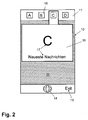
- Fig. 2 the user has activated the menu icon C so that a display area 16 is shown below the menu in which summary information 17 is presented, in the present case the program icon "C" and the additional information that the program contains the latest news can represent.
- the activation can be done by touching the touch-sensitive screen, by means of a mouse or by buttons or scroll wheels on the device.
- Fig. 3 shows the situation after the detection of the presence of a switching condition.
- the switching condition may be, for example, the lapse of a period of time (e.g., one second) in which the summary information is displayed before switching to the menu selection 18 shown in FIG.
- the menu selection includes various selections 19 such as "Go to Headlines", “Change Headlines", and the like.
- the selection options 19 may be selected by the user, as selected above, whereupon the program object assigned to the menu item performs the selected action.
- the actual information representation after activating a selection option 19 in the present case, the presentation of headlines 20 after the activation of the selection option 19 "Go to headlines" in the display area 16 itself and not take place in a separate program window of the selected program object.
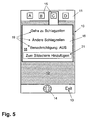
- FIG. 5 illustrates the third aspect of the method according to the invention, in which a menu 16 (displayed in the same display area 16 for overview information 17 in the present case) is displayed for the activated menu item C and the selection option "Add to screen" has been activated by the user as indicated by the border, so that a program object is called that displays information in a second, fixed area 22 of the display 10.
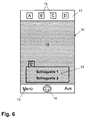
- This display is shown in Fig. 6, in which headlines of the headline program object assigned to menu item c are displayed at the bottom of the screen.
- FIG. 7 shows how, for example, in the presence of new headlines not yet read by the user, the menu icon changes to menu item C, in the present case by a hatching of the menu icon 15.
- the present invention offers numerous novel aspects and advantages for the use of data processing equipment. Below is an example of the use of the method according to the invention will be outlined.
- the user When the user first turns on his device or opens it at folding devices and looks at the home screen, he gets an immediate visual status about different information such as push messages (eg new SMS / MMS, new e-mail) and the push content (eg a new demo version of the game of the week).
- push messages eg new SMS / MMS, new e-mail
- the push content eg a new demo version of the game of the week.
- a menu bar item When the user selects a menu bar item, a large "pop-up" display area appears, showing a description of the menu bar feature and various selectable shortcuts and shortcuts. For example, if the "New Game” status indicator (event menu icon) appears, the user can find out more about the game, try out the game, go to the game area of a portal, and the like, while selecting this menu item.
- one of the selections that are available is "add to screen” or “add to home screen”. This allows the user to add information to the screen background of the computing device. For example, if the user wishes to customize the screen background with the content of emails, the three most recent email messages (date, subject) could always appear on the screen background and be updated dynamically.
- Adjustments to the menu bar can be easily made by the user. This provides an approach to personalizing the menu bar according to user preferences. For example, the user may include shortcuts to other areas of the computing device menu in the menu bar or remove existing points (eg, games) that are not relevant to him.
- the user may include shortcuts to other areas of the computing device menu in the menu bar or remove existing points (eg, games) that are not relevant to him.
- the home screen initially consists of a menu bar consisting of a limited set of icons (e.g., SMS, MMS, e-mail, games, music, ringtones, alarm, calendar). These icons become active and animated (by displaying an event menu icon) when the status of the underlying items changes, for example, a new message or content has been received, or a new calendar appointment or alert is reached. There is a set of options available with the left softkey for each menu icon. This functionality requires that push capabilities be added to existing content platforms or core stacks.
- icons e.g., SMS, MMS, e-mail, games, music, ringtones, alarm, calendar.
- the menu bar contains active menu icons for push messages.
- a new push message SMS, MMS or e-mail
- the menu icon is activated or animated.
- the associated options include shortcuts for the user to immediately read, delete, etc. the message may require the terminal message applications to interact with the menu bar.
- the menu bar contains active menu icons for push content.
- a new push content item for example, a game, a ringtone, music
- the menu icon is activated or animated.
- the associated options allow it the user to go to another place in the menu, where he can get more details, a preview, and the like of the received content or even buy them.
- the menu bar also contains active menu icons for time-related functions, such as calendar appointments, alarms, birthday reminders, and the like. If one of these functions "changes state" (for example, that an agreed time has been reached), the menu icon is activated or animated. The associated options allow the user to change the status of the function (for example, turn off the alarm) or to arrive at the complete appointment management functionality within the menu of the computing device.
- time-related functions such as calendar appointments, alarms, birthday reminders, and the like. If one of these functions "changes state" (for example, that an agreed time has been reached), the menu icon is activated or animated.
- the associated options allow the user to change the status of the function (for example, turn off the alarm) or to arrive at the complete appointment management functionality within the menu of the computing device.
- Another feature is the ability for the user to select one or more menu bar objects so that they fill an area of the screen background with a full version of the content, for example, if the user decides to add emails to his screen background, mail messages would be displayed there and updated dynamically.
Landscapes
- Engineering & Computer Science (AREA)
- General Engineering & Computer Science (AREA)
- Theoretical Computer Science (AREA)
- Human Computer Interaction (AREA)
- Physics & Mathematics (AREA)
- General Physics & Mathematics (AREA)
- User Interface Of Digital Computer (AREA)
Applications Claiming Priority (1)
| Application Number | Priority Date | Filing Date | Title |
|---|---|---|---|
| DE200510043625 DE102005043625A1 (de) | 2005-09-13 | 2005-09-13 | Verfahren zur ereignisabhängigen Dynamisierung einer Menüleiste eines Datenverarbeitungsgeräts |
Publications (2)
| Publication Number | Publication Date |
|---|---|
| EP1762927A2 true EP1762927A2 (fr) | 2007-03-14 |
| EP1762927A3 EP1762927A3 (fr) | 2013-05-08 |
Family
ID=37487507
Family Applications (1)
| Application Number | Title | Priority Date | Filing Date |
|---|---|---|---|
| EP06019086.5A Ceased EP1762927A3 (fr) | 2005-09-13 | 2006-09-12 | Procédé de dynamisation d'une barre de menus d'un appareil de traitement des données en fonction d'évènements |
Country Status (2)
| Country | Link |
|---|---|
| EP (1) | EP1762927A3 (fr) |
| DE (1) | DE102005043625A1 (fr) |
Cited By (1)
| Publication number | Priority date | Publication date | Assignee | Title |
|---|---|---|---|---|
| EP2392995A1 (fr) * | 2010-06-04 | 2011-12-07 | Research In Motion Limited | Dispositif électronique portable et son procédé de commande |
Citations (1)
| Publication number | Priority date | Publication date | Assignee | Title |
|---|---|---|---|---|
| US5283560A (en) * | 1991-06-25 | 1994-02-01 | Digital Equipment Corporation | Computer system and method for displaying images with superimposed partially transparent menus |
Family Cites Families (8)
| Publication number | Priority date | Publication date | Assignee | Title |
|---|---|---|---|---|
| EP1672886A3 (fr) * | 1998-03-05 | 2014-08-13 | Cliff Island LLC | Terminal portable |
| KR100460105B1 (ko) * | 2000-02-22 | 2004-12-03 | 엘지전자 주식회사 | 이동통신 단말기의 메뉴 검색 방법. |
| US6603984B2 (en) * | 2000-05-16 | 2003-08-05 | At&T Wireless Services, Inc. | Methods and systems for managing information on wireless data devices |
| KR100458389B1 (ko) * | 2000-09-29 | 2004-11-26 | 산요덴키가부시키가이샤 | 통신단말장치 및 표시방법 |
| FR2845549B1 (fr) * | 2002-10-03 | 2005-01-14 | Cellon France Sas | Procede de commande des fonctions d'un appareil electronique par l'action sur des premiers et deuxiemes moyens de commande, et appareil mettant en oeuvre le procede |
| WO2004057845A1 (fr) * | 2002-12-23 | 2004-07-08 | Sony Ericsson Mobile Communications Ab | Barre d'etat interactive |
| US20050044500A1 (en) * | 2003-07-18 | 2005-02-24 | Katsunori Orimoto | Agent display device and agent display method |
| EP2256594B1 (fr) * | 2003-12-01 | 2019-12-25 | BlackBerry Limited | Previsualisation d'un nouvel évènement sur un dispositif a écran relativement petit |
-
2005
- 2005-09-13 DE DE200510043625 patent/DE102005043625A1/de not_active Ceased
-
2006
- 2006-09-12 EP EP06019086.5A patent/EP1762927A3/fr not_active Ceased
Patent Citations (1)
| Publication number | Priority date | Publication date | Assignee | Title |
|---|---|---|---|---|
| US5283560A (en) * | 1991-06-25 | 1994-02-01 | Digital Equipment Corporation | Computer system and method for displaying images with superimposed partially transparent menus |
Cited By (1)
| Publication number | Priority date | Publication date | Assignee | Title |
|---|---|---|---|---|
| EP2392995A1 (fr) * | 2010-06-04 | 2011-12-07 | Research In Motion Limited | Dispositif électronique portable et son procédé de commande |
Also Published As
| Publication number | Publication date |
|---|---|
| DE102005043625A1 (de) | 2007-03-22 |
| EP1762927A3 (fr) | 2013-05-08 |
Similar Documents
| Publication | Publication Date | Title |
|---|---|---|
| EP4062279B1 (fr) | Procédé pour faire fonctionner un système de commande utilisateur dans un véhicule et système de commande utilisateur pour un véhicule | |
| DE602004005054T2 (de) | Benutzerschnittstelle mit dynamischer Leiste | |
| DE69716185T2 (de) | Mechanismus zum Steuern der sichtbaren Anwesenheit von Desktop-Objekten in einer graphischen Benutzerschnittstelle | |
| DE102007061993B4 (de) | Mobiles Endgerät mit einer Anzeigeeinheit sowie Anzeigeverfahren für ein mobiles Endgerät | |
| EP4062344A1 (fr) | Procédé pour faire fonctionner un système de commande utilisateur dans un véhicule et système de commande utilisateur pour un véhicule | |
| DE69901947T2 (de) | Drahtloses kommuniktionsgerät mit auf html-basierter mensch-maschinen schnittstelle | |
| DE3855555T2 (de) | Verfahren zur Förderung einer Antwort auf einer elektronischen Konferenzeinladung in einem wechselwirkenden System mit mehreren Terminals, das elektronische Kalender benützt | |
| DE60201024T2 (de) | Multifunktioneller applikations-launcher mit integriertem status | |
| DE202004021933U1 (de) | Vorsehen von Benachrichtigungen über neue Ereignisse auf einer Vorrichtung mit kleinem Bildschirm | |
| WO2007128512A1 (fr) | Procédé et système permettant d'obtenir un menu de sélection associé à un symbole affiché | |
| DE202006021126U1 (de) | Vorrichtung zum Verarbeiten von Daten eines mobilen Endgeräts | |
| DE202011106885U1 (de) | Modusumschaltung | |
| DE112009001276T5 (de) | Karten-Metapher für Aktivitäten in einem Rechengerät | |
| DE112011101209T5 (de) | Warnmeldungs-Anzeige auf einer tragbaren elektronischen Vorrichtung | |
| DE202012007707U1 (de) | Vorrichtung zum Vorsehen einer Benutzerschnittstelle auf einer Vorrichtung, die Inhalt-Operatoren anzeigt | |
| DE202015009844U1 (de) | Galerien kurzlebiger Nachrichten | |
| DE102007043140A1 (de) | Scrollingverfahren und mobiles Kommunikationsendgerät, das dieses verwendet | |
| DE10162939A1 (de) | Kontextabhängige Optionen für eine elektronische Vorrichtung | |
| DE10140874A1 (de) | Graphische Benutzeroberfläche | |
| DE102006021399B4 (de) | Verfahren und Vorrichtung zum Bereitstellen eines einem dargestellten Symbol zugeordneten Auswahlmenüs | |
| DE60319386T2 (de) | Nachrichtenverarbeitung für tragbare, elektronische Geräte | |
| EP1762927A2 (fr) | Procédé de dynamisation d'une barre de menus d'un appareil de traitement des données en fonction d'évènements | |
| DE102010034541B4 (de) | Verfahren und Vorrichtung zum Bereitstellen einer Benutzerschnittstelle | |
| DE102006021376A1 (de) | Verfahren und Vorrichtung zum Bereitstellen von angepassten Kommunikationsfenstern zur Kommunikation mit einem Kommunikationspartner in einer Anwendung auf einem Endgerät eines Benutzers | |
| EP3163425B1 (fr) | Procédé de fonctionnement d'un système informatique |
Legal Events
| Date | Code | Title | Description |
|---|---|---|---|
| PUAI | Public reference made under article 153(3) epc to a published international application that has entered the european phase |
Free format text: ORIGINAL CODE: 0009012 |
|
| AK | Designated contracting states |
Kind code of ref document: A2 Designated state(s): AT BE BG CH CY CZ DE DK EE ES FI FR GB GR HU IE IS IT LI LT LU LV MC NL PL PT RO SE SI SK TR |
|
| AX | Request for extension of the european patent |
Extension state: AL BA HR MK YU |
|
| RIC1 | Information provided on ipc code assigned before grant |
Ipc: G06F 3/048 20060101AFI20120709BHEP |
|
| PUAL | Search report despatched |
Free format text: ORIGINAL CODE: 0009013 |
|
| AK | Designated contracting states |
Kind code of ref document: A3 Designated state(s): AT BE BG CH CY CZ DE DK EE ES FI FR GB GR HU IE IS IT LI LT LU LV MC NL PL PT RO SE SI SK TR |
|
| AX | Request for extension of the european patent |
Extension state: AL BA HR MK RS |
|
| RIC1 | Information provided on ipc code assigned before grant |
Ipc: G06F 3/0482 20130101AFI20130404BHEP |
|
| 17P | Request for examination filed |
Effective date: 20131105 |
|
| RBV | Designated contracting states (corrected) |
Designated state(s): AT BE BG CH CY CZ DE DK EE ES FI FR GB GR HU IE IS IT LI LT LU LV MC NL PL PT RO SE SI SK TR |
|
| AKX | Designation fees paid |
Designated state(s): AT BE BG CH CY CZ DE DK EE ES FI FR GB GR HU IE IS IT LI LT LU LV MC NL PL PT RO SE SI SK TR |
|
| 17Q | First examination report despatched |
Effective date: 20131219 |
|
| RAP1 | Party data changed (applicant data changed or rights of an application transferred) |
Owner name: VODAFONE GMBH |
|
| STAA | Information on the status of an ep patent application or granted ep patent |
Free format text: STATUS: THE APPLICATION HAS BEEN REFUSED |
|
| 18R | Application refused |
Effective date: 20180614 |
|
| RIC1 | Information provided on ipc code assigned before grant |
Ipc: G06F 3/0482 20130101AFI20130404BHEP |