EP1763034A2 - Système de playback d'informations utilisant un support de stockage d'informations - Google Patents
Système de playback d'informations utilisant un support de stockage d'informations Download PDFInfo
- Publication number
- EP1763034A2 EP1763034A2 EP06118760A EP06118760A EP1763034A2 EP 1763034 A2 EP1763034 A2 EP 1763034A2 EP 06118760 A EP06118760 A EP 06118760A EP 06118760 A EP06118760 A EP 06118760A EP 1763034 A2 EP1763034 A2 EP 1763034A2
- Authority
- EP
- European Patent Office
- Prior art keywords
- information
- video
- advanced
- playback
- file
- Prior art date
- Legal status (The legal status is an assumption and is not a legal conclusion. Google has not performed a legal analysis and makes no representation as to the accuracy of the status listed.)
- Withdrawn
Links
Images










































Classifications
-
- G—PHYSICS
- G06—COMPUTING OR CALCULATING; COUNTING
- G06F—ELECTRIC DIGITAL DATA PROCESSING
- G06F3/00—Input arrangements for transferring data to be processed into a form capable of being handled by the computer; Output arrangements for transferring data from processing unit to output unit, e.g. interface arrangements
- G06F3/06—Digital input from, or digital output to, record carriers, e.g. RAID, emulated record carriers or networked record carriers
-
- H—ELECTRICITY
- H04—ELECTRIC COMMUNICATION TECHNIQUE
- H04L—TRANSMISSION OF DIGITAL INFORMATION, e.g. TELEGRAPHIC COMMUNICATION
- H04L67/00—Network arrangements or protocols for supporting network services or applications
- H04L67/01—Protocols
- H04L67/10—Protocols in which an application is distributed across nodes in the network
-
- G—PHYSICS
- G11—INFORMATION STORAGE
- G11B—INFORMATION STORAGE BASED ON RELATIVE MOVEMENT BETWEEN RECORD CARRIER AND TRANSDUCER
- G11B20/00—Signal processing not specific to the method of recording or reproducing; Circuits therefor
- G11B20/10—Digital recording or reproducing
- G11B20/10527—Audio or video recording; Data buffering arrangements
-
- G—PHYSICS
- G06—COMPUTING OR CALCULATING; COUNTING
- G06F—ELECTRIC DIGITAL DATA PROCESSING
- G06F15/00—Digital computers in general; Data processing equipment in general
-
- G—PHYSICS
- G11—INFORMATION STORAGE
- G11B—INFORMATION STORAGE BASED ON RELATIVE MOVEMENT BETWEEN RECORD CARRIER AND TRANSDUCER
- G11B20/00—Signal processing not specific to the method of recording or reproducing; Circuits therefor
- G11B20/10—Digital recording or reproducing
- G11B20/12—Formatting, e.g. arrangement of data block or words on the record carriers
-
- G—PHYSICS
- G11—INFORMATION STORAGE
- G11B—INFORMATION STORAGE BASED ON RELATIVE MOVEMENT BETWEEN RECORD CARRIER AND TRANSDUCER
- G11B27/00—Editing; Indexing; Addressing; Timing or synchronising; Monitoring; Measuring tape travel
- G11B27/02—Editing, e.g. varying the order of information signals recorded on, or reproduced from, record carriers
- G11B27/031—Electronic editing of digitised analogue information signals, e.g. audio or video signals
- G11B27/034—Electronic editing of digitised analogue information signals, e.g. audio or video signals on discs
-
- G—PHYSICS
- G11—INFORMATION STORAGE
- G11B—INFORMATION STORAGE BASED ON RELATIVE MOVEMENT BETWEEN RECORD CARRIER AND TRANSDUCER
- G11B27/00—Editing; Indexing; Addressing; Timing or synchronising; Monitoring; Measuring tape travel
- G11B27/10—Indexing; Addressing; Timing or synchronising; Measuring tape travel
- G11B27/102—Programmed access in sequence to addressed parts of tracks of operating record carriers
- G11B27/105—Programmed access in sequence to addressed parts of tracks of operating record carriers of operating discs
-
- G—PHYSICS
- G11—INFORMATION STORAGE
- G11B—INFORMATION STORAGE BASED ON RELATIVE MOVEMENT BETWEEN RECORD CARRIER AND TRANSDUCER
- G11B27/00—Editing; Indexing; Addressing; Timing or synchronising; Monitoring; Measuring tape travel
- G11B27/10—Indexing; Addressing; Timing or synchronising; Measuring tape travel
- G11B27/19—Indexing; Addressing; Timing or synchronising; Measuring tape travel by using information detectable on the record carrier
- G11B27/28—Indexing; Addressing; Timing or synchronising; Measuring tape travel by using information detectable on the record carrier by using information signals recorded by the same method as the main recording
- G11B27/32—Indexing; Addressing; Timing or synchronising; Measuring tape travel by using information detectable on the record carrier by using information signals recorded by the same method as the main recording on separate auxiliary tracks of the same or an auxiliary record carrier
- G11B27/322—Indexing; Addressing; Timing or synchronising; Measuring tape travel by using information detectable on the record carrier by using information signals recorded by the same method as the main recording on separate auxiliary tracks of the same or an auxiliary record carrier used signal is digitally coded
-
- G—PHYSICS
- G11—INFORMATION STORAGE
- G11B—INFORMATION STORAGE BASED ON RELATIVE MOVEMENT BETWEEN RECORD CARRIER AND TRANSDUCER
- G11B27/00—Editing; Indexing; Addressing; Timing or synchronising; Monitoring; Measuring tape travel
- G11B27/10—Indexing; Addressing; Timing or synchronising; Measuring tape travel
- G11B27/19—Indexing; Addressing; Timing or synchronising; Measuring tape travel by using information detectable on the record carrier
- G11B27/28—Indexing; Addressing; Timing or synchronising; Measuring tape travel by using information detectable on the record carrier by using information signals recorded by the same method as the main recording
- G11B27/32—Indexing; Addressing; Timing or synchronising; Measuring tape travel by using information detectable on the record carrier by using information signals recorded by the same method as the main recording on separate auxiliary tracks of the same or an auxiliary record carrier
- G11B27/327—Table of contents
- G11B27/329—Table of contents on a disc [VTOC]
-
- G—PHYSICS
- G11—INFORMATION STORAGE
- G11B—INFORMATION STORAGE BASED ON RELATIVE MOVEMENT BETWEEN RECORD CARRIER AND TRANSDUCER
- G11B27/00—Editing; Indexing; Addressing; Timing or synchronising; Monitoring; Measuring tape travel
- G11B27/10—Indexing; Addressing; Timing or synchronising; Measuring tape travel
- G11B27/34—Indicating arrangements
-
- G—PHYSICS
- G11—INFORMATION STORAGE
- G11B—INFORMATION STORAGE BASED ON RELATIVE MOVEMENT BETWEEN RECORD CARRIER AND TRANSDUCER
- G11B7/00—Recording or reproducing by optical means, e.g. recording using a thermal beam of optical radiation by modifying optical properties or the physical structure, reproducing using an optical beam at lower power by sensing optical properties; Record carriers therefor
- G11B7/007—Arrangement of the information on the record carrier, e.g. form of tracks, actual track shape, e.g. wobbled, or cross-section, e.g. v-shaped; Sequential information structures, e.g. sectoring or header formats within a track
-
- H—ELECTRICITY
- H04—ELECTRIC COMMUNICATION TECHNIQUE
- H04N—PICTORIAL COMMUNICATION, e.g. TELEVISION
- H04N9/00—Details of colour television systems
- H04N9/79—Processing of colour television signals in connection with recording
-
- H—ELECTRICITY
- H04—ELECTRIC COMMUNICATION TECHNIQUE
- H04N—PICTORIAL COMMUNICATION, e.g. TELEVISION
- H04N9/00—Details of colour television systems
- H04N9/79—Processing of colour television signals in connection with recording
- H04N9/80—Transformation of the television signal for recording, e.g. modulation, frequency changing; Inverse transformation for playback
- H04N9/804—Transformation of the television signal for recording, e.g. modulation, frequency changing; Inverse transformation for playback involving pulse code modulation of the colour picture signal components
- H04N9/8042—Transformation of the television signal for recording, e.g. modulation, frequency changing; Inverse transformation for playback involving pulse code modulation of the colour picture signal components involving data reduction
-
- G—PHYSICS
- G11—INFORMATION STORAGE
- G11B—INFORMATION STORAGE BASED ON RELATIVE MOVEMENT BETWEEN RECORD CARRIER AND TRANSDUCER
- G11B20/00—Signal processing not specific to the method of recording or reproducing; Circuits therefor
- G11B20/10—Digital recording or reproducing
- G11B20/10527—Audio or video recording; Data buffering arrangements
- G11B2020/1062—Data buffering arrangements, e.g. recording or playback buffers
- G11B2020/10675—Data buffering arrangements, e.g. recording or playback buffers aspects of buffer control
- G11B2020/10722—Data buffering arrangements, e.g. recording or playback buffers aspects of buffer control wherein the size of the buffer is variable, e.g. by adding additional memory cells for coping with input streams that have high bit rates
-
- G—PHYSICS
- G11—INFORMATION STORAGE
- G11B—INFORMATION STORAGE BASED ON RELATIVE MOVEMENT BETWEEN RECORD CARRIER AND TRANSDUCER
- G11B2220/00—Record carriers by type
- G11B2220/20—Disc-shaped record carriers
- G11B2220/25—Disc-shaped record carriers characterised in that the disc is based on a specific recording technology
- G11B2220/2537—Optical discs
- G11B2220/2541—Blu-ray discs; Blue laser DVR discs
-
- G—PHYSICS
- G11—INFORMATION STORAGE
- G11B—INFORMATION STORAGE BASED ON RELATIVE MOVEMENT BETWEEN RECORD CARRIER AND TRANSDUCER
- G11B2220/00—Record carriers by type
- G11B2220/20—Disc-shaped record carriers
- G11B2220/25—Disc-shaped record carriers characterised in that the disc is based on a specific recording technology
- G11B2220/2537—Optical discs
- G11B2220/2562—DVDs [digital versatile discs]; Digital video discs; MMCDs; HDCDs
-
- G—PHYSICS
- G11—INFORMATION STORAGE
- G11B—INFORMATION STORAGE BASED ON RELATIVE MOVEMENT BETWEEN RECORD CARRIER AND TRANSDUCER
- G11B2220/00—Record carriers by type
- G11B2220/20—Disc-shaped record carriers
- G11B2220/25—Disc-shaped record carriers characterised in that the disc is based on a specific recording technology
- G11B2220/2537—Optical discs
- G11B2220/2579—HD-DVDs [high definition DVDs]; AODs [advanced optical discs]
-
- H—ELECTRICITY
- H04—ELECTRIC COMMUNICATION TECHNIQUE
- H04N—PICTORIAL COMMUNICATION, e.g. TELEVISION
- H04N5/00—Details of television systems
- H04N5/76—Television signal recording
- H04N5/765—Interface circuits between an apparatus for recording and another apparatus
-
- H—ELECTRICITY
- H04—ELECTRIC COMMUNICATION TECHNIQUE
- H04N—PICTORIAL COMMUNICATION, e.g. TELEVISION
- H04N5/00—Details of television systems
- H04N5/76—Television signal recording
- H04N5/765—Interface circuits between an apparatus for recording and another apparatus
- H04N5/775—Interface circuits between an apparatus for recording and another apparatus between a recording apparatus and a television receiver
-
- H—ELECTRICITY
- H04—ELECTRIC COMMUNICATION TECHNIQUE
- H04N—PICTORIAL COMMUNICATION, e.g. TELEVISION
- H04N5/00—Details of television systems
- H04N5/76—Television signal recording
- H04N5/78—Television signal recording using magnetic recording
- H04N5/781—Television signal recording using magnetic recording on disks or drums
-
- H—ELECTRICITY
- H04—ELECTRIC COMMUNICATION TECHNIQUE
- H04N—PICTORIAL COMMUNICATION, e.g. TELEVISION
- H04N5/00—Details of television systems
- H04N5/76—Television signal recording
- H04N5/78—Television signal recording using magnetic recording
- H04N5/782—Television signal recording using magnetic recording on tape
- H04N5/783—Adaptations for reproducing at a rate different from the recording rate
-
- H—ELECTRICITY
- H04—ELECTRIC COMMUNICATION TECHNIQUE
- H04N—PICTORIAL COMMUNICATION, e.g. TELEVISION
- H04N5/00—Details of television systems
- H04N5/76—Television signal recording
- H04N5/84—Television signal recording using optical recording
- H04N5/85—Television signal recording using optical recording on discs or drums
-
- H—ELECTRICITY
- H04—ELECTRIC COMMUNICATION TECHNIQUE
- H04N—PICTORIAL COMMUNICATION, e.g. TELEVISION
- H04N5/00—Details of television systems
- H04N5/76—Television signal recording
- H04N5/907—Television signal recording using static stores, e.g. storage tubes or semiconductor memories
-
- H—ELECTRICITY
- H04—ELECTRIC COMMUNICATION TECHNIQUE
- H04N—PICTORIAL COMMUNICATION, e.g. TELEVISION
- H04N9/00—Details of colour television systems
- H04N9/79—Processing of colour television signals in connection with recording
- H04N9/7921—Processing of colour television signals in connection with recording for more than one processing mode
-
- H—ELECTRICITY
- H04—ELECTRIC COMMUNICATION TECHNIQUE
- H04N—PICTORIAL COMMUNICATION, e.g. TELEVISION
- H04N9/00—Details of colour television systems
- H04N9/79—Processing of colour television signals in connection with recording
- H04N9/80—Transformation of the television signal for recording, e.g. modulation, frequency changing; Inverse transformation for playback
- H04N9/804—Transformation of the television signal for recording, e.g. modulation, frequency changing; Inverse transformation for playback involving pulse code modulation of the colour picture signal components
- H04N9/806—Transformation of the television signal for recording, e.g. modulation, frequency changing; Inverse transformation for playback involving pulse code modulation of the colour picture signal components with processing of the sound signal
- H04N9/8063—Transformation of the television signal for recording, e.g. modulation, frequency changing; Inverse transformation for playback involving pulse code modulation of the colour picture signal components with processing of the sound signal using time division multiplex of the PCM audio and PCM video signals
-
- H—ELECTRICITY
- H04—ELECTRIC COMMUNICATION TECHNIQUE
- H04N—PICTORIAL COMMUNICATION, e.g. TELEVISION
- H04N9/00—Details of colour television systems
- H04N9/79—Processing of colour television signals in connection with recording
- H04N9/80—Transformation of the television signal for recording, e.g. modulation, frequency changing; Inverse transformation for playback
- H04N9/82—Transformation of the television signal for recording, e.g. modulation, frequency changing; Inverse transformation for playback the individual colour picture signal components being recorded simultaneously only
- H04N9/8205—Transformation of the television signal for recording, e.g. modulation, frequency changing; Inverse transformation for playback the individual colour picture signal components being recorded simultaneously only involving the multiplexing of an additional signal and the colour video signal
-
- H—ELECTRICITY
- H04—ELECTRIC COMMUNICATION TECHNIQUE
- H04N—PICTORIAL COMMUNICATION, e.g. TELEVISION
- H04N9/00—Details of colour television systems
- H04N9/79—Processing of colour television signals in connection with recording
- H04N9/80—Transformation of the television signal for recording, e.g. modulation, frequency changing; Inverse transformation for playback
- H04N9/82—Transformation of the television signal for recording, e.g. modulation, frequency changing; Inverse transformation for playback the individual colour picture signal components being recorded simultaneously only
- H04N9/8205—Transformation of the television signal for recording, e.g. modulation, frequency changing; Inverse transformation for playback the individual colour picture signal components being recorded simultaneously only involving the multiplexing of an additional signal and the colour video signal
- H04N9/8211—Transformation of the television signal for recording, e.g. modulation, frequency changing; Inverse transformation for playback the individual colour picture signal components being recorded simultaneously only involving the multiplexing of an additional signal and the colour video signal the additional signal being a sound signal
-
- H—ELECTRICITY
- H04—ELECTRIC COMMUNICATION TECHNIQUE
- H04N—PICTORIAL COMMUNICATION, e.g. TELEVISION
- H04N9/00—Details of colour television systems
- H04N9/79—Processing of colour television signals in connection with recording
- H04N9/80—Transformation of the television signal for recording, e.g. modulation, frequency changing; Inverse transformation for playback
- H04N9/82—Transformation of the television signal for recording, e.g. modulation, frequency changing; Inverse transformation for playback the individual colour picture signal components being recorded simultaneously only
- H04N9/8205—Transformation of the television signal for recording, e.g. modulation, frequency changing; Inverse transformation for playback the individual colour picture signal components being recorded simultaneously only involving the multiplexing of an additional signal and the colour video signal
- H04N9/8227—Transformation of the television signal for recording, e.g. modulation, frequency changing; Inverse transformation for playback the individual colour picture signal components being recorded simultaneously only involving the multiplexing of an additional signal and the colour video signal the additional signal being at least another television signal
-
- H—ELECTRICITY
- H04—ELECTRIC COMMUNICATION TECHNIQUE
- H04N—PICTORIAL COMMUNICATION, e.g. TELEVISION
- H04N9/00—Details of colour television systems
- H04N9/79—Processing of colour television signals in connection with recording
- H04N9/80—Transformation of the television signal for recording, e.g. modulation, frequency changing; Inverse transformation for playback
- H04N9/82—Transformation of the television signal for recording, e.g. modulation, frequency changing; Inverse transformation for playback the individual colour picture signal components being recorded simultaneously only
- H04N9/8205—Transformation of the television signal for recording, e.g. modulation, frequency changing; Inverse transformation for playback the individual colour picture signal components being recorded simultaneously only involving the multiplexing of an additional signal and the colour video signal
- H04N9/8233—Transformation of the television signal for recording, e.g. modulation, frequency changing; Inverse transformation for playback the individual colour picture signal components being recorded simultaneously only involving the multiplexing of an additional signal and the colour video signal the additional signal being a character code signal
Definitions
- One embodiment of the invention relates to an information playback system using information storage medium such as an optical disc.
- Japanese Patent No. 3673166 discloses supplying information to a device of a user who wants to accept advertisement through a web site in the Internet and displaying information in the device of the user.
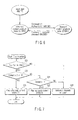
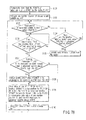
- a data processing method includes reading management information indicative of a playback and display procedure (S15), acquiring a content from a certain storage position at a timing determined based on the management information (S16), and performing playback and display of the content at a timing determined based on the management information (S17).
- FIG. 1 is a diagram showing the arrangement of a system according to an embodiment of the invention.
- This system comprises an information recording and playback apparatus (or an information playback apparatus) 1 which is implemented as a personal computer (PC), a recorder, or a player, and an information storage medium DISC implemented as an optical disc which is detachable from the information recording and playback apparatus 1.
- the system also comprises a display 13 which displays information stored in the information storage medium DISC, information stored in a persistent storage PRSTR, information obtained from a network server NTSRV via a router 11, and the like.
- the system further comprises a keyboard 14 used to make input operations to the information recording and playback apparatus 1, and the network server NTSRV which supplies information via the network.
- the system further comprises the router 11 which transmits information provided from the network server NTSRV via an optical cable 12 to the information recording and playback apparatus 1 in the form of wireless data 17.
- the system further comprises a wide-screen TV monitor 15 which displays image information transmitted from the information recording and playback apparatus 1 as wireless data, and loudspeakers 16-1 and 16-2 which output audio information transmitted from the information recording and playback apparatus 1 as wireless data.
- the information recording and playback apparatus 1 comprises an information recording and playback unit 2 which records and plays back information on and from the information storage medium DISC, and a persistent storage drive 3 which drives the persistent storage PRSTR that includes a fixed storage (flash memory or the like), removable storage (secure digital (SD) card, universal serial bus (USB) memory, portable hard disk drive (HDD), and the like).
- the apparatus 1 also comprises a recording and playback processor 4 which records and plays back information on and from a hard disk device 6, and a main central processing unit (CPU) 5 which controls the overall information recording and playback apparatus 1.
- CPU central processing unit
- the apparatus 1 further comprises the hard disk device 6 having a hard disk for storing information, a wireless local area network (LAN) controller 7-1 which makes wireless communications based on a wireless LAN, a standard content playback unit STDPL which plays back a standard content STDCT (to be described later), and an advanced content playback unit ADVPL which plays back an advanced content ADVCT (to be described later).
- LAN local area network
- the router 11 comprises a wireless LAN controller 7-2 which makes wireless communications with the information recording and playback apparatus 1 based on the wireless LAN, a network controller 8 which controls optical communications with the network server NTSRV, and a data manager 9 which controls data transfer processing.
- the wide-screen TV monitor 15 comprises a wireless LAN controller 7-3 which makes wireless communications with the information recording and playback apparatus 1 based on the wireless LAN, a video processor 24 which generates video information based on information received by the wireless LAN controller 7-3, and a video display unit 21 which displays the video information generated by the video processor 24 on the wide-screen TV monitor 15.
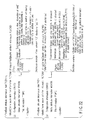
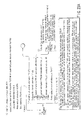
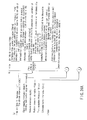
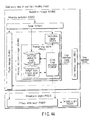
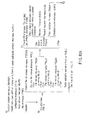
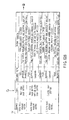
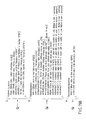
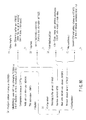
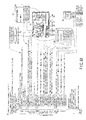
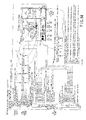
- a horizontal solid line on a right-hand side in FIGS. 3A and 3B represents data transfer 67 of contents in an information recording and playback apparatus 1 according to this embodiment, and a horizontal broken line means a command 68 transferred from a playlist manager PLMNG in a navigation manager NVMNG depicted in FIG. 28 to each part in an advanced content playback unit ADVPL.
- the advanced content playback unit ADVPL exists in the information recording and playback apparatus 1 depicted in FIG. 1.
- a structure in the advanced content playback unit ADVPL has a configuration depicted in FIG. 14.
- a persistent storage PRSTR shown in a vertical column on the right-hand side in FIGS. 3A and 3B corresponds to a persistent storage PRSTR in FIG. 14, and a network server NTSRV shown in a vertical column in FIGS. 3A and 3B corresponds to a network server NTSRV in FIG. 14.
- an information storage medium DISC shown in a vertical column in FIGS. 3A and 3B corresponds to an information storage medium DISC depicted in FIG. 14.
- a presentation engine PRSEN shown in a vertical column on the right-hand side in FIGS. 3A and 3B means a presentation engine PRSEN depicted in FIG. 14 and is utilized for playback processing of contents.
- FIG. 28 shows an internal structure of the navigation manager NVMNG depicted in FIG. 14.
- a playlist manager PLMNG exists in the navigation manager NVMNG, and the playlist manger PLMNG interprets contents in a playlist PLLST in which management information indicative of a playback/display procedure of contents in this embodiment is written.
- 3A and 3B is mainly issued from a playlist manager PLMNG in the navigation manager NVMNG.
- An internal structure of a data access manager DAMNG shown in FIG. 14 is constituted of a network manager NTMNG, a persistent storage manager PRMNG and a disk manager DKMNG as illustrated in FIG. 26.
- the network manager NTMNG in the data access manager DAMNG performs communication processing with each network server NTSRV, and executes intermediation of processing of the data transfer 67 of contents from the network server NTSRV.
- a command 68 is transferred from the playlist manager PLMNG in the navigation manager NVMNG to the network manager NTMNG, and the network manager NTMNG carries out processing of the data transfer 67 of contents from the corresponding network server NTSRV based on the command 68.
- the network manager shown in FIG. 26 represents a network manger NTMNG shown in the vertical column on the right-hand side in FIGS. 3A and 3B.
- the persistent storage manger PRMNG shown in FIG. 26 represents a persistent storage manager PRMNG illustrated in the vertical column on the right-had side in FIGS. 3A and 3B. As shown in FIG.
- the persistent storage manager PRMGN in the data access manager DAMNG executes processing with respect to a persistent storage PRSTR, and performs transfer processing of necessary data from the persistent storage PRSTR.
- the command 68 is also issued with respect to the persistent storage manager PRMNG from the playlist manager PLMNG in the navigation manager NVMNG.
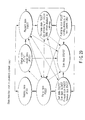
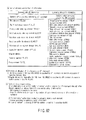
- On the right-hand side in FIGS. 3A and 3B when a horizontal line (or a broken line) is clearly written on each vertical column, data transfer 67 of contents or transmission of the command 68 is executed via a part shown in each vertical column. Further, when a line is drawn behind each vertical column, data transfer 67 of contents or transmission of the command 68 is executed without using a part shown in each vertical column. Furthermore, each processing step shown on the left-hand side in FIGS. 3A and 3B is written in synchronization with data transfer 67 of contents indicated by each horizontal line on the right-hand side in FIGS. 3A and 3B.
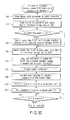
- a flow from step S11 to step S14 in a flowchart on the left-hand side in FIGS. 3A and 3B represents that contents of a playlist PLLST are changed and saved in accordance with a change in a storage position of contents obtained as a result of performing data transfer of contents.
- a flow from step S15 to step S17 in the flowchart shown on the left-hand side in FIGS. 3A and 3B represents a core part of a basic concept concerning a data processing method, a data transfer method or a program structure in this embodiment. That is, it represents a flow of previously storing in the data cache DTCCH data of contents which should be displayed based on the playlist PLLST, and displaying data from the data cache DTCCH for a user at a necessary timing.
- a file of the playlist PLLST which is management information indicative of a playback/display procedure for a user exists in the persistent storage PRSTR, the network server NTSRV or the information storage medium DISC.
- the playlist PLLST stored in the persistent storage PRSTR is transferred to the playlist manager PLMNG via the persistent storage manager PRMNG as indicated by a line ⁇ .
- a playlist manager PLMNG file stored in the network server NTSRV is transferred to the playlist manager PLMNG from the network server NTSRV via the network manager NTMNG as indicated by a line ⁇ .
- the playlist manager PLMNG stored in the information storage medium DISC is transferred to the playlist manager PLMNG from the information storage medium DISC via a disk manager DKMNG although not shown.
- the data processing method or the data transfer method shown at the step S11 matches with processing from step S44 to step S46 in FIG. 50 or processing at step S61 in FIG. 51. That is, when the plurality of playlists PLLST similar to a plurality of storage mediums exist, a playlist file PLLST to which the highest number of numbers set to the playlists PLLST is set is utilized as the latest file as indicated at the step S46 in FIG. 50 or the step S61 in FIG. 51.
- step S12 data of specific contents (e.g., contents of a secondary video set SCDVS) which take time for network download processing is transferred from the network server NTSRV toward the persistent storage PRSTR based on information of the latest playlist PLLST selected at step S11 (step S12).
- the command 68 is previously transferred from the playlist manager PLMNG to the network manager NTMNG and the persistent storage manager PRMNG (a line ⁇ ), and the network manager NTMNG executes processing to fetch data of contents from a corresponding network server NTSRV based on the command 68 and transfers this data to a specified persistent storage PRSTR via the persistent storage manager PRMNG (a line ⁇ ).
- a time map STMAP of a secondary video set must be also transferred simultaneously with a secondary enhanced video object data S-EVOB.
- a still image IMAGE, effect audio EFTAD, a font FONT or the like as an advanced element is also transferred with an advanced navigation ADVNV (a manifest MNFST, a markup MRKUP, a script SCRPT).
- playlist PLLST storage position information (src attribute information) is changed from the network server NTSRV before execution at the step S12 to the persistent storage PRSTR in accordance with a change in a storage position of contents (source data) generated by data transfer illustrated at the step S12.
- the network server NTSRV and the persistent storage PRSTR before changing from the network server NTSRV to the persistent storage PRSTR must be set to the playlist file PLL which is to be stored. Additionally, there is a possibility that a content provider changes the playlist PLLST stored in the network server NTSRV. In such a case, a value which is larger than the number already set in the network server NTSRV by "1" is set to the playlist file PLLST.
- the core part of the basic concept concerning the data processing method, the data transfer method or the program structure in this embodiment roughly consists of three steps as indicated by the steps S15 to S17. That is, at the first step (the step S15), the playlist PLLST as management information (a program) indicative of a playback/display procedure for a user is read by the playlist manager PLMNG in the navigation manager NVMNG. In the embodiment shown in FIGS.
- the playlist manager PLMNG reads the latest playlist PLLST from the persistent storage PRSTR as indicated by a line ⁇ .
- a playback/display object, index information, navigation data, resource data, source data or the like as necessary contents is transferred from a predetermined storage position (arc attribute information) in accordance with description contents of the playlist PLLST (a program) as management information at a predetermined timing (LoadingBegin attribute information/PRLOAD or preload attribute information/PRLOAD) as indicated at the step S16.
- This embodiment is characterized in that the necessary contents (the resource) is previously transferred into the data cache DTCCH. Storing all of the necessary contents in the data cache DTCCH from a specified storage position at a predetermined timing enables simultaneously playback/display of a plurality of playback objects without interrupting playback/display for a user.
- a method of retrieving a storage position or a file name (a data name) of contents (a resource) to be transferred differs depending on types of corresponding contents, and the method is carried out in accordance with the following procedure.
- a secondary enhanced video object S-EVOB file name is written in the time map STMAP of the secondary video set, and secondary enhanced video object data S-EVOB can be retrieved from information of the time map STMAP of the secondary video set.
- the corresponding resource (contents) is transferred to the data cache DTCCH from the corresponding persistent storage PRSTR via the persistent storage manager PRMNG (a line ⁇ ). Furthermore, information stored in the information storage medium DISC is transferred to the data cache DTCCH from the information storage medium DISC as indicated by a line ⁇ . Moreover, when there is a description that a resource (contents) specified in the playlist PLLST is stored in the network server NTSRV, data is transferred to the data cache DTCCH from the corresponding network server NTSRV via the network manager NTMNG as indicated by a line ⁇ .
- the command 68 of a data transfer request is issued from the playlist manager PLMNG to the persistent storage manager PRMNG, the network manager NTMNG and a disk manager DKMNG although not shown (a line ⁇ ).
- a plurality of playback/display objects are simultaneously displayed at a specified position in a screen based on information contents of management information (a playlist/a program) at a timing specified in the management information (titleTimeBegin/TTSTTM or titleTimeEnd/TTEDTM) (see FIGS. 11, 12 and 25).
- the command 68 (a line v) is transmitted to the data cache DTCCH from the playlist manager PLMNG in the navigation manager NVMNG, and the command 68 of preliminary preparation is transmitted to a presentation engine PRSEN from the playlist manager PLMNG as indicated by a line ⁇ .
- information of contents (a resource) previously stored in the data cache DTCCH is transferred toward the presentation engine PRSEN, and a playback/display object is displayed to a user (a line o).
- a primary video set PRMVS and some of secondary video sets SCDVS can be directly transferred from the information storage medium DISC to the presentation engine PRSEN without using the data cache DTCCH simultaneously with the above-described processing. This data transfer corresponds to a line ⁇ in FIGS.
- some of secondary video sets SCDVS can be directly transferred to (a secondary video player SCDVP in) the presentation engine PRSEN from the persistent storage manager PRMNG without using the data cache DTCCH.
- This data transfer corresponds to a line ⁇ in FIGS. 3A and 3B, and the instruction command 68 of data transfer is issued from the playlist manager PLMNG to the persistent storage manager PRMNG prior to the data transfer 67 (a line v). In this manner, the data transfer is carried out, and a plurality of playback/display objects can be simultaneously played back.
- playback/display timing control information When playback/display timing control information is provided to management information (a playlist PLLST/a program), a plurality of playback/display objects (including an advanced application ADAPL or an advanced subtitle ADSBT) including moving pictures (enhanced video object data EVOB) can be simultaneously played back/displayed without interruption.
- the data processing method and the data transfer method are mainly illustrated in FIGS. 3A and 3B, but this embodiment is not restricted thereto, and a scope of characteristics of this embodiment includes program description contents which describes a necessary possible timing or a storage position of a resource and can realize the data processing method or the data transfer method.
- this embodiment innovates the XML and scripts and the concept of timeline in correspondence with the expression format in the PC world.
- compatibility with the existing DVD-Video standards is lost.
- network connection is needed, and it becomes difficult to provide a very inexpensive information playback apparatus to the user.
- this embodiment adopts an arrangement which can use the advanced content ADVCT which meets the requirements of the users and the like described using FIG. 2, and the standard content STDCT which cannot meet the requirements of the users and the like described using FIG. 2 but can be played back by a very inexpensive information playback apparatus (without any precondition of Internet connection) while assuring the compatibility to the existing DVD-Video standards.
- This point is a large technical feature in this embodiment.
- FIGS. 15A and 15B show examples of video content playback methods by the information recording and playback apparatus 1.
- FIG. 15A(a) An example of a case is shown in FIG. 15A(a) wherein a main title 31 is presented like a television broadcast video information after video information 42 used to give an explanation of detailed navigation, commercial 44 for a product, service, or the like is presented to be inserted into the main title 31, a preview 41 of a movie is presented after completion of presentation of the main title 31.
- FIG. 15B(b) An example of a case is shown in FIG. 15B(b) wherein a main title 31 is presented like a television broadcast video information after video information 42 used to give an explanation of detailed navigation, a commercial 43 in the form of a telop is presented to be superimposed on presentation of the main title 31, and a preview 41 of a movie is presented after completion of presentation of the main title 31.
- FIG. 15B(c) An example of a case is shown in FIG. 15B(c) wherein a preview 41 of a movie is presented after video information 42 used to give an explanation of detailed navigation, a main title 31 is then presented, an independent window 32 for a commercial is presented on a presentation area different from the main title 31 during presentation of the main title 31, and a help icon 33 is presented on a presentation area different from the main title 31 during presentation of the preview 41 and main title 31.
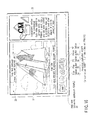
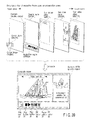
- FIG. 16 shows an example of a presentation window at point ⁇ when the main title 31, the independent window 32 for a commercial, and the help icon 33 are simultaneously presented in FIG. 15B(c).
- the main title 31 is presented as a moving picture of a main picture on the upper left area
- the independent window 32 for a commercial is presented as a moving picture of a sub-picture on the upper right area
- the help icon 33 is presented as a still picture (graphic) on the lower area.
- a stop button 34, play button 35, FR (fast-rewinding) button 36, pause button 37, FF (fast-forwarding) button 38, and the like are also presented as still pictures (graphics).
- a cursor (not shown) or the like is presented.
- Standard Content consists of Navigation data and Video object data on a disc.
- Advanced Content consists of Advanced Navigation such as Playlist, Manifest, Markup and Script files and Advanced Data such as Primary/Secondary Video Set and Advanced Element (image, audio, text and so on).
- Playlist file and Primary Video Set shall be located on a disc which has Advanced Content, and other data can be on a disc and also be delivered from a server.
- This embodiment defines two different types of contents, i.e., the standard content STDCT and the advanced content ADVCT. This point is a large technical feature in this embodiment.
- the standard content STDCT of this embodiment includes enhanced video object EVOB which records video information itself and navigation data IFO which records management information of that enhanced video object.
- the standard content STDCT has a data structure obtained by purely extending the existing DVD-Video data structure.
- the advanced content ADVCT has a data structure which records various kinds of information to be described later.
- FIG. 4 shows the data structure of the standard content STDCT.
- FIGS. 12, 13A and 13B show the data structure of an advanced content and explanations of effects and the like.
- FIG. 10 shows the relationship among various objects in this embodiment. These figures will be referred to as needed in the following description.
- Standard Content is just extension of content defined in DVD-Video specification especially for high-resolution video, high-quality audio and some new functions.
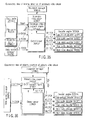
- Standard Content basically consists of one VMG space and one or more VTS spaces (which are called as “Standard VTS” or just “VTS”), as shown in FIG. 4.
- Standard VTS or just “VTS”
- this embodiment gives new functionalities. For instance,
- the standard content STDCT includes a video manager VMG that represents a menu frame, and a standard video title set SVTS that records video data.
- the video manager VMG that records the menu frame includes enhanced video object EVOB that records video information itself, and navigation data IFO that records management data of that EVOB.
- the standard video title set SVTS includes enhanced video object EVOB that records video information itself and navigation data IFO that records management data of that EVOB.
- the standard content STDCT represents an extended structure of the content specified by the conventional DVD-Video. Especially, new functionalities that improve the resolution of video data and the sound quality of audio data compared to the conventional DVD-Video are added. As shown in FIG. 4, the standard content STDCT consists of one video manager VMG space, and one or more video title set VTS spaces, which is called the standard video title set SVTS or VTS.
- this embodiment gives the following new functionalities.
- Standard VTS is basically used in Standard Content, however this VTS may be utilized in Advanced Content via time map TMAP.
- the EVOB may contain some specific information for Standard Content, and such information as highlight information HLI and presentation control information PCI shall be ignored in Advanced Content.
- the standard video title set SVTS in this embodiment is basically used on the standard content STDCT described above. However, this standard video title set SVTS may be utilized in the advanced content ADVCT via a time map TMAP (to be described later).
- the enhanced video object EVOB as object data used in the standard video title set SVTS may contain some pieces of specific information for the standard content STDCT. Some pieces of specific information contain, e.g., highlight information HLI and presentation control information PCI which are used in the standard content STDCT, but shall be ignored in the advanced content ADVCT in this embodiment.
- HDDVD_TS directory shall exist directly under the root directory. All files related with Primary Video Set (i.e. a VMG, Standard Video Set(s) and an Advanced VTS) shall reside under this directory.
- Primary Video Set i.e. a VMG, Standard Video Set(s) and an Advanced VTS
- the directory structure upon recording the standard content STDCT shown in FIG. 4 in the information storage medium DISC will be described below.
- the standard content STDCT and the advanced content ADVCT (to be described later) are recorded in the HDDVD_TS directory together.
- the HDDVD_TS directory exists directly under the root directory of the information storage medium DISC. For example, all files related with a primary video set PRMVS (to be described later) such as the video manager VMG, standard video title set SVTS, and the like shall reside under this directory.
- VMG Video Manager
- a Video Manager Information (VMGI), an Enhanced Video Object for First Play Program Chain Menu (FP_PGCM_EVOB), a Video Manager Information for backup (VMGI_BUP) shall be recorded respectively as a component file under the HDDVD_TS directory.
- An Enhanced Video Object Set for Video Manager Menu (VMGM_EVOBS) which should be divided into up to 98 files under the HDDVD_TS directory. For these files of a VMGM_EVOBS, every file shall be allocated contiguously.
- the video manager VMG basically include menu frame information and control information of the conventional DVD-Video.
- video manager information VMGI enhanced video object EVOB related with a menu FP_PGCM_EVOB which is to be presented first immediately after insertion of the information storage medium DISC
- video manager information VMGI_BUP as backup data of the navigation data IFO of the video manager VMG, and the like are separately recorded as component files.
- an enhanced video object set VMGM_EVOBS related with a video manager menu has a size of 1 GB or more, and these data shall be recorded while being divided into up to 98.
- all the files of the enhanced video object set VMGM_EVOBS of the video manager menu shall be allocated contiguously for the sake of convenience upon playback. In this manner, since the information of the enhanced video object set VMGM_EVOBS related with the video manager menu is recorded at one location together, data access convenience, data collection convenience, and high presentation speed can be assured.
- VTSI Video Title Set Information
- VTSI_BUP Video Title Set Information for backup
- An Enhanced Video Object Set for Video Title Set Menu (VTSM_EVOBS), and an Enhanced Video Object Set for Titles (VTSTT_EVOBS) may be divided into up to 99 files. These files shall be component files under the HDDVD_TS directory. For these files of a VTSM_EVOBS, and a VTSTT_EVOBS, every file shall be allocated contiguously.
- video title set information VTSI and backup data VTSI_BUP of the video title set information shall be recorded respectively as a component file under the HDDVD_TS directory.
- the sizes of an enhanced video object set VTSM_EVOBS of a video title set menu and an enhanced video object set VTSTT_EVOBS of each title are allowed to exceed 1 GB. However, their data should be recorded while being divided into up to 99 files. As a result, each file size can be set to be 1 GB or less.
- These files shall be independent component files under the HDDVD_TS directory. Every file of the enhanced video object set VTSM_EVOBS of the video title set menu and the enhanced video object set VTSTT_EVOBS of each title shall be allocated contiguously, respectively. As a result, since data are recorded at one location, the data access convenience, speeding up, and easy data processing management can be attained, and these pieces of information for the user can be presented at high speed.
- VTS Video Title Set
- VTS is a collection of Tides. Each VTS is composed of control data referred to as Video Title Set Information (VTSI), Enhanced Video Object Set for the VTS Menu (VTSM_VOBS), Enhanced Video Object Set for Titles in a VTS (VTSTT_EVOBS) and backup control data (VTSI_P).
- VTSI Video Title Set Information
- VTSM_VOBS Enhanced Video Object Set for the VTS Menu
- VTSTT_EVOBS Enhanced Video Object Set for Titles in a VTS
- VTSI_P backup control data
- VTS Video Title Set
- the video title set VTS is a collection of a set of video titles.
- This video title set includes video title set information VTSI as control information related with the video title set, an enhanced video object set VTSM_EVOBS of a video title set menu, an enhanced video object set (video information itself) VTSTT_EVOBS of each title, and backup data VTSI_BUP of the video title set information.
- the VMG is the table of contents for Standard Video Title Sets which exist in the "HD DVD-Video zone".
- a VMG is composed of control data referred to as Video Manager Information (VMGI), Enhanced Video Object for First Play PGC Menu (FP_PGCM_EVOB), Enhanced Video Object Set for VMG Menu (VMGM_EVOBS) and a backup of the control data (VMGI_BUP).
- the control data is static information necessary to playback titles and providing information to support User Operation.
- the FP_PGCM_EVOB is an Enhanced Video Object (EVOB) used for the selection of menu language.
- the VMGM_EVOBS is a collection of Enhanced Video Objects (EVOBs) used for Menus that support the volume access.
- VMG Video Manager
- the video manager VMG is the table of contents for the standard video title set SVTS, and is recorded in an HDDVD-Video zone to be described later.
- Constituent elements of the video manager VMG are control information as video manager information VMGI, a menu FP_PGCM_EVOB which is to be presented first immediately after insertion of the information storage medium DISC, an enhanced video object set VMGM_EVOBS of a video manager menu, and backup data VMGI_BUP of control information as the video manager information VMGI.
- the control information as the video manager information VMGI records information required to play back each title, and information used to support user's operations.
- the menu FP_PGCM_EVOB which is to be presented first immediately after insertion of the information storage medium DISC is used to select a language presented in the menu. That is, the user himself or herself selects an optimal menu language immediately after insertion of the information storage medium DISC, thus presenting various menu frames using the best understandable language.
- the enhanced video object set VMGM_EVOBS related with the video manager menu is a collection of the enhanced video objects EVOBs used for in menus that support volume access. That is, information of a menu frame (a frame provided as independent information for each individual language) presented in the language selected by the user is recorded as the enhanced video object set.
- the EVOBS is a collection of Enhanced Video Object which is composed of data on Video, Audio, Sub-picture and the like.
- the enhanced video object set EVOBS is a collection of the enhanced video object EVOB, which is composed of data on video, audio, sab-picture, and the like.
- the following rules shall apply to the enhanced video object set EVOBS.
- the advanced content ADVCT As video information and its management information to be recorded on the information storage medium DISC, two different types of contents, i.e., the advanced content ADVCT and standard content STDCT are set.
- the advanced content ADVCT the requirements of the user who wants to assure flexible and diversified expressions, easy processing of video related information of network actions, and easy transmission of information after processing, can be satisfied.
- the standard content STDCT at the same time, the data compatibility to the conventional DVD-Video can be assured, and even an inexpensive information playback apparatus without any precondition of network connection can play back video information of this embodiment. This point is a large technical feature in this embodiment.
- information storage media DISC corresponding to three different categories are defined as the information storage media DISC that record respective contents. That is, as shown in FIG. 5(a), a medium which records only information of the standard content STDCT as data to be recorded in the information storage medium DISC compliant to category 1 is defined.
- the information storage medium DISC compliant to category 1 can be played back by both an inexpensive information playback apparatus without any precondition of network connection and an advanced information playback apparatus premised on network connection.
- An information storage medium DISC which records only advanced content ADVCT as data recorded in an information storage medium compliant to category 2 is defined, as shown in FIG. 5(b).
- the information storage medium DISC compliant to category 2 can be played back by only an advanced information playback apparatus premised on network connection.
- an information storage medium DISC compliant to category 3 that records identical video information in both the formats of the advanced content ADVCT and standard content STDCT is defined. This point is a large technical feature of this embodiment.
- an advanced information playback apparatus having a network connection function can play back the advanced content ADVCT, and an inexpensive information playback apparatus without any precondition of network connection can play back the standard content STDCT.
- the contents optimal to every models can be presented (provided) to the user.
- This disc contains only Standard Content which consists of one VMG and one or more Standard VTSs.
- This disc contains no Advanced Content such as a Playlist, Advanced VTS and so on. As for an example of structure, see FIG. 5(a).
- the information storage medium DISC compliant to category 1 shown in FIG. 5(a) records the standard content STDCT which consists of one video manager VMG which forms a menu frame, and one or more standard video title sets SVTS that manage video information. No information of the advanced content ADVCT is recorded on this information storage medium DISC.
- This disc contains only Advanced Content which consists of Playlist, Primary Video Set (only Advanced VTS), Secondary Video Set and Advanced Subtitle. This disc contains no Standard Content such as VMG or Standard VTS. As for an example of structure, see FIG. 5(b).
- the information storage medium DISC compliant to category 2 shown in FIG. 5(b) records only the advanced content ADVCT, and does not record any standard content STDCT.
- This disc contains both Advanced Content which consists of Playlist, Advanced VTS in Primary Video Set, Secondary Video Set, Advanced Application and Advanced Subtitle and Standard Content which consists of one or more Standard VTSs in Primary Video Set. That is, neither FP_DOM nor VMGM_DOM should exist in this Primary Video Set. Even though FP_DOM and VMGM_DOM may exist on a disc, some navigation command to transit to FP_DOM or VMGM_DOM shall be ignored by a player. As for an example of structure, see FIG. 5(c). Even though this disc contains Standard Content, basically this disc follows rules for the Category 2 disc. Standard Content may be referred by Advanced Content with cancellations of some functions. In addition, for playback of this disc, there are kinds of state such as Advanced Content Playback State and Standard Content Playback State, and the transition between the states is allowed.
- the information storage medium DISC compliant to category 3 shown in FIG. 5(c) records the advanced content ADVCT and standard content STDCT.
- a primary video set PRMVS (to be described later) is defined.
- the primary video set PRMVS neither a first play domain FP_DOM corresponding to a frame to be presented immediately after insertion of the information storage medium DISC nor a video manager menu domain VMGM_DOM that presents a menu is defined in the primary video set PRMVS.
- the first play domain FP_DOM and video manager menu domain VMGM_DOM may exist in an area other than the primary video set PRMVS in the information storage medium DISC compliant to category 3.
- an information playback apparatus shall ignore a navigation command to transit to the first play domain FP_DOM or the video manager domain VMGM_DOM.
- the first play domain FP_DOM corresponding to a frame to be presented immediately after insertion of the information storage medium DISC and the video manager domain VMGM_DOM are basically required in a menu operation in the standard content STDCT.
- menu processing is executed in the advanced content ADVCT to refer to the standard video title set SVTS which records video information in the standard content STDCT as needed.
- Primary Video Set in Advanced Content consists of Advanced VTS space, Standard VTS space and VMG. Basically Advanced VTS is used only in Advanced Content, and Standard VTS may be used in Advanced Content even though this VTS is mainly used for Standard Content. In Advanced Content, VMG may exist in Primary Video Set, however the transition to VMGM_DOM or FP_DOM is not allowed. The data for Primary Video Set is located on a disc under HDDVD_TS directory.
- the primary video set PRMVS in the advanced content ADVCT includes an advanced video title set ADVTS, a standard video title set SVTS, and a video manager VMG. These video title sets are mainly used in the standard content STDCT. However, the advanced video title set ADVTS is used only in the advanced content ADVCT, and the standard video title set SVTS may be used in the advanced content ADVCT. In the advanced content ADVCT, the video manager VMG in the primary video set PRMVS may exist. However, during use of the advanced content ADVCT, the transition to the aforementioned video manager menu domain VMGM_DOM and first play domain FP_DOM is inhibited.
- the first play domain FP_DOM corresponding to a frame to be presented immediately after insertion of the information storage medium DISC and the video manager domain VMGM_DOM are basically required in a menu operation in the standard content STDCT.
- the menu processing is executed in the advanced content ADVCT to refer to the standard video title set SVTS which records video information in the standard content STDCT as needed.
- the primary video set PRMVS are recorded in the information storage medium DISC compliant to category 3.
- the primary video set PRMVS is allocated in the HDDVD_TS directory described above as the data structure to be recorded.
- the embodiment of the invention is not limited to this, and the primary video set PRMVS may be recorded in the persistent storage.
- At least the primary video set PRMVS and at least one playlist PLLST shall be recorded in the information storage medium DISC compliant to category 2 or 3.
- Other pieces of information related with the advanced content ADVCT described in FIGS. 6 and 7 shall be located in on information storage medium DISC but can be delivered from a server via the network.
- the Volume Space of an HD DVD-Video disc consists of
- a space that records each content on the information storage medium DISC, as shown in FIG. 5(c), is defined as a volume space, and logical sector numbers LSN are assigned to all locations in the volume space.
- the volume space is formed of the following three zones.
- This zone is defined as an area that records management information of a file system, although it is not described in FIG. 5(c).
- a file system compliant to uniform disc format (UDF) is built.
- the above zone indicates a zone which records management information of that file system.
- This zone records data in this embodiment described in FIG. 5(c).
- This zone consists of a zone that records the advanced content ADVCT, and a zone that records the standard content STDCT.
- This zone records DVD related information other than information used in the HD_DVD-Video of this embodiment.
- This zone can record information related with the HD_DVD-Video recording standards and information related with the existing DVD-Video and DVD-Audio standards.
- the information storage medium DISC compliant to category 3 shown in FIG. 5(c) has a structure that can independently play back the advanced content ADVCT and standard content STDCT.
- the playback apparatus reads advanced navigation data ADVNV included in the advanced content ADVCT in an initial state INSTT. After that, the playback apparatus transits to an advanced content playback state ADVPS.
- the information storage medium DISC compliant to category 2 shown in FIG. 5(b) is inserted.
- a playback situation can transit to a standard content playback state STDPS by executing a command MSCMD corresponding to a markup file MRKUP or script file SCRPT.
- the playback situation can return to the advanced content playback state ADVPS by executing a command NCCMD of navigation commands set in the standard content STDCT.
- system parameters which record information, e.g., the presentation angle numbers, playback audio numbers, and the like that are set by the system as in the existing DVD-Video standards are defined.
- the advanced content ADVCT can play back data to be set in the system parameter or can change the system parameter values in the advanced content playback state ADVPS. In this manner, compatibility to the existing DVD-Video playback can be assured. Independently of the transition direction between the advanced content playback state ADVPS and the standard content playback state STDPS, the consistency of the setting values of the system parameters can be maintained in this embodiment.
- FIG. 7 shows a medium identification processing method by the information playback apparatus of this embodiment when three different types of information storage media DISC shown in FIG. 5 are mounted.
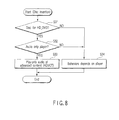
- the information playback apparatus determines if the information storage medium DISC is compliant to HD_DVD (step S11). In case of the information storage medium DISC compliant to HD_DVD, the information playback apparatus goes to find a playlist file PLLST recorded in an advanced content directory ADVCT located directly under the root directory shown in FIG. 11 and determines if the information storage medium DISC is compliant to category 2 or 3 (step S12). If the playlist file PLLST is found, the information playback apparatus determines that the information storage medium DISC is compliant to category 2 or 3, and plays back the advanced content ADVCT (step S13).
- the information playback apparatus checks the video manager ID number VMGM_ID recorded in the video manager information VMGI in the standard content STDCT and determines if the information storage medium DISC is compliant to category 1 (step S14). In case of the information storage medium DISC compliant to category 1, the video manager ID number VMGM_ID is recorded as specific data, and it can be identified based on the information in a video manager category VMG_CAT that the standard content STDCT compliant to category 1 alone is recorded. In this case, the standard content STDCT is played back (step S15). If the mounted information storage medium DISC belongs to none of categories described in FIG. 5, a processing method depending on the information playback apparatus is adopted (step S16).
- This embodiment supports a playback apparatus which does not have any video display function and plays back only audio information.
- FIG. 8 shows the startup sequence in an audio-only information playback apparatus.
- the information playback apparatus determines if the information storage medium DISC is compliant to HD_DVD (step S21). If the information storage medium DISC is not compliant to HD_DVD in this embodiment, a processing method depending on the information playback apparatus is adopted (step S24). Also, if the information playback apparatus is not the one which plays back only audio information, a processing method depending on the information playback apparatus is adopted (steps S22 and S24). If the mounted information storage medium DISC is compliant to HD_DVD of this embodiment, the information playback apparatus checks the presence/absence of a playlist file PLLST recorded in the advanced content directory ADVCT located directly under the root directory. If the playlist file PLLST is found, the information playback apparatus which plays back only audio information plays back audio information (steps S22 and S23). At this time, the information playback apparatus plays back information via the playlist file PLLST.
- each enhanced video object EVOB is designated by a logical sector number LSN as address information on the logical space.
- LSN logical sector number
- access to each enhanced video object EVOB in the advanced content ADVCT is managed not by address information but by time information.
- time information designated in the playlist PLLST can be converted into address information by time map information TMAPI.
- the time map information TMAPI is used to convert the designated time information into a logical sector number LSN indicating a logical address position on the information storage medium DISC.
- the time map information TMAPI is recorded at a position different from the playlist PLLST.
- advanced video title set information ADVTSI in the advanced content ADVCT corresponds to the standard video title set information STVTSI in the standard content STDCT.
- This advanced video title set information ADVTSI records enhanced video object information EVOBI which records individual attribute information of respective enhanced video object EVOB.
- This enhanced video object information EVOBI refers to and manages each individual enhanced video object EVOB as management information of attribute information.
- the playlist PLLST that manages playback of the advanced content ADVCT can designate playback of enhanced video object EVOB in the standard content STDCT.
- Standard Content can be utilized by Advanced Content.
- VTSI of Advanced VTS can refer EVOBs which is also be referred by VTSI of Standard VTS, by use of TMAP (see FIG. 9).
- a TMAP Information refers one or more EVOBUs in an EVOB.
- the EVOB may contain HLI, PCI and so on, which are not supported in Advanced Content. In the playback of such EVOBs, some information which is not supported in Advanced Content such as HLI and PCI shall be ignored in Advanced Content.
- the advanced content ADVCT can utilize some data in the standard content STDCT. This point is a large technical feature in this embodiment.
- the enhanced video object information EVCBI#3 in the advanced video title set information ADVTSI can refer to and play back enhanced video object EVOB#3 in the standard content STDCT by utilizing time map information TMAPI#3 in the advanced content ADVCT.
- the enhanced video object EVOB#3 referred to by the enhanced video object information EVOBI#3 in the advanced content can also be referred to by the standard video title set information STVTSI.
- the enhanced video object EVOB#3 in the standard content STDCT can be referred to by a plurality of pieces of information, it can be commonly utilized, and the efficiency of data to be recorded on the information storage medium DISC can be improved.
- This enhanced video object EVOB#3 includes information such as highlight information HLI, presentation control information PCI, and the like. However, the advanced content ADVCT does not support these pieces of information, and information specified by these highlight information HLI and presentation control information PCI is ignored upon playback of the advanced content ADVCT based on the playlist PLLST.
- Advanced VTS is utilized Video Title Set for Advanced Content. In comparison to Standard VTS, followings are additionally defined.
- the advanced video title set ADVTS shown in FIG. 5(c) will be described below with reference to FIG. 9.
- the advanced video title set ADVTS is utilized as a video title set for the advanced content ADVCT. Differences between the advanced video title set ADVTS shown in FIG. 5(c) and the standard video title set SVTS will be listed below.
- the advanced video title set ADVTS can have one main video stream MANVD, eight (maximum) or fewer main audio streams MANAD, one sub video stream SUBVD, eight (maximum) or less sub audio streams SUBAD, 32 (maximum) or fewer sub-picture streams SUBPT, and one advanced stream (stream data that records an advanced application ADAPL to be described later).
- enhanced video object EVOB in the video manager VMG that represents a menu frame is completely separated from enhanced video object EVOB in the standard video title set SVTS which represents video information to be played back, and a moving image and menu frame cannot be simultaneously presented.
- the advanced video title set ADVTS in this embodiment can manage and present a menu frame and a picture frame that represents a moving image by integrating them.
- the existing DVD-Video and standard content STDCT adopts a layered structure of program chains PGC/parts of title PTT/cells as a video management unit.
- the management method of the advanced content ADVCT in this embodiment does not adopt such layered structure.
- the standard content STDCT of the existing DVD-Video uses navigation commands to execute special processing such as transition processing and the like and performs user operation processing.
- the advanced content ADVCT of this embodiment does not perform these processes.
- one time map information TMAPI corresponds to one enhanced video object EVOB, and respective pieces of time map information TMAPI are recorded as one file on the information storage medium DISC.
- a plurality of enhanced video object EVOB corresponding to each stream in that interleaved block are included.
- Time map information TMAPI is set for each individual enhanced video object EVOB, and a plurality of pieces of time map information TMAPI are recorded in one file for each interleaved block.
- information in a navigation pack NV_PCK defined in the conventional DVD-Video and standard content STDCT is recorded after it is simplified.
- This VTS consists of only one Title.
- This VTS is composed of control data referred to as Video Title Set Information (VTSI), Enhanced Video Object Set for Titles in a VTS (VTSTT_EVOBS), Video Title Set Time Map Information (VTS_TMAP), backup control data (VTSI_BUP) and backup of Video Title Set Time Map Information (VTS_TMAP_BUP).
- VTSI Video Title Set Information
- VTSTT_EVOBS Video Title Set Time Map Information
- VTS_TMAP Video Title Set Time Map Information
- VTSI_BUP backup control data
- VTS_TMAP_BUP Backup of Video Title Set Time Map Information
- VTS Video Title Set
- one advanced video title set ADVTS is composed of only one title that represents video information itself.
- the advanced video title set ADVTS is composed of advanced video title set information ADVTSI which records control information, an enhanced video object set VTSTT_EVOBS which stores a video title representing the video information itself, video title set time map information VTS_TMAP which records time map information TMAPI shown in FIG. 9, backup information ADVTSI_BUP of the advanced video title set information ADVTSI, and backup information VTS_TMAP_BUP of the time map information.
- the EVOBS is a collection of Enhanced Video Object which is composed of data on Video, Audio, Sub-picture and the like.
- the data structure of the enhanced video object EVOB in the advanced content ADVCT shown in FIG. 9 will be described below.
- a collection of enhanced objects EVOBs is called an enhanced video object set EVOBS, and is composed of data of video, audio, sub-picture, and the like.
- the following rules shall apply to the enhanced video object set EVOBS in the advanced content ADVCT.
- FIG. 10 shows the relation among Data Type, Data Source and Player/Decoder for each presentation object defined above.
- the advanced content ADVCT in this embodiment uses objects shown in FIG. 10.
- the correspondence among the data types, data sources, and players/decoders, and player for each presentation object is shown in FIG. 10. Initially, “via network” and “persistent storage PRSTR" as the data sources will be described below.
- Network Server is an optional data source for Advanced Content playback, but a player should have network access capability.
- Network Server is usually operated by the Content provider of the current disc.
- Network Server usually locates in the internet.
- This embodiment is premised on playback of object data delivered from the network server NTSRV via the network as the data source of objects used to play back the advanced content ADVCT. Therefore, a player with advanced functions in this embodiment is premised on network access.
- the network server NTSRV which represents the data source of objects upon transferring data via the network
- a server to be accessed is designated in the advanced content ADVCT on the information storage medium DISC upon playback, and that server is operated by the content provider who created the advanced content ADVCT.
- the network server NTSRV is usually located in the Internet.
- Advanced Content files can exist on Network Server.
- Advanced Navigation can download any files on Dada Sources to the File Cache or Persistent Storage by using proper API(s).
- S-EVOB data read from Network Server Secondary Video Player can use Streaming Buffer.
- Files which record the advanced content ADVCT in this embodiment can be recoded in the network server NTSRV in advance.
- An application processing command API which is set in advance downloads advanced navigation data ADVNV onto a file cache FLCCH (data cache DTCCH) or the persistent storage PRSTR.
- a primary video set player cannot directly play back a primary video set PRMVS from the network server NTSRV.
- the primary video set PRMVS is temporarily recorded on the persistent storage PRSTR, and data are played back via the persistent storage PRSTR (to be described later).
- a secondary video player SCDVP can directly play back secondary enhanced video object S-EVOB from the network server NTSRV using a streaming buffer.
- the persistent storage PRSTR shown in FIG. 10 will be described below.
- Persistent Storage There are two categories of Persistent Storage. One is called as “Required Persistent Storage”. This is a mandatory Persistent Storage device attached in a player. FLASH memory is typical device for this. The minimum capacity for Fixed Persistent Storage is 128 MB. Others are optional and called as “Additional Persistent Storage”. They may be removable storage devices, such as USB Memory/HDD or Memory Card. NAS (Network Attached Storage) is also one of possible Additional Persistent Storage device. Actual device implementation is not specified in this specification. They should pursuant API model for Persistent Storage.
- Advanced Content files can exist on Persistent Storage.
- Advanced Navigation can copy any files on Data Sources to Persistent Storage or File Cache by using proper API(s).
- Secondary Video Player can read Secondary Video Set from Persistent Storage.
- This embodiment defines two different types of persistent storages PRSTRs.
- the first type is called a required persistent storage (or a fixed persistent storage as a mandatory persistent storage) PRSTR.
- the information recording and playback apparatus 1 (player) in this embodiment has the persistent storage PRSTR as a mandatory component.
- This embodiment is premised on that the fixed persistent storage PRSTR has a capacity of 64 MB or more.
- the minimum required memory size of the persistent storage PRSTR is set, as described above, the playback stability of the advanced content ADVCT can be guaranteed independently of the detailed arrangement of the information recording and playback apparatus 1. As shown in FIG.
- the file cache FLCCH (data cache DTCCH) is designated as the data source.
- the file cache FLCCH (data cache DTCCH) represents a cache memory having a relatively small capacity such as a DRAM, SRAM, or the like.
- the fixed persistent storage PRSTR in this embodiment incorporates a flash memory, and that memory itself is set not to be detached from the information playback apparatus.
- this embodiment is not limited to such specific memory, and for example, a portable flash memory may be used in addition to the fixed persistent storage PRSTR.
- the other type of the persistent storage PRSTR in this embodiment is called an additional persistent storage PRSTR.
- the additional persistent storage PRSTR may be a removable storage device, and can be implemented by, e.g., a USB memory, portable HDD, memory card, or the like.
- the flash memory has been described as an example the fixed persistent storage PRSTR, and the USB memory, portable HDD, memory card, or the like has been described as the additional persistent storage PRSTR.
- this embodiment is not limited to such specific devices, and other recording media may be used.
- This embodiment performs data I/O processing and the like for these persistent storages PRSTR using the data processing API (application interface).
- a file that records a specific advanced content ADVCT can be recorded in the persistent storage PRSTR.
- the advanced navigation data ADVNV can copy a file that records it from a data source to the persistent storage PRSTR or file cache FLCCH (data cache DTCCH).
- a primary video player PRMVP can directly read and present the primary video set PRMVS from the persistent storage PRSTR.
- the secondary video player SCDVP can directly read and present a secondary video set SCDVS from the persistent storage PRSTR.
- the advanced application ADAPL or an advanced subtitle ADSBT recorded in the information storage medium DISC, the persistent storage PRSTR, or the network server NTSRV needs to be once stored in the file cache, and such information then undergoes data processing.
- the advanced application ADAPL or advanced subtitle ADSBT is once stored in the file cache FLCCH (data cache DTCCH), speeding up of the presentation processing and control processing can be guaranteed.
- the primary video player PRMVP and secondary video player SDCVP as the playback processors shown in FIG. 10 will be described later.
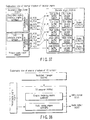
- the primary video player PRMVP includes a main video decoder MVDEC, main audio decoder MADEC, sub video decoder SVDEC, sub audio decoder SADEC, and sub-picture decoder SPDEC.
- the secondary video player SCDVP the main audio decoder MADEC, sub video decoder SVDEC, and sub audio decoder SADEC are commonly used as those in the primary video player PRMVP.
- an advanced element presentation engine AEPEN and advanced subtitle player ASBPL will also be described later.
- This primary video set PRMVS includes its management information, one or more enhanced video object files EVOB, and time map files TMAP, and uses a common filename for each pair.
- Primary Video Set is a container format of Primary Audio Video.
- the data structure of Primary Video Set is in conformity to Advanced VTS which consists of Video Title Set Information (VTSI), Time Map (TMAP) and Primary Enhanced Video Object (P-EVOB).
- VTSI Video Title Set Information
- TMAP Time Map
- P-EVOB Primary Enhanced Video Object
- Primary Video Set shall be played back by the Primary Video Player.
- the primary video set PRMVS contains a format of a primary audio video PRMAV.
- the primary video set PRMVS consists of advanced video title set information ADVTSI, time maps TMAP, and primary enhanced video object P-EVOB, and the like.
- the primary video set PRMVS shall be played back by the primary video player PRMVP.
- the primary video set PRMVS mainly means main video data recorded on the information storage medium DISC.
- the data type of this primary video set PRMVS consists of a primary audio video PRMAV, and a main video MANVD, main audio MANAD, and sub-picture SUBPT mean the same information as video information, audio information, and sub-picture information of the conventional DVD-Video and the standard content STDCT in this embodiment.
- the advanced content ADVCT in this embodiment can newly present a maximum of two frames at the same time. That is, a sub video SUBVD is defined as video information that can be played back simultaneously with the main video MANVD. Likewise, a sub audio SUBAD that can be output simultaneously with the main audio MANAD is newly defined.
- Secondary Video Set is used for substitution of Main Video/Main Audio streams to the corresponding streams in Primary Video Set (Substitute Audio Video), substitution of Main Audio stream to the corresponding stream in Primary Video Set (Substitute Audio), or used for addition to/substitution of Primary Video Set (Secondary Audio Video).
- Secondary Video Set may be recoded on a disc, recorded in Persistent Storage or delivered from a server.
- the file for Secondary Video Set is once stored in File Cache or Persistent Storage before playback, if the data is recorded on a disc, and it is possible to be played with Primary Video Set simultaneously.
- Secondary Video Set on a disc may be directly accessed in case that Primary Video Set is not played back (i.e. it is not supplied from a disc).
- the secondary video set SCDVS is used as a substitution for the main audio MANAD in the primary video set PRMVS, and is also used as additional information or substitute information of the primary video set PRMVS.
- This embodiment is not limited to this.
- the secondary video set SCDVS may be used as a substitution for a main audio MANAD of a substitute audio SBTAD or as an addition (superimposed presentation) or substitution for a secondary audio video SCDAV.
- the content of the secondary video set SCDVS can be downloaded from the aforementioned network server NTSRV via the network, or can be recorded and used in the persistent storage PRSTR, or can be recorded in advance on the information storage medium DISC of the embodiment of the invention.
- the secondary video set file SCDVS is once stored in the file cache FLCCH (data cache DTCCH) or the persistent storage PRSTR, and is then played back from the file cache or persistent storage PRSTR.
- the information of the secondary video set SCDVS can be played back simultaneously with some data of the primary video set PRMVS.
- the primary video set PRMVS recorded on the information storage medium DISC can be directly accessed and presented, but the secondary video set SCDVS recorded on the information storage medium DISC in this embodiment cannot be directly played back.
- information in the primary video set PRMVS is recorded in the aforementioned persistent storage PRSTR, and can be directly played back from the persistent storage PRSTR. More specifically, when the secondary video set SCDVS is recorded on the network server NTSRV, whole of the secondary video set SCDVS are once stored in the file cache FLCCH (data cache DTCCH) or the persistent storage PRSTR, and are then played back.
- This embodiment is not limited to this.
- a part of the secondary video set SCDVS recorded on the network server NTSRV is once stored in the streaming buffer within the range in which the streaming buffer does not overflow, as needed, and can be played back from there.
- Secondary Video Set can carry three types of Presentation Objects, Substitute Audio Video, Substitute Audio and Secondary Audio Video.
- Secondary Video Set may be provided from Disc, Network Server, Persistent Storage or File Cache in a player.
- the data structure of Secondary Video Set is a simplified and modified structure of Advanced VTS. It consists of Time Map (TMAP) with attribute information and Secondary Enhanced Video Object (S-EVOB). Secondary Video Set shall be played back by the Secondary Video Player.
- TMAP Time Map
- S-EVOB Secondary Enhanced Video Object
- the secondary video set SCDVS can carry three different types of presentation objects, i.e., a substitute audio video SBTAV, a substitute audio SBTAD, and secondary audio video SCDAV.
- the secondary video set SCDVS may be provided from the information storage medium DISC, network server NTSRV, persistent storage PRSTR, file cache FLCCH, or the like.
- the data structure of the secondary video set SCDVS is a simplified and partially modified structure of the advanced video title set ADVTS.
- the secondary video set SCDVS consists of time map TMAP and secondary enhanced video object S-EVOB.
- the secondary video set SCDVS shall be played back by the secondary video player SCDVP,
- the secondary video set SCDVS indicates data which is obtained by reading information from the persistent storage PRSTR or via the network, i.e., from a location other than the information storage medium DISC in this embodiment, and presenting the read information by partially substituting for the primary video set PRMVS described above. That is, the main audio decoder MADEC shown in FIG. 10 is common to that of the primary video player PRMVP and the secondary video player SCDVP.
- the main audio decoder MADEC in the secondary video player SCDVP When the content of the secondary video set SCDVS is to be played back using the main audio decoder MADEC in the secondary video player SCDVP, the sub audio SUBAD of the primary video set PRMVS is not played back by the primary video player PRMVP, and is output after it is substituted by data of the secondary video set SCDVS.
- the secondary video set SCDVS consists of three different types of objects, i.e., the substitute audio video SBTAV, substitute audio SBTAD, and secondary audio video SCDAV.
- a main audio MANAD in the substitute audio SBTAD is basically used when it substitutes for the main audio MANAD in the primary video set PRMVS.
- the substitute audio video SBTAV consists of the main video MANDV and the main audio MANAD.
- the substitute audio SBTAD consists of one main audio stream MANAD. For example, when the main audio MANAD recorded in advance on the information storage medium DISC as the primary video set PRMVS records Japanese and English in correspondence with video information of the main video MANVD, the main audio MANAD can only present Japanese or English audio information upon presentation to the user.
- this embodiment can attain as follows. That is, for a user who speaks Chinese as the native language, Chinese audio information recorded in the network server NTSRV is downloaded via the network, and audio information upon playing back the main video MANVD of the primary video set PRMVS can be output instead of presenting the audio information in Japanese or English while it is substituted by Chinese as the main audio MANAD of the secondary video set SCDVS.
- the sub audio SUBAD of the secondary video set SCDVS can be used when audio information synchronized with the window of the sub video SUBVD of the secondary audio video SCDAV is to be presented upon presentation on two windows (e.g., when comment information of a director is simultaneously presented to be superposed on the main audio MANAD which is output in synchronism with the main video MANVD of the primary video set PRMVS described above).
- Secondary Audio Video contains zero or one Sub Video stream and zero to eight Sub Audio streams. This is used for addition to Primary Video Set or substitution of Sub Video stream and Sub Audio stream in Primary Video Set.
- the secondary audio video SCDAV contains zero or one sub video SUBVD and zero to eight sub audio SUBAD.
- the secondary audio video SCDAV is used to be superimposed on (in addition to) the primary video set PRMVS.
- the secondary audio video SCDAV can also be used as a substitution for the sub video SUBVD and sub audio SUBAD in the primary video set PRMVS.
- Secondary Audio Video replaces Sub Video and Sub Audio presentations of Primary Audio Video. It may consist of Sub Video stream with/without Sub Audio stream or Sub Audio stream only. While being played back one of presentation stream in Secondary Audio Video, it is prohibited to be played Sub Video stream and Sub Audio stream in Primary Audio Video.
- the container format of Secondary Audio Video is Secondary Video Set.
- the secondary audio video SCDAV replaces the sub video SUBVD and sub audio SUBAD in the primary video set PRMVS.
- the secondary audio video SCDAV has the following cases.
- the sub video SUBVD and sub audio SUBAD in the primary audio video PRMAV cannot be played back.
- the secondary audio video SCDAV is included in the secondary video set SCDVS.
- An Advanced Application consists of one Manifest file, Markup file(s) (including content/style/timing/layout information), Script file(s), Image file (s) (JPEG/PNG/MNG/Capture Image Format), Effect Audio file(s) (LPCM wrapped by WAV), Font file(s) (Open Type) and others.
- a Manifest file gives information for display layout, an initial Markup file to be executed, Script file(s) and resources in the Advanced Application.
- the advanced application ADAPL in FIG. 10 consists of information such as a markup file MRKUP, script file SCRPT, still picture IMAGE, effect audio file EFTAD, font file FONT, and others. As described above, these pieces of information of the advanced application ADAPL are used once they are stored in the file cache. Information related with downloading to the file cache FLCCH (data cache DTCCH) is recorded in a manifest file MNFST (to be described later). Also, information of the download timing and the like of the advanced application ADAPL is described in resource information RESRCI in the playlist PLLST. In this embodiment, the manifest file MNFST also contains information related with loading of the markup file MRKUP information executed initially, information required upon loading information recorded in the script file SCRPT onto the file cache FLCCH (data cache DTCCH), and the like.
- Advanced Application provides three functions. The first is to control entire presentation behavior of Advanced Content. The next is to realize graphical presentation, such as menu buttons, over the video presentation. The last is to control effect audio playback.
- Advanced Navigation files of Advanced Application such as Manifest, Script and Markup, define the behavior of Advanced Application.
- Advanced Element files are used for graphical and audio presentation.
- the advanced application ADAPL provides the following three functions.
- the first function is a control function (e.g., jump control between different frames) for presentation behavior of the advanced content ADVCT.
- the second function is a function of realizing graphical presentation of menu buttons and the like.
- the third function is an effect audio playback control function.
- An advanced navigation file ADVNV contains a manifest MNFST, script file SCRPT, markup file MRKUP, and the like to implement the advanced application ADAPL.
- Information in an advanced element file ADVEL is related with a still picture IMAGE, font file FONT, and the like, and is used as presentation icons and presentation audio upon graphical presentation and audio presentation of the second function.
- An advanced subtitle ADSBT is also used after it is stored in the file cache FLCCH (data cache DTCCH) as in the advanced application ADAPL.
- Information of the advanced subtitle ADSBT can be fetched from the information storage medium DISC or persistent storage PRSTR, or via the network.
- the advanced subtitle ADSBT in this embodiment basically contains a substituted explanatory title or telop for a conventional video information or images such as pictographic characters, still pictures, or the like.
- substitution of the explanatory title it is basically formed based on text other than the images, and can also be presented by changing the font file FONT.
- Such advanced subtitles ADSBT can be added by downloading them from the network server NTSRV.
- a new explanatory title or a comment for a given video information can be output while playing back the main video MANVD in the primary video set PRMVS stored in the information storage medium DISC.
- the following use method is available. That is, when the sub-picture SUBPT stores only Japanese and English subtitles as, for example, the subtitles in the primary video set PRMVS, the user who speaks Chinese as the native language downloads a Chinese subtitle as the advanced subtitle ADSBT from the network server NTSRV via the network, and presents the downloaded subtitle.
- the data type in this case is set as the type of markup file MRKUPS for the advanced subtitle ADSBT or font file FONT.
- Advanced Subtitle is used for subtitle synchronized with video, which may be substitution of the Sub-picture data. It consists of one Manifest file for Advanced Subtitle, Markup file(s) for Advanced Subtitle (including content/style/timing/layout information), Font file(s) and Image file(s).
- the Markup file for Advanced Subtitle is a subset of Markup for Advanced Application.
- the advanced subtitle ADSBT can be used as a subtitle (explanatory title or the like) which is presented in synchronism with the main video MANVD of the primary video set PRMVS.
- the advanced subtitle ADSBT can also be used as simultaneous presentation (additional presentation processing) for the sub-picture SUBPT in the primary video set PRMVS or as a substitute for the sub-picture SUBPT of the primary video set PRMVS.
- the advanced subtitle ADSBT consists of one manifest file MNFSTS for the advanced subtitle ADSBT, markup file(s) MRKUPS for the advanced subtitle ADSBT, font file(s) FONTS and image file(s) IMAGES.
- the markup file MRKUPS for the advanced subtitle ADSBT exists as a subset of the markup file MRKUP of the advanced application ADAPL.
- Advanced Subtitle provides subtitling feature.
- Advanced Content has two means for subtitling. The one is by using with Sub-picture stream in Primary Audio Video as well as Sub-picture function of Standard Content. The other is by using with Advanced Subtitle. Both means shall not be used at the same time.
- Advanced Subtitle is a subset of Advanced Application.
- the advanced content ADVCT has two means for a subtitle.
- the subtitle is used as a sub-picture stream in the primary audio PRMAV as in the sub-picture function of the standard content STDCT.
- the subtitle is used as the advanced subtitle ADSBT. Both means shall not be used in both the purposes at the same time.
- the advanced subtitle ADSBT is a subset of the advanced application ADAPL.
- Advanced Stream is a data format of package files containing one or more Advanced Content files except for Primary Video Set.
- Advanced Stream is multiplexed into Primary Enhanced Video Object Set (P-EVOBS) and delivered to File Cache with P-EVOBS data supplying to Primary Video Player.
- P-EVOBS Primary Enhanced Video Object Set
- An advanced stream is a data format of package files containing one or more advanced content files ADVCT except for the primary video set PRMVS.
- the advanced stream is recorded to be multiplexed in a primary enhanced video object set P-EVOBS, and is delivered to the file cache FLCCH (data cache DTCCH).
- This primary enhanced video object set P-EVOBS undergoes playback processing by the primary video player PRMVP.
- These files which are recorded to be multiplexed in the primary enhanced video object set P-EVOBS are mandatory for playback of the advanced content ADVCT, and should be stored on the information storage medium DISC of this embodiment to have a file structure.
- Advanced Navigation files shall be located as files or archived in package file. Advanced Navigation files are read and interpreted for Advanced Content playback. Playlist, which is Advanced Navigation file for startup, shall be located on "ADV_OBJ" directory. Advanced Navigation files may be multiplexed in P-EVOB or archived in package file which is multiplexed in P-EVOB.
- Files related with the advanced navigation ADVNV are used in interrupt processing upon playback of the advanced content ADVCT.
- Primary Audio Video can provide several presentation streams, Main Video, Main Audio, Sub Video, Sub Audio and Sub-picture. A player can simultaneously play Sub Video and Sub Audio, in addition to Main Video and Main Audio.
- Primary Audio Video shall be exclusively provided from Disc.
- the container format of Primary Audio Video is Primary Video Set. Possible combination of video and audio presentation is limited by the condition between Primary Audio Video and other Presentation Object which is carried by Secondary Video Set.
- Primary Audio Video can also carry various kinds of data files which may be used by Advanced Application, Advanced Subtitle and others. The container stream for these files is called Advanced Stream.
- the primary audio video PRMAV is composed of streams containing a main video MANVD, main audio MANAD, sub video SUBVD, sub audio SUBAD, and sub-picture SUBPT.
- the information playback apparatus can simultaneously play back the sub video SUBVD and sub audio SUBAD, in addition to the main video MANVD and main audio MANAD.
- the primary audio video PRMAV shall be recorded in the information storage medium DISC or the persistent storage PRSTR.
- the primary audio video PRMAV is included as a part of the primary video set PRMVS. Possible combination of video and audio presentation is limited by the condition between the primary audio video PRMAV and the secondary video set SDCVS.
- the primary audio video PRMAV can also carry various kinds of data files which may be used by the advanced application ADAPL, advanced subtitle ADSBT, and others. The stream contained in these files are called an advanced stream.
- Substitute Audio replaces the Main Audio presentation of Primary Audio Video. It shall consist of Main Audio stream only. While being played Substitute Audio, it is prohibited to be played back Main Audio in Primary Video Set.
- the container format of Substitute Audio is Secondary Video Set. If Secondary Video Set includes Substitute Audio Video, then Secondary Video Set can not contain Substitute Audio.
- the substitute audio SBTAD replaces the main audio MANAD presentation of the primary audio video PRMAV.
- This substitute audio SBTAD shall consists of a main audio MANAD stream only. Wile being played the substitute audio SBTAD, it is prohibited to be played back the main audio MANAD in the primary video set PRMVS.
- the substitute audio SBTAD is contained in the secondary video set SCDVS.
- P-EVOB Primary Enhanced Video Object
- Primary Enhanced Video Object (P-EVOB) for Advanced Content is the data stream which carries presentation data of Primary Video Set.
- Primary Enhanced Video Object for Advanced Content is just referred as Primary Enhanced Video Object or P-EVOB.
- Primary Enhanced Video Object complies with Program Stream prescribed in "The system part of the MPEG-2 standard (ISO/IEC 13818-1)". Types of presentation data of Primary Video Set are Main Video, Main Audio, Sub Video, Sub Audio and Sub-picture. Advanced Stream is also multiplexed into P-EVOB.
- Time Map (TMAP) for Primary Video Set specifies entry points for each Primary Enhanced Video Object Unit (P-EVOBU).
- Access Unit for Primary Video Set is based on access unit of Main Video as well as traditional Video Object (VOB) structure.
- the offset information for Sub Video and Sub Audio is given by Synchronous Information (SYNCI) as well as Main Audio and Sub-picture.
- Advanced Stream is used for supplying various kinds of Advanced Content files to the File Cache without any interruption of Primary Video Set playback.
- the demux module in the Primary Video Player distributes Advanced Stream Pack (ADV_PCK) to the File Cache Manager in the Navigation Manager.
- ADV_PCK Advanced Stream Pack
- the primary enhanced video object P-EVOB for the advanced content ADVCT is the data stream which carries presentation data of the primary video set PRMVS.
- the main video MANVD, main audio MANAD, sub video SUBVD, sub audio SUBAD, and sub-picture SUBPT are included.
- a navigation pack NV_PCK exists as in the existing DVD and the standard content STDCT, and an advanced stream pack that records the advanced stream exists.
- offset information to the sub video SUBVD and sub audio SUBAD is recorded in synchronous information SYNCI as in the main audio MANAD and sub-picture SUBPT.
- FIG. 11 shows the file structure when various object streams shown in FIG. 10 are recorded on the information storage medium DISC.
- an advanced content directory ADVCT is allocated immediately under the root directory of the information storage medium DISC, and all files are recorded in that directory.
- a playlist file PLLST that records information related with playback exists under the advanced content directory ADVCT.
- an advanced application directory ADAPL that records information related with the advanced application
- a primary video set directory PRMVS that records information related with the primary video set
- SCDVS secondary video set directory SCDVS that records information related with the secondary video set
- an advanced subtitle directory ADSBT that records information related with the advanced subtitle
- an advanced navigation directory ADVNV that records management information related with the advanced application
- an advanced element directory ADVEL that records information related with various advanced elements (object information and the like) use in the advanced application.
- the advanced navigation directory ADVNV includes a manifest file MNFST related with a manifest which records the relationship among various kinds of management information used in the advanced application and information lists required for network downloading together, a markup file MRKUP which records markup data related with page layouts and the like, a script file SCRPT which records script commands.
- the advanced element directory ADVEL includes a still picture file IMAGE which records still pictures, an effect audio file EFTAD which records effect audio data, a font file FONT which records font information, and other file OTHER.
- a primary audio video directory PRMAV exists under the primary video set directory PRMVS.
- This directory includes a video title set information file ADVTSI which records attribute information and management information related with the enhanced video objects of the primary audio video, a time map file PTMAP of the primary video set which records time map information used to convert time information of the primary video set into address information, and a primary enhanced video object file P-EVOB which records the primary enhanced video objects.
- a substitute audio directory SBTAD and secondary audio video directory SCDAV exist under the secondary video set directory SCDVS.
- a time map file STMAP of the secondary video set which records time map information used to convert time information of the secondary video set into address information
- a secondary enhanced video object file S-EVOB which records the secondary enhanced video objects exist.
- the time map file STMAP used to convert time information of the secondary video set into address information, and the secondary enhanced video object file S-EVOB can be stored.
- an advanced navigation directory ADVNV which records management information related with the advanced subtitle, and an advanced element directory ADVEL as element information of the advanced subtitle exist.
- the advanced navigation directory ADVNV includes a manifest file MNFSTS of the advanced subtitle, and a markup file MRKUPS of the advanced subtitle.
- the manifest file MNFSTS of the advanced subtitle records the relationship among various kinds of management information related with the advanced subtitle and information required for network downloading.
- the markup file MRKUPS of the advanced subtitle records markup information used to designate the presentation position of the advanced subtitle on the screen and the like.
- the advanced element directory ADVEL includes a font file FONTS of the advanced subtitle which records font information of the advanced subtitle.
- Directory for Advanced Content may exist only under the "ADV_OBJ” directory. Any files of Advanced Navigation, Advanced Element and Secondary Video Set can reside at this directory.
- the name of this directory shall be consisting of character set defined in Files for Advanced Content below.
- the total number of "ADV_OBJ" sub-directories (excluding "ADV_OBJ” directory) shall be less than 512.
- Directory depth shall be equal or less than 8 from "ADV_OBJ" directory.
- Sub-directories exist under the advanced content directory ADVCT.
- the depth of layers of the sub-directories is eight layers or less, and the total number of sub-directories shall be less than 512 in this embodiment. If the directories are too deep, or if the total number of sub-directories is too large, accessibility drops. Therefore, in this embodiment, high-speed access is assured by limiting the number of layers and that of directories.
- the total number of files under the "ADV_OBJ" directory shall be limited to 512 ⁇ 2047, and the total number of files in each directory shall be less than 2048.
- Character code set "A to Z a to z 0 to 9 SP ! $ &'( ) + , - . ; @ _" (20h, 21h, 24h to 29h, 2Bh to 2Eh, 30h to 39h, 3Bh, 3Dh, 40h to 5Ah, 5Fh, 61h to 7Ah in ISO 8859-1) are used for filename.
- the length of the filename shall be equal to or less than 255 characters. For use of the filename, following rule shall be applied.
- the total number of files that can be recorded under the advanced content directory ADVCT shall be limited to be 512 ⁇ 2047, and the total number of files that can be recorded in each directory is shall be less than 2048.
- the filename adopts a structure in which a dot ".” is allocated after each filename, and an extension is allocated after the dot ".”.
- the advanced content directory ADVCT is recorded directly under the root directory of the information storage medium, and the playlist file PLLST is recorded directly under this advanced content directory ADVCT.
- a Playlist file shall reside under "ADV_OBJ” directory with having the filename "VPLST%%%.XPL” for a player which connects with a display device, or the filename "APLST&&&.XPL” for a player which doesn't connect with a display device, in case of Category 2 disc and Category 3 disc. If the Playlist file is necessary to be read in the startup sequence, the Playlist file shall reside directly under "ADV_OBJ" directory (its sub-directories are not included), and "%%%” and “&&&” are described by the value "000” to "999". In this case, the Playlist file which has the maximum number shall be read initially in the startup sequence.
- a plurality of playlist files PLLST can be recorded on the information storage medium DISC.
- the playlist file PLLST two different types of playlist files PLLST can be set.
- the filename of a playlist file PLLST which is directly accessed by the information playback apparatus upon playback is set to be "VPLIST%%%.XML", and that of a playlist file PLLST which is not directly accessed by the information playback apparatus is set to be "APLIST&&&.XML”. Note that "%%%” and "&&&” store numerals ranging from 000 to 999.
- the filename for Video Title Set Information shall be "HVA00001.VTI”.
- the filename for Enhanced Video Object shall have extension of "EVO".
- the filename of Time Map Information for Contiguous Block shall have same body in filename as that of a corresponding EVOB, with extension of "MAP".
- Time Map Information for Interleaved Block shall have same body in filename as that of corresponding EVOBs, with extension of "MAP".
- the filename of Time Map Information for Standard VTS referred in Advanced Content shall be "HVSO@@@@.MAP”.
- the advanced video title set information file ADVTSI shown in FIG. 11 shall have a filename of "HVA00001.VTI”.
- the extension of the filename of the primary enhanced video object file P-EVOB and that of the secondary enhanced video object file S-EVOB shall be "EVO”.
- the extension of the filename of the time map file PTMAP of the primary video set and that of the time map file STMAP of the secondary video set shall be "MAP" .
- the number of files of the primary video set time map files PTMAP and secondary video set time map files STMAP shall be limited to 999 or fewer. By specifying the number of time map files, speeding up of access control to the enhanced object EVOB is guaranteed.
- FIGS. 12, 13A and 13B show the data structure of an advanced content and explanations of effects and the like.
- Advanced Content realizes more interactivity in addition to the extension of audio and video realized by Standard Content.
- Advanced Content consists of followings.
- Playlist gives playback information among presentation objects as shown in FIG. 12. For instance, to play back Primary Video Set, a player reads a TMAP file by using URI described in the Playlist, interprets an EVOBI referred by the TMAP and access appropriate P-EVOB defined in the EVOBI. To present Advanced Application, a player reads a Manifest file by using URI described in the Playlist, and starts to present an initial Markup file described in the Manifest file after storing resource elements (including the initial file).
- the advanced content ADVCT which further extends the audio and video expression format implemented by the standard content STDCT and realizes interactivity.
- the advanced content ADVCT consists of the playlist PLLST, the primary video set PRMVS, secondary video set SCDVS, advanced application ADAPL, and advanced subtitle ADSBT shown in FIG. 10.
- the playlist PLLST shown in FIG. 12 records information related with the playback methods of various kinds of object information, and these pieces of information are recorded as one playlist file PLLST under the advanced content directory ADVCT, as shown in FIG. 11.
- a Playlist file is described by XML and one or more Playlist file are located on a disc.
- a player interprets initially a Playlist file to play back Advanced Content.
- the Playlist file consists of following information.
- the playlist PLLST or the playlist file PLLST which records the playlist PLLST is described using XML, and one or more playlist files PLLST are recorded in the information storage medium DISC.
- the information storage medium DISC which records the advanced content ADVCT that belongs to category 2 or category 3 in this embodiment the information playback apparatus searches for the playlist file PLLST immediately after insertion of the information storage medium DISC.
- the playlist file PLLST includes the following information.
- Object mapping information OBMAPI is set as playback information related with objects such as the primary video set PRMVS, secondary video set SCDVS, advanced application ADAPL, advanced subtitle ADSBT, and the like.
- the playback timing of each object data is described in the form of mapping on a title timeline to be described later.
- the locations of the primary video set PRMVS and secondary video set SCDVS are designated with reference to a location (directory or URL) where their time map file PTMAP or time map file STMAP exists.
- the advanced application ADAPL and advanced subtitle ADSBT are determined by designating the manifest file MNFST corresponding to these objects or its location (directory or URL).
- This embodiment allows to have a plurality of audio streams and sub-picture streams.
- information indicating what number of stream data is to be presented is described.
- the information indicating what number of stream is used is described as a track number.
- video track numbers for video streams, sub video track numbers for sub video streams, audio track numbers for audio streams, sub audio track numbers for sub audio streams, subtitle track numbers for subtitle streams, and application track numbers for application streams are set.
- track navigation information TRNAVI the user can immediately determine a favorite language.
- Resource information RESRCI indicates timing information such as a time limit of transfer of a resource file into the file cache and the like. This resource information also describes reference timings of resource files and the like in the advanced application ADAPL.
- Playback sequence information PLSQI describes information, which allows the user to easily execute jump processing to a given chapter position, such as chapter information in a single title and the like. This playback sequence information PLSQI is presented as a time designation point on a title timeline TMLE.
- System configuration information records structural information required to constitute a system such as a stream buffer size that represents the data size required upon storing data in the file cache via the Internet, and the like.
- Scheduled control information SCHECI records schedule indicating pause positions (timings) and event starting positions (timings) on the title timeline TMLE.
- FIG. 12 shows the data reference method to respective objects by the playlist PLLST.
- the playlist PLLST specifies the playback range of the primary enhanced object P-EVOB as time information on the timeline.
- the time map information PTMAP of the primary video set shall be referred to first as a tool used to convert the designated time information into the address position on the information storage medium DISC.
- the playback range of secondary enhanced video object S-EVOB is also described as time information on the playlist PLLST.
- the time map information STMAP of the secondary video set SCDVS is referred to first.
- Data of the advanced application ADAPL shall be stored on the file cache before they are used by the information playback apparatus, as shown in FIG. 10.
- the manifest file MNFST shall be referred to from the playlist PLLST to transfer various resource files described in the manifest file MNFST (the storage locations and resource filenames of the resource files are also described in the manifest file MNFST) onto the file cache FLCCH (data cache DTCCH).
- the file cache FLCCH data cache DTCCH
- data transfer to the file cache FLCCH data cache DTCCH
- the representation position and timing of the advanced subtitle ADSBT on the screen can be detected, and the font file FONTS in the advanced subtitle ADSBT can be utilized when the advanced subtitle ADSBT information is presented on the screen.
- the time map information PTMAP shall be referred to and access processing to primary enhanced video object P-EVOB defined by the enhanced video object information EVOBI shall be executed.
- Point contents and effects in a data structure in advanced contents ADVCT according to this embodiment will now be described with reference to FIGS. 13A and 13B. There are the following eight point contents and effects.
- FIG. 1 shows an example of the network route from the network server NTSRV to the information recording and playback apparatus 1, which goes through the router 11 in the home via the optical cable 12 to attain data connection via a wireless LAN in the home.
- this embodiment is not limited to this.
- this embodiment may have another network route.
- FIG. 1 illustrates a personal computer as the information recording and playback apparatus 1.
- this embodiment is not limited to this.
- a single home recorder or a single home player may be set as the information recording and playback apparatus.
- data may be directly displayed on the monitor by a wire without using the wireless LAN.
- the network server NTSRV shown in FIG. 1 stores information of the secondary video set SCDVS, advanced application ADAPL, and advanced subtitle ADSBT shown in FIG. 10 in advance, and these pieces of information can be delivered to the home via the optical cable 12.
- Various data sent via the optical cable 12 are transferred to the information recording and playback apparatus 1 in the form of wireless data 17 via the router 11 in the home.
- the router 11 comprises the wireless LAN controller 7-2, data manager 9, and network controller 8.
- the network controller 8 controls data updating processing with the network server NTSRV, and the wireless LAN controller 7-2 transfers data to the home wireless LAN.
- the data manager 9 controls such data transfer processing.
- the information playback apparatus of this embodiment incorporates the advanced content playback unit ADVPL which plays back the advanced content ADVCT, the standard content playback unit STDPL which plays back the standard content STDCT, and the recording and playback processor 4 which performs video recording on the recordable information storage medium DISC or the hard disk device 6 and can play back data from there.
- These playback units and the recording and playback processor 4 are organically controlled by the main CPU 5. As shown in FIG. 1, information is played back or recorded from or on the information storage medium DISC in the information recording and playback unit 2.
- media to be played back by the advanced content playback unit ADVPL are premised on playback of information from the information recording and playback unit 2 or the persistent storage drive (fixed or portable flash memory drive) 3.
- data recorded on the network server NTSRV can also be played back.
- data saved in the network server NTSRV go through the optical cable 12, go through the wireless LAN controller 7-2 in the router 11 under the network control in the router 11 to be transferred in the form of wireless data 17, and are then transferred to the advanced content playback unit ADVPL via the wireless LAN controller 7-1.
- Video information to be played back by the advanced content playback unit ADVPL can be displayed on the wide-screen TV monitor 15 from the wireless LAN controller 7-1 in the form of wireless data 18 when it can be displayed on the display 13 or when a user request of presentation on a wider screen is detected.
- the wide-screen TV monitor 15 incorporates the video processor 24, video display unit 21, and wireless LAN controller 7-3.
- the wireless data 18 is received by the wireless LAN controller 7-3, then undergoes video processing by the video processor 24, and is displayed on the wide-screen TV monitor 15 via the video display unit 21. At the same time, audio data is output via the loudspeakers 16-1 and 16-2. The user can make operations on a window (menu window or the like) displayed on the display 13 using the keyboard 14.
- the advanced content playback unit ADVPL comprises the following five logical functional modules.
- Data Access Manager is responsible to exchange various kind of data among data sources and internal modules of Advanced Content Player.
- a data access manager DAMNG is used to manage data exchange between the external data source where the advanced content ADVCT is recorded, and modules in the advanced content playback unit ADVPL.
- the data source of the advanced content ADVCT the persistent storage PRSTR, network server NTSRV, and information storage medium DISC are premised, and the data access manager DAMNG exchanges information from them.
- Various kinds of information of the advanced content ADVCT are exchanged with a navigation manager NVMNG (to be described later), the data cache DTCCH, and a presentation engine PRSEN via the data access manager DAMNG.
- Data Cache is temporal data storage for Advanced Content playback.
- the data cache DTCCH is used as a temporal data storage (temporary data save location) in the advanced content playback unit ADVPL.
- Navigation Manager is responsible to control all functional modules of Advanced Content player in accordance with descriptions in Advanced Application. Navigation Manager is also responsible to control user interface devices, such as remote controller or front panel of a player. Received user interface device events are handled in Navigation Manager.
- the navigation manager NVMNG controls all functional modules of the advanced content playback unit ADVPL in accordance with the description contents of the advanced application ADAPL.
- This navigation manager NVMNG also makes control in response to a user operation UOPE.
- the user operation UOPE is generated based on key in on a front panel of the information playback apparatus, that on a remote controller, and the like. Information received from the user operation UOPE generated in this way is processed by the navigation manager NVMNG.
- Presentation Engine is responsible for playback of presentation materials, such as Advanced Element of Advanced Application, Advanced Subtitle, Primary Video Set and Secondary Video set.
- the presentation engine PRSEN performs presentation playback of the advanced content ADVCT.
- AV Renderer is responsible to composite video inputs and mix audio inputs from other modules and output to external devices such as speakers and display.
- An AV renderer AVRND executes composition processing of video information and audio information input from other modules, and externally outputs composite information to the loudspeakers 16-1 and 16-2, the wide-screen TV monitor 15, and the like.
- the audio information used in this case may be either independent stream information or audio information obtained by mixing the sub audio SUBAD and main audio MANAD.
- the preview of the movie can be timely conducted to the users so as to create an opportunity to call them to a movie theater.
- the commercials commercial 44, independent window 32 for a commercial, and telop commercial 43
- sponsor charges are collected from commercial sponsors like in normal TV broadcasting, thus holding down the sales prices of the information storage media to the users.
- the concept of insertion of commercials into video information has been popularly proposed conventionally.
- the latest commercial information is read from the network server NTSRV and the latest commercial information is presented to be linked with showing of the main title 31 recorded on the information storage medium DISC. This point is a large technical feature in this embodiment.
- the latest preview 41 and commercial information are sequentially updated and saved in the network server NTSRV shown in FIG. 1, and are downloaded via the network in synchronism with the playback timing of the main title 31 recorded in the information storage medium DISC.
- the relationship between respective objects shown in FIGS. 15A and 15B and those shown in FIG. 10 will be described below.
- the main title 31 includes the main video MANVD and main audio MANAD of the primary audio video PRMAV in the primary video set PRMVS.
- the preview 41, commercial 44, and independent window 32 for a commercial are also recorded as the sub video SUBVD and sub audio SUBAD of the primary audio video PRMAV in the primary video set PRMVS in the information storage medium DISC.
- these pieces of information become too old to be presented.
- these pieces of information are substituted by the sub video SUBVD and sub audio SUBAD of the secondary audio video SCDAV in the secondary video set SCDVS saved in the network server NTSRV, and are presented as the commercial 44 or the independent window 32 for a commercial.
- the commercial 44 which is recorded in advance on the information storage medium DISC can be recorded as the main video MANVD and main audio MANAD of the primary audio video PRMAV in the primary video set PRMVS as another embodiment.
- information of the preview 41 is recorded in the information storage medium DISC, it is recorded in the sub video SUBVD and sub audio SUBAD of the primary audio video PRMAV in the primary video set PRMVS or in the main video MANVD and main audio MANAD of the primary audio video PRMAV.
- information of the preview 41 is recorded in the information storage medium DISC, it is recorded in the sub video SUBVD and sub audio SUBAD of the primary audio video PRMAV in the primary video set PRMVS or in the main video MANVD and main audio MANAD of the primary audio video PRMAV.
- that information is downloaded from the network server NTSRV as information of the sub video SUBVD and sub audio SUBAD in the secondary audio video SCDAV in the secondary video set SCDVS, and the downloaded information is presented.
- the commercial 44, information of the independent window 32 for a commercial or telop commercial 43, and the preview 41 can always be presented to the user as the latest ones, thus improving the PR effects.
- FIG. 15A(a) when the information storage medium DISC is inserted into the information recording and playback apparatus 1, the necessity explanatory video information 42 of detailed navigation is presented first. If the user does not feel the necessity of detailed navigation, he or she ignores it. However, if the user wants to see an explanation of the method of playing back the advanced content ADVCT on this information storage medium DISC, he or she inputs necessity of detailed navigation to present directions of use of detailed navigation (not shown). In case of FIG. 15B(c), how to use a help key (to be described later) is explained in the necessity explanatory video information 42 of detailed navigation, and a help icon is presented all the time. As a result, the user can designate the help icon when needed to ask for an explanation of the use method.
- FIG. 15A(a) the aforementioned commercial 44 is inserted in the middle of presentation of the main title 31 like in the broadcast TV screen, and the presentation method and timing of the commercial 44 are the same as those of commercials normally presented on broadcast reception TVs.
- the preview 41 of a forthcoming movie of the content provider of the information storage medium DISC is presented after completion of presentation of the main title 31.
- the latest commercial 43 is presented to be superimposed on presentation of the main title 31 in the form of a telop.
- this embodiment utilizes the advanced subtitle ADSBT with the aid of network downloading. This point is a large technical feature in this embodiment. That is, at an early timing, the telop commercial 43 is presented in the form of a telop (running text information) in the sub-picture SUBPT of the primary audio video PRMAV in the primary video set PRMVS.
- FIG. 15B(c) A video content presentation example in FIG. 15B(c) will be explained below.
- the preview 41 of a movie to be screened in a movie theater is presented immediately after the necessity explanatory video information 42 of detailed navigation, and the main title 31 is presented after presentation of the preview 41.
- the independent window 32 for a different commercial is presented in addition to the main title 31, and the help icon 33 is presented at the same time.
- the contents of the main title 31 are recorded in advance in the information storage medium DISC as the main video MANVD and main audio MANAD of the primary audio video PRMAV in the primary video set PRMVS.
- the independent window 32 for a different commercial is recorded as the sub video SUBVD and sub audio SUBAD of the primary audio video PRMAV in the primary video set PRMVS in the information storage medium DISC. This information is presented to the user at an early timing.
- the independent window 32 for a different commercial can present an updated video information in this embodiment.
- information of the independent window 32 for the latest commercial is saved in the network server NTSRV as the sub video SUBVD and sub audio SUBAD of the secondary audio video SCDAV in the secondary video set SCDAV, and is downloaded as needed via the network, thus presenting the latest information to the user.
- the help icon 33 includes the still picture file IMAGE and script file SCRPT of the advanced application ADAPL.
- FIG. 16 shows an example of the presentation window at point ⁇ when the main title 31, the independent window 32 for a commercial, and the help icon 33 are displayed at the same time in FIG. 15B(c).
- the main title 31 is presented on the upper left area in FIG. 16, the independent window 32 for a commercial is presented on the upper right area, and the help icon 33 is presented on the lower area. New effects as a result of the technical devices according to this embodiment shown in the window of FIG. 16 and FIG. 2 will be described below.
- the help icon 33 in FIG. 16 corresponds to 1.4) "PC-like help” and 1.5) "How to use guide of menu, etc.,” as the practical new effects of this embodiment.
- Picture data of the help icon 33 on this window exists as the still picture file IMAGE of the advanced application ADAPL, and its information is stored in the advanced element directory ADVEL in the advanced application directory ADAPL under the advanced content directory ADVCT in the information storage medium DISC shown in FIG. 11.
- Command processing related with such movement is recorded in the script file SCRPT in the advanced application ADAPL, i.e., it is stored in the script file SCRPT under the advanced navigation directory ADVNV in the advanced application directory ADAPL under the advanced content directory ADVCT in FIG. 11.
- Information used to designate the still picture of the help icon 33 and an area defined by the script file is recorded in the markup file MRKUP shown in FIG. 11, and associating information (related information required to download data) among these pieces of information is recorded in the manifest file MNFST.
- a plurality of pieces of information such as the stop button 34, play button 35, FR (fast-rewinding) button 36, pause button 37, FF (fast-forwarding) button 38, and the like shown in FIG.
- FIG. 16 which corresponds to 3.1) "Simultaneously present a plurality of pieces of video information by means of multi-windows” and 3.4) "Simultaneously present scrolling text to be superimposed on video information” of 3] "Simultaneously present independent information to be superimposed on video information during playback" of the new effects as a result of the technical devices according to this embodiment shown in FIG. 2 will be described below.
- the sub video SUBVD and sub audio SUBAD can be presented simultaneously with the main video MANVD and main audio MANAD.
- the main title 31 in FIG. 16 corresponds to the main video MANVD and main audio MANAD in the primary video set PRMVS
- the independent window 32 for a commercial on the right side corresponds to the sub video SUBVD and sub audio SUBAD, so that the two windows can be displayed at the same time.
- the independent window 32 for a commercial on the right side in FIG. 16 can be presented by substituting it by the sub video SUBVD and sub audio SUBAD in the secondary video set SCDVS.
- the sub video SUBVD and sub audio SUBAD in the primary audio video of the primary video set PRMVS are recorded in advance in the information storage medium DISC, and the sub video SUBVD and sub audio SUBAD in the secondary video set SCDVS to be updated are recorded in the network server NTSRV.
- the independent window 32 for a commercial recorded in advance in the information storage medium DISC is presented.
- the sub video SUBVD and sub audio SUBAD in the secondary video set SCDVS recorded in the network server NTSRV are downloaded via the network and are presented to update the independent window 32 for a commercial to the latest video information.
- the independent window 32 for the latest commercial can always be presented to the user, thus improving the commercial effect of a sponsor. Therefore, by collecting a large amount of commercial charge from the sponsor, the price of the information storage medium DISC to be sold can be hold down, thus promoting prevalence of the information storage medium DISC in this embodiment.
- a telop text message 39 shown in FIG. 16 can be presented to be superimposed on the main title 31.
- the latest information such as news, weather forecast, and the like is saved on the network server NTSRV in the form of the advanced subtitle ADSBT, and is presented while being downloaded via the network as needed, thus greatly improving the user's convenience.
- text font information of the telop text message at that time can be stored in the font file FONTS in the advanced element directory ADVEL in the advanced subtitle directory ADSBT, as shown in FIG. 11.
- Information about the size and presentation position on the main title 31 of this telop text message 39 can be recorded in the markup file MRKUPS of the advanced subtitle ADSBT in the advanced navigation directory ADVNV under the advanced subtitle directory ADSBT in FIG. 11.
- the playlist PLLST in this embodiment is recorded in the playlist file PLLST located immediately under the advanced content directory ADVCT in the information storage medium DISC or persistent storage PRSTR, as shown in FIG. 11, and records management information related with playback of the advanced content ADVCT.
- the playlist PLLST records information such as playback sequence information PLSQI, object mapping information OBMAPI, resource information RESRCI, and the like.
- the playback sequence information PLSQI records information of each title in the advanced content ADVCT present in the information storage medium DISC, persistent storage PRSTR, or network server NTSRV, and division position information of chapters that divide video information in the title.
- the object mapping information OBMAPI manages the presentation timings and positions on the screen of respective objects of each title. Each title is set with a title timeline TMLE, and the presentation start and end timings of each object can be set using time information on that title timeline TMLE.
- the resource information RESRCI records information of the prior storage timing of each object information to be stored in the data cache DTCCH (file cache FLCCH) before it is presented on the screen for each title. For example, the resource information RESRCI records information such as a loading start time LDSTTM for starting loading onto the data cache DTCCH (file cache FLCCH), a use valid period VALPRD in the data cache DTCCH (file cache FLCCH), and the like.
- a set of pictures (e.g., one show program) which is displayed for a user is managed as a title in the playlist PLLST.
- a title which is displayed first when playing back/displaying advanced contents ADVCT based on the playlist PLLST can be defined as a first play title FRPLTT.
- a playlist application resource PLAPRS can be transferred to the file cache FLCCH during playback of the first play title FRPLTT as shown in FIG. 70, and a download time of the resource required for playback of a title #1 and subsequent titles can be shortened. It is also possible to set the playlist PLLST in such a manner that the first play title FRPLTT cannot be set based on a judgment by a content provider.
- management information which designates an object to be presented and its presentation location on the screen is hierarchized into two levels, i.e., the playlist PLLST, and the markup file MRKUP and the markup file MRKUPS in the advanced subtitle ADSBT (via the manifest file MNFST and the manifest file MNFSTS in the advanced subtitle ADSBT), and the presentation timing of an object to be presented in the playlist PLLST is set in synchronism with the title timeline TMLE.
- the presentation timing of an object to be presented is set in synchronism with the title timeline TMLE similarly in the markup file MRKUP or the markup file MRKUPS of the advanced subtitle ADSBT.
- FIG. 16 the main title 31, the independent window 32 for a commercial, and various icon buttons on the lower area are presented on the window.
- the main video MANVD in the primary video set PRMVS is presented on the upper left area of the window as the main title 31, and its presentation timing is described in the playlist PLLST.
- the presentation timing of this main title 31 is set in synchronism with the title timeline TMLE.
- the presentation location and timing of the independent window 32 for a commercial recorded as, e.g., the sub video SUBVD are also described in the aforementioned same playlist PLLST.
- the presentation timing of this the independent window 32 for a commercial is also designated in synchronism with the title timeline TMLE.
- the window from the help icon 33 to the FF button 38 in, e.g., FIG. 16 is recorded as the sub-picture SUBPT in a video object, and command information executed upon depression of each button from the help icon 33 to the FF button 38 is similarly recorded as highlight information HLI in a navigation pack in the video object.
- a plurality of pieces of command information corresponding to window information from the help icon 33 to the FF button 38 are grouped together as the advanced application ADAPL, and only the presentation timing and the presentation location on the window of the grouped advanced application ADAPL are designated on the playlist PLLST.
- the playlist PLLST describes only the filename and file saving location of the manifest file MNFST (manifest file MNFSTS) that records information required to download data related with the advanced application ADAPL and advanced subtitle ADSBT.
- the plurality of pieces of window information themselves from the help icon 33 to the FF button 38 in FIG. 16 are saved in the advanced element directory ADVEL as still picture files IMAGE (see FIG. 11).
- Information which manages the locations on the window and presentation timings of respective still pictures IMAGE from the help icon 33 to the FF button 38 in FIG. 16 is recorded in the markup file MRKUP.
- This information is recorded in the markup file MRKUP in the advanced navigation directory ADVNV in FIG. 11.
- Each control information (command information) to be executed upon pressing of each of buttons from the help icon 33 to the FF button 38 is saved in the script file SCRPT in the advanced navigation directory ADVNV in FIG. 11, and the filenames and file saving locations of these script files SCRPT are described in the markup file MRKUP (and manifest file MNFST).
- the markup file MRKUP, script file SCRPT, and still picture file IMAGE are recorded in the information storage medium DISC.
- this embodiment is not limited to this, and these files may be saved in the network server NTSRV or persistent storage PRSTR.
- the playlist PLLST makes designation with respect to the markup file MRKUP via the manifest file MNFST.
- Video information and commands (scripts) of various icons and buttons, and command information are stored in independent files compared to the conventional DVD-Video in which they are stored in a video object, and undergo middle management using the markup file MRKUP.
- This structure can greatly facilitate edit and change processing of the content producer.
- the playlist PLLST designates the filename and file saving location of the markup file MRKUPS of the advanced subtitle via the manifest file MNFSTS of the advanced subtitle (see FIG. 11).
- the markup file MRKUPS of the advanced subtitle is recorded not only in the information storage medium DISC but it can also be saved on the network server NTSRV or persistent storage PRSTR in this embodiment.
- Playlist is used for two purposes of Advanced Content playback. The one is for initial system configuration of a player. The other is for definition of how to play plural kind of presentation objects of Advanced Content. Playlist consists of following configuration information for Advanced Content playback.
- the first use purpose is to define the initial system structure (advance settings of the required memory area in the data cache DTCCH and the like) in the information playback apparatus 1.
- the second use purpose is to define the playback methods of plural kind of presentation objects in the advanced content ADVCT.
- the playlist PLLST has the following configuration information.
- Resource Information On Object Mapping Information in Playlist, there is information element which specifies when resource files are needed for Advanced Application playback or Advanced Subtitle playback. They are called Resource Information. There are two types of Resource Information. The one is the Resource Information which is associated to Application. The other is the Resource Information which is associated to Title.
- the resource information RESRCI records information indicating which timings resource files that record information needed to play back the advanced application ADAPL and advanced subtitle ADSBT are to be stored on the data cache DTCCH (file cache FLCCH) in the object mapping information OBMAPI in the playlist PLLST.
- the first type of resource information RESRCI is that related with the advanced application ADAPL, and the second type is that related with the advanced subtitle ADSBT.
- Each Object Mapping Information of Presentation Object on Title Timeline can contain Track Number Assignment information in Playlist. Track is to enhance selectable presentation streams through the different Presentation Objects in Advanced Content. For example, it is possible to select to play main audio stream in Substitute Audio in addition to the selection of main audio streams in Primary Audio Video. There are five types of Tracks. They are main video, main audio, subtitle, sub video and sub audio.
- the object mapping information OBMAPI corresponding to various objects to be presented on the title timeline TMLE shown in FIG. 17 includes track number assignment information defined in the playlist PLLST.
- track numbers are defined to select various streams corresponding to different objects.
- audio information to be presented to the user can be selected from a plurality of pieces of audio information (audio streams) by designating the track number.
- the substitute audio SBTAD includes the main audio MANAD, which often includes a plurality of audio streams having different contents.
- OBMAPI track number assignment
- an audio stream to be presented to the user can be selected from a plurality of audio streams.
- audio information which is recorded as the main audio MANAD in the substitute audio SBTAD can be output to be superposed on the main audio MANAD in the primary audio video PRMAV.
- the main audio MANAD in the primary audio video PRMAV which is to be superposed upon output, often has a plurality of pieces of audio information (audio streams) having different contents.
- an audio stream to be presented to the user can be selected from a plurality of audio streams by designating an audio track number which is defined in advance in the object mapping information OBMAPI (track number assignment).
- mapping of the advanced subtitle ADBST on the timeline TMLE can be independently defined on the object mapping information OBMAPI irrespective of, e.g., the mapping situation of the primary audio video PRMAV and the like.
- a part corresponding to the primary audio video PRMAV is indicated by a single band as P-EVOB.
- this band includes main video MANVD tracks, main audio MANAD tracks, sub video SUBVD tracks, sub audio SUBAD tracks, and sub-picture SUBPT tracks.
- Each object includes a plurality of tracks, and one track (stream) is selected and presented upon presentation.
- the secondary video set SCDVS is indicated by bands as S-EVOB, each of which includes sub video SUBVD tracks and sub audio SUBAD tracks. Of these tracks, one track (one stream) is selected and presented. If the primary audio video PRMAV alone is mapped on the object mapping information OBMAPI on the title timeline TMLE, the following rules are specified in this embodiment to assure easy playback control processing.
- Time code for Title Timeline is 'Time code'. It is based on non-drop frame and described as HH:MM:SS:FF.
- the life period of all presentation objects shall be mapped and described by Time code values onto Title Timeline.
- Presentation end timing of audio presentation may not be exactly same as Time code timing.
- the end timing of audio presentation shall be rounded up to Video System Time Unit (VSTU) timing from the last audio sample presentation timing. This rule is to avoid overlapping of audio presentation objects on the time on Title Timeline.
- VSTU Video System Time Unit
- Video presentation timing for 60 Hz region even if presentation object is 1/24 frequency, it shall be mapped at 1/60 VSTU timing.
- video presentation timing of Primary Audio Video or Secondary Audio Video it shall have 3:2 pull-down information in elementary stream for 60 Hz region, so presentation timing on the Title Timeline is derived from this information for video presentation.
- presentation timing on the Title Timeline is derived from this information for video presentation.
- graphical presentation timing of Advanced Application or Advanced Subtitle with 1/24 frequency it shall follow graphic output timing model in this specification.
- the title timeline TMLE in this embodiment has time units synchronized with the presentation timings of frames and fields of video information, and the time on the title timeline TMLE is set based on the count value of time units.
- This point is a large technical feature in this embodiment.
- interlaced display has 60 fields and 30 frames per second. Therefore, the duration of a minimum time unit on the title timeline TMLE is divided into 60 per second, and the time on the title timeline TMLE is set based on the count value of the time units.
- the title timeline TMLE is equally divided into 50 units per second, and the time and timing on the title timeline TMLE is set based on a count value with reference to the equally divided one interval (1/50 sec).
- the reference duration (minimum time unit) of the title timeline TMLE is set in synchronism with the presentation timings of fields and frames of video information, synchronized timing presentation control among respective pieces of video information can be facilitated, and time settings with the highest precision within a practically significant range can be made.
- the time units are set in synchronism with fields and frames of video information, i.e., one time unit in the 60-Hz system is 1/60 sec, and one time unit in the 50-Hz system is 1/50 sec.
- the switching timings presentation start or end timing or switching timing to another frame
- the presentation periods of every presentation objects are set in synchronism with the time units (1/60 sec or 1/50 sec) on the title timeline TMLE.
- the frame interval of audio information is often different from the frame or field interval of the video information.
- the presentation period (presentation start and end times) is set based on timings which are rounded out in correspondence with the unit interval on the title timeline TMLE. In this way, presentation outputs of a plurality of audio objects can be prevented from overlapping on the title timeline TMLE.
- the presentation timing of the advanced application ADAPL information is different from the unit interval of the title timeline TMLE (for example, when the advanced application ADAPL has 24 frames per second and its presentation period is expressed on the title timeline of the 60-Hz system)
- Advanced Application (ADV APP) consists of one or plural Markup(s) files which can have one-directional or bi-directional links each other, script files which shares a name space belonging to the Advanced Application, and Advanced Element files which are used by the Markup(s) and Script(s).
- Valid period of each Markup file in one Advanced Application is the same as the valid period of Advanced Application which is mapped on Title Timeline. During the presentation of one Advanced Application, active Markup is always only one. An active Markup jumps one to another. The valid period one Application is divided to three major periods; pre-script period, Markup presentation period and post-script period.
- the valid period of the advanced application ADAPL on the title timeline TMLE can be divided into three periods i.e., a pre-script period, markup presentation period, and post-script period.
- the markup presentation period represents a period in which objects of the advanced application ADAPL are presented in correspondence with time units of the title timeline TMLE based on information of the markup file MRKUP of the advanced application ADAPL.
- the pre-script period is used as a preparation period of presenting the window of the advanced application ADAPL prior to the markup presentation period.
- the post-script period is set immediately after the markup presentation period, and is used as an end period (e.g., a period used in release processing of memory resources) immediately after presentation of respective presentation objects of the advanced application ADAPL.
- the pre-script period can be used as a control processing period (e.g., to clear the score of a game given to the user) prior to presentation of the advanced application ADAPL.
- the post-script period can be used in command processing (e.g., point-up processing of the score of a game of the user) immediately after playback of the advanced application ADAPL.
- sync attribute of application segment in Playlist The information of sync type is defined by sync attribute of application segment in Playlist.
- Soft-Sync Application and Hard-Sync Application the behavior to Title Timeline differs at the time of execution preparation of application.
- Execution preparation of application is resource loading and other startup process (such as script global code execution).
- Resource loading is reading resource from storage (DISC, Persistent Storage and Network Server) and store to the File Cache. Every application shall not execute before all resource loading is finished.
- a plurality of markup files MRKUP are set in correspondence with different windows during the markup presentation period, and are switched in correspondence with switching of the window (the switching processing is executed based on a method described in the script file SCRPT).
- the start timing of a markup page on the title timeline TMLE during the presentation period of the markup file MRKUP matches the presentation start timing of the one to be presented first of the plurality of markup files MRKUP
- the end timing of a markup page on the title timeline TMLE matches the presentation end timing of the last one of the plurality of markup files MRKUP.
- Soft-Sync Application gives preference to seamless proceeding of Title Timeline over execution preparation. If 'auto Run' attribute is 'true' and application is selected then resources will load into the File Cache by soft synced mechanism. Soft-Sync Application is activated after that all resources loading into the File Cache. The resource which cannot read without Title Timeline stopping shall not be defined as a resource of Soft-Sync Application. In case, Title Timeline jump into the valid period of Soft-Sync Application, the Application may not execute. And also, during the varied period of Soft-Sync Application, playback mode changes trick play to normal playback, the Application may not run.
- the first jump method is soft sync jump (jump model) of markup pages.
- the time flow of the title timeline TMLE does not stop on the window to be presented to the user. That is, the switching timing of the markup page matches that of unit position (time) of the aforementioned title timeline TMLE, and the end timing of the previous markup page matches the start timing of the next markup page (presentation window of the advanced application ADAPL) on the title timeline TMLE.
- a time period required to end the previous markup page e.g., a time period used to release the assigned memory space in the data cache DTCCH
- the presentation preparation period of the next markup page is set to overlap the presentation period of the previous markup page.
- the soft sync jump of the markup page can be used for the advanced application ADAPL or advanced subtitle ADSBT synchronized with the title timeline TMLE.
- Hard-Sync Application gives preference to execution preparation over seamless progress of Title Timeline.
- Hard-Sync Application is activated after all resources loading into the File Cache. If 'auto Run' attribute is 'true' and application is selected then resources will load into the File Cache by hard synced mechanism.
- Hard-Sync Application holds the Title Timeline during the resource loading and execution preparation of application.
- this embodiment also specifies hard sync jump of markup pages.
- a time change on the title timeline TMLE occurs on the window to be presented to the user (count-up on the title timeline TMLE is made), and the window of the primary audio video PRMAV changes in synchronism with such change.
- the window of the corresponding primary audio video PRMAV stops, and a still window is presented to the user.
- the hard sync jump of markup pages occurs in this embodiment, a period in which the time on the title timeline TMLE stops (the count value on the title timeline TMLE is fixed) is formed.
- the end timing time of a markup page before apparent switching on the title timeline TMLE matches the playback start timing of the next markup page on the title timeline TMLE.
- the end period of the previously presented markup page does not overlap the preparation period required to present the next markup page.
- the time flow on the title timeline TMLE temporarily stops during the jump period, and presentation of, e.g., the primary audio video PRMAV or the like is temporarily stopped.
- the hard sync jump processing of markup pages is used in only the advanced application ADAPL in this embodiment. In this way, the window change of the advanced subtitle ADSBT can be made without stopping the time change on the title timeline TMLE (without stopping, e.g., the primary audio video PRMAV) upon switching the presentation window of the advanced subtitle ADSBT.
- the windows of the advanced application ADAPL, advanced subtitle ADSBT, and the like designated by the markup page are switched for respective frames in this embodiment.
- interlaced display the number of frames per second is different from that of fields per second.
- switching processing can be done at the same timing irrespective of interlaced or progressive display, thus facilitating control. That is, preparation of a window required for the next frame is started at the immediately preceding frame presentation timing. The preparation is completed until the presentation timing of the next frame, and the window is displayed in synchronism with the presentation timing of the next frame.
- the interval of the time units on the title timeline is 1/60 sec.
- the frame presentation timing is set at an interval of two units (the boundary position of two units) of the title timeline TMLE. Therefore, when a window is to be presented at the n-th count value on the title timeline TMLE, presentation preparation of the next frame starts at the (n-2)-th timing two counts before, and a prepared graphic frame (a window that presents various windows related with the advanced application ADAPL will be referred to as a graphic frame in this embodiment) is presented at the timing of the n-th count on the title timeline TMLE.
- the graphic frame is prepared and presented for respective frames in this way, the continuously switched graphic frames can be presented to the user, thus preventing the user from feeling odd.
- Title element in Playlist file contains a list of element, called by Presentation Clip element, which describes Object Mapping Information of the segment of Presentation Object.
- PrimaryAudioVideoClip element, SubstituteAudioVideoClip element, SecondaryAudioVideoClip element and SubstituteAudioClip element, AdvancedSubtitleSegment element ApplicationSegment element respectively describe Object Mapping Information of Primary Audio Video, Secondary Audio Video, Substitute Audio, Advanced Subtitle of Advanced Subtitle of Advanced Subtitle Profile markup and Advanced Application of Markup and Script.
- Presentation Object shall be referred by the URI of the index information file as described in Figure 18.
- the URI shall be described by rules.
- Object Mapping Information of a Presentation Object in a Title Timeline is a valid period of the Presentation Object in a Title Timeline.
- the valid period on Title Timeline of a Presentation Object is determined by start time and end time on Title Timeline.
- the start time and end time on Title Timeline are described by titleTimeBegin attribute and titleTimeEnd attribute of each Presentation Clip element, respectively.
- the starting position of the Presentation Object is described by clipTimeBegin attribute of each Presentation Clip element.
- the Presentation Object shall be present at the starting position, described by clipTimeBegin.
- the clipTimeBegin attribute value shall be the presentation start time (PTS) of Coded-Frame of the video streams in P-EVOB (S-EVOB).
- Attribute values of titleTimeBegin, titleTimeEnd and clipTimeBegin, and the duration time of the Presentation Object shall satisfy the following relation:
- the valid period of PrimaryAudioVideoClip element shall not overlap each other on Title Timeline.
- the valid period of SubstituteAudioClip element shall not overlap each other on Title Timeline.
- the valid period of SubstituteAudioVideoClip element shall not overlap each other on Title Timeline.
- the object mapping information OBMAPI described in the playlist PLLST shown in FIG. 17 describes list information of elements called presentation clip elements.
- FIG. 18 shows the relationship between various presentation clip elements and corresponding object names to be presented and used.
- a primary audio video clip element PRAVCP described in the object mapping information OBMAPI explains object mapping information OBMAPI related with the primary audio video PRMAV.
- a secondary audio video clip element SCAVCP explains object mapping information OBMAPI of the secondary audio video SCDAV.
- a substitute audio clip element SBADCP explains object mapping information OBMAPI of the substitute audio SBTAD.
- An advanced subtitle segment element ADSTSG in the object mapping information OBMAPI describes information related with the markup file MRKUPS in the advanced subtitle ADSBT.
- An application segment element ADAPSG in the object mapping information OBMAPI describes information related with the markup file MRKUP and script file SCRPT of the advanced application ADAPL.
- the object mapping information OBMAPI related with each object to be played back and used describes information related with the valid period (including a presentation period or a preparation period and end processing period) of each object on the title timeline TMLE.
- the valid period on the title timeline TMLE is specified by the start time and end time on the title timeline TMLE.
- the start time and end time on the title timeline TMLE are specified by a titleTimeBegin attribute and titleTimeEnd attribute. That is, each clip element individually records the titleTimeBegin attribute and titleTimeEnd attribute.
- Presentation of a corresponding object begins from the time described by the titleTimeBegin attribute on the title timeline TMLE, and ends at the time described by the titleTimeEnd attribute.
- each of the primary audio video PRMAV, secondary audio video SCDAV, and substitute audio clip element SBADCP begins to be presented by clipTimeBegin which means an presentation elapsed time period calculated from a start position where each object is recorded. That is, the aforementioned titleTimeBegin attribute and titleTimeEnd attribute mean time information on the title timeline TMLE.
- clipTimeBegin means an independent time elapse in each object.
- the information playback apparatus may designate and acquire from the corresponding playlist (PLLST) various objects to be played back and used recorded in the network server (NTSRV) or persistent storage (PRSTR).
- NSRV network server
- PRSTR persistent storage
- the following relationship is set among the presentation period of each presentation object, and titleTimeBegin, titleTimeEnd, and clipTimeBegin to improve the precision of the presentation processing without producing any conflict among presentation timings.
- the presentation precision is improved by setting the following conditions.
- the time map file PTMAP of the primary video set PRMVS, the time map file STMAP of the secondary video set SCDVS, the manifest file MNFST, and the manifest file MNFSTS of the advanced subtitle ADSBT are referred to from the playlist PLLST.
- the primary audio video clip element PRAVCP describes the filename and saving location of the time map file PTMAP of the primary video set PRMVS as the filename to be referred to in the primary audio video clip element PRAVCP.
- the second audio video clip element SCAVCP describes the filename and saving location of the time map file STMAP of the secondary video set SCDVS.
- the substitute audio clip element SBADCP describes the filename and saving location of the time map file STMAP of the secondary video set SCDVS.
- the advanced subtitle segment element ADSTSG describes the filename and saving location of the manifest file MNFSTS of the advanced subtitle ADSBT.
- the application segment element ADAPSG describes the filename and saving location of the manifest file MNFST of the advanced application ADAPL.
- FIG. 19 shows the saving location designation method of the files described in respective clip elements. More specifically, when files are saved in the network server NTSRV, the address of an HTTP server or HTTPS server is designated by "http:" or "https:", as shown in FIG. 19.
- the description range of file saving location designation information (URI: Uniform Resource Identifier) described in each clip element shall be described using 1024 bytes or less.
- URI Uniform Resource Identifier
- each medium When each file is saved in the information storage medium DISC, file cache FLCCH (data cache DTCCH), or persistent storage PRSTR shown in FIG. 19, each medium shall be identified.
- each medium can be identified by adopting a path designation description method shown in FIG. 20 in respective clip elements. This point is a large technical feature in this embodiment.
- Every resource available on the disc or the network has an address that encoded by a Uniform Resource Identifier.
- URI refers to a XML file on a Disc. file:///dvddisk/ADV_OBJ/file.xmu
- the total length of URI shall be less than 1024.
- URI can refer to the resources on DVD Disc contents, File Cache, and Persistent Storages.
- the path of URI includes storage type and identifier for Persistent Storage in the following manner.
- All Advanced Navigation files (Manifest/Markup/Script) and Advanced Element files shall be loaded into File Cache by Resource Information element in Playlist, or API. All files loaded by Resource Information element shall be referred by URI of the original file location, not location in the File Cache.
- Files in archived file shall be referred by sub path of URI of archived file.
- URI of archived file shall be referred by original location, not location in file cache.
- the path 'file:///file cache/' is resolved as/temp directory in File Cache. For file cache, only application managed directory may be accessed.
- Playlist, Manifest and Markup may use relative URI reference.
- the base URI shall be derived from the URI of the original file location, if xml: base attribute is not specified. If xml: base attribute is specified, base URI is determined by rule.
- the persistent storage PRSTR two different recording media are brought into view as the persistent storage PRSTR.
- the first one is the fixed persistent storage PRSTR, and specifies only one persistent storage drive 3 in the information recording and playback apparatus 1 in this embodiment.
- the other one is the portable persistent storage PRSTR, and one or more storages (a plurality of storages are allowed) can be mounted in the information recording and playback apparatus 1 in this embodiment.
- the path designation description to a file the description method shown in FIG. 20 is specified, and the contents are described in each clip element in the playlist PLLST. That is, when a file is recorded in the information storage medium DISC, "file:///dvddisc/" is described.
- file cache FLCCH data cache DTCCH
- file:///filecache/ is described as the path designation description method.
- file:///fixed/ is described as the path designation description method.
- file:///removable/ is described as the path designation description method.
- Playlist File describes the navigation, the synchronization and the initial system configuration information for Advanced Content.
- Playlist File shall be encoded as well-formed XML.
- FIG. 21 shows an outline example of Playlist file.
- the root element of Playlist shall be Playlist element, which contains Configuration element, Media Attribute List element and Title Set element in a content of Playlist element.
- FIG. 21 shows the data structure in the playlist file PLLST that records information related with the playlist PLLST shown in FIG. 17.
- This playlist file PLLST is directly recorded in the form of the playlist file PLLST under the advanced content directory ADVCT, as shown in FIG. 11.
- the playlist file PLLST describes management information, synchronization information among respective presentation objects, and information related with the initial system structure (e.g., information related with pre-assignment of a memory space used in the data cache DTCCH or the like).
- the playlist file PLLST is described by a description method based on XML.
- FIG. 21 shows a schematic data structure in the playlist file PLLST.
- a field bounded by ⁇ Playlist[playlist]...> and ⁇ /Playlist> is called a playlist element in FIG. 21.
- configuration information CONFGI As information in the playlist element, configuration information CONFGI, media attribute information MDATRI, and title information TTINFO are described in this order.
- the allocation order of various elements in the playlist element is set in correspondence with the operation sequence before the beginning of video presentation in the advanced content playback unit ADVPL in the information recording and playback apparatus 1 shown in FIG. 1. That is, the assignment of the memory space used in the data cache DTCCH in the advanced content playback unit ADVPL shown in FIG. 14 is most necessary in the process of playback preparation. For this reason, a configuration information CONFGI element 134 is described first in the playlist element.
- a media attribute information MDATRI element 135 shall be described after the configuration information CONFGI element 134 and before a title information TTINFO element 136.
- the advanced content playback unit ADVPL starts presentation processing according to the information described in the title information TTINFO element 136. Therefore, the title information TTINFO element 136 is allocated after the information required for preparations (at the last position).
- a description 131 of the first line in FIG. 21 is definition text that declares "the following sentences are described based on the XML description method", and has a structure in which information of xml attribute information XMATRI is described between " ⁇ ?xml" and "?>".
- FIG. 22 shows the information contents in the xml attribute information XMATRI in (a).
- the xml attribute information XMATRI describes information indicating whether or not another XML having a child relationship with corresponding version information of XML is referred to. Information indicating whether or not the other XML having the child relationship is referred to is described using "yes” or "no". If the other XML having the child relationship is directly referred to in this target text, "no" is described; if this XML text does not directly refer to the other XML and is present as standalone XML, "yes" is described.
- Description text in a playlist element tag that specifies the range of a playlist element describes name space definition information PLTGNM of the playlist tag and playlist attribute information PLATRI after " ⁇ Playlist", and closes with ">", thus forming the playlist element tag.
- FIG. 22 shows description information in the playlist element tag in (b).
- the number of playlist elements which exit in the playlist file PLLST is one in principle.
- a plurality of playlist elements can be described. In such case, since a plurality of playlist element tags may be described in the playlist file PLLST, the name space definition information PLTGNM of the playlist tag is described immediately after " ⁇ Playlist" so as to identify each playlist element.
- the playlist attribute information PLATRI describes an integer part value MJVERN of the advanced content version number, a decimal part value MNVERN of the advanced content version number information, and additional information (e.g., a name or the like) PLDSCI related with the playlist in the playlist element in this order.
- additional information e.g., a name or the like
- PLDSCI e.g., a name or the like
- the advanced content playback unit ADVPL in the information recording and playback apparatus 1 shown in FIG. 1 plays back the advanced content version number described in the playlist element tag first, and determines if the advanced content version number falls within the version number range supported by it.
- the advanced content playback unit ADVPL shall immediately stop the playback processing.
- the playlist attribute information PLATRI describes the information of the advanced content version number at the foremost position.
- FIGS. 23A and 23B Various kinds of information described in the playlist PLLST in this embodiment have a hierarchical structure, as shown in FIGS. 23A and 23B, and FIGS. 24A and 24B.
- a Playlist file contains a list of Title elements in the Title Set element.
- the Title Set element describes information of a set of Titles for Advanced Contents in the Playlist.
- Title Timeline is assigned for each Title.
- the duration of Title Timeline shall be described by title Duration attribute of Title element by the time Expression value.
- the duration of Title Timeline shall be greater than '00:00:00:00'.
- the total number of Title shall be less than 1000.
- Each Title element describes a set of information of a Title for Advanced Content.
- the title information TTINFO included in the playlist element is described using a title set element bounded by ⁇ TitleSet> and ⁇ /TitleSet>, as shown in (b) of FIG. 23A.
- This title set element describes information related with a title set of the advanced content ADVCT defined in the playlist PLLST.
- title set attribute information TTSTAT written in the title set element tag there are frame rate (the number of frames per second) information FRAMRT (timeBase attribute information), frequency information TKBASE (tickBase attribute information) of a tick clock used in a markup page, menu language information DEFLNG (defaultLanguage attribute information) in a default state in a title set, as shown in (d) of FIG. 23B.
- FRAMRT timeBase attribute information
- frequency information TKBASE tickBase attribute information
- DEFLNG defaultLanguage attribute information
- the additional data type of attribute value is defined.
- the frame rate is the value described by timeBase attribute of Title element.
- the non-drop frame count is calculated by:
- a value of rateValue describes the frame rate.
- tickValue describes the tick rate value in frame rate.
- the value shall be '50', or '24' if the frame rate is '50'.
- the value shall be '60', or '24' if the frame rate is '60'.
- the language code attribute value follows the following BNF scheme.
- the specificCode and specificCodeExt describes specific code and specific code extension, respectively.
- '*' specificCodeExt : [0-9A-F] [0-9A-F]
- the parentalList is space delimited list of parental data, which describes the minimum parental level to playback the title for the specified country code.
- the parentalLevel and the countryCode describe the minimum parental level and country code, respectively.
- the '*' means Not Specified country code. If '*' is used for countryCode, the parental data describes the minimum parental level for unspecified country code.
- the countryCode shall be Alpha-2 code defined in ISO-3166.
- the countrycode and'*' shall be unique in a parentalList value.
- the TitleSet element describes information of a set of Titles for Advanced Contents in the Playlist.
- the TitleSet element consists of a list of Title element, FirstPlayTitle element and a list of PlaylistApplication element. According to the document order of Title element, the Title number for Advanced Navigation shall be assigned continuously from '1'. A Title element describes information of each Title.
- the frame rate value determines the frame rate for timeExpression in the Title.
- tick clock frequency used in Markup. This value can be omitted. If the value is omitted, tick clock frequency is frame rate value.
- the attribute value consists of two-letter lowercase symbols defined in ISO-639. If there is no Application Segment in a Title matching to the Menu Language setting, the Application Segment with language of defaultLanguage shall be activated. This attribute can be omitted.
- a set of titles concerning advanced contents ADVCT in the playlist PLLST is written in the title set element.
- Each title number is set in accordance with an arrangement order of title element information TTELEM written in the title set element. That is, a title number of a title managed based on the title element information TTELEM which is written first in the title set element is 1, and a continuous number is sequentially set as a title number of a title managed based on each title element information TTELEM.
- the frameRate (the number of frames per second) FRAMRT (timeBase attribute information) shown in (d) of FIG. 23B represents a frame rate value.
- Time management in each title is carried out based on a count value (a value of FF in "HH:MM:SS:FF”) on a title timeline TMLE.
- a 50 Hz system or a 60 Hz system is set as a count frequency of a title timeline TMLE at this time based on a value of the frame rate information FRAMRT (timeBase attribute information).
- the frameRate is represented as a rate value in units of "fps" (frames per sec), and a value of "50" or "60” is selectively set as the rate value.
- tick clock frequency information TKBASE tickBase attribute information
- a frequency of a page clock set in accordance with each markup page MRKUP and a frequency of an application clock set in accordance with each advanced application ADAPL match with the tick clock frequency TKBASE.
- the tick clock frequency TKBASE can be set independently from a frequency of a media clock on a title timeline TMLE.
- a clock of frame rate (the number of frames per second) information FRAMRT (timeBase attribute information) representing a reference frequency of the title timeline TMLE for each title is referred to as a media clock.
- this embodiment is characterized in that a page clock as a clock set in accordance with each markup page MRKUP and an application clock set in accordance with each application can be set independently from the media clock.
- tick clock frequency information TKBASE (tickBase attribute information) is represented as a tickValue in units of "fps”, and one of values "24", "50” and "60” is set as the tickValue. If a value of the frame rate (the number of frames per second) information FRAMRT (timeBase attribute information) is "50", a value of "50” or “24” is set as a value of the tick clock frequency information TKBASE (tickBase attribute information). If a value of the frame rate (the number of frames per second) information FRAMRT (timeBase attribute information) is "60", a value of "60” or “24” is set as a value of the tick clock frequency information TKBASE (tickBase attribute information).
- tick clock frequency information TKBASE tickBase attribute information
- FRAMRT timeBase attribute information
- menu language information DEFLNG defaultLangulage attribute information
- a menu language is set as a profile parameter.
- an application segment APPLSG corresponding to a language set based on the menu language information DEFLNG (defaultLanguage attribute information) in a default state in the TitleSet can be executed/displayed.
- the description of the menu language information DEFLNG (defaultLanguage attribute information) in a default state in the TitleSet can be eliminated in title set attribute information TTSTAT.
- FirstPlaytitle element information FPTELE can be written first in the title set element, one or more sets of title element information TTELEM can be sequentially written, and management information concerning each title is recorded in each corresponding title element information TTELEM.
- the example of FIG. 17 has three titles, i.e., titles #1 to #3, and (b) of FIG. 23A describes title element information TTELEM related with title #1 to that related with title #3.
- this embodiment is not limited to such example, and title element information TTELEM related with one to an arbitrary number of titles can be described.
- playlist application element information PLAELE can be written after the title element information TTELEM in the title set element.
- a title timeline TMLE is set to each title corresponding to the title element information TTELEM.
- the presentation period of the title timeline TMLE of each title is described in titleDuration attribute information (time duration information TTDUR of the entire title on the title timeline TMLE) in the title element information TTELEM.
- the numbers of corresponding titles are set in accordance with the order of description of respective pieces of title element information TTELEM described in the title set element.
- the title number of a title corresponding to the title element information TTELEM described first in the title set element is set to "1".
- the number of pieces of title element information TTELEM (the number of titles defined per playlist PLLST) that can be described in the title set element is set to be 512 or less.
- Each title element information TTELEM describes object mapping information OBMAPI, resource information RESRCI, playback sequence information PLSQI, and track navigation information TRNAVI in this order.
- the object mapping information OBMAPI includes information of track number assignment information that sets stream (track) numbers in respective presentation objects.
- the object mapping information describes a list of various clip elements described using FIGS. 24A and 24B.
- the object mapping information OBMAPI describes a list related with track number assignment information which represents the setting information of track numbers in the aforementioned presentation clip elements.
- each playback object such as video information, audio information, sub-picture information, or the like can have a plurality of streams, independent tracks are related with these streams, and track numbers are set, thus identifying playback streams in each presentation object.
- the resource information RESRCI explains a list of resource elements in the title element information TTELEM.
- the track navigation information TRNAVI describes information related with a track navigation list element.
- the playback sequence information PLSQI describes information of a chapter list element indicating the head positions of chapters corresponding to divisions of the video contents in a single title.
- the arrangement order of the object mapping information OBMAPI, resource information RESRCI, playback sequence information PLSQI, and track navigation information TRNAVI in the title element information TTELEM corresponds to the processing sequence of the advanced content playback unit ADVPL in the information recording and playback apparatus 1 (see FIG. 1). That is, information of the object mapping information OBMAPI which describes the information of the advanced application ADAPL and advanced subtitle ADSBT used in a single title is described at the first location in the title element information TTELEM.
- the advanced content playback unit ADVPL recognizes the contents of the advanced application ADAPL and advanced subtitle ADSBT used in the single title first from the object mapping information OBMAPI recorded first. As has been described using FIG.
- the information of the advanced application ADAPL and advanced subtitle ADSBT shall be saved in the file cache FLCCH (data cache DTCCH) in advance prior to presentation to the user.
- the advanced content playback unit ADVPL in the information recording and playback apparatus 1 requires information related with the advanced application ADAPL and advanced subtitle ADSBT set in the title and their storage timings in the file cache FLCCH (data cache DTCCH) prior to playback.
- the advanced content playback unit ADVPL then reads the resource information RESRCI, and can detect the storage timings of the advanced application ADAPL and advanced subtitle ADSBT in the file cache FLCCH (data cache DTCCH).
- the processing of the advanced content playback unit ADVPL is facilitated. Since the playback sequence information PLSQI becomes important to allow the user to immediately move video information that he or she wants to see upon playing back the advanced content ADVCT, the playback sequence information PLSQI is allocated after the resource information RESRCI. Since the track navigation information TRNAVI is information required immediately before presentation to the user, it is described at the last location in the title element information TTELEM.
- respective pieces of information which have related description contents in the title element information TTELEM are grouped together and are described at near positions.
- group names object mapping information OBMAPI, resource information RESRCI, playback sequence information PLSQI, and track navigation information TRNAVI are assigned.
- the Title element describes information of a Title for Advanced Contents, which consists of Object Mapping Information, Track Number Assignment for elementary stream and Playback Sequence in a Title.
- Title element consists of Chapter List element, Track Navigation List element, Title Resource element and list of Presentation Clip element.
- Presentation Clip elements are Primary Audio Video Clip, Substitute Audio Video Clip, Substitute Audio Clip, Secondary Audio Video Clip, Advanced Subtitle Segment and Application Segment.
- Presentation Clip elements also describe Track Number Assignment for elementary stream.
- Track Navigation List element describes the information of Track Navigation Information in the Title.
- Title Resource element describes the information of Resource Information par Title.
- the Title number shall follow the constraints.
- the value shall be 'Original'. If the content is Interoperable Content and Title is User Defined Title, the value shall be 'User Defined'. Otherwise it shall be omitted, or 'Advanced'. The value may be omitted. The default value is 'Advanced'.
- the attribute value shall be described by time Expression.
- the end time of all Presentation Object shall be less than the duration time of Title Timeline.
- the attribute value shall be described by parental List value. This attribute can be omitted. Default value is '*: 1'.
- Player may display this name as title name. This attribute can be omitted.
- 'pan scan Or Letter box' allows both Pan-scan and Letterbox
- 'pan scan' allows only Pan-scan
- 'letterbox' allows only Letterbox for 4:3 monitor.
- the default value is 'pan scan Or Letter box'.
- FIGS. 24A and 24B show information described in the title element tag that represents the start of each title element information TTELEM in this embodiment.
- the title element tag describes ID information TTIDI of a title used to identify each title first.
- title number information TTNUM is described.
- a plurality of title element information TTELEM can be described in the title information TTINFO as shown in FIG. 24A (b).
- the title number is set in description order and is recorded in the title number information TTNUM, whereas the title element information TTELEM is described at first position in the title information TTINFO.
- the title type information is described.
- the title type information TTTYPE three types of values of type information: "Advanced”, “Original”, and "UserDefined” can be set.
- video information recorded in the advanced video recording format which enables recording, editing, and playback by a user can be utilized as part of the advanced content ADVCT.
- the video information recorded in the advanced video recording format is referred to as interoperable content.
- the title type information TTTYPE for an original title (the interoperable content in a time immediately after the recording and before the editing) with respect to the interoperable content is set to "Original".
- the title type information TTTYPE for a title in a time after a user has edited (i.e., defined by the user) with respect to the interoperable content is set to "UserDefined”.
- the title type information TTTYPE is set to "Advanced”.
- description of the title type information TTTYPE in the title attribute information TTATRI can be omitted.
- the value of "Advanced” as a default is automatically set.
- selectable attribute information is described. This selectable attribute information indicates selection information as to whether or not the designated title can be operated in response to user operations. For example, in case of the system shown in FIG.
- the user may oppose the wide-screen TV monitor 15 and may perform screen operations (e.g., fast-forwarding FF or first-rewinding FR) using a remote controller (not shown).
- screen operations e.g., fast-forwarding FF or first-rewinding FR
- the selectable attribute information indicates whether or not the title is processed in response to user operations.
- a word of either "true” or "false” is described. For example, when the video contents of the corresponding title, i.e., the commercial 44 and preview 41 are not allowed to be fast-forwarded by the user, the entire corresponding title may be set to inhibit user operations.
- the selectable attribute information is set to "false” to inhibit user operations with respect to the corresponding title, thus rejecting requests such as fast-forwarding, fast-rewinding, and the like by the user.
- this value is "true”
- user operations are supported, and processing (user operations) such as fast-forwarding, fast-rewinding, and the like can be executed in response to user's requests.
- the default value of the selectable attribute information is set to "true”.
- the title playback processing method of the advanced content playback unit ADVPL (see FIG. 1) largely changes depending on the selectable attribute information.
- a description of the selectable attribute information can be omitted in the title element tag. When the description of this information is omitted, it is set as a default value "true”.
- the frame rate information (timebase attribute information) in the title set element, shown in FIG. 23B(d), represents the number of frames per sec of video information to be presented on the screen, and corresponds to a reference time interval of the title timeline TMLE.
- two systems i.e., the 50-Hz system (50 counts are counted up per sec on the title timeline TMLE) and 60-Hz system (60 counts are counted up per sec on the title timeline TMLE) can be set as the title timeline TMLE.
- the 50-Hz system 50 counts are counted up per sec on the title timeline TMLE
- 60-Hz system 60 counts are counted up per sec on the title timeline TMLE
- the clock according to a title timeline TMLE is referred to as a media clock, which is differently identified from a page clock as the clock set for each markup MRKUP.
- an application clock which is defined in execution of the advanced application ADAPL specified in the markup MRKUP.
- the page clock and the application clock have the same reference frequency. This frequency is referred to a frequency of a tick clock.
- the media clock according to the title timeline TMLE and the tick clock can be independently set. This point is a large technical feature in this embodiment.
- tickBase as shown in FIG. 23B(d).
- the value of the frequency information TKBASE for the tick clock used in the markup MRKUP must be set as a value less than the value described as the information of the frame rate (a number of frames per second).
- the timeBaseDivisor attribute information shown in (b) in FIG. 24A is indicative of a damping ratio TICKBD with respect to an application tick clock of a processing clock in the advanced application manager. That is, the information means a damping ratio with respect to the application tick (tick clock frequency information TKBASE) when the advanced application manager ADAMNG shown in FIG. 28 executes processing.
- processing of the advanced application manager ADAMNG advances one step every time a clock of the application tick (an application clock) is incremented by 3 counts.
- the processing clock of the advanced application manager ADAMNG is delayed to be behind the tick clock (the application clock) in this manner, the processing can be executed without applying a CPU power to the advanced application ADAPL which operates at a low speed, thereby suppressing a calorific value in the advanced content playback unit ADVPL.
- Time duration information TTDUR of the entire title on the title timeline TMLE represents the duration of the entire title timeline TMLE on the corresponding title.
- the time duration information TTDUR of the entire title on the title timeline TMLE is described using the total number of counts of the 50-Hz system or 60-Hz system corresponding to the frame rate (number of frames per sec) information. For example, when the presentation time of the corresponding entire title is n sec, a value "60n" or "50n” is set in the total number of counts as the time duration information TTDUR of the entire title on the title timeline TMLE.
- the end times of all playback objects shall be smaller than the time duration information TTDUR of the entire title on the title timeline TMLE.
- time duration information TTDUR of the entire title on the title timeline TMLE depends on the time unit interval on the title timeline TMLE, it is allocated behind the frame rate information, thus assuring easy data processing of the advanced content playback unit ADVPL.
- Next parental level information indicates a parental level of the corresponding title to be played back.
- a numeral equal to or smaller than 8 is entered as the parental level value.
- this information may be omitted in the title element tag.
- a default value of this information is set to "1".
- Information "onEnd” that represents the number information of a title to be presented after completion of the current title describes information of the title number related with the next title to be played back after completion of the current title.
- the window is kept paused (to present the end window) after completion of the title.
- a default value of this information is set to "0".
- a description of this information can be omitted in the title element tag, and in such case, that information is set to "0" as a default value.
- Title name information "displayName" to be displayed by the information recording and playback apparatus 1 describes the name of the corresponding title in a text format. Information described in this information can be displayed as the title name of the information recording and playback apparatus 1. Also, this information can be omitted in the title element tag.
- the alternativeSDDisplayMode attribute information indicative of allowed display mode information SDDISP in a 4:3 TV monitor represents a display mode which is allowed when outputting data to the 4:3 TV monitor when playing back a corresponding title.
- the value is set to "panscanOrLetterbox”
- outputting data in either a pan-scan mode and a letter box mode is allowed at the time of outputting data to the 4:3 TV monitor.
- outputting data in the pan-scan mode alone is allowed at the time of outputting data to the 4:3 TV monitor.
- the value is set to "letterbox”
- the letter box display mode alone is allowed at the time of outputting data to the 4:3 TV monitor.
- the information recording and playback apparatus 1 When data is output to the 4:3 TV monitor, the information recording and playback apparatus 1 must forcibly display/output data in an allowed display mode. Although the description of the allowed display mode information SDDISP in the 4:3 TV monitor can be eliminated, "panscanOrLetterbox" as a default value is automatically set in such a case.
- the column of additional information (description) related with a title describes additional information related with the title in a text format. A description of this information can be omitted in the title element tag.
- the title name information (displayName) to be displayed by the information recording and playback apparatus 1 and additional information (description) related with the title are not essential upon executing the playback processing of the advanced content playback unit ADVPL. Therefore, these pieces of information are recorded at the last location in title attribute information TTATRI.
- the file storage position URI description format XMBASE corresponding to the title element indicates a description format (XML_BASE) for a URI (uniform resource identifier) complying to XML.
- Information in the title element information TTELEM includes the object mapping information OBMAPI that describes a presentation clip element list, the resource information RESRCI that records a title resource element, the playback sequence information PLSQI that describes a chapter list element, and the track navigation information TRNAVI that describes a track list navigation list element, as shown in (c) of FIG. 23A.
- the presentation clip elements describe the primary audio video clip PRAVCP, substitute audio video clip SBAVCP, substitute audio clip SBADCP, secondary audio video clip SCAVCP, advanced subtitle segment ADSTSG, and application segment ADAPSG, as shown in (c) of FIG. 24B.
- the presentation clip elements are described in the object mapping information OBMAPI in each title.
- the presentation clip elements are described as a part of track number assignment information in correspondence with each elementary stream.
- the playback sequence information PLSQI is described as a list of chapter list elements, as shown in (d) of FIG. 24B.
- Title element in Playlist file contains a list of Chapter elements in a Chapter List element.
- Chapter List element describes chapter structure, called by Playback Sequence Information.
- the Chapter List element consists of a list of Chapter element. According to the document order of Chapter element in Chapter List, the Chapter number for Advanced Navigation shall be assigned continuously from '1'.
- the total number of chapters in a Title shall be less than 2000.
- the total number of chapters in a Playlist shall be less than 100000.
- the title Time Begin attribute of Chapter element describes the chapter start position by the time value on the Title Timeline.
- Chapter end position is given as the next chapter start position or the end of the Title Timeline for the last chapter.
- the chapter start position in a Title Timeline shall be monotonically increased according to the chapter number, and be less than or equals to the duration of Title Timeline.
- the chapter start position of chapter 1 shall be 00:00:00:00.
- the chapter list element in the playback sequence information PLSQI describes a chapter structure in the title.
- the chapter list element is described as a list of chapter elements (respective lines starting with a ⁇ Chapter titleTimingBegin> tag, as shown in (d) of FIG. 24B).
- the number of a chapter element described first in the chapter list is set to "1", and the chapter numbers are set in accordance with the order of description of respective chapter elements.
- the number of chapters in one chapter list (title) is set to be 512 or less, thus preventing diffusion in the processing of the advanced content playback unit ADVPL.
- Time information indicating the start position of each chapter is presented in the form of "HH : MM : SS : FF" which respectively represent hours, minutes, seconds, and the number of frames.
- the end position of this chapter is expressed by the start position of the next chapter.
- the end position of the last chapter is interpreted as the last value (count value) on the title timeline TMLE.
- the time information (count value) indicating the start position of each chapter on the title timeline TMLE must be set to monotonously increase in correspondence with increments of chapter number. With this setting, sequential jump access control according to the playback order of chapters is facilitated.
- the advanced content playback unit ADVPL (see FIG. 1) can present the corresponding chapter name information on the wide-screen TV monitor 15 as a name of each chapter. The corresponding chapter name information can omit a description in the chapter element tag.
- FIG. 25 shows the data flow in the advanced content playback unit ADVPL of various playback presentation objects defined in FIG. 10 described previously.
- FIG. 14 shows the structure in the advanced content playback unit ADVPL shown in FIG. 1.
- An information storage medium DISC, persistent storage PRSTR, and network server NTSRV in FIG. 25 respectively match the corresponding ones in FIG. 14.
- a streaming buffer STRBUF and file cache FLCCH in FIG. 25 will be generally called as a data cache DTCCH, which corresponds to the data cache DTCCH in FIG. 14.
- a primary video player PRMVP, secondary video player SCDVP, main video decoder MVDEC, main audio decoder MADEC, sub-picture decoder SPDEC, sub video decoder SVDEC, sub audio decoder SADEC, advanced application presentation engine AAPEN, and advanced subtitle player ASBPL in FIG. 25 are included in the presentation engine PRSEN in FIG.
- the navigation manager NVMNG in FIG. 14 manages the flow of various playback presentation object data in the advanced content playback unit ADVPL, and the data access manager DAMNG in FIG. 14 mediates data between the storage locations of various advanced contents ADVCT and the advanced content playback unit ADVPL.
- data of the primary video set PRMVS must be recorded in the information storage medium DISC.
- the primary video set PRMVS can also handle high-resolution video information. Therefore, the data transfer rate of the primary video set PRMVS may become very high.
- various information storage media such as an SD card SDCD, USB memory USBM, USBHDD, NAS, and the like are assumed as the persistent storage PRSTR, and some information storage media used as the persistent storage PRSTR may have a low data transfer rate.
- the primary video set PRMVS that can also handle high-resolution video information is allowed to be recorded in only the information storage medium DISC, continuous presentation to the user can be guaranteed without interrupting high-resolution data of the primary video set PRMVS.
- the primary video set read out from the information storage medium DISC in this way is transferred into the primary video player PRMVP.
- a main video MANVD, main audio MANAD, sub video SUBVD, sub audio SUBAD, and sub-picture SUBPT are multiplexed and recorded as packs in 2048-byte units.
- These packs are demultiplexed upon playback, and undergo decode processing in the main video decoder MVDEC, main audio decoder MADEC, sub video decoder SVDEC, sub audio decoder SADEC, and sub-picture decoder SPDEC.
- This embodiment allows two different playback methods of objects of the secondary video set SCDVS, i.e., a direct playback route from the information storage medium DISC or persistent storage PRSTR, and a method of playing back objects from the data cache DTCCH after they are temporarily stored in the data cache DTCCH.
- the secondary video set SCDVS recorded in the information storage medium DISC or persistent storage PRSTR is directly transferred to the secondary video player SCDVP, and undergoes decode processing by the main audio decoder MADEC, sub video decoder SVDEC, or sub audio decoder SADEC.
- the secondary video set SCDVS is temporarily recorded in the data cache DTCCH irrespective of its storage location (i.e., the information storage medium DISC, persistent storage PRSTR, or network server NTSRV), and is then sent from the data cache DTCCH to the secondary video player SCDVP.
- the secondary video set SCDVS recorded in the information storage medium DISC or persistent storage PRSTR is recorded in the file cache FLCCH in the data cache DTCCH.
- the secondary video set SCDVS recorded in the network server NTSRV is temporarily stored in the streaming buffer STRBUF.
- Data transfer from the information storage medium DISC or persistent storage PRSTR does not suffer any large data transfer rate drop.
- the data transfer rate of object data sent from the network server NTSRV may temporarily largely drop according to network circumstances. Therefore, since the secondary video set SCDVS sent from the network server NTSRV is recorded in the streaming buffer STRBUF, a data transfer rate drop on the network can be backed up in terms of the system, and continuous playback upon user presentation can be guaranteed.
- This embodiment is not limited to these methods, and can store data of the secondary video set SCDVS recorded in the network server NTSRV in the persistent storage PRSTR. After that, the information of the secondary video set SCDVS is transferred from the persistent storage PRSTR to the secondary video player SCDVP, and can be played back and presented.
- all pieces of information of the advanced application ADAPL and advanced subtitle ADSBT are temporarily stored in the file cache FLCCH in the data cache DTCCH irrespective of the recording locations of objects.
- the advanced application ADAPL temporarily stored in the file cache FLCCH is transferred to the advanced application presentation engine AAPEN, and undergoes presentation processing to the user.
- the information of the advanced subtitle ADSBT stored in the file cache FLCCH is transferred to the advanced subtitle player ASBPL, and is presented to the user.
- Data Access Manager consists of Disc Manger, Network Manager and Persistent Storage Manager (see FIG. 26).
- the Disc Manager controls data reading from HD DVD disc to internal modules of the Advanced Content Player.
- the Disc Manager is responsible to provide file access API set for HD DVD Disc.
- HD DVD Disc shall not support write function.
- the Persistent Storage Manager controls data exchange between Persistent Storage Devices and internal modules of Advanced Content Player.
- the Persistent Storage Manager is responsible to provide file access API set for Persistent Storage devices.
- Persistent Storage devices may support file read/write functions.
- the Network Manager controls data exchange between Network Server and internal modules of the Advanced Content Player.
- the Network Manager is responsible to provide file access API set for Network Server.
- Network Server usually supports file download and some Network Servers may support file upload.
- the Navigation Manager invokes file download/upload between Network Server and the File Cache in accordance with Advanced Application.
- the Network Manager also provides protocol level access functions to the Presentation Engine.
- the Secondary Video Player in the Presentation Engine can utilize these functions for streaming from Network Server.
- FIG. 26 shows the structure of the data access manager DAMNG in the advanced content playback unit ADVPL shown in FIG. 14.
- the data access manager DAMNG in this embodiment controls exchange of various playback objects recorded in the persistent storage PRSTR, network server NTSRV, and information storage medium DISC into the advanced content playback unit ADVPL.
- the data access manager DAMNG includes a disc manager DKMNG, persistent storage manager PRMNG, and network manager NTMNG. The operation of the disc manager DKMNG will be described first.
- the disc manager DKMNG performs data control upon reading information from the information storage medium DISC and transferring data to various internal modules in the advanced content playback unit ADVPL.
- the disc manager DKMNG plays back various files recorded in the information storage medium DISC in accordance with API (application interface) commands with respect to the information storage medium DISC of this embodiment. This embodiment is not premised on a write function of information in the information storage medium DISC.
- the persistent storage manager PRMNG controls data transfer between the persistent storage PRSTR and various internal modules in the advanced content playback unit ADVPL.
- the persistent storage manager PRMNG also performs file access control (file read control) in the persistent storage PRSTR in correspondence with an API command set as in the disc manager DKMNG.
- file read control file read control
- the persistent storage PRSTR of this embodiment is premised on recording and playback functions.
- the network manager NTMNG performs data transfer control between the network server NTSRV and internal modules in the advanced content playback unit ADVPL.
- the network manager NTMNG performs file access control (file read control) based on an API command set with respect to the network server NTSRV.
- the network server NTSRV not only normally supports file downloading from the network server NTSRV but also can support file uploading to the network server NTSRV.
- the network manager NTMNG also manages an access control function in protocol level of various playback objects to be sent to the presentation engine PRSEN. Also, the network manager NTMNG can perform data transfer control of the secondary video set SCDVS from the network server NTSRV to the secondary video player SCDVP via the streaming buffer STRBUF, as shown in FIG. 25. The network manager NTMNG also controls and manages these control operations.
- the Data Cache can be divided into two kinds of temporal data storages.
- One is the File Cache which is temporal buffer for file data.
- the other is the Streaming Buffer which is temporal buffer for streaming data.
- the Data Cache quota for the Streaming Buffer is described in Play list and the Data Cache is divided during startup sequence of the Advanced Content playback.
- Minimum size of Data Cache is 64 MB (see FIG. 27).
- the Data Cache configuration is changed during startup sequence of Advanced Content playback.
- Play list can include size of the Streaming Buffer. If there is no Streaming Buffer size configuration, it indicates Streaming Buffer size equals zero.
- the Streaming Buffer size shall be multiple of 2048 bytes.
- Minimum Streaming Buffer size is zero byte.
- the File Cache is used for temporal file cache among Data Sources, Navigation Manager and Presentation Engine.
- the Streaming Buffer is used for temporal data buffer for Secondary Video Set by the Secondary Video Presentation Engine in the Secondary Video Player.
- the Secondary Video Player requests the Network Manager to get a part of S-EVOB of Secondary Video Set to the Streaming Buffer. And then Secondary Video Player reads S-EVOB data from the Streaming Buffer and feeds it to the Demux Module in the Secondary Video Player.
- FIG. 27 shows the structure in the data cache DTCCH in the advanced content playback unit ADVPL shown in FIG. 14.
- the data cache DTCCH is divided into two different types of areas to be described below as temporal data storage locations.
- the first area is the file cache FLCCH which is used as a temporary storage location (temporal buffer) for file data.
- the streaming buffer STRBUF which is used as a temporary storage location for streaming data can be defined.
- the streaming buffer STRBUF can temporarily store the secondary video set SCDVS transferred from the network server NTSRV.
- a substitute audio SBTAD, substitute audio video SBTAV, or secondary audio video included in the secondary video set SCDVS is temporarily recorded in the streaming buffer STRBUF.
- An information description column associated with the streaming buffer in resource information RESRCI in a playlist PLLST describes information associated with the streaming buffer STRBUF area assigned to the data cache DTCCH (the size of the streaming buffer STRBUF area, the address range on the memory space assigned as the streaming buffer STRBUF area, and the like).
- an assignment job of the data cache DTCCH (assignment processing of the data size to be assigned to the file cache FLCCH and that to be assigned to the streaming buffer) is executed.
- the data size in the data cache DTCCH is premised on 64 MB or more. Smooth execution of the presentation processing of the advanced application ADAPL and advanced subtitle ADSBT premised on 64 MB or more to the user is guaranteed.
- the assignment job in the data cache DTCCH (settings of the assigned memory sizes of the file cache FLCCH and streaming buffer STRBUF, and the like) is changed.
- the playlist file PLLST describes memory size information to be assigned to the streaming buffer STRBUF. If the size of the streaming buffer STRBUF is not described in the playlist PLLST, the memory size to be assigned to the streaming buffer STRBUF is considered as "0".
- the size information of the streaming buffer STRBUF described in configuration information CONFGI in the playlist file PLLST shown in FIGS. 23A and 23B is described using a pack size (logical block size or logical sector size) as a unit.
- all of one pack size, one logical block size, and one logical sector size are equal to each other, i.e., 2048 bytes (about 2 kbytes).
- the minimum size of the streaming buffer STRBUF is specified as 0 byte.
- primary enhanced video objects P-EVOB included in the primary video set PRMVS and secondary enhanced video objects S-EVOB included in the secondary video set SCDVS are recorded as streams in pack units for respective logical blocks (logical sectors). Therefore, in this embodiment, by describing the size information of the streaming buffer STRBUF using a pack size (logical block size or logical sector size) as a unit access control to respective stream packs can be facilitated.
- the file cache FLCCH is used as a location used to temporarily store data of the advanced content ADVCT externally fetched via the data access manager DAMNG, and can be used by both the navigation manager NVMNG and presentation engine PRSEN, as shown in FIG. 27.
- the streaming buffer STRBUF is a memory space used by the presentation engine PRSEN alone.
- the streaming buffer STRBUF records data of the secondary video set SCDVS, and can be used by a secondary video playback engine SVPBEN in the secondary video player SCDVP.
- the secondary video player SCDVP issues a request to the network manager NTMNG (included in the data access manager DAMNG shown in FIG. 26) to read at least some of secondary enhanced video object data S-EVOB in the secondary video set SCDVS from the network server NTSRV and to temporarily store them in the streaming buffer STRBUF.
- the secondary video player SCDVP reads the secondary enhanced video object data S-EVOB temporarily stored in the streaming buffer STRBUF, transfers them to a demultiplexer DEMUX in the secondary video player SCDVP shown in FIG. 35, and make them undergo decoder processing in a decoder engine DCDEN.
- Navigation Manager consists of five major functional modules, Parser, Play list Manager, Advanced Application Manager, File Cache Manager and User Interface Engine (see FIG. 28).
- Parser reads and parses Advanced Navigation files in response to the request from Play list Manager and Advanced Application Manager. Parsed results are sent to the requested modules.
- Play list Manager has following responsibilities.
- Play list Manager controls Title Timeline progress in response to the request from Advanced Application, playback progress status from each playback control modules and default playback schedule of the current Play list. Play list Manager also observes each playback modules, such as Primary Video Player, Secondary Video Player and so on, whether they can keep seamless playback the own Presentation Object which is synchronized to Title Timeline. When some synchronized Presentation Object can not keep seamless playback, Play list Manager arbitrates presentation timing among synchronized Presentation Objects and time of Title Timeline.
- Play list Manager reads and parses Resource Information of Object Mapping information in Play list. Play list Manager gives Resource Information to File Cache Manager which generates resource management table in it.
- Play list Manager orders File Cache Manager to load and discard resource files based on this table along with Title Timeline progress.
- Play list Manager provides variety set of APIs of playback control modules to programming engine in Advanced Application Manager. There are APIs of Secondary Video Player control, Effect Audio control, Audio Mixing control and so on.
- Play list Manager provides player system APIs to programming engine in Advanced Application Manager.
- Advanced Application Manager controls entire playback behavior of Advanced Content and also controls Advanced Application Presentation Engine in accordance with the cooperation of Markup and Script of Advanced Application.
- Advanced Application Manager consists of Declarative Engine and Programming Engine (See FIG. 28).
- Declarative Engine manages and controls declarative behavior of Advanced Content in accordance with the Markup of Advanced Application. Declarative Engine has following responsibilities:
- Programming Engine manages event driven behaviors, API set calls, or any kind of control of Advanced Content.
- User Interface events are typically handled by Programming Engine and it may change the behavior of Advanced Content or Advanced Application which is defined in Declarative Engine.
- File Cache Manager receives PCKs of Advanced Stream multiplexed in P-EVOBS from demux module in Primary Video Player. PS header of Advanced Stream PCK is removed, and then stored Advanced Stream data into File Cache. File Cache Manager also gets resource files including package file on Disc, Network Server or Persistent Storage in response to the request from Play list Manager or Advanced Application.
- the User Interface Engine includes the Cursor Manager and several user interface device controllers, such as Front Panel, Remote Control, Mouse, Game Pad controller and so on. At least support one device which can generate User Input Event is mandatory. Support of Cursor Manager is mandatory. Support of a way for slipping out of a hang-up (such as, Reset Button, DISC tray compulsorily open button and so on) is mandatory. To support other user interfaces are optional.
- Each controller detects availability of the device and observes user operation events. Every User Input Event is defined in this specification. The user input events are notified to Programming Engine in Advanced Application Manager in Navigation Manager.
- the Cursor Manager controls cursor shape and position. Cursor position, image and hotspot may be updated via API call from the Programming Engine in Advanced Application Manager.
- the Cursor Manager updates the Cursor Plane according to moving events from related devices, such as Mouse, Game Pad and so on.
- the area to which Cursor can move is called 'Cursor Region'. This area may be changed by API call.
- FIG. 28 shows the internal structure of the navigation manager NVMNG in the advanced content playback unit ADVPL shown in FIG. 14.
- the navigation manager NVMNG includes five principal functional modules, i.e., a parser PARSER, playlist manager PLMNG, advanced application manager ADAMNG, file cache manager FLCMNG, and user interface engine UIENG.
- the parser PARSER shown in FIG. 28 parses an advanced navigation file (a manifest file MNFST, markup file MRKUP, and script file SCRPT in the advanced navigation directory ADVNV shown in FIG. 11) in response to a request from the playlist manager PLMNG or advanced application manager ADAMNG to execute analysis processing of the contents.
- the parser PARSER sends various kinds of required information to respective functional modules based on the analysis result.
- the playlist manager PLMNG shown in FIG. 28 executes the following processes:
- the playlist manager PLMNG sown in FIG. 28 executes initialization processing based on the contents described in the playlist file PLLST.
- the playlist manager PLMNG changes the memory space size to be assigned to the file cache FLCCH and the data size on the memory space to be assigned as the streaming buffer STRBUF in the data cache DTCCH shown in FIG. 27.
- the playlist manager PLMNG executes transfer processing of required playback presentation information to respective playback control modules. For example, the playlist manager PLMNG transmits a time map file PTMAP of the primary video set PRMVS to the primary video player PRMVP during the playback period of the primary enhanced video object data P-EVOB.
- the playlist manager PLMNG transfers the manifest file MNFST to the advanced application manager ADAMNG from the playlist manager PLMNG.
- the playlist manager PLMNG performs the following three control operations.
- the playlist manager PLMNG monitors playback presentation modules such as the primary video player PRMVP, secondary video player SCDVP, and the like irrespective of the necessity of continuous (seamless) playback of various presentation objects to be presented in synchronism with the title timeline TMLE.
- the playlist manager PLMNG adjusts playback timings between the objects to be synchronously presented and played back, and time (time period) on the title timeline TMLE, thus performing presentation control that does not make the user feel uneasy.
- the playlist manager PLMNG in the navigation manager NVMNG reads out and analyzes resource information RESRCI in the playlist PLLST.
- the playlist manager PLMNG transfers the readout resource information RESRCI to the file cache FLCCH.
- the playlist manager PLMNG instructs the file cache manager FLCMNG to load or erase resource files based on a resource management table in synchronism with the progress of the title timeline TMLE.
- the playlist manager PLMNG in the navigation manager NVMNG generates various commands (API) associated with playback presentation control to a programming engine PRGEN in the advanced application manager ADAMNG to control the programming engine PRGEN.
- various commands (API) generated by the playlist manager PLMNG a control command for the secondary video player SCDVP (FIG. 34), a control command for an audio mixing engine ADMXEN (FIG. 38), an API command associated with processing of an effect audio EFTAD, and the like are issued.
- the playlist manager PLMNG also issues player system API commands for the programming engine PRGEN in the advanced application manager ADAMNG. These player system API commands include a command required to access system information, and the like.
- the advanced application manager ADAMNG performs control associated with all playback presentation processes of the advanced content ADVCT. Furthermore, the advanced application manager ADAMNG also controls the advanced application presentation engine AAPEN shown in FIG. 30 as a collaboration job in association with the information of the markup file MRKUP and script file SCRPT of the advanced application ADAPL. As shown in FIG. 28, the advanced application manager ADAMNG includes a declarative engine DECEN and the programming engine PRGEN.
- the declarative engine DECEN manages and controls declaration processing of the advanced content ADVCT in correspondence with the markup file MRKUP in the advanced application ADAPL.
- the declarative engine DECEN copes with the following items.
- the file cache manager FLCMNG processes in correspondence with the following events.
- the file cache manager FLCMNG performs processing of the packs associated with the advanced application ADAPL, which are multiplexed in the primary enhanced video object set P-EVOBS and are extracted by the demultiplexer DEMUX in the primary video player PRMVP. At this time, a presentation stream header in an advanced stream pack included in the primary enhanced video object set P-EVOBS is removed, and packs are recorded in the file cache FLCCH as advanced stream data.
- the file cache manager FLCMNG acquires resource files stored in the information storage medium DISC, network server NTSRV, and persistent storage PRSTR in response to requests from the playlist manager PLMNG and the advanced application manager ADAMNG.
- the user interface engine UIENG includes a remote control controller RMCCTR, front panel controller FRPCTR, game pad controller GMPCTR, keyboard controller KBDCTR, mouse controller MUSCTR, and cursor manager CRSMNG, as shown in FIG. 28.
- a remote control controller RMCCTR front panel controller FRPCTR
- game pad controller GMPCTR game pad controller GMPCTR
- keyboard controller KBDCTR keyboard controller KBDCTR
- mouse controller MUSCTR mouse controller MUSCTR
- cursor manager CRSMNG cursor manager CRSMNG
- FIG. 28 includes a remote control controller RMCCTR, front panel controller FRPCTR, game pad controller GMPCTR, keyboard controller KBDCTR, mouse controller MUSCTR, and cursor manager CRSMNG, as shown in FIG. 28.
- the cursor manager CRSMNG is indispensable, and the user processing on the screen is premised on the use of a cursor like in a personal computer.
- Various other controllers are handled as options
- the cursor manager CRSMNG controls the cursor shape and the cursor position on the screen.
- the cursor manager CRSMNG updates a cursor plane CRSRPL shown in FIG. 39 in response to motion information detected in the user interface engine UIENG.
- FIG. 29 shows state machine of Advanced Content Player. There are eight states in the state machine, Startup, Playback, Pause, Pre Jump, Post Jump, Stop and Suspend.
- States to be processed by the advanced content playback unit ADVPL in the information recording and playback apparatus 1 shown in FIG. 1 include eight states, i.e., a suspend state SPDST, pause state PSEST, fast state FASTST/slow state SLOWST/forward state FWDST/reverse state RVCST, startup state STUPST/update state UPDTST, stop state STOPST, playback state PBKST, pre-jump state PRJST, and post-jump state POJST.
- FIG. 29 is a state transition chart among the states of the advanced content playback unit ADVPL. Respective states shown in this state transition chart are controlled by the navigation manager NVMNG in the advanced content playback unit ADAPL, as shown in FIG. 14.
- wireless data 18 is input to the advanced content playback unit ADVPL via the wireless LAN controller 7-1 in the information recording and playback apparatus 1.
- the remote control controller RMCCTR operates, and inputs that information to the advanced application manager ADAMNG as a user interface event UIEVT, as shown in FIG. 28.
- the advanced application manager ADAMNG interprets the user designated contents in correspondence with the position on the screen designated by the user, and notifies the parser PARSER of them.
- the parser PARSER causes transition to each of the states shown in FIG. 29. When each state transition has occurred, as shown in FIG. 29, the parser PARSER controls optimal processing in correspondence with information of the playlist PLLST interpreted by the playlist manager PLMNG.
- the operation contents of respective states will be described below.
- the advanced content playback unit ADVPL When the advanced content playback unit ADVPL starts the startup processing or update processing, it transits to the startup state STUPST/update state UPDTST. When the startup state STUPST/update state UPDTST is normally complete, the advanced content playback unit ADVPL transits to the playback state PBKST.
- the playback state PBKST means a playback state of the advanced content ADVCT at a normal speed. That is, when the advanced content playback unit ADVPL is in the playback state PBKST, it executes processing along the title timeline TMLE at a normal playback speed.
- the stop state STOPST means that the advanced content playback unit ADVPL reaches an end state. At this time, the processing along the time axis of the title timeline TMLE is not executed, and every application processes are also stopped.
- the pause state PSEST represents a paused state. At this time, the time progress of the title timeline TMLE (count-up on the title timeline TMLE) is paused.
- the fast state FASTST means a fast playback mode of a movie
- the slow state SLOWST means a slow playback mode of a movie.
- the forward state FWDST means information playback in a normal playback direction and also includes jump processing to an identical title in the forward direction (to access a playback position after an elapse of a specific time period).
- the reverse state RVCST means playback in the reverse direction with respect to the normal playback direction (rewinding), and also includes jump playback to a position a specific time period before.
- the pre-jump state means end processing of a content (title), playback of which is underway.
- the advanced application ADAPL presents various control buttons on the screen. When the user clicks a "jump button” of these buttons, the advanced content playback unit ADVPL transits to the pre-jump state PRJST.
- a jump destination designated by the "jump button” presented by the advanced application ADAPL indicates jump to a different title or is largely different from the time (count value) designated by the title timeline TMLE even in an identical title.
- the advanced application ADVPL currently presented on the screen is often not used (its validity period has expired) on the time (count value) of a title timeline TMLE corresponding to the jump destination.
- the end processing of the advanced application ADAPL currently presented on the screen is needed. Therefore, in this embodiment, in the pre-jump state PRJST, the time (count value) of the title timeline TMLE at the jump destination is checked, and the end processing of the advanced application ADAPL, the validity period of which has expired and presentation preparation processing of an advanced application ADAPL, the validity period of which newly starts (which is not presented on the frame before jump) are executed. After that, the advanced content playback unit ADVPL transits to the post-jump state POJST.
- the post-jump state POJST represents a loading processing mode of the next content (title).
- unique title timelines TMLE are set for respective titles.
- the time progress of the title timeline TMLE of title #2 is stopped.
- the title timeline TMLE shifts from the one for title #2 to that corresponding to title #3.
- preparation processes such as the setting of the memory space of the data cache DTCCH, loading processing of the advanced application ADAPL into the set data cache DTCCH, and the like are executed.
- the advanced content playback unit ADVPL transits to the playback state PBKST.
- the suspend state means that the advanced content playback unit ADVPL is in a standby state.
- this state the time progress of the title timeline TMLE is paused, and various playback presentation objects are in a presentation standby state.
- this state in, e.g., FIG. 1, this state is set when only the standard content STDCT is presented on the wide-screen TV monitor 15, and the advanced content ADVCT is not presented.
- the advanced content playback unit ADVPL When the user inserts the information storage medium DISC into the information recording and playback unit 2 in the information recording and playback apparatus 1, the advanced content playback unit ADVPL is set in the startup state STUPST, and also enters the update state UPDTST as an initial state. After that, in a normal case, the advanced content playback unit ADVPL transits to the playback state PBKST soon to start a presentation mode of the advanced content ADVCT. At this time, when the user switches the advanced content ADVCT to the standard content STDCT, the advanced content playback unit ADVPL transits to the suspend state SPDST. When the user starts to play back the advanced content ADVCT again, the advanced content playback unit ADVPL transits to the playback state PBKST.
- the advanced content playback unit ADVPL transits to the post-jump state POJST via the pre-jump state PRJST, and then transits to the playback state PBKST of the title designated by the user.
- the advanced content playback unit ADVPL transits to the pause state PSEST.
- the advanced content playback unit ADVPL transits to the fast state.
- the advanced content playback unit ADVPL transits to the stop state STOPST.
- the state transition of the advanced content playback unit ADVPL takes place in response to user operations UOPE in this way.
- the Presentation Engine is responsible to decode presentation data and output AV Renderer in response to control commands from the Navigation Manager. It consists of six major modules and one graphic buffering memory. These six major modules are Advanced Application Presentation Engine, Advanced Subtitle Player, Font Rendering System, Secondary Video Player, Primary Video Player and Decoder Engine.
- Pixel Buffer is shared graphics memory which is stores pixel images, such as text images and decoded PNG images.
- the Pixel buffer is used for the Advanced Application Presentation Engine, Font Rendering System and Advanced Subtitle Player (See FIG. 30).
- FIG. 30 shows the internal structure of the presentation engine PRSEN in the advanced content playback unit ADVPL shown in FIG. 14.
- Positioning of the presentation engine PRSEN will be described first.
- the advanced content ADVCT recorded on each of various recording media passes through the data access manager DAMNG, as shown in FIG. 14, and then undergoes data transfer to the AV renderer AVRND via the presentation engine PRSEN.
- Control at this time is done by the navigation manager NVMNG. That is, the presentation engine PRSEN decodes playback presentation data corresponding to various presentation objects in response to control commands generated by the navigation manager NVMNG, and transfers the decoded results to the AV renderer AVRND.
- the presentation engine PRSEN includes six different principal processing functional modules and one graphic buffer memory.
- the six different principal functional modules include the advanced application presentation engine AAPEN, a font rendering system FRDSTM, the advanced subtitle player ASBPL, the secondary video player SCDVP, the primary video player PRMVP, and the decoder engine DCDEN.
- a pixel buffer PIXBUF corresponds to the graphic buffer memory.
- the pixel buffer PIXBUF is shared as a graphic memory that stores, e.g., a text image and a pixel image such as a PNG image or the like.
- the pixel buffer PIXBUF is shared by the advanced application presentation engine AAPEN, font rendering system FRDSTM, and advanced subtitle player ASBPL. That is, as will be described later, the advanced application presentation engine AAPEN generates image pictures associated with the advanced application ADAPL (for example, a series of frame images from the help icon 33 to the FF button 38 shown in FIG. 16). At this time, the advanced application presentation engine AAPEN uses the pixel buffer PIXBUF as a temporary storage location of the image pictures. Likewise, the font rendering system FRDSTM generates text information corresponding to font. An image picture as the text information of the font shape which is specified and designated temporarily shares the pixel buffer PIXBUF as its temporary storage location. Also, when the advanced subtitle player ASBPL generates, e.g., subtitle information of the advanced subtitle ADSBT, its image picture can be temporarily stored in the pixel buffer PIXBUF.
- FIG. 25 describes the data flow of these playback presentation objects in the advanced content playback unit ADVPL.
- FIG. 30 and FIG. 25 described above will be explained below.
- the primary video set PRMVS will be explained first. As shown in FIG. 25, the primary video set PRMVS recorded in the information storage medium DISC is directly transferred to the primary video player PRMVP, and is decoded by various decoders. A relevant explanation will be given using FIG. 30.
- the primary video set PRMVS recorded in the information storage medium DISK goes through the data access manager DAMNG, is then decoded by the decoder engine DCDEN via the primary video player PRMVP, and undergoes picture composition by the AV renderer AVRND.
- the secondary video set SCDVS will be described below. As shown in FIG. 25, the secondary video set SCDVS goes through the secondary video player SCDVP and is decoded by various decoders. A relevant explanation will be given using FIG. 30.
- the secondary video set SCDVS goes through the data access manager DAMNG, is processed by the secondary video player SCDVP, is then decoded by the decoder engine DCDEN, and undergoes picture composition by the AV renderer AVRND. Also, as shown in FIG. 25, the secondary video set SCDVS recorded in the network server NTSRV goes through the streaming buffer STRBUF, and reaches the secondary video player SCDVP. A relevant explanation will be given using FIG. 30.
- the secondary video set SCDVS recorded in the network server NTSRV is temporarily stored in the streaming buffer STRBUF (not shown) in the data cache DTCCH, is sent from the streaming buffer STRBUF in the data cache DTCCH to the secondary video player SCDVP, is decoded by the decoder engine DCDEN, and undergoes picture composition by the AV renderer AVRND.
- the advanced application ADAPL will be explained below. As shown in FIG. 25, the advanced application ADAPL is temporarily stored in the file cache FLCCH, and is then transferred to an advanced element presentation engine AEPEN. A relevant explanation will be given using FIG. 30.
- the advanced application ADAPL is transferred from the file cache FLCCH in which it is temporarily stored to the advanced application presentation engine AAPEN, is formed as an image picture in the advanced application presentation engine AAPEN, and then undergoes picture composition by the AV renderer AVRND.
- the advanced subtitle ADSBT will be described below. As shown in FIG. 25, the advanced subtitle ADSBT is inevitably temporarily stored in the file cache FLCCH, and is then transferred to the advanced subtitle player ASBPL. A relevant explanation will be given using FIG. 30.
- the advanced subtitle ADSBT stored in the file cache FLCCH is converted into an image picture that expresses the text contents by the advanced subtitle player ASBPL, and undergoes picture composition on the AV renderer AVRND.
- a font file FONT stored in the advanced element directory ADVEL as shown in FIG. 11, is used.
- the advanced subtitle ADSBT stored in the file cache FLCCH is converted into a character picture (image picture) in the designated font format in the font rendering system FRDSTM, and then undergoes picture composition by the AV renderer AVRND.
- a character picture (image picture) in a unique font format generated by the font rendering system FRDSTM is temporarily stored in the pixel buffer PIXBUF, and that image picture is transferred to the AV renderer AVRND via the advanced subtitle player ASBPL.
- the Advanced Application Presentation Engine outputs two presentation streams to the AV Renderer.
- the Advanced Application Presentation Engine consists of Sound Decoder, Graphics Decoder and Layout Manager (See FIG. 31).
- the Sound Decoder reads WAV file from the File Cache and continuously outputs LPCM data to AV Renderer triggered by API call from the Programming Engine.
- the Graphics Decoder retrieves graphics data, such as MNG, PNG or JPEG image from the File Cache.
- the Layout Manager has responsibility to make frame image for the Graphics Plane to the AV Renderer.
- Layout information comes from the Declarative Engine in the Advanced Application Manager, when frame image is changed.
- the Layout Manager has the memory called "Graphics Surface” for creating frame image.
- the Layout Manger invokes the Graphics Decoder to decode specified graphics object which is to be located on frame image.
- the Layout Manger also invokes the Font Rendering System to make text image which is also to be located on frame image.
- the Layout Manager locates graphical images on proper position from bottom to top and calculates the pixel alpha value when the object has alpha channel/value. Then finally it sends frame image to AV Renderer.
- the advanced content playback unit ADVPL includes the presentation engine PRSEN.
- FIG. 31 shows the internal structure of the advanced application presentation engine AAPEN in the presentation engine PRSEN shown in FIG. 30.
- the advanced application presentation engine AAPEN transfers two different types of playback presentation streams (playback presentation objects) to be described below to the AV renderer AVRND.
- One of playback presentation streams to be transferred to the AV renderer AVRND is a frame image presented on the graphic plane GRPHPL shown in FIG. 39.
- An effect audio stream EFTAD corresponds to the other playback presentation stream.
- the advanced application presentation engine AAPEN includes a sound decoder SNDDEC, graphics decoder GHCDEC, and layout manager LOMNG.
- Effect audio EFTAD (see FIG. 10) information in the advanced application ADAPL is transferred from the file cache FLCCH in which it is temporarily stored in advance to the sound decoder SNDDEC, is decoded in the sound decoder SNDDEC, and then undergoes audio mixing in the AV renderer AVRND.
- Each individual still picture IMAGE (see FIG. 10) which forms the image picture in the advanced application ADAPL is transferred from the file cache FLCCH in which it is temporarily stored to the graphics decoder GHCDEC, and is converted into (an element of) the image picture on the bitmap in the graphics decoder GHCDEC.
- each still picture IMAGE undergoes size conversion (scaler processing) in the layout manager LOMNG, is composited on the layout to form the image picture, and then undergoes image composition by the AV renderer.
- a plurality of pieces of individual still picture information corresponding to the help icon 33, stop button 34, play button 35, FR button 36, pause button 37, and FF button 38 are stored in the file cache FLCCH in correspondence with the advanced application ADAPL.
- each individual still picture is converted into (an element of) the image picture on the bitmap by decoder processing.
- the layout manager LOMNG sets the position of the help icon 33, that of the stop button 34, and the like, and the image picture formed as an array of pictures from the help icon 33 to the FF button 38 is generated in the layout manager LOMNG.
- This image picture as an array of pictures from the help icon 33 to the FF button 38 generated by the layout manager LOMNG is composited to other pictures by the AV renderer AVRND.
- the sound decoder SNDDEC reads a WAV file from the file cache FLCCH, and continuously outputs that file in the linear PCM format to the AV renderer AVRND.
- the navigation manager NVMNG includes the programming engine PRGEN. This programming engine PRGEN issues an API command to the presentation engine PRSEN, and the above data processing is executed in response to that API command as a trigger.
- the graphics decoder GHCDEC executes decode processing of graphics data stored in the file cache FLCCH.
- (elements of) image pictures to be handled include an MNG image, PNG image, MPEG image, and the like.
- An image file that records information associated with these image pictures is decoded in the graphics decoder GHCDEC, and the decoded (elements of) image pictures are temporarily stored in the pixel buffer PIXBUF shown in FIG. 30. After that, the temporarily stored (elements of) image pictures are transferred to the layout manager LOMNG in response to a request from this layout manager LOMNG.
- the image pictures to be handled by the advanced application presentation engine AAPEN form a presentation frame on the graphic plane GRPHPL shown in FIG. 39.
- the layout manager LOMNG executes processing for generating these image pictures on the graphic plane GRPHPL, and transferring them to the AV renderer AVRND for composition.
- Layout information corresponding to each presentation frame (elements of image picture) in the graphic plane GRPHPL shown in FIG. 39 is available. That is, different pieces of corresponding layout information exist every time the frame contents in the graphic plane GRPHPL change, and the layout in the layout manager LOMNG is set based on such layout information.
- the layout manager LOMNG incorporates a memory called a graphics surface GRPHSF, which is used upon generating image pictures on the graphic plane GRPHPL.
- the layout manager LOMNG individually activates the graphics decoder GHCDEC to decode each element of the image picture, and then sets the layout for respective elements of image pictures as a frame image (image picture). As shown in FIG.
- the presentation engine PRSEN includes the font rendering system FRDSTM, which converts character information based on the designated font format into an image picture.
- the layout manager LOMNG activates the font rendering system FRDSTM to convert text information into a frame image (image picture) and to lay it out on the graphic plane GRPHPL.
- the entire image picture or each individual element of the image picture on the graphic plane GRPHPL is set to be translucent, so that a video picture of a sub-picture plane SBPCPL, sub video plane SBVDPL, or main video plane MNVDPL which exists below the graphic plane GRPHPL can be seen through it.
- the transparency of each element of the image picture (or the entire image picture) in the graphic plane GRPHPL with respect to the lower planes is defined by an alpha value.
- the layout manager LOMNG sets to lay out the elements at designated positions on the graphic plane GRPHPL as translucent patterns according to the alpha value.
- FIG. 32 shows an example behavior of Graphic Process Model how objects in the File Cache and Drawing Canvas are treated.
- FIG. 32 shows a graphic process model in the presentation engine PRSEN in this embodiment.
- CMPFRM compression form
- a graphic image (image picture) generated by the graphic process is presented on the graphic plane GRPHPL in FIG. 39, as will be described later.
- a canvas coordinate system CNVCRD is defined, as shown in FIG. 40, and each decoded graphic image (image picture including an animation) is laid out on the canvas coordinate system CNVCRD.
- the information recording and playback apparatus 1 includes the advanced content playback unit ADVPL.
- the advanced content playback unit ADVPL includes the presentation engine PRSEN, as shown in FIG. 14.
- the presentation engine PRSEN includes the advanced subtitle player ASBPL, as shown in FIG. 30.
- the structure in the advanced subtitle player ASBPL will be described below.
- the sub-picture plane SBPCPL which presents a sub-picture and advanced subtitle ADSBT exists on the presentation frame.
- the advanced subtitle player ASBPL outputs a subtitle image to be presented on the sub-picture plane SBPCPL.
- the advanced subtitle player ASBPL comprises the parser PARSER, declarative engine DECEN, and layout manager LOMNG.
- the Advanced Subtitle Player outputs Subtitle image to the Subpicture Plane.
- Advanced Subtitle is a subset of Advanced Application, so the Advanced Subtitle Player has subset modules of the Advanced Application Manager and the Advanced Application Presentation Engine.
- the Advanced Subtitle Player consists of Parser, Declarative Engine and Layout Engine (see FIG. 33).
- Parser reads Markup from the File Cache, and then the parsed results are transferred to Declarative Engine.
- Declarative Engine manages the presentation information of layout, style and timing of Advanced Subtitle.
- Declarative Engine sends commands to Layout Manager to generate Subpicture image.
- Layout Manager invokes Font Rendering System to generate text image in accordance with the information comes from Declarative Engine, and then locates generated image on proper position in Subpicture frame image.
- a required graphic image is stored at Pixel Buffer, and a frame image is created on the Graphics Surface in the Layout Manager.
- the advanced subtitle ADSBT is positioned as a subset of the advanced application ADAPL. Therefore, the advanced subtitle player ASBPL has subset modules of the advanced application manager ADAMNG (see FIG. 28) and the advanced application presentation engine AAPEN (see FIG. 30). That is, as shown in FIG. 30, the advanced subtitle player ASBPL and advanced application presentation engine AAPEN share one pixel buffer PIXBUF. As shown in FIG. 33, the layout manager LOMNG in the advanced subtitle player ASBPL shares that in the advanced application presentation engine AAPEN, as shown in FIG. 31, and the declarative engine DECEN in the advanced subtitle player ASBPL shares that in the advanced application manager ADAMNG, as shown in FIG. 28.
- the parser PARSER in the advanced subtitle player ASBPL reads a markup file MRKUPS of the advanced subtitle stored in the file cache FLCCH in the data cache DTCCH, and parses its contents.
- the parser PARSER transfers the parsing result to the declarative engine DECEN.
- the declarative engine DECEN manages presentation information associated with the presentation format (style) and presentation timing of the layout of the advanced subtitle ADSBT.
- the declarative engine DECEN transfers various commands to the layout manager LOMNG.
- the layout manager LOMNG activates the font rendering system FRDSTM in the presentation engine PRSEN to generate a text image (image picture).
- the layout manager LOMNG lays out the generated text image (image picture) at an appropriate position in a sub-picture frame image (sub-picture plane SBPCPL).
- the generated text image (image picture) is recorded on the pixel buffer PIXBUF, and undergoes layout processing on the sub-picture plane SBPCPL by the layout manager LOMNG.
- the image picture (frame image) as the processing result is output onto the sub-picture plane SBPCPL.
- the font rendering system FRDSTM is included in the presentation engine PRSEN, and generates a text image (image picture) in response to requests from the advanced application presentation engine AAPEN and the advanced subtitle player ASBPL.
- FIG. 34 shows the structure in the font rendering system FRDSTM.
- the Font Rendering System is responsible for generating text image in response to the request from the Advanced Application Presentation Engine or the Advanced Subtitle Player. "The Font Rendering System uses Pixel Buffer, in order to decode text images. Font Type that Font Rendering System supports is Open Type font.
- the font rendering system FRDSTM includes a decoder DECDER which incorporates a font engine FONTEN, a rasterizer RSTRZ, and a font cache FONTCC.
- the advanced subtitle ADSBT information or advanced application ADAPL information read out from the font cache FLCCH is used to generate a text image (image picture) in the decoder DECDER using the font engine FONTEN.
- the presentation size of the generated text image (image picture) in the sub-picture plane SBPCPL (see FIG. 39) is set by a scaler SCALER in the rasterizer RSTRZ. After that, the transparency of the generated text image (image picture) is designated by an alpha map generation AMGRT.
- the generated text image (image picture) is temporarily stored in the font cache FONTCC as needed, and is read out from the font cache FONTCC at a required timing, thus presenting the picture.
- the transparency of the generated text image (image picture) is specified by the alpha map generation AMGRT.
- the alpha map generation AMGRT not only can evenly set the transparency of the overall text image (image picture) generated by the decoder DECDER but also can partially change the transparency in the text image (image picture).
- the pixel buffer PIXBUF can be used in the process of conversion from a text character into a text image (image picture) by the decoder DECDER.
- the pixel buffer PIXBUF can be used in the process of conversion from a text character into a text image (image picture) by the decoder DECDER.
- the pixel buffer PIXBUF can be used in the process of conversion from a text character into a text image (image picture) by the decoder DECDER.
- a font type supported by the font rendering system FRDSTM is basically an open type (conventionally, generally used font type).
- this embodiment is not limited to such specific type, and a text image can be generated in the form of a font type corresponding to a font file FONT using the font file FONT located under the advanced element directory
- the advanced content playback unit ADVPL includes the presentation engine PRSEN, which includes the secondary video player SCDVP (see FIG. 30).
- the internal structure of the secondary video player SCDVP in this embodiment will be described below using FIG. 35.
- Secondary Video Player is responsible to play Substitute Audio Video, Substitute Audio and Secondary Audio Video which are carried by Secondary Video Set.
- These Presentation Objects may be stored on Disc, Network Server, Persistent Storage and File Cache.
- the contents from Network Server should be stored in Streaming Buffer before feeding it to Demux module in Secondary Video Player to avoid data lack because of bit rate fluctuation of network transporting path.
- Secondary Video Player consists of Secondary Video Playback Engine and Demux. Secondary Video Player connects proper decoders in Decoder Engine according to presentation stream types in Secondary Video Set (see FIG. 35).
- Secondary Video Playback Engine is responsible to control all functional modules. In Secondary Video Player in response to the request from Play list Manager in Navigation Manager. Secondary Video Playback Engine reads and analyses TMAP file to find proper reading position of S-EVOB.
- Demux reads and distributes S-EVOB stream to proper decoder modules in Decoder Engine, which are connected to Secondary Video Player. Demux has also responsibility to output each PCK in S-EVOB in accurate SCR timing. When S-EVOB consists of single stream of video or audio, Demux just supplies it to the decoder in accurate SCR timing.
- the secondary video set SCDVS includes a substitute audio video SBTAV, substitute audio SBTAD, and secondary audio video SCDAV, and the secondary video player SCDVP performs playback processing of them.
- Playback presentation objects of the secondary video set SCDVS can be stored in any of the information storage medium DISC, network server NTSRV, and persistent storage PRSTR.
- DISC information storage medium
- NTSRV network server
- PRSTR persistent storage PRSTR.
- playback presentation objects of the secondary video set SCDVS must be stored in advance in the file cache FLCCH, and must be played back from the file cache FLCCH.
- the primary video set PRMVS and secondary video set SCDVS are stored at different locations in the single information storage medium DISC, if they are to be simultaneously played back, an optical head (not shown) included in the information recording and playback unit 2 in the information recording and playback apparatus 1 shown in FIG. 1 is required to repeat access control between the recording locations of the primary video set PRMVS and secondary video set SCDVS, and they become hard to be continuously played back due to the influence of the access time of the optical head.
- the secondary video set SCDVS is stored in the file cache FLCCH to allow the optical head in the information recording and playback unit 2 to play back only the primary video set PRMVS.
- the secondary video player SCDVP executes playback processing of the secondary video set SCDVS recorded in the network server NTSRV
- the secondary video set SCDVS must be stored in the streaming buffer STRBUF in the data cache DTCCH in advance before data is transferred to the demultiplexer DEMUX in the secondary video player SCDVP (see FIG. 25). In this way, depletion of data to be transferred can be prevented even when the transfer rate of the network route has varied.
- the secondary video set SCDVS stored in the network server NTSRV is stored in advance in the streaming buffer STRBUF in the data cache DTCCH.
- this embodiment is not limited to this.
- the secondary video set SCDVS can be stored in the file cache FLCCH in the data cache DTCCH.
- the secondary video set SCDVS is transferred from the file cache FLCCH in the data cache DTCCH to the demultiplexer DEMUX.
- the secondary video player SCDVP includes a secondary video playback engine SVPBEN and the demultiplexer DEMUX. As shown in FIG.
- a main audio MANAD and main video MANVD are multiplexed in the secondary video set SCDVS for respective packs, and data are recorded (a sub video SUBVD and sub audio SUBAD are also multiplexed and recorded for respective packs).
- the demultiplexer DEMUX demultiplexes these data for respective packs, and transfers the packs to the decoder engine DCDEN. That is, sub-picture packs SP_PCK extracted by the demultiplexer DEMUX are transferred to the sub-picture decoder SPDEC, and sub audio packs AS_PCK are transferred to the sub audio decoder SADEC.
- Sub video packs VS_PCK are transferred to the sub video decoder SVDEC, main audio packs AM_PCK are transferred to the main audio decoder MADEC, and main video packs VM_PCK are transferred to the main video decoder MVDEC.
- the secondary video playback engine SVPBEN shown in FIG. 35 executes control processing of all functional modules in the secondary video player SCDVP. In the control of the secondary video playback engine SVPBEN, processing is executed in response to a request from the playlist manager PLMNG in the navigation manager NVMNG shown in FIG. 28.
- the playlist PLLST refers to the time map file STMAP of the secondary video set SCDVS, as shown in FIG. 12, as has been described previously.
- the secondary video playback engine SVPBEN plays back the time map file STMAP of the secondary video set SCDVS, and interprets its contents, thus calculating an optimal playback start position of secondary enhanced video object data S-EVOB and issuing an access instruction to the optical head in the information recording and playback unit 2 (see FIG. 1).
- the demultiplexer DEMUX in the secondary video player SCDVP plays back a secondary enhanced video object data stream S-EVOB, demultiplexes it into packs, and transfers data to various decoders in the decoder engine DCDEN for respective packs.
- the demultiplexer DEMUX transfers them to various decoders at the timings of DTS (decoding time stamp) data described in respective packs in synchronism with system clock timings (SCR timings) of a standard clock included in the decoder engine DCDEN.
- the advanced content playback unit ADVPL shown in FIG. 1 includes the presentation engine PRSEN, as shown in FIG. 14. As shown in FIG. 30, the presentation engine PRSEN includes the primary video player PRMVP. FIG. 36 shows the internal structure of the primary video player PRMVP.
- Primary Video Player is responsible to play Primary Video Set.
- Primary Video Set shall be stored on Disc.
- Primary Video Player consists of DVD Playback Engine and Demux. Primary Video Player connects proper decoder modules in Decoder Engine according to presentation stream types in Primary Video Set (see FIG. 36).
- DVD Playback Engine is responsible to control all functional modules in Primary Video Player in response to the request from Play list Manager in Navigation Manager.
- DVD Playback Engine reads and analyses IFO and TMAP(s) to find proper reading position of P-EVOB and controls special playback features of Primary Video Set, such as multi angle, audio/Subpicture selection and sub video/audio playback.
- Demux reads and distributes P-EVOB stream to proper decoder modules in Decoder Engine, which are connected to Primary Video Player. Demux also has a responsibility to output each PCK in P-EVQB in accurate SCR timing to each decoder. For multi angle stream, it reads proper interleaved block of P-EVOB on Disc or Persistent Storage in accordance with location information in the TMAP or navigation pack (NV PCK). Demux is responsible to provide the selected audio pack (AM_PCK or AS PCK) to the audio decoder (main audio decoder or sub audio decoder). And also it is responsible to provide the selected Subpicture pack (SP PCK) to Subpicture decoder.
- AM_PCK or AS PCK the selected audio pack
- SP PCK Subpicture pack
- the primary video player PRMVP supports playback of the primary video set PRMVS.
- the primary video set PRMVS is stored in only the information storage medium DISC.
- the primary video player PRMVP includes a DVD playback engine DPBKEN and demultiplexer DEMUX.
- various data types of the primary video set PRMVS include those from a main video MANVD to sub-picture SUBPT.
- the demultiplexer DEMUX is connected to corresponding decoders in the decoder engine DCDEN in accordance with these various data types.
- sub-picture packs SP_PCK included in primary enhanced video object data P-EVOB are transferred to the sub-picture decoder SPDEC, and sub audio packs AS_PCK are transferred to the sub audio decoder SADEC.
- Sub video packs VS_PCK are transferred to the sub video decoder SVDEC, main audio packs AM_PCK are transferred to the main audio decoder MADEC, and main video packs VM_PCK are transferred to the main video decoder MVDEC.
- the navigation manager NVMNG includes the playlist manager PLMNG which interprets the contents of the playlist file PLLST.
- the DVD playback engine DPBKEN shown in FIG. 36 supports control of every functional modules in the primary video player PRMVP in response to a request from the playlist manager PLMNG.
- the DVD playback engine DPBKEN interprets the contents of management information associated with playback (the playlist file PLLST and video title set information ADVTSI shown in FIG. 11), and controls access to the playback start position in the primary enhanced video object data P-EVOB using the time map file PTMAP located under the primary video set directory PRMAV.
- the DVD playback engine DPBKEN controls special playback functions of the primary video set PRMVS such as switching of multi-angle, audio, and sub-picture tracks (streams), two-window simultaneous playback using a sub video SUBVD and sub audio SUBAD, and the like.
- the demultiplexer DEMUX transfers various stream (pack) data distributed and allocated in the primary enhanced video object data P-EVOB to corresponding decoders in the decoder engine DCDEN connected to the primary video player PRMVP to make them execute decode processing.
- each pack PCK in the primary enhanced video object data P-EVOB includes DTS (decoding time stamp) information to transfer each pack information to the corresponding decoder at the designated DTS time.
- the demultiplexer DEMUX supports processing for playing back appropriate data in interleaved blocks of the primary enhanced video object data P-EVOB recorded in the information storage medium DISC in correspondence with information in the time map file PTMAP or information of navigation packs NV_PCK of the primary video set.
- the advanced content playback unit ADVPL in this embodiment includes the presentation engine PRSEN, which includes the decoder engine DCDEN, as shown in FIG. 30.
- the decoder engine DCDEN includes five different decoders, i.e., the sub audio decoder SADEC, sub video decoder SVDEC, main audio decoder MADEC, main video decoder MVDEC, and sub-picture decoder SPDEC, as shown in FIG. 37.
- Decoder Engine is an aggregation of five kinds of decoders, Subpicture Decoder, Sub Audio Decoder, Sub Video Decoder, Main Audio Decoder and Main Video Decoder. Each decoder module has own input buffer module. For Subpicture Decoder, Sub Video Decoder and Main Video Decoder, each of them has scaler function for output frame. Each decoder is connected and controlled by the playback engine of the connected Player, Secondary Video Playback Engine in Secondary Video Player or DVD Playback engine in Primary Video Player (See FIG. 37).
- the decode function modules for each presentation stream type can be connected to Secondary Video Player or Primary Video Player depends on the current playback combination of presentation streams.
- the Subpicture Decoder is responsible to decode Subpicture stream in response to request from the DVD Playback Engine.
- the output plane is called Subpicture plane and it shall be exclusively shared between the output from the Advanced Subtitle Player and the Subpicture Decoder.
- the Sub Audio Decoder supports decoding the audio stream which is called as 'sub audio'. Number of channels of sub audio is up to 2ch and its sampling rate is up to 48 kHz.
- the output audio stream of Sub Audio Decoder is called as 'sub audio stream'.
- the Sub Video Decoder supports video stream which is called as 'sub video'.
- the Sub Video Decoder support SD resolution is mandatory, and support HD resolution is optional.
- the output video plane of Sub Video Decoder is. called as 'sub video plane'.
- Scaling function in Sub Video decoder consists of three kinds of functionality as follows:
- the Main Audio Decoder can support up to 7.1ch multi channel audio and up to 192 kHz sampling rate, which is called as 'main audio'.
- the output audio stream of the Main Audio Decoder is called as 'main audio stream'.
- the Main Video Decoder can support HD resolution video stream which is called as 'main video'.
- the output video plane of the Main Video Decoder is called as 'main video plane'.
- the Main Video Decoder decodes main video stream and locates it specified size of the Graphic Plane which is called as 'Aperture'. Decoded main video is scaled by the scaler and located proper position on canvas in accordance with the position and scale information from the Navigation Manager. The information also includes outer frame color information. This is applied to the outside area from main video in canvas.
- Scaling function in Main Video decoder consists of three kinds of functionalities as follows:
- a sub audio buffer SABUF, sub video buffer SVBUF, main audio buffer MABUF, main video buffer MVBUF, and sub-picture buffer SPBUF are respectively connected to these decoders.
- scalers SCALER each of which sets the presentation size and presentation location on the frame, are connected to the sub video decoder SVDEC, main video decoder MVDEC, and sub-picture decoder SPDEC.
- the respective decoders are connected to and controlled by the DVD playback engine DPBKEN in the primary video player PRMVP, and are also connected to and controlled by the secondary video playback engine SVPEN in the secondary video player SCDVP.
- the primary video set PRMVS and secondary video set SCDVS have various data described in a data type column in FIG. 10.
- Respective data included in the primary video set PRMVS are demultiplexed into five types of streams and these streams are output from the demultiplexer DEMUX in the primary video player PRMVP.
- the processing method of respective streams will be described below.
- Main video packs VM_PCK that record data of a main video MANVD undergo decode processing in the main video decoder MVDEC via the main video buffer MVBUF.
- Main audio packs AM_PCK that record data of a main audio MANAD undergo decode processing in the main audio decoder MADEC via the main audio buffer MABUF.
- Sub video packs VS_PCK that record data of a sub video SUBVD undergo decode processing in the sub video decoder SVDEC via the sub video buffer SVBUF.
- respective data included in the secondary video set SCDVS are demultiplexed into four types of streams and are output from the demultiplexer DEMUX in the secondary video player SCDVP.
- the processing method of respective streams will be described below.
- Main audio packs AM_PCK that record data of a main audio MANAD included in a substitute audio SBTAD or substitute audio video SBTAV undergo decode processing in the main audio decoder MADEC via the main audio buffer MABUF.
- Main video packs VM_PCK that record data of a main video MANVD in the substitute audio video SBTAV undergo decode processing in the main video decoder MVDEC via the main video buffer MVBUF.
- the sub-picture decoder SPDEC executes decode processing of a sub-picture stream. Respective frame layers on the presentation frame will be explained using FIG. 39.
- the output from the sub-picture decoder SPDEC is presented on the sub-picture plane SBPCPL.
- SBPCPL the decode results of a sub-picture SUBPT and advanced subtitle ADSBT are commonly (alternatively) presented.
- the advanced subtitle ADSBT is decoded and output by the advanced subtitle player ASBPL shown in FIG. 30.
- the sub audio decoder SADEC processes decoding of an audio stream called a sub audio SUBAD.
- the sub video decoder SVDEC can support up to a maximum of two channels, and sets a sample rate of 48 kHz or less. By holding down the performance of the sub audio decoder SADEC in this way, the manufacturing cost in the decoder engine DCDEN can be reduced.
- An audio stream output from the sub audio decoder SADEC is called a sub audio stream SUBAD.
- the sub video decoder SVDEC supports decode processing of a video stream called a sub video SUBVD.
- the sub video decoder SVDEC indispensably supports SD (standard definition) resolutions, and can also support HD (high definition) resolutions.
- Data output from the sub video decoder SVDEC is presented on the sub video plane SBVDPL (see FIG. 39).
- the scaler SCALER connected to the output side of the sub video decoder SVDEC has the following three functions.
- the size of the independent window 32 for a commercial can be set by an API command compliant to the advanced application ADAPL.
- the optimal presentation frame size is set in the scaler SCALER based on the API command.
- the aspect ratio of the sub video SUBVD which is originally set remains unchanged, and only the entire size is changed.
- the main audio decoder MADEC supports decoding of a multi-channel audio up to 7.1 channels, and an audio up to a sampling rate of 192 kHz. Data decoded by the main audio decoder MADEC is called a main audio MANAD.
- the main video decoder MVDEC can support HD (high definition) resolutions, and decoded video information is called a main video MANVD. In this manner, since the main video decoder MVDEC can implement decoding of high resolutions, high picture quality that meets the users demand can be attained. Since the sub video decoder SVDEC is provided in addition to this decoder, two windows can be presented at the same time. Also, by limiting the decode performance of the sub video decoder SVDEC, the price of the decoder engine DCDEN can be suppressed. The frame decoded by the main video decoder MVDEC is presented on the main video plane MNVDPL (see FIG. 39).
- the main video decoder MVDEC decodes a main video MANVD.
- the presentation size of the decoded video information must match the size called an aperture APTR (see FIG. 40) on the graphic plane GRPHPL (see FIG. 39).
- the decoded main video MANVD is scaled to an appropriate size on the aperture APTR and is laid out at an appropriate position on the aperture APTR by the scaler SCALER in correspondence with position information POSITI and scale information SCALEI (see FIG. 41) supplied from the navigation manager NVMNG.
- the scale information transferred from the navigation manager NVMNG includes information for the color of a frame part that presents the border of the frame of the main video plane MNVDPL. In this embodiment, the color of the border is set as "0, 0, 0" (black) in a default state.
- the scaler SCALER connected to the output side of the main video decoder MVDEC has the following three functions.
- the size of the main video MANVD (main title 31) can be designated by an API command compliant to the advanced application ADAPL.
- the aspect ratio of the main video MANVD which is originally set remains unchanged, and only the entire size is changed (conversion to a specific aspect ratio is inhibited depending on the API command).
- the main video MANVD is presented on a full screen in a default state.
- the information recording and playback apparatus 1 includes the advanced content playback unit ADVPL, which includes the AV renderer AVRND, as shown in FIG. 14.
- the AV renderer AVRND includes a graphic rendering engine GHRNEN and audio mixing engine ADMXEN, as shown in FIG. 38.
- the AV Renderer has two responsibilities. One is to composite graphic planes come from the Presentation Engine and the Navigation Manager and output composite video signal. The other is to mix PCM streams from the Presentation Engine and output mixed audio signal.
- the AV Renderer consists of the Graphic Rendering Engine and the Sound Mixing Engine (see FIG. 38).
- the Graphic Rendering Engine can receive four graphic plane inputs from the Presentation Engine.
- the Graphics Rendering Engine has the Cursor Plane and updates it in accordance with cursor-image and position information from the Navigation Manager.
- the Graphic Rendering Engine composites these five planes in accordance with control information from the Navigation Manager, then output composite video signal.
- the Audio Mixing Engine can receive three LPCM streams from the Presentation Engine.
- the Audio Mixing Engine mixes these three LPCM streams in accordance with mixing level information from the Navigation Manager, and then outputs mixed audio signal.
- the graphic rendering engine GHRNEN performs composition processing of pictures on the graphic plane GRPHPL (see FIG. 39) based on information coming from the navigation manager NVMNG and presentation engine PRSEN shown in FIG. 14.
- the audio mixing engine ADMXEN mixes audio information (PCM streams) coming from the presentation engine PRSEN and outputs mixed audio information.
- a frame to be presented to the user is configured by five planes, i.e., a cursor plane CRSRPL, graphic plane GRPHPL, sub-picture plane SBPCPL, sub video plane SBVDPL, and main video plane MNVDPL, as will be described in FIG. 39 in detail.
- These five planes undergo composition processing on the graphic rendering engine GHRNEN.
- the presentation engine PRSEN shown in FIG. 38 generates pictures on the respective planes, i.e., the graphic plane GRPHPL, sub-picture plane SBPCPL, sub video plane SBVDPL, and main video plane MNVDPL, and transfers them to the graphic rendering engine GHRNEN.
- the graphic rendering engine GHRNEN newly generates a cursor plane CRSRPL.
- the graphic rendering engine GHRNEN generates a cursor image CRSIMG, and lays it out on the cursor plane CRSRPL based on position information of the cursor image CRSIMG of the cursor sent from the navigation manager NVMNG.
- the graphic rendering engine GHRNEN executes composition processing of the five planes based on control information from the navigation manager NVMNG, and then outputs a composite picture as a video signal.
- the audio mixing engine ADMXEN simultaneously can receive linear PCM streams up to a maximum of three types sent from the presentation engine PRSEN and can mix these audio streams. At this time, the audio mixing engine ADMXEN sets a tone volume for each linear PCM stream based on mixing level information sent from the navigation manager NVMNG, and then outputs the mixed stream.
- the frame is configured by five frame layers, i.e., the cursor plane CRSRPL, graphic plane GRPHPL, sub-picture plane SBPCPL, sub video plane SBVDPL, and main video plane MNVDPL.
- one frame layer as the cursor plane CRSRPL is generated in the graphic rendering engine GHRNEN (see FIG. 41) in the AV renderer AVRND.
- Four frame layers, i.e., the graphic plane GRPHPL, sub-picture plane SBPCPL, sub video plane SBVDPL, and main video plane MNVDPL in FIG. 39, are generated in the presentation engine PRSEN (see FIG. 41).
- the frame rates of the four frame layers i.e., the graphic plane GRPHPL, sub-picture plane SBPCPL, sub video plane SBVDPL, and main video plane MNVDPL, which are input to the graphic rendering engine GHRNEN and are generated in the presentation engine PRSEN, can be respectively independently set. More specifically, video information output from the advanced application presentation engine AAPEN in the presentation engine PRSEN, that output from the advanced subtitle player ASBPL, that output from the secondary video player SCDVP, and that output from the primary video player PRMVP can have unique frame rates.
- the main video plane MNVDPL shown in FIG. 39 is obtained as an output which is output from the primary video player PRMVP shown in FIG. 41 or 30 and goes through the decoder engine DCDEN and the scaler SCALER.
- the frame layer of the sub video plane SBVDPL is generated as an output of the scaler SCALER after it is output from the secondary video player SCDVP and goes through the decoder engine DCDEN.
- the sub video plane SBVDPL is generated by selecting one of the output from the advanced subtitle player ASBPL shown in FIG. 41 or 30, and the frame which is output from the sub video decoder SVDEC and goes through the scaler SCALER.
- the graphic plane GRPHPL is obtained as the output from the advanced application presentation engine AAPEN.
- a composite frame shown on the lower side of FIG. 39 represents a full-size frame to be viewed by the user.
- the frame dimension size (resolution) to be optimally presented varies depending on a wide screen, standard screen, or the like with respect to the screen of the television.
- an optimal frame size to be presented to the user is defined by the graphic plane GRPHPL. That is, the optimal frame size to be presented to the user on the graphic plane GRPHPL is set based on the number of scan lines and the number of dots.
- the optimal frame size (the number of pixels) to be presented to the user is defined as the size of the aperture APTR (graphic region) on the graphic plane GRPHPL. Therefore, when the frame to be presented to the user is a high-resolution frame, the size of the aperture APTR (graphic region) on the graphic plane GRPHPL becomes large, and when the frame size (resolution) to be presented to the user is a conventional standard size, the size of the aperture APTR (graphic region) becomes smaller compared to the resolution (the total number of pixels). Unlike the example shown in FIG.
- the frame size on the main video plane MNVDPL completely matches the size of the aperture APTR (graphic region) on the graphic plane GRPHPL.
- presentation control can be facilitated by defining a region (application region APPRGN) that presents the advanced application ADAPL together within the aperture APTR (graphic region).
- the application region APPRGN can be defined as a region for presenting a plurality of elements included in the advanced application ADAPL together.
- a plurality of application regions APPRGN can be set within the aperture APTR (graphic region) on the graphic plane GRPHPL. Details of the following contents will be described later using FIG. 40.
- FIG. 39 has explained that the aperture APTR (graphic region) can be set on the graphic plane GRPHPL in correspondence with the frame size of the composite frame. Also, FIG. 39 has explained that one or more application regions APPRGN can be set as those for presenting one or more elements of the advanced application ADAPL within the aperture APTR (graphic region). A detailed explanation will be given using FIG. 40.
- a coordinate system called a canvas can be defined on the graphic plane GRPHPL.
- a rectangular region that allows frame composition on the graphic plane GRPHPL can be defined within the canvas coordinate system CNVCRD.
- This rectangular region is called the aperture APTR (graphic region).
- the origin position (0, 0) of the graphic region on the canvas coordinate system CNVCRD matches the position of an end point (origin) of the aperture APTR (graphic region). Therefore, the position of the end point (origin) of the aperture APTR (graphic region) is (0, 0) on the canvas coordinate system CNVCRD.
- Units of the X-axis and Y-axis of the aperture APTR are respectively identified by the number of pixels. For example, when the number of pixels of the frame to be presented to the user is 1920 ⁇ 1080, the corresponding position (1920, 1080) of the other end of the aperture APTR (graphic region) can be defined.
- the size of the aperture APTR (graphic region) can be defined in the playlist PLLST.
- the advanced application ADAPL can set a unique coordinate system.
- the unique coordinate system can be set in the canvas coordinate system CNVCRD as a rectangular region. This rectangular region is called an application region APPRGN.
- Each advanced application ADAPL can have at least one application region APPRGN.
- the setting location of the application region APPRGN can be designated by X- and Y-coordinate values on the canvas coordinate system CNVCRD. That is, as shown in FIG. 40, the layout location of an application region APPRGN#1 on the aperture APTR (graphic region) is set by the canvas coordinate CNVCRD coordinate values within the canvas coordinate system CNVCRD of an end point (origin) of the application region APPRGN#1.
- a specific still picture IMAGE and the like can be laid out in the application region APPRGN as a plurality of elements (application elements or child elements) in the advanced application ADAPL.
- the X- and Y-values of an independent coordinate system in the application region APPRGN can be defined. That is, as shown in FIG. 40, the application region APPRGN#1 has a unique intra- application region coordinate system, and the layout location of each element can be designated by intra- application region coordinate values. For example, as shown in FIG.
- FIG. 41 shows the relationship between the detailed structure in the graphic rendering engine GHRNEN in the AV renderer AVRND shown in FIG. 38, and various engines and players in the presentation engine PRSEN shown in FIG. 30.
- FIG. 41 Video Compositing Model in this specification is shown in FIG. 41.
- the area of Canvas is from 31 st power of -2 to the 31 3t power of 2 minus 1 in x directions, and from 31 st power of -2 to the 31 st power of 2 minus 1 in y directions.
- the origin point (0, 0) and direction of x-y axis are correspond with each other.
- the origin of Aperture is (0, 0) in Canvas coordinate system.
- the size of Aperture is defined in Play list.
- Frame rates of all graphic inputs to Graphic Rendering Engine shall be identical to video output of a player.
- the Cursor Plane is the topmost plane of five graphic planes in the Graphic Rendering Engine in this Video Compositing Model.
- the Cursor Plane is managed by the Overlay Controller in the Graphic Rendering Engine.
- the Cursor Manager in the Navigation Manager is responsible to supply cursor image to the Overlay Controller.
- the Cursor Manager is also responsible to manage cursor position and update the position information to the Overlay Controller.
- the frame to be presented to the user is configured by five frame layers, and pictures of these frame layers are composited by an overlay controller OVLCNT.
- a large characteristic feature of this embodiment lies in that the frame rate (the number of frames to be presented per sec) of each frame layer input to the overlay controller OVLCNT can be independently set for each frame layer. With this feature, an optimal frame rate for each frame layer can be set without being limited by the frame rate, and an effective frame can be presented to the user.
- one of an output moving picture of the primary video player PRMVP and the substitute audio video STBAV of an output moving picture of the secondary video player SCDVP is selected, and is decoded by the main video decoder MVDEC in the decoder engine DCDEN after chroma information CRMI is considered.
- the frame size and presentation frame position of the decoded output are set by the scaler SCALER, and the decoded output is input to the overlay controller OVLCTR.
- one of the sub video SUBVD output from the primary video player PRMVP and that output from the secondary video player SCDVP is input to the sub video decoder in the decoder engine DCDEN in consideration of chroma information CRMI.
- the presentation size and presentation position on the frame of the output moving picture decoded by that decoder are set by the scaler SCALER, and the output moving picture then undergo chroma effect processing CRMEFT.
- the processed output can be input to the overlay controller OVLCTR in a translucent form in correspondence with alpha information indicating the transparency that allows to display the main video plane MNVDPL as the lower layer.
- the advanced subtitle ADSBT is input to a switch (module) SWITCH after its presentation frame size and presentation position are set by the layout manager LOMNG in the advanced subtitle player ASBPL.
- the sub-picture SUBPT of the primary audio video PRMAV is input from the primary video player PRMVP to the sub-picture decoder SPDEC in the decoder engine DCDEN and is decoded by that decoder, and the presentation frame size and presentation position of the sub-picture SUBPT are then set by the scaler SCALER.
- the sub-picture SUBPT is similarly input to the switch SWITCH.
- one of the advanced subtitle ADSBT and the sub-picture SUBPT in the primary audio video PRMAV is selected by selection processing by the switch SWITCH, and is input to the overlay controller OVLCNT, as shown in FIG. 41.
- An output for the graphic plane GRPHPL is directly input to the overlay controller OVLCNT after the presentation size and presentation position are set by the layout manager LOMNG in the advanced application presentation engine AAPEN.
- the cursor manager CRSMNG in the navigation manager NVMNG outputs a cursor image CRSIMG and position information POSITI indicating the presentation position of the cursor, and the frame layer of the cursor is generated in the overlay controller OVLCTR.
- POSITI position information
- the cursor plane CRSRPL indicates the frame layer which is located at the uppermost position of the five frame layers, and its frame is generated in the graphic rendering engine GHRNEN.
- the resolution of the cursor plane CRSRPL matches that of the aperture APTR (graphic region) on the graphic plane GRPHPL (see the explanation of FIG. 39).
- the cursor plane CRSRPL is generated and managed in the overlay controller OVLCTR in the graphic rendering engine GHRNEN.
- the cursor manager CRSMNG included in the navigation manager NVMNG generates the cursor image CRSIMG and transfers it to the overlay controller OVLCTR.
- the cursor manager CRSMNG manages and generates the position information POSITI that represents the cursor position on the screen, and transfers it to the overlay controller OVLCTR. Also, the cursor manager CRSMNG timely updates the position information POSITI of the cursor in response to the user input, and transfers the updated information to the overlay controller OVLCTR.
- the cursor image CRSIMG and X- and Y-coordinates (hotspotXY) indicating the position of the cursor in a default state (initial state) depend on the advanced content playback unit ADVPL to be used. In this embodiment, the cursor position (X, Y) in the default state (initial state) is set at (0, 0) (origin position).
- the cursor image CRSIMG and position information POSITI indicating its position are updated by API commands from the programming engine PRGEN (see FIG. 28) in the advanced application manager ADAMNG.
- a maximum resolution of the cursor image CRSIMG is set to be 256 ⁇ 256 pixels. By setting this numerical value, a cursor image CRSIMG having certain expressive power can be expressed, and the cursor presentation processing speed can be increased by preventing an unnecessarily high resolution setting.
- the file format of the cursor image CRSIMG is set by PMG (8-bit color expression).
- the cursor image CRSIMG can be switched by an API command between a state in which it is completely presented on the screen or a state in which it is 100% transparent and cannot be seen on the screen.
- the cursor image CRSIMG is laid out on the cursor plane CRSRPL in the overlay controller OVLCTR.
- the overlay controller OVLCTR can set alpha mixing (i.e., setting of transparency based on alpha information) indicating a translucent state with respect to the frames of lower frame layers than the cursor plane CRSRPL.
- the graphic plane GRPHPL in the video composition model of this embodiment corresponds to the second uppermost frame layer generated in the graphic rendering engine GHRNEN.
- the advanced application presentation engine AAPEN shown in FIG. 41 Under the control of the advanced application manager ADAMNG in the navigation manager NVMNG shown in FIG. 28, the advanced application presentation engine AAPEN shown in FIG. 41 generates the frame of the graphic plane GRPHPL.
- the advanced application manager ADAMNG in the navigation manager NVMNG shown in FIG. 28 controls the graphic decoder GHCDEC and font rendering system FRDSTM in the advanced application presentation engine AAPEN shown in FIG. 31 to generate a part of the frame of the graphic plane GRPHPL.
- the layout manager LOMNG in the advanced application presentation engine AAPEN generates a composite frame of the graphic plane GRPHPL.
- the layout manager LOMNG sets the output video size and presentation location of the frame output from there.
- the frame rate (the number of frames changes per sec) output from the layout manager LOMNG can be uniquely set independently of the frame rate of video pictures of, e.g., the main video MANVD, sub video SUBVD, and the like.
- an animation effect can be presented as continuation of graphic images such as animation or the like.
- the layout manager LOMNG shown in FIG. 31 sets the frame on the graphic plane GRPHPL, it cannot set the conditions of alpha information (alpha value) for individual building frames.
- an alpha value cannot be set for respective graphic images (individual building frames) in the graphic plane GRPHPL, but an alpha value for the entire graphic plane GRPHPL can be set. Therefore, the transparency (alpha value) for lower frames is set to be constant everywhere on the graphic plane GRPHPL.
- the sub-picture plane SBPCPL in the video composition model of this embodiment corresponds to the third uppermost frame layer generated by the graphic rendering engine GHRNEN.
- the sub-picture plane SBPCPL is generated by the advanced subtitle player ASBPL or the sub-picture decoder SPDEC in the decoder engine DCDEN (see FIG. 41).
- the primary video set PRMVS includes an image of the sub-picture SUBPT having a designated presentation frame size. When the presentation size of the image of the sub-picture SUBPT is designated, the sub-picture decoder SPDEC does not change the size of the image of the sub-picture SUBPT by directly by the scaler SCALER, and that image is directly transferred to the graphic rendering engine GHRNEN.
- the presentation size of the composite frame is specified by the size of the aperture APTR (graphic region) on the graphic plane GRPHPL.
- the presentation size of the main video MANVD matches the size of the aperture APTR (graphic region).
- the presentation size of the sub-picture SUBPT is automatically determined based on the size of the aperture APTR (graphic region).
- the output frame of the sub-picture decoder SPDEC is directly transferred to the graphic rendering engine GHRNEN without being processed by the scaler SCALER. Conversely, as shown in FIG.
- the frame size of the sub-picture SUBPT need be changed accordingly.
- the scaler SCALER connected at the output side of the sub-picture decoder SPDEC sets an optimal presentation size and presentation position of the aperture APTR (graphic region) and then transfers them to the graphic rendering engine GHRNEN.
- this embodiment is not limited to the above description.
- the sub-picture SUBPT can be presented to be aligned to the upper left corner of the aperture APTR (graphic region).
- the frame rate of the frame to be transferred to the graphic rendering engine GHRNEN of the sub-picture plane SBPCPL can be uniquely set independently of that of the video output, as shown in FIG. 41.
- the frame rates of the sub-picture plane SBPCPL and graphic plane GRPHPL that presents the sub-picture SUBPT and the advanced subtitle ADSBT or advanced application ADAPL are uniquely set independently of those of the main video plane MNVDPL and sub video plane SBVDPL, high processing efficiency of the presentation engine PRSEN can be achieved. This is because the main video plane MNVDPL and sub video plane SBVDPL change 50 to 60 fields per sec, but frames presented on the sub-picture plane SBPCPL and graphic plane GRPHPL have relatively low change rates.
- an identical frame is presented for 10 seconds on the graphic plane GRPHPL in some cases.
- the loads on the advanced application presentation engine AAPEN and advanced subtitle player ASBPL become too heavy.
- the advanced subtitle player ASBPL can provide the frame of the sub-picture plane SBPCPL corresponding to the subset of the advanced application ADAPL.
- the sub-picture plane SBPCPL to be transferred to the overlay controller OVLCTR which generates a composite frame by compositing the respective frame layers one of the outputs from the advanced subtitle player ASBPL and sub-picture decoder SPDEC is used.
- the frame to be presented on the sub-picture plane SBPCPL supplied from the presentation engine PRSEN is selected by the switch module SWITCH in the graphic rendering engine GHRNEN.
- the transparency of the frame to be presented on the sub-picture plane SBPCPL can also be set, so that the frames of the sub video plane SBVDPL and main video plane MNVDPL as its lower layers are seen through that plane.
- an alpha value (alpha information) indicating transparency can be set for the sub-picture plane SBPCPL, and a constant alpha value (alpha information) is set everywhere in the sub-picture plane SBPCPL.
- the sub video plane SBVDPL corresponds to the fourth uppermost frame layer to be generated by the graphic rendering engine GHRNEN (see FIG. 39).
- the sub video plane SBVDPL presents a video picture decoded in the sub video decoder SVDEC in the decoder engine DCDEN.
- the scaler SCALER connected on the output side of the sub video decoder SVDEC sets the frame size and presentation position of the sub video SUBVD on the sub video plane SBVDPL, and outputs a final presentation video size (see FIG. 41).
- a scaling ratio indicated by the scale information SCALEI is set to be 1 (to be presented on the full aperture APTR (graphic region) size without being reduced in size).
- the values of the alpha value, scale information SCALEI, and position information POSITI can be changed by API commands.
- the output frame rate of the sub video plane SBVDPL can be uniquely set irrespective of that of a video output of the advanced content playback unit ADVPL (the frame rate of the main video plane MNVDPL). In this way, for example, by decreasing the frame rate of the sub video plane SBVDPL, continuity upon loading can be guaranteed when a stream is transferred from the network server NTSRV.
- chroma information CRMI is set in the sub video stream SUBVD
- the edge of a video object in the sub video SUBVD can be extracted by the chroma effect processing CRMEFT in the graphic rendering engine GHRNEN.
- chroma key processing allows to set the blue part to be transparent and a person or the like in colors other than blue to be opaque, and to superimpose another frame on the blue part.
- a case will be examined below wherein, for example, the frame of the main video plane MNVDPL is presented to have the full frame size of the aperture APTR (graphic region), and the frame on the sub video plane SBVDPL is presented to be superimposed on the former frame.
- the frame on the sub video plane SBVDPL includes a video picture in which a specific person appears on the blue background
- only the person on the sub video plane can be presented to be superimposed on a video picture on the main video plane MNVDPL as the lower layer by setting the chroma color to be blue, i.e., setting only the blue part to be transparent.
- the chroma key chroma effect CRMEFT
- processing for extracting the edge of a specific object on the sub video plane SBVDPL, and superimposing the extracted object on the main video plane MNVDPL as the lower layer by setting a transparent background color can be done.
- the chroma information CRMI can be applied to the sub video player module corresponding to the secondary video player SCDVP or the primary video player PRMVP.
- Two alpha values are set for an output video picture from the chroma effect CRMEFT. That is, one alpha value is set in a 100% visible state, and a video picture of the sub video plane SBVDPL located on the back side cannot be seen through.
- the object (person) or the like which exists in the blue background and has colors different from blue has this alpha value.
- the other alpha value is set to be 100% transparent, and the blue background has this value in the above example.
- This portion allows 100% transparency, and the frame of the main video plane MNVDPL as the lower layer can be seen through.
- This embodiment is not limited to such specific values, and an intermediate value between 100% and 0% can be set as an alpha value.
- An intermediate value of alpha values (alpha information) at respective positions of a video picture in the sub video plane SBVDPL which overlaps the main video plane MNVDPL as the lowermost layer is set by the overlay information OVLYI transferred from the navigation manager NVMNG, and is actually set based on the value of that information by the overlay controller OVLCTR in the graphic rendering engine GHRNEN.
- the main video plane MNVDPL corresponds to the lowermost frame layer to be composited in the graphic rendering engine GHRNEN.
- a video picture of the main video plane MNVDPL includes that decoded by the main video decoder MVDEC in the decoder engine DCDEN.
- the scaler SCALER connected to the output stage of the main video decoder MVDEC sets the presentation frame size and presentation position on the main video plane MNVDPL.
- the size and presentation location as defaults (initial values) of the main video frame on the main video plane MNVDPL match the size of the aperture APTR (graphic region).
- the size information of the aperture APTR (graphic region) in this embodiment is specified in configuration information CONFGI in the playlist file PLLST, as shown in FIG. 21, and is designated while the aspect ratio of the frame is held in an original state.
- configuration information CONFGI in the playlist file PLLST, as shown in FIG. 21, and is designated while the aspect ratio of the frame is held in an original state.
- the presentation position of a video picture of the main video plane MNVDPL in the aperture APTR (graphic region) is set so that the height of the presentation frame matches that of the aperture APTR (graphic region), and a frame having a narrow width with respect to the full frame is presented at the central position of the aperture APTR (graphic region) in the widthwise direction of the screen.
- the presentation color condition as a default (initial value) in the main video plane MNVDPL is not converted into the configuration information CONFGI, and original default colors are used.
- the values of the presentation size, presentation position, presentation colors, aspect ratio, and the like in the main video plane MNVDPL can be changed by API commands.
- the information values of the video size, video presentation position, presentation colors, aspect ratio, and the like are set to be defaults (initial values) before jump. After that, the values of the video size, presentation position, presentation colors, aspect ratio, and the like are changed to designated values set by the playlist PLLST at the beginning of playback of the next title.
- the information recording and playback apparatus 1 of this embodiment includes the advanced content playback unit ADVPL (see FIG. 1).
- the advanced content playback unit ADVPL includes the AV renderer AVRND, which includes the audio mixing engine ADMXEN, as shown in FIG. 38.
- FIG. 42 shows an audio mixing model representing the relationship between the audio mixing engine ADMXEN and the presentation engine PRSEN which is connected on the input side of the engine ADMXEN.
- Audio Mixing Model in this specification is shown in FIG. 42. There are three audio stream inputs in this model. They are effect audio, sub audio and main audio. Sampling Rate Converter adjusts audio sampling rate from the output of each sound/audio decoder to the sampling rate of final audio output.
- Static mixing levels among three audio streams are handled by Sound Mixer in Audio Mixing Engine in accordance with the mixing level information from Navigation Manager. Final output audio signal depends on a player.
- Effect audio steam is typically used when graphical button is clicked.
- Single channel (mono) and stereo channel WAV formats are supported.
- Sound Decoder reads WAV file from File Cache and sends LPCM stream to Audio Mixing Engine in response to the request from Navigation Manager. Two or more streams are not present simultaneously. In case that presentation of the other stream is requested while one stream is being presented, presentation of current stream is stopped and presentation of next stream is started.
- Secondary Audio Video may be synchronized or not to Title Timeline. If Secondary Audio Video consists of sub video and sub audio, they shall be synchronized each other no matter what Secondary Audio Video is synchronized to Title Timeline. For sub audio in Primary Audio Video, it shall be synchronized with Title Timeline.
- main audio stream There are three sources of main audio stream. The first one is main audio stream in Substitute Audio Video.
- the next one is main audio stream in Substitute Audio.
- the last one is main audio stream in Primary Audio Video. Every main audio stream in different Presentation Object shall be synchronized with Title Timeline.
- an effect audio EFTAD is supplied as the output from the sound decoder SNDDEC in the advanced application presentation engine AAPEN shown in FIG. 42.
- the sub audio stream SUBAD is supplied as the output from the sub audio decoder SADEC in the decoder engine DCDEN.
- the main audio stream MANAD is supplied as the output from the main audio decoder MADEC in the decoder engine DCDEN.
- the sampling frequencies of these audio streams need not match, and these audio streams can have different sampling frequencies (sampling rates).
- the audio mixing engine ADMXEN Upon mixing the audio streams having three different sampling frequencies, the audio mixing engine ADMXEN includes sampling rate converters SPRTCV corresponding to the respective audio streams. That is, the sampling rate converters SPRTCV have a function of changing the sampling frequencies (sampling rates) upon output from the audio decoders (SNDDEC, SADEC, MADEC) to that of a final audio output.
- mixing level information MXLVI is transferred from the navigation manager NVMNG to a sound mixer SNDMIX in the audio mixing engine ADMXEN, and a mixing level upon mixing the three different types of audio streams is set based on the transferred information in the sound mixer SNDMIX.
- the output dynamic range of a final audio output AOUT can be uniquely set by the advanced content playback unit ADVPL to be used.
- the effect audio stream EFTAD (see FIG. 10) is an audio stream basically used when the user clicks a graphical button.
- FIG. 16 the advanced application ADAPL is presented on the screen, and the help icon 33 is presented in it.
- the effect audio EFTAD supports a single-channel (monaural) or stereo-channel (two-channel) WAV format.
- the sound decoder SNDDEC in the advanced application presentation engine AAPEN generates an effect audio stream EFTAD in accordance with the information contents of control information CTRLI sent from the navigation manager NVMNG, and transfers it to the audio mixing engine ADMXEN.
- the sound source of this effect audio stream EFTAD is saved in advance as a WAV file in the file cache FLCCH.
- the sound decoder SNDDEC in the advanced application presentation engine AAPEN reads this WAV file, converts it into a linear PCM format, and transfers the converted file to the audio mixing engine ADMXEN.
- the effect audio EFTAD cannot present two or more streams at the same time.
- the effect audio stream EFTAD designated next is preferentially output.
- FIG. 16 For example, a case will be examined wherein the user holds down the FF button 38. That is, a case will be examined below wherein upon holding down the effect (FF) button 38, a corresponding effect audio EFTAD continuously sounds for several seconds to present that fact to the user.
- an effect audio EFTAD indicating pressing of the play button 35 is output instead before sounding of the effect audio EFTAD ends.
- the sub audio stream SUBAD supports two sub audio streams SUBAD, i.e., the sub audio stream SUBAD in the secondary audio video SCDAV and that in the primary audio video PRMAV.
- the secondary audio video SCDAV can be presented in synchronism with the title timeline TMLE or can also be presented asynchronously. If the secondary audio video SCDAV includes both the sub video SUBVD and sub audio SUBAD, the sub video SUBVD and sub audio SUBAD must be synchronized with each other independently of whether or not the secondary audio video SCDAV is synchronized with the title timeline TMLE. The sub audio SUBAD in the primary audio video PRMAV must be synchronized with the title timeline TMLE. In this embodiment, meta data control information in an elementary stream of the sub audio stream SUBAD is also processed by the sub audio decoder SADEC.
- main audio stream MANAD three different types of main audio streams MANAD, i.e., a main audio stream MANAD in a substitute audio video SBTAV, that in a substitute audio SBTAD, and that in a primary audio video PRMAV are available. All main audio streams MANAD included in different playback presentation objects must be synchronized with the title timeline TMLE.
- FIG. 43 shows a data supply model from the network server NTSRV and persistent storage PRSTR memory in this embodiment.
- Persistent Storage can store any Advanced Content files.
- Network Server can store any Advanced Content files except for Primary Video Set.
- Network Manager and Persistent Storage Manager provide file access functions.
- Network Manager also provides protocol level access functions.
- File Cache Manager in Navigation Manager can get Advanced Stream file directly from Network Server and Persistent Storage via Network Manager and Persistent Storage Manager. Parser in Navigation Manager cannot read Advanced Navigation files directly from Network Server and Persistent Storage except for Play list in startup sequence. Files shall be stored to File Cache at once before being read by Parser.
- Advanced Application Presentation Engine has a way to copy the files from Network Server or Persistent Storage to File Cache.
- Advanced Application Presentation Engine invokes File Cache Manager to get the files which are not located on File Cache.
- File Cache Manager compares with File Cache Table whether requested file is cached on File Cache or not. The case the file exists on File Cache, File Cache Manager passes the file data to Advanced Application Presentation Engine directly from File Cache. The case the file does not exist on File Cache, File Cache Manager get the file from its original location to File Cache, and then passes the file data to Advanced Application Presentation Engine.
- Secondary Video Player can directly get files of Secondary Video Set, such as TMAP and S-EVOB, from Network Server and Persistent Storage via Network Manager and Persistent Storage Manager as well as File Cache.
- Secondary Video Playback Engine uses Streaming Buffer to get S-EVOB from Network Server. It stored part of S-EVOB data to Streaming Buffer at once, and feed to it to Demux module in Secondary Video Player.
- the advanced content file ADVCT can be stored in the persistent storage PRSTR.
- the advanced content ADVCT except for the primary video set PRMVS can be stored in the network server NTSRV.
- the network manager NTMNG and persistent storage manager PRMNG in the data access manager DAMNG in FIG. 43 execute access processing to various files associated with the advanced content ADVCT.
- the network manager NTMNG has an access function on the protocol level.
- the file cache manager FLCMNG in the navigation manager NVMNG makes control upon directly acquiring an advanced stream file associated with the advanced application ADAPL from the network server NTSRV or persistent storage PRSTR via the network manager NTMNG or persistent storage manager PRMNG.
- the parser PARSER can directly read the contents of the playlist file PLLST upon startup of the advanced content playback unit ADVPL.
- the playlist file PLLST must be stored in the information storage medium DISC.
- this embodiment is not limited to this.
- the playlist file PLLST may be stored in the persistent storage PRSTR, network server NTSRV, or the like, and may be directly read from there.
- the parser PARSER in the navigation manager NVMNG cannot directly play back files such as a manifest file MNFST, markup file MRKUP, script file SCRPT, and the like, which are located under the advanced navigation directory ADVNV indicated by advanced navigation files (see FIG. 11) and are obtained from the network server NTSRV or persistent storage PRSTR.
- this embodiment is premised on that when the parser PARSER plays back advanced navigation files ADVNV (i.e., files such as the manifest file MNFST, markup file MRKUP, script file SCRPT, and the like under the directory ADVNV), these files are temporarily recorded in the file cache FLCCH, and the parser PARSER plays back the advanced navigation files ADVNV from the file cache FLCCH. It is also premised on that advanced elements ADVEL (files such as a still picture file IMAGE, effect audio file EFTAD, font file FONT, and other files OTHER shown in FIG. 11) are stored in the file cache FLCCH in advance.
- ADVEL files such as a still picture file IMAGE, effect audio file EFTAD, font file FONT, and other files OTHER shown in FIG. 11
- the advanced content ADVCT including the advanced elements ADVEL is transferred in advance from the network server NTSRV or persistent storage PRSTR via the network manager NTMNG or persistent storage manager PRMNG in the data access manager DAMNG, and is stored in advance in the file cache FLCCH.
- the advanced application presentation engine AAPEN reads the advanced elements ADVEL stored in the file cache FLCCH.
- the advanced application presentation engine AAPEN in the presentation engine PRSEN controls to copy various files in the network server NTSRV or persistent storage PRSTR to the file cache FLCCH.
- the advanced application presentation engine AAPEN controls the file cache manager FLCMNG in the navigation manager NVMNG to store required files (or short files of required information) in the file cache FLCCH.
- the file cache manager FLCMNG confirms the contents of a file cache table which indicates a list stored in the file cache FLCCH to see if files requested from the advanced application presentation engine AAPEN are temporarily stored in the file cache FLCCH.
- the advanced application presentation engine AAPEN in the presentation engine PRSEN controls the file cache manager FLCMNG in the navigation manager NVMNG to store the required advanced content ADVCT in the file cache FLCCH in advance.
- this embodiment is not limited to this.
- the playlist manager PLMNG in the navigation manager NVMNG may interpret the contents of resource information RESRCI in the playlist PLLST and may report the parser PARSER on that result, and the parser PARSER may control the file cache manager FLCMNG based on the resource information RESRCI to store the required advanced content ADVCT in the file cache FLCCH in advance.
- the file cache manager FLCMNG directly transfers the required file data from the file cache FLCCH to the advanced application presentation engine AAPEN.
Landscapes
- Engineering & Computer Science (AREA)
- Signal Processing (AREA)
- Multimedia (AREA)
- Theoretical Computer Science (AREA)
- Physics & Mathematics (AREA)
- General Engineering & Computer Science (AREA)
- General Physics & Mathematics (AREA)
- Computer Networks & Wireless Communication (AREA)
- Computer Hardware Design (AREA)
- Human Computer Interaction (AREA)
- Television Signal Processing For Recording (AREA)
- Signal Processing For Digital Recording And Reproducing (AREA)
- Management Or Editing Of Information On Record Carriers (AREA)
- Indexing, Searching, Synchronizing, And The Amount Of Synchronization Travel Of Record Carriers (AREA)
- Information Retrieval, Db Structures And Fs Structures Therefor (AREA)
- Two-Way Televisions, Distribution Of Moving Picture Or The Like (AREA)
Applications Claiming Priority (1)
| Application Number | Priority Date | Filing Date | Title |
|---|---|---|---|
| JP2005250305A JP2007065928A (ja) | 2005-08-30 | 2005-08-30 | 情報記憶媒体、情報処理方法、情報転送方法、情報再生方法、情報再生装置、情報記録方法、情報記録装置、及びプログラム |
Publications (2)
| Publication Number | Publication Date |
|---|---|
| EP1763034A2 true EP1763034A2 (fr) | 2007-03-14 |
| EP1763034A3 EP1763034A3 (fr) | 2007-05-02 |
Family
ID=37671186
Family Applications (1)
| Application Number | Title | Priority Date | Filing Date |
|---|---|---|---|
| EP06118760A Withdrawn EP1763034A3 (fr) | 2005-08-30 | 2006-08-10 | Système de playback d'informations utilisant un support de stockage d'informations |
Country Status (6)
| Country | Link |
|---|---|
| US (38) | US20070047901A1 (fr) |
| EP (1) | EP1763034A3 (fr) |
| JP (1) | JP2007065928A (fr) |
| KR (1) | KR20070026118A (fr) |
| CN (1) | CN1925049A (fr) |
| TW (1) | TW200739533A (fr) |
Cited By (7)
| Publication number | Priority date | Publication date | Assignee | Title |
|---|---|---|---|---|
| WO2008127573A1 (fr) * | 2007-04-11 | 2008-10-23 | Thomson Licensing | Systèmes auteurs et procédés permettant de les mettre en application |
| RU2452046C2 (ru) * | 2007-01-05 | 2012-05-27 | Майкрософт Корпорейшн | Поэтапное обновление и форматирование разметки hd-dvd |
| US8750377B2 (en) | 2007-04-12 | 2014-06-10 | Thomson Licensing | Method and apparatus for context dependent merging for skip-direct modes for video encoding and decoding |
| CN106658103A (zh) * | 2016-11-15 | 2017-05-10 | 乐视控股(北京)有限公司 | 一种分享视频流数据的方法、源设备及电子设备 |
| EP2270801A4 (fr) * | 2008-04-16 | 2017-07-19 | Panasonic Intellectual Property Management Co., Ltd. | Support d'enregistrement, dispositif d'enregistrement, procédé d'enregistrement et dispositif de reproduction |
| CN108463918A (zh) * | 2015-10-30 | 2018-08-28 | 株式会社东芝 | 电池控制装置以及电池系统 |
| CN109189726A (zh) * | 2018-08-08 | 2019-01-11 | 北京奇安信科技有限公司 | 一种读写日志的处理方法及装置 |
Families Citing this family (187)
| Publication number | Priority date | Publication date | Assignee | Title |
|---|---|---|---|---|
| US20090118019A1 (en) * | 2002-12-10 | 2009-05-07 | Onlive, Inc. | System for streaming databases serving real-time applications used through streaming interactive video |
| US8549574B2 (en) * | 2002-12-10 | 2013-10-01 | Ol2, Inc. | Method of combining linear content and interactive content compressed together as streaming interactive video |
| US8387099B2 (en) * | 2002-12-10 | 2013-02-26 | Ol2, Inc. | System for acceleration of web page delivery |
| US8526490B2 (en) * | 2002-12-10 | 2013-09-03 | Ol2, Inc. | System and method for video compression using feedback including data related to the successful receipt of video content |
| US9192859B2 (en) | 2002-12-10 | 2015-11-24 | Sony Computer Entertainment America Llc | System and method for compressing video based on latency measurements and other feedback |
| US8832772B2 (en) * | 2002-12-10 | 2014-09-09 | Ol2, Inc. | System for combining recorded application state with application streaming interactive video output |
| US9446305B2 (en) | 2002-12-10 | 2016-09-20 | Sony Interactive Entertainment America Llc | System and method for improving the graphics performance of hosted applications |
| US8964830B2 (en) | 2002-12-10 | 2015-02-24 | Ol2, Inc. | System and method for multi-stream video compression using multiple encoding formats |
| US9314691B2 (en) * | 2002-12-10 | 2016-04-19 | Sony Computer Entertainment America Llc | System and method for compressing video frames or portions thereof based on feedback information from a client device |
| US8949922B2 (en) * | 2002-12-10 | 2015-02-03 | Ol2, Inc. | System for collaborative conferencing using streaming interactive video |
| US8366552B2 (en) * | 2002-12-10 | 2013-02-05 | Ol2, Inc. | System and method for multi-stream video compression |
| US8468575B2 (en) | 2002-12-10 | 2013-06-18 | Ol2, Inc. | System for recursive recombination of streaming interactive video |
| US9061207B2 (en) | 2002-12-10 | 2015-06-23 | Sony Computer Entertainment America Llc | Temporary decoder apparatus and method |
| US8711923B2 (en) | 2002-12-10 | 2014-04-29 | Ol2, Inc. | System and method for selecting a video encoding format based on feedback data |
| US8495678B2 (en) * | 2002-12-10 | 2013-07-23 | Ol2, Inc. | System for reporting recorded video preceding system failures |
| US10201760B2 (en) * | 2002-12-10 | 2019-02-12 | Sony Interactive Entertainment America Llc | System and method for compressing video based on detected intraframe motion |
| US9003461B2 (en) * | 2002-12-10 | 2015-04-07 | Ol2, Inc. | Streaming interactive video integrated with recorded video segments |
| US9077991B2 (en) * | 2002-12-10 | 2015-07-07 | Sony Computer Entertainment America Llc | System and method for utilizing forward error correction with video compression |
| US9138644B2 (en) | 2002-12-10 | 2015-09-22 | Sony Computer Entertainment America Llc | System and method for accelerated machine switching |
| US8893207B2 (en) * | 2002-12-10 | 2014-11-18 | Ol2, Inc. | System and method for compressing streaming interactive video |
| US8840475B2 (en) * | 2002-12-10 | 2014-09-23 | Ol2, Inc. | Method for user session transitioning among streaming interactive video servers |
| US9108107B2 (en) | 2002-12-10 | 2015-08-18 | Sony Computer Entertainment America Llc | Hosting and broadcasting virtual events using streaming interactive video |
| US9032465B2 (en) | 2002-12-10 | 2015-05-12 | Ol2, Inc. | Method for multicasting views of real-time streaming interactive video |
| US8661496B2 (en) * | 2002-12-10 | 2014-02-25 | Ol2, Inc. | System for combining a plurality of views of real-time streaming interactive video |
| US8472792B2 (en) | 2003-12-08 | 2013-06-25 | Divx, Llc | Multimedia distribution system |
| US7519274B2 (en) | 2003-12-08 | 2009-04-14 | Divx, Inc. | File format for multiple track digital data |
| US8239749B2 (en) | 2004-06-25 | 2012-08-07 | Apple Inc. | Procedurally expressing graphic objects for web pages |
| JP4243862B2 (ja) * | 2004-10-26 | 2009-03-25 | ソニー株式会社 | コンテンツ利用装置およびコンテンツ利用方法 |
| JP4595555B2 (ja) * | 2005-01-20 | 2010-12-08 | ソニー株式会社 | コンテンツ再生装置およびコンテンツ再生方法 |
| JP4247626B2 (ja) * | 2005-01-20 | 2009-04-02 | ソニー株式会社 | 再生装置および再生方法 |
| JP4741267B2 (ja) * | 2005-03-28 | 2011-08-03 | ソニー株式会社 | コンテンツ推薦システム、通信端末およびコンテンツ推薦方法 |
| US7511767B2 (en) * | 2005-03-29 | 2009-03-31 | Snell & Wilcox Limited | Video storage device, and method of controlling a video storage device and video mixer |
| JP2006302346A (ja) * | 2005-04-15 | 2006-11-02 | Toshiba Corp | 情報記録媒体、情報記録方法、情報再生方法、情報記録装置、情報再生装置 |
| JP2007011928A (ja) * | 2005-07-04 | 2007-01-18 | Sony Corp | コンテンツ提供システム、コンテンツ提供装置、コンテンツ配信サーバ、コンテンツ受信端末およびコンテンツ提供方法 |
| JP5133508B2 (ja) | 2005-07-21 | 2013-01-30 | ソニー株式会社 | コンテンツ提供システム、コンテンツ提供装置、コンテンツ配信サーバ、コンテンツ受信端末およびコンテンツ提供方法 |
| JP2007074549A (ja) * | 2005-09-08 | 2007-03-22 | Toshiba Corp | 情報記録媒体、情報記録方法、情報再生方法、情報記録装置、情報再生装置 |
| JP2007163624A (ja) * | 2005-12-12 | 2007-06-28 | Fujitsu Ltd | オンスクリーンディスプレイ装置およびその制御方法 |
| JP4811046B2 (ja) | 2006-02-17 | 2011-11-09 | ソニー株式会社 | コンテンツの再生装置、オーディオ再生機およびコンテンツの再生方法 |
| US7515710B2 (en) | 2006-03-14 | 2009-04-07 | Divx, Inc. | Federated digital rights management scheme including trusted systems |
| JP4625781B2 (ja) * | 2006-03-22 | 2011-02-02 | 株式会社東芝 | 再生装置 |
| GB2454106B (en) | 2006-06-06 | 2010-06-16 | Channel D Corp | System and method for displaying and editing digitally sampled audio data |
| US8888592B1 (en) | 2009-06-01 | 2014-11-18 | Sony Computer Entertainment America Llc | Voice overlay |
| JP5161220B2 (ja) * | 2006-08-24 | 2013-03-13 | フランス・テレコム | マルチメディア番組の管理方法、サーバ、端末、信号、及び対応するコンピュータプログラム |
| US9230068B2 (en) | 2006-10-03 | 2016-01-05 | Salesforce.Com, Inc. | Method and system for managing license objects to applications in an application platform |
| JP4860459B2 (ja) * | 2006-12-27 | 2012-01-25 | 京セラミタ株式会社 | 表示制御プログラム、表示制御装置、及び表示制御方法 |
| US8745501B2 (en) * | 2007-03-20 | 2014-06-03 | At&T Knowledge Ventures, Lp | System and method of displaying a multimedia timeline |
| US20080235403A1 (en) * | 2007-03-20 | 2008-09-25 | At&T Knowledge Ventures, Lp | System, method, and device to wirelessly communicate multimedia timeline data |
| KR101118218B1 (ko) * | 2007-03-28 | 2012-03-16 | 삼성전자주식회사 | 재생 장치 및 재생 방법 |
| JP4901608B2 (ja) * | 2007-06-29 | 2012-03-21 | 株式会社東芝 | 光ディスク再生装置及び光ディスク再生方法 |
| US9843774B2 (en) * | 2007-10-17 | 2017-12-12 | Excalibur Ip, Llc | System and method for implementing an ad management system for an extensible media player |
| US20090106639A1 (en) * | 2007-10-17 | 2009-04-23 | Yahoo! Inc. | System and Method for an Extensible Media Player |
| US20090125812A1 (en) * | 2007-10-17 | 2009-05-14 | Yahoo! Inc. | System and method for an extensible media player |
| KR20090050374A (ko) * | 2007-11-15 | 2009-05-20 | 삼성전자주식회사 | 저장 매체를 이용한 컨텐츠의 연속 재생 방법 및 이를 위한장치 |
| JP5513400B2 (ja) | 2007-11-16 | 2014-06-04 | ソニック アイピー, インコーポレイテッド | マルチメディアファイルのための階層的で簡略なインデックス構造体 |
| US9168457B2 (en) | 2010-09-14 | 2015-10-27 | Sony Computer Entertainment America Llc | System and method for retaining system state |
| US8613673B2 (en) | 2008-12-15 | 2013-12-24 | Sony Computer Entertainment America Llc | Intelligent game loading |
| US8968087B1 (en) | 2009-06-01 | 2015-03-03 | Sony Computer Entertainment America Llc | Video game overlay |
| US8147339B1 (en) | 2007-12-15 | 2012-04-03 | Gaikai Inc. | Systems and methods of serving game video |
| US8997161B2 (en) * | 2008-01-02 | 2015-03-31 | Sonic Ip, Inc. | Application enhancement tracks |
| US9584446B2 (en) * | 2008-03-18 | 2017-02-28 | Vmware, Inc. | Memory buffer management method and system having multiple receive ring buffers |
| DE112009000771T5 (de) * | 2008-04-23 | 2011-02-17 | Mitsubishi Electric Corp. | Inhaltswiedergabevorrichtung und -programm |
| TWI478581B (zh) * | 2008-06-10 | 2015-03-21 | Sunplus Technology Co Ltd | 多個多媒體檔案的無接縫播放方法 |
| TWI425416B (zh) * | 2008-06-27 | 2014-02-01 | Chi Mei Comm Systems Inc | 音頻播放管理系統及方法 |
| CN101651759B (zh) * | 2008-08-13 | 2011-04-20 | 华为技术有限公司 | 媒体播放的控制方法、系统和设备 |
| US8595294B2 (en) | 2008-09-15 | 2013-11-26 | Wolf Pack Products, Llc | System for digital yearbook with advertising |
| US9373132B2 (en) | 2008-09-15 | 2016-06-21 | Wolf Pack Products, Llc | System for digital yearbook with advertising |
| US10380102B2 (en) | 2008-09-15 | 2019-08-13 | Wolf Pack Products, Llc | System for digital yearbook |
| US8214436B2 (en) * | 2008-09-15 | 2012-07-03 | Wolf Pack Products, Llc | System for digital yearbook delivery |
| FI20080534A0 (fi) * | 2008-09-22 | 2008-09-22 | Envault Corp Oy | Turvallinen ja valikoidusti kiistettävissä oleva tiedostovarasto |
| US20110307448A1 (en) * | 2008-10-01 | 2011-12-15 | Keiichi Tanaka | Reproduction device |
| US8301583B2 (en) | 2008-10-09 | 2012-10-30 | International Business Machines Corporation | Automated data conversion and route tracking in distributed databases |
| US8926435B2 (en) | 2008-12-15 | 2015-01-06 | Sony Computer Entertainment America Llc | Dual-mode program execution |
| US8260877B2 (en) | 2008-12-31 | 2012-09-04 | Apple Inc. | Variant streams for real-time or near real-time streaming to provide failover protection |
| US8185477B2 (en) * | 2008-12-31 | 2012-05-22 | Ericsson Television Inc. | Systems and methods for providing a license for media content over a network |
| US8578272B2 (en) | 2008-12-31 | 2013-11-05 | Apple Inc. | Real-time or near real-time streaming |
| US8156089B2 (en) | 2008-12-31 | 2012-04-10 | Apple, Inc. | Real-time or near real-time streaming with compressed playlists |
| US8099473B2 (en) | 2008-12-31 | 2012-01-17 | Apple Inc. | Variant streams for real-time or near real-time streaming |
| CN102549557B (zh) | 2009-01-07 | 2015-09-09 | 索尼克Ip股份有限公司 | 针对在线内容的媒体指南的特定化、集中式、自动化创建 |
| US20100191689A1 (en) * | 2009-01-27 | 2010-07-29 | Google Inc. | Video content analysis for automatic demographics recognition of users and videos |
| EP2410529A1 (fr) * | 2009-03-16 | 2012-01-25 | Panasonic Corporation | Dispositif de lancement d'application |
| US8280226B2 (en) * | 2009-04-06 | 2012-10-02 | International Business Machines Corporation | Content recorder multi-angle viewing and playback |
| US8818172B2 (en) * | 2009-04-14 | 2014-08-26 | Avid Technology, Inc. | Multi-user remote video editing |
| US8527646B2 (en) * | 2009-04-14 | 2013-09-03 | Avid Technology Canada Corp. | Rendering in a multi-user video editing system |
| US9723319B1 (en) | 2009-06-01 | 2017-08-01 | Sony Interactive Entertainment America Llc | Differentiation for achieving buffered decoding and bufferless decoding |
| KR101624649B1 (ko) * | 2009-08-14 | 2016-05-26 | 삼성전자주식회사 | 계층적인 부호화 블록 패턴 정보를 이용한 비디오 부호화 방법 및 장치, 비디오 복호화 방법 및 장치 |
| US20110246659A1 (en) * | 2009-09-29 | 2011-10-06 | Nokia Corporation | System, Method and Apparatus for Dynamic Media File Streaming |
| WO2011039614A1 (fr) * | 2009-09-29 | 2011-04-07 | Nokia Corporation | Systèmes, procédés et appareils de diffusion en flux de fichier multimédia |
| JP5110541B2 (ja) * | 2009-12-01 | 2012-12-26 | Necビッグローブ株式会社 | コンテンツ選択システム、提供装置、転送装置、コンテンツ選択方法、およびコンテンツ選択プログラム |
| JP5723888B2 (ja) | 2009-12-04 | 2015-05-27 | ソニック アイピー, インコーポレイテッド | 基本ビットストリーム暗号材料伝送システムおよび方法 |
| KR101656102B1 (ko) | 2010-01-21 | 2016-09-23 | 삼성전자주식회사 | 컨텐츠 파일 생성/제공 장치 및 방법 |
| US20110183654A1 (en) | 2010-01-25 | 2011-07-28 | Brian Lanier | Concurrent Use of Multiple User Interface Devices |
| US8560642B2 (en) | 2010-04-01 | 2013-10-15 | Apple Inc. | Real-time or near real-time streaming |
| GB201105502D0 (en) | 2010-04-01 | 2011-05-18 | Apple Inc | Real time or near real time streaming |
| US8805963B2 (en) | 2010-04-01 | 2014-08-12 | Apple Inc. | Real-time or near real-time streaming |
| US8892691B2 (en) | 2010-04-07 | 2014-11-18 | Apple Inc. | Real-time or near real-time streaming |
| US8676591B1 (en) | 2010-08-02 | 2014-03-18 | Sony Computer Entertainment America Llc | Audio deceleration |
| CN103442774B (zh) | 2010-09-13 | 2016-08-10 | 索尼电脑娱乐美国公司 | 双模式程序执行和加载 |
| WO2012037165A2 (fr) | 2010-09-13 | 2012-03-22 | Gaikai, Inc. | Gestion des additifs pour un programme d'ordinateur |
| JP4937394B2 (ja) * | 2010-09-17 | 2012-05-23 | 株式会社東芝 | ストリームファイル管理装置及び方法 |
| US8924993B1 (en) | 2010-11-11 | 2014-12-30 | Google Inc. | Video content analysis for automatic demographics recognition of users and videos |
| US8914534B2 (en) | 2011-01-05 | 2014-12-16 | Sonic Ip, Inc. | Systems and methods for adaptive bitrate streaming of media stored in matroska container files using hypertext transfer protocol |
| JP5683301B2 (ja) | 2011-02-02 | 2015-03-11 | キヤノン株式会社 | 画像記録装置 |
| US8958824B2 (en) * | 2011-02-14 | 2015-02-17 | Samsung Electronics Co., Ltd. | Method and apparatus for providing information and computer readable storage medium having a program recorded thereon for executing the method |
| US20130127877A1 (en) * | 2011-02-28 | 2013-05-23 | Joaquin Cruz Blas, JR. | Parameterizing Animation Timelines |
| US9009605B2 (en) * | 2011-03-22 | 2015-04-14 | Don't Nod Entertainment | Temporal control of a virtual environment |
| US8843586B2 (en) | 2011-06-03 | 2014-09-23 | Apple Inc. | Playlists for real-time or near real-time streaming |
| US8856283B2 (en) | 2011-06-03 | 2014-10-07 | Apple Inc. | Playlists for real-time or near real-time streaming |
| US9467708B2 (en) | 2011-08-30 | 2016-10-11 | Sonic Ip, Inc. | Selection of resolutions for seamless resolution switching of multimedia content |
| KR101928910B1 (ko) | 2011-08-30 | 2018-12-14 | 쏘닉 아이피, 아이엔씨. | 복수의 최대 비트레이트 레벨들을 사용하여 인코딩된 비디오를 인코딩하고 스트리밍하기 위한 시스템들 및 방법들 |
| US8818171B2 (en) | 2011-08-30 | 2014-08-26 | Kourosh Soroushian | Systems and methods for encoding alternative streams of video for playback on playback devices having predetermined display aspect ratios and network connection maximum data rates |
| US8909922B2 (en) | 2011-09-01 | 2014-12-09 | Sonic Ip, Inc. | Systems and methods for playing back alternative streams of protected content protected using common cryptographic information |
| US8964977B2 (en) | 2011-09-01 | 2015-02-24 | Sonic Ip, Inc. | Systems and methods for saving encoded media streamed using adaptive bitrate streaming |
| US8769628B2 (en) | 2011-12-22 | 2014-07-01 | Sandisk Technologies Inc. | Remote access to a data storage device |
| US20130179199A1 (en) | 2012-01-06 | 2013-07-11 | Rovi Corp. | Systems and methods for granting access to digital content using electronic tickets and ticket tokens |
| US8929701B2 (en) * | 2012-02-15 | 2015-01-06 | Draka Comteq, B.V. | Loose-tube optical-fiber cable |
| US9628531B2 (en) * | 2012-04-25 | 2017-04-18 | Futurewei Technologies, Inc. | Systems and methods for controlling client behavior in adaptive streaming |
| JP6035842B2 (ja) * | 2012-04-25 | 2016-11-30 | ソニー株式会社 | 撮像装置、撮像処理方法、画像処理装置および撮像処理システム |
| US9185009B2 (en) * | 2012-06-20 | 2015-11-10 | Google Inc. | Status aware media play |
| US9197685B2 (en) | 2012-06-28 | 2015-11-24 | Sonic Ip, Inc. | Systems and methods for fast video startup using trick play streams |
| US9143812B2 (en) | 2012-06-29 | 2015-09-22 | Sonic Ip, Inc. | Adaptive streaming of multimedia |
| US10452715B2 (en) | 2012-06-30 | 2019-10-22 | Divx, Llc | Systems and methods for compressing geotagged video |
| US9635369B2 (en) * | 2012-07-02 | 2017-04-25 | Qualcomm Incorporated | Video parameter set including HRD parameters |
| WO2014015110A1 (fr) | 2012-07-18 | 2014-01-23 | Verimatrix, Inc. | Systèmes et procédés de commutation rapide de contenu pour fournir une expérience tv linéaire à l'aide d'une distribution de contenu multimédia en temps réel |
| KR20150042255A (ko) | 2012-08-22 | 2015-04-20 | 후아웨이 테크놀러지 컴퍼니 리미티드 | Mpeg-2 트랜스포트 스트림에서 iso-bmff 이벤트 박스의 캐리지 |
| US8997254B2 (en) | 2012-09-28 | 2015-03-31 | Sonic Ip, Inc. | Systems and methods for fast startup streaming of encrypted multimedia content |
| US8914836B2 (en) | 2012-09-28 | 2014-12-16 | Sonic Ip, Inc. | Systems, methods, and computer program products for load adaptive streaming |
| US10194239B2 (en) * | 2012-11-06 | 2019-01-29 | Nokia Technologies Oy | Multi-resolution audio signals |
| US9264475B2 (en) | 2012-12-31 | 2016-02-16 | Sonic Ip, Inc. | Use of objective quality measures of streamed content to reduce streaming bandwidth |
| US9313510B2 (en) | 2012-12-31 | 2016-04-12 | Sonic Ip, Inc. | Use of objective quality measures of streamed content to reduce streaming bandwidth |
| US9191457B2 (en) | 2012-12-31 | 2015-11-17 | Sonic Ip, Inc. | Systems, methods, and media for controlling delivery of content |
| US9948573B2 (en) * | 2013-03-14 | 2018-04-17 | Comcast Cable Communications, Llc | Delivery of multimedia components according to user activity |
| US9906785B2 (en) | 2013-03-15 | 2018-02-27 | Sonic Ip, Inc. | Systems, methods, and media for transcoding video data according to encoding parameters indicated by received metadata |
| US10397292B2 (en) | 2013-03-15 | 2019-08-27 | Divx, Llc | Systems, methods, and media for delivery of content |
| US9344517B2 (en) | 2013-03-28 | 2016-05-17 | Sonic Ip, Inc. | Downloading and adaptive streaming of multimedia content to a device with cache assist |
| TWI491226B (zh) * | 2013-04-02 | 2015-07-01 | Hon Hai Prec Ind Co Ltd | 視頻播放裝置及控制方法 |
| US9094737B2 (en) | 2013-05-30 | 2015-07-28 | Sonic Ip, Inc. | Network video streaming with trick play based on separate trick play files |
| US9247317B2 (en) | 2013-05-30 | 2016-01-26 | Sonic Ip, Inc. | Content streaming with client device trick play index |
| US9967305B2 (en) | 2013-06-28 | 2018-05-08 | Divx, Llc | Systems, methods, and media for streaming media content |
| US9336287B2 (en) * | 2013-09-26 | 2016-05-10 | SecurityDo Corp. | System and method for merging network events and security events via superimposing data |
| US9343112B2 (en) | 2013-10-31 | 2016-05-17 | Sonic Ip, Inc. | Systems and methods for supplementing content from a server |
| KR102047764B1 (ko) * | 2013-12-12 | 2019-11-25 | 한국전자통신연구원 | 피드백 정보를 선택적으로 전송하기 위한 mmt 시그널링 메시지 처리 방법 |
| US9866878B2 (en) | 2014-04-05 | 2018-01-09 | Sonic Ip, Inc. | Systems and methods for encoding and playing back video at different frame rates using enhancement layers |
| US9336675B2 (en) | 2014-04-28 | 2016-05-10 | Motorola Solutions, Inc. | Methods and systems for presenting prioritized incident content |
| CN105320502A (zh) * | 2014-06-24 | 2016-02-10 | 中兴通讯股份有限公司 | 一种终端及终端的多窗口显示方法 |
| CN104166604A (zh) * | 2014-08-15 | 2014-11-26 | 小米科技有限责任公司 | 视频备份方法和装置 |
| CN105376610B (zh) * | 2014-08-27 | 2019-03-19 | Tcl集团股份有限公司 | 一种基于图片识别的视频切换方法及系统 |
| US9842133B2 (en) * | 2014-09-12 | 2017-12-12 | Observepoint, Inc. | Auditing of web-based video |
| US9998518B2 (en) * | 2014-09-18 | 2018-06-12 | Multipop Llc | Media platform for adding synchronized content to media with a duration |
| WO2016150350A1 (fr) * | 2015-03-20 | 2016-09-29 | 柳州桂通科技股份有限公司 | Procédé et système pour reproduire de manière synchrone des informations multiples multimédias |
| US11513658B1 (en) | 2015-06-24 | 2022-11-29 | Amazon Technologies, Inc. | Custom query of a media universe database |
| KR102551239B1 (ko) | 2015-09-02 | 2023-07-05 | 인터디지털 씨이 페이튼트 홀딩스, 에스에이에스 | 확장된 장면에서의 내비게이션을 용이하게 하기 위한 방법, 장치 및 시스템 |
| CN106993227B (zh) * | 2016-01-20 | 2020-01-21 | 腾讯科技(北京)有限公司 | 一种进行信息展示的方法和装置 |
| CN105812902B (zh) * | 2016-03-17 | 2018-09-04 | 联发科技(新加坡)私人有限公司 | 数据播放的方法、设备及系统 |
| US10075292B2 (en) | 2016-03-30 | 2018-09-11 | Divx, Llc | Systems and methods for quick start-up of playback |
| JP6866071B2 (ja) * | 2016-04-25 | 2021-04-28 | ヤマハ株式会社 | 端末装置、端末装置の動作方法およびプログラム |
| US10148989B2 (en) | 2016-06-15 | 2018-12-04 | Divx, Llc | Systems and methods for encoding video content |
| KR102321859B1 (ko) * | 2016-07-21 | 2021-11-03 | 한화테크윈 주식회사 | 자바 스크립트를 이용한 실시간 미디어 스트리밍 방법 및 그 장치 |
| CN106250468B (zh) * | 2016-07-29 | 2019-07-19 | 捷开通讯(深圳)有限公司 | 环境信息的存储方法、回放方法、存储回放系统及终端 |
| US10979785B2 (en) * | 2017-01-20 | 2021-04-13 | Hanwha Techwin Co., Ltd. | Media playback apparatus and method for synchronously reproducing video and audio on a web browser |
| US10498795B2 (en) | 2017-02-17 | 2019-12-03 | Divx, Llc | Systems and methods for adaptive switching between multiple content delivery networks during adaptive bitrate streaming |
| US10819821B2 (en) * | 2017-04-07 | 2020-10-27 | Futurewei Technologies, Inc. | Method and system for allocating content using a content-based centrality metric |
| WO2019008748A1 (fr) * | 2017-07-07 | 2019-01-10 | 株式会社Asj | Système de traitement de données et système de données de distribution utilisant ledit système |
| CN111316254B (zh) * | 2017-11-21 | 2023-05-05 | 塔拉里网络股份有限公司 | 自适应专用网络(apn)中的智能写保护高速缓存(iwpc) |
| CN109887447B (zh) * | 2017-12-06 | 2022-11-15 | 宏碁股份有限公司 | 数字广告牌的检修方法及故障排除与警示的方法 |
| CN108052578B (zh) * | 2017-12-08 | 2020-07-28 | 上海星佑网络科技有限公司 | 用于信息处理的方法和装置 |
| US11061900B2 (en) | 2018-01-22 | 2021-07-13 | Spredfast, Inc. | Temporal optimization of data operations using distributed search and server management |
| US10594773B2 (en) * | 2018-01-22 | 2020-03-17 | Spredfast, Inc. | Temporal optimization of data operations using distributed search and server management |
| CN110620946B (zh) | 2018-06-20 | 2022-03-18 | 阿里巴巴(中国)有限公司 | 字幕显示方法及装置 |
| CN108924626B (zh) * | 2018-08-17 | 2021-02-23 | 腾讯科技(深圳)有限公司 | 图片生成方法、装置、设备及存储介质 |
| CN109040827B (zh) * | 2018-08-27 | 2021-07-13 | Tcl移动通信科技(宁波)有限公司 | 一种视频文件的播放方法、存储介质及智能终端 |
| CN110876030B (zh) * | 2018-08-30 | 2022-03-25 | 佳能株式会社 | 记录控制设备及其控制方法和存储介质 |
| US10976989B2 (en) | 2018-09-26 | 2021-04-13 | Apple Inc. | Spatial management of audio |
| US11100349B2 (en) | 2018-09-28 | 2021-08-24 | Apple Inc. | Audio assisted enrollment |
| US11398168B2 (en) * | 2019-04-03 | 2022-07-26 | Samsung Electronics Co., Ltd. | Mobile device with a foldable display and method of providing user interfaces on the foldable display |
| CN113316094B (zh) * | 2020-02-26 | 2023-03-31 | 成都鼎桥通信技术有限公司 | 一种集群组短数据的发送方法和系统 |
| WO2021211103A1 (fr) * | 2020-04-15 | 2021-10-21 | Hewlett-Packard Development Company, L.P. | Fonctionnement d'un composant de sortie pour produire une représentation d'un ensemble d'instructions |
| JP7299327B2 (ja) * | 2020-06-22 | 2023-06-27 | グーグル エルエルシー | ビデオの生成 |
| CN111669623B (zh) * | 2020-06-28 | 2023-10-13 | 腾讯科技(深圳)有限公司 | 视频特效的处理方法、装置以及电子设备 |
| KR102414993B1 (ko) * | 2020-09-18 | 2022-06-30 | 네이버 주식회사 | 연관 정보 제공 방법 및 시스템 |
| US12229472B2 (en) * | 2020-09-22 | 2025-02-18 | Bose Corporation | Hearing augmentation and wearable system with localized feedback |
| CA3195016A1 (fr) * | 2020-10-06 | 2022-04-14 | Arris Enterprises Llc | Systeme et procede de commande audio de programmes video affiches simultanement |
| TWI763232B (zh) * | 2021-01-04 | 2022-05-01 | 瑞昱半導體股份有限公司 | 消除未穩態雜訊之方法及其裝置 |
| EP4327558A1 (fr) | 2021-04-20 | 2024-02-28 | Block, Inc. | Flux de lecture en direct |
| CN113515255B (zh) * | 2021-05-17 | 2023-02-07 | 英华达(上海)科技有限公司 | 音频播放控制方法、系统、电子设备及存储介质 |
| CN116011152A (zh) * | 2021-10-21 | 2023-04-25 | 国网河北省电力有限公司电力科学研究院 | 基于spcd文件的二次电缆回路路径自动搜索方法及系统 |
| KR102409697B1 (ko) * | 2022-04-06 | 2022-06-16 | 주식회사 알에프투디지털 | 단방향 오프셋 추정을 이용한 오디오 동기 시스템 |
| US12340631B2 (en) * | 2022-06-05 | 2025-06-24 | Apple Inc. | Providing personalized audio |
Family Cites Families (43)
| Publication number | Priority date | Publication date | Assignee | Title |
|---|---|---|---|---|
| DE3633439A1 (de) * | 1986-10-01 | 1988-04-14 | Mahlo Gmbh & Co Kg | Verfahren und vorrichtung zur messung der schussfaden- oder maschenreihenlage bei textilien |
| DE3717305C1 (de) * | 1987-05-22 | 1988-07-28 | Mahlo Gmbh & Co Kg | Verfahren und Vorrichtung zur Messung der Schussfaden- oder Maschenreihenlage von Textilbahnen |
| DE3734294A1 (de) * | 1987-10-09 | 1989-04-27 | Sick Optik Elektronik Erwin | Optische oberflaechen-inspektionsvorrichtung |
| GB2270791B (en) * | 1992-09-21 | 1996-07-17 | Grass Valley Group | Disk-based digital video recorder |
| US5614940A (en) * | 1994-10-21 | 1997-03-25 | Intel Corporation | Method and apparatus for providing broadcast information with indexing |
| FR2726299A1 (fr) * | 1994-11-02 | 1996-05-03 | Scanera Sc | Dispositif d'inspection de textiles |
| CA2168327C (fr) * | 1995-01-30 | 2000-04-11 | Shinichi Kikuchi | Support d'enregistrement de donnees comportant des donnees de navigation, methode et appareil d'enregistrement de telles donnees et systeme de transmission de ces donnees via une route de communication utilisant les donnees de navigation a cette fin |
| EP0737975B1 (fr) * | 1995-04-11 | 1999-07-07 | Kabushiki Kaisha Toshiba | Milieu d'enregistrement et méthode, appareil d'enregistrement d'enregistrement pour enregistrer les données sur le milieu d'enregistrement, et appareil de reproduction et méthode de reproduction pour la reproduction de données du milieu d'enregistrement |
| US6097383A (en) * | 1997-01-23 | 2000-08-01 | Zenith Electronics Corporation | Video and audio functions in a web television |
| US20030161614A1 (en) * | 1997-11-28 | 2003-08-28 | Kabushiki Kaisha Toshiba | Method and apparatus for playing back data recorded on a recoding medium |
| DE60002502T2 (de) * | 1999-11-10 | 2004-03-25 | Thomson Licensing S.A., Boulogne | Editier und teilungsverfahren für wiedereinschreibbare platten |
| GB0005792D0 (en) * | 2000-03-11 | 2000-05-03 | Shelton Vision Systems Ltd | Automatic inspection method |
| WO2002008948A2 (fr) * | 2000-07-24 | 2002-01-31 | Vivcom, Inc. | Systeme et procede d'indexation, de recherche, d'identification et de mise en forme de portions de fichiers electroniques multimedia |
| JP3673166B2 (ja) * | 2000-12-05 | 2005-07-20 | 株式会社ネクサス | 広告情報の供給方法 |
| GB0029893D0 (en) * | 2000-12-07 | 2001-01-24 | Sony Uk Ltd | Video information retrieval |
| US7206029B2 (en) * | 2000-12-15 | 2007-04-17 | Koninklijke Philips Electronics N.V. | Picture-in-picture repositioning and/or resizing based on video content analysis |
| GB0031615D0 (en) * | 2000-12-27 | 2001-02-07 | Koninkl Philips Electronics Nv | Improved television services |
| FR2819321B1 (fr) * | 2001-01-10 | 2005-01-21 | Amadeus | Procede de traitement et d'acces a des donnees dans un systeme de reservation par ordinateur, et systeme de mise en oeuvre |
| EP1381232A4 (fr) * | 2001-04-02 | 2005-09-28 | Matsushita Electric Industrial Co Ltd | Appareil de reproduction video de contenu video numerique, procede de reproduction video, programme de reproduction video, et support de progiciel |
| US20050160352A1 (en) * | 2001-06-14 | 2005-07-21 | Samsung Electronics Co., Ltd. | Information storage medium containing preload information, apparatus for and method of reproducing therefor |
| JP2003091975A (ja) * | 2001-09-17 | 2003-03-28 | Pioneer Electronic Corp | 情報再生装置 |
| KR100476781B1 (ko) * | 2001-12-28 | 2005-03-16 | 삼성전자주식회사 | 캐싱기법을 이용한 mpeg-4 시스템 단말의 제어방법 |
| JP2003249057A (ja) * | 2002-02-26 | 2003-09-05 | Toshiba Corp | デジタル情報媒体を用いるエンハンスド・ナビゲーション・システム |
| JP2003259316A (ja) * | 2002-02-28 | 2003-09-12 | Toshiba Corp | ストリーム処理システムおよびストリーム処理プログラム |
| US20040047588A1 (en) * | 2002-03-27 | 2004-03-11 | Tomoyuki Okada | Package medium, reproduction apparatus, and reproduction method |
| JP3646707B2 (ja) * | 2002-04-12 | 2005-05-11 | ソニー株式会社 | 番組情報の取得装置および取得方法 |
| US8635355B2 (en) * | 2002-05-01 | 2014-01-21 | Stmicroelectronics, Inc. | Method for pre-caching content to enable true VOD systems from NVOD or stream limited VOD systems |
| KR100514733B1 (ko) * | 2002-05-24 | 2005-09-14 | 삼성전자주식회사 | 인터렉티브 모드를 지원하는 정보저장매체, 그 재생방법및 재생장치 |
| CN100481914C (zh) * | 2002-09-25 | 2009-04-22 | 松下电器产业株式会社 | 再现装置和记录方法 |
| KR100463204B1 (ko) * | 2003-02-12 | 2004-12-23 | 삼성전자주식회사 | 선택적인 데이터 캐시 구조를 갖는 데이터 프로세싱 장치및 이를 포함하는 컴퓨터 시스템 |
| KR100992393B1 (ko) * | 2003-02-25 | 2010-11-08 | 엘지전자 주식회사 | 대화형 광디스크 장치에서의 콘텐츠 정보 재생방법 |
| JP2004274627A (ja) * | 2003-03-11 | 2004-09-30 | Sony Corp | 映像素材編集装置及び映像素材編集方法 |
| US7526565B2 (en) * | 2003-04-03 | 2009-04-28 | International Business Machines Corporation | Multiple description hinting and switching for adaptive media services |
| KR100953517B1 (ko) * | 2003-04-28 | 2010-04-21 | 엘지전자 주식회사 | 대화형 광디스크의 리얼타임 데이터 스트리밍 관리 및재생방법 |
| JP2005100585A (ja) * | 2003-09-05 | 2005-04-14 | Toshiba Corp | 情報記憶媒体、情報再生装置、情報再生方法 |
| CA2550536A1 (fr) * | 2003-12-19 | 2005-07-21 | Sonic Solutions | Services de personnalisation pour entites provenant de sources multiples |
| JP4741369B2 (ja) * | 2004-01-30 | 2011-08-03 | パナソニック株式会社 | 記録方法、再生装置、プログラム、再生方法 |
| KR101058007B1 (ko) * | 2004-05-18 | 2011-08-19 | 삼성전자주식회사 | 기록 매체에 저장된 데이터를 삭제하는 방법 및 삭제된데이터를 복원하는 방법 |
| US7354852B2 (en) * | 2004-12-09 | 2008-04-08 | Asm Japan K.K. | Method of forming interconnection in semiconductor device |
| JP2007004896A (ja) * | 2005-06-23 | 2007-01-11 | Toshiba Corp | 情報記憶媒体、情報転送方法、情報再生方法、及び情報記録方法 |
| KR20070009382A (ko) * | 2005-07-15 | 2007-01-18 | 엘지전자 주식회사 | 데이터 재생방법 및 재생장치, 기록매체와 데이터 기록방법및 기록장치 |
| JP2007257714A (ja) * | 2006-03-22 | 2007-10-04 | Toshiba Corp | 情報再生装置及び再生方法 |
| JP2007257754A (ja) * | 2006-03-24 | 2007-10-04 | Toshiba Corp | 情報再生装置及び再生方法 |
-
2005
- 2005-08-30 JP JP2005250305A patent/JP2007065928A/ja not_active Withdrawn
-
2006
- 2006-08-10 EP EP06118760A patent/EP1763034A3/fr not_active Withdrawn
- 2006-08-28 US US11/510,715 patent/US20070047901A1/en not_active Abandoned
- 2006-08-29 TW TW095131782A patent/TW200739533A/zh unknown
- 2006-08-30 CN CNA2006101119723A patent/CN1925049A/zh active Pending
- 2006-08-30 KR KR1020060082635A patent/KR20070026118A/ko not_active Ceased
- 2006-11-20 US US11/561,820 patent/US20070071408A1/en not_active Abandoned
- 2006-11-20 US US11/561,563 patent/US20070140079A1/en not_active Abandoned
- 2006-11-20 US US11/561,592 patent/US20070086099A1/en not_active Abandoned
- 2006-11-20 US US11/561,741 patent/US20070091493A1/en not_active Abandoned
- 2006-11-20 US US11/561,594 patent/US20070094585A1/en not_active Abandoned
- 2006-11-20 US US11/561,796 patent/US20070077036A1/en not_active Abandoned
- 2006-11-20 US US11/561,728 patent/US20070092205A1/en not_active Abandoned
- 2006-11-20 US US11/561,569 patent/US20070079001A1/en not_active Abandoned
- 2006-11-20 US US11/561,740 patent/US20070071407A1/en not_active Abandoned
- 2006-11-20 US US11/561,731 patent/US20070091492A1/en not_active Abandoned
- 2006-11-20 US US11/561,777 patent/US20070092199A1/en not_active Abandoned
- 2006-11-20 US US11/561,742 patent/US20070091494A1/en not_active Abandoned
- 2006-11-21 US US11/562,283 patent/US20070079228A1/en not_active Abandoned
- 2006-11-21 US US11/562,133 patent/US20070094586A1/en not_active Abandoned
- 2006-11-21 US US11/562,108 patent/US20070092209A1/en not_active Abandoned
- 2006-11-21 US US11/562,155 patent/US20070077037A1/en not_active Abandoned
- 2006-11-21 US US11/562,086 patent/US20070092226A1/en not_active Abandoned
- 2006-11-21 US US11/562,032 patent/US20070091495A1/en not_active Abandoned
- 2006-11-21 US US11/562,127 patent/US20070094514A1/en not_active Abandoned
- 2006-11-22 US US11/562,542 patent/US20070070537A1/en not_active Abandoned
- 2006-11-25 US US11/563,190 patent/US20070086741A1/en not_active Abandoned
- 2006-11-27 US US11/563,223 patent/US20070094587A1/en not_active Abandoned
- 2006-11-27 US US11/563,221 patent/US20070086742A1/en not_active Abandoned
- 2006-11-27 US US11/563,591 patent/US20070094515A1/en not_active Abandoned
- 2006-11-29 US US11/564,586 patent/US20070143213A1/en not_active Abandoned
- 2006-11-29 US US11/564,566 patent/US20070086753A1/en not_active Abandoned
- 2006-11-29 US US11/564,480 patent/US20070098359A1/en not_active Abandoned
- 2006-11-29 US US11/564,778 patent/US20070094518A1/en not_active Abandoned
- 2006-11-29 US US11/564,767 patent/US20070098354A1/en not_active Abandoned
- 2006-11-29 US US11/564,539 patent/US20070085141A1/en not_active Abandoned
- 2006-11-29 US US11/564,520 patent/US20070127353A1/en not_active Abandoned
- 2006-11-29 US US11/564,626 patent/US20070101163A1/en not_active Abandoned
- 2006-11-29 US US11/564,465 patent/US20070086752A1/en not_active Abandoned
- 2006-11-29 US US11/564,632 patent/US20070086102A1/en not_active Abandoned
-
2010
- 2010-07-19 US US12/839,169 patent/US20110013883A1/en not_active Abandoned
-
2013
- 2013-03-15 US US13/839,468 patent/US20130282794A1/en not_active Abandoned
- 2013-03-15 US US13/840,583 patent/US20130230298A1/en not_active Abandoned
Cited By (9)
| Publication number | Priority date | Publication date | Assignee | Title |
|---|---|---|---|---|
| RU2452046C2 (ru) * | 2007-01-05 | 2012-05-27 | Майкрософт Корпорейшн | Поэтапное обновление и форматирование разметки hd-dvd |
| WO2008127573A1 (fr) * | 2007-04-11 | 2008-10-23 | Thomson Licensing | Systèmes auteurs et procédés permettant de les mettre en application |
| US8750377B2 (en) | 2007-04-12 | 2014-06-10 | Thomson Licensing | Method and apparatus for context dependent merging for skip-direct modes for video encoding and decoding |
| EP2270801A4 (fr) * | 2008-04-16 | 2017-07-19 | Panasonic Intellectual Property Management Co., Ltd. | Support d'enregistrement, dispositif d'enregistrement, procédé d'enregistrement et dispositif de reproduction |
| CN108463918A (zh) * | 2015-10-30 | 2018-08-28 | 株式会社东芝 | 电池控制装置以及电池系统 |
| CN108463918B (zh) * | 2015-10-30 | 2021-09-03 | 株式会社东芝 | 电池控制装置以及电池系统 |
| CN106658103A (zh) * | 2016-11-15 | 2017-05-10 | 乐视控股(北京)有限公司 | 一种分享视频流数据的方法、源设备及电子设备 |
| CN109189726A (zh) * | 2018-08-08 | 2019-01-11 | 北京奇安信科技有限公司 | 一种读写日志的处理方法及装置 |
| CN109189726B (zh) * | 2018-08-08 | 2020-12-22 | 奇安信科技集团股份有限公司 | 一种读写日志的处理方法及装置 |
Also Published As
Similar Documents
| Publication | Publication Date | Title |
|---|---|---|
| US7925138B2 (en) | Information storage medium, information reproducing apparatus, and information reproducing method | |
| EP1763034A2 (fr) | Système de playback d'informations utilisant un support de stockage d'informations | |
| US20070177849A1 (en) | Information reproducing system using information storage medium |
Legal Events
| Date | Code | Title | Description |
|---|---|---|---|
| PUAI | Public reference made under article 153(3) epc to a published international application that has entered the european phase |
Free format text: ORIGINAL CODE: 0009012 |
|
| 17P | Request for examination filed |
Effective date: 20060811 |
|
| AK | Designated contracting states |
Kind code of ref document: A2 Designated state(s): AT BE BG CH CY CZ DE DK EE ES FI FR GB GR HU IE IS IT LI LT LU LV MC NL PL PT RO SE SI SK TR |
|
| AX | Request for extension of the european patent |
Extension state: AL BA HR MK YU |
|
| PUAL | Search report despatched |
Free format text: ORIGINAL CODE: 0009013 |
|
| AK | Designated contracting states |
Kind code of ref document: A3 Designated state(s): AT BE BG CH CY CZ DE DK EE ES FI FR GB GR HU IE IS IT LI LT LU LV MC NL PL PT RO SE SI SK TR |
|
| AX | Request for extension of the european patent |
Extension state: AL BA HR MK YU |
|
| RIC1 | Information provided on ipc code assigned before grant |
Ipc: H04N 7/24 20060101ALI20070326BHEP Ipc: G11B 27/34 20060101ALI20070326BHEP Ipc: G11B 27/034 20060101ALI20070326BHEP Ipc: G11B 27/32 20060101ALI20070326BHEP Ipc: G11B 27/10 20060101AFI20070206BHEP |
|
| 17Q | First examination report despatched |
Effective date: 20070620 |
|
| AKX | Designation fees paid |
Designated state(s): DE FR GB PL |
|
| STAA | Information on the status of an ep patent application or granted ep patent |
Free format text: STATUS: THE APPLICATION IS DEEMED TO BE WITHDRAWN |
|
| 18D | Application deemed to be withdrawn |
Effective date: 20090303 |