EP1764683B1 - Verfahren und Vorrichtung zur Steuerung eines Anzeigegeräts in einem elektronischen Gerät - Google Patents
Verfahren und Vorrichtung zur Steuerung eines Anzeigegeräts in einem elektronischen Gerät Download PDFInfo
- Publication number
- EP1764683B1 EP1764683B1 EP05108031.5A EP05108031A EP1764683B1 EP 1764683 B1 EP1764683 B1 EP 1764683B1 EP 05108031 A EP05108031 A EP 05108031A EP 1764683 B1 EP1764683 B1 EP 1764683B1
- Authority
- EP
- European Patent Office
- Prior art keywords
- application
- screen
- user
- dialog box
- fields
- Prior art date
- Legal status (The legal status is an assumption and is not a legal conclusion. Google has not performed a legal analysis and makes no representation as to the accuracy of the status listed.)
- Expired - Lifetime
Links
Images






Classifications
-
- G—PHYSICS
- G06—COMPUTING OR CALCULATING; COUNTING
- G06F—ELECTRIC DIGITAL DATA PROCESSING
- G06F9/00—Arrangements for program control, e.g. control units
- G06F9/06—Arrangements for program control, e.g. control units using stored programs, i.e. using an internal store of processing equipment to receive or retain programs
- G06F9/44—Arrangements for executing specific programs
- G06F9/451—Execution arrangements for user interfaces
Definitions
- the present application relates generally to electronic devices and more particularly to a method and apparatus for controlling a display of an electronic device.
- PDAs personal digital assistants
- PED portable electronic device
- a dialog box that asks the user to confirm whether a particular telephone number is to be deleted may simply say "Delete!, and offer a "OK” or "Exit” options,
- "Deletel” should be phrased as the question “Delete?" and similarly, "OK” and “Exit” should be rephrased as “Yes” and “No”, respectively.
- This problem is exacerbated by the fact that computing resources in a PED are constrained in relation to a full-blown desktop or laptop computer.
- the exemplary "Deletel" dialog box may consume a large portion of the PED display that covers the actual telephone entry that the user was trying to delete, and as such the user will have difficulty confirming the correct number is being deleted.
- the desire to provide more informative dialog boxes is constrained by the limited memory and processing resources of the PED.
- WO 03/100591 A discloses a portable data processing apparatus which receives information identifying interaction opportunities for a user of the apparatus and presents them via a display.
- US5790120 A discloses a user interface that has a mini-program window display means, a launch selection area display means and an activating means.
- a method of controlling the display of a portable electronic device having a display comprising the steps of:
- the dialog box application in response to an attempt, by a user, to save less than the minimum required information at the user application, rendering the dialog box application over the screen, the dialog box occupying at least a portion of the screen, so as to obscure the contents of the portion of the screen, the dialog box containing input fields comprising all required input fields not input by the user for the user application to ensure that the minimum required information is provided in order to save the information of the user application.
- the user application can be, for example, a telephone application, a messaging application, a calendar application, an address book application and a memo application.
- the function can be, for example, a save command or a delete command within one of the applications.
- the fields can include, for example, an icon corresponding to the user applications, a fixed message, a variable message, a message-type icon, and an option button.
- the fields can comprise at least two option buttons.
- One of the option buttons can be a default option button which pre-selects a lossless action.
- the fields can comprise at least three option buttons, two of the option buttons having lossless actions and one of the option buttons having a lossy action.
- a default option button can be pre-selected.
- the default option button is the one of the options buttons having a lossless action that is farthest from the option button having a lossy action.
- the database can further comprise layout characteristics representing at least one of locations, colours, sizes and fonts for the fields within the dialog box such that the physical layout of the dialog box application is configurable.
- layout characteristics can thus be configurable for each function.
- Another aspect of the present application comprises a computer-readable medium containing a set of programming instructions executable by a microcomputer of a portable electronic device.
- the programming instructions carry out the aforementioned method.
- a portable electronic device comprising a display and a microcomputer connected to the display.
- the microcomputer is operable to execute a user application.
- the microcomputer is also operable to control the display in order to render at least one screen on the display.
- the screen corresponds to the user application.
- the portable electronic device also includes a user-input device that is connected to the microcomputer.
- the user-input device is operable to forward a received command from a user at the device to the microcomputer.
- the command corresponds to a function associated with the screen.
- the microcomputer is also operable to call a dialog box application corresponding to the function.
- the dialog box application has a plurality of configurable fields.
- the microcomputer is also operable to access a database containing objects that are for populating the fields.
- the microcomputer is also operable to populate the fields in the dialog box application with the objects.
- the microcomputer is also operable to control the display in order to render the dialog box application over the screen in response to an attempt, by a user, to save less than the minimum required information at the user application, such that at least a portion of the screen is occupied by the dialog box, so as to obscure the contents of the portion of the screen and to provide input fields comprising all required input fields not input by the user, to receive user input for the user application to ensure that the minimum required information is provided in order to save the information of the user application.
- the device can Include a modem-radio combination such that the device is operable to communicate with a wireless base station.
- the microcomputer can be operable to update the database based on command instructions received wirelessly from the base station.
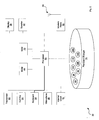
- a portable electronic device in accordance with an embodiment is indicated generally at 30.
- device 30 is based on the computing environment and functionality of a personal digital assistant with wireless voice telephony capabilities.
- device 30 can be based on the construction and functionality of any mobile electronic device that can be connected to a wireless network. Such devices include cellular telephones or laptops computers connected to wireless networks.
- electronic device 30 includes, a housing 34, which frames an LCD display 38, a speaker 42, a microphone 46, a trackwheel 50, an exit key 54 and a keyboard 58.
- Trackwheel 50 and exit key 54 can be inwardly depressed along the path of arrow "A" as a means to provide additional user-input.
- housing 34 can be made from any suitable material as will occur to those of skill in the art.
- Device 30 includes a processor 62.
- Processor 62 is connected to a read-only-memory (“ROM”) 66, which contains a plurality of applications executable by processor 62 that enables device 30 to perform certain functions.
- ROM read-only-memory
- Processor 62 is also connected to a random access memory unit (“RAM”) 70 and a persistent storage device 74 which is responsible for various nonvolatile storage functions of device 30.
- RAM random access memory unit
- persistent storage device 74 which is responsible for various nonvolatile storage functions of device 30.
- Processor 62 can send output signals to various output devices including display 38 and speaker 42. Processor 62, can also receive input from various input devices including microphone 46, trackwheel 50, exit key 54 and keyboard 58. Processor 62 is also connected to an internal clock 78 and a modem and radio 82. Modem and radio 82 are operable to connect device 30 to one or more wireless base stations in range of device 30, in the usual manner, via an antenna 86.
- Persistent storage 74 also stores a plurality of the applications that are executable by processor 62, and data files that are used by those applications to allow device 30 to performs its intended functions. Applications and data files are represented as circles disposed within persistent storage 74. Each application and data file will be discussed in greater detail below.
- FIG. 3 a screen shot is shown presenting a main menu application 90 that is stored on persistent storage device 74 and executed on processor 62 is shown on display 38.
- main menu application 90 that is stored on persistent storage device 74 and executed on processor 62 is shown on display 38.
- the menu of choices of applications presented by application 90 can include a plurality of applications, such as a telephone application 94, a messaging application 98 (e.g. email and/or short message service), a calendar application 102, an address book application 106, and a memo application 110.
- Telephone application 94 allows a user of device 30 to conduct a voice telephone call.
- Email messaging application 98 allows a user to send and receive email messages.
- Calendar application 102 allows a user to manage calendar appointments.
- Address book application 106 allows a user to manage contact information.
- Memo application 110 allows a user to maintain a virtual note pad for lists and other discrete pieces of primarily text information. While a specific set of applications is shown in menu application 90, it is to be understood that such applications are exemplary and different combinations and/or types of offerings of applications can be shown, as desired, according to the features, functions and/or applications and the like that are associated with device 30.
- Each application can be accessed by a user operating device 30 using any appropriate user-input means, such as by scrolling to an application using trackwheel 50 to navigate until the appropriate icon representing the pre-selected application is highlighted, and then depressing trackwheel 50 along the path indicated by "A" in Figure 1 to actually select the application and cause its execution.
- pre-select refers to the highlighting of a particular icon or field being presented on display 38
- select refers to depressing trackwheel 50 along the path indicated by "A" in Figure 1 while a particular icon or field is pre-select in order to effect an action associated with the pre-selected highlighted icon or field being presented on display 38.
- applications 94, 98, 102, 106 and 110 can be based on any known functionality as currently found on existing or future PEDs. However, it should be understood that such applications 94, 98, 102, 106 and 110 are merely exemplary.
- an "Edit Address” screen of address book application 106 is shown and indicated at 114 1 .
- address book 106 can have a plurality of different screens, for viewing, searching, etc. of addresses stored therein, and Figure 4 only shows one of such screens.
- Edit Address screen 114 1 shows an exemplary record of an individual named Kate Page, which a user of device 30 can now edit.
- Edit Address screen 114 1 from Figure 4 is shown as being updated and now indicated in Figure 5 as Edit Address screen 114 2 .
- Edit Address screen 114 2 now the addition of a work telephone number including the number "555-555-5555" in the corresponding work telephone number field.
- Figure 6 shows a prior art version of such a dialog box, which suffers from a number of disadvantages.
- Figure 6 includes substantially the same elements as Figure 5 , but all elements are followed by the suffix P1, to indicate that the elements shown in Figure 6 are all prior art.
- Figure 6 also includes a prior art dialog box 118P1.
- Prior art dialog box 118P1 is comprised of an icon 122P1, a message 126P1, and a plurality of option buttons 130P1, 134P2, 138P1.
- Icon 122P1 is an encircled question mark, while message 126P1 indicates "Changes Made!. This is a first disadvantage in that the contents of icon 112P1 contradicts the exclamatory nature of message 126P1.
- Option button 130P1 presents a "Save” option
- option button 134P1 presents a "Discard” option
- option button 138P1 presents a "Cancel” option.
- option button 138P1 is shown as being highlighted by reversing the colours of the button and text therein in relation to the other option buttons 134P1 and 138P1.
- trackwheel 50 can be used to scroll through such option buttons 130P1, 134P2 and 138P1, likewise reversing the colours of each in relation to each other to denote pre-selection.
- Trackwheel 50 can be depressed along the path indicated by arrow "A", or the "enter” key can be depressed, to make the actual selection.
- Option buttons 130P1, 134P1 and 138P1 suffer from their own disadvantages. Particularly, when option button 134P1 "Discard", is presented in conjunction with option button 138P1 "Cancel” can result in confusion for the user. In other words, while Discard means “discard these changes and exit the edit address screen” and Cancel means “cancel this operation and return to the edit address screen for further editing” - it is possible to confuse these meanings and select one instead of the other.
- dialog box 118P1 is "Discard", which is a 'lossy' action, whereby the addition of the number 555-555-5555 would be lost and irretrievable. Also of concern is that the lossy "Discard” option is directly adjacent to the constructive "Save” option, leading to an increased possibility of "Discard” being selected unintentionally.
- dialog box 118P1 covers up the information in Edit Address screen 114 2 , and thus the user is unable to verify that the changes being made are desirable.
- dialog box 118P1 A general difficulty with dialog box 118P1 is that it is often designed to meet the needs of a plurality of different applications executing on a prior art PED, in order to make efficient use of computing resources on the PED due to the portable nature thereof, and thus ambiguities and lack of clarity in the messages being conveyed and the requested input are predictable.
- a "one-size-fits-all" dialog box intended to serve a plurality of different applications on an application-rich PED, without obscuring the underlying information of a screen (such as screen 1142) while facilitating of the appropriate option in the dialog box, is a difficult problem [flag to see if wording can be less awkward], and prior to the teachings provided in the present patent application, this remains an unsolved problem.
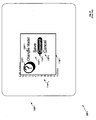
- Dialog box application 140 is accessible to applications 94, 98, 102, 106 and 110 and thus dynamically configurable in order to be able to present a user-friendly interface according to the context in which the dialog box application 140 is Invoked.
- application 140 includes seven fields, but fewer or more fields can be provided as desired.
- Field 1, indicated at "F1” is reserved for presenting the icon corresponding to which of the applications 94, 98, 102, 106 and 110 made the call for dialog box application 140.
- field F1 could be set to the address book icon indicated at item 106 in Figure 3 .
- Field 2 is reserved for fixed messages. Fixed messages also correspond to the particular application 94, 98, 102, 106 or 110 which made the call for application 140, and also correspond to the particular function that was being accessed. For example, in edit address screen 1142, field F2 could be set to read "Do you want to save the changes you made to the address belonging to".
- Field 3 indicated at "F3" is reserved for variable messages.
- Variable messages correspond to the particular record or other specific item according to the function that was being accessed for the corresponding application 94, 98,102, 106 or 110.
- field F2 could be set to read “Kate Page”.
- the complete message would read "Do you want to save the changes you made to the address belonging to Kate Page"
- Field 4, indicated at "F4" is reserved for a message icon, which is typically representative of a type of message being conveyed by application 140.
- a message icon could, for example, be a graphical punctuation mark (e.g. graphical punctuation mark could be icon 122P1 from Figure 6 ) that grammatically fits the message conveyed by fields F2 and F3.
- a message icon could, for example, be a graphical punctuation mark (e.g. graphical punctuation mark icon 122P1 from Figure 6 ) that grammatically fits the message conveyed by fields F2 and F3.
- Field 5 indicated at "F5" is reserved for an option button.
- this option button is the default option button, and is chosen to default to pre-select a lossless action. For example, in edit address screen 114 2 , field F5 could be set to read "Yes”.
- Field 6, indicated at "F6" is reserved for an option button.
- field F6 could be set to read "Return to Editing”.
- Field 7, indicated at "F7" is reserved for an option button. This option button chosen to be the lossy action, and is thus oriented farther away from Field 5 and Field 6. For example, in edit address screen 114 2 , field F7 could be set to read "Discard changes and exit".
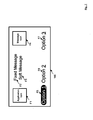
- Table I continues with the above example, showing an exemplary database (indicated at reference 144 in Figure 2 ) that can be used by application 140 when application 140 is invoked from edit address screen 114.
- Table I Exemplary contents of a record database 144 accessible to application 140 Entry # Column 1 Column 2 Column 3 Name Contents Action 1 Calling Application Address Book Application 106 None 2 Calling Screen within Application Edit Address Screen 114 None 3 Calling Function within Screen Save None 4 Field 1 Address Book Icon None 5 Field 2 "Do you want to save the changes you made to the address belonging to" None 6 Field 3 ⁇ Retrieve First Name; Last Name of currently displayed Edit Screen 114 ⁇ None 7 Field 4 Encircled Question Mark Icon None 8 Field 5 "Yes" Save Record with changes and exit Edit Address Screen 114 9 Field 6 "Return to Editing" Return to Edit Address Screen 114 10 Field 7 "Discard Changes and Exit" Do not save record and exit edit address screen 114
- Entry 1 identifies to the "Calling Application”.
- Column 2 of Entry 1 identifies that this record is relevant to calls to application 140 that are made from application 106. In other words, this record is utilized only when application 140 is accessed from application 106.
- Column 3 of Entry 1 indicates "None", which means that no other action or call of another application relates to that particular Entry 1. (Since Column 3 relates to Actions or other application calls, Column 3 is only relevant for Entries 8 through 10, which pertain to the option buttons associated with Fields 5 through 7.
- Entry 2 identifies the "Calling Screen within the Application”. Thus, Column 2 of Entry 2 identifies that this record is relevant to calls to application 140 that are made when edit address screen 114 is being accessed from application 106. Column 3 of Entry 3 indicates "None", which means that no other action or call of another application relates to that particular Entry 2.
- Entry 3 identifies the "Calling Function within the Screen”. Thus, Column 2 of Entry 3 identifies that this record is relevant to calls to application 140 that are made when edit address screen 114 is being accessed from application 106, and the user has indicated that they wish to "Save” the current record. Column 3 of Entry 3 indicates “None", which means that no other action or call of another application relates to that particular Entry 4.
- Entry 4 identifies Field 1 of application 140.
- Column 2 of Entry 4 identifies that Field 1 of application 140 is to be populated with the address book icon indicated at 106 in Figure 3 .
- Column 3 of Entry 4 indicates "None", which means that no other action or call of another application relates to that particular Entry 4.
- Entry 7 identifies Field 4 of application 140.
- Column 2 of Entry 7 identifies that Field 4 of application 140 is to be populated with encircled question mark icon.
- Field 4 will be populated with the encircled question mark icon indicated at 122P1 in Figure 6 .
- Column 3 of Entry 7 indicates "None", which means that no other action or call of another application relates to that particular Entry 7.
- Entry 9 identifies Field 6 of application 140.
- Column 2 of Entry 9 identifies that Field 6 of application 140 is to be populated with the term "Return to Edit”.
- Column 3 of Entry 9 indicates "Return to Edit Address Screen 114", which means if this option is selected, then the changes that were made will not be committed to memory, but edit address screen 114 will be shown again in the same form it was shown prior to the invocation of application 114. This is an example of a "lossless" selection.
- Entry 10 identifies Field 7 of application 140.
- Column 2 of Entry 10 identifies that Field 7 of application 140 is to be populated with the term "Discard Changes and Exit”.
- Column 3 of Entry 10 indicates "Do not save record and exit edit address screen 114", which means if this option is selected, then the changes that were made will not be committed to memory, and application 140 will cause application 106 to exit edit address screen 114. This is an example of a "lossy" selection.
- Entries 8, 9 and 10 are populated according to the particular type of application associated with application 140.
- the Entries 8, 9, 10 and the like would not be populated with options that would change stored information, but merely ask the user to acknowledge the information presented in Field F2 and/or Field F3 and/or the like.
- application 140 could be invoked again with a message in Field F2 that simply states “Records have now been deleted” and an option button presenting an "OK" message, asking the user to acknowledge that such deletion had occurred.
- Edit Address screen 114 1 from Figure 4 is shown as being updated and now indicated in Figure 5 as Edit Address screen 114 2 .
- Edit Address screen 114 2 now includes a work telephone number including the number "555-555-5555" in the corresponding work telephone number field.
- application 140 is invoked and populated using database 144 according to the contents of Table I. The user is thus presented with a dialog box asking the user to confirm the changes, and Figure 8 shows the appearance of such a dialog box, indicated at 140 2 .
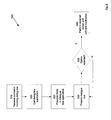
- a method of controlling the display of information in accordance with another embodiment will now be discussed with reference to the flowchart shown in Figure 9 , and is indicated generally at 500.
- method 500 In order to assist in the explanation of method 500, reference will be made to the foregoing discussion of device 30. However, it is to be understood that method 500 and/or device 30 can be varied, and need not work in conjunction with each other.
- processor 62 is currently executing application 106, and that edit address screen 1142 is shown.
- a command is received invoking a dialog box.
- trackwheel 50 can be used to access a "save" command from within edit address screen 1142.
- step 520 the dialog box application is called.
- processor 62 will invoke application 140 based on a programming instruction embedded inside application 106.
- step 525 the fields in the dialog box are populated.
- application 140 will access database 144 and populate the respective fields F1 through F7 within application 140 according to the example given above.
- step 530 the dialog box is presented.
- display 38 will be rendered according to the representation shown in Figure 8 .
- a default pre-selection is placed over field F5, now reading "Yes", which is a lossless option.
- TWO rolls of track-wheel 50 are used to reach the in field F7 from field F5
- fields F5 and F6 being lossless options.
- Application 140 can thus be configured such that rolling track-wheel 50 towards the left causes the selection to remain over Field 5, forcing two rolls of track-wheel 50 to reach a lossy selection.
- step 535 it is determined whether an option has been selected. Continuing with the example, if none of the options presented in fields F5, F6 or F7 have been pre-selected without an accompanying depression of trackwheel 50 along arrow "A", then a "no" determination is made and the method cycles back to step 530. However, if one of the options in fields F5, F6 or F7 are pre-selected, and trackwheel 50 has been depressed along arrow "A", then method 500 advances to step 540 and the appropriate option is performed, such selection and performance being achieved as previously described.
- a differently-structured database 144 can include additional entries that are usable by a correspondingly varied application 140.
- Database 144 can include references to colours, and/or positions of where various fields F1 through F7 are to be positioned within the resulting dialog box (such that the physical layout is different than shown in Figure 8 , and/or is otherwise configurable).
- a varied dialog box application is indicated at 140a. Similar to dialog box application 140, dialog box application 140a is accessed when the save option from the edit address screen 114 is accessed.
- dialog box application 140a is accessed when the user has attempted to save a record wherein no first name or last name has been provided.
- Field Fa3 actually prompts the user for input to provide the first and last name.
- Field Fa4 shows an exclamation mark to show the informational nature of the dialog box.
- Fa5 reads as "Save", to indicate that this is the constructive action that will occur once the first and last name have been provided.
- the dialog box application 140a is invoked to ensure that at least the minimum required information is provided in order to save the record as updated in the particular edit address screen 114.
- Dialog box application 140b is accessed from the telephone application 94, from which the user has just attempted to send a "call-forwarding" signal to a base station connected wirelessly to device 30 via modem/radio 82. Specifically, the user has attempted to forward all calls to the number "+1-555-555-5555".
- dialog box application 140b presents a "progress” bar indicating progress made in delivering the call forward command to the a base station, and receiving a response therefrom.
- Field Fb3 is thus a "progress meter", which is animated and changes in appearance as communication is established.
- the message icon in field Fb4 is a triangle, indicating a 'caution' sign that the user needs to wait before confirmation is provided that call forwarding was successful.
- application 140 (and its variants) can be dynamically configured for any application executing on device 30.
- Application 140 thus provides a novel means for controlling a display in a portable electronic device that is meaningful to the user, while also make efficient use of limited resources on an PED, by dynamically presenting both fixed and variable detailed messages to the user according to the context in which the messages arise.
- the information presented in the dialog box duplicates or reproduces a certain level of information from the application screen from which the dialog box was invoked.
- the invoking application screen is obscured by the dialog box, sufficient information is still presented in the dialog box so that the user is still aware of the obscured information.
- application 140 (and its variants) allow carriers, service providers and administrators associated with device 30 to be able to push new types of message applications to device 30 via a link connecting to wireless base station in range of device 30.
- only the contents of such messages need be pushed - i.e. only the contents of database 144 need be updated - thereby conserving bandwidth of a link between device 30 and the base station since the actual application 140 need not be pushed over the link.
- both the resources of device 30 and the wireless link connected to device 30 can be conserved by using application 140 and database 144 for presenting messages.
Landscapes
- Engineering & Computer Science (AREA)
- Software Systems (AREA)
- Theoretical Computer Science (AREA)
- Human Computer Interaction (AREA)
- Physics & Mathematics (AREA)
- General Engineering & Computer Science (AREA)
- General Physics & Mathematics (AREA)
- User Interface Of Digital Computer (AREA)
- Digital Computer Display Output (AREA)
Claims (17)
- Verfahren zum Steuern einer Anzeige (38) einer tragbaren elektronischen Vorrichtung (30), das aufweist:Darstellen eines Bildschirms auf der Anzeige (38), wobei der Bildschirm einer Benutzeranwendung entspricht;Empfangen (510) eines Befehls an der Vorrichtung (30), der einer Funktion entspricht, die mit dem Bildschirm assoziiert ist;Aufrufen (520) einer Dialogfeldanwendung (140a) entsprechend der Funktion, wobei die Dialogfeldanwendung (140a) eine Vielzahl von konfigurierbaren Feldern (Fa1- Fa7) hat;Zugreifen auf eine Datenbank (144), die Objekte enthält, wobei zumindest ein Teil der Objekte Information auf dem Bildschirm wiedergibt derart, dass Inhalte des Bildschirms basierend auf den Objekten identifiziert werden können;Füllen (525) von Feldern in der Dialogfeldanwendung (140a) mit den Objekten; undin Reaktion auf einen Versuch durch einen Benutzer, weniger als die minimal erforderliche Information an der Benutzeranwendung zu speichern, Darstellen der Dialogfeldanwendung (140a) über dem Bildschirm; wobei die Dialogfeldanwendung zumindest einen Teil des Bildschirms einnimmt, um die Inhalte dieses Teils des Bildschirms zu verdecken; wobei die Dialogfeldanwendung Eingabefelder enthält, die alle erforderlichen Eingabefelder aufweisen, die von dem Benutzer nicht eingegeben wurden, um eine Benutzereingabe für die Benutzeranwendung zu empfangen, um sicherzustellen, dass die minimal erforderliche Information vorgesehen wird, um die Information der Benutzeranwendung zu speichern.
- Das Verfahren gemäß Anspruch 1, wobei die Benutzeranwendung aus der Gruppe ausgewählt wird, die aus einer Telefon-Anwendung (94); einer Messaging-Anwendung (98); einer Kalender-Anwendung (102); einer Adressbuch-Anwendung (106) und einer Memo-Anwendung (110) besteht.
- Das Verfahren gemäß Anspruch 1, wobei die Felder zumindest zwei aufweisen aus: ein Symbol entsprechend den Benutzeranwendungen; eine feste Nachricht; eine variable Nachricht; ein Symbol eines Nachrichten-Typs; und eine Optionsschaltfläche.
- Das Verfahren gemäß Anspruch 1, wobei die Felder zumindest zwei Optionsschaltflächen aufweisen und eine Standardoptionsschaltfläche eine verlustfreie Aktion vorauswählt.
- Das Verfahren gemäß Anspruch 1, wobei die Felder zumindest drei Optionsschaltflächen aufweisen, wobei zwei der Optionsschaltflächen verlustfreie Aktionen haben und eine der Optionsschaltflächen eine verlustbehaftete Aktion hat; und wobei eine Standardoptionsschaltfläche die eine der Optionsschaltflächen mit einer verlustfreien Aktion ist, die am weitesten von der Optionsschaltfläche mit einer verlustbehafteten Aktion ist.
- Das Verfahren gemäß Anspruch 1, wobei die Datenbank (144) weiter Layout-Charakteristiken aufweist, die zumindest eines aus Positionen, Farben, Größen und Schriftarten für die Felder in dem Dialogfeld repräsentieren derart, dass ein physikalisches Layout der Dialogfeldanwendung (140a) konfigurierbar ist.
- Das Verfahren gemäß Anspruch 6, wobei die Layout-Charakteristiken für jede Funktion konfigurierbar sind.
- Eine tragbare elektronische Vorrichtung (30), die aufweist:eine Anzeige (38);einen Mikrocomputer, der mit der Anzeige (38) verbunden ist und betriebsfähig ist zum Ausführen einer Benutzeranwendung; wobei der Mikrocomputer betriebsfähig ist zum Steuern der Anzeige (38), um zumindest einen Bildschirm auf der Anzeige (38) entsprechend der Benutzeranwendung darzustellen;eine Vorrichtung, die mit dem Mikrocomputer verbunden ist und betriebsfähig ist zum Weiterleiten eines empfangenen Befehls an die Vorrichtung an den Mikrocomputer; wobei der Befehl einer Funktion entspricht, die mit dem Bildschirm assoziiert ist;wobei der Mikrocomputer weiter betriebsfähig ist zum Aufrufen einer Dialogfeldanwendung (140a) entsprechend der Funktion, wobei die Dialogfeldanwendung (140a) eine Vielzahl von konfigurierbaren Feldern (Fa1-Fa7) hat;wobei der Mikrocomputer weiter betriebsfähig ist zum Zugreifen auf eine Datenbank (144), die Objekte enthält, wobei zumindest ein Teil der Objekte Information auf dem Bildschirm wiedergibt derart, dass Inhalte des Bildschirms basierend auf den Objekten identifiziert werden können;wobei der Mikrocomputer weiter betriebsfähig ist zum Füllen der Felder in der Dialogfeldanwendung (140a) mit den Objekten; undwobei der Mikrocomputer weiter betriebsfähig ist zum Steuern der Anzeige (38), um die Dialogfeldanwendung (140a) über dem Bildschirm darzustellen, in Reaktion auf einen Versuch durch einen Benutzer, weniger als die minimal erforderliche Information an der Benutzeranwendung zu speichern, derart, dass zumindest ein Teil des Bildschirms von der Dialogfeldanwendung eingenommen wird, um die Inhalte dieses Teils des Bildschirms zu verdecken, und zum Vorsehen von Eingabefeldern, die alle erforderlichen Eingabefelder aufweist, die von dem Benutzer nicht eingegeben wurden, um eine Benutzereingabe für die Benutzeranwendung zu empfangen, um sicherzustellen, dass die minimal erforderliche Information vorgesehen wird, um die Information der Benutzeranwendung zu speichern.
- Die Vorrichtung gemäß Anspruch 8, wobei die Benutzeranwendung aus der Gruppe ausgewählt wird, die aus einer Telefon-Anwendung (94); einer Messaging-Anwendung (98); einer Kalender-Anwendung (102); einer Adressbuch-Anwendung (106) und einer Memo-Anwendung (110) besteht.
- Die Vorrichtung gemäß Anspruch 8, wobei die Felder zumindest zwei aufweisen aus: ein Symbol entsprechend den Benutzeranwendungen; eine feste Nachricht; eine variable Nachricht; ein Symbol eines Nachrichten-Typs; und eine Optionsschaltfläche.
- Die Vorrichtung gemäß Anspruch 8, wobei die Felder zumindest zwei Optionsschaltflächen aufweisen und eine Standardoptionsschaltfläche eine verlustfreie Aktion vorauswählt.
- Die Vorrichtung gemäß Anspruch 8, wobei die Felder zumindest drei Optionsschaltflächen aufweisen, wobei zwei der Optionsschaltflächen verlustfreie Aktionen haben und eine der Optionsschaltflächen eine verlustbehaftete Aktion hat; und wobei eine Standardoptionsschaltfläche die eine der Optionsschaltflächen mit einer verlustfreien Aktion vorauswählt, die am weitesten von der Optionsschaltfläche mit einer verlustbehafteten Aktion ist.
- Die Vorrichtung gemäß Anspruch 12, wobei die Datenbank (144) weiter Layout-Charakteristiken aufweist, die zumindest eines aus Positionen und Farben und Größen und Schriftarten für die Felder in dem Dialogfeld repräsentieren derart, dass ein physikalisches Layout der Dialogfeldanwendung (140a) konfigurierbar ist.
- Die Vorrichtung gemäß Anspruch 13, wobei die Layout-Charakteristiken für jede Funktion konfigurierbar sind.
- Die Vorrichtung gemäß Anspruch 8, wobei die Vorrichtung eine Modem-Funkvorrichtung aufweist und betriebsfähig ist zum drahtlosen Kommunizieren mit einer Basisstation.
- Die Vorrichtung gemäß Anspruch 15, wobei der Mikrocomputer betriebsfähig ist zum Aktualisieren der Datenbank (144) basierend auf Befehlsanweisungen, die drahtlos von der Basisstation empfangen werden.
- Ein computerlesbares Medium, das eine Vielzahl von Programmanweisungen enthält, wobei die Anweisungen zum Steuern einer Anzeige (38) einer tragbaren elektronischen Vorrichtung (30) sind; wobei die Anweisungen ein Verfahren aufweisen, das aufweist:Darstellen eines Bildschirms auf der Anzeige (38), wobei der Bildschirm einer Benutzeranwendung entspricht;Empfangen (510) eines Befehls an der Vorrichtung, der einer Funktion entspricht, die mit dem Bildschirm assoziiert ist;Aufrufen (520) einer Dialogfeldanwendung (140a) entsprechend der Funktion, wobei die Dialogfeldanwendung (140a) eine Vielzahl von konfigurierbaren Feldern (Fa1 - Fa7) hat;Zugreifen auf eine Datenbank (144), die Objekte enthält, wobei zumindest ein Teil der Objekte Information auf dem Bildschirm wiedergibt derart, dass Inhalte des Bildschirms basierend auf den Objekten identifiziert werden können;Füllen (525) von Feldern in der Dialogfeldanwendung (140a) mit den Objekten; undin Reaktion auf einen Versuch durch einen Benutzer, weniger als die minimal erforderliche Information an der Benutzeranwendung zu speichern, Darstellen der Dialogfeldanwendung (140a) über dem Bildschirm; wobei die Dialogfeldanwendung zumindest einen Teil des Bildschirms einnimmt, um die Inhalte dieses Teils des Bildschirms zu verdecken; wobei die Dialogfeldanwendung Eingabefelder enthält, die alle erforderlichen Eingabefelder aufweisen, die von dem Benutzer nicht eingegeben wurden, um eine Benutzereingabe für die Benutzeranwendung zu empfangen, um sicherzustellen, dass die minimal erforderliche Information vorgesehen wird, um die Information der Benutzeranwendung zu speichern.
Priority Applications (2)
| Application Number | Priority Date | Filing Date | Title |
|---|---|---|---|
| EP05108031.5A EP1764683B1 (de) | 2005-09-01 | 2005-09-01 | Verfahren und Vorrichtung zur Steuerung eines Anzeigegeräts in einem elektronischen Gerät |
| CA2558210A CA2558210C (en) | 2005-09-01 | 2006-08-30 | Method and apparatus for controlling a display in an electronic device |
Applications Claiming Priority (1)
| Application Number | Priority Date | Filing Date | Title |
|---|---|---|---|
| EP05108031.5A EP1764683B1 (de) | 2005-09-01 | 2005-09-01 | Verfahren und Vorrichtung zur Steuerung eines Anzeigegeräts in einem elektronischen Gerät |
Publications (2)
| Publication Number | Publication Date |
|---|---|
| EP1764683A1 EP1764683A1 (de) | 2007-03-21 |
| EP1764683B1 true EP1764683B1 (de) | 2014-11-12 |
Family
ID=35999572
Family Applications (1)
| Application Number | Title | Priority Date | Filing Date |
|---|---|---|---|
| EP05108031.5A Expired - Lifetime EP1764683B1 (de) | 2005-09-01 | 2005-09-01 | Verfahren und Vorrichtung zur Steuerung eines Anzeigegeräts in einem elektronischen Gerät |
Country Status (2)
| Country | Link |
|---|---|
| EP (1) | EP1764683B1 (de) |
| CA (1) | CA2558210C (de) |
Citations (1)
| Publication number | Priority date | Publication date | Assignee | Title |
|---|---|---|---|---|
| US5790120A (en) * | 1992-08-27 | 1998-08-04 | Starfish Software, Inc. | Individually configurable panel user interface with selective launching, sticky windows, hot keys, start up options and configurable background |
Family Cites Families (1)
| Publication number | Priority date | Publication date | Assignee | Title |
|---|---|---|---|---|
| GB0211901D0 (en) | 2002-05-23 | 2002-07-03 | Koninkl Philips Electronics Nv | Management of interaction opportunity data |
-
2005
- 2005-09-01 EP EP05108031.5A patent/EP1764683B1/de not_active Expired - Lifetime
-
2006
- 2006-08-30 CA CA2558210A patent/CA2558210C/en active Active
Patent Citations (1)
| Publication number | Priority date | Publication date | Assignee | Title |
|---|---|---|---|---|
| US5790120A (en) * | 1992-08-27 | 1998-08-04 | Starfish Software, Inc. | Individually configurable panel user interface with selective launching, sticky windows, hot keys, start up options and configurable background |
Also Published As
| Publication number | Publication date |
|---|---|
| CA2558210A1 (en) | 2007-03-01 |
| CA2558210C (en) | 2012-10-23 |
| EP1764683A1 (de) | 2007-03-21 |
Similar Documents
| Publication | Publication Date | Title |
|---|---|---|
| US7778671B2 (en) | Mobile communications terminal having an improved user interface and method therefor | |
| CN100581186C (zh) | 通信终端 | |
| US7466320B2 (en) | User interface and method for persistent viewing of a user selected folder on a mobile device | |
| EP2132622B1 (de) | Transparente schicht-anwendung | |
| CN100440121C (zh) | 通过用户界面控制设备的方法 | |
| US20060253801A1 (en) | Graphical user interface for electronic devices | |
| US8612877B2 (en) | Method for providing options associated with computer applications in a mobile device and a menu and application therefor | |
| US20160154686A1 (en) | Method and apparatus for presenting clipboard contents on a mobile terminal | |
| US20090327948A1 (en) | Text input | |
| JP2011527045A (ja) | モバイルデバイスにおけるマルチタスキングをサポートするための方法 | |
| EP1956473B1 (de) | System und Verfahren zum Zugriff auf ein Symbol einer tragbaren elektronischen Vorrichtung | |
| US8983550B2 (en) | Address book management method and user interface | |
| KR20010049844A (ko) | 감소된 수의 소프트키들에 대해 소프트키 기능을경험적으로 구성하기 위한 방법 및 장치 | |
| US8707205B2 (en) | Method and apparatus for controlling a display in an electronic device | |
| EP1764683B1 (de) | Verfahren und Vorrichtung zur Steuerung eines Anzeigegeräts in einem elektronischen Gerät | |
| US20080146210A1 (en) | System and method for associating items from a group with features provided by a mobile device | |
| CA2548266C (en) | Multiple keyboard context sensitivity for application usage | |
| KR100791543B1 (ko) | 이동통신 단말기용 태그 메뉴 사용자 인터페이스 제공 방법및 이를 실현시키기 위한 프로그램을 기록한 컴퓨터로판독 가능한 기록 매체 | |
| KR101196742B1 (ko) | 이동통신 단말기에서 다차원 그래픽을 이용하는 계층적인유저인터페이스 제공 장치 및 방법 | |
| CA2515870C (en) | User interface and method for persistent viewing of a user selected folder on a mobile device | |
| CA2612804C (en) | System and method for associating items from a group with features provided by a mobile device | |
| KR20040037381A (ko) | 이동통신 단말기에서 단축키를 이용한 메뉴 선택방법 | |
| HK1087808A (en) | User interface and method for persistent viewing of a user selected folder on a mobile device |
Legal Events
| Date | Code | Title | Description |
|---|---|---|---|
| PUAI | Public reference made under article 153(3) epc to a published international application that has entered the european phase |
Free format text: ORIGINAL CODE: 0009012 |
|
| 17P | Request for examination filed |
Effective date: 20050920 |
|
| AK | Designated contracting states |
Kind code of ref document: A1 Designated state(s): AT BE BG CH CY CZ DE DK EE ES FI FR GB GR HU IE IS IT LI LT LU LV MC NL PL PT RO SE SI SK TR |
|
| AX | Request for extension of the european patent |
Extension state: AL BA HR MK YU |
|
| 17Q | First examination report despatched |
Effective date: 20070802 |
|
| AKX | Designation fees paid |
Designated state(s): AT BE BG CH CY CZ DE DK EE ES FI FR GB GR HU IE IS IT LI LT LU LV MC NL PL PT RO SE SI SK TR |
|
| AXX | Extension fees paid |
Extension state: AL Payment date: 20050920 Extension state: YU Payment date: 20050920 Extension state: MK Payment date: 20050920 Extension state: HR Payment date: 20050920 Extension state: BA Payment date: 20050920 |
|
| RAP1 | Party data changed (applicant data changed or rights of an application transferred) |
Owner name: BLACKBERRY LIMITED |
|
| RAP1 | Party data changed (applicant data changed or rights of an application transferred) |
Owner name: BLACKBERRY LIMITED |
|
| GRAP | Despatch of communication of intention to grant a patent |
Free format text: ORIGINAL CODE: EPIDOSNIGR1 |
|
| INTG | Intention to grant announced |
Effective date: 20140417 |
|
| GRAS | Grant fee paid |
Free format text: ORIGINAL CODE: EPIDOSNIGR3 |
|
| GRAA | (expected) grant |
Free format text: ORIGINAL CODE: 0009210 |
|
| AK | Designated contracting states |
Kind code of ref document: B1 Designated state(s): AT BE BG CH CY CZ DE DK EE ES FI FR GB GR HU IE IS IT LI LT LU LV MC NL PL PT RO SE SI SK TR |
|
| AX | Request for extension of the european patent |
Extension state: AL BA HR MK YU |
|
| REG | Reference to a national code |
Ref country code: GB Ref legal event code: FG4D |
|
| REG | Reference to a national code |
Ref country code: CH Ref legal event code: EP |
|
| REG | Reference to a national code |
Ref country code: AT Ref legal event code: REF Ref document number: 696120 Country of ref document: AT Kind code of ref document: T Effective date: 20141115 |
|
| REG | Reference to a national code |
Ref country code: IE Ref legal event code: FG4D |
|
| REG | Reference to a national code |
Ref country code: DE Ref legal event code: R096 Ref document number: 602005045129 Country of ref document: DE Effective date: 20141224 |
|
| REG | Reference to a national code |
Ref country code: NL Ref legal event code: T3 |
|
| REG | Reference to a national code |
Ref country code: AT Ref legal event code: MK05 Ref document number: 696120 Country of ref document: AT Kind code of ref document: T Effective date: 20141112 |
|
| PG25 | Lapsed in a contracting state [announced via postgrant information from national office to epo] |
Ref country code: PT Free format text: LAPSE BECAUSE OF FAILURE TO SUBMIT A TRANSLATION OF THE DESCRIPTION OR TO PAY THE FEE WITHIN THE PRESCRIBED TIME-LIMIT Effective date: 20150312 Ref country code: ES Free format text: LAPSE BECAUSE OF FAILURE TO SUBMIT A TRANSLATION OF THE DESCRIPTION OR TO PAY THE FEE WITHIN THE PRESCRIBED TIME-LIMIT Effective date: 20141112 Ref country code: LT Free format text: LAPSE BECAUSE OF FAILURE TO SUBMIT A TRANSLATION OF THE DESCRIPTION OR TO PAY THE FEE WITHIN THE PRESCRIBED TIME-LIMIT Effective date: 20141112 Ref country code: FI Free format text: LAPSE BECAUSE OF FAILURE TO SUBMIT A TRANSLATION OF THE DESCRIPTION OR TO PAY THE FEE WITHIN THE PRESCRIBED TIME-LIMIT Effective date: 20141112 Ref country code: IS Free format text: LAPSE BECAUSE OF FAILURE TO SUBMIT A TRANSLATION OF THE DESCRIPTION OR TO PAY THE FEE WITHIN THE PRESCRIBED TIME-LIMIT Effective date: 20150312 |
|
| PG25 | Lapsed in a contracting state [announced via postgrant information from national office to epo] |
Ref country code: PL Free format text: LAPSE BECAUSE OF FAILURE TO SUBMIT A TRANSLATION OF THE DESCRIPTION OR TO PAY THE FEE WITHIN THE PRESCRIBED TIME-LIMIT Effective date: 20141112 Ref country code: SE Free format text: LAPSE BECAUSE OF FAILURE TO SUBMIT A TRANSLATION OF THE DESCRIPTION OR TO PAY THE FEE WITHIN THE PRESCRIBED TIME-LIMIT Effective date: 20141112 Ref country code: AT Free format text: LAPSE BECAUSE OF FAILURE TO SUBMIT A TRANSLATION OF THE DESCRIPTION OR TO PAY THE FEE WITHIN THE PRESCRIBED TIME-LIMIT Effective date: 20141112 Ref country code: CY Free format text: LAPSE BECAUSE OF FAILURE TO SUBMIT A TRANSLATION OF THE DESCRIPTION OR TO PAY THE FEE WITHIN THE PRESCRIBED TIME-LIMIT Effective date: 20141112 Ref country code: GR Free format text: LAPSE BECAUSE OF FAILURE TO SUBMIT A TRANSLATION OF THE DESCRIPTION OR TO PAY THE FEE WITHIN THE PRESCRIBED TIME-LIMIT Effective date: 20150213 Ref country code: LV Free format text: LAPSE BECAUSE OF FAILURE TO SUBMIT A TRANSLATION OF THE DESCRIPTION OR TO PAY THE FEE WITHIN THE PRESCRIBED TIME-LIMIT Effective date: 20141112 |
|
| PG25 | Lapsed in a contracting state [announced via postgrant information from national office to epo] |
Ref country code: EE Free format text: LAPSE BECAUSE OF FAILURE TO SUBMIT A TRANSLATION OF THE DESCRIPTION OR TO PAY THE FEE WITHIN THE PRESCRIBED TIME-LIMIT Effective date: 20141112 Ref country code: SK Free format text: LAPSE BECAUSE OF FAILURE TO SUBMIT A TRANSLATION OF THE DESCRIPTION OR TO PAY THE FEE WITHIN THE PRESCRIBED TIME-LIMIT Effective date: 20141112 Ref country code: DK Free format text: LAPSE BECAUSE OF FAILURE TO SUBMIT A TRANSLATION OF THE DESCRIPTION OR TO PAY THE FEE WITHIN THE PRESCRIBED TIME-LIMIT Effective date: 20141112 Ref country code: RO Free format text: LAPSE BECAUSE OF FAILURE TO SUBMIT A TRANSLATION OF THE DESCRIPTION OR TO PAY THE FEE WITHIN THE PRESCRIBED TIME-LIMIT Effective date: 20141112 Ref country code: CZ Free format text: LAPSE BECAUSE OF FAILURE TO SUBMIT A TRANSLATION OF THE DESCRIPTION OR TO PAY THE FEE WITHIN THE PRESCRIBED TIME-LIMIT Effective date: 20141112 |
|
| REG | Reference to a national code |
Ref country code: DE Ref legal event code: R097 Ref document number: 602005045129 Country of ref document: DE |
|
| PLBE | No opposition filed within time limit |
Free format text: ORIGINAL CODE: 0009261 |
|
| STAA | Information on the status of an ep patent application or granted ep patent |
Free format text: STATUS: NO OPPOSITION FILED WITHIN TIME LIMIT |
|
| 26N | No opposition filed |
Effective date: 20150813 |
|
| PG25 | Lapsed in a contracting state [announced via postgrant information from national office to epo] |
Ref country code: IT Free format text: LAPSE BECAUSE OF FAILURE TO SUBMIT A TRANSLATION OF THE DESCRIPTION OR TO PAY THE FEE WITHIN THE PRESCRIBED TIME-LIMIT Effective date: 20141112 |
|
| PG25 | Lapsed in a contracting state [announced via postgrant information from national office to epo] |
Ref country code: SI Free format text: LAPSE BECAUSE OF FAILURE TO SUBMIT A TRANSLATION OF THE DESCRIPTION OR TO PAY THE FEE WITHIN THE PRESCRIBED TIME-LIMIT Effective date: 20141112 |
|
| PG25 | Lapsed in a contracting state [announced via postgrant information from national office to epo] |
Ref country code: MC Free format text: LAPSE BECAUSE OF FAILURE TO SUBMIT A TRANSLATION OF THE DESCRIPTION OR TO PAY THE FEE WITHIN THE PRESCRIBED TIME-LIMIT Effective date: 20141112 Ref country code: LU Free format text: LAPSE BECAUSE OF FAILURE TO SUBMIT A TRANSLATION OF THE DESCRIPTION OR TO PAY THE FEE WITHIN THE PRESCRIBED TIME-LIMIT Effective date: 20150901 |
|
| REG | Reference to a national code |
Ref country code: CH Ref legal event code: PL |
|
| REG | Reference to a national code |
Ref country code: IE Ref legal event code: MM4A |
|
| PG25 | Lapsed in a contracting state [announced via postgrant information from national office to epo] |
Ref country code: CH Free format text: LAPSE BECAUSE OF NON-PAYMENT OF DUE FEES Effective date: 20150930 Ref country code: LI Free format text: LAPSE BECAUSE OF NON-PAYMENT OF DUE FEES Effective date: 20150930 Ref country code: IE Free format text: LAPSE BECAUSE OF NON-PAYMENT OF DUE FEES Effective date: 20150901 |
|
| REG | Reference to a national code |
Ref country code: FR Ref legal event code: PLFP Year of fee payment: 12 |
|
| PG25 | Lapsed in a contracting state [announced via postgrant information from national office to epo] |
Ref country code: BG Free format text: LAPSE BECAUSE OF FAILURE TO SUBMIT A TRANSLATION OF THE DESCRIPTION OR TO PAY THE FEE WITHIN THE PRESCRIBED TIME-LIMIT Effective date: 20141112 Ref country code: HU Free format text: LAPSE BECAUSE OF FAILURE TO SUBMIT A TRANSLATION OF THE DESCRIPTION OR TO PAY THE FEE WITHIN THE PRESCRIBED TIME-LIMIT; INVALID AB INITIO Effective date: 20050901 |
|
| PG25 | Lapsed in a contracting state [announced via postgrant information from national office to epo] |
Ref country code: TR Free format text: LAPSE BECAUSE OF FAILURE TO SUBMIT A TRANSLATION OF THE DESCRIPTION OR TO PAY THE FEE WITHIN THE PRESCRIBED TIME-LIMIT Effective date: 20141112 |
|
| REG | Reference to a national code |
Ref country code: FR Ref legal event code: PLFP Year of fee payment: 13 |
|
| PG25 | Lapsed in a contracting state [announced via postgrant information from national office to epo] |
Ref country code: BE Free format text: LAPSE BECAUSE OF FAILURE TO SUBMIT A TRANSLATION OF THE DESCRIPTION OR TO PAY THE FEE WITHIN THE PRESCRIBED TIME-LIMIT Effective date: 20141112 |
|
| REG | Reference to a national code |
Ref country code: FR Ref legal event code: PLFP Year of fee payment: 14 |
|
| REG | Reference to a national code |
Ref country code: DE Ref legal event code: R082 Ref document number: 602005045129 Country of ref document: DE Ref country code: DE Ref legal event code: R081 Ref document number: 602005045129 Country of ref document: DE Owner name: MALIKIE INNOVATIONS LTD., IE Free format text: FORMER OWNER: BLACKBERRY LTD., WATERLOO, ONTARIO, CA |
|
| PGFP | Annual fee paid to national office [announced via postgrant information from national office to epo] |
Ref country code: DE Payment date: 20240926 Year of fee payment: 20 |
|
| PGFP | Annual fee paid to national office [announced via postgrant information from national office to epo] |
Ref country code: GB Payment date: 20240924 Year of fee payment: 20 |
|
| PGFP | Annual fee paid to national office [announced via postgrant information from national office to epo] |
Ref country code: FR Payment date: 20240925 Year of fee payment: 20 |
|
| PGFP | Annual fee paid to national office [announced via postgrant information from national office to epo] |
Ref country code: NL Payment date: 20240925 Year of fee payment: 20 |
|
| REG | Reference to a national code |
Ref country code: DE Ref legal event code: R071 Ref document number: 602005045129 Country of ref document: DE |
|
| REG | Reference to a national code |
Ref country code: NL Ref legal event code: MK Effective date: 20250831 |
|
| REG | Reference to a national code |
Ref country code: GB Ref legal event code: PE20 Expiry date: 20250831 |