EP1772801A2 - Procédé de recherche de données dans un terminal sans fil - Google Patents
Procédé de recherche de données dans un terminal sans fil Download PDFInfo
- Publication number
- EP1772801A2 EP1772801A2 EP06016012A EP06016012A EP1772801A2 EP 1772801 A2 EP1772801 A2 EP 1772801A2 EP 06016012 A EP06016012 A EP 06016012A EP 06016012 A EP06016012 A EP 06016012A EP 1772801 A2 EP1772801 A2 EP 1772801A2
- Authority
- EP
- European Patent Office
- Prior art keywords
- key
- input
- data
- cursor
- moving
- Prior art date
- Legal status (The legal status is an assumption and is not a legal conclusion. Google has not performed a legal analysis and makes no representation as to the accuracy of the status listed.)
- Withdrawn
Links
Images
Classifications
-
- H—ELECTRICITY
- H04—ELECTRIC COMMUNICATION TECHNIQUE
- H04B—TRANSMISSION
- H04B1/00—Details of transmission systems, not covered by a single one of groups H04B3/00 - H04B13/00; Details of transmission systems not characterised by the medium used for transmission
- H04B1/38—Transceivers, i.e. devices in which transmitter and receiver form a structural unit and in which at least one part is used for functions of transmitting and receiving
- H04B1/40—Circuits
-
- G—PHYSICS
- G06—COMPUTING OR CALCULATING; COUNTING
- G06F—ELECTRIC DIGITAL DATA PROCESSING
- G06F3/00—Input arrangements for transferring data to be processed into a form capable of being handled by the computer; Output arrangements for transferring data from processing unit to output unit, e.g. interface arrangements
- G06F3/01—Input arrangements or combined input and output arrangements for interaction between user and computer
- G06F3/048—Interaction techniques based on graphical user interfaces [GUI]
- G06F3/0487—Interaction techniques based on graphical user interfaces [GUI] using specific features provided by the input device, e.g. functions controlled by the rotation of a mouse with dual sensing arrangements, or of the nature of the input device, e.g. tap gestures based on pressure sensed by a digitiser
- G06F3/0489—Interaction techniques based on graphical user interfaces [GUI] using specific features provided by the input device, e.g. functions controlled by the rotation of a mouse with dual sensing arrangements, or of the nature of the input device, e.g. tap gestures based on pressure sensed by a digitiser using dedicated keyboard keys or combinations thereof
- G06F3/04892—Arrangements for controlling cursor position based on codes indicative of cursor displacements from one discrete location to another, e.g. using cursor control keys associated to different directions or using the tab key
Definitions
- the present invention relates to a method for searching data in a wireless terminal. More particularly, the present invention relates to a method for easily searching data displayed in a wireless terminal.
- the user when performing a data search in a wireless terminal, the user selects data one by one in a specific direction using a directional key.
- An aspect of exemplary embodiments of the present invention is to address at least the above problems and/or disadvantages and to provide at least the advantages described below. Accordingly, an aspect of exemplary embodiments of the present invention is to provide a method for easily searching data displayed in a wireless terminal.
- a method for searching data in a wireless terminal comprises the steps of determining if at least two keys are input while data is displayed in the wireless terminal; moving a cursor onto a position of specific data corresponding to consecutive inputs of the keys when the keys are consecutively input; moving the cursor onto a position of first data when a first key of the keys is input; and moving the cursor onto a position of last data when a last key of the keys is input.
- a method for searching data in a wireless terminal comprises the steps of: determining input of directional keys while data is displayed in the wireless terminal; displaying data of a previous screen when a left key of the directional keys is input; displaying data of a next screen when a right key of the directional keys is input; upwardly moving a cursor onto a position of specific data, when an up key of the directional keys is input; and downwardly moving the cursor onto a position of specific data, when a down key of the directional keys is input.
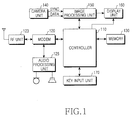
- FIG. 1 is a block diagram illustrating the construction of a wireless terminal comprising a camera according to an exemplary embodiment of the present invention.
- An RF unit 123 performs the wireless communication function of the wireless terminal.
- the RF unit 123 includes an RF transmitter (not shown) and an RF receiver (not shown).
- the RF transmitter up-converts and amplifies frequencies of a signal to be transmitted and the RF receiver low-noise amplifies a received signal and down-converts the frequency of the received signal.
- a modem 120 includes a transmitter for encoding and modulating the signal to be transmitted and a receiver for demodulating and decoding the received signal.
- An audio processing unit 125 may include a codec, which contains a data codec for processing packet data and the like and an audio codec for processing an audio signal such as a voice signal.
- the audio processing unit 125 converts a digital audio signal received from the modem 120 into an analog signal by means of the audio codec, thereby reproducing the converted analog signal. Also, the audio processing unit 125 converts an analog audio signal for transmission generated from a microphone into a digital audio signal by means of the audio codec, and transmits the converted digital audio signal to the modem 120.
- the codec may be constructed separately, or may be included in a controller 110.
- a memory 130 may include a program memory and a data memory.
- the program memory may store programs for controlling the general operation of the wireless terminal and programs for controlling data to be searched through the input of at least two keys and/or directional keys according to an exemplary embodiment of the present invention.
- the data memory temporarily stores data generated while the programs are executed.
- a controller 110 controls the entire operation of the wireless terminal.
- the controller 110 may include the modem 120 and the codec.
- the controller 110 controls data to be searched based on consecutive input of at least two keys and the number of inputs of a specific key of the at least two keys.
- the controller 110 controls data to be searched based on input of each directional key according to an exemplary embodiment of the present invention.
- a camera module 140 includes a camera sensor and a signal processing section.
- the camera sensor photographs an image and converts an optical signal obtained through the photographing into an electric signal.
- the signal processing section converts an analog image signal obtained through the photographing of the camera sensor into digital data.
- the camera sensor is a charge-coupled device (CCD) sensor
- the signal processing section may include a digital signal processor (DSP).
- the camera sensor and the signal processing section may be integrally or separately constructed.
- An image processing unit 150 performs a function to generate image data for displaying an image signal output from the camera module 140.
- the image processing unit 150 processes an image signal output from the camera module 140, in a unit of frame, and outputs the frame image data to be suitable for the screen size and the properties of a display unit 160.
- the image processing unit 150 includes a video codec to compress frame image data displayed on the display unit 160 by using a predetermined scheme and to restore original frame image data from compressed frame image data.
- the video codec may include a JPEG codec, an MPEG4 codec, a Wavelet codec, etc. It is assumed that the image processing unit 150 has an OSD (On Screen Display) function and can output OSD data according to the size of a display screen under the control of the controller 110.
- OSD On Screen Display
- the display unit 160 displays an image signal output from the image processing unit 150 and user data output from the controller 110 on a screen.
- the display unit 160 may employ a liquid crystal display (LCD).
- the display unit 160 may include an LCD controller, a memory for storing image data, an LCD element, etc.
- the display unit 160 may serve as an input section.
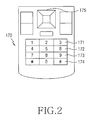
- a key input unit 170 includes keys for inputting numeric and character information and function keys for setting various functions. According to an exemplary embodiment of the present invention, the key input unit 170 enables a data search to be performed using the keys for inputting numeric and character information.
- the key input unit 170 enables a data search to be performed through the operation of directional keys from among the function keys for setting various functions.
- FIG. 2 is a view illustrating the keys for inputting numeric and character information and the function keys for setting various functions, which are included in the key input unit 170.
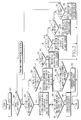
- FIG. 3 is a flowchart illustrating a method for searching data in the wireless terminal according to a first exemplary embodiment of the present invention.
- the method for searching data according to the first exemplary embodiment of the present invention will be described using the 3 key, 6 key, 9 key, and the # key from among the keys for inputting numeric and character information.
- a first key, a second key, a third key, and a fourth key represent the 3 key, 6 key, 9 key, and the # key, respectively.
- the first exemplary embodiment of the present invention is described using the 3 key, 6 key, 9 key, and the # key
- the method for searching data according to an exemplary embodiment of the present invention can be identically achieved by using the 3 key, 6 key, 9 key, and the # key.
- the method for searching data according to an exemplary embodiment of the present invention can also be achieved by using the 1 key, 4 key, 7 key, and the * key, or by using the 2 key, 5 key, 8 key, and the 0 key, or by using the 1 key, 2 key, and the 3 key, or by using the 4 key, 5 key, and the 6 key, or by using the 7 key, 8 key, and the 9 key, or by using the * key, 0 key, and the # key.
- step 301 data is displayed on the display unit 160 of the wireless terminal.
- a drag bar represents the existence of data other than the data currently-displayed on the screen of the display unit 160.
- the controller 110 senses it in step 302 and determines if the first to fourth keys 171 to 174 included in the key input unit 170 are operated.
- the consecutive operation of the first to fourth keys 171 to 174 in the designated order during a predetermined time period is sensed by the controller 110.
- the controller 110 senses this operation in step 303 and proceeds to step 304.
- the controller 110 controls data other than the data currently-displayed on the screen so that this data is displayed, while moving a cursor downward at a speed corresponding to the operation speed of the consecutively-operated keys 171 to 174.
- the controller 110 senses it in step 305, and continuously moves the cursor downward in step 306.
- the consecutive operation of the first to fourth keys 171 to 174 in the reverse order of the designated order during a predetermined time period is sensed by the controller 110.
- the controller 110 senses this operation in step 307 and proceeds to step 308.
- the controller 110 controls data other than the data currently-displayed on the screen so that this data is displayed, while moving a cursor upward at a speed corresponding to the operation speed of the consecutively-operated keys 174 to 171.
- the controller 110 senses it in step 309, and continuously moves the cursor upward in step 310.
- the controller 110 senses it in step 311, and moves the cursor onto the position of the first data of all data included in the current screen (step 312).
- the controller 110 senses it in step 313, and moves the cursor onto the position of the first data of data currently-displayed on the current screen (step 314).
- the controller 110 senses it in step 315, and moves the cursor onto the position of the last data of all data included in the current screen (step 316).
- the controller 110 senses it in step 317, and moves the cursor onto the position of the last data of data currently-displayed on the current screen (step 318).
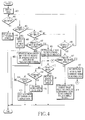
- FIG. 4 is a flowchart illustrating a method for searching data in the wireless terminal according to a second exemplary embodiment of the present invention.
- Data is displayed on the display unit 160 of the wireless terminal in step 401, and it is determined if directional keys 175 included in the key input unit 170 are operated.
- the controller 110 senses the operation in step 402 and turns a current screen into a previous screen to display corresponding data (step 403). Also, when a right key of the directional keys 175 is operated, the controller 110 senses the right key operation in step 404, and turns a current screen into a next screen to display corresponding data (step 405).
- the controller 110 senses the operation in step 406, and determines an operation time period of the up key. When the operation time period of the up key is less than a predetermined time period, the controller 110 senses it in step 407, and moves the cursor upward by a predetermined interval when the up key is operated, thereby locating the cursor onto the corresponding data (step 408). In step 408, if the display unit 160 displays an image such as a picture on the screen, the controller 110 may move the cursor upward by a predetermined number of pixels when the up key is operated, so that the cursor indicates an image data located at a specific region of the displayed image. In contrast, when the operation time period of the up key is equal to or greater than the predetermined time period, the controller 110 senses it in step 407, and automatically moves the cursor upward to locate the cursor onto the corresponding data (step 409).
- the controller 110 senses the operation of the up key in step 410, and increases the moving speed of the cursor in step 411. Also, while step 409 is performed, when the down key of the directional keys 175 is operated. The controller 110 senses the operation in step 412 and decreases the moving speed of the cursor in step 413. Also, while step 409 is performed, when the center key of the directional keys 175 is operated, the controller 110 senses this operation in step 414, and stops moving the cursor in step 415. The moving speed of the cursor may be increased or decreased in various levels.
- the controller 110 senses the operation in step 416, and determines an operation time period of the down key.
- the controller 110 senses the operation time in step 417, and moves the cursor downward by a predetermined interval when the down key is operated, thereby locating the cursor onto the corresponding data (step 418).
- the controller 110 may move the cursor downward by a predetermined number of pixels when the down key is operated, so that the cursor indicates an image data located at a specific region of the displayed image.
- the controller 110 senses it in step 417 and automatically moves the cursor downward to locate the cursor onto the corresponding data (step 419).
- the controller 110 senses the operation of the up key of the directional keys 175 in step 410 and increases the moving speed of the cursor in step 411. Also, while step 419 is performed, when the down key is operated, the controller 110 senses it in step 412, and decreases the moving speed of the cursor in step 413. Also, while step 419 is performed, when the center key of the directional keys 175 is operated, the controller 110 senses it in step 414, and stops moving the cursor in step 415. The moving speed of the cursor may be increased or decreased in various levels.
- data search in the wireless terminal can be performed using the key input unit, thereby improving convenience of the user during a web search, file viewing, a list search, etc.
Landscapes
- Engineering & Computer Science (AREA)
- General Engineering & Computer Science (AREA)
- Theoretical Computer Science (AREA)
- Human Computer Interaction (AREA)
- Physics & Mathematics (AREA)
- General Physics & Mathematics (AREA)
- Computer Networks & Wireless Communication (AREA)
- Signal Processing (AREA)
- Telephone Function (AREA)
- User Interface Of Digital Computer (AREA)
Applications Claiming Priority (1)
| Application Number | Priority Date | Filing Date | Title |
|---|---|---|---|
| KR1020050094359A KR100689526B1 (ko) | 2005-10-07 | 2005-10-07 | 휴대단말기의 데이터 검색방법 |
Publications (1)
| Publication Number | Publication Date |
|---|---|
| EP1772801A2 true EP1772801A2 (fr) | 2007-04-11 |
Family
ID=37562087
Family Applications (1)
| Application Number | Title | Priority Date | Filing Date |
|---|---|---|---|
| EP06016012A Withdrawn EP1772801A2 (fr) | 2005-10-07 | 2006-08-01 | Procédé de recherche de données dans un terminal sans fil |
Country Status (4)
| Country | Link |
|---|---|
| US (1) | US20070080942A1 (fr) |
| EP (1) | EP1772801A2 (fr) |
| KR (1) | KR100689526B1 (fr) |
| CN (2) | CN101650631A (fr) |
Families Citing this family (1)
| Publication number | Priority date | Publication date | Assignee | Title |
|---|---|---|---|---|
| JP6036123B2 (ja) * | 2012-10-01 | 2016-11-30 | 富士ゼロックス株式会社 | 情報表示装置及びプログラム |
Family Cites Families (10)
| Publication number | Priority date | Publication date | Assignee | Title |
|---|---|---|---|---|
| US6727830B2 (en) * | 1999-01-05 | 2004-04-27 | Microsoft Corporation | Time based hardware button for application launch |
| JP2000349889A (ja) | 1999-06-04 | 2000-12-15 | Matsushita Electric Ind Co Ltd | スクロール機能付き電話端末装置 |
| JP4383683B2 (ja) * | 2001-03-12 | 2009-12-16 | アルプス電気株式会社 | 入力装置 |
| JP2003067120A (ja) | 2001-08-24 | 2003-03-07 | Pioneer Electronic Corp | テンキーの使用方法 |
| US6765556B2 (en) * | 2001-11-16 | 2004-07-20 | International Business Machines Corporation | Two-key input per character text entry apparatus and method |
| KR20030042876A (ko) * | 2001-11-26 | 2003-06-02 | 에스케이텔레텍주식회사 | 이동통신단말기에서의 키패드 위치 정보에 따른 메뉴 선택방법 |
| KR100451141B1 (ko) * | 2002-06-05 | 2004-10-02 | 엘지전자 주식회사 | 이동통신 단말기를 이용한 메뉴 구현방법 |
| US7429978B2 (en) * | 2003-03-06 | 2008-09-30 | Fujitsu Limited | Portable electronic apparatus |
| JP4057456B2 (ja) | 2003-04-15 | 2008-03-05 | 京セラ株式会社 | 情報端末 |
| KR100999294B1 (ko) * | 2003-10-15 | 2010-12-07 | 엘지전자 주식회사 | 이동 통신 단말기의 전화 번호부 검색 방법 |
-
2005
- 2005-10-07 KR KR1020050094359A patent/KR100689526B1/ko not_active Expired - Fee Related
-
2006
- 2006-03-10 US US11/372,079 patent/US20070080942A1/en not_active Abandoned
- 2006-08-01 CN CN200910160578A patent/CN101650631A/zh active Pending
- 2006-08-01 EP EP06016012A patent/EP1772801A2/fr not_active Withdrawn
- 2006-08-01 CN CNA2006101083365A patent/CN1946114A/zh active Pending
Also Published As
| Publication number | Publication date |
|---|---|
| US20070080942A1 (en) | 2007-04-12 |
| CN101650631A (zh) | 2010-02-17 |
| CN1946114A (zh) | 2007-04-11 |
| KR100689526B1 (ko) | 2007-03-02 |
Similar Documents
| Publication | Publication Date | Title |
|---|---|---|
| US9088814B2 (en) | Image display method and apparatus | |
| AU2011215017B2 (en) | Apparatus and method for performing multi-tasking | |
| US8751973B2 (en) | Display method and system for portable device using external display device | |
| JP4956216B2 (ja) | デジタル放送番組表示装置およびデジタル放送番組表示プログラム | |
| KR101661981B1 (ko) | 영상표시장치 및 그 동작방법 | |
| US20120147269A1 (en) | Image processing apparatus, user terminal apparatus, image processing method, and control method thereof | |
| EP3510767B1 (fr) | Dispositif d'affichage | |
| US20150177965A1 (en) | Portable terminal having touch screen and method for processing image therein | |
| US20200272243A1 (en) | Apparatus and method for arranging a keypad in wireless terminal | |
| KR20130040547A (ko) | 휴대단말기의 화면제어 장치 및 방법 | |
| US20130167083A1 (en) | Apparatus and method for editting screen in wireless terminal | |
| KR100651368B1 (ko) | 휴대단말기의 움직임에 따른 이미지 제어방법 | |
| US9728157B2 (en) | Program, display apparatus, television receiver, display method, and display system | |
| EP2549471A2 (fr) | Appareil et procédé d'affichage d'une fenêtre contextuelle dans un terminal portable | |
| CN111445427B (zh) | 视频图像处理方法以及显示设备 | |
| US20070162878A1 (en) | Method for automatically displaying data in wireless terminal | |
| EP1772801A2 (fr) | Procédé de recherche de données dans un terminal sans fil | |
| EP1722372A2 (fr) | Procédé d'affichage des données d'image dans un terminal portable | |
| EP1770489A2 (fr) | Méthode de contrôle de données utilsant des fonctions d'une souris dans un terminal sans-fil | |
| US12301946B2 (en) | Mobile terminal | |
| US12184924B2 (en) | Image display apparatus | |
| EP1850209A2 (fr) | Dispositif et procédé de saisie de touches dans un terminal portable sans fil | |
| KR20230116661A (ko) | 이동 단말기 | |
| US20130135356A1 (en) | Apparatus and method for displaying data items in a wireless terminal | |
| AU2014200244B2 (en) | Method of Controlling Tasks on an Apparatus |
Legal Events
| Date | Code | Title | Description |
|---|---|---|---|
| PUAI | Public reference made under article 153(3) epc to a published international application that has entered the european phase |
Free format text: ORIGINAL CODE: 0009012 |
|
| 17P | Request for examination filed |
Effective date: 20060801 |
|
| AK | Designated contracting states |
Kind code of ref document: A2 Designated state(s): AT BE BG CH CY CZ DE DK EE ES FI FR GB GR HU IE IS IT LI LT LU LV MC NL PL PT RO SE SI SK TR |
|
| AX | Request for extension of the european patent |
Extension state: AL BA HR MK YU |
|
| STAA | Information on the status of an ep patent application or granted ep patent |
Free format text: STATUS: THE APPLICATION IS DEEMED TO BE WITHDRAWN |
|
| 18D | Application deemed to be withdrawn |
Effective date: 20110301 |