EP1811365A2 - Eingabevorrichtung, mobiles Endgerät und Verfahren zur Datenmanipulation in einem mobilen Endgerät - Google Patents
Eingabevorrichtung, mobiles Endgerät und Verfahren zur Datenmanipulation in einem mobilen Endgerät Download PDFInfo
- Publication number
- EP1811365A2 EP1811365A2 EP06127105A EP06127105A EP1811365A2 EP 1811365 A2 EP1811365 A2 EP 1811365A2 EP 06127105 A EP06127105 A EP 06127105A EP 06127105 A EP06127105 A EP 06127105A EP 1811365 A2 EP1811365 A2 EP 1811365A2
- Authority
- EP
- European Patent Office
- Prior art keywords
- section
- content data
- manipulation
- display
- display section
- Prior art date
- Legal status (The legal status is an assumption and is not a legal conclusion. Google has not performed a legal analysis and makes no representation as to the accuracy of the status listed.)
- Withdrawn
Links
Images




Classifications
-
- G—PHYSICS
- G06—COMPUTING OR CALCULATING; COUNTING
- G06F—ELECTRIC DIGITAL DATA PROCESSING
- G06F3/00—Input arrangements for transferring data to be processed into a form capable of being handled by the computer; Output arrangements for transferring data from processing unit to output unit, e.g. interface arrangements
- G06F3/01—Input arrangements or combined input and output arrangements for interaction between user and computer
- G06F3/048—Interaction techniques based on graphical user interfaces [GUI]
- G06F3/0484—Interaction techniques based on graphical user interfaces [GUI] for the control of specific functions or operations, e.g. selecting or manipulating an object, an image or a displayed text element, setting a parameter value or selecting a range
- G06F3/0486—Drag-and-drop
-
- H—ELECTRICITY
- H04—ELECTRIC COMMUNICATION TECHNIQUE
- H04B—TRANSMISSION
- H04B1/00—Details of transmission systems, not covered by a single one of groups H04B3/00 - H04B13/00; Details of transmission systems not characterised by the medium used for transmission
- H04B1/38—Transceivers, i.e. devices in which transmitter and receiver form a structural unit and in which at least one part is used for functions of transmitting and receiving
- H04B1/40—Circuits
-
- G—PHYSICS
- G06—COMPUTING OR CALCULATING; COUNTING
- G06F—ELECTRIC DIGITAL DATA PROCESSING
- G06F3/00—Input arrangements for transferring data to be processed into a form capable of being handled by the computer; Output arrangements for transferring data from processing unit to output unit, e.g. interface arrangements
- G06F3/01—Input arrangements or combined input and output arrangements for interaction between user and computer
- G06F3/03—Arrangements for converting the position or the displacement of a member into a coded form
- G06F3/033—Pointing devices displaced or positioned by the user, e.g. mice, trackballs, pens or joysticks; Accessories therefor
- G06F3/0354—Pointing devices displaced or positioned by the user, e.g. mice, trackballs, pens or joysticks; Accessories therefor with detection of two-dimensional [2D] relative movements between the device, or an operating part thereof, and a plane or surface, e.g. 2D mice, trackballs, pens or pucks
-
- G—PHYSICS
- G06—COMPUTING OR CALCULATING; COUNTING
- G06F—ELECTRIC DIGITAL DATA PROCESSING
- G06F3/00—Input arrangements for transferring data to be processed into a form capable of being handled by the computer; Output arrangements for transferring data from processing unit to output unit, e.g. interface arrangements
- G06F3/01—Input arrangements or combined input and output arrangements for interaction between user and computer
- G06F3/03—Arrangements for converting the position or the displacement of a member into a coded form
- G06F3/033—Pointing devices displaced or positioned by the user, e.g. mice, trackballs, pens or joysticks; Accessories therefor
- G06F3/0354—Pointing devices displaced or positioned by the user, e.g. mice, trackballs, pens or joysticks; Accessories therefor with detection of two-dimensional [2D] relative movements between the device, or an operating part thereof, and a plane or surface, e.g. 2D mice, trackballs, pens or pucks
- G06F3/03547—Touch pads, in which fingers can move on a surface
-
- G—PHYSICS
- G06—COMPUTING OR CALCULATING; COUNTING
- G06F—ELECTRIC DIGITAL DATA PROCESSING
- G06F3/00—Input arrangements for transferring data to be processed into a form capable of being handled by the computer; Output arrangements for transferring data from processing unit to output unit, e.g. interface arrangements
- G06F3/01—Input arrangements or combined input and output arrangements for interaction between user and computer
- G06F3/048—Interaction techniques based on graphical user interfaces [GUI]
- G06F3/0487—Interaction techniques based on graphical user interfaces [GUI] using specific features provided by the input device, e.g. functions controlled by the rotation of a mouse with dual sensing arrangements, or of the nature of the input device, e.g. tap gestures based on pressure sensed by a digitiser
- G06F3/0488—Interaction techniques based on graphical user interfaces [GUI] using specific features provided by the input device, e.g. functions controlled by the rotation of a mouse with dual sensing arrangements, or of the nature of the input device, e.g. tap gestures based on pressure sensed by a digitiser using a touch-screen or digitiser, e.g. input of commands through traced gestures
- G06F3/04886—Interaction techniques based on graphical user interfaces [GUI] using specific features provided by the input device, e.g. functions controlled by the rotation of a mouse with dual sensing arrangements, or of the nature of the input device, e.g. tap gestures based on pressure sensed by a digitiser using a touch-screen or digitiser, e.g. input of commands through traced gestures by partitioning the display area of the touch-screen or the surface of the digitising tablet into independently controllable areas, e.g. virtual keyboards or menus
-
- G—PHYSICS
- G06—COMPUTING OR CALCULATING; COUNTING
- G06F—ELECTRIC DIGITAL DATA PROCESSING
- G06F3/00—Input arrangements for transferring data to be processed into a form capable of being handled by the computer; Output arrangements for transferring data from processing unit to output unit, e.g. interface arrangements
- G06F3/01—Input arrangements or combined input and output arrangements for interaction between user and computer
- G06F3/048—Interaction techniques based on graphical user interfaces [GUI]
- G06F3/0487—Interaction techniques based on graphical user interfaces [GUI] using specific features provided by the input device, e.g. functions controlled by the rotation of a mouse with dual sensing arrangements, or of the nature of the input device, e.g. tap gestures based on pressure sensed by a digitiser
- G06F3/0489—Interaction techniques based on graphical user interfaces [GUI] using specific features provided by the input device, e.g. functions controlled by the rotation of a mouse with dual sensing arrangements, or of the nature of the input device, e.g. tap gestures based on pressure sensed by a digitiser using dedicated keyboard keys or combinations thereof
-
- G—PHYSICS
- G09—EDUCATION; CRYPTOGRAPHY; DISPLAY; ADVERTISING; SEALS
- G09G—ARRANGEMENTS OR CIRCUITS FOR CONTROL OF INDICATING DEVICES USING STATIC MEANS TO PRESENT VARIABLE INFORMATION
- G09G5/00—Control arrangements or circuits for visual indicators common to cathode-ray tube indicators and other visual indicators
- G09G5/14—Display of multiple viewports
-
- H—ELECTRICITY
- H04—ELECTRIC COMMUNICATION TECHNIQUE
- H04M—TELEPHONIC COMMUNICATION
- H04M1/00—Substation equipment, e.g. for use by subscribers
- H04M1/02—Constructional features of telephone sets
- H04M1/23—Construction or mounting of dials or of equivalent devices; Means for facilitating the use thereof
- H04M1/236—Construction or mounting of dials or of equivalent devices; Means for facilitating the use thereof including keys on side or rear faces
-
- H—ELECTRICITY
- H04—ELECTRIC COMMUNICATION TECHNIQUE
- H04M—TELEPHONIC COMMUNICATION
- H04M1/00—Substation equipment, e.g. for use by subscribers
- H04M1/72—Mobile telephones; Cordless telephones, i.e. devices for establishing wireless links to base stations without route selection
- H04M1/724—User interfaces specially adapted for cordless or mobile telephones
- H04M1/72466—User interfaces specially adapted for cordless or mobile telephones with selection means, e.g. keys, having functions defined by the mode or the status of the device
-
- H—ELECTRICITY
- H04—ELECTRIC COMMUNICATION TECHNIQUE
- H04M—TELEPHONIC COMMUNICATION
- H04M1/00—Substation equipment, e.g. for use by subscribers
- H04M1/72—Mobile telephones; Cordless telephones, i.e. devices for establishing wireless links to base stations without route selection
- H04M1/724—User interfaces specially adapted for cordless or mobile telephones
- H04M1/72469—User interfaces specially adapted for cordless or mobile telephones for operating the device by selecting functions from two or more displayed items, e.g. menus or icons
-
- G—PHYSICS
- G06—COMPUTING OR CALCULATING; COUNTING
- G06F—ELECTRIC DIGITAL DATA PROCESSING
- G06F2203/00—Indexing scheme relating to G06F3/00 - G06F3/048
- G06F2203/033—Indexing scheme relating to G06F3/033
- G06F2203/0339—Touch strips, e.g. orthogonal touch strips to control cursor movement or scrolling; single touch strip to adjust parameter or to implement a row of soft keys
-
- G—PHYSICS
- G09—EDUCATION; CRYPTOGRAPHY; DISPLAY; ADVERTISING; SEALS
- G09G—ARRANGEMENTS OR CIRCUITS FOR CONTROL OF INDICATING DEVICES USING STATIC MEANS TO PRESENT VARIABLE INFORMATION
- G09G2340/00—Aspects of display data processing
- G09G2340/12—Overlay of images, i.e. displayed pixel being the result of switching between the corresponding input pixels
-
- H—ELECTRICITY
- H04—ELECTRIC COMMUNICATION TECHNIQUE
- H04M—TELEPHONIC COMMUNICATION
- H04M2250/00—Details of telephonic subscriber devices
- H04M2250/22—Details of telephonic subscriber devices including a touch pad, a touch sensor or a touch detector
Definitions
- the present invention relates to an input unit for making inputs of various types of information to a unit, a mobile terminal unit such as mobile phone using the input unit, and a content data manipulation method in the mobile terminal unit.
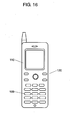
- FIG. 16 is a diagram showing the configuration of a mobile terminal unit of previous type.
- mobile phone 120 being a mobile terminal unit is provided with display section 110 and ten-key pad 109.
- a user operates ten-key pad 109 of mobile phone 120 for connection to the Internet, and downloads content data from Websites.
- the content data is then stored in a memory inside of a unit. When such an operation is repeated for a number of times, the content data is stored in order of being downloaded in a memory inside of mobile phone 120.
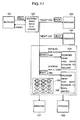
- FIG. 17 is a diagram showing a content data manipulation method in a previous mobile terminal unit.
- display section 110 of a unit is displaying message 101 being exemplary content data.
- display section 110 displays a screen of browser menu 102.
- browser menu 102 a display of "back” is selected or a key assigned to the function of "back” is depressed for a short time.
- the content data downloaded preceding to message 101 is selected so that the content data, i.e., message 103, is displayed on display section 110 of mobile phone 120.
- browser menu screen 105 or 106 appears when a key assigned to the function of "back" or “next" is depressed for a long time, i.e., a predetermined length of time or longer.
- a numeric character(s) of ten-key pad 109 are illuminated in accordance with the number of contents stored in the memory. Assuming that five contents are stored in the memory and available for browsing, as shown in FIG. 17 by diagonally shaded areas of ten-key pad 109, the keys of 1 to 5 are all illuminated.
- the invention is proposed in consideration of such problems observed with the previous technology, and provides an input unit and a mobile terminal unit capable of manipulating content data in a simple and easy manner, and a content data manipulation method in the mobile terminal unit.
- An aspect of the invention is directed to an input unit, including: a display section that displays thereon content data; a manipulation section that is provided close to the display section for being in charge of manipulation related to the content data; and a pad section that detects the movement of an object on the display section and the manipulation section.
- an input unit that allows manipulation of content data with such a simple and easy manner as moving an object on the display section and the operation section.
- a mobile terminal unit including: a display section that displays thereon content data; a manipulation section that is provided close to the display section for being in charge of manipulation related to the content data; a pad section that detects the movement of an object on the display section and the manipulation section; and a control section that goes through a predetermined process with respect to the content data based on the movement of the object detected by the pad section.
- a mobile terminal unit that allows manipulation of content data with such a simple and easy manner as moving an object on the display section and the operation section.
- a memory section may be provided for storing the content data, and when the pad section detects the movement of the object being directed from the display section to the manipulation section, the control section may make the memory section store therein the content data.
- Such a configuration implements a mobile terminal unit that can leave out any desired content data from those remained available for browsing, and put the data into a temporary-storage state with such a simple and easy operation of a user moving object from the display section to the manipulation section provided in a close range.
- the control section may make the display section hide a display of the content data.
- Such a configuration enables a user to intuitively know that the content data is put into a temporary-storage state.
- the manipulation section may be provided with an explicit-display section that shows the content data being stored in the memory section, and when the pad section detects the movement of the object being directed from the display section to the manipulation section, the control section may make the explicit-display section explicitly display that the content data is stored in the memory section.
- the explicit-display section displays explicitly that the content data is stored in the memory section so that the user can know more clearly that the content data is now in storage.
- the explicit-display section may explicitly display a title of the content data.
- the manipulation section may be plurally provided, the manipulation sections are each provided with the explicit-display section, and when the pad section detects the movement of the object being directed from the display section to the manipulation section, the control section may make any of the explicit-display sections located at a position where the object remains display explicitly that the content data is stored in the memory section.
- Such a configuration helps a user implement intuitive and easy-to-know manipulation as if storing a piece of content data into each of a plurality of manipulation sections. The user also knows by the number of the illuminating explicit-display sections at a glance how many content data are already in storage.
- a memory section may be provided for storing therein the content data, and when the pad section detects the movement of the object being directed from the manipulation section to the display section, the control section may read the content data from the memory section.
- the control section may make the display section display thereon the content data.
- This configuration enables a user to intuitively know that the content data in storage of the memory is now read.
- control section may notify a user of details of the content data stored in the memory section.
- This configuration can notify a user of the details of the content data stored in the memory section.
- the predetermined operation may be of stopping the object on the manipulation section for a predetermined length of time or longer.
- control section when detecting the predetermined operation, may enlarge and display the content data with no overlay in a display area of the display section.
- This configuration offers a user the data other than the temporarily-stored content data in the easier-to-see format.
- the predetermined operation may be of tapping the display section.
- the manipulation section may be provided with a light-guidance section that extends to the surface including the side surface of a cabinet.
- Such a configuration enables to check from the side surface of the cabinet that the content data is stored so that the viewability can be increased to a further extent.
- the pad section may detect the movement of a pen or a finger on the display section and the manipulation section.
- Still another aspect of the invention is directed to a content data manipulation method using a mobile terminal unit that includes: a display section that displays thereon content data; a manipulation section that is provided close to the display section for being in charge of manipulation related to the content data; a pad section that detects the movement of an object on the display section and the manipulation section; and a control section that exercises control over the display section and the pad section.
- the method includes: a first step of detecting the movement of the object by the pad section; and a second step of going through a predetermined process by the control section with respect to the content data based on the movement of the object detected by the pad section.
- a content data manipulation method for use with a mobile terminal unit that can manipulate content data with such a simple and easy manner as moving an object on the display section and the operation section.
- the invention can provide an input unit and a mobile terminal unit capable of manipulating content data in a simple and easy manner, and a content data manipulation method in the mobile terminal unit.
- a mobile terminal unit is exemplified by mobile phone 20 for a description.
- FIG. 1 is a view of the front configuration of mobile phone 20 in the embodiment of the invention.
- mobile phone 20 includes a unit cabinet 1 having the outside shape of substantially a rectangular parallelepiped, and including therein a wiring board.
- Mobile phone 20 is provided with, on the manipulation surface side thereof, in order from bottom to top of FIG. 1, transmitter section 3, ten-key pad 5, function key 7, display section 11, and receiver section 9.
- Transmitter section 3 receives the voice of a user for use for phone transmission
- receiver section 9 receives the voice of a person on the other end when the unit serves as a phone.
- Ten-key pad 5 is used for input of numeric digits or others
- function key 7 is used for making inputs to activate any specific function
- display section 11 is used for displaying thereon content data or others.
- Transmitter section 3 is configured by a microphone or others disposed at a predetermined position inside of unit cabinet 1.
- Ten-key pad 5 and function key 7 are each configured by a push-down switch, disposed at a predetermined position on the wiring board to be ready to be depressed.
- Display section 11 includes an LCD (Liquid Crystal Display) or others as a function element.
- LCD Liquid Crystal Display
- Receiver section 9 is configuredusing a speaker or others.
- Mobile phone 20 includes antenna 10 for transmission and reception of radio waves.
- Mobile phone 20 also includes edge portion 40 of a predetermined width on the sides of a portion at which display section 11 of unit cabinet 1 is disposed.
- Edge portion 40 is provided with manipulation section 21, which is provided separately from display section 11 for manipulation of data for saving. As shown in FIG. 1, for data-saving manipulation as such, the manipulation section 21 is provided to edge portions 40 three each on each of the sides of display section 11.
- Mobile phone 20 includes explicit-display section 15 for use to explicitly notify a user of whether data-saving manipulation is performed, i.e. , whether content data is stored in a memory inside of the unit cabinet 1.
- explicit-display section 15 is disposed in accordance with the position where manipulation sections 21 are located for data-saving manipulation.
- manipulation sections 21 for data-saving manipulation are each configured by a light-transmissive resin component, and explicit-display section 15 being an organic EL (electroluminescent) device is disposed at the position corresponding to each of manipulation sections 21 inside of unit cabinet 1, e.g., directly beneath each corresponding manipulation section 21, so that explicit-display sections 15 fulfill the function.
- pad member 31 is disposed corresponding to an area carrying thereon display section 11 and manipulation sections 21 for data-saving manipulation, i.e., area 42 enclosed by dotted lines in FIG. 1.
- Padmember 31 is provided for detecting the movement of an object (such as user's finger or others) in area 42. With pad member 31, when the user's finger is placed on area 42 on unit cabinet 1, for example, a signal is generated for use to specify the coordinates of the position.
- Pad member 31 is exemplified as being capacitance type, but this is surely not restrictive.
- Pad member 31 may be a pressure-sensitive resistance film or others.
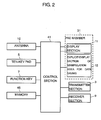
- FIG. 2 is a block diagram showing the configuration of mobile phone 20 in the embodiment of the invention.
- control section 41 including a microcomputer or others disposed on the wiring board.
- Control section 41 is connected all with antenna 10, ten-key 5, function key 7, pad member 31, display section 11, explicit-display section 15, transmitter section 3, and receiver section 9.
- Control section 41 exchanges various types of signals with these components, and control section 41 exercises control thereover.
- Control section 41 is connected with memory 45, and control section 41 is also in charge of exercising control over data input/output to/from memory 45.
- Mobile phone 20 has a function of browsing Websites using a browser through connection to the Internet.
- Mobile phone 20 is capable of offering various services, e. g. , making phone calls by depression of ten-key pad 5, function key 7, or others, sending and receiving E-mails, reading data of photo images, documents, or others stored in memory 45 for display, Website browsing through connection to the Internet, and telephone conversation with moving pictures, i.e., picture phone.
- information to be displayed on display section 11 of mobile phone 20, e.g., phone numbers, E-mails , photo images, documents, Websites, and moving images is collectively referred to as content data.
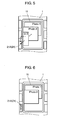
- FIGS. 3 to 14 are each a diagram for illustrating a method of using mobile phone 20 in the embodiment of the invention.
- a user operates function key 7 or others to display a plurality of content data one by one on display section 11.
- the content data is photo images, as exemplarily shown in FIG. 3, the content data, i.e., images of Photo1 to Photo3, appears on display section 11 with an overlay in order of display, i.e., the recent image is displayed toward the front compared with the other two.
- FIG. 3 example Photo3 is displayed at the top toward the front, and Photo2 is displayed therebehind and then Photo1. With such a display, the user can view only Photo3 in its entirety.
- the user goes through an operation of temporarily saving the image of Photo3 displayed thereover.
- the user first places his or her finger on the position in display section 11 where the image of Photo3 is displayed. The user then moves and slides his or her finger toward operation section 21A for data-saving manipulation while touching the upper surface of display section 11.
- pad member 31 forwards a signal to control section 41 for specifying the coordinates of the position where the user's finger is placed.
- control section 41 Based on the signal provided by pad member 31, control section 41 accordingly specifies the position on display section 11 where the user' s finger is placed, and based on the coordinates of the position, selects the content data corresponding thereto for saving. In the state of FIG. 4 example, control section 41 assumes as the user is selecting the content data of Photo3.
- control section 41 exercises control to move the display of Photo3 in accordance with the direction and speed of the finger movement. Such control is exercised based on the signal provided by pad member 31 to control section 41. As such, the user feels as if the image of Photo3 moves together with his or her finger, thereby implementing very intuitive operation.
- control section 21A When the user's finger reaches and stops on a lower-left portion of FIG. 5 for data-saving manipulation, i.e. , operation section 21A, control section hides (deletes) the image of Photo3 from display section 11, and stores image data of Photo3 into memory 45. Such deletion and storage are made based on the signal provided by pad member 31, indicating the coordinates of the position.
- Control section 41 also exercises control over the display of explicit-display section 15, which is disposed corresponding to manipulation section 21A. To be specific, as shown in FIG. 6, on manipulation section 21A in charge of data-saving manipulation, explicit-display section 15 serves to display the title of content data, e.g., "Photo3", stored in the memory 45 on a temporary basis.
- control section 41 determines which manipulation section 21 is to be explicitly displayed by explicit -display section 15 . Such a determination is made based on the coordinates of the position where the user's finger eventually stops.
- control section 41 exercises display control over explicit-display section 15 of manipulation section 21A located at the position where the user's finger eventually stops.
- control section 41 determines that the content data corresponding to manipulation section 21A, i.e., content data of Photo3, is selected by the user.
- Control section 41 then reads out the image data of Photo3 stored in memory 45, and displays the image of Photo3 in display 11 bit by bit in accordance with the movement of the finger. Such a display is made based on the signal coming from pad member 31 whenever the user moves his or her finger. During the manipulation procedure as such, the display of content data title, i.e., display of "Photo3", explicitly made by explicit-display section 15 onto manipulation section 21A is disappeared by control of control section 41 when the image of Photo3 is displayed again in display section 11.
- the above-described operation procedure also includes the method of manipulating the images of Photo1 and Photo2 to move toward manipulation sections 21 for temporary storage into memory 45, and the method of displaying again the temporarily-stored content data in display section 11.
- mobile phone 20 in this embodiment includes manipulation sections 21 at portions close to display section 11 for data-saving manipulation, and pad member 31 is disposed not only on display section 11 but also on areas including manipulation sections 21 for the aim of detecting the movement of an object.
- mobile phone 20 of the embodiment by a user placing his or her finger in display section 11, the position where the user's finger is placed is detected so that any corresponding content data is controllably selected as a movement object. This thus favorably helps the operation of moving the content data or others to be completed in a smooth manner.
- Mobile phone 20 of the embodiment can also put the content data selected as a movement object into a temporary-storage state by a user sliding his or her finger from display section 11 onto any of manipulation sections 21 for data-saving manipulation.
- Mobile phone 20 can also display again the temporarily-stored content data by the user sliding his or her finger from manipulation section 21A provided for data-saving manipulation into display section 11.
- the operation of putting the content data into the temporary- storage state, or the operation of displaying again the content data are performed based on a finger-abutting-position or a movement direction of the finger. This is very easy for the user to understand, and these operations are simply done only by tracing the surface of unit cabinet 1, thereby offering excellent operability.
- control section 41 For control application in such a case, using a signal provided by pad member 31 as a key, if control section 41 is already through with the operation for manipulation section 21A of putting any specific content data into temporary-storage state, the user may be warned by a warning sound.
- the signal using as a key is provided when user erroneously executes the operation as described above, indicating the coordinates as information that the user's finger moved from inside of display section 11 to manipulation section 21A.
- content data is a screen of information about a Website on the Internet.
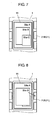
- a user operates function key 7 or others to establish a connection with any Website on the Internet, for example, and as shown in FIG. 7, a plurality of content data, i.e., screens of Website information, is displayed in display section 11.
- a plurality of content data i.e., screens of Website information
- Such displayed Website-information screens may display information about several different Websites at the same time, or display several layers of information of any one specific Website.
- FIG. 7 example schematically, three Website-information screens are displayed with an overlay, i.e., SiteA to SiteC, about three different Websites.
- SiteC is displayed on SiteB with an overlay
- SiteB is displayed on SiteA with an overlay.
- display section 11 only SiteC can be viewed in its entirety.
- the user first places his or her finger at the position in display section 11 where the information screen of SiteB is displayed.
- pad member 31 forwards a signal to control section 41 for specifying the coordinates of the position where the user's finger is placed.
- control section 41 accordingly determines that the information screen of SiteB is selected as a manipulation target. Note here that the information about SiteB is assumed as being entirely selected as a manipulation target, including the portion behind the information screen of SiteC . As shown in FIG. 8, control section 41 makes display section 11 display the image of SiteB in such a manner that the image is located toward the front.
- control section 41 may notify the user of the details of the temporary-stored content data, thereby leading to much better operability.
- notification can be made in various manners, e.g., a speaker or others provided to receiver section 9 may be used for a sound, or a pop-up screen may be provided to display section 11 for a message.
- FIGS. 11 to 14 described next is an exemplary operation when mobile phone 20 in the embodiment offers a picture phone service, i.e., telephone conversation is made with moving pictures. Assuming that the user is making conversations with six speakers at the same time, and images of six speakers are all displayed on display section 11.
- Exemplified here is a case that, from the images of A, B, C, D, E, and F, the user wants to temporarily store a part of the images, e.g., B, C, D and E .
- display section 11 displays thereon screen information about two speakers of A and F who are not selected as saving targets. Their information screens remain the same in size as those before the data storage.
- Explicit-display section 15 displays explicitly that the images of B, C, D, and E are stored in four manipulation sections 21, respectively. As such, the user can know that the images of B, C, D , and E are all stored in memory 45.
- the user goes through an operation different from that of temporarily storing the content data or of displaying again the temporarily-stored content data as above, e.g., taps twice on display section 11 using a finger or other objects.
- pad member 31 (not shown in FIG. 13) forwards a signal to control section 41, indicating that the currently executed operation is different from the normal operation. Based on the signal, control section 41 displays the information screens of the two speakers of A and F on display section 11. Prior to making such a display, control section 41 enlarges the information screens to each equally cover ahalf of display section 11 in its entirety with no overlay.
- Such an operation of enlarging and displaying the images is preferably executed as a procedure after the operation of temporarily storing the content data, and the operation of displaying again the temporarily-stored content data. If executed as such, the resulting procedure leads to much better operability. If the operation of enlarging the images for display is executed by tapping display section 11 using the user's finger tip or joint, the user's finger can remain on the cabinet until the procedure is completed after the operation of temporarily storing the content data, and the operation of displaying again the temporarily-stored content data.
- the invention can implement a mobile phone that enables a user to put content data into a temporarily-storage state and display the content data again with a simple and easy operation.
- the operation methods described above may be combined together for use, and the content data being a manipulation target is not restrictive to the above-described
- an LED Light-Emitting Diode
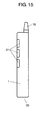
- FIG. 15 is a side view of the mobile phone in the embodiment, showing another configuration.
- explicit-display section 15 (not shown) is an LED, and in each of manipulation sections 21, a light-transmissive resin component (light-guidance section) is provided across unit cabinet 1, from the front surface to the side surface.
- unit cabinet 1 can be illuminated also from the side surface when the LED is illuminated, and the resulting mobile unit can be configured at a lower cost.
- pad member 31 of capacitance type any finger movement on the side surface of manipulation sections 21 can be also detected. This thus enables to detect any finger movement also on curved surfaces and side surfaces.
- the light-transmissive resin component is surely extended from the side surface to the rear surface.
- display section 11 is an LCD.
- display section 11 may be an organic EL device.
- the organic EL device may be extended to the position of manipulation sections 21, and manipulation sections 21 and display section 11 may be used as a piece. In the practical sense, however, providing manipulation sections 21 separately from display section 11 is more preferable as this helps create users' awareness for the moving operation of a finger.
- manipulation sections 21 may be disposed at a position in the vicinity of display section 11, and unit cabinet 1 may be so disposed that the upper surface thereof comes between manipulation section 21 and display section 11 with no height difference, for example.
- Manipulation section 21 may be solely provided, but considering the usability, manipulation section 21 is preferably disposed at a plurality of positions. If this is the case, the area to be occupied by each of manipulation sections 21 is of a size allowing at least a user's finger to touch, and a size not causing a finger placed on one manipulation section 21 to interfere with others. As such, it is important to dispose, at predetermined intervals, manipulation sections 21 being operation areas for the tracing operation using a finger.
- Exemplified in the embodiment is the case of performing the moving operation using finger. This is surely not restrictive, and the tracing operation may be performed using a pen, e.g., stylus pen. If this is the case, pad member 31 may be so configured as to detect a position signal when touched by a pen tip or others.
- a mobile terminal unit is exemplified by a mobile phone.
- the invention can be applied to information terminal units typified byPDAs (Personal Digital Assistants), and mobile terminal units including portable game machines, remote controls, or others, in addition to portable wireless terminal units typified by mobile phones and SmartPhones.
- recent electrical appliances e.g., music players and vehicle navigation systems, are often equipped with a display section.
- the invention can be applied to various types of such electrical appliances including personal computers, and can increase the usability thereof.
- the invention can achieve a special effect of being able to manipulating any desired content data in a simple and easy manner.
- the invention thus serves effective as an input unit for making inputs of various types of information, a mobile terminal unit such as mobile phone using the input unit, a content data manipulation method in the mobile terminal unit, and others.
Landscapes
- Engineering & Computer Science (AREA)
- Theoretical Computer Science (AREA)
- General Engineering & Computer Science (AREA)
- Human Computer Interaction (AREA)
- Physics & Mathematics (AREA)
- General Physics & Mathematics (AREA)
- Signal Processing (AREA)
- Computer Networks & Wireless Communication (AREA)
- Computer Hardware Design (AREA)
- User Interface Of Digital Computer (AREA)
- Telephone Function (AREA)
- Position Input By Displaying (AREA)
- Two-Way Televisions, Distribution Of Moving Picture Or The Like (AREA)
Applications Claiming Priority (1)
| Application Number | Priority Date | Filing Date | Title |
|---|---|---|---|
| JP2005377944 | 2005-12-28 |
Publications (2)
| Publication Number | Publication Date |
|---|---|
| EP1811365A2 true EP1811365A2 (de) | 2007-07-25 |
| EP1811365A3 EP1811365A3 (de) | 2012-08-01 |
Family
ID=37876857
Family Applications (1)
| Application Number | Title | Priority Date | Filing Date |
|---|---|---|---|
| EP06127105A Withdrawn EP1811365A3 (de) | 2005-12-28 | 2006-12-22 | Eingabevorrichtung, mobiles Endgerät und Verfahren zur Datenmanipulation in einem mobilen Endgerät |
Country Status (5)
| Country | Link |
|---|---|
| US (1) | US20070146346A1 (de) |
| EP (1) | EP1811365A3 (de) |
| KR (1) | KR100786446B1 (de) |
| CN (1) | CN100483320C (de) |
| TW (1) | TWI362876B (de) |
Cited By (1)
| Publication number | Priority date | Publication date | Assignee | Title |
|---|---|---|---|---|
| WO2010063874A1 (en) * | 2008-12-05 | 2010-06-10 | Nokia Corporation | Method for defining content download parameters with simple gesture |
Families Citing this family (7)
| Publication number | Priority date | Publication date | Assignee | Title |
|---|---|---|---|---|
| US20070125646A1 (en) * | 2005-11-25 | 2007-06-07 | Applied Materials, Inc. | Sputtering target for titanium sputtering chamber |
| JP4884412B2 (ja) * | 2008-03-12 | 2012-02-29 | 京セラ株式会社 | 携帯端末 |
| JP2013046386A (ja) * | 2011-08-26 | 2013-03-04 | Sharp Corp | 表示装置、受信装置、表示方法、テレビジョン受像機、表示システム、プログラムおよび記録媒体 |
| CN103677564B (zh) * | 2013-11-20 | 2016-03-30 | 小米科技有限责任公司 | 滑动操作响应方法、装置及终端设备 |
| US10225587B1 (en) * | 2017-12-19 | 2019-03-05 | Novatek Microelectronics Corp. | Motion estimation method for frame rate converter and video processor using the same |
| US10288990B1 (en) * | 2017-12-21 | 2019-05-14 | Stmicroelectronics S.R.L. | Calculation of beam speed and position in a laser projection system using a graphics processing unit |
| US10469813B2 (en) | 2017-12-21 | 2019-11-05 | Stmicroelectronics S.R.L. | Light source response compensation for light projection system using a graphics processing unit |
Family Cites Families (25)
| Publication number | Priority date | Publication date | Assignee | Title |
|---|---|---|---|---|
| US5305435A (en) * | 1990-07-17 | 1994-04-19 | Hewlett-Packard Company | Computer windows management system and method for simulating off-screen document storage and retrieval |
| DE69032348T2 (de) * | 1990-07-31 | 1998-09-24 | Hewlett Packard Co | Objektbasiertes System |
| US5365360A (en) * | 1991-11-15 | 1994-11-15 | International Business Machines Corporation | Method and apparatus for presenting information contained within a data icon by assigning attributes to various dimensions of the data icon |
| JP2813728B2 (ja) * | 1993-11-01 | 1998-10-22 | インターナショナル・ビジネス・マシーンズ・コーポレイション | ズーム/パン機能付パーソナル通信機 |
| US5956020A (en) * | 1995-07-27 | 1999-09-21 | Microtouch Systems, Inc. | Touchscreen controller with pen and/or finger inputs |
| JP3667043B2 (ja) * | 1997-07-30 | 2005-07-06 | キヤノン株式会社 | 情報処理システム、情報処理装置、及び印刷制御方法 |
| KR100608256B1 (ko) * | 1999-09-16 | 2006-08-02 | 삼성전자주식회사 | 멀티미디어콘텐츠의 구매 및 휴대용기기에서의 재생을 가능케 하는 디지털방송수신장치 |
| US6822635B2 (en) * | 2000-01-19 | 2004-11-23 | Immersion Corporation | Haptic interface for laptop computers and other portable devices |
| JP3763389B2 (ja) * | 2000-03-24 | 2006-04-05 | シャープ株式会社 | 画像データ編集操作方法および情報処理装置 |
| JP2002099741A (ja) | 2000-09-21 | 2002-04-05 | Nippon Columbia Co Ltd | コンテンツデータ配信システム及びネットワーク端末装置及び携帯端末装置 |
| US6938101B2 (en) * | 2001-01-29 | 2005-08-30 | Universal Electronics Inc. | Hand held device having a browser application |
| US7209914B2 (en) * | 2001-05-22 | 2007-04-24 | Icms Group N.V. | Method of storing, retrieving and viewing data |
| KR100430158B1 (ko) | 2001-06-18 | 2004-05-04 | 지은묵 | 인터넷방송의 콘텐츠 위탁 영업 시스템 및 방법 |
| JP2003091476A (ja) | 2001-09-14 | 2003-03-28 | Victor Co Of Japan Ltd | コンテンツ管理装置及びコンテンツ管理方法 |
| US20030060238A1 (en) * | 2001-09-25 | 2003-03-27 | Mccarthy Kevin | Selection function in a communication terminal |
| AUPS107202A0 (en) * | 2002-03-13 | 2002-04-11 | K W Dinn Holdings Pty Limited | Improved device interface |
| US6775560B2 (en) * | 2002-05-31 | 2004-08-10 | Lavaflow, Llp | Cellular telephone having a touch screen user interface |
| JP4065142B2 (ja) * | 2002-05-31 | 2008-03-19 | 松下電器産業株式会社 | オーサリング装置およびオーサリング方法 |
| US20040001073A1 (en) * | 2002-06-27 | 2004-01-01 | Jan Chipchase | Device having a display |
| US7656393B2 (en) * | 2005-03-04 | 2010-02-02 | Apple Inc. | Electronic device having display and surrounding touch sensitive bezel for user interface and control |
| JP2004295159A (ja) * | 2003-02-07 | 2004-10-21 | Sony Corp | アイコン表示システム、アイコン表示方法、電子機器装置およびコンピュータプログラム |
| JP4346969B2 (ja) | 2003-06-20 | 2009-10-21 | キヤノン株式会社 | デジタルテレビ放送受信装置及びデジタルテレビ放送受信装置の制御方法 |
| US7532196B2 (en) * | 2003-10-30 | 2009-05-12 | Microsoft Corporation | Distributed sensing techniques for mobile devices |
| KR20060007331A (ko) * | 2004-07-19 | 2006-01-24 | 하승의 | 휴대폰의 움직임을 감지하여 실시간 출력되는 시스템 |
| US8028250B2 (en) * | 2004-08-31 | 2011-09-27 | Microsoft Corporation | User interface having a carousel view for representing structured data |
-
2006
- 2006-12-13 TW TW095146635A patent/TWI362876B/zh not_active IP Right Cessation
- 2006-12-22 EP EP06127105A patent/EP1811365A3/de not_active Withdrawn
- 2006-12-27 KR KR1020060135423A patent/KR100786446B1/ko not_active Expired - Fee Related
- 2006-12-28 US US11/617,119 patent/US20070146346A1/en not_active Abandoned
- 2006-12-28 CN CNB2006101712672A patent/CN100483320C/zh not_active Expired - Fee Related
Cited By (1)
| Publication number | Priority date | Publication date | Assignee | Title |
|---|---|---|---|---|
| WO2010063874A1 (en) * | 2008-12-05 | 2010-06-10 | Nokia Corporation | Method for defining content download parameters with simple gesture |
Also Published As
| Publication number | Publication date |
|---|---|
| US20070146346A1 (en) | 2007-06-28 |
| EP1811365A3 (de) | 2012-08-01 |
| TW200733695A (en) | 2007-09-01 |
| CN1991724A (zh) | 2007-07-04 |
| KR100786446B1 (ko) | 2007-12-17 |
| CN100483320C (zh) | 2009-04-29 |
| KR20070070105A (ko) | 2007-07-03 |
| TWI362876B (en) | 2012-04-21 |
Similar Documents
| Publication | Publication Date | Title |
|---|---|---|
| KR100617821B1 (ko) | 사용자 인터페이스 장치 및 방법 | |
| US8478351B2 (en) | Mobile terminal having touch input device | |
| US8964959B2 (en) | Electronic device, incoming call answering and rejection method and digital data storage media | |
| KR101495132B1 (ko) | 휴대 단말기 및 그 휴대 단말기에서 데이터 표시 방법 | |
| US9280278B2 (en) | Electronic apparatus and method to organize and manipulate information on a graphical user interface via multi-touch gestures | |
| US20100011291A1 (en) | User interface, device and method for a physically flexible device | |
| US8351992B2 (en) | Portable electronic apparatus, and a method of controlling a user interface thereof | |
| US20130082824A1 (en) | Feedback response | |
| US20100146451A1 (en) | Handheld terminal capable of supporting menu selection using dragging on touch screen and method of controlling the same | |
| US7450111B2 (en) | Key functionality for communication terminal | |
| US20100004028A1 (en) | Portable terminal and driving method of the same | |
| US20100174987A1 (en) | Method and apparatus for navigation between objects in an electronic apparatus | |
| US20100214218A1 (en) | Virtual mouse | |
| EP2360563A1 (de) | Typische Auswahlhinweise für Symbole | |
| JP6078375B2 (ja) | 電子機器及び制御プログラム並びに電子機器の動作方法 | |
| KR101354820B1 (ko) | 전자장치와 전자장치의 동작모드 제어방법 및이동통신단말기 | |
| US20070146346A1 (en) | Input unit, mobile terminal unit, and content data manipulation method in mobile terminal unit | |
| US20110014953A1 (en) | User input assembly for an electronic device | |
| JP2007202124A (ja) | 入力装置およびこの入力装置を用いた携帯端末機器ならびに携帯端末機器におけるコンテンツデータの閲覧方法 | |
| KR101483302B1 (ko) | 터치스크린을 이용한 이동통신단말기의 동작 제어 방법 | |
| KR101229357B1 (ko) | 방향입력용 터치패드와 터치패널이 구비된 이동통신단말기및 그 제어방법 | |
| KR101951420B1 (ko) | 이동 단말기 및 그것의 제어방법 | |
| WO2008055513A1 (en) | Wireless mobile communication terminal with adaptive user interface | |
| KR20110057027A (ko) | 터치패널의 작동방법 | |
| WO2013179644A1 (ja) | 入力装置及びこの入力装置を備えた電子機器装置 |
Legal Events
| Date | Code | Title | Description |
|---|---|---|---|
| PUAI | Public reference made under article 153(3) epc to a published international application that has entered the european phase |
Free format text: ORIGINAL CODE: 0009012 |
|
| AK | Designated contracting states |
Kind code of ref document: A2 Designated state(s): AT BE BG CH CY CZ DE DK EE ES FI FR GB GR HU IE IS IT LI LT LU LV MC NL PL PT RO SE SI SK TR |
|
| AX | Request for extension of the european patent |
Extension state: AL BA HR MK YU |
|
| RAP1 | Party data changed (applicant data changed or rights of an application transferred) |
Owner name: PANASONIC CORPORATION |
|
| PUAL | Search report despatched |
Free format text: ORIGINAL CODE: 0009013 |
|
| AK | Designated contracting states |
Kind code of ref document: A3 Designated state(s): AT BE BG CH CY CZ DE DK EE ES FI FR GB GR HU IE IS IT LI LT LU LV MC NL PL PT RO SE SI SK TR |
|
| AX | Request for extension of the european patent |
Extension state: AL BA HR MK RS |
|
| RIC1 | Information provided on ipc code assigned before grant |
Ipc: G06F 3/048 20060101AFI20120628BHEP Ipc: G06F 3/033 20060101ALI20120628BHEP Ipc: H04M 1/23 20060101ALI20120628BHEP Ipc: H04M 1/725 20060101ALI20120628BHEP |
|
| AKY | No designation fees paid | ||
| REG | Reference to a national code |
Ref country code: DE Ref legal event code: R108 |
|
| REG | Reference to a national code |
Ref country code: DE Ref legal event code: R108 Effective date: 20130410 |
|
| STAA | Information on the status of an ep patent application or granted ep patent |
Free format text: STATUS: THE APPLICATION IS DEEMED TO BE WITHDRAWN |
|
| 18D | Application deemed to be withdrawn |
Effective date: 20130202 |