EP1835385A2 - Verfahren und Vorrichtung für den Schnellzugriff auf eine Anwendung eines mobilen Kommunikationsendgeräts - Google Patents
Verfahren und Vorrichtung für den Schnellzugriff auf eine Anwendung eines mobilen Kommunikationsendgeräts Download PDFInfo
- Publication number
- EP1835385A2 EP1835385A2 EP07101063A EP07101063A EP1835385A2 EP 1835385 A2 EP1835385 A2 EP 1835385A2 EP 07101063 A EP07101063 A EP 07101063A EP 07101063 A EP07101063 A EP 07101063A EP 1835385 A2 EP1835385 A2 EP 1835385A2
- Authority
- EP
- European Patent Office
- Prior art keywords
- application
- widget
- displaying
- user
- zoom
- Prior art date
- Legal status (The legal status is an assumption and is not a legal conclusion. Google has not performed a legal analysis and makes no representation as to the accuracy of the status listed.)
- Withdrawn
Links
Images
Classifications
-
- G—PHYSICS
- G06—COMPUTING OR CALCULATING; COUNTING
- G06F—ELECTRIC DIGITAL DATA PROCESSING
- G06F3/00—Input arrangements for transferring data to be processed into a form capable of being handled by the computer; Output arrangements for transferring data from processing unit to output unit, e.g. interface arrangements
- G06F3/01—Input arrangements or combined input and output arrangements for interaction between user and computer
- G06F3/048—Interaction techniques based on graphical user interfaces [GUI]
- G06F3/0481—Interaction techniques based on graphical user interfaces [GUI] based on specific properties of the displayed interaction object or a metaphor-based environment, e.g. interaction with desktop elements like windows or icons, or assisted by a cursor's changing behaviour or appearance
-
- H—ELECTRICITY
- H04—ELECTRIC COMMUNICATION TECHNIQUE
- H04B—TRANSMISSION
- H04B1/00—Details of transmission systems, not covered by a single one of groups H04B3/00 - H04B13/00; Details of transmission systems not characterised by the medium used for transmission
- H04B1/38—Transceivers, i.e. devices in which transmitter and receiver form a structural unit and in which at least one part is used for functions of transmitting and receiving
- H04B1/40—Circuits
Definitions
- the present invention relates generally to an application access method in a mobile communication terminal, and in particular, to a method for fast access to an application in a mobile communication terminal, for easily, simply, and conveniently allowing the access to the application with high user preference.
- mobile communication terminals support not only existing simple voice communication but also various services such as Internet access, message service, and multimedia services. As these services are gradually expanded, the trend is towards widening the display of the mobile communication terminal along with the number of colors. As users vary their requests as compared to prior usage, it is required to more effectively use the screen space of the mobile communication terminal and utilize it in various methods. Various users' ergonomic desires need to be satisfied while prioritizing a user's convenience.
- a conventional mobile communication terminal processes user data and performs several other functions based on the user's desire.
- a conventional method used for executing the function is based on menu selection input. This method is performed through a procedure of designating a menu associated with a predetermined function, displaying the designated menu in response to a predetermined request input, and, when the user makes a selection, performing a predetermined function depending on the selected menu. Further, in recent years, in an effort to increase the user's convenience a method of executing a function based on icon selection is used.
- execution of a function consists of an application and thus, hierarchical movement through the menu occurs when changing from one application to another for an additional function. Accordingly, a search for a function desired by the user requires moving from an upper menu to a lower menu. Moreover, as the menu provided by the mobile communication terminal expands, a complex process of moving from the upper menu to the lower menu through several depths to search for the menu desired by the user is performed. Since the menu is not constructed on the basis of user data but on every application, a user's interface is interrupted. For example, after the user searches for the menu to send a message to a counterpart, a complex process of again getting out of the current menu and checking a schedule menu should be performed in order to check a schedule with the counterpart.
- a conventional menu construction is functionally monolithic.
- the interface should be based on user data, and should also consider the user's convenience even in the display format.
- the object of the present invention to provide a method for fast access to an application in a mobile communication terminal, embodying a user based interface, thereby facilitating and making each application access simple and convenient.
- This object is solved by the subject matter of the independent claims.
- Preferred embodiments are defined by the subject matter of the dependent claims.
- a method for fast access to an application in a mobile communication terminal includes upon user's selecting a specific application, displaying an execution picture of the specific application where one or more applications are disposed in a widget type; determining whether or not zoom-in is inputted to any one of the applications based on the widget type; and magnifying and displaying the application based on the widget type where the zoom-in input is effected.
- a device for fast access to an application in a mobile communication terminal includes a controller for, upon user's selection of a specific application, controlling and displaying an execution picture of the specific application where one or more applications are disposed in a widget type, and controlling and determining whether or not zoom-in is input for any one of the applications based on the widget type, and magnifying and displaying an area for displaying the application based on the widget type where zoom-in is effected; and a display unit for, under the control of the controller, displaying the specific application execution picture, and magnifying and displaying the application based on the widget type indicated by the zoom-in input.
- a method for fast access to an application in a mobile communication terminal includes providing a picture where a plurality of application symbols are displayed; selecting a specific application symbol from the plurality of application symbols; stepwise magnifying the selected application symbol in response to repetitive zoom-in key press while magnifying and displaying a content comprised in the application symbol; and stepwise reducing the magnified and displayed application symbol in response to repetitive zoom-out key press while restoring it to an original picture.
- the present invention provides a faster application access method based on a user's input.
- one or more different applications are disposed in a widget type in a screen where a specific application is executed.
- the applications based on the widget type which mean mini applications of various functions, are embodied in a small window type on the screen.
- the applications are constructed such that they are magnified and displayed when zoom-in is input in places where a cursor is positioned in the application. Accordingly, the user can directly enter a desired application in the screen where the specific application is executed, without the need to hierarchically navigate between respective menus.
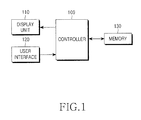
- FIG. 1 illustrates the construction of the mobile communication terminal according to the present invention.
- a typical mobile communication terminal to which the present invention applies includes a controller 100, a display unit 110, a user interface 120, and a memory 130.
- the controller 100 performs general control operations of the mobile communication terminal and, particularly, controls and outputs the application based on the widget type using the display unit 110 according to the present invention.
- the controller 100 controls and outputs a picture for application execution associated with the selected menu item, using the display unit 110.
- applications associated with a menu with high user preference are disposed in the widget type.
- the respective applications based on the widget type can be embodied in at least two ways. First, by using a small window having a title for allowing the user to understand whether the application is based on any function, and second, by using a symbol, a picture, and an icon to inform the content of the application. By doing so, the present invention can remarkably shorten the path to a desired menu in one screen without hierarchical movement between the menus.
- Execution of the mini applications for various functions displayed on the screen is performed by the following method.
- the application based on the widget type, which is desired by the user is selected using a zoom-in function. Accordingly, if there is a request for the application based on the widget type, the controller 100 controls the small window in which the application is displayed, that is, a widget area is magnified and displayed.
- the applications for the menu with high user preference can be disposed in the widget type even in the magnified and displayed widget area.
- content of applications associated with a main menu and applications for operation related to data processing of a currently executed application may be provided in various kinds.
- a graphic input device (GID) cursor is added for selecting all objects such as the application based on the widget type in the application execution picture.
- the GID cursor an object selection cursor displayed on the display unit 110, operates like a mouse cursor and has a cross shape.
- the GID cursor is operated on the basis of a rollover function.
- the rollover function of the present invention refers to the function of changing the color of an edge of a specific portion and displaying a shade when the GID cursor is put on or is rubbed on the position such as an information field, an image, a button, or a widget area.
- the controller 100 changes and displays the field, the image, the button, or the widget area indicated by the position.
- the information field refers to a field where data depending on the application execution is displayed.
- the present invention provides a new menu construction and movement method in the mobile communication terminal, thereby allowing the user to enjoy his/her application use, and a fast access method.
- the display unit 110 receives and displays data regarding key input data from the user interface 120, or displays an operational state and a plurality of information of the terminal using an icon and a character.
- the display unit 110 may allow the user to visually recognize its state in setting or enabling a necessary function under the control of the controller 100.
- the display unit 110 according to the present invention magnifies or reduces and displays the widget area for allowing the user to directly execute a different application in a specific application execution picture without the hierarchical movement between the menus, depending on a user's zoom-in or zoom-out input.
- a display unit 110 is constructed in a touch screen type, like a user interface 120
- the display unit 110 transmits a control signal for user's action in selecting an application based on a widget type.
- a plurality of numeric keys, function keys, and direction keys displayed on the touch screen may be selected or pressed using an input tool such as a stylus pen.
- the user interface 120 includes a plurality of numeric keys and function keys, and input /output data associated with a key selected by the user to the controller 100.
- the user interface 120 includes a zoom-in or zoom-out key for magnifying or reducing each of the widget areas associated with the applications based on various widget types.
- the zoom-in or zoom-out key may be separately provided on the user interface 120, or may be embodied using the function keys for performing other functions. Unlikely, it may be embodied by a previously mapped key combination.
- the memory 130 includes a read only memory (ROM) and a random access memory (RAM) for storing a plurality of program and data.
- the memory 130 stores data on a display object application item of a specific application execution picture.
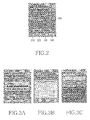
- FIG. 2 shows a screen construction for providing the user with faster application access in the mobile communication terminal with the above function.
- FIG. 2 illustrates an example of a phonebook application execution picture according to the present invention and also an application based on a related widget type. However, this does not limit the scope of the present invention.
- the application based on the widget type provided in the application execution picture may change depending on the selection of the user or service provider, and terminal manufacturing company.
- the phonebook application execution picture of FIG. 2 provides a name field for displaying a name, a dial number field for displaying a dial number associated with the inputted name, buttons for adding and deleting the dial number, the applications 210, 220, 230, and 240 based on the widget type with the high user preference, and the GID cursor 200 for selecting all objects on the screen.
- the dial number field is activated when the GID cursor 200 is positioned on the dial number field.
- the GID cursor 200 is inactivated when the GID cursor 200 is out of the dial number field.
- a call connection key is pressed, a call connection can be immediately attempted.
- the object shows a bright color when the GID cursor is positioned on a specific object, and it shows a dark color when the GID cursor is out of the object. In other words, by changing the color of the edge of the object or by changing the shade of the object depending on the movement of the GID cursor, the user can recognize whether any object is currently activated.
- a call application 210 based on the widget type is a widget for call execution.
- the GID cursor 200 is activated when it is positioned on the application.
- the widget is magnified and displayed for execution of the application.
- widget items such as a message application 220 for preparing a message, a schedule management application 230 for managing a schedule, and an event application 240 for managing an event are magnified and displayed for the execution of the application in response to the zoom-in input, and are reduced to and displayed in the original size and position depending on the zoom-out input.
- FIG. 3 showing an execution picture according to the selection of the application based on the widget type.
- FIG. 3 exemplifies pictures depending on the execution of the application based on the widget type according to an embodiment of the present invention.
- FIG. 3A is an example of a picture in case where the call application 210 of FIG. 2 is selected.
- FIG 3A exemplifies a case where, in state where the GID cursor moves to the call application 210 in response to user's input, a call function is performed when the user inputs the zoom-in.
- FIG. 3A exemplifies a case where a name and a dial number of a called party are displayed and a picture for informing in-transmission is output, but various pictures for performing the call function such as displaying of call log information can be also output.
- FIG. 3B is an example of a picture in case where the message application 220 of FIG. 2 is selected.
- FIG. 3B exemplifies a case where a content of the name field of FIG. 2 is displayed in an object field to which a message is to be transmitted, and an input window for preparing the message is displayed for the object.
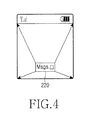
- the widget area is magnified and displayed in a method of FIG. 4 and is displayed by a full size picture. On contrary, the magnified widget area is restored to the widget type, that is, to the original size and position.
- FIG. 3C is an example of a picture when the event application 230 of FIG 2 is selected.
- FIG. 3C exemplifies that an input event or the picture is displayed when the event application 220 based on the widget type is zoomed-in in the phonebook application picture.
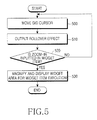
- FIG. 5 is a flowchart illustrating the fast application access method according to an embodiment of the present invention.
- the controller 100 moves the GID cursor for selecting all objects on a specific application execution picture depending on user's direction key input in step 500, and outputs a rollover effect for the moved widget item in step 510. This is to change the color of the area of the widget item and inform the user whether any widget item is currently activated. Thus, when the moved GID cursor is positioned on any one application of the widget items, the application is activated inform that the GID cursor currently moves to the application.
- step 520 the controller 100 moves the GID cursor and activates the widget item and then, determines whether or not there is the zoom-in input in the moved widget item. If there is a zoom-in input, in step 530, the controller 100 magnifies and displays the widget area for widget item execution in the method of FIG. 4. In other words, the application based on the widget type is magnified and displayed as the picture for executing the application. And then, if the application execution associated with a desired widget item is finished, the user can restore the magnified widget area to the original size and position using the zoom-out.
- the present invention provides a new menu construction and movement method in the mobile communication terminal; thereby contributing a new dynamism in the user's enjoyment in using the menu.
- the present invention also provides a fast access method for a high-grade user, and three-dimensional space simulation.
- the present invention simply and conveniently executes a different application without the hierarchical movement between the menus in one screen, thereby remarkably shortening the path to the desired menu. Furthermore, the present invention advantageously of facilitates accessibility and mobility to each application by achieving fast access to a desired application using the zoom-in, and restoring to its original state using the zoom-out function.
Landscapes
- Engineering & Computer Science (AREA)
- General Engineering & Computer Science (AREA)
- Theoretical Computer Science (AREA)
- Human Computer Interaction (AREA)
- Physics & Mathematics (AREA)
- General Physics & Mathematics (AREA)
- Computer Networks & Wireless Communication (AREA)
- Signal Processing (AREA)
- User Interface Of Digital Computer (AREA)
- Telephone Function (AREA)
- Mobile Radio Communication Systems (AREA)
Applications Claiming Priority (1)
| Application Number | Priority Date | Filing Date | Title |
|---|---|---|---|
| KR1020060023604A KR100790078B1 (ko) | 2006-03-14 | 2006-03-14 | 이동 통신 단말기에서 어플리케이션으로의 빠른 접근 방법및 장치 |
Publications (2)
| Publication Number | Publication Date |
|---|---|
| EP1835385A2 true EP1835385A2 (de) | 2007-09-19 |
| EP1835385A3 EP1835385A3 (de) | 2012-11-07 |
Family
ID=38068226
Family Applications (1)
| Application Number | Title | Priority Date | Filing Date |
|---|---|---|---|
| EP07101063A Withdrawn EP1835385A3 (de) | 2006-03-14 | 2007-01-24 | Verfahren und Vorrichtung für den Schnellzugriff auf eine Anwendung eines mobilen Kommunikationsendgeräts |
Country Status (5)
| Country | Link |
|---|---|
| US (1) | US20070220449A1 (de) |
| EP (1) | EP1835385A3 (de) |
| JP (1) | JP2007251920A (de) |
| KR (1) | KR100790078B1 (de) |
| CN (1) | CN101039473A (de) |
Cited By (2)
| Publication number | Priority date | Publication date | Assignee | Title |
|---|---|---|---|---|
| WO2009071779A1 (fr) * | 2007-11-15 | 2009-06-11 | France Telecom | Procede et dispositif pour commander l'affichage d'une zone d'informations sur l'ecran d'accueil d'un terminal mobile |
| EP2302497A3 (de) * | 2009-09-09 | 2013-05-08 | Lg Electronics Inc. | Mobiles Endgerät und Anzeigesteuerungsverfahren dafür |
Families Citing this family (46)
| Publication number | Priority date | Publication date | Assignee | Title |
|---|---|---|---|---|
| KR101414614B1 (ko) * | 2007-10-02 | 2014-07-03 | 엘지전자 주식회사 | 정보 입출력 기능을 갖는 단말기 및 이를 이용한 방법 |
| KR100877059B1 (ko) * | 2007-10-29 | 2009-01-07 | 주식회사 엘지텔레콤 | 모바일 위젯 스킨 변경 방법 및 시스템 |
| KR100946824B1 (ko) * | 2007-10-31 | 2010-03-09 | (주)피엑스디 | 디지털 방송 위젯 시스템 및 위젯 출력 방법 |
| JP2009146164A (ja) * | 2007-12-14 | 2009-07-02 | Brother Ind Ltd | 無線タグ作成装置及び無線タグ編集装置 |
| US20090187847A1 (en) * | 2008-01-18 | 2009-07-23 | Palm, Inc. | Operating System Providing Consistent Operations Across Multiple Input Devices |
| US9110685B2 (en) | 2008-03-25 | 2015-08-18 | Qualcomm, Incorporated | Apparatus and methods for managing widgets in a wireless communication environment |
| KR101039312B1 (ko) * | 2008-07-11 | 2011-06-08 | 삼성전자주식회사 | 휴대 단말기를 이용한 네비게이션 시스템 및 서비스 제공방법 |
| JP5052447B2 (ja) * | 2008-07-29 | 2012-10-17 | ソフトバンクモバイル株式会社 | 携帯通信端末、携帯通信端末制御方法及び携帯通信端末制御プログラム |
| CN101651633B (zh) * | 2008-08-12 | 2011-11-09 | 中国移动通信集团公司 | 一种支持移动互联网应用的终端、系统及方法 |
| JP5100616B2 (ja) * | 2008-11-04 | 2012-12-19 | 株式会社エヌ・ティ・ティ・ドコモ | 情報処理装置及びプログラム |
| CA2674405C (en) * | 2009-07-31 | 2022-11-22 | Bce Inc. | System and method for delivery of retail-channel-specific content to a media device |
| US20110087739A1 (en) * | 2009-10-12 | 2011-04-14 | Microsoft Corporation | Routing User Data Entries to Applications |
| KR20110064334A (ko) * | 2009-12-08 | 2011-06-15 | 삼성전자주식회사 | 휴대용 단말기에서 사용자 인터페이스 설정을 위한 장치 및 방법 |
| US8650277B2 (en) | 2010-02-03 | 2014-02-11 | Symantec Corporation | Method, system, and computer readable medium for gathering usage statistics |
| CN102156698B (zh) * | 2010-02-11 | 2013-03-13 | 北京易路联动技术有限公司 | 将网页应用文本化的方法及系统 |
| CN101833448B (zh) * | 2010-04-12 | 2015-05-20 | 中兴通讯股份有限公司 | 一种基于buiw平台的信息条显示的方法及装置 |
| CN101833417B (zh) * | 2010-04-23 | 2013-04-17 | 深圳桑菲消费通信有限公司 | 一种在手机上实现灵动视窗的系统及其方法 |
| CN101853158A (zh) * | 2010-05-11 | 2010-10-06 | 中兴通讯股份有限公司 | Widget窗口调整的方法及装置 |
| CN101883148B (zh) * | 2010-06-24 | 2012-12-26 | 华为终端有限公司 | 一种添加日程的方法及装置 |
| CN101969457B (zh) * | 2010-09-25 | 2012-09-05 | 浙江大学 | 基于赫夫曼树的服务器端移动widget管理及查找方法 |
| CN101976408A (zh) * | 2010-09-29 | 2011-02-16 | 中兴通讯股份有限公司 | widget的试用实现方法、widget及终端 |
| US20120159395A1 (en) | 2010-12-20 | 2012-06-21 | Microsoft Corporation | Application-launching interface for multiple modes |
| US8612874B2 (en) | 2010-12-23 | 2013-12-17 | Microsoft Corporation | Presenting an application change through a tile |
| US8689123B2 (en) | 2010-12-23 | 2014-04-01 | Microsoft Corporation | Application reporting in an application-selectable user interface |
| KR20120080922A (ko) * | 2011-01-10 | 2012-07-18 | 삼성전자주식회사 | 디스플레이 장치 및 그 디스플레이 방법 |
| US9342381B2 (en) | 2011-02-03 | 2016-05-17 | Symantec Corporation | Method and system for establishing a DLP-compliant environment |
| US9104307B2 (en) | 2011-05-27 | 2015-08-11 | Microsoft Technology Licensing, Llc | Multi-application environment |
| US9658766B2 (en) | 2011-05-27 | 2017-05-23 | Microsoft Technology Licensing, Llc | Edge gesture |
| US9158445B2 (en) | 2011-05-27 | 2015-10-13 | Microsoft Technology Licensing, Llc | Managing an immersive interface in a multi-application immersive environment |
| US9104440B2 (en) | 2011-05-27 | 2015-08-11 | Microsoft Technology Licensing, Llc | Multi-application environment |
| US8893033B2 (en) | 2011-05-27 | 2014-11-18 | Microsoft Corporation | Application notifications |
| US20130057587A1 (en) | 2011-09-01 | 2013-03-07 | Microsoft Corporation | Arranging tiles |
| US9146670B2 (en) | 2011-09-10 | 2015-09-29 | Microsoft Technology Licensing, Llc | Progressively indicating new content in an application-selectable user interface |
| CN102591707B (zh) * | 2011-12-15 | 2017-05-24 | 上海博泰悦臻电子设备制造有限公司 | 车载设备及其后台运行程序的显示方法 |
| US9223472B2 (en) | 2011-12-22 | 2015-12-29 | Microsoft Technology Licensing, Llc | Closing applications |
| US9128605B2 (en) | 2012-02-16 | 2015-09-08 | Microsoft Technology Licensing, Llc | Thumbnail-image selection of applications |
| CN102819416B (zh) | 2012-08-13 | 2016-12-21 | 华为终端有限公司 | 一种实现组件内容显示的方法和装置 |
| WO2014112729A1 (ko) * | 2013-01-16 | 2014-07-24 | 에스케이플래닛 주식회사 | 세그먼트 생성 및 서비스 메뉴 제공 장치 및 방법 |
| KR102031810B1 (ko) * | 2013-01-16 | 2019-10-14 | 에스케이플래닛 주식회사 | 어플리케이션서비스 기반 서비스메뉴 제공 시스템 및 그 방법, 그리고 이에 적용되는 장치 |
| CN105359094A (zh) | 2014-04-04 | 2016-02-24 | 微软技术许可有限责任公司 | 可扩展应用表示 |
| WO2015154276A1 (en) | 2014-04-10 | 2015-10-15 | Microsoft Technology Licensing, Llc | Slider cover for computing device |
| KR102107275B1 (ko) | 2014-04-10 | 2020-05-06 | 마이크로소프트 테크놀로지 라이센싱, 엘엘씨 | 컴퓨팅 디바이스에 대한 접이식 쉘 커버 |
| JP6204882B2 (ja) | 2014-07-16 | 2017-09-27 | キヤノン株式会社 | 情報処理装置、制御方法、並びにプログラム |
| CN106662891B (zh) | 2014-10-30 | 2019-10-11 | 微软技术许可有限责任公司 | 多配置输入设备 |
| CN107085569B (zh) * | 2016-02-14 | 2022-01-25 | 西安中兴新软件有限责任公司 | 一种信息访问方法和装置 |
| CN106996618A (zh) * | 2017-03-27 | 2017-08-01 | 广东美的制冷设备有限公司 | 空气处理设备的控制装置、方法及空调器的控制系统 |
Family Cites Families (11)
| Publication number | Priority date | Publication date | Assignee | Title |
|---|---|---|---|---|
| KR19980075429A (ko) * | 1997-03-31 | 1998-11-16 | 윤종용 | 이동통신 시스템의 기지국 관리장치에서 위젯의 폰트 변경 방법 |
| US6975712B1 (en) * | 1998-08-26 | 2005-12-13 | Microsoft Corporation | Common visual and functional architecture for presenting and controlling arbitrary telephone line features |
| EP1026572B1 (de) * | 1999-02-02 | 2004-10-20 | Casio Computer Co., Ltd. | Fensteranzeigesteuergerät und dessen Programmspeichermedium |
| US6456296B1 (en) * | 1999-05-28 | 2002-09-24 | Sony Corporation | Color scheme for zooming graphical user interface |
| US6909439B1 (en) | 1999-08-26 | 2005-06-21 | International Business Machines Corporation | Method and apparatus for maximizing efficiency of small display in a data processing system |
| US20020029259A1 (en) * | 2000-07-26 | 2002-03-07 | Nec Corporation | Remote operation system and remote operation method thereof |
| JP2003162355A (ja) * | 2001-11-26 | 2003-06-06 | Sony Corp | タスクの表示切り替え方法及び携帯機器及び携帯通信機器 |
| US20040261031A1 (en) * | 2003-06-23 | 2004-12-23 | Nokia Corporation | Context dependent auxiliary menu elements |
| US7546554B2 (en) * | 2004-03-31 | 2009-06-09 | Fuji Xerox Co., Ltd. | Systems and methods for browsing multimedia content on small mobile devices |
| US20060020904A1 (en) * | 2004-07-09 | 2006-01-26 | Antti Aaltonen | Stripe user interface |
| US20060123360A1 (en) * | 2004-12-03 | 2006-06-08 | Picsel Research Limited | User interfaces for data processing devices and systems |
-
2006
- 2006-03-14 KR KR1020060023604A patent/KR100790078B1/ko not_active Expired - Fee Related
- 2006-12-13 JP JP2006335825A patent/JP2007251920A/ja active Pending
- 2006-12-14 CN CNA2006101670805A patent/CN101039473A/zh active Pending
-
2007
- 2007-01-24 EP EP07101063A patent/EP1835385A3/de not_active Withdrawn
- 2007-03-12 US US11/716,782 patent/US20070220449A1/en not_active Abandoned
Cited By (3)
| Publication number | Priority date | Publication date | Assignee | Title |
|---|---|---|---|---|
| WO2009071779A1 (fr) * | 2007-11-15 | 2009-06-11 | France Telecom | Procede et dispositif pour commander l'affichage d'une zone d'informations sur l'ecran d'accueil d'un terminal mobile |
| EP2302497A3 (de) * | 2009-09-09 | 2013-05-08 | Lg Electronics Inc. | Mobiles Endgerät und Anzeigesteuerungsverfahren dafür |
| US9600168B2 (en) | 2009-09-09 | 2017-03-21 | Lg Electronics Inc. | Mobile terminal and display controlling method thereof |
Also Published As
| Publication number | Publication date |
|---|---|
| KR20070093585A (ko) | 2007-09-19 |
| JP2007251920A (ja) | 2007-09-27 |
| KR100790078B1 (ko) | 2008-01-02 |
| US20070220449A1 (en) | 2007-09-20 |
| CN101039473A (zh) | 2007-09-19 |
| EP1835385A3 (de) | 2012-11-07 |
Similar Documents
| Publication | Publication Date | Title |
|---|---|---|
| US20070220449A1 (en) | Method and device for fast access to application in mobile communication terminal | |
| US9128597B2 (en) | Method for switching user interface, electronic device and recording medium using the same | |
| US8351989B2 (en) | Method of displaying menu in a mobile communication terminal | |
| CA2572574C (en) | Method and arrangement for a primary action on a handheld electronic device | |
| KR101433490B1 (ko) | 터치 스크린 기기 잠금 해제 | |
| US8537117B2 (en) | Handheld wireless communication device that selectively generates a menu in response to received commands | |
| KR100984817B1 (ko) | 이동통신 단말기의 터치스크린을 이용한 사용자 인터페이스 방법 | |
| KR101038459B1 (ko) | 핸드헬드 이동 통신 장치의 접촉 감지 스크린을 사용하는 텍스트 선택 | |
| CN100568892C (zh) | 与用户界面交互的方法与设备 | |
| US10684760B2 (en) | Method and mobile communication terminal for changing a configuration of a screen displaying function items | |
| EP1855185A2 (de) | Verfahren zur Datenanzeige mit einem mobilen Endgerät | |
| EP2154603A2 (de) | Anzeigevorrichtung, Anzeigeverfahren und Programm | |
| CN101252607A (zh) | 带有扩展显示屏的滑盖式手机 | |
| KR20090107638A (ko) | 위젯형 대기화면을 제어할 수 있는 이동 단말기 및 그를이용한 대기화면 제어 방법 | |
| JP2009500761A (ja) | ストライプユーザインターフェース | |
| US20090187840A1 (en) | Side-bar menu and menu on a display screen of a handheld electronic device | |
| US20080244452A1 (en) | Method and terminal for implementing preview function | |
| KR100455145B1 (ko) | 이동통신 단말기의 아이콘 선택에 따른 도움말 표시방법 | |
| KR100389825B1 (ko) | 소프트 핫키로 사용되는 터치스크린키를 가지는 정보단말기 및 그 방법 | |
| EP2081110A1 (de) | Zusatzmenü und Menü auf einem Anzeigebildschirm eines tragbaren elektronischen Geräts | |
| KR20040094950A (ko) | 휴대용 개인 단말기의 화면 확대 방법 |
Legal Events
| Date | Code | Title | Description |
|---|---|---|---|
| PUAI | Public reference made under article 153(3) epc to a published international application that has entered the european phase |
Free format text: ORIGINAL CODE: 0009012 |
|
| 17P | Request for examination filed |
Effective date: 20070124 |
|
| AK | Designated contracting states |
Kind code of ref document: A2 Designated state(s): AT BE BG CH CY CZ DE DK EE ES FI FR GB GR HU IE IS IT LI LT LU LV MC NL PL PT RO SE SI SK TR |
|
| AX | Request for extension of the european patent |
Extension state: AL BA HR MK YU |
|
| RAP1 | Party data changed (applicant data changed or rights of an application transferred) |
Owner name: SAMSUNG ELECTRONICS CO., LTD. |
|
| PUAL | Search report despatched |
Free format text: ORIGINAL CODE: 0009013 |
|
| AK | Designated contracting states |
Kind code of ref document: A3 Designated state(s): AT BE BG CH CY CZ DE DK EE ES FI FR GB GR HU IE IS IT LI LT LU LV MC NL PL PT RO SE SI SK TR |
|
| AX | Request for extension of the european patent |
Extension state: AL BA HR MK RS |
|
| RIC1 | Information provided on ipc code assigned before grant |
Ipc: G06F 3/048 20060101AFI20121004BHEP |
|
| AKX | Designation fees paid |
Designated state(s): DE FR GB |
|
| STAA | Information on the status of an ep patent application or granted ep patent |
Free format text: STATUS: THE APPLICATION IS DEEMED TO BE WITHDRAWN |
|
| 18D | Application deemed to be withdrawn |
Effective date: 20130508 |