EP1850213A2 - Procédés de navigation dans des informations - Google Patents
Procédés de navigation dans des informations Download PDFInfo
- Publication number
- EP1850213A2 EP1850213A2 EP07102318A EP07102318A EP1850213A2 EP 1850213 A2 EP1850213 A2 EP 1850213A2 EP 07102318 A EP07102318 A EP 07102318A EP 07102318 A EP07102318 A EP 07102318A EP 1850213 A2 EP1850213 A2 EP 1850213A2
- Authority
- EP
- European Patent Office
- Prior art keywords
- contact
- speed
- navigation
- touch
- information
- Prior art date
- Legal status (The legal status is an assumption and is not a legal conclusion. Google has not performed a legal analysis and makes no representation as to the accuracy of the status listed.)
- Withdrawn
Links
Images





Classifications
-
- G—PHYSICS
- G06—COMPUTING OR CALCULATING; COUNTING
- G06F—ELECTRIC DIGITAL DATA PROCESSING
- G06F3/00—Input arrangements for transferring data to be processed into a form capable of being handled by the computer; Output arrangements for transferring data from processing unit to output unit, e.g. interface arrangements
- G06F3/01—Input arrangements or combined input and output arrangements for interaction between user and computer
- G06F3/048—Interaction techniques based on graphical user interfaces [GUI]
- G06F3/0484—Interaction techniques based on graphical user interfaces [GUI] for the control of specific functions or operations, e.g. selecting or manipulating an object, an image or a displayed text element, setting a parameter value or selecting a range
- G06F3/0485—Scrolling or panning
-
- G—PHYSICS
- G06—COMPUTING OR CALCULATING; COUNTING
- G06F—ELECTRIC DIGITAL DATA PROCESSING
- G06F3/00—Input arrangements for transferring data to be processed into a form capable of being handled by the computer; Output arrangements for transferring data from processing unit to output unit, e.g. interface arrangements
- G06F3/01—Input arrangements or combined input and output arrangements for interaction between user and computer
- G06F3/03—Arrangements for converting the position or the displacement of a member into a coded form
- G06F3/033—Pointing devices displaced or positioned by the user, e.g. mice, trackballs, pens or joysticks; Accessories therefor
- G06F3/0354—Pointing devices displaced or positioned by the user, e.g. mice, trackballs, pens or joysticks; Accessories therefor with detection of two-dimensional [2D] relative movements between the device, or an operating part thereof, and a plane or surface, e.g. 2D mice, trackballs, pens or pucks
- G06F3/03547—Touch pads, in which fingers can move on a surface
-
- G—PHYSICS
- G06—COMPUTING OR CALCULATING; COUNTING
- G06F—ELECTRIC DIGITAL DATA PROCESSING
- G06F3/00—Input arrangements for transferring data to be processed into a form capable of being handled by the computer; Output arrangements for transferring data from processing unit to output unit, e.g. interface arrangements
- G06F3/01—Input arrangements or combined input and output arrangements for interaction between user and computer
- G06F3/03—Arrangements for converting the position or the displacement of a member into a coded form
- G06F3/033—Pointing devices displaced or positioned by the user, e.g. mice, trackballs, pens or joysticks; Accessories therefor
- G06F3/0362—Pointing devices displaced or positioned by the user, e.g. mice, trackballs, pens or joysticks; Accessories therefor with detection of one-dimensional [1D] translations or rotations of an operating part of the device, e.g. scroll wheels, sliders, knobs, rollers or belts
-
- G—PHYSICS
- G06—COMPUTING OR CALCULATING; COUNTING
- G06F—ELECTRIC DIGITAL DATA PROCESSING
- G06F3/00—Input arrangements for transferring data to be processed into a form capable of being handled by the computer; Output arrangements for transferring data from processing unit to output unit, e.g. interface arrangements
- G06F3/01—Input arrangements or combined input and output arrangements for interaction between user and computer
- G06F3/048—Interaction techniques based on graphical user interfaces [GUI]
- G06F3/0484—Interaction techniques based on graphical user interfaces [GUI] for the control of specific functions or operations, e.g. selecting or manipulating an object, an image or a displayed text element, setting a parameter value or selecting a range
- G06F3/0485—Scrolling or panning
- G06F3/04855—Interaction with scrollbars
-
- G—PHYSICS
- G06—COMPUTING OR CALCULATING; COUNTING
- G06F—ELECTRIC DIGITAL DATA PROCESSING
- G06F3/00—Input arrangements for transferring data to be processed into a form capable of being handled by the computer; Output arrangements for transferring data from processing unit to output unit, e.g. interface arrangements
- G06F3/01—Input arrangements or combined input and output arrangements for interaction between user and computer
- G06F3/048—Interaction techniques based on graphical user interfaces [GUI]
- G06F3/0487—Interaction techniques based on graphical user interfaces [GUI] using specific features provided by the input device, e.g. functions controlled by the rotation of a mouse with dual sensing arrangements, or of the nature of the input device, e.g. tap gestures based on pressure sensed by a digitiser
- G06F3/0488—Interaction techniques based on graphical user interfaces [GUI] using specific features provided by the input device, e.g. functions controlled by the rotation of a mouse with dual sensing arrangements, or of the nature of the input device, e.g. tap gestures based on pressure sensed by a digitiser using a touch-screen or digitiser, e.g. input of commands through traced gestures
- G06F3/04886—Interaction techniques based on graphical user interfaces [GUI] using specific features provided by the input device, e.g. functions controlled by the rotation of a mouse with dual sensing arrangements, or of the nature of the input device, e.g. tap gestures based on pressure sensed by a digitiser using a touch-screen or digitiser, e.g. input of commands through traced gestures by partitioning the display area of the touch-screen or the surface of the digitising tablet into independently controllable areas, e.g. virtual keyboards or menus
-
- G—PHYSICS
- G06—COMPUTING OR CALCULATING; COUNTING
- G06F—ELECTRIC DIGITAL DATA PROCESSING
- G06F2203/00—Indexing scheme relating to G06F3/00 - G06F3/048
- G06F2203/033—Indexing scheme relating to G06F3/033
- G06F2203/0339—Touch strips, e.g. orthogonal touch strips to control cursor movement or scrolling; single touch strip to adjust parameter or to implement a row of soft keys
Definitions
- the disclosure relates generally to information navigation methods, and, more particularly to information navigation methods that navigate information at various navigation speeds.
- contact movement along a touch-sensitive mechanism is detected.
- a navigation speed is determined according to contact movement parameter, such as distance or speed of contact movement, or retention period of contact.
- Information is continuously navigated according to the navigation speed.
- contact on a touch-sensitive mechanism is detected.
- a navigation speed is determined according to contact position on the touch-sensitive mechanism.
- Information is continuously navigated according to the navigation speed.
- an information navigation method movement of contact on a control tool is detected. Content movement quantity is determined according to the contact motion speed. Information is navigated according to the content movement quantity.
- Information navigation methods may take the form of program code embodied in a tangible media.
- the program code When the program code is loaded into and executed by a device, the device becomes an apparatus for practicing the disclosed method.
- Fig. 1 is a flowchart of an embodiment of an information navigation method
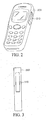
- Fig. 2 is a schematic diagram illustrating an embodiment of a portable devoice with a scroll wheel
- Fig. 3 is a schematic diagram illustrating an embodiment of a portable devoice with a touch-sensitive mechanism
- Fig. 4 is a flowchart of an embodiment of an information navigation method
- Figs. 5A, 5B and 5C are schematic diagrams illustrating embodiments of a touch-sensitive mechanism with different areas
- Figs. 6A, 6B and 6C are schematic diagrams illustrating embodiments of a touch-sensitive mechanism with different areas
- Figs. 7A and 7B are schematic diagrams illustrating embodiments of a touch-sensitive mechanism
- Fig. 8 is a flowchart of an embodiment of a method for navigation speed adjustment
- Fig. 9 is a schematic diagram illustrating an embodiment of navigation speed adjustment
- Fig. 10 is a schematic diagram illustrating an embodiment of navigation speed adjustment
- Fig. 11 is a flowchart of an embodiment of an information navigation method
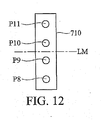
- Fig. 12 is schematic diagrams illustrating an embodiment of information navigation
- Fig. 13 is a flowchart of an embodiment of an information navigation method.
- Figs. 14A and 14B are schematic diagrams illustrating an embodiment of navigation speed adjustment.
- Fig. 1 is a flowchart of an embodiment of an information navigation method for use in a portable device (200 and 300) comprising a control tool, such as scroll wheel 210 or touch-sensitive mechanism 310, respectively shown in Figs. 2 and 3.
- the touch-sensitive mechanism 310 has a touch-sensitive surface comprising at least one one-dimensional sensor.
- the portable device may be a handheld device such as multi-media player, PDA, smart phone, global positioning device and mobile phone.
- the "user motion to content movement ratio" can be determined dynamically.
- step S110 a movement of contact of a pointer such as a finger or stylus on a control tool is detected.
- a content movement quantity is determined according to the contact motion parameter on the control tool.
- the content motion parameter can be determined according to the contact motion speed, the distance of contact movement or the retention period of contact on the control tool.
- the content movement quantity in the following embodiment is determined according to the contact motion speed, but it is to be understood that the invention is not limited thereto.
- step S130 information is navigated according to the content movement quantity. When the information comprises several items, such as email messages or address book records, scrolling distance is determined according to the content movement quantity. That is, one item behind or in front the content movement quantity of an original item is moved to according to the scrolling direction and the content movement quantity.
- the cursor moves only a short and fixed distance such as a single item, suitable for short-list navigation. If a single rotation on the scroll wheel 210 is quick, the cursor jumps through many items at a time. This suits long-list navigation. Additionally, if contact moves slowly across the touch-sensitive mechanism 310, the cursor moves by only a short and fixed distance such as a single item. If contact on the touch-sensitive mechanism 310 speeds up, the cursor jumps through many items at a time.
- Fig. 4 is a flowchart of an embodiment of an information navigation method for use in a portable device comprising a touch-sensitive mechanism.
- Information may comprise menus, email message lists, address book records, web pages, and others.
- step S410 contact movement across the touch-sensitive mechanism is detected, as is the direction thereof.
- step S420 it is determined whether a determination parameter corresponding to the contact motion exceeds a threshold value. If not (No in step S420), the procedure returns to step S410. If so (Yes in step S420), in step S430, a navigation speed is determined according to the contact movement speed on the touch-sensitive mechanism.
- the determination parameter may be different in different embodiments. In some embodiments, the determination parameter may be the contact movement position of the pointer on the touch-sensitive mechanism. If the determination parameter is the contact movement position, it is determined whether the contact movement position of the pointer enters a specific area of the touch-sensitive mechanism.
- the determination parameter may be the contact movement speed on the touch-sensitive mechanism. If the determination parameter is contact movement speed, it is determined whether the contact movement speed exceeds a threshold speed. Thereafter, in step S440, it is determined whether contact remains with the touch-sensitive mechanism. If so (Yes in step S440), in step S450, information is continuously navigated according to the navigation speed and contact vector (direction). It is noted that continuous information navigation means the content is continuously scrolled through or browsed. If contact is terminated with the touch-sensitive mechanism (the pointer leaves the surface of the touch-sensitive mechanism) (No in step S440), in step S460, the continuous information navigation is terminated.
- the touch-sensitive surface of the touch-sensitive mechanism comprises specific areas.
- Figs. 5A, 5B and 5C are schematic diagrams illustrating embodiments of a touch-sensitive mechanism with different areas.
- the touch-sensitive mechanism 510 has areas 511 and 512, where the bottom area 512 is the specific area, as shown in Fig. 5A. Additionally, the touch-sensitive mechanism 510 has areas 511 and 513, where the top area 513 is the specific area, as shown in Fig. 5B.
- two ends of the touch-sensitive surface may have respective specific areas, as shown in Fig. 5C.
- Figs. 6A, 6B and 6C are schematic diagrams illustrating embodiments of a touch-sensitive mechanism with different areas. It is noted that the touch-sensitive mechanism in Figs. 5A, 5B and 5C has an elongated touch-sensitive surface, and the touch-sensitive mechanism in Figs. 6A, 6B and 6C has a curved touch-sensitive surface. Similarly, the touch-sensitive mechanism 610 has areas 611 and 612, where area 612 is the specific area, as shown in Fig. 6A. Additionally, the touch-sensitive mechanism 610 has areas 611 and 613, where area 613 is the specific area, as shown in Fig. 6B.
- two ends of the touch-sensitive surface may have respective specific areas, as shown in Fig. 6C. Additionally, if the contact movement speed exceeds a threshold speed, the navigation speed is determined according to the contact movement speed on the touch-sensitive mechanism, and the information is continuously navigated according to the navigation speed. In this embodiment, the touch-sensitive surface of the touch-sensitive mechanism 510 does not have any specific area, as the touch-sensitive surface 710 and 720, respectively shown in Figs. 7A and 7B.
- a specific function is determined according to the contact vector, and the specific function is used to continuously navigate the information according to the navigation speed.
- video fast-forward function is launched upon contact with the touch-sensitive surface 611 of the touch-sensitive mechanism 610 in Fig. 6C, and subsequent movement from area 611 to area 613.
- the navigation speed is determined according to contact movement speed, and video is continuously advanced according to the navigation speed.
- video rewind function is launched upon contact with the touch-sensitive surface 611 of the touch-sensitive mechanism 610, and subsequent movement from area 611 to area 612.
- video rewind function is launched.
- the navigation speed is determined according to contact movement speed, and video is continuously rewound according to the navigation speed. Therefore, the speed of video fast-forwarding and rewinding can be determined according to contact movement speed.
- contact movement speed can be determined according to the average speed, maximum speed or acceleration of movement. Additionally, contact movement speed can be determined according to contact movement distance. For example, contact movement speed is fast if the distance is long, and slow if the distance is short. Further, a table or a specific formula can be set in the portable device for retrieval or calculation of corresponding navigation speeds. The calculation of navigation speed is not limited thereto.
- Fig. 8 is a flowchart of an embodiment of a method for navigation speed adjustment.
- step S810 information is navigated according to the contact vector and the navigation speed.
- step S820 contact movement on the touch-sensitive mechanism is detected.
- step S830 the navigation speed is adjusted according to the moving direction.
- Fig. 9 shows an example of navigation speed adjustment, as follows.
- contact movement is in area 511 of the touch-sensitive mechanism 510, and subsequent contact movement into the specific area 512 or 513, and navigation speed is determined according to the contact movement speed, and information continuously navigated according to the navigation speed. Note contact with the surface of the touch-sensitive mechanism 510 remains. Upon contact movement, the navigation speed is adjusted accordingly.
- the navigation speed is determined according to the contact movement speed, and information is continuously navigated according to the navigation speed. If contact returns to area 511, navigation speed decelerates. If contact moves toward area 512 again, the navigation speed is accelerated. Similarly, with contact movement from area 511 to area 513, the navigation speed is determined according to the contact movement speed, and information continuously navigated according to the navigation speed. Upon contact movement in the opposite direction to area 511, the navigation speed decelerates. Upon contact movement toward area 512 again, the navigation speed is accelerated.
- the information is continuously navigated according to the inverse direction of the contact vector.
- the downward navigation speed at contact position P1 exceeds that at contact position P2
- the upward navigation speed at contact position P4 exceeds that at contact position P3.
- the navigation speed is set to 0. Further, the maximum navigation speed can be accelerated to the original navigation speed. If the navigation speed requires acceleration beyond the original speed, contact is removed from the touch-sensitive mechanism, and contact movement is performed again.
- the navigation speed can be determined according to a contact motion speed of a pointer such as a finger or stylus on a control tool, and information is navigated accordingly.
- the navigation speed can be also adjusted by the distance of contact movement or the retention period of contact on the touch-sensitive mechanism. A longer distance of contact movement or a longer retention period of contact on the touch-sensitive mechanism will contribute a larger speed adjustment scale.
- a speed adjustment scale may be different.
- the speed adjustment scale may be acceleration for adjusting navigation speed.
- the speed adjustment scale is determined according to the distance between a position where the navigation speed has been determined and an end of the surface of the touch-sensitive mechanism. If a contact is made at position P12 and moves to position P13, the navigation speed is determined according to the contact motion speed from position P12 to P13, as shown in Fig. 14A, and the speed adjustment scale is determined according to distance D1 from line L1 to L2. If a contact is made at position P14 and moves to position P15, the navigation speed is determined according to the contact motion speed from position P14 to P15, as shown in Fig.
- the speed adjustment scale for D2 is greater than that for D1. For example, if contact moves toward line L2 in Fig. 14A, the navigation speed is accelerated according to a first acceleration. If contact moves toward line L4 in Fig. 14B, the navigation speed is accelerated according to a second acceleration. The first acceleration is smaller than the second acceleration. It is understood that upon contact movement in the opposite direction to line L2 in Fig. 14A, the navigation speed decelerates, and upon contact movement in the opposite direction to line L4 in Fig. 14B, the navigation speed decelerates. In some embodiments, the speed adjustment scale for decelerating navigation speed is fixed. For example, the speed adjustment scales for decelerating navigation speed in Figs. 14A and 14B are the same.
- the navigation speed is determined according to the contact movement speed on the touch-sensitive mechanism, and the information is continuously navigated according to the navigation speed. It is noted that when contact remains on the surface of the touch-sensitive mechanism, and the contact position moves, navigation speed is adjusted.
- the method for navigation speed adjustment is similar to the example in Fig. 9, and is omitted herefrom. Additionally, the adjustment of the navigation speed for continuous scanning and seeking of video in the video playback application is also similar to the example in Fig. 9, and is omitted herefrom.
- the navigation speed if the navigation speed decelerates less than a first threshold value, the navigation speed is set to 0. If the navigation speed is accelerated to exceed a second threshold value, the navigation speed varies significantly. For example, a specific acceleration different from an original acceleration is applied to the navigation speed, where the navigation speed between the first and second threshold values is adjusted according to the original acceleration, and the specific acceleration is greater than the original acceleration.
- Fig. 10 shows another example of navigation speed adjustment.
- the navigation speed is determined according to the contact movement speed, and information is continuously and downwardly navigated according to the navigation speed. If contact moves back to area 511, the navigation speed is decelerated. If contact moves toward the direction of area 512 again, the navigation speed is accelerated. The downward navigation speed at contact position P5 exceeds that at contact position P6. It is understood that in this example, if contact moves into a specific area, such as contact position P7 in area 513, the information is continuously navigated according to the inverse direction of the original contact vector and a predetermined and fixed speed.
- the navigation speed is determined according to the contact movement speed, and information is continuously and upwardly navigated according to the navigation speed. If contact moves back to area 511, the navigation speed is decelerated. If contact moves toward the direction of area 513 again, the navigation speed is accelerated. If contact moves into area 512, the information is continuously and downwardly navigated according to a predetermined and fixed speed.
- Fig. 11 is a flowchart of an embodiment of an information navigation method for use in a portable device comprising a touch-sensitive mechanism.
- each position on the surface of the touch-sensitive mechanism has a corresponding predefined navigation speed.
- information is continuously navigated according to the navigation speed corresponding to the contact point.
- step S1110 contact with the touch-sensitive mechanism is detected.
- step S1120 a navigation speed is determined according to the contact position on the touch-sensitive mechanism.
- step S1130 it is determined whether contact remains with the touch-sensitive mechanism. If so (Yes in step S1130), in step S1140, it is determined whether the contact position moves. If so (Yes in step S1140), in step S1150, the navigation speed is re-determined according to the new contact position on the touch-sensitive mechanism.
- step S1160 information is continuously navigated according to the navigation speed. If contact is terminated with the touch-sensitive mechanism (No in step S1130), in step S1170, the information navigation is terminated.
- the direction of continuous navigation can be determined according to the contact position on the touch-sensitive mechanism. For example, if the contact positions are P8 and P9, as shown in Fig. 12, information is downwardly navigated. If the contact positions of the pointer are P10 and P11, information is upwardly navigated. The downward navigation speed at contact position P8 exceeds that at contact position P9, and the upward navigation speed at contact position P10 exceeds that at contact position P11.
- Fig. 13 is a flowchart of an embodiment of an information navigation method for use in a portable device comprising a touch-sensitive mechanism.
- step S1310 contact movement on the touch-sensitive mechanism is detected. It is understood that the contact vector is also detected.
- step S1320 the navigation speed is determined according to the contact movement speed on the touch-sensitive mechanism, and in step S1330, information is continuously navigated according to the navigation speed and the contact vector. It is noted that, in this embodiment, contact can leave the surface of the touch-sensitive mechanism after movement thereon. After contact leaves the surface of the touch-sensitive mechanism, the navigation speed is determined according to the contact movement speed, and information is continuously navigated according to the navigation speed and the contact vector. Thereafter, in step S1340, it is determined whether contact with the touch-sensitive mechanism is resumed. If not (No in step S1340), the procedure returns to step S1330, and the navigation proceeds. If so (Yes in step S1340), in step S1350, the navigation is terminated.
- a determination parameter such as contact movement position or speed exceeds a threshold value. If the determination parameter exceeds the threshold value, the navigation speed is determined according to the contact movement speed, and information is continuously navigated according to the navigation speed and the contact vector.
- Information navigation methods may take the form of program code (i.e., executable instructions) embodied in tangible media, such as floppy diskettes, CD-ROMS, hard drives, or any other device-readable storage medium, wherein, when the program code is loaded into and executed by a device, such as a computer, the device thereby becomes an apparatus for practicing the methods.
- the methods may also be embodied in the form of program code transmitted over some transmission medium, such as electrical wiring or cabling, through fiber optics, or via any other form of transmission, wherein, when the program code is received and loaded into and executed by a device, such as a computer, the device becomes an apparatus for practicing the disclosed methods.
- the program code When implemented on a general-purpose processor, the program code combines with the processor to provide a unique apparatus that operates analogously to application specific logic circuits.
Landscapes
- Engineering & Computer Science (AREA)
- General Engineering & Computer Science (AREA)
- Theoretical Computer Science (AREA)
- Human Computer Interaction (AREA)
- Physics & Mathematics (AREA)
- General Physics & Mathematics (AREA)
- Position Input By Displaying (AREA)
- Navigation (AREA)
Applications Claiming Priority (1)
| Application Number | Priority Date | Filing Date | Title |
|---|---|---|---|
| CN 200610077718 CN101063925B (zh) | 2006-04-24 | 2006-04-24 | 信息导读方法 |
Publications (2)
| Publication Number | Publication Date |
|---|---|
| EP1850213A2 true EP1850213A2 (fr) | 2007-10-31 |
| EP1850213A3 EP1850213A3 (fr) | 2009-01-28 |
Family
ID=38180507
Family Applications (1)
| Application Number | Title | Priority Date | Filing Date |
|---|---|---|---|
| EP07102318A Withdrawn EP1850213A3 (fr) | 2006-04-24 | 2007-02-13 | Procédés de navigation dans des informations |
Country Status (2)
| Country | Link |
|---|---|
| EP (1) | EP1850213A3 (fr) |
| CN (1) | CN101063925B (fr) |
Cited By (19)
| Publication number | Priority date | Publication date | Assignee | Title |
|---|---|---|---|---|
| EP2189892A3 (fr) * | 2008-11-19 | 2011-08-10 | Sony Corporation | Procédé et appareil de traitement d'image |
| EP3232310A1 (fr) * | 2016-03-16 | 2017-10-18 | LG Electronics Inc. | Terminal mobile de type montre et son procédé de commande |
| US10001817B2 (en) | 2013-09-03 | 2018-06-19 | Apple Inc. | User interface for manipulating user interface objects with magnetic properties |
| US10275117B2 (en) | 2012-12-29 | 2019-04-30 | Apple Inc. | User interface object manipulations in a user interface |
| US10281999B2 (en) | 2014-09-02 | 2019-05-07 | Apple Inc. | Button functionality |
| CN110262711A (zh) * | 2013-09-03 | 2019-09-20 | 苹果公司 | 用户界面中的用户界面对象操作 |
| US10503388B2 (en) | 2013-09-03 | 2019-12-10 | Apple Inc. | Crown input for a wearable electronic device |
| US10536414B2 (en) | 2014-09-02 | 2020-01-14 | Apple Inc. | Electronic message user interface |
| US10691230B2 (en) | 2012-12-29 | 2020-06-23 | Apple Inc. | Crown input for a wearable electronic device |
| US10712824B2 (en) | 2018-09-11 | 2020-07-14 | Apple Inc. | Content-based tactile outputs |
| US10884592B2 (en) | 2015-03-02 | 2021-01-05 | Apple Inc. | Control of system zoom magnification using a rotatable input mechanism |
| US10921976B2 (en) | 2013-09-03 | 2021-02-16 | Apple Inc. | User interface for manipulating user interface objects |
| US11068128B2 (en) | 2013-09-03 | 2021-07-20 | Apple Inc. | User interface object manipulations in a user interface |
| US11157143B2 (en) | 2014-09-02 | 2021-10-26 | Apple Inc. | Music user interface |
| US11250385B2 (en) | 2014-06-27 | 2022-02-15 | Apple Inc. | Reduced size user interface |
| US11307682B2 (en) | 2016-03-16 | 2022-04-19 | Lg Electronics Inc. | Watch type mobile terminal and method for controlling the same |
| US11402968B2 (en) | 2014-09-02 | 2022-08-02 | Apple Inc. | Reduced size user in interface |
| US11435830B2 (en) | 2018-09-11 | 2022-09-06 | Apple Inc. | Content-based tactile outputs |
| US12287962B2 (en) | 2013-09-03 | 2025-04-29 | Apple Inc. | User interface for manipulating user interface objects |
Families Citing this family (11)
| Publication number | Priority date | Publication date | Assignee | Title |
|---|---|---|---|---|
| US8717305B2 (en) * | 2008-03-04 | 2014-05-06 | Apple Inc. | Touch event model for web pages |
| CN101566891A (zh) * | 2008-04-25 | 2009-10-28 | 佛山市顺德区顺达电脑厂有限公司 | 触控的滑动方法 |
| CN101727230B (zh) * | 2008-10-17 | 2012-06-27 | 中国移动通信集团公司 | 一种触摸屏光标控制方法、装置和移动通信终端 |
| EP2480957B1 (fr) | 2009-09-22 | 2017-08-09 | Apple Inc. | Dispositif, procédé et interface utilisateur graphique pour manipuler des objets d'interface utilisateur |
| US8780069B2 (en) | 2009-09-25 | 2014-07-15 | Apple Inc. | Device, method, and graphical user interface for manipulating user interface objects |
| US8832585B2 (en) | 2009-09-25 | 2014-09-09 | Apple Inc. | Device, method, and graphical user interface for manipulating workspace views |
| US8539385B2 (en) * | 2010-01-26 | 2013-09-17 | Apple Inc. | Device, method, and graphical user interface for precise positioning of objects |
| US9081494B2 (en) | 2010-07-30 | 2015-07-14 | Apple Inc. | Device, method, and graphical user interface for copying formatting attributes |
| US9098182B2 (en) | 2010-07-30 | 2015-08-04 | Apple Inc. | Device, method, and graphical user interface for copying user interface objects between content regions |
| CN102508573B (zh) * | 2011-10-28 | 2015-04-22 | Tcl通讯科技(成都)有限公司 | 一种通过滑屏实现快速定位的方法及设备 |
| CN105573538B (zh) * | 2014-10-17 | 2020-10-20 | 中兴通讯股份有限公司 | 滑动断线补偿方法及电子设备 |
Family Cites Families (7)
| Publication number | Priority date | Publication date | Assignee | Title |
|---|---|---|---|---|
| US5825353A (en) * | 1995-04-18 | 1998-10-20 | Will; Craig Alexander | Control of miniature personal digital assistant using menu and thumbwheel |
| FI115689B (fi) * | 1997-05-21 | 2005-06-15 | Nokia Corp | Menetelmä ja järjestely matkaviestimen näytöllä esitettävän tiedon vierittämiseksi |
| JP3624626B2 (ja) * | 1997-05-28 | 2005-03-02 | ソニー株式会社 | 情報処理装置および方法、並びに記録媒体 |
| US7312785B2 (en) * | 2001-10-22 | 2007-12-25 | Apple Inc. | Method and apparatus for accelerated scrolling |
| CA2563716A1 (fr) * | 2004-04-23 | 2005-11-10 | Cirque Corporation | Procede ameliore pour le defilement et le mouvement de bordure sur pave tactile |
| AU2005264829B2 (en) * | 2004-07-19 | 2010-08-19 | Creative Technology Ltd | Method and apparatus for touch scrolling |
| FR2874714A1 (fr) * | 2004-09-02 | 2006-03-03 | France Telecom | Dispositif de selection tactile |
-
2006
- 2006-04-24 CN CN 200610077718 patent/CN101063925B/zh not_active Expired - Fee Related
-
2007
- 2007-02-13 EP EP07102318A patent/EP1850213A3/fr not_active Withdrawn
Cited By (46)
| Publication number | Priority date | Publication date | Assignee | Title |
|---|---|---|---|---|
| US9063646B2 (en) | 2008-11-19 | 2015-06-23 | Sony Corporation | Image processing apparatus, image processing method, and image display program |
| EP2189892A3 (fr) * | 2008-11-19 | 2011-08-10 | Sony Corporation | Procédé et appareil de traitement d'image |
| US10275117B2 (en) | 2012-12-29 | 2019-04-30 | Apple Inc. | User interface object manipulations in a user interface |
| US10691230B2 (en) | 2012-12-29 | 2020-06-23 | Apple Inc. | Crown input for a wearable electronic device |
| US11829576B2 (en) | 2013-09-03 | 2023-11-28 | Apple Inc. | User interface object manipulations in a user interface |
| US10001817B2 (en) | 2013-09-03 | 2018-06-19 | Apple Inc. | User interface for manipulating user interface objects with magnetic properties |
| US11537281B2 (en) | 2013-09-03 | 2022-12-27 | Apple Inc. | User interface for manipulating user interface objects with magnetic properties |
| US12050766B2 (en) | 2013-09-03 | 2024-07-30 | Apple Inc. | Crown input for a wearable electronic device |
| CN110262711A (zh) * | 2013-09-03 | 2019-09-20 | 苹果公司 | 用户界面中的用户界面对象操作 |
| US10503388B2 (en) | 2013-09-03 | 2019-12-10 | Apple Inc. | Crown input for a wearable electronic device |
| US12287962B2 (en) | 2013-09-03 | 2025-04-29 | Apple Inc. | User interface for manipulating user interface objects |
| EP3042271B1 (fr) * | 2013-09-03 | 2020-03-18 | Apple Inc. | Manipulations d'un objet sur une interface utilisateur |
| US11068128B2 (en) | 2013-09-03 | 2021-07-20 | Apple Inc. | User interface object manipulations in a user interface |
| US12481420B2 (en) | 2013-09-03 | 2025-11-25 | Apple Inc. | User interface for manipulating user interface objects with magnetic properties |
| EP3677999A1 (fr) * | 2013-09-03 | 2020-07-08 | Apple Inc. | Manipulation d'objets d'interface utilisateur dans une interface utilisateur |
| US11656751B2 (en) | 2013-09-03 | 2023-05-23 | Apple Inc. | User interface for manipulating user interface objects with magnetic properties |
| CN110262711B (zh) * | 2013-09-03 | 2023-03-03 | 苹果公司 | 用户界面中的用户界面对象操作 |
| US10921976B2 (en) | 2013-09-03 | 2021-02-16 | Apple Inc. | User interface for manipulating user interface objects |
| US11250385B2 (en) | 2014-06-27 | 2022-02-15 | Apple Inc. | Reduced size user interface |
| US11720861B2 (en) | 2014-06-27 | 2023-08-08 | Apple Inc. | Reduced size user interface |
| US12299642B2 (en) | 2014-06-27 | 2025-05-13 | Apple Inc. | Reduced size user interface |
| US12361388B2 (en) | 2014-06-27 | 2025-07-15 | Apple Inc. | Reduced size user interface |
| US11743221B2 (en) | 2014-09-02 | 2023-08-29 | Apple Inc. | Electronic message user interface |
| US11941191B2 (en) | 2014-09-02 | 2024-03-26 | Apple Inc. | Button functionality |
| US11474626B2 (en) | 2014-09-02 | 2022-10-18 | Apple Inc. | Button functionality |
| US11157143B2 (en) | 2014-09-02 | 2021-10-26 | Apple Inc. | Music user interface |
| US12197659B2 (en) | 2014-09-02 | 2025-01-14 | Apple Inc. | Button functionality |
| US11068083B2 (en) | 2014-09-02 | 2021-07-20 | Apple Inc. | Button functionality |
| US12118181B2 (en) | 2014-09-02 | 2024-10-15 | Apple Inc. | Reduced size user interface |
| US11644911B2 (en) | 2014-09-02 | 2023-05-09 | Apple Inc. | Button functionality |
| US11402968B2 (en) | 2014-09-02 | 2022-08-02 | Apple Inc. | Reduced size user in interface |
| US10281999B2 (en) | 2014-09-02 | 2019-05-07 | Apple Inc. | Button functionality |
| US10536414B2 (en) | 2014-09-02 | 2020-01-14 | Apple Inc. | Electronic message user interface |
| US12001650B2 (en) | 2014-09-02 | 2024-06-04 | Apple Inc. | Music user interface |
| US12333124B2 (en) | 2014-09-02 | 2025-06-17 | Apple Inc. | Music user interface |
| US10884592B2 (en) | 2015-03-02 | 2021-01-05 | Apple Inc. | Control of system zoom magnification using a rotatable input mechanism |
| US11307682B2 (en) | 2016-03-16 | 2022-04-19 | Lg Electronics Inc. | Watch type mobile terminal and method for controlling the same |
| EP3232310A1 (fr) * | 2016-03-16 | 2017-10-18 | LG Electronics Inc. | Terminal mobile de type montre et son procédé de commande |
| US10664075B2 (en) | 2016-03-16 | 2020-05-26 | Lg Electronics Inc. | Watch type mobile terminal and method for controlling the same |
| US10025399B2 (en) | 2016-03-16 | 2018-07-17 | Lg Electronics Inc. | Watch type mobile terminal and method for controlling the same |
| EP3454194A1 (fr) * | 2016-03-16 | 2019-03-13 | LG Electronics Inc. | Terminal mobile de type montre et son procédé de commande |
| US10712824B2 (en) | 2018-09-11 | 2020-07-14 | Apple Inc. | Content-based tactile outputs |
| US12277275B2 (en) | 2018-09-11 | 2025-04-15 | Apple Inc. | Content-based tactile outputs |
| US11921926B2 (en) | 2018-09-11 | 2024-03-05 | Apple Inc. | Content-based tactile outputs |
| US11435830B2 (en) | 2018-09-11 | 2022-09-06 | Apple Inc. | Content-based tactile outputs |
| US10928907B2 (en) | 2018-09-11 | 2021-02-23 | Apple Inc. | Content-based tactile outputs |
Also Published As
| Publication number | Publication date |
|---|---|
| EP1850213A3 (fr) | 2009-01-28 |
| CN101063925A (zh) | 2007-10-31 |
| CN101063925B (zh) | 2012-03-21 |
Similar Documents
| Publication | Publication Date | Title |
|---|---|---|
| EP1850213A2 (fr) | Procédés de navigation dans des informations | |
| US20070216661A1 (en) | Information navigation methods | |
| US12254171B2 (en) | Device, method, and graphical user interface for moving a current position in content at a variable scrubbing rate | |
| EP2176733B1 (fr) | Listes de navigation activees par des mouvements d'entree | |
| US8229286B2 (en) | Method and system for file fast-forwarding and rewind | |
| RU2464648C2 (ru) | Режим турбопрокрутки для быстрого выбора элемента данных | |
| US8677283B2 (en) | Displaying lists as reacting against barriers | |
| WO2016048731A1 (fr) | Navigation gestuelle pour interface utilisateur secondaire | |
| US20140075315A1 (en) | Media reproduction control arrangement and method | |
| KR101194539B1 (ko) | 미디어 파일 빠른 검색 방법 및 장치 | |
| JP2007280461A (ja) | 再生装置、ユーザインターフェイス制御方法、プログラム | |
| EP2312416A1 (fr) | Écran tactile et son procédé de commande | |
| US20080079698A1 (en) | Item navigation and selection methods | |
| CN103995655B (zh) | 列表显示装置以及列表显示方法 | |
| TW201947923A (zh) | 可攜式電子裝置及通話介面顯示方法 | |
| HK1166659B (en) | Device, method, and graphical user interface for moving a current position in content at a variable scrubbing rate | |
| HK1166659A (en) | Device, method, and graphical user interface for moving a current position in content at a variable scrubbing rate |
Legal Events
| Date | Code | Title | Description |
|---|---|---|---|
| PUAI | Public reference made under article 153(3) epc to a published international application that has entered the european phase |
Free format text: ORIGINAL CODE: 0009012 |
|
| AK | Designated contracting states |
Kind code of ref document: A2 Designated state(s): AT BE BG CH CY CZ DE DK EE ES FI FR GB GR HU IE IS IT LI LT LU LV MC NL PL PT RO SE SI SK TR |
|
| AX | Request for extension of the european patent |
Extension state: AL BA HR MK YU |
|
| PUAL | Search report despatched |
Free format text: ORIGINAL CODE: 0009013 |
|
| AK | Designated contracting states |
Kind code of ref document: A3 Designated state(s): AT BE BG CH CY CZ DE DK EE ES FI FR GB GR HU IE IS IT LI LT LU LV MC NL PL PT RO SE SI SK TR |
|
| AX | Request for extension of the european patent |
Extension state: AL BA HR MK RS |
|
| RIC1 | Information provided on ipc code assigned before grant |
Ipc: G06F 3/048 20060101ALI20081219BHEP Ipc: G06F 3/033 20060101ALI20081219BHEP Ipc: G06F 3/038 20060101AFI20070703BHEP |
|
| 17P | Request for examination filed |
Effective date: 20090727 |
|
| AKX | Designation fees paid |
Designated state(s): DE FR GB NL |
|
| 17Q | First examination report despatched |
Effective date: 20090907 |
|
| RAP1 | Party data changed (applicant data changed or rights of an application transferred) |
Owner name: HTC CORPORATION |
|
| RAP1 | Party data changed (applicant data changed or rights of an application transferred) |
Owner name: HTC CORPORATION |
|
| STAA | Information on the status of an ep patent application or granted ep patent |
Free format text: STATUS: THE APPLICATION IS DEEMED TO BE WITHDRAWN |
|
| 18D | Application deemed to be withdrawn |
Effective date: 20150114 |