EP1850251A2 - Gerät zur Bildansicht - Google Patents
Gerät zur Bildansicht Download PDFInfo
- Publication number
- EP1850251A2 EP1850251A2 EP07251743A EP07251743A EP1850251A2 EP 1850251 A2 EP1850251 A2 EP 1850251A2 EP 07251743 A EP07251743 A EP 07251743A EP 07251743 A EP07251743 A EP 07251743A EP 1850251 A2 EP1850251 A2 EP 1850251A2
- Authority
- EP
- European Patent Office
- Prior art keywords
- image
- data
- images
- display
- image data
- Prior art date
- Legal status (The legal status is an assumption and is not a legal conclusion. Google has not performed a legal analysis and makes no representation as to the accuracy of the status listed.)
- Ceased
Links
Images




Classifications
-
- G—PHYSICS
- G06—COMPUTING OR CALCULATING; COUNTING
- G06F—ELECTRIC DIGITAL DATA PROCESSING
- G06F16/00—Information retrieval; Database structures therefor; File system structures therefor
- G06F16/50—Information retrieval; Database structures therefor; File system structures therefor of still image data
- G06F16/58—Retrieval characterised by using metadata, e.g. metadata not derived from the content or metadata generated manually
- G06F16/587—Retrieval characterised by using metadata, e.g. metadata not derived from the content or metadata generated manually using geographical or spatial information, e.g. location
-
- G—PHYSICS
- G06—COMPUTING OR CALCULATING; COUNTING
- G06F—ELECTRIC DIGITAL DATA PROCESSING
- G06F16/00—Information retrieval; Database structures therefor; File system structures therefor
- G06F16/50—Information retrieval; Database structures therefor; File system structures therefor of still image data
- G06F16/54—Browsing; Visualisation therefor
-
- G—PHYSICS
- G06—COMPUTING OR CALCULATING; COUNTING
- G06F—ELECTRIC DIGITAL DATA PROCESSING
- G06F16/00—Information retrieval; Database structures therefor; File system structures therefor
- G06F16/50—Information retrieval; Database structures therefor; File system structures therefor of still image data
- G06F16/58—Retrieval characterised by using metadata, e.g. metadata not derived from the content or metadata generated manually
Definitions
- the image viewer further comprises an image input device for inputting image data; a registration judging device for judging whether the input image data satisfy predetermined conditions for registration or not; and a registration control device for registering the input image data in the image database when the registration judging device judges that the input image data satisfy the predetermined conditions.
- This configuration prevents inadequate images from being registered in the image database, so the storage capacity of the image database is utilized effectively.
- the display device may preferably display position-related information in addition to the images, the position-related information having relation to the positional data of the displayed images.
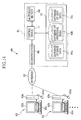
- the image viewer of the present invention may be composed as a network system, wherein the image database and the image arrangement deciding device are provided in an administrative image server, whereas the display device is provided in each one of terminal devices connected to the server through the network. Then, the image database is shared with many users for registering and disclosing the image data.
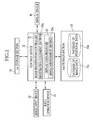
- Fig.1 shows an image viewer 10 that is constituted of a control device 11, an image input device 12, an input operation device 13, a first storage section 14, a second storage section 15, and a display device 16.
- the control device 11 is connected to the respective components of the image viewer 10, to control them.
- the image input device 12 is a device for inputting image data, that is, an image data obtaining device for obtaining image data from users.
- an image data obtaining device for obtaining image data from users.
- a memory card reader, a CD-ROM drive or the like is used as the image input device 12.
- the first storage section 14 stores image data temporarily as the image data is entered through the image input device 12.
- a flash memory, a hard disc or the like is used as the first storage section 14.
- the second storage section 15 is a data storage device, such as a hard disc, and stores a database 15a of image data and a database 15b of positional data.
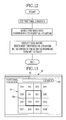
- the display data producer 22 is provided with an image arrangement decider 22a that decides the arrangement of the images of one group on a screen of the display device 16. Based on the positional data attached to the image data, the image arrangement decider 22a determines which images are the nearest to a particular image with respect to their camera locations, and where the nearest images should adjoin the particular image. According to the determined positional relations between the camera locations of the respective images, the image arrangement decider 22a decides a lattice arrangement of the images. The display data producer 22 produces display data for displaying an array of images arranged in adjacent to one another according to the decided arrangement.
- the image arrangement may be decided so as to satisfy bordering conditions between predetermined regions or areas, e.g. according to data of borders between prefectures. It is also possible to arrange the images in accordance with a geographical contour of a designated area, e.g. Saitama Prefecture.
- the control device 11. controls the image input device 12 to get an image data file with positional data indicating its camera location.
- the image data file includes GPS data as the positional data and is read out from a memory card that stores image data files captured by a digital camera.
- the image data file may be obtained from a camera phone as an E-mail attachment.
- the control device 11 stores the obtained image data file in the first storage section 14.
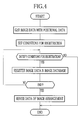
- the image registration controller 21 searches the positional database 15b based on the attached positional data, e.g. the GPS data, of this image data file, to retrieve positional data relating to the attached positional data, such as an addresses, a landmarks and other data, and registers the retrieved positional data in association with the image data in the image database 15a.
- the attached positional data e.g. the GPS data
- the image registration controller 21 searches the positional database 15b based on the attached positional data, e.g. the GPS data, of this image data file, to retrieve positional data relating to the attached positional data, such as an addresses, a landmarks and other data, and registers the retrieved positional data in association with the image data in the image database 15a.
- the image arrangement decider 22a obtains the positional data of the large number of image data files registered in the image database 15a, and decides an arrangement of these images based on the obtained positional data so as to arrange the images adjacently to one another in a latticed array.
- the display data producer 22 produces the display data representative of the array of images arranged in the decided arrangement. Thereafter, the control device 11 controls the display device 16 based on the display data, to drive the display device 16 to display the image array.
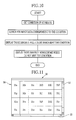
- Fig.3 shows an example 31 of the image array displayed on a display screen 30 of the display device 16.
- the image array 31 consists of 24 rectangular image frames 31A to 31X arranged tightly in a 4x6 matrix.
- the display screen 30 displays scroll bars 32 and 33 on the right and bottom sides of the image array 31 respectively.
- Operating the scroll bars 32 and 33 by the input operation device 13 causes the image array 31 to scroll to display another image array including other images than before.
- operating the scroll bar 32 causes the image array 31 to scroll up and down
- operating the scroll bar 33 causes the image array 31 to scroll right and left.
- the image array 31 are so arranged that the top side of the screen 30 correspond to the north with respect to the camera locations of the images displayed in the frames 31A to 31X. Therefore, as the image array 31 is scrolled upwards by operating the scroll bar 32, other images are displayed sequentially from those captured in southern areas to those captured in northern areas.
- the control device 11 controls the image input device 12 to obtain image data with positional data, and stores the obtained image data in the first storage section 14. Thereafter, the image registration controller 21 sets the conditions for registration, including a judgment based on the positional data as to whether the image is captured in a particular area or not, a visual judgment by the administrator on the image contents, an automatic judgment on the image contents, and a judgment as to whether a designated time comes or not, and the like.
- the registration judgment section 21a judges as to whether each image data file satisfies the conditions for registration. If not, the image data file is not registered. If the image data file satisfies the conditions for registration, the image registration controller 21 registers the image data file in the image database 15a in association with an address and a landmark corresponding to the positional data of that image data file, in the same way as described above.
- the conditions for registration include a condition that the image data should be registered when a designated time comes, the judgment process as to whether the image data satisfy the conditions for registration or not is restarted when the designated time has come.
- the input image data is checked with respect to the predetermined conditions for registration, and only those image data files which satisfy these conditions are automatically registered. Therefore, it becomes possible to filter the image data on the registration according to the predetermined conditions like the camera locations or the image contents. Since unnecessary image data files are not registered, the capacity of the second storage section 15 is used efficiently.
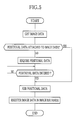
- the control device 11 controls the image input device 12 to obtain image data, and stores the obtained image data in the first storage section 14. Thereafter, the image registration controller 21 judges whether positional data is attached to the obtained image data or not. This judgment is made, for example, as to whether GPS data is written in an Exif-tag or not if the image data is Exif-JPG format. If it is judged that the positional data is attached to the image data, the sequence proceeds to an after-mentioned positional data complementing process.
- an address, a landmark name or longitude and latitude of a location may be entered through the input operation device 13.
- text data or a zip code of the address may be entered, or the address is selected from an address list or on a map.
- control device 11 checks if any positional data is entered through the input operation device 13. If not, the control device 11 standbys for the entry of positional data.
- the image registration controller 21 searches the GPS correlation map showing correlations between addresses, GPS data, and landmarks, in the positional database 15b, and add other related positional data to the entered positional data. Namely, the image registration controller 21 associates the entered positional data and the positional data retrieved from the positional database 15b with the image data, and thereafter registers the image data in the image database 15a. Then, the image registration process is terminated.
- the aggregation is a regional unit for grouping the image data based on the attached positional data and displaying them as data aggregates, and may be prefecture, municipality, landmark or the like.
- the aggregation may be designated by entering data through the input operation device 13, or automatically by the control device 11 based on the distribution of the camera locations of the image data files registered in the image database 15a.
- the control device 11 is a grouping device that aggregates the image data files into groups according to the designated aggregation, and decides a representative image of each group. After the aggregation is designated, the control device 11 sorts all the image data files registered in the image database 15a into groups according the designated aggregation. For example, if prefecture is designated as the aggregation, those image data files which are captured in the same prefecture are sorted into the same group.
- the representative image data files may be decided in an appropriate way. For example, past records of the individual image data files, indicating how many times each image data file has been browsed and for what purposes the image data file has been used, are converted into scores. One getting the highest score within each group is decided to be the representative image of that group. It is also possible to sort the image data files in the sequence of time of capturing the image data files and decide the latest image data file or the oldest one to be a representative. Alternatively, a representative image of a group may be such an image that contains a subject representing a feature of an area in which the image group belongs, since the subjects of the respective images are known from their attribute data.
- the image arrangement decider 22a decides the arrangement of the representative images based on the positional data attached to these image data files, in the same way as described with respect to general images.
- the display data producer 22 produces display data for an image array 31 consisting of the representative images arranged in the decided image arrangement. Thereafter, the control device 11 controls the display device 16 based on the display data, to display the image array 31 of the representative images.
- the image viewer 10 simply displays the image array 31 on the display screen in the above embodiments, it is possible to display such position-related information with the image array 31 that have some relations to the positional data of the displayed images.
- position-related information borderlines between regions, markers indicating landmarks, or a graphically-deformed route map may be displayed.
- a caption "Saitama” 42 is displayed on the images captured in Saitama Prefecture
- a caption "Chiba” 43 is displayed on the images captured in Chiba Prefecture
- a caption "Tokyo” 44 is displayed on the images captured in Tokyo.
- border lines, landmark markers and graphically-deformed traffic lines are referred to as examples of the position-related information to be displayed with the image array 31. These three kinds of data may be displayed independently from each other or in combination with each other.
- the control device 11 retrieves map data from the positional database 15b in correspondence with the positional data of the chosen image 31N, and controls the display device 16 based on the retrieved map data, to display a map 45 in place of the image 31N.
- a map corresponding to a chosen image is displayed in place of the chosen image.
- a map is displayed in correspondence with a chosen image. It is alternatively possible to display a landmark name in a tool chip or the like at a position pointed by a mouse cursor in a chosen image among the image array 31. It is also possible to pre-register personal positional data, such as "my house", "my favorite place” and the like, so that the mouse cursor automatically moves to chose one of those images corresponding to the pre-registered positional data when the mouse cursor is brought into a certain distance range to that image by operating the scroll bars 32 and 33 and the mouse. In other words, the mouse cursor moves as if it is attracted to and automatically snaps at the pre-registered place.
- the pre-registered places may have different attractive forces depending upon their importance, by setting the above-mentioned distance range differently from one place to another.
- the operating member 51b is moved with the mouse or the like up and down along the time axis 51a to shift the time about the image array 31 between the past and the present. That is, as the operating member 51b is moved to the topmost position of the time axis 51a, the time about the image array 31 is set to reflect the earliest time data of the images. On the other hand, as the operating member 51b is moved to the lowest position of the time axis 51a, the time about the image array 31 is set to reflect the latest time data. Thus, the display changes to reflect the time as the operating member 51b is moved along the time axis 51a. In this embodiment, those images which had been captured by a period of time indicated by the position of the operating member 51b are displayed in full colors, whereas other images are displayed in monochrome.
- the time slider 51 when a period of time is designated by the time slider 51, those images already captured at that time period are displayed in full colors, and other are displayed in monochrome, i.e. in black-and-white. But the discrimination based on the time data may be made by displaying the images in full colors, on one hand, and in sepia tone, on the other hand.
- time data it is also possible to reflect the time data by fringing already captured images with particular frames to distinguish from others. It is alternatively possible to display only those images which had been captured before the designated time period, while making invisible of, e.g. blacking out, other images which had not yet been captured by that time period. Note that the time data is reflected on the display without changing the image arrangement inside the image array 31, so the correlations between the images based on their camera locations are maintained on the display screen 30.
- the above-described embodiment changes the display of the image array 31 so as to reflect the time data of the images, it is possible to display the images so as to reflect other attribute data than the time and positional data of the images. If the attribute data, e.g. classification of the subject and image characteristic values, are attached as metadata to the individual image, those images which have the same attribute as designated by the user are made apparent on the display screen 30.
- attribute data e.g. classification of the subject and image characteristic values
- the control device 11 searches the image database 15a for those images which correspond to the designated condition. In this example, those images which contain flowers as their subjects are retrieved. Thereafter, the control device 11 controls the display device 16 such that the retrieved images, i.e. those containing flowers as their subjects, are displayed in full colors, as implied by 31D to 31F, 31J to 31L, 31P and 31Q, while those containing no flower as their subject are displayed in monochrome, as implied by 31a to 31c, 31g to 31i, 31m to 31o, 31r, 31s to 31x.
- the images that meet the designated condition of attribute are displayed discriminately from the images that do not meet the designated condition, so it is easy to find the images that meet the designated condition.
- the display changes to reflect the search result, without changing the image arrangement in the image array, so the positional relation between the images is maintained unchanged.
- an image attribute is designed as a condition for searching, and those images meeting the designated condition are displayed distinguishably from others that do not meet the condition. It is also possible to use the positional data as a condition for searching for retrieving the images.
- the control device 11 controls the display device 16 to display an entry column 52 for entering a positional condition and a search button 53 beside an image array 31 on the display screen 30.
- the user operates the input operation device 13 to enter a landmark name, e. g. "Kinkakuj i Temple", as the positional condition for image retrieval, and turn the search button 53 on, the control device 11 gets the positional condition "Kinkakuji Temple".
- control device 11 retrieves those image data files which meet the designated condition "Kinkakuji Temple". If, for example, images 31I, 31J, 31O and 31P meet the condition, the control device 11 controls the display device 16 to change the image arrangement of the image array 31 so as to display these images 31I, 31J, 31O and 31P in the center of the display screen 30, and surround these images 31I, 31J, 31O and 31P with a frame 54, to allow the user to notice instantly that these images meet the positional condition.
- a landmark name is entered in the entry column 52 to designate the positional condition in the above-described embodiment, it is possible to enter either one or more of an address, a landmark and a pair of latitude and longitude, to designate the positional condition.
- the image data file is uploaded by sending it through a Web page, as an e-mail attachment, by use of FTP software or the like.
- the administrative image server 61 can also take the image data directly from a storage medium such as a CD-ROM or a memory card.
- the administrative image server 61 is constituted of a controller 11, a first storage section 14, a second storage section 15 and a communication device 65.
- the communication device 65 is a device for communicating data between the administrative image server 61 and the personal computers 63 through a network, and may for example be a LAN card, a LAN board or the like.
- the control device 11 controls the communication device 65 to obtain the image data uploaded from the personal computers 63, and stores the obtained image data temporarily in the first storage section 14.
- the second storage section 15 stores an image database 15a, a database 15b of positional data and a database 15c of user data.
- the control device 11 controls the communication device 65 to disclose the image data registered in the image database 15a on the Internet 62. So the image data registered in the image database 15a is available for inspection to general public on the Internet 62. It is possible to limit the users who are allowed to browse the image data by setting publication range of the image data. Note that equivalent components are designated by the same reference numerals as in the above-described image viewer 10, so the detailed description of these components is omitted.
- an image viewer is composed as a network system, so as to share the image database on the network.
- the user can share and display not only those images owned by him or her, but also those owned by others.
- Who registers the images in the image database can decide the object or range of disclosure of his or her registered images, such as private, his or her friends only, within his or her community, or general public (no limitation). It is also possible to designate a registrar for retrieving images based on their registrars as attribute data of the images, so as to display only those images which are registered by the designated person.
- each image frame and the arrangement of the images are not limited to this embodiment.
- the image frames may be rectangular, equilateral-triangular, regular-hexagonal, or of another polygonal shape insofar as they are of the same shape and can be arranged in tight contact with one another.
Landscapes
- Engineering & Computer Science (AREA)
- Theoretical Computer Science (AREA)
- Data Mining & Analysis (AREA)
- Databases & Information Systems (AREA)
- Physics & Mathematics (AREA)
- General Engineering & Computer Science (AREA)
- General Physics & Mathematics (AREA)
- Library & Information Science (AREA)
- Information Retrieval, Db Structures And Fs Structures Therefor (AREA)
- Processing Or Creating Images (AREA)
- Instructional Devices (AREA)
Applications Claiming Priority (1)
| Application Number | Priority Date | Filing Date | Title |
|---|---|---|---|
| JP2006126196A JP4796435B2 (ja) | 2006-04-28 | 2006-04-28 | 画像ビューア |
Publications (2)
| Publication Number | Publication Date |
|---|---|
| EP1850251A2 true EP1850251A2 (de) | 2007-10-31 |
| EP1850251A3 EP1850251A3 (de) | 2008-05-14 |
Family
ID=38420552
Family Applications (1)
| Application Number | Title | Priority Date | Filing Date |
|---|---|---|---|
| EP07251743A Ceased EP1850251A3 (de) | 2006-04-28 | 2007-04-25 | Gerät zur Bildansicht |
Country Status (4)
| Country | Link |
|---|---|
| US (1) | US20070253025A1 (de) |
| EP (1) | EP1850251A3 (de) |
| JP (1) | JP4796435B2 (de) |
| CN (1) | CN101063977A (de) |
Families Citing this family (35)
| Publication number | Priority date | Publication date | Assignee | Title |
|---|---|---|---|---|
| US8106856B2 (en) | 2006-09-06 | 2012-01-31 | Apple Inc. | Portable electronic device for photo management |
| JP2009128443A (ja) * | 2007-11-20 | 2009-06-11 | Olympus Imaging Corp | 表示制御装置,カメラ,表示制御方法,表示制御プログラム |
| JP5361174B2 (ja) * | 2007-11-30 | 2013-12-04 | キヤノン株式会社 | 表示制御装置、表示制御方法、およびプログラム |
| JP4458158B2 (ja) * | 2007-12-07 | 2010-04-28 | ソニー株式会社 | 表示装置、表示方法、及びプログラム |
| US8799811B2 (en) * | 2008-08-22 | 2014-08-05 | Siemens Aktiengesellschaft | Method and apparatus for displaying medical thumbnail objects in a browsing component |
| KR101532294B1 (ko) * | 2008-12-18 | 2015-07-01 | 삼성전자주식회사 | 자동 태깅 장치 및 방법 |
| JP5470861B2 (ja) * | 2009-01-09 | 2014-04-16 | ソニー株式会社 | 表示装置及び表示方法 |
| EP2480957B1 (de) | 2009-09-22 | 2017-08-09 | Apple Inc. | Einrichtung, verfahren und grafische benutzeroberfläche zum manipulieren von benutzeroberflächenobjekten |
| US8766928B2 (en) | 2009-09-25 | 2014-07-01 | Apple Inc. | Device, method, and graphical user interface for manipulating user interface objects |
| US8780069B2 (en) | 2009-09-25 | 2014-07-15 | Apple Inc. | Device, method, and graphical user interface for manipulating user interface objects |
| US8832585B2 (en) | 2009-09-25 | 2014-09-09 | Apple Inc. | Device, method, and graphical user interface for manipulating workspace views |
| US8799826B2 (en) | 2009-09-25 | 2014-08-05 | Apple Inc. | Device, method, and graphical user interface for moving a calendar entry in a calendar application |
| US8539386B2 (en) | 2010-01-26 | 2013-09-17 | Apple Inc. | Device, method, and graphical user interface for selecting and moving objects |
| US8539385B2 (en) | 2010-01-26 | 2013-09-17 | Apple Inc. | Device, method, and graphical user interface for precise positioning of objects |
| US8612884B2 (en) | 2010-01-26 | 2013-12-17 | Apple Inc. | Device, method, and graphical user interface for resizing objects |
| EP2547078A4 (de) * | 2010-03-11 | 2014-01-22 | Nec Corp | Endgerät, einstellverfahren dafür und kommunikationssystem |
| US20110252130A1 (en) * | 2010-04-12 | 2011-10-13 | Jeyhan Karaoguz | System and method for managing a network of user-selectable devices |
| US9098182B2 (en) | 2010-07-30 | 2015-08-04 | Apple Inc. | Device, method, and graphical user interface for copying user interface objects between content regions |
| US9081494B2 (en) | 2010-07-30 | 2015-07-14 | Apple Inc. | Device, method, and graphical user interface for copying formatting attributes |
| US8972879B2 (en) | 2010-07-30 | 2015-03-03 | Apple Inc. | Device, method, and graphical user interface for reordering the front-to-back positions of objects |
| CN103262055A (zh) * | 2010-12-09 | 2013-08-21 | 日本电气株式会社 | 包括图像信息显示设备的通信终端、图像信息显示方法及图像信息显示程序 |
| CN102254334B (zh) * | 2011-06-15 | 2012-12-05 | 武汉大学 | 一种基于dcom技术的地图符号化网络共享服务方法 |
| US9043720B2 (en) * | 2011-10-11 | 2015-05-26 | International Business Machines Corporation | Post selection mouse pointer location |
| JP5315424B2 (ja) | 2012-01-23 | 2013-10-16 | キヤノン株式会社 | 画像表示制御装置及びその制御方法 |
| WO2013114473A1 (ja) * | 2012-02-02 | 2013-08-08 | パナソニック株式会社 | サーバー、端末装置、画像検索方法、画像処理方法、およびプログラム |
| JP2014056503A (ja) | 2012-09-13 | 2014-03-27 | International Business Maschines Corporation | 多言語環境でのコミュニケーションに適する非テキスト要素を特定するためのコンピュータ実装方法、プログラム、および、システム |
| JP5379904B2 (ja) * | 2012-11-27 | 2013-12-25 | オリンパスイメージング株式会社 | 表示制御装置,カメラ,表示制御方法,表示制御プログラム |
| CN103870231A (zh) * | 2012-12-17 | 2014-06-18 | 广州市千钧网络科技有限公司 | 呈现图片的设备和方法 |
| US9626439B2 (en) * | 2013-05-31 | 2017-04-18 | Xilopix | Method for searching in a database |
| CN104504102B (zh) * | 2014-12-26 | 2017-11-21 | 携程计算机技术(上海)有限公司 | 图片版本管理系统及方法 |
| JP6630096B2 (ja) * | 2015-09-24 | 2020-01-15 | キヤノン株式会社 | 表示制御装置及びその制御方法、コンピュータプログラム |
| CN109792537B (zh) | 2016-09-29 | 2023-06-23 | 皇家飞利浦有限公司 | 用于提供图像的装置和方法以及图像处理装置和系统 |
| JP2018106289A (ja) * | 2016-12-22 | 2018-07-05 | パイオニア株式会社 | 表示制御装置、表示制御方法、プログラム及び記録媒体 |
| DK201970535A1 (en) | 2019-05-06 | 2020-12-21 | Apple Inc | Media browsing user interface with intelligently selected representative media items |
| DK181076B1 (en) | 2020-02-14 | 2022-11-25 | Apple Inc | USER INTERFACES FOR TRAINING CONTENT |
Citations (2)
| Publication number | Priority date | Publication date | Assignee | Title |
|---|---|---|---|---|
| EP1139239A2 (de) * | 2000-03-29 | 2001-10-04 | Kabushiki Kaisha Toshiba | Schema zum Auffinden von multimedialen Daten unter Benutzung von Ereignisnamen und Zeit- oder Ortsinformationen |
| US6330576B1 (en) * | 1998-02-27 | 2001-12-11 | Minolta Co., Ltd. | User-friendly information processing device and method and computer program product for retrieving and displaying objects |
Family Cites Families (15)
| Publication number | Priority date | Publication date | Assignee | Title |
|---|---|---|---|---|
| JP3906938B2 (ja) * | 1997-02-18 | 2007-04-18 | 富士フイルム株式会社 | 画像再生方法及び画像データ管理方法 |
| US6266442B1 (en) * | 1998-10-23 | 2001-07-24 | Facet Technology Corp. | Method and apparatus for identifying objects depicted in a videostream |
| US6542882B1 (en) * | 1999-04-22 | 2003-04-01 | Gateway, Inc. | System and method for providing a database of content having like associations |
| JP2001014316A (ja) * | 1999-04-28 | 2001-01-19 | Aizu Doken Corp | 建築土木用データベース生成装置及び表示装置 |
| US6914626B2 (en) * | 2000-02-21 | 2005-07-05 | Hewlett Packard Development Company, L.P. | Location-informed camera |
| JP4706118B2 (ja) * | 2000-08-07 | 2011-06-22 | ソニー株式会社 | 情報処理装置 |
| JP3982605B2 (ja) * | 2000-09-29 | 2007-09-26 | カシオ計算機株式会社 | 撮影画像管理装置、撮影画像管理方法及び撮影画像管理プログラム |
| US7425963B2 (en) * | 2001-07-16 | 2008-09-16 | Hewlett-Packard Development Company, L.P. | Hierarchical image feature-based visualization |
| JP2003052004A (ja) * | 2001-08-06 | 2003-02-21 | Canon Inc | 撮像装置、画像再生装置、画像再生方法およびプログラム |
| JP2003216621A (ja) * | 2002-01-23 | 2003-07-31 | Fuji Photo Film Co Ltd | プログラム、画像管理装置、及び画像管理方法 |
| AU2002345519A1 (en) * | 2002-07-09 | 2004-02-02 | Centre National De La Recherche Scientifique | Annotation of digital images using text |
| JP3944160B2 (ja) * | 2003-12-25 | 2007-07-11 | キヤノン株式会社 | 撮像装置、情報処理装置、それらの制御方法及びプログラム |
| CA2560386C (en) * | 2004-03-23 | 2013-09-24 | Google Inc. | A digital mapping system |
| JP4517742B2 (ja) * | 2004-06-23 | 2010-08-04 | ソニー株式会社 | 画像表示制御装置および画像表示制御方法 |
| JP2006050425A (ja) * | 2004-08-06 | 2006-02-16 | Sharp Corp | 画像処理装置 |
-
2006
- 2006-04-28 JP JP2006126196A patent/JP4796435B2/ja not_active Expired - Fee Related
-
2007
- 2007-04-25 EP EP07251743A patent/EP1850251A3/de not_active Ceased
- 2007-04-26 US US11/790,621 patent/US20070253025A1/en not_active Abandoned
- 2007-04-27 CN CNA2007101019503A patent/CN101063977A/zh active Pending
Patent Citations (2)
| Publication number | Priority date | Publication date | Assignee | Title |
|---|---|---|---|---|
| US6330576B1 (en) * | 1998-02-27 | 2001-12-11 | Minolta Co., Ltd. | User-friendly information processing device and method and computer program product for retrieving and displaying objects |
| EP1139239A2 (de) * | 2000-03-29 | 2001-10-04 | Kabushiki Kaisha Toshiba | Schema zum Auffinden von multimedialen Daten unter Benutzung von Ereignisnamen und Zeit- oder Ortsinformationen |
Also Published As
| Publication number | Publication date |
|---|---|
| JP4796435B2 (ja) | 2011-10-19 |
| US20070253025A1 (en) | 2007-11-01 |
| JP2007299172A (ja) | 2007-11-15 |
| EP1850251A3 (de) | 2008-05-14 |
| CN101063977A (zh) | 2007-10-31 |
Similar Documents
| Publication | Publication Date | Title |
|---|---|---|
| EP1850251A2 (de) | Gerät zur Bildansicht | |
| US11636149B1 (en) | Method and apparatus for managing digital files | |
| US8051089B2 (en) | Systems and methods for location-based real estate service | |
| US8811775B1 (en) | Visualizing digital images on a map | |
| US6883146B2 (en) | Picture database graphical user interface utilizing map-based metaphors for efficient browsing and retrieving of pictures | |
| US7415662B2 (en) | Digital media management apparatus and methods | |
| US8848972B2 (en) | Proactive creation of photobooks | |
| US6948124B2 (en) | Graphical user interface utilizing three-dimensional scatter plots for visual navigation of pictures in a picture database | |
| KR101290667B1 (ko) | 화상 관리 장치, 화상 표시 장치 및 화상 표시 방법과 컴퓨터 판독가능한 기록 매체 | |
| KR20070101336A (ko) | 이미지를 브라우징하기 위한 사용자 인터페이스 | |
| US10191635B1 (en) | System and method of generating a view for a point of interest | |
| US20040145602A1 (en) | Organizing and displaying photographs based on time | |
| US20080306921A1 (en) | Digital Media Management Apparatus and Methods | |
| US20040135904A1 (en) | Image sorting method, device, and program | |
| CN103562957B (zh) | 信息提供装置、信息提供方法以及信息提供系统 | |
| JP2003298991A (ja) | 画像整理方法および装置並びにプログラム | |
| JP2000276484A (ja) | 画像検索装置、画像検索方法及び画像表示装置 | |
| JP2009526302A (ja) | デジタルデータに対するタグ付け方法及びシステム | |
| WO2002057959A2 (en) | Digital media management apparatus and methods | |
| JP2003330942A (ja) | ディジタルデータ検索装置 | |
| US11244487B2 (en) | Proactive creation of photo products | |
| US10445358B2 (en) | Method of indexing multimedia content by creating database records that include location data | |
| JP2004295198A (ja) | 位置データ抽出装置 | |
| US20050172313A1 (en) | Image playback device and image playback method | |
| JP2007079866A (ja) | 画像分類装置、画像分類方法、画像分類プログラム、及び撮像装置 |
Legal Events
| Date | Code | Title | Description |
|---|---|---|---|
| PUAI | Public reference made under article 153(3) epc to a published international application that has entered the european phase |
Free format text: ORIGINAL CODE: 0009012 |
|
| AK | Designated contracting states |
Kind code of ref document: A2 Designated state(s): AT BE BG CH CY CZ DE DK EE ES FI FR GB GR HU IE IS IT LI LT LU LV MC MT NL PL PT RO SE SI SK TR |
|
| AX | Request for extension of the european patent |
Extension state: AL BA HR MK YU |
|
| PUAL | Search report despatched |
Free format text: ORIGINAL CODE: 0009013 |
|
| AK | Designated contracting states |
Kind code of ref document: A3 Designated state(s): AT BE BG CH CY CZ DE DK EE ES FI FR GB GR HU IE IS IT LI LT LU LV MC MT NL PL PT RO SE SI SK TR |
|
| AX | Request for extension of the european patent |
Extension state: AL BA HR MK RS |
|
| 17P | Request for examination filed |
Effective date: 20080922 |
|
| 17Q | First examination report despatched |
Effective date: 20081027 |
|
| AKX | Designation fees paid |
Designated state(s): DE FR GB |
|
| STAA | Information on the status of an ep patent application or granted ep patent |
Free format text: STATUS: THE APPLICATION HAS BEEN REFUSED |
|
| 18R | Application refused |
Effective date: 20110505 |