EP1862896A2 - Configuration de ports de réseau - Google Patents
Configuration de ports de réseau Download PDFInfo
- Publication number
- EP1862896A2 EP1862896A2 EP07102906A EP07102906A EP1862896A2 EP 1862896 A2 EP1862896 A2 EP 1862896A2 EP 07102906 A EP07102906 A EP 07102906A EP 07102906 A EP07102906 A EP 07102906A EP 1862896 A2 EP1862896 A2 EP 1862896A2
- Authority
- EP
- European Patent Office
- Prior art keywords
- image forming
- forming device
- user terminal
- network port
- list
- Prior art date
- Legal status (The legal status is an assumption and is not a legal conclusion. Google has not performed a legal analysis and makes no representation as to the accuracy of the status listed.)
- Withdrawn
Links
Images







Classifications
-
- G—PHYSICS
- G06—COMPUTING OR CALCULATING; COUNTING
- G06F—ELECTRIC DIGITAL DATA PROCESSING
- G06F3/00—Input arrangements for transferring data to be processed into a form capable of being handled by the computer; Output arrangements for transferring data from processing unit to output unit, e.g. interface arrangements
- G06F3/12—Digital output to print unit, e.g. line printer, chain printer
-
- G—PHYSICS
- G06—COMPUTING OR CALCULATING; COUNTING
- G06F—ELECTRIC DIGITAL DATA PROCESSING
- G06F3/00—Input arrangements for transferring data to be processed into a form capable of being handled by the computer; Output arrangements for transferring data from processing unit to output unit, e.g. interface arrangements
- G06F3/12—Digital output to print unit, e.g. line printer, chain printer
- G06F3/1201—Dedicated interfaces to print systems
- G06F3/1202—Dedicated interfaces to print systems specifically adapted to achieve a particular effect
- G06F3/1203—Improving or facilitating administration, e.g. print management
- G06F3/1204—Improving or facilitating administration, e.g. print management resulting in reduced user or operator actions, e.g. presetting, automatic actions, using hardware token storing data
-
- G—PHYSICS
- G06—COMPUTING OR CALCULATING; COUNTING
- G06F—ELECTRIC DIGITAL DATA PROCESSING
- G06F3/00—Input arrangements for transferring data to be processed into a form capable of being handled by the computer; Output arrangements for transferring data from processing unit to output unit, e.g. interface arrangements
- G06F3/12—Digital output to print unit, e.g. line printer, chain printer
- G06F3/1201—Dedicated interfaces to print systems
- G06F3/1223—Dedicated interfaces to print systems specifically adapted to use a particular technique
- G06F3/1224—Client or server resources management
- G06F3/1226—Discovery of devices having required properties
-
- G—PHYSICS
- G06—COMPUTING OR CALCULATING; COUNTING
- G06F—ELECTRIC DIGITAL DATA PROCESSING
- G06F3/00—Input arrangements for transferring data to be processed into a form capable of being handled by the computer; Output arrangements for transferring data from processing unit to output unit, e.g. interface arrangements
- G06F3/12—Digital output to print unit, e.g. line printer, chain printer
- G06F3/1201—Dedicated interfaces to print systems
- G06F3/1278—Dedicated interfaces to print systems specifically adapted to adopt a particular infrastructure
- G06F3/1285—Remote printer device, e.g. being remote from client or server
- G06F3/1286—Remote printer device, e.g. being remote from client or server via local network
-
- H—ELECTRICITY
- H04—ELECTRIC COMMUNICATION TECHNIQUE
- H04L—TRANSMISSION OF DIGITAL INFORMATION, e.g. TELEGRAPHIC COMMUNICATION
- H04L67/00—Network arrangements or protocols for supporting network services or applications
- H04L67/50—Network services
- H04L67/51—Discovery or management thereof, e.g. service location protocol [SLP] or web services
Definitions
- the present invention relates generally to a user terminal, an image forming device and a network port setting method thereof, which are capable of easily setting a network port.
- the various input and output machines such as laser beam printers, LED print head (LPH) printers, copy machines, and facsimiles, are called image forming devices.
- LPH LED print head
- a general image forming device is formed to have a single function in an apparatus, such as a printer, a copy machine, a scanner, or a facsimile.
- an apparatus such as a printer, a copy machine, a scanner, or a facsimile.
- a multi-function machine formed to have various functions in an apparatus has also appeared.
- one image forming device and one user terminal apparatus are connected and used locally.
- networks such as a local area network (LAN)
- LAN local area network
- a user may select and use a particular image forming device from among the plurality of image forming devices.
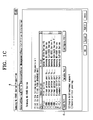
- FIGS. 1A through 1D are views illustrating a conventional network port setting method.
- a user desires to set a network port of an image forming device on an operation system, for example, Windows, the user selects a "Printer and Faxes" menu A at a "Start-UP" folder, as illustrated in FIG. 1A.
- an operation system for example, Windows
- a setting pane of the "Printer and Faxes menu” is displayed, as illustrated in FIG. 1B.
- a list of all the image forming devices connected to a user terminal apparatus is displayed in the setting pane of the "Printer and Faxes" menu A.
- the user selects the image forming device desired to set the network port through the setting pane of the "Printer and Faxes" menu A, and activates a "Properties” pane of the selected image forming device, as illustrated in FIG. 1C.
- the "Properties” pane of the selected image forming device illustrated in FIG. 1C includes tabs, such as “General”, “Sharing”, “Ports”, “Advanced”, “Color Management”, “Security”, “Printer”, and “Information”.
- tabs such as "General”, “Sharing”, “Ports”, “Advanced”, “Color Management”, “Security”, “Printer”, and “Information”.
- an "Add Port" button C is clicked after a "Ports” tab B is selected, a "Printer Ports” pane is displayed, as illustrated in FIG. 1D.
- the user has to carry out many selecting processes.
- the several selecting processes are carried out through the setting panes illustrated in FIGS. 1A through 1D, but even after the network port adding wizard executes, several selecting processes may still be required by the system.
- a user terminal apparatus an image forming device and a network port setting method thereof, which set a network port providing a pertinent information list and an image forming device list to a user, thereby allowing the network port to be easily set.
- a user terminal apparatus including a network searching unit to search an image forming device connected to the user terminal apparatus through a network, a driver searching unit to search preinstalled driver information, an information collecting unit to collect predetermined information related to the searched image forming device to create a pertinent information list, and to create an image forming device list on the basis of the searched driver information, and a port setting unit to set a network port selected from the pertinent information list to the image forming device selected from the image forming device list.
- the apparatus may further include a user interface unit to display the pertinent information list and the image forming device list, and to receive a select signal for the network port and the image forming device to be set through the pertinent information list and the image forming device list, which are displayed.
- the predetermined information may include at least one of an IP address, a model name, and a name of the searched image forming device, as well as a number corresponding to the other image forming devices connected with other user terminal apparatuses, which use the searched image forming device.
- the information collecting unit may collect the predetermined information by using one of a simple network management protocol (SNMP) and a transmission control protocol/internet protocol (TCP/IP).
- SNMP simple network management protocol
- TCP/IP transmission control protocol/internet protocol
- the user interface unit may display the pertinent information list on a first side of an indicating picture, and the image forming device list on a second side of the indicating picture.
- a user may drag a network port to be set on the pertinent information list, and drop the dragged network port onto the image forming device to be set on the image forming device list.
- the user interface unit may provide the indicating picture, so that when pertinent information is selected from the pertinent information list, the image forming device compatible with the network port corresponding to the selected pertinent information is activated on the image forming device list.
- the apparatus may further include an IP setting unit to receive an IP address inputted by a user, and to set a network port by the inputted IP address, when the network port selected from the pertinent information list is ineffective.
- the network searching unit may re-search an image forming device connected to the user terminal apparatus through the network.
- a network port setting method of a user terminal apparatus including searching an image forming device connected to the user terminal apparatus through a network, searching preinstalled driver information, collecting predetermined information related to the searched image forming device to create a pertinent information list, creating an image forming device list on the basis of the searched driver information, displaying the pertinent information list and the image forming device list created, and setting a network port selected from the pertinent information list to the image forming device selected from the image forming device list.
- the predetermined information may include an IP address, a model name, and a name of the searched image forming device, as well as a number corresponding to the other image forming devices connected with other user terminal apparatuses, which use the image forming device.
- the collecting of the predetermined information may include collecting the predetermined information by using one of a simple network management protocol (SNMP) and a transmission control protocol/internet protocol (TCP/IP).
- the displaying of the pertinent information list and the image forming device list may include displaying the pertinent information list a first side of an indicating picture, and the image forming device list on a second side of the indicating picture.
- the setting of the network port may include dragging a network port to be set on the pertinent information list, and dropping the dragged network port onto an image forming device to be set on the image forming device list.
- the displaying of the pertinent information list and the image forming device list may include providing the indicating picture, so that when pertinent information is selected from the pertinent information list, only an image forming device compatible with the network port corresponding to the selected pertinent information is activated as the image forming device on the image forming device list.
- the method may further include receiving an IP address inputted by a user and setting a network port by the inputted IP address, when the network port selected from the pertinent information list is ineffective.
- the method may further include re-searching another image forming device connected to the user terminal apparatus through the network when a network re-searching request signal is inputted.
- an image forming device connected through a network to a plurality of user terminal apparatuses, including a storing unit to store pertinent information of the user terminal apparatuses, and a control unit to control the storing unit, so that whenever there is a connection request for adding a network port from each of the user terminal apparatuses, the storing unit stores an IP address of the requesting user terminal apparatus and a number representing a connection request.
- the device may further include a terminal apparatus interface unit to support an interface to the user terminal apparatuses, and when there is an information request from each of the user terminal apparatuses, the control unit may confirm a connection state of the user terminal apparatuses corresponding to IP addresses stored in the storing unit, and transfer the confirmed connection state and the connection request information to the requesting user terminal apparatus through the terminal apparatus interface unit.
- a terminal apparatus interface unit to support an interface to the user terminal apparatuses, and when there is an information request from each of the user terminal apparatuses, the control unit may confirm a connection state of the user terminal apparatuses corresponding to IP addresses stored in the storing unit, and transfer the confirmed connection state and the connection request information to the requesting user terminal apparatus through the terminal apparatus interface unit.
- a network port setting method of an image forming device including storing an IP address of the requesting user terminal apparatus and a number representing a connection request when there is a connection request for adding a network port from each of a plurality of user terminal apparatuses, confirming a connection state of user terminal apparatuses corresponding to stored IP addresses when there is an information request from each of the user terminal apparatuses, and transferring the confirmed connection state , the stored IP addresses and the number representing thethe connection request to the requesting user terminal apparatus.
- a computer readable recording medium containing computer readable codes as a program to perform a network port setting method, the method including storing an IP address of the requesting user terminal apparatus and a number corresponding to the connection request when there is a connection request for adding a network port from each of a plurality of user terminal apparatuses, confirming a connection state of user terminal apparatuses corresponding to stored IP addresses, and transferring the confirmed connection state, the stored IP addresses and the number corresponding to the connection request to the requesting user terminal apparatus when there is an information request from each of the user terminal apparatuses.
- a user terminal apparatus including an information collecting unit to collect information relating to one or more image forming devices to create a pertinent information list, and to collect information relating to one or more preinstalled drivers to create an image forming device list, and a user interface unit to generate a signal representing a first image of the pertinent information list and a second image of the image forming device list.
- the user terminal apparatus may further include a display to display the first image and the second image within a screen thereof.
- the user terminal apparatus may further include a port setting unit to set a network port of one of the drivers of the image forming device list according to a selected one of the image forming devices of the pertinent information list.
- the user terminal apparatus may further include a network searching unit to search the one or more image forming devices connected through a network, and a driver searching unit to search the one or more drivers installed therein.
- the user interface unit may generate the signal including a cursor to connect one of the one or more drivers of the image forming device list and one of the one or more image forming devices of the pertinent information list to set a network port selected from the pertinent information list to one of the drivers of the image forming device list.
- a user terminal apparatus including a searching unit to search to search for one or more image forming devices connected to a network and one or more drivers installed therein, an information collecting unit to create a pertinent information list from the search image forming devices and an image forming device list from the searched one or more drivers, an interface unit to generate a signal representing a first image of the pertinent information list and a second image of the image forming device list to be displayed on a screen, and a port setting unit to set a network port selected from the displayed pertinent information list to one of the drivers selected from the displayed image forming device list.
- a user interface apparatus to set a network port based on a status of a selected network port to an image forming device, including a port setting unit to automatically set the network port to the image forming device when the selected network port is effective, and an IP setting unit to set the network port with an IP address input by a user when the network port is ineffective.
- a network port setting method based on a status of a selected network port including automatically setting the network port to an image forming device when the selected network port is effective, and setting the network port with an IP address input by a user when the network port is ineffective.
- FIG. 2 is a block diagram illustrating a user terminal apparatus 100 according to an embodiment of the present invention
- FIG. 3 is a view illustrating a state of displaying a pertinent information list and an image forming device list in the user terminal apparatus 100 of FIG. 2.
- the user terminal apparatus 100 includes a port changing unit 110, and an image forming device interface unit 120. Also, software including an operating system (OS) and various driver application programs are installed in the user terminal apparatus 100.
- OS operating system
- driver application programs are installed in the user terminal apparatus 100.
- the port changing unit 110 includes a network searching unit 111, a driver searching unit 112, an information collecting unit 113, a user interface unit 114, a port setting unit 115, and an IP setting unit 116.
- the network searching unit 111 searches for an image forming device connected to the user terminal apparatus 100 through a network.
- the image forming device may be a single general printer or a plurality of general printers.
- the network searching unit 111 When a user inputs a network re-searching request signal through the user interface unit 114, the network searching unit 111 re-searches for the image forming device connected to the user terminal apparatus 100 through the network.
- the driver searching unit 112 searches for driver information installed in the OS of the user terminal apparatus 100 in advance. Accordingly, image forming devices set in the user terminal apparatus 100 may be detected.
- the information collecting unit 113 collects predetermined information related to the image forming device identified by the network searching unit 111 to create a pertinent information list, and creates an image forming device list on the basis of the driver information identified by driver searching unit 112. At this time, it is possible, but not necessary, to create the image forming device list in the form of icons.
- the predetermined information collected by the information collecting unit 113 includes an IP address, a model name, and a name of the image forming device, which is connected to the network, and a number of other image forming devices connected with other user terminal apparatuses which use the image forming device.
- the information collecting unit 113 may use a simple network management protocol (SNMP) or a transmission control protocol/internet protocol (TCP/IP).
- SNMP simple network management protocol
- TCP/IP transmission control protocol/internet protocol
- the user interface unit 114 which supports an interface between the port changing unit 110 and the user, provides the image forming device list and the pertinent information list created by the information collecting unit 113 to the user, and receives a select signal for the network port and the image forming device to be set from the user.
- the user interface unit 114 provides an indicating picture including the pertinent information list F and the image forming device list G, so that the user may easily confirm them. At this time, it is possible, but not necessary, to display the pertinent information list F on a first side of the indicating picture, and to display the image forming device list G on a second side of the indicating picture.
- the pertinent information list F on the first side of the indicating picture may be embodied to be dragged by a mouse operation of the user, and the image forming device list G on the second side of the indicating picture is displayed in the shape of icons.
- the indicating picture which is provided at the user interface unit 114, further includes a refresh button H, which inputs a network re-searching request signal to re-search the network when there is no desired information in the pertinent information list F.
- the port setting unit 115 sets the selected network port to the selected image forming device according to the select signal of the user inputted through the user interface unit 114.
- the IP setting unit 116 receives an IP address through the user interface unit 114 from the user and sets a network port by the inputted IP address, according to the select signal of the user inputted through the user interface unit 114.
- the image forming device interface unit 120 supports an interface between the image forming and the user terminal apparatus 100.
- the network searching unit 111 may search for the image forming device connected to the network, through the image forming device interface unit 120.
- the port changing unit 110 may be embodied in an application program only for port changing, or a driver having an additional function for port changing.
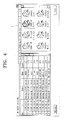
- FIG. 4 is a view illustrating a network port setting method.
- the indicating picture which is provided at the user interface unit 114, includes the pertinent information list F, the image forming device list G, and the refresh button H.
- the user selects one IP address which the user wants to set among the related information list F, by using the mouse.
- FIG. 4 assumes that the user selects "10.88.193.78".
- the user drags "10.88.193.78” by using the mouse, and moves and drops the dragged "10.88.193.78" onto the activated icon I.
- a select signal for the network port and the image forming device that the user wants to set is inputted through the user interface unit 114.
- the port setting unit 115 sets the network port.
- FIG. 5 is a view illustrating a network port setting method when the IP address is effective.
- the port setting unit 115 may determine whether the network port selected by the user is effective.
- the port setting unit 115 may display a message which confirms whether the user wants to change the port of the image forming device into the selected network port through the user interface unit 114 prior to setting the selected network port.
- FIG. 5 illustrates a message for confirming whether the selection made by the user is correct.
- the port setting unit 115 may display the message "Do you want to change a port of the selected printer into the network port 10.88.193.78 ?”, so that the user confirms the selected network port. If the user clicks "Yes”, the selected port is set. If the user clicks "No", the above process repeats.
- FIGS. 6A and 6B are views illustrating a network port setting method when the IP address is ineffective.
- the port setting unit 115 may determine whether the network port selected by the user is effective.
- the user interface unit 114 may display a message which induces the user to directly set an IP address. As illustrated in FIG. 6A, the user interface unit 114 may display the message "10.88.193.78 of the selected printer is ineffective IP. Do you want to set a new IP?".
- the IP setting unit 116 provides an input pane which is capable of directly inputting the new IP as illustrated in FIG. 6B, through the user interface unit 114. After that, the IP setting unit 116 sets the network port with the IP address inputted through the input pane by the user.
- FIG. 7 is a block diagram illustrating an image forming device 200 according to an embodiment of the present invention.
- the image forming device 200 includes a storing unit 210, a control unit 220, and a terminal apparatus interface unit 230. Also, the image forming device 200 further includes a printing unit under the control of the control unit 220, which is necessary to form a desired image. That is, the image forming device 200 prints the desired image according to signals transmitted from the user terminal apparatus 100 through the set network port. However, since functions and constructions of the printing unit are the same as those of the conventional printing unit, descriptions thereof are omitted for clarity and conciseness. Furthermore, the image forming device 200 is connected to a plurality of user terminal apparatuses through a network.
- the storing unit 210 stores pertinent information of the plurality of user terminal apparatuses under the control of the control unit 220.
- the pertinent information stored in the storing unit 210 is information related to each of the plurality of user terminal apparatuses.
- the control unit 220 which controls a general operation of the image forming device 200, controls signal inputs and signal outputs to the storing unit 210 and the terminal apparatus interface unit 230.
- control unit 220 controls the storing unit 210 to store an IP address of the requesting user terminal apparatus and a connection request number.
- control unit 220 If there is an information request from one of the user terminal apparatuses, i.e., the user terminal apparatus 100, the control unit 220 confirms a present connection state of the plurality of user terminal apparatuses corresponding to IP addresses stored in the storing unit 210.
- the control unit 220 transfers the confirmed connection state of the plurality of user terminal apparatuses and the pertinent information stored in the storing unit 210 to the user terminal apparatus 100 through the terminal apparatus interface unit 230.
- the terminal apparatus interface unit 230 which supports an interface between the plurality of user terminal apparatuses and the image forming device 200, receives information requests from the plurality of user terminal apparatuses and transfers the confirmed connection state and the pertinent information under the control of the control unit 220.
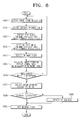
- FIG. 8 is a view illustrating a network port setting method of a user terminal apparatus according to an embodiment of the present invention.
- the network searching unit 111 searches for an image forming device connected to the user terminal apparatus 100 through the network (S300), and the driver searching unit 112 searches driver information through drivers installed in the OA of the user terminal apparatus 100 (S310).
- the information collecting unit 113 collects pertinent information of the image forming device identified through the network searching unit 111 to create a pertinent information list, and creates an image forming device list using the driver information identified by the driver searching unit 112 (S320).
- the user interface unit 114 displays an indicating picture including the pertinent information list and the image forming device list as illustrated in FIG. 3 (S330).
- the user moves the mouse on the pertinent information list of the indicating picture displayed through the user interface unit 114, to select a desired network port to set (S340).
- the user may select the refresh button H to re-search for an image forming device connected to the network.
- the refresh button H S360-Y
- the network searching unit 111 re-searches the image forming device connected to the network, and repeats the operations after the operation S300.
- the user drags the corresponding network port on the pertinent information list and drops the dragged network port onto the icon of the activated image forming device, as illustrated in FIG. 4 (S370).
- the port setting unit 115 sets the network port of the corresponding image forming device with the selected IP address (S392).
- the IP setting unit 116 directly receives an IP address through the user interface unit 114 from the user (S390), and then sets the network port of the corresponding image forming device with the received IP address (S392).
- FIG. 9 is a flow chart illustrating a network port setting method of an image forming device according to an embodiment of the present invention.
- the control unit 220 of the image forming device 200 controls the storing unit 210 to store the number of the requests together with IP addresses of the requesting user terminal apparatuses (S410).
- control unit 220 If there is an information request from one of the user terminal apparatuses, i.e., the user terminal apparatus 100 (S420-Y), the control unit 220 confirms a connection state of the plurality of user terminal apparatuses corresponding to IP addresses stored in the storing unit 210 (S430).
- the control unit 220 transfers the connection state of the user terminal apparatuses, the IP addresses of the user terminal apparatuses, and the number of the requests through the terminal apparatus interface unit 230 (S440).
- the network searching unit 111 of the user terminal apparatus 100 may search the plurality of image forming devices 200 by the connection state of the plurality of user terminal apparatuses, the IP addresses of the user terminal apparatuses, and the number of the requests transferred from the image forming devices 200.
- the information collecting unit 113 may then collect the pertinent information.
- the present invention can also be embodied as computer-readable codes on a computer-readable recording medium.
- the computer-readable recording medium is any data storage device that can store data which can be thereafter read by a computer system. Examples of the computer-readable recording media include read-only memory (ROM), random-access memory (RAM), CD-ROMs, magnetic tapes, floppy disks, optical data storage devices, and carrier waves (such as data transmission through the Internet).
- ROM read-only memory
- RAM random-access memory
- CD-ROMs compact discs
- magnetic tapes magnetic tapes
- floppy disks optical data storage devices
- carrier waves such as data transmission through the Internet
- carrier waves such as data transmission through the Internet
- the computer-readable recording medium can also be distributed over network-coupled computer systems so that the computer-readable code is stored and executed in a distributed fashion. Also, functional programs, codes, and code segments to accomplish the present invention can be easily construed by programmers skilled in the art to which the present invention pertains.
- the user terminal apparatus, the image forming device, and the network port setting method thereof set the network port with the drag and drop method, thereby allowing the network port to be easily and conveniently set as compared with the convention apparatus and method.
- the image forming device has the information on the user terminal apparatuses, which have connected to itself. Accordingly, the user terminal apparatus connected to the network may easily detect the frequency in use of the certain image forming device, thereby allowing the image forming device having the small frequency in use to be selected and used.
Landscapes
- Engineering & Computer Science (AREA)
- Theoretical Computer Science (AREA)
- Human Computer Interaction (AREA)
- Physics & Mathematics (AREA)
- General Engineering & Computer Science (AREA)
- General Physics & Mathematics (AREA)
- Computer Networks & Wireless Communication (AREA)
- Signal Processing (AREA)
- Facsimiles In General (AREA)
- Computer And Data Communications (AREA)
- Accessory Devices And Overall Control Thereof (AREA)
Applications Claiming Priority (1)
| Application Number | Priority Date | Filing Date | Title |
|---|---|---|---|
| KR1020060048681A KR20070114967A (ko) | 2006-05-30 | 2006-05-30 | 네트워크 포트 설정을 위한 사용자 단말장치 및화상형성장치 그리고 그들의 네트워크 포트 설정 방법 |
Publications (1)
| Publication Number | Publication Date |
|---|---|
| EP1862896A2 true EP1862896A2 (fr) | 2007-12-05 |
Family
ID=38430583
Family Applications (1)
| Application Number | Title | Priority Date | Filing Date |
|---|---|---|---|
| EP07102906A Withdrawn EP1862896A2 (fr) | 2006-05-30 | 2007-02-22 | Configuration de ports de réseau |
Country Status (4)
| Country | Link |
|---|---|
| US (1) | US20070279666A1 (fr) |
| EP (1) | EP1862896A2 (fr) |
| KR (1) | KR20070114967A (fr) |
| CN (1) | CN101083584A (fr) |
Families Citing this family (18)
| Publication number | Priority date | Publication date | Assignee | Title |
|---|---|---|---|---|
| WO2009088932A1 (fr) * | 2008-01-03 | 2009-07-16 | Connectsoft, Inc. | Procédé et système pour récupérer et afficher des images de dispositifs connectés à un dispositif informatique |
| JP5157682B2 (ja) * | 2008-03-17 | 2013-03-06 | 株式会社リコー | 情報処理装置、画像形成装置、操作画面変更方法、操作画面変更プログラムおよび記憶媒体 |
| KR101310237B1 (ko) * | 2008-10-17 | 2013-10-14 | 삼성전자주식회사 | 서버를 이용하여 화상형성장치를 검색하는 방법과 이를 수행하는 호스트 장치 및 시스템 |
| JP5645098B2 (ja) * | 2009-08-24 | 2014-12-24 | 富士ゼロックス株式会社 | 画像形成装置 |
| KR101541174B1 (ko) | 2009-10-01 | 2015-08-03 | 삼성전자 주식회사 | 화상형성장치와 연결되는 호스트장치 및 호스트장치의 정보 관리방법 |
| US20120030595A1 (en) * | 2010-07-29 | 2012-02-02 | Seiko Epson Corporation | Information storage medium, terminal apparatus, and image generation method |
| JP2013020380A (ja) * | 2011-07-08 | 2013-01-31 | Canon Inc | 情報処理システム、画像形成装置、管理装置、管理方法およびコンピュータプログラム |
| KR101854652B1 (ko) * | 2011-10-28 | 2018-06-14 | 에이치피프린팅코리아 주식회사 | 복수의 네트워크 인터페이스들을 지원하는 화상형성장치 및 그 장치에서의 라우팅 테이블을 편집하는 방법 |
| KR101860486B1 (ko) * | 2011-10-28 | 2018-07-02 | 에이치피프린팅코리아 주식회사 | 복수의 네트워크 인터페이스들을 지원하는 화상형성장치를 포함하는 화상형성시스템 및 그 시스템에서의 라우팅 테이블을 편집하는 방법 |
| US9927952B2 (en) | 2012-05-23 | 2018-03-27 | Microsoft Technology Licensing, Llc | Utilizing a ribbon to access an application user interface |
| JP6238528B2 (ja) * | 2013-02-22 | 2017-11-29 | キヤノン株式会社 | 印刷装置 |
| US9501500B2 (en) | 2013-05-10 | 2016-11-22 | Tencent Technology (Shenzhen) Company Limited | Systems and methods for image file processing |
| CN104090877B (zh) * | 2013-05-10 | 2017-02-08 | 腾讯科技(深圳)有限公司 | 一种跨设备的图形文件处理方法及装置 |
| CN103648001A (zh) * | 2013-11-29 | 2014-03-19 | 乐视致新电子科技(天津)有限公司 | 一种切换方法及装置 |
| US20160112277A1 (en) * | 2014-10-15 | 2016-04-21 | Infinera Corporation | Optical channel tracing in a link viewer |
| US10756984B2 (en) * | 2015-04-13 | 2020-08-25 | Wirepath Home Systems, Llc | Method and apparatus for creating and managing network device port VLAN configurations |
| JP6470635B2 (ja) * | 2015-05-29 | 2019-02-13 | キヤノン株式会社 | 情報処理装置、情報処理方法 |
| KR20220018275A (ko) * | 2020-08-06 | 2022-02-15 | 휴렛-팩커드 디벨롭먼트 컴퍼니, 엘.피. | 화상 형성 장치의 고유 정보를 이용하여 확인된 화상 형성 장치의 네트워크 정보를 업데이트 |
Family Cites Families (2)
| Publication number | Priority date | Publication date | Assignee | Title |
|---|---|---|---|---|
| JP3979867B2 (ja) * | 2001-04-13 | 2007-09-19 | 株式会社リコー | 機器情報変更システム |
| US7689673B2 (en) * | 2002-04-23 | 2010-03-30 | Canon Kabushiki Kaisha | Remote creation of printer instances on a workstation |
-
2006
- 2006-05-30 KR KR1020060048681A patent/KR20070114967A/ko not_active Ceased
- 2006-12-12 US US11/637,121 patent/US20070279666A1/en not_active Abandoned
-
2007
- 2007-02-22 EP EP07102906A patent/EP1862896A2/fr not_active Withdrawn
- 2007-03-15 CN CNA2007100863612A patent/CN101083584A/zh active Pending
Also Published As
| Publication number | Publication date |
|---|---|
| US20070279666A1 (en) | 2007-12-06 |
| CN101083584A (zh) | 2007-12-05 |
| KR20070114967A (ko) | 2007-12-05 |
Similar Documents
| Publication | Publication Date | Title |
|---|---|---|
| EP1862896A2 (fr) | Configuration de ports de réseau | |
| US7552432B2 (en) | Information processing apparatus, information processing method, and control program | |
| EP1860547B1 (fr) | Récupération d'une tâche d'impression stockée à distance | |
| EP2288078A1 (fr) | Système de gestion de réseau, procédé d'affichage et programme | |
| JP2008027128A (ja) | デバイス管理システム、管理装置、プログラム。 | |
| JP4844871B2 (ja) | インストーラを作成するためのプログラム,該プログラムを記憶する記憶媒体,インストーラの作成方法,情報処理装置 | |
| US20080120394A1 (en) | Network apparatus, data provision location providing method, and recording medium | |
| JP2008123298A (ja) | 情報処理方法及びシステム | |
| US7877729B2 (en) | Method and apparatus for editing and viewing device layout, and computer program product | |
| US9386082B2 (en) | Information processing apparatus, and control method and storage medium therefor | |
| JP2002288056A (ja) | 管理装置、ネットワーク管理プログラム、ネットワーク管理プログラムを記録したコンピュータ読取可能な記録媒体、被管理装置、リンク生成プログラムおよびリンク生成プログラムを記録したコンピュータ読取可能な記録媒体 | |
| JP2012155401A (ja) | 印刷システム、印刷装置、印刷システムの制御方法、印刷装置の制御方法、プログラム | |
| KR20080001959A (ko) | 드라이버와 네트워크 포트의 관리를 위한 사용자 단말장치및 그의 드라이버와 네트워크 포트의 관리 방법 | |
| JP4187542B2 (ja) | 画像形成装置を選択する情報処理装置 | |
| JP2009151618A (ja) | 印刷出力制御システム及び印刷出力制御方法、並びにコンピュータ・プログラム | |
| EP1770525B1 (fr) | Contrôleur, système, procédé et programme pour contrôler un affichage d'informations de travail, et support d'enregistrement | |
| JP2011229032A (ja) | 電子装置 | |
| JP2008294792A (ja) | 複合機 | |
| JP5084699B2 (ja) | 情報処理装置及びこれを含む画像形成システム | |
| JP5063334B2 (ja) | 電子機器システムおよび操作画面表示プログラム | |
| JP4511111B2 (ja) | ネットワークスキャニングシステム | |
| JP4098604B2 (ja) | ネットワークスキャニングシステム、スキャナ制御装置及びその制御方法、及び、コンピュータプログラム | |
| JP4952978B2 (ja) | インストーラを作成するためのプログラム,該プログラムを記憶する記憶媒体,情報処理装置 | |
| JP4050597B2 (ja) | ネットワークスキャニングシステム | |
| JP4616317B2 (ja) | ネットワークスキャニングシステム |
Legal Events
| Date | Code | Title | Description |
|---|---|---|---|
| PUAI | Public reference made under article 153(3) epc to a published international application that has entered the european phase |
Free format text: ORIGINAL CODE: 0009012 |
|
| AK | Designated contracting states |
Kind code of ref document: A2 Designated state(s): AT BE BG CH CY CZ DE DK EE ES FI FR GB GR HU IE IS IT LI LT LU LV MC NL PL PT RO SE SI SK TR |
|
| AX | Request for extension of the european patent |
Extension state: AL BA HR MK YU |
|
| STAA | Information on the status of an ep patent application or granted ep patent |
Free format text: STATUS: THE APPLICATION IS DEEMED TO BE WITHDRAWN |
|
| 18D | Application deemed to be withdrawn |
Effective date: 20090829 |