EP1876528A2 - Contrôle d'accès à la mémoire dans un système à démarrages multiples - Google Patents
Contrôle d'accès à la mémoire dans un système à démarrages multiples Download PDFInfo
- Publication number
- EP1876528A2 EP1876528A2 EP20070101478 EP07101478A EP1876528A2 EP 1876528 A2 EP1876528 A2 EP 1876528A2 EP 20070101478 EP20070101478 EP 20070101478 EP 07101478 A EP07101478 A EP 07101478A EP 1876528 A2 EP1876528 A2 EP 1876528A2
- Authority
- EP
- European Patent Office
- Prior art keywords
- address
- request
- partition
- default
- remapping
- Prior art date
- Legal status (The legal status is an assumption and is not a legal conclusion. Google has not performed a legal analysis and makes no representation as to the accuracy of the status listed.)
- Ceased
Links
Images



Classifications
-
- G—PHYSICS
- G06—COMPUTING OR CALCULATING; COUNTING
- G06F—ELECTRIC DIGITAL DATA PROCESSING
- G06F9/00—Arrangements for program control, e.g. control units
- G06F9/06—Arrangements for program control, e.g. control units using stored programs, i.e. using an internal store of processing equipment to receive or retain programs
- G06F9/44—Arrangements for executing specific programs
- G06F9/4401—Bootstrapping
- G06F9/4406—Loading of operating system
- G06F9/441—Multiboot arrangements, i.e. selecting an operating system to be loaded
-
- G—PHYSICS
- G06—COMPUTING OR CALCULATING; COUNTING
- G06F—ELECTRIC DIGITAL DATA PROCESSING
- G06F9/00—Arrangements for program control, e.g. control units
- G06F9/06—Arrangements for program control, e.g. control units using stored programs, i.e. using an internal store of processing equipment to receive or retain programs
- G06F9/22—Microcontrol or microprogram arrangements
- G06F9/24—Loading of the microprogram
Definitions
- the present disclosure relates to the booting of a computer system, and one particular implementation relates to controlling access to memory in a multi-booting system.
- a sequence of operations is performed to load an operating system.
- a sequence of operations referred to as a booting sequence.
- more than one operating system is stored on the computer, and a user selects the appropriate operating system to load during the booting sequence.
- address remapping is performed in a multi-booting system by respectively storing a default operating system ("OS") and a non-default OS at first and second address regions of a memory medium, and receiving a selection indicative of the non-default OS.
- OS operating system
- a request is received to access data at an intended address within the first address region, and a remapped address within the second address region is calculated based upon the selection.
- the request to access data at the intended address is changed to a request to access data at the remapped address within the second address region.
- Implementations may include one or more of the following features.
- a request may be received to access data at the remapped address.
- the request may be changed to a request to access data at the intended address using the remapping application.
- Access to the data may be provided at the intended address or at the remapped address.
- the remapped address may be calculated based on the intended address and an offset between a starting address of the first address region and a starting address of the second address region.
- the remapping application may be a filter driver.
- the non-default OS may be booted based upon the selection, which may be received during the booting process, and which may be a control or menu selection or a keypad depression.
- An alternate OS may be stored at a third address region of the memory medium, and the non-default OS may be booted using a basic input/output system ("BIOS").
- the selection may be a user selection or an automatic selection.
- a computer application product for performing address remapping in a multi-booting system is tangibly embodied in a computer-readable medium.
- the computer application product is operable to cause a data processing apparatus to perform operations including storing a default OS and a non-default OS at first and second address regions of a memory medium, respectively, receiving a request to access data at an intended address within the first address region, and receiving a selection indicative of the non-default OS.
- the computer application product is also operable to cause the data processing apparatus to perform operations including calculating a remapped address within the second address region based upon the selection, and changing the request to access data at the intended address to a request to access data at the remapped address within the second address region using a remapping application.
- FIG. 1 is a block diagram of the internal architecture of an exemplary computer system.
- FIG. 2 depicts an exemplary storage medium that has been partitioned to include multiple operating systems.
- FIG. 3 illustrates the loading of an operating system using an exemplary storage medium.
- FIGS. 4A to 4C illustrate exemplary operations of a remapping application.
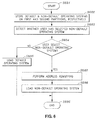
- FIGS. 5 and 6 are flowcharts illustrating exemplary processes for performing address remapping.
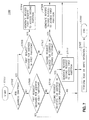
- FIG. 7 is a flowchart illustrating an example process for performing address calculation.
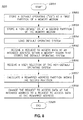
- FIG. 8 is a flowchart illustrating an exemplary process for performing address remapping.
- FIG. 1 is a block diagram of the internal architecture of an exemplary computer system 100, that includes a central processing unit (“CPU”) 101 interfacing to a portable media disk drive 102, such as a floppy disk drive or an optical disk drive.
- the CPU 101 also interfaces with a random-access memory (“RAM”) 103, a display 104, and a read-only memory (“ROM”) 105 that stores a BIOS 105 a .
- the CPU 101 interfaces with a user input unit 106, such as a keyboard or a mouse, a network interface 107, and a hard disk drive (“HDD”) 109.
- a user input unit 106 such as a keyboard or a mouse
- HDD hard disk drive
- the booting sequence begins with the CPU 101 executing a boot loading application or firmware, such as the BIOS 105 a , from the ROM 105.
- the primary function of the BIOS 105 a is to prepare the computer system 100 so that software applications stored on various media devices, such as the HDD 109 or the portable media disk drive 102, can load, execute, and assume control of the computer system 100.
- the boot loading program or BIOS 105 a searches through a preconfigured list of storage devices until it finds a bootable storage device storing at least one operating system. If the bootable storage device is divided into distinct logical sections, referred to as partitions or address regions, each partition may store a different operating system. For example, a HDD with multiple partitions may store several operating systems in different partitions of the HDD, with each partition having its own boot sector.
- the boot loading program or BIOS 105 a finds a bootable storage device, the first boot sector of the bootable storage device is loaded and executed.
- the first boot sector is referred to as the master boot record ("MBR").
- MBR master boot record
- the boot loading program or BIOS 105 a loads data stored in the boot sector of a partition where an operating system is stored, and executes the data.
- VBRs volume boot sectors
- the loaded VBR includes the code that loads and executes the kernel of the operating system stored at the partition of the VBR.
- the BIOS 105 a loads each operating system in the same manner, in an operating system-independent mode. In particular, the BIOS 105 a merely needs to know the address of the VBR of the bootable partition to load an operating system.
- the BIOS 105 a upon accessing the stored address of the VBR, loads operating systems similarly, regardless of whether the operating system is the MICROSOFT® Disk Operating System (MS-DOS®), MICROSOFT WINDOWS® operating system, the LINUX® operating system, or another operating system.
- MS-DOS® MICROSOFT® Disk Operating System
- MICROSOFT WINDOWS® operating system the LINUX® operating system, or another operating system.
- FIG. 2 depicts an exemplary storage medium 200 that has been partitioned into a default partition 202 and a non-default partition 203, each of which store an operating system.
- the default partition 202 may store a MICROSOFT WINDOWS® operating system
- the non-default partition 203 may store a LINUX® operating system.
- the first sector of the HDD 200 stores a MBR 201 that includes information that assists the BIOS 105 a to load the operating systems stored in the default partition 202 and the non-default partition 203 into the RAM 103, by identifying the addresses of the default partition 202 and the non-default partition 203.
- the MBR 201 occupies one 512-byte sector, and includes a 64-byte partition table 204 that is itself subdivided into four 16-byte segments holding partition-specific information, For each partition, the partition table 204 stores information including a boot flag that indicates whether the partition is a bootable partition, cylinder-head-sector addresses of the first and the last sectors of the partition, the partition type, the logical block address of the first sector in the partition, the number of sectors in the partition, and other partition-specific data.
- the MBR 201 uses a boot loading application 207 that can load and execute the VBR of the desired partition, such as the VBR 205 for the default partition 202 or the VBR 206 for the non-default partition 203.
- the boot loading application 207 may be stored in the first 446 bytes of the MBR 201.
- the boot loading application 207 scans the list of the primary partition entries in the partition table 204 to find a bootable partition, then loads and runs a corresponding VBR for a selected partition. The loaded VBR then continues to load the rest of the selected operating system into memory.
- the partition table 204 stores one active bootable partition. Remaining partitions are thus stored in the partition table 204 as inactive (or non-bootable) partitions.
- the default partition 202 is the active partition, although the non-default partition 203 could also be the active partition in a different example.
- the default partition 202 stores a default operating system that is loaded by the BIOS 105a and includes several files.
- the default partition 202 includes the VBR 205 that includes the code that loads and executes the kernel of the default operating system stored at the default partition 202.
- the default partition 202 may include file systems 208 and/or 209, each of which may be, for example, a new technology file system ("NTFS") or a file allocation table (“FAT”) file system.
- the default partition 202 may also store a root directory 210 that includes information about file names, sizes, starting sectors, file properties, and/or starting cluster numbers, and a data storage space 211 that includes the actual data files stored in the default partition 202.
- the non-default partition 203 may store the data related to the non-default operating system in a similar fashion to the default partition 202.
- the non-default operating system may be loaded using the information stored in the MBR 201.
- the non-default partition 203 may include an additional MBR 212, such that the operating system stored in the default partition 203 is loaded using the information stored in the MBR 212.
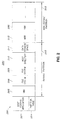
- FIG. 3 illustrates the loading of an operating system by the boot loading program or the BIOS 105 a using an exemplary storage medium 301.
- the storage medium 301 may be the HDD 109, the portable media disk drive 102, or any other storage medium.
- the storage medium 301 is partitioned so that it has at least two distinct memory regions storing different operating systems. Specifically, the storage medium 301 includes at least a first partition 302 (between addresses 100 to 199 ), and a second partition 303 (between addresses of 300 to 399 ). To determine which operating system to load, the BIOS 105 a consults the MBR partition table stored in MBR region 304 on the storage medium 301 (between addresses of 0 to 99 ). The BIOS 105 a loads the operating system which is marked as bootable in the MBR partition table stored in MBR region 304.
- the BIOS 105 a accesses data stored on the bootable partition of the storage medium 301.
- the BIOS 105 a accesses data stored in that region by issuing a first request 310 ("REQ_1").
- the BIOS 105 a accesses data stored in that region by issuing a second request 315 ("REQ_2").
- These requests may be requests to read or write data associated with the loading of the operating system stored in the corresponding partition.
- the BIOS 105 a loads a boot sector from a partition that is identified as bootable in the MBR partition table stored in the MBR region 304. Because one bootable partition is indicated as active at a time, the MBR is changed when the user intends to boot from a non-active partition, placing an additional inconvenience on users and increasing the chances of hardware conflicts.
- multi-booting is accomplished by introducing a remapping application 320 that intercepts requests from the BIOS 105 a to access data from the active, default partition, thereby transparently redirecting requests to data stored on a non-active, non-default partition.
- the remapping application 320 may change the first request 310 and/or the second request 315 to requests that access different locations, such as a revised first request 325 ("REQ_1_new") or a revised second request 330 (“REQ_2_new").
- the request change is transparent to the BIOS 105 a , such that, when the BIOS 105 a issues instructions to load an operating system from an active partition, an operating system actually loads from the non-active partition.
- the MBR 304 for the storage medium 301 is not changed each time an operating system is booted from a non-active, non-default partition.
- the remapping application 320 may operate in inactive, swapping, or overriding modes, and may be firmware having added instructions for address swapping and address overriding, a modified application of an INT-13x handler in the BIOS 105 a , a ROM firmware, a filter driver in the MICROSOFT WINDOWS® operating system, or a command interface program.
- the remapping application 320 also may be stored in a flash memory.
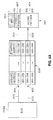
- FIG. 4A illustrates the exemplary operation of a remapping application 320 in an inactive mode.
- the BIOS 105 a issues a first request 310 to access data at an intended address 401 (between addresses of 100 to 199 ) on the storage medium 301, where the intended address 401 may, for example, correspond to a beginning address of a specific boot sector.
- the remapping application 320 does not change the intended address 401 from that requested in the first request 310 from the BIOS 105 a .
- the BIOS 105 a requests access to data at an intended address 401 located in the partition 402
- the remapping application 320 directs the revised first request 325 to the same address in the partition 402 requested by first request 310.
- the BIOS 105 a requests to access data at an intended address 403 (between addresses of 300 to 399 ) located in the partition 404 using second request 315
- the remapping application 320 directs the revised second request 330 to the same address in the partition 404 requested by the second request 315.
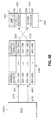
- FIG. 4B illustrates the exemplary operation of the remapping application 320 in a swapping mode.
- the BIOS 105 a issues a first request 310 to access data at an intended address 401 (between addresses of 100 to 199 ) on a storage medium 301
- the first request is modified by the remapping application 320 to direct the revised first request 325 to the partition 404.
- the BIOS 105 a issues a second request 315 to access data at an intended address 403 (between addresses of 300 to 399 ) located in the partition 404
- the second request 315 is modified by the remapping application 320 to direct the revised second request 330 to the partition 402.
- requests to access the partition 402 and the partition 404 are swapped by the remapping application 320. Therefore, even when the BIOS 105 a intends to access data from the partition 402, it is in fact accessing data from the partition 404. Notably, the actual location of data on the storage medium 301 remains unchanged.
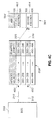
- FIG. 4C illustrates the exemplary operation of the remapping application 320 in an overriding mode.
- the BIOS 105 a issues a first request 310 to access data at an intended address 401 (between addresses of 100 to 199 ) on the storage medium 301
- the first request 310 is modified by the remapping application 320, which directs the revised first request 325 to the partition 404.
- the BIOS 105 a issues a second request 315 to access data at an intended address 403 (between addresses of 300 to 399 ) located in the partition 404
- the remapping application 320 directs the revised second request 330 to the partition 404.
- requests to access the partition 402 are effectively overridden, and requests to access partition 404 are left unchanged.
- partition 402 becomes inaccessible to the BIOS 105 a .
- the actual location of data on the storage medium 301 remains unchanged, such that if the remapping application 320 is disabled or if the mode of operation is changed, the BIOS 105 a will again be able to access data at the partition 402.
- partitions 402 and 404 may also store individual MBRs. In such an instance, an operating system stored in the partition 402 is loaded using the information stored in the MBR associated with partition 402, and the operating system stored in the partition 404 is loaded using the information stored in the MBR associated with the partition 404.
- FIG. 5 is a flowchart illustrating an example process 500 for performing address remapping.
- OS1 default and non-default operating systems
- OS2 operating systems
- Partition_A first and second partitions
- Partition_B first and second partitions
- the first partition is the active, bootable partition
- BIOS boot loading application or BIOS loads the default operating system from the first partition
- the user may operate the computer system using the default operating system (S504).
- the user When the computer system is again re-initialized or rebooted (S505), the user inputs a command to select an operating system (S506). If the non-default operating system is selected (S507), address remapping is performed by the remapping application 320 using address swapping or address overriding (S508). If the default operating system is selected (S507), the default operating system is again loaded (S503).
- Address remapping may be performed through address swapping or address overriding, as described above with respect to FIGS. 4B and 4C.
- the boot loading program or the BIOS reads the starting address of the boot sector of the second partition, and loads the non-default operating system from the second partition, although the MBR itself remains unchanged (S509). Once loaded, the user may operate the computer system using the non-default operating system (S510), at which point the process 500 ends (S511).
- FIG. 6 is a flowchart illustrating another example process 600 for performing address remapping.
- the process 600 begins (S601), default and non-default operating systems are stored on first and second partitions of a storage medium (S602).
- the computer system detects whether a user selected the non-default operating system (S603). If the user has not selected the non-default operating system (S604), the default operating system is loaded (S605), and the process 600 ends (S606).
- address remapping is performed by the remapping application 320 (S607). Address remapping may be performed through address swapping or address overriding, as described above with respect to FIGS. 4B and 4C.
- the boot loading program or BIOS reads the starting address of the second partition, and loads the non-default operating system (S608), and the process 600 ends (S606). If no user command is received (S604), the boot loading program or BIOS loads the default operating system from the active partition, as specified in the MBR (S605).
- FIG. 7 is a flowchart illustrating an example process 700 for performing address calculation.
- Address remapping may be performed through address swapping or address overriding, as described with respect to FIGS. 4B and 4C.
- the default and non-default operating systems are respectively stored in the first and second partitions of a storage medium.
- the process 700 begins (S701), it is determined whether address remapping is to occur utilizing address swapping or address overriding for address remapping (S702).
- the remapping application 320 If address swapping is to be utilized (S702) and the remapping application 320 receives a first request for an address in the first partition (S703), the remapping application modifies the first request and generates a revised first request to access an address in the second partition (S704). A read or write operation is performed according to the revised request (S705), and the process 700 ends (S706).
- ADD_A represents a starting address of the first partition
- ADD_B represents a starting address the second partition
- REQUESTED_ADDRESS represents the address requested by the first request
- REMAPPED_ADDRESS represents the modified address of the revised first request.
- the remapping application 320 modifies the second request and generates a revised second request to access an address in the first partition (S708).
- a read or write operation is performed according to the revised request (S705), and the process 700 ends (S706).
- ADD_A represents a starting address of the first partition
- ADD_B represents a starting address the second partition
- REQUESTED_ADDRESS represents the address requested by the second request
- REMAPPED_ADDRESS represents the modified address of the revised second request.
- address overriding is performed.
- requests to access the second partition are overridden to access the first partition.
- the boot loading program or BIOS issues a first request to access the first partition (S709)
- the read or write operation is performed based upon the first request (S705) and the process 700 ends (S706).
- the remapping application modifies the second request to calculate a revised second request to access the first partition (S711), such as by using Equation (2), above.
- a read or write operation is performed according to the revised second request (S705), thereby ending the process 700 (S706).
- requests to access the first partition are overridden to access the second partition, such as by using Equation (1), above.
- FIG. 8 is a flowchart illustrating an exemplary process 800 for performing address remapping in a multi-booting system.
- a default operating system is stored at a first partition of a memory medium (S802), and a non-default operating system is stored at a second partition (S803).
- a boot loading application or BIOS loads the default operating system, according to the master boot record (S804).
- a request is received to access data at an intended address within a partition that stores the default OS (S805), and a selection of the non-default operating system is received (S806).
- a remapped address that is within the second partition is calculated (S807). For example, calculating the remapped address may include calculating the remapped address based on the intended address and an offset between a starting address of the first address region and a starting address of the second address region.
- the remapping application changes the request to access data at the intended address to a request to access data at the remapped address (S808), and the process 800 ends (S809).
- the data then may be accessed at a remapped address.
- changing the request to access data at the intended address may further include address overriding, such that a request to access data at the remapped address is unchanged.
- changing the request to access data at the intended address further may include address swapping, such that a request to access data at the remapped address is changed to a request to access data at the intended address.
- the remapping application may be a filter driver.
- the method of FIG. 8 may further include loading the non-default operating system for booting, or storing a third OS at a third address region of the memory medium. Address remapping may be performed when a predetermined command is input, such as during booting.
- the predetermined command may include a function key input and/or a selection command in the boot loading application's setup menu.
- Tables 1 to 6, below, include exemplarily computer code for performing volatile or non-volatile address remapping.
- volatile address remapping When volatile address remapping is utilized, the remapping lasts while the computer system is on and is reset when the computer is rebooted or re-initialized. On the other hand, if non-volatile address remapping is utilized, the remapping lasts even after the computer system is rebooted or re-initialized.
- an interface with BIOS may be created.
- Various methods exist for calling or interfacing with BIOS such as by using an unused software interrupt (e.g., INT15), or registering and utilizing the system management interrupts ("SMI") trap service.
- Address remapping may be performed during a power-on self-test (“POST”) process or a BIOS booting process, as illustrated in Table 6.
- POST power-on self-test
- BIOS BIOS booting process
- filter driver may be programed to perform address remapping.
- two or more operating systems may be stored in the same partition, where the remapping application 320 is used to enable multi-booting from the same partition.
- the remapping application 320 redirects requests from a boot loading application to a memory region that is located on the same partition as the currently "active" operating system.
- the BIOS 105 a will load an operating system from the address specified by the remapping application 320.
- This arrangement may be particularly useful for situations when a user wishes to store a backup of the operating system files on the same partition with the currently active (e.g. booting) operating system.
- the user may utilize the remapping application 320 to force the BIOS 105 a to load the backed-up version of the operating system by performing an address override.
- the remapping application 320 may override the address of the corrupted files with an address of the backed up files located in the second memory region. Consequently, the BIOS 105 a may load a backed up operating system from the same partition, although the backed-up operating system is stored at a different partition from the active operating system. Backed-up operating system files may also be stored on a different partition as well.
- address remapping may be triggered in a variety of ways.
- a function key may be utilized to enable address remapping by performing a BIOS POST operation.
- it may be possible to select address remapping, as well as specific type of address remapping (i.e., address swapping or address overriding) from BIOS setup menu.
Landscapes
- Engineering & Computer Science (AREA)
- Software Systems (AREA)
- Theoretical Computer Science (AREA)
- Physics & Mathematics (AREA)
- General Engineering & Computer Science (AREA)
- General Physics & Mathematics (AREA)
- Computer Security & Cryptography (AREA)
- Stored Programmes (AREA)
- Memory System Of A Hierarchy Structure (AREA)
Applications Claiming Priority (1)
| Application Number | Priority Date | Filing Date | Title |
|---|---|---|---|
| KR1020060061799A KR101121641B1 (ko) | 2006-07-03 | 2006-07-03 | 시스템 동작 제어 장치 및 방법 |
Publications (2)
| Publication Number | Publication Date |
|---|---|
| EP1876528A2 true EP1876528A2 (fr) | 2008-01-09 |
| EP1876528A3 EP1876528A3 (fr) | 2009-04-29 |
Family
ID=37914268
Family Applications (1)
| Application Number | Title | Priority Date | Filing Date |
|---|---|---|---|
| EP20070101478 Ceased EP1876528A3 (fr) | 2006-07-03 | 2007-01-31 | Contrôle d'accès à la mémoire dans un système à démarrages multiples |
Country Status (5)
| Country | Link |
|---|---|
| US (1) | US7689802B2 (fr) |
| EP (1) | EP1876528A3 (fr) |
| JP (1) | JP5826985B2 (fr) |
| KR (1) | KR101121641B1 (fr) |
| CN (1) | CN100501678C (fr) |
Cited By (1)
| Publication number | Priority date | Publication date | Assignee | Title |
|---|---|---|---|---|
| WO2015148280A1 (fr) * | 2014-03-25 | 2015-10-01 | Microsoft Technology Licensing, Llc | Systèmes d'exploitation sélectionnables par l'utilisateur |
Families Citing this family (23)
| Publication number | Priority date | Publication date | Assignee | Title |
|---|---|---|---|---|
| US7921453B2 (en) * | 2006-12-22 | 2011-04-05 | Intel Corporation | Authenticated distributed detection and inference |
| KR101489158B1 (ko) * | 2008-05-21 | 2015-02-06 | 삼성전자 주식회사 | 마스터 부트 레코드가 저장되어 있는 저장매체, 이를포함하는 컴퓨터 시스템 및 그 부팅방법 |
| US20110138163A1 (en) * | 2008-08-14 | 2011-06-09 | Junko Suginaka | Dual-boot control method and dual-boot computer |
| US9626511B2 (en) * | 2008-08-26 | 2017-04-18 | Symantec Corporation | Agentless enforcement of application management through virtualized block I/O redirection |
| US8239667B2 (en) * | 2008-11-13 | 2012-08-07 | Intel Corporation | Switching between multiple operating systems (OSes) using sleep state management and sequestered re-baseable memory |
| US8190574B2 (en) * | 2010-03-02 | 2012-05-29 | Storagecraft Technology Corporation | Systems, methods, and computer-readable media for backup and restoration of computer information |
| JP2013047883A (ja) * | 2011-08-29 | 2013-03-07 | Jvc Kenwood Corp | 情報処理装置及びその起動方法 |
| WO2013035141A1 (fr) * | 2011-09-05 | 2013-03-14 | Suginaka Junko | Dispositif de traitement d'informations, procédé de commande de démarrage associé, programme de commande de démarrage associé et dispositif externe |
| US9135447B1 (en) * | 2012-01-30 | 2015-09-15 | Symantec Corporation | Systems and methods for deploying a pre-boot environment to enable an address offset mode after execution of system bios for booting a operating system in a protected area |
| CN102736932B (zh) * | 2012-05-16 | 2015-12-16 | 上海斐讯数据通信技术有限公司 | 镜像文件、镜像文件的制作方法及多系统的启动引导方法 |
| CN103577201B (zh) * | 2012-07-20 | 2018-04-06 | 上海斐讯数据通信技术有限公司 | 嵌入式双系统的更新方法及系统 |
| US9342243B2 (en) * | 2012-11-28 | 2016-05-17 | Lenovo (Beijing) Co., Ltd. | Method and electronic apparatus for implementing multi-operating system |
| WO2014091629A1 (fr) * | 2012-12-14 | 2014-06-19 | 富士通株式会社 | Programme de gestion de dispositif de mémoire, et procédé de gestion pour dispositif électronique et dispositif de mémoire |
| CN104142838A (zh) * | 2014-07-02 | 2014-11-12 | 青岛海信移动通信技术股份有限公司 | 一种移动通信终端开机启动的方法和设备 |
| CN105809050B (zh) * | 2014-12-31 | 2018-10-02 | 北京元心科技有限公司 | 一种多操作系统的隔离方法及装置 |
| JP6341192B2 (ja) * | 2015-12-22 | 2018-06-13 | カシオ計算機株式会社 | 情報処理装置、制御方法及びプログラム |
| EP3376391A1 (fr) * | 2017-03-17 | 2018-09-19 | Ricoh Company Ltd. | Appareil de traitement d'informations, procédé de mise à jour et moyens de support |
| US10185571B2 (en) * | 2017-06-08 | 2019-01-22 | Vmware, Inc. | Intelligent UEFI run-time services address space management |
| US11868635B2 (en) * | 2020-04-20 | 2024-01-09 | Western Digital Technologies, Inc. | Storage system with privacy-centric multi-partitions and method for use therewith |
| CN112596678B (zh) * | 2020-12-24 | 2024-01-16 | 得一微电子股份有限公司 | 一种存储设备及其固件设置方法、重新分区方法 |
| CN114692106A (zh) * | 2020-12-30 | 2022-07-01 | 网神信息技术(北京)股份有限公司 | 针对存储介质的兼容处理方法、存储介质访问方法 |
| JP2023032245A (ja) * | 2021-08-26 | 2023-03-09 | キヤノン株式会社 | 情報処理装置、及びその制御方法 |
| CN114880250A (zh) * | 2022-04-29 | 2022-08-09 | Oppo广东移动通信有限公司 | 处理访问请求的方法、译码器及总线系统 |
Family Cites Families (17)
| Publication number | Priority date | Publication date | Assignee | Title |
|---|---|---|---|---|
| JPH0318928A (ja) * | 1989-06-16 | 1991-01-28 | Hitachi Ltd | システムロード処理方法およびデイスク制御装置 |
| US5136711A (en) * | 1990-10-17 | 1992-08-04 | Ast Research | System for multiple access hard disk partitioning |
| US6430663B1 (en) * | 1998-07-06 | 2002-08-06 | Adaptec, Inc. | Methods for selecting a boot partition and hiding a non-selected partition |
| US6385721B1 (en) | 1999-01-22 | 2002-05-07 | Hewlett-Packard Company | Computer with bootable hibernation partition |
| KR20010012032A (ko) * | 1999-07-19 | 2001-02-15 | 유춘열 | 다중 컴퓨터 오퍼레이팅 시스템 사용 장치 |
| US6532538B1 (en) * | 2000-02-17 | 2003-03-11 | International Business Machines Corporation | Method and system for supporting multiple operating systems on the same disk running on different computers at the same time |
| US6658563B1 (en) | 2000-05-18 | 2003-12-02 | International Business Machines Corporation | Virtual floppy diskette image within a primary partition in a hard disk drive and method for booting system with virtual diskette |
| JP2002108485A (ja) * | 2000-09-29 | 2002-04-10 | Toshiba Corp | 情報処理装置及び情報処理装置の起動方法 |
| JP3677252B2 (ja) * | 2002-03-22 | 2005-07-27 | 株式会社東芝 | 情報機器、記憶媒体、及び初期状態復元方法 |
| JP2003308230A (ja) * | 2002-04-12 | 2003-10-31 | Matsushita Electric Ind Co Ltd | 記録媒体処理装置 |
| KR100452325B1 (ko) | 2002-12-23 | 2004-10-12 | 한국전자통신연구원 | 프로세서 번호 할당 및 순차적 부팅이 가능한에이엠비에이 버스 기반 멀티프로세서 시스템 |
| TWI223774B (en) | 2003-07-18 | 2004-11-11 | Mitac Technology Corp | Selectable booting operation method by the bios with the multi-partition in the disk |
| JP2005202942A (ja) * | 2003-12-16 | 2005-07-28 | Matsushita Electric Ind Co Ltd | 情報記録媒体、データ処理装置及びデータ処理方法 |
| KR100532505B1 (ko) * | 2004-02-17 | 2005-11-30 | 삼성전자주식회사 | 하드디스크 드라이브의 분할 방법 및 이에 적합한하드디스크 드라이브 |
| JP2006031635A (ja) * | 2004-07-21 | 2006-02-02 | Toshiba Corp | 情報処理装置およびソフトウェア更新方法 |
| US7600105B2 (en) * | 2004-09-22 | 2009-10-06 | Cyberlink Corp. | Systems, methods, and apparatus for providing efficient startup to computers with peripheral devices |
| JP2006139550A (ja) * | 2004-11-12 | 2006-06-01 | Matsushita Electric Ind Co Ltd | 記録媒体 |
-
2006
- 2006-07-03 KR KR1020060061799A patent/KR101121641B1/ko not_active Expired - Fee Related
-
2007
- 2007-01-12 US US11/622,728 patent/US7689802B2/en not_active Expired - Fee Related
- 2007-01-24 CN CNB2007100073341A patent/CN100501678C/zh not_active Expired - Fee Related
- 2007-01-31 EP EP20070101478 patent/EP1876528A3/fr not_active Ceased
- 2007-07-03 JP JP2007175445A patent/JP5826985B2/ja not_active Expired - Fee Related
Non-Patent Citations (1)
| Title |
|---|
| None |
Cited By (2)
| Publication number | Priority date | Publication date | Assignee | Title |
|---|---|---|---|---|
| WO2015148280A1 (fr) * | 2014-03-25 | 2015-10-01 | Microsoft Technology Licensing, Llc | Systèmes d'exploitation sélectionnables par l'utilisateur |
| US9697010B2 (en) | 2014-03-25 | 2017-07-04 | Microsoft Technology Licensing, Llc | User selectable operating systems |
Also Published As
| Publication number | Publication date |
|---|---|
| EP1876528A3 (fr) | 2009-04-29 |
| US7689802B2 (en) | 2010-03-30 |
| KR20080003490A (ko) | 2008-01-08 |
| CN100501678C (zh) | 2009-06-17 |
| JP2008016030A (ja) | 2008-01-24 |
| KR101121641B1 (ko) | 2012-04-16 |
| JP5826985B2 (ja) | 2015-12-02 |
| US20080005527A1 (en) | 2008-01-03 |
| CN101101557A (zh) | 2008-01-09 |
Similar Documents
| Publication | Publication Date | Title |
|---|---|---|
| EP1876528A2 (fr) | Contrôle d'accès à la mémoire dans un système à démarrages multiples | |
| US7032107B2 (en) | Virtual partition for recording and restoring computer data files | |
| US6934833B2 (en) | Operating system selector and data storage drive | |
| US5701477A (en) | Method and apparatus for master boot record shadowing | |
| US8370835B2 (en) | Method for dynamically generating a configuration for a virtual machine with a virtual hard disk in an external storage device | |
| CN101650660B (zh) | 从中央存储装置引导计算机系统 | |
| US5136711A (en) | System for multiple access hard disk partitioning | |
| US7024549B1 (en) | Disk drive having a protected partition configured to load an operating system for performing a user-selected function | |
| US5761680A (en) | Coherent film system access during defragmentation operations on a storage medium | |
| JP5121427B2 (ja) | ユニファイドストレージシステムのための方法および装置 | |
| US6192471B1 (en) | Operating system independent system for running utility programs in a defined environment | |
| US9317275B2 (en) | Computer system and program restoring method thereof | |
| US20030188109A1 (en) | Information processing system | |
| KR19990036566A (ko) | 컴퓨터기억장치의논리적드라이브의파티션맵핑갱신시스템 및 방법 | |
| US7921247B1 (en) | Sharing a dynamically located memory block between components executing in different processor modes in an extensible firmware interface environment | |
| KR101489158B1 (ko) | 마스터 부트 레코드가 저장되어 있는 저장매체, 이를포함하는 컴퓨터 시스템 및 그 부팅방법 | |
| JP3993648B2 (ja) | 圧縮システムをオペレーティング・システムと統合する方法およびコンピュータ・システム | |
| US20070271438A1 (en) | Apparatus and method for partitioning hard disk without reboot | |
| JP2006079628A (ja) | ユーザデータをパーティションファイルに記憶する、又はユーザデータを含むパーティションファイルを使用するシステム及び方法 | |
| US20110051275A1 (en) | Computer system, disk storage device and method of controlling the same | |
| US20060242397A1 (en) | Methods of resizing partition | |
| CN100403262C (zh) | 计算机装置开机方法及使用该方法的计算机装置 | |
| EP2645245A1 (fr) | Appareil de traitement d'informations, procédé de gestion d'appareil et programme de gestion de l'appareil | |
| US20070240153A1 (en) | System and method for installing hypervisor after user operating system has been installed and loaded | |
| KR20050111061A (ko) | 데이터를 백업하는 방법, 시스템 및 기록매체 |
Legal Events
| Date | Code | Title | Description |
|---|---|---|---|
| PUAI | Public reference made under article 153(3) epc to a published international application that has entered the european phase |
Free format text: ORIGINAL CODE: 0009012 |
|
| AK | Designated contracting states |
Kind code of ref document: A2 Designated state(s): AT BE BG CH CY CZ DE DK EE ES FI FR GB GR HU IE IS IT LI LT LU LV MC NL PL PT RO SE SI SK TR |
|
| AX | Request for extension of the european patent |
Extension state: AL BA HR MK YU |
|
| PUAL | Search report despatched |
Free format text: ORIGINAL CODE: 0009013 |
|
| AK | Designated contracting states |
Kind code of ref document: A3 Designated state(s): AT BE BG CH CY CZ DE DK EE ES FI FR GB GR HU IE IS IT LI LT LU LV MC NL PL PT RO SE SI SK TR |
|
| AX | Request for extension of the european patent |
Extension state: AL BA HR MK RS |
|
| 17P | Request for examination filed |
Effective date: 20091029 |
|
| AKX | Designation fees paid |
Designated state(s): DE FR GB NL |
|
| 17Q | First examination report despatched |
Effective date: 20100201 |
|
| STAA | Information on the status of an ep patent application or granted ep patent |
Free format text: STATUS: THE APPLICATION HAS BEEN REFUSED |
|
| 18R | Application refused |
Effective date: 20150918 |