EP1887767A2 - Verfahren und mobiles Kommunikationsendgerät zur Änderung der Konfiguration einer Bildschirmanzeigefunktion - Google Patents
Verfahren und mobiles Kommunikationsendgerät zur Änderung der Konfiguration einer Bildschirmanzeigefunktion Download PDFInfo
- Publication number
- EP1887767A2 EP1887767A2 EP07113939A EP07113939A EP1887767A2 EP 1887767 A2 EP1887767 A2 EP 1887767A2 EP 07113939 A EP07113939 A EP 07113939A EP 07113939 A EP07113939 A EP 07113939A EP 1887767 A2 EP1887767 A2 EP 1887767A2
- Authority
- EP
- European Patent Office
- Prior art keywords
- block
- user
- screen
- mobile communication
- communication terminal
- Prior art date
- Legal status (The legal status is an assumption and is not a legal conclusion. Google has not performed a legal analysis and makes no representation as to the accuracy of the status listed.)
- Granted
Links
Images


Classifications
-
- G—PHYSICS
- G06—COMPUTING OR CALCULATING; COUNTING
- G06F—ELECTRIC DIGITAL DATA PROCESSING
- G06F3/00—Input arrangements for transferring data to be processed into a form capable of being handled by the computer; Output arrangements for transferring data from processing unit to output unit, e.g. interface arrangements
- G06F3/01—Input arrangements or combined input and output arrangements for interaction between user and computer
- G06F3/048—Interaction techniques based on graphical user interfaces [GUI]
- G06F3/0484—Interaction techniques based on graphical user interfaces [GUI] for the control of specific functions or operations, e.g. selecting or manipulating an object, an image or a displayed text element, setting a parameter value or selecting a range
- G06F3/04847—Interaction techniques to control parameter settings, e.g. interaction with sliders or dials
-
- H—ELECTRICITY
- H04—ELECTRIC COMMUNICATION TECHNIQUE
- H04B—TRANSMISSION
- H04B1/00—Details of transmission systems, not covered by a single one of groups H04B3/00 - H04B13/00; Details of transmission systems not characterised by the medium used for transmission
- H04B1/38—Transceivers, i.e. devices in which transmitter and receiver form a structural unit and in which at least one part is used for functions of transmitting and receiving
- H04B1/40—Circuits
-
- G—PHYSICS
- G06—COMPUTING OR CALCULATING; COUNTING
- G06F—ELECTRIC DIGITAL DATA PROCESSING
- G06F3/00—Input arrangements for transferring data to be processed into a form capable of being handled by the computer; Output arrangements for transferring data from processing unit to output unit, e.g. interface arrangements
- G06F3/01—Input arrangements or combined input and output arrangements for interaction between user and computer
- G06F3/048—Interaction techniques based on graphical user interfaces [GUI]
- G06F3/0481—Interaction techniques based on graphical user interfaces [GUI] based on specific properties of the displayed interaction object or a metaphor-based environment, e.g. interaction with desktop elements like windows or icons, or assisted by a cursor's changing behaviour or appearance
- G06F3/04815—Interaction with a metaphor-based environment or interaction object displayed as three-dimensional [3D], e.g. changing the user viewpoint with respect to the environment or object
-
- G—PHYSICS
- G06—COMPUTING OR CALCULATING; COUNTING
- G06F—ELECTRIC DIGITAL DATA PROCESSING
- G06F3/00—Input arrangements for transferring data to be processed into a form capable of being handled by the computer; Output arrangements for transferring data from processing unit to output unit, e.g. interface arrangements
- G06F3/01—Input arrangements or combined input and output arrangements for interaction between user and computer
- G06F3/048—Interaction techniques based on graphical user interfaces [GUI]
- G06F3/0481—Interaction techniques based on graphical user interfaces [GUI] based on specific properties of the displayed interaction object or a metaphor-based environment, e.g. interaction with desktop elements like windows or icons, or assisted by a cursor's changing behaviour or appearance
- G06F3/04817—Interaction techniques based on graphical user interfaces [GUI] based on specific properties of the displayed interaction object or a metaphor-based environment, e.g. interaction with desktop elements like windows or icons, or assisted by a cursor's changing behaviour or appearance using icons
-
- G—PHYSICS
- G06—COMPUTING OR CALCULATING; COUNTING
- G06F—ELECTRIC DIGITAL DATA PROCESSING
- G06F3/00—Input arrangements for transferring data to be processed into a form capable of being handled by the computer; Output arrangements for transferring data from processing unit to output unit, e.g. interface arrangements
- G06F3/01—Input arrangements or combined input and output arrangements for interaction between user and computer
- G06F3/048—Interaction techniques based on graphical user interfaces [GUI]
- G06F3/0481—Interaction techniques based on graphical user interfaces [GUI] based on specific properties of the displayed interaction object or a metaphor-based environment, e.g. interaction with desktop elements like windows or icons, or assisted by a cursor's changing behaviour or appearance
- G06F3/0482—Interaction with lists of selectable items, e.g. menus
-
- G—PHYSICS
- G06—COMPUTING OR CALCULATING; COUNTING
- G06F—ELECTRIC DIGITAL DATA PROCESSING
- G06F3/00—Input arrangements for transferring data to be processed into a form capable of being handled by the computer; Output arrangements for transferring data from processing unit to output unit, e.g. interface arrangements
- G06F3/01—Input arrangements or combined input and output arrangements for interaction between user and computer
- G06F3/048—Interaction techniques based on graphical user interfaces [GUI]
- G06F3/0484—Interaction techniques based on graphical user interfaces [GUI] for the control of specific functions or operations, e.g. selecting or manipulating an object, an image or a displayed text element, setting a parameter value or selecting a range
- G06F3/04842—Selection of displayed objects or displayed text elements
-
- G—PHYSICS
- G06—COMPUTING OR CALCULATING; COUNTING
- G06F—ELECTRIC DIGITAL DATA PROCESSING
- G06F3/00—Input arrangements for transferring data to be processed into a form capable of being handled by the computer; Output arrangements for transferring data from processing unit to output unit, e.g. interface arrangements
- G06F3/01—Input arrangements or combined input and output arrangements for interaction between user and computer
- G06F3/048—Interaction techniques based on graphical user interfaces [GUI]
- G06F3/0484—Interaction techniques based on graphical user interfaces [GUI] for the control of specific functions or operations, e.g. selecting or manipulating an object, an image or a displayed text element, setting a parameter value or selecting a range
- G06F3/04845—Interaction techniques based on graphical user interfaces [GUI] for the control of specific functions or operations, e.g. selecting or manipulating an object, an image or a displayed text element, setting a parameter value or selecting a range for image manipulation, e.g. dragging, rotation, expansion or change of colour
-
- H—ELECTRICITY
- H04—ELECTRIC COMMUNICATION TECHNIQUE
- H04M—TELEPHONIC COMMUNICATION
- H04M1/00—Substation equipment, e.g. for use by subscribers
- H04M1/72—Mobile telephones; Cordless telephones, i.e. devices for establishing wireless links to base stations without route selection
- H04M1/724—User interfaces specially adapted for cordless or mobile telephones
- H04M1/72469—User interfaces specially adapted for cordless or mobile telephones for operating the device by selecting functions from two or more displayed items, e.g. menus or icons
-
- G—PHYSICS
- G06—COMPUTING OR CALCULATING; COUNTING
- G06F—ELECTRIC DIGITAL DATA PROCESSING
- G06F2203/00—Indexing scheme relating to G06F3/00 - G06F3/048
- G06F2203/048—Indexing scheme relating to G06F3/048
- G06F2203/04806—Zoom, i.e. interaction techniques or interactors for controlling the zooming operation
-
- H—ELECTRICITY
- H04—ELECTRIC COMMUNICATION TECHNIQUE
- H04M—TELEPHONIC COMMUNICATION
- H04M1/00—Substation equipment, e.g. for use by subscribers
- H04M1/72—Mobile telephones; Cordless telephones, i.e. devices for establishing wireless links to base stations without route selection
- H04M1/724—User interfaces specially adapted for cordless or mobile telephones
- H04M1/72403—User interfaces specially adapted for cordless or mobile telephones with means for local support of applications that increase the functionality
- H04M1/72427—User interfaces specially adapted for cordless or mobile telephones with means for local support of applications that increase the functionality for supporting games or graphical animations
-
- H—ELECTRICITY
- H04—ELECTRIC COMMUNICATION TECHNIQUE
- H04M—TELEPHONIC COMMUNICATION
- H04M1/00—Substation equipment, e.g. for use by subscribers
- H04M1/72—Mobile telephones; Cordless telephones, i.e. devices for establishing wireless links to base stations without route selection
- H04M1/724—User interfaces specially adapted for cordless or mobile telephones
- H04M1/72448—User interfaces specially adapted for cordless or mobile telephones with means for adapting the functionality of the device according to specific conditions
-
- H—ELECTRICITY
- H04—ELECTRIC COMMUNICATION TECHNIQUE
- H04M—TELEPHONIC COMMUNICATION
- H04M1/00—Substation equipment, e.g. for use by subscribers
- H04M1/72—Mobile telephones; Cordless telephones, i.e. devices for establishing wireless links to base stations without route selection
- H04M1/724—User interfaces specially adapted for cordless or mobile telephones
- H04M1/72469—User interfaces specially adapted for cordless or mobile telephones for operating the device by selecting functions from two or more displayed items, e.g. menus or icons
- H04M1/72472—User interfaces specially adapted for cordless or mobile telephones for operating the device by selecting functions from two or more displayed items, e.g. menus or icons wherein the items are sorted according to specific criteria, e.g. frequency of use
Definitions
- the present invention generally relates to a mobile communication terminal, and more particularly to a method and mobile communication terminal for changing the configuration of a screen displaying function items.
- screens for function items are constructed in the same size and form, as shown in FIG. 1, and have a structure for displaying icons and titles of the function items.
- the object of the present invention is to provide a method and mobile communication terminal for changing a configuration of a screen displaying function items that can increase display visibility of the function items of the mobile communication terminal and can easily and quickly access the function items.
- a method for changing a configuration of a screen displaying function items of a mobile communication terminal including activating a block onto which an indicator is moved in a screen displaying at least one block in which detailed items are provided for functions of the mobile communication terminal; determining whether an edit request is input from a user in a state in which the block is activated; and reconfiguring the screen by changing at least one of size and position of the activated block in response to a user setting when the edit request is input.
- a mobile communication terminal for changing a configuration of a screen displaying function items, the terminal including a user interface provided with a zoom-in key and a zoom-out key for outputting a key input signal mapped to a key input from a user; a controller for controlling a screen to display at least one block in which detailed items are provided for functions of the mobile communication terminal when the user selects a specific function, and for reconfiguring the screen by changing at least one of size and position of a block of the at least one block on which an indicator is positioned in response to a key input signal mapped to an edit request from the user when the indicator is positioned on the block; and a display for displaying the screen of the at least one block and the reconfigured screen under control of the controller.
- Preferred embodiments of the present invention can implement a function for configuring a screen reflecting user preference when formlets are displayed to indicate function items of a mobile communication terminal.
- the size, position and shape of a formlet on which an indicator is positioned are changed by user settings in a state in which multiple formlets are displayed, thereby increasing accessibility to a formlet of high preference of a user, and also increasing display visibility.
- a formlet is a work block for enabling interaction with a storage object.
- a phonebook function, a camera function, or the like can be implemented with one formlet.
- This formlet is one component of a zooming User Interface (UI) and is a function unit provided to the user for a specific purpose (for example, a call log formlet or a phonebook formlet).
- UI zooming User Interface
- These formlets can be displayed on one screen.
- the work block is a block of detailed items for a function of the mobile communication terminal.
- a function for quickly accessing a work block of high interest to the user is desired. Therefore, a need exists for a method which can differentially display a work block of high interest to the user.
- FIG. 2 shows a mobile communication terminal according to the present invention for providing a personalized formlet according to need.
- the formlet is referred to herein as the work block.
- a controller 200 controls the overall operation of the mobile communication terminal.
- the controller 200 changes the size and position of a specific work block in response to user settings in a screen displaying at least one work block, and controls a display 210 to output a change result.
- the color and shape of the specific work block can be changed in accordance with the present invention.
- the controller 200 controls the display 210 to display a function for editing a work block selected by the user from a screen displaying multiple work blocks in accordance with the present invention. That is, the controller 200 allows the user to easily change the size, position, color and shape of a work block by providing the edit function for the selected work block.
- a key for editing a work block can be assigned with a function key for performing other existing functions.
- the edit function for a work block can be provided by displaying an edit option menu on the screen.
- the edit function can be provided in various methods using a specific key or a menu on the screen.
- the user can set the selected work block to a desired size and can move the work block to a desired position.
- color and shape change option menus are selected and various color and shape lists are displayed, the user can change the color and shape of the work block by selecting a desired color and shape. Since a high-interest work block can be arranged in a desired size and position, the user can easily access and move a desired work block.
- a work block of high interest to the user can be differentially displayed, without modification of the work block, according to size change since work blocks are created in a vector form.
- a Graphic Input Device (GID) cursor is provided to select an associated work block from a screen displaying work blocks.
- the GID cursor can be an indicator for selecting a work block displayed on the display 210 and can have a cross shape like a mouse cursor.
- the GID cursor operates based on a rollover function.
- the rollover function can change the color of the edge of an associated part or can indicate the associated part by shade, when the GID cursor is placed on or passes through a specific area displayed on the display 210, such as a work block, a screen, a button, or the like.
- the controller 200 can change and display the color of a work block in a moved position.
- various work blocks displayed on one screen are executed in the following method.
- the user selects a desired work block using a zoom-in function.
- the controller 200 controls an operation for enlarging the work block to display the enlarged work block.
- detailed items of a selected function are displayed on the displayed enlarged work block.
- Various types of information regarding the detailed items can be provided. For example, when a user zooms in on a "phonebook" work block, information regarding functions of a phonebook list and the like can be displayed, or sub-menus of a phone number search menu, a recent call list menu, and the like, can be displayed.
- the zoom-in or zoom-out input is used to adjust the size of a specific work block after the edit function is selected in a state in which the specific work block is activated.
- a direction key input can be used to move the work block and determine a position of the work block.
- the display 210 can receive and output display data mapped to key input data from a UI 220 or can display an operating state of the terminal and a plurality of pieces of information in the form of icons and characters. Under the control of the controller 200, the display 210 allows the user to visually detect an operating state in which a function is set or started.
- the display 210 can enlarge or reduce a work block so other functions can be immediately executed without a hierarchical movement between menus on a screen displaying specific work blocks.
- the display 210 to which the present invention is applied displays an edit menu mapped to selection when the user selects the edit function.
- the display 210 can provide the controller 200 with a control signal related to a work block movement and selection by the user like the UI 220.
- the UI 220 can be provided with number keys and function keys and can provide the controller 200 with input data mapped to a key selected by the user.
- the UI 220 can include a zoom-in or zoom-out key for enlarging or reducing work blocks in which detailed items for various functions are provided.
- This zoom-in or zoom-out key can be additionally provided on the UI 220 or can be implemented with a function key for performing other existing functions.
- the zoom-in or zoom-out key can be implemented with a combination of keys mapped in advance.
- the memory 230 can be constructed with a Random Access Memory (RAM) and a Read-Only Memory (ROM) for storing a plurality of programs, data, and the like. Other configurations of memory 230 may alternatively be used according to the desires of the user. In accordance with the present invention, the memory 230 can store various work blocks to be displayed on a screen and their information. Moreover, the memory 230 can store information generated and updated by the user for high-interest work blocks.
- RAM Random Access Memory
- ROM Read-Only Memory
- FIG. 3 shows an operation for changing a configuration of a screen displaying work blocks in a mobile communication terminal with the above-described structure in accordance with the present invention
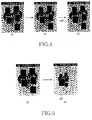
- FIGS. 4 and 5 show examples of screens according to operations shown in FIG. 3.
- FIG. 3 relates to an example of displaying work blocks mapped to a main menu when the main menu is selected.
- the controller 200 determines whether the user selects the main menu in step 300. If the main menu is selected, the controller 200 proceeds to step 310 to display a plurality of work blocks mapped to the selected main menu. For example, when the main menu is selected, various work blocks such as a "phonebook” work block, a “message” work block, a “camera” work block, and the like can be displayed on one screen, as shown in diagram (a) of FIG. 4. An indicator, such as a GID cursor for selecting a work block, overlaps with the work blocks on one screen.
- a GID cursor for selecting a work block
- the controller 200 determines whether the indicator is positioned on one work block according to user input in step 320. If the indicator is positioned on one work block, the controller 200 activates the associated work block in step 330. When a movement between work blocks is made according to user input, the controller 200 allows the user to view the activated work block by changing the color of the edge of the work block on which the indicator is currently being positioned or indicating the work block by shade along with the moved indicator.
- the user moves the indicator onto the desired work block.
- the indicator is positioned on the desired work block in a state in which the work blocks are displayed, as shown in diagram (a) of FIG. 4, the color of the whole function block on which the indicator is positioned is varied, as shown in diagram (b) of FIG. 4.
- the controller 200 proceeds to step 340 to determine whether the edit function is selected for the work block on which the indicator is positioned.
- step 350 the controller 200 proceeds to step 350 to change the size and position of the activated work block according to the edit function selected by the user, and to display the work block in the changed size and position.
- the user can also change the color and shape of the activated work block using the edit function.
- the controller 200 determines whether the editing is completed in step 360. Until the editing is completed, the work block is edited according to user input.
- a work block of high interest to the user can be differentially displayed which is distinguished from other work blocks. As visibility of a work block is improved, the user can quickly access the work block.
- Diagram (a) of FIG. 4 and diagram (b) of FIG. 5 show examples of indicating an activation state by varying the color of a specific work block on which the indicator is positioned, diagram (c) of FIG. 4 shows an example of reducing the size of the activated work block, and diagram (b) of FIG. 5 shows an example of enlarging the size of the activated work block.
- Diagram (c) of FIG. 4 shows an example in which the specific work block of diagram (b) of FIG. 4 is reduced to a smaller size than the original size and is displayed in a smaller size than other work blocks as indicated by reference numeral 400 when a zoom-out request is input after the user presses an edit key or selects an edit menu in a state in which the specific work block is activated.
- diagram (b) of FIG. 5 shows an example in which the activated work block is displayed in a larger size as indicated by reference numeral 500 when the user inputs a zoom-in request in a state in which the activated work block of diagram (a) of FIG. 5 is displayed.
- the user can reduce low-interest work blocks to a size smaller than the original size.
- the zoom-in function the user can enlarge a high-interest work block to a larger size.
- FIGS. 4 and 5 an example of displaying work blocks mapped to a main menu has been described. For example, when a phonebook function is selected, work blocks for buddy and family groups and the like can be displayed. As described above, frequently used sub-functions mapped to specific functions can be displayed with work blocks.
- the present invention can reconfigure a screen displaying a plurality of work blocks using zoom-in and zoom-out functions while considering interest of a user. Moreover, the present invention can differentially display a work block of high interest to the user without modification of the work block according to size change since work blocks are created in a vector form.
Landscapes
- Engineering & Computer Science (AREA)
- General Engineering & Computer Science (AREA)
- Theoretical Computer Science (AREA)
- Human Computer Interaction (AREA)
- Physics & Mathematics (AREA)
- General Physics & Mathematics (AREA)
- Computer Networks & Wireless Communication (AREA)
- Signal Processing (AREA)
- User Interface Of Digital Computer (AREA)
- Telephone Function (AREA)
Applications Claiming Priority (1)
| Application Number | Priority Date | Filing Date | Title |
|---|---|---|---|
| KR1020060074757A KR100800889B1 (ko) | 2006-08-08 | 2006-08-08 | 이동 통신 단말기의 기능 항목이 표시되는 화면의 구성을변경하기 위한 방법 및 이를 위한 단말기 |
Publications (3)
| Publication Number | Publication Date |
|---|---|
| EP1887767A2 true EP1887767A2 (de) | 2008-02-13 |
| EP1887767A3 EP1887767A3 (de) | 2009-12-16 |
| EP1887767B1 EP1887767B1 (de) | 2014-01-22 |
Family
ID=38749361
Family Applications (1)
| Application Number | Title | Priority Date | Filing Date |
|---|---|---|---|
| EP07113939.8A Active EP1887767B1 (de) | 2006-08-08 | 2007-08-07 | Verfahren und mobiles Kommunikationsendgerät zur Änderung der Konfiguration einer Bildschirmanzeigefunktion |
Country Status (4)
| Country | Link |
|---|---|
| US (5) | US9904448B2 (de) |
| EP (1) | EP1887767B1 (de) |
| KR (1) | KR100800889B1 (de) |
| CN (1) | CN101123775B (de) |
Cited By (1)
| Publication number | Priority date | Publication date | Assignee | Title |
|---|---|---|---|---|
| EP2112582A3 (de) * | 2008-04-23 | 2014-02-12 | Sony Mobile Communications AB | Betriebsvorrichtung mit einer Berührungsanzeige |
Families Citing this family (16)
| Publication number | Priority date | Publication date | Assignee | Title |
|---|---|---|---|---|
| KR101340562B1 (ko) * | 2007-04-10 | 2013-12-11 | 삼성전자주식회사 | 복사 장치 및 사용자 인터페이스 방법 |
| USD579946S1 (en) * | 2007-07-31 | 2008-11-04 | Samsung Electronics Co., Ltd. | Image display for a mobile phone |
| USD618699S1 (en) * | 2008-12-29 | 2010-06-29 | Samsung Electronics Co., Ltd. | Mobile phone with graphic design |
| USD618249S1 (en) * | 2009-01-16 | 2010-06-22 | Samsung Electronics Co., Ltd. | Video display image for mobile phone |
| USD618700S1 (en) * | 2009-01-16 | 2010-06-29 | Samsung Electronics Co., Ltd. | Video display image for mobile phone |
| USD618702S1 (en) * | 2009-01-16 | 2010-06-29 | Samsung Electronics Co., Ltd. | Video display image for mobile phone |
| USD618701S1 (en) * | 2009-01-16 | 2010-06-29 | Samsung Electronics Co., Ltd. | Video display image for mobile phone |
| KR101613838B1 (ko) | 2009-05-19 | 2016-05-02 | 삼성전자주식회사 | 휴대 단말기의 홈 스크린 지원 방법 및 이를 지원하는 휴대 단말기 |
| US8533622B2 (en) * | 2009-06-17 | 2013-09-10 | Microsoft Corporation | Integrating digital book and zoom interface displays |
| KR20110013606A (ko) * | 2009-08-03 | 2011-02-10 | 엘지전자 주식회사 | 이동 통신 단말기에서의 메뉴 실행 방법 및 이를 적용한 이동 통신 단말기 |
| US8359541B1 (en) * | 2009-09-18 | 2013-01-22 | Sprint Communications Company L.P. | Distributing icons so that they do not overlap certain screen areas of a mobile device |
| KR101747299B1 (ko) * | 2010-09-10 | 2017-06-15 | 삼성전자주식회사 | 데이터 객체 디스플레이 방법 및 장치와 컴퓨터로 읽을 수 있는 저장 매체 |
| KR101740436B1 (ko) * | 2010-12-08 | 2017-05-26 | 엘지전자 주식회사 | 이동 단말기 및 그 제어방법 |
| KR20130046482A (ko) * | 2011-10-28 | 2013-05-08 | 삼성전자주식회사 | 기본 화면 제어 방법 및 이를 지원하는 단말기 |
| KR101873744B1 (ko) * | 2011-11-29 | 2018-07-03 | 엘지전자 주식회사 | 이동단말기 및 그 제어방법 |
| KR20140034399A (ko) * | 2012-09-11 | 2014-03-20 | 에스케이플래닛 주식회사 | 웹 페이지 컨텐츠 선택 시스템 및 방법 |
Citations (1)
| Publication number | Priority date | Publication date | Assignee | Title |
|---|---|---|---|---|
| US20050240878A1 (en) | 2004-04-26 | 2005-10-27 | Microsoft Corporation | System and method for scaling icons |
Family Cites Families (40)
| Publication number | Priority date | Publication date | Assignee | Title |
|---|---|---|---|---|
| US6484189B1 (en) * | 1991-04-26 | 2002-11-19 | Amiga Development Llc | Methods and apparatus for a multimedia authoring and presentation system |
| JPH0561632A (ja) * | 1991-09-02 | 1993-03-12 | Casio Comput Co Ltd | アイコン表示装置 |
| US5564004A (en) * | 1994-04-13 | 1996-10-08 | International Business Machines Corporation | Method and system for facilitating the selection of icons |
| US6003034A (en) * | 1995-05-16 | 1999-12-14 | Tuli; Raja Singh | Linking of multiple icons to data units |
| US5838317A (en) * | 1995-06-30 | 1998-11-17 | Microsoft Corporation | Method and apparatus for arranging displayed graphical representations on a computer interface |
| JP3633189B2 (ja) | 1997-03-07 | 2005-03-30 | ソニー株式会社 | 画像サイズ可変装置、画像サイズ可変方法、及びモニタ装置 |
| US6057845A (en) * | 1997-11-14 | 2000-05-02 | Sensiva, Inc. | System, method, and apparatus for generation and recognizing universal commands |
| US6211856B1 (en) * | 1998-04-17 | 2001-04-03 | Sung M. Choi | Graphical user interface touch screen with an auto zoom feature |
| US6405224B1 (en) * | 1998-09-01 | 2002-06-11 | Aidministrator Nederland B.V. | Method and apparatus for HTML control |
| EP1052849B1 (de) * | 1998-11-30 | 2011-06-15 | Sony Corporation | Digitalempfänger und Verfahren zum Betreiben dafür |
| DE60014984T2 (de) | 1999-02-02 | 2005-03-10 | Casio Computer Co., Ltd. | Fensteranzeigesteuergerät und dessen Programmspeichermedium |
| US20030069874A1 (en) | 1999-05-05 | 2003-04-10 | Eyal Hertzog | Method and system to automate the updating of personal information within a personal information management application and to synchronize such updated personal information management applications |
| JP2001154803A (ja) * | 1999-11-29 | 2001-06-08 | Hitachi Ltd | タッチ入力式情報処理装置 |
| US20020033837A1 (en) | 2000-01-10 | 2002-03-21 | Munro James A. | Multiple-image viewer |
| GB2365676B (en) * | 2000-02-18 | 2004-06-23 | Sensei Ltd | Mobile telephone with improved man-machine interface |
| US6477117B1 (en) * | 2000-06-30 | 2002-11-05 | International Business Machines Corporation | Alarm interface for a smart watch |
| JP2002261918A (ja) * | 2001-03-02 | 2002-09-13 | Hitachi Ltd | 携帯電話機 |
| US6668177B2 (en) * | 2001-04-26 | 2003-12-23 | Nokia Corporation | Method and apparatus for displaying prioritized icons in a mobile terminal |
| JP2002351598A (ja) * | 2001-05-24 | 2002-12-06 | Matsushita Electric Ind Co Ltd | 携帯用電子機器 |
| CA2387936A1 (en) * | 2002-05-29 | 2003-11-29 | Ibm Canada Limited-Ibm Canada Limitee | Menu user interface with size differentiation between enabled and disabled menu items |
| JP2004030329A (ja) | 2002-06-26 | 2004-01-29 | Nokia Corp | スタイラスuiシステムおよびスタイラス |
| US8484576B2 (en) | 2003-04-17 | 2013-07-09 | Supersonic Aerospace International, Llc | System and method for customizing multiple windows of information on a display |
| JP2005070898A (ja) | 2003-08-20 | 2005-03-17 | Toshiba Corp | 情報処理装置および表示制御方法 |
| EP1660985A4 (de) * | 2003-09-02 | 2008-01-02 | Research In Motion Ltd | Verfahren und datenstruktur zur benutzeroberflächen-anpassung |
| JP2005108041A (ja) * | 2003-09-30 | 2005-04-21 | Toshiba Corp | 携帯端末のメニュー画面表示方法及び携帯端末 |
| US7630580B1 (en) * | 2004-05-04 | 2009-12-08 | AgentSheets, Inc. | Diffusion-based interactive extrusion of 2D images into 3D models |
| JP4343051B2 (ja) * | 2004-07-20 | 2009-10-14 | 株式会社東芝 | 情報処理装置、操作画面の制御方法およびプログラム |
| KR20060022114A (ko) * | 2004-09-06 | 2006-03-09 | 주식회사 팬택 | 표시창의 지정 메뉴 확대 기능을 갖는 이동통신 단말기 및그 제어 방법 |
| US20060085434A1 (en) | 2004-09-30 | 2006-04-20 | Microsoft Corporation | System and method for deriving and visualizing business intelligence data |
| US20060123360A1 (en) * | 2004-12-03 | 2006-06-08 | Picsel Research Limited | User interfaces for data processing devices and systems |
| EP1677182B1 (de) | 2004-12-28 | 2014-04-23 | Sony Mobile Communications Japan, Inc. | Anzeigeverfahren, tragbares Endgerät und Anzeigeprogramm |
| JP4360496B2 (ja) * | 2004-12-28 | 2009-11-11 | ソニー・エリクソン・モバイルコミュニケーションズ株式会社 | 表示方法、携帯端末装置及び表示プログラム |
| CN1801217A (zh) * | 2005-01-07 | 2006-07-12 | 大同股份有限公司 | 可应用于可携式电子装置的缩放显示画面方法 |
| US7581192B2 (en) | 2005-03-31 | 2009-08-25 | Microsoft Corporation | Method and apparatus for application window grouping and management |
| KR100677457B1 (ko) * | 2005-05-24 | 2007-02-02 | 엘지전자 주식회사 | 단말기의 카메라를 이용한 메뉴 입력 장치 및 방법 |
| JP2007020645A (ja) | 2005-07-12 | 2007-02-01 | Brother Ind Ltd | 刺繍データ処理装置及びプログラム |
| US8464177B2 (en) | 2006-07-26 | 2013-06-11 | Roy Ben-Yoseph | Window resizing in a graphical user interface |
| US8351989B2 (en) * | 2007-02-23 | 2013-01-08 | Lg Electronics Inc. | Method of displaying menu in a mobile communication terminal |
| KR101513019B1 (ko) * | 2008-10-27 | 2015-04-17 | 엘지전자 주식회사 | 휴대 단말기 및 그 동작방법 |
| KR101784466B1 (ko) * | 2009-09-15 | 2017-11-06 | 삼성전자주식회사 | 휴대단말의 기능 실행 방법 및 장치 |
-
2006
- 2006-08-08 KR KR1020060074757A patent/KR100800889B1/ko active Active
-
2007
- 2007-08-07 CN CN200710140253.9A patent/CN101123775B/zh active Active
- 2007-08-07 EP EP07113939.8A patent/EP1887767B1/de active Active
- 2007-08-08 US US11/835,673 patent/US9904448B2/en active Active
-
2015
- 2015-06-11 US US14/737,061 patent/US9733817B2/en active Active
-
2017
- 2017-06-08 US US15/617,582 patent/US10684760B2/en active Active
- 2017-06-14 US US15/622,764 patent/US9792030B1/en active Active
- 2017-10-25 US US15/793,536 patent/US20180059924A1/en not_active Abandoned
Patent Citations (1)
| Publication number | Priority date | Publication date | Assignee | Title |
|---|---|---|---|---|
| US20050240878A1 (en) | 2004-04-26 | 2005-10-27 | Microsoft Corporation | System and method for scaling icons |
Cited By (1)
| Publication number | Priority date | Publication date | Assignee | Title |
|---|---|---|---|---|
| EP2112582A3 (de) * | 2008-04-23 | 2014-02-12 | Sony Mobile Communications AB | Betriebsvorrichtung mit einer Berührungsanzeige |
Also Published As
| Publication number | Publication date |
|---|---|
| US9733817B2 (en) | 2017-08-15 |
| KR100800889B1 (ko) | 2008-02-04 |
| US10684760B2 (en) | 2020-06-16 |
| US9792030B1 (en) | 2017-10-17 |
| US20150277739A1 (en) | 2015-10-01 |
| EP1887767A3 (de) | 2009-12-16 |
| US9904448B2 (en) | 2018-02-27 |
| CN101123775A (zh) | 2008-02-13 |
| US20180059924A1 (en) | 2018-03-01 |
| EP1887767B1 (de) | 2014-01-22 |
| US20080040680A1 (en) | 2008-02-14 |
| US20170269826A1 (en) | 2017-09-21 |
| CN101123775B (zh) | 2014-12-03 |
| US20170285910A1 (en) | 2017-10-05 |
Similar Documents
| Publication | Publication Date | Title |
|---|---|---|
| US9792030B1 (en) | Method and mobile communication terminal for changing a configuration of a screen displaying function items | |
| KR100790078B1 (ko) | 이동 통신 단말기에서 어플리케이션으로의 빠른 접근 방법및 장치 | |
| JP4616424B2 (ja) | コンピュータ表示画面上におけるメニュー項目の表示方法 | |
| KR100977385B1 (ko) | 위젯형 대기화면을 제어할 수 있는 이동 단말기 및 그를이용한 대기화면 제어 방법 | |
| US8351989B2 (en) | Method of displaying menu in a mobile communication terminal | |
| EP1359495B1 (de) | Verfahren und Vorrichtung zur Interaktion mit einer Benutzerschnittstelle | |
| JP5910511B2 (ja) | 電子装置、表示方法及びプログラム | |
| JP5784944B2 (ja) | 電子機器 | |
| EP2506132A2 (de) | Endgerät und Programm | |
| US20080178116A1 (en) | Displaying scroll bar on terminal | |
| JP2008542868A (ja) | 改良されたポケットコンピュータ及び関連する方法 | |
| CN101188713A (zh) | 以交叉形状显示菜单的方法和设备 | |
| JP2012208712A (ja) | 電子機器 | |
| US11934638B2 (en) | Command display control method, computer-readable medium and apparatus | |
| KR101312297B1 (ko) | 단말기를 이용한 아이콘 변경시스템 및 방법, 그리고 그 단말기 | |
| US20040001041A1 (en) | Scrollbar-less control button and method | |
| JP6041939B2 (ja) | 電子機器 | |
| KR100731776B1 (ko) | 메뉴 표시 기능을 갖는 이동 단말기 및 이를 이용한 메뉴표시 방법 | |
| KR20190082694A (ko) | 어플리케이션 사용 이력에 따른 앱아이콘 정보를 제어하기 위한 단말기 및 방법, 컴퓨터 판독 가능한 기록매체 | |
| CA2532123C (en) | Magnification of currently selected menu item | |
| HK40068811B (en) | Command display control method, computer-readable medium and apparatus |
Legal Events
| Date | Code | Title | Description |
|---|---|---|---|
| PUAI | Public reference made under article 153(3) epc to a published international application that has entered the european phase |
Free format text: ORIGINAL CODE: 0009012 |
|
| 17P | Request for examination filed |
Effective date: 20070807 |
|
| AK | Designated contracting states |
Kind code of ref document: A2 Designated state(s): AT BE BG CH CY CZ DE DK EE ES FI FR GB GR HU IE IS IT LI LT LU LV MC MT NL PL PT RO SE SI SK TR |
|
| AX | Request for extension of the european patent |
Extension state: AL BA HR MK YU |
|
| PUAL | Search report despatched |
Free format text: ORIGINAL CODE: 0009013 |
|
| AK | Designated contracting states |
Kind code of ref document: A3 Designated state(s): AT BE BG CH CY CZ DE DK EE ES FI FR GB GR HU IE IS IT LI LT LU LV MC MT NL PL PT RO SE SI SK TR |
|
| AX | Request for extension of the european patent |
Extension state: AL BA HR MK RS |
|
| RIC1 | Information provided on ipc code assigned before grant |
Ipc: H04M 1/24 20060101AFI20071210BHEP Ipc: G06F 3/048 20060101ALI20091110BHEP |
|
| 17Q | First examination report despatched |
Effective date: 20100129 |
|
| AKX | Designation fees paid |
Designated state(s): DE FR GB |
|
| RAP1 | Party data changed (applicant data changed or rights of an application transferred) |
Owner name: SAMSUNG ELECTRONICS CO., LTD. |
|
| RIC1 | Information provided on ipc code assigned before grant |
Ipc: H04M 1/24 20060101AFI20130711BHEP Ipc: H04M 1/725 20060101ALN20130711BHEP Ipc: G06F 3/048 20130101ALI20130711BHEP |
|
| GRAP | Despatch of communication of intention to grant a patent |
Free format text: ORIGINAL CODE: EPIDOSNIGR1 |
|
| INTG | Intention to grant announced |
Effective date: 20130923 |
|
| GRAS | Grant fee paid |
Free format text: ORIGINAL CODE: EPIDOSNIGR3 |
|
| GRAA | (expected) grant |
Free format text: ORIGINAL CODE: 0009210 |
|
| AK | Designated contracting states |
Kind code of ref document: B1 Designated state(s): DE FR GB |
|
| REG | Reference to a national code |
Ref country code: GB Ref legal event code: FG4D |
|
| REG | Reference to a national code |
Ref country code: DE Ref legal event code: R096 Ref document number: 602007034877 Country of ref document: DE Effective date: 20140306 |
|
| REG | Reference to a national code |
Ref country code: DE Ref legal event code: R097 Ref document number: 602007034877 Country of ref document: DE |
|
| PLBE | No opposition filed within time limit |
Free format text: ORIGINAL CODE: 0009261 |
|
| STAA | Information on the status of an ep patent application or granted ep patent |
Free format text: STATUS: NO OPPOSITION FILED WITHIN TIME LIMIT |
|
| 26N | No opposition filed |
Effective date: 20141023 |
|
| REG | Reference to a national code |
Ref country code: DE Ref legal event code: R097 Ref document number: 602007034877 Country of ref document: DE Effective date: 20141023 |
|
| REG | Reference to a national code |
Ref country code: FR Ref legal event code: PLFP Year of fee payment: 10 |
|
| REG | Reference to a national code |
Ref country code: FR Ref legal event code: PLFP Year of fee payment: 11 |
|
| REG | Reference to a national code |
Ref country code: FR Ref legal event code: PLFP Year of fee payment: 12 |
|
| PGFP | Annual fee paid to national office [announced via postgrant information from national office to epo] |
Ref country code: DE Payment date: 20250721 Year of fee payment: 19 |
|
| PGFP | Annual fee paid to national office [announced via postgrant information from national office to epo] |
Ref country code: GB Payment date: 20250722 Year of fee payment: 19 |
|
| PGFP | Annual fee paid to national office [announced via postgrant information from national office to epo] |
Ref country code: FR Payment date: 20250725 Year of fee payment: 19 |