EP1926031A2 - Système et procédé d'extraction pour l'affichage de résultats extraits et système - Google Patents
Système et procédé d'extraction pour l'affichage de résultats extraits et système Download PDFInfo
- Publication number
- EP1926031A2 EP1926031A2 EP07121109A EP07121109A EP1926031A2 EP 1926031 A2 EP1926031 A2 EP 1926031A2 EP 07121109 A EP07121109 A EP 07121109A EP 07121109 A EP07121109 A EP 07121109A EP 1926031 A2 EP1926031 A2 EP 1926031A2
- Authority
- EP
- European Patent Office
- Prior art keywords
- documents
- retrieval
- search
- document
- event
- Prior art date
- Legal status (The legal status is an assumption and is not a legal conclusion. Google has not performed a legal analysis and makes no representation as to the accuracy of the status listed.)
- Withdrawn
Links
Images









Classifications
-
- G—PHYSICS
- G06—COMPUTING OR CALCULATING; COUNTING
- G06Q—INFORMATION AND COMMUNICATION TECHNOLOGY [ICT] SPECIALLY ADAPTED FOR ADMINISTRATIVE, COMMERCIAL, FINANCIAL, MANAGERIAL OR SUPERVISORY PURPOSES; SYSTEMS OR METHODS SPECIALLY ADAPTED FOR ADMINISTRATIVE, COMMERCIAL, FINANCIAL, MANAGERIAL OR SUPERVISORY PURPOSES, NOT OTHERWISE PROVIDED FOR
- G06Q10/00—Administration; Management
- G06Q10/10—Office automation; Time management
-
- G—PHYSICS
- G06—COMPUTING OR CALCULATING; COUNTING
- G06F—ELECTRIC DIGITAL DATA PROCESSING
- G06F16/00—Information retrieval; Database structures therefor; File system structures therefor
- G06F16/90—Details of database functions independent of the retrieved data types
- G06F16/95—Retrieval from the web
- G06F16/953—Querying, e.g. by the use of web search engines
- G06F16/9537—Spatial or temporal dependent retrieval, e.g. spatiotemporal queries
Definitions
- the present invention relates to a retrieval system for accumulating documents comprising images and retrieving documents from the accumulated documents based on user operations, as well as to a method of displaying retrieved results in the system.
- Multi-functional peripherals which combine the features of printers, copiers, faxes, etc., can be installed not only in offices, but also in lobbies, reception rooms, meeting rooms, and other public spaces.
- the second countermeasure it is contemplated to execute a so-called search refinement, during which the initially retrieved search results are narrowed down by adding other search conditions, without resetting the initial search conditions and clearing the search results, as it was done in the above-described first countermeasure.
- the additional search conditions are appropriate, the number of document hits can be made smaller than the initial number of hits, thereby making it possible to narrow down the range of the desired documents.
- An effective way to reduce the effort of the users associated with the above-described search process is for the document retrieval system to distinguish documents that the users may consider necessary and display them in a preferential manner in comparison with the other retrieved documents.
- Changing the display order of the search results in this manner has the advantage of making it possible to find the target documents more quickly when the users perform the checking operation starting from the beginning of the retrieved document list.
- the users can retrieve the desired documents in an efficient manner by dynamically optimizing the order, in which the search results are displayed.
- the documents that the users may consider necessary are inferred from the installation sites of the multi-functional peripherals and from the timing of the searches. It is contemplated that it is effective to provide a technology for rearranging and displaying the search results in a suitable order.
- multi-functional peripherals are now installed in lobbies, reception rooms, meeting rooms, and other office-like locations that were not considered in the past, with the peripherals being interconnected through a network and capable of offering various services.
- the users who make use of these multi-functional peripherals now include company employees from various departments and even external parties.
- the intentions of the users who employ them will exhibit particular trends. For example, in situations that often arise in lobbies and reception rooms, new additional reference materials become necessary during informal discussions between company employees and external parties.
- the retrieval system works in cooperation with a reservation system for meeting rooms and visiting schedules of external parties, and checks them against the search times and installation sites of the multi-functional peripherals, on which the searches are executed. It is believed that, under such circumstances, the documents that users might consider necessary can be found within a shorter period of time if the display order of the retrieved documents is rearranged in such a manner that visitor- and meeting-related documents among the documents matching the search conditions are shifted to a higher priority on the search results list.
- search results are always displayed in the same order and degree of priority according to the searcher's access rights and specified search conditions no matter where the multi-functional peripherals or PCs are located, regardless of parameters such as the locations, in which the multi-functional peripherals are installed, or the times when the searches are executed.
- search results are always displayed in the same order and degree of priority according to the searcher's access rights and specified search conditions no matter where the multi-functional peripherals or PCs are located, regardless of parameters such as the locations, in which the multi-functional peripherals are installed, or the times when the searches are executed.
- an attribute search that is, conducting a search by specifying document attribute information, such as document titles, creators, and the like
- the same results are always returned in a fixed fashion when conducting a search under the same conditions, with the results displayed simply in the order, in which they were obtained, in accordance with the internal algorithms that the retrieval system has.
- the frequency of use of documents stored in a document storage means is calculated and, after the frequency of use is obtained, it is stored in a memory location. Information on the documents stored in the document storage means is then displayed by the display unit of an operational input means in order of descending frequency of use.
- the system accepts selection inputs that select the documents the users want to get, reads the image data of the selected documents from the document storage means and displays it on the display unit of the operational input means.
- the display order of the search results is determined without any regard to the environment, in which the users are located. For this reason, it is believed that the documents the users need may often appear at the end of the sorting order. Accordingly, the checking operation requires a lot of time before it locates the desired documents, which is not suitable for searches executed while being engaged in an informal discussion or walking down a corridor using multi-functional peripheral installed there. For this reason, it is believed that users will tend to abandon the idea of using the multi-functional peripheral to perform the search and will return to their workplace in order to re-do the search.
- retrieved documents are displayed by dynamically varying their priority levels by taking into account the event schedules associated with the locations, in which the retrieval devices are installed. As a result, the time required to retrieve documents that the users want to obtain can be reduced.
- Fig. 1 is a diagram explaining the configuration of a document retrieval system used in an exemplary embodiment of the present invention.
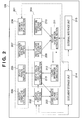
- Fig. 2 is a block diagram explaining the internal configuration of the retrieval device according to the present exemplary embodiment.
- Fig. 3 is a diagram illustrating an exemplary screen used to specify attribute search parameters on a search conditions entry screen provided by a search conditions input section in the present exemplary embodiment.
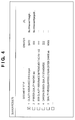
- Fig. 4 is a diagram illustrating exemplary search results displayed by a search results display section in the present exemplary embodiment.
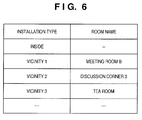
- Fig. 5 and Fig. 6 are diagrams illustrating exemplary installation site information, which shows the installation site of a retrieval device, and which is stored in the installation site storage section in the present exemplary embodiment.
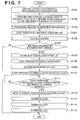
- Fig. 7 is a flow chart explaining a process used in the first exemplary embodiment in order to rearrange, in the optimum display order, a document hit list obtained as a result of a search when the search is executed using a multi-functional peripheral installed in a meeting room.
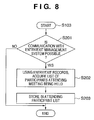
- Fig. 8 is a flow chart explaining a process, whereby a multi-functional peripheral used in the present exemplary embodiment works with an entry/exit management system to acquire a list of participants attending a meeting.
- Fig. 9 is a flow chart explaining an agenda search process performed by a related information extraction section used in the present exemplary embodiment.
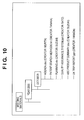
- Fig. 10 is a diagram illustrating an exemplary attribute search screen used in the present exemplary embodiment.
- Fig. 11 is a diagram illustrating an exemplary meeting schedule stored in a meeting room reservation device used in the present exemplary embodiment.
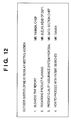
- Fig. 12 is a diagram illustrating exemplary agenda information used in an exemplary embodiment of the present invention.
- Fig. 13 is a diagram illustrating the overall configuration of the document retrieval system used in a second exemplary embodiment of the present invention.
- Fig. 14 is a diagram illustrating a portion extracted from a visitor list displayed at login to a visitor management device used in the second exemplary embodiment.
- Fig. 15 is a flow chart explaining a process used in the second exemplary embodiment in order to rearrange, in the optimum display order, a document hit list obtained as a result of executing a search in a situation, wherein the search is executed using a multi-functional peripheral installed in a meeting room.
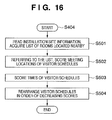
- Fig. 16 is a flow chart explaining a priority level computation process used in the second exemplary embodiment.
- Fig. 17 is a diagram showing an example of installation site information used in the second exemplary embodiment.
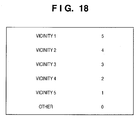
- Fig. 18 is a diagram explaining a meeting location scoring table used in the second exemplary embodiment.
- Fig. 19 is a diagram explaining a meeting time scoring table used in the second exemplary embodiment.
- FIG. 1 is a diagram explaining the configuration of a document retrieval system used in an exemplary embodiment of the present invention.
- Reference numeral 101 denotes a retrieval device which, in the present exemplary embodiment, is a multi-functional peripheral possessing the functionality of a printer, copier, FAX, etc., and is typically installed in a corporate office, etc.
- Reference numeral 102 denotes a meeting room provided in the office. In the present exemplary embodiment, the meeting room is called "Meeting Room A".
- Reference numeral 103 denotes an entry/exit management system provided at the entrance to the meeting room 102. In the office, company employees and external parties who enter and leave the office always carry ID cards used for security management.
- the entry/exit management system 103 can, in real time, obtain information on the IDs of the company employees and others present in the meeting room or reception room, in which it is installed.
- Reference numeral 104 denotes a schedule management device, which is used by company employees working in the office to enter daily schedules via desktop computers. As a result, the schedule management device 104 gleans information on the schedules of all the company employees based on the entered schedules.
- Reference numeral 105 denotes storage devices, specifically ones that store intraoffice electronic documentation, e.g., various meeting materials, and the like, and operate in a manner similar to a document server.
- Reference numeral 106 denotes a meeting room reservation device, which enables company employees to reserve all meeting rooms in the office by connecting to the meeting room reservation device 106 via desktop computers.
- Reference numeral 107 denotes an integrated user authentication device, which exercises overall control over user authentication in the entry/exit management system 103, schedule management device 104, meeting room reservation device 106, etc.
- Fig. 2 is a block diagram explaining the internal configuration of the retrieval device 101 used in the present exemplary embodiment. It should be noted that in the present exemplary embodiment, as described above, the retrieval device 101 is a multi-functional peripheral.
- Reference numeral 201 denotes a user interface section, which provides an interface between the retrieval device 101 and users, allowing the users to search for the desired documents and images (collectively referred to hereinafter as "documents") and check search results.
- the user interface section 201 comprises four elements, including a search conditions input section 205, a search results display section 206, an installation site input section 207, and a document contents display section 208.
- the search conditions input section 205 possesses a feature that permits entry of search conditions used to search for the desired documents, etc., among documents stored in the retrieval device 101 or in the storage devices 105 coupled to the network.
- Fig. 3 is a diagram illustrating an exemplary screen used to specify attribute search parameters on a search conditions entry screen provided by the search conditions input section 205.
- the types of attributes that can be specified as search conditions include "document title”, “creator”, “URL”, and "keywords”.
- radio buttons are provided to select either "match, partial” or "match, full”.
- match, partial refers to retrieving all documents including the character string of the specified document title as part of the document titles.
- match, full refers to a situation, in which only documents having document titles absolutely identical to the specified character string are retrieved.
- multiple terms can be entered in order to make it easier for document creators or users with special authority to perform searches when documents are created and stored or at any time after storage. They are stored along with the documents as the "keywords", that is, one of the attributes representing the characteristics of the documents. Documents having the entered keywords are then retrieved during the attribute search.
- the relationship between them can be selected using radio buttons representing an "AND” condition or an "OR” condition. If "AND” is selected, only documents having all the multiple specified terms as the keywords are retrieved. On the other hand, if "OR” is selected, all the documents having at least one of the terms from among the specified multiple terms as their keywords are retrieved.
- the search results display section 206 displays for the user a list of documents matching the search conditions entered using the search conditions input section 205.
- Fig. 4 is a diagram illustrating exemplary search results displayed by the search results display section 206.
- the results shown are retrieved in accordance with the search conditions of Fig. 3.
- Serial numbers indicating the priority levels of the retrieved documents, document titles, creators, and URLs are displayed using a single line for each document retrieved.
- checkboxes are displayed at the beginning of each line and checking the checkboxes permits operations on documents selected from among the search results, such as, for instance, displaying or deleting the contents of the documents, checking them out, and other operations. If Fig. 4, a check box of the document having the priority level of "1", whose title is "QUALITY ASSURANCE SYSTEM", is checked.
- function keys indicating possible operations for the documents representing the search results, and such operations can be carried out by pressing a function key after selecting documents using the checkboxes.
- Fig. 4 of the present exemplary embodiment is shown with these function keys omitted because they have no direct bearing on the gist of the present invention, but they may be provided as needed.
- the installation site input section 207 is used during installation of the retrieval device 101 by service personnel and other persons performing the installation for entering location-related information. It should be noted that if the retrieval device 101 contains a built-in receiver, such as a GPS receiver, information on the installation site may be acquired automatically using location information acquired using the receiver and an office layout diagram, etc. In such a case, the installation site input section 207 will no longer be an essential component.
- the document contents display section 208 is used to select documents from the document list displayed by the search results display section 206 and check their contents.
- Reference numeral 202 denotes a search execution section, which uses the user's search conditions entered via the search conditions input section 205 in order to retrieve documents corresponding thereto from the storage devices 105.
- the search results storage section 203 stores a list of documents matching the search conditions, retrieved by the search execution section 202. Whenever documents matching the search conditions are located during a search process performed by the search execution section 202, the document IDs of the retrieved documents are stored in the search results storage section 203. Subsequently, upon termination of the search process performed by the search execution section 202, the order of storage is changed by a search results display order determination section 213, which is described below.
- Reference numeral 204 denotes a search results sorting section, which is the characteristic portion of the present exemplary embodiment among the components of the retrieval device 101.
- the search results sorting section 204 includes elements such as the search results display order determination section 213, an installation site storage section 209, a search time storage section 210, a related information storage section 212, and a related information extraction section 211.
- the installation site storage section 209 stores installation site information obtained from the installation site input section 207 of the user interface section 201 or from GPS and office layout diagrams.
- Fig. 5 and Fig. 6 are diagrams illustrating exemplary installation site information showing the installation site of the retrieval device 101, which is stored in the installation site storage section 209 in the present exemplary embodiment.
- Fig. 5 shows that the retrieval device 101, which contains the information, is installed in Meeting Room A.
- the retrieval device 101 which has the information, is installed not inside the meeting room, but instead in an open space in the office, such as a lobby or corridor. Information is then stored for "vicinity 1, vicinity 2, " depending on the order of distance from the installation site.
- the installation site of the retrieval device is closest to Meeting Room B, subsequently followed, in the order of increasing distance, by Discussion Corner 3, Tea Room, etc.
- the search time storage section 210 stores the dates and times when the user entered search conditions via the search conditions input section 205 and pressed the "OK" button, issuing a command to start a search.
- the related information extraction section 211 accesses information associated with the installation sites stored the installation site storage section 209 and search time storage section 210, as well as time information regarding the times when searches were initiated, which is stored in the search time storage section 210.
- Information corresponding to the event in question is then extracted from documents stored in the various storage devices 105 coupled to the network, as well as from various services cooperating with the retrieval system, such as, for instance, the meeting room reservation device 106, schedule management device 104, entry/exit management system 103, etc.
- the related information storage section 212 stores various types of information associated with events extracted and collected by the related information extraction section 211.
- the search results display order determination section 213 rearranges the search results in such a manner that documents believed to be closely related to the event based on the related information stored in the related information storage section 212 are shifted to a higher priority on the list. This is done by issuing an instruction to rearrange the order of search results provisionally created by the search results storage section 203 from the output results of the search execution section 202.
- Reference numeral 214 denotes a document storage unit, which stores documents created by the user on a hard disk, etc., incorporated into the retrieval device 101.
- Reference numeral 215 denotes an external interface unit, which communicates with external services through a network and issues search requests to the various storage devices 105 on the network, etc.
- Fig. 7 is a flow chart explaining a process used in the first exemplary embodiment in order to rearrange, in the optimum display order, the list of documents satisfying search conditions when a search is executed by a user on a multi-functional peripheral installed in a meeting room by entering search conditions and executing the search.
- Step S101 the search execution section 202 interprets the search conditions entered by the user via the search conditions input section 205 and searches for documents corresponding to the search conditions.
- a search for documents matching the search conditions is carried out on the documents stored in the document storage unit 214, and, via the external interface unit 215, documents stored in all the storage devices 105 on the network.
- the thus retrieved results are stored in the search results storage section 203.
- the related information extraction section 211 accesses, via the external interface unit 215, the meeting room reservation device 106 connected through the network.
- Fig. 11 is diagram illustrating an exemplary meeting schedule stored in the meeting room reserving device 106 used in the present exemplary embodiment.
- Meeting IDs which identify meetings, the dates and times (dates) when the meetings are held, as well as the start times, end times, and subjects of the meetings are listed here.
- the IDs and subjects of the meetings held around that time in the meeting room are then acquired based on the information about the meeting room stored in the installation site storage section 209 and information on the date/time when the search was executed, which is stored in the search time storage section 210. Furthermore, not only meetings held around that time, but all meetings scheduled to be held on that day at other times after that time, are stored in the related information storage section 212 by acquiring their meeting IDs and meeting subjects.
- Step S103 information managed by the entry/exit management systems 103 is retrieved and a list of participants attending the meetings is acquired. Detailed explanations will now be provided with reference to the flow chart of Fig. 8.
- Fig. 8 is a flow chart explaining a process (Step 103) executed in cooperation with the entry/exit management system 103, whereby the multi-functional peripheral (retrieval device) 101 used in the present exemplary embodiment acquires a list of participants attending meetings.
- Step S201 the related information extraction section 211 uses the external interface unit 215 to determine whether it is possible to communicate with the entry/exit management system 103, which manages entry/exit from the meeting room. If no communication with the entry/exit management system 103 is possible, the processing of the subroutine is terminated. If it is determined in Step S201 there is an entry/exit management system 103, with which communication is possible, control proceeds to Step S202.
- Step S202 the system accesses the entry/exit records of the searchable entry/exit management system 103 for the meeting room, in which the multi-functional peripheral 101 is installed, and acquires a list of all the participants attending the meeting held at this point in time in this meeting room.
- Step S203 the user IDs of these users are stored in the attending participant list and the subroutine is terminated.
- the process above relates to the entry/exit management shown in Step S103 of Fig. 7.
- Fig. 9 is a flow chart explaining the agenda search process (S105) performed by the related information extraction section 211 in the present exemplary embodiment.
- Step S301 the system stores the communicated meeting subject in the workspace.
- Step S302 all the storage devices 105 on the network are searched to determine whether there are folders containing the subject of the meeting in the folder attributes, that is, in the folder name, folder comments, etc.
- control proceeds to Step S303, and all the storage devices 105 on the network are similarly searched to determine whether there are folders containing a character string corresponding to the current date in the attributes of the folders.
- Character string corresponding to the date is not limited to strings containing the current date, but also includes cases, in which only part of the date is included, but the current date corresponds thereto. Furthermore, it also includes cases, in which folders are sorted by year, month and day and represented in a hierarchically structured manner, with the current date contained in a unit shown in the lowest-level folder.
- Fig. 10 is a diagram illustrating an exemplary attribute search screen used in the present exemplary embodiment.
- Step S305 the process is terminated if no folder is located that contains the current date or meeting subject in the attributes.
- Step S305 it is determined whether the character string of the subject of the meeting in question, or character strings suggesting an agenda, are contained in the attributes of the document, that is, the document title, comments, user index, etc.
- Character strings with agenda-related meanings include all terms synonymous with "agenda”, such as “agenda”, “topics of discussion”, “proceedings", “minutes”, “meeting memo”, etc.
- Fig. 12 is a diagram illustrating exemplary information from such an agenda.
- Step S306 The date/time of creation and dates/times of updates to the document are accessed in Step S306. If either the date/time of creation or the dates/times of updates to the document are within one month of the current date, control proceeds to Step S307, and the document is stored in the workspace as an agenda candidate for the meeting in question.
- Step S305 if it is determined in Step S305 that no corresponding character strings are contained in the attributes of the document or in the text of the document, or if it is determined in Step S306 that the date of creation of the document is earlier than 1 month of the current date, the subroutine shown in Fig. 9 is terminated.
- Step S309 priority levels are calculated for all the agenda candidates stored in the workspace, and a suitable agenda candidate for the meeting in question is selected.
- documents, in which the subject of the meeting in question is mentioned in important locations within the text, such as in the headings, etc., and documents, in which there is a scheduled participant column, are considered to be closest to an agenda, and the level of priority of such documents is raised.
- the description above provides a detailed explanation of the process of retrieving agendas in Step S105 of Fig. 7.
- Step S106 control proceeds to Step S106, wherein a determination is made as to the presence of records regarding participants scheduled to attend the meeting in question in the text of the agenda retrieved in Step S105. If there are records regarding participants scheduled to attend, control proceeds to Step S107, wherein the user IDs of the participants are acquired by querying the database of the user authentication device 107 and stored in the attending participant list. Next, control proceeds to Step S108, wherein the following operations are performed on the user IDs of all the attending participants stored in Step S107.
- Step S109 the search results list stored in the search results storage section 203 in Step S101, which includes a set of documents matching the user's search conditions, is copied to the workspace. Then, in Steps S110 to S111, all the documents acquired in Step 109 are examined to determine whether the creators of the documents are the users indicated by the user IDs and whether the creation dates of the documents are within 1 month of the current date. If such documents are found in the search results list, control proceeds to Step S112, and the search results list is rearranged by raising the priority levels of the documents such that the documents are shifted to a higher position in the sequence of the search results list. Once the examination is over for all the documents in the search results list, the loop is terminated in Step S113.
- Step S114 the loop is terminated in Step S114. Furthermore, when these operations are over for all the meetings obtained in Step S104, the loop is terminated in Step S115. Thus, all the operations of the search results display order determination section 213 are complete. As a result, when, for instance, a document's creator is a participant attending a meeting in the meeting room and its creation date is within 1 month of the current date, the document is displayed in a higher position on the search results list.
- search results display section 206 receives the document list of the search results storage section 203 sorted by the search results display order determination section 213 and displays the search results in that order.
- the display priority of the search results is determined based on the contents and attendees of the meeting taking place at the point in time of the search, as well as on the creators and creation times, etc., of the documents subject to retrieval.
- the documents the user intends to obtain can be retrieved and displayed in the highest-to-lowest order of probability.
- Fig. 13 is a diagram illustrating the overall configuration of the document retrieval system according to the second exemplary embodiment of the present invention.
- Reference numeral 1101 denotes a retrieval device, which corresponds to the retrieval device 101 used in the above-described first exemplary embodiment.
- Reference numeral 1102 denotes a visitor management device, which is capable of comprehensive management of visitor schedules entered in various departments and offers the receptionist's office, etc., the capability of quick verification. It should be noted that the configuration of the retrieval device 1101 used herein is common with the configuration illustrated in the above-described Fig. 2.
- Fig. 14 is a diagram illustrating a portion extracted from a visitor list displayed at login to the visitor management device 1102 according to the second exemplary embodiment.
- a single line corresponds to a single visitor, with the columns designating, from left to right, the date of the scheduled visitor's visit, the time of visit, the name of the visitor, and the name of the room scheduled as the meeting location.
- employees of Company A represented by a Mr. X
- employees of Company B represented by a Mr. Y
- a Mr. Z from Company C will have a meeting in Discussion Corner 2 at 9:30 AM on the same day
- a Mr. W from Company D will have a meeting in the tea room at 10:00 AM.
- reference numeral 1103 denotes the same document server as the storage devices 105 used in the above-described first exemplary embodiment.
- Reference numeral 1104 denotes Reception Room No. 3
- numeral 1105 denotes the Discussion Corner 2.
- reference numeral 1106 denotes a Tea Room.
- Fig. 15 is a flow chart explaining a process used in the second exemplary embodiment in order to rearrange, in the optimum display order, the list of documents satisfying search conditions, produced as a result of a search executed on a multi-functional peripheral in a situation, wherein the user enters search conditions and executes a search on a multi-functional peripheral installed in a meeting room.
- the search execution section 202 executes a search based on the search conditions entered by the user and a list of retrieved documents is stored in the search results storage section 203 (S401 to S402).
- communication is established with the visitor management device 1102 via the external interface unit 215, and a list of current visitors or visitors scheduled for a visit from the current moment onward is acquired based on the visitor schedules for current day (S403).
- the visitor list is as shown in Fig. 14.
- Step S404 wherein priority levels are computed for the visitor schedules acquired in Step S403 according to how distant the meeting times and meeting locations are from the current moment and the installation site of the retrieval device 1101.
- the priority level computation algorithm will be explained in detail with reference to the flow chart of Fig. 16.
- Fig. 16 is a flow chart explaining the priority level computation process (S404) according to the second exemplary embodiment. This process is carried out by the search results sorting section 204 described above.
- Step S501 the installation site information stored in the document server 1103 is read out and a list of rooms located near the installation site of the retrieval device 1101 is acquired.
- Fig. 17 is a diagram illustrating an example of such installation site information.
- the names of the rooms are listed in the order of increasing distance from the installation site.
- the order indicated for the installation site of the retrieval device 020 is Meeting Room C, Director Reception Room, Reception Room No. 3, and Meeting Room A.
- the visitor schedules acquired in Step S403 are then scored based on the scoring table shown in Fig. 18 according to the meeting locations.
- Fig. 18 is a diagram explaining the meeting location scoring table.
- the meeting locations of the visitor schedules are scored by assigning 5 points to the room in the closest position, 4 points to the room in the second-closest position, and so on, after performing rearrangement in the order of increasing distance from the installation site of the retrieval device 1101. Rooms located in position 6 and farther are assigned a score of "0".
- the visitor schedules acquired in Step S403 are similarly scored based on the scoring table shown in Fig. 19 according to the meeting times.
- Fig. 19 is a diagram explaining an example of the meeting time scoring table.
- scoring is carried out by assigning a score of 6 points if the meeting time is within 30 minutes of the current moment, 5 points if the meeting time is more than 30 minutes away and within 60 minutes of the current moment, and so on, with visitor schedules more than 3 hours away assigned a score of "0".
- Steps S502 to S504 total visitor schedule scores are calculated by adding up the scores assigned to the meeting locations and meeting times of each visitor schedule and the visitor schedules are rearranged in the order of decreasing total scores.
- Step S404 The processing of Step S404 is terminated, after which the visitor schedules are repeatedly subjected to the following operations as shown in the loop starting from Step S405 of Fig. 15.
- Step S406 the contents of the retrieval device 1101, or storage facilities coupled to the network, such as the document server 1103, etc., are searched to determine whether there are folders including the character strings in the folder names (S406). If in Step S406 it is found that there are folders including these character strings in the folder names, control proceeds to Step S408, wherein the document IDs of all the documents contained in the folders are copied to the workspace. On the other hand, if no such folders are found, control proceeds to Step S407, wherein the search target is extended to documents inside the folder and all the storage facilities on the network are similarly searched to determine whether there are documents that have visitor company names or visitor names, etc., as document attributes.
- Step S408 if corresponding documents are found, control proceeds to Step S408, and their document IDs are copied to the workspace. In this manner, if corresponding documents are found in any of Steps S406 and S407, control proceeds to the loop starting from Step S408 and the system determines whether these documents are contained in the search results acquired in Step S402 (Step S409). If the documents are contained in the search results, the order of the document, stored in the search results storage section 203, is shifted to the highest position (S410).
- Step S411 the loop is terminated in Step S411. Furthermore, once these operations are over for all the visitor schedules acquired in Step S403, the loop used to process the visitor schedules is terminated in Step S412. Thus, the entire process illustrated in Fig. 15 is complete.
- the display order of the retrieved document titles is determined according to the location information, such as the meeting rooms located near the retrieval device, etc., as well as the time and names of the people who use the locations, etc.
- the documents the user intends to obtain can be retrieved and displayed in the highest-to-lowest order of probability even though these search instructions are from a retrieval device set up in an open environment.
- the present invention may be applied to a system composed of a plurality of devices, as well as applied to an apparatus constituted by a single device.
- the present invention can be implemented by directly or remotely supplying a software program realizing the functionality of the above-described embodiments to a system or apparatus and allowing the computer of the system or apparatus to read and execute the supplied program. In such a case, so long as it has the functionality of the program, it does not have to be configured as a software program.
- the program code installed on the computer in order to implement the functional processing of the present invention on a computer is itself an implementation of the present invention.
- the claims of the present invention include a computer program used to implement the functional processing of the present invention.
- the form of the program such as object code, interpreter-executed programs, script data supplied to the OS, etc., is irrelevant.
- Various media can be employed as the recordable media used to supply the program.
- it may be a floppy (TM ) disk, a hard disk, an optical disk, a magneto-optical disk, an MO, a CD-ROM, a CD-R, a CD-RW, a magnetic tape, a non-volatile memory card, ROM, or a DVD (DVD-ROM, DVD-R), etc.
- the program can be supplied by connecting to an Internet homepage using a browser on a client computer and downloading it from the homepage onto a hard disk or another recordable medium.
- the downloaded program may be the inventive computer program itself, as well as a compressed file equipped with self-installation functionality.
- it can also be implemented by dividing the program code constituting the program of the present invention into a plurality of files and downloading the respective files from different homepages.
- WWW servers that allow a plurality of users to download program files used to implement the functional processing of the present invention on the computer are also included in claims of the present invention.
- it may take the form of encrypting the program of the present invention, storing it on a CD-ROM or another storage medium, and disseminating it among users.
- users who meet certain criteria may be allowed to download information on a key used to decrypt the encryption from a homepage through the Internet and use the information on the key to install the encrypted program on a computer in executable format.
- the program read from the recordable media may be written to memory provided in an expansion board inserted into a computer or an expansion unit connected to a computer.
- a CPU, etc. provided in the expansion board or expansion unit partially or entirely carries out actual processing based on the instructions of the program and the functionality of the above-described embodiments is implemented based on such processing.
Landscapes
- Engineering & Computer Science (AREA)
- Databases & Information Systems (AREA)
- Theoretical Computer Science (AREA)
- Business, Economics & Management (AREA)
- Strategic Management (AREA)
- Data Mining & Analysis (AREA)
- Physics & Mathematics (AREA)
- General Physics & Mathematics (AREA)
- Entrepreneurship & Innovation (AREA)
- Human Resources & Organizations (AREA)
- General Engineering & Computer Science (AREA)
- Economics (AREA)
- Marketing (AREA)
- Operations Research (AREA)
- Quality & Reliability (AREA)
- Tourism & Hospitality (AREA)
- General Business, Economics & Management (AREA)
- Information Retrieval, Db Structures And Fs Structures Therefor (AREA)
- Control Or Security For Electrophotography (AREA)
Applications Claiming Priority (1)
| Application Number | Priority Date | Filing Date | Title |
|---|---|---|---|
| JP2006313598A JP2008129821A (ja) | 2006-11-20 | 2006-11-20 | 検索システム及び前記システムにおける検索結果の表示方法 |
Publications (2)
| Publication Number | Publication Date |
|---|---|
| EP1926031A2 true EP1926031A2 (fr) | 2008-05-28 |
| EP1926031A3 EP1926031A3 (fr) | 2008-06-04 |
Family
ID=39197145
Family Applications (1)
| Application Number | Title | Priority Date | Filing Date |
|---|---|---|---|
| EP07121109A Withdrawn EP1926031A3 (fr) | 2006-11-20 | 2007-11-20 | Système et procédé d'extraction pour l'affichage de résultats extraits et système |
Country Status (5)
| Country | Link |
|---|---|
| US (1) | US7797315B2 (fr) |
| EP (1) | EP1926031A3 (fr) |
| JP (1) | JP2008129821A (fr) |
| KR (1) | KR100904944B1 (fr) |
| CN (1) | CN101187942A (fr) |
Families Citing this family (21)
| Publication number | Priority date | Publication date | Assignee | Title |
|---|---|---|---|---|
| US9041744B2 (en) | 2005-07-14 | 2015-05-26 | Telecommunication Systems, Inc. | Tiled map display on a wireless device |
| US20090098889A1 (en) * | 2007-09-11 | 2009-04-16 | Bob Barcklay | Wireless device location alerts on battery notification events |
| WO2009061501A1 (fr) * | 2007-11-09 | 2009-05-14 | Telecommunication Systems, Inc. | Panoramique de points d'intérêt sur une carte affichée avec une recherche persistante sur un téléphone sans fil |
| EP2277105A4 (fr) * | 2008-04-07 | 2012-09-19 | Telecomm Systems Inc | Recherche de proximité pour des noms de point d'intérêt combinant une correspondance de chaîne inexacte avec une recherche par rayon croissant |
| JP2010049456A (ja) * | 2008-08-21 | 2010-03-04 | Canon Inc | データ処理装置、データ処理方法、会議システム、記憶媒体及びプログラム |
| US8594627B2 (en) | 2008-10-06 | 2013-11-26 | Telecommunications Systems, Inc. | Remotely provisioned wirelessly proxy |
| JP2011013703A (ja) * | 2009-06-10 | 2011-01-20 | Onkyo Corp | コンテナ表示制御装置及びそのプログラム |
| US20110231773A1 (en) * | 2010-03-19 | 2011-09-22 | Avaya Inc. | System and method for providing just-in-time resources based on context |
| JP4973760B2 (ja) * | 2010-05-13 | 2012-07-11 | コニカミノルタビジネステクノロジーズ株式会社 | 資料出力システム、資料出力装置、および資料出力システムの制御方法 |
| USD754161S1 (en) | 2012-11-26 | 2016-04-19 | Nero Ag | Device with a display screen with graphical user interface |
| US20140149932A1 (en) * | 2012-11-26 | 2014-05-29 | Nero Ag | System and method for providing a tapestry presentation |
| US9477934B2 (en) | 2013-07-16 | 2016-10-25 | Sap Portals Israel Ltd. | Enterprise collaboration content governance framework |
| WO2015094158A1 (fr) * | 2013-12-16 | 2015-06-25 | Hewlett-Packard Development Company, L.P. | Détermination d'explications de communication préférées au moyen de niveaux de pertinence d'enregistrements |
| US20170090729A1 (en) * | 2015-09-30 | 2017-03-30 | The Boeing Company | Organization and Visualization of Content from Multiple Media Sources |
| JP6589694B2 (ja) * | 2016-03-02 | 2019-10-16 | コニカミノルタ株式会社 | 画像形成装置、プログラム及び画像形成システム |
| JP6701932B2 (ja) * | 2016-05-06 | 2020-05-27 | コニカミノルタ株式会社 | 画像形成装置、プログラム、会議システム |
| JP2019159883A (ja) * | 2018-03-14 | 2019-09-19 | アルパイン株式会社 | 検索システム、検索方法 |
| JP7112278B2 (ja) * | 2018-08-07 | 2022-08-03 | キヤノン株式会社 | 画像処理装置及びその制御方法、並びにプログラム |
| JP2020024582A (ja) | 2018-08-07 | 2020-02-13 | キヤノン株式会社 | 画像処理装置及びその制御方法、並びにプログラム |
| CN110399459B (zh) * | 2019-07-16 | 2022-03-18 | 北京字节跳动网络技术有限公司 | 在线文档的搜索方法、装置、终端、服务器及存储介质 |
| CN115185433A (zh) * | 2022-05-31 | 2022-10-14 | 北京达佳互联信息技术有限公司 | 数据展示方法、装置、电子设备及存储介质 |
Family Cites Families (20)
| Publication number | Priority date | Publication date | Assignee | Title |
|---|---|---|---|---|
| JP3527335B2 (ja) * | 1995-10-19 | 2004-05-17 | 株式会社日立製作所 | 携帯端末システム及びスケジュール管理方法 |
| JP2000231568A (ja) * | 1999-02-09 | 2000-08-22 | Ricoh Co Ltd | 文書検索装置および文書検索方法 |
| US6317718B1 (en) | 1999-02-26 | 2001-11-13 | Accenture Properties (2) B.V. | System, method and article of manufacture for location-based filtering for shopping agent in the physical world |
| JP2001084256A (ja) * | 1999-09-10 | 2001-03-30 | Toshiba Corp | データベース処理装置、データベース処理方法、及びデータベース処理プログラムを記録したコンピュータ読み取り可能な記憶媒体 |
| JP2002091973A (ja) * | 2000-09-14 | 2002-03-29 | Matsushita Electric Ind Co Ltd | 情報提供システム及びその検索方法 |
| JP2002149528A (ja) * | 2000-11-13 | 2002-05-24 | Sharp Corp | 情報提供システム、そのシステムに用いられるサーバ、情報提供方法およびその方法を実現する機械読取可能な記録媒体 |
| JP2002318820A (ja) * | 2001-04-19 | 2002-10-31 | Aloka Co Ltd | 医療情報提供システム |
| US7464072B1 (en) * | 2001-06-18 | 2008-12-09 | Siebel Systems, Inc. | Method, apparatus, and system for searching based on search visibility rules |
| US7058624B2 (en) * | 2001-06-20 | 2006-06-06 | Hewlett-Packard Development Company, L.P. | System and method for optimizing search results |
| US7239409B2 (en) * | 2001-06-22 | 2007-07-03 | Hewlett-Packard Development Company, L.P. | Remote access to print job retention |
| US7089233B2 (en) * | 2001-09-06 | 2006-08-08 | International Business Machines Corporation | Method and system for searching for web content |
| US20040039612A1 (en) * | 2002-06-14 | 2004-02-26 | Neil Fitzgerald | Method and apparatus for customer direct on-line reservation of rental vehicles |
| JP2004252649A (ja) * | 2003-02-19 | 2004-09-09 | Canon Inc | ネットワーク会議室予約システム |
| JP2005049972A (ja) * | 2003-07-30 | 2005-02-24 | Ricoh Co Ltd | 多機能画像形成装置及び文書情報検索方法 |
| US7734996B2 (en) * | 2003-09-08 | 2010-06-08 | Nec Corporation | Documentation browsing method, documentation browsing apparatus, documentation browsing robot, and documentation browsing program |
| WO2005027068A1 (fr) * | 2003-09-12 | 2005-03-24 | Canon Kabushiki Kaisha | Diffusion en temps reel de donnees video non continues |
| JP2005165856A (ja) * | 2003-12-04 | 2005-06-23 | Fuji Xerox Co Ltd | 資料呼出装置 |
| JP4189387B2 (ja) * | 2005-03-28 | 2008-12-03 | 株式会社東芝 | 知識検索システム、知識検索方法及びプログラム |
| JP4347264B2 (ja) * | 2005-05-20 | 2009-10-21 | キヤノン株式会社 | 文書管理システム |
| US8131748B2 (en) * | 2006-05-12 | 2012-03-06 | Sap Ag | Search query formulation |
-
2006
- 2006-11-20 JP JP2006313598A patent/JP2008129821A/ja active Pending
-
2007
- 2007-11-07 US US11/936,708 patent/US7797315B2/en not_active Expired - Fee Related
- 2007-11-20 KR KR1020070118845A patent/KR100904944B1/ko not_active Expired - Fee Related
- 2007-11-20 EP EP07121109A patent/EP1926031A3/fr not_active Withdrawn
- 2007-11-20 CN CNA2007101927819A patent/CN101187942A/zh active Pending
Non-Patent Citations (1)
| Title |
|---|
| CHEN H; TOLIA S; SAYERS C; FININ T; JOSHI A: "Creating context-aware software agents", LECTURE NOTES IN ARTIFICIAL INTELLIGENCE, vol. 2564, 2003, Germany, pages 186 - 197, ISSN: 0302-9743 * |
Also Published As
| Publication number | Publication date |
|---|---|
| JP2008129821A (ja) | 2008-06-05 |
| CN101187942A (zh) | 2008-05-28 |
| US7797315B2 (en) | 2010-09-14 |
| US20080120293A1 (en) | 2008-05-22 |
| KR100904944B1 (ko) | 2009-06-29 |
| KR20080045657A (ko) | 2008-05-23 |
| EP1926031A3 (fr) | 2008-06-04 |
Similar Documents
| Publication | Publication Date | Title |
|---|---|---|
| US7797315B2 (en) | Retrieval system and method of displaying retrieved results in the system | |
| US9229992B2 (en) | Automatic identification of digital content related to a block of text, such as a blog entry | |
| US6886015B2 (en) | Method and system for building a family tree | |
| US20080082568A1 (en) | System and method for managing and utilizing information | |
| US20070055657A1 (en) | System for generating and managing context information | |
| US20070250496A1 (en) | System and Method For Organizing Recorded Events Using Character Tags | |
| US20110004819A1 (en) | Systems and methods for user-driven document assembly | |
| US10114821B2 (en) | Method and system to access to electronic business documents | |
| US20020123902A1 (en) | Method, system and storage medium for managing and providing access to legal information | |
| CN1598817A (zh) | 计算及通讯应用中构造使用重大事件的模型的系统及方法 | |
| WO2011002627A1 (fr) | Système, procédé, et appareil pour capturer, sécuriser, partager, extraire et rechercher des données | |
| US20070294092A1 (en) | System and method for creating and organizing job applicant credential information | |
| KR20100047220A (ko) | 문서관리장치, 방법 및 프로그램 | |
| JP7394294B2 (ja) | 日報管理装置およびコンピュータプログラム | |
| CN101316306A (zh) | 会议系统及其控制方法 | |
| JP5615779B2 (ja) | ファイル共有システム、分析サーバ及びファイル共有方法 | |
| JP2007305006A (ja) | 人材紹介システム用サーバ装置及び人材紹介システム | |
| Leigh et al. | From information to knowledge creation in the archive: Observing humanities researchers' information activities | |
| US10248638B2 (en) | Creating forms for hierarchical organizations | |
| JP5307258B2 (ja) | ペア画像投稿検索装置及びペア画像投稿検索プログラム | |
| Raas | Electronic recordkeeping–more than electronic document management | |
| JP2005285008A (ja) | データセキュリティ管理システム、プログラム、データセキュリティ管理方法 | |
| JP4787590B2 (ja) | 蔵書検索方法、蔵書検索システム及び蔵書検索プログラム | |
| JP2000099535A (ja) | 画像検索装置及びその方法、コンピュータ可読メモリ | |
| JP4921901B2 (ja) | 予約管理システム、予約管理方法及び予約管理プログラム |
Legal Events
| Date | Code | Title | Description |
|---|---|---|---|
| PUAI | Public reference made under article 153(3) epc to a published international application that has entered the european phase |
Free format text: ORIGINAL CODE: 0009012 |
|
| PUAL | Search report despatched |
Free format text: ORIGINAL CODE: 0009013 |
|
| AK | Designated contracting states |
Kind code of ref document: A2 Designated state(s): AT BE BG CH CY CZ DE DK EE ES FI FR GB GR HU IE IS IT LI LT LU LV MC MT NL PL PT RO SE SI SK TR |
|
| AX | Request for extension of the european patent |
Extension state: AL BA HR MK RS |
|
| AK | Designated contracting states |
Kind code of ref document: A3 Designated state(s): AT BE BG CH CY CZ DE DK EE ES FI FR GB GR HU IE IS IT LI LT LU LV MC MT NL PL PT RO SE SI SK TR |
|
| AX | Request for extension of the european patent |
Extension state: AL BA HR MK RS |
|
| 17P | Request for examination filed |
Effective date: 20081204 |
|
| AKX | Designation fees paid |
Designated state(s): DE ES FR GB IT NL |
|
| 17Q | First examination report despatched |
Effective date: 20090720 |
|
| STAA | Information on the status of an ep patent application or granted ep patent |
Free format text: STATUS: THE APPLICATION HAS BEEN WITHDRAWN |
|
| 18W | Application withdrawn |
Effective date: 20100903 |