EP1936623A2 - Système, procédé et support organisant des modèles pour générer des images en mouvement - Google Patents
Système, procédé et support organisant des modèles pour générer des images en mouvement Download PDFInfo
- Publication number
- EP1936623A2 EP1936623A2 EP07123109A EP07123109A EP1936623A2 EP 1936623 A2 EP1936623 A2 EP 1936623A2 EP 07123109 A EP07123109 A EP 07123109A EP 07123109 A EP07123109 A EP 07123109A EP 1936623 A2 EP1936623 A2 EP 1936623A2
- Authority
- EP
- European Patent Office
- Prior art keywords
- objects
- template
- execution module
- scene
- scenes
- Prior art date
- Legal status (The legal status is an assumption and is not a legal conclusion. Google has not performed a legal analysis and makes no representation as to the accuracy of the status listed.)
- Withdrawn
Links
Images




Classifications
-
- H—ELECTRICITY
- H04—ELECTRIC COMMUNICATION TECHNIQUE
- H04N—PICTORIAL COMMUNICATION, e.g. TELEVISION
- H04N5/00—Details of television systems
- H04N5/76—Television signal recording
- H04N5/91—Television signal processing therefor
- H04N5/93—Regeneration of the television signal or of selected parts thereof
-
- G—PHYSICS
- G11—INFORMATION STORAGE
- G11B—INFORMATION STORAGE BASED ON RELATIVE MOVEMENT BETWEEN RECORD CARRIER AND TRANSDUCER
- G11B27/00—Editing; Indexing; Addressing; Timing or synchronising; Monitoring; Measuring tape travel
- G11B27/02—Editing, e.g. varying the order of information signals recorded on, or reproduced from, record carriers
- G11B27/031—Electronic editing of digitised analogue information signals, e.g. audio or video signals
- G11B27/034—Electronic editing of digitised analogue information signals, e.g. audio or video signals on discs
-
- H—ELECTRICITY
- H04—ELECTRIC COMMUNICATION TECHNIQUE
- H04N—PICTORIAL COMMUNICATION, e.g. TELEVISION
- H04N5/00—Details of television systems
- H04N5/76—Television signal recording
- H04N5/91—Television signal processing therefor
Definitions
- One or more embodiments of the present invention relate to moving images, and, more particularly, to a system, method and medium of organizing templates for generating moving images so that a user may more easily create moving images.
- Slideshow presentations are one of the most widely adopted methods for displaying a number of content items such as photos.
- a slide show a plurality of content items, such as photos, are displayed one after another at regular time intervals.
- the playback of content may be interrupted for a predetermined period of time, suggesting that a slideshow can only display content in a non-successive manner, and thus may not be able to freely organize content according to a user's preference.
- the slideshow presentation is not appropriate to best cope with the recent trend in user's demand for personalized images and dynamic presentations created from the images.
- a user since, in a slideshow, only one content item is displayed at a time, a user may not be able to intuitively determine the correlation between previous, current, and subsequent content items, and to render the content items in various manners. That is, since a slideshow is a static display of content items at regular time intervals, a user may not be able to intuitively determine the correlation between the content items even if the content items are photos taken at the same place.
- Moving images are execution-module-based images created based on photos, digital photos, and music sources possessed by individuals. Examples of moving images include Macromedia's Shockwave Flash (SWF) files created using the Flash animation software program.
- SWF Macromedia's Shockwave Flash
- Moving images are distinguished from video sequences which can be compressed or decompressed by MPEG or H.264 codecs.
- a moving image may include a plurality of content items which can be controlled independently of one another, whereas a video sequence may include various images which merely comprise pixel data, and which cannot be controlled independently of one another.
- Video sequences are regarded as content items that can be included in a moving image.
- UCC user-created content
- templates which are tools for helping users to easily create moving images based on their personal content.
- templates can maximize user convenience by helping users to easily create moving images, there is a clear limit in the flexibility of templates.
- it is necessary to provide users with a considerable number and variety of templates.
- template-organizing tools In general, in order for ordinary users to easily use template-organizing tools, template-organizing tools must be able to create a template with only a few mouse manipulations, to operate properly even in connection with moving-image-generation tools, and to provide time-structured images so that users can easily perform various control operations such as rewind, skip, and arbitrary access operations on moving images.
- FIG. 1 illustrates the setting of timelines 22 for content 21 for creating a time-structured image using Flash.
- a user must manually designate a timeline 22 for each object (such as a photo, a sticker, or a background).
- the designation of a timeline 22 must be performed whenever a new object is added or whenever an existing object is modified.
- the moving image can be played back in units of frames or a time-seek operation can be performed on the moving image.
- One or more embodiments of the present invention provide a system, method and medium for organizing a template, which can allow a user to more easily generate templates for creating moving images and to appropriately set a variety of attributes of each element of a moving image according to the user's preferences.
- embodiments of the present invention include a system organizing a template for creating a moving image.
- the system includes a template controller to generate a time tab indicating when to display the moving image and to identify one or more scenes of the moving image by parsing a script in response to a user command, a scene controller to identify one or more objects included in each of the scenes and an execution module to define dynamic effects for each of the objects and to load the identified objects and the identified execution module, an object controller to create a control code for each of the identified objects based on the loaded objects and the loaded execution module, the control code controlling the identified objects according to the time tab, and a template storage unit to store the template that includes the script, the execution module, the objects, and the control code.
- embodiments of the present invention include a method of organizing a template for creating a moving image.
- the method includes identifying one or more scenes of a moving image by parsing a script in response to a user command, generating a time tab indicating when to display the moving image, identifying one or more objects included in each of the scenes and an execution module that defines dynamic effects for each of the objects, loading the identified objects and the identified execution module, creating a control code for each of the identified objects based on the loaded objects and the loaded execution module, the control code controlling the identified objects according to the time tab, and storing the template that includes the script, the execution module, the objects, and the control code.
- moving images may include content elements such as photos or moving images, decorative elements such as background music, stickers, captions, intro scenes, and end scenes, and effect elements such as transition, animation, and camera-work effects.
- the transition effect varies the attributes of an image such as transparency when a scene or an object appears or disappears
- the animation effect varies the position and size of an object over time at various speeds
- the camera-work effect offers the effect of moving a camera without moving an object.
- object generally denotes an element of a moving image
- photos, sounds, video sequences, backgrounds, stickers, and captions may be collectively referred to herein as objects.
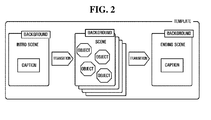
- FIG. 2 illustrates a template, according to an embodiment of the present invention.
- a template may include a plurality of scenes.
- Each of the scenes may include a variety of objects, and each of the objects may have dynamic effects and attributes.
- the attributes of an object are values that quantify the characteristics of the object.
- the attributes of an object may include the x- and y-axis coordinates, depth, rotation angle, width, height, and transparency of the object.
- the dynamic effects may be implemented as an independent execution module such as a Macromedia Flash Movie file (i.e., a Shockwave Flash (SWF) file).
- SWF Shockwave Flash
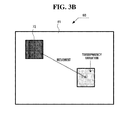
- FIGS. 3A and 3B illustrate dynamic effects. More particularly, FIG. 3A illustrates an object to which an animation effect may be applied.
- a scene 60 may include a background 61.
- An object 62 included in the scene 60 may be either moved, rotated, or enlarged, for example. Alternatively, the movement, rotation, and enlargement of the object 62 may all be performed at the same time.
- FIG. 3B illustrates an object to which a transition effect may be applied.
- an object 72 included in a scene 60 may be moved while varying the transparency of the object 72, for example. Once the transparency of the object 72 reaches 1 (or 100%) and the duration of the object 72 expires, the object 72 may no longer be displayed.
- Such a dynamic transition effect allows a user to recognize a moving image played in the same manner as in a general video sequence.
- FIG. 4 illustrates a system organizing a template, according to an embodiment of the present invention.
- the template organizing system 100 may include, for example, a user interface 110, a template execution unit 120, a template-organizing unit 130, a template storage unit 140, a template controller 150, a scene controller 160, and an object controller 170.
- the template controller 150 may generate and manage a time tab that can be referenced by each scene or object.
- the template controller 150 may parse a script 30, store the script 30 in a memory (not shown), and manage the script 30.
- the template controller 150 may provide an application programming interface (API) so that the scene controller 160 can reference the script 30. If a template is modified by a user, the template controller 150 may modify the script 30 accordingly, and store the modified script.
- API application programming interface
- the script 30 may be data that defines the whole structure of a moving image.
- the moving image may include a plurality of scenes, and each of the scenes may include a variety of objects.
- Table 1 presents an example of the script 30, which may be obtained by writing in XML, a template and a moving image created using the template.
- the term "Intro" denotes an overview image that may include the introductory message of a moving image before a user's content appears. Portions of the moving image that share the same background are referred to as scenes, and users are allowed to view scenes one by one.
- a scene may include, for example, a user's photos, decorative elements (such as stickers and captions), and dynamic effects.
- the term “Ending” denotes an image that may sum up the whole story of moving images, including photos of a user, when the display of the moving image is terminated. The same background sound may be applied to a whole moving image or different background sounds may be applied to different scenes of a moving image.
- the script 30 may display all elements of a moving image using a markup language.
- FIG. 5 illustrates a possible structure of the script 30.
- the script 30 may include, for example, a plurality of scenes, e.g., scenes 1, 2, and 3, and each of scenes #1, #2, and #3 may include one or more uniform resource locators (URLs) for identifying corresponding objects, and the attribute values of the objects at any given moment of time.
- the URLs in each of scenes 1, 2, and 3 may be used to load the objects (e.g., objects 40 illustrated in FIG. 4 ).
- the attributes of an object are generally values that quantify the characteristics of the object at any given moment of time.
- the attributes of an object may include, for example, the x- and y-axis coordinates, depth, rotation angle, width, height, and transparency of the object.
- the x- and y-axis coordinates of an object may be determined with respect to the upper left corner of the background of the object.
- the depth may indicate the priority in which the overlapping objects are displayed. For example, if a picture object has a higher display priority than a sticker object and if the two objects should occupy the same space in a displayed image, the picture object may appear opaque and obscure the sticker object to some degree, based on the respective display priorities of the objects.
- a URL written in the script 30 may be the URL of the object 30 or the URL of an execution module 50 that defines dynamic effects for the object 30.
- the execution module 50 may be implemented as an SWF file, for example. Referring to Table 1, the URL of a caption may be set as "./caption/*.swf" where "*.swf" does not simply indicate the URL of the caption but indicates the URL of an execution module that represents dynamic effects regarding the caption.
- the template controller 150 may control the scene controller 160, and the scene controller 160 may control the object controller 170. That is, the template controller 150, the scene controller 160, and the object controller 170 may be arranged hierarchically according to a hierarchical structure of a template which includes a plurality of scenes, each scene including a plurality of objects.
- FIG. 6 illustrates a hierarchical structure of a template.
- a template may include a plurality of scenes, e.g., scene 1, scene 2, ..., scene N, and each of scene 1, scene 2, ..., scene N may include a variety of objects such as backgrounds, cuts, captions, and stickers.
- an element may control one or more sub-elements located directly thereunder. In this manner, all the elements in the hierarchy illustrated in FIG. 6 can be sequentially controlled.
- An object may include one or more other objects as sub-elements.
- the same dynamic effect may also be applied to an element "frames” 26 and an element “photos” 27, which are sub-elements of the element "cuts” 25.
- the element "frames” 26 and the element “photos” 27 may inherit the attributes of the element "cuts" 25, so that they are rotated along with the element "cuts” 25.
- the template may be controlled by the template controller 150, and scenes 1, 2, ..., N may be controlled by the scene controller 160, and the objects, including the element "cuts” 25, the element “frames” 26 and the element “photos” 27, may be controlled by the object controller 170.
- the template controller 150 may set a time tab according to a predetermined frame rate.
- the time tab typically indicates when to display a moving image. For example, when the predetermined frame rate is 30 frames per second (fps), 30 time tabs are set for each second.
- the template controller 150 may identify one or more scenes of a template and the configuration of the template by parsing the script 30, and may load the results of the parsing into a predetermined memory (not shown).
- the scene controller 160 may identify one or more objects included in a certain scene and an execution module 50 that defines dynamic effects for the identified objects with reference to the results of the parsing performed by the template controller 150. The scene controller 160 may then load one of the identified objects and the execution module 50.
- the object controller 170 may create a control code for each of the identified objects (e.g., the objects 40) based on the loaded object and the execution module 50.
- the control code may be metadata, which is used to execute the identified objects in units of time tabs.
- the control code may be recorded in the execution module 50, which defines the dynamic effects for each of the identified objects, or may be recorded in the certain scene, which is an element comprising the identified objects as sub-elements.
- a sticker having a jpg format may not include a control code of its own due to the characteristics of the jpg format.
- a control code specifying the location, size, and angle of the sticker may be recorded in a scene, which is an element comprising the sticker as a sub-element.
- a control code for the object 85 may include the attributes of the object 85 for each of the four time tabs tn through tn+3, i.e., the x- and y-axis coordinates, depth, rotation angle, width, height, and transparency of the object 85.
- a control code for each object in a predetermined scene may be recorded in the execution module 50. Accordingly, when an arbitrary time tab is accessed, the attributes of all objects in a predetermined scene at the arbitrary time tab may be readily identified using the value of the arbitrary time tab.
- the template controller 150 may provide the scene controller 160 with the value of a predetermined time tab. Then, the scene controller 160 may issue to the object controller 170 a request for the attributes of objects at the predetermined time tab.
- the object controller 170 may read a control code recorded in the execution module 50, and provide the scene controller 160 with the attributes of the objects at the predetermined time tab such as the locations, sizes, and rotation angles of the objects at the predetermined time tab. Then, the scene controller 160 may combine the objects in the predetermined scene and the attributes of the objects, thereby obtaining a still image corresponding to the predetermined time tab.
- the template controller 150 may operate under the control of the template execution unit 120, the template-organizing unit 130, and the template storage unit 140, for example.
- the template execution unit 120, the template-organizing unit 130, and the template storage unit 140 may interact with a user via the user interface 110.
- FIG. 8 illustrates an example of the user interface 110 illustrated in FIG. 4 , according to an embodiment of the present invention.
- the user interface 110 may not be provided with timeline organizing functions.
- the user interface 110 may provide an organizing function by which objects in each scene may be separated as independent files and may thus be organized separately, instead of providing a complicated animation organizing function. Most scenes or objects may be selected using a drag-and-drop operation.
- the user interface 110 may include, for example, a work zone 71, a scene arrangement zone 72, an object palette 73, and an object control zone 74.
- the work zone 71 is an area where a scene (hereinafter referred to as the current scene) currently being selected by a user may actually be organized.
- the work zone 71 is an interface for arranging objects in the current scene and organizing the current scene with reference to the attributes of the objects in the current scene, e.g., the sizes and rotation angles of the objects in the current scene.
- a dynamic effect accompanied by each of the objects in the current scene may not be readily identified in the work zone 71.
- the current scene can be readily executed using a preview button included in the object control zone 74.
- the scene arrangement zone 72 is an interface for identifying the configuration of scenes and changing the order in which the scenes are arranged using a drag-and-drop operation.
- the scene arrangement zone 72 may allow a user to delete a scene, add a new scene, or switch scenes using one or more icons (not shown) that are displayed when a scene is selected.
- the object palette 73 is an interface for adding objects such as stickers, frames, captions, and backgrounds to a scene or modifying the objects.
- Stickers and captions may be readily added to a scene simply by being dragged and dropped into the work zone 71.
- Frames and backgrounds may be assigned to a scene, one at a time. Thus, a frame image or a background image of the current scene may be switched simply by a user clicking a "Frame" or "Bg" button.
- the object control zone 74 is an interface for organizing the current scene or the attributes of the objects in the current scene, e.g., the sizes and rotation angles of the objects in the current scene.
- Slide bars and icons displayed in the object control zone 74 may be activated or deactivated according to which of the objects of the current scene is selected in the work zone 71.
- a user may be able to intuitively determine what attributes can be organized based on the slide bars and the icons displayed in the object control zone 74.
- the template execution unit 120 may control the template controller 150 to execute a current template.
- the template controller 150 may execute a moving image in units of time tabs that are set in advance, and provide the template execution unit 120 with a result image obtained by the execution.
- the template execution unit 120 may provide the user with the result image using the user interface 110.
- the template-organizing unit 130 may control the template controller 150 to modify the script 300 so that the configuration of the current template may be modified.
- the template storage unit 140 may store a template newly created or organized in a predetermined file format so that the template may be used by various moving image generation systems.
- the predetermined file format may be defined in various ways.
- the predetermined file format may include, for example, the script 30 which defines the configuration of a moving image, the objects 40 which make up the moving image, the execution module 50, which defines dynamic effects accompanied by the objects 40, and source data of the objects 40.
- the execution module 50 may include a control code for executing the moving image in units of time tabs.
- each of the respective components shown in FIG. 3 may be a software or hardware component, such as a Field Programmable Gate Array (FPGA) or an Application Specific Integrated Circuit (ASIC), which performs certain tasks, classes, subroutines, processes, object-oriented software, executable threads, or programs.
- FPGA Field Programmable Gate Array
- ASIC Application Specific Integrated Circuit
- embodiments of the present invention may also be implemented through computer readable code/instructions in/on a medium, e.g., a computer readable medium, to control at least one processing element to implement any above described embodiment.
- a medium e.g., a computer readable medium
- the medium can correspond to any medium/media permitting the storing and/or transmission of the computer readable code.
- the computer readable code may be recorded/transferred on a medium in a variety of ways, with examples of the medium including recording media, such as magnetic storage media (e.g., ROM, floppy disks, hard disks, etc.) and optical recording media (e.g., CD-ROMs, or DVDs), and transmission media such as carrier waves, as well as through the Internet, for example.
- the medium may further be a signal, such as a resultant signal or bitstream, according to embodiments of the present invention.
- the media may also be a distributed network, so that the computer readable code is stored/transferred and executed in a distributed fashion.
- the processing element could include a processor or a computer processor, and processing elements may be distributed and/or included in a single device.
- an ordinary user to easily generate a template for generating a time-structured moving image and to set various attributes of each object of the moving image according to his/her preferences.
Landscapes
- Engineering & Computer Science (AREA)
- Multimedia (AREA)
- Signal Processing (AREA)
- Processing Or Creating Images (AREA)
- Television Signal Processing For Recording (AREA)
Applications Claiming Priority (1)
| Application Number | Priority Date | Filing Date | Title |
|---|---|---|---|
| KR1020060129535A KR100827241B1 (ko) | 2006-12-18 | 2006-12-18 | 동적 영상물을 생성하기 위한 템플릿을 편집하는 장치 및방법 |
Publications (2)
| Publication Number | Publication Date |
|---|---|
| EP1936623A2 true EP1936623A2 (fr) | 2008-06-25 |
| EP1936623A3 EP1936623A3 (fr) | 2008-07-30 |
Family
ID=39208703
Family Applications (1)
| Application Number | Title | Priority Date | Filing Date |
|---|---|---|---|
| EP07123109A Withdrawn EP1936623A3 (fr) | 2006-12-18 | 2007-12-13 | Système, procédé et support organisant des modèles pour générer des images en mouvement |
Country Status (5)
| Country | Link |
|---|---|
| US (1) | US8205159B2 (fr) |
| EP (1) | EP1936623A3 (fr) |
| JP (1) | JP5536306B2 (fr) |
| KR (1) | KR100827241B1 (fr) |
| CN (1) | CN101207717B (fr) |
Cited By (1)
| Publication number | Priority date | Publication date | Assignee | Title |
|---|---|---|---|---|
| EP2299447A1 (fr) | 2009-09-13 | 2011-03-23 | Samsung Electronics Co., Ltd. | Appareil et procédé pour générer une image en mouvement et appareil et procédé pour reproduire une image en mouvement |
Families Citing this family (25)
| Publication number | Priority date | Publication date | Assignee | Title |
|---|---|---|---|---|
| US10540485B2 (en) * | 2006-12-05 | 2020-01-21 | David Gene Smaltz | Instructions received over a network by a mobile device determines which code stored on the device is to be activated |
| KR101017808B1 (ko) * | 2007-04-04 | 2011-02-28 | 엔에이치엔(주) | 편집 파일 자동 생성 방법 및 그 장치 |
| KR101567814B1 (ko) * | 2009-01-21 | 2015-11-11 | 삼성전자주식회사 | 슬라이드 쇼를 제공하는 방법, 장치, 및 컴퓨터 판독가능 저장매체 |
| JP2010191634A (ja) * | 2009-02-17 | 2010-09-02 | Nhn Corp | 動画作成プログラム、動画作成サービス提供システム、及び動画再生プログラム |
| US9069772B2 (en) * | 2010-06-04 | 2015-06-30 | International Business Machines Corporation | Smart slide creation and presentation |
| KR101190020B1 (ko) * | 2010-08-06 | 2012-10-12 | 주식회사 레드로버 | 프리젠테이션 동영상 제작 프로그램이 저장된 컴퓨터로 읽을 수 있는 매체 및 그 프로그램이 저장된 서버 시스템 |
| US8443285B2 (en) | 2010-08-24 | 2013-05-14 | Apple Inc. | Visual presentation composition |
| US10127697B2 (en) * | 2010-10-28 | 2018-11-13 | Kodak Alaris Inc. | Imaging product selection system |
| JP5436467B2 (ja) * | 2011-01-26 | 2014-03-05 | 株式会社ソニー・コンピュータエンタテインメント | 情報処理装置、表示制御方法、プログラム及び情報記憶媒体 |
| CN102306162A (zh) * | 2011-07-22 | 2012-01-04 | 福州锐达数码科技有限公司 | 一种实现多媒体对象存储与回放方法 |
| WO2013062599A1 (fr) * | 2011-10-26 | 2013-05-02 | Box, Inc. | Rendu de prévisualisation de contenu multimédia amélioré dans un système de gestion de contenu en nuage |
| US20130106888A1 (en) * | 2011-11-02 | 2013-05-02 | Microsoft Corporation | Interactively zooming content during a presentation |
| US11232481B2 (en) | 2012-01-30 | 2022-01-25 | Box, Inc. | Extended applications of multimedia content previews in the cloud-based content management system |
| US9454835B2 (en) * | 2012-02-29 | 2016-09-27 | Milliken & Company | System and method for displaying and manipulating a floor layout display on a computer |
| DE102013208915A1 (de) * | 2012-05-31 | 2013-12-05 | Xerox Corp. | Asynchrone Personalisierung von Datensätzen unter Verwendung von dynamischem Scripting |
| USD689516S1 (en) | 2012-08-20 | 2013-09-10 | Nike, Inc. | Display screen with icon |
| KR101325625B1 (ko) * | 2012-09-28 | 2013-11-06 | 한미아이티 주식회사 | 제품 코드 제공 장치, 방법 및 상기 방법을 위한 컴퓨터 판독 가능한 기록 매체 |
| US10074182B2 (en) * | 2013-11-14 | 2018-09-11 | Microsoft Technology Licensing, Llc | Presenting markup in a scene using depth fading |
| US10437341B2 (en) * | 2014-01-16 | 2019-10-08 | Immersion Corporation | Systems and methods for user generated content authoring |
| CN108108194B (zh) * | 2016-11-24 | 2020-12-04 | 腾讯科技(深圳)有限公司 | 用户界面编辑方法以及用户界面编辑器 |
| KR101850285B1 (ko) * | 2017-04-13 | 2018-04-19 | 주식회사안그라픽스 | 영상 스크립트 생성 장치 및 방법, 영상 스크립트 기반 동영상 제작 시스템 및 방법, 컴퓨터프로그램 저장 매체 |
| KR102339223B1 (ko) * | 2017-08-22 | 2021-12-15 | 삼성전자주식회사 | 전자 장치 및 전자 장치에서 카메라 기능과 연관된 콘텐트 제공 방법 |
| CN112132599B (zh) * | 2019-06-24 | 2024-06-21 | 北京沃东天骏信息技术有限公司 | 图像处理方法及装置、计算机可读存储介质、电子设备 |
| CN111275800B (zh) * | 2020-01-15 | 2021-09-14 | 北京字节跳动网络技术有限公司 | 动画生成方法、装置、电子设备及计算机可读存储介质 |
| CN117669529B (zh) * | 2024-02-01 | 2024-04-30 | 腾讯科技(深圳)有限公司 | 数据处理方法、装置、设备以及介质 |
Family Cites Families (28)
| Publication number | Priority date | Publication date | Assignee | Title |
|---|---|---|---|---|
| WO1994028480A1 (fr) | 1993-05-24 | 1994-12-08 | Media Station, Inc. | Procede et systeme de developpement multimedia interactif |
| JP3314905B2 (ja) | 1995-09-19 | 2002-08-19 | 日本電信電話株式会社 | 画面情報参照再生装置 |
| JPH10105358A (ja) | 1996-09-30 | 1998-04-24 | Sony Corp | 画像表示制御装置および方法、並びに情報記録媒体 |
| JP2003513538A (ja) * | 1999-10-22 | 2003-04-08 | アクティブスカイ,インコーポレイテッド | オブジェクト指向ビデオシステム |
| US20050091576A1 (en) * | 2003-10-24 | 2005-04-28 | Microsoft Corporation | Programming interface for a computer platform |
| KR100403942B1 (ko) * | 2000-05-24 | 2003-11-01 | 전연택 | 3차원 가상공간내에서 목적물 선택시 동영상을 구현하는시스템 |
| US7155676B2 (en) * | 2000-12-19 | 2006-12-26 | Coolernet | System and method for multimedia authoring and playback |
| JP2002208022A (ja) * | 2001-01-10 | 2002-07-26 | Reile:Kk | 表示制御方法、情報表示装置および媒体 |
| US7432940B2 (en) * | 2001-10-12 | 2008-10-07 | Canon Kabushiki Kaisha | Interactive animation of sprites in a video production |
| SG152905A1 (en) * | 2002-04-12 | 2009-06-29 | Mitsubishi Electric Corp | Metadata editing apparatus, metadata reproduction apparatus, metadata delivery apparatus, metadata search apparatus, metadata re-generation condition setting apparatus, and metadata delivery method |
| JP2003316524A (ja) | 2002-04-24 | 2003-11-07 | Konica Minolta Holdings Inc | 記録媒体及びプログラム |
| US20040001106A1 (en) * | 2002-06-26 | 2004-01-01 | John Deutscher | System and process for creating an interactive presentation employing multi-media components |
| KR100467603B1 (ko) * | 2002-08-08 | 2005-01-24 | 삼성전자주식회사 | 태스크 기반의 비선형 하이퍼비디오 편집방법 및 그 장치 |
| JP3690391B2 (ja) * | 2003-01-23 | 2005-08-31 | セイコーエプソン株式会社 | 画像編集装置、画像のトリミング方法、及びプログラム |
| KR20040079490A (ko) | 2003-03-07 | 2004-09-16 | 김효한 | 멀티미디어전자책용 파일제작방법 |
| US7173623B2 (en) * | 2003-05-09 | 2007-02-06 | Microsoft Corporation | System supporting animation of graphical display elements through animation object instances |
| KR20030079836A (ko) | 2003-08-04 | 2003-10-10 | (주)몽토피아 | 파워포인트 문서를 플래시 애니메이션으로 변환하는 방법 |
| CN100435546C (zh) | 2003-11-27 | 2008-11-19 | 富士胶片株式会社 | 图像编辑装置及其方法 |
| KR100565650B1 (ko) * | 2003-12-29 | 2006-03-29 | 엘지전자 주식회사 | Dmb를 이용한 슬라이드 서비스의 제어방법 |
| KR20050108677A (ko) | 2004-05-13 | 2005-11-17 | 주식회사 한국인터넷데이터센터 | 플래시를 동적으로 생성 및 관리하기 위한 방법 및 이를위한 기록매체 |
| JP2005341391A (ja) * | 2004-05-28 | 2005-12-08 | Fuji Photo Film Co Ltd | 画像再生装置および方法並びにプログラム |
| KR20050117827A (ko) * | 2004-06-11 | 2005-12-15 | 삼성전자주식회사 | 디지털 오디오 방송에서의 슬라이드 쇼 데이터 처리방법및 장치 |
| US20050289466A1 (en) * | 2004-06-24 | 2005-12-29 | Kaihu Chen | Multimedia authoring method and system using bi-level theme templates |
| US7694213B2 (en) | 2004-11-01 | 2010-04-06 | Advanced Telecommunications Research Institute International | Video content creating apparatus |
| US7952535B2 (en) * | 2005-02-20 | 2011-05-31 | Mediatek Singapore Pte Ltd | Electronic visual jockey file |
| US20060274070A1 (en) * | 2005-04-19 | 2006-12-07 | Herman Daniel L | Techniques and workflows for computer graphics animation system |
| JP2007115293A (ja) * | 2005-10-17 | 2007-05-10 | Toshiba Corp | 情報記憶媒体、プログラム、情報再生方法、情報再生装置、データ転送方法、及びデータ処理方法 |
| KR20080047847A (ko) * | 2006-11-27 | 2008-05-30 | 삼성전자주식회사 | 동적 영상물 재생 장치 및 방법 |
-
2006
- 2006-12-18 KR KR1020060129535A patent/KR100827241B1/ko not_active Expired - Fee Related
-
2007
- 2007-09-10 US US11/898,206 patent/US8205159B2/en not_active Expired - Fee Related
- 2007-12-11 JP JP2007319076A patent/JP5536306B2/ja not_active Expired - Fee Related
- 2007-12-13 EP EP07123109A patent/EP1936623A3/fr not_active Withdrawn
- 2007-12-18 CN CN2007101608090A patent/CN101207717B/zh not_active Expired - Fee Related
Cited By (2)
| Publication number | Priority date | Publication date | Assignee | Title |
|---|---|---|---|---|
| EP2299447A1 (fr) | 2009-09-13 | 2011-03-23 | Samsung Electronics Co., Ltd. | Appareil et procédé pour générer une image en mouvement et appareil et procédé pour reproduire une image en mouvement |
| US8649666B2 (en) | 2009-09-13 | 2014-02-11 | Samsung Electronics Co., Ltd. | Apparatus and method for generating moving image and apparatus and method for reproducing moving image |
Also Published As
| Publication number | Publication date |
|---|---|
| EP1936623A3 (fr) | 2008-07-30 |
| CN101207717B (zh) | 2012-09-05 |
| JP2008165768A (ja) | 2008-07-17 |
| KR100827241B1 (ko) | 2008-05-07 |
| US8205159B2 (en) | 2012-06-19 |
| US20080148153A1 (en) | 2008-06-19 |
| CN101207717A (zh) | 2008-06-25 |
| JP5536306B2 (ja) | 2014-07-02 |
Similar Documents
| Publication | Publication Date | Title |
|---|---|---|
| US8205159B2 (en) | System, method and medium organizing templates for generating moving images | |
| CN101193250B (zh) | 产生运动图像的帧信息的系统和方法 | |
| US8656282B2 (en) | Authoring tool for providing tags associated with items in a video playback | |
| US9003324B2 (en) | Control device and control method thereof | |
| US8589871B2 (en) | Metadata plug-in application programming interface | |
| JP5015150B2 (ja) | 対話式マルチメディア環境の状態変化への宣言式応答 | |
| CN101193298A (zh) | 播放运动图像的系统、方法和介质 | |
| US20120198412A1 (en) | Software cinema | |
| JP2008527540A (ja) | ユーザインターフェイス用の分散ソフトウェア構成 | |
| US7996772B2 (en) | Apparatus, method, and medium for providing guideline for arranging images with story | |
| US20160012859A1 (en) | System and method for generating and using spatial and temporal metadata | |
| US11099714B2 (en) | Systems and methods involving creation/display/utilization of information modules, such as mixed-media and multimedia modules | |
| US20170069354A1 (en) | Method, system and apparatus for generating a position marker in video images | |
| CN119383388B (zh) | 视频编辑方法、装置、设备及介质 | |
| US20130156399A1 (en) | Embedding content in rich media | |
| US12231717B1 (en) | Method, apparatus, device and medium for video editing | |
| CA2857519A1 (fr) | Systemes et procedes incluant des fonctions de creation/de visualisation/d'utilisation de modules d'information | |
| US20250365467A1 (en) | Interactive content cards for video | |
| Harrington et al. | An Editor's Guide to Adobe Premiere Pro | |
| Viel et al. | Go beyond boundaries of iTV applications | |
| CN117911582A (zh) | 混合媒体内容的自适应编辑体验 |
Legal Events
| Date | Code | Title | Description |
|---|---|---|---|
| PUAI | Public reference made under article 153(3) epc to a published international application that has entered the european phase |
Free format text: ORIGINAL CODE: 0009012 |
|
| AK | Designated contracting states |
Kind code of ref document: A2 Designated state(s): AT BE BG CH CY CZ DE DK EE ES FI FR GB GR HU IE IS IT LI LT LU LV MC MT NL PL PT RO SE SI SK TR |
|
| AX | Request for extension of the european patent |
Extension state: AL BA HR MK RS |
|
| PUAL | Search report despatched |
Free format text: ORIGINAL CODE: 0009013 |
|
| AK | Designated contracting states |
Kind code of ref document: A3 Designated state(s): AT BE BG CH CY CZ DE DK EE ES FI FR GB GR HU IE IS IT LI LT LU LV MC MT NL PL PT RO SE SI SK TR |
|
| AX | Request for extension of the european patent |
Extension state: AL BA HR MK RS |
|
| 17P | Request for examination filed |
Effective date: 20081230 |
|
| 17Q | First examination report despatched |
Effective date: 20090211 |
|
| AKX | Designation fees paid |
Designated state(s): DE FR GB NL |
|
| GRAP | Despatch of communication of intention to grant a patent |
Free format text: ORIGINAL CODE: EPIDOSNIGR1 |
|
| STAA | Information on the status of an ep patent application or granted ep patent |
Free format text: STATUS: THE APPLICATION IS DEEMED TO BE WITHDRAWN |
|
| 18D | Application deemed to be withdrawn |
Effective date: 20120301 |