EP1939714A1 - Procédé de présentation de données sur un petit écran - Google Patents
Procédé de présentation de données sur un petit écran Download PDFInfo
- Publication number
- EP1939714A1 EP1939714A1 EP06127200A EP06127200A EP1939714A1 EP 1939714 A1 EP1939714 A1 EP 1939714A1 EP 06127200 A EP06127200 A EP 06127200A EP 06127200 A EP06127200 A EP 06127200A EP 1939714 A1 EP1939714 A1 EP 1939714A1
- Authority
- EP
- European Patent Office
- Prior art keywords
- field
- portable electronic
- electronic device
- processor
- label
- Prior art date
- Legal status (The legal status is an assumption and is not a legal conclusion. Google has not performed a legal analysis and makes no representation as to the accuracy of the status listed.)
- Ceased
Links
Images




Classifications
-
- G—PHYSICS
- G06—COMPUTING OR CALCULATING; COUNTING
- G06F—ELECTRIC DIGITAL DATA PROCESSING
- G06F3/00—Input arrangements for transferring data to be processed into a form capable of being handled by the computer; Output arrangements for transferring data from processing unit to output unit, e.g. interface arrangements
- G06F3/01—Input arrangements or combined input and output arrangements for interaction between user and computer
- G06F3/048—Interaction techniques based on graphical user interfaces [GUI]
- G06F3/0487—Interaction techniques based on graphical user interfaces [GUI] using specific features provided by the input device, e.g. functions controlled by the rotation of a mouse with dual sensing arrangements, or of the nature of the input device, e.g. tap gestures based on pressure sensed by a digitiser
- G06F3/0489—Interaction techniques based on graphical user interfaces [GUI] using specific features provided by the input device, e.g. functions controlled by the rotation of a mouse with dual sensing arrangements, or of the nature of the input device, e.g. tap gestures based on pressure sensed by a digitiser using dedicated keyboard keys or combinations thereof
- G06F3/04895—Guidance during keyboard input operation, e.g. prompting
-
- H—ELECTRICITY
- H04—ELECTRIC COMMUNICATION TECHNIQUE
- H04M—TELEPHONIC COMMUNICATION
- H04M1/00—Substation equipment, e.g. for use by subscribers
- H04M1/26—Devices for calling a subscriber
- H04M1/27—Devices whereby a plurality of signals may be stored simultaneously
- H04M1/274—Devices whereby a plurality of signals may be stored simultaneously with provision for storing more than one subscriber number at a time, e.g. using toothed disc
- H04M1/2745—Devices whereby a plurality of signals may be stored simultaneously with provision for storing more than one subscriber number at a time, e.g. using toothed disc using static electronic memories, e.g. chips
-
- H—ELECTRICITY
- H04—ELECTRIC COMMUNICATION TECHNIQUE
- H04M—TELEPHONIC COMMUNICATION
- H04M1/00—Substation equipment, e.g. for use by subscribers
- H04M1/26—Devices for calling a subscriber
- H04M1/27—Devices whereby a plurality of signals may be stored simultaneously
- H04M1/274—Devices whereby a plurality of signals may be stored simultaneously with provision for storing more than one subscriber number at a time, e.g. using toothed disc
- H04M1/2745—Devices whereby a plurality of signals may be stored simultaneously with provision for storing more than one subscriber number at a time, e.g. using toothed disc using static electronic memories, e.g. chips
- H04M1/27453—Directories allowing storage of additional subscriber data, e.g. metadata
- H04M1/27457—Management thereof, e.g. manual editing of data
-
- H—ELECTRICITY
- H04—ELECTRIC COMMUNICATION TECHNIQUE
- H04M—TELEPHONIC COMMUNICATION
- H04M2250/00—Details of telephonic subscriber devices
- H04M2250/56—Details of telephonic subscriber devices including a user help function
-
- H—ELECTRICITY
- H04—ELECTRIC COMMUNICATION TECHNIQUE
- H04M—TELEPHONIC COMMUNICATION
- H04M2250/00—Details of telephonic subscriber devices
- H04M2250/70—Details of telephonic subscriber devices methods for entering alphabetical characters, e.g. multi-tap or dictionary disambiguation
Definitions
- the present embodiment relates generally to a method for presenting data on a small screen, in particular, a screen of a portable electronic device.
- Portable electronic devices such as cell phones, personal digital assistants, pagers, organizers and wireless mobile computing devices, for example, are becoming increasingly popular and, as a result, the functionality of these devices continues to expand.
- the screen In order for users to access the many functions of the portable electronic device efficiently, the screen should be uncluttered and the input keys well organized. Providing an uncluttered appearance while still providing sufficient information to the user presents a challenge due to the small size of the screens of most portable electronic devices.
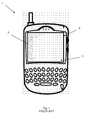
- FIG. 1 An example of a prior art portable electronic device 10 is generally shown in Figure 1 .
- the portable electronic device 1 includes a screen 2.
- a new address record 3 may be viewed.
- the new address record fills the entire screen 2 with multiple blank fields having field labels.
- This arrangement uses screen space inefficiently.
- Other portable electronic device applications also use screen space inefficiently and often also have a cluttered appearance, which is undesirable.
- a method for controlling display of data on a screen of a portable electronic device including: launching an application, the application having a field for receiving data and a field label for identifying the field, prompting a user to enter data into the field and removing the field label from the screen when the data is entered into the field.
- a portable electronic device including a processor for launching an application, the application having a field for receiving data and a field label for identifying the field and an input device for entering data into the field.
- the field label is removed from a screen of the portable electronic device when the data is entered into the field.
- the method includes providing the list of contacts, the list including at least one contact name, a name record of the contact name being stored in the address book application and providing a visual identifier adjacent each contact name, the visual identifier being associated with a field of the name record. The visual identifier is provided when a corresponding field of the name record for the contact name is populated.
- Figure 1 is a front view of a prior art portable electronic device
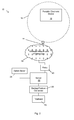
- Figure 2 is a functional block diagram of a communication system for portable electronic devices according to an embodiment
- Figure 3 is a functional block diagram of certain components of the portable electronic device of Figure 2 ;
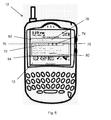
- Figure 4 is a front view of a portable electronic device of Figure 2 ;
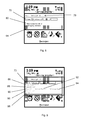
- Figures 5 to 12 are screen shots of the portable electronic device according to an embodiment.
- Figure 13 is a screen shot of a portable electronic device according to another embodiment.
- Figure 14 is a screen shot of a portable electronic device according to still another embodiment.
- Figure 15 is a screen shot of a portable electronic device according to yet another embodiment.
- prior art new address record 3 fills the entire screen 2 of portable electronic device 1.
- the new address record 3 fills at least two screens, as indicated by scroll indicator 11, which is provided in the lower right corner of the screen 2.
- Stored address records display both populated and blank fields. As such, each record fills more than one screen even in cases where only two or three fields are populated.
- FIG. 2 a functional block diagram of a communication system 10 and a portable electronic device 12 is generally shown.
- the portable electronic device 12 and the communication system 10 are operable to effect communications over a radio communications channel therebetween.
- the communication system 10 is functionally represented in Figure 2 and includes a base station 14.
- Base station 14 defines a coverage area, or cell 16 within which communications between the base station 14 and the portable electronic device 12 can be effected.
- the portable electronic device 12 is movable within cell 20 and can be moved to coverage areas defined by other cells, including those that are not illustrated in the present example.
- the base station 14 is part of a wireless network and infrastructure 18 that provides a link to the portable electronic device 12.
- the wireless network and infrastructure 18 includes additional base stations (not shown) that provide the other cells referred to above. Data is delivered to the portable electronic device 12 via wireless transmission from base station 14. Similarly, data is sent from the portable electronic device 12 via wireless transmission to the base stations 14.
- Wireless networks and infrastructures include, for example, data-centric wireless networks, voice-centric wireless networks, or dual-mode wireless networks.
- the wireless network and infrastructure 18 includes a dual-mode wireless network that supports both voice and data communications over the same physical base stations.
- the portable electronic device 12 communicates with the Internet through the wireless network and infrastructure 18.
- the communication system 10 further includes a relay device 20 that is connected to the wireless network and infrastructure 18 and to a server 22. It will be understood that the functions provided by the relay device 20 and the server 22 can be embodied in the same device.
- the server 22 is also connected to an administration server 24, as shown.
- the administration server 24 provides administrative services to and control over the server 22.
- the server 22 is also functionally coupled through a connector 26 to a backup/restore database 28.
- Other connectors and databases can be provided, for example, for synchronization purposes.
- the connector 26 receives commands from the server 22. It will be understood that the connector 26 is a functional component and can be provided by way of an application on the server 22.
- the backup/restore database 28 is used for storing data records, including, for example, copies of Short Message Service (SMS) or Personal Identification Number (PIN) messages sent from the portable electronic device 12.
- SMS Short Message Service
- PIN Personal Identification Number
- the portable electronic device 12 is based on the computing environment and functionality of a wireless personal digital assistant (PDA). It will be understood, however, that the portable electronic device 12 is not limited to a wireless personal digital assistant. Other portable electronic devices are possible, such as cellular telephones, smart telephones, and laptop computers.
- the portable electronic device 12 is based on a microcomputer including a processor 30 connected to a Read Only Memory (ROM) 32 that contains a plurality of applications executable by the processor 30 that enables the portable electronic device 12 to perform certain functions including, for example, PIN message functions, SMS message functions and cellular telephone functions.
- ROM Read Only Memory
- the processor 30 is also connected to a random access memory unit (RAM) 34 and a persistent storage device 36 which are responsible for various nonvolatile storage functions of the portable electronic device 12.
- the processor 30 receives input from various input devices including a keypad 38 and a trackwheel 50.
- the trackwheel 50 is located on a side of the portable electronic device 12 and can be rotated and inwardly depressed to provide user input.
- the processor 30 outputs to various output devices including an LCD display screen 40.
- a microphone 42 and phone speaker 44 are connected to the processor 30 for cellular telephone functions.
- the processor 30 is also connected to a modem and radio device 46.
- the modem and radio device 46 is used to connect to wireless networks using an antenna 48.
- the modem and radio device 46 transmits and receives voice and data communications to and from the portable electronic device 12 through the antenna 48.
- the portable electronic device 12 is operable to effect two way communication of voice and data.
- the portable electronic device 12 transmits and receives voice and data communications over the wireless network and infrastructure 18 via wireless communications with the base station 14 over a radio communications channel.
- the portable electronic device 12 includes a screen 13 that displays a window 62.
- An address record 64 which is associated with an Address Book application, is displayed in the window 62.
- the address record 64 is launched by selecting an Address Book icon 66 and navigating through a menu (not shown). The menu pops up when a particular input key is selected so that the menu does not take up valuable screen space when not in use.
- the window 62 occupies only a portion of the screen 50 so that the information that is displayed is not limited to the application that is currently running.
- Time/date information 52, a signal strength indicator 54, a battery strength indicator 56 and a name of a service provider 58 which are located near the top of the screen 50, may be viewed by a user while working in a particular application.
- a new message indicator 60 is provided so that a user may quickly determine if new messages have arrived while working in the application.
- icons that represent the different applications and functions available on the portable electronic device 12 may also be viewed by the user.
- Icon 66 which is associated with the Address Book application, and additional application icons may be viewed by scrolling in the direction indicated by the scroll indicator 11.
- the address book and other applications that are available on the portable electronic device 12 are stored in the persistent storage 36 thereof.
- the processor 30 executes the address book application and a list of contacts, which is stored in a Contacts Database in the persistent storage 36, is retrieved for display.
- the processor 30 relays information between the keypad 38, thumbwheel 50, screen 13 and the persistent storage 36 during operation of the application.
- the name field 78 appears near the top of the screen 50 and expandable regions 70, 72, 74 and 76 are selectable to view additional information associated therewith.
- expandable region 70 the user may view home addresses that are stored in the record 64.
- selecting expandable region 72 allows the user to view business addresses
- selecting expandable region 74 allows the user to view numbers, such as telephone numbers and facsimile numbers, for example.
- Expandable region 76 provides the user with other information that is associated with the name field 78.
- the processor 30 operates to resize the window 62 to display the related information stored in the persistent storage 36.
- the window 62 may also be maximized to the size of the entire screen if required by the volume of related information.
- the number of expandable regions is not limited to four and the type of information that is stored within each expandable region may be categorized in any manner.
- email addresses could be stored in a separate region and telephone/facsimile numbers could be stored with the addresses.
- an expandable region entitled Notes may contain text entered by the user relating to the name record.
- an expandable region entitled Business2 may be provided to accommodate contacts that have more than one business address.
- the layout of the address information in the address record 64 is similar to an address as it would appear on a mailing label.
- Such field labels are unnecessary because the user knows the location of each field from experience. If the user is unsure of the contents of a particular field, the user may select the field thereby causing a pop-up window 80 to appear. As shown, the pop-up window 80 provides a short description of the contents of the field.
- An advantage of the mailing label layout of the address information is that new users of the portable electronic device 12 will already be familiar with the layout. Therefore very little time will be spent learning how to navigate the address record. It is possible to provide an alternate layout that is not as common. The time required for a new user to become accustomed to the alternate layout, however, will be significantly greater than the time required for a new user to become accustomed to the mailing label layout.
- FIG. 6 to 12 screen shots of the portable electronic device are shown to describe the creation of an address record 64 according to an embodiment.
- navigation and selection of fields is described using the trackwheel 50, it will be appreciated by a person skilled in the art that other navigation and selection techniques may alternatively be used.
- trackballs, touch pads, cursor keys, joy sticks, pen pointers or other suitable input devices may be used.
- the user first navigates through menu options within the address book application using the trackwheel 50 to select a "create new record” option.
- the address record 64 includes several name fields that are provided above titled expandable regions 70-76, as shown in Figure 6 .
- a cursor 82 is scrolled through selectable fields within the application using the trackwheel 50.
- the cursor 82 is located in the First Name Field 84.
- the field name is removed. This conserves screen space because the field name becomes unnecessary once content is provided in the field.
- a pop-up window which provides a short description of the contents of the field, appears. Therefore, in the embodiment, the field name is not only unnecessary but is redundant.
- the "New Address" title is replaced therewith to further conserve screen space.
- the user may then proceed to fill in selected fields in the address record.
- pop-up window 80 appears when one of the expandable regions 70-76 is selected.
- the pop-up window 80 provides instructions to the user for filling in the address information.
- the user may alternatively expand the expandable region 70-76 by using the trackwheel 50 or navigating through a menu.
- the expandable region entitled Home 70 expands and a plurality of field labels appear in a mailing address layout, as shown in Figure 9 .
- the field labels include: Address1 86, Address2 88, City 90, State/Prov 92, Postal/Zip 94, Country 96 and Email 98.
- the field labels disappear, as shown in Figure 10 .
- Pop-up windows 80 are launched, which include the respective field labels, when characters are being entered into the field or the field is selected.
- the pop-up windows 80 do not launch immediately upon selection of the field. Instead a 0.5 second delay is provided. The delay may be lengthened or shortened as desired.
- expandable region 74 is expanded to show the various numbers stored on the address record 64 and allow the user to enter additional numbers.
- abbreviated field labels are used in order to minimize the amount of space that is used.
- full field labels may be used.
- H1 identifies the first home telephone number 100
- B1 identifies the first business telephone number 102. Both of these fields were created by selecting the "New" button 104, which expands as shown in Figure 12 when selected.
- the user In order to enter a new number, the user first selects the type of number and then enters the number. When displayed, a short form will be used in order to conserve screen space. As number labels are used, they are removed from the new list so that only one of each type of number may be entered.
- FIG. 13 Another embodiment is shown in Figure 13 .
- child fields are provided. The child fields are not shown until a parent field is selected.
- a Job Title field 108 which is shown grayed for the purpose of illustration, is only displayed once characters have been typed into the Company field 106.
- a photo 110 may be included with each name record, if desired.
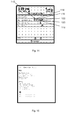
- a contact list which is generally a list of name fields 78 of name records 64, includes visual identifiers 112 adjacent the name field 78.
- the visual identifiers 112 correspond to fields of the name records in order to provide the user with a quick summary of the information that is contained in the record.
- the record for contact "George B" contains a home address, a business address, an email address, a telephone number and a web site address, which are identified by visual identifiers 114, 116, 118, 120 and 122, respectively.
- the visual identifiers 112 allow the user to determine quickly whether or not the record contains the desired information.
- the visual identifiers 112 may further be customized so that a user may easily differentiate between different types of telephone numbers and email addresses, for example.
- each visual identifier is the same, however, the visual identifiers are colour coded so that a user can differentiate therebetween.
- the visual identifiers can be circles that are coloured red, blue, orange and green to represent a home address, a business address, an email address and a web address. Any combination of visual identifier types and colours can be employed to provide a quick summary of information that is stored in a record may be provided.
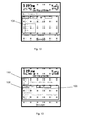
- an address record occupies the entire display screen, as shown in Figure 15 . Because the address record does not include any field labels, screen space is conserved, while the meaning of the data is maintained. As shown in Figure 15 , there is unused screen space available in the event that further information is added to this record.
- autocategorization software is provided to automatically assign categories when information is added to fields. This is useful to facilitate searching through the address records by using specific categories. Several default categories may be provided including "personal” and “business” for address book records. A business phone number, for example, would be retrieved if the search criteria included the category "business".
- information entered on a name record is colour-coded based on its category.
- the colour red is assigned to the category "home” and the colour blue is assigned to the category "business".
- a first mobile telephone number is red and a second mobile telephone number is blue
- a home telephone number is red
- a business telephone number is blue.
- the colour scheme is used consistently throughout the database so that a user is able to quickly and easily identify the category of various telephone numbers associated when viewing various name records. It will be appreciated that any technique that allows a user to quickly and easily recognize the category of data being presented may be used. Possible techniques include each category being assigned a different font, a different highlight colour or a different text size. It will be appreciated that such techniques may be used on their own or may be combined with other techniques.
- recently viewed web page URLs that match a pattern being typed by the user are provided in a drop down combo box. This is useful when the user is entering a web page URL on an address record for a contact. If the web page has been previously visited using the portable electronic device 10, the URL will appear in the drop down combo box and thus save the user from having to re-type the address.
Landscapes
- Engineering & Computer Science (AREA)
- General Engineering & Computer Science (AREA)
- Theoretical Computer Science (AREA)
- Human Computer Interaction (AREA)
- Physics & Mathematics (AREA)
- General Physics & Mathematics (AREA)
- Mobile Radio Communication Systems (AREA)
- Telephone Function (AREA)
- User Interface Of Digital Computer (AREA)
Priority Applications (3)
| Application Number | Priority Date | Filing Date | Title |
|---|---|---|---|
| EP06127200A EP1939714A1 (fr) | 2006-12-27 | 2006-12-27 | Procédé de présentation de données sur un petit écran |
| PCT/CA2007/002322 WO2008077246A1 (fr) | 2006-12-27 | 2007-12-20 | Procédé de présentation de données sur un petit écran |
| CA2673839A CA2673839C (fr) | 2006-12-27 | 2007-12-20 | Procede de presentation de donnees sur un petit ecran |
Applications Claiming Priority (1)
| Application Number | Priority Date | Filing Date | Title |
|---|---|---|---|
| EP06127200A EP1939714A1 (fr) | 2006-12-27 | 2006-12-27 | Procédé de présentation de données sur un petit écran |
Publications (1)
| Publication Number | Publication Date |
|---|---|
| EP1939714A1 true EP1939714A1 (fr) | 2008-07-02 |
Family
ID=38051286
Family Applications (1)
| Application Number | Title | Priority Date | Filing Date |
|---|---|---|---|
| EP06127200A Ceased EP1939714A1 (fr) | 2006-12-27 | 2006-12-27 | Procédé de présentation de données sur un petit écran |
Country Status (3)
| Country | Link |
|---|---|
| EP (1) | EP1939714A1 (fr) |
| CA (1) | CA2673839C (fr) |
| WO (1) | WO2008077246A1 (fr) |
Citations (4)
| Publication number | Priority date | Publication date | Assignee | Title |
|---|---|---|---|---|
| EP0171663A2 (fr) * | 1984-08-14 | 1986-02-19 | International Business Machines Corporation | Technique d'acide sur écran orientée sur les champs de saisie |
| US5805164A (en) | 1996-04-29 | 1998-09-08 | Microsoft Corporation | Data display and entry using a limited-area display panel |
| GB2341952A (en) * | 1998-09-24 | 2000-03-29 | Ibm | Multi-layer entry field for computer graphic user interface |
| WO2000029977A1 (fr) * | 1998-11-04 | 2000-05-25 | Cch Incorporated | Systeme automatise d'edition de formulaires et procede faisant intervenir un systeme expert a base de regles pour la generation dynamique d'une interface utilisateur graphique |
Family Cites Families (9)
| Publication number | Priority date | Publication date | Assignee | Title |
|---|---|---|---|---|
| CN1324464A (zh) * | 1998-08-26 | 2001-11-28 | 西姆泰克有限公司 | 映射数据文件的方法和设备 |
| JP4519381B2 (ja) * | 1999-05-27 | 2010-08-04 | テジック コミュニケーションズ インク | 自動訂正機能を備えたキーボード・システム |
| US6957395B1 (en) * | 2000-01-04 | 2005-10-18 | Apple Computer, Inc. | Computer interface having a single window mode of operation |
| AU2003296975A1 (en) * | 2002-12-13 | 2004-07-09 | Bea Systems, Inc. | System and method for mobile communication |
| US7839419B2 (en) * | 2003-10-23 | 2010-11-23 | Microsoft Corporation | Compositing desktop window manager |
| US20070254721A1 (en) * | 2004-06-21 | 2007-11-01 | Griffin Jason T | Handheld wireless communication device |
| US7689908B2 (en) * | 2005-01-31 | 2010-03-30 | Microsoft Corporation | Method and system for a target device display simulation |
| US8341551B2 (en) * | 2006-02-13 | 2012-12-25 | Research In Motion Limited | Method and arrangment for a primary actions menu for a contact data entry record of an address book application on a handheld electronic device |
| US8000741B2 (en) * | 2006-02-13 | 2011-08-16 | Research In Motion Limited | Handheld wireless communication device with chamfer keys |
-
2006
- 2006-12-27 EP EP06127200A patent/EP1939714A1/fr not_active Ceased
-
2007
- 2007-12-20 WO PCT/CA2007/002322 patent/WO2008077246A1/fr not_active Ceased
- 2007-12-20 CA CA2673839A patent/CA2673839C/fr active Active
Patent Citations (4)
| Publication number | Priority date | Publication date | Assignee | Title |
|---|---|---|---|---|
| EP0171663A2 (fr) * | 1984-08-14 | 1986-02-19 | International Business Machines Corporation | Technique d'acide sur écran orientée sur les champs de saisie |
| US5805164A (en) | 1996-04-29 | 1998-09-08 | Microsoft Corporation | Data display and entry using a limited-area display panel |
| GB2341952A (en) * | 1998-09-24 | 2000-03-29 | Ibm | Multi-layer entry field for computer graphic user interface |
| WO2000029977A1 (fr) * | 1998-11-04 | 2000-05-25 | Cch Incorporated | Systeme automatise d'edition de formulaires et procede faisant intervenir un systeme expert a base de regles pour la generation dynamique d'une interface utilisateur graphique |
Non-Patent Citations (4)
| Title |
|---|
| "TIME-DEPENDENT UNSOLICITED HELP", IBM TECHNICAL DISCLOSURE BULLETIN, IBM CORP. NEW YORK, US, vol. 31, no. 3, 1 August 1988 (1988-08-01), XP000106189, ISSN: 0018-8689 * |
| FIREFALCON: "TextBox With Tool Tip Control Implementation", THE CODE PROJECT, 6 August 2006 (2006-08-06), XP002435398, Retrieved from the Internet <URL:http://www.codeproject.com/useritems/textboxwithtooltipcontrol.asp> [retrieved on 20070524] * |
| INTERNET CITATION: "Conditional Control Visibility", 10 April 2006 (2006-04-10), pages 1 - 2, XP007909946, Retrieved from the Internet <URL:http://www.tech-archive.net/Archive/Access/microsoft.public.access.formscoding/2006-04/msg00603.html> [retrieved on 20090928] * |
| STUDIO 7.5: "Designing for Small Screens", October 2005, AVA PUBLISHING SA, LAUSANNE, SWITZERLAND, ISBN: 2-940373-07-8, XP002435401 * |
Also Published As
| Publication number | Publication date |
|---|---|
| CA2673839A1 (fr) | 2008-07-03 |
| CA2673839C (fr) | 2014-05-13 |
| WO2008077246A1 (fr) | 2008-07-03 |
Similar Documents
| Publication | Publication Date | Title |
|---|---|---|
| US6463304B2 (en) | Application launcher for a two-way mobile communications device | |
| US7953804B2 (en) | User interface for a handheld device | |
| US20030013483A1 (en) | User interface for handheld communication device | |
| US6560638B1 (en) | Method of composing electronic mail in which mail expressions corresponding to a category attribute of an electronic mail ID of the destination are inserted into the outgoing electronic mail | |
| US9798444B2 (en) | Restricted user interface navigation | |
| EP2140667B1 (fr) | Procédé et appareil portable pour rechercher des articles de différents types | |
| JP5118054B2 (ja) | 通信情報配信システム及び通信情報を配信する方法 | |
| US20110003620A1 (en) | Handheld electronic device including automatic selection of input language, and associated method | |
| US20100295791A1 (en) | Portable information terminal, character delivery method; and character temporary storage program product | |
| WO2010113457A1 (fr) | Dispositif terminal de communication et système de communication utilisant ce dispositif | |
| US8731534B2 (en) | Mobile terminal and method for displaying image according to call therein | |
| JP2006311556A (ja) | 移動通信端末機が実行する電話帳検索方法及び移動通信端末機における電話帳検索手段 | |
| CN101206552B (zh) | 用于在移动设备中提供选项的方法及装置 | |
| US20060259613A1 (en) | Systems and methods for discovering features in a communication device | |
| CN101166326B (zh) | 用于关联绘图功能与移动通信设备的联系人列表中的信息的方法和装置 | |
| US10156953B2 (en) | Method for presenting data on a small screen | |
| US6624809B1 (en) | Displayed information management method | |
| CN103164107A (zh) | 动态生成和使用图形化的联系人图谱的方法和装置 | |
| CA2673839C (fr) | Procede de presentation de donnees sur un petit ecran | |
| US20080003984A1 (en) | Method and system for improved handling of message templates | |
| EP2375707A1 (fr) | Procédé et dispositif d'interface utilisateur pour administrer des données de contact avec plusieurs étiquettes | |
| KR100673448B1 (ko) | 메모 검색기능이 구비된 이동통신 단말기 및 그 동작방법 | |
| CA2515870C (fr) | Interface utilisateur et procede de visionnement constant d'un dossier selectionne par l'utilisateur sur un dispositif mobile | |
| JP2010267269A (ja) | 携帯情報端末および一時文字保存プログラム | |
| KR20080038933A (ko) | 휴대 단말기의 키워드를 이용한 메시지 관리 방법 |
Legal Events
| Date | Code | Title | Description |
|---|---|---|---|
| PUAI | Public reference made under article 153(3) epc to a published international application that has entered the european phase |
Free format text: ORIGINAL CODE: 0009012 |
|
| 17P | Request for examination filed |
Effective date: 20061227 |
|
| AK | Designated contracting states |
Kind code of ref document: A1 Designated state(s): AT BE BG CH CY CZ DE DK EE ES FI FR GB GR HU IE IS IT LI LT LU LV MC NL PL PT RO SE SI SK TR |
|
| AX | Request for extension of the european patent |
Extension state: AL BA HR MK RS |
|
| AKX | Designation fees paid |
Designated state(s): AT BE BG CH CY CZ DE DK EE ES FI FR GB GR HU IE IS IT LI LT LU LV MC NL PL PT RO SE SI SK TR |
|
| AXX | Extension fees paid |
Extension state: RS Payment date: 20061227 Extension state: MK Payment date: 20061227 Extension state: HR Payment date: 20061227 Extension state: BA Payment date: 20061227 Extension state: AL Payment date: 20061227 |
|
| STAA | Information on the status of an ep patent application or granted ep patent |
Free format text: STATUS: THE APPLICATION HAS BEEN REFUSED |
|
| 18R | Application refused |
Effective date: 20110210 |