EP1942396A1 - Verfahren zur Steuerung des Touchpads in mobilem Kommunikationsendgerät und mobiles Kommunikationsendgerät damit - Google Patents
Verfahren zur Steuerung des Touchpads in mobilem Kommunikationsendgerät und mobiles Kommunikationsendgerät damit Download PDFInfo
- Publication number
- EP1942396A1 EP1942396A1 EP08000058A EP08000058A EP1942396A1 EP 1942396 A1 EP1942396 A1 EP 1942396A1 EP 08000058 A EP08000058 A EP 08000058A EP 08000058 A EP08000058 A EP 08000058A EP 1942396 A1 EP1942396 A1 EP 1942396A1
- Authority
- EP
- European Patent Office
- Prior art keywords
- touch pad
- state
- enter
- light
- input
- Prior art date
- Legal status (The legal status is an assumption and is not a legal conclusion. Google has not performed a legal analysis and makes no representation as to the accuracy of the status listed.)
- Ceased
Links
Images


Classifications
-
- G—PHYSICS
- G06—COMPUTING OR CALCULATING; COUNTING
- G06F—ELECTRIC DIGITAL DATA PROCESSING
- G06F1/00—Details not covered by groups G06F3/00 - G06F13/00 and G06F21/00
- G06F1/26—Power supply means, e.g. regulation thereof
- G06F1/32—Means for saving power
- G06F1/3203—Power management, i.e. event-based initiation of a power-saving mode
-
- G—PHYSICS
- G06—COMPUTING OR CALCULATING; COUNTING
- G06F—ELECTRIC DIGITAL DATA PROCESSING
- G06F1/00—Details not covered by groups G06F3/00 - G06F13/00 and G06F21/00
- G06F1/26—Power supply means, e.g. regulation thereof
- G06F1/32—Means for saving power
- G06F1/3203—Power management, i.e. event-based initiation of a power-saving mode
- G06F1/3234—Power saving characterised by the action undertaken
- G06F1/325—Power saving in peripheral device
- G06F1/3262—Power saving in digitizer or tablet
-
- G—PHYSICS
- G06—COMPUTING OR CALCULATING; COUNTING
- G06F—ELECTRIC DIGITAL DATA PROCESSING
- G06F1/00—Details not covered by groups G06F3/00 - G06F13/00 and G06F21/00
- G06F1/26—Power supply means, e.g. regulation thereof
- G06F1/32—Means for saving power
- G06F1/3203—Power management, i.e. event-based initiation of a power-saving mode
- G06F1/3234—Power saving characterised by the action undertaken
- G06F1/3287—Power saving characterised by the action undertaken by switching off individual functional units in the computer system
-
- H—ELECTRICITY
- H04—ELECTRIC COMMUNICATION TECHNIQUE
- H04B—TRANSMISSION
- H04B1/00—Details of transmission systems, not covered by a single one of groups H04B3/00 - H04B13/00; Details of transmission systems not characterised by the medium used for transmission
- H04B1/38—Transceivers, i.e. devices in which transmitter and receiver form a structural unit and in which at least one part is used for functions of transmitting and receiving
- H04B1/40—Circuits
-
- H—ELECTRICITY
- H04—ELECTRIC COMMUNICATION TECHNIQUE
- H04W—WIRELESS COMMUNICATION NETWORKS
- H04W52/00—Power management, e.g. Transmission Power Control [TPC] or power classes
- H04W52/02—Power saving arrangements
- H04W52/0209—Power saving arrangements in terminal devices
- H04W52/0251—Power saving arrangements in terminal devices using monitoring of local events, e.g. events related to user activity
- H04W52/0254—Power saving arrangements in terminal devices using monitoring of local events, e.g. events related to user activity detecting a user operation or a tactile contact or a motion of the device
-
- H—ELECTRICITY
- H04—ELECTRIC COMMUNICATION TECHNIQUE
- H04M—TELEPHONIC COMMUNICATION
- H04M2250/00—Details of telephonic subscriber devices
- H04M2250/22—Details of telephonic subscriber devices including a touch pad, a touch sensor or a touch detector
-
- Y—GENERAL TAGGING OF NEW TECHNOLOGICAL DEVELOPMENTS; GENERAL TAGGING OF CROSS-SECTIONAL TECHNOLOGIES SPANNING OVER SEVERAL SECTIONS OF THE IPC; TECHNICAL SUBJECTS COVERED BY FORMER USPC CROSS-REFERENCE ART COLLECTIONS [XRACs] AND DIGESTS
- Y02—TECHNOLOGIES OR APPLICATIONS FOR MITIGATION OR ADAPTATION AGAINST CLIMATE CHANGE
- Y02D—CLIMATE CHANGE MITIGATION TECHNOLOGIES IN INFORMATION AND COMMUNICATION TECHNOLOGIES [ICT], I.E. INFORMATION AND COMMUNICATION TECHNOLOGIES AIMING AT THE REDUCTION OF THEIR OWN ENERGY USE
- Y02D10/00—Energy efficient computing, e.g. low power processors, power management or thermal management
-
- Y—GENERAL TAGGING OF NEW TECHNOLOGICAL DEVELOPMENTS; GENERAL TAGGING OF CROSS-SECTIONAL TECHNOLOGIES SPANNING OVER SEVERAL SECTIONS OF THE IPC; TECHNICAL SUBJECTS COVERED BY FORMER USPC CROSS-REFERENCE ART COLLECTIONS [XRACs] AND DIGESTS
- Y02—TECHNOLOGIES OR APPLICATIONS FOR MITIGATION OR ADAPTATION AGAINST CLIMATE CHANGE
- Y02D—CLIMATE CHANGE MITIGATION TECHNOLOGIES IN INFORMATION AND COMMUNICATION TECHNOLOGIES [ICT], I.E. INFORMATION AND COMMUNICATION TECHNOLOGIES AIMING AT THE REDUCTION OF THEIR OWN ENERGY USE
- Y02D30/00—Reducing energy consumption in communication networks
- Y02D30/70—Reducing energy consumption in communication networks in wireless communication networks
Definitions
- the present invention relates to a method and corresponding mobile communication terminal for independently controlling a touch pad, a touch pad light and a display device on the mobile terminal.
- Mobile communication terminals now include many additional functions besides the basic call function. For example, users can now access the Internet, send voice and text messages, perform scheduling tasks, play games, listen to music, etc. on their mobile terminals. To provide these enhanced functions, the mobile terminals now include input devices such as a touch pad, a jog dial, a joystick, and a keypad including numbers and keys.
- input devices such as a touch pad, a jog dial, a joystick, and a keypad including numbers and keys.
- the related art sliding-type mobile communication terminal including a touch pad activates and deactivates the touch pad together with the display device of the terminal. That is, the touch pad and the display device are operated in a linked manner with each other.
- the display device when the display device is ON, the touch pad light is ON, and the touch pad is in an active state and when there is no input operation performed on the terminal, the display device is changed into a dim state (because there has been no input). Further, the touch pad light remains in an ON state and the touch pad remains in an active state.
- the touch pad light is turned OFF, and at the same time, the touch pad is deactivated.
- the activation of the touch pad is also linked to an ON/OFF state of the touch pad light.
- the touch pad light and the touch pad are operated in a linked manner, the touch pad cannot be used when the touch pad light is turned off. This is inconvenient for the user of the terminal.
- the touch pad when the display device is turned ON or is in a dim state, the touch pad is in an active state and the touch pad light is in an ON state.
- the terminal uses more battery consumption than necessary.
- the touch pad light when the touch pad light is in an OFF state, the touch pad light can only be turned ON by pressing a predetermined key. However, this action does not turn on the touch pad.
- one object of the present invention is to address the above-noted and other problems.
- One object of the invention method of controlling a mobile communication terminal comprising a touch pad, a corresponding touch pad light and a display device, comprising independently controlling an active state or an inactive state of the touch pad, an ON state or an OFF state of the touch pad light and at least an ON state or an OFF state of the display device.
- the present invention also provides a corresponding mobile communication terminal.
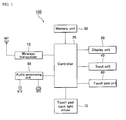
- FIG. 1 is a block diagram illustrating a mobile communication terminal 100 according to an embodiment of the present invention.
- the mobile communication terminal 100 includes a wireless transceiver 10, a controller 20, a memory unit 30, an input unit 40, a display unit 50, a touch pad unit 60, a touch pad back light driver 70 and an audio processing unit 80.
- the wireless transceiver 10 performs a communication function of the mobile communication terminal 100. Further, the controller 20 controls the overall operations of the mobile communication terminal 100. For example, the controller 20 controls the on/off state of the display unit 50, the active or inactive state of the touch pad unit 60, and the on/off state of a light of the touch pad unit 60.
- the memory unit 30 includes a program memory and a data memory.
- the program memory stores programs for controlling the operations of the mobile communication terminal 100
- the data memory stores user-data and other data used in operating the mobile terminal.
- the input unit 40 includes buttons or keys that the user selects to input numerals and character information.
- the input unit 40 also includes function buttons that the user can select to perform specific functions.
- the input unit 40 includes a key pad, a jog dial, a touch screen, a joy stick, etc.
- the display unit 50 displays information and menu screens used in operating the mobile terminal 100.
- the display unit 50 includes, for example, a liquid crystal display (LCD) or an organic light emitting diode (OLED).
- LCD liquid crystal display
- OLED organic light emitting diode
- the display unit 50 may include two or more display devices including an external display unit and an internal display unit.
- the touch pad unit 60 includes at least one touch pad that is used as an input device to receive input from a user. That is, the user can touch the touch pad to input or select desired characters or functions.
- the touch pad back light driver 70 turns on/off a light of the touch pad unit 60 by controlling a power supply to a back light of the touch pad unit 60.
- the touch pad back light driver 70 also controls the touch pad unit 60 to turn on or off the entire light of the touch pad unit 60 or only specific portions of the touch pad unit 60.
- the audio processing unit 80 outputs an audio signal that is decoded in the controller 20 through a speaker (SPK) or outputs an audio signal generated from a microphone (MIC) to the controller 20.
- SPK speaker
- MIC microphone
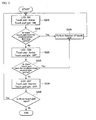
- FIG. 2 is a flowchart illustrating a method of controlling a touch pad in a mobile communication terminal according to an embodiment of the present invention.
- FIG. 1 will also be referred to in this description.
- the LCD of the display unit 50 is turned ON, the light of the touch pad unit 60 is turned ON and the touch pad included in the touch pad unit 60 is in an active state (S210).
- the active state of the touch pad means that the user can select or active a function on the touch pad by touching the appropriate portion of the touch pad.
- the controller 20 determines if the user has touched the touch pad within a first predetermined time period (S215), and when the controller 20 determines the user has touched the touch pad (e.g., to input information (Yes in S215), the controller 20 performs the function corresponding the touched touch pad (S240).
- the controller 20 determines the user has not touched the touch pad within the first predetermined time period (No in S215), the controller 20 reduces the brightness of the display unit 50 to a dim state (hereinafter, referred to as the 'dim state'), and controls the touch pad back light driver 70 to turn OFF the light of the touch pad unit 60 (S220). Note that the touch pad is still in the active state.
- the controller 20 determines if the user has touched the touch pad within a second predetermined time period (S225). When the user has not touched the touch pad (No in S225), the controller 20 turns OFF the display unit 50 and makes the touch pad unit 60 inactive (S230). That is, the controller 20 turns off the LCD included in the display unit 50. When the controller 20 determines the user has touched the touch pad within the second predetermined time period (Yes in S230), the controller 20 performs the function corresponding the touched touch pad (S240).
- step S230 the controller 20 again determines if the user has touched the touch pad (S235), and if so (Yes in S235), the method starts back at step S210.
- the controller 20 controls the touch pad back light driver 70 to turn ON the light of the touch pad unit 60.
- the function corresponding to the touched position of the touch pad is performed only when the touch pad is in an active state.
- the touch pad is touched by the user within the predetermined second time period (Yes in S225)
- the touch pad is in an active state so that the specific function of the touch pad is performed (S240), and at the same time, the light of the touch pad unit 60 and the display unit 50 is turned ON (S210).
- step S230 when the touch pad is in an inactive state in step S230, and when the touch pad is touched by the user (Yes in S235), the function of the touch pad 60 is not performed and the touch pad 60 changes from the inactive state to the active state, and the light of the touch pad unit 60 and the display unit 50 is turned ON (S210).
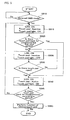
- FIG. 3 is a flowchart illustrating a method of controlling a touch pad in a mobile communication terminal according to another embodiment of the present invention.
- FIG. 3 is similar to FIG. 2 , but in FIG. 3 , a four-step control procedure is performed.
- FIG. 1 will also be referred to in this description.
- the LCD of the display unit 50 is turned ON, the light of the touch pad unit 60 is turned ON and the touch pad included in the touch pad unit 60 is in an active state (S310).
- the active state of the touch pad means that the user can select or active a function on the touch pad by touching the appropriate position of the touch pad.
- the controller 20 determines if the user has touched the touch pad within a first predetermined time period (S315), and when the controller 20 determines the user has touched the touch pad (e.g., to input information (Yes in S315), the controller 20 performs the function corresponding the touched touch pad (S350).
- the controller 20 determines the user has not touched the touch pad within the first predetermined time period (No in S315), the controller 20 turns the touch pad light OFF, but maintains the LCD in the display unit 50 in the ON state and maintains the touch pad of the touch pad unit 60 in an active state (S230).
- the LCD of the display unit 50 remains in an ON state
- the touch pad included in the touch pad unit 60 remains in the active state
- the touch pad light is changed into an OFF state. As such, it is possible to reduce power consumption by only turning off the light of the touch pad.
- the controller 20 determines if the user has touched the touch pad within a second predetermined time period (S325). When the user has not touched the touch pad (No in S325), the controller 20 reduces the brightness of the display unit 50 to a dim state, and maintains the previous states of the touch pad and touch pad light (S330).
- the controller 20 determines the user has touched the touch pad within the second predetermined time period (Yes in S325), the controller 20 performs the function corresponding the touched touch pad (S350). The controller 20 then determines if the user has touched the touch pad within a third predetermined time period (S335). When the controller 20 determines the user has touched the touch pad within the third predetermined time period (Yes in S335), the controller 20 performs the function corresponding the touched touch pad (S350).
- step S340 the controller 20 determines if there is input on the touch pad (S345), and if there is input on the touch pad (Yes in S345), the process returns to step S310. That is, the touch pad light and the LCD are turned ON and the touch pad is turned into an active state.
- the controller 20 controls the touch pad back light driver 70 to turn ON the light of the touch pad. Similar to the embodiment shown in FIG. 2 , when the touch pad 60 is touched by the user, the function on the touch pad is only performed when the touch pad is the active state.
- an input unit that is not a touch pad such as an input unit including a regular keypad or other input buttons.
- an OLED can be used as the display unit 50.
- FIG. 4 is a block diagram illustrating a mobile communication terminal 400 according to another embodiment of the present invention.
- the mobile communication terminal 400 includes a wireless transceiver 410, a controller 420, a memory unit 430, an input unit 440, a broadcast processing unit 450, a display unit 460, an audio processing unit 470, a touch pad unit 480 and a touch pad back light driver 490.
- the wireless transceiver 410 performs a communication function of the mobile communication terminal 400.
- the wireless transceiver 410 also receives a digital multimedia broadcast from a broadcasting station.
- the controller 420 controls the overall operations of the mobile communication terminal 400. For example, when there is a DMB broadcast performance request from the input unit 440, the controller 420 changes a current mode of the terminal 400 into a DMB mode and displays the DMB broadcast on the display unit 460.
- the controller 420 sets the touch pad unit 480 into an inactive state, and controls the touch pad light driver 490 to turn ON a light of the touch pad unit 480. That is, the touch pad unit 480 is set into an inactive state when entering the DMB mode to prevent an erroneous operation if the user accidentally touches the touch pad unit 480.
- the controller 420 changes the touch pad unit 480 into an active state.
- the memory unit 430 includes a program memory and a data memory.
- the program memory stores programs for controlling the operations of the mobile communication terminal 400
- the data memory stores user-data and other data used in operating the mobile terminal.
- the input unit 440 includes buttons or keys that the user selects to input numerals and character information.
- the input unit 440 also includes function buttons that the user can select to perform specific functions.
- the input unit 440 includes a key pad, a jog dial, a touch screen, a joy stick etc.
- the input unit 440 receives a DMB broadcast performance request from the user.
- the display unit 460 displays information and menu screens used in operating the mobile terminal 400.
- the display unit 460 includes, for example, a liquid crystal display (LCD) or an organic light emitting diode (OLED). Further, the display unit 460 may include two or more display devices including an external display unit and an internal display unit. The display unit 460 also displays received DMB broadcasts.
- the touch pad unit 480 includes at least one touch pad that is used as an input device to receive input from a user. That is, the user can touch the touch pad to input or select desired characters or functions.
- the touch pad back light driver 490 turns ON/OFF a light of the touch pad unit 480 by controlling a power supply to a back light of the touch pad unit 480.
- the touch pad back light driver 490 also controls the touch pad unit 480 to turn ON or OFF the entire light of the touch pad unit 480 or only specific portions of the touch pad unit 480.
- the touch pad unit 480 is set in an inactive state by the controller 420 when entering the DMB mode.
- the audio processing unit 470 outputs an audio signal that is decoded in the controller 420 through a speaker (SPK) or outputs an audio signal generated from a microphone (MIC) to the controller 420.
- the broadcast processing unit 450 processes a DMB video/audio received through the wireless transceiver 410, and displays the DMB broadcast on the display unit 460.
- FIG. 5 is a flowchart illustrating a method of controlling a touch pad in a mobile communication terminal during a DMB broadcast according to an embodiment of the present invention.
- the LCD of the display unit 460 always remains in an ON state after entering the DMB broadcast mode.
- FIG. 4 will also be referred to in this description.
- the controller 420 determines whether or not the user has entered the DMB mode to watch a particular DMB broadcast (S510).
- the controller 420 displays the broadcast on the display unit 460 (i.e., the LCD of the display unit 460 is turned ON) (S515).
- the touch pad unit 480 is also deactivated and the touch pad light for the touch pad unit 480 is turned ON.
- the controller 420 determines if the user touches the touch pad included in the touch pad unit 480 within a first predetermined time period (S515). When the controller 420 determines the user has not touched the touch pad within the first predetermined time period (No in 5520), the controller 420 turns OFF the touch pad light, maintains the LCD of the display unit 460 in the ON state and maintains the touch pad in the inactive state (S530).
- the controller 420 determines the user has touched the touch pad of the touch pad unit 480 (Yes in S520), the functions of the touch pad are not performed, and the controller 420 changes the touch pad from an inactive state into an active state (S540). Accordingly, the user has to touch the touch pad once to active the touch pad and again to input a desired function.
- step S540 the controller 420 determines if the user has touched the touch pad within a second predetermined time period (S545).
- the controller 420 determines the user has touched the touch pad (Yes in S545), and the touch pad is in the active state, the controller 420 performs the corresponding function touched by the user (S550).
- the process returns to step S515 and the controller changes the touch pad into an inactive state again (S515).
- step S530 the controller 420 determines if the user has touched the touch pad (S535). If the user has touched the touch pad (Yes in S535), the process performs the step S540. If the user has not touched the touch pad (No in S535), the states in step S530 are maintained.
- first, second and third predetermined time periods may be set in advance by the manufacturer of the terminal.
- the time periods may also be changed or set by a user of the terminal using the appropriate menu options.
- an active state or an inactive state of the touch pad is controlled independently of an ON/OFF state of a touch pad light, that is to say that the touch pad and the touch pad light are controlled separately. Accordingly, although the user touches the touch pad in the state that the touch pad light is turned off, when the touch pad is in an active state, a function of the touch pad can be performed.
- the touch pad light when the touch pad light is in an OFF state, and when the user touches a touch pad, all lights of the touch pads or the lights for a specific touch pad are turned ON so that the user can better see the touch pads.
Landscapes
- Engineering & Computer Science (AREA)
- Theoretical Computer Science (AREA)
- General Engineering & Computer Science (AREA)
- Physics & Mathematics (AREA)
- General Physics & Mathematics (AREA)
- Computer Networks & Wireless Communication (AREA)
- Signal Processing (AREA)
- Computer Hardware Design (AREA)
- Computing Systems (AREA)
- Telephone Function (AREA)
Applications Claiming Priority (1)
| Application Number | Priority Date | Filing Date | Title |
|---|---|---|---|
| KR1020070000994A KR20080064274A (ko) | 2007-01-04 | 2007-01-04 | 이동통신단말기의 터치패드 제어방법 및 그 이동통신단말기 |
Publications (1)
| Publication Number | Publication Date |
|---|---|
| EP1942396A1 true EP1942396A1 (de) | 2008-07-09 |
Family
ID=39106352
Family Applications (1)
| Application Number | Title | Priority Date | Filing Date |
|---|---|---|---|
| EP08000058A Ceased EP1942396A1 (de) | 2007-01-04 | 2008-01-03 | Verfahren zur Steuerung des Touchpads in mobilem Kommunikationsendgerät und mobiles Kommunikationsendgerät damit |
Country Status (4)
| Country | Link |
|---|---|
| US (1) | US20080192019A1 (de) |
| EP (1) | EP1942396A1 (de) |
| KR (1) | KR20080064274A (de) |
| CN (1) | CN101227678A (de) |
Cited By (4)
| Publication number | Priority date | Publication date | Assignee | Title |
|---|---|---|---|---|
| WO2010098744A1 (en) | 2009-02-24 | 2010-09-02 | Hewlett-Packard Development Company, L.P. | Method and system to lower power consumption |
| EP2469376A3 (de) * | 2010-12-21 | 2013-08-07 | Sony Corporation | Bildanzeigesteuerungsvorrichtung und Bildanzeigesteuerungsverfahren |
| EP2352073A4 (de) * | 2008-11-05 | 2013-10-02 | Nec Corp | Tragbares elektronisches gerät, energiesparverfahren für das tragbare elektronische gerät sowie energiesparprogramm |
| EP2927807A4 (de) * | 2012-11-27 | 2015-12-09 | Zte Corp | Verfahren zur aktivierung eines endgerätes und endgerät |
Families Citing this family (16)
| Publication number | Priority date | Publication date | Assignee | Title |
|---|---|---|---|---|
| JP5223313B2 (ja) * | 2007-11-30 | 2013-06-26 | 富士通モバイルコミュニケーションズ株式会社 | 移動通信機器 |
| JP2009272996A (ja) * | 2008-05-09 | 2009-11-19 | Toshiba Corp | 携帯端末 |
| US20100110040A1 (en) * | 2008-10-30 | 2010-05-06 | Samsung Electronics Co., Ltd. | Touch controller having increased sensing sensitivity, and display driving circuit and display device and system having the touch controller |
| KR101529922B1 (ko) * | 2008-11-26 | 2015-06-18 | 엘지전자 주식회사 | 단말기 및 그 제어 방법 |
| JP5639644B2 (ja) * | 2009-05-29 | 2014-12-10 | トムソン ライセンシングThomson Licensing | Ledインジケータを含む電子装置及び消費エネルギー節減方法 |
| TWM393739U (en) * | 2010-02-12 | 2010-12-01 | Pixart Imaging Inc | Optical touch control apparatus |
| US20110242043A1 (en) * | 2010-04-06 | 2011-10-06 | Mark Yarvis | Device with capacitive touchscreen panel and method for power management |
| CN102256010B (zh) * | 2011-06-27 | 2014-04-09 | 惠州Tcl移动通信有限公司 | 移动设备及其背光控制方法 |
| KR101397084B1 (ko) | 2012-07-02 | 2014-05-20 | 엘지전자 주식회사 | 이동 단말기 |
| US9128712B2 (en) * | 2012-08-10 | 2015-09-08 | Blackberry Limited | Electronic device including touch-sensitive display and method of detecting touches |
| JP5904055B2 (ja) * | 2012-08-17 | 2016-04-13 | コニカミノルタ株式会社 | 携帯型の情報機器およびコンピュータープログラム |
| US9141243B2 (en) | 2013-09-03 | 2015-09-22 | Blackberry Limited | Electronic device including touch-sensitive display and method of detecting touches |
| WO2015085501A1 (zh) * | 2013-12-11 | 2015-06-18 | 华为终端有限公司 | 一种屏幕控制方法、屏幕控制装置以及触控终端 |
| KR20160099397A (ko) | 2015-02-12 | 2016-08-22 | 삼성전자주식회사 | 제한된 실행 환경에서 결제 기능을 수행하기 위한 방법 및 장치 |
| US12254814B2 (en) * | 2022-04-06 | 2025-03-18 | Chongqing Boe Optoelectronics Technology Co., Ltd. | Drive apparatus and display apparatus |
| CN115047987A (zh) * | 2022-05-30 | 2022-09-13 | 凯晖科技股份有限公司 | 触摸板防误触碰方法、装置及计算机设备 |
Citations (3)
| Publication number | Priority date | Publication date | Assignee | Title |
|---|---|---|---|---|
| US6560612B1 (en) * | 1998-12-16 | 2003-05-06 | Sony Corporation | Information processing apparatus, controlling method and program medium |
| US20040125947A1 (en) * | 2002-12-30 | 2004-07-01 | Michael Charlier | Method and apparatus to deploy a mini-touchpad on a cellular phone |
| US20060192748A1 (en) * | 2005-02-28 | 2006-08-31 | Lowles Robert J | Backlight control for a portable computing device |
Family Cites Families (2)
| Publication number | Priority date | Publication date | Assignee | Title |
|---|---|---|---|---|
| US6278887B1 (en) * | 1999-02-05 | 2001-08-21 | Neopoint, Inc. | System and method for power conservation in a wireless communication handset |
| US6757002B1 (en) * | 1999-11-04 | 2004-06-29 | Hewlett-Packard Development Company, L.P. | Track pad pointing device with areas of specialized function |
-
2007
- 2007-01-04 KR KR1020070000994A patent/KR20080064274A/ko not_active Withdrawn
-
2008
- 2008-01-03 US US11/969,140 patent/US20080192019A1/en not_active Abandoned
- 2008-01-03 EP EP08000058A patent/EP1942396A1/de not_active Ceased
- 2008-01-04 CN CNA200810009581XA patent/CN101227678A/zh active Pending
Patent Citations (3)
| Publication number | Priority date | Publication date | Assignee | Title |
|---|---|---|---|---|
| US6560612B1 (en) * | 1998-12-16 | 2003-05-06 | Sony Corporation | Information processing apparatus, controlling method and program medium |
| US20040125947A1 (en) * | 2002-12-30 | 2004-07-01 | Michael Charlier | Method and apparatus to deploy a mini-touchpad on a cellular phone |
| US20060192748A1 (en) * | 2005-02-28 | 2006-08-31 | Lowles Robert J | Backlight control for a portable computing device |
Cited By (8)
| Publication number | Priority date | Publication date | Assignee | Title |
|---|---|---|---|---|
| EP2352073A4 (de) * | 2008-11-05 | 2013-10-02 | Nec Corp | Tragbares elektronisches gerät, energiesparverfahren für das tragbare elektronische gerät sowie energiesparprogramm |
| WO2010098744A1 (en) | 2009-02-24 | 2010-09-02 | Hewlett-Packard Development Company, L.P. | Method and system to lower power consumption |
| EP2391930A4 (de) * | 2009-02-24 | 2012-08-22 | Hewlett Packard Development Co | Verfahren und system zur verringerung des stromverbrauchs |
| US8868900B2 (en) | 2009-02-24 | 2014-10-21 | Hewlett-Packard Development Company, L.P. | Method and system to lower power consumption |
| CN102334084B (zh) * | 2009-02-24 | 2015-01-07 | 惠普开发有限公司 | 用于降低功耗的方法和系统 |
| EP2469376A3 (de) * | 2010-12-21 | 2013-08-07 | Sony Corporation | Bildanzeigesteuerungsvorrichtung und Bildanzeigesteuerungsverfahren |
| US9703403B2 (en) | 2010-12-21 | 2017-07-11 | Sony Corporation | Image display control apparatus and image display control method |
| EP2927807A4 (de) * | 2012-11-27 | 2015-12-09 | Zte Corp | Verfahren zur aktivierung eines endgerätes und endgerät |
Also Published As
| Publication number | Publication date |
|---|---|
| CN101227678A (zh) | 2008-07-23 |
| US20080192019A1 (en) | 2008-08-14 |
| KR20080064274A (ko) | 2008-07-09 |
Similar Documents
| Publication | Publication Date | Title |
|---|---|---|
| US20080192019A1 (en) | Method of controlling touch pad in mobile communication terminal and mobile communication terminal thereof | |
| KR101346931B1 (ko) | 터치 스크린을 구비한 전자 기기 및 이를 이용한애플리케이션 실행 방법 | |
| CN102629163B (zh) | 控制触摸面板的操作的方法和支持所述方法的便携式终端 | |
| US20110296416A1 (en) | Method and apparatus for managing an application being executed in a portable terminal | |
| KR20110133274A (ko) | 휴대 단말기의 메시지 리스트 표시 방법 및 장치 | |
| KR20100032660A (ko) | 휴대단말기의 터치스크린 동작 제어 방법 및 장치 | |
| JP2010231618A (ja) | 携帯端末装置、及びアプリケーション起動方法 | |
| KR101658440B1 (ko) | 세미활성모드 상시 정보 표시창을 갖는 이동통신기기 | |
| KR101577400B1 (ko) | 휴대 단말기의 정보 표시 방법 및 장치 | |
| KR101717584B1 (ko) | 휴대 단말기의 통신 설정 제어 방법 및 이를 기반으로 운용되는 휴대 단말기 | |
| CN103744574A (zh) | 一种用于移动终端的闹钟关闭方法、装置和移动终端 | |
| KR100543302B1 (ko) | 이동통신 단말기에서 멀티미디어 작업 중 선택적 수신 방법 | |
| JP4102383B2 (ja) | 移動無線端末装置 | |
| CN107391732B (zh) | 应用程序的功能引导方法、装置及终端设备 | |
| US9958969B2 (en) | Apparatus and method for automatically registering and executing preferred function in a mobile communication terminal | |
| KR20110068027A (ko) | 휴대 단말기의 전력 제어 방법 및 장치 | |
| CN105808716A (zh) | 闹钟提醒方法、装置及终端 | |
| JP5697341B2 (ja) | 携帯電子機器 | |
| JPWO2008081945A1 (ja) | 携帯情報端末 | |
| JP4743540B2 (ja) | 無線通信端末装置 | |
| JP2012151729A (ja) | 携帯端末及びその動作方法 | |
| KR20110127391A (ko) | 휴대 단말기의 gui제공 방법 및 장치 | |
| JP5513280B2 (ja) | 携帯端末、輝度制御プログラムおよび輝度制御方法 | |
| JP2012203763A (ja) | 携帯端末装置、携帯端末装置の省電力制御方法および携帯端末装置の省電力制御プログラム | |
| JP2010278689A (ja) | 情報端末装置 |
Legal Events
| Date | Code | Title | Description |
|---|---|---|---|
| PUAI | Public reference made under article 153(3) epc to a published international application that has entered the european phase |
Free format text: ORIGINAL CODE: 0009012 |
|
| 17P | Request for examination filed |
Effective date: 20080103 |
|
| AK | Designated contracting states |
Kind code of ref document: A1 Designated state(s): AT BE BG CH CY CZ DE DK EE ES FI FR GB GR HR HU IE IS IT LI LT LU LV MC MT NL NO PL PT RO SE SI SK TR |
|
| AX | Request for extension of the european patent |
Extension state: AL BA MK RS |
|
| AKX | Designation fees paid |
Designated state(s): AT BE BG CH CY CZ DE DK EE ES FI FR GB GR HR HU IE IS IT LI LT LU LV MC MT NL NO PL PT RO SE SI SK TR |
|
| 17Q | First examination report despatched |
Effective date: 20090827 |
|
| STAA | Information on the status of an ep patent application or granted ep patent |
Free format text: STATUS: THE APPLICATION HAS BEEN REFUSED |
|
| 18R | Application refused |
Effective date: 20110118 |