EP1947561A2 - Verfahren zum Anzeigen eines Browsers und dieses verwendende Endgerät - Google Patents
Verfahren zum Anzeigen eines Browsers und dieses verwendende Endgerät Download PDFInfo
- Publication number
- EP1947561A2 EP1947561A2 EP08000852A EP08000852A EP1947561A2 EP 1947561 A2 EP1947561 A2 EP 1947561A2 EP 08000852 A EP08000852 A EP 08000852A EP 08000852 A EP08000852 A EP 08000852A EP 1947561 A2 EP1947561 A2 EP 1947561A2
- Authority
- EP
- European Patent Office
- Prior art keywords
- text
- text field
- field
- input
- user
- Prior art date
- Legal status (The legal status is an assumption and is not a legal conclusion. Google has not performed a legal analysis and makes no representation as to the accuracy of the status listed.)
- Granted
Links
Images





Classifications
-
- G—PHYSICS
- G06—COMPUTING OR CALCULATING; COUNTING
- G06F—ELECTRIC DIGITAL DATA PROCESSING
- G06F3/00—Input arrangements for transferring data to be processed into a form capable of being handled by the computer; Output arrangements for transferring data from processing unit to output unit, e.g. interface arrangements
- G06F3/01—Input arrangements or combined input and output arrangements for interaction between user and computer
- G06F3/048—Interaction techniques based on graphical user interfaces [GUI]
- G06F3/0481—Interaction techniques based on graphical user interfaces [GUI] based on specific properties of the displayed interaction object or a metaphor-based environment, e.g. interaction with desktop elements like windows or icons, or assisted by a cursor's changing behaviour or appearance
-
- G—PHYSICS
- G06—COMPUTING OR CALCULATING; COUNTING
- G06F—ELECTRIC DIGITAL DATA PROCESSING
- G06F16/00—Information retrieval; Database structures therefor; File system structures therefor
- G06F16/90—Details of database functions independent of the retrieved data types
- G06F16/95—Retrieval from the web
- G06F16/957—Browsing optimisation, e.g. caching or content distillation
- G06F16/9577—Optimising the visualization of content, e.g. distillation of HTML documents
Definitions
- the present invention relates to a terminal, and more particularly, to a method of displaying a browser including a text field and a terminal implementing the same.
- a mobile communication terminal is regarded as a necessity in a modern society to be globally used.
- efforts have been made to the developments of the mobile communication terminals by taking slimness and fast Internet access capability into consideration.
- a text field of an Internet browser means a previously provided input box to enable a terminal user to input prescribed information such as word search field, ID/password field, URL field, etc.
- a user has difficulty in inputting the information correctly due to the fact that the screen size is too small.
- it is difficult for the user to view and check whether the inputted text is correct because the screen is too small.
- the present invention is directed to a method of displaying a browser including a text field and terminal implementing the same that substantially obviate one or more problems due to limitations and disadvantages of the
- An object of the present invention is to provide a terminal, method and computer program for controlling a display of an input field on a screen and for controlling a user-input operation, which are user-friendly and convenient.
- An object of the present invention is to provide a method of displaying a browser including a text field and a terminal implementing the same, by which an environment facilitating a terminal user to input prescribed information to a text field of an Internet browser despite a relatively small-sized screen of a display unit of the terminal.
- a display method in a terminal includes displaying a browser including at least one or more text fields, selecting a specific text field from the at least one or more text fields, and enlarging the selected text field.
- a display method in a terminal includes displaying a browser including at least one or more text fields, selecting a specific text field from the at least one or more text fields, and generating a text field input window for the selected text field.
- a terminal in another aspect of the present invention, includes an input unit to receive a user command, a display unit to display a browser including at least one or more text fields, and a control unit configured to, when a specific one of the at least one or more text fields is selected via the input unit, enlarge the selected text field.
- a terminal in another aspect of the present invention, includes an input unit to receive a user command, a display unit to display a browser including at least one or more text fields, and a control unit configured to, when a specific one of the at least one or more text fields is selected via the input unit, generate a text field input window.
- a display method for a mobile terminal comprising: displaying a browser including at least one or more text fields; selecting one text field from the at least one or more text fields; and enlarging the selected text field and displaying a keypad on a screen of the mobile terminal, in response to the selection.
- a display method for a mobile terminal comprising: displaying a browser including at least one or more text fields; selecting a specific text field from the at least one or more text fields; displaying an input area in addition to the selected text field on a screen of the mobile terminal, in response to the selection of the specific text field; and displaying a user's input on the input area.
- a display method for a mobile terminal comprising: displaying at least one or more text fields; receiving a user's touch of an area in one of the at least one or more text fields; and magnifying an area associated with the user's touch according to the user's touch, wherein the magnified area is used for an input operation.
- a display method for a mobile terminal comprising: displaying a browser including at least one or more text fields; receiving a user's touch of one text field from the at least one or more text fields; and in response to the user's touch, enlarging the selected text field and/or displaying an input field in addition to the selected text field, wherein the enlarged text field and/or the displayed input field is used for the user's input.
- FIG. 1 is a schematic block diagram of a mobile terminal according to an embodiment of the present invention.
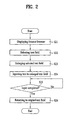
- FIG. 2 is a flowchart of a method of displaying a browser according to a first embodiment of the present invention
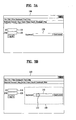
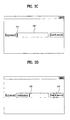
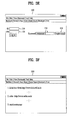
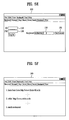
- FIGs. 3A to 3H are diagrams of examples of a screen of a terminal display unit to implement the browser display method according to the first embodiment of the present invention
- FIG. 4 is a flowchart of a method of displaying a browser according to a second embodiment of the present invention.
- FIGs. 5A to 5F are diagrams of examples of a screen of a terminal display unit to implement the browser display method according to the second embodiment of the present invention.
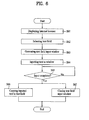
- FIG. 6 is a flowchart of a method of displaying a browser according to a third embodiment of the present invention.
- FIGs. 7A to 7E are diagrams of examples of a screen of a terminal display unit to implement the browser display method according to the third embodiment of the present invention.
- a "terminal” refers to and encompasses any kind of terminal which can be used for a terminal user to input prescribed information to a text field provided to a display screen according to the present invention.
- the terminal in one example, includes a mobile terminal, which is capable of an Internet access to use Internet site pages, such as a PDA, a hand-held computer, a notebook computer, a mobile phone, and the like. Yet, it is to be understood that a scope of the present invention needs not to be restricted to a mobile terminal explained in the following description.
- FIG. 1 is a schematic block diagram of a mobile terminal according to the present invention.
- a terminal 1 (e.g., a mobile terminal) according to an embodiment of the present invention 1 includes a communicating unit 10, a display unit 20, a memory unit 30, an input unit 40, and a control unit 50.
- the mobile terminal according to the present invention can be provided with other various additional elements (such as a battery unit (not shown)) as well as the aforesaid elements.
- additional elements such as a battery unit (not shown)
- explanations for the additional elements will be omitted in the following description for concise explanation of the present invention.
- at least two elements can be combined to configure one element or one element can be divided into at least two elements. All components of the terminal 1 are operatively coupled and configured.
- the communicating unit 10 enables the terminal 1 to carry out Internet communications with an external environment.
- the terminal 1 is a mobile communication terminal such as a mobile phone or a mobile device having a phone capability
- the communicating unit 10 enables the terminal 1 to access a mobile communication network for the Internet communications.
- the communicating unit 10 enables a terminal user to have voice communications with a third party as well.
- the display unit 20 displays various kinds of video and other information relating to functions executed in the terminal 1.
- the display unit 20 displays a browser that enables a terminal user to access an Internet web page (or 'wap' page in case of wireless Internet) when the terminal performs Internet communications via the communicating unit 10.
- the display unit 20 can include a touchscreen for the convenience and facilitation of a terminal manipulation, and can include one or more screens.
- the memory unit (or storage unit) 30 plays a role in storing various kinds of software, firmware, and/or data used for the operations of the terminal 1.
- the memory unit 30 stores a browser program to view an Internet web page in case of an Internet access.
- the input unit 40 e.g., a keypad, enables a terminal user to input various kinds of information or commands to the terminal 1.
- the display unit 20 is implemented with a touchscreen, the touchscreen may be considered as part of the input unit 40.
- control unit 50 controls the communicating unit 10, the display unit 20, the memory unit 30, and the input unit 40 to implement a browser displaying method explained in the following description to be executed in the terminal 1.
- Embodiments of a method of displaying a browser according to the present invention are explained in the following description. Assuming that the display unit 20 includes a touchscreen, the browser displaying method according to the present invention is explained. Yet, it is apparent that the present invention can be implemented not only by the touchscreen of the display unit 20 but also by a keypad manipulation of the input unit 40.
- FIGs. 2 to 3H A method of displaying a browser according to a first embodiment of the present invention is explained with reference to FIGs. 2 to 3H as follows.
- FIG. 2 is a flowchart of a method of displaying a browser according to a first embodiment of the present invention
- FIGs. 3A to 3H are diagrams of various examples of a screen of a terminal display unit to implement the browser display method according to the first embodiment of the present invention.
- the method of FIG. 2 is implemented in the terminal 1, but can be implemented in other suitable device.
- an Internet browser 100 is displayed on a screen of the display unit 20 of the terminal 1 (S21).
- the Internet browser 100 can be provided with at least one or more text fields.
- an 'ID' text field 110, a 'password' text field 120, and a 'keyword' text field (e.g., search field) 130 are exemplarily shown in FIG. 3A .
- FIG. 3B exemplarily shows that the 'keyword' text field 130 is selected.
- the text field selection is carried out by touching (132) a portion of the touchscreen where the 'keyword' text field 130 is located.
- the selected text field 130 is enlarged on the screen.
- the selected text field 130 as enlarged can fill the entire screen or a part of the screen having other images displayed therein.
- FIG. 3B exemplarily shows that a dotted line 140 indicates the portion that is enlarged if the text field 130 is selected.
- the dotted line 140 is provided to help the understanding of the present invention. So, it is unnecessary for the dotted line 140 to appear on the screen actually.
- a size of the text field to be enlarged may be set by the terminal user in advance.
- a cursor 135 is displayed within the enlarged selected text field 130 to indicate that a text can be inputted to the text field.
- the terminal user inputs a specific keyword, text or any data to the enlarged text field 130 via the input unit 40 (S24) .
- the user enters "restaurant” into the enlarged text field 130.
- the terminal user selects a search execution' icon 150 to inform the terminal 1 of the completion of the input operation as shown in FIG. 3D (S25).
- the enlarged text field 130 returns to its original size (S26).
- the terminal 1 then provides a result of the search according to the inputted keyword to the terminal user via the display unit screen 100 as shown in FIG. 3F .
- the terminal 1 can be configured to switch the image shown in FIG. 3D to the image shown in FIG. 3F directly.
- the style of enlarging the selected field 130 is not limited to the aforesaid configuration only.
- the selected text field can be enlarged as shown in FIG. 3G .
- the portion corresponding to the selected text field on the display unit screen 100 is enlarged with a magnifying glass 134 shown thereon. This is also applicable to a second embodiment (or any other embodiment) of the present invention as well.
- a virtual keypad 155 can be displayed together with the selected text field 130 on the screen of the display unit 20 as shown in Fig. 3H , to facilitate the user's text input.
- the virtual keypad 155 may be displayed along with the text field 130 (which may or may not be enlarged).
- the virtual keypad 155 may also be initiated to display on the screen in response to the user's manipulation of the input unit 40, other than the user's selection of the text field 130.
- the first embodiment of the present invention can be modified into a second embodiment of the present invention.
- the second embodiment of the present invention differs from the first embodiment of the present invention in a timing of enlarging a selected text field.
- a method of displaying a browser according to a second embodiment of the present invention is explained with reference to FIGs. 4 to 5F as follows.
- FIG. 4 is a flowchart of a method of displaying a browser according to a second embodiment of the present invention
- FIGs. 5A to 5F are diagrams of a screen of a terminal display unit to implement the browser display method according to the second embodiment of the present invention.
- the method of FIG. 4 is implemented in the terminal 1, but can be implemented in other suitable device.
- an Internet browser 100 is displayed on the screen of the display unit 20 (S41).
- the Internet browser 100 can be provided with at least one or more text fields.
- an 'ID' text field 110, a 'password' text field 120, and a 'keyword' text field 130 are exemplarily shown in FIG. 5A .
- FIG. 5B exemplarily shows that the 'keyword' text field 130 is selected, by a user touching the text field 130. Then, a cursor 135 indicating that a text (or other input) can be inputted to the text field 130 is displayed within the selected text field 130 shown in FIG. 5C .
- the terminal user inputs a specific keyword or other data to the selected text field 130 via the input unit 40 (S43).
- the portion of the image corresponding to the selected text field 130 is enlarged to improve the terminal user's visibility (S44).
- the selected text field 130 is enlarged on the screen at this time.
- FIG. 5C exemplarily shows that a dotted line 140 indicates the portion that is to be enlarged if the text field 130 is selected.
- the dotted line 140 is provided to help with the understanding of the present invention. So, it is unnecessary for the dotted line 140 to appear on the screen actually.
- a size of the text field to be enlarged is set by the terminal user in advance.
- the terminal user selects a 'search execution' icon 150 to inform the terminal 1 of the completion of the input operation (S45).
- the enlarged text field 130 including the inputted keyword (e.g., 'restaurant') shown, as shown in FIG. 5E returns to its original size (S46).
- the terminal 1 then provides a result of the search, as shown in FIG. 5F , according to the inputted keyword to the terminal user via the display unit screen 100.
- the terminal 1 can be configured to switch the image shown in FIG. 5D to the image shown in FIG. 5F directly.
- a text field is enlarged to enhance the user's convenience and to facilitate the inputting of a text or other data into the search/input field.
- a window for a text field input is separately and additionally generated on the browser 100 to enhance a user's convenience and to facilitate the inputting of a text thereto.
- FIG. 6 is a flowchart of a method of displaying a browser according to a third embodiment of the present invention
- FIGs. 7A to 7E are diagrams of examples of a screen of a terminal display unit to implement the browser display method according to the third embodiment of the present invention.
- the method of FIG. 6 is implemented in the terminal 1, but can be implemented in other suitable device.
- an Internet browser 100 is displayed on the screen of the display unit 20 (S61).
- the Internet browser 100 can be provided with at least one or more text fields.
- an 'ID' text field 110, a 'password' text field 120, and a 'keyword' text field 130 are exemplarily shown in FIG. 7A .
- FIG. 7B exemplarily shows that the 'keyword' text field 130 is selected.
- the text field selection is carried out by a user touching a portion of the touchscreen where the 'keyword' text field 130 is located.
- a text field input window 200 facilitating a text (or other data) to be inputted to the selected text field 130 is generated as shown in FIG. 7C (S63).
- a pop-up type window is generated as the text field input window 200.
- the text field input window may include an inner text field 230 of the text field input window and an 'input' icon 250.
- a size of the text field input window 200 may be set enough for the inner text field 230 to secure a terminal user's visibility sufficiently.
- a size of the text field input window 200 can be set by a terminal user in advance.
- a cursor 235 indicating that a text (or other data) can be inputted to the text field 230 is displayed within the selected inner text field 230 on the screen.
- the terminal user inputs a specific keyword (or other data) to the selected text field 130 via the input unit 40 (S64). For example, the user inputs a word "restaurant” into the inner text field 230 as shown in FIG. 7D .
- the 'input' icon 250 is selected, e.g., via touching, to inform the terminal 1 of the completion of the input operation as shown in FIG. 7D (S65).
- the inputted keyword shown in the inner text field 230 is copied to the 'keyword' text field 130 (S66).
- the text field input window 200 is then closed (S67).
- steps S66 and S67 can occur simultaneously.
- the browser 100 having the text field 130 with the inputted keyword "restaurant” shown is displayed on the screen of the terminal 1, as shown in FIG. 7E .
- the inputted keyword is copied to the 'keyword' text field 130.
- the present invention is not limited to this.
- a keyword when a keyword is inputted to the inner text field 230, it can be configured to enable the inputted keyword to be copied to the 'keyword' text field 130 by real time. For example, as the user enters a keyword (or other data) into the inner text field 230, the entered data as it is being entered in real time can be displayed simultaneously in the inner text field 230 and the 'keyword' text field 130. This is apparent to those skilled in the art. So, details of this configuration are omitted in the following description.
- the third embodiment of the present invention can be modified in a similar manner that the first embodiment is modified into the second embodiment.
- the corresponding 'keyword' field 130 is enlarged.
- the 'keyword' text field 130 is enlarged as soon as a keyword is inputted to the selected text field 130.
- the text field input window 200 is generated. Further, the third embodiment can be modified such that, after the 'keyword' text field 130 has been selected, the text field input window 200 is generated as soon as a keyword is inputted to the selected text field 130.
- the modification of the third embodiment is apparent to those skilled in the art from the aforesaid first to third embodiments of the present invention.
- each of the second and third embodiments can be modified to include a virtual keyboard 155 feature of the first embodiment.
- a virtual keyboard 155 touch sensitive
- FIG. 7D along with the display of the cursor 235 in the inner text field 230, a virtual keyboard 155 can also be displayed as part of the browser 100.
- the selected field discussed above is a text search field 130
- the invention is equally applicable to other input fields such as the input fields 110 and 120.
- the input fields 110 and 120 can be enlarged and/or a virtual keyboard 150 can be provided, when the input fields 110 and 120 are selected by the user for user input.
- the present invention provides at least the following effects or advantages.
- a text field is small in proportion to the size of the display unit screen.
- the present invention facilitates the terminal user to input prescribed information to the selected text field.
Landscapes
- Engineering & Computer Science (AREA)
- Theoretical Computer Science (AREA)
- General Engineering & Computer Science (AREA)
- Physics & Mathematics (AREA)
- General Physics & Mathematics (AREA)
- Databases & Information Systems (AREA)
- Human Computer Interaction (AREA)
- Data Mining & Analysis (AREA)
- User Interface Of Digital Computer (AREA)
Applications Claiming Priority (2)
| Application Number | Priority Date | Filing Date | Title |
|---|---|---|---|
| KR1020070006333A KR20080068491A (ko) | 2007-01-19 | 2007-01-19 | 터치 방식 정보 입력 단말기 및 그 방법 |
| KR1020070018187A KR20080078291A (ko) | 2007-02-23 | 2007-02-23 | 브라우저 디스플레이 방법 및 이를 구현할 수 있는 단말기 |
Publications (3)
| Publication Number | Publication Date |
|---|---|
| EP1947561A2 true EP1947561A2 (de) | 2008-07-23 |
| EP1947561A3 EP1947561A3 (de) | 2013-01-23 |
| EP1947561B1 EP1947561B1 (de) | 2019-06-19 |
Family
ID=39110798
Family Applications (1)
| Application Number | Title | Priority Date | Filing Date |
|---|---|---|---|
| EP08000852.7A Active EP1947561B1 (de) | 2007-01-19 | 2008-01-17 | Verfahren zum Anzeigen eines Browsers und dieses verwendende Endgerät |
Country Status (3)
| Country | Link |
|---|---|
| EP (1) | EP1947561B1 (de) |
| BR (1) | BRPI0800031A (de) |
| TW (1) | TWI454962B (de) |
Cited By (1)
| Publication number | Priority date | Publication date | Assignee | Title |
|---|---|---|---|---|
| EP2395442A1 (de) * | 2010-06-08 | 2011-12-14 | LG Electronics Inc. | Mobiles Endgerät und Verfahren zur Steuerung des mobilen Endgerätes |
Citations (4)
| Publication number | Priority date | Publication date | Assignee | Title |
|---|---|---|---|---|
| WO2002088979A1 (en) | 2001-05-02 | 2002-11-07 | Bitstream Inc. | Methods and systems for displaying media in scaled manner and/or in orientation |
| US20040210853A1 (en) | 2003-04-15 | 2004-10-21 | Detter Craig J. | Method for dynamically distinguishing a character string |
| US20050012723A1 (en) | 2003-07-14 | 2005-01-20 | Move Mobile Systems, Inc. | System and method for a portable multimedia client |
| US20050052434A1 (en) | 2003-08-21 | 2005-03-10 | Microsoft Corporation | Focus management using in-air points |
Family Cites Families (8)
| Publication number | Priority date | Publication date | Assignee | Title |
|---|---|---|---|---|
| US5459796A (en) * | 1990-10-22 | 1995-10-17 | The Watt Stopper | System for entering handwritten data into computer generated forms |
| US6714220B2 (en) * | 2000-01-19 | 2004-03-30 | Siemens Aktiengesellschaft | Interactive input with limit-value monitoring and on-line help for a palmtop device |
| US20030074647A1 (en) * | 2001-10-12 | 2003-04-17 | Andrew Felix G.T.I. | Automatic software input panel selection based on application program state |
| JP3630153B2 (ja) * | 2002-07-19 | 2005-03-16 | ソニー株式会社 | 情報表示入力装置及び情報表示入力方法、並びに情報処理装置 |
| US20040165009A1 (en) * | 2003-02-20 | 2004-08-26 | International Business Machines Corporation | Expansion of interactive user interface components |
| US7533351B2 (en) * | 2003-08-13 | 2009-05-12 | International Business Machines Corporation | Method, apparatus, and program for dynamic expansion and overlay of controls |
| US20050091577A1 (en) * | 2003-10-23 | 2005-04-28 | International Business Machines Corporation | Information integration system |
| KR100703771B1 (ko) * | 2005-05-17 | 2007-04-06 | 삼성전자주식회사 | 문자 입력판을 디스플레이하는 장치 및 방법 |
-
2008
- 2008-01-17 EP EP08000852.7A patent/EP1947561B1/de active Active
- 2008-01-18 TW TW097102102A patent/TWI454962B/zh not_active IP Right Cessation
- 2008-01-21 BR BRPI0800031-0A patent/BRPI0800031A/pt not_active Application Discontinuation
Patent Citations (4)
| Publication number | Priority date | Publication date | Assignee | Title |
|---|---|---|---|---|
| WO2002088979A1 (en) | 2001-05-02 | 2002-11-07 | Bitstream Inc. | Methods and systems for displaying media in scaled manner and/or in orientation |
| US20040210853A1 (en) | 2003-04-15 | 2004-10-21 | Detter Craig J. | Method for dynamically distinguishing a character string |
| US20050012723A1 (en) | 2003-07-14 | 2005-01-20 | Move Mobile Systems, Inc. | System and method for a portable multimedia client |
| US20050052434A1 (en) | 2003-08-21 | 2005-03-10 | Microsoft Corporation | Focus management using in-air points |
Cited By (3)
| Publication number | Priority date | Publication date | Assignee | Title |
|---|---|---|---|---|
| EP2395442A1 (de) * | 2010-06-08 | 2011-12-14 | LG Electronics Inc. | Mobiles Endgerät und Verfahren zur Steuerung des mobilen Endgerätes |
| US8533591B2 (en) | 2010-06-08 | 2013-09-10 | Lg Electronics Inc. | Mobile terminal and method of controlling mobile terminal |
| KR101680665B1 (ko) | 2010-06-08 | 2016-11-29 | 엘지전자 주식회사 | 이동단말기 및 그 제어방법 |
Also Published As
| Publication number | Publication date |
|---|---|
| EP1947561A3 (de) | 2013-01-23 |
| BRPI0800031A (pt) | 2008-09-02 |
| TW200839595A (en) | 2008-10-01 |
| TWI454962B (zh) | 2014-10-01 |
| EP1947561B1 (de) | 2019-06-19 |
Similar Documents
| Publication | Publication Date | Title |
|---|---|---|
| US8516388B2 (en) | Method of displaying browser and terminal implementing the same | |
| CN101226539A (zh) | 显示浏览器的方法以及实现该方法的终端 | |
| US9875219B2 (en) | Methods and systems for opening a file | |
| EP2177976B1 (de) | Mobiles Endgerät mit Bildprojektionsfunktion | |
| EP2658228B1 (de) | Mobiles Endgerät zum Anschließen an eine externe Anzeige und Ansteuerungsverfahren dafür | |
| EP2172836B1 (de) | Mobiles Endgerät und Benutzerschnittstelle für ein mobiles Endgerät | |
| US9116593B2 (en) | Single-axis window manager | |
| JP5360058B2 (ja) | 情報処理装置、表示制御方法、及びプログラム | |
| EP2284728A1 (de) | Netznavigationsverfahren und Netznavigationsvorrichtung | |
| US20060277478A1 (en) | Temporary title and menu bar | |
| EP2178272A2 (de) | Bildprojektion in einem mobilen Kommunikationsendgerät | |
| JP2007251920A (ja) | 移動通信端末機における高速アプリケーションアクセス方法及び装置 | |
| KR20030097820A (ko) | 두 개 이상의 디스플레이들을 구비한 장치들 상에디스플레이된 조화 이미지들 | |
| EP2442240A1 (de) | Tragbares Endgerät und Verfahren zu dessen Steuerung | |
| CN100392634C (zh) | 显示万维网文档的系统和方法 | |
| CN104281400A (zh) | 电子装置及触控方法 | |
| EP1947561B1 (de) | Verfahren zum Anzeigen eines Browsers und dieses verwendende Endgerät | |
| JP5696073B2 (ja) | 画像処理装置及び画像処理プログラム | |
| JP2005181424A (ja) | 携帯情報処理端末および情報表示処理方法および情報表示処理プログラム | |
| CN118131955A (zh) | 一种页面放大方法、装置和介质 | |
| CN118689570A (zh) | 一种分屏方法及相关装置 | |
| KR101709509B1 (ko) | 이동 단말기 및 그 제어방법 | |
| JP5246773B2 (ja) | 携帯端末装置及びプログラム | |
| CN113366426A (zh) | 移动应用的显示控制方法及电子设备 | |
| KR101701837B1 (ko) | 이동 단말기 및 그 제어방법 |
Legal Events
| Date | Code | Title | Description |
|---|---|---|---|
| PUAI | Public reference made under article 153(3) epc to a published international application that has entered the european phase |
Free format text: ORIGINAL CODE: 0009012 |
|
| AK | Designated contracting states |
Kind code of ref document: A2 Designated state(s): AT BE BG CH CY CZ DE DK EE ES FI FR GB GR HR HU IE IS IT LI LT LU LV MC MT NL NO PL PT RO SE SI SK TR |
|
| AX | Request for extension of the european patent |
Extension state: AL BA MK RS |
|
| PUAL | Search report despatched |
Free format text: ORIGINAL CODE: 0009013 |
|
| AK | Designated contracting states |
Kind code of ref document: A3 Designated state(s): AT BE BG CH CY CZ DE DK EE ES FI FR GB GR HR HU IE IS IT LI LT LU LV MC MT NL NO PL PT RO SE SI SK TR |
|
| AX | Request for extension of the european patent |
Extension state: AL BA MK RS |
|
| RIC1 | Information provided on ipc code assigned before grant |
Ipc: G06F 3/048 20130101AFI20121214BHEP |
|
| 17P | Request for examination filed |
Effective date: 20130723 |
|
| RBV | Designated contracting states (corrected) |
Designated state(s): AT BE BG CH CY CZ DE DK EE ES FI FR GB GR HR HU IE IS IT LI LT LU LV MC MT NL NO PL PT RO SE SI SK TR |
|
| AKX | Designation fees paid |
Designated state(s): AT BE BG CH CY CZ DE DK EE ES FI FR GB GR HR HU IE IS IT LI LT LU LV MC MT NL NO PL PT RO SE SI SK TR |
|
| RAP1 | Party data changed (applicant data changed or rights of an application transferred) |
Owner name: MICROSOFT TECHNOLOGY LICENSING, LLC |
|
| STAA | Information on the status of an ep patent application or granted ep patent |
Free format text: STATUS: EXAMINATION IS IN PROGRESS |
|
| 17Q | First examination report despatched |
Effective date: 20161128 |
|
| GRAP | Despatch of communication of intention to grant a patent |
Free format text: ORIGINAL CODE: EPIDOSNIGR1 |
|
| STAA | Information on the status of an ep patent application or granted ep patent |
Free format text: STATUS: GRANT OF PATENT IS INTENDED |
|
| INTG | Intention to grant announced |
Effective date: 20190108 |
|
| GRAS | Grant fee paid |
Free format text: ORIGINAL CODE: EPIDOSNIGR3 |
|
| GRAA | (expected) grant |
Free format text: ORIGINAL CODE: 0009210 |
|
| STAA | Information on the status of an ep patent application or granted ep patent |
Free format text: STATUS: THE PATENT HAS BEEN GRANTED |
|
| AK | Designated contracting states |
Kind code of ref document: B1 Designated state(s): AT BE BG CH CY CZ DE DK EE ES FI FR GB GR HR HU IE IS IT LI LT LU LV MC MT NL NO PL PT RO SE SI SK TR |
|
| REG | Reference to a national code |
Ref country code: GB Ref legal event code: FG4D |
|
| REG | Reference to a national code |
Ref country code: CH Ref legal event code: EP |
|
| REG | Reference to a national code |
Ref country code: IE Ref legal event code: FG4D |
|
| REG | Reference to a national code |
Ref country code: DE Ref legal event code: R096 Ref document number: 602008060402 Country of ref document: DE |
|
| REG | Reference to a national code |
Ref country code: AT Ref legal event code: REF Ref document number: 1146327 Country of ref document: AT Kind code of ref document: T Effective date: 20190715 |
|
| REG | Reference to a national code |
Ref country code: NL Ref legal event code: FP |
|
| PG25 | Lapsed in a contracting state [announced via postgrant information from national office to epo] |
Ref country code: SE Free format text: LAPSE BECAUSE OF FAILURE TO SUBMIT A TRANSLATION OF THE DESCRIPTION OR TO PAY THE FEE WITHIN THE PRESCRIBED TIME-LIMIT Effective date: 20190619 Ref country code: FI Free format text: LAPSE BECAUSE OF FAILURE TO SUBMIT A TRANSLATION OF THE DESCRIPTION OR TO PAY THE FEE WITHIN THE PRESCRIBED TIME-LIMIT Effective date: 20190619 Ref country code: HR Free format text: LAPSE BECAUSE OF FAILURE TO SUBMIT A TRANSLATION OF THE DESCRIPTION OR TO PAY THE FEE WITHIN THE PRESCRIBED TIME-LIMIT Effective date: 20190619 Ref country code: NO Free format text: LAPSE BECAUSE OF FAILURE TO SUBMIT A TRANSLATION OF THE DESCRIPTION OR TO PAY THE FEE WITHIN THE PRESCRIBED TIME-LIMIT Effective date: 20190919 Ref country code: LT Free format text: LAPSE BECAUSE OF FAILURE TO SUBMIT A TRANSLATION OF THE DESCRIPTION OR TO PAY THE FEE WITHIN THE PRESCRIBED TIME-LIMIT Effective date: 20190619 |
|
| REG | Reference to a national code |
Ref country code: LT Ref legal event code: MG4D |
|
| PG25 | Lapsed in a contracting state [announced via postgrant information from national office to epo] |
Ref country code: GR Free format text: LAPSE BECAUSE OF FAILURE TO SUBMIT A TRANSLATION OF THE DESCRIPTION OR TO PAY THE FEE WITHIN THE PRESCRIBED TIME-LIMIT Effective date: 20190920 Ref country code: BG Free format text: LAPSE BECAUSE OF FAILURE TO SUBMIT A TRANSLATION OF THE DESCRIPTION OR TO PAY THE FEE WITHIN THE PRESCRIBED TIME-LIMIT Effective date: 20190919 Ref country code: LV Free format text: LAPSE BECAUSE OF FAILURE TO SUBMIT A TRANSLATION OF THE DESCRIPTION OR TO PAY THE FEE WITHIN THE PRESCRIBED TIME-LIMIT Effective date: 20190619 |
|
| REG | Reference to a national code |
Ref country code: AT Ref legal event code: MK05 Ref document number: 1146327 Country of ref document: AT Kind code of ref document: T Effective date: 20190619 |
|
| PG25 | Lapsed in a contracting state [announced via postgrant information from national office to epo] |
Ref country code: CZ Free format text: LAPSE BECAUSE OF FAILURE TO SUBMIT A TRANSLATION OF THE DESCRIPTION OR TO PAY THE FEE WITHIN THE PRESCRIBED TIME-LIMIT Effective date: 20190619 Ref country code: RO Free format text: LAPSE BECAUSE OF FAILURE TO SUBMIT A TRANSLATION OF THE DESCRIPTION OR TO PAY THE FEE WITHIN THE PRESCRIBED TIME-LIMIT Effective date: 20190619 Ref country code: PT Free format text: LAPSE BECAUSE OF FAILURE TO SUBMIT A TRANSLATION OF THE DESCRIPTION OR TO PAY THE FEE WITHIN THE PRESCRIBED TIME-LIMIT Effective date: 20191021 Ref country code: EE Free format text: LAPSE BECAUSE OF FAILURE TO SUBMIT A TRANSLATION OF THE DESCRIPTION OR TO PAY THE FEE WITHIN THE PRESCRIBED TIME-LIMIT Effective date: 20190619 Ref country code: AT Free format text: LAPSE BECAUSE OF FAILURE TO SUBMIT A TRANSLATION OF THE DESCRIPTION OR TO PAY THE FEE WITHIN THE PRESCRIBED TIME-LIMIT Effective date: 20190619 Ref country code: SK Free format text: LAPSE BECAUSE OF FAILURE TO SUBMIT A TRANSLATION OF THE DESCRIPTION OR TO PAY THE FEE WITHIN THE PRESCRIBED TIME-LIMIT Effective date: 20190619 |
|
| PG25 | Lapsed in a contracting state [announced via postgrant information from national office to epo] |
Ref country code: IT Free format text: LAPSE BECAUSE OF FAILURE TO SUBMIT A TRANSLATION OF THE DESCRIPTION OR TO PAY THE FEE WITHIN THE PRESCRIBED TIME-LIMIT Effective date: 20190619 Ref country code: IS Free format text: LAPSE BECAUSE OF FAILURE TO SUBMIT A TRANSLATION OF THE DESCRIPTION OR TO PAY THE FEE WITHIN THE PRESCRIBED TIME-LIMIT Effective date: 20191019 Ref country code: ES Free format text: LAPSE BECAUSE OF FAILURE TO SUBMIT A TRANSLATION OF THE DESCRIPTION OR TO PAY THE FEE WITHIN THE PRESCRIBED TIME-LIMIT Effective date: 20190619 |
|
| PG25 | Lapsed in a contracting state [announced via postgrant information from national office to epo] |
Ref country code: TR Free format text: LAPSE BECAUSE OF FAILURE TO SUBMIT A TRANSLATION OF THE DESCRIPTION OR TO PAY THE FEE WITHIN THE PRESCRIBED TIME-LIMIT Effective date: 20190619 |
|
| PG25 | Lapsed in a contracting state [announced via postgrant information from national office to epo] |
Ref country code: DK Free format text: LAPSE BECAUSE OF FAILURE TO SUBMIT A TRANSLATION OF THE DESCRIPTION OR TO PAY THE FEE WITHIN THE PRESCRIBED TIME-LIMIT Effective date: 20190619 Ref country code: PL Free format text: LAPSE BECAUSE OF FAILURE TO SUBMIT A TRANSLATION OF THE DESCRIPTION OR TO PAY THE FEE WITHIN THE PRESCRIBED TIME-LIMIT Effective date: 20190619 |
|
| PG25 | Lapsed in a contracting state [announced via postgrant information from national office to epo] |
Ref country code: IS Free format text: LAPSE BECAUSE OF FAILURE TO SUBMIT A TRANSLATION OF THE DESCRIPTION OR TO PAY THE FEE WITHIN THE PRESCRIBED TIME-LIMIT Effective date: 20200224 |
|
| REG | Reference to a national code |
Ref country code: DE Ref legal event code: R097 Ref document number: 602008060402 Country of ref document: DE |
|
| PLBE | No opposition filed within time limit |
Free format text: ORIGINAL CODE: 0009261 |
|
| STAA | Information on the status of an ep patent application or granted ep patent |
Free format text: STATUS: NO OPPOSITION FILED WITHIN TIME LIMIT |
|
| PG2D | Information on lapse in contracting state deleted |
Ref country code: IS |
|
| 26N | No opposition filed |
Effective date: 20200603 |
|
| PG25 | Lapsed in a contracting state [announced via postgrant information from national office to epo] |
Ref country code: SI Free format text: LAPSE BECAUSE OF FAILURE TO SUBMIT A TRANSLATION OF THE DESCRIPTION OR TO PAY THE FEE WITHIN THE PRESCRIBED TIME-LIMIT Effective date: 20190619 Ref country code: MC Free format text: LAPSE BECAUSE OF FAILURE TO SUBMIT A TRANSLATION OF THE DESCRIPTION OR TO PAY THE FEE WITHIN THE PRESCRIBED TIME-LIMIT Effective date: 20190619 |
|
| REG | Reference to a national code |
Ref country code: CH Ref legal event code: PL |
|
| REG | Reference to a national code |
Ref country code: BE Ref legal event code: MM Effective date: 20200131 |
|
| PG25 | Lapsed in a contracting state [announced via postgrant information from national office to epo] |
Ref country code: LU Free format text: LAPSE BECAUSE OF NON-PAYMENT OF DUE FEES Effective date: 20200117 |
|
| PG25 | Lapsed in a contracting state [announced via postgrant information from national office to epo] |
Ref country code: BE Free format text: LAPSE BECAUSE OF NON-PAYMENT OF DUE FEES Effective date: 20200131 Ref country code: LI Free format text: LAPSE BECAUSE OF NON-PAYMENT OF DUE FEES Effective date: 20200131 Ref country code: CH Free format text: LAPSE BECAUSE OF NON-PAYMENT OF DUE FEES Effective date: 20200131 |
|
| PG25 | Lapsed in a contracting state [announced via postgrant information from national office to epo] |
Ref country code: IE Free format text: LAPSE BECAUSE OF NON-PAYMENT OF DUE FEES Effective date: 20200117 |
|
| PG25 | Lapsed in a contracting state [announced via postgrant information from national office to epo] |
Ref country code: MT Free format text: LAPSE BECAUSE OF FAILURE TO SUBMIT A TRANSLATION OF THE DESCRIPTION OR TO PAY THE FEE WITHIN THE PRESCRIBED TIME-LIMIT Effective date: 20190619 Ref country code: CY Free format text: LAPSE BECAUSE OF FAILURE TO SUBMIT A TRANSLATION OF THE DESCRIPTION OR TO PAY THE FEE WITHIN THE PRESCRIBED TIME-LIMIT Effective date: 20190619 |
|
| P01 | Opt-out of the competence of the unified patent court (upc) registered |
Effective date: 20230512 |
|
| PGFP | Annual fee paid to national office [announced via postgrant information from national office to epo] |
Ref country code: GB Payment date: 20231219 Year of fee payment: 17 |
|
| PGFP | Annual fee paid to national office [announced via postgrant information from national office to epo] |
Ref country code: NL Payment date: 20231219 Year of fee payment: 17 Ref country code: FR Payment date: 20231219 Year of fee payment: 17 |
|
| PGFP | Annual fee paid to national office [announced via postgrant information from national office to epo] |
Ref country code: DE Payment date: 20231219 Year of fee payment: 17 |
|
| REG | Reference to a national code |
Ref country code: DE Ref legal event code: R119 Ref document number: 602008060402 Country of ref document: DE |
|
| REG | Reference to a national code |
Ref country code: NL Ref legal event code: MM Effective date: 20250201 |
|
| GBPC | Gb: european patent ceased through non-payment of renewal fee |
Effective date: 20250117 |
|
| PG25 | Lapsed in a contracting state [announced via postgrant information from national office to epo] |
Ref country code: DE Free format text: LAPSE BECAUSE OF NON-PAYMENT OF DUE FEES Effective date: 20250801 |
|
| PG25 | Lapsed in a contracting state [announced via postgrant information from national office to epo] |
Ref country code: NL Free format text: LAPSE BECAUSE OF NON-PAYMENT OF DUE FEES Effective date: 20250201 |
|
| PG25 | Lapsed in a contracting state [announced via postgrant information from national office to epo] |
Ref country code: GB Free format text: LAPSE BECAUSE OF NON-PAYMENT OF DUE FEES Effective date: 20250117 |
|
| PG25 | Lapsed in a contracting state [announced via postgrant information from national office to epo] |
Ref country code: FR Free format text: LAPSE BECAUSE OF NON-PAYMENT OF DUE FEES Effective date: 20250131 |