EP1950651A1 - Mobile Kommunikationsvorrichtung und Verfahren zur Steuerung von Vorgängen der mobilen Kommunikationsvorrichtung - Google Patents
Mobile Kommunikationsvorrichtung und Verfahren zur Steuerung von Vorgängen der mobilen Kommunikationsvorrichtung Download PDFInfo
- Publication number
- EP1950651A1 EP1950651A1 EP08000851A EP08000851A EP1950651A1 EP 1950651 A1 EP1950651 A1 EP 1950651A1 EP 08000851 A EP08000851 A EP 08000851A EP 08000851 A EP08000851 A EP 08000851A EP 1950651 A1 EP1950651 A1 EP 1950651A1
- Authority
- EP
- European Patent Office
- Prior art keywords
- touch screen
- touch
- menu
- control menu
- image
- Prior art date
- Legal status (The legal status is an assumption and is not a legal conclusion. Google has not performed a legal analysis and makes no representation as to the accuracy of the status listed.)
- Withdrawn
Links
Images




Classifications
-
- G—PHYSICS
- G06—COMPUTING OR CALCULATING; COUNTING
- G06F—ELECTRIC DIGITAL DATA PROCESSING
- G06F3/00—Input arrangements for transferring data to be processed into a form capable of being handled by the computer; Output arrangements for transferring data from processing unit to output unit, e.g. interface arrangements
- G06F3/01—Input arrangements or combined input and output arrangements for interaction between user and computer
- G06F3/048—Interaction techniques based on graphical user interfaces [GUI]
- G06F3/0487—Interaction techniques based on graphical user interfaces [GUI] using specific features provided by the input device, e.g. functions controlled by the rotation of a mouse with dual sensing arrangements, or of the nature of the input device, e.g. tap gestures based on pressure sensed by a digitiser
- G06F3/0488—Interaction techniques based on graphical user interfaces [GUI] using specific features provided by the input device, e.g. functions controlled by the rotation of a mouse with dual sensing arrangements, or of the nature of the input device, e.g. tap gestures based on pressure sensed by a digitiser using a touch-screen or digitiser, e.g. input of commands through traced gestures
- G06F3/04886—Interaction techniques based on graphical user interfaces [GUI] using specific features provided by the input device, e.g. functions controlled by the rotation of a mouse with dual sensing arrangements, or of the nature of the input device, e.g. tap gestures based on pressure sensed by a digitiser using a touch-screen or digitiser, e.g. input of commands through traced gestures by partitioning the display area of the touch-screen or the surface of the digitising tablet into independently controllable areas, e.g. virtual keyboards or menus
-
- H—ELECTRICITY
- H04—ELECTRIC COMMUNICATION TECHNIQUE
- H04N—PICTORIAL COMMUNICATION, e.g. TELEVISION
- H04N21/00—Selective content distribution, e.g. interactive television or video on demand [VOD]
- H04N21/40—Client devices specifically adapted for the reception of or interaction with content, e.g. set-top-box [STB]; Operations thereof
- H04N21/47—End-user applications
-
- H—ELECTRICITY
- H04—ELECTRIC COMMUNICATION TECHNIQUE
- H04B—TRANSMISSION
- H04B1/00—Details of transmission systems, not covered by a single one of groups H04B3/00 - H04B13/00; Details of transmission systems not characterised by the medium used for transmission
- H04B1/38—Transceivers, i.e. devices in which transmitter and receiver form a structural unit and in which at least one part is used for functions of transmitting and receiving
- H04B1/40—Circuits
-
- H—ELECTRICITY
- H04—ELECTRIC COMMUNICATION TECHNIQUE
- H04N—PICTORIAL COMMUNICATION, e.g. TELEVISION
- H04N21/00—Selective content distribution, e.g. interactive television or video on demand [VOD]
- H04N21/40—Client devices specifically adapted for the reception of or interaction with content, e.g. set-top-box [STB]; Operations thereof
- H04N21/41—Structure of client; Structure of client peripherals
- H04N21/4104—Peripherals receiving signals from specially adapted client devices
- H04N21/4126—The peripheral being portable, e.g. PDAs or mobile phones
-
- H—ELECTRICITY
- H04—ELECTRIC COMMUNICATION TECHNIQUE
- H04N—PICTORIAL COMMUNICATION, e.g. TELEVISION
- H04N21/00—Selective content distribution, e.g. interactive television or video on demand [VOD]
- H04N21/40—Client devices specifically adapted for the reception of or interaction with content, e.g. set-top-box [STB]; Operations thereof
- H04N21/41—Structure of client; Structure of client peripherals
- H04N21/414—Specialised client platforms, e.g. receiver in car or embedded in a mobile appliance
- H04N21/41407—Specialised client platforms, e.g. receiver in car or embedded in a mobile appliance embedded in a portable device, e.g. video client on a mobile phone, PDA, laptop
-
- H—ELECTRICITY
- H04—ELECTRIC COMMUNICATION TECHNIQUE
- H04N—PICTORIAL COMMUNICATION, e.g. TELEVISION
- H04N21/00—Selective content distribution, e.g. interactive television or video on demand [VOD]
- H04N21/40—Client devices specifically adapted for the reception of or interaction with content, e.g. set-top-box [STB]; Operations thereof
- H04N21/41—Structure of client; Structure of client peripherals
- H04N21/422—Input-only peripherals, i.e. input devices connected to specially adapted client devices, e.g. global positioning system [GPS]
- H04N21/42204—User interfaces specially adapted for controlling a client device through a remote control device; Remote control devices therefor
- H04N21/42206—User interfaces specially adapted for controlling a client device through a remote control device; Remote control devices therefor characterized by hardware details
- H04N21/42208—Display device provided on the remote control
- H04N21/42209—Display device provided on the remote control for displaying non-command information, e.g. electronic programme guide [EPG], e-mail, messages or a second television channel
-
- H—ELECTRICITY
- H04—ELECTRIC COMMUNICATION TECHNIQUE
- H04N—PICTORIAL COMMUNICATION, e.g. TELEVISION
- H04N21/00—Selective content distribution, e.g. interactive television or video on demand [VOD]
- H04N21/40—Client devices specifically adapted for the reception of or interaction with content, e.g. set-top-box [STB]; Operations thereof
- H04N21/41—Structure of client; Structure of client peripherals
- H04N21/422—Input-only peripherals, i.e. input devices connected to specially adapted client devices, e.g. global positioning system [GPS]
- H04N21/42204—User interfaces specially adapted for controlling a client device through a remote control device; Remote control devices therefor
- H04N21/42206—User interfaces specially adapted for controlling a client device through a remote control device; Remote control devices therefor characterized by hardware details
- H04N21/42224—Touch pad or touch panel provided on the remote control
-
- H—ELECTRICITY
- H04—ELECTRIC COMMUNICATION TECHNIQUE
- H04N—PICTORIAL COMMUNICATION, e.g. TELEVISION
- H04N21/00—Selective content distribution, e.g. interactive television or video on demand [VOD]
- H04N21/40—Client devices specifically adapted for the reception of or interaction with content, e.g. set-top-box [STB]; Operations thereof
- H04N21/43—Processing of content or additional data, e.g. demultiplexing additional data from a digital video stream; Elementary client operations, e.g. monitoring of home network or synchronising decoder's clock; Client middleware
- H04N21/431—Generation of visual interfaces for content selection or interaction; Content or additional data rendering
- H04N21/4312—Generation of visual interfaces for content selection or interaction; Content or additional data rendering involving specific graphical features, e.g. screen layout, special fonts or colors, blinking icons, highlights or animations
Definitions
- the present invention relates to a mobile communication device which is capable of controlling operation control menus to appear on or disappear from a touch screen in response to a touch input to the touch screen, and a method of controlling an operation of the mobile communication device.
- PDAs personal digital assistants
- CMOS Complementary Metal-Oxide Semiconductor
- Double-sided LCDs and full touch screens have received more and more public attention, because double-sided LCDs can help reduce the size of mobile communication devices while enabling a variety of designs and full touch screens can make keypads, which is a basic element of conventional mobile communication devices, unnecessary.
- one object of the present invention is to address the above-noted and other problems and limitations associated with the related art.
- Another object of the present invention is to provide a mobile communication device which is capable of controlling operation control menus to appear on or disappear from a touch screen in response to touch input(s) to the touch screen, and a method of controlling an operation of the mobile communication device.
- Another object of the present invention is to allow a user to easily control a menu display operation of a touch screen provided in a mobile communication device (e.g., a mobile phone, a smart phone, a computer notebook, etc.) in a convenient manner.
- a mobile communication device e.g., a mobile phone, a smart phone, a computer notebook, etc.
- the present invention provides, in one aspect, a method of controlling an operation of a mobile communication device equipped with a touch screen, the method including displaying an image on at least a portion of the touch screen; if a first touch input to the touch screen is detected, displaying a first operation control menu in at least one first area on the touch screen; and if a second touch input to the touch screen is detected, displaying a second operation control menu in a second area on the touch screen.
- the present invention a mobile communication device, including a touch screen and a control unit configured to display an image on at least a portion of the touch screen, to display a first operation control menu in at least one first area on the touch screen if a first touch input to the touch screen is detected, and to display a second operation control menu in a second area on the touch screen if a second touch input to the touch screen is detected.
- FIGS. 1 and 2 are diagrams of the exterior of one example of a mobile communication device according to an embodiment of the present invention
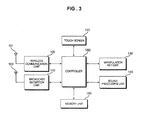
- FIG. 3 is a block diagram of a mobile communication device according to an embodiment of the present invention.
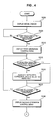
- FIGS. 4 and 5 are flowcharts illustrating a method of controlling an operation of a mobile communication device according to an embodiment of the present invention.
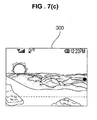
- FIGS. 6(a)-6(c) and 7(a)-7(c) illustrate examples of touch screen images for explaining the method illustrated in FIGS. 4 and 5 according to the present invention.
- FIGS. 1 and 2 illustrate the exterior of one example of a mobile communication device 100 according to an embodiment of the present invention.
- the mobile communication device 100 includes a receiver 141 which is disposed on a front surface of the mobile communication device 100 and outputs a voice signal of a correspondent during a phone conversation with the correspondent or other audio sounds, a touch screen 120 which can be used as both an input device and a display device, and manipulation keys 131 which are used to receive or terminate a call or to perform other functions. Keys 133 for increasing or reducing the volume or performing camera functions may be disposed on one side of the mobile communication device 100.
- the mobile communication device 100 includes or can include other known components. All the components of the mobile communication device 100 are operatively configured and coupled.
- the touch screen 120 is a display device which responds to a touch input from a user, e.g., a touch to the screen 120 made by the user using a finger. More specifically, the touch screen 120 allows the user to interact with the mobile communication device 100 by touching pictures, characters, and others displayed on the touch screen 120.
- FIG. 3 is a block diagram of a mobile communication device according to an embodiment of the present invention.
- the mobile communication device of FIG. 3 can be the mobile communication device 100 of FIG. 1 or can be other types of mobile devices.
- the mobile communication device includes a wireless communication unit 105, a broadcast reception unit 110, a touch screen 120, a manipulation key unit 130, a sound processing unit 140, a memory unit 150, and a control unit 160.
- the mobile communication device can include other known components (e.g., a camera module, etc.) and all the components of the mobile communication device are operatively coupled and configured.
- the wireless communication unit 105 provides an interface for wireless communication with a base station through an antenna 103. Further, the wireless communication unit 105 preferably includes a duplex filter for filtering a signal received through the antenna 103, a power amplifier for amplifying a transmit signal, a frequency up-convert circuit/unit in a transmission path, a frequency down-convert circuit/unit in a reception path, etc.
- the broadcast reception unit 110 receives a digital multimedia broadcast signal from a channel selected by a user, generates a transport stream by demodulating the received digital multimedia broadcast signal, divides the transport stream into a number of element streams such as video data, audio data, and other data, and decodes each of the element streams, thereby generating a broadcast signal that can be played back. The broadcast reception unit 110 outputs the generated broadcast signal.
- the touch screen 120 serves as an input device for receiving a user's commands and data. Also, the touch screen 120 serves as a display device for displaying menus used for operating the mobile communication device and other information such as a state of a received call, battery information, etc.
- the touch screen 120 can include a touch screen panel and a touch screen panel controller.
- the touch screen panel which is a transparent panel attached onto the exterior of the mobile communication device, can be connected to buses in the mobile communication device.
- the touch screen panel determines whether the touch screen 120 has been touched. If it is determined that the touch screen 120 has been touched, the touch screen panel can transmit to the touch screen panel controller a signal corresponding to the touch input to the touch screen 120. Then, the touch screen panel controller processes the signal transmitted by the touch screen panel, and transmits data obtained by processing the signal to the control unit 160. Accordingly, the control unit 160 can determine whether there has been a touch input to the touch screen 120 and what part of the touch screen 120 has been touched based on the data transmitted by the touch screen panel controller.
- the manipulation key unit 130 may include keys for making or receiving a call or for terminating a call, and receive a user command by transmitting a signal corresponding to which one of the keys is hit by the user to the control unit 160.
- the sound processing unit 140 may amplify a sound signal output by the control unit 160 and output the amplified signal to a speaker. Also, the sound processing unit 140 may convert a sound signal input thereto via a microphone into an electrical signal and transmit the electrical signal to the control unit 160.
- the memory unit 150 stores programs and data for performing the operation of the mobile communication device and various data that the user wishes to store.
- the memory unit 150 may store a software driver for controlling the touch screen 120.
- the memory unit 150 preferably is a built-in memory, but can include both a built-in memory and a detachable memory such as a memory stick.
- the control unit 160 controls the operation of the mobile communication device by controlling the wireless communication unit 105, the broadcast reception unit 110, the touch screen 120, the manipulation key unit 130, the sound processing unit 140, and the memory unit 150. More specifically, the control unit 160 controls an image to be displayed on the touch screen 120, controls a first operation control menu to be displayed in at least one first region on the touch screen 120 when a first touch input to the touch screen 120 is detected, and controls a second operation control menu to be displayed in at least one second region on the touch screen 120 when a second touch input to the touch screen 120 is detected.
- the image is preferably a moving image, but can be a still image, icons, texts, characters, or any information or representation.
- FIGS. 4 and 5 are flowcharts illustrating a method of controlling an operation of a mobile communication device according to an embodiment of the present invention. This method is discussed below as being implemented in the mobile communication device of FIG. 3 , but can be implemented in other suitable device.
- control unit 160 displays a moving image on the touch screen 120 of the mobile communication device.
- DMB digital multimedia broadcast
- the control unit 160 determines whether a first touch input to the touch screen 120 has been detected. For instance, while the image is displayed on the touch screen 120, the control unit 160 determines whether there has been a touch input to the touch screen 120 and/or what part of the touch screen 120 has been touched based on a signal transmitted by the touch screen 120. For instance, the control unit 160 may determine that the user has touched a side area (or predefined area) of the image being displayed on the touch screen.
- the control unit 160 displays a first operation control menu on the touch screen 120.
- the first operation control menu e.g., a volume control menu or other designated menu
- the first operation control menu may be displayed on a designated area of the touch screen 120.
- the first operation control menu may be displayed on at least one of the left and right sides of the moving image.
- the control unit 160 determines whether a menu item has been selected from the first operation control menu displayed on the touch screen 120. In operation S220, if it is determined in operation S215 that a particular menu item has been selected from the displayed first operation control menu, the control unit 160 controls an operation corresponding to the selected menu item to be performed (e.g., increasing the volume in the above example). In operation S225, the control unit 160 determines whether a second (another) touch input to the touch screen 120 has been detected. The second touch input to the touch screen 120 corresponds to a touch input to a portion of the touch screen 120 that is not occupied by the first operation control menu. For instance, while the first operation control menu is displayed in one area of the touch screen 120, the control unit 120 checks to see if a touch input to another designated area of the touch screen 120 is made.
- the control unit 160 displays a second operation control menu on the touch screen 120.
- the second operation control menu may be displayed at the bottom of the moving image.
- control unit 160 determines whether a menu item has been selected from the first operation control menu and/or the second operation control menu displayed on the touch screen 120.
- control unit 160 controls an operation corresponding to the selected menu item to be performed.
- control unit 160 determines whether a third touch input to the touch screen 120 has been detected, e.g., to the touch screen that is currently displaying the first and second menus.
- the third touch input to the touch screen 120 corresponds to a touch input to a portion of the touch screen 120 that is occupied by neither the first operation control menu nor the second operation control menu.
- control unit 160 controls the second operation control menu to disappear from the touch screen 120.
- control unit 160 determines whether a menu item has been selected from the first operation control menu. In operation S260, if it is determined in operation S255 that a menu item has been selected from the displayed first operation control menu, the control unit 160 controls an operation corresponding to the selected menu item to be performed. In operation S265, the control unit 160 determines whether a fourth touch input to the touch screen 120 has been detected. The fourth touch input to the touch screen 120 corresponds to a touch input to a portion of the touch screen 120 that is not occupied by the first operation control menu.
- control unit 160 controls the first operation control menu to disappear from the touch screen 120.
- the above-mentioned operations/steps may be repeatedly performed and/or in different orders.
- a single additional touch to any area or a designated area of the touch screen 120 can cause both the first and second operation control menus to simultaneously disappear from the touch screen 120.
- one touch to the touch screen 120 can cause multiple menus to simultaneously appear on the touch screen.
- a third touch to the touch screen may cause a third operation control menu to appear on the touch screen and so on.
- the first through fourth touches in the method of FIGS. 5 and 6 can be touches to predetermined areas of the touch screen 120, or can be touches to any part of the touch screen 120.
- FIGS. 6(a)-6(c) and 7(a)-7(c) illustrate examples of touch screen images for explaining the method illustrated in FIGS. 4 and 5 according to an embodiment of the present invention. These images are preferably displayed on the touch screen 120, but can be displayed in other types of touch screen devices.
- FIG. 6(a) illustrates a touch screen image when a moving image 300 that is obtained by playing back, e.g., a DMB program, is displayed on a touch screen (e.g., touch screen 120) of a device.
- a touch screen e.g., touch screen 120
- first operation control menus 310 and 312 are respectively displayed on the left and right sides of the moving image 300, as illustrated in FIG. 6(b) .
- the first operation control menus 310 and 312 may include a channel control menu and a volume control menu.
- a second operation control menu 320 is displayed at the bottom of the moving image 300, as illustrated in FIG. 6(c) .
- the second operation control menu 320 may include, but is not limited to, a menu for selecting functions, other than those provided by the first operation control menu 310, 312; a menu for providing a channel list; a menu for selecting a time machine function which allow users to continue watching TV, broadcast or images without pausing even when they receive an incoming phone call or are abruptly interrupted by recording broadcast programs in the memory unit 150 and playing the recorded programs back at a later time; and a menu for returning to previous menus. Other menus are possible.
- FIGs. 7(a)-7(c) are examples of touch screen images for explaining how to make the first operation control menus 310 and 312 and the second operation control menu 320 disappear from the touch screen according to an embodiment of the present invention.
- the touch inputs for causing the displayed menu(s) to disappear may be made to portions of the touch screen, excluding the area(s) where the menu(s) are already displayed. For instance, in FIG. 7(a) , if the user touches the menu 310 (e.g., the arrow icon), then the volume may increase, whereas if the user touches any part of the displayed scenery, then the second menu 320 may disappear as shown in FIG. 7(b) . Other examples are possible.
- the first and second operation control menus are sequentially displayed on the left and right sides of and at the bottom of the touch screen 120 in response to touch inputs to arbitrary portion(s) of the touch screen 120.
- a first operation control menu may be displayed when a touch input to the left or right side of the touch screen 120 is detected
- a second operation control menu may be displayed when a touch input to the top or bottom of the touch screen 120 is detected.
- the second and first operation menu items displayed on the touch screen 120 are controlled to sequentially disappear in response to the third and fourth touch inputs, respectively, to the touch screen 120.
- the present invention is not restricted to this.
- the first and second operation control menus displayed on the touch screen 120 may disappear all at once in response to a single touch input to the touch screen 120.
- the present invention it is possible to control operation control menus to appear on or disappear from a touch screen on which a moving image or other information/data is displayed, in response to touch input(s) to the touch screen. Therefore, it is possible to efficiently control an operation of the mobile communication device using even a small-sized touch screen by making the operation control menus appear on or disappear from the touch screen, whenever necessary, in response to the touch input(s) to the touch screen.
Landscapes
- Engineering & Computer Science (AREA)
- Signal Processing (AREA)
- Multimedia (AREA)
- General Engineering & Computer Science (AREA)
- Human Computer Interaction (AREA)
- Theoretical Computer Science (AREA)
- Physics & Mathematics (AREA)
- General Physics & Mathematics (AREA)
- Computer Networks & Wireless Communication (AREA)
- Telephone Function (AREA)
- User Interface Of Digital Computer (AREA)
- Position Input By Displaying (AREA)
Applications Claiming Priority (1)
| Application Number | Priority Date | Filing Date | Title |
|---|---|---|---|
| KR1020070006393A KR100867957B1 (ko) | 2007-01-22 | 2007-01-22 | 이동통신 단말기 및 그 제어방법 |
Publications (1)
| Publication Number | Publication Date |
|---|---|
| EP1950651A1 true EP1950651A1 (de) | 2008-07-30 |
Family
ID=39363879
Family Applications (1)
| Application Number | Title | Priority Date | Filing Date |
|---|---|---|---|
| EP08000851A Withdrawn EP1950651A1 (de) | 2007-01-22 | 2008-01-17 | Mobile Kommunikationsvorrichtung und Verfahren zur Steuerung von Vorgängen der mobilen Kommunikationsvorrichtung |
Country Status (10)
| Country | Link |
|---|---|
| US (1) | US20080176604A1 (de) |
| EP (1) | EP1950651A1 (de) |
| KR (1) | KR100867957B1 (de) |
| CN (1) | CN101299179A (de) |
| AU (1) | AU2008200287A1 (de) |
| BR (1) | BRPI0800146A (de) |
| CA (1) | CA2618167A1 (de) |
| MX (1) | MX2008000855A (de) |
| RU (1) | RU2008102227A (de) |
| TW (1) | TW200837609A (de) |
Cited By (3)
| Publication number | Priority date | Publication date | Assignee | Title |
|---|---|---|---|---|
| EP2431849A1 (de) * | 2010-09-02 | 2012-03-21 | Research In Motion Limited | Lokalisierung eines berührungsempfindlichen Steuerverfahrens und Vorrichtung |
| US8531417B2 (en) | 2010-09-02 | 2013-09-10 | Blackberry Limited | Location of a touch-sensitive control method and apparatus |
| CN104571913A (zh) * | 2014-12-25 | 2015-04-29 | 青岛歌尔声学科技有限公司 | 一种模拟鼠标控制的系统和方法 |
Families Citing this family (37)
| Publication number | Priority date | Publication date | Assignee | Title |
|---|---|---|---|---|
| KR101172402B1 (ko) * | 2007-02-14 | 2012-08-08 | 삼성전자주식회사 | 이동통신기기와 디지털 tv 간의 tv 방송 프로그램 연계시청방법과, 그 이동통신기기 및 디지털 tv |
| KR101404606B1 (ko) * | 2007-08-21 | 2014-06-10 | 삼성전자주식회사 | 터치스크린을 이용한 메뉴 제공방법 및 이를 적용한멀티미디어 기기 |
| USD584272S1 (en) * | 2007-10-31 | 2009-01-06 | Samsung Electronics Co., Ltd. | Portable phone |
| USD598409S1 (en) * | 2007-12-13 | 2009-08-18 | Samsung Electronics Co., Ltd. | Mobile phone |
| US8954887B1 (en) * | 2008-02-08 | 2015-02-10 | Google Inc. | Long press interface interactions |
| USD596605S1 (en) * | 2008-05-06 | 2009-07-21 | Samsung Electronics Co., Ltd. | Mobile phone |
| CA129633S (en) * | 2008-08-19 | 2009-11-23 | Lg Electronics Inc | Mobile phone |
| TWI467422B (zh) * | 2008-11-20 | 2015-01-01 | Htc Corp | 觸控式電子裝置及其相關控制方法 |
| USD606506S1 (en) * | 2008-12-09 | 2009-12-22 | Samsung Electronics Co., Ltd. | Mobile phone |
| USD605158S1 (en) * | 2008-12-23 | 2009-12-01 | Htc Corporation | Mobile phone |
| USD613722S1 (en) * | 2009-01-09 | 2010-04-13 | Sony Ericsson Mobile Communications Ab | Mobile phone |
| USD616407S1 (en) * | 2009-02-23 | 2010-05-25 | Samsung Electronics Co., Ltd. | Mobile phone |
| TW201035829A (en) * | 2009-03-31 | 2010-10-01 | Compal Electronics Inc | Electronic device and method of operating screen |
| JP2011059820A (ja) * | 2009-09-07 | 2011-03-24 | Sony Corp | 情報処理装置、情報処理方法、およびプログラム |
| CA136058S (en) * | 2009-12-23 | 2011-01-20 | Lg Electronics Inc | Mobile phone |
| KR100990833B1 (ko) * | 2010-01-28 | 2010-11-04 | 김준 | 터치 장치 제어방법, 이를 이용하는 터치 장치 |
| JP5846755B2 (ja) * | 2010-05-14 | 2016-01-20 | 株式会社東芝 | 画像診断装置及び医用画像表示装置 |
| CN101930339B (zh) * | 2010-08-11 | 2013-04-03 | 惠州Tcl移动通信有限公司 | 一种电子设备界面切换的方法及装置 |
| US20120120000A1 (en) * | 2010-11-12 | 2012-05-17 | Research In Motion Limited | Method of interacting with a portable electronic device |
| TW201227484A (en) * | 2010-12-24 | 2012-07-01 | Acer Inc | Methods and systems for switching pages, and computer program products thereof |
| US20120304081A1 (en) * | 2011-05-27 | 2012-11-29 | Mirko Mandic | Navigation User Interface in Support of Page-Focused, Touch- or Gesture-based Browsing Experience |
| US9417754B2 (en) | 2011-08-05 | 2016-08-16 | P4tents1, LLC | User interface system, method, and computer program product |
| USD749085S1 (en) * | 2011-08-23 | 2016-02-09 | Sony Corporation | Display panel or screen with graphical user interface |
| KR101255570B1 (ko) * | 2011-09-28 | 2013-04-17 | (주)유니엠텍 | 디스플레이 상의 메뉴 제어방법 |
| USD732497S1 (en) * | 2011-12-16 | 2015-06-23 | Lg Electronics Inc. | Mobile phone |
| KR101929297B1 (ko) * | 2012-04-27 | 2019-03-12 | 삼성전자주식회사 | 터치 반응성 개선 방법 및 그 전자 장치 |
| CN102915185B (zh) * | 2012-09-20 | 2018-11-16 | 广州市动景计算机科技有限公司 | 应用界面及控制应用界面操作的方法和装置 |
| KR102115727B1 (ko) * | 2013-01-07 | 2020-05-28 | 삼성전자주식회사 | 하이브리드 위젯을 제공하는 모바일 장치 및 그 제어 방법 |
| KR102080743B1 (ko) * | 2013-03-08 | 2020-02-24 | 엘지전자 주식회사 | 이동 단말기 및 그것의 제어 방법 |
| KR101504237B1 (ko) * | 2013-11-15 | 2015-03-19 | 엘지전자 주식회사 | 이동 단말기 및 그 제어방법 |
| JP6309771B2 (ja) * | 2014-01-21 | 2018-04-11 | 株式会社ミツトヨ | タッチパネル式タブレット型パーソナルコンピュータ、その制御方法及びコンピュータプログラム |
| KR20150139337A (ko) * | 2014-06-03 | 2015-12-11 | 삼성전자주식회사 | 화상형성장치의 애플리케이션 실행을 조작하는 화면을 제공하는 방법 및 이를 이용하는 화상형성장치 |
| CN104238757B (zh) * | 2014-09-29 | 2018-01-23 | 联想(北京)有限公司 | 一种电子设备的控制方法、装置和电子设备 |
| CN104951686B (zh) * | 2015-07-07 | 2020-08-04 | 京东方科技集团股份有限公司 | 一种移动终端及控制移动终端的方法 |
| RU170022U1 (ru) * | 2016-06-10 | 2017-04-12 | Вячеслав Александрович Матвеев | Боковой сенсор тройного назначения |
| JP1628209S (de) * | 2018-05-10 | 2019-04-01 | ||
| CN115658218B (zh) * | 2022-09-09 | 2024-03-12 | 北京百度网讯科技有限公司 | 边缘设备接入云端的方法、装置、设备以及存储介质 |
Citations (1)
| Publication number | Priority date | Publication date | Assignee | Title |
|---|---|---|---|---|
| DE29824936U1 (de) * | 1997-09-19 | 2003-07-17 | Borgward Glenn Rolus | Digitales Buch mit ergonomischer Gehäuseform |
Family Cites Families (18)
| Publication number | Priority date | Publication date | Assignee | Title |
|---|---|---|---|---|
| US5798760A (en) * | 1995-06-07 | 1998-08-25 | Vayda; Mark | Radial graphical menuing system with concentric region menuing |
| US5897623A (en) * | 1996-08-30 | 1999-04-27 | U S West, Inc. | Interface method for providing information about items on a list for interactive television |
| US8479122B2 (en) * | 2004-07-30 | 2013-07-02 | Apple Inc. | Gestures for touch sensitive input devices |
| US6331840B1 (en) * | 1998-03-27 | 2001-12-18 | Kevin W. Nielson | Object-drag continuity between discontinuous touch screens of a single virtual desktop |
| KR100312232B1 (ko) * | 1999-03-05 | 2001-11-03 | 윤종용 | 터치스크린패널을 사용자 정보 입력 수단으로 구비하는 디지털휴대용 단말기의 사용자 인터페이싱 방법 |
| US6542175B1 (en) * | 2000-02-17 | 2003-04-01 | International Business Machines Corporation | Computer controlled display graphical interface unit for tracking a sequence of documents and for controlling the size of a cache for storing the documents |
| EP1160160A3 (de) * | 2000-05-31 | 2002-01-30 | EADS Airbus GmbH | Vorrichtung zur Steuerung und Überwachung von Flugzeug-Kabinensystemen |
| US6853994B1 (en) * | 2000-08-30 | 2005-02-08 | International Business Machines Corporation | Object oriented based, business class methodology for performing data metric analysis |
| US6985837B2 (en) * | 2001-11-01 | 2006-01-10 | Moon Dennis A | System presenting meteorological information using a browser interface |
| US20040158494A1 (en) * | 2003-02-05 | 2004-08-12 | Suthar Yogin P. | Restaurant automation system |
| EP1510911A3 (de) * | 2003-08-28 | 2006-03-22 | Sony Corporation | Gerät, Verfahren und Programm zum Verarbeiten von Informationen und Speichermedium mit Programm zum Verarbeiten von Informationen |
| US7554521B1 (en) * | 2004-04-15 | 2009-06-30 | Apple Inc. | User interface control for changing a parameter |
| KR100689444B1 (ko) * | 2004-09-07 | 2007-03-08 | 삼성전자주식회사 | 단말기의 디지털 멀티미디어 방송 채널정보 표시장치 및방법 |
| JP2006195768A (ja) * | 2005-01-14 | 2006-07-27 | Alps Electric Co Ltd | 入力装置付き表示装置 |
| KR100809288B1 (ko) * | 2005-04-15 | 2008-03-04 | 삼성전자주식회사 | 컨텐츠와 이에 관련된 정보들을 동시에 출력하는 장치 및 방법 |
| KR20070006477A (ko) * | 2005-07-08 | 2007-01-11 | 삼성전자주식회사 | 가변적 메뉴 배열 방법 및 이를 이용한 디스플레이 장치 |
| CN100592247C (zh) * | 2005-09-21 | 2010-02-24 | 鸿富锦精密工业(深圳)有限公司 | 多层次菜单显示装置及其显示控制方法 |
| TWI328185B (en) * | 2006-04-19 | 2010-08-01 | Lg Electronics Inc | Touch screen device for potable terminal and method of displaying and selecting menus thereon |
-
2007
- 2007-01-22 KR KR1020070006393A patent/KR100867957B1/ko not_active Expired - Fee Related
- 2007-04-27 US US11/790,871 patent/US20080176604A1/en not_active Abandoned
-
2008
- 2008-01-17 EP EP08000851A patent/EP1950651A1/de not_active Withdrawn
- 2008-01-18 MX MX2008000855A patent/MX2008000855A/es active IP Right Grant
- 2008-01-18 CA CA002618167A patent/CA2618167A1/en not_active Abandoned
- 2008-01-21 TW TW097102235A patent/TW200837609A/zh unknown
- 2008-01-21 RU RU2008102227/09A patent/RU2008102227A/ru not_active Application Discontinuation
- 2008-01-21 AU AU2008200287A patent/AU2008200287A1/en not_active Abandoned
- 2008-01-22 BR BRPI0800146-4A patent/BRPI0800146A/pt not_active IP Right Cessation
- 2008-01-22 CN CNA2008101287963A patent/CN101299179A/zh active Pending
Patent Citations (1)
| Publication number | Priority date | Publication date | Assignee | Title |
|---|---|---|---|---|
| DE29824936U1 (de) * | 1997-09-19 | 2003-07-17 | Borgward Glenn Rolus | Digitales Buch mit ergonomischer Gehäuseform |
Cited By (3)
| Publication number | Priority date | Publication date | Assignee | Title |
|---|---|---|---|---|
| EP2431849A1 (de) * | 2010-09-02 | 2012-03-21 | Research In Motion Limited | Lokalisierung eines berührungsempfindlichen Steuerverfahrens und Vorrichtung |
| US8531417B2 (en) | 2010-09-02 | 2013-09-10 | Blackberry Limited | Location of a touch-sensitive control method and apparatus |
| CN104571913A (zh) * | 2014-12-25 | 2015-04-29 | 青岛歌尔声学科技有限公司 | 一种模拟鼠标控制的系统和方法 |
Also Published As
| Publication number | Publication date |
|---|---|
| TW200837609A (en) | 2008-09-16 |
| AU2008200287A1 (en) | 2008-08-07 |
| KR20080068945A (ko) | 2008-07-25 |
| BRPI0800146A (pt) | 2008-09-16 |
| CN101299179A (zh) | 2008-11-05 |
| RU2008102227A (ru) | 2009-07-27 |
| MX2008000855A (es) | 2009-02-24 |
| CA2618167A1 (en) | 2008-07-22 |
| KR100867957B1 (ko) | 2008-11-11 |
| US20080176604A1 (en) | 2008-07-24 |
Similar Documents
| Publication | Publication Date | Title |
|---|---|---|
| US20080176604A1 (en) | Mobile communication device and method of controlling operation of the mobile communication device | |
| US10175868B2 (en) | Mobile communication terminal and terminal operation method | |
| KR100881952B1 (ko) | 터치스크린을 구비하는 이동통신 단말기 및 그 동작제어방법 | |
| US8401566B2 (en) | Mobile terminal and method for converting broadcast channel of a mobile terminal | |
| KR100832800B1 (ko) | 후보 전화번호를 제공하는 이동통신 단말기 및 그 제어방법 | |
| US7761806B2 (en) | Mobile communication device and method of controlling operation of the mobile communication device | |
| CN101452365B (zh) | 终端及其控制方法 | |
| US8160652B2 (en) | Mobile terminal and screen displaying method thereof | |
| US9423955B2 (en) | Previewing and playing video in separate display window on mobile terminal using gestures | |
| US8356250B2 (en) | Mobile terminal and equalizer controlling method thereof | |
| US20090051666A1 (en) | Portable terminal | |
| EP2346232A2 (de) | Eingabevorrichtung und tragbares Endgerät mit der Eingabevorrichtung | |
| US20090176532A1 (en) | Character input apparatus and method for mobile terminal | |
| CN106802759A (zh) | 视频播放的方法及终端设备 | |
| CN101335950B (zh) | 移动终端以及向其提供广播的方法 | |
| KR20110101316A (ko) | 이동통신 단말기에서 선호기능 자동 등록 및 실행을 위한 장치 및 방법 | |
| JP2014036431A (ja) | 電子機器及び制御プログラム並びに電子機器での表示制御方法 | |
| KR100782075B1 (ko) | 휴대 단말에서 화면 전환 장치 및 방법 | |
| KR101677623B1 (ko) | 이동 단말기 및 그 제어 방법 | |
| KR20090008909A (ko) | 터치스크린을 구비하는 이동통신 단말기 및 그 제어방법 | |
| KR20070026945A (ko) | 휴대용 단말기의 메뉴 표시 방법 |
Legal Events
| Date | Code | Title | Description |
|---|---|---|---|
| PUAI | Public reference made under article 153(3) epc to a published international application that has entered the european phase |
Free format text: ORIGINAL CODE: 0009012 |
|
| AK | Designated contracting states |
Kind code of ref document: A1 Designated state(s): AT BE BG CH CY CZ DE DK EE ES FI FR GB GR HR HU IE IS IT LI LT LU LV MC MT NL NO PL PT RO SE SI SK TR |
|
| AX | Request for extension of the european patent |
Extension state: AL BA MK RS |
|
| 17P | Request for examination filed |
Effective date: 20081024 |
|
| 17Q | First examination report despatched |
Effective date: 20081120 |
|
| AKX | Designation fees paid |
Designated state(s): AT BE BG CH CY CZ DE DK EE ES FI FR GB GR HR HU IE IS IT LI LT LU LV MC MT NL NO PL PT RO SE SI SK TR |
|
| STAA | Information on the status of an ep patent application or granted ep patent |
Free format text: STATUS: THE APPLICATION IS DEEMED TO BE WITHDRAWN |
|
| 18D | Application deemed to be withdrawn |
Effective date: 20130801 |