EP1966678B1 - Dispositif de commande pour appareil electronique, en particulier dispositif d'information au conducteur - Google Patents
Dispositif de commande pour appareil electronique, en particulier dispositif d'information au conducteur Download PDFInfo
- Publication number
- EP1966678B1 EP1966678B1 EP06819578.3A EP06819578A EP1966678B1 EP 1966678 B1 EP1966678 B1 EP 1966678B1 EP 06819578 A EP06819578 A EP 06819578A EP 1966678 B1 EP1966678 B1 EP 1966678B1
- Authority
- EP
- European Patent Office
- Prior art keywords
- selection window
- selection
- window
- functionality
- display
- Prior art date
- Legal status (The legal status is an assumption and is not a legal conclusion. Google has not performed a legal analysis and makes no representation as to the accuracy of the status listed.)
- Ceased
Links
Images


Classifications
-
- G—PHYSICS
- G06—COMPUTING OR CALCULATING; COUNTING
- G06F—ELECTRIC DIGITAL DATA PROCESSING
- G06F3/00—Input arrangements for transferring data to be processed into a form capable of being handled by the computer; Output arrangements for transferring data from processing unit to output unit, e.g. interface arrangements
- G06F3/01—Input arrangements or combined input and output arrangements for interaction between user and computer
- G06F3/048—Interaction techniques based on graphical user interfaces [GUI]
- G06F3/0481—Interaction techniques based on graphical user interfaces [GUI] based on specific properties of the displayed interaction object or a metaphor-based environment, e.g. interaction with desktop elements like windows or icons, or assisted by a cursor's changing behaviour or appearance
- G06F3/0482—Interaction with lists of selectable items, e.g. menus
-
- B—PERFORMING OPERATIONS; TRANSPORTING
- B60—VEHICLES IN GENERAL
- B60K—ARRANGEMENT OR MOUNTING OF PROPULSION UNITS OR OF TRANSMISSIONS IN VEHICLES; ARRANGEMENT OR MOUNTING OF PLURAL DIVERSE PRIME-MOVERS IN VEHICLES; AUXILIARY DRIVES FOR VEHICLES; INSTRUMENTATION OR DASHBOARDS FOR VEHICLES; ARRANGEMENTS IN CONNECTION WITH COOLING, AIR INTAKE, GAS EXHAUST OR FUEL SUPPLY OF PROPULSION UNITS IN VEHICLES
- B60K35/00—Instruments specially adapted for vehicles; Arrangement of instruments in or on vehicles
- B60K35/10—Input arrangements, i.e. from user to vehicle, associated with vehicle functions or specially adapted therefor
Definitions
- the invention is based on an operating device for an electronic device, in particular a driver information device, according to the preamble of the main claim.
- Driver information devices are already known in which various functions of the driver information device can be selected in different screens. To do this, first call up the appropriate screen, then from a list the desired function is selected.
- a rotary multi-functional switch unit for use in a vehicle which is designed to control a control menu having various fields.
- a graphical user interface in a steering wheel of a vehicle that interacts with a display unit.
- the operating device with the features of the independent claims has the advantage that a user can expand a selection menu in which a function is specified. Depending on the user's choice, therefore, the respective selection window takes up less space if the user currently does not need a setting or more space if the user wishes to make a setting.
- the measures listed in the dependent claims advantageous refinements and improvements of the main claim operating device for a driver information device are possible. It is particularly advantageous to leave a position of the upper edge of the selection window unchanged when expanding the selection window. As a result, an irritation of the user is avoided by the selection window selected by him as possible not moved, but only expanded in one direction. In particular, it is advantageous in this case to move the selection window in the subsequent selection window down.
- selection window such that, in addition to setting devices, further selection windows, which in turn can be expanded, are also displayed in the area of the extended selection window. If such a subordinate selection window is expanded, then in a preferred embodiment that selection window is also enlarged, in which the subordinate selection window is provided. Thus, an adjustment can be made even in a variety of subordinate selection windows in the display.
- the operating device according to the invention can be used for any electronic devices.
- their use is advantageous if only a fairly small screen area is available.
- the function is therefore explained below using the example of a driver information device in a motor vehicle.
- a driver information device 1 is shown, which is incorporated in a motor vehicle or installed there.
- the driver information device 1 has a central unit 2 with a computing unit 3 for controlling the driver information device 1 and the systems connected to it.
- the central unit 2 also has a memory 4 in which operating data for the operation of the driver information device 1 are stored.
- data for generating a menu representation 5 is stored, which is displayed in a display unit 6.
- the display unit 6 is connected to the CPU 2 and displays selectable functions and subfunctions of the driver information device 1.
- the driver information device 1 can be controlled by the user with any control means, such as by voice, via a designed as a touch screen display unit 6 or via an operating element 7, in particular keys 8 for controlling a mark in a surface of the display unit 6 , Furthermore, a selection element 9 is preferably provided for confirming a selection made.
- a first selection window 11 and a second selection window 12 are shown.
- the first selection window 11 is not extended.
- the second selection window 12 consists of a first area 13 and a second area 14. After a previously made, corresponding selection, the first area 13 has been expanded by the second area 14 and thus by at least one selectable subfunction.
- a circular selection box 15 is shown for selecting the subfunction.
- the driver information device 1 may serve to control any of a variety of functions of components of the vehicle. These may be eg a radio device, a CD player, a CD changer, a cassette player, a sound setting, a navigation device, a telephone device, a climate control unit and / or a personalization setting of the driver information device. In this case, all these functions, other functions, but also only a part of these functions can each be offered in the display to a user. Below is an example of the driver information device 1 based on the embodiment according to the FIG. 1 shown.
- the central unit 2 is connected to a first locating unit 16, which receives radio signals from so-called GPS (Global Positioning System) satellites. By means of the received signals, a position determination of the vehicle is possible.
- An antenna 17 is provided for forming a mobile telephone connection to a mobile radio network. As a result, on the one hand traffic information can be retrieved. On the other hand, it is also possible for the user to establish a telephone connection via the antenna 17.
- Another antenna 18 is provided for receiving a radio program.
- a first memory unit 19 with a navigation map base for a route calculation, for example by the arithmetic unit 3, is also connected to the central unit 2. Furthermore, a second memory unit 20 is provided in which music titles can be stored.
- a cassette player 21 may also be connected to the CPU 2. From the connected memory units 19, 20, 21, data are transmitted to the arithmetic unit 3 for further processing. Furthermore, but also control signals are transmitted in particular via a data bus 22 to other vehicle systems. For example, it is possible to enable a climate control 23 by means of the central unit 2 and a corresponding selection in an extended selection window in the display unit 6, wherein a control of the air conditioning and thus a change in the temperature in the interior of the vehicle is made. In a further embodiment, for example, on a fuel consumption and an odometer 24 is accessed.
- the computing unit 3 can operate as a so-called on-board computer and to output the average consumption and / or an average vehicle speed to the driver via the display unit 6.
- the display unit 6 is used to display travel route recommendations.
- a speaker 25 is connected to the central unit 2, on the one hand outputs a music program and incoming phone calls, but on the other hand can issue warning signals when due to a car navigation to make a change in direction or a fault has occurred in the vehicle.
- FIG. 2 a first embodiment of a display surface 30 is shown.
- a first selection window 31 with a radio function a second selection window 32 with a CD function and a third selection window 33 with a navigation function are shown.
- a display mark 34 is furthermore provided, which can be moved freely in the display area 30, for example, by means of the operating element 7. Accordingly, individual buttons of the display surface 30 can be selected by an actuation of the selection element 9.
- a designation 35 "Radio" is shown in the first selection window 31 .
- only the selection window 31 may be shown as a single selection field in the display.
- a text field 36 a currently set radio station is shown. The user can thus recognize, without having to increase the selection window, which radio station is currently set.
- an activation mark 37 is shown.
- the activation flag 37 is shown filled and indicates that the radio is currently activated and that the program of the received radio station indicated in the text field 36 is output.
- a magnification mark 38 is provided. By selecting the extension mark, the selection window 31 is enlarged. A corresponding enlargement will be described below on the basis of FIG. 3 explained.
- a CD functionality is shown in the second selection window 32 .
- a designation 39 "CD" is indicated, on the basis of which a user can recognize that this controls a CD changer or a CD drive for audio playback in the vehicle.
- a text window 40 a currently played or to be played song title or a title number of individual titles of the inserted in the drive volume is specified.
- an activation mark 41 is also provided.
- the activation mark 41 in the second selection window is empty.
- a user can switch an audio output from a radio reception to a reproduction of the CD by selecting the activation flag 41. By optionally subsequent selection of the activation mark 37 can be switched back to the radio mode.
- a magnification mark 42 is also provided in the second selection window 32 for enlarging the second selection window 32.
- a designation 43 "Navi” is given as an abbreviation for "navigation”, which indicates that the third selection window 33 is used for navigation of a vehicle.
- a text field 44 a currently set destination is set.
- an activation marker 45 is provided in the third selection window, indicating that a route guidance to the destination specified in the text field 44 is currently activated. Even without an enlargement of the third selection window, the navigation can be deactivated or also activated again by clicking on the activation marker 45.
- a magnification mark 46 is provided, with which the third selection window 33 can be enlarged. An enlargement of the third selection window 33 will be described below with reference to FIG FIG. 4 explained.
- the display area 30 is also shown, wherein the first selection window 31 according to the FIG. 2 now shown as an extended, first selection window 310.
- the expanded first selection window 310 differs from the previous, first selection window 31 in that its surface area on the display area 30 has increased compared to it.
- a first area 311 corresponds to the previous, first selection window 31.
- a second area 312 is now displayed.
- An upper edge 313 of the first selection window 310 is displayed at the same position as an upper edge of the previous first selection window 31.
- the second selection window 32 and the third selection window 33 move down in the display area 30.
- magnification mark 38 In the first area 311, the magnification mark 38, now designated as 38 ', has changed. To indicate enlargement, the magnification mark 38 'is now partially filled. Instead, any other symbols for indicating a successful enlargement of a respective selection window are possible.
- a term 314 "station" denotes a subsequent transmitter selection.
- a list selection 315 is indicated.
- various station names that can be received by the radio can be displayed. By selecting the change arrow 317, these individual station names can be traversed and displayed for selection.
- the selection window 316 can be enlarged into a list representation, so that a user can select from a plurality of transmitters at the same time.
- Another radio functionality 318 e.g. Turning on traffic messages may be selected by setting a tick 319.
- any other representations of functions of radio reception are possible, e.g. a program type selection, a preference for strong radio stations, a selection of stored radio stations or an input of a specific reception frequency.
- the representation in the text field 36 is adapted to the newly set transmitter.
- the user can now reduce the first selection window 310 again by re-selecting the magnification mark 38 'so that the first selection window 31 is displayed again.
- the first area 311 always remains the same in terms of content, whereby, of course, the respectively selected settings are output accordingly.
- a status of the subfunction is also displayed accordingly only when the subfunction is activated. So it is e.g. it is possible that an activation of a highlighting of traffic reports in the first area 311 and the first selection window 31 is shown. If a highlighting of traffic announcements is deactivated, no highlighting takes place in the first area 311 or in the first selection window 31 without an enlargement.
- the information content and / or the presentation form of the first area of the selection window can also be changed with the reduction or enlargement.
- FIG. 4 an enlarged, third selection window 330 is shown.
- the enlarged selection window 330 also has a first area 331 and a second area 332, wherein the original, unexpanded third selection window 33 corresponds to the first area 331. Accordingly, the magnification mark 46 'is now shown changed.
- a first sub-selection window 333 and a second sub-selection window 334 are shown in the second area. Both sub-selection windows 333, 334 are also already shown in their expanded form. This is indicated by the correspondingly adapted magnification marks 51, 52 of the respective subselection windows 333, 334.
- a further setting possibility with a corresponding text field 53 and a button 54 is shown.
- a voice output can be activated or deactivated during navigation.
- the text field 53 indicates the corresponding function, eg the speech output.
- a hook can accordingly be set or deleted by selecting the button 54.
- the selection window 330 also increases or decreases in each case.
- the driver can increase one, none or both sub-selection windows 333, 334 in each case.
- the Subselection windows 333, 334 are constructed in the same way as the selection windows themselves, but are completely within the area of selection window 330. They represent further subfunctions to subfunctions of the main navigation function.
- the destination input for the destination indicated in the text field 44 is shown.
- a representation of the destination can be repeated in a text field 335 again.
- a function indication of the sub-function of the sub-selection window is indicated by the designation 336 "Destination”.
- With the designation 337 "city” can be entered by a corresponding letter selection a city as a destination.
- the designation 338 "Street” the street can be entered by means of a corresponding letter selection.
- An option for the route calculation may be selected via the function "way" 339 from a list representation 340. For this, e.g. between the fastest route, the shortest route or a route without ferries or toll roads.
- the driver can inform himself about the remaining travel time to the travel destination 341 and about the remaining travel distance 342 to the destination.
- FIG. 4 deactivates the activation flag 37 and activates the activation flag 41. Accordingly, the reference numerals have been changed to 37 'and 41'. Thus, according to the activation made a music playback from the CD and no output of a radio program.
- all possible main functions of a driver information device are always displayed in the first display area 30 and at least one selection menu.
- main functions such as eg radio, CD, navigation or telephone
- main functions are automatically displayed when a corresponding function group is connected to the driver information device. So it is possible, for example, a phone function as a selection window only then represent when the central unit 2 is a connection to a mobile phone of the user, for example via a cable or a Bluetooth connection.
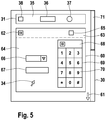
- the telephone functionality in the display area 30 is shown in an expanded selection box 60.
- the telephone functionality here follows the radio functionality.
- the selection field 60 is so large that next to the first selection window 31 no further selection fields can be displayed more simultaneously in the display area 30.
- By an arrow representation 61 is thereby indicated that connect to the telephone selection field 60 even more selection fields.
- a user now has at least two options for accessing these further selection fields. First, he can select the magnification mark 62 of the telephone selection field and thus reduce the telephone selection field. As a result of the reduction of the telephone selection field 60, other selection fields can now also be displayed again in the display area 30.
- a scroll functionality is provided with which a user can change to further selection fields by means of a screen change.
- the scrolling function may be controlled, for example, by a scroll bar 71 on a right side of the display area 30 by the user.
- the telephone selection field 60 has a first area 63 and a second area 64, wherein when reduced, the first area would remain unchanged.
- a function "telephone" is indicated in the first area 63.
- a connection mark 65 is provided which indicates whether there is currently a telephone connection. From a selection list 66, a user can select a participant.
- a text field 67 a number may be written by a user. For this purpose, the user can call another selection field 68 in which a keyboard 69 appears. Individual keys 70 thereby form a keypad provided in the selection field 68.
- a user can first select individual keys 70, for example with the display mark 34, and then select them by a confirmation. The dialed number then appears in the text box 67.
- the connection tag 65 the user can have the telephone connection established.
- a driver information device in the display area can be output for information purposes. be controlled by appropriate user settings.
- This can be, for example, the following functions: Function: Cassette Players Underactive: - Noise reduction on / off - Play a desired page Function: Sound reproduction Underactive: - Selection of a sound spectrum - balance adjustment Function: air adjustment Underactive: desired temperature Air flow (window / footwell / air nozzles) - Circulating air - Ventilation Function: personalization Underactive: - Telephone number directory - Seat adjustment Function: Window and sunroof Underactive: Opening individual windows and the sliding roof Function: CD changer Underactive: - CD selection - Repeat random play setting
- menu structure a selection of options by, for example, list, tick or selection box, can be used both to control other functions of a driver information device, but also to any other functions for controlling other electronic devices accordingly.
Landscapes
- Engineering & Computer Science (AREA)
- General Engineering & Computer Science (AREA)
- Theoretical Computer Science (AREA)
- Human Computer Interaction (AREA)
- Physics & Mathematics (AREA)
- General Physics & Mathematics (AREA)
- Chemical & Material Sciences (AREA)
- Combustion & Propulsion (AREA)
- Transportation (AREA)
- Mechanical Engineering (AREA)
- User Interface Of Digital Computer (AREA)
- Navigation (AREA)
- Control Of Indicators Other Than Cathode Ray Tubes (AREA)
- Fittings On The Vehicle Exterior For Carrying Loads, And Devices For Holding Or Mounting Articles (AREA)
Claims (6)
- Dispositif d'information au conducteur (1) comportant une fonctionnalité radio, .CD et navigation, un dispositif de commande comportant un écran (6, 30), l'écran (6, 30) étant réalisé de manière à être sensible au toucher, une fenêtre de sélection pouvant être respectivement représentée dans l'écran pour la fonctionnalité radio, CD et navigation et la fonction respective étant indiquée dans la fenêtre de sélection, une fonction de sélection (38, 42, 46) pour une extension d'au moins une des fenêtres de sélection (31, 32, 33) étant prévue de manière à ce qu'une surface d'affichage de la fenêtre de sélection soit agrandie, la fenêtre de sélection étant agrandie à raison d'au moins une représentation d'une sous-fonction sélectionnable de la fonction respective, et étant représentée dans la fenêtre de sélection respective, sans agrandissement de la fenêtre de sélection, respectivement une marque d'activation (37, 41, 45) qui affiche une activation de la fonctionnalité respective et la fonctionnalité respective étant activée par sa sélection.
- Dispositif de commande selon la revendication 1, caractérisé en ce que, en cas d'extension de la fenêtre de sélection, une position du bord supérieur de la fenêtre de sélection dans la surface d'affichage reste inchangée.
- Dispositif de commande selon la revendication 2, caractérisé en ce qu'une fenêtre de sélection suivante dans la surface d'affichage est décalée vers le bas après l'agrandissement de la fenêtre de sélection.
- Dispositif de commande selon une des revendications précédentes, caractérisé par au moins une sélection de barre de défilement, une saisie sur champs de touche et/ou une surface d'activation affichée lors de l'extension de la fenêtre de sélection pour commander la sous-fonction.
- Dispositif de commande selon une des revendications précédentes, caractérisé par une surface d'activation (38, 42, 46, 62) représentée dans la fenêtre de sélection respective pour l'extension de la fenêtre de sélection.
- Dispositif de commande selon une des revendications précédentes, caractérisé en ce qu'au moins une fenêtre de sélection déjà étendue (330) contient au moins une autre sous-fenêtre de sélection pouvant être agrandie en conséquence (333, 334).
Applications Claiming Priority (2)
| Application Number | Priority Date | Filing Date | Title |
|---|---|---|---|
| DE102005061144A DE102005061144A1 (de) | 2005-12-21 | 2005-12-21 | Bedienvorrichtung für ein elektronisches Gerät, insbesondere eine Fahrerinformationsvorrichtung |
| PCT/EP2006/068604 WO2007073987A2 (fr) | 2005-12-21 | 2006-11-17 | Dispositif de commande pour appareil electronique, en particulier dispositif d'information au conducteur |
Publications (2)
| Publication Number | Publication Date |
|---|---|
| EP1966678A2 EP1966678A2 (fr) | 2008-09-10 |
| EP1966678B1 true EP1966678B1 (fr) | 2019-04-17 |
Family
ID=37682773
Family Applications (1)
| Application Number | Title | Priority Date | Filing Date |
|---|---|---|---|
| EP06819578.3A Ceased EP1966678B1 (fr) | 2005-12-21 | 2006-11-17 | Dispositif de commande pour appareil electronique, en particulier dispositif d'information au conducteur |
Country Status (5)
| Country | Link |
|---|---|
| EP (1) | EP1966678B1 (fr) |
| KR (1) | KR20080078006A (fr) |
| CN (1) | CN101341461B (fr) |
| DE (1) | DE102005061144A1 (fr) |
| WO (1) | WO2007073987A2 (fr) |
Families Citing this family (4)
| Publication number | Priority date | Publication date | Assignee | Title |
|---|---|---|---|---|
| US8111179B2 (en) | 2006-07-21 | 2012-02-07 | Gentex Corporation | Method and system for reducing signal distortion in a continuously variable slope delta modulation scheme |
| KR101262700B1 (ko) * | 2011-08-05 | 2013-05-08 | 삼성전자주식회사 | 음성 인식 및 모션 인식을 이용하는 전자 장치의 제어 방법 및 이를 적용한 전자 장치 |
| EP3754997B1 (fr) | 2011-08-05 | 2023-08-30 | Samsung Electronics Co., Ltd. | Procédé de commande d'un appareil électronique basé sur la reconnaissance vocale et sur la reconnaissance de mouvement, et appareil électronique appliquant ce procédé |
| DE102014005760B4 (de) | 2014-04-17 | 2023-10-12 | Audi Ag | Anordnung für einen Innenraum eines Kraftfahrzeugs |
Citations (6)
| Publication number | Priority date | Publication date | Assignee | Title |
|---|---|---|---|---|
| EP0841609A2 (fr) * | 1996-11-07 | 1998-05-13 | Adobe Systems Incorporated | Combinaison de palettes sur le dispositif d'affichage d'un ordinateur |
| US5801703A (en) * | 1993-03-22 | 1998-09-01 | Island Graphics Corporation | Method and apparatus for selectably expandable menus |
| US5986657A (en) * | 1996-08-02 | 1999-11-16 | Autodesk, Inc. | Method and apparatus for incorporating expandable and collapsible options in a graphical user interface |
| US6175782B1 (en) * | 1997-01-28 | 2001-01-16 | American Calcar Inc. | System and method for adjusting climate control in vehicles |
| WO2003036455A1 (fr) * | 2001-10-02 | 2003-05-01 | Ziad Badarneh | Systeme interactif |
| EP1369770A1 (fr) * | 2002-06-06 | 2003-12-10 | Sony Ericsson Mobile Communications AB | Interface utilisateur graphique pour des menus extensibles |
-
2005
- 2005-12-21 DE DE102005061144A patent/DE102005061144A1/de not_active Withdrawn
-
2006
- 2006-11-17 CN CN2006800481999A patent/CN101341461B/zh not_active Expired - Fee Related
- 2006-11-17 KR KR1020087015098A patent/KR20080078006A/ko not_active Ceased
- 2006-11-17 WO PCT/EP2006/068604 patent/WO2007073987A2/fr not_active Ceased
- 2006-11-17 EP EP06819578.3A patent/EP1966678B1/fr not_active Ceased
Patent Citations (6)
| Publication number | Priority date | Publication date | Assignee | Title |
|---|---|---|---|---|
| US5801703A (en) * | 1993-03-22 | 1998-09-01 | Island Graphics Corporation | Method and apparatus for selectably expandable menus |
| US5986657A (en) * | 1996-08-02 | 1999-11-16 | Autodesk, Inc. | Method and apparatus for incorporating expandable and collapsible options in a graphical user interface |
| EP0841609A2 (fr) * | 1996-11-07 | 1998-05-13 | Adobe Systems Incorporated | Combinaison de palettes sur le dispositif d'affichage d'un ordinateur |
| US6175782B1 (en) * | 1997-01-28 | 2001-01-16 | American Calcar Inc. | System and method for adjusting climate control in vehicles |
| WO2003036455A1 (fr) * | 2001-10-02 | 2003-05-01 | Ziad Badarneh | Systeme interactif |
| EP1369770A1 (fr) * | 2002-06-06 | 2003-12-10 | Sony Ericsson Mobile Communications AB | Interface utilisateur graphique pour des menus extensibles |
Also Published As
| Publication number | Publication date |
|---|---|
| WO2007073987A2 (fr) | 2007-07-05 |
| KR20080078006A (ko) | 2008-08-26 |
| DE102005061144A1 (de) | 2007-06-28 |
| WO2007073987A3 (fr) | 2008-01-17 |
| CN101341461A (zh) | 2009-01-07 |
| CN101341461B (zh) | 2013-03-20 |
| EP1966678A2 (fr) | 2008-09-10 |
Similar Documents
| Publication | Publication Date | Title |
|---|---|---|
| DE69712501T2 (de) | Prioritäten zuweisung an fahrzeug-anzeigemerkmale | |
| EP0199916B2 (fr) | Unité centralisée d'entrée de commandes et de sortie d'informations pour des équipements auxiliaires de véhicules | |
| EP2473367B1 (fr) | Procédé d'affichage d'informations lors d'un défilement et dispositif correspondant | |
| EP2013054B1 (fr) | Dispositif de commande multifonctions et système de radionavigation pour un véhicule automobile | |
| DE10360655A1 (de) | Bediensystem für ein Fahrzeug | |
| EP1131804A1 (fr) | Dispositif pour l'entree d'objectifs d'un parcours dans un systeme de navigation | |
| DE102008021186A1 (de) | Verfahren und Vorrichtung zum Anzeigen von Informationen in einem Fahrzeug | |
| EP2293175B1 (fr) | Dispositif de commande et procédé de préparation d'un dispositif de commande | |
| EP2425321A1 (fr) | Procédé et dispositif pour afficher de l'information rangée dans des listes | |
| DE102007005026A1 (de) | Anzeige- und Bedienvorrichtung mit verbesserter Auswahlmöglichkeit eines aktuellen Anzeige- und Bedienkontextes | |
| DE102007052343B4 (de) | Verfahren und Einrichtung zum Anzeigen von Daten in einem Fahrzeug | |
| EP2473366B1 (fr) | Dispositif de commande et procédé pour utiliser un dispositif de commande pour naviguer dans des listes | |
| EP2424744A1 (fr) | Procédé pour commander l'affichage d'informations sur une surface d'affichage | |
| DE102008061989A1 (de) | Verfahren und Vorrichtung zum Steuern einer optischen und/oder akustischen Ausgabe in einem Fahrzeug | |
| EP1966678B1 (fr) | Dispositif de commande pour appareil electronique, en particulier dispositif d'information au conducteur | |
| DE102004027642A1 (de) | Verwendung eines mobilen Rechners zur Bedienung eines Fahrerinformationssystems | |
| DE102013003266A1 (de) | Informationswiedergabesystem für ein Fahrzeug und Verfahren zum Bereitstellen von Informationen für einen Benutzer eines Fahrzeugs | |
| EP3046797B1 (fr) | Système de commande et procédé de commande destiné à un véhicule | |
| EP1474656B1 (fr) | Procede de saisie pour entrer un nom | |
| DE102016001453B4 (de) | Verfahren zum Betreiben eines Kraftfahrzeugs, Steuereinrichtung sowie Kraftfahrzeug | |
| EP1804026A2 (fr) | Procédé destiné à la sélection d'un emplacement | |
| EP1832847B1 (fr) | Appareil de navigation avec mémoire de répertoire téléphonique | |
| EP2292458A2 (fr) | Procédé et dispositif d'affichage d'informations | |
| DE102007012595B4 (de) | Verfahren und Vorrichtung zur Bedienung von in ein Kraftfahrzeug integrierten elektrischen Geräten | |
| EP1832846A1 (fr) | Appareil de navigation avec surface de commande sur écran tactile |
Legal Events
| Date | Code | Title | Description |
|---|---|---|---|
| PUAI | Public reference made under article 153(3) epc to a published international application that has entered the european phase |
Free format text: ORIGINAL CODE: 0009012 |
|
| 17P | Request for examination filed |
Effective date: 20080721 |
|
| AK | Designated contracting states |
Kind code of ref document: A2 Designated state(s): DE ES FR GB IT SE |
|
| RBV | Designated contracting states (corrected) |
Designated state(s): DE ES FR GB IT SE |
|
| 17Q | First examination report despatched |
Effective date: 20090128 |
|
| DAX | Request for extension of the european patent (deleted) | ||
| REG | Reference to a national code |
Ref country code: DE Ref legal event code: R079 Ref document number: 502006016229 Country of ref document: DE Free format text: PREVIOUS MAIN CLASS: G06F0003048000 Ipc: G06F0003048200 |
|
| GRAP | Despatch of communication of intention to grant a patent |
Free format text: ORIGINAL CODE: EPIDOSNIGR1 |
|
| RIC1 | Information provided on ipc code assigned before grant |
Ipc: G06F 3/0482 20130101AFI20181119BHEP |
|
| INTG | Intention to grant announced |
Effective date: 20181213 |
|
| RIN1 | Information on inventor provided before grant (corrected) |
Inventor name: GILLIARD, BERTRAND Inventor name: SCHWEIZER, PHILIPPE Inventor name: GIORDANI, MARC |
|
| RIC1 | Information provided on ipc code assigned before grant |
Ipc: G06F 3/0482 20130101AFI20181119BHEP |
|
| GRAS | Grant fee paid |
Free format text: ORIGINAL CODE: EPIDOSNIGR3 |
|
| GRAA | (expected) grant |
Free format text: ORIGINAL CODE: 0009210 |
|
| AK | Designated contracting states |
Kind code of ref document: B1 Designated state(s): DE ES FR GB IT SE |
|
| REG | Reference to a national code |
Ref country code: GB Ref legal event code: FG4D Free format text: NOT ENGLISH |
|
| REG | Reference to a national code |
Ref country code: DE Ref legal event code: R096 Ref document number: 502006016229 Country of ref document: DE |
|
| PG25 | Lapsed in a contracting state [announced via postgrant information from national office to epo] |
Ref country code: SE Free format text: LAPSE BECAUSE OF FAILURE TO SUBMIT A TRANSLATION OF THE DESCRIPTION OR TO PAY THE FEE WITHIN THE PRESCRIBED TIME-LIMIT Effective date: 20190417 Ref country code: ES Free format text: LAPSE BECAUSE OF FAILURE TO SUBMIT A TRANSLATION OF THE DESCRIPTION OR TO PAY THE FEE WITHIN THE PRESCRIBED TIME-LIMIT Effective date: 20190417 |
|
| REG | Reference to a national code |
Ref country code: DE Ref legal event code: R097 Ref document number: 502006016229 Country of ref document: DE |
|
| PLBE | No opposition filed within time limit |
Free format text: ORIGINAL CODE: 0009261 |
|
| STAA | Information on the status of an ep patent application or granted ep patent |
Free format text: STATUS: NO OPPOSITION FILED WITHIN TIME LIMIT |
|
| 26N | No opposition filed |
Effective date: 20200120 |
|
| GBPC | Gb: european patent ceased through non-payment of renewal fee |
Effective date: 20191117 |
|
| PG25 | Lapsed in a contracting state [announced via postgrant information from national office to epo] |
Ref country code: GB Free format text: LAPSE BECAUSE OF NON-PAYMENT OF DUE FEES Effective date: 20191117 |
|
| PGFP | Annual fee paid to national office [announced via postgrant information from national office to epo] |
Ref country code: IT Payment date: 20201130 Year of fee payment: 15 Ref country code: FR Payment date: 20201119 Year of fee payment: 15 |
|
| REG | Reference to a national code |
Ref country code: DE Ref legal event code: R084 Ref document number: 502006016229 Country of ref document: DE |
|
| PGFP | Annual fee paid to national office [announced via postgrant information from national office to epo] |
Ref country code: DE Payment date: 20220125 Year of fee payment: 16 |
|
| PG25 | Lapsed in a contracting state [announced via postgrant information from national office to epo] |
Ref country code: FR Free format text: LAPSE BECAUSE OF NON-PAYMENT OF DUE FEES Effective date: 20211130 |
|
| PG25 | Lapsed in a contracting state [announced via postgrant information from national office to epo] |
Ref country code: IT Free format text: LAPSE BECAUSE OF NON-PAYMENT OF DUE FEES Effective date: 20211117 |
|
| REG | Reference to a national code |
Ref country code: DE Ref legal event code: R119 Ref document number: 502006016229 Country of ref document: DE |
|
| PG25 | Lapsed in a contracting state [announced via postgrant information from national office to epo] |
Ref country code: DE Free format text: LAPSE BECAUSE OF NON-PAYMENT OF DUE FEES Effective date: 20230601 |