EP1976271A2 - Terminal de communication mobile et procédé d'affichage d'image utilisant les informations de mise au point - Google Patents
Terminal de communication mobile et procédé d'affichage d'image utilisant les informations de mise au point Download PDFInfo
- Publication number
- EP1976271A2 EP1976271A2 EP07017475A EP07017475A EP1976271A2 EP 1976271 A2 EP1976271 A2 EP 1976271A2 EP 07017475 A EP07017475 A EP 07017475A EP 07017475 A EP07017475 A EP 07017475A EP 1976271 A2 EP1976271 A2 EP 1976271A2
- Authority
- EP
- European Patent Office
- Prior art keywords
- image
- interested area
- information
- captured subject
- display
- Prior art date
- Legal status (The legal status is an assumption and is not a legal conclusion. Google has not performed a legal analysis and makes no representation as to the accuracy of the status listed.)
- Granted
Links
Images


Classifications
-
- H—ELECTRICITY
- H04—ELECTRIC COMMUNICATION TECHNIQUE
- H04B—TRANSMISSION
- H04B1/00—Details of transmission systems, not covered by a single one of groups H04B3/00 - H04B13/00; Details of transmission systems not characterised by the medium used for transmission
- H04B1/38—Transceivers, i.e. devices in which transmitter and receiver form a structural unit and in which at least one part is used for functions of transmitting and receiving
- H04B1/40—Circuits
-
- H—ELECTRICITY
- H04—ELECTRIC COMMUNICATION TECHNIQUE
- H04N—PICTORIAL COMMUNICATION, e.g. TELEVISION
- H04N23/00—Cameras or camera modules comprising electronic image sensors; Control thereof
- H04N23/60—Control of cameras or camera modules
- H04N23/61—Control of cameras or camera modules based on recognised objects
-
- H—ELECTRICITY
- H04—ELECTRIC COMMUNICATION TECHNIQUE
- H04N—PICTORIAL COMMUNICATION, e.g. TELEVISION
- H04N23/00—Cameras or camera modules comprising electronic image sensors; Control thereof
- H04N23/60—Control of cameras or camera modules
- H04N23/61—Control of cameras or camera modules based on recognised objects
- H04N23/611—Control of cameras or camera modules based on recognised objects where the recognised objects include parts of the human body
-
- H—ELECTRICITY
- H04—ELECTRIC COMMUNICATION TECHNIQUE
- H04N—PICTORIAL COMMUNICATION, e.g. TELEVISION
- H04N23/00—Cameras or camera modules comprising electronic image sensors; Control thereof
- H04N23/60—Control of cameras or camera modules
- H04N23/63—Control of cameras or camera modules by using electronic viewfinders
- H04N23/633—Control of cameras or camera modules by using electronic viewfinders for displaying additional information relating to control or operation of the camera
- H04N23/635—Region indicators; Field of view indicators
-
- H—ELECTRICITY
- H04—ELECTRIC COMMUNICATION TECHNIQUE
- H04N—PICTORIAL COMMUNICATION, e.g. TELEVISION
- H04N23/00—Cameras or camera modules comprising electronic image sensors; Control thereof
- H04N23/60—Control of cameras or camera modules
- H04N23/67—Focus control based on electronic image sensor signals
- H04N23/675—Focus control based on electronic image sensor signals comprising setting of focusing regions
Definitions
- the present invention relates to a portable terminal. More particularly, the present invention relates to a portable terminal that displays an image using focus information thereof, and a method that displays an image using the focus information of the portable terminal.
- portable terminals With the development of mobile communication technology and portable terminal manufacturing technology, various types of portable terminals have been introduced with portability that is becoming increasingly more convenient. As the capabilities become more advanced in terms increased memory capacity and a variety of functions of portable terminals increase, such portable terminals can provide text information, image information, moving picture experts group layer 3 (MP3) data, and even multimedia functions, such as games, etc., to users.
- MP3 moving picture experts group layer 3
- a portal terminal refers to wireless terminals, personal digital assistants (PDAs), portable multimedia players (PMPs), and digital cameras, etc.
- PDAs personal digital assistants
- PMPs portable multimedia players
- a portal terminal to which a camera module is mounted can now perform multi-media communication as well as a voice communications, in which the camera module can photograph subjects, and store and transmit the captured (i.e. shot) images.
- the conventional portable terminal encodes typically stores images captured by the camera module in a Joint Photographic Expert Group (JPEG) format. Such encoded images are decoded and then displayed on a display screen,
- JPEG Joint Photographic Expert Group
- the captured image is displayed on the display as it is captured, a user must perform panning or a plurality of zooming stages for the displayed image to check whether a specific portion of the scene captured will be included the photo. For example, if a person is photographed with a landscape in the background, the person typically occupies a relatively small area of the image. Therefore, the user of the portable terminal must repeatedly operate volume keys for zooming, and four direction keys for panning to magnify the area of the person in the mage, which is inconvenient to the user.
- the conventional portable terminal displays an image on the display according to the shooting mode in which the photograph was made regardless of the features of the image
- there is a limitation in displaying images that comply with the features of the displayed images That is, it is preferable that an image of a person is displayed in the portrait format, and an image of a landscape is displayed in the landscape format.
- the conventional portable terminal displays the image of the person in the landscape format and does not display it to comply with the features of the portrait image.
- the conventional portable terminal displays the image of the landscape in the portrait format and does not display it to comply with the features of the landscape image.
- the conventional portable terminal uses the mode in which a photo was made as a strict default.
- the present invention has been made in part to solve at least some of the above-mentioned problems, and provide some of the advantages to be described herein below.
- the present invention provides a portable terminal that can rapidly display an interested area of an image and a method for displaying the image using focus information thereof.
- One exemplary aspect of the invention provides a portable terminal that can display an interested area of an image in the portrait format or landscape format according to features of the interested area, and a method for displaying the image using focus information thereof.
- a portable terminal that displays an image with reference to a focus, using focus information of the image, and a method for displaying an image using the focus information.
- a method for displaying an image using focus information of a portable terminal includes: extracting at least one interested area from a captured image of a subject; and when at least one of the extracted interested areas is selected, generating image information of the captured subject, which includes at least one piece of focus information of the selected interested area.
- the method may further include displaying the interested area image of the captured subject image according to focus information of the generated image information, when requesting that the captured subject image is displayed.
- a portable terminal that includes a camera module, a display, image extracting unit, and image information generating unit.
- the camera module captures in image of a subject.
- the display displays an image including the captured subject image.
- the image extracting unit extracts at least one interested area from the captured subject image.
- the image information generating unit generates image information of the captured subject, which includes at least one piece of focus information about one of the extracted interested areas, which is determined by selecting from the extracted interested areas.
- the terminal may further include an image controlling unit for displaying the interested area image of the captured subject image on the display, according to focus information of the generated image information, when requesting that the captured subject image is displayed.
- an image controlling unit for displaying the interested area image of the captured subject image on the display, according to focus information of the generated image information, when requesting that the captured subject image is displayed.
- FIG. 1 is a schematic block diagram illustrating a portable terminal 100 according to an exemplary embodiment of the present invention.
- the portable terminal 100 is configured to include a controller 10, key input unit 20, storage unit 30, camera module 40, and display 50.
- the controller 10 typically controls the entire operation of the portable terminal 10.
- the controller 10 controls an image displaying using focus information of captured subject image.
- the key input unit 20 includes a plurality of keys for operating the portable terminal 10.
- the key input unit 20 generates key data as a user selects corresponding keys and transmits it to the controller 10.
- user's commands generated by the key input unit 20 include a shooting mode execution and an image display mode execution.
- the storage unit 30 stores a program for controlling operations of the portable terminal 100, and data created while the program is executed.
- the storage unit 30 also stores, for example, another program for displaying images using focus information of a captured image, and data created while another program is executed.
- the storage unit 30 stores image information 32 about a captured subject.
- the camera module 40 serves to photograph a subject, and is configured to include a lens and a charged coupled device (CCD) or a complementary metal oxide semiconductor (CMOS) image sensor. In particular, the camera module 40 photographs a subject and outputs image data thereof.
- CCD charged coupled device
- CMOS complementary metal oxide semiconductor
- the display 50 displays an image of a preview state in the shooting mode, and an image of image information 32 stored in the storage unit 30 in the image display mode.
- the display 50 is implemented by a liquid crystal display (LCD).
- the controller 10 includes an image extracting unit 12, image information generating unit 14, and image controlling unit 16.
- the image extracting unit 12 extracts at least one interested area of a captured subject image.
- the image information generating unit 14 generates image information 32 of the captured subject, which includes focus information of the selected interested area.
- the image controlling unit 16 displays an interested area image in the captured subject image, according to the focus information of the generated image information 32, on the display 50.
- the selected interested area includes at least one or more pieces of focus information.
- the image extracting unit 12 extracts the portion of the principal subject as an interested area from the captured image.
- the interested area may be a face in the captured image,
- the interested area may be a subject marked on a focus area with reference to the focus of a camera.
- the image extracting unit 12 may also extract a plurality of interested areas from the captured image.
- the image extracting unit 12 presents the extracted interested areas according to the focus values in order, so that a user can select at least one of them.
- the image extracting unit 12 requests selection for the sequentially presented interested areas from the user through the display 50.
- the captured subject image information 32 includes image data and exchangeable image file format (EXIF).
- the image data may include a JPEG format.
- the EXIF includes detailed additional information of an image, such as the manufacturer and model of a portable terminal 100, image editor, image correction date, EXIF version, captured date, actual size of an image uploaded on the web, exposure time, shooting program, focal length, aperture size of an iris diaphragm, and a status indicating whether a flash was used, etc.
- the image information generating unit 14 typically includes focus information of an interested area with the EXIF to generate captured subject image information 32.
- the image information generating unit 14 may include focus information of an interested area with a thumbnail to generate captured subject image information 32.
- the image extracting unit 12 extracts an interested area from a captured subject image, using at least one piece of focus information.
- the focus information can be detected by hardware, such as a camera module 40 having a multifocal lens and an image processing unit, or by software, such as a dedicated application program, and/or a combination of the two.
- a portable terminal 100 when a portable terminal 100 includes a camera module 40 having a multifocal lens and an image processing unit, it includes focus information with a thumbnail or EXIF, based on pixel unit or macro block unit, and then stores it.
- the dedicated application program can be implemented based on an edge detection algorithm.
- an edge detection algorithm Before photographing an image, at least one area to which the edge detection algorithm is intended to process is set in a shooting area that the camera module 40 is intended to photograph, in a shooting setting mode.
- the image extracting unit 12 applies the edge detection algorithm to the set area in the captured subject image to detect focus information.
- the detected focus information is included in a thumbnail or EXIF to be stored.
- the image extracting unit 12 extracts an area including detected focus as an interested area.
- the image extracting unit 12 may extract an interested area proportional to the size of the display 50. Therefore, the extracted interested area is optimized in the size of the display 50 and thus magnified when displayed on the display 50.
- the image controlling unit 16 (shown in FIG 1 ) encodes image information of the captured subject image in the JPEG format.
- the image controlling unit 16 includes a codec for processing the encoded image information 32.
- the image controlling unit 16 stores the image information 32 in the storage unit 30, generally the encoded image information.
- the image controlling unit 16 When receiving a request that the captured subject image is displayed, the image controlling unit 16 extracts image information 32 of the requested captured subject image from the storage unit 30. In addition, the image controlling unit 16 further decodes the extracted image information 32 if it was encoded. The image controlling unit 16 displays an interested area image, according to focus information of the extracted image information 32, on the display 50.
- the image controlling unit 16 when receiving a request that the captured subject image is displayed, extracts image information 32 of the requested captured subject image from the storage unit 30.
- the image controlling unit 16 displays an interested area image of the image information 32, which is extracted according to focus information, on the display 50.
- the image controlling unit 16 decodes an interested area image of the extracted encoded image information 32 and then displays it on the display 50.
- the image extracting unit 12 detects the position of the eyes and the mouth using the edge detection algorithm that can read the outline of a person, and calculates relative distances between the detected the eyes and mouth to detect the size of the face.
- the image extracting unit 12 extracts an area including the detected focus as an interested area.
- the image controlling unit 16 magnifies the image of the extracted interested area to be optimized in the size of the display 50 using the detected information and then display it on the display 50,
- the image extracting unit 12 may employ face recognition methods, such as an Eigenfaces Method using principle component analysis (PCA), a Fisherfaces Method using Fisher Liner discriminant (FLD), and a method using the PCA and Support Vector Machine (SVM), all of which are known by a person or ordinary skill in the art.
- PCA Eigenfaces Method using principle component analysis
- FLD Fisherfaces Method using Fisher Liner discriminant
- SVM Support Vector Machine
- the image controlling unit 16 displays an interested area image in a portrait or landscape on the display 50, according to the features of an interested area.
- the image controlling unit 16 adjusts the size of the interested area image to comply with proportions of the display 50 and then displays the interested area on the display 50.
- the image controlling unit 16 magnifies the interested area image and then displays the interested area on the display 50.
- the image controlling unit 16 may edit the interested area image based on a preset edit format, according to focus information, and then displays the edited interested area image on the display 50. For example, the image controlling unit 16 highlights the peripheral portion except for the focused portion of the interested area, according to focus information, and then displays the image to comply with the size of the display 50. Also, the image controlling unit 16 displays the interested area image in a frame form.
- the portable terminal 100 can magnify an interested area of the captured subject image, using focus information, and then display the magnified interested area on the display 50, so that a user can see the interested area image while the user operates the volume keys and four direction keys of the portable terminal relatively less often.
- the portable terminal 100 displays the interested area image in a portrait format or a landscape format, according to the features of the interested area.
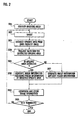
- FIG. 2 is a flow chart illustrating a method for displaying an image using focus information of a portable terminal 100 according to an exemplary embodiment of the present invention, particularly in a shooting mode.
- the controller 10 executes the shooting mode (S61). Specifically, when the user selects a key linked to an executing function of the shooting mode or selects the shooting mode through a main menu, the controller 10 executes the shooting mode.
- the camera module 40 shoots (captures) an image of a subject under the control of the controller 10.
- the user can see the subject, intended to be captured, through a preview image of the display 50, or by a view finder.
- the image extracting unit 12 extracts an interested area from the captured subject image, In other words, if the subject image includes at least one or more subjects, the image extracting unit 12 extracts a portion of a principal subject, as an interested area, from the captured subject image.
- the image extracting unit 12 requests that the user select the extracted interested area through the display 50. Specifically, the image extracting unit 12 presents the extracted interested areas on the display 50, according to focus values of the extracted interested areas, in order, such that the user can select one of them.
- the image information generating unit 14 determines whether one of the extracted interested areas has been selected.
- selecting one of the extracted interested areas is performed by user's key selection.
- the image information generating unit 14 When one of the extracted interested areas is selected in step 65, the image information generating unit 14 generates image information 32 including focus information of the selected interested area (S66). That is to say, the image information generating unit 14 includes the focus information of the interested area with an EXIF to generate the image information 32 of the captured subject image.
- the image information generating unit 14 generates image information 32 of the captured subject image, in which focus information is not included (S67).
- the generated image information 32 is identical to the conventional image information.
- the image controlling unit 16 encodes the generated image information 32 in JPEG format and then stores the image information in the storage unit 30 (S68).
- the controller 10 determines whether or not the shooting mode has terminated (S69). When determining that the shooting mode has not terminated in S69, the controller 10 repeats S62 to S68. The subject shooting procedures are repeatedly performed until the shooting mode has terminated.
- FIG. 3 is a flow chart illustrating a method for displaying an image using focus information of a portable terminal 100 according to an exemplary embodiment of the present invention, particularly in an image display mode.
- the controller 10 executes the image display mode (S71). Specifically, when the user selects a key linked to an executing function of the image display mode or selects the image display mode through a main menu, the controller 10 executes the image display mode,
- the controller 16 is requested to display the captured image as the user selects a key through the key input unit 20 (S72).
- the controller 16 determines whether or not image information 32 of the request image has focus information (S73).
- the image controlling unit 16 displays an interested area image corresponding to the focus information on the display 50 (S74).
- the image information 32 refers to the image information 32 that was generated through S65 and then encoded and stored through S67. Since the interested area image is a portion of the captured subject image, the image controlling unit 16 magnifies the interested area image and then displays the magnified area image on the display 50. In other words, the user can check the desired interested area in the captured image, although the user barely uses the volume keys and four direction keys to perform panning or zooming of the displayed image.
- the image controlling unit 16 displays the requested image on the display 50 (S75) with any focus information or image information.
- the image information 32 refers to the image information 32 that was generated at S66 ( FIG. 2 ), and then encoded and stored at S68. That is, the image controlling unit 16 displays the captured image on the display 50 in the conventional format at step S76.
- step 76 the controller 10 determines whether or not the image display mode has terminated (S76).
- the controller 10 determines that the image display mode is not terminated at S76, the controller 10 repeats S72 to S74. The image display procedures are performed repeatedly until the image display mode is terminated.
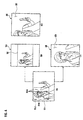
- FIGS. 4A to 4D show examples of the output on display screens according to the method for displaying an image using focus information of a portable terminal according to an exemplary embodiment of the present invention.
- the portable terminal 100 includes a display 50 of an image in portrait style.
- FIG. 4A shows a screen displaying an original image of a captured subject image 91
- the subject image 91 captured in the camera module 40 of the portable terminal 100 has a landscape format.
- a person as a subject is positioned at the left of the captured image 91. Since the subject of the captured subject image 91 is a person, the image extracting unit 12 extracts an interested area 91c including the face from the captured subject image 91.
- focus position 91a of the interested area 91d may be the eyes and mouth of the subject.
- focus area 81b of the interested area 91c may also comprise the face.
- the image controlling unit 16 displays the captured subject image 91 as it is on the display 50, as shown in FIG. 4B or 4C , similar to the conventional image display method.
- the image controlling unit 16 reduces the captured subject image 91 while maintaining its ratio and displays the captured subject image on the display 50 in a landscape format.
- the reference numeral 92 denotes an image displayed on the display 50.
- the image controlling unit 16 displays the captured subject image 91 in a portrait format. Since the captured subject image 91 has a landscape format, a part of the left or right thereof is not displayed on the screen. Therefore, the user must operate the volume keys or four direction keys to magnify the person in the image 93 displayed on the display 50. It should be understood that there can be different keys used to magnify or position the image viewed on the display 50.
- the image controlling unit 16 magnifies an interested area 91d of the captured subject image 91 using the focus information 91 a and displays it on the display 50.
- the image controlling unit 16 magnifies the interested area image 91c in portrait format and then displays the image in the form of a close-up on the display 50. That is, according to the present invention, the image display method using focus information 91 a can reduce the use of the volume keys and four direction keys to check a person in the captured subject image 95 displayed on the display 50 screen.
- a method for image display and the portable terminal can magnify an interested area of the captured subject image using focus information thereof, and then display the magnified on the display, resulting in a decrease in the use of the volume keys and four direction keys to check the interested area, as compared with a conventional camera module of a mobile communication terminal.
- the captured subject image can be displayed in a portrait or a landscape display according to the features a specific area image thereof, so that a user can easily check the images displayed on the portable terminal.
Landscapes
- Engineering & Computer Science (AREA)
- Signal Processing (AREA)
- Multimedia (AREA)
- Computer Networks & Wireless Communication (AREA)
- Studio Devices (AREA)
- Automatic Focus Adjustment (AREA)
- Telephone Function (AREA)
- Controls And Circuits For Display Device (AREA)
Applications Claiming Priority (1)
| Application Number | Priority Date | Filing Date | Title |
|---|---|---|---|
| KR1020070031396A KR100811796B1 (ko) | 2007-03-30 | 2007-03-30 | 휴대 단말기 및 그의 초점 정보를 이용한 영상 표시 방법 |
Publications (3)
| Publication Number | Publication Date |
|---|---|
| EP1976271A2 true EP1976271A2 (fr) | 2008-10-01 |
| EP1976271A3 EP1976271A3 (fr) | 2010-07-21 |
| EP1976271B1 EP1976271B1 (fr) | 2013-05-22 |
Family
ID=39398171
Family Applications (1)
| Application Number | Title | Priority Date | Filing Date |
|---|---|---|---|
| EP07017475.0A Ceased EP1976271B1 (fr) | 2007-03-30 | 2007-09-06 | Terminal de communication mobile et procédé d'affichage d'image utilisant les informations de mise au point |
Country Status (4)
| Country | Link |
|---|---|
| US (1) | US8102461B2 (fr) |
| EP (1) | EP1976271B1 (fr) |
| KR (1) | KR100811796B1 (fr) |
| CN (1) | CN101276405B (fr) |
Cited By (3)
| Publication number | Priority date | Publication date | Assignee | Title |
|---|---|---|---|---|
| EP2549733A1 (fr) * | 2011-07-21 | 2013-01-23 | Sony Corporation | Méthode et appareil pour enregistrer et reproduire un signal d'information additionnel |
| WO2013185695A1 (fr) * | 2012-08-30 | 2013-12-19 | 中兴通讯股份有限公司 | Procédé et dispositif pour traiter des images de terminal mobile |
| EP3076386A4 (fr) * | 2013-12-23 | 2016-10-19 | Huawei Device Co Ltd | Procédé d'affichage d'images, et terminal d'utilisateur |
Families Citing this family (20)
| Publication number | Priority date | Publication date | Assignee | Title |
|---|---|---|---|---|
| JP5803058B2 (ja) * | 2010-03-30 | 2015-11-04 | ソニー株式会社 | 画像処理装置および方法、並びにプログラム |
| KR101794350B1 (ko) * | 2011-02-08 | 2017-12-04 | 삼성전자주식회사 | 휴대단말기의 영상 촬영 방법 |
| CN102324100A (zh) * | 2011-09-30 | 2012-01-18 | 优视科技有限公司 | 基于移动终端摄像头的实时取色方法和装置 |
| JP5985053B2 (ja) * | 2012-07-04 | 2016-09-06 | インテル・コーポレーション | 関心領域ベースの3dビデオコーディング |
| KR101990089B1 (ko) * | 2012-10-16 | 2019-06-17 | 삼성전자주식회사 | 썸네일 이미지를 생성하기 위한 방법 및 그 전자 장치 |
| KR101800617B1 (ko) * | 2013-01-02 | 2017-12-20 | 삼성전자주식회사 | 디스플레이 장치 및 이의 화상 통화 방법 |
| US9607235B2 (en) * | 2013-03-14 | 2017-03-28 | Facebook, Inc. | Image cropping according to points of interest |
| KR102127351B1 (ko) * | 2013-07-23 | 2020-06-26 | 삼성전자주식회사 | 사용자 단말 장치 및 그 제어 방법 |
| US9292756B2 (en) * | 2013-12-10 | 2016-03-22 | Dropbox, Inc. | Systems and methods for automated image cropping |
| KR101462269B1 (ko) | 2014-01-24 | 2014-11-13 | (주)아이엔아이 | 고화질 카메라의 부분 저장장치 및 방법 |
| US9538065B2 (en) * | 2014-04-03 | 2017-01-03 | Qualcomm Incorporated | System and method for multi-focus imaging |
| JP6365229B2 (ja) * | 2014-10-23 | 2018-08-01 | 株式会社デンソー | 多感覚インタフェースの制御方法および多感覚インタフェース制御装置、多感覚インタフェースシステム |
| CN104574483A (zh) * | 2014-12-31 | 2015-04-29 | 北京奇虎科技有限公司 | 一种生成可定制动态图的方法和装置 |
| CN104574484B (zh) * | 2014-12-31 | 2016-10-05 | 北京奇虎科技有限公司 | 一种基于交互操作产生图片动态效果的方法和装置 |
| KR102354458B1 (ko) * | 2015-08-19 | 2022-01-21 | 삼성전자주식회사 | 디스플레이 장치 및 그의 제어방법 |
| CN105933612A (zh) * | 2016-06-29 | 2016-09-07 | 联想(北京)有限公司 | 一种图像处理方法及电子设备 |
| US10757221B2 (en) * | 2016-10-28 | 2020-08-25 | International Business Machines Corporation | Rendering a portion of an image corresponding to an interest of a user |
| US10806417B2 (en) * | 2017-05-08 | 2020-10-20 | Konica Minolta, Inc. | Radiographic imaging apparatus, radiographic imaging system and information processing method |
| CN110365906A (zh) * | 2019-07-29 | 2019-10-22 | 维沃移动通信有限公司 | 拍摄方法及移动终端 |
| JP7418104B2 (ja) * | 2019-08-30 | 2024-01-19 | キヤノン株式会社 | 画像処理装置及び画像処理装置の制御方法 |
Family Cites Families (12)
| Publication number | Priority date | Publication date | Assignee | Title |
|---|---|---|---|---|
| JP2001177741A (ja) | 1999-12-15 | 2001-06-29 | Minolta Co Ltd | 電子カメラおよび表示システム |
| JP2001211351A (ja) | 2000-01-27 | 2001-08-03 | Fuji Photo Film Co Ltd | 画像撮像装置およびその動作制御方法 |
| JP2003125251A (ja) | 2001-10-16 | 2003-04-25 | Minolta Co Ltd | デジタルカメラおよび再生プログラム |
| KR100547992B1 (ko) | 2003-01-16 | 2006-02-01 | 삼성테크윈 주식회사 | 디지털 카메라와 그의 제어 방법 |
| US7269292B2 (en) * | 2003-06-26 | 2007-09-11 | Fotonation Vision Limited | Digital image adjustable compression and resolution using face detection information |
| US20050134719A1 (en) | 2003-12-23 | 2005-06-23 | Eastman Kodak Company | Display device with automatic area of importance display |
| JP4250543B2 (ja) | 2004-02-06 | 2009-04-08 | キヤノン株式会社 | 撮像装置及び情報処理装置及びそれらの制御方法 |
| US8659619B2 (en) * | 2004-03-26 | 2014-02-25 | Intellectual Ventures Fund 83 Llc | Display device and method for determining an area of importance in an original image |
| JP2005303522A (ja) | 2004-04-08 | 2005-10-27 | Nikon Corp | 表示制御装置、カメラおよび画像表示プログラム |
| DE102005016886A1 (de) * | 2005-04-12 | 2006-10-19 | Thomson Broadcast And Media Solutions Gmbh | Verfahren zur Fokussierung eines Filmabtasters und Filmabtaster zur Durchführung des Verfahrens |
| KR100703290B1 (ko) * | 2005-04-13 | 2007-04-03 | 삼성전자주식회사 | 특정 영역을 확대하여 촬영하는 방법 |
| CN100397411C (zh) * | 2006-08-21 | 2008-06-25 | 北京中星微电子有限公司 | 实时鲁棒的人脸追踪显示方法及系统 |
-
2007
- 2007-03-30 KR KR1020070031396A patent/KR100811796B1/ko active Active
- 2007-07-27 US US11/881,658 patent/US8102461B2/en active Active
- 2007-09-06 EP EP07017475.0A patent/EP1976271B1/fr not_active Ceased
- 2007-09-28 CN CN2007101630198A patent/CN101276405B/zh active Active
Non-Patent Citations (1)
| Title |
|---|
| None |
Cited By (6)
| Publication number | Priority date | Publication date | Assignee | Title |
|---|---|---|---|---|
| EP2549733A1 (fr) * | 2011-07-21 | 2013-01-23 | Sony Corporation | Méthode et appareil pour enregistrer et reproduire un signal d'information additionnel |
| US9088758B2 (en) | 2011-07-21 | 2015-07-21 | Sony Corporation | Mark information recording apparatus, mark information presenting apparatus, mark information recording method, and mark information presenting method |
| US10311320B2 (en) | 2011-07-21 | 2019-06-04 | Sony Corporation | Mark information recording apparatus, mark information presenting apparatus, mark information recording method, and mark information presenting method |
| US11100354B2 (en) | 2011-07-21 | 2021-08-24 | Sony Corporation | Mark information recording apparatus, mark information presenting apparatus, mark information recording method, and mark information presenting method |
| WO2013185695A1 (fr) * | 2012-08-30 | 2013-12-19 | 中兴通讯股份有限公司 | Procédé et dispositif pour traiter des images de terminal mobile |
| EP3076386A4 (fr) * | 2013-12-23 | 2016-10-19 | Huawei Device Co Ltd | Procédé d'affichage d'images, et terminal d'utilisateur |
Also Published As
| Publication number | Publication date |
|---|---|
| US20080239139A1 (en) | 2008-10-02 |
| EP1976271A3 (fr) | 2010-07-21 |
| EP1976271B1 (fr) | 2013-05-22 |
| CN101276405A (zh) | 2008-10-01 |
| US8102461B2 (en) | 2012-01-24 |
| KR100811796B1 (ko) | 2008-03-10 |
| CN101276405B (zh) | 2012-12-26 |
Similar Documents
| Publication | Publication Date | Title |
|---|---|---|
| EP1976271B1 (fr) | Terminal de communication mobile et procédé d'affichage d'image utilisant les informations de mise au point | |
| CN107547800B (zh) | 控制装置的相机的方法及其装置 | |
| JP4250543B2 (ja) | 撮像装置及び情報処理装置及びそれらの制御方法 | |
| US9251765B2 (en) | Image processing device, image processing method, and program for generating composite image | |
| CN101336448B (zh) | 成像装置,显示控制装置,图像显示系统,以及成像系统 | |
| US20110216209A1 (en) | Imaging device for capturing self-portrait images | |
| US8988535B2 (en) | Photographing control method and apparatus according to motion of digital photographing apparatus | |
| JP2004343747A (ja) | カメラ付移動通信端末機の撮影方法 | |
| TW200808044A (en) | Imaging apparatus and computer readable recording medium | |
| CN101588451A (zh) | 图像拾取设备和方法、再现控制设备和方法、及程序 | |
| CN102611835B (zh) | 数字拍摄设备及其控制方法 | |
| CN103179345A (zh) | 数字拍摄设备及其控制方法 | |
| JP4574459B2 (ja) | 撮影装置及びその制御方法及びプログラム及び記憶媒体 | |
| CN115379075A (zh) | 月亮拍摄方法、装置、存储介质及拍摄设备 | |
| CN106485653A (zh) | 用户终端及全景图片动态缩略图的生成方法 | |
| KR20130081069A (ko) | 디지털 촬영 장치 및 이의 제어 방법 | |
| JP5310076B2 (ja) | 画像処理装置、および画像処理プログラム | |
| JP2011239021A (ja) | 動画像生成装置、撮像装置および動画像生成プログラム | |
| JP5098917B2 (ja) | 構図判定装置、構図判定方法、プログラム | |
| JP5233726B2 (ja) | 電子カメラ | |
| JP2002135627A (ja) | 電子カメラ装置および画像表示方法 | |
| JP2010074415A (ja) | 撮像装置、画像表示方法および画像表示プログラム | |
| JPWO2020066332A1 (ja) | 撮影装置、撮影方法、及びプログラム | |
| WO2025187394A1 (fr) | Dispositif de traitement d'informations, procédé de commande pour dispositif de traitement d'image, et programme | |
| JP5613285B2 (ja) | 撮像装置、撮像方法、表示装置および表示方法 |
Legal Events
| Date | Code | Title | Description |
|---|---|---|---|
| PUAI | Public reference made under article 153(3) epc to a published international application that has entered the european phase |
Free format text: ORIGINAL CODE: 0009012 |
|
| 17P | Request for examination filed |
Effective date: 20070906 |
|
| AK | Designated contracting states |
Kind code of ref document: A2 Designated state(s): AT BE BG CH CY CZ DE DK EE ES FI FR GB GR HU IE IS IT LI LT LU LV MC MT NL PL PT RO SE SI SK TR |
|
| AX | Request for extension of the european patent |
Extension state: AL BA HR MK RS |
|
| PUAL | Search report despatched |
Free format text: ORIGINAL CODE: 0009013 |
|
| AK | Designated contracting states |
Kind code of ref document: A3 Designated state(s): DE FR GB |
|
| AKX | Designation fees paid |
Designated state(s): DE FR GB |
|
| 17Q | First examination report despatched |
Effective date: 20110314 |
|
| GRAP | Despatch of communication of intention to grant a patent |
Free format text: ORIGINAL CODE: EPIDOSNIGR1 |
|
| RAP1 | Party data changed (applicant data changed or rights of an application transferred) |
Owner name: SAMSUNG ELECTRONICS CO., LTD. |
|
| GRAS | Grant fee paid |
Free format text: ORIGINAL CODE: EPIDOSNIGR3 |
|
| GRAP | Despatch of communication of intention to grant a patent |
Free format text: ORIGINAL CODE: EPIDOSNIGR1 |
|
| GRAA | (expected) grant |
Free format text: ORIGINAL CODE: 0009210 |
|
| AK | Designated contracting states |
Kind code of ref document: B1 Designated state(s): DE FR GB |
|
| REG | Reference to a national code |
Ref country code: GB Ref legal event code: FG4D |
|
| REG | Reference to a national code |
Ref country code: DE Ref legal event code: R096 Ref document number: 602007030537 Country of ref document: DE Effective date: 20130718 |
|
| PLBE | No opposition filed within time limit |
Free format text: ORIGINAL CODE: 0009261 |
|
| STAA | Information on the status of an ep patent application or granted ep patent |
Free format text: STATUS: NO OPPOSITION FILED WITHIN TIME LIMIT |
|
| 26N | No opposition filed |
Effective date: 20140225 |
|
| REG | Reference to a national code |
Ref country code: DE Ref legal event code: R097 Ref document number: 602007030537 Country of ref document: DE Effective date: 20140225 |
|
| REG | Reference to a national code |
Ref country code: FR Ref legal event code: PLFP Year of fee payment: 10 |
|
| REG | Reference to a national code |
Ref country code: FR Ref legal event code: PLFP Year of fee payment: 11 |
|
| REG | Reference to a national code |
Ref country code: FR Ref legal event code: PLFP Year of fee payment: 12 |
|
| PGFP | Annual fee paid to national office [announced via postgrant information from national office to epo] |
Ref country code: FR Payment date: 20200824 Year of fee payment: 14 Ref country code: GB Payment date: 20200824 Year of fee payment: 14 |
|
| GBPC | Gb: european patent ceased through non-payment of renewal fee |
Effective date: 20210906 |
|
| PG25 | Lapsed in a contracting state [announced via postgrant information from national office to epo] |
Ref country code: GB Free format text: LAPSE BECAUSE OF NON-PAYMENT OF DUE FEES Effective date: 20210906 Ref country code: FR Free format text: LAPSE BECAUSE OF NON-PAYMENT OF DUE FEES Effective date: 20210930 |
|
| REG | Reference to a national code |
Ref country code: DE Ref legal event code: R079 Ref document number: 602007030537 Country of ref document: DE Free format text: PREVIOUS MAIN CLASS: H04N0005232000 Ipc: H04N0023600000 |
|
| PGFP | Annual fee paid to national office [announced via postgrant information from national office to epo] |
Ref country code: DE Payment date: 20230822 Year of fee payment: 17 |
|
| REG | Reference to a national code |
Ref country code: DE Ref legal event code: R119 Ref document number: 602007030537 Country of ref document: DE |
|
| PG25 | Lapsed in a contracting state [announced via postgrant information from national office to epo] |
Ref country code: DE Free format text: LAPSE BECAUSE OF NON-PAYMENT OF DUE FEES Effective date: 20250401 |