EP2000891A2 - Vorrichtung und Verfahren zur Ausführung eines Menüs in einem mobilen Endgerät - Google Patents
Vorrichtung und Verfahren zur Ausführung eines Menüs in einem mobilen Endgerät Download PDFInfo
- Publication number
- EP2000891A2 EP2000891A2 EP08005891A EP08005891A EP2000891A2 EP 2000891 A2 EP2000891 A2 EP 2000891A2 EP 08005891 A EP08005891 A EP 08005891A EP 08005891 A EP08005891 A EP 08005891A EP 2000891 A2 EP2000891 A2 EP 2000891A2
- Authority
- EP
- European Patent Office
- Prior art keywords
- menu
- item
- list
- determined
- touch
- Prior art date
- Legal status (The legal status is an assumption and is not a legal conclusion. Google has not performed a legal analysis and makes no representation as to the accuracy of the status listed.)
- Withdrawn
Links
Images



Classifications
-
- G—PHYSICS
- G06—COMPUTING OR CALCULATING; COUNTING
- G06F—ELECTRIC DIGITAL DATA PROCESSING
- G06F3/00—Input arrangements for transferring data to be processed into a form capable of being handled by the computer; Output arrangements for transferring data from processing unit to output unit, e.g. interface arrangements
- G06F3/01—Input arrangements or combined input and output arrangements for interaction between user and computer
- G06F3/048—Interaction techniques based on graphical user interfaces [GUI]
- G06F3/0487—Interaction techniques based on graphical user interfaces [GUI] using specific features provided by the input device, e.g. functions controlled by the rotation of a mouse with dual sensing arrangements, or of the nature of the input device, e.g. tap gestures based on pressure sensed by a digitiser
- G06F3/0488—Interaction techniques based on graphical user interfaces [GUI] using specific features provided by the input device, e.g. functions controlled by the rotation of a mouse with dual sensing arrangements, or of the nature of the input device, e.g. tap gestures based on pressure sensed by a digitiser using a touch-screen or digitiser, e.g. input of commands through traced gestures
- G06F3/04883—Interaction techniques based on graphical user interfaces [GUI] using specific features provided by the input device, e.g. functions controlled by the rotation of a mouse with dual sensing arrangements, or of the nature of the input device, e.g. tap gestures based on pressure sensed by a digitiser using a touch-screen or digitiser, e.g. input of commands through traced gestures for inputting data by handwriting, e.g. gesture or text
-
- H—ELECTRICITY
- H04—ELECTRIC COMMUNICATION TECHNIQUE
- H04B—TRANSMISSION
- H04B1/00—Details of transmission systems, not covered by a single one of groups H04B3/00 - H04B13/00; Details of transmission systems not characterised by the medium used for transmission
- H04B1/38—Transceivers, i.e. devices in which transmitter and receiver form a structural unit and in which at least one part is used for functions of transmitting and receiving
- H04B1/40—Circuits
-
- G—PHYSICS
- G06—COMPUTING OR CALCULATING; COUNTING
- G06F—ELECTRIC DIGITAL DATA PROCESSING
- G06F3/00—Input arrangements for transferring data to be processed into a form capable of being handled by the computer; Output arrangements for transferring data from processing unit to output unit, e.g. interface arrangements
- G06F3/01—Input arrangements or combined input and output arrangements for interaction between user and computer
- G06F3/048—Interaction techniques based on graphical user interfaces [GUI]
- G06F3/0481—Interaction techniques based on graphical user interfaces [GUI] based on specific properties of the displayed interaction object or a metaphor-based environment, e.g. interaction with desktop elements like windows or icons, or assisted by a cursor's changing behaviour or appearance
- G06F3/0482—Interaction with lists of selectable items, e.g. menus
-
- G—PHYSICS
- G06—COMPUTING OR CALCULATING; COUNTING
- G06F—ELECTRIC DIGITAL DATA PROCESSING
- G06F2203/00—Indexing scheme relating to G06F3/00 - G06F3/048
- G06F2203/048—Indexing scheme relating to G06F3/048
- G06F2203/04807—Pen manipulated menu
Definitions
- the present invention relates to a device and a method for executing a menu in a mobile terminal. More particularly, the present invention relates to a device and a method for executing a menu in a mobile terminal having a touch screen.
- Mobile terminals have gained wide popularity and are widely used due to their mobility and the convenience of communication functions they provide to users. Recently, with the increasing development of information communication technology and semiconductor technology, mobile terminals are being provided with even more advanced functions. That is, mobile terminals now have various functions in addition to a communication function such as voice communication or a character message service. Moreover, the quality of mobile terminals has gradually developed regarding size, design, resolution, user interface, etc.
- a touch screen performs a function of an input device and a function of a display device thus allowing for the inputting and displaying of data on a single screen. Because a mobile terminal having a touch screen may not require a keypad, the mobile terminal can have an increased display area while enabling a user to intuitively manipulate input. Accordingly, manufacturers of mobile terminals have an increasing interest in the use of a touch screen in a mobile terminal and have actively performed related research and development. However, there remains further opportunity for improving user convenience with regard to a touch screen in a mobile terminal.
- an aspect of the present invention is to address the above-mentioned problems and disadvantages and to provide at least the advantages described below. Accordingly, an aspect of the present invention is to provide a device and a method for executing a menu that can improve user convenience in executing a specific menu using a specific item corresponding to a touch input operation of a user in a mobile terminal having a touch screen.
- a device for executing a menu in a mobile terminal includes a display unit for displaying, when a request for displaying a menu list is input, the menu list, including at least one menu, in a first direction and an item list, including at least one item, for executing the menu in a second direction intersecting the first direction, a touch panel for detecting a touch action on the display unit, a position detection unit for determining, when the touch action is detected, a touch position on the display unit and a menu execution unit for determining a menu of the menu list in the first direction and an item of the item list in the second direction by analyzing the touch position and for executing the determined menu using the determined item.
- a method of executing a menu in a mobile terminal having a touch screen includes displaying, when a request for displaying a menu list is input, at least one menu list in a first direction on the touch screen and displaying at least one item list for executing the menu in a second direction intersecting the first direction, determining, if a touch action is detected on the touch screen, a menu of the menu list in the first direction and an item of the item list in the second direction by analyzing a touch position detected on the touch screen and executing the determined menu using the determined item.
- a method of executing a menu in a mobile terminal having a touch screen includes displaying, when a request for displaying a menu list is input, at least one menu list in a first direction on the touch screen and displaying at least one item list for executing the menu in a second direction intersecting the first direction, determining, if a touch action is detected on the touch screen, a menu of the menu list in the first direction and an item of the item list in the second direction by analyzing a touch position detected on the touch screen and executing, if a menu of the first direction exists at the analyzed touch position, the determined menu using the determined item.
- a method of executing a menu in a mobile terminal having a touch screen includes displaying, when a request for displaying a menu list is input, at least one menu list in a first direction on the touch screen and displaying at least one item list for executing the menu in a second direction intersecting the first direction, determining, if a touch action is detected on the touch screen, an item of the item list in the second direction by analyzing a touch position detected on the touch screen and displaying, if a menu of the first direction does not exist at the analyzed touch position, a previously displayed menu list.
- a method of executing a menu in a mobile terminal having a touch screen includes displaying, when a request for displaying a menu list is input in a first direction on the touch screen, at least one menu list and a first scroll key for scrolling menus and displaying in a second direction intersecting the first direction, at least one item list and a second scroll key for scrolling items, determining, if a touch action is detected on the touch screen, except for the first and second scroll key, a menu of the menu list in the first direction and an item of the item list in the second direction by analyzing a touch position detected on the touch screen and scrolling, if a touch action is detected on the first scroll key, the menus displayed in the first direction, and scrolling, if a touch action is detected on the second scroll key, the items displayed in the second direction.
- a method of executing a menu in a mobile terminal having a touch screen includes displaying, when a request for displaying a menu list is input, at least one menu list occupying a space set in a first direction on the touch screen and displaying at least one item list occupying a space set in a second direction intersecting the first direction, determining, if a touch action is detected on the touch screen, a menu of the menu list in the first direction and an item of the item list in the second direction by analyzing a touch position detected on the touch screen and executing the determined menu using the determined item.
- the term "menu" indicates an option to which a function or information that can be provided in a mobile terminal is allocated.
- a menu may be an option to which a function that can be provided by the mobile terminal, such as a camera, memo box, message box, and MP3 player, is allocated, or may be an option to which information generated when performing a specific function in the mobile terminal, such as an image, memo, message, and MP3 file, is allocated.
- a menu may include a lower level menu, or may be a lowest level menu that does not include a lower level menu.
- menu list indicates a list in which at least one menu of one specific level is arranged in a specific direction.
- the term "item” indicates a command for executing a menu in the mobile terminal.
- An item may be differently provided according to a menu to be executed.
- items corresponding thereto may be viewing, addition, deletion and entire deletion of the memo.
- items corresponding thereto may be reproduction, transmission, deletion and entire deletion.
- item list indicates a list in which at least one item for executing a specific level menu is arranged in a specific direction.
- touch indicates an action in which a user of the mobile terminal makes contact to the touch screen.
- the contact to the touch screen may be made with a finger, a stylus and the like.
- drag indicates an action in which the user of the mobile terminal moves a touch while continuing the touch to the touch screen.
- drop indicates an action in which the user of the mobile terminal removes a touch from the touch screen, for example by lifting a stylus off of the touch screen.
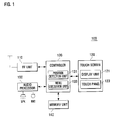
- FIG. 1 is a block diagram illustrating a configuration of a mobile terminal according to an exemplary embodiment of the present invention.
- a mobile terminal is a mobile phone.
- PDA Personal Digital Assistant
- a mobile terminal 100 includes a radio frequency (RF) unit 110, touch screen 120, controller 130, memory unit 140 and audio processor 150.
- RF radio frequency
- the RF unit 110 performs a wireless communication function of the mobile terminal 100.
- the RF unit 110 includes an RF transmitter for up-converting the frequency of a signal to be transmitted and for amplifying the signal.
- the RF unit 110 also includes an RF receiver for low-noise amplifying a received signal and for down-converting the frequency of the signal.
- the touch screen 120 includes a display unit 121 and a touch panel 123.
- the display unit 121 displays various information including information about a state of the mobile terminal 100.
- the display unit 121 may use a liquid crystal display (LCD) and include an LCD controller, memory for storing display data and an LCD display element.
- LCD liquid crystal display
- the display unit 121 displays at least one menu list in a first direction and displays at least one item list in a second direction intersecting the first direction.
- the touch panel 123 is mounted proximate the display unit 121 and includes a touch sensor and a signal converter.
- the touch sensor detects a change of a physical quantity, for example an electrical quantity such as resistance or capacitance, or a mechanical quantity such as displacement. The detected change is interpreted as a touch action such as a touch, a drag, or a drop.
- the signal converter converts the detected change of the physical quantity to an appropriate signal.
- the controller 130 performs a function of controlling the general operations of the mobile terminal 100.
- the controller 130 includes a data processor having a transmitter for encoding and modulating a signal to be transmitted and a receiver for demodulating and decoding a received signal, for which the data processor includes a modem and a codec.
- the controller 130 also includes a position detection unit 131 and a menu execution unit 133.
- the position detection unit 131 receives a touch signal from the signal converter and, using the received touch signal, determines a touch position on the display unit 121. When a drag is generated from a touch position on the display unit 121, the position detection unit 131 determines a new touch position in the drag path.
- the menu execution unit 133 analyzes a touch position determined by the position detection unit 131.
- the menu execution unit 133 determines a menu of a menu list in the first direction and an item of an item list in the second direction corresponding to the analyzed touch position.
- the menu execution unit 133 scrolls through a menu list when a touch action is detected on a first scroll key and scrolls through an item list when a touch action is detected on a second scroll key. Further, the menu execution unit 133 executes the determined menu using the determined item when a drop is generated at a position on the display unit 121. If a menu of the first direction does not exist at the position where the drop is generated, the menu execution unit 133 displays the previously displayed menu list.
- the memory unit 140 includes a program memory and a data memory.
- the program memory stores an operation program for the mobile terminal 100 and a program for executing a menu using the touch screen 120 according to an exemplary embodiment of the present invention.
- the data memory stores data generated while performing the programs.
- the memory unit 140 stores menu position information of a menu list displayed in the first direction and item position information of an item list displayed in the second direction. Further, the memory unit 140 stores menus in the menu list displayed in the first direction according to a user preference. For example, the menus may be stored according to the number of times each menu is executed by the control of the controller 130. Also, the memory unit 140 stores items in the item list displayed in the second direction according to a user preference, for example according to the number of times an item is executed by the control of the controller 130.
- the audio processor 150 performs a function of reproducing an audio signal, received from an audio codec of a data processor, through a speaker SPK and of outputting an audio signal to be transmitted, that is input through a microphone MIC, to an audio codec of the data processor.
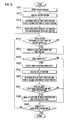
- FIG. 2 is a flowchart illustrating a method of executing a menu according to another exemplary embodiment of the present invention.
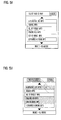
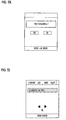
- FIGs. 5A to 5L illustrate examples of screens that may be displayed when performing a process of executing a menu according to the method of FIG. 2 .
- FIGs. 5A to 5D and FIG. 5H illustrate examples of screens that may be displayed when performing a process of determining a menu and an item, and
- FIGs. 5E to 5G and FIGs. 5I to 5L illustrate examples of screens that may be displayed when performing a process of executing a menu using an item.
- the controller 130 determines whether a request for displaying a menu list is input in step S211. If a request for displaying a menu list is input, the controller 130 controls to display a menu list and an item list on the touch screen 120 in step S213.
- a displayed menu list and item list is shown in FIG. 5A .
- a menu of the menu list may be, for example, an MP3 file.
- step S213 the controller 130 controls to display at least one menu list in a first direction of the touch screen 120.
- the controller 130 controls to position each menu of a menu list displayed in the first direction in a preset space. Display characteristics of each preset space occupied by a menu of the menu list displayed in the first direction may be set by the user, for example according to number of execution times. Further, a first scroll key for scrolling through the menu list may also be displayed in the first direction.
- the controller 130 controls to display at least one item list in a second direction, wherein the second direction intersects the first direction.
- the controller 130 controls to position each item of an item list displayed in the second direction in a preset space. Display characteristics of each preset space occupied by an item of the item list displayed in the second direction may be set by the user, for example according to the number of times an item has been executed. Further, the controller 130 controls to arrange each item of the item list in a preset order according to user preference, for example according to number of execution times. Also, a second scroll key for scrolling through the item list may be displayed in the second direction.
- the controller 130 determines whether a touch is generated on the touch screen 120 in step S215. If a touch is generated on the touch screen 120, the controller 130 determines a menu and an item corresponding to the touch position in step S217, as shown in FIGs. 5B to 5D and FIG. 5H . That is, the controller 130 analyzes the generated touch position and thereby determines a menu and item corresponding to the touch position to be executed by the user of the mobile terminal 100.
- FIG. 3 is a flowchart illustrating an exemplary process of determining a menu and item of step S217 in the method of FIG. 2 .
- the controller 130 detects a touch position in step S311.
- the controller 130 analyzes the detected touch position in step S313.
- the controller 130 determines a menu and item that correspond to the detected touch position in step S315. That is, the controller 130 determines a menu of the first direction and an item of the second direction corresponding to the detected touch position. More specifically, the controller 130 extracts menu position information of a menu of the first direction corresponding to the touch position and item position information of an item of the second direction corresponding to the touch position from menu position information and item position information stored in the memory unit 140. The controller 130 determines the menu corresponding to the extracted menu position information and the item corresponding to the extracted item position information.
- the controller 130 then controls to display a menu execution bar in the second direction corresponding to the determined menu and to display an item execution bar in the first direction corresponding to the determined item in step S317, as shown in FIG. 5B .
- the controller 130 controls to display the menu execution bar at a space in the display unit 121 that corresponds to a space occupied by the determined menu in a menu list displayed in the first direction.
- the controller 130 controls to display the item execution bar at a space in the display unit 121 that corresponds to a space occupied by the determined item in an item list displayed in the second direction.
- the controller 130 determines whether a touch action is detected corresponding to either the first scroll key or the second scroll key in step S319. If a touch action is detected corresponding to either the first scroll key or the second scroll key, the controller 130 scrolls at least one of the menu list corresponding to the first scroll key and the item list corresponding to the second scroll key in step S321. That is, the controller 130 scrolls the menu list if the touch action is performed at the first scroll key and scrolls the item list if the touch action is performed at the second scroll key. In an example as shown in FIG. 5C , a touch action is detected corresponding to a second scroll key so as to scroll through the item list. The controller 130 scrolls at least one of a menu list or an item list at a scroll speed that is initially set and may be altered by the user.
- the controller 130 determines whether a drag is generated from a touch position on the display unit 121 in step S323. If a drag is generated from a touch position on the display unit 121, the controller 130 detects the touch position in the drag path in step S325.
- the controller 130 analyzes the detected touch position in step S327.
- the controller 130 determines a menu and item that can be executed by analyzing the detected touch position in step S329. That is, the controller 130 determines a menu of the first direction and an item of the second direction corresponding to the detected touch position. More specifically, the controller 130 extracts menu position information of a menu of the first direction and item position information of an item of the second direction corresponding to the touch position from menu position information and item position information stored in the memory unit 140. The controller 130 determines the menu corresponding to the extracted menu position information and the item corresponding to the extracted item position information.
- the controller 130 determines whether to move at least one of the menu execution bar and the item execution bar to correspond to the detected touch position in step S331, by determining whether the determined menu corresponds to the currently displayed menu execution bar and whether the determined item corresponds to the currently displayed item execution bar. If at least one of the menu execution bar and the item execution bar is to be moved corresponding to the detected touch position, the controller 130 controls to move the corresponding execution bar in step S333, as shown in FIGs. 5D to 5H .
- the controller 130 moves the menu execution bar to the determined menu.
- the controller 130 controls to display the menu execution bar in the display unit 121 at the determined menu in the menu list displayed in the first direction. Further, if the determined item does not correspond to the currently displayed item execution bar, the controller 130 moves the item execution bar to the determined item.
- the controller 130 controls to display the item execution bar in the display unit 121 at the determined item in the item list displayed in the second direction.
- the controller 130 moves the execution bar at a speed proportional to the speed of the drag generated in the display unit 121.
- the controller 130 After display of the menu execution bar corresponding to the determined menu and the item execution bar corresponding to the determined item at step S333, or if a drag of a touch is not generated from a touch position on the display unit 121 at step S323, the controller 130 determines whether a request for terminating the process of determining a menu and item is input in step S335. If a request for terminating a process of determining a menu and item is input, the controller 130 detects the request and the process returns to step S217 of FIG. 2 .
- step S319 If a request for terminating the process of determining a menu and item is not input, the process returns to step S319 and the controller 130 controls to repeat steps S319 to S335 until the request for terminating the process of determining a menu and item is input.
- the controller 130 determines a specific menu and item and then the process returns to the process of FIG. 2 .
- the controller 130 determines whether a drop of a touch is generated on the display unit 121 in step S219. If a drop of a touch is generated on the display unit 121, the controller 130 executes the determined menu using a processing function allocated to the determined item in step S221, as shown in FIGs. 5E to 5G and FIGs. 5I to 5L . That is, the controller 130 executes a specific menu using a specific item corresponding to the drop generated in the touch screen 120. The controller 130 performs a different process according to whether a menu of the first direction of the touch position exists.
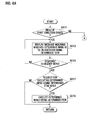
- FIGs. 4A and 4B are flowcharts illustrating an exemplary process of executing the determined menu using the determined item of step S221 in the method of FIG. 2 .
- FIG. 4A illustrates an exemplary process of executing one determined menu using the determined item
- FIG. 4B illustrates an exemplary process of executing at least one determined menu using the determined item.
- the controller 130 determines whether a menu of the first direction exists at the touch position at which the drop is generated in step S411. If a menu of the first direction exists at the touch position at which the drop is generated, as shown in FIG. 5E , the controller 130 controls to display a message inquiring whether the determined menu is to be executed using the determined item in step S413, as shown in FIG. 5F .
- the inquiry message may be registered as a default in the mobile terminal 100 to correspond to a specific item, or may be selectively registered by the user.
- the controller 130 determines whether a response to the inquiry is input in step S415. If a response to the inquiry is input, the controller 130 determines whether the input response is a request for executing the determined menu using the determined item in step S417. If the input response is not a request for executing the determined menu using the determined item, the controller 130 terminates the process of executing one determined menu using the determined item and the process returns to the process of FIG. 2 .
- the controller 130 executes the determined menu using the determined item in step S419, as shown in FIG. 5G , and then the process returns to the process of FIG. 2 .
- the controller 130 determines whether a plurality of menus can be executed using the determined item in step S431. If a plurality of menus cannot be executed using the determined item, the controller 130 terminates the process of executing at least one determined menu using the determined item and the process returns to the process of FIG. 2 .
- the controller 130 controls to display a menu list in step S433, as shown in FIG. 5I .
- the controller 130 determines whether at least one menu is selected from a menu list in step S435, as shown in FIG. 5J . If at least one menu is selected from a menu list, the controller 130 controls to display a message inquiring whether the selected at least one menu is to be executed using the determined item in step S437, as shown in FIG. 5K .
- the inquiry message may be registered as a default in the mobile terminal 100 to correspond to a specific item, or may be selectively registered by the user.
- the controller 130 determines whether a response to the inquiry is input in step S439. If a response to the inquiry is input, the controller 130 determines whether the input response is a request for executing the selected at least one menu using the determined item in step S441.
- the controller 130 terminates the process of executing at least one determined menu using the determined item and the process returns to the process of FIG. 2 .
- the controller 130 executes the selected at least one menu using the determined item in step S443, as shown in FIG. 5L , and then the process returns to the process of FIG. 2 .
- the controller 130 terminates the process of executing the menu.
- a device and a method for executing a menu in a mobile terminal when a request for displaying a menu list in the mobile terminal is input, at least one menu list is displayed in a first direction and an item list is displayed in a second direction intersecting the first direction.
- the mobile terminal determines a menu of the first direction and an item of the second direction corresponding to a touch position and executes the determined menu using the determined item. Accordingly, the user of the mobile terminal can execute a specific menu using a specific item with a single touch and drop.
- user convenience is improved and selection of a menu and item can be performed intuitively and distinguishably displayed.
Landscapes
- Engineering & Computer Science (AREA)
- General Engineering & Computer Science (AREA)
- Theoretical Computer Science (AREA)
- Human Computer Interaction (AREA)
- Physics & Mathematics (AREA)
- General Physics & Mathematics (AREA)
- Computer Networks & Wireless Communication (AREA)
- Signal Processing (AREA)
- User Interface Of Digital Computer (AREA)
- Telephone Function (AREA)
- Position Input By Displaying (AREA)
Applications Claiming Priority (1)
| Application Number | Priority Date | Filing Date | Title |
|---|---|---|---|
| KR1020070051775A KR101415296B1 (ko) | 2007-05-29 | 2007-05-29 | 휴대 단말기의 메뉴 실행 장치 및 방법 |
Publications (2)
| Publication Number | Publication Date |
|---|---|
| EP2000891A2 true EP2000891A2 (de) | 2008-12-10 |
| EP2000891A3 EP2000891A3 (de) | 2013-01-16 |
Family
ID=39540397
Family Applications (1)
| Application Number | Title | Priority Date | Filing Date |
|---|---|---|---|
| EP08005891A Withdrawn EP2000891A3 (de) | 2007-05-29 | 2008-03-27 | Vorrichtung und Verfahren zur Ausführung eines Menüs in einem mobilen Endgerät |
Country Status (3)
| Country | Link |
|---|---|
| US (1) | US20080297485A1 (de) |
| EP (1) | EP2000891A3 (de) |
| KR (1) | KR101415296B1 (de) |
Cited By (2)
| Publication number | Priority date | Publication date | Assignee | Title |
|---|---|---|---|---|
| CN102915178A (zh) * | 2012-09-25 | 2013-02-06 | 广东欧珀移动通信有限公司 | 一种基于触摸屏进入多选列表界面的方法及装置 |
| CN105955592A (zh) * | 2009-05-11 | 2016-09-21 | 索尼移动通信公司 | 信息终端、用于信息终端的信息呈现方法、及信息呈现程序 |
Families Citing this family (20)
| Publication number | Priority date | Publication date | Assignee | Title |
|---|---|---|---|---|
| US20090122018A1 (en) * | 2007-11-12 | 2009-05-14 | Leonid Vymenets | User Interface for Touchscreen Device |
| KR101461954B1 (ko) | 2008-05-08 | 2014-11-14 | 엘지전자 주식회사 | 단말기 및 그 제어 방법 |
| KR101504209B1 (ko) * | 2008-10-16 | 2015-03-19 | 엘지전자 주식회사 | 터치센서가 장착된 입력장치를 구비한 이동단말기 및 그 제어방법 |
| US9026918B2 (en) * | 2008-10-16 | 2015-05-05 | Accenture Global Services Limited | Enabling a user device to access enterprise data |
| KR20100044341A (ko) * | 2008-10-22 | 2010-04-30 | 엘지전자 주식회사 | 이동 단말기 및 이를 이용한 스케쥴러 제공 방법 |
| US20100153866A1 (en) | 2008-12-11 | 2010-06-17 | Accenture Global Services Gmbh | Method and system for modifying the execution of a native application running on a portable electronic device |
| US20100281430A1 (en) * | 2009-05-02 | 2010-11-04 | Samir Hanna Safar | Mobile applications spin menu |
| KR101646922B1 (ko) | 2009-05-19 | 2016-08-23 | 삼성전자 주식회사 | 휴대 단말기의 통신 관련 기능 운용 방법 및 이를 지원하는 휴대 단말기 |
| US8359544B2 (en) * | 2009-05-28 | 2013-01-22 | Microsoft Corporation | Automated content submission to a share site |
| KR20100134948A (ko) * | 2009-06-16 | 2010-12-24 | 삼성전자주식회사 | 터치스크린을 구비하는 장치의 메뉴 표시 방법 |
| KR101648747B1 (ko) * | 2009-10-07 | 2016-08-17 | 삼성전자 주식회사 | 복수의 터치 센서를 이용한 ui 제공방법 및 이를 이용한 휴대 단말기 |
| KR101726606B1 (ko) | 2010-11-18 | 2017-04-13 | 삼성전자주식회사 | 휴대 단말기의 정보 표시 방법 및 장치 |
| US9507454B1 (en) * | 2011-09-19 | 2016-11-29 | Parade Technologies, Ltd. | Enhanced linearity of gestures on a touch-sensitive surface |
| CN102819389B (zh) * | 2012-07-19 | 2016-03-09 | 宇龙计算机通信科技(深圳)有限公司 | 一种移动终端以及在移动终端显示内容的方法 |
| KR101412419B1 (ko) * | 2012-08-20 | 2014-06-25 | 주식회사 팬택 | 개선된 사용자 인터페이스 기능을 갖는 이동통신 단말과 사용자 인터페이스 제공 방법 |
| CN103945040A (zh) * | 2013-01-17 | 2014-07-23 | 腾讯科技(深圳)有限公司 | 终端的通讯控制方法及装置 |
| JP5805685B2 (ja) * | 2013-02-27 | 2015-11-04 | 京セラ株式会社 | 電子機器、制御方法、及び制御プログラム |
| KR101575969B1 (ko) | 2014-07-14 | 2015-12-08 | 엘지전자 주식회사 | 단말기 및 그 동작 방법 |
| CN104636048A (zh) * | 2015-01-26 | 2015-05-20 | 上海天奕达电子科技有限公司 | 一种页面内容滚动显示的方法和装置 |
| CN107728918A (zh) | 2017-09-27 | 2018-02-23 | 北京三快在线科技有限公司 | 浏览连续页面的方法、装置及电子设备 |
Family Cites Families (8)
| Publication number | Priority date | Publication date | Assignee | Title |
|---|---|---|---|---|
| US6121968A (en) * | 1998-06-17 | 2000-09-19 | Microsoft Corporation | Adaptive menus |
| SE0002472L (sv) * | 2000-06-30 | 2001-12-31 | Nokia Corp | Method and apparatus for selection control |
| US7921166B2 (en) | 2002-02-01 | 2011-04-05 | Xerox Corporation | Methods and systems for accessing email |
| JP4113902B2 (ja) * | 2004-08-27 | 2008-07-09 | 富士通株式会社 | 操作画面生成方法,表示制御装置,操作画面生成プログラムおよび同プログラムを記録したコンピュータ読取可能な記録媒体 |
| US20060246955A1 (en) * | 2005-05-02 | 2006-11-02 | Mikko Nirhamo | Mobile communication device and method therefor |
| KR20060133389A (ko) * | 2005-06-20 | 2006-12-26 | 엘지전자 주식회사 | 이동 단말기의 데이터 처리 장치 및 그 방법 |
| WO2007001960A2 (en) * | 2005-06-20 | 2007-01-04 | Bin Wai Lam | Methods and systems for enabling the injection of sounds into communications |
| KR100894146B1 (ko) * | 2007-02-03 | 2009-04-22 | 엘지전자 주식회사 | 이동통신 단말기 및 그 동작 제어방법 |
-
2007
- 2007-05-29 KR KR1020070051775A patent/KR101415296B1/ko not_active Expired - Fee Related
-
2008
- 2008-03-27 EP EP08005891A patent/EP2000891A3/de not_active Withdrawn
- 2008-04-14 US US12/102,428 patent/US20080297485A1/en not_active Abandoned
Cited By (3)
| Publication number | Priority date | Publication date | Assignee | Title |
|---|---|---|---|---|
| CN105955592A (zh) * | 2009-05-11 | 2016-09-21 | 索尼移动通信公司 | 信息终端、用于信息终端的信息呈现方法、及信息呈现程序 |
| CN105955592B (zh) * | 2009-05-11 | 2019-07-16 | 索尼移动通信公司 | 信息终端、用于信息终端的信息呈现方法、及信息呈现程序 |
| CN102915178A (zh) * | 2012-09-25 | 2013-02-06 | 广东欧珀移动通信有限公司 | 一种基于触摸屏进入多选列表界面的方法及装置 |
Also Published As
| Publication number | Publication date |
|---|---|
| EP2000891A3 (de) | 2013-01-16 |
| KR101415296B1 (ko) | 2014-07-04 |
| KR20080104680A (ko) | 2008-12-03 |
| US20080297485A1 (en) | 2008-12-04 |
Similar Documents
| Publication | Publication Date | Title |
|---|---|---|
| US20080297485A1 (en) | Device and method for executing a menu in a mobile terminal | |
| US11093124B2 (en) | Page operating method and electronic device thereof | |
| JP6640265B2 (ja) | 複数のアプリケーションから受信した通知を表示するためのシステムおよび方法 | |
| AU2008100010A4 (en) | Portable multifunction device, method, and graphical user interface for translating displayed content | |
| TWI381305B (zh) | 使用者介面的顯示與操作方法以及電子裝置 | |
| US20120062494A1 (en) | Mobile electronic device, controlling method thereof and non-transitory recording medium thereof | |
| JP6368455B2 (ja) | 装置、方法、及びプログラム | |
| US9329770B2 (en) | Portable device, method, and graphical user interface for scrolling to display the top of an electronic document | |
| AU2008100011A4 (en) | Positioning a slider icon on a portable multifunction device | |
| EP2126676B1 (de) | Tragbare multifunktionsvorrichtung, verfahren und graphische benutzeroberfläche zur interpretation von fingergesten auf einer touchscreen-anzeige | |
| KR101538705B1 (ko) | 휴대단말의 기능 제어 방법 및 시스템 | |
| JP6100287B2 (ja) | 端末複数選択操作方法及び端末 | |
| US20160210042A1 (en) | Touch screen device, method, and graphical user interface for inserting a character from an alternate keyboard | |
| EP2051161A2 (de) | Mobiles Endgerät und Verfahren zur Menüanzeige davon | |
| KR20110115180A (ko) | 상이한 제스처에 대해 유사한 동작을 수행하는 휴대용 전자 장치 | |
| US20150234566A1 (en) | Electronic device, storage medium and method for operating electronic device | |
| US20100138765A1 (en) | Indicator Pop-Up | |
| KR101354841B1 (ko) | 터치 스크린을 구비한 전자 기기 및 그 입력처리 방법 | |
| KR20200002752A (ko) | 터치스크린을 구비한 휴대 단말기의 터치 압력을 이용한 사용자 인터페이스 제공 방법 및 장치 |
Legal Events
| Date | Code | Title | Description |
|---|---|---|---|
| PUAI | Public reference made under article 153(3) epc to a published international application that has entered the european phase |
Free format text: ORIGINAL CODE: 0009012 |
|
| 17P | Request for examination filed |
Effective date: 20080327 |
|
| AK | Designated contracting states |
Kind code of ref document: A2 Designated state(s): AT BE BG CH CY CZ DE DK EE ES FI FR GB GR HR HU IE IS IT LI LT LU LV MC MT NL NO PL PT RO SE SI SK TR |
|
| AX | Request for extension of the european patent |
Extension state: AL BA MK RS |
|
| RAP1 | Party data changed (applicant data changed or rights of an application transferred) |
Owner name: SAMSUNG ELECTRONICS CO., LTD. |
|
| PUAL | Search report despatched |
Free format text: ORIGINAL CODE: 0009013 |
|
| AK | Designated contracting states |
Kind code of ref document: A3 Designated state(s): AT BE BG CH CY CZ DE DK EE ES FI FR GB GR HR HU IE IS IT LI LT LU LV MC MT NL NO PL PT RO SE SI SK TR |
|
| AX | Request for extension of the european patent |
Extension state: AL BA MK RS |
|
| RIC1 | Information provided on ipc code assigned before grant |
Ipc: G06F 3/048 20130101AFI20121207BHEP |
|
| RBV | Designated contracting states (corrected) |
Designated state(s): AT BE BG CH CY CZ DE DK EE ES FI FR GB GR HR HU IE IS IT LI LT LU LV MC MT NL NO PL PT RO SE SI SK TR |
|
| AKX | Designation fees paid |
Designated state(s): DE GB NL |
|
| 17Q | First examination report despatched |
Effective date: 20161128 |
|
| STAA | Information on the status of an ep patent application or granted ep patent |
Free format text: STATUS: THE APPLICATION HAS BEEN WITHDRAWN |
|
| 18W | Application withdrawn |
Effective date: 20170331 |