EP2023091A2 - Navigationsvorrichtung und Navigationsprogramm - Google Patents
Navigationsvorrichtung und Navigationsprogramm Download PDFInfo
- Publication number
- EP2023091A2 EP2023091A2 EP08161074A EP08161074A EP2023091A2 EP 2023091 A2 EP2023091 A2 EP 2023091A2 EP 08161074 A EP08161074 A EP 08161074A EP 08161074 A EP08161074 A EP 08161074A EP 2023091 A2 EP2023091 A2 EP 2023091A2
- Authority
- EP
- European Patent Office
- Prior art keywords
- display
- guidance information
- user
- displayed
- information
- Prior art date
- Legal status (The legal status is an assumption and is not a legal conclusion. Google has not performed a legal analysis and makes no representation as to the accuracy of the status listed.)
- Granted
Links
- 239000003550 marker Substances 0.000 description 36
- 230000006870 function Effects 0.000 description 9
- 238000001514 detection method Methods 0.000 description 8
- 230000007246 mechanism Effects 0.000 description 7
- 238000000034 method Methods 0.000 description 6
- 230000010365 information processing Effects 0.000 description 5
- 238000012217 deletion Methods 0.000 description 3
- 230000037430 deletion Effects 0.000 description 3
- 238000012545 processing Methods 0.000 description 3
- 230000008859 change Effects 0.000 description 2
- 238000004891 communication Methods 0.000 description 2
- 238000010586 diagram Methods 0.000 description 2
- 238000012986 modification Methods 0.000 description 2
- 230000004048 modification Effects 0.000 description 2
- 230000001133 acceleration Effects 0.000 description 1
- 230000005540 biological transmission Effects 0.000 description 1
- 238000004590 computer program Methods 0.000 description 1
- 238000012937 correction Methods 0.000 description 1
- 230000009977 dual effect Effects 0.000 description 1
- 230000000694 effects Effects 0.000 description 1
- 230000010354 integration Effects 0.000 description 1
- 230000003287 optical effect Effects 0.000 description 1
- 230000008569 process Effects 0.000 description 1
- 230000000007 visual effect Effects 0.000 description 1
Images




Classifications
-
- G—PHYSICS
- G01—MEASURING; TESTING
- G01C—MEASURING DISTANCES, LEVELS OR BEARINGS; SURVEYING; NAVIGATION; GYROSCOPIC INSTRUMENTS; PHOTOGRAMMETRY OR VIDEOGRAMMETRY
- G01C21/00—Navigation; Navigational instruments not provided for in groups G01C1/00 - G01C19/00
- G01C21/26—Navigation; Navigational instruments not provided for in groups G01C1/00 - G01C19/00 specially adapted for navigation in a road network
- G01C21/34—Route searching; Route guidance
- G01C21/36—Input/output arrangements for on-board computers
- G01C21/3667—Display of a road map
- G01C21/367—Details, e.g. road map scale, orientation, zooming, illumination, level of detail, scrolling of road map or positioning of current position marker
-
- G—PHYSICS
- G01—MEASURING; TESTING
- G01C—MEASURING DISTANCES, LEVELS OR BEARINGS; SURVEYING; NAVIGATION; GYROSCOPIC INSTRUMENTS; PHOTOGRAMMETRY OR VIDEOGRAMMETRY
- G01C21/00—Navigation; Navigational instruments not provided for in groups G01C1/00 - G01C19/00
- G01C21/26—Navigation; Navigational instruments not provided for in groups G01C1/00 - G01C19/00 specially adapted for navigation in a road network
- G01C21/34—Route searching; Route guidance
- G01C21/36—Input/output arrangements for on-board computers
- G01C21/3667—Display of a road map
- G01C21/3673—Labelling using text of road map data items, e.g. road names, POI names
Definitions
- the present invention relates to a navigation device and a navigation program, such as those for displaying guidance information on a screen.
- the use of a navigation device to guide a vehicle has been growing remarkably in recent years.
- the navigation device includes functions such as the following: a function for searching for a route from a departure point to a destination, a function for detecting a position of a host vehicle using a global positioning system (GPS) satellite and sensors such as a gyro, and a function for displaying the route to the destination and a current position of the host vehicle on a map.
- GPS global positioning system
- the navigation device displays guidance information on a display screen. But in order to display more information, a display with a wide width, otherwise known as a wide screen or the like, is needed.
- the wide screen has a horizontal width that is, for example, approximately 1.5 to 2 times wider than a conventional display screen.
- the wide screen faces the driver seat and the passenger seat, and is installed in an area positioned between the driver seat and the passenger seat. With the wide screen, more information can be displayed within one screen by displaying screens of a conventional size in an aligned manner or by enlarging a display range.
- Art related to a navigation device with such a wide screen can be found in a car navigation system disclosed in JP-A-H11-258983 .
- This art rotatably supports the wide screen to enable horizontal and vertical setting of a length direction of the wide screen. Accordingly, a navigation system displays a horizontally long map when the wide screen is set horizontal and displays a vertically long map when the wide screen is set vertical.
- the display is often viewed at an angle within the vehicle. For this reason, although the display of the near side of the wide screen is easily visible, the display of the far side is difficult to see since it is viewed from a distance.
- displaying guidance information on a side far from a user more enlarged than guidance information displayed on a side near the user facilitates viewing of the display on the far side by the user.
- a second aspect of the present invention by obtaining a position of the user, guidance information on the side far from the user can be enlarged and displayed regardless of the side of a display screen where the user is positioned.
- a magnification rate of items of low priority can be reduced.
- guidance information can be displayed so as to fit in the display screen.
- a plurality of display states of guidance information can be used and modified as appropriate so as to enable the display of easily viewable guidance information while reducing display space.
- a computer program can be provided that realizes through a computer a function for displaying guidance information on a side far from a user more enlarged than guidance information displayed on a side near the user.
- FIG. 1 show displays of a navigation device according to an embodiment.
- a display 42 is installed in front of and in between a driver seat and a passenger seat so as to face a driver and an occupant sitting in the passenger seat.
- the display 42 has a horizontal width that is approximately 1.5 to 2 times wider than an ordinary display, and structures a so-called wide screen.
- Various guidance information is displayed on the display 42 including maps and roads, as well as an orientation, a remaining distance to a destination, an estimated arrival time, place names, facility names, facility markers, and the like.
- FIG. 1A shows the display 42 equally divided into two regions, a standard region 61 and an enlarged region 62.
- the user position 60 is at an angle with respect to the display 42.
- the standard region 61 is formed on a side near the user position 60 and the enlarged region 62 is formed on a side far from the user.
- the navigation device displays guidance information on the display 42
- information displayed in the standard region 61 is displayed at a standard scale, while information displayed in the enlarged region 62 is displayed enlarged. Since the display on the side far from the user position 60 is thus enlarged, the user can more easily view guidance information on the far side of the display 42.
- FIG. 1B shows the display 42 divided into three regions.
- the regions are a standard region 63, an enlarged region (large) 64, and an enlarged region (extra large) 65.
- the navigation device displays guidance information at a standard scale.
- the enlarged region (large) 64 the navigation device displays guidance information at a scale greater than that in the standard region 63.
- the enlarged region (extra large) 65 the navigation device displays guidance information at a scale greater than that in the enlarged region (large) 64.
- the guidance information is enlarged more as the distance from the user position 60 increases, guidance information on a side far from the user position 60 can be more easily viewed.
- various modifications are conceivable, such as further dividing the display 42 or continuously increasing the magnification rate in accordance with moving from a side near the user position 60 to a side farther therefrom.
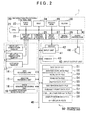
- FIG. 2 is a system configuration diagram of a navigation device 1 to which the present embodiment is applied.
- the navigation device 1 is mounted in a vehicle, and as shown in the figure, includes a current position detection unit 10, an information processing control unit 20, an input/output unit 40, and an information storage unit 50.
- the current position detection unit 10 has the following structure.
- An absolute orientation sensor 11 is a geomagnetic sensor that detects in which direction the vehicle is positioned based on detection of the N direction according to a magnet.
- the absolute orientation sensor 11 is not limited provided that it is a mechanism for detecting an absolute direction.
- the relative orientation sensor 12 detects whether to turn at an intersection, for example, and may be an optical rotation sensor or rotation type resistance volume attached to a rotating portion of a steering wheel, or an angular sensor attached to a vehicle wheel portion.
- the relative orientation sensor 12 may also employ a gyro sensor that uses angular velocity to detect angular changes.
- the relative orientation sensor 12 is not limited provided that it is capable of detecting an angle that has changed relative to a reference angle (absolute orientation).
- a distance sensor 13 may be one that detects and counts rotations of the wheel, or one that detects an acceleration and performs integration twice. In other words, the distance sensor 13 is not limited provided that it is capable of measuring a movement distance of the vehicle.
- a GPS receiving unit 14 is a device that receives a signal from an artificial satellite, and is capable of obtaining various information such as a signal's time of origin, position information of the receiving unit, movement speed of the receiving unit, and travel direction of the receiving unit.
- a beacon receiving unit 15 is a device that receives a signal sent from a sending unit installed at a specific point. In particular, the beacon receiving unit 15 is capable of obtaining VICS information and also capable of obtaining information pertaining to vehicle travel, such as congestion information, current position information, and parking information.
- the navigation device 1 is provided with a current position acquisition (detection) unit.
- a data sending/receiving unit 16 uses telephone lines and radio waves to communicate with outside the vehicle, and is a device for exchanging information. For example, there are various methods such as a car telephone, ATIS, VICS, GPS correction, and inter-vehicle communication that enable the input and output of information pertaining to travel.
- the information processing control unit 20 performs computing and controls based on information input from the current position detection unit 10 and the input/output unit 40, and information stored in the information storage unit 50. Furthermore, the information processing control unit 20 is a mechanism that controls so as to output a computing result to an output unit such as the display 42, a printer 43, or a speaker 44.
- the information processing control unit 20 has the following structure.
- a central processing unit (CPU) 21 performs general computing and controls for the entire navigation device 1.
- a first ROM 22 stores programs pertaining to navigation.
- the first ROM 22 stores a navigation program that searches for point information required for guidance of a route to a destination, outputs the searched point information to a RAM 24 or the like for image display and audio output, and uses a point information data file 58 or the like to search based on a reading of a point name.
- a sensor input interface 23 is a mechanism that receives information from the current position detection unit 10.
- the RAM 24 is a storage mechanism that records information input by the user such as information regarding destinations and pass-through points, and also stores results computed by the CPU 21 based on the information input by the user, results of route searches, and map information (that also includes the point information) read from the information storage unit 50.
- a communications interface 25 is a mechanism for inputting and outputting information from the current position detection unit 10, especially information obtained from outside.
- a second ROM 26 stores programs pertaining to navigation, and in particular stores a navigation program pertaining to audio guidance.
- An image processor 27 is a processing mechanism for converting vector information processed by the CPU 21 into image information.
- a clock 28 counts time.
- An image memory 29 is a mechanism that stores the image information processed by the image processor 27.
- An audio processor 30 processes audio information read from the information storage unit 50 and outputs such information to the speaker 44.
- the input/output unit 40 is structured from the following: an input unit 41 that inputs data including a destination, pass-through points, and search conditions from the user; the display 42 that displays images, guidance information, and the like; the printer 43 that prints information; and the speaker 44 that outputs sound.
- the display 42 is a wide screen display, and is installed near the front and center of the driver seat and the passenger seat so as to face the driver seat and the passenger seat, with a horizontal direction thereof becoming a length direction.
- the display 42 functions as a display device that displays guidance information to the user.
- the input unit 41 is structured from a touch panel, a touch switch, a joystick, or a key switch, for example.
- the touch panel is structured from a transparent electrode or the like installed on the display 24, and is capable of detecting a position at which the user touched the display 42.
- the information storage unit 50 is connected with the information processing control unit 20 via a transmission line 45. Furthermore, the information storage unit 50 stores a map data file 51, an intersection data file 52, a node data file 53, a road data file 54, a photo data file 55, a destination data file 56, a guidance point data file 57, the point information data file 58, a user position data file 59, and other data files.
- the information storage unit 50 is structured by a hard disk, a flash memory, or the like, that is, a rewritable storage medium, but may also be used in combination with a ROM such as a CD-ROM or a DVD-ROM.
- the map data file 51 stores map data such as nation-wide road maps, road maps for arbitrary regions, and residential maps.
- the road maps are formed from roads including main highways, expressways, and city streets (relatively narrow roads), and from landmarks (facilities and the like).
- the residential maps include city plans that show graphics representing the outlines of buildings and the like, and also show road names and other information.
- the intersection data file 52 stores data pertaining to geographic position coordinates and names of intersections, and the like.
- the node data file 53 stores geographic coordinate data and the like for nodes, which are used for route searches on maps.
- the road data file 54 stores data pertaining to roads, such as road locations and types, the number of vehicle lanes, and connection relationships between roads.
- the photo data file 55 stores computer graphic image data and image data of photos showing various facilities and sightseeing spots, as well as locations where visual display is required such as main intersections and the like.
- the destination data file 56 stores data including the locations and names of facilities and other places that are highly likely to become destinations, such as major sightseeing spots and buildings, as well as businesses and offices listed in telephone books.
- the guidance point data file 57 stores guidance data of points for which guidance is needed, such as guidance regarding branch points and the content of guidance signs placed along roads.
- the point information data file 58 is a file for storing point information.
- Point information is also called point-of-interest (POI) information, and for example, includes information such as the displayed characters of point names, the readings of displayed characters, information corresponding to the displayed characters and readings, as well as information pertaining to coordinates, addresses, telephone numbers, and other items regarding points that users may be interested in for route guidance or the like. Examples of such points include stadiums, theaters, shops such as restaurants and department stores, schools, government buildings, welfare institutions, head offices and branches of private companies, sightseeing spots, and so on.
- the point information functions as search targets.
- the user position data file 59 is a file that stores user position data.
- the user position data is information that specifies on which side of the display 42 the user is positioned facing.
- the navigation device 1 sets the enlarged region in the display 42 on the side far from the side specified in the user position data, and set the standard region on the near side.
- the user position data may be configured to enable manual setting by the user, or configured to enable automatic setting.
- both ends of the display 42 are equipped with human body sensors that utilize infrared light or the like. When the touch panel on the display 42 is touched, the sensors can detect from which side the hand came from in order to determine the user position.
- a configuration is also possible where the driver side is set in advance as the standard region and the passenger side is set as the enlarged region, and neither can be changed.
- the user can select between a standard mode in which the standard region fills the entire display 42, and an enlarged mode in which the side near the user is designated as the standard region and the side far from the user is designated as the enlarged region.
- FIG. 3A shows the case where the user has selected the standard mode, and the entire display 42 is used as the standard region.
- the navigation device 1 uses various data stored in the information storage unit 50 to form an image that is then displayed on the display 42.
- a map, a host vehicle marker 71, an orientation marker 72, a distance marker 73, an estimated arrival time 74, a zoom-in button 76, and various place names such as "Anjo City" are displayed on the display 42.
- facilities such as restaurants (not shown) can be displayed as facility markers represented by graphics, symbols, or the like.
- These display elements are displayed on the display 42 by the navigation device 1 using various data stored in the information storage unit 50.
- the navigation device 1 can control the display position, size, and showing/hiding of the display elements independent of one another.
- the display elements are information for guiding a route of the vehicle, and therefore function as guidance information.
- the host vehicle marker 71 indicates the position of the traveling host vehicle, and is displayed on a route.
- the host vehicle marker 71 has a triangle within a circle, and the apex of the triangle represents the direction of travel.
- the left side of the screen displays the orientation marker 72, the distance marker 73, the estimated arrival marker 74, and the zoom-in button 76.
- the orientation marker 72 indicates the direction in which the host vehicle is traveling.
- the distance marker 73 indicates the distance to a point at which a change in course occurs, such as a right turn at an intersection.
- the estimated arrival marker 74 indicates the estimated time of arrival at the destination and the distance to the destination.
- the zoom-in button 76 is a button the user touches in order to switch to the enlarged mode.
- Various place names such as Anjo City, Okazaki City, Kitano Town, Matsubashi Town, and Higashi Town are represented by characters.
- a coordinate system is set on the display screen of the display 42, and positions on the display screen can be specified through coordinate values.
- the guidance information is designated with minimum rectangular regions that contain guidance information, and one corner of a rectangular region (e.g. a lower left corner) is designated as a reference point.
- the navigation device 1 places the reference point of the guidance information on the coordinate system of the display screen, thereby specifying a display position of the guidance information on the display 42.
- FIG. 3B shows the case where the user has selected the enlarged mode, and the right half of the display 42 is set as the standard region 61 while the left half is set as the enlarged region 62.
- the boundary line between the standard region 61 and the enlarged region 62 is a position (a dotted line 90) where the width of the display 42 is divided 45:55, using the side far from the user as a reference. Note that this is merely an example, and various other cases such as where the two halves are divided 50:50 or 60:40 are also possible.
- a display scale of guidance information displayed in the standard region 61 such as the characters “Matsubashi Town” and “Okazaki City” and the host vehicle marker 71, is set to the same standard scale as used in the standard mode.
- the characters “Kitano Town”, “Higashi Town” and “Anjo City” as well as the distance marker 73, the estimated arrival marker 74, a zoom-out button 75, and the like in the enlarged region 62 are displayed at an enlarged scale that is greater than the standard scale.
- zoom-out button 75 is a button the user touches in order to switch to the standard mode.
- Button types such as the zoom-out button 75 are displayed at the enlarged scale when displayed in the enlarged region 62.
- the navigation device 1 determiners whether the guidance information is displayed in the standard region 61 or the enlarged region 62. And as described above, in the case of display in the standard region 61, a standard scale is applied, while in the case of display in the enlarged region 62, an enlarged scale is applied. Therefore, a display on the side far from the user is displayed enlarged, and the user can more easily view the guidance information on the side far from himself or herself.
- the navigation device 1 is capable of selective enlargement, rather than uniform enlargement of the guidance information belonging in the enlarged region 62.
- FIG. 4A shows an enlarged scale applied to the guidance information, which is displayed without any adjustment in the enlarged region 62.
- display positions for an upper part of the orientation marker 72 and a lower part of the zoom-out button 75 are outside of the display 42 and therefore not shown.
- the navigation device 1 can adjust the display state of the guidance information in the following manner.
- FIG. 4B shows the orientation marker 72 deleted in order to secure display space for the distance marker 73, the estimated, arrival marker 74, and the zoom-out button 75.
- the guidance information is associated with minimum rectangular regions that include guidance information.
- the navigation device 1 confirms if all or a portion of the rectangular regions are inside the display screen, or if all the rectangular regions are outside the display screen. Accordingly, the navigation device 1 detects if all or a portion of the guidance information is displayed inside the display screen, or if none of the guidance information is displayed on the display screen.
- the navigation device 1 can detect that only a portion of the orientation marker 72 and the zoom-out button 75 are displayed in FIG. 4A .
- the guidance information is prioritized, and in cases where there is non-displayed guidance information or partially-displayed guidance information, the navigation device 1 deletes guidance information with low priority in order to secure display space.
- the guidance information is prioritized in the navigation device 1 and if the display positions of guidance information on the side far from the user are outside the display screen of the display device (the display 42), then the navigation device 1 deletes guidance information with low priority in order to display higher priority guidance information.
- the priority of the orientation marker 72 is set lower than that of the distance marker 73, the estimated arrival marker 74, and the zoom-out button 75. Therefore, the orientation marker 72 is deleted. Following the deletion of one piece of guidance information, if at least a portion of the guidance information is still not displayed, then another piece of guidance information with the lowest priority is further deleted. In cases where a plurality of guidance information with the lowest priority exists, then deletion is performed in any type of order, for example, deleting those from the top of the screen first and so on.
- the above example deletes low priority guidance information.
- Tn FIG. 4C since the priority of the orientation marker 72 is set lower than that of other guidance information, the magnification rate of the orientation marker 72 is set smaller than that of other guidance information. Accordingly, display space can be secured for enlarging and displaying other guidance information with higher priority. Also, a vertical-direction magnification rate of the estimated arrival marker 74 is set smaller than a horizontal-direction magnification rate, which contributes to securing display space.
- the guidance information is prioritized in the navigation device 1 and if the display positions of guidance information on the side far from the user is outside the display screen of the display device (the display 42), then the navigation device 1 sets the magnification rate of the guidance information with low priority smaller than the magnification rate of higher priority guidance information. Furthermore, the vertical-direction and horizontal-direction magnification rates can be changed in order to modify and display guidance information.
- all of the guidance information can be structured such that the magnification rate thereof is set in a range for display in the enlarged region 62. If the magnification rate is set in a range enabling the display of all the guidance information, then displaying the guidance information at the maximun magnification rate that enables the display of all the guidance information allows the guidance information to be enlarged to the greatest possible extent. In this manner, if the display positions of guidance information on the side far from the user are outside the display screen of the display device (the display 42), then the navigation device 1 can also be configured so as to enlarge the guidance information in a range that enables display of the guidance information on the display screen.
- the navigation device 1 stores a database that records combinations of guidance information and display states for each magnification rate in the information storage unit 50. After setting the magnification rate for the various guidance information, the navigation device 1 then reads out the display state pertaining to the magnification rate and displays the guidance information on the display 42. Setting of the magnification rate can be performed, for example, by prioritizing the guidance information and apportioning larger magnification rates to higher priority guidance information so that all the guidance information is displayed.
- a triangle and letter N that serve as characteristic parts indicating the north direction account for a large portion of the display state of the guidance information. Since this portion is enlarged in the guidance information, the north direction can be easily recognized even from afar without increasing the magnification rate of the guidance information itself. Accordingly, the display space can be conserved while also facilitating recognition from afar.
- the navigation device 1 can set the magnification rate of guidance information so that the guidance information is displayed on the display screen (the display 42), and can also display a display state in accordance with the set magnification rate.
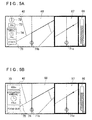
- the display 42 is formed with three regions, a remaining distance display region 66, a detail display region 67, and a large-area display region 68. Note that the large-area display region 68 is positioned on the side far from the user. Based on a remaining distance indicator 81, the remaining distance display region 66 displays a distance up to a point where a change in course occurs, such as at an intersection.
- the detail display region 67 displays the surroundings of the current position of the host vehicle according to a host vehicle marker 71 a, and guides a course along the route.
- the large-area display region 68 displays the surroundings of the current position of the host vehicle according to a host vehicle marker 71b, and also displays the orientation marker 72, the distance marker 73, the estimated arrival marker 74, the zoom-in button 76, and the like.
- FIG. 5A is a display in standard mode where the large-area display region 68 is not shown enlarged. If the user touches the zoom-in button 76, then the navigation device 1 displays the large-area display region 68 enlarged.
- FIG. 5B shows the large-area display region 68 displayed enlarged in the enlarged mode.
- the large-area display region 68 enlarges and displays the distance marker 73, the estimated arrival marker 74, and the zoom-in button 75, while the orientation marker 72 is deleted due to its low priority status.
- the display of the remaining distance display region 66 and the detail display region 67 is the same as in the standard mode.
- duel display In recent years, a display called duel display has been developed. This involves simultaneously forming two images, a first image and a second image, on the display such that a user viewing the display from a first side sees the first image and another user viewing the display from a second side sees the second image.
- the navigation device 1 enlarges and displays guidance information on the second side with respect to the user, and enlarges and displays guidance information on the first side with respect to the other user.
- the navigation device 1 obtains the user position from the user position data of the user position data file 59 (step 5).
- the navigation device 1 is provided with a position acquisition unit for obtaining the position of the user.
- the navigation device 1 then identifies the sides near to and far from the user based on the user position and sets the standard region 61 and the enlarged region 62 in the display 42 accordingly (step 10). In this manner, the navigation device 1 uses the obtained user position to determine the side of the display device (the display 42) near the user and the side far from the user.
- the navigation device 1 subsequently obtains the guidance information to be displayed on the display 42 from the information storage unit 50 (step 15).
- the navigation device 1 is provided with a guidance information acquisition unit for obtaining guidance information.
- the navigation device 1 determines the guidance information display region for each piece of guidance information (step 20).
- the navigation device 1 sets a predetermined magnification rate for the guidance information to be displayed on the display 62 (step 25). For enlargement of the guidance information, the navigation device 1 confirms whether at least a portion of the guidance information is positioned outside of the display screen (i.e., whether the guidance information runs off the screen). If there is at least a portion positioned outside of the display screen, then the navigation device 1 adjusts the display state of the guidance information in the enlarged region 62 by for example, securing display space through the deletion of lower priority guidance information or the like and by changing the display position of the guidance information (step 30).
- the navigation device 1 displays the guidance information at the applicable display position and magnification rate with respect to the enlarged region 62, and displays the guidance information at the normal display position and magnification rate with respect to the standard region 61 (step 35).
- the navigation device 1 is provided with a display unit that displays guidance information on the display device (the display 42) such that guidance information to be displayed on the side far from the user is displayed more enlarged than guidance information to displayed on the side near the user. After completing the above, the navigation device 1 ends processing for displaying guidance information on the display 42.
- the display 42 is not limited to a wide screen display.
- Art for displaying guidance information according to the present embodiment may also be applied to an ordinary display. Also possible, for example, is changing the magnification rate depending on the distance to the user, such as by using laser light or the like to measure a distance from the display 42 to the user, and increasing the magnification rate in accordance with a greater distance to the user.
Landscapes
- Engineering & Computer Science (AREA)
- Radar, Positioning & Navigation (AREA)
- Remote Sensing (AREA)
- Automation & Control Theory (AREA)
- Physics & Mathematics (AREA)
- General Physics & Mathematics (AREA)
- Navigation (AREA)
- Instructional Devices (AREA)
- Traffic Control Systems (AREA)
Applications Claiming Priority (1)
| Application Number | Priority Date | Filing Date | Title |
|---|---|---|---|
| JP2007210389A JP2009042187A (ja) | 2007-08-10 | 2007-08-10 | ナビゲーション装置、及びナビゲーションプログラム |
Publications (3)
| Publication Number | Publication Date |
|---|---|
| EP2023091A2 true EP2023091A2 (de) | 2009-02-11 |
| EP2023091A3 EP2023091A3 (de) | 2010-09-01 |
| EP2023091B1 EP2023091B1 (de) | 2013-09-25 |
Family
ID=39926518
Family Applications (1)
| Application Number | Title | Priority Date | Filing Date |
|---|---|---|---|
| EP08161074.3A Not-in-force EP2023091B1 (de) | 2007-08-10 | 2008-07-24 | Navigationsvorrichtung und Navigationsprogramm |
Country Status (4)
| Country | Link |
|---|---|
| US (1) | US8370059B2 (de) |
| EP (1) | EP2023091B1 (de) |
| JP (1) | JP2009042187A (de) |
| CN (1) | CN101363739B (de) |
Cited By (1)
| Publication number | Priority date | Publication date | Assignee | Title |
|---|---|---|---|---|
| CN102054438A (zh) * | 2009-10-30 | 2011-05-11 | 爱信艾达株式会社 | 显示控制装置、导航系统和显示控制方法 |
Families Citing this family (15)
| Publication number | Priority date | Publication date | Assignee | Title |
|---|---|---|---|---|
| DE102007038464B4 (de) * | 2007-08-14 | 2010-04-08 | Navigon Ag | Verfahren zum Betrieb einer Einrichtung zur Ermittlung eines Streckenverlaufes für ein Fortbewegungsmittel |
| JP5704807B2 (ja) * | 2009-10-29 | 2015-04-22 | パイオニア株式会社 | 情報表示装置、情報表示方法、及び情報表示プログラム |
| US8671413B2 (en) * | 2010-01-11 | 2014-03-11 | Qualcomm Incorporated | System and method of dynamic clock and voltage scaling for workload based power management of a wireless mobile device |
| US9383888B2 (en) | 2010-12-15 | 2016-07-05 | Microsoft Technology Licensing, Llc | Optimized joint document review |
| US9118612B2 (en) | 2010-12-15 | 2015-08-25 | Microsoft Technology Licensing, Llc | Meeting-specific state indicators |
| US9864612B2 (en) * | 2010-12-23 | 2018-01-09 | Microsoft Technology Licensing, Llc | Techniques to customize a user interface for different displays |
| JP5229379B2 (ja) * | 2011-02-21 | 2013-07-03 | 株式会社デンソー | 表示制御装置 |
| KR101326847B1 (ko) * | 2011-12-12 | 2013-11-20 | 기아자동차주식회사 | 차량의 운전 모드 안내 시스템 및 그 방법 |
| JP6018881B2 (ja) * | 2012-11-07 | 2016-11-02 | 株式会社日立製作所 | ナビゲーション装置、及びナビゲーション方法 |
| DE102013006026A1 (de) * | 2013-04-08 | 2014-10-09 | Audi Ag | Orientierungszoom in Navigationskarten bei Darstellung auf kleinen Bildschirmen |
| US10379610B2 (en) * | 2013-09-02 | 2019-08-13 | Sony Corporation | Information processing device and information processing method |
| KR101575648B1 (ko) * | 2014-07-01 | 2015-12-08 | 현대자동차주식회사 | 사용자 인터페이스 장치, 그를 가지는 차량 및 그의 제어 방법 |
| CN104236576A (zh) * | 2014-09-17 | 2014-12-24 | 沈阳美行科技有限公司 | 一种导航设备点击简易引导提前显示扩大图的方法 |
| CN110503891A (zh) * | 2019-07-05 | 2019-11-26 | 太仓秦风广告传媒有限公司 | 一种基于距离变化的电子广告牌变换方法及其系统 |
| CN111078088B (zh) * | 2019-11-29 | 2021-08-24 | 维沃移动通信有限公司 | 界面控制方法、电子设备和计算机可读存储介质 |
Citations (2)
| Publication number | Priority date | Publication date | Assignee | Title |
|---|---|---|---|---|
| JPH11258983A (ja) | 1998-03-09 | 1999-09-24 | Nec Corp | カーナビゲーションシステム |
| JP2007210389A (ja) | 2006-02-08 | 2007-08-23 | Toyota Motor Corp | 車両用シート装置 |
Family Cites Families (15)
| Publication number | Priority date | Publication date | Assignee | Title |
|---|---|---|---|---|
| US5848373A (en) * | 1994-06-24 | 1998-12-08 | Delorme Publishing Company | Computer aided map location system |
| JPH09113289A (ja) | 1995-10-18 | 1997-05-02 | Fujitsu Ten Ltd | ナビゲーション装置 |
| US5757268A (en) * | 1996-09-26 | 1998-05-26 | United Technologies Automotive, Inc. | Prioritization of vehicle display features |
| JP3644473B2 (ja) * | 1997-08-07 | 2005-04-27 | アイシン・エィ・ダブリュ株式会社 | 地図表示装置及び記録媒体 |
| IL142574A (en) * | 1998-10-13 | 2004-03-28 | Integrated Systems Res Corp | System and method for tracking vehicle fleets |
| JP2001159525A (ja) * | 1999-11-30 | 2001-06-12 | Mitsubishi Electric Corp | ナビゲーション装置および記録媒体 |
| JP2002372432A (ja) * | 2001-06-13 | 2002-12-26 | Aisin Aw Co Ltd | ナビゲーション装置の表示装置 |
| JP4260383B2 (ja) * | 2001-07-06 | 2009-04-30 | アルパイン株式会社 | 車載用表示装置 |
| JP2003104089A (ja) * | 2001-10-01 | 2003-04-09 | Pioneer Electronic Corp | ディスプレイの設置方法、ディスプレイ、インストルメントパネルの設置方法 |
| US20080150709A1 (en) * | 2004-02-20 | 2008-06-26 | Sharp Kabushiki Kaisha | Onboard Display Device, Onboard Display System and Vehicle |
| US20050203892A1 (en) * | 2004-03-02 | 2005-09-15 | Jonathan Wesley | Dynamically integrating disparate systems and providing secure data sharing |
| JP4423114B2 (ja) * | 2004-06-02 | 2010-03-03 | アルパイン株式会社 | ナビゲーション装置およびその交差点案内方法 |
| JP2006030615A (ja) * | 2004-07-16 | 2006-02-02 | Mitsubishi Motors Corp | 車載モニタ表示装置,車両用文字情報提供装置及びそれらから成る車両用文字情報表示システム |
| JP4758087B2 (ja) * | 2004-09-27 | 2011-08-24 | アルパイン株式会社 | 表示装置 |
| JP4286876B2 (ja) * | 2007-03-01 | 2009-07-01 | 富士通テン株式会社 | 画像表示制御装置 |
-
2007
- 2007-08-10 JP JP2007210389A patent/JP2009042187A/ja active Pending
-
2008
- 2008-07-24 EP EP08161074.3A patent/EP2023091B1/de not_active Not-in-force
- 2008-07-24 CN CN2008101300243A patent/CN101363739B/zh not_active Expired - Fee Related
- 2008-07-31 US US12/219,956 patent/US8370059B2/en not_active Expired - Fee Related
Patent Citations (2)
| Publication number | Priority date | Publication date | Assignee | Title |
|---|---|---|---|---|
| JPH11258983A (ja) | 1998-03-09 | 1999-09-24 | Nec Corp | カーナビゲーションシステム |
| JP2007210389A (ja) | 2006-02-08 | 2007-08-23 | Toyota Motor Corp | 車両用シート装置 |
Cited By (2)
| Publication number | Priority date | Publication date | Assignee | Title |
|---|---|---|---|---|
| CN102054438A (zh) * | 2009-10-30 | 2011-05-11 | 爱信艾达株式会社 | 显示控制装置、导航系统和显示控制方法 |
| EP2325831A1 (de) * | 2009-10-30 | 2011-05-25 | Aisin Aw Co., Ltd. | Steuervorrichtung für Anzeige, Navigationssystem und Anzeigesteuerverfahren |
Also Published As
| Publication number | Publication date |
|---|---|
| CN101363739A (zh) | 2009-02-11 |
| CN101363739B (zh) | 2012-11-21 |
| EP2023091A3 (de) | 2010-09-01 |
| US20090043493A1 (en) | 2009-02-12 |
| US8370059B2 (en) | 2013-02-05 |
| JP2009042187A (ja) | 2009-02-26 |
| EP2023091B1 (de) | 2013-09-25 |
Similar Documents
| Publication | Publication Date | Title |
|---|---|---|
| EP2023091B1 (de) | Navigationsvorrichtung und Navigationsprogramm | |
| US7519469B2 (en) | Display method and apparatus for navigation system | |
| JP5089439B2 (ja) | ナビゲーションシステムの地図画像表示方法および装置 | |
| JP3949007B2 (ja) | ナビゲーション装置 | |
| US9052212B2 (en) | Dynamic destination map display for navigation system | |
| US7865302B2 (en) | Method and apparatus for displaying house number and building footprint in arrival screen for navigation system | |
| JP2002168634A (ja) | 車載用ナビゲーション装置の立体地図表示方法 | |
| JPH09281889A (ja) | 地図表示装置及び地図表示方法 | |
| JP4705170B2 (ja) | ナビゲーションデバイス及びナビゲーションデバイス上に表示された地図データをスクロールする方法 | |
| JP2009134105A (ja) | 表示装置、表示制御方法、表示制御プログラム、および記録媒体 | |
| US7973808B2 (en) | Map display apparatus with scrolling text | |
| JPH0257910A (ja) | ナビゲーション装置 | |
| JP2001027533A (ja) | 地図表示装置 | |
| EP2700906A1 (de) | Verfahren zur Anzeige von Kartenansichten und Kartenansichtssystem | |
| JP2005308661A (ja) | ナビゲーション装置 | |
| US20060149470A1 (en) | Consultation and processing system of information for hiking with the use of standard PDA hardware | |
| JP4748778B2 (ja) | ナビゲーション装置 | |
| JP2007309823A (ja) | 車載用ナビゲーション装置 | |
| EP1788355B1 (de) | Elektronisches Routenanzeigesystem und Navigationssystem damit | |
| JP2004191218A (ja) | ナビゲーション装置 | |
| JP4915298B2 (ja) | ナビゲーション装置、及びプログラム | |
| JP3257991B2 (ja) | 車両用ナビゲーション装置 | |
| JP2007121525A (ja) | カーナビゲーション装置 | |
| JPH08328467A (ja) | ナビゲーション装置における地図表示装置 | |
| RU2417398C2 (ru) | Навигационное устройство и способ прокрутки картографических данных, отображаемых в навигационном устройстве |
Legal Events
| Date | Code | Title | Description |
|---|---|---|---|
| PUAI | Public reference made under article 153(3) epc to a published international application that has entered the european phase |
Free format text: ORIGINAL CODE: 0009012 |
|
| AK | Designated contracting states |
Kind code of ref document: A2 Designated state(s): AT BE BG CH CY CZ DE DK EE ES FI FR GB GR HR HU IE IS IT LI LT LU LV MC MT NL NO PL PT RO SE SI SK TR |
|
| AX | Request for extension of the european patent |
Extension state: AL BA MK RS |
|
| PUAL | Search report despatched |
Free format text: ORIGINAL CODE: 0009013 |
|
| AK | Designated contracting states |
Kind code of ref document: A3 Designated state(s): AT BE BG CH CY CZ DE DK EE ES FI FR GB GR HR HU IE IS IT LI LT LU LV MC MT NL NO PL PT RO SE SI SK TR |
|
| AX | Request for extension of the european patent |
Extension state: AL BA MK RS |
|
| 17P | Request for examination filed |
Effective date: 20110228 |
|
| AKX | Designation fees paid |
Designated state(s): AT BE BG CH CY CZ DE DK EE ES FI FR GB GR HR HU IE IS IT LI LT LU LV MC MT NL NO PL PT RO SE SI SK TR |
|
| 17Q | First examination report despatched |
Effective date: 20111118 |
|
| GRAP | Despatch of communication of intention to grant a patent |
Free format text: ORIGINAL CODE: EPIDOSNIGR1 |
|
| INTG | Intention to grant announced |
Effective date: 20130522 |
|
| GRAS | Grant fee paid |
Free format text: ORIGINAL CODE: EPIDOSNIGR3 |
|
| GRAA | (expected) grant |
Free format text: ORIGINAL CODE: 0009210 |
|
| RIN1 | Information on inventor provided before grant (corrected) |
Inventor name: SAKAI, TAKAMITSU |
|
| AK | Designated contracting states |
Kind code of ref document: B1 Designated state(s): AT BE BG CH CY CZ DE DK EE ES FI FR GB GR HR HU IE IS IT LI LT LU LV MC MT NL NO PL PT RO SE SI SK TR |
|
| RAP1 | Party data changed (applicant data changed or rights of an application transferred) |
Owner name: AISIN AW CO., LTD. |
|
| REG | Reference to a national code |
Ref country code: GB Ref legal event code: FG4D |
|
| REG | Reference to a national code |
Ref country code: CH Ref legal event code: EP |
|
| REG | Reference to a national code |
Ref country code: AT Ref legal event code: REF Ref document number: 633885 Country of ref document: AT Kind code of ref document: T Effective date: 20131015 |
|
| REG | Reference to a national code |
Ref country code: IE Ref legal event code: FG4D |
|
| REG | Reference to a national code |
Ref country code: DE Ref legal event code: R096 Ref document number: 602008027754 Country of ref document: DE Effective date: 20131121 |
|
| PG25 | Lapsed in a contracting state [announced via postgrant information from national office to epo] |
Ref country code: HR Free format text: LAPSE BECAUSE OF FAILURE TO SUBMIT A TRANSLATION OF THE DESCRIPTION OR TO PAY THE FEE WITHIN THE PRESCRIBED TIME-LIMIT Effective date: 20130925 Ref country code: NO Free format text: LAPSE BECAUSE OF FAILURE TO SUBMIT A TRANSLATION OF THE DESCRIPTION OR TO PAY THE FEE WITHIN THE PRESCRIBED TIME-LIMIT Effective date: 20131225 Ref country code: SE Free format text: LAPSE BECAUSE OF FAILURE TO SUBMIT A TRANSLATION OF THE DESCRIPTION OR TO PAY THE FEE WITHIN THE PRESCRIBED TIME-LIMIT Effective date: 20130925 Ref country code: LT Free format text: LAPSE BECAUSE OF FAILURE TO SUBMIT A TRANSLATION OF THE DESCRIPTION OR TO PAY THE FEE WITHIN THE PRESCRIBED TIME-LIMIT Effective date: 20130925 |
|
| REG | Reference to a national code |
Ref country code: AT Ref legal event code: MK05 Ref document number: 633885 Country of ref document: AT Kind code of ref document: T Effective date: 20130925 |
|
| REG | Reference to a national code |
Ref country code: NL Ref legal event code: VDEP Effective date: 20130925 |
|
| REG | Reference to a national code |
Ref country code: LT Ref legal event code: MG4D |
|
| PG25 | Lapsed in a contracting state [announced via postgrant information from national office to epo] |
Ref country code: FI Free format text: LAPSE BECAUSE OF FAILURE TO SUBMIT A TRANSLATION OF THE DESCRIPTION OR TO PAY THE FEE WITHIN THE PRESCRIBED TIME-LIMIT Effective date: 20130925 Ref country code: SI Free format text: LAPSE BECAUSE OF FAILURE TO SUBMIT A TRANSLATION OF THE DESCRIPTION OR TO PAY THE FEE WITHIN THE PRESCRIBED TIME-LIMIT Effective date: 20130925 Ref country code: LV Free format text: LAPSE BECAUSE OF FAILURE TO SUBMIT A TRANSLATION OF THE DESCRIPTION OR TO PAY THE FEE WITHIN THE PRESCRIBED TIME-LIMIT Effective date: 20130925 Ref country code: GR Free format text: LAPSE BECAUSE OF FAILURE TO SUBMIT A TRANSLATION OF THE DESCRIPTION OR TO PAY THE FEE WITHIN THE PRESCRIBED TIME-LIMIT Effective date: 20131226 |
|
| PG25 | Lapsed in a contracting state [announced via postgrant information from national office to epo] |
Ref country code: BE Free format text: LAPSE BECAUSE OF FAILURE TO SUBMIT A TRANSLATION OF THE DESCRIPTION OR TO PAY THE FEE WITHIN THE PRESCRIBED TIME-LIMIT Effective date: 20130925 |
|
| PG25 | Lapsed in a contracting state [announced via postgrant information from national office to epo] |
Ref country code: EE Free format text: LAPSE BECAUSE OF FAILURE TO SUBMIT A TRANSLATION OF THE DESCRIPTION OR TO PAY THE FEE WITHIN THE PRESCRIBED TIME-LIMIT Effective date: 20130925 Ref country code: NL Free format text: LAPSE BECAUSE OF FAILURE TO SUBMIT A TRANSLATION OF THE DESCRIPTION OR TO PAY THE FEE WITHIN THE PRESCRIBED TIME-LIMIT Effective date: 20130925 Ref country code: SK Free format text: LAPSE BECAUSE OF FAILURE TO SUBMIT A TRANSLATION OF THE DESCRIPTION OR TO PAY THE FEE WITHIN THE PRESCRIBED TIME-LIMIT Effective date: 20130925 Ref country code: RO Free format text: LAPSE BECAUSE OF FAILURE TO SUBMIT A TRANSLATION OF THE DESCRIPTION OR TO PAY THE FEE WITHIN THE PRESCRIBED TIME-LIMIT Effective date: 20130925 Ref country code: CZ Free format text: LAPSE BECAUSE OF FAILURE TO SUBMIT A TRANSLATION OF THE DESCRIPTION OR TO PAY THE FEE WITHIN THE PRESCRIBED TIME-LIMIT Effective date: 20130925 Ref country code: IS Free format text: LAPSE BECAUSE OF FAILURE TO SUBMIT A TRANSLATION OF THE DESCRIPTION OR TO PAY THE FEE WITHIN THE PRESCRIBED TIME-LIMIT Effective date: 20140125 |
|
| PG25 | Lapsed in a contracting state [announced via postgrant information from national office to epo] |
Ref country code: CY Free format text: LAPSE BECAUSE OF FAILURE TO SUBMIT A TRANSLATION OF THE DESCRIPTION OR TO PAY THE FEE WITHIN THE PRESCRIBED TIME-LIMIT Effective date: 20130925 Ref country code: PL Free format text: LAPSE BECAUSE OF FAILURE TO SUBMIT A TRANSLATION OF THE DESCRIPTION OR TO PAY THE FEE WITHIN THE PRESCRIBED TIME-LIMIT Effective date: 20130925 Ref country code: ES Free format text: LAPSE BECAUSE OF FAILURE TO SUBMIT A TRANSLATION OF THE DESCRIPTION OR TO PAY THE FEE WITHIN THE PRESCRIBED TIME-LIMIT Effective date: 20130925 Ref country code: AT Free format text: LAPSE BECAUSE OF FAILURE TO SUBMIT A TRANSLATION OF THE DESCRIPTION OR TO PAY THE FEE WITHIN THE PRESCRIBED TIME-LIMIT Effective date: 20130925 |
|
| REG | Reference to a national code |
Ref country code: DE Ref legal event code: R097 Ref document number: 602008027754 Country of ref document: DE |
|
| PG25 | Lapsed in a contracting state [announced via postgrant information from national office to epo] |
Ref country code: PT Free format text: LAPSE BECAUSE OF FAILURE TO SUBMIT A TRANSLATION OF THE DESCRIPTION OR TO PAY THE FEE WITHIN THE PRESCRIBED TIME-LIMIT Effective date: 20140127 |
|
| PLBE | No opposition filed within time limit |
Free format text: ORIGINAL CODE: 0009261 |
|
| STAA | Information on the status of an ep patent application or granted ep patent |
Free format text: STATUS: NO OPPOSITION FILED WITHIN TIME LIMIT |
|
| PG25 | Lapsed in a contracting state [announced via postgrant information from national office to epo] |
Ref country code: IT Free format text: LAPSE BECAUSE OF FAILURE TO SUBMIT A TRANSLATION OF THE DESCRIPTION OR TO PAY THE FEE WITHIN THE PRESCRIBED TIME-LIMIT Effective date: 20130925 |
|
| 26N | No opposition filed |
Effective date: 20140626 |
|
| PG25 | Lapsed in a contracting state [announced via postgrant information from national office to epo] |
Ref country code: DK Free format text: LAPSE BECAUSE OF FAILURE TO SUBMIT A TRANSLATION OF THE DESCRIPTION OR TO PAY THE FEE WITHIN THE PRESCRIBED TIME-LIMIT Effective date: 20130925 |
|
| REG | Reference to a national code |
Ref country code: DE Ref legal event code: R097 Ref document number: 602008027754 Country of ref document: DE Effective date: 20140626 |
|
| PGFP | Annual fee paid to national office [announced via postgrant information from national office to epo] |
Ref country code: GB Payment date: 20140723 Year of fee payment: 7 Ref country code: FR Payment date: 20140708 Year of fee payment: 7 |
|
| PG25 | Lapsed in a contracting state [announced via postgrant information from national office to epo] |
Ref country code: LU Free format text: LAPSE BECAUSE OF FAILURE TO SUBMIT A TRANSLATION OF THE DESCRIPTION OR TO PAY THE FEE WITHIN THE PRESCRIBED TIME-LIMIT Effective date: 20140724 |
|
| REG | Reference to a national code |
Ref country code: CH Ref legal event code: PL |
|
| REG | Reference to a national code |
Ref country code: IE Ref legal event code: MM4A |
|
| PG25 | Lapsed in a contracting state [announced via postgrant information from national office to epo] |
Ref country code: CH Free format text: LAPSE BECAUSE OF NON-PAYMENT OF DUE FEES Effective date: 20140731 Ref country code: LI Free format text: LAPSE BECAUSE OF NON-PAYMENT OF DUE FEES Effective date: 20140731 |
|
| PG25 | Lapsed in a contracting state [announced via postgrant information from national office to epo] |
Ref country code: IE Free format text: LAPSE BECAUSE OF NON-PAYMENT OF DUE FEES Effective date: 20140724 |
|
| GBPC | Gb: european patent ceased through non-payment of renewal fee |
Effective date: 20150724 |
|
| PG25 | Lapsed in a contracting state [announced via postgrant information from national office to epo] |
Ref country code: MC Free format text: LAPSE BECAUSE OF FAILURE TO SUBMIT A TRANSLATION OF THE DESCRIPTION OR TO PAY THE FEE WITHIN THE PRESCRIBED TIME-LIMIT Effective date: 20130925 Ref country code: GB Free format text: LAPSE BECAUSE OF NON-PAYMENT OF DUE FEES Effective date: 20150724 |
|
| REG | Reference to a national code |
Ref country code: FR Ref legal event code: ST Effective date: 20160331 |
|
| PG25 | Lapsed in a contracting state [announced via postgrant information from national office to epo] |
Ref country code: BG Free format text: LAPSE BECAUSE OF FAILURE TO SUBMIT A TRANSLATION OF THE DESCRIPTION OR TO PAY THE FEE WITHIN THE PRESCRIBED TIME-LIMIT Effective date: 20130925 Ref country code: FR Free format text: LAPSE BECAUSE OF NON-PAYMENT OF DUE FEES Effective date: 20150731 |
|
| PG25 | Lapsed in a contracting state [announced via postgrant information from national office to epo] |
Ref country code: MT Free format text: LAPSE BECAUSE OF FAILURE TO SUBMIT A TRANSLATION OF THE DESCRIPTION OR TO PAY THE FEE WITHIN THE PRESCRIBED TIME-LIMIT Effective date: 20130925 |
|
| PG25 | Lapsed in a contracting state [announced via postgrant information from national office to epo] |
Ref country code: HU Free format text: LAPSE BECAUSE OF FAILURE TO SUBMIT A TRANSLATION OF THE DESCRIPTION OR TO PAY THE FEE WITHIN THE PRESCRIBED TIME-LIMIT; INVALID AB INITIO Effective date: 20080724 Ref country code: TR Free format text: LAPSE BECAUSE OF FAILURE TO SUBMIT A TRANSLATION OF THE DESCRIPTION OR TO PAY THE FEE WITHIN THE PRESCRIBED TIME-LIMIT Effective date: 20130925 |
|
| PGFP | Annual fee paid to national office [announced via postgrant information from national office to epo] |
Ref country code: DE Payment date: 20160720 Year of fee payment: 9 |
|
| REG | Reference to a national code |
Ref country code: DE Ref legal event code: R119 Ref document number: 602008027754 Country of ref document: DE |
|
| PG25 | Lapsed in a contracting state [announced via postgrant information from national office to epo] |
Ref country code: DE Free format text: LAPSE BECAUSE OF NON-PAYMENT OF DUE FEES Effective date: 20180201 |