EP2040154A2 - Terminal mobile incluant un écran tactile et son procédé de commande - Google Patents
Terminal mobile incluant un écran tactile et son procédé de commande Download PDFInfo
- Publication number
- EP2040154A2 EP2040154A2 EP08015784A EP08015784A EP2040154A2 EP 2040154 A2 EP2040154 A2 EP 2040154A2 EP 08015784 A EP08015784 A EP 08015784A EP 08015784 A EP08015784 A EP 08015784A EP 2040154 A2 EP2040154 A2 EP 2040154A2
- Authority
- EP
- European Patent Office
- Prior art keywords
- image
- displayed
- mobile terminal
- thumbnail
- menu item
- Prior art date
- Legal status (The legal status is an assumption and is not a legal conclusion. Google has not performed a legal analysis and makes no representation as to the accuracy of the status listed.)
- Withdrawn
Links
Images



Classifications
-
- G—PHYSICS
- G06—COMPUTING OR CALCULATING; COUNTING
- G06F—ELECTRIC DIGITAL DATA PROCESSING
- G06F3/00—Input arrangements for transferring data to be processed into a form capable of being handled by the computer; Output arrangements for transferring data from processing unit to output unit, e.g. interface arrangements
- G06F3/01—Input arrangements or combined input and output arrangements for interaction between user and computer
- G06F3/048—Interaction techniques based on graphical user interfaces [GUI]
- G06F3/0481—Interaction techniques based on graphical user interfaces [GUI] based on specific properties of the displayed interaction object or a metaphor-based environment, e.g. interaction with desktop elements like windows or icons, or assisted by a cursor's changing behaviour or appearance
-
- G—PHYSICS
- G06—COMPUTING OR CALCULATING; COUNTING
- G06F—ELECTRIC DIGITAL DATA PROCESSING
- G06F3/00—Input arrangements for transferring data to be processed into a form capable of being handled by the computer; Output arrangements for transferring data from processing unit to output unit, e.g. interface arrangements
- G06F3/01—Input arrangements or combined input and output arrangements for interaction between user and computer
- G06F3/048—Interaction techniques based on graphical user interfaces [GUI]
- G06F3/0487—Interaction techniques based on graphical user interfaces [GUI] using specific features provided by the input device, e.g. functions controlled by the rotation of a mouse with dual sensing arrangements, or of the nature of the input device, e.g. tap gestures based on pressure sensed by a digitiser
- G06F3/0488—Interaction techniques based on graphical user interfaces [GUI] using specific features provided by the input device, e.g. functions controlled by the rotation of a mouse with dual sensing arrangements, or of the nature of the input device, e.g. tap gestures based on pressure sensed by a digitiser using a touch-screen or digitiser, e.g. input of commands through traced gestures
-
- G—PHYSICS
- G06—COMPUTING OR CALCULATING; COUNTING
- G06F—ELECTRIC DIGITAL DATA PROCESSING
- G06F3/00—Input arrangements for transferring data to be processed into a form capable of being handled by the computer; Output arrangements for transferring data from processing unit to output unit, e.g. interface arrangements
- G06F3/01—Input arrangements or combined input and output arrangements for interaction between user and computer
- G06F3/048—Interaction techniques based on graphical user interfaces [GUI]
- G06F3/0481—Interaction techniques based on graphical user interfaces [GUI] based on specific properties of the displayed interaction object or a metaphor-based environment, e.g. interaction with desktop elements like windows or icons, or assisted by a cursor's changing behaviour or appearance
- G06F3/04817—Interaction techniques based on graphical user interfaces [GUI] based on specific properties of the displayed interaction object or a metaphor-based environment, e.g. interaction with desktop elements like windows or icons, or assisted by a cursor's changing behaviour or appearance using icons
-
- G—PHYSICS
- G06—COMPUTING OR CALCULATING; COUNTING
- G06F—ELECTRIC DIGITAL DATA PROCESSING
- G06F3/00—Input arrangements for transferring data to be processed into a form capable of being handled by the computer; Output arrangements for transferring data from processing unit to output unit, e.g. interface arrangements
- G06F3/01—Input arrangements or combined input and output arrangements for interaction between user and computer
- G06F3/048—Interaction techniques based on graphical user interfaces [GUI]
- G06F3/0481—Interaction techniques based on graphical user interfaces [GUI] based on specific properties of the displayed interaction object or a metaphor-based environment, e.g. interaction with desktop elements like windows or icons, or assisted by a cursor's changing behaviour or appearance
- G06F3/0482—Interaction with lists of selectable items, e.g. menus
-
- G—PHYSICS
- G06—COMPUTING OR CALCULATING; COUNTING
- G06F—ELECTRIC DIGITAL DATA PROCESSING
- G06F3/00—Input arrangements for transferring data to be processed into a form capable of being handled by the computer; Output arrangements for transferring data from processing unit to output unit, e.g. interface arrangements
- G06F3/01—Input arrangements or combined input and output arrangements for interaction between user and computer
- G06F3/048—Interaction techniques based on graphical user interfaces [GUI]
- G06F3/0484—Interaction techniques based on graphical user interfaces [GUI] for the control of specific functions or operations, e.g. selecting or manipulating an object, an image or a displayed text element, setting a parameter value or selecting a range
- G06F3/0486—Drag-and-drop
-
- H—ELECTRICITY
- H04—ELECTRIC COMMUNICATION TECHNIQUE
- H04B—TRANSMISSION
- H04B1/00—Details of transmission systems, not covered by a single one of groups H04B3/00 - H04B13/00; Details of transmission systems not characterised by the medium used for transmission
- H04B1/38—Transceivers, i.e. devices in which transmitter and receiver form a structural unit and in which at least one part is used for functions of transmitting and receiving
- H04B1/40—Circuits
-
- G—PHYSICS
- G06—COMPUTING OR CALCULATING; COUNTING
- G06F—ELECTRIC DIGITAL DATA PROCESSING
- G06F2203/00—Indexing scheme relating to G06F3/00 - G06F3/048
- G06F2203/048—Indexing scheme relating to G06F3/048
- G06F2203/04806—Zoom, i.e. interaction techniques or interactors for controlling the zooming operation
-
- H—ELECTRICITY
- H04—ELECTRIC COMMUNICATION TECHNIQUE
- H04M—TELEPHONIC COMMUNICATION
- H04M1/00—Substation equipment, e.g. for use by subscribers
- H04M1/72—Mobile telephones; Cordless telephones, i.e. devices for establishing wireless links to base stations without route selection
- H04M1/724—User interfaces specially adapted for cordless or mobile telephones
- H04M1/72403—User interfaces specially adapted for cordless or mobile telephones with means for local support of applications that increase the functionality
- H04M1/72427—User interfaces specially adapted for cordless or mobile telephones with means for local support of applications that increase the functionality for supporting games or graphical animations
Definitions
- the present invention relates to a mobile terminal equipped with a touch screen and a method of controlling an operation thereof that can display a thumbnail image corresponding to a stored image file in a new arrangement manner and that can quickly enter a related menu.
- a mobile terminal is a portable appliance that can carry and that has at least one of a function of performing audio dedicated communication and audiovisual communication, a function of inputting and outputting information, and a function of storing data.
- the function of the mobile terminal is diversified, the mobile terminal has complicated functions such as photographing of a picture or a moving picture, reproduction of a music file or a moving picture file, a game, reception of broadcasting, and wireless Internet and is embodied in a comprehensive multimedia player form.
- UI user interface
- the mobile terminal is regarded as a personal portable instrument for representing user personality, various design change is requested.
- the user uses the image file stored in the mobile terminal in various uses such as edition of the image file and transmission of the edited image file to a mail, or setting the image file to a background screen.
- the present invention has been made in an effort to solve the above problems, and the present invention provides a mobile terminal and a method of controlling an operation thereof that can display a list of a stored image file in a user friendly manner and quickly and easily approach a related menu in the displayed image list.
- a method of controlling an operation of a mobile terminal including: displaying a thumbnail image corresponding to an image file stored in a touch screen to be randomly overlapped; selecting any one of thumbnail images by touch input; and displaying the selected thumbnail image together with an option icon for selecting a quick menu to be distinguished from other thumbnail images.
- the method may further include displaying a quick menu item of a rear surface by turning over the selected thumbnail image, when the option icon is selected by touch input.
- the method may further include displaying a corresponding image file on a full screen, when an image display area of the selected thumbnail image is selected by touch input.
- a mobile terminal including: a display unit for displaying a thumbnail image to be randomly overlapped; and a controller for controlling, when any one of thumbnail images is selected, to display the selected thumbnail image together with an option icon for selecting a quick menu in the display unit to be distinguished from other thumbnail images.
- a computer readable recording medium on which a program for executing the method in the computer is recorded.
- a mobile terminal described in a present specification includes a mobile phone, a smart phone, a notebook computer, a digital broadcasting terminal, personal digital assistants (PDA), a portable multimedia player (PMP), and a navigation apparatus.
- PDA personal digital assistants
- PMP portable multimedia player
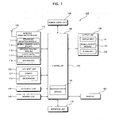
- FIG. 1 is a block diagram of a mobile terminal according to an exemplary embodiment of the present invention. Referring to FIG. 1 , the mobile terminal according to an exemplary embodiment of the present invention is described in an element viewpoint according to a function thereof.
- the mobile terminal 100 includes a radio frequency (RF) unit 110, an audio/video (A/V) input unit 120, a user input unit 130, a sensing unit 140, an output unit 150, a memory 160, an interface unit 170, a controller 180, and a power supply unit 190.
- RF radio frequency
- A/V audio/video
- the mobile terminal 100 includes a radio frequency (RF) unit 110, an audio/video (A/V) input unit 120, a user input unit 130, a sensing unit 140, an output unit 150, a memory 160, an interface unit 170, a controller 180, and a power supply unit 190.
- RF radio frequency
- A/V audio/video
- the RF unit 110 may include a broadcasting reception module 111, a mobile communication module 113, a wireless Internet module 115, a local area communication module 117, and a Global Positioning System (GPS) module 119.
- GPS Global Positioning System
- the broadcasting reception module 111 receives at least one of a broadcasting signal and broadcasting related information from an external broadcasting management server through a broadcasting channel.
- the broadcasting channel may include a satellite channel and a terrestrial channel.
- the broadcasting management server is a server for generating and transmitting at least one of a broadcasting signal and broadcasting related information or a server for receiving at least one of the generated broadcasting signal and broadcasting related information to transmit the at least one of the generated broadcasting signal and broadcasting related information to the mobile terminal.
- the broadcasting related information is information related to a broadcasting channel, a broadcasting program or a broadcasting service provider.
- the broadcasting signal may include a TV broadcasting signal, a radio broadcasting signal, a data broadcasting signal, and a broadcasting signal of a form in which a data broadcasting signal is combined to the TV broadcasting signal or the radio broadcasting signal.
- the broadcasting related information may be provided even through a mobile communication network and in this case, may be received by the mobile communication module 113.
- the broadcasting related information may exist in various forms.
- the broadcasting related information may exist in a form such as Electronic Program Guide (EPG) of Digital Multimedia Broadcasting (DMB) or Electronic Service Guide (ESG) of Digital Video Broadcast-Handheld (DVB-H).
- EPG Electronic Program Guide
- DMB Digital Multimedia Broadcasting
- ESG Electronic Service Guide
- DVD-H Digital Video Broadcast-Handheld
- the broadcasting reception module 111 receives a broadcasting signal using various broadcasting systems and can receive a digital broadcasting signal using a digital broadcasting system such as particularly, Digital Multimedia Broadcasting-Terrestrial (DMB-T), Digital Multimedia Broadcasting-Satellite (DMB-S), Media Forward Link Only (MediaFLO), Digital Video Broadcast-Handheld (DVB-H), and Integrated Services Digital Broadcast-Terrestrial (ISDB-T). Further, the broadcasting reception module 111 can be formed to be suitable to all broadcasting systems for providing a broadcasting signal as well as such a digital broadcasting system. A broadcasting signal and/or broadcasting related information received through the broadcasting reception module 111 can be stored in the memory 160.
- DMB-T Digital Multimedia Broadcasting-Terrestrial
- DMB-S Digital Multimedia Broadcasting-Satellite
- MediaFLO Media Forward Link Only
- DVD-H Digital Video Broadcast-Handheld
- ISDB-T Integrated Services Digital Broadcast-Terrestrial
- the mobile communication module 113 transmits and receives a radio signal to and from at least one of a base station, an external terminal, and a server in a mobile communication network.
- the radio signal may include various forms of data according to transmission and reception of an audio dedicated communication call signal, an audiovisual communication call signal, or a character/multimedia message.
- the wireless Internet module 115 is a module for connecting to wireless Internet and may be provided at the inside or the outside of the mobile terminal 100.
- the local area communication module 117 is a module for local area communication. As local area communication technology, Bluetooth, Radio Frequency Identification (RFID), infrared Data Association (IrDA), Ultra Wideband (UWB), and ZigBee, etc. can be used.
- the GPS module 119 receives position information from a plurality of GPS artificial satellites.
- the A/V input unit 120 is used for inputting an audio signal or a video signal and may include a camera 121 and a microphone 123.
- the camera 121 processes an image frame of a still image or a moving image obtained by an image sensor in an audiovisual communication mode or a photographing mode.
- the processed image frame can be displayed in the display unit 151.
- the image frame processed in the camera 121 may be stored in the memory 160 or transmitted to the outside through the RF unit 110. According to a configuration aspect of the mobile terminal, two or more cameras 121 may be provided in the mobile terminal.
- the microphone 123 receives an external sound signal to process to electrical sound data.
- the processed sound data are converted to a form that can be transmitted to a mobile communication base station through the mobile communication module 113 and are output.
- the microphone 123 can use various noise removal algorithms for removing noise generating in a process of receiving an external sound signal.
- the user input unit 130 generates key input data in which a user inputs in order to control an operation of the mobile terminal.
- the user input unit 130 may include a keypad, a dome switch, a touch pad (static pressure/static electricity), a jog wheel, a jog switch, a finger mouse, etc. Particularly, when the touch pad and the display unit 151 to be described later are formed in a layer structure, they are called a touch screen.
- the sensing unit 140 generates a sensing signal for controlling an operation of the mobile terminal 100 by detecting a current state of the mobile terminal 100 such as an opening or closing state of the mobile terminal 100, a position of the mobile terminal 100, and whether a user touches the mobile terminal 100. For example, when the mobile terminal 100 is formed in a slide phone type, the sensing unit 140 can sense whether the slide phone is opened or closed. Further, the sensing unit 140 can perform a function of sensing whether power is applied to the power supply unit 190 and whether the interface unit 170 is coupled to an external appliance.
- the output unit 150 outputs an audio signal, a video signal, or an alarm signal and may include a display unit 151, a sound output module 153, and an alarm unit 155.
- the display unit 151 displays information processed in the mobile terminal 100. For example, when the mobile terminal 100 is in a communication mode, the mobile terminal 100 displays a user interface (UI) or a graphic user interface (GUI) related to communication. When the mobile terminal 100 is in an audiovisual communication mode or a photographing mode, the mobile terminal 100 can display each or both of a photographed image and a received image and displays the UI and the GUI.
- UI user interface
- GUI graphic user interface
- the display unit 151 can be used as an input device in addition to an output device.
- the display unit 151 may include a touch screen panel and a touch screen panel controller.
- the touch screen panel is a transparent panel attached to the outside and can be connected to a bus within the mobile terminal.
- touch input is generated through a contact result
- the touch screen panel sends the corresponding signals to the touch screen panel controller.
- the touch screen panel controller processes the signals and then transmits the corresponding data to the controller 180, thereby allowing the controller 180 to know whether touch input is generated or an area in which a touch is generated on the touch screen.
- the display unit 151 may include at least one of a liquid crystal display (LCD), a thin film transistor-LCD, an organic light-emitting diode, a flexible display, and a third-dimensional display.
- the mobile terminal 100 may have at least two display units 151.
- the mobile terminal 100 may have both an external display unit (not shown) and an internal display unit (not shown).
- the sound output module 153 In a call signal reception mode, a communication mode or a recording mode, a voice recognition mode, and a broadcasting reception mode, the sound output module 153 outputs audio data received from the RF unit 110 or stored in the memory 160. Further, the sound output module 153 outputs a sound signal related to a function performed in the mobile terminal 100, for example, a call signal reception sound, and a message reception sound.
- the sound output module 153 may include a speaker and a buzzer.
- the alarm unit 155 outputs a signal notifying that an event is generated in the mobile terminal 100.
- the event generating in the mobile terminal 100 may include, for example call signal reception, message reception, and key signal input.
- the alarm unit 155 outputs a signal notifying generation of an event in other forms in addition to an audio signal or a video signal.
- the alarm unit 155 may output a signal in a vibration form.
- the alarm unit 155 may output a vibration in order to notify that a call signal is received or a message is received.
- the alarm unit 155 may output a vibration as the feedback to key signal input.
- a user can recognize whether an event is generated through such vibration output.
- a signal notifying generation of an event may be output through the display unit 151 or the sound output module 153.
- the memory 160 may store a program for processing and controlling the controller 180 and perform a function for temporarily storing the input or output data (for example, a phonebook, a message, a still image, and a moving picture).
- a program for processing and controlling the controller 180 and perform a function for temporarily storing the input or output data (for example, a phonebook, a message, a still image, and a moving picture).
- the memory 160 may include storage medium of at least one type of a flash memory type, a hard disk type, a multimedia card micro type, a card type memory (for example, SD or XD memory), a RAM, and a ROM. Further, the mobile terminal 100 may operate web storage for performing a storage function of the memory 160 on Internet.
- the interface unit 170 performs an interface function of all external appliances connected to the mobile terminal 100.
- External appliances connected to the mobile terminal 100 may include, for example a wired/wireless head set, an external charger, a wired/wireless data port, a memory card, a card socket such as a subscriber identification module (SIM)/user identity module (UIM) card, an audio Input/Output (I/O) terminal, an video I/O terminal, and an earphone.
- SIM subscriber identification module
- UIM user identity module
- I/O audio Input/Output
- video I/O terminal an earphone.
- the interface unit 170 receives data or power from the external appliances to transfer the data or the power to each of the elements within the mobile terminal 100 and transmits data within the mobile terminal 100 to external appliances.
- the controller 180 generally controls an operation of each of the units and thus controls general operations of the mobile terminal 100.
- the controller 180 performs a control and a processing related to audio dedicated communication, data communication, and audiovisual communication.
- the controller 180 may include a multimedia reproduction module 181 for reproducing multimedia.
- the multimedia reproduction module 181 may be formed with hardware provided within the controller 180 or software in addition to the controller 180.
- the power supply unit 190 receives an external power source and an internal power source by the control of the controller 180 to supply power necessary for operating each of the elements.
- the mobile terminal according to an exemplary embodiment of the present invention has described in an element viewpoint according to a function thereof.
- the mobile terminal according to an exemplary embodiment of the present invention will be described hereinafter in an element viewpoint according to an external shape thereof.
- a bar type mobile terminal in which an entire touch screen is provided is exemplified.
- the mobile terminal according to an exemplary embodiment of the present invention is not limited to the bar type mobile terminal and can be applied to all type mobile terminals including the above-described type.
- FIG. 2 is a perspective view of a front surface of a mobile terminal according to an exemplary embodiment of the present invention.
- a case for forming an external appearance of the mobile terminal 100 is formed with a front case (100A-1) and a rear case (100A-2).
- Various electronic components are provided within space formed by the front case (100A-1) and the rear case (100A-2).
- At least one intermediate case may be additionally disposed.
- Such cases may be formed by injecting synthetic resin or be made of a metal material such as stainless steel (STS) or titanium (Ti).
- a display unit 151 In a main body, specifically in the first front case (100A-1), a display unit 151, a first sound output module 153a, a first camera 121a, and a first user input unit 130a may be disposed.
- a second user input unit 130b, a third user input unit 130c, and a microphone 123 In a side surface of the rear case (100A-2), a second user input unit 130b, a third user input unit 130c, and a microphone 123 may be disposed.
- the display unit 151 includes a liquid crystal display (LCD) and Organic Light Emitting Diodes (OLED) for visually representing information. As touch pads are overlapped in a layer structure in the display unit 151, the display unit 151 operates as a touch screen, thereby inputting information by user touch.
- LCD liquid crystal display
- OLED Organic Light Emitting Diodes
- the first sound output module 153a can be embodied in a form of a receiver or a speaker.
- the first camera 121a can be embodied to be suitable for photographing an image or a moving image of a user.
- the microphone 123 can be embodied in a form suitable for inputting the user voice and other sounds.
- the first to third user input units (130a, 130b, and 130c) are referred to as a user input unit 130 and can use a tactile manner.
- the user input unit 130 can be embodied in a dome switch or a touch pad that receives an instruction or information by push or touch manipulation of the user, a wheel or jog scheme that rotates a key, or a manipulation scheme of a joy stick.
- the first user input unit 130a is used for inputting an instruction such as start, end, and communication and the second user input unit 130b is used for inputting selection of an operating mode.
- the third user input unit 130c can be operated as a hot key for activating a special function within the mobile terminal 100.
- FIG. 3 is a perspective view of a rear side of the mobile terminal shown in FIG. 2 .
- a fourth user input unit 130d, a fifth user input unit 130d, and an interface unit 170 may be disposed in a side surface of the rear case (100A-2), and a second camera 121b may be additionally provided in a rear surface of the rear case (100A-2).
- the second camera 121b has a photographing direction substantially opposite to the first camera 121a and may have a pixel different from that of the first camera 121a.
- the first camera 121a has a low pixel in order to transmit the photographed user face to another party without a problem while photographing a user's face in a case of audiovisual communication and the second camera 121b has a high pixel because the second camera 121b generally photographs a general subject and does not directly transmit.
- a sixth user input unit 130f may be provided around the second camera 121b.
- a jog wheel for performing rotation input may be used as the sixth user input unit 130f.
- a flashlight 125 and a mirror 126 may be additionally provided to be adjacent to the second camera 121b.
- the flashlight 125 throws light on the subject.
- the mirror 126 is used to look at himself in the glass.
- a second sound output module (not shown) may be additionally disposed in the rear case (100A-2).
- the second sound output module together with the first sound output module 153a can embody a stereo function and may be used for a communication in a speakerphone mode.
- a broadcasting signal reception antenna (not shown) is disposed in one side of the second rear case (100A-2).
- the antenna is provided to be withdrawn from the rear case (100A-2).
- the interface unit 170 becomes a passage for allowing the mobile terminal 100 to exchange data with an external appliance.
- the interface unit 170 may be at least one of a connection port for connecting to an earphone using a wire or radio, a port for local area communication, and a power supply terminal for supplying power to the mobile terminal 100.
- the interface unit 170 may be a card socket for housing an external card such as a SIM or an UIM, and a memory card for storing information.
- the power supply unit 190 for supplying power to a mobile terminal is mounted at the rear case (100A-2) side.
- the power supply unit 190 may be, for example a chargeable battery and may be detachably coupled to the rear case (100A-2) for charging.
- the second camera 121b is disposed in the rear case (100A-2), however a position of the second camera 121b is not always limited thereto. Further, although the second camera 121b is not separately provided, by rotatably forming the first camera 121a, the first camera 121a may photograph a photographing direction of the second camera 121b.
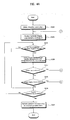
- FIGS. 4A to 4C are flowcharts illustrating a method of controlling an operation of a mobile terminal according to an exemplary embodiment of the present invention.
- the controller 180 controls to display a thumbnail image corresponding to an image file stored in the memory 160 to be randomly overlapped in the display unit 151 consisting of a touch screen (S203).
- a thumbnail image corresponding to an image file stored in the memory 160 to be randomly overlapped in the display unit 151 consisting of a touch screen (S203).
- the controller 180 determines whether any one of the displayed thumbnail images is selected (S206). If any one of the displayed thumbnail images is selected, the controller 180 controls to display the selected image together with an option icon for selecting a quick menu to be distinguished from other thumbnail images (S209).
- the quick menu is a menu for quickly entering a menu item such as transmission, edition, and deletion of an image file corresponding to the selected thumbnail image.
- a desired thumbnail image can be selected by touch input. Further, by enlarging a size of the selected thumbnail image or differently displaying a circumferential edge of the selected thumbnail image, the selected thumbnail image can be displayed to be distinguished from other thumbnail images.
- the controller 180 determines whether an option icon is selected by touch input (S212). If an option icon is selected by touch input, the controller 180 controls to perform a process shown in FIG. 4B .
- the controller 180 determines whether an image display area is selected from the selected thumbnail image by touch input (S215). If an image display area is selected from the selected thumbnail image by touch input, the controller 180 controls to perform a process shown in FIG. 4C .
- the controller 180 determines whether another operation menu displayed in the display unit 151 except for the thumbnail image is selected (S218). If another operation menu displayed in the display unit 151 except for the thumbnail image is selected, the controller 180 controls to perform an operation corresponding to selected operation menu (S221).
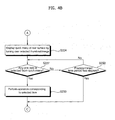
- FIG. 4B is a flowchart illustrating a process to be performed when an option icon is selected from the selected thumbnail image by touch input.
- the controller 180 controls to display a quick menu of a rear surface by turning over the selected thumbnail image (S224).
- the quick menu may include a menu item such as transmission, deletion, background setting, and edition of an image file corresponding to the selected thumbnail image.
- the controller 180 determines whether any one item is selected from a quick menu (S227). If any one item is selected from a quick menu, the controller 180 controls to perform an operation corresponding to the selected item (S230).
- the controller 180 determines whether a predetermined time period has elapsed without touch input (S233). If a predetermined time period has elapsed without touch input, the process returns to step S203.
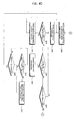
- FIG. 4C is a flowchart illustrating a process to be performed when an image display area in the selected thumbnail image is touched.
- the controller 180 controls to display an image file corresponding to the selected thumbnail image on a full screen (S236).
- the controller 180 controls to display a related menu item in a border area such as a lateral side or a vertical side of an image displayed on a full screen (S239).
- the related menu item may include a menu item such as transmission, background setting, deletion, and edition of the displayed image.
- the controller 180 determines whether any one of the displayed related menu item is selected (S242). If any one of the displayed related menu item is selected, the controller 180 controls to perform an operation corresponding to the selected menu item (S245).
- the controller 180 determines whether a predetermined time period has elapsed without touch input such as selection of a menu item (S248). If a predetermined time period has elapsed without touch input, the controller 180 controls to remove the displayed related menu item (S251). Therefore, in this case, a related menu item is not displayed on a screen and only an image is displayed.
- step S248 If a predetermined time period has not elapsed without touch input at step S248, i.e. in a state where the related menu item is displayed, when the image display area is touched, the process returns to step S203 (S263).
- the controller 180 determines whether a zoom or brightness adjustment instruction is input (S254). If a zoom or brightness adjustment instruction is input, the controller 180 controls to adjust zoom or brightness of a displayed image according to the input instruction (S257).
- the zoom or a brightness adjustment instruction can be input by dragging to any one of vertical and lateral directions after touching an image display area and zoom or brightness can be adjusted to correspond to a dragged distance.
- the controller 180 determines whether a menu item is displayed (S260). If a menu item is displayed, the process returns to step S239. If a menu item is not displayed, the process returns to step S254.
- the stored image list can be displayed in a user friendly manner while providing a higher sense of reality and be quickly performed a desired operation related to the selected image.
- the above-described exemplary embodiment exemplifies display of the stored image list, however the present invention can be applied to a case of displaying several images on a screen.
- FIGS. 5 to 11 are screens illustrating a method of controlling an operation of a mobile terminal according to an exemplary embodiment of the present invention in a display unit.
- FIG. 5 shows an example of an image list viewing screen 300 displayed when a photo album menu is selected.
- a thumbnail image corresponding to the stored image file is displayed to be randomly overlapped.
- an icon 305 for moving to a next screen or a previous screen is displayed at a lower end of the image list viewing screen 300.
- a 'standard' menu item 315 for converting to a standard arrangement method is displayed at a lower end of the image list viewing screen 300.
- a 'back' menu item 320 for moving to a previous menu are displayed.
- thumbnail images are displayed to be randomly overlapped, when any one thumbnail image is selected by touch input, the thumbnail image together with an option icon is displayed to be distinguished from other thumbnail images, as indicated by reference numeral 350.
- FIG. 6 is a diagram illustrating a process of converting the thumbnail image selected from the image list viewing screen 300.
- reference numeral 350 indicates a state before a thumbnail image is selected and reference numeral 360 indicates a state where a thumbnail image is selected.
- reference numeral 360 indicates a state where a thumbnail image is selected.
- a date 361 in which an image is generated and an option icon 363 for selecting a quick menu are displayed.
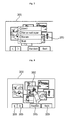
- the option icon 363 is selected by touch input, the selected thumbnail image is turned over and a quick menu 370 of a rear surface is displayed and a quick menu 370 for the selected thumbnail image is displayed, as shown in FIG. 7 .
- FIG. 8 illustrates a state in which an image display area of the thumbnail image 360 selected from the image list viewing screen 300 is selected by touch input.
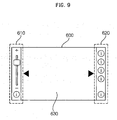
- the corresponding image file is displayed on a full screen, as shown in FIG. 9 .
- Menu items 610 and 620 related to the displayed image are displayed at a lateral side of the image 600 displayed on the full screen.
- Such a menu item includes a menu item such as transmission, background setting, deletion, and edition of the displayed image and disappears when there is no touch input for a predetermined time period. Further, when the image display area 630 is selected by touch input, the screen is returned to the image list viewing screen 300.
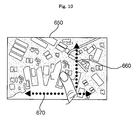
- FIG. 10 illustrates a screen 650 in which a related menu item disappears and in which an image is displayed on a full screen.
- a state when a related menu item disappears after the displayed image is touched, when the displayed image is vertically dragged in a direction indicated by reference numeral 660 or is laterally dragged in a direction indicated by reference numeral 670, brightness of the displayed image is adjusted or zoom is adjusted according to a set state.
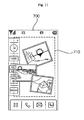
- FIG. 11 shows a screen 700 in which a thumbnail image 710 selected from the image list viewing screen 300 is displayed as a background.
- the thumbnail image selected from the image list viewing screen 300 can be used as various screen backgrounds and in this case, the thumbnail images can be displayed to be randomly overlapped.
- the present invention can be implemented with processor readable codes in a processor readable recording medium provided in a mobile terminal such as a Mobile Station Modem (MSM).
- the processor readable recording medium may include all kinds of recording devices in which data that can be read by the processor are stored.
- the processor readable recording medium may include, for example a ROM, a RAM, a CD-ROM, a magnetic tape, a floppy disk, and an optical data storage device.
- the processor readable recording medium may also include implementations in the form of carrier waves (e.g. transmission via Internet).
- the processor readable recording medium is distributed to a computer system connected to a network and the processor readable codes may be stored and executed therein in a distributed manner.
- a mobile terminal and a method of controlling an operation thereof according to the present invention are not limited to a configuration and a method of the above-described exemplary embodiments but may be formed by a selective combination of all or some of each of the exemplary embodiments so that the exemplary embodiments may be variously deformed.
- an image file stored in a user friendly manner can be easily searched. Further, it is possible to quickly and easily approach to a related menu by an intuitional touch input of a thumbnail image displayed on the touch screen, thereby improving user convenience.
Landscapes
- Engineering & Computer Science (AREA)
- General Engineering & Computer Science (AREA)
- Theoretical Computer Science (AREA)
- Human Computer Interaction (AREA)
- Physics & Mathematics (AREA)
- General Physics & Mathematics (AREA)
- Computer Networks & Wireless Communication (AREA)
- Signal Processing (AREA)
- User Interface Of Digital Computer (AREA)
- Telephone Function (AREA)
- Controls And Circuits For Display Device (AREA)
Applications Claiming Priority (1)
| Application Number | Priority Date | Filing Date | Title |
|---|---|---|---|
| KR1020070094834A KR100929236B1 (ko) | 2007-09-18 | 2007-09-18 | 터치스크린을 구비하는 휴대 단말기 및 그 동작 제어방법 |
Publications (2)
| Publication Number | Publication Date |
|---|---|
| EP2040154A2 true EP2040154A2 (fr) | 2009-03-25 |
| EP2040154A3 EP2040154A3 (fr) | 2013-02-13 |
Family
ID=40091297
Family Applications (1)
| Application Number | Title | Priority Date | Filing Date |
|---|---|---|---|
| EP08015784A Withdrawn EP2040154A3 (fr) | 2007-09-18 | 2008-09-08 | Terminal mobile incluant un écran tactile et son procédé de commande |
Country Status (3)
| Country | Link |
|---|---|
| US (1) | US8584043B2 (fr) |
| EP (1) | EP2040154A3 (fr) |
| KR (1) | KR100929236B1 (fr) |
Cited By (9)
| Publication number | Priority date | Publication date | Assignee | Title |
|---|---|---|---|---|
| US8631350B2 (en) | 2010-04-23 | 2014-01-14 | Blackberry Limited | Graphical context short menu |
| EP2256611A3 (fr) * | 2009-05-25 | 2014-02-12 | Lg Electronics Inc. | Dispositif d'affichage et son procédé de commande |
| EP2237140A3 (fr) * | 2009-03-31 | 2014-05-14 | Lg Electronics Inc. | Terminal mobile et son procédé de contrôle |
| EP2750399A1 (fr) * | 2012-12-26 | 2014-07-02 | LG Electronics Inc. | Appareil d'affichage d'image et procédé de fonctionnement de celui-ci |
| US9223483B2 (en) | 2012-02-24 | 2015-12-29 | Blackberry Limited | Method and apparatus for providing a user interface on a device that indicates content operators |
| US9753611B2 (en) | 2012-02-24 | 2017-09-05 | Blackberry Limited | Method and apparatus for providing a user interface on a device enabling selection of operations to be performed in relation to content |
| EP2690544A3 (fr) * | 2012-07-25 | 2017-10-18 | Samsung Electronics Co., Ltd | Dispositif de terminal d'utilisateur et son procédé de contrôle |
| CN108304111A (zh) * | 2013-09-13 | 2018-07-20 | 联想(北京)有限公司 | 信息处理方法和信息处理设备 |
| EP3786917A1 (fr) * | 2019-08-27 | 2021-03-03 | Hyundai Motor Company | Organe de commande de mise en pelotons, système le comprenant et procédé associé |
Families Citing this family (101)
| Publication number | Priority date | Publication date | Assignee | Title |
|---|---|---|---|---|
| US7730401B2 (en) | 2001-05-16 | 2010-06-01 | Synaptics Incorporated | Touch screen with user interface enhancement |
| TW200907746A (en) * | 2007-08-14 | 2009-02-16 | Kye Systems Corp | Interactive display device |
| US10503376B2 (en) * | 2007-12-20 | 2019-12-10 | Samsung Electronics Co., Ltd. | Method and apparatus for adjusting an image and control guides displayed on a display |
| JP2009175227A (ja) * | 2008-01-22 | 2009-08-06 | Toshiba Corp | 携帯端末装置 |
| US20090322761A1 (en) * | 2008-06-26 | 2009-12-31 | Anthony Phills | Applications for mobile computing devices |
| US20100036734A1 (en) * | 2008-08-11 | 2010-02-11 | Yang Pan | Delivering Advertisement Messages to a User by the Use of Idle Screens of Electronic Devices |
| USD609243S1 (en) * | 2008-09-08 | 2010-02-02 | Samsung Electronics Co., Ltd. | Transitional image display for mobile phone |
| WO2010064387A1 (fr) * | 2008-12-04 | 2010-06-10 | 三菱電機株式会社 | Dispositif de saisie sur écran |
| US8213741B2 (en) * | 2008-12-19 | 2012-07-03 | Texas Instruments Incorporated | Method to generate thumbnails for digital images |
| US20100185965A1 (en) * | 2009-01-21 | 2010-07-22 | Frederick Collin Davidson | Artistic file manager |
| US8214357B2 (en) | 2009-02-27 | 2012-07-03 | Research In Motion Limited | System and method for linking ad tagged words |
| US8914468B2 (en) * | 2009-02-27 | 2014-12-16 | Blackberry Limited | System and method for providing access links in a media folder |
| US20100220851A1 (en) * | 2009-02-27 | 2010-09-02 | Research In Motion Limited | System and method for providing dialing access links |
| WO2010121412A1 (fr) * | 2009-04-20 | 2010-10-28 | Wu Wei | Dispositif portatif intégrant un ordinateur et un téléphone cellulaire et son procédé de fabrication |
| CN102414649B (zh) | 2009-04-30 | 2015-05-20 | 辛纳普蒂克斯公司 | 按照多个规则集合来操作触摸屏控制系统 |
| KR101160384B1 (ko) * | 2009-05-06 | 2012-06-26 | (주) 비앤디 | 사용자 인터페이스 장치 및 사용자 인터페이스 방법 |
| KR101576292B1 (ko) * | 2009-05-21 | 2015-12-09 | 엘지전자 주식회사 | 이동 통신 단말기에서의 메뉴 실행 방법 및 이를 적용한 이동 통신 단말기 |
| KR100954324B1 (ko) * | 2009-06-17 | 2010-04-21 | 주식회사 인프라웨어 | 퀵 메뉴 표시 방법 |
| KR20110013606A (ko) * | 2009-08-03 | 2011-02-10 | 엘지전자 주식회사 | 이동 통신 단말기에서의 메뉴 실행 방법 및 이를 적용한 이동 통신 단말기 |
| KR101618152B1 (ko) * | 2009-09-11 | 2016-05-04 | 주식회사 엘지유플러스 | 터치스크린을 구비한 모바일 단말 및 그의 웹 페이지 드래그 방법 |
| US8359541B1 (en) * | 2009-09-18 | 2013-01-22 | Sprint Communications Company L.P. | Distributing icons so that they do not overlap certain screen areas of a mobile device |
| US20110099507A1 (en) | 2009-10-28 | 2011-04-28 | Google Inc. | Displaying a collection of interactive elements that trigger actions directed to an item |
| US20110113368A1 (en) * | 2009-11-06 | 2011-05-12 | Santiago Carvajal | Audio/Visual Device Graphical User Interface |
| US9354726B2 (en) | 2009-11-06 | 2016-05-31 | Bose Corporation | Audio/visual device graphical user interface submenu |
| US8436887B2 (en) | 2009-11-13 | 2013-05-07 | Samsung Electronics Co., Ltd. | Mobile terminal, display apparatus and control method thereof |
| KR101600091B1 (ko) * | 2009-11-25 | 2016-03-04 | 엘지전자 주식회사 | 터치스크린을 포함한 이동 통신 단말기에서의 데이터 표시 제어 방법 및 이를 적용한 이동 통신 단말기 |
| KR20110081040A (ko) * | 2010-01-06 | 2011-07-13 | 삼성전자주식회사 | 투명 디스플레이를 구비한 휴대단말에서 컨텐츠 운용 방법 및 장치 |
| TWI439960B (zh) | 2010-04-07 | 2014-06-01 | 蘋果公司 | 虛擬使用者編輯環境 |
| JP2011238125A (ja) * | 2010-05-12 | 2011-11-24 | Sony Corp | 画像処理装置および方法、並びにプログラム |
| KR101687552B1 (ko) * | 2010-06-04 | 2016-12-19 | 엘지전자 주식회사 | 휴대 단말기 및 그 동작 방법 |
| JP5556398B2 (ja) * | 2010-06-08 | 2014-07-23 | ソニー株式会社 | 情報処理装置、情報処理方法およびプログラム |
| US20120036471A1 (en) * | 2010-08-04 | 2012-02-09 | Misys | Tool bars along lateral edges of a mobile computing device display |
| US8717381B2 (en) * | 2011-01-11 | 2014-05-06 | Apple Inc. | Gesture mapping for image filter input parameters |
| US8930821B2 (en) * | 2011-04-08 | 2015-01-06 | Siemens Industry, Inc. | Component specifying and selection apparatus and method using intelligent graphic type selection interface |
| JPWO2012144632A1 (ja) * | 2011-04-20 | 2014-07-28 | Necカシオモバイルコミュニケーションズ株式会社 | 情報処理装置、情報処理方法及びプログラム |
| KR101802759B1 (ko) * | 2011-05-30 | 2017-11-29 | 엘지전자 주식회사 | 이동 단말기 및 이것의 디스플레이 제어 방법 |
| JP5849490B2 (ja) * | 2011-07-21 | 2016-01-27 | ブラザー工業株式会社 | データ入力装置、データ入力装置の制御方法およびプログラム |
| US9417754B2 (en) | 2011-08-05 | 2016-08-16 | P4tents1, LLC | User interface system, method, and computer program product |
| KR101850302B1 (ko) * | 2011-10-14 | 2018-04-20 | 삼성전자주식회사 | 사용자 단말 장치 및 그 렌더링 장치 제어 방법 |
| KR101919853B1 (ko) * | 2011-12-23 | 2018-11-19 | 삼성전자주식회사 | 디스플레이 장치 및 그 잠금 해제 방법 |
| JP5395927B2 (ja) * | 2012-05-11 | 2014-01-22 | 株式会社東芝 | 電子機器および手書き文書検索方法 |
| USD721726S1 (en) * | 2012-06-01 | 2015-01-27 | Samsung Electronics Co., Ltd. | Portable electronic device display with graphical user interface |
| CN103577083A (zh) * | 2012-07-30 | 2014-02-12 | 腾讯科技(深圳)有限公司 | 一种图片操作方法和移动终端 |
| CN102968268B (zh) * | 2012-10-23 | 2018-07-10 | 努比亚技术有限公司 | 一种裁剪图片的方法与装置 |
| KR20140083229A (ko) * | 2012-12-26 | 2014-07-04 | 삼성전자주식회사 | 디스플레이 장치 및 이의 메뉴 제공 방법 |
| USD742896S1 (en) * | 2013-10-25 | 2015-11-10 | Microsoft Corporation | Display screen with graphical user interface |
| US20150160794A1 (en) * | 2013-12-09 | 2015-06-11 | Microsoft Corporation | Resolving ambiguous touches to a touch screen interface |
| KR102102646B1 (ko) * | 2014-01-17 | 2020-04-21 | 엘지전자 주식회사 | 이동단말기 및 그 제어방법 |
| US9891794B2 (en) | 2014-04-25 | 2018-02-13 | Dropbox, Inc. | Browsing and selecting content items based on user gestures |
| US10089346B2 (en) | 2014-04-25 | 2018-10-02 | Dropbox, Inc. | Techniques for collapsing views of content items in a graphical user interface |
| JP6322765B2 (ja) | 2014-08-02 | 2018-05-09 | アップル インコーポレイテッド | コンテキスト特化ユーザインターフェース |
| US10452253B2 (en) | 2014-08-15 | 2019-10-22 | Apple Inc. | Weather user interface |
| KR102411890B1 (ko) | 2014-09-02 | 2022-06-23 | 삼성전자주식회사 | 컨텐츠를 처리하는 방법 및 이를 위한 전자 장치 |
| KR102230267B1 (ko) * | 2014-09-04 | 2021-03-19 | 삼성전자주식회사 | 영상 표시 장치 및 방법 |
| US10152804B2 (en) * | 2015-02-13 | 2018-12-11 | Smugmug, Inc. | System and method for dynamic color scheme application |
| WO2016144385A1 (fr) | 2015-03-08 | 2016-09-15 | Apple Inc. | Partage de constructions graphiques configurables par l'utilisateur |
| KR20160123879A (ko) * | 2015-04-17 | 2016-10-26 | 삼성전자주식회사 | 전자 장치 및 그의 화면 표시 방법 |
| KR20160124536A (ko) * | 2015-04-20 | 2016-10-28 | 삼성전자주식회사 | 사용자 인터페이스를 제공하는 방법 및 전자장치 |
| US10304347B2 (en) | 2015-08-20 | 2019-05-28 | Apple Inc. | Exercised-based watch face and complications |
| CN105117133B (zh) * | 2015-09-10 | 2019-06-28 | 北京亿虎乐游网络科技有限公司 | 一种提供触摸屏多选操作的控制方法和系统 |
| US10116151B2 (en) * | 2015-09-22 | 2018-10-30 | Bseng, Llc | Battery charger rental kiosk system |
| CN105353966A (zh) * | 2015-10-19 | 2016-02-24 | 苏州嘉辰悦电子科技有限公司 | 一种触摸扩展系统的数据传输方法及其传输软件 |
| US10091391B2 (en) * | 2015-11-10 | 2018-10-02 | Bidirectional Display, Inc. | System and method for constructing document image from snapshots taken by image sensor panel |
| US12175065B2 (en) | 2016-06-10 | 2024-12-24 | Apple Inc. | Context-specific user interfaces for relocating one or more complications in a watch or clock interface |
| US10564803B2 (en) * | 2016-08-18 | 2020-02-18 | Samsung Electronics Co., Ltd. | Selecting application that can handle data content |
| CN110109592B (zh) | 2016-09-23 | 2022-09-23 | 苹果公司 | 头像创建和编辑 |
| JP6580013B2 (ja) * | 2016-09-29 | 2019-09-25 | 株式会社日立製作所 | 画像処理装置、及びその方法 |
| CN108509117A (zh) | 2017-02-27 | 2018-09-07 | 腾讯科技(深圳)有限公司 | 数据显示方法及装置 |
| DK179412B1 (en) | 2017-05-12 | 2018-06-06 | Apple Inc | Context-Specific User Interfaces |
| CN108108117B (zh) * | 2018-01-23 | 2021-01-19 | 中兴通讯股份有限公司 | 一种截屏方法、装置及终端 |
| US11722764B2 (en) | 2018-05-07 | 2023-08-08 | Apple Inc. | Creative camera |
| DK179874B1 (en) | 2018-05-07 | 2019-08-13 | Apple Inc. | USER INTERFACE FOR AVATAR CREATION |
| US11327650B2 (en) | 2018-05-07 | 2022-05-10 | Apple Inc. | User interfaces having a collection of complications |
| US12033296B2 (en) | 2018-05-07 | 2024-07-09 | Apple Inc. | Avatar creation user interface |
| US10375313B1 (en) | 2018-05-07 | 2019-08-06 | Apple Inc. | Creative camera |
| EP3903500B1 (fr) | 2018-12-26 | 2026-02-18 | Snap Inc. | Création et interactions d'utilisateur avec un papier peint tridimensionnel sur des dispositifs informatiques |
| US11107261B2 (en) | 2019-01-18 | 2021-08-31 | Apple Inc. | Virtual avatar animation based on facial feature movement |
| CN109918167B (zh) * | 2019-03-15 | 2021-01-26 | Oppo广东移动通信有限公司 | 操作图标的放置方法、装置、终端设备、计算机可读存储介质 |
| CA186708S (en) * | 2019-03-26 | 2020-12-10 | Tertzakian Peter | Display screen |
| CA186709S (en) * | 2019-03-26 | 2020-08-31 | Tertzakian Peter | Display screen |
| US11131967B2 (en) | 2019-05-06 | 2021-09-28 | Apple Inc. | Clock faces for an electronic device |
| US11960701B2 (en) | 2019-05-06 | 2024-04-16 | Apple Inc. | Using an illustration to show the passing of time |
| KR102393717B1 (ko) | 2019-05-06 | 2022-05-03 | 애플 인크. | 전자 디바이스의 제한된 동작 |
| US12015732B2 (en) * | 2019-05-31 | 2024-06-18 | Apple Inc. | Device, method, and graphical user interface for updating a background for home and wake screen user interfaces |
| CN110502484B (zh) * | 2019-08-16 | 2023-06-20 | 北京小米移动软件有限公司 | 在移动终端显示文件信息的方法、装置及介质 |
| DK180392B1 (en) | 2019-09-09 | 2021-03-12 | Apple Inc | Techniques for managing display usage |
| US11921998B2 (en) | 2020-05-11 | 2024-03-05 | Apple Inc. | Editing features of an avatar |
| US11372659B2 (en) | 2020-05-11 | 2022-06-28 | Apple Inc. | User interfaces for managing user interface sharing |
| EP4439263A3 (fr) | 2020-05-11 | 2024-10-16 | Apple Inc. | Interfaces utilisateur pour gérer un partage d'interface utilisateur |
| DK202070625A1 (en) * | 2020-05-11 | 2022-01-04 | Apple Inc | User interfaces related to time |
| US11694590B2 (en) | 2020-12-21 | 2023-07-04 | Apple Inc. | Dynamic user interface with time indicator |
| US11720239B2 (en) | 2021-01-07 | 2023-08-08 | Apple Inc. | Techniques for user interfaces related to an event |
| US12182373B2 (en) | 2021-04-27 | 2024-12-31 | Apple Inc. | Techniques for managing display usage |
| US11921992B2 (en) | 2021-05-14 | 2024-03-05 | Apple Inc. | User interfaces related to time |
| US12093037B2 (en) * | 2021-06-02 | 2024-09-17 | Ford Global Technologies, Llc | Remote control system for a vehicle and trailer |
| US11776190B2 (en) | 2021-06-04 | 2023-10-03 | Apple Inc. | Techniques for managing an avatar on a lock screen |
| US12493267B2 (en) | 2022-01-24 | 2025-12-09 | Apple Inc. | User interfaces for indicating time |
| US12566540B2 (en) | 2022-05-10 | 2026-03-03 | Apple Inc. | Devices, methods, and graphical user interfaces for providing notifications and application information |
| US12287913B2 (en) | 2022-09-06 | 2025-04-29 | Apple Inc. | Devices, methods, and graphical user interfaces for controlling avatars within three-dimensional environments |
| US12578975B2 (en) | 2022-09-15 | 2026-03-17 | Apple Inc. | User interfaces for indicating time |
| JP2024062535A (ja) * | 2022-10-25 | 2024-05-10 | セイコーエプソン株式会社 | 表示装置、表示装置の制御方法及びプログラム |
Citations (4)
| Publication number | Priority date | Publication date | Assignee | Title |
|---|---|---|---|---|
| JP2004326430A (ja) * | 2003-04-24 | 2004-11-18 | Konica Minolta Photo Imaging Inc | プリントシステム |
| KR20060032793A (ko) * | 2004-10-13 | 2006-04-18 | 삼성테크윈 주식회사 | 터치 스크린을 갖는 디지털 저장 장치의 섬네일 이미지검색 방법 |
| US20060117108A1 (en) * | 2004-12-01 | 2006-06-01 | Richard Salisbury | Touch screen control |
| KR20070094834A (ko) | 2005-01-07 | 2007-09-21 | 쓰리엠 이노베이티브 프로퍼티즈 캄파니 | 태양광 제어 다층 필름 |
Family Cites Families (16)
| Publication number | Priority date | Publication date | Assignee | Title |
|---|---|---|---|---|
| JP2001337996A (ja) * | 2000-05-24 | 2001-12-07 | Canon Inc | 画像処理装置及びその制御方法並びに記憶媒体 |
| KR100381583B1 (ko) * | 2001-04-24 | 2003-04-26 | 엘지전자 주식회사 | 개인용 정보단말기에서의 유저 인터페이스 방법 |
| US20050134578A1 (en) * | 2001-07-13 | 2005-06-23 | Universal Electronics Inc. | System and methods for interacting with a control environment |
| US7814439B2 (en) * | 2002-10-18 | 2010-10-12 | Autodesk, Inc. | Pan-zoom tool |
| US20050034084A1 (en) * | 2003-08-04 | 2005-02-10 | Toshikazu Ohtsuki | Mobile terminal device and image display method |
| US7761800B2 (en) * | 2004-06-25 | 2010-07-20 | Apple Inc. | Unified interest layer for user interface |
| US7546543B2 (en) * | 2004-06-25 | 2009-06-09 | Apple Inc. | Widget authoring and editing environment |
| US7464110B2 (en) * | 2004-06-30 | 2008-12-09 | Nokia Corporation | Automated grouping of image and other user data |
| US8418075B2 (en) * | 2004-11-16 | 2013-04-09 | Open Text Inc. | Spatially driven content presentation in a cellular environment |
| US20060129948A1 (en) * | 2004-12-14 | 2006-06-15 | Hamzy Mark J | Method, system and program product for a window level security screen-saver |
| KR101179890B1 (ko) * | 2006-02-09 | 2012-09-06 | 삼성전자주식회사 | 휴대단말의 디지털 이미지 표시방법 및 장치 |
| US20080034316A1 (en) * | 2006-08-01 | 2008-02-07 | Johan Thoresson | Scalable scrollbar markers |
| US8106856B2 (en) * | 2006-09-06 | 2012-01-31 | Apple Inc. | Portable electronic device for photo management |
| US8564543B2 (en) * | 2006-09-11 | 2013-10-22 | Apple Inc. | Media player with imaged based browsing |
| US20080163053A1 (en) * | 2006-12-28 | 2008-07-03 | Samsung Electronics Co., Ltd. | Method to provide menu, using menu set and multimedia device using the same |
| US7956848B2 (en) * | 2007-09-04 | 2011-06-07 | Apple Inc. | Video chapter access and license renewal |
-
2007
- 2007-09-18 KR KR1020070094834A patent/KR100929236B1/ko not_active Expired - Fee Related
-
2008
- 2008-09-08 EP EP08015784A patent/EP2040154A3/fr not_active Withdrawn
- 2008-09-12 US US12/209,827 patent/US8584043B2/en not_active Expired - Fee Related
Patent Citations (4)
| Publication number | Priority date | Publication date | Assignee | Title |
|---|---|---|---|---|
| JP2004326430A (ja) * | 2003-04-24 | 2004-11-18 | Konica Minolta Photo Imaging Inc | プリントシステム |
| KR20060032793A (ko) * | 2004-10-13 | 2006-04-18 | 삼성테크윈 주식회사 | 터치 스크린을 갖는 디지털 저장 장치의 섬네일 이미지검색 방법 |
| US20060117108A1 (en) * | 2004-12-01 | 2006-06-01 | Richard Salisbury | Touch screen control |
| KR20070094834A (ko) | 2005-01-07 | 2007-09-21 | 쓰리엠 이노베이티브 프로퍼티즈 캄파니 | 태양광 제어 다층 필름 |
Cited By (17)
| Publication number | Priority date | Publication date | Assignee | Title |
|---|---|---|---|---|
| EP2237140A3 (fr) * | 2009-03-31 | 2014-05-14 | Lg Electronics Inc. | Terminal mobile et son procédé de contrôle |
| US9395763B2 (en) | 2009-03-31 | 2016-07-19 | Lg Electronics Inc. | Mobile terminal and controlling method thereof |
| US8854315B2 (en) | 2009-05-25 | 2014-10-07 | Lg Electronics Inc. | Display device having two touch screens and a method of controlling the same |
| EP2256611A3 (fr) * | 2009-05-25 | 2014-02-12 | Lg Electronics Inc. | Dispositif d'affichage et son procédé de commande |
| US8631350B2 (en) | 2010-04-23 | 2014-01-14 | Blackberry Limited | Graphical context short menu |
| US10936153B2 (en) | 2012-02-24 | 2021-03-02 | Blackberry Limited | Method and apparatus for providing a user interface on a device enabling selection of operations to be performed in relation to content |
| US9223483B2 (en) | 2012-02-24 | 2015-12-29 | Blackberry Limited | Method and apparatus for providing a user interface on a device that indicates content operators |
| US9753611B2 (en) | 2012-02-24 | 2017-09-05 | Blackberry Limited | Method and apparatus for providing a user interface on a device enabling selection of operations to be performed in relation to content |
| US10698567B2 (en) | 2012-02-24 | 2020-06-30 | Blackberry Limited | Method and apparatus for providing a user interface on a device that indicates content operators |
| EP2690544A3 (fr) * | 2012-07-25 | 2017-10-18 | Samsung Electronics Co., Ltd | Dispositif de terminal d'utilisateur et son procédé de contrôle |
| US8804043B2 (en) | 2012-12-26 | 2014-08-12 | Lg Electronics Inc. | Image display apparatus having a graphical user interface for a plurality of input ports and method for operating the same |
| EP2750399A1 (fr) * | 2012-12-26 | 2014-07-02 | LG Electronics Inc. | Appareil d'affichage d'image et procédé de fonctionnement de celui-ci |
| CN108304111A (zh) * | 2013-09-13 | 2018-07-20 | 联想(北京)有限公司 | 信息处理方法和信息处理设备 |
| CN108304111B (zh) * | 2013-09-13 | 2021-05-18 | 联想(北京)有限公司 | 信息处理方法和信息处理设备 |
| EP3786917A1 (fr) * | 2019-08-27 | 2021-03-03 | Hyundai Motor Company | Organe de commande de mise en pelotons, système le comprenant et procédé associé |
| US20210065557A1 (en) * | 2019-08-27 | 2021-03-04 | Hyundai Motor Company | Platooning controller, system including the same, and method thereof |
| US11776410B2 (en) | 2019-08-27 | 2023-10-03 | Hyundai Motor Company | Platooning controller, system including the same, and method thereof |
Also Published As
| Publication number | Publication date |
|---|---|
| KR100929236B1 (ko) | 2009-12-01 |
| US20090077497A1 (en) | 2009-03-19 |
| US8584043B2 (en) | 2013-11-12 |
| EP2040154A3 (fr) | 2013-02-13 |
| KR20090029518A (ko) | 2009-03-23 |
Similar Documents
| Publication | Publication Date | Title |
|---|---|---|
| EP2040154A2 (fr) | Terminal mobile incluant un écran tactile et son procédé de commande | |
| KR101470543B1 (ko) | 터치스크린을 구비하는 휴대 단말기 및 그 동작 제어방법 | |
| KR101415763B1 (ko) | 휴대 단말기 및 그 이미지 표시 방법 | |
| EP2045700A1 (fr) | Procédé d'affichage de menu pour terminal de communication mobile | |
| KR101505191B1 (ko) | 휴대 단말기 및 그 동작 제어방법 | |
| US20110185283A1 (en) | Mobile terminal and method of controlling the mobile terminal | |
| KR20090107793A (ko) | 가변 메뉴 아이콘을 사용하는 휴대 단말기 및 그 제어방법 | |
| KR20090032559A (ko) | 휴대 단말기 및 그 제어방법 | |
| KR20100056209A (ko) | 휴대 단말기 및 그 동작방법 | |
| KR20090053561A (ko) | 근거리 통신 기능을 구비하는 휴대 단말기 및 그 제어방법 | |
| KR101512770B1 (ko) | 휴대 단말기 및 그 동작방법 | |
| KR100913585B1 (ko) | 북마킹 영역을 설정할 수 있는 휴대 단말기 및 그 동작제어방법 | |
| KR20100126025A (ko) | 휴대 단말기 및 그 동작방법 | |
| KR101370905B1 (ko) | 휴대단말기 및 그 제어 방법 | |
| KR101351048B1 (ko) | 휴대 단말기, 휴대 단말기의 정보 전송 방법 그리고 휴대단말기의 표시방법 | |
| KR101626308B1 (ko) | 휴대 단말기 및 그 제어방법 | |
| KR101590358B1 (ko) | 블록부를 포함하는 휴대 단말기 및 그 동작방법 | |
| KR101504684B1 (ko) | 휴대 단말기 및 그 동작방법 | |
| KR101538381B1 (ko) | 휴대 단말기 및 그 제어방법 | |
| KR101523285B1 (ko) | 타 휴대 단말기의 화면 표시가 가능한 휴대 단말기 및 그제어방법 | |
| KR20100028923A (ko) | 휴대 단말기 및 그 제어방법 | |
| KR101504685B1 (ko) | 휴대 단말기 및 그 동작방법 | |
| KR101609138B1 (ko) | 휴대 단말기 및 그 동작방법 | |
| KR101470010B1 (ko) | 휴대 단말기 및 휴대 단말기에서의 진동 전달 방법 | |
| KR20110019220A (ko) | 휴대 단말기 및 그 동작방법 |
Legal Events
| Date | Code | Title | Description |
|---|---|---|---|
| PUAI | Public reference made under article 153(3) epc to a published international application that has entered the european phase |
Free format text: ORIGINAL CODE: 0009012 |
|
| AK | Designated contracting states |
Kind code of ref document: A2 Designated state(s): AT BE BG CH CY CZ DE DK EE ES FI FR GB GR HR HU IE IS IT LI LT LU LV MC MT NL NO PL PT RO SE SI SK TR |
|
| AX | Request for extension of the european patent |
Extension state: AL BA MK RS |
|
| RAP1 | Party data changed (applicant data changed or rights of an application transferred) |
Owner name: LG ELECTRONICS INC. |
|
| PUAL | Search report despatched |
Free format text: ORIGINAL CODE: 0009013 |
|
| AK | Designated contracting states |
Kind code of ref document: A3 Designated state(s): AT BE BG CH CY CZ DE DK EE ES FI FR GB GR HR HU IE IS IT LI LT LU LV MC MT NL NO PL PT RO SE SI SK TR |
|
| AX | Request for extension of the european patent |
Extension state: AL BA MK RS |
|
| RIC1 | Information provided on ipc code assigned before grant |
Ipc: G06F 3/048 20130101AFI20130104BHEP |
|
| 17P | Request for examination filed |
Effective date: 20130802 |
|
| RBV | Designated contracting states (corrected) |
Designated state(s): AT BE BG CH CY CZ DE DK EE ES FI FR GB GR HR HU IE IS IT LI LT LU LV MC MT NL NO PL PT RO SE SI SK TR |
|
| RBV | Designated contracting states (corrected) |
Designated state(s): AT BE BG CH CY CZ DE DK EE ES FI FR GB GR HR HU IE IS IT LI LT LU LV MC MT NL NO PL PT RO SE SI SK TR |
|
| RBV | Designated contracting states (corrected) |
Designated state(s): AT BE BG CH CY CZ DE DK EE ES FI FR GB GR HR HU IE IS IT LI LT LU LV MC MT NL NO PL PT RO SE SI SK TR |
|
| 17Q | First examination report despatched |
Effective date: 20171208 |
|
| STAA | Information on the status of an ep patent application or granted ep patent |
Free format text: STATUS: THE APPLICATION IS DEEMED TO BE WITHDRAWN |
|
| 18D | Application deemed to be withdrawn |
Effective date: 20200603 |