EP2045703A2 - Mobiles Endgerät und Bildanzeigeverfahren dafür - Google Patents
Mobiles Endgerät und Bildanzeigeverfahren dafür Download PDFInfo
- Publication number
- EP2045703A2 EP2045703A2 EP08164747A EP08164747A EP2045703A2 EP 2045703 A2 EP2045703 A2 EP 2045703A2 EP 08164747 A EP08164747 A EP 08164747A EP 08164747 A EP08164747 A EP 08164747A EP 2045703 A2 EP2045703 A2 EP 2045703A2
- Authority
- EP
- European Patent Office
- Prior art keywords
- image
- group
- images
- display
- row
- Prior art date
- Legal status (The legal status is an assumption and is not a legal conclusion. Google has not performed a legal analysis and makes no representation as to the accuracy of the status listed.)
- Ceased
Links
Images



Classifications
-
- G—PHYSICS
- G06—COMPUTING OR CALCULATING; COUNTING
- G06F—ELECTRIC DIGITAL DATA PROCESSING
- G06F3/00—Input arrangements for transferring data to be processed into a form capable of being handled by the computer; Output arrangements for transferring data from processing unit to output unit, e.g. interface arrangements
- G06F3/01—Input arrangements or combined input and output arrangements for interaction between user and computer
- G06F3/048—Interaction techniques based on graphical user interfaces [GUI]
- G06F3/0484—Interaction techniques based on graphical user interfaces [GUI] for the control of specific functions or operations, e.g. selecting or manipulating an object, an image or a displayed text element, setting a parameter value or selecting a range
- G06F3/04845—Interaction techniques based on graphical user interfaces [GUI] for the control of specific functions or operations, e.g. selecting or manipulating an object, an image or a displayed text element, setting a parameter value or selecting a range for image manipulation, e.g. dragging, rotation, expansion or change of colour
-
- H—ELECTRICITY
- H04—ELECTRIC COMMUNICATION TECHNIQUE
- H04B—TRANSMISSION
- H04B1/00—Details of transmission systems, not covered by a single one of groups H04B3/00 - H04B13/00; Details of transmission systems not characterised by the medium used for transmission
- H04B1/38—Transceivers, i.e. devices in which transmitter and receiver form a structural unit and in which at least one part is used for functions of transmitting and receiving
- H04B1/40—Circuits
-
- G—PHYSICS
- G06—COMPUTING OR CALCULATING; COUNTING
- G06F—ELECTRIC DIGITAL DATA PROCESSING
- G06F16/00—Information retrieval; Database structures therefor; File system structures therefor
- G06F16/50—Information retrieval; Database structures therefor; File system structures therefor of still image data
- G06F16/54—Browsing; Visualisation therefor
-
- G—PHYSICS
- G06—COMPUTING OR CALCULATING; COUNTING
- G06F—ELECTRIC DIGITAL DATA PROCESSING
- G06F3/00—Input arrangements for transferring data to be processed into a form capable of being handled by the computer; Output arrangements for transferring data from processing unit to output unit, e.g. interface arrangements
- G06F3/01—Input arrangements or combined input and output arrangements for interaction between user and computer
- G06F3/048—Interaction techniques based on graphical user interfaces [GUI]
- G06F3/0481—Interaction techniques based on graphical user interfaces [GUI] based on specific properties of the displayed interaction object or a metaphor-based environment, e.g. interaction with desktop elements like windows or icons, or assisted by a cursor's changing behaviour or appearance
- G06F3/0482—Interaction with lists of selectable items, e.g. menus
-
- G—PHYSICS
- G06—COMPUTING OR CALCULATING; COUNTING
- G06F—ELECTRIC DIGITAL DATA PROCESSING
- G06F3/00—Input arrangements for transferring data to be processed into a form capable of being handled by the computer; Output arrangements for transferring data from processing unit to output unit, e.g. interface arrangements
- G06F3/01—Input arrangements or combined input and output arrangements for interaction between user and computer
- G06F3/048—Interaction techniques based on graphical user interfaces [GUI]
- G06F3/0484—Interaction techniques based on graphical user interfaces [GUI] for the control of specific functions or operations, e.g. selecting or manipulating an object, an image or a displayed text element, setting a parameter value or selecting a range
- G06F3/0485—Scrolling or panning
-
- G—PHYSICS
- G06—COMPUTING OR CALCULATING; COUNTING
- G06F—ELECTRIC DIGITAL DATA PROCESSING
- G06F3/00—Input arrangements for transferring data to be processed into a form capable of being handled by the computer; Output arrangements for transferring data from processing unit to output unit, e.g. interface arrangements
- G06F3/01—Input arrangements or combined input and output arrangements for interaction between user and computer
- G06F3/048—Interaction techniques based on graphical user interfaces [GUI]
- G06F3/0487—Interaction techniques based on graphical user interfaces [GUI] using specific features provided by the input device, e.g. functions controlled by the rotation of a mouse with dual sensing arrangements, or of the nature of the input device, e.g. tap gestures based on pressure sensed by a digitiser
- G06F3/0488—Interaction techniques based on graphical user interfaces [GUI] using specific features provided by the input device, e.g. functions controlled by the rotation of a mouse with dual sensing arrangements, or of the nature of the input device, e.g. tap gestures based on pressure sensed by a digitiser using a touch-screen or digitiser, e.g. input of commands through traced gestures
- G06F3/04883—Interaction techniques based on graphical user interfaces [GUI] using specific features provided by the input device, e.g. functions controlled by the rotation of a mouse with dual sensing arrangements, or of the nature of the input device, e.g. tap gestures based on pressure sensed by a digitiser using a touch-screen or digitiser, e.g. input of commands through traced gestures for inputting data by handwriting, e.g. gesture or text
-
- G—PHYSICS
- G06—COMPUTING OR CALCULATING; COUNTING
- G06F—ELECTRIC DIGITAL DATA PROCESSING
- G06F2203/00—Indexing scheme relating to G06F3/00 - G06F3/048
- G06F2203/048—Indexing scheme relating to G06F3/048
- G06F2203/04806—Zoom, i.e. interaction techniques or interactors for controlling the zooming operation
-
- H—ELECTRICITY
- H04—ELECTRIC COMMUNICATION TECHNIQUE
- H04M—TELEPHONIC COMMUNICATION
- H04M1/00—Substation equipment, e.g. for use by subscribers
- H04M1/02—Constructional features of telephone sets
- H04M1/0202—Portable telephone sets, e.g. cordless phones, mobile phones or bar type handsets
- H04M1/0206—Portable telephones comprising a plurality of mechanically joined movable body parts, e.g. hinged housings
- H04M1/0208—Portable telephones comprising a plurality of mechanically joined movable body parts, e.g. hinged housings characterized by the relative motions of the body parts
- H04M1/0235—Slidable or telescopic telephones, i.e. with a relative translation movement of the body parts; Telephones using a combination of translation and other relative motions of the body parts
-
- H—ELECTRICITY
- H04—ELECTRIC COMMUNICATION TECHNIQUE
- H04M—TELEPHONIC COMMUNICATION
- H04M1/00—Substation equipment, e.g. for use by subscribers
- H04M1/72—Mobile telephones; Cordless telephones, i.e. devices for establishing wireless links to base stations without route selection
- H04M1/724—User interfaces specially adapted for cordless or mobile telephones
- H04M1/72403—User interfaces specially adapted for cordless or mobile telephones with means for local support of applications that increase the functionality
- H04M1/7243—User interfaces specially adapted for cordless or mobile telephones with means for local support of applications that increase the functionality with interactive means for internal management of messages
- H04M1/72439—User interfaces specially adapted for cordless or mobile telephones with means for local support of applications that increase the functionality with interactive means for internal management of messages for image or video messaging
-
- H—ELECTRICITY
- H04—ELECTRIC COMMUNICATION TECHNIQUE
- H04M—TELEPHONIC COMMUNICATION
- H04M2250/00—Details of telephonic subscriber devices
- H04M2250/52—Details of telephonic subscriber devices including functional features of a camera
Definitions
- the present invention relates to a method for displaying images of each group of images stored by being divided into a plurality of groups in a mobile terminal so as to allow a user to easily search or select images, and to a mobile terminal implementing such method.
- a mobile terminal is a portable device which is equipped with one or more functions among a voice/video communication function, an information input/output function, a data storage function, and the like.
- the mobile terminal incorporates a variety of complicated functions, such as capturing images or video via a camera, playing music files or video files, playing games, receiving broadcasts, and the like. Also, the mobile terminal has been implemented as an integrated multimedia player.
- Related art mobile terminals display images stored by being divided into a plurality of groups, in which if a certain group is selected, a plurality of images included in the group are displayed in an index format screen display using thumbnail images, and an original image corresponding to a thumbnail image selected on the index screen is displayed in a full screen display format.
- the present invention is directed to provide a method for displaying a group of stored images so as to be intuitively recognizable and for easily moving to another group after selecting an image of a certain group, and to a mobile terminal implementing the method.
- a mobile terminal including: a display for displaying a plurality of image groups and images included in each image group, a user input unit for receiving a user's command input about a certain position or direction so as to move the displayed plurality of image groups or images included in a specific group, and a controller for controlling the above components so as to move the displayed image groups or the images within the specific group to the commanded certain position or direction.
- the user's command input is a flicking touch input or dragging touch input.
- the group of images comprises a plurality of image groups, each image group displayed within a corresponding row or column on the display, each row or column independently movable, and each image in each row or column independently movable.
- the display comprises a touch screen including the user input unit.
- an image display method for a mobile terminal including: displaying a plurality of image groups and images included in each image group in rows or columns, and detecting a user's command input through flicking or dragging, and scrolling the displayed image groups or images included in a specific group in the commanded direction.
- the user's command input is a flicking touch input or dragging touch input.
- the step of displaying a group of images comprises displaying a plurality of image groups, each image group displayed within a corresponding row or column on the display, and each image in each row or column independently movable, and the step of moving comprising moving each row or column independently.
- the characteristic comprises an intensity of flicking or dragging corresponding to one of a flicking or dragging touch pressure, a touch release speed, or a dragging speed.
- the step of displaying comprises displaying an image of the group of images in a full screen display, and the step of moving comprises scrolling to another image in the group when the image is dragged or flicked in a predetermined direction.
- the step of displaying a group of images comprises displaying a plurality of image groups, each image group displayed within a corresponding row or column on the display, and each image in each row or column independently movable, and displaying an image of a first group of the plurality of image groups in a full screen display; and the step of moving comprises scrolling to an image in a second group of the plurality of image groups when the image is dragged or flicked in a predetermined direction.
- the step of displaying a group of images comprises displaying a plurality of image groups, each image group displayed within a corresponding row or column on the display, and each image in each row or column independently movable; and the step of moving comprises transferring an image from a first group of the plurality of image groups to a second group of the plurality of image groups in response to a touch and drag operation.
- the step of moving comprises: changing an order of images within the group of images in response to a touch and drag operation.
- the present invention has an effect of enabling easily comparing images in each group by displaying the images included in all image groups on an index screen display without selecting or changing the images each stored in the plurality of groups.
- the present invention also has an effect of allowing a user to simultaneously refer to images included in a plurality of groups and to easily select or move an image of a certain group to another group in an intuitive manner.
- Figure 1 is a schematic block diagram of a mobile terminal according to one embodiment of the present invention.
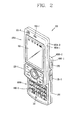
- Figure 2 is a front perspective view showing an exemplary mobile terminal according to the present invention.
- Figure 3 is a rear view showing the mobile terminal in Fig. 2 ;
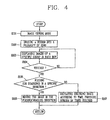
- Figure 4 is a flowchart showing an image display method for a mobile terminal according to an embodiment of the present invention.
- Figure 5 is an exemplary view showing an image screen display of the mobile terminal according to an embodiment of the present invention.
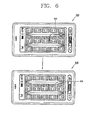
- Figure 6 is an exemplary view showing a method for moving an image in the mobile terminal according to an embodiment of the present invention.
- the mobile terminal may be implemented in various forms. Examples of such terminals include mobile phones, user equipment, smart phones, notebook computers, digital broadcast receiver terminals, personal digital assistants (PDA), portable multimedia players (PMP) and mobile navigation units.
- PDA personal digital assistants
- PMP portable multimedia players
- Figure 1 is a schematic block diagram of a mobile terminal according to one embodiment of the present invention.
- the mobile terminal 100 may include a wireless communication unit 110, an A/V (Audio/Video) input unit 120, a user input unit 130, a sensing unit 140, an output unit 150, a memory 160, an interface unit 170, a controller 180, and a power supply unit 190, and the like.
- Figure 1 shows the mobile terminal 100 having various components, but it is to be understood that implementing all of the illustrated components is not a requirement. A greater or fewer number of components may alternatively be implemented.
- the wireless communication unit 110 typically includes one or more components allowing radio (wireless) communication between the mobile terminal 100 and a wireless communication system or a network within which the mobile terminal is located.
- the wireless communication unit 110 may include a broadcast receiver module 111, a mobile communication module 112, a wireless internet module 113, a short-range communication module 114, a GPS module 115, and the like.
- the broadcast receiver module 111 receives a broadcast signal and/or broadcast associated information from an external broadcast managing server via a broadcast channel.
- the broadcast channel may include a satellite channel and a terrestrial channel.
- the broadcast managing server may refer to a server that generates and transmits a broadcast signal and/or broadcast associated information or a server that receives a previously generated broadcast signal and/or broadcast associated information and transmits the same to a terminal.
- Examples of the broadcast associated information may include information regarding a broadcast channel, a broadcast program, a broadcast service provider, etc.
- the broadcast signal may be implemented as a TV broadcast signal, a radio broadcast signal, and a data broadcast signal, among others. If desired, the broadcast signal may further include a broadcast signal combined with a TV or radio broadcast signal.
- the broadcast associated information may be provided also via a mobile communication network and, in this case, the broadcast associated information may be received by the mobile communication module 112.
- the broadcast associated information may exist in various forms. For example, it may exist in the form of an electronic program guide (EPG) of digital multimedia broadcasting (DMB), an electronic service guide (ESG) of digital video broadcast-handheld (DVB-H), and the like.
- EPG electronic program guide
- ESG electronic service guide
- DMB digital multimedia broadcasting
- DVB-H digital video broadcast-handheld
- the broadcast receiver module 111 may be configured to receive broadcast signals using various types of broadcast systems.
- the broadcast receiver module 111 may receive a digital broadcast signal using a digital broadcast system, such as Digital Multimedia Broadcasting-Terrestrial (DMB-T), Digital Multimedia Broadcasting-Satellite (DMB-S), Digital Video Broadcast-Handheld (DVB-H), the data broadcasting system known as media forward link only (MediaFLO®), Integrated Services Digital Broadcast-Terrestrial (ISDB-T), and the like.
- the broadcast receiver module 111 is configured to be suitable for every broadcast system that provides a broadcast signal as well as the above-mentioned digital broadcast systems.
- a broadcast signal and/or broadcast-associated information received via the broadcast receiver module 111 may be stored in the memory 160.
- the mobile communication module 112 transmits/receives radio signals to/from at least one of a base station, an external terminal and a server in a mobile communication network.
- radio signals may include a voice call signal, a video call signal or various types of data according to text/multimedia message transmission/reception.
- the wireless internet module 113 supports Internet access for the mobile terminal. This module 113 may be internally or externally coupled to the terminal.
- the short-range communication module 114 refers to a module for supporting short range communications.
- Some examples of short-range communication technology include Bluetooth TM , Radio Frequency IDentification (RFID), Infrared Data Association (IrDA), Ultra-WideBand (UWB), ZigBee TM , and the like.
- the GPS (Global Positioning System) module 115 is a module that receives location information from a plurality of artificial satellites.
- the A/V input unit 120 is configured to input an audio or video signal.
- the A/V input unit 120 may include a camera 121 and a microphone 122.
- the camera 121 processes image frames of still pictures or videos obtained by an image capture device in a video call mode or an image capturing mode.
- the processed image frames may be displayed on a display module 151 of the output unit 150.
- the image frames processed by the camera 121 may be stored in the memory 160 or transmitted via the wireless communication unit 110. Two or more cameras 121 may be provided according to the configuration of the mobile terminal.
- the microphone 122 may receive an external analog audio signal (audible sound) via a microphone (or the like) in a phone call mode, a recording mode, a voice recognition mode, etc., and process it into digital data.
- the processed audio (voice) data may be converted for output into a format transmittable to a mobile communication base station via the mobile communication module 112 in case of the phone call mode.
- the microphone 122 may include various types of noise canceling (or suppression) algorithms to cancel (or suppress) noise generated in the course of receiving and transmitting audio signals.
- the user input unit 130 may generate key input data inputted by a user to control various operations of the mobile terminal.
- the user input unit 130 may include a keypad, a dome switch, a touch pad (e.g., a touch sensitive member that detects changes in resistance, pressure, capacitance, etc.), a jog wheel, a jog switch, and the like.
- a touch pad e.g., a touch sensitive member that detects changes in resistance, pressure, capacitance, etc.
- the sensing unit 140 detects a current status (or state) of the mobile terminal 100 such as an opened/closed state of the mobile terminal 100, a location of the mobile terminal 100, a presence or absence of user contact with the mobile terminal 100, etc., and generates commands or signals for controlling the operation of the mobile terminal 100.
- the sensing unit 140 may sense whether the slide phone is opened or closed. In addition, the sensing unit 140 can detect whether or not the power supply unit 190 supplies power or whether or not the interface unit 170 is coupled with an external device.
- the interface unit 170 serves as an interface with at least one external device connected with the mobile terminal 100.
- the external devices may include wired/wireless headset ports, external power charger ports, wired/wireless data ports, card sockets, e.g., memory card ports, SIM/UIM/UICC cards, audio input/output (I/O) ports, video I/O ports, earphone ports, among others.
- the interface unit 170 may be used to receive inputs (e.g., data, information, power, etc.) from an external device and transfer the received inputs to one or more elements within the mobile terminal 100 or may be used to transfer data from the mobile terminal to an external device.
- the output unit 150 is configured to provide outputs in a visual, audible, and/or tactile manner (e.g., audio signal, video signal, alarm signal, etc.).
- the output unit 150 may include the display module 151, an audio output module 152, an alarm output module 153, and the like.
- the display module 151 may output information processed in the mobile terminal 100. For example, when the mobile terminal 100 is in the phone call mode, the display module 151 may display a User Interface (UI) or a Graphic User Interface (GUI) associated with a call or other communication on a screen display thereof. When the mobile terminal 100 is in the video call mode or the image capturing mode, the display module 151 may display a captured and/or received image, a UI, a GUI, and the like on its screen display.
- UI User Interface
- GUI Graphic User Interface
- the display module 151 may function as both an input device and an output device.
- the display module 151 may include at least one of a Liquid Crystal Display (LCD) panel, a Thin Film Transistor-LCD (TFT-LCD) panel, an Organic Light Emitting Diode (OLED) display, a flexible display screen, a three-dimensional (3D) display screen, or the like.
- LCD Liquid Crystal Display
- TFT-LCD Thin Film Transistor-LCD
- OLED Organic Light Emitting Diode
- flexible display screen a three-dimensional (3D) display screen, or the like.
- the mobile terminal 100 may include two or more display modules (or other display means) 151 according to its desired implementation.
- the mobile terminal 100 may include an external display unit (not shown) and an internal display unit (not shown).
- the audio output module 152 may output audio data received from the wireless communication unit 110 or stored in the memory 160 in a call signal reception mode, a call mode, a recording mode, a voice recognition mode, a broadcast reception mode, and the like.
- the audio output module 152 may provide audible outputs related to a particular function (e.g., a call signal reception sound, a message reception sound, etc.) performed by the mobile terminal 100.
- the audio output module 152 may include a speaker, a buzzer, or the like.
- the alarm output module 153 may provide outputs to inform about the occurrence of an event of the mobile terminal 100. Typical events may include a call signal reception, a message reception, a key signal input, and the like. In addition to audio or video outputs, the alarm output module 153 may provide outputs in a different manner to inform about the occurrence of an event.
- the alarm output module 153 may provide outputs in the form of vibrations (or other tactile means).
- the alarm output module 153 may provide tactile outputs (i.e., vibrations) to inform the user.
- tactile outputs i.e., vibrations
- the user can recognize the occurrence of various events.
- Outputs informing about the occurrence of an event may be also provided via the display module 151 or the audio output module 152.
- the memory 160 may store software programs or the like used for the processing and controlling performed by the controller 180, or may temporarily store inputted/outputted data (e.g., a phonebook, messages, still images, video, etc.).
- inputted/outputted data e.g., a phonebook, messages, still images, video, etc.
- the memory 160 may include at least one type of storage medium including a flash memory type, a hard disk type, a multimedia card micro type, a card-type memory (e.g., SD or XD memory, etc), a Random Access Memory (RAM), a Static Random Access Memory (SRAM), a Read-Only Memory (ROM), an Electrically Erasable Programmable Read-Only Memory (EEPROM), a Programmable Read-Only memory (PROM) magnetic memory, a magnetic disk, an optical disk, and the like.
- the mobile terminal 100 may cooperate with a web storage device on the internet that remotely performs the storage function of the memory 160.
- the controller 180 typically controls the general operations of the mobile terminal. For example, the controller 180 performs controlling and processing associated with voice calls, data communications, video calls, and the like.
- the controller 180 may include a multimedia reproduction module 181 for reproducing multimedia data.
- the multimedia reproduction module 181 may be implemented integrally within the controller 180 or by software executed therein, or may be configured separately from the controller 180.
- the power supply unit 190 receives external or internal power and supplies power required for the operations of the respective elements under the control of the controller 180.
- the functionalities described herein may be implemented by using at least one of application specific integrated circuits (ASICs), digital signal processors (DSPs), digital signal processing devices (DSPDs), programmable logic devices (PLDs), field programmable gate arrays (FPGAs), processors, controllers, micro-controllers, microprocessors, and electronic units designed to perform the functions described herein. In some cases, such functionalities may be implemented by the controller 180.
- ASICs application specific integrated circuits
- DSPs digital signal processors
- DSPDs digital signal processing devices
- PLDs programmable logic devices
- FPGAs field programmable gate arrays
- processors controllers, micro-controllers, microprocessors, and electronic units designed to perform the functions described herein.
- controller 180 such functionalities may be implemented by the controller 180.
- the functionalities such as operation procedures or functions may be implemented together with separate software modules that allow performing of at least one function or operation.
- Software codes can be implemented by a software application written in any suitable programming language. The software codes may be stored in the memory 160 and executed by the controller 180.
- the mobile terminal may be implemented in a variety of different configurations. Examples of such configurations include a folder-type, a bar-type, a swing-type, a slide type and combinations thereof. For clarity, further description will primarily relate to a slide-type mobile terminal. However such teachings apply equally to other types of mobile terminals.
- Figure 2 is a front perspective view of a slide-type mobile terminal according to the present invention.
- the mobile terminal of Figure 2 can be the same as or similar to the mobile terminal of Figure 1 .
- the slide-type mobile terminal according to the present invention includes a first body 100A and a second body 100B disposed to be slidably movable along at least one direction relative to one another.
- a state in which the first body 100A is disposed to overlap with or overlie the second body 100B may be called a "closed configuration," and as shown in the drawing, a state in which the first body 100A and second body 100B are so disposed relative one another as to expose at least a portion of the second body 100B may be called an "opened configuration.”
- the mobile terminal In the closed configuration, the mobile terminal mainly operates in a standby mode (idle mode), and the standby mode may be released according to a user manipulation.
- the mobile terminal operates mainly in the calling mode or the like in the opened configuration, and it can be changed to the standby mode with the lapse of a certain time period or a user manipulation.
- the case (a casing, a housing, a cover, etc.) constituting the external appearance of the first body 100A is formed by a first front case 100A-1 and a first rear case 100A-2.
- Various electronic components are installed in a space between the first front case 100A-1 and the first rear case 100A-2.
- One or more intermediate cases may be additionally disposed between the first front case 100A-1 and the first rear case 100A-2.
- the cases may be formed by injection-molding a synthetic resin or may be made of a metallic material such as stainless steel (STS) or titanium (Ti), and the like.
- STS stainless steel
- Ti titanium
- the display module 151, a first audio output module 152-1, a first camera module 121-1 or a first user input unit 130-1 may be located on the first body 100A, specifically, on the first front case 100A-1 of the first body 100A.
- the display module 151 may include an LCD (Liquid Crystal Display), an OLED (Organic Light Emitting Diode) display, etc. that visually displays information.
- LCD Liquid Crystal Display
- OLED Organic Light Emitting Diode
- a touch pad may be overlaid in a layered manner on the screen of the display module 151 to allow the display module 151 to function as a touch screen to enable the inputting of information by a user's touch.
- the first audio output module 152-1 may be implemented in the form of a receiver or a speaker.
- the first camera module 121-1 may be implemented to be suitable for capturing images or video with respect to the user and so on.
- the first user input unit 130-1 receives an input of a command to record or capture a video call of the present invention according to a user's manipulation thereof.
- the case constituting the external appearance of the second body 100B is formed by a second front case 100B-1 and a second rear case 100B-2.
- a second user input unit 130-2 may be disposed on a front face of the second body 100B, specifically, on the second front case 100B-1.
- a third user input unit 130-3, the microphone 122, and the interface unit 170 may be disposed on at least one of the second front case 100B-1 and the second rear case 100B-2.
- the first to third user input units 130-1, 130-2, and 130-3 may be generally referred to as the manipulation unit 130, and various techniques can be employed for implementing the manipulation unit so long as they can be operated by a user in a tactile manner.
- the user input units 130-1, 130-2 and 130-3 can be implemented with a dome switch or touch pad that can receive user commands or information according to a user's pressing, pushing or touching, or implemented in the form of a wheel that rotates a key, a jog element, a joystick, or the like.
- the first user input unit 130-1 is used for inputting commands such as start, end, scroll or the like
- the second user input unit 130-2 is used for inputting numbers, characters, symbols, or the like.
- the third user input unit 130-3 may operate as a hot key for activating a particular function within the mobile terminal.
- the microphone 122 may be implemented in a form suitable to transduce the voice of a user, other sounds, or the like.
- the interface unit 170 may be used as a link (passage or path) through which the mobile terminal can exchange data or the like with an external device.
- the interface unit 170 may be implemented as at least one of a connection port for connecting an earphone to the mobile terminal via a wired (fixed) or wireless means, a port for short-range communications (e.g., an Infrared Data Association (IrDA) port, a Bluetooth TM port, a wireless LAN port, etc.), power supply ports for providing power to the mobile terminal, or the like.
- IrDA Infrared Data Association
- the power supply unit 190 for supplying power to the mobile terminal is located at a side portion of the second rear case 100B-2.
- the power supply unit 190 may be, for example, a rechargeable battery that can be detached.
- Figure 3 is a rear view showing the mobile terminal in Fig. 2 .
- a second camera module 121-2 may additionally be disposed on a rear surface of the second rear case 100B-2 of the second body 100B.
- the second camera module 121-2 may have an image capture direction which is substantially the opposite to that of the first camera module 121-1 (refer to Fig. 1 ), and may support a different resolution, image size, or number of pixels as compared to the first camera module.
- the first camera module 121-1 may operate with a relatively lower resolution to capture images of a user's face and transmit the same to the other party during video call communication or the like, while the second camera module 121-2 may operate with a relatively higher resolution to capture images of general subjects with high picture quality not for immediately being transmitted but for later use or for communicating to others.
- a flash lamp 121-3 and a mirror 121-4 may be additionally disposed adjacent to the second camera module 121-2.
- the flash lamp 121-3 illuminates the subject.
- the mirror 121-4 allows a user to see themselves when they wants to capture their own image (self-image capturing) by using the second camera module 121-2.
- the second rear case 100B-2 may further include a second audio output module 152-2.
- the second audio output module 152-2 may implement a stereophonic sound function in conjunction with the first audio output module 152-1 (refer to Fig. 2 ) and may be also used for sending and receiving audio calls in a speaker phone mode.
- a broadcast signal receiving antenna 111-1 may be disposed at one side or region of the second rear case 100B-2, in addition to an antenna that supports mobile communications.
- the antenna 111-1 can be configured to be retractable from the second body 100B.
- One part of a slide module 100C that slidably combines the first body 100A and the second body 100B may be disposed on the first rear case 100A-2 of the first body 100A.
- the other part of the slide module 100C may be disposed on the second front case 100B-1 of the second body 100B, which may not be exposed as shown in the drawing.
- the second camera module 121-2 and so on is disposed on the second body 100B, but such a described configuration is not meant to be limiting.
- one or more of the elements which are disposed on the second rear case 100B-2 in the above description, may be mounted on the first body 100A, mainly, on the first rear case 100A-2.
- those elements disposed on the first rear case 100A-2 can be protected (or covered) by the second body 100B in the closed configuration.
- the first camera module 121-1 may be configured to rotate (or otherwise be moved) to thus allow image capturing in various directions.
- Figure 4 is a flowchart showing steps of an image display method for a mobile terminal according to the present invention
- Figure 5 is an exemplary view showing an image display screen in the mobile terminal according to the present invention.
- the operation/methods of Figs. 4 & 5 (and Fig. 6 ) as discussed below are preferably implemented by the mobile terminal of Fig. 1 or 2 , but can be implanted by other suitable terminals.
- the controller 180 when the mobile terminal according to the present invention is put into an image viewing mode (S101), the controller 180, as shown in Fig. 5 , is configured to divide the screen display area of the output unit 150 into a plurality of rows 410, 420, 430 (S102), and display images included in specific image groups (group A, group B and group C) in each respective row (S103).
- the display images may be thumbnails that represent pictures stored in an internal memory of the mobile device and taken from an embedded camera of the mobile device, or transferred via a wired or wireless connection to another device.
- the thumbnails may also represent movie clips, audio clips, text files or text folders.
- the rows shown on the display screen may be automatically created based on metadata associated with the corresponding files.
- a first row may contain all stored images having a common date (or common month, or common year) of creation or of storing.
- the rows may contain all stored images having an image title with a common first letter, or a common source, or another item of common metadata.
- the rows may correspond to a user's organization of images/files.
- a first row may correspond to a first user-created photo-album, while a second row may correspond to a second user-created photo-album.
- File types of rows may be the same or may be different. That is, one row may include thumbnails of photographs, while a second row may include thumbnails of moving picture files. Rows may also contain thumbnails representing a mixture of file types. Also, the thumbnails may be static or may be animated (e.g., contain a first few seconds of a corresponding movie file.)
- the image viewing mode is a mode which allows a user to view a variety of multimedia files including a picture, an image, a moving picture, and the like.
- the multimedia files in this example are picture image files.
- the controller 180 is configured to divide the display area on the display screen into a plurality of rows 410, 420, 430, and display images included in specific groups (or folders) in each row.
- the width of each row may be set to be the same or different.
- Such divided rows may be configured such that the row 420 relatively close to the center of the display area can be set to have the largest width, and the other two rows 410, 430 can be set to have a relatively smaller width. That is, an image displayed in a certain row may be set to display in a relatively larger size than that displayed in other rows. More specifically, the image can be shown in its original (normal) size, without being cut (i.e., cropped or cutoff) or blocked (i.e., obscured, obstructed or overlain).
- the images (photo B-1 ⁇ photo B-5) displayed in the specific row 420 are displayed in their normal sizes without being cut or blocked, while the images displayed in the two rows 410, 430 may be displayed having portions thereof cutoff or blocked.
- each row the user may touch upon dividers 440, 450 dividing between each row, and then drag the dividers in up/down directions.
- the dividers 440, 450 may not be displayed, and although the dividers are not shown, the width of each row can be adjusted by touching and dragging a space between each row.
- Dragging or flicking or like touch gestures may enable the user to move or change the position of the image groups displayed in each row. Further, the user may move or change the position of the images displayed in a certain row within that certain row.
- Each of the image groups may be divided into a row or a column.
- the positions of the entire image groups displayed in each row can be moved or changed.
- Each of the image groups divided into rows in the above example may also be displayed as being divided into columns.
- the position of the entire image groups displayed in each column can be changed by dragging or pushing or pulling in right/left directions.
- the controller 180 may change the position of all the images belonging to the certain image group in a rightward or leftward direction.
- the images within the group displayed in the center row 420 are scrolled in the leftward direction, as shown in the screen display '520' in Fig. 5 .
- images that were not previously shown are newly displayed (e.g., scrolled onscreen), and some images (photos B-1, B-2) that were previously shown are no longer displayed (e.g., scrolled offscreen).
- images belonging to the groups located on both sides of the dividers may be simultaneously scrolled in the right/left directions by flicking the spaces between each row or the dividers displayed between each row.
- images belonging to a plurality of groups may be simultaneously scrolled in the up/down directions by flicking the empty spaces between each row or the dividers displayed between each row.
- Flicking or dragging may be used to scroll the image groups displayed in rows/columns or the images included in each image group in a certain direction.
- the number of images or groups to be scrolled may be controlled by the intensity of the flicking or dragging (e.g., a touch pressure, a speed to release the touch, a dragging speed, etc.).
- the rate at which the groups or images are scrolled may be controlled according to the intensity of flicking or dragging. That is, the greater the intensity of flicking (dragging), the faster it is scrolled as well as the more the number of images or groups scrolled.
- scrolling of the images belonging to a certain group displayed in a certain row is performed separately from those belonging to another certain group displayed in another row.
- the screen display '520' in Fig. 5 even though the images of the image group displayed in the center row 420 are scrolled in a certain direction, the images in the image groups displayed in another rows 410, 430 are not scrolled.
- the images of the groups displayed in the rows (410 and 420, 420 and 430) on both sides of the dividers 440, 450 may simultaneously be scrolled in a certain direction.
- the images of the image groups displayed on both sides of empty spaces may simultaneously be scrolled in an up or down direction by touching upon the empty spaces between the image groups divided in each column and then dragging (flicking) in an up or down direction.
- the controller 180 may display a specific image selected through a touch or a button input on the full screen.
- the image which can be selected to be displayed in the full screen may be limited to among the image group displayed in the center row or to the group divided into a specific row or column.
- the images of the group displayed in the center row 420 may be enlarged to be displayed in the full screen according to the number of times being touched by the user, and the time and pressure of touch by the user.
- the number of times being touched indicates being touched two or more times in a consecutive manner.
- the touch time indicates the time until the touch is released.
- the touch pressure indicates a pressure in case a pressure when being touched is greater than a reference pressure.
- the images of the groups displayed in other designated rows 410, 430 are touched upon, they may also be enlarged to be displayed in the full screen.
- the controller 180 may scroll another image within the same group and display it on the full screen. Similarly, if the image is dragged or flicked in another certain direction (up or down), the controller 180 may display a certain image belonging to another group on the full screen.
- an image among the images of each group divided in different rows may be dragged and moved into the image group belonging to another row.
- the image 414 may be moved between the specific images (photos B-3, B-4) of the image group displayed in the row 420, as shown in the screen display 610 in Fig. 6 . That is, changing of the image group as well as specifying the order of images within the changed group may be simultaneously possible.
- an image in a certain group (e.g., group A) divided into a row or a column can be moved into another certain group (e.g., group B). That is, the present invention provides an effect of allowing the user to simultaneously view and refer to images of a plurality of groups and to easily move an image of a certain group into a certain position in another group in an intuitive manner.
- the above example described the method for moving each image group or images within the group in a certain direction (or to a location) by dragging or flicking.
- a state that the image group or image is moved is consecutively shown on the display module 151, thereby allowing the user to easily recognize the direction in which an image group or image is moved or its moving speed.
- the present invention may restrict the moving direction of each of the image groups or images. For instance, if it is assumed that the image groups are displayed in rows, the image groups are moved only when they are flicked up. If they are flicked down, it may be recognized as a mis-operation. Likewise, when the images included in a specific image group are moved, their moving direction may be restricted. If the image group or images are to be moved in the restricted direction, it may be recognized as a mis-operation.
- the controller 180 may or may not output an alarm.
- the alarm may be a visual display, an audible signal or a vibration.
- a user may be able to scroll a first row in a first direction and to simultaneously scroll a second row in an opposite direction. It is also possible to rearrange rows or columns. For example, a user may delete a displayed second row, so that the rows below shift up (e.g., the displays shifts from showing rows ABC to showing rows ACD.)
Landscapes
- Engineering & Computer Science (AREA)
- Theoretical Computer Science (AREA)
- General Engineering & Computer Science (AREA)
- General Physics & Mathematics (AREA)
- Physics & Mathematics (AREA)
- Human Computer Interaction (AREA)
- Data Mining & Analysis (AREA)
- Databases & Information Systems (AREA)
- Signal Processing (AREA)
- Computer Networks & Wireless Communication (AREA)
- User Interface Of Digital Computer (AREA)
- Controls And Circuits For Display Device (AREA)
- Telephone Function (AREA)
- Image Processing (AREA)
Applications Claiming Priority (1)
| Application Number | Priority Date | Filing Date | Title |
|---|---|---|---|
| KR1020070100023A KR101415763B1 (ko) | 2007-10-04 | 2007-10-04 | 휴대 단말기 및 그 이미지 표시 방법 |
Publications (2)
| Publication Number | Publication Date |
|---|---|
| EP2045703A2 true EP2045703A2 (de) | 2009-04-08 |
| EP2045703A3 EP2045703A3 (de) | 2010-09-08 |
Family
ID=40291046
Family Applications (1)
| Application Number | Title | Priority Date | Filing Date |
|---|---|---|---|
| EP08164747A Ceased EP2045703A3 (de) | 2007-10-04 | 2008-09-19 | Mobiles Endgerät und Bildanzeigeverfahren dafür |
Country Status (4)
| Country | Link |
|---|---|
| US (1) | US8606326B2 (de) |
| EP (1) | EP2045703A3 (de) |
| KR (1) | KR101415763B1 (de) |
| CN (1) | CN101404686A (de) |
Cited By (7)
| Publication number | Priority date | Publication date | Assignee | Title |
|---|---|---|---|---|
| WO2011071875A1 (en) * | 2009-12-07 | 2011-06-16 | Motorola Mobility, Inc. | Display interface and method for displaying multiple items arranged in a sequence |
| EP2336867A1 (de) * | 2009-12-21 | 2011-06-22 | France Telecom | Verfahren und Vorrichtung zur Anzeigekontrolle auf einer Anzeigevorrichtung für eine Vielzahl von Elementen einer Liste |
| EP2926267A4 (de) * | 2012-11-27 | 2016-11-30 | Google Inc | Bildanzeigeumgebung |
| EP3855297A3 (de) * | 2009-09-22 | 2021-10-27 | Apple Inc. | Vorrichtung, verfahren und grafische benutzeroberfläche zur manipulation von benutzerschnittstellenobjekten |
| US11307737B2 (en) | 2019-05-06 | 2022-04-19 | Apple Inc. | Media browsing user interface with intelligently selected representative media items |
| US11446548B2 (en) | 2020-02-14 | 2022-09-20 | Apple Inc. | User interfaces for workout content |
| US11601584B2 (en) | 2006-09-06 | 2023-03-07 | Apple Inc. | Portable electronic device for photo management |
Families Citing this family (32)
| Publication number | Priority date | Publication date | Assignee | Title |
|---|---|---|---|---|
| US8411046B2 (en) * | 2008-10-23 | 2013-04-02 | Microsoft Corporation | Column organization of content |
| KR101513019B1 (ko) * | 2008-10-27 | 2015-04-17 | 엘지전자 주식회사 | 휴대 단말기 및 그 동작방법 |
| US9104984B2 (en) | 2008-11-13 | 2015-08-11 | Sony Corporation | Method and device relating to information management |
| JP4853510B2 (ja) * | 2008-11-27 | 2012-01-11 | ソニー株式会社 | 情報処理装置、表示制御方法およびプログラム |
| KR101595263B1 (ko) * | 2009-12-03 | 2016-02-18 | 삼성전자주식회사 | 앨범 관리 방법 및 장치 |
| CN102193714A (zh) * | 2010-03-11 | 2011-09-21 | 龙旗科技(上海)有限公司 | 一种移动终端资料分组管理的人机交互方式 |
| US8793333B1 (en) * | 2010-03-25 | 2014-07-29 | A9.Com, Inc. | Matrix viewing |
| US20120013539A1 (en) * | 2010-07-13 | 2012-01-19 | Hogan Edward P A | Systems with gesture-based editing of tables |
| KR101674213B1 (ko) * | 2010-07-14 | 2016-11-08 | 엘지전자 주식회사 | 이동 통신 단말기에서 촬영된 이미지 관리방법 및 이를 이용한 이동 통신 단말기 |
| US8626324B2 (en) | 2010-09-17 | 2014-01-07 | Apple Inc. | Altering sound output on a virtual music keyboard |
| KR20120056929A (ko) * | 2010-09-20 | 2012-06-05 | 엘지전자 주식회사 | 휴대 단말기 및 그 동작 제어방법 |
| US9971405B2 (en) * | 2010-09-27 | 2018-05-15 | Nokia Technologies Oy | Touch sensitive input |
| US8516386B2 (en) * | 2010-09-29 | 2013-08-20 | Apple Inc. | Scrolling virtual music keyboard |
| US20130027433A1 (en) * | 2011-07-29 | 2013-01-31 | Motorola Mobility, Inc. | User interface and method for managing a user interface state between a locked state and an unlocked state |
| US9354809B2 (en) * | 2011-10-03 | 2016-05-31 | Furuno Electric Co., Ltd. | Display device, display program and display method |
| JP5907692B2 (ja) * | 2011-10-27 | 2016-04-26 | 京セラ株式会社 | 携帯端末装置、プログラムおよび表示制御方法 |
| KR20130064478A (ko) * | 2011-12-08 | 2013-06-18 | 삼성전자주식회사 | 사용자 단말 장치 및 그 배경 화면 표시 방법 |
| US20130212093A1 (en) * | 2012-02-15 | 2013-08-15 | International Business Machines Corporation | Generating visualizations of a display group of tags representing content instances in objects satisfying a search criteria |
| CN103309483B (zh) * | 2012-03-12 | 2017-03-01 | 联想(北京)有限公司 | 一种电子设备以及触控信息输入方法 |
| JP5925024B2 (ja) * | 2012-04-06 | 2016-05-25 | キヤノン株式会社 | 表示制御装置、表示制御方法、およびプログラム |
| US9360982B2 (en) | 2012-05-01 | 2016-06-07 | International Business Machines Corporation | Generating visualizations of facet values for facets defined over a collection of objects |
| CN104781779B (zh) | 2012-11-06 | 2018-06-15 | 诺基亚技术有限公司 | 用于创建针对图像的运动效果的方法和装置 |
| US9134893B2 (en) | 2012-12-14 | 2015-09-15 | Barnes & Noble College Booksellers, Llc | Block-based content selecting technique for touch screen UI |
| US9134892B2 (en) * | 2012-12-14 | 2015-09-15 | Barnes & Noble College Booksellers, Llc | Drag-based content selection technique for touch screen UI |
| US9158433B1 (en) * | 2013-03-04 | 2015-10-13 | Ca, Inc. | Graphical user interface text selection and processing in client applications employing a screen-at-a-time based communication protocol |
| KR102118091B1 (ko) * | 2013-03-06 | 2020-06-04 | 삼성전자주식회사 | 오브젝트에 대한 사전 실행 기능을 가지는 모바일 장치 및 그 제어방법 |
| US20140258886A1 (en) * | 2013-03-07 | 2014-09-11 | Smugmug, Inc. | Method for transferring a file from a device |
| KR20150029451A (ko) * | 2013-09-10 | 2015-03-18 | 엘지전자 주식회사 | 이동 단말기 및 이의 제어방법 |
| KR102138524B1 (ko) | 2013-12-26 | 2020-07-28 | 엘지전자 주식회사 | 이미지를 캡쳐하는 모바일 디바이스 및 그 제어 방법 |
| KR101636424B1 (ko) | 2015-04-02 | 2016-07-20 | 주종필 | 이미지 합성 장치 및 이미지 합성 방법 |
| JP6648531B2 (ja) * | 2016-01-14 | 2020-02-14 | 富士通株式会社 | ファイル操作チェック装置、ファイル操作チェックプログラム、及びファイル操作チェック方法 |
| CN111064848B (zh) * | 2019-12-27 | 2021-09-17 | 维沃移动通信有限公司 | 图片显示方法及电子设备 |
Citations (2)
| Publication number | Priority date | Publication date | Assignee | Title |
|---|---|---|---|---|
| US20030122787A1 (en) * | 2001-12-28 | 2003-07-03 | Philips Electronics North America Corporation | Touch-screen image scrolling system and method |
| JP2006014237A (ja) * | 2004-06-29 | 2006-01-12 | Sharp Corp | 画像再生装置 |
Family Cites Families (15)
| Publication number | Priority date | Publication date | Assignee | Title |
|---|---|---|---|---|
| US6031631A (en) * | 1993-09-03 | 2000-02-29 | Canon Kabushiki Kaisha | Image processing system with independent control of image forming apparatuses |
| US7263667B1 (en) * | 1999-06-09 | 2007-08-28 | Microsoft Corporation | Methods, apparatus and data structures for providing a user interface which facilitates decision making |
| EP1128656A3 (de) | 2000-02-21 | 2002-01-09 | Fujitsu Limited | Bildaufnahmesystem mit Datenverwaltungsfunktion, Datenverwaltungsverfahren und Speichermedium |
| AU2001283538A1 (en) | 2000-08-04 | 2002-02-18 | Tom C. Hill | Method and system for presenting digital media |
| US20030030664A1 (en) * | 2001-08-13 | 2003-02-13 | Parry Travis J. | Customizable control panel software |
| US7289132B1 (en) * | 2003-12-19 | 2007-10-30 | Apple Inc. | Method and apparatus for image acquisition, organization, manipulation, and publication |
| US7743348B2 (en) * | 2004-06-30 | 2010-06-22 | Microsoft Corporation | Using physical objects to adjust attributes of an interactive display application |
| US20060007178A1 (en) * | 2004-07-07 | 2006-01-12 | Scott Davis | Electronic device having an imporoved user interface |
| CN100442824C (zh) | 2005-02-28 | 2008-12-10 | 奥林巴斯映像株式会社 | 显示装置、照相机以及显示方法 |
| KR20070034767A (ko) * | 2005-09-26 | 2007-03-29 | 엘지전자 주식회사 | 다중 표시영역을 갖는 이동통신 단말기 및 이를 이용한 디스플레이 간의 데이터 표시 방법 |
| KR100763189B1 (ko) * | 2005-11-17 | 2007-10-04 | 삼성전자주식회사 | 영상 표시 장치 및 방법 |
| US7908569B2 (en) * | 2006-08-10 | 2011-03-15 | Nokia Corporation | Creating virtual targets in directory structures |
| US8564544B2 (en) * | 2006-09-06 | 2013-10-22 | Apple Inc. | Touch screen device, method, and graphical user interface for customizing display of content category icons |
| US20080168478A1 (en) * | 2007-01-07 | 2008-07-10 | Andrew Platzer | Application Programming Interfaces for Scrolling |
| JP5235901B2 (ja) * | 2007-02-13 | 2013-07-10 | 三星ディスプレイ株式會社 | 指向性表示装置用のサブピクセルレイアウト及びサブピクセルレンダリング方法及びシステム |
-
2007
- 2007-10-04 KR KR1020070100023A patent/KR101415763B1/ko not_active Expired - Fee Related
-
2008
- 2008-09-08 US US12/206,519 patent/US8606326B2/en not_active Expired - Fee Related
- 2008-09-19 EP EP08164747A patent/EP2045703A3/de not_active Ceased
- 2008-10-06 CN CNA2008101619456A patent/CN101404686A/zh active Pending
Patent Citations (2)
| Publication number | Priority date | Publication date | Assignee | Title |
|---|---|---|---|---|
| US20030122787A1 (en) * | 2001-12-28 | 2003-07-03 | Philips Electronics North America Corporation | Touch-screen image scrolling system and method |
| JP2006014237A (ja) * | 2004-06-29 | 2006-01-12 | Sharp Corp | 画像再生装置 |
Cited By (21)
| Publication number | Priority date | Publication date | Assignee | Title |
|---|---|---|---|---|
| US11601584B2 (en) | 2006-09-06 | 2023-03-07 | Apple Inc. | Portable electronic device for photo management |
| US11972104B2 (en) | 2009-09-22 | 2024-04-30 | Apple Inc. | Device, method, and graphical user interface for manipulating user interface objects |
| EP3855297A3 (de) * | 2009-09-22 | 2021-10-27 | Apple Inc. | Vorrichtung, verfahren und grafische benutzeroberfläche zur manipulation von benutzerschnittstellenobjekten |
| US11334229B2 (en) | 2009-09-22 | 2022-05-17 | Apple Inc. | Device, method, and graphical user interface for manipulating user interface objects |
| US8799816B2 (en) | 2009-12-07 | 2014-08-05 | Motorola Mobility Llc | Display interface and method for displaying multiple items arranged in a sequence |
| WO2011071875A1 (en) * | 2009-12-07 | 2011-06-16 | Motorola Mobility, Inc. | Display interface and method for displaying multiple items arranged in a sequence |
| US9262052B2 (en) | 2009-12-21 | 2016-02-16 | Orange | Method and device for controlling the display of a plurality of elements of a list on a display device |
| EP2336867A1 (de) * | 2009-12-21 | 2011-06-22 | France Telecom | Verfahren und Vorrichtung zur Anzeigekontrolle auf einer Anzeigevorrichtung für eine Vielzahl von Elementen einer Liste |
| EP2926267A4 (de) * | 2012-11-27 | 2016-11-30 | Google Inc | Bildanzeigeumgebung |
| AU2013352410B2 (en) * | 2012-11-27 | 2018-11-08 | Google Llc | Image display environment |
| US11307737B2 (en) | 2019-05-06 | 2022-04-19 | Apple Inc. | Media browsing user interface with intelligently selected representative media items |
| US11625153B2 (en) | 2019-05-06 | 2023-04-11 | Apple Inc. | Media browsing user interface with intelligently selected representative media items |
| US11947778B2 (en) | 2019-05-06 | 2024-04-02 | Apple Inc. | Media browsing user interface with intelligently selected representative media items |
| US11452915B2 (en) | 2020-02-14 | 2022-09-27 | Apple Inc. | User interfaces for workout content |
| US11611883B2 (en) | 2020-02-14 | 2023-03-21 | Apple Inc. | User interfaces for workout content |
| US11638158B2 (en) | 2020-02-14 | 2023-04-25 | Apple Inc. | User interfaces for workout content |
| US11716629B2 (en) | 2020-02-14 | 2023-08-01 | Apple Inc. | User interfaces for workout content |
| US11564103B2 (en) | 2020-02-14 | 2023-01-24 | Apple Inc. | User interfaces for workout content |
| US11446548B2 (en) | 2020-02-14 | 2022-09-20 | Apple Inc. | User interfaces for workout content |
| US11985506B2 (en) | 2020-02-14 | 2024-05-14 | Apple Inc. | User interfaces for workout content |
| US12413981B2 (en) | 2020-02-14 | 2025-09-09 | Apple Inc. | User interfaces for workout content |
Also Published As
| Publication number | Publication date |
|---|---|
| KR101415763B1 (ko) | 2014-07-08 |
| US20090093275A1 (en) | 2009-04-09 |
| US8606326B2 (en) | 2013-12-10 |
| KR20090034660A (ko) | 2009-04-08 |
| CN101404686A (zh) | 2009-04-08 |
| EP2045703A3 (de) | 2010-09-08 |
Similar Documents
| Publication | Publication Date | Title |
|---|---|---|
| US8606326B2 (en) | Mobile terminal and image display method thereof | |
| EP2045700A1 (de) | Menüanzeigeverfahren für ein Mobilkommunikationsendgerät | |
| US9152314B2 (en) | Mobile terminal and controlling method thereof | |
| US10338763B2 (en) | Mobile terminal and control method thereof for displaying home screen background images and video | |
| US9128544B2 (en) | Mobile terminal and control method slidably displaying multiple menu screens | |
| US8584043B2 (en) | Mobile terminal including touch screen and method of controlling operation thereof | |
| EP2237140B1 (de) | Mobiles Endgerät und Steuerungsverfahren dafür | |
| KR101592296B1 (ko) | 이동 단말기 및 그의 객체 선택과 실행 방법 | |
| EP2472378B1 (de) | Mobiles Endgerät und Steuerungsverfahren dafür | |
| US8595646B2 (en) | Mobile terminal and method of receiving input in the mobile terminal | |
| US9501214B2 (en) | Mobile terminal and controlling method thereof | |
| EP3033837B1 (de) | Tragbares endgerät und verfahren zur steuerung davon | |
| US9083814B2 (en) | Bouncing animation of a lock mode screen in a mobile communication terminal | |
| US8713463B2 (en) | Mobile terminal and controlling method thereof | |
| US8565831B2 (en) | Mobile terminal and method for controlling the same | |
| US20140334797A1 (en) | Mobile terminal and controlling method thereof | |
| US20130205210A1 (en) | Mobile terminal and controlling method thereof | |
| US20100060475A1 (en) | Mobile terminal and object displaying method using the same | |
| US9766694B2 (en) | Mobile terminal and controlling method thereof | |
| US20140204040A1 (en) | Mobile terminal and control method thereof | |
| US20110111769A1 (en) | Mobile terminal and controlling method thereof | |
| KR101883373B1 (ko) | 이동 단말기 및 이의 제어방법 | |
| KR20110056953A (ko) | 이동 단말기 및 그 제어방법 | |
| KR101476199B1 (ko) | 이동 단말기 및 이것의 영상 편집 방법 | |
| KR101392923B1 (ko) | 간편한 정보 입력 기능을 갖는 휴대 단말기 및 그 방법 |
Legal Events
| Date | Code | Title | Description |
|---|---|---|---|
| PUAI | Public reference made under article 153(3) epc to a published international application that has entered the european phase |
Free format text: ORIGINAL CODE: 0009012 |
|
| 17P | Request for examination filed |
Effective date: 20080919 |
|
| AK | Designated contracting states |
Kind code of ref document: A2 Designated state(s): AT BE BG CH CY CZ DE DK EE ES FI FR GB GR HR HU IE IS IT LI LT LU LV MC MT NL NO PL PT RO SE SI SK TR |
|
| AX | Request for extension of the european patent |
Extension state: AL BA MK RS |
|
| PUAL | Search report despatched |
Free format text: ORIGINAL CODE: 0009013 |
|
| AK | Designated contracting states |
Kind code of ref document: A3 Designated state(s): AT BE BG CH CY CZ DE DK EE ES FI FR GB GR HR HU IE IS IT LI LT LU LV MC MT NL NO PL PT RO SE SI SK TR |
|
| AX | Request for extension of the european patent |
Extension state: AL BA MK RS |
|
| 17Q | First examination report despatched |
Effective date: 20131212 |
|
| STAA | Information on the status of an ep patent application or granted ep patent |
Free format text: STATUS: THE APPLICATION HAS BEEN REFUSED |
|
| 18R | Application refused |
Effective date: 20150324 |