EP2051161A2 - Terminal mobile et son procédé d'affichage de menu - Google Patents
Terminal mobile et son procédé d'affichage de menu Download PDFInfo
- Publication number
- EP2051161A2 EP2051161A2 EP08165255A EP08165255A EP2051161A2 EP 2051161 A2 EP2051161 A2 EP 2051161A2 EP 08165255 A EP08165255 A EP 08165255A EP 08165255 A EP08165255 A EP 08165255A EP 2051161 A2 EP2051161 A2 EP 2051161A2
- Authority
- EP
- European Patent Office
- Prior art keywords
- menu
- level
- level menu
- menus
- controller
- Prior art date
- Legal status (The legal status is an assumption and is not a legal conclusion. Google has not performed a legal analysis and makes no representation as to the accuracy of the status listed.)
- Granted
Links
Images





Classifications
-
- G—PHYSICS
- G06—COMPUTING OR CALCULATING; COUNTING
- G06F—ELECTRIC DIGITAL DATA PROCESSING
- G06F3/00—Input arrangements for transferring data to be processed into a form capable of being handled by the computer; Output arrangements for transferring data from processing unit to output unit, e.g. interface arrangements
- G06F3/01—Input arrangements or combined input and output arrangements for interaction between user and computer
- G06F3/048—Interaction techniques based on graphical user interfaces [GUI]
- G06F3/0484—Interaction techniques based on graphical user interfaces [GUI] for the control of specific functions or operations, e.g. selecting or manipulating an object, an image or a displayed text element, setting a parameter value or selecting a range
- G06F3/0485—Scrolling or panning
-
- H—ELECTRICITY
- H04—ELECTRIC COMMUNICATION TECHNIQUE
- H04B—TRANSMISSION
- H04B1/00—Details of transmission systems, not covered by a single one of groups H04B3/00 - H04B13/00; Details of transmission systems not characterised by the medium used for transmission
- H04B1/38—Transceivers, i.e. devices in which transmitter and receiver form a structural unit and in which at least one part is used for functions of transmitting and receiving
- H04B1/40—Circuits
-
- G—PHYSICS
- G06—COMPUTING OR CALCULATING; COUNTING
- G06F—ELECTRIC DIGITAL DATA PROCESSING
- G06F3/00—Input arrangements for transferring data to be processed into a form capable of being handled by the computer; Output arrangements for transferring data from processing unit to output unit, e.g. interface arrangements
- G06F3/01—Input arrangements or combined input and output arrangements for interaction between user and computer
- G06F3/048—Interaction techniques based on graphical user interfaces [GUI]
- G06F3/0481—Interaction techniques based on graphical user interfaces [GUI] based on specific properties of the displayed interaction object or a metaphor-based environment, e.g. interaction with desktop elements like windows or icons, or assisted by a cursor's changing behaviour or appearance
- G06F3/0482—Interaction with lists of selectable items, e.g. menus
-
- G—PHYSICS
- G06—COMPUTING OR CALCULATING; COUNTING
- G06F—ELECTRIC DIGITAL DATA PROCESSING
- G06F3/00—Input arrangements for transferring data to be processed into a form capable of being handled by the computer; Output arrangements for transferring data from processing unit to output unit, e.g. interface arrangements
- G06F3/01—Input arrangements or combined input and output arrangements for interaction between user and computer
- G06F3/048—Interaction techniques based on graphical user interfaces [GUI]
- G06F3/0487—Interaction techniques based on graphical user interfaces [GUI] using specific features provided by the input device, e.g. functions controlled by the rotation of a mouse with dual sensing arrangements, or of the nature of the input device, e.g. tap gestures based on pressure sensed by a digitiser
- G06F3/0488—Interaction techniques based on graphical user interfaces [GUI] using specific features provided by the input device, e.g. functions controlled by the rotation of a mouse with dual sensing arrangements, or of the nature of the input device, e.g. tap gestures based on pressure sensed by a digitiser using a touch-screen or digitiser, e.g. input of commands through traced gestures
-
- H—ELECTRICITY
- H04—ELECTRIC COMMUNICATION TECHNIQUE
- H04M—TELEPHONIC COMMUNICATION
- H04M2250/00—Details of telephonic subscriber devices
- H04M2250/22—Details of telephonic subscriber devices including a touch pad, a touch sensor or a touch detector
Definitions
- the present invention relates to a mobile terminal and a method of displaying a menu thereof, and more particularly, to a mobile terminal and a method of displaying a menu thereof that hierarchically manages data by grouping the data in a menu.
- the mobile terminals are more widely used, various functions are added to the mobile terminal to enable the mobile terminal to perform complex functions. That is, mobile terminals now have an increased number of functions available by a user request and store a large amount of data.
- the data may include a photo, music, a message, and a memo.
- the mobile terminal organizes the data in a menu on a group basis so that a user may easily search for the data, thereby hierarchically managing the data.
- the present invention provides a mobile terminal and a method of displaying a menu thereof that hierarchically manages data by grouping the data in a menu.
- the present invention discloses a method of displaying a menu of a mobile terminal including displaying a list of upper-level menus in an order on a display screen, displaying a first upper-level menu at an upper end of the display screen, displaying a second upper-level menu that is next to the first upper-level menu in the order at a lower end of the display screen, and lower-level menus of the first upper-level menu in a list between the first upper-level menu and the second upper-level menu in response to selection of the first upper-level menu from the list of upper-level menus, and executing a selected lower-level menu in response to selection of one of the lower-level menus.
- the present invention also discloses a mobile terminal including a display unit to display a list of upper-level menus in an order on a display screen, a touch panel to detect a drag and drop motion to scroll the upper-level menus and a touch to select one of the upper-level menus, and a controller.
- the controller controls the display unit to display a first upper-level menu at an upper end of the display screen, a second upper-level menu that is next to the first upper-level menu in the order a lower end of the display screen, and lower-level menus of the first upper-level menu in a list between the first upper-level menu and the second upper-level menu in response to selection of the first upper-level menu from the list of upper-level menus.
- the controller also executes a selected lower-level menu in response to selection of one of the lower-level menus.
- FIG. 1 is a block diagram showing a configuration of a mobile terminal according to an exemplary embodiment of the present invention.
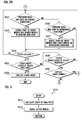
- FIG. 2A and FIG. 2B are flowcharts showing a method of displaying a menu according to another exemplary embodiment of the present invention.
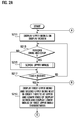
- FIG. 3 is a flowchart showing a process of scrolling upper menus in the method of FIG. 2A and FIG. 2B .
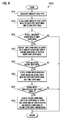
- FIG. 4 is a flowchart showing a process of scrolling upper menus and lower menus in an upward direction in the method of FIG. 2A and FIG. 2B .
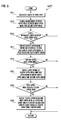
- FIG. 5 is a flowchart showing a process of scrolling upper menus and lower menus in a downward direction in the method of FIG. 2 and FIG. 2B .
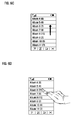
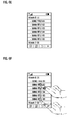
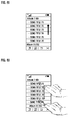
- FIG. 6A, FIG. 6B , FIG. 6C, FIG. 6D , FIG. 6E, FIG. 6F , FIG. 6G, FIG. 6H , FIG. 6I, FIG. 6J , FIG. 6K, FIG. 6L , FIG. 6M, and FIG. 6N show screens displayed when performing the method of displaying a menu of FIG. 2A and FIG. 2B .
- menu indicates an item that is provided in a mobile terminal and that can be selected by a user.
- the menu may be a file that includes data (for example music, a photo, a moving image, and a schedule), which may be provided by the mobile terminal.
- the menu may be a folder (for example a music album and a photo album) that includes at least one file, or the menu may be a function (for example a camera, alarm, and a calculator) that can be executed by the mobile terminal.
- the menu may be hierarchically formed.
- the menu may be an upper-level menu corresponding to a relatively high hierarchy level (hereinafter, an "upper menu”) or a lower-level menu corresponding to a relatively low hierarchy level (hereinafter, a "lower menu”). Further, the menu may not have a lower menu.
- the order may be determined according to a generation date, capacity, or menu name.
- first menu indicates a menu selected from menus aligned in an order
- second menu indicates a menu positioned immediately after the first menu among the menus aligned in the order
- third menu indicates a menu positioned immediately after the second menu among the menus aligned in the order
- fourth menu indicates a menu positioned immediately preceding the first menu among menus aligned in the order.
- touch indicates an operation in which the user of the mobile terminal touches a finger or instrument, such as a stylus, on a touch panel.
- drag and drop indicates an operation in which the user removes a finger or instrument from a touch panel after moving the finger in a state where the finger is touching the touch panel.
- drag path indicates a path in which the user of the mobile terminal moves a finger or instrument on the touch panel.
- FIG. 1 is a block diagram showing a configuration of a mobile terminal according to an exemplary embodiment of the present invention.
- the mobile terminal is embodied as a mobile phone.
- a mobile terminal 100 includes a radio frequency (RF) unit 110, a display unit 120, a touch panel 130, a memory unit 140, a controller 150, and an audio processor 160.
- RF radio frequency
- the RF unit 110 performs a wireless communication function of the mobile terminal 100.
- the RF unit 110 includes an RF transmitter to up-convert a frequency of a signal to be transmitted and amplify the signal, and an RF receiver to low-noise amplify a received signal and down-convert a frequency of the signal.
- the display unit 120 displays a state of the mobile terminal 100 on a display screen.
- the display unit 120 may be a liquid crystal display (LCD), and in this case, the display unit 120 includes an LCD controller, a memory to store display data, and an LCD display element.
- LCD liquid crystal display
- the touch panel 130 may be mounted in the display unit 120 or may be formed separately from the display unit 120 and installed at a position spaced apart from the display unit 120.
- the touch panel 130 includes a touch detector and a signal converter. When a touch occurs, there is a change in the value of a physical characteristic, for example, the resistance or capacitance, which is detected by the touch detector. Further, the signal converter converts the change in the value of the physical characteristic to a touch signal.
- the memory unit 140 includes a program memory and a data memory.
- the program memory stores operation programs of the mobile terminal 100, including a program to display a menu according to an exemplary embodiment of the present invention.
- the data memory stores data generated while performing a program.
- the memory unit 140 stores menus in a hierarchical manner.
- the controller 150 controls general operations of the mobile terminal 100.
- the controller 150 includes a data processor having a transmitter to encode and modulate a signal to be transmitted and a receiver to demodulate and decode a received signal.
- the data processor may include a modem and a codec. Further, the controller 150 receives a touch signal from the signal converter to detect a touch and a drag and drop occurring on the touch panel 130.
- the controller 150 selects an upper menu at the touch position as a first upper menu.
- the controller 150 controls the display unit 120 to display the first upper menu at an upper end of the display screen and to display a second upper menu at a lower end of the display screen. Further, the controller 150 controls the display unit 120 to display lower-level menus of the first upper menu in a list between the first upper menu and the second upper menu. In this case, when the controller 150 detects a drag and drop, the controller 150 scrolls through the lower menus of the first upper menu displayed between the first upper menu and the second upper menu. When a lower menu is selected, the controller 150 executes the selected lower menu.
- the audio processor 160 reproduces an audio signal received from the audio codec of the data processor through a speaker SPK and outputs an audio signal generated by a microphone MIC to the audio codec of the data processor.
- FIG. 2A and FIG. 2B are a flowcharts showing a method of displaying a menu of a mobile terminal according to another exemplary embodiment of the present invention.
- FIG. 6A, FIG. 6B , FIG. 6C, FIG. 6D , FIG. 6E, FIG. 6F , FIG. 6G, FIG. 6H , FIG. 6I, FIG. 6J , FIG. 6K, FIG. 6L , FIG. 6M, and FIG. 6N show screens displayed when performing the method of displaying a menu of FIG. 2A and FIG. 2B .
- FIG. 6A shows an upper menu display screen
- FIG. 6B and FIG. 6C show a display screen when scrolling an upper menu
- FIG. 6D and 6E show a display screen when selecting a specific upper menu
- FIG. 6F , FIG. 6G , FIG. 6H , FIG. 6I , FIG. 6J , FIG. 6K , FIG. 6L , and FIG. 6M show a display screen when scrolling an upper menu and a lower menu
- FIG. 6N shows a display screen when re-selecting the selected upper menu.
- a lower menu is exemplified as a music file
- an upper menu is exemplified as an album including at least one music file, however this is only for the purpose of simplifying the description, and an upper menu and a lower menu are not limited thereto.
- the controller 150 controls the display unit 120 to display upper menus in a list on a display screen (S211), as shown in FIG. 6A .
- the controller 150 controls the display unit 120 to display a preset quantity of upper menus on the display screen. If the quantity of upper menus is equal to or greater than the preset quantity, the controller 150 controls the display unit 120 to display the preset quantity of upper menus in a list. If the quantity of upper menus is less than the preset quantity, the controller 150 controls the display unit 120 to display all of the upper menus in a list and to leave the remaining space empty.
- the controller 150 determines whether a drag and drop is performed on the touch panel 130 (S213), as shown in FIG. 6B .
- the controller 150 scrolls the upper menus (S215), as shown in FIG. 6C . If upper menus exist that are not displayed on the display screen, the controller 150 scrolls the remaining undisplayed upper menus and controls the display unit 120 to display the remaining upper menus on the display screen. In order to determine a scroll direction, the controller 150 analyzes a drag path and scrolls the upper menus according to a drag direction.
- step S215 in which the controller 150 scrolls the upper menus, is described in more detail with reference to FIG. 3 .
- FIG. 3 is a flowchart showing the process of step S215 of scrolling the upper menus in the method of FIG. 2A .
- the controller 150 calculates a length of a drag path (S311).
- the controller 150 scrolls upper menus (S313). In this case, the controller 150 scrolls a quantity of upper menus corresponding to the length of the drag path. The controller 150 scrolls the upper menus at a speed corresponding to a speed of the drag and drop.
- step S217 of FIG. 2A The process then continues at step S217 of FIG. 2A .
- the controller 150 determines whether a touch occurs on the touch panel 130 (S217), as shown in FIG. 6D .
- the controller 150 controls the display unit 120 to display an upper menu positioned at the touch position as a first upper menu and to display a lower menu of the first upper menu (S219), as shown in FIG. 6E . That is, the controller 150 selects the first upper menu according to the touch position and the display unit 120 displays the first upper menu at the upper end of the display screen. The controller 150 controls the display unit 120 to display the second upper menu at the lower end of the display screen. Further, the controller 150 controls the display unit 120 to display lower menus of the first upper menu between the first upper menu and the second upper menu. In this case, the controller 150 controls the display unit 120 to display upper menus and lower menus within the preset quantity on the display screen.
- the controller 150 controls the display unit 120 to display further upper menus in the remaining space. That is, the controller 150 controls the display unit 120 to display the second upper menu at a position immediately below the lowermost lower menu of the first upper menu, and to display further upper menus in the order of the list at positions below the second upper menu. Alternatively, the controller 150 may control the display unit 120 to display the first upper menu immediately above an uppermost lower menu of the first upper menu and to display upper menus preceding the first upper menu in the order at positions above the first upper menu.
- the controller 150 determines whether a drag and drop is performed in an upward direction (S221), as shown in FIG. 6F .
- the controller 150 scrolls the upper menus and the lower menus in an upward direction (S223), as shown in FIG. 6G, FIG. 6H , and FIG. 6I . That is, if lower menus of the first upper menu that are not displayed on the display screen exist, the controller 150 scrolls the remaining undisplayed lower menus and the display unit 120 displays the remaining lower menus on the display screen. In this case, the controller 150 analyzes a drag path and determines a scroll direction. The controller 150 scrolls according to the drag direction at a speed corresponding to a speed of the drag and drop.
- step S223, in which the controller 150 scrolls the upper menus and the lower menus in an upward direction, is described in more detail with reference to FIG. 4 .
- FIG. 4 is a flowchart showing the process of step S223 of scrolling the upper menus and the lower menus in an upward direction in the method of FIG. 2B .
- the controller 150 calculates a length of a drag path (S411).
- the controller 150 scrolls lower menus of the first upper menu that are displayed between the first upper menu and the second upper menu (S413).
- the controller 150 determines whether a lowermost lower menu of the first upper menu is to be scrolled (S415).
- the controller 150 controls the display unit 120 to display a third upper menu at the lower end of the display screen (S417), as shown in FIG. 6G .
- the controller 150 controls the display unit 120 to display the second upper menu at a position immediately above the third upper menu.
- the controller 150 determines whether the second upper menu is to be further scrolled (S419).
- the controller 150 scrolls the second upper menu and lower menus of the second upper menu between the lowermost lower menu of the first upper menu and the third upper menu (S421), as shown in FIG. 6H .
- the controller 150 determines whether the second upper menu reaches the first upper menu (S423).
- the controller 150 controls the display unit 120 to display the second upper menu at the upper end of the display screen, to display the third upper menu at the lower end of the display screen, and to display lower menus of the second upper menu between the second upper menu and the third upper menu (S425), as shown in FIG. 6I .
- step S229 of FIG. 2B The process then continues at step S229 of FIG. 2B .
- the second upper menu When the second upper menu reaches the first upper menu, the second upper menu may be regarded as the first upper menu, and the third upper menu may be regarded as the second upper menu. That is, when the second upper menu reaches the upper end of the display screen, the second upper menu is changed to the first upper menu and the third upper menu is changed to the second upper menu.
- step S221 of FIG. 2B if a drag and drop is not performed in an upward direction, the controller 150 determines whether a drag and drop is performed in a downward direction (S225), as shown in FIG. 6J .
- the controller 150 scrolls the upper menus and the lower menus in a downward direction (S227), as shown in FIG. 6K, FIG. 6L , and FIG. 6M .
- the controller 150 analyzes a drag path and determines a scroll direction.
- the controller 150 scrolls according to the drag direction at a speed corresponding to a speed of the drag and drop.
- step S227 in which the controller 150 scrolls the upper menus and the lower menus in a downward direction is described in more detail with reference to FIG. 5 .
- FIG. 5 is a flowchart showing the process of step S227 of scrolling upper menus and lower menus in a downward direction in the method of FIG. 2B .
- the controller 150 calculates a length of a drag path (S511).
- the controller 150 scrolls lower menus of the first upper menu between the first upper menu and the second upper menu (S513).
- the controller 150 determines whether an uppermost lower menu of the first upper menu is to be scrolled (S515).
- the controller 150 controls a display unit 120 to display a fourth upper menu at the upper end of the display screen (S517), as shown in FIG. 6K .
- the controller 150 controls the display unit 120 to display the first upper menu at a position immediately below the fourth upper menu.
- the controller 150 determines whether the first upper menu is to be scrolled (S519).
- the controller 150 scrolls lower menus of the fourth upper menu and lower menus of the first upper menu between the fourth upper menu and the second upper menu (S521), as shown in FIG. 6L .
- the controller 150 determines whether the first upper menu reaches the second upper menu (S523).
- the controller 150 controls the display unit 120 to display the first upper menu at the lower end of the display screen, to display the fourth upper menu at the upper end of the display screen, and to display lower menus of the fourth upper menu between the fourth upper menu and the first upper menu (S525), as shown in FIG. 6M .
- step S229 of FIG. 2B The process then continues at step S229 of FIG. 2B .
- the first upper menu When the first upper menu reaches the second upper menu, the first upper menu may be regarded as the second upper menu, and the fourth upper menu may be regarded as the first upper menu. That is, when the first upper menu reaches the lower end of the display screen, the first upper menu is changed to the second upper menu and the fourth upper menu is changed to the first upper menu.
- the controller 150 determines whether a touch occurs on the touch panel 130 (S229), as shown in FIG. 6N .
- the controller 150 determines whether a lower menu exists at the touch position (S231).
- the controller 150 executes the lower menu (S233) and the menus are no longer displayed.
- the controller 150 determines whether an upper menu exists at the touch position (S235).
- the controller 150 determines whether lower menus of the upper menu are already displayed (S237).
- step S211 the controller 150 controls the display unit 120 to display upper menus in a list on the display screen.
- step S219 the controller 150 controls the display unit 120 to display the lower menus of the first upper menus between the first upper menus and the second upper menus.
- the mobile terminal when the mobile terminal displays upper menus in a list, if a specific upper menu is selected, the mobile terminal displays the selected upper menu, an upper menu next in order of the list, and lower menus of the selected upper menu on a screen.
- the mobile terminal scrolls the lower menus between the selected upper menu and the upper menu next in order.
Landscapes
- Engineering & Computer Science (AREA)
- General Engineering & Computer Science (AREA)
- Theoretical Computer Science (AREA)
- Human Computer Interaction (AREA)
- Physics & Mathematics (AREA)
- General Physics & Mathematics (AREA)
- Computer Networks & Wireless Communication (AREA)
- Signal Processing (AREA)
- User Interface Of Digital Computer (AREA)
- Telephone Function (AREA)
Applications Claiming Priority (1)
| Application Number | Priority Date | Filing Date | Title |
|---|---|---|---|
| KR1020070104709A KR101460111B1 (ko) | 2007-10-17 | 2007-10-17 | 휴대 단말기 및 그의 메뉴 표시 방법 |
Publications (3)
| Publication Number | Publication Date |
|---|---|
| EP2051161A2 true EP2051161A2 (fr) | 2009-04-22 |
| EP2051161A3 EP2051161A3 (fr) | 2012-01-25 |
| EP2051161B1 EP2051161B1 (fr) | 2014-11-19 |
Family
ID=40001487
Family Applications (1)
| Application Number | Title | Priority Date | Filing Date |
|---|---|---|---|
| EP08165255.4A Not-in-force EP2051161B1 (fr) | 2007-10-17 | 2008-09-26 | Terminal mobile et son procédé d'affichage de menu |
Country Status (4)
| Country | Link |
|---|---|
| US (1) | US8683385B2 (fr) |
| EP (1) | EP2051161B1 (fr) |
| KR (1) | KR101460111B1 (fr) |
| CN (1) | CN101414241B (fr) |
Cited By (1)
| Publication number | Priority date | Publication date | Assignee | Title |
|---|---|---|---|---|
| EP2261784A1 (fr) * | 2009-06-08 | 2010-12-15 | Lg Electronics Inc. | Mobiles Endgerät und Verfahren zum Anzeigen von Informationen in einem mobilen Endgerät |
Families Citing this family (17)
| Publication number | Priority date | Publication date | Assignee | Title |
|---|---|---|---|---|
| KR101725887B1 (ko) | 2009-12-21 | 2017-04-11 | 삼성전자주식회사 | 터치 스크린 디바이스의 컨텐츠 검색 방법 및 장치 |
| CN102193714A (zh) * | 2010-03-11 | 2011-09-21 | 龙旗科技(上海)有限公司 | 一种移动终端资料分组管理的人机交互方式 |
| KR100999667B1 (ko) * | 2010-04-27 | 2010-12-20 | 주식회사 모블릭 | 카탈로그 컨텐츠 서비스를 제공하는 디지털 디바이스 및 카탈로그 컨텐츠 제공서버 |
| JP5478438B2 (ja) * | 2010-09-14 | 2014-04-23 | 任天堂株式会社 | 表示制御プログラム、表示制御システム、表示制御装置、表示制御方法 |
| KR101888904B1 (ko) * | 2011-04-28 | 2018-08-17 | 크루셜텍 주식회사 | 움직임 감지장치를 이용한 휴대 단말의 E-book 정보 표시 방법 및 장치 |
| KR102107491B1 (ko) * | 2012-08-27 | 2020-05-07 | 삼성전자주식회사 | 리스트 스크롤 바 제어 방법 및 모바일 장치 |
| CN102932553A (zh) * | 2012-11-13 | 2013-02-13 | 深圳桑菲消费通信有限公司 | 一种应用于手机的预览文件方法 |
| KR102174916B1 (ko) * | 2012-11-30 | 2020-11-05 | 삼성전자주식회사 | 종료 효과를 표시하는 모바일 장치 및 그 제어방법 |
| EP2741176A3 (fr) | 2012-12-10 | 2017-03-08 | Samsung Electronics Co., Ltd | Dispositif mobile de type bracelet, son procédé de commande et procédé d'affichage UI |
| KR102206044B1 (ko) * | 2012-12-10 | 2021-01-21 | 삼성전자주식회사 | 뱅글 타입의 모바일 디바이스와 그 제어 방법 및 ui 표시 방법 |
| CN103995655B (zh) * | 2013-02-19 | 2018-03-16 | 阿尔派株式会社 | 列表显示装置以及列表显示方法 |
| KR102074347B1 (ko) * | 2013-03-15 | 2020-03-02 | 엘지전자 주식회사 | 이동 단말기 및 그것의 제어방법 |
| TWI525523B (zh) * | 2013-05-26 | 2016-03-11 | 仁寶電腦工業股份有限公司 | 電子裝置的操作方法以及系統 |
| CN103823631A (zh) * | 2014-02-27 | 2014-05-28 | 北京六间房科技有限公司 | 一种标签显示方法 |
| JP6136987B2 (ja) * | 2014-03-04 | 2017-05-31 | 株式会社デンソー | データ検索装置 |
| CN106068482B (zh) * | 2014-09-04 | 2018-07-06 | 山崎马扎克公司 | 具有菜单显示功能的装置 |
| CN105824587A (zh) * | 2015-01-04 | 2016-08-03 | 中国移动通信集团河南有限公司 | 一种报表信息显示的方法、装置、服务器及系统 |
Citations (2)
| Publication number | Priority date | Publication date | Assignee | Title |
|---|---|---|---|---|
| US6448985B1 (en) | 1999-08-05 | 2002-09-10 | International Business Machines Corporation | Directory tree user interface having scrollable subsections |
| WO2006101507A2 (fr) | 2005-03-22 | 2006-09-28 | Microsoft Corporation | Recherche de menu de lancement de programmes par le systeme d'exploitation |
Family Cites Families (4)
| Publication number | Priority date | Publication date | Assignee | Title |
|---|---|---|---|---|
| US6252597B1 (en) * | 1997-02-14 | 2001-06-26 | Netscape Communications Corporation | Scalable user interface for graphically representing hierarchical data |
| US7716582B2 (en) * | 2001-12-07 | 2010-05-11 | Robert Bosch Gmbh | Method for displaying a hierarchically structure list and associated display unit |
| TWI238348B (en) * | 2002-05-13 | 2005-08-21 | Kyocera Corp | Portable information terminal, display control device, display control method, and recording media |
| US7404152B2 (en) * | 2005-06-03 | 2008-07-22 | Research In Motion Limited | Displaying messages on handheld devices |
-
2007
- 2007-10-17 KR KR1020070104709A patent/KR101460111B1/ko not_active Expired - Fee Related
-
2008
- 2008-09-26 EP EP08165255.4A patent/EP2051161B1/fr not_active Not-in-force
- 2008-10-02 US US12/244,532 patent/US8683385B2/en active Active
- 2008-10-16 CN CN200810170902.4A patent/CN101414241B/zh not_active Expired - Fee Related
Patent Citations (2)
| Publication number | Priority date | Publication date | Assignee | Title |
|---|---|---|---|---|
| US6448985B1 (en) | 1999-08-05 | 2002-09-10 | International Business Machines Corporation | Directory tree user interface having scrollable subsections |
| WO2006101507A2 (fr) | 2005-03-22 | 2006-09-28 | Microsoft Corporation | Recherche de menu de lancement de programmes par le systeme d'exploitation |
Cited By (2)
| Publication number | Priority date | Publication date | Assignee | Title |
|---|---|---|---|---|
| EP2261784A1 (fr) * | 2009-06-08 | 2010-12-15 | Lg Electronics Inc. | Mobiles Endgerät und Verfahren zum Anzeigen von Informationen in einem mobilen Endgerät |
| US8103296B2 (en) | 2009-06-08 | 2012-01-24 | Lg Electronics Inc. | Mobile terminal and method of displaying information in mobile terminal |
Also Published As
| Publication number | Publication date |
|---|---|
| CN101414241B (zh) | 2015-04-15 |
| EP2051161A3 (fr) | 2012-01-25 |
| CN101414241A (zh) | 2009-04-22 |
| KR101460111B1 (ko) | 2014-11-11 |
| US20090106702A1 (en) | 2009-04-23 |
| EP2051161B1 (fr) | 2014-11-19 |
| US8683385B2 (en) | 2014-03-25 |
| KR20090039207A (ko) | 2009-04-22 |
Similar Documents
| Publication | Publication Date | Title |
|---|---|---|
| EP2051161B1 (fr) | Terminal mobile et son procédé d'affichage de menu | |
| US11093124B2 (en) | Page operating method and electronic device thereof | |
| JP6640265B2 (ja) | 複数のアプリケーションから受信した通知を表示するためのシステムおよび方法 | |
| US11307745B2 (en) | Operating method for multiple windows and electronic device supporting the same | |
| EP2619643B1 (fr) | Procédé et appareil pour modifier l'écran d'accueil dans un dispositif tactile | |
| US9983777B2 (en) | User interface method and apparatus for mobile terminal having touchscreen | |
| US9772762B2 (en) | Variable scale scrolling and resizing of displayed images based upon gesture speed | |
| US9891809B2 (en) | User terminal device and controlling method thereof | |
| US9690441B2 (en) | Method and apparatus for managing message | |
| US8539375B1 (en) | Method and apparatus for providing a user interface on a device enabling selection of operations to be performed in relation to content | |
| EP2199895B1 (fr) | Dispositif électronique et procédé pour implémenter les interfaces d'utilisateur | |
| KR101948075B1 (ko) | 캐러셀형 사용자 인터페이스 제공 방법 및 장치 | |
| EP2000891A2 (fr) | Dispositif et procédé pour l'exécution d'un menu dans un terminal mobile | |
| EP2703982A2 (fr) | Dispositif tactile et procédé de manipulation tactile pour des contenus | |
| CA2865193A1 (fr) | Procede pour acceder a un element et effectuer des actions rapides sur ledit element au travers d'un menu contextuel | |
| CA2865190A1 (fr) | Procede pour acceder a un element et effectuer des actions rapides sur ledit element au travers d'un menu contextuel | |
| CA2846482A1 (fr) | Procede de mise en oeuvre d'une interface utilisateur dans un terminal portable et appareil associe | |
| US20120169627A1 (en) | Electronic device and method thereof for transmitting data |
Legal Events
| Date | Code | Title | Description |
|---|---|---|---|
| PUAI | Public reference made under article 153(3) epc to a published international application that has entered the european phase |
Free format text: ORIGINAL CODE: 0009012 |
|
| 17P | Request for examination filed |
Effective date: 20080926 |
|
| AK | Designated contracting states |
Kind code of ref document: A2 Designated state(s): AT BE BG CH CY CZ DE DK EE ES FI FR GB GR HR HU IE IS IT LI LT LU LV MC MT NL NO PL PT RO SE SI SK TR |
|
| AX | Request for extension of the european patent |
Extension state: AL BA MK RS |
|
| PUAL | Search report despatched |
Free format text: ORIGINAL CODE: 0009013 |
|
| AK | Designated contracting states |
Kind code of ref document: A3 Designated state(s): AT BE BG CH CY CZ DE DK EE ES FI FR GB GR HR HU IE IS IT LI LT LU LV MC MT NL NO PL PT RO SE SI SK TR |
|
| AX | Request for extension of the european patent |
Extension state: AL BA MK RS |
|
| RIC1 | Information provided on ipc code assigned before grant |
Ipc: G06F 3/048 20060101AFI20111216BHEP |
|
| RAP1 | Party data changed (applicant data changed or rights of an application transferred) |
Owner name: SAMSUNG ELECTRONICS CO., LTD. |
|
| AKX | Designation fees paid |
Designated state(s): DE GB NL |
|
| 17Q | First examination report despatched |
Effective date: 20121011 |
|
| GRAJ | Information related to disapproval of communication of intention to grant by the applicant or resumption of examination proceedings by the epo deleted |
Free format text: ORIGINAL CODE: EPIDOSDIGR1 |
|
| GRAP | Despatch of communication of intention to grant a patent |
Free format text: ORIGINAL CODE: EPIDOSNIGR1 |
|
| GRAP | Despatch of communication of intention to grant a patent |
Free format text: ORIGINAL CODE: EPIDOSNIGR1 |
|
| INTG | Intention to grant announced |
Effective date: 20140613 |
|
| GRAS | Grant fee paid |
Free format text: ORIGINAL CODE: EPIDOSNIGR3 |
|
| GRAA | (expected) grant |
Free format text: ORIGINAL CODE: 0009210 |
|
| AK | Designated contracting states |
Kind code of ref document: B1 Designated state(s): DE GB NL |
|
| REG | Reference to a national code |
Ref country code: GB Ref legal event code: FG4D |
|
| REG | Reference to a national code |
Ref country code: DE Ref legal event code: R096 Ref document number: 602008035428 Country of ref document: DE Effective date: 20141231 |
|
| REG | Reference to a national code |
Ref country code: NL Ref legal event code: T3 |
|
| REG | Reference to a national code |
Ref country code: DE Ref legal event code: R097 Ref document number: 602008035428 Country of ref document: DE |
|
| PLBE | No opposition filed within time limit |
Free format text: ORIGINAL CODE: 0009261 |
|
| STAA | Information on the status of an ep patent application or granted ep patent |
Free format text: STATUS: NO OPPOSITION FILED WITHIN TIME LIMIT |
|
| 26N | No opposition filed |
Effective date: 20150820 |
|
| PGFP | Annual fee paid to national office [announced via postgrant information from national office to epo] |
Ref country code: NL Payment date: 20190821 Year of fee payment: 12 |
|
| PGFP | Annual fee paid to national office [announced via postgrant information from national office to epo] |
Ref country code: DE Payment date: 20190820 Year of fee payment: 12 |
|
| PGFP | Annual fee paid to national office [announced via postgrant information from national office to epo] |
Ref country code: GB Payment date: 20190821 Year of fee payment: 12 |
|
| REG | Reference to a national code |
Ref country code: DE Ref legal event code: R119 Ref document number: 602008035428 Country of ref document: DE |
|
| REG | Reference to a national code |
Ref country code: NL Ref legal event code: MM Effective date: 20201001 |
|
| GBPC | Gb: european patent ceased through non-payment of renewal fee |
Effective date: 20200926 |
|
| PG25 | Lapsed in a contracting state [announced via postgrant information from national office to epo] |
Ref country code: NL Free format text: LAPSE BECAUSE OF NON-PAYMENT OF DUE FEES Effective date: 20201001 |
|
| PG25 | Lapsed in a contracting state [announced via postgrant information from national office to epo] |
Ref country code: DE Free format text: LAPSE BECAUSE OF NON-PAYMENT OF DUE FEES Effective date: 20210401 |
|
| PG25 | Lapsed in a contracting state [announced via postgrant information from national office to epo] |
Ref country code: GB Free format text: LAPSE BECAUSE OF NON-PAYMENT OF DUE FEES Effective date: 20200926 |