EP2071443A2 - Verfahren zur Steuerung eines Parameterwertes - Google Patents
Verfahren zur Steuerung eines Parameterwertes Download PDFInfo
- Publication number
- EP2071443A2 EP2071443A2 EP08170892A EP08170892A EP2071443A2 EP 2071443 A2 EP2071443 A2 EP 2071443A2 EP 08170892 A EP08170892 A EP 08170892A EP 08170892 A EP08170892 A EP 08170892A EP 2071443 A2 EP2071443 A2 EP 2071443A2
- Authority
- EP
- European Patent Office
- Prior art keywords
- touch
- parameter
- region
- region map
- application
- Prior art date
- Legal status (The legal status is an assumption and is not a legal conclusion. Google has not performed a legal analysis and makes no representation as to the accuracy of the status listed.)
- Withdrawn
Links
Images


Classifications
-
- G—PHYSICS
- G06—COMPUTING OR CALCULATING; COUNTING
- G06F—ELECTRIC DIGITAL DATA PROCESSING
- G06F3/00—Input arrangements for transferring data to be processed into a form capable of being handled by the computer; Output arrangements for transferring data from processing unit to output unit, e.g. interface arrangements
- G06F3/01—Input arrangements or combined input and output arrangements for interaction between user and computer
- G06F3/048—Interaction techniques based on graphical user interfaces [GUI]
- G06F3/0487—Interaction techniques based on graphical user interfaces [GUI] using specific features provided by the input device, e.g. functions controlled by the rotation of a mouse with dual sensing arrangements, or of the nature of the input device, e.g. tap gestures based on pressure sensed by a digitiser
- G06F3/0488—Interaction techniques based on graphical user interfaces [GUI] using specific features provided by the input device, e.g. functions controlled by the rotation of a mouse with dual sensing arrangements, or of the nature of the input device, e.g. tap gestures based on pressure sensed by a digitiser using a touch-screen or digitiser, e.g. input of commands through traced gestures
-
- G—PHYSICS
- G06—COMPUTING OR CALCULATING; COUNTING
- G06F—ELECTRIC DIGITAL DATA PROCESSING
- G06F3/00—Input arrangements for transferring data to be processed into a form capable of being handled by the computer; Output arrangements for transferring data from processing unit to output unit, e.g. interface arrangements
- G06F3/01—Input arrangements or combined input and output arrangements for interaction between user and computer
- G06F3/03—Arrangements for converting the position or the displacement of a member into a coded form
- G06F3/033—Pointing devices displaced or positioned by the user, e.g. mice, trackballs, pens or joysticks; Accessories therefor
- G06F3/0354—Pointing devices displaced or positioned by the user, e.g. mice, trackballs, pens or joysticks; Accessories therefor with detection of two-dimensional [2D] relative movements between the device, or an operating part thereof, and a plane or surface, e.g. 2D mice, trackballs, pens or pucks
- G06F3/03547—Touch pads, in which fingers can move on a surface
-
- G—PHYSICS
- G06—COMPUTING OR CALCULATING; COUNTING
- G06F—ELECTRIC DIGITAL DATA PROCESSING
- G06F3/00—Input arrangements for transferring data to be processed into a form capable of being handled by the computer; Output arrangements for transferring data from processing unit to output unit, e.g. interface arrangements
- G06F3/01—Input arrangements or combined input and output arrangements for interaction between user and computer
- G06F3/048—Interaction techniques based on graphical user interfaces [GUI]
- G06F3/0484—Interaction techniques based on graphical user interfaces [GUI] for the control of specific functions or operations, e.g. selecting or manipulating an object, an image or a displayed text element, setting a parameter value or selecting a range
- G06F3/04847—Interaction techniques to control parameter settings, e.g. interaction with sliders or dials
Definitions
- the invention relates to touch-sensitive user interfaces.
- Touch-sensitive user interfaces have become popular means for controlling consumer electronic devices. Interfaces having a touch-sensitive area of a closed-loop shape, such as a ring, are particularly suitable for portable devices, such as mobile phones or multimedia players.
- Such interfaces provide a convenient way of controlling a parameter of applications executed on the device, such as volume level, brightness or position of a marker on a list, by moving a stylus or a finger over the touch-sensitive area in a continuous manner, for example by making circles over an annular surface.
- the parameter to be controlled can be selected using additional buttons outside the touch-sensitive area or can be selected automatically depending on the state of operation of the device. For example, in case of a portable music player, when an audio clip is played, the touch-sensitive area can be used to adjust the volume. Similarly, when a list of audio files is displayed, the touch-sensitive area can be used to move a marker through the list.
- Such method for controlling a parameter is especially useful for changing the parameter in a quick manner over a wide range.
- some users may find it difficult for precise adjustment of the parameter, for example to change the position on the list only by one item or change the volume by one tick. This requires movement of the stylus or finger over a short range, which may be hard to define for inexperienced users.
- the object of the invention is a method for controlling a value of a parameter of an application executed on a device comprising a touch-sensitive input apparatus with a touch-sensitive area, the method comprising the steps of defining a region map specifying a plurality of parameter control regions within the touch-sensitive area, each parameter control region having assigned a parameter change direction, receiving from the touch-sensitive input apparatus a touch start event specifying a touch starting position within the touch-sensitive area, monitoring the touch-sensitive input apparatus to receive a touch position change or a touch end event, upon detection of a touch position change, setting a parameter change value according to the position change direction, upon detection of a touch end event before detection of a touch position change, setting a parameter change value according to the parameter change direction specified for the parameter control region to which the touch starting position belongs and providing the parameter change value to the application.
- Each parameter control region specified in the region map can have further assigned a parameter identifier, and the method may further comprise the step of upon receiving a touch start event, reading from the region map the parameter identifier specified for the parameter control region to which the touch starting position belongs and providing the parameter identifier to the application.
- the method may further comprise the step of receiving a region map specification from the application and defining the region map according to the received region map specification.
- the object of the invention is also a computer program comprising software code adapted to perform the steps of the above described method when executed on a data processing terminal, and a computer readable storage medium comprising the above described computer program.
- the object of the invention is also a system for controlling a parameter of an application executed on a device comprising a touch-sensitive input apparatus with a touch-sensitive area, the system comprising a region map specifying a plurality of parameter control regions within the touch-sensitive area, each parameter control region having assigned a parameter change direction, a parameter controller configured to receive from the touch-sensitive input apparatus a touch start event specifying a touch starting position, monitor the touch-sensitive input apparatus to receive a touch position change or a touch end event, upon detection of a touch position change, select a parameter change value according to the position change direction, upon detection of a touch end event before detection of a touch position change, select a parameter change value according to the parameter change direction specified for the parameter control region to which the touch starting position belongs and provide the parameter change value to the application.
- Each parameter control region specified in the region map may have further assigned a parameter identifier and the parameter controller may be further configured to upon receiving a touch start event, read from the region map the parameter identifier specified for the parameter control region to which the touch starting position belongs and provide the parameter identifier to the application.
- the system may further comprise a region map manager, configured to receive a region map specification from the application and define the region map according (105) to the received region map specification.
- Fig. 1 presents a general architecture of a device with a user interface providing a method for controlling a parameter according to the invention.
- the device comprises a touch-sensitive input apparatus 100, which has a touch-sensitive area of a closed-loop shape, defined by an inner curve 102 and an outer curve 103, for example a shape of a ring.
- the input apparatus 100 is operable by touch via a stylus or a finger.
- Touch events detected at the touch-sensitive area are transmitted to a parameter controller 104. Touch events may be defined as a touch start event specifying that a touch has been detected, a touch end event specifying that the touch has been released, a current touch position on the basis of which touch position change can be calculated.
- the parameter controller 104 comprises a region map 105, which identifies a plurality of parameter control regions 101a - 101d within the touch-sensitive area of the input apparatus 100. Each parameter control region has assigned at least a parameter change direction. Exemplary structures of the region map are presented on Fig. 2 and Fig. 3 .
- the region map 105 can be predefined, or can be altered by software applications via a region map manager 106.
- the parameter controller 104 is configured to receive from the input apparatus 100 a touch start event specifying a touch starting position and monitor the input apparatus 100 to further receive current touch position or a touch end event. In case a touch position change is detected, the parameter controller 104 sets a parameter change value, for example +1 or -1, according to the position change direction. In case a touch end event is detected before detection of a touch position change, the parameter change value is set according to the touch starting position. The parameter change value is then transmitted to a software application 107.
- the parameter controller 104 may be a hardware element, either stand-alone or integrated with the input apparatus 100, or a software module operable by the processor of the device along with other applications 107.
- the region map 105 may be pre-defined for all applications or may be application-configurable. In case of application-configurable region map 105 the application, upon execution, defines regions of the touch-sensitive area, their type and optionally parameters and supporting graphics, as explained with reference to Fig. 3 .
- the application 107 to which the parameter change signal is transmitted can be pre-defined or defined by the operating system or other application depending on the context of operation of the device.
- the parameter change signal in one context of operation the parameter change signal may be directed to a volume control application, while in other context the parameter change signal may be directed to a list display application.
- Fig. 2 presents one exemplary structure of a simple region map 105 in a form of a table and indication of the regions on an exemplary touch-sensitive area in a form of a ring.
- the region map specifies regions and their associated parameter change direction, for example:
- a region is defined as a specific area of the touch pad, for example a range of radial coordinates in case of an annular touch-sensitive area, a rectangle defined by opposite in case of rectangular touch-sensitive areas or an array of points.
- the regions are used by the controller 104 to determine the parameter change value upon detection of a touch end event before detection of a touch position change.
- Region R1 defined at the top part of the annular area is defined so as to receive input for increasing the parameter
- region R2 is defined at the bottom part of the annular area so as to receive input for decreasing the parameter.
- the user may also change the parameter by starting the touch at any position and then changing the touch position in a direction that determines the parameter change value, for example a clockwise direction determining increase of the parameter.
- Fig. 3 presents another exemplary structure of the region map, which further contains a parameter identifier column, specifying a parameter associated with a given region.
- a parameter identifier column specifying a parameter associated with a given region.
- Such structure allows specifying a plurality of parameters to be controlled via the touch-sensitive area, for example volume and channel in case of a television receiver.
- Regions R1 and R3 are defined for controlling parameter P1, so as to cause its increase or decrease, respectively.
- Regions R2 and R4 are defined for controlling parameter P2, so as to cause its increase or decrease, respectively.
- the parameter identifier is read from the region map upon detection of a touch start event, so as to determine the parameter to be controlled.
- the parameter identifier is used both for inputs in which touch position changes and inputs for which the touch event is detected before touch position change.
- the parameter controller may be configured to take no action or to control the previously controlled parameter in case of a touch position change.
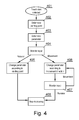
- Fig. 4 presents a procedure of operation of the parameter controller.
- the procedure starts in step 401 when a touch start event is detected at the touch-sensitive apparatus.
- the starting position of the touch input is determined.
- a parameter associated with the starting position is read in step 403.
- the touch input is then monitored for further changes in step 404.
- a touch end event is received before detection of a touch position change, meaning that the user has touched the input apparatus at one position only, a parameter change value is set according to the parameter change direction specified for the parameter control region to which the touch starting position belongs. For example, in case of a region map configured as shown in Fig.
- the parameter change value is set to +1 and provided to the application together with a parameter identifier P1.
- the movement direction is detected in step 406 and the parameter change value is set according to the position change direction. For example, in case of a region map configured as shown in Fig. 3 , if the starting position is in region R1 and a counter-clockwise touch position change has been detected, the parameter change value is set to -1 and provided to the application together with a parameter identifier P1.
- Monitoring of the touch input is continued in step 407. In case further movement occurs, the parameter is changed in step 406. In case the touch input is released, monitoring is stopped in step 408.
Landscapes
- Engineering & Computer Science (AREA)
- General Engineering & Computer Science (AREA)
- Theoretical Computer Science (AREA)
- Human Computer Interaction (AREA)
- Physics & Mathematics (AREA)
- General Physics & Mathematics (AREA)
- Position Input By Displaying (AREA)
- User Interface Of Digital Computer (AREA)
Priority Applications (1)
| Application Number | Priority Date | Filing Date | Title |
|---|---|---|---|
| EP08170892A EP2071443A3 (de) | 2007-12-12 | 2008-12-05 | Verfahren zur Steuerung eines Parameterwertes |
Applications Claiming Priority (2)
| Application Number | Priority Date | Filing Date | Title |
|---|---|---|---|
| EP07024026 | 2007-12-12 | ||
| EP08170892A EP2071443A3 (de) | 2007-12-12 | 2008-12-05 | Verfahren zur Steuerung eines Parameterwertes |
Publications (2)
| Publication Number | Publication Date |
|---|---|
| EP2071443A2 true EP2071443A2 (de) | 2009-06-17 |
| EP2071443A3 EP2071443A3 (de) | 2012-05-30 |
Family
ID=40377462
Family Applications (1)
| Application Number | Title | Priority Date | Filing Date |
|---|---|---|---|
| EP08170892A Withdrawn EP2071443A3 (de) | 2007-12-12 | 2008-12-05 | Verfahren zur Steuerung eines Parameterwertes |
Country Status (2)
| Country | Link |
|---|---|
| US (1) | US20090153518A1 (de) |
| EP (1) | EP2071443A3 (de) |
Cited By (4)
| Publication number | Priority date | Publication date | Assignee | Title |
|---|---|---|---|---|
| CN103095991A (zh) * | 2009-07-22 | 2013-05-08 | 奥林巴斯映像株式会社 | 条件变更装置 |
| CN103123795A (zh) * | 2011-11-21 | 2013-05-29 | 宏碁股份有限公司 | 多媒体播放方法 |
| CN104331248A (zh) * | 2014-11-25 | 2015-02-04 | 广东欧珀移动通信有限公司 | 一种音乐播放器及其界面显示方法、移动终端 |
| CN112817555A (zh) * | 2021-02-01 | 2021-05-18 | 维沃移动通信(杭州)有限公司 | 音量控制方法及音量控制装置 |
Families Citing this family (4)
| Publication number | Priority date | Publication date | Assignee | Title |
|---|---|---|---|---|
| TWI368161B (en) * | 2007-12-21 | 2012-07-11 | Htc Corp | Electronic apparatus and input interface thereof |
| TWI469001B (zh) * | 2008-07-31 | 2015-01-11 | Htc Corp | 可觸控式電子裝置及其操作方法 |
| US8907910B2 (en) * | 2012-06-07 | 2014-12-09 | Keysight Technologies, Inc. | Context based gesture-controlled instrument interface |
| CN109698934B (zh) * | 2017-10-23 | 2021-03-05 | 中移(苏州)软件技术有限公司 | 一种区域监控方法及装置 |
Family Cites Families (10)
| Publication number | Priority date | Publication date | Assignee | Title |
|---|---|---|---|---|
| US7730401B2 (en) * | 2001-05-16 | 2010-06-01 | Synaptics Incorporated | Touch screen with user interface enhancement |
| US6690365B2 (en) * | 2001-08-29 | 2004-02-10 | Microsoft Corporation | Automatic scrolling |
| US7046230B2 (en) * | 2001-10-22 | 2006-05-16 | Apple Computer, Inc. | Touch pad handheld device |
| JP2003296015A (ja) * | 2002-01-30 | 2003-10-17 | Casio Comput Co Ltd | 電子機器 |
| US7466307B2 (en) * | 2002-04-11 | 2008-12-16 | Synaptics Incorporated | Closed-loop sensor on a solid-state object position detector |
| US20060092177A1 (en) * | 2004-10-30 | 2006-05-04 | Gabor Blasko | Input method and apparatus using tactile guidance and bi-directional segmented stroke |
| JP2006323664A (ja) * | 2005-05-19 | 2006-11-30 | Sony Corp | 電子機器 |
| DE102005049802A1 (de) * | 2005-10-18 | 2007-04-19 | BSH Bosch und Siemens Hausgeräte GmbH | Haushaltsgerätebedienvorrichtung |
| US20070097089A1 (en) * | 2005-10-31 | 2007-05-03 | Battles Amy E | Imaging device control using touch pad |
| US7889175B2 (en) * | 2007-06-28 | 2011-02-15 | Panasonic Corporation | Touchpad-enabled remote controller and user interaction methods |
-
2008
- 2008-12-05 EP EP08170892A patent/EP2071443A3/de not_active Withdrawn
- 2008-12-12 US US12/333,497 patent/US20090153518A1/en not_active Abandoned
Cited By (8)
| Publication number | Priority date | Publication date | Assignee | Title |
|---|---|---|---|---|
| CN103095991A (zh) * | 2009-07-22 | 2013-05-08 | 奥林巴斯映像株式会社 | 条件变更装置 |
| CN103095991B (zh) * | 2009-07-22 | 2016-05-11 | 奥林巴斯株式会社 | 照相机 |
| CN103123795A (zh) * | 2011-11-21 | 2013-05-29 | 宏碁股份有限公司 | 多媒体播放方法 |
| CN103123795B (zh) * | 2011-11-21 | 2015-11-25 | 宏碁股份有限公司 | 多媒体播放方法 |
| CN104331248A (zh) * | 2014-11-25 | 2015-02-04 | 广东欧珀移动通信有限公司 | 一种音乐播放器及其界面显示方法、移动终端 |
| CN104331248B (zh) * | 2014-11-25 | 2017-10-24 | 广东欧珀移动通信有限公司 | 一种音乐播放器及其界面显示方法、移动终端 |
| CN112817555A (zh) * | 2021-02-01 | 2021-05-18 | 维沃移动通信(杭州)有限公司 | 音量控制方法及音量控制装置 |
| CN112817555B (zh) * | 2021-02-01 | 2023-06-23 | 维沃移动通信(杭州)有限公司 | 音量控制方法及音量控制装置 |
Also Published As
| Publication number | Publication date |
|---|---|
| EP2071443A3 (de) | 2012-05-30 |
| US20090153518A1 (en) | 2009-06-18 |
Similar Documents
| Publication | Publication Date | Title |
|---|---|---|
| EP2071443A2 (de) | Verfahren zur Steuerung eines Parameterwertes | |
| US7791594B2 (en) | Orientation based multiple mode mechanically vibrated touch screen display | |
| EP4280040B1 (de) | Steuerung einer multifunktionsvorrichtung einer anderen elektronischen vorrichtung | |
| US20090153495A1 (en) | Input method for use in an electronic device having a touch-sensitive screen | |
| US20170277498A1 (en) | Keyboard input to an electronic device | |
| KR101905513B1 (ko) | 휴대단말기의 영상 재생 방법 및 장치 | |
| KR20090043753A (ko) | 터치스크린을 구비한 단말장치의 멀티태스킹 제어 방법 및장치 | |
| US9798512B1 (en) | Context-based volume adjustment | |
| CN106383645A (zh) | 一种音乐播放的控制方法及移动终端 | |
| JP2016506567A (ja) | ディスプレイ装置、遠隔制御装置及びこれらのユーザインターフェース提供方法 | |
| US20130209061A1 (en) | Multimedia playing control method, playing control module and playing terminal | |
| CN105096979A (zh) | 一种控制音乐播放的方法及智能手表 | |
| US20150033163A1 (en) | Method for the parameter change of parameterisable functions by means of data processing devices | |
| CN110908582A (zh) | 一种控制方法、触控笔及电子组件 | |
| KR20150135840A (ko) | 사용자 인터페이스 제공 장치 및 방법 | |
| US20190087074A1 (en) | Dynamic adjustment of haptic/audio feedback during scrolling operations | |
| CN105227985B (zh) | 显示设备及其控制方法 | |
| JP2013008278A (ja) | 操作装置、及び、操作方法 | |
| CN101598966A (zh) | 显示双画面的触控装置及其控制方法 | |
| WO2019060162A1 (en) | DYNAMIC ADJUSTMENT OF MINIATURE MULTIMEDIA IMAGE SIZE BASED ON TOUCH SCREEN PRESSURE | |
| KR101210298B1 (ko) | 터치 입력을 이용한 사용자 인터페이스 방법 및 이를 적용한 단말기 | |
| KR101863654B1 (ko) | 입력 신호에 따른 화면 변화 제어 방법 및 이를 지원하는 휴대 단말기 | |
| US20130016074A1 (en) | Electronic device | |
| US8780279B2 (en) | Television and control device having a touch unit and method for controlling the television using the control device | |
| JP2012220969A (ja) | 端末装置およびプログラム |
Legal Events
| Date | Code | Title | Description |
|---|---|---|---|
| PUAI | Public reference made under article 153(3) epc to a published international application that has entered the european phase |
Free format text: ORIGINAL CODE: 0009012 |
|
| AK | Designated contracting states |
Kind code of ref document: A2 Designated state(s): AT BE BG CH CY CZ DE DK EE ES FI FR GB GR HR HU IE IS IT LI LT LU LV MC MT NL NO PL PT RO SE SI SK TR |
|
| AX | Request for extension of the european patent |
Extension state: AL BA MK RS |
|
| PUAL | Search report despatched |
Free format text: ORIGINAL CODE: 0009013 |
|
| AK | Designated contracting states |
Kind code of ref document: A3 Designated state(s): AT BE BG CH CY CZ DE DK EE ES FI FR GB GR HR HU IE IS IT LI LT LU LV MC MT NL NO PL PT RO SE SI SK TR |
|
| AX | Request for extension of the european patent |
Extension state: AL BA MK RS |
|
| RIC1 | Information provided on ipc code assigned before grant |
Ipc: G06F 3/048 20060101AFI20120425BHEP Ipc: G06F 3/033 20060101ALI20120425BHEP |
|
| AKY | No designation fees paid | ||
| REG | Reference to a national code |
Ref country code: DE Ref legal event code: R108 |
|
| REG | Reference to a national code |
Ref country code: DE Ref legal event code: R108 Effective date: 20130206 |
|
| STAA | Information on the status of an ep patent application or granted ep patent |
Free format text: STATUS: THE APPLICATION IS DEEMED TO BE WITHDRAWN |
|
| 18D | Application deemed to be withdrawn |
Effective date: 20121201 |