EP2148267A2 - Dispositif mobile doté d'un écran tactile et procédé associé de réglage de clavier virtuel - Google Patents
Dispositif mobile doté d'un écran tactile et procédé associé de réglage de clavier virtuel Download PDFInfo
- Publication number
- EP2148267A2 EP2148267A2 EP09163945A EP09163945A EP2148267A2 EP 2148267 A2 EP2148267 A2 EP 2148267A2 EP 09163945 A EP09163945 A EP 09163945A EP 09163945 A EP09163945 A EP 09163945A EP 2148267 A2 EP2148267 A2 EP 2148267A2
- Authority
- EP
- European Patent Office
- Prior art keywords
- touch
- size
- touch screen
- control unit
- mobile device
- Prior art date
- Legal status (The legal status is an assumption and is not a legal conclusion. Google has not performed a legal analysis and makes no representation as to the accuracy of the status listed.)
- Granted
Links
Images




Classifications
-
- G—PHYSICS
- G06—COMPUTING OR CALCULATING; COUNTING
- G06F—ELECTRIC DIGITAL DATA PROCESSING
- G06F3/00—Input arrangements for transferring data to be processed into a form capable of being handled by the computer; Output arrangements for transferring data from processing unit to output unit, e.g. interface arrangements
- G06F3/01—Input arrangements or combined input and output arrangements for interaction between user and computer
- G06F3/048—Interaction techniques based on graphical user interfaces [GUI]
- G06F3/0487—Interaction techniques based on graphical user interfaces [GUI] using specific features provided by the input device, e.g. functions controlled by the rotation of a mouse with dual sensing arrangements, or of the nature of the input device, e.g. tap gestures based on pressure sensed by a digitiser
- G06F3/0488—Interaction techniques based on graphical user interfaces [GUI] using specific features provided by the input device, e.g. functions controlled by the rotation of a mouse with dual sensing arrangements, or of the nature of the input device, e.g. tap gestures based on pressure sensed by a digitiser using a touch-screen or digitiser, e.g. input of commands through traced gestures
- G06F3/04886—Interaction techniques based on graphical user interfaces [GUI] using specific features provided by the input device, e.g. functions controlled by the rotation of a mouse with dual sensing arrangements, or of the nature of the input device, e.g. tap gestures based on pressure sensed by a digitiser using a touch-screen or digitiser, e.g. input of commands through traced gestures by partitioning the display area of the touch-screen or the surface of the digitising tablet into independently controllable areas, e.g. virtual keyboards or menus
-
- G—PHYSICS
- G06—COMPUTING OR CALCULATING; COUNTING
- G06F—ELECTRIC DIGITAL DATA PROCESSING
- G06F1/00—Details not covered by groups G06F3/00 - G06F13/00 and G06F21/00
- G06F1/16—Constructional details or arrangements
- G06F1/1613—Constructional details or arrangements for portable computers
- G06F1/1626—Constructional details or arrangements for portable computers with a single-body enclosure integrating a flat display, e.g. Personal Digital Assistants [PDAs]
-
- G—PHYSICS
- G06—COMPUTING OR CALCULATING; COUNTING
- G06F—ELECTRIC DIGITAL DATA PROCESSING
- G06F1/00—Details not covered by groups G06F3/00 - G06F13/00 and G06F21/00
- G06F1/16—Constructional details or arrangements
- G06F1/1613—Constructional details or arrangements for portable computers
- G06F1/1633—Constructional details or arrangements of portable computers not specific to the type of enclosures covered by groups G06F1/1615 - G06F1/1626
- G06F1/1637—Details related to the display arrangement, including those related to the mounting of the display in the housing
- G06F1/1643—Details related to the display arrangement, including those related to the mounting of the display in the housing the display being associated to a digitizer, e.g. laptops that can be used as penpads
-
- G—PHYSICS
- G06—COMPUTING OR CALCULATING; COUNTING
- G06F—ELECTRIC DIGITAL DATA PROCESSING
- G06F3/00—Input arrangements for transferring data to be processed into a form capable of being handled by the computer; Output arrangements for transferring data from processing unit to output unit, e.g. interface arrangements
- G06F3/01—Input arrangements or combined input and output arrangements for interaction between user and computer
- G06F3/02—Input arrangements using manually operated switches, e.g. using keyboards or dials
- G06F3/023—Arrangements for converting discrete items of information into a coded form, e.g. arrangements for interpreting keyboard generated codes as alphanumeric codes, operand codes or instruction codes
- G06F3/0238—Programmable keyboards
-
- G—PHYSICS
- G06—COMPUTING OR CALCULATING; COUNTING
- G06F—ELECTRIC DIGITAL DATA PROCESSING
- G06F3/00—Input arrangements for transferring data to be processed into a form capable of being handled by the computer; Output arrangements for transferring data from processing unit to output unit, e.g. interface arrangements
- G06F3/01—Input arrangements or combined input and output arrangements for interaction between user and computer
- G06F3/03—Arrangements for converting the position or the displacement of a member into a coded form
- G06F3/041—Digitisers, e.g. for touch screens or touch pads, characterised by the transducing means
-
- G—PHYSICS
- G06—COMPUTING OR CALCULATING; COUNTING
- G06F—ELECTRIC DIGITAL DATA PROCESSING
- G06F3/00—Input arrangements for transferring data to be processed into a form capable of being handled by the computer; Output arrangements for transferring data from processing unit to output unit, e.g. interface arrangements
- G06F3/01—Input arrangements or combined input and output arrangements for interaction between user and computer
- G06F3/048—Interaction techniques based on graphical user interfaces [GUI]
- G06F3/0481—Interaction techniques based on graphical user interfaces [GUI] based on specific properties of the displayed interaction object or a metaphor-based environment, e.g. interaction with desktop elements like windows or icons, or assisted by a cursor's changing behaviour or appearance
-
- G—PHYSICS
- G06—COMPUTING OR CALCULATING; COUNTING
- G06F—ELECTRIC DIGITAL DATA PROCESSING
- G06F3/00—Input arrangements for transferring data to be processed into a form capable of being handled by the computer; Output arrangements for transferring data from processing unit to output unit, e.g. interface arrangements
- G06F3/14—Digital output to display device ; Cooperation and interconnection of the display device with other functional units
Definitions
- the present invention relates to a mobile device with a touch screen. More particularly, the present invention relates to a method for setting a virtual keypad displayed on a touch screen of a mobile device.
- a touch screen is a unit that can be used as both a display unit and an input unit. Therefore, electronic devices having a touch screen may not require additional display and input units. Because of this advantage, a touch screen has been widely used for size-limited electronic devices, such as mobile devices which are often referred to as portable devices or handheld devices.
- a touch screen displays a virtual keypad or a graphical icon for selecting a menu.
- a user can write a text message, input a phone number, or use any other various functions of a mobile device.
- Such a keypad or an icon may, however, have a fixed size while displayed on a touch screen.
- An aspect of the present invention is to address at least the above-mentioned problems and/or disadvantages and to provide at least the advantages described below. Accordingly, an aspect of the present invention is to provide a mobile device with a touch screen and a related method for setting a virtual keypad of the mobile device.
- a method for setting a virtual keypad on a touch screen of a mobile device includes in a keypad setting mode, determining whether a touch is detected on the touch screen, if the touch is detected, determining a size of a touch detected region, displaying a virtual keypad composed of keys including sizes corresponding to the determined size of the touch detected region, and storing the displayed virtual keypad.
- a mobile device in accordance with another aspect of the present invention, includes a memory unit for storing virtual keypads with different sizes, a touch screen detecting a touch thereon and displaying at least one of the virtual keypads, and a control unit for determining a size of a touch detected region in a keypad setting mode, for selecting the virtual keypad composed of keys including sizes corresponding to the determined size of the touch detected region, for controlling the touch screen to display the selected virtual keypad, and for storing the displayed virtual keypad.
- FIG. 1 is a block diagram illustrating a configuration of a mobile device including a touch screen according to an exemplary embodiment of the present invention.
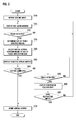
- FIG. 2 is a flow diagram illustrating a method for setting a virtual keypad on a touch screen of a mobile device according to an exemplary embodiment of the present invention.
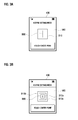
- FIGs. 3A and 3B are exemplary views illustrating display screens with a size scan window for determining a touch size according to an exemplary embodiment of the present invention.
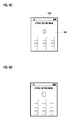
- FIGs. 4A to 4E are exemplary views illustrating a series of display screens for setting a virtual keypad according to an exemplary embodiment of the present invention.
- FIG. 5 is a flow diagram illustrating a method for setting a virtual keypad on a touch screen of a mobile device according to an exemplary embodiment of the present invention.
- FIG. 6 is an exemplary view illustrating a display screen for setting a virtual keypad according to an exemplary embodiment of the present invention.
- Exemplary embodiments of the present invention provide a virtual keypad which refers to an arrangement of a plurality of virtual keys displayed on a touch screen and used for entry of letters and numbers in a mobile device.
- the virtual keypad may include other graphical objects, such as icons or a list arranged, for selection of menu items. That is, a virtual keypad may include a variety of keys, icons, a list, and the like used for selecting functions or menus available for a mobile device.
- a touch size refers to an area of a region where a user's touch is electrically detected.
- the touch size may include at least one length in lengthwise, widthwise and/or diagonal directions.
- a touch region may be represented as coordinates from which a touch size is calculated.
- FIG. 1 is a block diagram illustrating a configuration of a mobile device including a touch screen according to an exemplary embodiment of the present invention.
- a mobile device includes a memory unit 110, a control unit 120 and a touch screen 130.
- the memory unit 110 stores a variety of programs required for performing functions of the mobile device and data created while the functions are performed. More particularly, the memory unit 110 may store a size scan window displayed on the touch screen 130. In a keypad setting mode, the size scan window is used as a standard for determining the touch size of a region where a user's touch is detected. Furthermore, the memory unit 100 may store different sized virtual keypads, each of which corresponds to the touch size of each touch-detected region.
- a virtual keypad composed of one-sized keys corresponds to a touch region having a size of one or less
- another virtual keypad composed of twenty-five-sized keys corresponds to a touch region having a size of ten or more.
- a further virtual keypad composed of nine-sized keys corresponds to a touch region having a size between one and ten.
- a virtual keypad may correspond to coordinates of a touch region rather than to the touch size. More specifically, a virtual keypad having one-sized keys is assigned to a touch region located within coordinates (-1, 0), (1, 0), (0, 1) and (0, -1), and another virtual keypad having nine-sized keys is assigned to a touch region located within coordinates (-3, 0), (3, 0), (0, 3) and (0, -3). Additionally, a further virtual keypad having twenty-five-sized keys is assigned to a touch region located within coordinates (-5, 0), (5, 0), (0, 5) and (0, -5).
- the above sizes and coordinates of keys and touch regions are provided as an example and may be differently determined by a user or a manufacturer.
- the control unit 120 controls states and operations of whole elements of the mobile device. More particularly, the control unit 120 controls the touch screen 130 to display a size scan window when a keypad setting mode is selected by a user. More specifically, once a user's touch is detected on a size scan window being presently displayed, the control unit 120 receives the coordinates of a touch-detected region from the touch screen 130. The control unit 120 then determines the size of a touch region from the received coordinates and retrieves a virtual keypad corresponding to the calculated size from the memory unit 110. The control unit 120 then controls the touch screen 130 to display the retrieved virtual keypad thereon.
- the control unit 120 may use several well-known techniques. For example, the control unit 120 may determine a widthwise dimension between a leftmost coordinate and a rightmost coordinate of a touch region, or a lengthwise dimension between an uppermost coordinate and a lowermost coordinate of a touch region. Alternatively, the control unit 120 may determine a rough or an exact area of a touch region from at least three arbitrary coordinates on boundaries of a touch region. After the size of a touch region is determined, the control unit 120 selects a virtual keypad adapted to be displayed on the touch screen 130. For example, if the determined size of a touch region is twelve, the control unit 120 selects a virtual keypad which has twenty-five-sized keys and is assigned to a touch region having the size of ten or more.
- the touch screen 130 includes a display unit 140 and a touch sensor 150.
- the display unit 140 provides various kinds of graphical information related to states and operations of the mobile device. More particularly, in a keypad setting mode under the control of the control unit 120, the display unit 140 may display a size scan window used for determining the touch size of a user's touch region. Also, the display unit 140 may display a virtual keypad selected depending on the determined touch size.
- the touch sensor 150 is embedded in the display unit 140 to detect a user's touch action on a surface of the display unit 140. Also, the touch sensor 150 acquires the coordinates of a detected touch region and then transmits values of the coordinates to the control unit 120. To acquire the coordinates of a touch region, the touch screen 130 provides a surface with an imaginary grid framework having intersecting points to which coordinates are assigned. Therefore, when a user touches a surface of the touch screen 130, the touch sensor 150 detects touched intersecting points corresponding to a touch region, and then acquires the coordinates of the touched intersecting points.
- the mobile device may further include other well-known elements, such as a Radio Frequency (RF) communication unit, a camera module, a broadcast receiving module, a wireless internet module, and the like.
- RF Radio Frequency
- FIG. 2 is a flow diagram illustrating a method for setting a virtual keypad on a touch screen of a mobile device according to an exemplary embodiment of the present invention.
- FIGs. 3A and 3B are exemplary views illustrating display screens with a size scan window for determining a touch size according to an exemplary embodiment of the present invention.
- the control unit 120 when a user selects a keypad setting mode through a suitable menu or function key to set a virtual keypad displayed on the touch screen 130, the control unit 120 enters into a keypad setting mode in step 210. Also, in case of being predefined by a user or a manufacturer, the control unit 120 may automatically activate a keypad setting mode upon booting of the mobile device.
- the touch screen 130 displays a size scan window 310 to be used for determining the size of a touch region in step 215.
- the size scan window 310 may be displayed as illustrated in FIGs. 3A and 3B . More specifically, in a keypad setting mode, the touch screen 130 may display the size scan window of a single rectangle 310 enclosing a crisscross pattern 300 as illustrated in FIG. 3A . Additionally, a pop-up message, such as 'Touch Cross Point', may be displayed. That is, when a user wishes to use a keypad setting mode, the size scan window 310, together with an appended pop-up message, inform a user where to touch a surface through a finger or a stylus pen.
- the size scan window may be alternatively composed of different sized rectangles 310a, 310b and 310c enclosing a crisscross pattern 300.
- the different sized rectangles 310a, 310b and 310c may have the same central point.
- a pop-up message, such as 'Touch Center Point', may also be displayed.
- the control unit 120 determines whether a touch signal is received from the size scan window 310 in step 220. If the touch signal is received, the control unit 120 determines the size of a touch region in step 225. The determination of the touch size may require a single touch action or several touch actions. In the latter case, the control unit 120 may determine respective sizes of touch regions and then determine the average of the respective sizes to determine the touch size. More specifically, the control unit 120 may use several techniques to determine the touch size.
- the control unit 120 determines whether a touch signal is received from the inside of the size scan window 310. If the touch signal is received, the control unit 120 acquires the coordinates on the boundaries of a touch region. Then, by using the acquired coordinates, the control unit 120 determines the touch size, such as length or area, of the touch region.
- the control unit 120 transmits a touch failure message to the display unit.
- the touch failure message is displayed in a pop-up message or in an overlay message form to inform a user that the touch is not exactly within the size scan window 310.
- the control unit 120 first determines whether a touch signal is received from the size scan windows 310a, 310b and 310c through the touch screen 130.
- control unit 120 determines which size scan window completely covers a touch detected region. The control unit 120 then determines the touch size of the touch detected region.
- the control unit 120 acquires the coordinates of the touch detected region. Then the control unit 120 compares the acquired coordinates with the coordinates of the respective windows 310a, 310b and 310c.
- control unit 120 may be able to determine which of the size scan windows 310a, 310b and 310c completely covers the touch detected region. The control unit 120 then determines the size of the touch region by using the size scan window that completely covers the touch region.
- the first size scan window 310a may have the size of one and four corner coordinates (-1, 0), (1, 0), (0, 1) and (0, -1).
- the second size scan window 310b may have the size of nine and four corner coordinates (-3, 0), (3, 0), (0, 3) and (0, -3)
- the third size scan window 310c may have the size of twenty five and four corner coordinates (-5, 0), (5, 0), (0, 5) and (0, -5).
- the control unit 120 acquires coordinates (-4, 0), (4, 0), (0, 4) and (0, - 4) from the touch region, the touch region may be located between the second size scan window 310b and the third size scan window 310c. Therefore, the control unit 120 may consider, as the size of the touch region, the size of the third size scan window 310c completely covering the touch region.
- the control unit 120 determines the size of the touch region from the smallest touch region of the second size scan window 310b and the third size scan window 310c.
- the control unit 120 controls the display unit to display a touch failure message in a pop-up message or an overlay form message.
- the control unit 120 may move the location of the size scan windows 310a, 310b and 310c toward a user's touch region. That is, the control unit 120 receives the central point of a user's touch region and then redisplays the size scan windows based on the received central point.
- the control unit 120 accesses the memory unit 110 storing virtual keypads and then retrieves a virtual keypad corresponding to the determined touch size in step 230.
- the control unit 120 controls the touch screen 130 to display the retrieved virtual keypad in step 235. For example, if the touch region has the size of one, the control unit 120 retrieves the virtual keypad composed of one-sized keys from the memory unit 110 and then displays the virtual keypad on the touch screen 130.
- the control unit 120 determines whether a keypad setting is completed in step 240. More specifically, if a user selects a predefined soft key, such as the OK key or the save key, displayed on the touch screen 130, the control unit 120 determines that a keypad setting is completed and stores the displayed virtual keypad as a current keypad in the memory unit 110 in step 270. The stored current keypad will be displayed on the touch screen 130 when specified functions, such as writing a message, inputting a call number, and selecting a menu, which need a user's input are executed.
- a predefined soft key such as the OK key or the save key
- the control unit 120 determines whether a touch signal is received from the virtual keypad displayed on the touch screen 130 in step 245. If the touch signal is received, the control unit 120 controls the touch screen 130 to display a function corresponding to a touched part in step 250. For example, when a specific number or letter key in the virtual keypad is touched, the control unit 120 displays a number or letter corresponding to a touch key on the touch screen 130. When a specific icon or list item in the virtual keypad is touched, the control unit 120 displays a menu corresponding to a touched icon or list item on the touch screen 130.
- icons may be represented by images or menu titles, and items of a list may be represented by menu titles.
- the control unit 120 determines whether a save instruction is input in step 260. More specifically, if a user selects a save key through the touch screen 130, the control unit 120 stores the displayed virtual keypad as a current keypad in the memory unit 110. The stored current keypad will be displayed on the touch screen 130 when specified functions, such as writing a message, inputting a call number, and selecting a menu, which need a user's input are executed.
- FIGs. 4A to 4E are exemplary views illustrating a series of display screens for setting a keypad according to an exemplary embodiment of the present invention.
- the control unit 120 controls the touch screen 130 to display at least one size scan window 310 as illustrated in FIGs. 3A and 3B .
- a user may touch the size scan window 310 on the touch screen 130 by using a finger or its equivalent.
- the control unit 120 therefore receives a touch signal from a touch region and, as illustrated in FIG. 4B , displays the touch region on the touch screen 130.
- the control unit 120 determines the touch size of the touch region as described above.
- the control unit 120 controls the touch screen 130 to display a virtual keypad corresponding to the touch region. For example, if the touch region has the size of one or less, a virtual keypad composed of one-sized keys is displayed as illustrated in FIG. 4C . If the touch region has a size between one and ten, a virtual keypad composed of nine-sized keys is displayed as illustrated in FIG. 4D . If the touch region has the size of ten or more, a virtual keypad composed of twenty-five-sized keys is displayed as illustrated in FIG. 4E .
- a virtual keypad displayed on the touch screen 130 may be determined based on the size of a touch detected region. That is, a user may select a proper one of different sized virtual keypads after considering a finger size or the tip size of a touching tool.
- the keypad size selection as described above is exemplary only, the present invention is not limited thereto.
- the shape, color, configuration, and the like of the virtual keypad may also be differently determined according to the size of a touch detected region.
- a virtual keypad may be determined to have circular shaped keys. Also, if a touch detected region has a size smaller than a predefined size, a virtual keypad may be determined to have triangular shaped keys. In an exemplary implementation, if a touch detected region has a size greater than a predefined size, a virtual keypad may be determined to have yellow colored keys. Also, if a touch detected region has a size smaller than a predefined size, a virtual keypad may be determined to have blue colored keys. In a further exemplary implementation, if a touch detected region has a size greater than a predefined size, keys of a virtual keypad may be configured lengthwise along the left or right side of the touch screen.
- the size scan window 310 is used for a mobile device to determine a virtual keypad displayed on the touch screen 130.
- the size scan window 310 is illustrated to have a rectangular shape, the illustrated shape is exemplary only, and the present invention is not limited thereto. In an exemplary implementation, the size scan window may have any other suitable shapes.
- FIG. 5 is a flow diagram illustrating a method for setting a keypad on a touch screen of a mobile device according to an exemplary embodiment of the present invention.
- FIG. 6 is an exemplary view illustrating a screen for setting a keypad according to an exemplary embodiment of the present invention.
- control unit 120 when a user selects a keypad setting mode through a suitable menu or function key, the control unit 120 enters into a keypad setting mode in step 510. Also, in case of being predefined by a user or a manufacturer, the control unit 120 may automatically activate a keypad setting mode upon booting of the mobile device.
- the touch screen 130 displays several candidate keys for a virtual keypad on the touch screen 130 in step 520. As illustrated in FIG. 6 , the candidate keys have different sizes. Additionally, a pop-up message, such as 'Touch Key with Desired Size', may be displayed to help a user to select a desired key size. Each of the candidate keys corresponds to one of virtual keypads stored in the memory unit.
- the control unit 120 displays in a keypad setting mode a one-sized key 610a of the first virtual keypad, a nine-sized key 610b of the second virtual keypad and a twenty-five-sized key 610c of the third virtual keypad on the touch screen 130.
- the control unit 120 determines whether a touch signal is received from one of the candidate keys in step 530. That is, the control unit 120 determines whether one of the candidate keys displayed on the touch screen 130 is selected. If any candidate key is selected, the control unit determines the size of the selected key in step 540 and then displays a corresponding keypad on the touch screen in step 550. For example, if a user selects a nine-sized key 610b, the control unit 120 displays the second virtual keypad composed of nine-sized keys on the touch screen 130.
- control unit 120 determines whether a keypad setting is completed in step 560. More specifically, if a user selects a predefined soft key, such as the OK key or the save key, displayed on the touch screen 130, the control unit 120 determines that a keypad setting is completed, and then stores the displayed virtual keypad as a current keypad in the memory unit 110 in step 570. The stored current keypad will be displayed on the touch screen 130 when specified functions, such as writing a message, inputting a call number, and selecting a menu, which need a user's input are executed.
- a predefined soft key such as the OK key or the save key
- control unit 120 If a keypad setting is not yet completed, the control unit 120 returns to the previous step 520 and redisplays the candidate keys on the touch screen 130. Accordingly, a user may select another candidate key in step 530.
- a virtual keypad displayed on the touch screen may be determined based on the size of a touch detected region. Therefore, a user may select a suitable sized virtual keypad in consideration of a finger size or the tip size of a touching tool. Also, when selecting a menu or inputting letters, a user may have a reduced possibility of touching by mistake.
Landscapes
- Engineering & Computer Science (AREA)
- Theoretical Computer Science (AREA)
- General Engineering & Computer Science (AREA)
- Human Computer Interaction (AREA)
- Physics & Mathematics (AREA)
- General Physics & Mathematics (AREA)
- Computer Hardware Design (AREA)
- Telephone Function (AREA)
- User Interface Of Digital Computer (AREA)
- Position Input By Displaying (AREA)
- Input From Keyboards Or The Like (AREA)
Applications Claiming Priority (1)
| Application Number | Priority Date | Filing Date | Title |
|---|---|---|---|
| KR1020080072840A KR101061512B1 (ko) | 2008-07-25 | 2008-07-25 | 터치 스크린을 구비한 휴대 단말기 및 그 휴대 단말기에서키패드 설정 방법 |
Publications (3)
| Publication Number | Publication Date |
|---|---|
| EP2148267A2 true EP2148267A2 (fr) | 2010-01-27 |
| EP2148267A3 EP2148267A3 (fr) | 2012-09-05 |
| EP2148267B1 EP2148267B1 (fr) | 2015-07-15 |
Family
ID=40823012
Family Applications (1)
| Application Number | Title | Priority Date | Filing Date |
|---|---|---|---|
| EP09163945.0A Not-in-force EP2148267B1 (fr) | 2008-07-25 | 2009-06-26 | Dispositif mobile avec écran tactile et son procédé de configurer un clavier virtuel |
Country Status (3)
| Country | Link |
|---|---|
| US (1) | US20100020031A1 (fr) |
| EP (1) | EP2148267B1 (fr) |
| KR (1) | KR101061512B1 (fr) |
Cited By (3)
| Publication number | Priority date | Publication date | Assignee | Title |
|---|---|---|---|---|
| WO2016204604A1 (fr) | 2015-06-14 | 2016-12-22 | Tpe Holding B.V. | Clavier pour système électronique |
| US20170060414A1 (en) * | 2015-09-02 | 2017-03-02 | Kyocera Document Solutions Inc. | Display input device, image forming apparatus and method of controlling display input device |
| WO2017096170A1 (fr) * | 2015-12-04 | 2017-06-08 | Datalogic Usa, Inc. | Icône de taille réglable pour écrans tactiles de dispositifs électroniques |
Families Citing this family (10)
| Publication number | Priority date | Publication date | Assignee | Title |
|---|---|---|---|---|
| JP5532300B2 (ja) * | 2009-12-24 | 2014-06-25 | ソニー株式会社 | タッチパネル装置およびタッチパネル制御方法、プログラム、並びに記録媒体 |
| CN101776970A (zh) * | 2010-02-26 | 2010-07-14 | 华为终端有限公司 | 触控键盘的设置方法及装置 |
| US8593418B2 (en) * | 2010-08-08 | 2013-11-26 | Qualcomm Incorporated | Method and system for adjusting display content |
| TWI540491B (zh) * | 2011-11-09 | 2016-07-01 | 緯創資通股份有限公司 | 觸控面板之虛擬按鍵的設定與偵測方法 |
| CN103247310A (zh) * | 2012-02-14 | 2013-08-14 | 索尼爱立信移动通讯有限公司 | 多媒体播放控制方法、播放控制模块和播放终端 |
| EP3182261A1 (fr) | 2012-09-17 | 2017-06-21 | Huawei Device Co., Ltd. | Procédé de traitement à pavé tactile et dispositif de terminal |
| US20140152586A1 (en) * | 2012-11-30 | 2014-06-05 | Kabushiki Kaisha Toshiba | Electronic apparatus, display control method and storage medium |
| US10126940B2 (en) * | 2014-10-19 | 2018-11-13 | Lenovo (Singapore) Pte. Ltd. | Touch zones on a soft keyboard |
| US20180204227A1 (en) * | 2015-09-21 | 2018-07-19 | Asheesh Mohindru | Golf Pace of Play |
| US10969910B2 (en) * | 2018-12-18 | 2021-04-06 | Ford Global Technologies, Llc | Variable size user input device for vehicle |
Family Cites Families (12)
| Publication number | Priority date | Publication date | Assignee | Title |
|---|---|---|---|---|
| JPH07117868B2 (ja) * | 1991-04-30 | 1995-12-18 | インターナショナル・ビジネス・マシーンズ・コーポレイション | タツチ型作動キーボード定義方法及び装置 |
| US6456952B1 (en) * | 2000-03-29 | 2002-09-24 | Ncr Coporation | System and method for touch screen environmental calibration |
| US20020124026A1 (en) * | 2001-03-05 | 2002-09-05 | Weber David J. | Methods and apparata for enhancing text to increase reading speed and comprehension |
| AU2003244973A1 (en) * | 2002-07-04 | 2004-01-23 | Koninklijke Philips Electronics N.V. | Automatically adaptable virtual keyboard |
| JP4518955B2 (ja) * | 2002-11-29 | 2010-08-04 | コーニンクレッカ フィリップス エレクトロニクス エヌ ヴィ | 接触エリアの移動させられた表現を用いたユーザインタフェース |
| US20040183834A1 (en) * | 2003-03-20 | 2004-09-23 | Chermesino John C. | User-configurable soft input applications |
| FI20045149L (fi) * | 2004-04-23 | 2005-10-24 | Nokia Corp | Käyttöliittymä |
| US20060077179A1 (en) * | 2004-10-08 | 2006-04-13 | Inventec Corporation | Keyboard having automatic adjusting key intervals and a method thereof |
| JP2008012199A (ja) * | 2006-07-10 | 2008-01-24 | Aruze Corp | ゲーム装置及びゲーム装置の画像表示制御方法 |
| WO2008128096A2 (fr) * | 2007-04-11 | 2008-10-23 | Next Holdings, Inc. | Système à écran tactile avec procédés de saisie par effleurement et clic |
| KR101352994B1 (ko) * | 2007-12-10 | 2014-01-21 | 삼성전자 주식회사 | 적응형 온 스크린 키보드 제공 장치 및 그 제공 방법 |
| US20090183098A1 (en) * | 2008-01-14 | 2009-07-16 | Dell Products, Lp | Configurable Keyboard |
-
2008
- 2008-07-25 KR KR1020080072840A patent/KR101061512B1/ko not_active Expired - Fee Related
-
2009
- 2009-06-24 US US12/491,154 patent/US20100020031A1/en not_active Abandoned
- 2009-06-26 EP EP09163945.0A patent/EP2148267B1/fr not_active Not-in-force
Non-Patent Citations (1)
| Title |
|---|
| None |
Cited By (4)
| Publication number | Priority date | Publication date | Assignee | Title |
|---|---|---|---|---|
| WO2016204604A1 (fr) | 2015-06-14 | 2016-12-22 | Tpe Holding B.V. | Clavier pour système électronique |
| US20170060414A1 (en) * | 2015-09-02 | 2017-03-02 | Kyocera Document Solutions Inc. | Display input device, image forming apparatus and method of controlling display input device |
| WO2017096170A1 (fr) * | 2015-12-04 | 2017-06-08 | Datalogic Usa, Inc. | Icône de taille réglable pour écrans tactiles de dispositifs électroniques |
| US10222979B2 (en) | 2015-12-04 | 2019-03-05 | Datalogic Usa, Inc. | Size adjustable soft activation trigger for touch displays on electronic device |
Also Published As
| Publication number | Publication date |
|---|---|
| US20100020031A1 (en) | 2010-01-28 |
| KR20100011569A (ko) | 2010-02-03 |
| EP2148267B1 (fr) | 2015-07-15 |
| KR101061512B1 (ko) | 2011-09-02 |
| EP2148267A3 (fr) | 2012-09-05 |
Similar Documents
| Publication | Publication Date | Title |
|---|---|---|
| EP2148267B1 (fr) | Dispositif mobile avec écran tactile et son procédé de configurer un clavier virtuel | |
| US9678659B2 (en) | Text entry for a touch screen | |
| US7564448B2 (en) | Touch screen system and control method therefor capable of setting active regions | |
| JP3630153B2 (ja) | 情報表示入力装置及び情報表示入力方法、並びに情報処理装置 | |
| RU2483344C2 (ru) | Устройство беспроводной связи и разделенная поверхность сенсорного пользовательского ввода | |
| US20150242117A1 (en) | Portable electronic device, and control method and program therefor | |
| US20120013645A1 (en) | Display and method of displaying icon image | |
| JP2010538353A (ja) | キー入力インターフェース方法 | |
| US20140022216A1 (en) | Touch panel device and display method | |
| JP2012043180A (ja) | 情報処理装置、情報処理方法およびコンピュータプログラム | |
| US20150091804A1 (en) | Technique for improving operability in switching character types in software keyboard | |
| KR20070011387A (ko) | 터칭 도구 또는 손가락의 사용에 따라 제공 정보를적합화하는 터치 스크린 | |
| US20250328231A1 (en) | Display device, display method, and program | |
| EP2270626A2 (fr) | Appareil de traitement d'informations, procédé pour commander un affichage et support d'enregistrement lisible sur un ordinateur | |
| JP2011134273A (ja) | 情報処理装置、情報処理方法およびプログラム | |
| JP2014016743A (ja) | 情報処理装置、情報処理装置の制御方法、および情報処理装置の制御プログラム | |
| JP2009098990A (ja) | 表示装置 | |
| EP2908234A1 (fr) | Dispositif d'interface utilisateur, procédé d'interface utilisateur et programme | |
| KR101358506B1 (ko) | 필기입력방법 및 이를 이용한 이동통신단말기 | |
| KR101678213B1 (ko) | 터치 영역 증감 검출에 의한 사용자 인터페이스 장치 및 그 제어 방법 | |
| CN104714739A (zh) | 信息处理方法及电子设备 | |
| JP2014167712A (ja) | 情報処理装置、情報処理方法およびプログラム | |
| JP2009514119A (ja) | ディスプレイ機能を有するボタンを具備した端末機及びこのためのディスプレイ方法 | |
| KR20110011845A (ko) | 터치 스크린이 구비된 이동통신 단말기 및 그 제어 방법 | |
| JP2012141696A (ja) | 携帯情報端末およびその表示制御方法 |
Legal Events
| Date | Code | Title | Description |
|---|---|---|---|
| PUAI | Public reference made under article 153(3) epc to a published international application that has entered the european phase |
Free format text: ORIGINAL CODE: 0009012 |
|
| AK | Designated contracting states |
Kind code of ref document: A2 Designated state(s): AT BE BG CH CY CZ DE DK EE ES FI FR GB GR HR HU IE IS IT LI LT LU LV MC MK MT NL NO PL PT RO SE SI SK TR |
|
| AX | Request for extension of the european patent |
Extension state: AL BA RS |
|
| PUAL | Search report despatched |
Free format text: ORIGINAL CODE: 0009013 |
|
| AK | Designated contracting states |
Kind code of ref document: A3 Designated state(s): AT BE BG CH CY CZ DE DK EE ES FI FR GB GR HR HU IE IS IT LI LT LU LV MC MK MT NL NO PL PT RO SE SI SK TR |
|
| AX | Request for extension of the european patent |
Extension state: AL BA RS |
|
| RIC1 | Information provided on ipc code assigned before grant |
Ipc: G06F 3/048 20060101AFI20120801BHEP |
|
| RAP1 | Party data changed (applicant data changed or rights of an application transferred) |
Owner name: SAMSUNG ELECTRONICS CO., LTD. |
|
| 17P | Request for examination filed |
Effective date: 20130305 |
|
| 17Q | First examination report despatched |
Effective date: 20130620 |
|
| REG | Reference to a national code |
Ref country code: DE Ref legal event code: R079 Ref document number: 602009032203 Country of ref document: DE Free format text: PREVIOUS MAIN CLASS: G06F0003048000 Ipc: G06F0003048800 |
|
| RIC1 | Information provided on ipc code assigned before grant |
Ipc: G06F 3/0488 20130101AFI20141201BHEP |
|
| GRAP | Despatch of communication of intention to grant a patent |
Free format text: ORIGINAL CODE: EPIDOSNIGR1 |
|
| INTG | Intention to grant announced |
Effective date: 20150219 |
|
| GRAS | Grant fee paid |
Free format text: ORIGINAL CODE: EPIDOSNIGR3 |
|
| GRAA | (expected) grant |
Free format text: ORIGINAL CODE: 0009210 |
|
| AK | Designated contracting states |
Kind code of ref document: B1 Designated state(s): AT BE BG CH CY CZ DE DK EE ES FI FR GB GR HR HU IE IS IT LI LT LU LV MC MK MT NL NO PL PT RO SE SI SK TR |
|
| REG | Reference to a national code |
Ref country code: CH Ref legal event code: EP Ref country code: GB Ref legal event code: FG4D |
|
| REG | Reference to a national code |
Ref country code: IE Ref legal event code: FG4D |
|
| REG | Reference to a national code |
Ref country code: AT Ref legal event code: REF Ref document number: 737106 Country of ref document: AT Kind code of ref document: T Effective date: 20150815 |
|
| REG | Reference to a national code |
Ref country code: DE Ref legal event code: R096 Ref document number: 602009032203 Country of ref document: DE |
|
| REG | Reference to a national code |
Ref country code: NL Ref legal event code: T3 |
|
| REG | Reference to a national code |
Ref country code: AT Ref legal event code: MK05 Ref document number: 737106 Country of ref document: AT Kind code of ref document: T Effective date: 20150715 |
|
| REG | Reference to a national code |
Ref country code: LT Ref legal event code: MG4D |
|
| PG25 | Lapsed in a contracting state [announced via postgrant information from national office to epo] |
Ref country code: NO Free format text: LAPSE BECAUSE OF FAILURE TO SUBMIT A TRANSLATION OF THE DESCRIPTION OR TO PAY THE FEE WITHIN THE PRESCRIBED TIME-LIMIT Effective date: 20151015 Ref country code: LT Free format text: LAPSE BECAUSE OF FAILURE TO SUBMIT A TRANSLATION OF THE DESCRIPTION OR TO PAY THE FEE WITHIN THE PRESCRIBED TIME-LIMIT Effective date: 20150715 Ref country code: FI Free format text: LAPSE BECAUSE OF FAILURE TO SUBMIT A TRANSLATION OF THE DESCRIPTION OR TO PAY THE FEE WITHIN THE PRESCRIBED TIME-LIMIT Effective date: 20150715 Ref country code: GR Free format text: LAPSE BECAUSE OF FAILURE TO SUBMIT A TRANSLATION OF THE DESCRIPTION OR TO PAY THE FEE WITHIN THE PRESCRIBED TIME-LIMIT Effective date: 20151016 Ref country code: LV Free format text: LAPSE BECAUSE OF FAILURE TO SUBMIT A TRANSLATION OF THE DESCRIPTION OR TO PAY THE FEE WITHIN THE PRESCRIBED TIME-LIMIT Effective date: 20150715 |
|
| PG25 | Lapsed in a contracting state [announced via postgrant information from national office to epo] |
Ref country code: ES Free format text: LAPSE BECAUSE OF FAILURE TO SUBMIT A TRANSLATION OF THE DESCRIPTION OR TO PAY THE FEE WITHIN THE PRESCRIBED TIME-LIMIT Effective date: 20150715 Ref country code: PL Free format text: LAPSE BECAUSE OF FAILURE TO SUBMIT A TRANSLATION OF THE DESCRIPTION OR TO PAY THE FEE WITHIN THE PRESCRIBED TIME-LIMIT Effective date: 20150715 Ref country code: SE Free format text: LAPSE BECAUSE OF FAILURE TO SUBMIT A TRANSLATION OF THE DESCRIPTION OR TO PAY THE FEE WITHIN THE PRESCRIBED TIME-LIMIT Effective date: 20150715 Ref country code: HR Free format text: LAPSE BECAUSE OF FAILURE TO SUBMIT A TRANSLATION OF THE DESCRIPTION OR TO PAY THE FEE WITHIN THE PRESCRIBED TIME-LIMIT Effective date: 20150715 Ref country code: PT Free format text: LAPSE BECAUSE OF FAILURE TO SUBMIT A TRANSLATION OF THE DESCRIPTION OR TO PAY THE FEE WITHIN THE PRESCRIBED TIME-LIMIT Effective date: 20151116 Ref country code: AT Free format text: LAPSE BECAUSE OF FAILURE TO SUBMIT A TRANSLATION OF THE DESCRIPTION OR TO PAY THE FEE WITHIN THE PRESCRIBED TIME-LIMIT Effective date: 20150715 |
|
| REG | Reference to a national code |
Ref country code: DE Ref legal event code: R097 Ref document number: 602009032203 Country of ref document: DE |
|
| PG25 | Lapsed in a contracting state [announced via postgrant information from national office to epo] |
Ref country code: SK Free format text: LAPSE BECAUSE OF FAILURE TO SUBMIT A TRANSLATION OF THE DESCRIPTION OR TO PAY THE FEE WITHIN THE PRESCRIBED TIME-LIMIT Effective date: 20150715 Ref country code: EE Free format text: LAPSE BECAUSE OF FAILURE TO SUBMIT A TRANSLATION OF THE DESCRIPTION OR TO PAY THE FEE WITHIN THE PRESCRIBED TIME-LIMIT Effective date: 20150715 Ref country code: DK Free format text: LAPSE BECAUSE OF FAILURE TO SUBMIT A TRANSLATION OF THE DESCRIPTION OR TO PAY THE FEE WITHIN THE PRESCRIBED TIME-LIMIT Effective date: 20150715 Ref country code: IT Free format text: LAPSE BECAUSE OF FAILURE TO SUBMIT A TRANSLATION OF THE DESCRIPTION OR TO PAY THE FEE WITHIN THE PRESCRIBED TIME-LIMIT Effective date: 20150715 Ref country code: CZ Free format text: LAPSE BECAUSE OF FAILURE TO SUBMIT A TRANSLATION OF THE DESCRIPTION OR TO PAY THE FEE WITHIN THE PRESCRIBED TIME-LIMIT Effective date: 20150715 |
|
| PLBE | No opposition filed within time limit |
Free format text: ORIGINAL CODE: 0009261 |
|
| STAA | Information on the status of an ep patent application or granted ep patent |
Free format text: STATUS: NO OPPOSITION FILED WITHIN TIME LIMIT |
|
| PG25 | Lapsed in a contracting state [announced via postgrant information from national office to epo] |
Ref country code: RO Free format text: LAPSE BECAUSE OF FAILURE TO SUBMIT A TRANSLATION OF THE DESCRIPTION OR TO PAY THE FEE WITHIN THE PRESCRIBED TIME-LIMIT Effective date: 20150715 |
|
| 26N | No opposition filed |
Effective date: 20160418 |
|
| PG25 | Lapsed in a contracting state [announced via postgrant information from national office to epo] |
Ref country code: IS Free format text: LAPSE BECAUSE OF FAILURE TO SUBMIT A TRANSLATION OF THE DESCRIPTION OR TO PAY THE FEE WITHIN THE PRESCRIBED TIME-LIMIT Effective date: 20150715 |
|
| PG25 | Lapsed in a contracting state [announced via postgrant information from national office to epo] |
Ref country code: SI Free format text: LAPSE BECAUSE OF FAILURE TO SUBMIT A TRANSLATION OF THE DESCRIPTION OR TO PAY THE FEE WITHIN THE PRESCRIBED TIME-LIMIT Effective date: 20150715 |
|
| PG25 | Lapsed in a contracting state [announced via postgrant information from national office to epo] |
Ref country code: BE Free format text: LAPSE BECAUSE OF FAILURE TO SUBMIT A TRANSLATION OF THE DESCRIPTION OR TO PAY THE FEE WITHIN THE PRESCRIBED TIME-LIMIT Effective date: 20150715 |
|
| PG25 | Lapsed in a contracting state [announced via postgrant information from national office to epo] |
Ref country code: MC Free format text: LAPSE BECAUSE OF FAILURE TO SUBMIT A TRANSLATION OF THE DESCRIPTION OR TO PAY THE FEE WITHIN THE PRESCRIBED TIME-LIMIT Effective date: 20150715 |
|
| REG | Reference to a national code |
Ref country code: CH Ref legal event code: PL |
|
| GBPC | Gb: european patent ceased through non-payment of renewal fee |
Effective date: 20160626 |
|
| REG | Reference to a national code |
Ref country code: IE Ref legal event code: MM4A |
|
| REG | Reference to a national code |
Ref country code: FR Ref legal event code: ST Effective date: 20170228 |
|
| PG25 | Lapsed in a contracting state [announced via postgrant information from national office to epo] |
Ref country code: FR Free format text: LAPSE BECAUSE OF NON-PAYMENT OF DUE FEES Effective date: 20160630 Ref country code: CH Free format text: LAPSE BECAUSE OF NON-PAYMENT OF DUE FEES Effective date: 20160630 Ref country code: LI Free format text: LAPSE BECAUSE OF NON-PAYMENT OF DUE FEES Effective date: 20160630 |
|
| PG25 | Lapsed in a contracting state [announced via postgrant information from national office to epo] |
Ref country code: IE Free format text: LAPSE BECAUSE OF NON-PAYMENT OF DUE FEES Effective date: 20160626 Ref country code: GB Free format text: LAPSE BECAUSE OF NON-PAYMENT OF DUE FEES Effective date: 20160626 |
|
| PG25 | Lapsed in a contracting state [announced via postgrant information from national office to epo] |
Ref country code: CY Free format text: LAPSE BECAUSE OF FAILURE TO SUBMIT A TRANSLATION OF THE DESCRIPTION OR TO PAY THE FEE WITHIN THE PRESCRIBED TIME-LIMIT Effective date: 20150715 Ref country code: HU Free format text: LAPSE BECAUSE OF FAILURE TO SUBMIT A TRANSLATION OF THE DESCRIPTION OR TO PAY THE FEE WITHIN THE PRESCRIBED TIME-LIMIT; INVALID AB INITIO Effective date: 20090626 |
|
| PG25 | Lapsed in a contracting state [announced via postgrant information from national office to epo] |
Ref country code: MT Free format text: LAPSE BECAUSE OF NON-PAYMENT OF DUE FEES Effective date: 20160630 Ref country code: MK Free format text: LAPSE BECAUSE OF FAILURE TO SUBMIT A TRANSLATION OF THE DESCRIPTION OR TO PAY THE FEE WITHIN THE PRESCRIBED TIME-LIMIT Effective date: 20150715 Ref country code: TR Free format text: LAPSE BECAUSE OF FAILURE TO SUBMIT A TRANSLATION OF THE DESCRIPTION OR TO PAY THE FEE WITHIN THE PRESCRIBED TIME-LIMIT Effective date: 20150715 Ref country code: LU Free format text: LAPSE BECAUSE OF NON-PAYMENT OF DUE FEES Effective date: 20160626 |
|
| PG25 | Lapsed in a contracting state [announced via postgrant information from national office to epo] |
Ref country code: BG Free format text: LAPSE BECAUSE OF FAILURE TO SUBMIT A TRANSLATION OF THE DESCRIPTION OR TO PAY THE FEE WITHIN THE PRESCRIBED TIME-LIMIT Effective date: 20150715 |
|
| PGFP | Annual fee paid to national office [announced via postgrant information from national office to epo] |
Ref country code: DE Payment date: 20180522 Year of fee payment: 10 |
|
| PGFP | Annual fee paid to national office [announced via postgrant information from national office to epo] |
Ref country code: NL Payment date: 20180523 Year of fee payment: 10 |
|
| REG | Reference to a national code |
Ref country code: DE Ref legal event code: R119 Ref document number: 602009032203 Country of ref document: DE |
|
| REG | Reference to a national code |
Ref country code: NL Ref legal event code: MM Effective date: 20190701 |
|
| PG25 | Lapsed in a contracting state [announced via postgrant information from national office to epo] |
Ref country code: DE Free format text: LAPSE BECAUSE OF NON-PAYMENT OF DUE FEES Effective date: 20200101 Ref country code: NL Free format text: LAPSE BECAUSE OF NON-PAYMENT OF DUE FEES Effective date: 20190701 |