EP2151817A2 - Dispositifs d'affichage portables et programmes - Google Patents
Dispositifs d'affichage portables et programmes Download PDFInfo
- Publication number
- EP2151817A2 EP2151817A2 EP09010180A EP09010180A EP2151817A2 EP 2151817 A2 EP2151817 A2 EP 2151817A2 EP 09010180 A EP09010180 A EP 09010180A EP 09010180 A EP09010180 A EP 09010180A EP 2151817 A2 EP2151817 A2 EP 2151817A2
- Authority
- EP
- European Patent Office
- Prior art keywords
- display
- power
- information
- displayed
- display portion
- Prior art date
- Legal status (The legal status is an assumption and is not a legal conclusion. Google has not performed a legal analysis and makes no representation as to the accuracy of the status listed.)
- Withdrawn
Links
- 238000000034 method Methods 0.000 description 13
- 230000002093 peripheral effect Effects 0.000 description 11
- 239000000758 substrate Substances 0.000 description 7
- 230000006870 function Effects 0.000 description 3
- 239000011159 matrix material Substances 0.000 description 2
- 238000004891 communication Methods 0.000 description 1
- 238000012986 modification Methods 0.000 description 1
- 230000004048 modification Effects 0.000 description 1
- 239000000725 suspension Substances 0.000 description 1
Images





Classifications
-
- G—PHYSICS
- G09—EDUCATION; CRYPTOGRAPHY; DISPLAY; ADVERTISING; SEALS
- G09G—ARRANGEMENTS OR CIRCUITS FOR CONTROL OF INDICATING DEVICES USING STATIC MEANS TO PRESENT VARIABLE INFORMATION
- G09G3/00—Control arrangements or circuits, of interest only in connection with visual indicators other than cathode-ray tubes
- G09G3/20—Control arrangements or circuits, of interest only in connection with visual indicators other than cathode-ray tubes for presentation of an assembly of a number of characters, e.g. a page, by composing the assembly by combination of individual elements arranged in a matrix no fixed position being assigned to or needed to be assigned to the individual characters or partial characters
- G09G3/34—Control arrangements or circuits, of interest only in connection with visual indicators other than cathode-ray tubes for presentation of an assembly of a number of characters, e.g. a page, by composing the assembly by combination of individual elements arranged in a matrix no fixed position being assigned to or needed to be assigned to the individual characters or partial characters by control of light from an independent source
- G09G3/3433—Control arrangements or circuits, of interest only in connection with visual indicators other than cathode-ray tubes for presentation of an assembly of a number of characters, e.g. a page, by composing the assembly by combination of individual elements arranged in a matrix no fixed position being assigned to or needed to be assigned to the individual characters or partial characters by control of light from an independent source using light modulating elements actuated by an electric field and being other than liquid crystal devices and electrochromic devices
- G09G3/344—Control arrangements or circuits, of interest only in connection with visual indicators other than cathode-ray tubes for presentation of an assembly of a number of characters, e.g. a page, by composing the assembly by combination of individual elements arranged in a matrix no fixed position being assigned to or needed to be assigned to the individual characters or partial characters by control of light from an independent source using light modulating elements actuated by an electric field and being other than liquid crystal devices and electrochromic devices based on particles moving in a fluid or in a gas, e.g. electrophoretic devices
-
- G—PHYSICS
- G09—EDUCATION; CRYPTOGRAPHY; DISPLAY; ADVERTISING; SEALS
- G09G—ARRANGEMENTS OR CIRCUITS FOR CONTROL OF INDICATING DEVICES USING STATIC MEANS TO PRESENT VARIABLE INFORMATION
- G09G3/00—Control arrangements or circuits, of interest only in connection with visual indicators other than cathode-ray tubes
- G09G3/20—Control arrangements or circuits, of interest only in connection with visual indicators other than cathode-ray tubes for presentation of an assembly of a number of characters, e.g. a page, by composing the assembly by combination of individual elements arranged in a matrix no fixed position being assigned to or needed to be assigned to the individual characters or partial characters
- G09G3/34—Control arrangements or circuits, of interest only in connection with visual indicators other than cathode-ray tubes for presentation of an assembly of a number of characters, e.g. a page, by composing the assembly by combination of individual elements arranged in a matrix no fixed position being assigned to or needed to be assigned to the individual characters or partial characters by control of light from an independent source
- G09G3/36—Control arrangements or circuits, of interest only in connection with visual indicators other than cathode-ray tubes for presentation of an assembly of a number of characters, e.g. a page, by composing the assembly by combination of individual elements arranged in a matrix no fixed position being assigned to or needed to be assigned to the individual characters or partial characters by control of light from an independent source using liquid crystals
- G09G3/3611—Control of matrices with row and column drivers
- G09G3/3648—Control of matrices with row and column drivers using an active matrix
- G09G3/3651—Control of matrices with row and column drivers using an active matrix using multistable liquid crystals, e.g. ferroelectric liquid crystals
-
- G—PHYSICS
- G09—EDUCATION; CRYPTOGRAPHY; DISPLAY; ADVERTISING; SEALS
- G09G—ARRANGEMENTS OR CIRCUITS FOR CONTROL OF INDICATING DEVICES USING STATIC MEANS TO PRESENT VARIABLE INFORMATION
- G09G2330/00—Aspects of power supply; Aspects of display protection and defect management
- G09G2330/02—Details of power systems and of start or stop of display operation
- G09G2330/021—Power management, e.g. power saving
-
- G—PHYSICS
- G09—EDUCATION; CRYPTOGRAPHY; DISPLAY; ADVERTISING; SEALS
- G09G—ARRANGEMENTS OR CIRCUITS FOR CONTROL OF INDICATING DEVICES USING STATIC MEANS TO PRESENT VARIABLE INFORMATION
- G09G2330/00—Aspects of power supply; Aspects of display protection and defect management
- G09G2330/02—Details of power systems and of start or stop of display operation
- G09G2330/021—Power management, e.g. power saving
- G09G2330/022—Power management, e.g. power saving in absence of operation, e.g. no data being entered during a predetermined time
Definitions
- the present invention relates to portable display devices and programs, and more particularly to portable display devices and programs for maintaining a display image or information in the portable display devices even when power from a power source is turned off.
- a known portable display device e.g., electronic paper
- the portable display device is configured to maintain information, which was displayed in the non-volatile display device immediately before power is turned off. Therefore, a user may view the information even in a state of power-off.
- Another known portable display device is configured to make a notification display for security reasons in which information that was displayed in a non-volatile display device immediately before power is turned off is erased and textual information such as "Power off', is displayed in the non-volatile display device.
- the above-described devices only display the information, which was displayed immediately before power is turned off, or make the notification display, in a state of power-off. Therefore, information that a user desires may not be displayed in the non-volatile display device in a state of power-off, which may be inconvenient for users.
- a portable display device which overcomes these and other shortcomings of the related art.
- the object is attained by a portable display device according to claim 1 and by a computer readable medium according to claim 8. It is an advantage of the invention that information displayed in a state of power-off may be designated by a user. Information that a user desires may be displayed in the non-volatile display device in a state of power-off. This may be convenient for users.
- the information storage portion may be configured to store one or a plurality of pieces of information designated by an operation of the operation device. Thus, a plurality of pieces of information to be displayed in the display device in a state of power-off may be set. Variations in such information may increase.
- the controller may be configured to display the plurality of pieces of information in the display device at one time when power is turned off. Thus, a plurality of pieces of information may be displayed and recognized at a time.
- the controller may be configured to sequentially select different pieces of information from the plurality of pieces of information stored in the information storage portion every time power is turned off and to display the selected pieces of information in the display device. Therefore, different pieces of information may be sequentially selected from a plurality of pieces of information and displayed. This may keep a user from being bored. Further, information may be displayed without reducing its display size.
- the controller may be configured to display in the display device information associated with the information displayed in the display device immediately before power is turned off, among the plurality of pieces of information stored in the information storage portion, in the state of power-off. Therefore, information corresponding to the information that a user is viewing, may be displayed. Thus, the information displayed in states of power-on and power-off may be associated with each other.
- the information associated with the information displayed in the display device may be stored in a folder storing in the information displayed in the display device or may be the same information type as that of the information displayed in the display device.
- the controller may be configured to display, in the state of power-off, information corresponding to time when power is turned off, among the plurality of pieces of information stored in the information storage portion. This may be convenient.
- the portable display device may further include a mode storage portion configured to store either one of a first mode in which a preset information is displayed in the display device or a second mode in which information displayed in the display device is continuously displayed in the display device, based on an operation of the operation device.
- the controller may be configured to display the preset information in the display portion in the state of power-off when a mode stored in the mode storage portion is the first mode, and display the information displayed in the display device continuously in the state of power-off when a mode stored in the mode storage portion is the second mode.
- the first mode and the second mode may be determined by an operation of a user.
- Information may be displayed in the non-volatile display device in a mode that a user desires, which may be convenient.
- a portable display device 1 may be of substantially a rectangular parallelepipedonal shape.
- Portable display device 1 may comprise an electrophoretic display portion 21.
- Electrophoretic display portion 21 may be disposed on a front surface of portable display device 1.
- a right side of portable display device 1 in Fig. 1 may comprise a card slot (not shown) into which a memory card 23 in Fig. 2 may be inserted.
- Portable display device 1 may display contents stored in memory card 23 in electrophoretic display portion 21.
- information e.g., at least one of a text, a freeze-frame image, and a moving image, may be displayed based on the contents.
- Content data may comprise at least one piece of data for displaying a text, a freeze-frame image, and a moving image
- a right portion of portable display device 1 in Fig. 1 adjacent to electrophoretic display portion 21 may comprise operation keys 14 that may be operated by a user.
- Operation keys 14 may comprise an enter key 145, and an up arrow key 141, a down arrow key 142, a right arrow key 143 and a left arrow key 144 that may be disposed on the upper, lower, right and left side of enter key 145, respectively.
- up arrow key 141 and down arrow key 142 may be used to select a content in a screen listing contents or a menu screen.
- Right arrow key 143 and left arrow key 144 may be used to turn pages of a content displayed in electrophoretic display portion 21.
- a content stored in memory card 23 may be displayed in display portion 21 or instructions for various settings may be provided, with the operations of operation keys 14 according to the information displayed in electrophoretic display portion 21.
- a power key 15 may be disposed on a portion of device 1 below operation keys 14 in Fig. 1 .
- Power key 15 may provide instructions for turning power on or off.
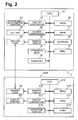
- device 1 may comprise a central processing unit (CPU) 10, a display controller 11, a charge controller 12, a memory card interface (I/F) 13, operation keys 14, power key 15, a read-only memory (ROM) 16, a random access memory (RAM) 17, an electrically erasable programmable read-only memory (EEPROM) 18, and a real time clock (RTC) 19.
- CPU central processing unit
- display controller 11 a display controller 11
- charge controller 12 a memory card interface (I/F) 13
- operation keys 14 power key
- ROM read-only memory
- RAM random access memory
- EEPROM electrically erasable programmable read-only memory
- RTC real time clock
- CPU 10 may perform controls of device 1.
- CPU 10 may drive display portion 21 to display information therein.
- ROM 16 may store various data and programs for operating device 1.
- RAM 17 may temporarily store various data.
- EEPROM 18 may be a non-volatile memory and store various data, such as a power-off display table which will be discussed later.
- RTC 19 may measure time.
- Display controller 11 may control display in display portion 21.
- Memory card I/F 13 may control reading/writing of data from/into memory card 23.
- Device 1 may be driven by power supplied from a battery 22 when power is not supplied from an external power source (not shown).
- a power source e.g., battery 22 or the external power source
- CPU 10 central processing unit
- peripheral devices such as ROM 16, RAM 17, EEPROM 18, and display controller 11.
- Charge controller 12 may control charging to battery 22 from the external power source.
- CPU 10 In a state of power-off, when power key 15 is pressed or any of operation keys 14 is pressed, an instruction to turn power on may be provided.
- CPU 10 may be placed in a normal operation mode. Power may be supplied to the peripheral devices. Thus, device 1 may be brought into an operational state.
- an instruction to turn power off may be provided. Power supply to the peripheral devices may be suspended or stopped.
- CPU 10 may be placed to a power-saving mode in which its power consumption may be more saved than in its normal operation mode.
- a user does not operate any operation keys 14 in a state of power-on for a predetermined period of time, e.g., power-off setting time
- device 1 When a user does not operate any operation keys 14 in a state of power-on for a predetermined period of time, e.g., power-off setting time, device 1 may be determined as a non-operating state. At this time also, power may be turned off by suspending power supply to the peripheral devices.
- CPU 10 may be placed to the
- a state of power-off may be one of the following (a)-(d), any combination of (a)-(c), or any combination of (b)-(d).
- (a) Power supply to CPU 10 may be suspended or stopped:
- (b) Power supply to at least one of the peripheral devices e.g., RAM 17, controllers such as display controller 11, display portion 21
- At least one of the peripheral devices may be placed in a power-saving mode in which power consumption may be more saved than in a normal operation mode of the at least one of the peripheral devices:
- CPU 10 may be placed in a power-saving mode in which its power consumption may be more saved than its normal operation mode.
- the state of power-off may be caused when power key 15 is pressed; when any of operation key 14 is not pressed for a predetermined period of time; when the remaining amount of battery 22 becomes small; or when power is not supplied from battery 22 because battery 22 runs out or is not mounted on device 1.
- Display portion 21 may be a non-volatile display device and may maintain display information even when power supply is suspended from the power source to display portion 21. Thus, while power is saved, the display information may be viewed in display portion 21 even in a state of power-off.
- Device 1 may be configured to read or write data from or into an external device 200, via memory card 23.
- External device 200 may be configured to provide device 1 with data of a content body, e.g., a document, and data of information to be displayed in display portion 21 in association with the content, when power is turned off.
- the information to be displayed in display portion 21 when power is off may be hereinafter simply referred to as "power-off display information.”
- Device 200 may comprise a central processing unit (CPU) 210, a display controller 211, a memory card interface (I/F) 213, an operation portion 214, a read-only memory (ROM) 216, a random access memory (RAM) 217, a hard disk drive (HDD) 218, and a display portion 221.
- CPU central processing unit
- display controller 211 a display controller 211
- I/F memory card interface
- operation portion 214 an operation portion 214
- ROM read-only memory
- RAM random access memory
- HDD hard disk drive
- CPU 210 may perform controls of device 200.
- ROM 16 may store various data and programs for operating device 200.
- RAM 217 may temporarily store various data.
- HDD 218 may be a non-volatile storage medium configured to store various data for device 200.
- Display controller 211 may control display portion 221 to display information therein.
- Memory card I/F 213 may control reading/writing of data from/into memory card 23.
- Device 200 may be used to provide device 1 with data of a content, via memory card 23.
- Device 200 may also be used to provide device 1 with power-off display information, which may be set in association with a content, and settings for the power-off display information information, by performing such a process shown in Fig. 8 .
- Display controller 11 may be configured to control a gate driver (not shown) and a source driver (not shown) of display portion 21 to rewrite information displayed in display portion 21, based on a rewriting instruction received from CPU 10.
- Display portion 21 may comprise an electrophoretic display panel (not shown), a gate driver configured to output a gate line signal to respective gate lines of the electrophoretic display panel, and a source drive configured to output a source signal to respective source lines of the electrophoretic display panel.
- the electrophoretic display panel may be of an active matrix type.
- the electrophoretic display panel may comprise a transparent substrate positioned on a front side, e.g., a viewing side, and a rear substrate positioned opposite to the transparent substrate. Electrophoretic display elements may be positioned between the transparent substrate and the rear substrate.
- the active matrix type-display panel may be configured to rewrite information by applying voltage to a common electrode positioned on the transparent substrate and a pixel electrode positioned on the rear substrate for each pixel.
- the date driver and the source driver may be configured to output a gate signal and the source signal corresponding to the information to be rewritten, to the gate lines and the source lines, respectively.
- Voltage for controlling the electrophoretic display elements may be applied to each pixel electrode to rewrite information displayed in the display panel.
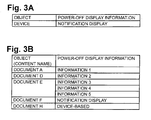
- a power-off display table shown in Figs. 3A and 3B may be referred to, to determine power-off display information.
- the power-off display table may comprise a power-off display table for device 1, as shown in Fig. 3A , and a power-off display table for contents, as shown in Fig. 3B .
- the power-off display table for device 1 may store settings of power-off display information for device 1.
- the power-off display table for contents may store settings of power-off display information for each of contents.
- the power-off display table may be stored in EEPROM 18 or memory card 23. More specifically, the power-off display table for device 1 may be stored in EEPROM 18 and power-off display table for contents may be stored in memory card 23.
- Operation keys 14 or operation portion 214 of external device 200 may be operated to make settings of the power-off display information in the power-off display table.
- the power-off display table may store settings of the power-off display information in correspondence with an object for which power-off display information is set.
- Settings of power-off display information may comprise information e.g., an image such as information 1-5 in Fig. 3B , a notification display, and a device-based setting.
- the notification display setting information that was displayed in display portion 21 immediately before power is turned off, may be erased and textual information such as "Power off", may be displayed in display portion 21 in a state of power-off.
- the power-off display information may be determined based on the settings in the power-off display table for device 1.
- the device-based setting may be set only in the power-off display table for contents.
- the device-based setting may be set to a content as a default setting.
- the device-based setting may be set to document H in the power-off display table for contents, as shown in Fig. 3B .
- the power-off table for device 1 as shown in Fig. 3A
- the notification display may appear in display portion 21 accordingly.
- a plurality of pieces of power-off display information may be set to one object in the power-off display table.
- information 3, 4 and 5 may be set to document E in the power-off display table for contents.
- EEPROM 18 or memory card 23 may store the power-off display table, as described above. EEPROM 18 and memory card 23 may also store data of contents, as well as data of images that may be set as power-off display information, e.g., information 1-5, as shown in Fig. 3B .
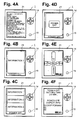
- Display portion 21 may display various information, such as e-mail message shown in Fig. 4A , when power is on.
- a lower portion, e.g., a footer portion, of display portion 21 may display information, such as a page number.
- display portion 21 may display the set power-off display information, e.g. information 1, and such a message "Power off' at the lower portion of display portion 21, as shown in Fig. 4B .
- a state of power-off As shown in Fig. 4B , power may be turned on. At this time, information, e.g., e-mail message shown in Fig. 4A , that was displayed in display portion 21 before power is turned off, may be displayed again in display portion 21. If the notification display appears in a state of power-off, e.g., the notification display is set as the power-off display information, the information that was displayed in display portion 21 immediately before power is turned off, may not be displayed in display portion 21 when power is turned on. Nevertheless, such a top page that is shown in Fig. 4E , may appear.
- the plurality of pieces of power-off display information may be displayed in line, as shown in Fig. 4C .
- the lower portion of the display area of display portion 21 may display a message, "Power off'.
- CPU 10 may simultaneously display a plurality of pieces of information in display portion 21 when power is turned off.
- a plurality of pieces of information may be recognized at a time when power is turned off.
- the pieces of information when a plurality of pieces of power-off display information is set for one object, the pieces of information may be arranged in line in display portion 21.
- any piece of the power-off display information e.g., information 2
- CPU 10 may sequentially select and display different pieces of the power-off display information.
- different pieces of the power-off display information which may be sequentially displayed, may keep a user from being bored. Further, by display pieces of power-off display information sequentially, the information may be displayed without reducing its display size.
- the notification display When the notification display is set as the power-off display information, information that was displayed in display portion 21 immediately before power is turned off, may be erased. Textual information, such as "Power off', may be displayed at a middle portion of the display area in display portion 21 when power is off, as shown in Fig. 4D . Thus, the notification display will increase security.
- Operations of operation keys 14 may cause such a screen shown in Fig. 4F to appear.
- a user may set the power-off setting time and the device-based power off display information, using operation keys 14 on the screen shown in Fig. 4F .
- the set power-off setting time has elapsed in a state of power-on without an operation of any operation keys 14, power may be turned off.
- a power-on process shown in Fig. 5 may be performed when power is turned on, e, g., when power key 15 or operation key 14 is pressed.
- step S 11 power supply to CPU 10 may start in step S 11. Then, power supply to the peripheral devices may start in step S12. Thereafter, the peripheral devices may be initialized in step S13.
- CPU 10 may start up the system in step 14.
- CPU 10 may determine in step S16 whether a notification display setting in EEPROM 18 represents "set".
- the notification display setting may represent whether information displayed in display portion 21 when power is turned off is the notification display.
- the notification display setting may be stored in EEPROM 18 in step S66 of Fig. 6 .
- CPU 10 determines that the notification display setting in EEPROM 18 represents "set” (S16: YES)
- flow may proceed to step S19.
- CPU 10 determines that the notification display setting in EEPROM 18 represents "not set", (S 16: NO)
- flow may proceed to step S 17.
- step S 17 CPU 10 may read from EEPROM 18 latest display information which may represent what information was displayed in display portion 21 before power is turned off.
- the latest display information may be stored in EEPROM 18 in step S56.
- CPU 10 may display the information that was displayed before power is turned off, in step S18. Therefore, CPU 10 may control display portion 21, which may show notification of "Power off' as shown in Fig. 4D , to display the information, e.g., e-mail message shown in Fig. 4A , that was displayed before power is turned off.
- step S19 CPU 10 may display the top page.
- CPU 10 may control display portion 21 to display such top page shown in Fig. 4E .
- the power-off process shown in Fig. 6 may be invoked at a timing when power is turned on.
- CPU 10 may determine in step S51 whether any key is pressed. When CPU 10 determines that any key is pressed (S51: YES), flow may proceed to step S55. When CPU 10 determines that any key is not pressed (S51: NO), the power-off setting time may be measured with a timer in step S52. Then, flow may proceed to step S53. The power-off setting time may be stored in EEPROM 18 in step S 103 or S104 of Fig. 7 .
- step S53 CPU 10 may determine whether any key is pressed. When CPU 10 determines that any key is pressed (S53: YES), flow may proceed to step S55. When CPU 10 determines that any key is not pressed (S53: NO), CPU 10 may determine in step S54 whether the power-off setting time has elapsed. When CPU 10 determines the power-off setting time has elapsed (S54: YES), flow may proceed to step S56. When CPU 10 determines the power-off setting time has not elapsed (S54: NO), flow may return to step S53.
- CPU 10 may determine in step S55 whether power key 15 is pressed. When CPU 10 determines power key 15 is pressed (S55: YES), flow may proceed to step S56. When CPU 10 determines power key 15 is not pressed (S55: NO), an operation associated with the pressed key may be performed in step S57. Then, flow may return to step S51.
- step S56 When the power-off setting time has elapsed without any key operation in a state of power-on, flow may proceed to step S56.
- step S56 When power key 15 is pressed in a state of power-on, flow may also proceed to step S56.
- CPU 10 may retract latest display information to EEPROM 18.
- the latest display information may comprise information to identify the content being displayed in display portion 21 and the number of pages of the content. Even when power is turned off, CPU 10 may recognize, when power is turned on, the information that was displayed in display portion 21 immediately before power is turned off.
- the information that was displayed immediately before power is turned off may be restored and displayed again in display portion 21 when power is turned on.
- the information that was displayed immediately before power is turned off may be restored and displayed again when power is turned on, with power key 15 and any of operation keys 14 pressed simultaneously, regardless of whether the notification display is set as the power-off display information.
- the information that was displayed immediately before power is turned off may not be restored with any operation, regardless of whether the notification display is set as the power-off display information.
- step S56 in which the latest display information may be retracted to EEPROM 18, may be omitted.
- power key 15 may be disposed in device 1. In another embodiment, power key 15 may be omitted and any key may function as power key 15 by pressing and held the key for a while.
- CPU 10 may determine in step S61 whether the power-off display information is set to the content being displayed in display portion 21. Determination in step S61 may be made based on whether power-off display table for contents stores the content being displayed in display portion 21 as an object for which power-off display information is set.
- CPU 10 determines that the power-off display information is set to the content being displayed in display portion 21 (S61: YES)
- the setting of the power-off display information for the content may be read out from memory card 23 in step S63. Then, flow may proceed to step S66.
- step S61 When CPU 10 determines that the power-off display information is not set to the content being displayed in display portion 21 (S61: NO), the device-based setting of the power-off display information, which may be stored in the power-off display table for device, may be read from EEPROM 18 in step S62. Then, flow may proceed to step S66. Even when the information displayed in step S61 in display portion 21 is not a content, flow may proceed to step S62. For example, while the top page is displayed in display portion 21 in step S61, flow may proceed to step S62.
- CPU 10 may display the power-off display information in step S66, based on the read setting of the power-off display information.
- the message, "Power off” may be displayed in the lower portion of the display area of display portion 21, e.g., footer portion, in step S67. Then, flow may proceed to step S68.
- CPU 10 determines, based on the power-off display table, that a plurality of pieces of power-off display information is set to a content, the pieces of power-off display information may be displayed in line in display portion 21.
- step S68 CPU 10 may prepare for the suspension of the system, e.g., CPU 10 may output an instruction to the peripheral devices to stop their operation. Then, the power supply to the peripheral devices may be suspended in step S69. The power supply to CPU 10 may be suspended in step S70. Thus, power may be turned off.
- a setting in the power-off display table for device 1 that may be referred to in step S62 may be made with a user's operation and stored in EEPROM 18.
- CPU 10 may display, in a state of power-off, information designated, for example, with operations of operation keys 14.
- a user may designate the information that may be displayed in display portion 21 in a state of power-off.
- the information that a user desires may be readily displayed in display portion 21 when power is turned off.
- CPU 10 may display the pieces of information simultaneously in display portion 21 in a state of power-off. This may enable a plurality of pieces of information to be recognized at a time.
- CPU 10 may display information corresponding to information, e.g., a content, that was displayed immediately before power is turned off, among a plurality of pieces of information stored in memory card 23. Therefore, information corresponding to the information that a user is viewing, may be displayed in display portion 21. Thus, information displayed in states of power-on state and power-off may be associated with each other.
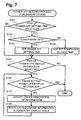
- a power-off setting process may be performed in device 1 to set a power-off setting time and/or power-off display information.
- a user performs a predetermined operation in device 1 in a state of power-on, such a screen shown in Fig. 4F may appear. Thereafter, the power-off setting process may be invoked.
- the screen may comprise items to set a power-off setting time and power-off display information.
- CPU 10 may determine in step S101 whether the item of "power-off setting time" is selected with operations of operation keys 14.
- CPU 10 may display such a message to encourage a user to select whether an auto-power off function to automatically turn power off is enabled, and accept a user's selection with operation keys 14.
- CPU 10 may determine in step S102 whether the auto-power off function power is enabled, e.g., power is turned off after lapse of the setting time, based on the user's selection.
- CPU 10 may display such a message to encourage a user to input the power-off setting time.
- CPU 10 may set the value input by the user as the power-off setting time and may display such a screen shown in Fig. 4F again in step S103. Then, flow may proceed to step S105.
- CPU 10 determines that power is not turned off after lapse of the power-off setting time (S102: NO)
- CPU 10 may not set the power-off setting time and may display such a screen shown in Fig. 4F again in step S104. Then, flow may proceed to step S105.
- CPU 10 determines that the item of "power-off setting time" is not selected (S101: NO)
- flow may proceed to step S105.
- CPU 10 may determine in step S105 whether an item of "power-off display information" is selected with operations of operation keys 14. When CPU 10 determines that the item is selected (S 105: YES), CPU 10 may display such a message to encourage a user to set the power-off display information and determine whether an operation to set power-off display information is finished in step S106. When CPU 10 determines that the operation to set power-off display information is not finished (S106: NO), flow may proceed to step S107. When CPU 10 determines that an operation to set power-off display information is finished (S 106: YES), or the item of "power-off display information" is not selected (S105: NO), flow may end.
- step S107 CPU 10 may accept a user's designation of the information to be displayed in a state of power-off.
- information stored in memory card 23 may be designated.
- CPU 10 may register the information designated by a user in the power-off display table for device 1 in step S108. Flow may return to step S106.
- CPU 10 may store in the power-off display table for device 1, one or more pieces of information (e.g., information 1, information 2, or notification display) designated by a user's operation using operation keys 14.
- a power-off setting process may be invoked with a predetermined operation in external device 200.
- the process may be executed after a predetermined operation is performed in external device 200 and a menu screen is displayed in display portion 221.
- the menu screen may list a plurality of selectable items, one of which may be the "power-off display information".
- CPU 210 may determine in step S111 whether an item of "power-off display information" is selected using operation portion 214.
- CPU 210 may display a list of contents stored in memory card 23 in display portion 221 and display a message encourage a user to select a content to which the power-off display information may be set in step S 112.
- CPU 210 may accept a user's selection of a content from the list in step S 112.
- CPU 210 may determine in step S 113 whether a content is selected.
- flow may proceed to steps S 114.
- step S116 CPU 210 may determine whether other item is selected from the menu.
- CPU 210 determines that other item is selected from the menu (S116: YES)
- an operation associated with the selected item may be performed in S 117.
- flow may returned to step S111.
- CPU 210 determines that other item is not selected from the menu (S 116: NO)
- flow may end.
- step S 114 CPU 210 may accept a user's designation of information to be displayed in a state of power-off, e.g., power-off display information.
- step S114 information stored in memory card 23 or HDD 218 may be designated.
- step S115 CPU 210 may register, in the power-off display table for contents, the information designated by a user as a setting of the power-off display information corresponding to the content selected in step S 112. If memory card 23 does not pre-store data, e.g., image data, of the information registered as a setting of power-off display information in the power-off display table for contents, CPU 210 may store the data of the information designated by a user in memory card 23 in step S 115. Then, flow may return to step S 112.
- data e.g., image data
- CPU 210 may store, in the power-off display table for contents, one or more pieces of information (e.g., information 1, information 2, or notification display) selected using operation portion 214, as the information associated with a content displayed in a state of power-on immediately before power is turned off. With operations of operation portion 214, CPU 210 may store the information to be displayed in a state of power-off in association with a content, in memory card 23.
- CPU 10 of device 1 may read memory card 23 and display the information, e.g., information 1, information 2, or notification display, in association with the content being displayed immediately before power is turned off.
- information that may be displayed in display portion 21 in a state of power-off may be designated by a user.
- information that the user desires may be displayed in display portion 21 in a state of power-off, which may be convenient for users.
- CPU 10 may correspond to a controller.
- Display portion 21 may correspond to a non-volatile display device.
- Operation keys 14 may correspond to an operation device.
- EEPROM 18 and memory card 23 may correspond to an information storage portion.
- the power-off display table for device 1 shown in Fig. 3A may be updated in device 1.
- the power-off display table for contents shown in Fig. 3B may be updated in external device 200.
- the power-off display table for contents may be updated in device 1.
- the power-off display table for device may be updated in external device 200.
- power-off display information may be set for each content.
- power-off display information may be set for each folder containing contents or may be set according to content types, content names, e.g., the first letter of the contents, confidentiality of contents, security levels of contents, or time when power is turned off.
- content types e.g., the first letter of the contents, confidentiality of contents, security levels of contents, or time when power is turned off.
- a power-off display table shown in Fig. 9A-9C may be referred to, to determine the information to be displayed in a state of power-off, e.g., power-off display information.
- Power-off display table may comprise a power-off display table for device 1, as shown in Fig. 9A , a power-off display table for contents as shown in Fig. 9B , and a power-off display table for time, as shown in Fig. 9C .
- the power-off display table for device 1 may store settings of power-off display information for device 1. When a plurality of pieces of information is set for one object, as shown in Fig.
- the pieces of information may be displayed in display portion 21 by dividing its display area into a plurality of sections, as shown in Fig. 4C .
- the power-off display table for device 1 may store time settings as a setting of power-off display information. Based on the power-off display table for time, as shown in Fig. 9C , information, e.g., weather forecast, scheduler, TV programs, or calendar, may be displayed in display area of display portion 21 in a state of power-off.
- the power-off display table for contents may store settings according to contents, content type, folders containing contents, content names, confidentiality of contents, and security level of contents.
- the power-off display table for contents may store settings in association with classification, setting objects and power-off display information.
- classification may comprise contents, content types, folders containing contents, content names, confidentiality of contents, and security level of contents.
- the power-off display information may be set for each classification.
- Contents may be classified according to types, e.g., file formats of contents, categories of contents, e.g., sports, politics, and economy.
- Contents may also be classified according to content names, e.g., file names starting from the letter "A" or "B”.
- Contents may be classified according to confidentiality, e.g., whether a content comprises confidential information.
- Contents may be classified according to security levels, e.g., security levels preset to contents. Any classification may be selected in step S 112 of Fig. 8 instead of a content, and may be associated with the power-off display information.
- the classification may correspond to an information type.
- power-off display information associated with the information displayed in display portion 21 may be the same information type, e.g., classification, as that of the information displayed in display portion 21.
- power-off display information may be set according to classification, which may be convenient for users.
- Continuing display may be set in the power-off display table for contents, as power-off display information.
- the information displayed in a state of power-on may be continuously displayed in a state of power-off.
- the continuing display may be designated in step S107 of Fig. 7 or step S114 of Fig. 8 and may be associated as the power-off display information.
- CPU 10 may display the images or notification display in display portion 21 in a state of power-off.
- the power-off display information is the continuing display, CPU 10 may continuously display the information displayed in a state of power-on, even in a state of power-off. For example, if a content being displayed in display portion 21 in a state of power-on is contained in folder A, the content displayed in a state of power-on may be continuously displayed in display portion 21 in a state of power-off, based on the setting in the power-off display table for contents shown in Fig. 9B .
- power-off display information associated with the information displayed in display portion 21 may be stored in a folder storing in the information displayed in display portion 21.
- a warning display may be set in the power-off display table for contents as power-off display information.
- the warning display when power is turned off, information displayed in a state of power-on may be erased and such a warning message may be displayed in display portion 21, that may inform a user that power is turned off while confidential information is being displayed.
- the warning display may be set for contents which may be set as having confidential information and for contents whose security level is a predetermined level or greater. Therefore, when the security level of a content being displayed in display portion 21 is set to a predetermined level or greater, or when a content being displayed in display portion 21 is set as having confidential information, a warning message may be displayed in display portion 21 when power is turned off. Thus, information security may increase.
- the power-off display table for time may be applied according to time.
- the power-off display table for time may store settings of the power-off display information in association with time.
- Time may comprise a start time and end time.
- weather forecast may be set as the power-off display information for the time between 6:00 a.m. and 8:00 a.m.
- a scheduler may be set as the power-off display information for the time between 8:00 a.m. to 17:00.
- TV programs may be set as the power-off display information for the time between 17:00 to 00:00, midnight.
- a calendar may be set as the power-off display information for the time between midnight to 6:00 a.m.
- CPU 10 may refer to the power-off display table for time.
- CPU 10 may determine, in step S62 of Fig. 6 , power-off display information associated with the time in which power is turned off.
- CPU 10 may display the information accordingly in step S66.
- weather forecast may be displayed in a portion of the display area of display portion 21 where information 1 is displayed in Fig. 4C , together with information 2 and information 3.
- TV programs may be displayed in a portion of the display area of display portion 21 where information 1 is displayed in Fig. 4C , together with information 2 and information 3.
- information corresponding to the time when power is turned off may be displayed in display portion 21, among a plurality of pieces of information, e.g., weather forecast, and scheduler.
- EEPROM 18 or memory card 23 may store contents or information about settings of the power-off display table.
- EEPROM 18 or memory card 23 may store contents that may be supplied from another device, via a communication network, or information about settings of the power-off display table. Further, contents or information about settings of the power-off display table may be stored in EEPROM 18 of device 1, via a USB cable.
Landscapes
- Engineering & Computer Science (AREA)
- Physics & Mathematics (AREA)
- Computer Hardware Design (AREA)
- General Physics & Mathematics (AREA)
- Theoretical Computer Science (AREA)
- Crystallography & Structural Chemistry (AREA)
- Chemical & Material Sciences (AREA)
- Controls And Circuits For Display Device (AREA)
- Electrochromic Elements, Electrophoresis, Or Variable Reflection Or Absorption Elements (AREA)
- Digital Computer Display Output (AREA)
- Control Of Indicators Other Than Cathode Ray Tubes (AREA)
- Control Of El Displays (AREA)
- User Interface Of Digital Computer (AREA)
Applications Claiming Priority (1)
| Application Number | Priority Date | Filing Date | Title |
|---|---|---|---|
| JP2008204436A JP2010039370A (ja) | 2008-08-07 | 2008-08-07 | 携帯型表示端末及びプログラム |
Publications (2)
| Publication Number | Publication Date |
|---|---|
| EP2151817A2 true EP2151817A2 (fr) | 2010-02-10 |
| EP2151817A3 EP2151817A3 (fr) | 2010-12-01 |
Family
ID=41226787
Family Applications (1)
| Application Number | Title | Priority Date | Filing Date |
|---|---|---|---|
| EP09010180A Withdrawn EP2151817A3 (fr) | 2008-08-07 | 2009-08-06 | Dispositifs d'affichage portables et programmes |
Country Status (3)
| Country | Link |
|---|---|
| US (1) | US20100033490A1 (fr) |
| EP (1) | EP2151817A3 (fr) |
| JP (1) | JP2010039370A (fr) |
Families Citing this family (2)
| Publication number | Priority date | Publication date | Assignee | Title |
|---|---|---|---|---|
| JP2010039931A (ja) * | 2008-08-07 | 2010-02-18 | Brother Ind Ltd | 携帯型表示端末及びプログラム |
| JP2018100985A (ja) * | 2015-03-23 | 2018-06-28 | 日本電気株式会社 | 表示端末、表示制御方法、およびプログラム |
Citations (3)
| Publication number | Priority date | Publication date | Assignee | Title |
|---|---|---|---|---|
| US20030103023A1 (en) * | 1999-03-23 | 2003-06-05 | Hiroshi Ootsuka | Liquid crystal display device with a memory effect |
| US7019737B1 (en) * | 1999-03-12 | 2006-03-28 | Minolta Co., Ltd. | Liquid crystal display device, portable electronic device and driving method thereof |
| JP2007187927A (ja) | 2006-01-13 | 2007-07-26 | Brother Ind Ltd | 閲覧端末及び閲覧端末プログラム |
Family Cites Families (10)
| Publication number | Priority date | Publication date | Assignee | Title |
|---|---|---|---|---|
| DE69228929T2 (de) * | 1992-02-25 | 1999-12-02 | Citizen Watch Co Ltd | Flüssigkristallanzeige |
| JP2001100702A (ja) * | 1999-09-29 | 2001-04-13 | Minolta Co Ltd | 情報再生装置 |
| JP4151325B2 (ja) * | 2002-07-02 | 2008-09-17 | 株式会社ニコン | 電子カメラ |
| US7027035B2 (en) * | 2002-10-07 | 2006-04-11 | Hewlett-Packard Development Company, L.P. | Image copy to a second display |
| JP2004219679A (ja) * | 2003-01-15 | 2004-08-05 | Olympus Corp | カメラ及び携帯機器 |
| US7714831B2 (en) * | 2003-07-16 | 2010-05-11 | Honeywood Technologies, Llc | Background plateau manipulation for display device power conservation |
| US20060190824A1 (en) * | 2005-02-23 | 2006-08-24 | Memory Matrix, Inc. | Systems and methods for sharing screen-saver content |
| JP2007293400A (ja) * | 2006-04-21 | 2007-11-08 | Seiko Epson Corp | 情報処理装置 |
| US20080100636A1 (en) * | 2006-10-31 | 2008-05-01 | Jiin Lai | Systems and Methods for Low-Power Computer Operation |
| JP2009069355A (ja) * | 2007-09-12 | 2009-04-02 | Canon Inc | 電子機器 |
-
2008
- 2008-08-07 JP JP2008204436A patent/JP2010039370A/ja active Pending
-
2009
- 2009-08-06 EP EP09010180A patent/EP2151817A3/fr not_active Withdrawn
- 2009-08-07 US US12/538,102 patent/US20100033490A1/en not_active Abandoned
Patent Citations (3)
| Publication number | Priority date | Publication date | Assignee | Title |
|---|---|---|---|---|
| US7019737B1 (en) * | 1999-03-12 | 2006-03-28 | Minolta Co., Ltd. | Liquid crystal display device, portable electronic device and driving method thereof |
| US20030103023A1 (en) * | 1999-03-23 | 2003-06-05 | Hiroshi Ootsuka | Liquid crystal display device with a memory effect |
| JP2007187927A (ja) | 2006-01-13 | 2007-07-26 | Brother Ind Ltd | 閲覧端末及び閲覧端末プログラム |
Also Published As
| Publication number | Publication date |
|---|---|
| JP2010039370A (ja) | 2010-02-18 |
| US20100033490A1 (en) | 2010-02-11 |
| EP2151817A3 (fr) | 2010-12-01 |
Similar Documents
| Publication | Publication Date | Title |
|---|---|---|
| EP2151818A2 (fr) | Dispositifs d'affichage portables et programmes | |
| EP2151733A2 (fr) | Dispositifs d'affichage portables et programmes | |
| EP0145206A2 (fr) | Dispositif d'affichage d'information | |
| EP0618715A1 (fr) | Bloc-notes electronique | |
| JP2014088033A (ja) | ラベルプリンタ | |
| US7750877B2 (en) | Program for causing computer to execute display system and data transfer method | |
| JP3117668B2 (ja) | 携帯型端末機器のメモリ管理方法 | |
| JP2000315127A (ja) | ドキュメントビューワ装置 | |
| US20100201700A1 (en) | Display apparatus, computer-readable recording medium in which display data deletion program is recorded, and display data deletion method | |
| JP2010086089A (ja) | 携帯型表示端末及びプログラム | |
| JPH09101864A (ja) | 情報処理装置及びその各種装置 | |
| US20100033490A1 (en) | Portable display devices and programs | |
| JP4618103B2 (ja) | 情報表示装置 | |
| JP2014197151A (ja) | 表示装置、表示プログラム | |
| JP4561111B2 (ja) | 表示装置 | |
| JP2011039200A (ja) | 携帯型表示装置及びプログラム | |
| JP2004139580A (ja) | 省電力化電子装置及び電子装置に用いられる省電力化方法 | |
| JP2008027154A (ja) | 画像表示装置及びプログラム | |
| JP2011039199A (ja) | 携帯型表示装置及びプログラム | |
| JP2019101769A (ja) | 画像データ出力装置及びプログラム | |
| CN1967518B (zh) | 文档编辑系统及方法 | |
| JP2014119981A (ja) | 情報表示端末 | |
| KR20010093988A (ko) | 휴대용 전자책과 운용방법 | |
| US20100192059A1 (en) | Display apparatus, display method and computer-readable recording medium in which display processing program is recorded | |
| JP2011022745A (ja) | 表示装置及び表示装置のプログラム |
Legal Events
| Date | Code | Title | Description |
|---|---|---|---|
| PUAI | Public reference made under article 153(3) epc to a published international application that has entered the european phase |
Free format text: ORIGINAL CODE: 0009012 |
|
| AK | Designated contracting states |
Kind code of ref document: A2 Designated state(s): AT BE BG CH CY CZ DE DK EE ES FI FR GB GR HR HU IE IS IT LI LT LU LV MC MK MT NL NO PL PT RO SE SI SK SM TR |
|
| AX | Request for extension of the european patent |
Extension state: AL BA RS |
|
| PUAL | Search report despatched |
Free format text: ORIGINAL CODE: 0009013 |
|
| AK | Designated contracting states |
Kind code of ref document: A3 Designated state(s): AT BE BG CH CY CZ DE DK EE ES FI FR GB GR HR HU IE IS IT LI LT LU LV MC MK MT NL NO PL PT RO SE SI SK SM TR |
|
| AX | Request for extension of the european patent |
Extension state: AL BA RS |
|
| 17P | Request for examination filed |
Effective date: 20110601 |
|
| 17Q | First examination report despatched |
Effective date: 20110816 |
|
| STAA | Information on the status of an ep patent application or granted ep patent |
Free format text: STATUS: THE APPLICATION IS DEEMED TO BE WITHDRAWN |
|
| 18D | Application deemed to be withdrawn |
Effective date: 20140103 |