EP2177979A2 - Appareil d'affichage et son procédé d'affichage d'interface utilisateur - Google Patents
Appareil d'affichage et son procédé d'affichage d'interface utilisateur Download PDFInfo
- Publication number
- EP2177979A2 EP2177979A2 EP09166052A EP09166052A EP2177979A2 EP 2177979 A2 EP2177979 A2 EP 2177979A2 EP 09166052 A EP09166052 A EP 09166052A EP 09166052 A EP09166052 A EP 09166052A EP 2177979 A2 EP2177979 A2 EP 2177979A2
- Authority
- EP
- European Patent Office
- Prior art keywords
- menu
- menu items
- frequency
- user interface
- display apparatus
- Prior art date
- Legal status (The legal status is an assumption and is not a legal conclusion. Google has not performed a legal analysis and makes no representation as to the accuracy of the status listed.)
- Ceased
Links
Images



Classifications
-
- G—PHYSICS
- G06—COMPUTING OR CALCULATING; COUNTING
- G06F—ELECTRIC DIGITAL DATA PROCESSING
- G06F3/00—Input arrangements for transferring data to be processed into a form capable of being handled by the computer; Output arrangements for transferring data from processing unit to output unit, e.g. interface arrangements
- G06F3/01—Input arrangements or combined input and output arrangements for interaction between user and computer
- G06F3/048—Interaction techniques based on graphical user interfaces [GUI]
- G06F3/0481—Interaction techniques based on graphical user interfaces [GUI] based on specific properties of the displayed interaction object or a metaphor-based environment, e.g. interaction with desktop elements like windows or icons, or assisted by a cursor's changing behaviour or appearance
- G06F3/0482—Interaction with lists of selectable items, e.g. menus
Definitions
- Apparatuses and methods consistent with the present invention relate to a display apparatus and a user interface display method, and more particularly, to a display apparatus which displays a menu using widgets, and a user interface display method.
- a user interface display method and a display apparatus as set forth in the appended claims.
- Other features of the invention will be apparent from the dependent claims, and the description which follows.
- Exemplary embodiments of the present invention address at least the above problems and/or disadvantages and other disadvantages not described above. Also, the present invention is not required to overcome the disadvantages described above, and an exemplary embodiment of the present invention may not overcome any of the problems described above.
- One or more exemplary embodiments of the present invention provide a display apparatus which facilitates the user's access to diverse services.
- a user interface display method of a display apparatus including checking frequency of use of menu items in a menu, classifying the menu items according to the frequency of use of the menu items, and generating icons corresponding to the classified menu items, and displaying the icons on a screen.
- a representative icon for at least one infrequently used menu item may be generated according to a preset reference.
- At least one representative icon may be generated according to the frequency of use of the menu items.
- the frequency of use of the menu items may be one of the total frequency of use of the menu items or the recent frequency of use of the menu items.
- the icons corresponding to the classified menu items may be generated by classifying the menu items according to category or user.
- an icon for each frequently used menu item may be generated according to a preset reference.
- An icon corresponding to each menu item may be generated to sequentially show information regarding the menu item as a slideshow.
- the menu may be at least one of a menu for setting the function of the display apparatus and a service menu for obtaining diverse information through the Internet.
- the icons may be generated in a widget form.
- a display apparatus including a user interface (UI) generation unit which generates an icon, a display unit which displays the icon, and a control unit which checks frequency of use of menu items in a menu, classifies the menu items according to the frequency of use of the menu items, and controls the UI generation unit to generate icons corresponding to the classified menu items.
- UI user interface
- the UI generation unit may generate a representative icon for at least one infrequently used menu item according to a preset reference.
- At least one representative icon may be generated according to the frequency of use of the menu items.
- the frequency of use of the menu items may be one of the total frequency of use of the menu items or the recent frequency of use of the menu items.
- the UI generation unit may generate the icons corresponding to the classified menu items by classifying the menu items according to the category or user.
- the UI generation unit may generate an icon for each frequently used menu item according to a preset reference.
- An icon corresponding to each menu item may be generated to sequentially show information regarding the menu item as a slideshow.
- the menu may be at least one of a menu for setting the function of the display apparatus and a service menu for obtaining diverse information through the Internet.
- the UI generation unit may generate the icons in a widget form.
- FIG. 1 is a schematic block diagram of a display apparatus according to an exemplary embodiment of the present invention.
- the display apparatus 100 may include a tuner unit 110, a signal processing unit 120, a speaker unit 130, a display unit 140, a communication unit 150, a command input unit 160, a memory unit 170, a user interface (UI) generation unit 180, and a control unit 190.
- a tuner unit 110 may include a tuner unit 110, a signal processing unit 120, a speaker unit 130, a display unit 140, a communication unit 150, a command input unit 160, a memory unit 170, a user interface (UI) generation unit 180, and a control unit 190.
- UI user interface
- the tuner unit 110 tunes to a broadcast signal having a frequency band corresponding to a channel selected by control of the control unit 190, demodulates the tuned broadcast signal, and corrects errors in the tuned broadcast signal, so that the broadcast signal can be output in a transport stream (TS) format.
- TS transport stream
- the signal processing unit 120 may include a demultiplexer 121, an audio processing unit 123, and a video processing unit 125.
- the demultiplexer 121 divides the broadcast signal demodulated by the tuner unit 110 into video data, audio data, and additional data defined as Program and System Information Protocol (PSIP), and outputs such data in a bit stream format.
- PSIP Program and System Information Protocol
- the audio processing unit 123 decodes the audio data output by the demultiplexer 121 and processes the decoded audio data to be suitable for the output standard of the speaker unit 130.
- the video processing unit 125 decodes the video data output by the demultiplexer 121 and processes the decoded video data to have a vertical frequency, resolution, and ratio aspect suitable for the output standard of the display unit 140. In addition, the video processing unit 125 scales a user interface generated by the UI generation unit 180 and the video data so as to display the user interface along with the video data on the display unit 140.
- the speaker unit 130 amplifies the audio data output by the audio processing unit 123 to a certain degree of sound and outputs the amplified audio data.
- the display unit 140 displays the video data and user interface output by the video processing unit 125.
- the communication unit 150 communicates with a broadcasting server or a web server through the Internet so as to receive diverse services. That is, the communication unit 150 requests services desired by the user via the Internet, and receives services from an external source.
- the command input unit 160 may include diverse keys to receive user commands, and an infrared signal receiving unit to receive user commands from a remote control (not shown). Alternatively, the command input unit 160 may be implemented as a touch panel in combination with the display unit 140. User commands received through the command input unit 160 are converted into corresponding key signals, and transmitted to the control unit 190.
- the memory unit 170 stores diverse programs and data needed for performing the operation of the display apparatus 100.
- the memory unit 170 stores information on the frequency of use of a service menu and the frequency of use of an on-screen display (OSD) menu needed for setting the function of the display apparatus 100.
- OSD on-screen display
- the UI generation unit 180 generates a service menu for using services received through the communication unit 150. In addition, the UI generation unit 180 generates an OSD menu for the user to set the function of the display apparatus 100. The UI generation unit 180 generates icons in a widget form corresponding to a menu classified by the control unit 190 according to the frequency of use.
- the control unit 190 controls each component to perform its function according to user commands received through the command input unit 160. That is, if a user command to request a specific service is received through the command input unit 160, the control unit 190 controls the communication unit 150 to request and receive the service through the Internet. Subsequently, the control unit 190 controls the signal processing unit 120 and the display unit 140 to process the received service and provide the user with the service.
- control unit 190 updates the information on the frequency of use of the service and stores the information on the frequency of use of the service in the memory unit 170. Subsequently, the control unit 190 classifies services according to their frequency of use, and controls the UI generation unit 180 to generate a user interface based on the classification result. That is, the control unit 190 classifies services according to their total frequency of use or their recent frequency of use, and controls the UI generation unit 180 to generate a user interface so that the user can utilize the classified services easily.
- the service menu in the user interface generated by the UI generation unit 180 is a widget menu which is generated in a widget form.
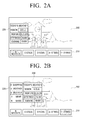
- FIGS. 2A to 2G illustrate various types of user interface which are displayed on a display apparatus according to exemplary embodiments of the present invention.
- a main screen 200 displays a broadcast program
- a widget menu window 210 displays icons for services generated according to their frequency of use.
- buttons such as [N weather], [E stock], [D news], [3-5 times], and [1-2 times] are arranged according to their frequency of use. That is, the most frequently used service is a service regarding [N weather], followed by [E stock] and [D news]. If [N weather] is selected, a first sub window 220 displays information regarding [N weather] as illustrated in FIG. 2A .
- Services which are not frequently used by the user are classified in [3-5 times] or [1-2 times]. That is, if [1-2 times] is selected, the first sub window 220 of FIG. 2B displays icons regarding services which have only been used once or twice by the user. Among the icons [D shopping], [A weather], [B weather], [A movie], and [N music] which are displayed on the first sub window 220, if the user selects [B weather], a second sub window 230 displays information regarding [B weather] as illustrated in FIG. 2B .
- the three most frequently used icons are displayed on the widget menu window 210, and the remaining services are classified into other two icons according to their frequency of use.
- the number of frequently used icons which are arranged in the widget menu window 210 can be set by the user.
- the number and frequency of use of icons for infrequently used services such as [3-5 times] and [1-2 times] can be set by the user.
- infrequently used services may be classified under [1-5 times] and [6-8 times] icons, or may be classified under [1-2 times], [3-4 times] and [5-6 times] icons.
- infrequently used services are managed under one or more icons
- infrequently used services as well as frequently used services can also be easily found. That is, icons of frequently used services are displayed on the widget menu window 210, and icons of infrequently used services are collected and displayed as lower menus under representative icons, so many icons for all of the services do not have to be displayed in the widget menu window 210. Therefore, the user can find an icon of a desired service easily.
- a widget menu window 210 of FIG. 2C icons of frequently used services such as [N weather], [E stock], and [D news] are displayed, and infrequently used services are classified under categories desired by the user, such as sport 211 and weather 212.
- a first sub window 220 displays icons regarding weather 212 as illustrated in FIG. 2C .
- [A weather], [B weather], [C weather], and [D weather] displayed in the first sub window 220 if the user selects [C weather] displayed in the first sub window 220, if the user selects [C weather], a second sub window 230 displays information regarding [C weather], as illustrated in FIG. 2C .
- the categories can be modified by the user as desired, and the number of categories displayed in the widget menu window 210 can also be set by the user. That is, FIG. 2C illustrates two categories as an example, but it is possible to have only one category, or three or more categories.
- a widget menu window 210 of FIG. 2D icons of frequently used services such as [N weather], [E stock], and [D news] are displayed, and infrequently used services are classified according to the user. That is, infrequently used services are classified under icons [user a] and [user b], as illustrated in FIG. 2D . If [user b] is selected, a first sub window 220 displays icons of services used by user b as illustrated in FIG. 2D .
- the icons displayed in the first sub window 220 are arranged according to their frequency of use by user b.
- [A weather] [A movie], [N music], and [D mail] which are displayed in the first sub window 220
- a second sub window 230 displays information regarding [A weather] as illustrated in FIG. 2D .
- Users can be distinguished by allocating a user identification and a password to each user in order for each user to log-in to use the display apparatus 100. Other methods can also be used to distinguish users.
- infrequently used services are classified according to their category or user, so infrequently used services as well as frequently used services can be easily found.
- a widget menu window 210 of FIG. 2E a plurality of icons [1], [2], [3], [4], and [5] are displayed, and each icon includes services classified according their frequency of use. For example, services having a frequency of use of 50% or more are classified in a lower menu under [1], services having a frequency of use of 30%-50% are classified in a lower menu under [2], services having a frequency of use of 10%-30% are classified in a lower menu under [3], services having a frequency of use of 2%-10% are classified in a lower menu under [4], and services having a frequency of use of 0%-2% are classified in a lower menu under [5].
- the number of services classified under each icon [1], [2], [3], [4], and [5] may be limited. That is, the three most frequently used services may be classified under [1], and services can be allocated to [2], [3], [4], and [5] in the same manner.
- a first sub window 220 displays icons [N weather], [E stock], and [D news] which are classified under [1].
- [N weather], [E stock], and [D news] which are displayed in the first sub window 220
- a second sub window 230 displays information regarding [N weather], as illustrated in FIG. 2E .
- FIG. 2F illustrates that a widget menu window 210 displays an OSD menu for setting the function of the display apparatus 100 as an example. That is, the widget menu window 210 can display frequently used icons of the OSD menu as well as icons of frequently used services. As illustrated in FIG. 2F , if [sound control] is selected, a first sub window 220 displays an OSD menu for setting sound.
- the widget menu window 210 of FIG. 2F may display [1-3 times] regarding the frequency of use as illustrated in FIGS. 2A and 2B , or display weather 213 regarding the category as illustrated in FIG. 2C .
- the widget menu window 210 may also display icons classified according to the user. As described above, the type of icons displayed on the widget menu window 210 can be set by the user, so the user can utilize the widget menu window 210 in diverse manners.
- a first icon 214, a second icon 215, a third icon 216, a fourth icon 217, and a fifth icon 218 are displayed.
- Information regarding each service is sequentially displayed on each icon as a slideshow. That is, as illustrated in FIG. 2G , information regarding the N weather service is displayed in the first icon 214 as a slideshow, information regarding the E stock service is displayed in the second icon 215 as a slideshow, and information regarding the D news service is displayed in the third icon 216 as a slideshow.
- the fourth icon 217 and the fifth icon 218 display infrequently used services as slide shows. For example, if the fourth icon 217 includes services used by user a as a lower menu, the fourth icon 217 sequentially displays icons corresponding to services used by user a as a slideshow. As another example, if the fifth icon 218 indicates a category regarding weather, the fifth icon 218 sequentially displays icons corresponding to services classified under weather as a slideshow.
- Various user interface display methods as described above can be set by the user, and the user can easily select a desired service through a menu arranged according to the frequency of use.
- FIG. 3 is a flowchart illustrating a method for displaying a user interface on a display apparatus according to an exemplary embodiment of the present invention.
- the control unit 190 updates information regarding the frequency of use (S310). That is, the control unit 190 checks the frequency of use of the selected service, and stores the checked frequency of use in the memory unit 170. Subsequently, the control unit 190 classifies the services according to the updated frequency of use (S320), and controls the UI generation unit 180 to generate icons corresponding to the classified services (S330).
- the control unit 190 controls the UI generation unit 180, the video processing unit 125, and the display unit 140 to display a user interface according to the set user interface display method (S360). If a user interface display method has not already been set (S340-N), a user interface display method is set (S350), and the control unit 190 displays a user interface according to the set user interface display method (S360).
- the user can easily utilize a desired service using icons generated according to the frequency of use of the service by directly setting a user interface display method.
- the user can easily select a desired service by displaying icons according to the frequency of use.
Landscapes
- Engineering & Computer Science (AREA)
- General Engineering & Computer Science (AREA)
- Theoretical Computer Science (AREA)
- Human Computer Interaction (AREA)
- Physics & Mathematics (AREA)
- General Physics & Mathematics (AREA)
- User Interface Of Digital Computer (AREA)
- Digital Computer Display Output (AREA)
Applications Claiming Priority (1)
| Application Number | Priority Date | Filing Date | Title |
|---|---|---|---|
| KR1020080100590A KR101564318B1 (ko) | 2008-10-14 | 2008-10-14 | 디스플레이장치 및 그의 사용자 인터페이스 표시방법 |
Publications (2)
| Publication Number | Publication Date |
|---|---|
| EP2177979A2 true EP2177979A2 (fr) | 2010-04-21 |
| EP2177979A3 EP2177979A3 (fr) | 2012-08-29 |
Family
ID=41455955
Family Applications (1)
| Application Number | Title | Priority Date | Filing Date |
|---|---|---|---|
| EP09166052A Ceased EP2177979A3 (fr) | 2008-10-14 | 2009-07-21 | Appareil d'affichage et son procédé d'affichage d'interface utilisateur |
Country Status (3)
| Country | Link |
|---|---|
| US (1) | US9032330B2 (fr) |
| EP (1) | EP2177979A3 (fr) |
| KR (1) | KR101564318B1 (fr) |
Cited By (1)
| Publication number | Priority date | Publication date | Assignee | Title |
|---|---|---|---|---|
| WO2012166071A1 (fr) * | 2011-05-31 | 2012-12-06 | Echostar Ukraine, L.L.C. | Appareil, systèmes et procédés d'optimisation d'interfaces graphiques utilisateur sur la base d'un historique de sélection d'utilisateur |
Families Citing this family (14)
| Publication number | Priority date | Publication date | Assignee | Title |
|---|---|---|---|---|
| KR101660746B1 (ko) * | 2010-08-24 | 2016-10-10 | 엘지전자 주식회사 | 이동 단말기 및 이것의 애플리케이션 지시자 설정 방법 |
| US8918719B2 (en) * | 2011-02-14 | 2014-12-23 | Universal Electronics Inc. | Graphical user interface and data transfer methods in a controlling device |
| KR101374385B1 (ko) * | 2012-03-07 | 2014-03-14 | 주식회사 팬택 | 단축 아이콘 제공 기능을 갖는 휴대용 디바이스 및 단축 아이콘 제공방법 |
| CN104461253B (zh) * | 2012-07-31 | 2018-06-19 | 北京奇虎科技有限公司 | 一种界面展示系统、方法和设备 |
| CN102981698A (zh) * | 2012-10-23 | 2013-03-20 | 天津三星通信技术研究有限公司 | 用于在便携式终端中管理应用的方法和设备 |
| US20140129499A1 (en) * | 2012-11-05 | 2014-05-08 | Numenta, Inc. | Value oriented action recommendation using spatial and temporal memory system |
| WO2014112362A1 (fr) * | 2013-01-18 | 2014-07-24 | パナソニック株式会社 | Procédé et programme de présentation de contenu |
| TWI696103B (zh) * | 2013-11-29 | 2020-06-11 | 日商半導體能源研究所股份有限公司 | 資料處理裝置及資料處理裝置的驅動方法 |
| WO2015089767A1 (fr) * | 2013-12-18 | 2015-06-25 | 宇龙计算机通信科技(深圳)有限公司 | Procédé de commande d'affichage d'icône d'application et terminal |
| KR20170031333A (ko) * | 2015-09-11 | 2017-03-21 | 주식회사 현대아이티 | 사용패턴의 통계적 처리를 통한 gui가 표시된 디스플레이 장치 및 제어 방법 |
| CN106657559A (zh) * | 2015-11-03 | 2017-05-10 | 瓦戈科技(上海)有限公司 | 手机菜单的显示方法 |
| KR102735717B1 (ko) * | 2017-01-13 | 2024-11-29 | 삼성전자주식회사 | 디스플레이장치 및 그 제어방법 |
| JP7370745B2 (ja) * | 2019-07-03 | 2023-10-30 | キヤノン株式会社 | 画像処理装置、画像処理装置の制御方法、およびプログラム |
| US20230065355A1 (en) * | 2021-08-24 | 2023-03-02 | Atlis Motor Vehicles, Inc. | Systems and Methods for a Control System for a Vehicle |
Citations (1)
| Publication number | Priority date | Publication date | Assignee | Title |
|---|---|---|---|---|
| US20070220441A1 (en) * | 2005-01-18 | 2007-09-20 | Apple Computer, Inc. | Systems and methods for organizing data items |
Family Cites Families (16)
| Publication number | Priority date | Publication date | Assignee | Title |
|---|---|---|---|---|
| US5689667A (en) * | 1995-06-06 | 1997-11-18 | Silicon Graphics, Inc. | Methods and system of controlling menus with radial and linear portions |
| EP1107097A4 (fr) | 1998-08-24 | 2007-10-17 | Hitachi Ltd | Systeme, dispositif et procede d'affichage de traitement d'informations multimedia |
| US7240296B1 (en) * | 2000-02-11 | 2007-07-03 | Microsoft Corporation | Unified navigation shell user interface |
| KR100368453B1 (ko) | 2000-08-23 | 2003-01-24 | 엘지전자 주식회사 | 사용자 인터페이스를 제공하는 기기의 메뉴 재구성 방법및 장치 |
| JP4140181B2 (ja) * | 2000-09-08 | 2008-08-27 | 富士フイルム株式会社 | 電子カメラ |
| US6900835B2 (en) * | 2002-08-23 | 2005-05-31 | Hewlett-Packard Development Company, L.P. | Method and apparatus for prioritizing menu items of an electronic device |
| KR20040083797A (ko) | 2003-03-25 | 2004-10-06 | 엘지전자 주식회사 | 디지털 tv에서 선호 메뉴 항목 디스플레이 방법 |
| US7343567B2 (en) * | 2003-04-25 | 2008-03-11 | Microsoft Corporation | System and method for providing dynamic user information in an interactive display |
| DE10360655A1 (de) * | 2003-12-23 | 2005-07-21 | Daimlerchrysler Ag | Bediensystem für ein Fahrzeug |
| JP4799068B2 (ja) * | 2005-07-26 | 2011-10-19 | キヤノン株式会社 | テレビ受信装置及びその表示制御方法 |
| US7707514B2 (en) * | 2005-11-18 | 2010-04-27 | Apple Inc. | Management of user interface elements in a display environment |
| US20080120324A1 (en) * | 2006-11-17 | 2008-05-22 | X.Com, Inc. | Computer-implemented systems and methods for displaying media assets |
| KR20080077798A (ko) | 2007-02-21 | 2008-08-26 | 삼성전자주식회사 | 단말의 메뉴 표시 방법 |
| US8543933B2 (en) * | 2008-02-21 | 2013-09-24 | Emtrace Technologies Usa, Inc. | Slideshow display of images for user-defined groups of applications |
| CN101677338B (zh) * | 2008-09-18 | 2013-06-05 | 深圳富泰宏精密工业有限公司 | 快捷列表排序系统及方法 |
| US9170708B2 (en) * | 2010-04-07 | 2015-10-27 | Apple Inc. | Device, method, and graphical user interface for managing folders |
-
2008
- 2008-10-14 KR KR1020080100590A patent/KR101564318B1/ko not_active Expired - Fee Related
-
2009
- 2009-07-10 US US12/501,134 patent/US9032330B2/en active Active
- 2009-07-21 EP EP09166052A patent/EP2177979A3/fr not_active Ceased
Patent Citations (1)
| Publication number | Priority date | Publication date | Assignee | Title |
|---|---|---|---|---|
| US20070220441A1 (en) * | 2005-01-18 | 2007-09-20 | Apple Computer, Inc. | Systems and methods for organizing data items |
Cited By (1)
| Publication number | Priority date | Publication date | Assignee | Title |
|---|---|---|---|---|
| WO2012166071A1 (fr) * | 2011-05-31 | 2012-12-06 | Echostar Ukraine, L.L.C. | Appareil, systèmes et procédés d'optimisation d'interfaces graphiques utilisateur sur la base d'un historique de sélection d'utilisateur |
Also Published As
| Publication number | Publication date |
|---|---|
| EP2177979A3 (fr) | 2012-08-29 |
| KR20100041421A (ko) | 2010-04-22 |
| KR101564318B1 (ko) | 2015-11-02 |
| US9032330B2 (en) | 2015-05-12 |
| US20100095227A1 (en) | 2010-04-15 |
Similar Documents
| Publication | Publication Date | Title |
|---|---|---|
| US9032330B2 (en) | Display apparatus and user interface display method thereof | |
| US8819588B2 (en) | Display apparatus and method of displaying user interface thereof | |
| KR101600905B1 (ko) | 방송수신장치 및 그 제어방법 | |
| US20100122207A1 (en) | Broadcast display apparatus and control method thereof | |
| EP2242260A1 (fr) | Procédé pour le réglage de canaux et appareil de réception de diffusion l'utilisant | |
| EP2141919A1 (fr) | Appareil de réception de diffusion et son procédé de fonctionnement | |
| US9277277B2 (en) | Method and apparatus for controlling display of information on a television | |
| US20130125173A1 (en) | Signal processing apparatus, signal processing system including the same, and control method of the same | |
| US20100007792A1 (en) | Method for displaying on-screen-display (osd) items and display apparatus applying the same | |
| US20160037202A1 (en) | Control device, broadcast receiver, method for controlling broadcast receiver, and method for providing service | |
| JP2006060823A (ja) | 同時間帯の放送番組情報をカイドするデジタル放送受信用端末機及びその方法 | |
| US8667534B2 (en) | Method for performing broadcast channel zapping and broadcast receiving apparatus applying the same | |
| EP2026570B1 (fr) | Récepteur de diffusion et dispositif d'entrée d'utilisateur disposant d'une fonction de correspondance, et son procédé | |
| EP2026572A1 (fr) | Procédé de fourniture d'interface graphique utilisateur pour la sélection d'un programme diffusé et appareil AV correspondant | |
| US20060290823A1 (en) | Remote-control system, remote controller, and display-control method | |
| EP2017781A1 (fr) | Procédé pour fournir des informations de stock et appareil de réception de diffusion l'utilisant | |
| KR20150081040A (ko) | 멀티미디어 장치 및 그의 화면 분할 방법 | |
| US20100131981A1 (en) | Method for displaying a widget and a broadcast receiving apparatus thereof | |
| US20080115165A1 (en) | Broadcast receiving apparatus and method for displaying broadcast channel list for each region | |
| CN100546372C (zh) | 数字广播系统及其控制方法 | |
| EP2211539A2 (fr) | Procédé d'affichage d'un objet fenêtre et appareil de réception de diffusion correspondant | |
| KR100449722B1 (ko) | 방송 수신기의 방송 정보 디스플레이 제어 방법 및 장치 | |
| KR101600922B1 (ko) | 방송수신장치 및 그 제어방법 | |
| US20070111660A1 (en) | Mobile communication terminal capable of performing other functions while outputting DMB to external AV device | |
| KR101739406B1 (ko) | 영상표시장치 및 그 동작방법 |
Legal Events
| Date | Code | Title | Description |
|---|---|---|---|
| PUAI | Public reference made under article 153(3) epc to a published international application that has entered the european phase |
Free format text: ORIGINAL CODE: 0009012 |
|
| AK | Designated contracting states |
Kind code of ref document: A2 Designated state(s): AT BE BG CH CY CZ DE DK EE ES FI FR GB GR HR HU IE IS IT LI LT LU LV MC MK MT NL NO PL PT RO SE SI SK SM TR |
|
| AX | Request for extension of the european patent |
Extension state: AL BA RS |
|
| PUAL | Search report despatched |
Free format text: ORIGINAL CODE: 0009013 |
|
| AK | Designated contracting states |
Kind code of ref document: A3 Designated state(s): AT BE BG CH CY CZ DE DK EE ES FI FR GB GR HR HU IE IS IT LI LT LU LV MC MK MT NL NO PL PT RO SE SI SK SM TR |
|
| AX | Request for extension of the european patent |
Extension state: AL BA RS |
|
| RIC1 | Information provided on ipc code assigned before grant |
Ipc: G06F 3/048 20060101AFI20120720BHEP |
|
| RAP1 | Party data changed (applicant data changed or rights of an application transferred) |
Owner name: SAMSUNG ELECTRONICS CO., LTD. |
|
| 17P | Request for examination filed |
Effective date: 20130227 |
|
| 17Q | First examination report despatched |
Effective date: 20130419 |
|
| APBK | Appeal reference recorded |
Free format text: ORIGINAL CODE: EPIDOSNREFNE |
|
| APBN | Date of receipt of notice of appeal recorded |
Free format text: ORIGINAL CODE: EPIDOSNNOA2E |
|
| APBR | Date of receipt of statement of grounds of appeal recorded |
Free format text: ORIGINAL CODE: EPIDOSNNOA3E |
|
| APAF | Appeal reference modified |
Free format text: ORIGINAL CODE: EPIDOSCREFNE |
|
| APBT | Appeal procedure closed |
Free format text: ORIGINAL CODE: EPIDOSNNOA9E |
|
| STAA | Information on the status of an ep patent application or granted ep patent |
Free format text: STATUS: THE APPLICATION HAS BEEN REFUSED |
|
| 18R | Application refused |
Effective date: 20210423 |