EP2184673A1 - Informationsverarbeitungsvorrichtung, Informationsverarbeitungsverfahren und Programm - Google Patents
Informationsverarbeitungsvorrichtung, Informationsverarbeitungsverfahren und Programm Download PDFInfo
- Publication number
- EP2184673A1 EP2184673A1 EP09252505A EP09252505A EP2184673A1 EP 2184673 A1 EP2184673 A1 EP 2184673A1 EP 09252505 A EP09252505 A EP 09252505A EP 09252505 A EP09252505 A EP 09252505A EP 2184673 A1 EP2184673 A1 EP 2184673A1
- Authority
- EP
- European Patent Office
- Prior art keywords
- touch
- operators
- unit
- coordinate system
- operating
- Prior art date
- Legal status (The legal status is an assumption and is not a legal conclusion. Google has not performed a legal analysis and makes no representation as to the accuracy of the status listed.)
- Withdrawn
Links
Images


Classifications
-
- G—PHYSICS
- G06—COMPUTING OR CALCULATING; COUNTING
- G06F—ELECTRIC DIGITAL DATA PROCESSING
- G06F3/00—Input arrangements for transferring data to be processed into a form capable of being handled by the computer; Output arrangements for transferring data from processing unit to output unit, e.g. interface arrangements
- G06F3/01—Input arrangements or combined input and output arrangements for interaction between user and computer
- G06F3/048—Interaction techniques based on graphical user interfaces [GUI]
- G06F3/0487—Interaction techniques based on graphical user interfaces [GUI] using specific features provided by the input device, e.g. functions controlled by the rotation of a mouse with dual sensing arrangements, or of the nature of the input device, e.g. tap gestures based on pressure sensed by a digitiser
- G06F3/0488—Interaction techniques based on graphical user interfaces [GUI] using specific features provided by the input device, e.g. functions controlled by the rotation of a mouse with dual sensing arrangements, or of the nature of the input device, e.g. tap gestures based on pressure sensed by a digitiser using a touch-screen or digitiser, e.g. input of commands through traced gestures
-
- G—PHYSICS
- G06—COMPUTING OR CALCULATING; COUNTING
- G06F—ELECTRIC DIGITAL DATA PROCESSING
- G06F3/00—Input arrangements for transferring data to be processed into a form capable of being handled by the computer; Output arrangements for transferring data from processing unit to output unit, e.g. interface arrangements
- G06F3/01—Input arrangements or combined input and output arrangements for interaction between user and computer
- G06F3/048—Interaction techniques based on graphical user interfaces [GUI]
- G06F3/0487—Interaction techniques based on graphical user interfaces [GUI] using specific features provided by the input device, e.g. functions controlled by the rotation of a mouse with dual sensing arrangements, or of the nature of the input device, e.g. tap gestures based on pressure sensed by a digitiser
- G06F3/0488—Interaction techniques based on graphical user interfaces [GUI] using specific features provided by the input device, e.g. functions controlled by the rotation of a mouse with dual sensing arrangements, or of the nature of the input device, e.g. tap gestures based on pressure sensed by a digitiser using a touch-screen or digitiser, e.g. input of commands through traced gestures
- G06F3/04883—Interaction techniques based on graphical user interfaces [GUI] using specific features provided by the input device, e.g. functions controlled by the rotation of a mouse with dual sensing arrangements, or of the nature of the input device, e.g. tap gestures based on pressure sensed by a digitiser using a touch-screen or digitiser, e.g. input of commands through traced gestures for inputting data by handwriting, e.g. gesture or text
-
- G—PHYSICS
- G06—COMPUTING OR CALCULATING; COUNTING
- G06F—ELECTRIC DIGITAL DATA PROCESSING
- G06F2203/00—Indexing scheme relating to G06F3/00 - G06F3/048
- G06F2203/048—Indexing scheme relating to G06F3/048
- G06F2203/04808—Several contacts: gestures triggering a specific function, e.g. scrolling, zooming, right-click, when the user establishes several contacts with the surface simultaneously; e.g. using several fingers or a combination of fingers and pen
Definitions
- the present invention relates to an information processing apparatus, an information processing method and a program.
- One of display devices is a touch screen (touch panel) provided with an electric capacitance type touch sensor or a resistance film type touch sensor at the surface of a display unit of a liquid crystal display or the like.
- a touch screen touch panel
- an electric capacitance type touch sensor or a resistance film type touch sensor at the surface of a display unit of a liquid crystal display or the like.
- the present invention has been made in view of the foregoing issues, and it is desirable to provide a novel and improved information processing apparatus, information processing method and program capable of performing a desired operation with use of a touch screen panel without visually recognizing the display.
- an information processing apparatus including a touch operating unit touch-operating by operators, a detecting unit for detecting a touch state of each of the operators in touch with the touch operating unit, a coordinate system determining unit for determining a coordinate system of the touch operating unit in accordance with an operating direction of the operators detected by the detecting unit, a relative position calculating unit for calculating a relative position of each of the two of more operators from a touch position of the two or more operators detected by the detecting unit by an additional touch operation by the two or more operators and the coordinate system of the touch operating unit determined by the coordinate system determining unit, and a command issuing unit for issuing a predetermined operation command based on the touch state of each of the two or more operators detected by the detecting unit at the relative position of the two or more operators calculated by the relative position calculating unit.
- the operating state of each of the operators in touch with the touch operating unit is detected to determine the coordinate system of the touch operating unit in accordance with the operating direction of the operator. Then, the touch positions of two or more operators detected by the detecting unit by additional touch operations by the two or more operators and the determined coordinate system are used to calculate relative positions of the two or more operators. And the touch states of the two or more operators at the relative positions are used as a basis so as to issue a predetermined operation command.
- the operating directions of the operators are judged so that the user can perform desired operations without paying attention to the orientation of the housing.
- the user can perform desired operations with the touch screen panel without visually recognizing the housing or display of the information processing apparatus. For example, when the information processing apparatus is placed in the bag or pocket, the user can perform desired operations without taking it out of the pocket or bag.
- the coordinate system determining unit may determine the coordinate system of the touch operating unit on a condition where a y axis is a direction in parallel with the operating direction of the operator detected by the detecting unit and an x axis is a direction perpendicular to the operating direction.
- the coordinate system determining unit may determine the coordinate system of the touch operating unit when the detecting unit detects the two or more operators which are in touch with the touch operating unit, spaced with a predetermined distance away from each other and moved by a predetermined distance on the touch operating unit.
- the relative position calculating unit may calculate the relative position of each of the two or more operators from the touch position of the two or more operators detected by the detecting unit by the additional touch operation of the two or more operators after the coordinate system of the touch operating unit is determined by the coordinate system determining unit.
- the information processing apparatus may include a mode selecting unit for selecting a first mode in which a y axis is a vertical direction of a housing of the information processing apparatus and an x axis is a horizontal direction of the housing or a second mode in which a y axis is a direction in parallel with an operating direction of each of the operator and an x axis is a direction perpendicular to the operating direction.
- the mode selecting unit selects the second mode when the detecting unit detects the two or more operators which are in touch with the touch operating unit, spaced with a predetermined distance away from each other and moved by a predetermined distance on the touch operating unit.
- the coordinate system determining unit may determine the coordinate system of the touch operating unit in accordance with the operating direction of each of the two or more operators, and the relative position calculating unit calculates the relative position of the two or more operators based on the coordinate system of the touch operating unit determined by the coordinate system determining unit and the touch position of the two or more operators detected by the detecting unit after the second mode is selected by the mode selecting unit.
- the detecting unit may detect the touch state including a touch order and a number of touches of the two or more operators and the command issuing unit issues the predetermined operation commands in accordance with the touch order and the number of touches of the two or more operators.
- an information processing method including the steps of: detecting a touch state of each of operators which are in touch with a touch operating unit; determining a coordinate system of the touch operating unit in accordance with an operating direction of each of the detected operators; calculating a relative position of each of the two or more operators from a touch position of the two or more detected operators by the detecting unit by an additional touch operation by the two or more operators and the coordinate system of the touch operating unit determined by the coordinate system detecting unit; and issuing a predetermined operation command based on the touch state of each of the two or more operators detected at the relative position of the two or more operators calculated.
- a program for causing a computer to function as an information processing apparatus including a touch operating unit touch-operating by operators; a detecting unit for detecting a touch state of each of the two or more operators in touch with the touch operating unit; a coordinate system determining unit for determining a coordinate system of the touch operating unit in accordance with an operating direction of the operators detected by the detecting unit; a relative position calculating unit for calculating a relative position of each of the two or more operators from a touch position of the two or more operators detected by the detecting unit by an additional touch operation by the two or more operators and the coordinate system of the touch operating unit determined by the coordinate system determining unit; and a command issuing unit for issuing a predetermined operation command based on the touch state of each of the two or more operators detected by the detecting unit at the relative position of the two or more operators calculated by the relative position calculating unit.
- the invention relates to an information processing apparatus, an information processing method and a program capable of performing any operations with use of a touch screen.
- a touch screen (touch panel) provided with an electric capacitance type touch sensor or a resistance film type touch sensor at the surface of a display unit of a liquid crystal display or the like.
- an electric capacitance type touch sensor or a resistance film type touch sensor at the surface of a display unit of a liquid crystal display or the like.
- the touch screen is used not only to receive input of line drawings but also to display a menu screen image or change screen images in accordance with the gesture by a finger detected by the touch screen.
- This structure can improve user's usability in inputting with use of the touch screen.
- a device equipped with a hardware button can be operated for a desired operation by groping the hardware button even in the bag or pocket after it is unlocked. Such an operation is performed in the following process.
- a hardware button is assigned to each of the functions like play, fast-forward, step forward, rewind, step backward (hereinafter also referred to as "basic functions) in music device. Therefore, these are operated without visually recognizing the device even on the desk or table.
- basic functions the operation performed without visual recognition of the device.
- blind operation the device needs to be held oriented fixedly and it is difficult to grope the button by fingers.
- the device using the touch screen needs to visually recognize the display and check the position of the button for operation. For this reason, the blind operation as described above is very difficult. Besides, for often used basic functions, there is need to hold the device, visually recognize the display, unlock it and visually recognize the display again. Hence, for the device using the touch screen, the user has to visually recognize the display even when he uses basic functions, which causes an issue of burden on the user's operation.
- a separate small-sized operating device is mounted on the device and the basic functions are performed by this small-sized operating device.
- the device has to be attached to a cloth or the like and the small-sized operating device has to be visually recognized and operated.
- the device when any operation is made with use of the touch screen in the bag or the pocket, the device needs to be taken out of the bag pr pocket to visually recognize the display, which makes the operation inconvenient. Further, when the device is operated with determined gesture, the device needs to be held in the fixed orientation.
- the information processing apparatus 10 according to the embodiment of the present invention has been created.
- the information processing apparatus 10 according to the present embodiment it becomes possible to perform a desired operation with use of the touch screen panel without visually recognizing the display.
- the information processing apparatus 10 is described by way of example of a small-sized audio player or media player shown in FIG. 1 or a PDA (Personal Digital Assistant), a portable phone.
- the present invention is not limited to these and may be applicable to a personal computer or the like.
- the information processing apparatus is structured integral with a display device such as a display.
- the present invention is not limited to this and the information processing apparatus 10 may be structured separate from the display device.
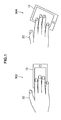
- the user can touch the touch screen with use of two or more fingers while holding the information processing apparatus 10 with one hand.
- the orientations of the fingers are different depending on the user's ways of holding the information processing apparatus 10. In other words, in the holding example 502, the orientation of the user's fingers is parallel with the vertical orientation of the housing of the information processing apparatus 10, while in the holding example 504, the orientation of the user's fingers is not vertical to nor parallel with the housing of the information processing apparatus 10.
- the user When the information processing apparatus 10 is in the bag or pocket, the user holds the information processing apparatus 10 as shown in the holding example 502 or holding example 504. If the information processing apparatus 10 needs to be held in the fixed orientation, the user has to take the information processing apparatus 10 out of the bag or pocket and check the direction of the housing and display. However, for the information processing apparatus 10 according to this embodiment, it becomes possible to perform a desired operation with use of the touch screen panel without holding the information processing apparatus 10 in the fixed orientation.
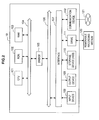
- FIG. 2 is a block diagram showing the hardware configuration of the information processing apparatus 10 according to the present embodiment.
- the information processing apparatus 10 has a CPU (Central Processing Unit) 101, a ROM (Read Only Memory) 102, a RAM (Random Access Memory) 103, a host bus 104, a bridge 105, an external bus 106, an interface 107, an input device 108, an output device 109, a storage device (HDD) 110, a drive 111 and a communication device 112.
- a CPU Central Processing Unit
- ROM Read Only Memory
- RAM Random Access Memory
- the CPU 101 functions as an operating device or a control device and controls the entire operation within the information processing apparatus 10 in accordance with various programs. Besides, the CPU 101 may be a micro processor.
- the ROM 102 stores programs used by the CPU 101, operation parameters and the like.
- the RAM 103 primarily stores programs used for execution of the CPU 101 and parameters that changed appropriately in execution thereof. These are connected to each other by the host bus 104 structured of a CPU bus or the like.
- the host bus 104 is connected to the external bus 106 such as a PCI bus (Peripheral Component Interconnect/Interface) via the bridge 105.
- the host bus 104, the bridge 105 and the external bus 106 are not necessarily structured separately and may be embodied in one bus having functions of these buses.
- the input device 108 is structured to have inputting means for user's inputting information, such as a mouse, a keyboard, a touch screen, a button, a microphone, switch and a lever and an input control circuit for generating an input signal based on user's input and outputting the signal to the CPU 101.
- the user of the information processing apparatus 10 operates the input device 108 thereby to input various data into the information processing apparatus 10 and give instructions of processing operation.
- the user's operation is mainly accepted by detecting an operator such as a user's finger by the touch screen.
- the touch screen has two functions of display and input.
- the touch screen according to the present embodiment is able not only to receive input of line drawings by operation of user's finger or the like but also to detect gesture by two or more user fingers.
- the touch screen is an input device capable of detecting two or more, plural touch points.
- any way can be adopted to detect the positional information of the operators in the display, such as a resistance film type using a metal thin film which forms a transparent electrode and a electric capacitance system for detecting the position by detecting change in electric capacitance between the finger end and the conducting film.
- the output device 109 is structured to include, for example, a display device such as a CRT (Cathode Ray Tube) display device, an LCD (Liquid Crystal Display) device, an OLED (Organic Light Emitting Display) device and a lamp, and an audio output device such as a speaker and a headphone.
- the output device 109 for example, outputs a played content.
- the display device displays various information such as menu screen image and played image data in the form of text or image, while the audio output device converts the played audio data and the like into sound to output the same.
- the storage device 110 is a device for data storing and is structured as an example of storage of the information processing apparatus 10 according to the present embodiment.
- the storage device 110 may include a recording medium, a recording device for recording data in the recording medium, a reading device for reading the date from the recording medium, a deleting device for deleting the data recorded in the recording medium, and the like.
- the storage device 110 is structured to include, for example, a HDD (Hard Disk Drive). This storage device 110 drives the hard disk and stores programs executed by the CPU 101 and various data.
- HDD Hard Disk Drive
- the drive 111 is a reader/writer for recording media and is provided integral with the information processing apparatus 10 or external to the information processing apparatus 10.
- the drive 111 reads information recorded in the removable recording medium 120 mounted thereon, such as a magnetic disk, an optical disk, a magnet-optical disk, semiconductor memory or the like and output the information to the RAM 103.
- the communication device 112 is a communication interface structured to include, for example, a communication device for connecting to the communication network 121 or the like. Besides, the communication device 112 may be either of a communication device compatible with wireless LAN (Local Area Network), a wireless USB compatible communication device and a wire communication device for cable communication. This communication device 112 performs transmission and reception of various data with the external device via the communication network 121.
- wireless LAN Local Area Network
- wireless USB compatible communication device Wireless USB compatible communication device
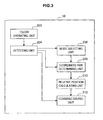
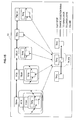
- FIG. 3 is a block diagram showing the functional structure of the information processing apparatus 10 according to the present embodiment.
- the information processing apparatus 10 according to the present embodiment has, mainly, a touch operating unit 202, a detecting unit 204, a mode selecting unit 206, a coordinate system determining unit 208, a relative position calculating unit 210, a command issuing unit 212 and the like.
- the touch operating unit 202 and the detecting unit 204 are examples of the above-mentioned touch screen.
- the touch operating unit 202 is a display unit of the touch screen and is touch-operated by at least two operators.
- the at least two operators may be, for example, user's fingers, hands, stylus or the like. However, the following description is made by way of two or more user fingers as the operators.
- the detecting unit 204 has a function of detecting the touch states of the two or more operators that are in touch with the touch operating unit 202.
- the detecting unit 204 provides the detected touch states of the two or more operators to the mode selecting unit 206 or the coordinate system determining unit 208.
- the touch states of the two or more operators detected by the detecting unit 204 include touch order of the two or more operators, touch positions, numbers of touches, touch times and the like.
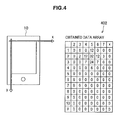
- FIG. 4 the touch states of the two or more operators detected by the detecting unit 204 are described.
- FIG. 4 is an explanatory view for explaining the touch states of the two or more operators detected by the detecting unit 204.
- the detecting unit 204 obtains the number of touches (touch time), positions of the touch points of the operators where the y axis is the vertical direction of the housing of the information processing apparatus 10 and the x axis is the horizontal direction of the housing, and the like, and then obtains data array 402.
- the numeric values in the data array 402 indicate touch strength of the operator and a higher numeric value shows stronger touch.
- the touch state can be detected including the number of touches of the operators, touch center and the like by obtaining twenty data pieces per second, for example.
- the mode selecting unit 206 provided with detection results from the detecting unit 204 performs mode selection based on the detected touch states, from the blind mode or normal mode.
- the blind mode is a mode for a user operating without visually recognizing the display and the housing of the information processing apparatus 10. Specifically, it is a mode in which the y axis is a direction parallel to the operating direction of the two or more operators and the x axis is a direction vertical to the operating direction. This mode is an example of the second mode of the present invention.
- the normal mode is a mode for a user operating while visually recognizing the housing and display of the information processing apparatus 10. Specifically, this is a mode in which the y axis is the direction vertical to the housing of the information processing apparatus 10 and the x axis is a direction horizontal to the housing.
- This mode is an example of the first mode of the present invention.
- the mode selecting unit 206 can determine it the blind mode. The mode selecting unit 206 notifies the coordinate system determining unit 208 of whether the mode is normal mode (first mode), the blind mode (second mode) or not.
- the coordinate system determining unit 208 has a function of determining a coordinate system of the touch operating unit 202 in accordance with the operating direction of the two or more operators detected by the detecting unit 204.
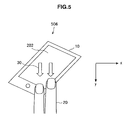
- the coordinate system determining unit 208 may be structured to determine the coordinate system of the touch operating unit 202 when it receives a notice of the blind mode from the mode selecting unit 206. Determination of the coordinate system of the touch operating unit 202 by the coordinate system determining unit 208 is described with reference to FIG. 5 .
- FIG. 5 is an explanatory view for explaining determination of a coordinate system of the touch operating unit 202 by the coordinate system determining unit 208.
- two or more operators 20, that is, two user fingers move in the direction shown by the touch direction 30 on the touch operating unit 202.
- the coordinate system determining unit 208 determines the coordinate system by setting the direction parallel to the operating direction 30 of the operators 20 to the y axis and the direction vertical to the operating direction 30 to the x axis.
- the relative position calculating unit 210 has a function of determining a relative position of the two or more operators from the operating positions of the two or more operators detected by the detecting unit 204 and the coordinate system of the touch operating unit 202 determined by the coordinate system determining unit 208.
- the relative position calculating unit 210 may be structured to calculate the relative positions of the two or more operators from the touch positions of the two or more operators detected by the detecting unit 204 after the coordinate system of the touch operating unit 202 is determined by the coordinate system determining unit 208.
- the relative position calculating unit 210 may be structured to calculate the relative positions of the two or more operators from the touch positions of the two or more operators detected by the detecting unit 204 and coordinate system of the touch operating unit 202 determined by the coordinate system determining unit 208 after the blind mode (second mode) is selected by the mode selecting unit 206.
- the command issuing unit 212 has a function of issuing a predetermined operation command based on the touch state of the two or more operators detected by the detecting unit 204 at the relative positions of the two or more operators calculated by the relative position calculating unit 210.
- the command issuing unit 212 specifies the command for operating the predetermined function of the information processing apparatus 10 from combination of the relative positions of the two or more operators and the touch states of the operators.
- the predetermined function of the information processing apparatus 10 may be music replay, stop, fast-forward, rewind, step forward, step backward and other functions in the case where the information processing apparatus 10 is a device having a music replay function.
- the command issued by the command issuing unit 212 will be described in detail later.
- FIG. 6 is a flowchart for explaining the information processing method of the information processing apparatus 10.
- the detecting unit 204 detects the touch state of the two or more operators (S102). Then, the mode selecting unit 206 determines whether it is the normal mode or blind mode (S104).
- S104 normal mode or blind mode
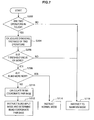
- FIG. 7 is a flowchart for explaining the determination processing of the blind mode.
- the operators are two operators.
- the detecting unit 204 determines whether the two touch points of the two operators are in touch with the touch operating unit 202 or not (S202). In the step S202, if it is determined that the two touch points of the two operators are not in touch with the touch operating unit 202, the current mode is maintained (S216).
- the dragging distances of the two touch points are calculated (S204).
- the dragging distances calculated in the step S204 are moving distance of the two operators on the touch operating unit 202. Then, it is determined whether or not the dragging distance calculated in the step S204 is equal to or more than a threshold value (S206).
- the threshold value in the step S206 is, for example, 30 mm around, however, this value may be changed in accordance with the size of the housing of the information processing apparatus 10.
- the mode is switched by the processing of the step 208 and the steps thereafter. That is, when the dragging distance of the two operators is equal to or more than the threshold value, the operation of the two operators means mode switching instructions.
- the mode switching instructions are that the normal mode is to be switched to the blind mode and the blind mode is to be switched to the normal mode.
- step S206 when the dragging distance is equal to or more than the threshold value, it is determined whether the current mode is the blind mode or not (S208). When the dragging distance is the threshold value or less in the step S206, the current mode is maintained (S216).
- step S208 if it is determined that the current mode is the blind mode, the normal mode instructions are given to switch to the normal mode (S214). On the other hand, in the step S208, if it is determined that the current mode is not the blind mode, the coordinate system base of the blind mode is calculated to switch to the blind mode (S210). Then, the blind input mode is instructed to determine the coordinate system base of the touch operating unit 202 (S212).
- the mode selecting unit 206 determines that the current mode is the blind mode when the detected result of the touch state in the step S102 shows the two or more operators are in touch and positioned with a predetermined space away from each other and they are moved by a predetermined distance on the touch operating unit.
- the coordinate system determining unit 208 determines the coordinate system of the touch operating unit 202 (S 106). Then, the relative position calculating unit 210 uses the coordinate system of the touch operating unit 202 determined in the step S106 and the touch positions of the two or more operators to determine the relative positions of the two or more operators (S108). In the step S104, it is determined the mode is not the blind mode, that is, when it is determined the current mode is the normal mode, the touch positions of the two or more operators are calculated as usual assuming that the y axis is the vertical direction of the housing and the x axis is the horizontal direction (S110).
- the detecting unit 204 detects the touch states of the two or more operators (S112).
- the command issuing unit 212 issues a predetermined operation command based on the touch states detected in the step S 112 at the relative positions calculated in the step S108.
- the predetermined operation command is issued based on the touch states at the position calculated in the step S110 (S114).
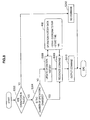
- FIG. 8 is a flowchart showing a flow from the processing of detecting the touch states of the operators to the processing of issuing the command.
- S302 it is determined whether the operators are in touch with the touch operating unit 202 or not.
- S304 it is determined whether or not the number of the operators is changed.
- the command is not output (S312).
- step S304 if it is determined that the number of operators is not changed, the operation history of the operation history data 402 is updated (S306).
- step S304 if it is determined that the number of operators in touch with the touch operating unit 202 is changed, the command is recognized based on the operation history data (S308). Then, the command recognized in the step S308 is output (S310).
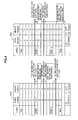
- FIG. 9 is an explanatory view for explaining the operation history data 402.
- an operation history data example 410 the time in which an index finger (first operator) is in touch is set to the start 1. Then, a predetermined time later, a middle finger (second operator) is in touch, and the time in which the touch time of the middle finger is equal to or less than a predetermined time is set to the start 2.
- the command "step forward" is issued at the start 2. That is, when the number of fingers in touch is changed like 1, 2 and then 1, the command "step forward” is issued.
- an operation history data example 412 is explained.
- the time in which an index finger (first operator) is in touch is set to the start 1.
- a predetermined time later, a middle finger (second operator) is in touch is set to the start 2.
- the command "fast-forward" is issued during the time period when the middle finger is in touch.
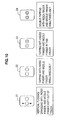
- FIG. 10 is an explanatory view for explaining examples of touch operation by two operators.
- the two operators are described as an index finger and a middle finger.
- the touch operation example 21 shows a state where the index finger is used to flick and drag the touch surface and the middle finger is not in touch.
- flick/drag means an action of dragging and flicking the touch surface by a finger.
- the touch operation example 22 shows the index finger and the middle finger are used to tap the touch surface simultaneously.
- tapping is an action of tapping or patting the touch surface with a finger.
- the touch operation example 23 shows the touch surface is tapped sequentially with the index finger and the middle finger, in this order.
- the touch operation example 24 shows the touch surface is double-tapped simultaneously by the index finger and the middle finger.
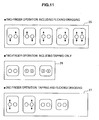
- FIG. 11 is an explanatory view for explaining examples of touch operation by two fingers.
- the touch operation example 25 shows the two fingers are used to flick and drag the touch surface.
- the index finger and the middle finger are mode horizontally alternately, or only the index finger is used to flick and drag the screen while the middle finger is in touch.
- the middle finger and the index finger may be simultaneously used to flick and drag the screen.
- the touch operating example 26 shows tapping is only performed with the two fingers.
- the index finger and the middle finger are used to tap the screen simultaneously or alternately.
- the touch operation example 27 shows the touch surface is tapped and flicked/dragged with either of the index finger and the middle finger.
- the index finger or the middle finger is only used to flick/drag the screen or the index finger or the middle finger is only used to tap the screen.
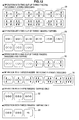
- FIG. 12 is an explanatory view for explaining examples of touch operation by three fingers.
- the touch operation example 28 shows the touch surface is flicked/dragged with any two of the three fingers of the index finger, the middle finger and the ring finger. For example, flicking/dragging with the middle finger and tapping with the ring finger may be performed simultaneously, or the middle finger and the ring finger are used simultaneously for flicking and dragging.
- the contact operation example 29 shows tapping of the touch surface with any two of three fingers.
- the index finger and the ring finger are used to tap the screen simultaneously or the middle finger and the ring finger are used to tap the screen one by one.
- the touch operation example 30 shows the touch surface is flicked/dragged or tapped with any one of three fingers. For example, only the index finger is used to tap the screen or ring finger is only used to flick/drag the screen.
- the touch operation example 31 shows flicking/dragging is performed with any of three fingers.
- only the index finger is used to flick/drag the surface while the middle and ring fingers are in touch with the touch surface.
- the middle and ring fingers are used to flick/drag the surface while the index finger is in touch with the touch surface.
- the touch operation example 32 and the touch operation example 33 show a state where the touch surface is tapped by three fingers.
- the index finger and the middle finger are used simultaneously to tap the surface and then, the ring is used to tap the surface.
- the three fingers are used to tap the surface one by one.
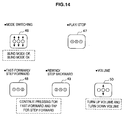
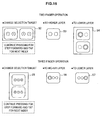
- the touch operation example 41 shows the mode is switched by flicking/dragging with two fingers simultaneously.
- the blind mode is turned on.
- the blind mode can be turned off.
- the touch operation example 42 shows replay and stop of music contents by double-tapping of the touch surface with either of two fingers or simultaneous tapping with the two fingers.
- the touch surface is double-tapped only with the index finger
- the surface is tapped with the index finger and the middle finger simultaneously.
- the touch operation example 43 and the touch operation example 44 show "fast-forward”, “step forward”, “rewind”, “step backward” of music contents are performed by tapping the touch surface with two fingers one after another. For example, for “fast-forward” or “step forward”, the surface is tapped with the index finger and the middle finger in this order. For “rewind” and “step backward”, the surface is tapped with the middle finger and the index finger, in this order.
- the touch operation example 45 shows turning up or down of the volume by flicking/dragging of the touch surface with any of two fingers. For example, for turning up of the volume, the index finger is used to flick/drag the surface from bottom up. For turning down of the volume, the index finger is used to flick/drag the surface from top down.
- the touch operation example 46 shows a state where the three fingers are simultaneously used to flick and drag the screen for mode switching.
- the blind mode may be turned on.
- the blind mode may be turned off.
- the touch operation example 47 shows replay and stop of music contents by double tapping of the touch surface with three fingers simultaneously or one after another.
- the index finger and the ring finger are used to tap the surface simultaneously and then, the middle finger is used to tap the surface.
- the middle finger is used to tap the surface and then, the index finger and the ring finger are used to tap the surface simultaneously.
- the touch operation example 48 and the touch operation example 49 show a state where "fast-forward”, “step forward”, “rewind”, “step backward” of music contents are performed by tapping the touch surface with three fingers simultaneously or one after another.
- the index finger and the middle finger are used to tap the surface simultaneously and then, the ring finger is used to tap the surface.
- the middle finger and the ring finger are used to tap the surface simultaneously and then, the index finger is used to tap the surface.
- the touch operation example 50 shows turning up or down of the volume by flicking/dragging of the touch surface with any of three fingers.
- the middle finger is used to flick/drag the surface from bottom up while the index finger and ring finger are in touch with the surface.
- the middle finger is used to flick/drag the surface from top down while the index finger and ring finger are in touch with the surface.
- FIG. 15 is an explanatory view for explaining the contents stored in the hierarchical structure.
- the structure has layers of, from above, Genre, Artist, Album, Song and Playlist in this order.
- the user performs touch operation with two or three fingers thereby to be able to change the selection range or move to the higher layer or lower layer.
- touch operation examples 52 to 54 are explanatory views for explaining the touch operation with user of two fingers.
- the touch operation example 52 shows changing of selection target by touch with two fingers one after another. For example, first the index finger is used to touch, which is followed by continuous touch with the middle finger thereby to step forward one selection target, or first the index finger is used to touch, which is followed by tapping with the middle finger thereby to step forward selection targets sequentially.
- the touch operation example 53 shows moving to a higher layer by tapping with two fingers simultaneously.
- the index finger and the middle finger are both used simultaneously to tap the screen thereby to move to the higher layer.
- the touch operation example 54 shows moving to a lower layer by double-tapping with either of two fingers.
- the index finger is only used to double-tap the screen so as to move to the lower layer.
- Touch operation examples 55 to 57 in FIG. 16 are explanatory views for explaining the touch operation with user of three fingers.
- the touch operation example 55 shows changing of the selection target by touching with three fingers simultaneously or one after another.
- the index finger and the middle finger are used simultaneously to touch the screen, which is followed by continuous touching with the ring finger thereby to step forward one selection target, or the middle finger and the ring finger are used to touch the screen, which is followed by tapping with the index finger thereby to step forward selection targets continuously.
- the touch operation example 56 shows moving to a higher layer by double tapping or tapping with the three fingers.
- the three fingers are used simultaneously to touch the screen and then, the index finger is used to double-tap the screen, which is followed by tapping with the middle finger and ring finger thereby to move to the upper layer.
- the touch operation example 57 shows moving to a lower layer by double tapping or tapping with the three fingers.
- the three fingers are used simultaneously to touch the screen and then, the index finger and the middle finger are used to tap the screen, which is followed by double-tapping with the ring finger thereby to move to the lower layer. Examples of the touch operation and command have been described hereinabove.
- the operation states of two or more operators in touch with the touch operating unit 202 are detected to determine the coordinate system of the touch operating unit 202 in accordance with the operating directions of the two or more operators. Then, the coordinate system determined and the touch positions of the two or more operators are used to calculate the relative positions of the two or more operators, and the touch states of the two or more operators at the relative positions are used as a basis so as to issue various operating commands.
- the operating directions of the operators are judged so that the user can perform desired operations without paying attention to the orientation of the housing.
- the user can perform desired operations with the touch screen panel without visually recognizing the housing or display of the information processing apparatus 10. For example, when the information processing apparatus 10 is placed in the bag or pocket, the user can perform desired operations without taking it out of the pocket or bag.
- the present embodiment has been described by way of the example where the user can perform desired operations without visually recognizing the housing and display of the information processing apparatus 10.
- the present invention is not limited to this example.
- an application other than the application for replaying music contents hereinafter referred to as "music content replay application”
- the operations of replaying and stopping music contents replay and the like may be performed without switching the displayed application.
- an application other than the music content replay application is running, the above-described specific operation by operators is performed to switch to the blind mode and detect the operation of the operators. As the operators' operation is detected after switching to the blind mode, the application other than the music content replay application can continue to run in order to replay, stop the music contents and the like.
Landscapes
- Engineering & Computer Science (AREA)
- General Engineering & Computer Science (AREA)
- Theoretical Computer Science (AREA)
- Human Computer Interaction (AREA)
- Physics & Mathematics (AREA)
- General Physics & Mathematics (AREA)
- User Interface Of Digital Computer (AREA)
- Position Input By Displaying (AREA)
Applications Claiming Priority (1)
| Application Number | Priority Date | Filing Date | Title |
|---|---|---|---|
| JP2008280021A JP4853507B2 (ja) | 2008-10-30 | 2008-10-30 | 情報処理装置、情報処理方法およびプログラム |
Publications (1)
| Publication Number | Publication Date |
|---|---|
| EP2184673A1 true EP2184673A1 (de) | 2010-05-12 |
Family
ID=41698409
Family Applications (1)
| Application Number | Title | Priority Date | Filing Date |
|---|---|---|---|
| EP09252505A Withdrawn EP2184673A1 (de) | 2008-10-30 | 2009-10-29 | Informationsverarbeitungsvorrichtung, Informationsverarbeitungsverfahren und Programm |
Country Status (6)
| Country | Link |
|---|---|
| US (1) | US9507507B2 (de) |
| EP (1) | EP2184673A1 (de) |
| JP (1) | JP4853507B2 (de) |
| CN (1) | CN101727240B (de) |
| BR (1) | BRPI0914286A2 (de) |
| RU (1) | RU2533646C2 (de) |
Cited By (18)
| Publication number | Priority date | Publication date | Assignee | Title |
|---|---|---|---|---|
| NL2007993A (en) * | 2010-12-20 | 2012-06-25 | Apple Inc | Event recognition. |
| US8285499B2 (en) | 2009-03-16 | 2012-10-09 | Apple Inc. | Event recognition |
| US8411061B2 (en) | 2008-03-04 | 2013-04-02 | Apple Inc. | Touch event processing for documents |
| US8416196B2 (en) | 2008-03-04 | 2013-04-09 | Apple Inc. | Touch event model programming interface |
| US8429557B2 (en) | 2007-01-07 | 2013-04-23 | Apple Inc. | Application programming interfaces for scrolling operations |
| US8552999B2 (en) | 2010-06-14 | 2013-10-08 | Apple Inc. | Control selection approximation |
| US8560975B2 (en) | 2008-03-04 | 2013-10-15 | Apple Inc. | Touch event model |
| US8566044B2 (en) | 2009-03-16 | 2013-10-22 | Apple Inc. | Event recognition |
| US8566045B2 (en) | 2009-03-16 | 2013-10-22 | Apple Inc. | Event recognition |
| US8717305B2 (en) | 2008-03-04 | 2014-05-06 | Apple Inc. | Touch event model for web pages |
| CN104685463A (zh) * | 2012-05-16 | 2015-06-03 | 讯宝科技公司 | 用于力感测触摸板的自动使用的设备和方法 |
| US9298363B2 (en) | 2011-04-11 | 2016-03-29 | Apple Inc. | Region activation for touch sensitive surface |
| US9311112B2 (en) | 2009-03-16 | 2016-04-12 | Apple Inc. | Event recognition |
| US9529519B2 (en) | 2007-01-07 | 2016-12-27 | Apple Inc. | Application programming interfaces for gesture operations |
| US9733716B2 (en) | 2013-06-09 | 2017-08-15 | Apple Inc. | Proxy gesture recognizer |
| EP2795450B1 (de) * | 2011-12-21 | 2018-12-19 | Nokia Technologies Oy | Benutzergestenerkennung |
| US10732997B2 (en) | 2010-01-26 | 2020-08-04 | Apple Inc. | Gesture recognizers with delegates for controlling and modifying gesture recognition |
| US10963142B2 (en) | 2007-01-07 | 2021-03-30 | Apple Inc. | Application programming interfaces for scrolling |
Families Citing this family (60)
| Publication number | Priority date | Publication date | Assignee | Title |
|---|---|---|---|---|
| US20110138284A1 (en) * | 2009-12-03 | 2011-06-09 | Microsoft Corporation | Three-state touch input system |
| US20110148786A1 (en) * | 2009-12-18 | 2011-06-23 | Synaptics Incorporated | Method and apparatus for changing operating modes |
| US9465532B2 (en) * | 2009-12-18 | 2016-10-11 | Synaptics Incorporated | Method and apparatus for operating in pointing and enhanced gesturing modes |
| JP5091267B2 (ja) * | 2010-02-18 | 2012-12-05 | シャープ株式会社 | 操作機器、その操作機器を備えた電子機器および画像処理装置ならびに操作方法 |
| EP2557446B1 (de) | 2010-04-05 | 2019-09-04 | Olympus Corporation | Mikroskopsteuerung und mikroskopsystem mit der mikroskopsteuerung |
| JP5649851B2 (ja) * | 2010-05-18 | 2015-01-07 | オリンパス株式会社 | 顕微鏡コントローラを有する顕微鏡システム |
| JP5158987B2 (ja) * | 2010-05-21 | 2013-03-06 | パナソニック株式会社 | 携帯端末、情報処理方法、及びプログラム |
| JP5728008B2 (ja) * | 2010-06-16 | 2015-06-03 | パナソニック インテレクチュアル プロパティ コーポレーション オブアメリカPanasonic Intellectual Property Corporation of America | 情報入力装置、情報入力方法及びプログラム |
| TW201201067A (en) | 2010-06-23 | 2012-01-01 | Novatek Microelectronics Corp | Touch sensing method and touch sensing system |
| US20120075196A1 (en) * | 2010-09-23 | 2012-03-29 | Nokia Corporation | Apparatus and method for user input |
| US8612874B2 (en) | 2010-12-23 | 2013-12-17 | Microsoft Corporation | Presenting an application change through a tile |
| US8689123B2 (en) | 2010-12-23 | 2014-04-01 | Microsoft Corporation | Application reporting in an application-selectable user interface |
| JP2012155600A (ja) * | 2011-01-27 | 2012-08-16 | Fujitsu Ltd | 情報処理装置、制御方法、および制御プログラム |
| CN103444165B (zh) * | 2011-03-15 | 2017-09-08 | 富士通先端科技株式会社 | 摄像装置和摄像方法 |
| CN102693057B (zh) * | 2011-03-21 | 2017-09-29 | 联想(北京)有限公司 | 便携式终端及其操作方法 |
| US20120304107A1 (en) * | 2011-05-27 | 2012-11-29 | Jennifer Nan | Edge gesture |
| US9104307B2 (en) | 2011-05-27 | 2015-08-11 | Microsoft Technology Licensing, Llc | Multi-application environment |
| US9658766B2 (en) | 2011-05-27 | 2017-05-23 | Microsoft Technology Licensing, Llc | Edge gesture |
| US20120304132A1 (en) | 2011-05-27 | 2012-11-29 | Chaitanya Dev Sareen | Switching back to a previously-interacted-with application |
| US9158445B2 (en) | 2011-05-27 | 2015-10-13 | Microsoft Technology Licensing, Llc | Managing an immersive interface in a multi-application immersive environment |
| US20120319959A1 (en) * | 2011-06-14 | 2012-12-20 | Microsoft Corporation | Device interaction through barrier |
| JP5855862B2 (ja) | 2011-07-07 | 2016-02-09 | オリンパス株式会社 | 撮像装置、撮像方法およびプログラム |
| US20130057587A1 (en) | 2011-09-01 | 2013-03-07 | Microsoft Corporation | Arranging tiles |
| US9146670B2 (en) | 2011-09-10 | 2015-09-29 | Microsoft Technology Licensing, Llc | Progressively indicating new content in an application-selectable user interface |
| CN102426495A (zh) * | 2011-09-22 | 2012-04-25 | 深圳市同洲电子股份有限公司 | 移动终端遥控数字电视接收终端的方法及移动终端 |
| US9094603B2 (en) | 2011-10-07 | 2015-07-28 | Panasonic Intellectual Property Corporation Of America | Image pickup device and image pickup method |
| JP5810824B2 (ja) * | 2011-10-20 | 2015-11-11 | 富士通株式会社 | プログラム、方法、および情報処理装置 |
| US8773382B2 (en) | 2011-10-28 | 2014-07-08 | Nintendo Co., Ltd. | Computer-readable storage medium, coordinate processing apparatus, coordinate processing system, and coordinate processing method |
| JP5827870B2 (ja) | 2011-10-28 | 2015-12-02 | 任天堂株式会社 | 座標処理プログラム、座標処理装置、座標処理システムおよび座標処理方法 |
| EP2587348B1 (de) * | 2011-10-28 | 2020-12-02 | Nintendo Co., Ltd. | Informationsverarbeitungsprogramm, Informationsverarbeitungssystem und Informationsverarbeitungsverfahren |
| US8760423B2 (en) | 2011-10-28 | 2014-06-24 | Nintendo Co., Ltd. | Computer-readable storage medium, information processing apparatus, information processing system, and information processing method |
| US9024891B2 (en) * | 2011-11-03 | 2015-05-05 | Synaptics Incorporated | Single substrate touch sensor |
| JP5776525B2 (ja) * | 2011-12-05 | 2015-09-09 | 株式会社デンソー | 入力装置 |
| US8796566B2 (en) | 2012-02-28 | 2014-08-05 | Grayhill, Inc. | Rotary pushbutton and touchpad device and system and method for detecting rotary movement, axial displacement and touchpad gestures |
| JP5999309B2 (ja) * | 2012-03-21 | 2016-09-28 | パナソニックIpマネジメント株式会社 | 負荷コントローラ |
| JP6015183B2 (ja) * | 2012-07-18 | 2016-10-26 | 富士ゼロックス株式会社 | 情報処理装置およびプログラム |
| CN103853418B (zh) * | 2012-11-30 | 2017-05-24 | 联想(北京)有限公司 | 一种数据处理方法和电子设备 |
| WO2014129565A1 (ja) * | 2013-02-21 | 2014-08-28 | 京セラ株式会社 | 装置 |
| JP6079337B2 (ja) * | 2013-03-18 | 2017-02-15 | 富士通株式会社 | 入力装置および入力制御方法並びに入力制御プログラム |
| JP6221049B2 (ja) * | 2013-03-29 | 2017-11-01 | パナソニックIpマネジメント株式会社 | 冷蔵庫 |
| WO2014184902A1 (ja) * | 2013-05-15 | 2014-11-20 | 三菱電機株式会社 | ユーザインタフェース装置 |
| US10031586B2 (en) * | 2013-06-12 | 2018-07-24 | Amazon Technologies, Inc. | Motion-based gestures for a computing device |
| US9020194B2 (en) * | 2013-06-14 | 2015-04-28 | Qualcomm Incorporated | Systems and methods for performing a device action based on a detected gesture |
| JP6020742B2 (ja) | 2013-10-25 | 2016-11-02 | 株式会社村田製作所 | 電子機器、および、操作入力プログラム |
| CN103558970A (zh) * | 2013-10-29 | 2014-02-05 | 广东欧珀移动通信有限公司 | 音量调节方法 |
| KR102206053B1 (ko) * | 2013-11-18 | 2021-01-21 | 삼성전자주식회사 | 입력 도구에 따라 입력 모드를 변경하는 전자 장치 및 방법 |
| US9372587B2 (en) | 2013-11-26 | 2016-06-21 | Synaptics Incorporated | Methods and apparatus for arranging electrode layers and associated routing traces in a sensor device |
| TWI544392B (zh) * | 2014-07-01 | 2016-08-01 | 義隆電子股份有限公司 | 電容式觸控電子裝置、觸控裝置及其模式選擇方法 |
| JP5965966B2 (ja) * | 2014-11-06 | 2016-08-10 | オリンパス株式会社 | 顕微鏡コントローラ及び該顕微鏡コントローラを有する顕微鏡システム |
| BR112017012783A2 (pt) * | 2014-12-24 | 2018-01-02 | Sony Corp | dispositivo eletrônico, e, método de controle de dispositivo eletrônico. |
| JP6065939B2 (ja) * | 2015-06-11 | 2017-01-25 | カシオ計算機株式会社 | 表示装置、及び表示方法 |
| CN105117147A (zh) * | 2015-07-24 | 2015-12-02 | 上海修源网络科技有限公司 | 一种基于手势操控车载操作系统的方法、装置及车载设备 |
| CN106293051B (zh) * | 2015-08-21 | 2020-01-10 | 北京智谷睿拓技术服务有限公司 | 基于手势的交互方法、交互装置及用户设备 |
| JP6197012B2 (ja) * | 2015-10-27 | 2017-09-13 | 株式会社ソニー・インタラクティブエンタテインメント | 情報処理装置および情報処理方法 |
| JP6109282B2 (ja) * | 2015-12-09 | 2017-04-05 | オリンパス株式会社 | 電子機器、撮像方法およびプログラム |
| JP6674095B2 (ja) * | 2016-04-18 | 2020-04-01 | 富士通クライアントコンピューティング株式会社 | タッチセンサ、端末装置及び押下検出プログラム |
| JP6410900B2 (ja) * | 2017-08-28 | 2018-10-24 | 富士ゼロックス株式会社 | 表示制御装置、画像表示装置、およびプログラム |
| CN108646973B (zh) * | 2018-05-10 | 2022-03-15 | Oppo广东移动通信有限公司 | 熄屏显示方法、移动终端以及计算机可读存储介质 |
| KR102155378B1 (ko) * | 2018-09-19 | 2020-09-14 | 주식회사 브이터치 | 객체 제어를 지원하기 위한 방법, 시스템 및 비일시성의 컴퓨터 판독 가능 기록 매체 |
| US11023067B2 (en) * | 2018-12-19 | 2021-06-01 | Intel Corporation | Input control using fingerprints |
Citations (15)
| Publication number | Priority date | Publication date | Assignee | Title |
|---|---|---|---|---|
| JPS63269265A (ja) * | 1987-04-28 | 1988-11-07 | Canon Inc | 画像処理方法及び画像処理装置 |
| US6226404B1 (en) * | 1997-06-09 | 2001-05-01 | Nec Corporation | On-line character recognition system |
| EP1158785A2 (de) * | 2000-05-18 | 2001-11-28 | Sony Corporation | Bildaufnahmegerät und sein Betriebsverfahren |
| US20020158838A1 (en) * | 2001-04-30 | 2002-10-31 | International Business Machines Corporation | Edge touchpad input device |
| WO2002088853A1 (en) | 2001-04-26 | 2002-11-07 | Caveo Technology, Llc | Motion-based input system for handheld devices |
| US20020167699A1 (en) | 2000-05-17 | 2002-11-14 | Christopher Verplaetse | Motion-based input system for handheld devices |
| US20040169674A1 (en) | 2002-12-30 | 2004-09-02 | Nokia Corporation | Method for providing an interaction in an electronic device and an electronic device |
| WO2005099301A1 (en) * | 2004-04-05 | 2005-10-20 | Koninklijke Philips Electronics N.V. | Audio entertainment system, device, method, and computer program |
| JP2005339420A (ja) | 2004-05-31 | 2005-12-08 | Sony Corp | 車載装置、車載装置の情報提供方法、車載装置の情報提供方法のプログラム及び車載装置の情報提供方法のプログラムを記録した記録媒体 |
| WO2007089766A2 (en) * | 2006-01-30 | 2007-08-09 | Apple Inc. | Gesturing with a multipoint sensing device |
| US20070257881A1 (en) | 2006-05-08 | 2007-11-08 | Marja-Leena Nurmela | Music player and method |
| US20080260176A1 (en) * | 2005-10-28 | 2008-10-23 | Koninklijke Philips Electronics, N.V. | System and Method For Controlling a Device Using Position and Touch |
| US20090239587A1 (en) * | 2008-03-19 | 2009-09-24 | Universal Electronics Inc. | System and method for appliance control via a personal communication or entertainment device |
| EP2124139A1 (de) * | 2006-12-22 | 2009-11-25 | Panasonic Corporation | Benutzeroberflächeneinrichtung |
| EP2131263A1 (de) * | 2008-05-13 | 2009-12-09 | Sony Ericsson Mobile Communications Japan, Inc. | Informationsverarbeitungsvorrichtung, Informationsverarbeitungsverfahren, Informationsverarbeitungsprogramm und mobiles Endgerät |
Family Cites Families (11)
| Publication number | Priority date | Publication date | Assignee | Title |
|---|---|---|---|---|
| US5451724A (en) * | 1992-08-05 | 1995-09-19 | Fujitsu Limited | Touch panel for detecting a coordinate of an arbitrary position where pressure is applied |
| US7663607B2 (en) * | 2004-05-06 | 2010-02-16 | Apple Inc. | Multipoint touchscreen |
| US8479122B2 (en) * | 2004-07-30 | 2013-07-02 | Apple Inc. | Gestures for touch sensitive input devices |
| KR100474724B1 (ko) * | 2001-08-04 | 2005-03-08 | 삼성전자주식회사 | 터치스크린을 가지는 장치 및 그 장치에 외부디스플레이기기를 연결하여 사용하는 방법 |
| US11275405B2 (en) | 2005-03-04 | 2022-03-15 | Apple Inc. | Multi-functional hand-held device |
| RU2246749C2 (ru) * | 2003-01-14 | 2005-02-20 | Пшеницин Юрий Михайлович | Устройство для ввода информации |
| JP4789232B2 (ja) * | 2004-10-05 | 2011-10-12 | ソニー株式会社 | 情報処理装置及び入力操作モード制御方法 |
| JP5550211B2 (ja) * | 2005-03-04 | 2014-07-16 | アップル インコーポレイテッド | 多機能ハンドヘルド装置 |
| JP4548614B2 (ja) * | 2006-03-24 | 2010-09-22 | 株式会社デンソー | 入力装置 |
| CN100485595C (zh) * | 2007-07-25 | 2009-05-06 | 广东威创视讯科技股份有限公司 | 一种触摸屏装置与多点触摸定位方法 |
| US20090153289A1 (en) * | 2007-12-12 | 2009-06-18 | Eric James Hope | Handheld electronic devices with bimodal remote control functionality |
-
2008
- 2008-10-30 JP JP2008280021A patent/JP4853507B2/ja not_active Expired - Fee Related
-
2009
- 2009-10-16 BR BRPI0914286-0A patent/BRPI0914286A2/pt not_active IP Right Cessation
- 2009-10-23 US US12/604,894 patent/US9507507B2/en not_active Expired - Fee Related
- 2009-10-28 CN CN200910209131XA patent/CN101727240B/zh not_active Expired - Fee Related
- 2009-10-29 RU RU2009140128/08A patent/RU2533646C2/ru not_active IP Right Cessation
- 2009-10-29 EP EP09252505A patent/EP2184673A1/de not_active Withdrawn
Patent Citations (15)
| Publication number | Priority date | Publication date | Assignee | Title |
|---|---|---|---|---|
| JPS63269265A (ja) * | 1987-04-28 | 1988-11-07 | Canon Inc | 画像処理方法及び画像処理装置 |
| US6226404B1 (en) * | 1997-06-09 | 2001-05-01 | Nec Corporation | On-line character recognition system |
| US20020167699A1 (en) | 2000-05-17 | 2002-11-14 | Christopher Verplaetse | Motion-based input system for handheld devices |
| EP1158785A2 (de) * | 2000-05-18 | 2001-11-28 | Sony Corporation | Bildaufnahmegerät und sein Betriebsverfahren |
| WO2002088853A1 (en) | 2001-04-26 | 2002-11-07 | Caveo Technology, Llc | Motion-based input system for handheld devices |
| US20020158838A1 (en) * | 2001-04-30 | 2002-10-31 | International Business Machines Corporation | Edge touchpad input device |
| US20040169674A1 (en) | 2002-12-30 | 2004-09-02 | Nokia Corporation | Method for providing an interaction in an electronic device and an electronic device |
| WO2005099301A1 (en) * | 2004-04-05 | 2005-10-20 | Koninklijke Philips Electronics N.V. | Audio entertainment system, device, method, and computer program |
| JP2005339420A (ja) | 2004-05-31 | 2005-12-08 | Sony Corp | 車載装置、車載装置の情報提供方法、車載装置の情報提供方法のプログラム及び車載装置の情報提供方法のプログラムを記録した記録媒体 |
| US20080260176A1 (en) * | 2005-10-28 | 2008-10-23 | Koninklijke Philips Electronics, N.V. | System and Method For Controlling a Device Using Position and Touch |
| WO2007089766A2 (en) * | 2006-01-30 | 2007-08-09 | Apple Inc. | Gesturing with a multipoint sensing device |
| US20070257881A1 (en) | 2006-05-08 | 2007-11-08 | Marja-Leena Nurmela | Music player and method |
| EP2124139A1 (de) * | 2006-12-22 | 2009-11-25 | Panasonic Corporation | Benutzeroberflächeneinrichtung |
| US20090239587A1 (en) * | 2008-03-19 | 2009-09-24 | Universal Electronics Inc. | System and method for appliance control via a personal communication or entertainment device |
| EP2131263A1 (de) * | 2008-05-13 | 2009-12-09 | Sony Ericsson Mobile Communications Japan, Inc. | Informationsverarbeitungsvorrichtung, Informationsverarbeitungsverfahren, Informationsverarbeitungsprogramm und mobiles Endgerät |
Cited By (58)
| Publication number | Priority date | Publication date | Assignee | Title |
|---|---|---|---|---|
| US9037995B2 (en) | 2007-01-07 | 2015-05-19 | Apple Inc. | Application programming interfaces for scrolling operations |
| US11954322B2 (en) | 2007-01-07 | 2024-04-09 | Apple Inc. | Application programming interface for gesture operations |
| US11449217B2 (en) | 2007-01-07 | 2022-09-20 | Apple Inc. | Application programming interfaces for gesture operations |
| US10963142B2 (en) | 2007-01-07 | 2021-03-30 | Apple Inc. | Application programming interfaces for scrolling |
| US10817162B2 (en) | 2007-01-07 | 2020-10-27 | Apple Inc. | Application programming interfaces for scrolling operations |
| US8429557B2 (en) | 2007-01-07 | 2013-04-23 | Apple Inc. | Application programming interfaces for scrolling operations |
| US10613741B2 (en) | 2007-01-07 | 2020-04-07 | Apple Inc. | Application programming interface for gesture operations |
| US10481785B2 (en) | 2007-01-07 | 2019-11-19 | Apple Inc. | Application programming interfaces for scrolling operations |
| US10175876B2 (en) | 2007-01-07 | 2019-01-08 | Apple Inc. | Application programming interfaces for gesture operations |
| US9760272B2 (en) | 2007-01-07 | 2017-09-12 | Apple Inc. | Application programming interfaces for scrolling operations |
| US9665265B2 (en) | 2007-01-07 | 2017-05-30 | Apple Inc. | Application programming interfaces for gesture operations |
| US8661363B2 (en) | 2007-01-07 | 2014-02-25 | Apple Inc. | Application programming interfaces for scrolling operations |
| US9639260B2 (en) | 2007-01-07 | 2017-05-02 | Apple Inc. | Application programming interfaces for gesture operations |
| US9575648B2 (en) | 2007-01-07 | 2017-02-21 | Apple Inc. | Application programming interfaces for gesture operations |
| US9529519B2 (en) | 2007-01-07 | 2016-12-27 | Apple Inc. | Application programming interfaces for gesture operations |
| US9448712B2 (en) | 2007-01-07 | 2016-09-20 | Apple Inc. | Application programming interfaces for scrolling operations |
| US8723822B2 (en) | 2008-03-04 | 2014-05-13 | Apple Inc. | Touch event model programming interface |
| US9798459B2 (en) | 2008-03-04 | 2017-10-24 | Apple Inc. | Touch event model for web pages |
| US12236038B2 (en) | 2008-03-04 | 2025-02-25 | Apple Inc. | Devices, methods, and user interfaces for processing input events |
| US11740725B2 (en) | 2008-03-04 | 2023-08-29 | Apple Inc. | Devices, methods, and user interfaces for processing touch events |
| US8411061B2 (en) | 2008-03-04 | 2013-04-02 | Apple Inc. | Touch event processing for documents |
| US9323335B2 (en) | 2008-03-04 | 2016-04-26 | Apple Inc. | Touch event model programming interface |
| US9389712B2 (en) | 2008-03-04 | 2016-07-12 | Apple Inc. | Touch event model |
| US8836652B2 (en) | 2008-03-04 | 2014-09-16 | Apple Inc. | Touch event model programming interface |
| US10936190B2 (en) | 2008-03-04 | 2021-03-02 | Apple Inc. | Devices, methods, and user interfaces for processing touch events |
| US8416196B2 (en) | 2008-03-04 | 2013-04-09 | Apple Inc. | Touch event model programming interface |
| US8717305B2 (en) | 2008-03-04 | 2014-05-06 | Apple Inc. | Touch event model for web pages |
| US10521109B2 (en) | 2008-03-04 | 2019-12-31 | Apple Inc. | Touch event model |
| US8645827B2 (en) | 2008-03-04 | 2014-02-04 | Apple Inc. | Touch event model |
| US9690481B2 (en) | 2008-03-04 | 2017-06-27 | Apple Inc. | Touch event model |
| US9720594B2 (en) | 2008-03-04 | 2017-08-01 | Apple Inc. | Touch event model |
| US8560975B2 (en) | 2008-03-04 | 2013-10-15 | Apple Inc. | Touch event model |
| US9971502B2 (en) | 2008-03-04 | 2018-05-15 | Apple Inc. | Touch event model |
| US8682602B2 (en) | 2009-03-16 | 2014-03-25 | Apple Inc. | Event recognition |
| US11755196B2 (en) | 2009-03-16 | 2023-09-12 | Apple Inc. | Event recognition |
| US8566045B2 (en) | 2009-03-16 | 2013-10-22 | Apple Inc. | Event recognition |
| US12265704B2 (en) | 2009-03-16 | 2025-04-01 | Apple Inc. | Event recognition |
| US8566044B2 (en) | 2009-03-16 | 2013-10-22 | Apple Inc. | Event recognition |
| US9285908B2 (en) | 2009-03-16 | 2016-03-15 | Apple Inc. | Event recognition |
| US9965177B2 (en) | 2009-03-16 | 2018-05-08 | Apple Inc. | Event recognition |
| US8285499B2 (en) | 2009-03-16 | 2012-10-09 | Apple Inc. | Event recognition |
| US11163440B2 (en) | 2009-03-16 | 2021-11-02 | Apple Inc. | Event recognition |
| US9311112B2 (en) | 2009-03-16 | 2016-04-12 | Apple Inc. | Event recognition |
| US10719225B2 (en) | 2009-03-16 | 2020-07-21 | Apple Inc. | Event recognition |
| US9483121B2 (en) | 2009-03-16 | 2016-11-01 | Apple Inc. | Event recognition |
| US10732997B2 (en) | 2010-01-26 | 2020-08-04 | Apple Inc. | Gesture recognizers with delegates for controlling and modifying gesture recognition |
| US12061915B2 (en) | 2010-01-26 | 2024-08-13 | Apple Inc. | Gesture recognizers with delegates for controlling and modifying gesture recognition |
| US8552999B2 (en) | 2010-06-14 | 2013-10-08 | Apple Inc. | Control selection approximation |
| US10216408B2 (en) | 2010-06-14 | 2019-02-26 | Apple Inc. | Devices and methods for identifying user interface objects based on view hierarchy |
| NL2007993A (en) * | 2010-12-20 | 2012-06-25 | Apple Inc | Event recognition. |
| WO2012087939A1 (en) * | 2010-12-20 | 2012-06-28 | Apple Inc. | Event recognition |
| US9298363B2 (en) | 2011-04-11 | 2016-03-29 | Apple Inc. | Region activation for touch sensitive surface |
| EP3457270A1 (de) * | 2011-12-21 | 2019-03-20 | Nokia Technologies Oy | Benutzergestenerkennung |
| EP2795450B1 (de) * | 2011-12-21 | 2018-12-19 | Nokia Technologies Oy | Benutzergestenerkennung |
| CN104685463A (zh) * | 2012-05-16 | 2015-06-03 | 讯宝科技公司 | 用于力感测触摸板的自动使用的设备和方法 |
| US9733716B2 (en) | 2013-06-09 | 2017-08-15 | Apple Inc. | Proxy gesture recognizer |
| US11429190B2 (en) | 2013-06-09 | 2022-08-30 | Apple Inc. | Proxy gesture recognizer |
| US12379783B2 (en) | 2013-06-09 | 2025-08-05 | Apple Inc. | Proxy gesture recognizer |
Also Published As
| Publication number | Publication date |
|---|---|
| RU2009140128A (ru) | 2011-05-10 |
| US20100110031A1 (en) | 2010-05-06 |
| US9507507B2 (en) | 2016-11-29 |
| BRPI0914286A2 (pt) | 2012-03-13 |
| RU2533646C2 (ru) | 2014-11-20 |
| CN101727240B (zh) | 2012-05-30 |
| JP2010108273A (ja) | 2010-05-13 |
| JP4853507B2 (ja) | 2012-01-11 |
| CN101727240A (zh) | 2010-06-09 |
Similar Documents
| Publication | Publication Date | Title |
|---|---|---|
| US9507507B2 (en) | Information processing apparatus, information processing method and program | |
| US11461004B2 (en) | User interface supporting one-handed operation and terminal supporting the same | |
| US9395905B2 (en) | Graphical scroll wheel | |
| EP2192477B1 (de) | Tragbares Endgerät mit Berührungsbildschirm und Verfahren zur Anzeige von Icons in dem tragbaren Endgerät | |
| CN100541408C (zh) | 电子设备 | |
| CN102681760B (zh) | 信息处理设备和信息处理方法 | |
| CN101650634B (zh) | 显示设备和显示方法 | |
| US20090179867A1 (en) | Method for providing user interface (ui) to display operating guide and multimedia apparatus using the same | |
| EP2631766B1 (de) | Verfahren und Vorrichtung zum Bewegen von Inhalten in einem Endgerät | |
| EP2224321B1 (de) | Informationsverarbeitungsvorrichtung und Anzeigesteuerungsverfahren | |
| CN101464777B (zh) | 信息处理设备,信息处理方法和程序 | |
| JP4632102B2 (ja) | 情報処理装置、情報処理方法及び情報処理プログラム | |
| US20050046621A1 (en) | Method and device for recognizing a dual point user input on a touch based user input device | |
| US20090207140A1 (en) | Identifying and responding to multiple time-overlapping touches on a touch panel | |
| JP2010176330A (ja) | 情報処理装置、及び表示制御方法 | |
| US20140143725A1 (en) | Screen display method in mobile terminal and mobile terminal using the method | |
| KR101446141B1 (ko) | 트리 구조의 메뉴 브라우징 방법 및 장치 | |
| KR20090057557A (ko) | 멀티 터치를 이용한 재생시간 이동 및 재생구간 설정 방법 | |
| JP2011053974A (ja) | 操作制御装置、操作制御方法およびコンピュータプログラム | |
| JP2014112449A (ja) | タッチ表面の端部領域におけるタッチ接触の選択的拒否 | |
| CN102360249A (zh) | 分立式键盘布局系统和设置方法、相应的便携电子设备及控制方法 | |
| KR20070062911A (ko) | 터치 및 드래그를 이용하여 제어 가능한 모바일 장치 및 그조작 방법 | |
| JP2011150414A (ja) | 情報処理装置、操作入力決定方法及び操作入力決定プログラム | |
| US20140085340A1 (en) | Method and electronic device for manipulating scale or rotation of graphic on display | |
| KR20140131051A (ko) | 압력 센서를 포함하는 전자 장치 및 그 제어 방법 |
Legal Events
| Date | Code | Title | Description |
|---|---|---|---|
| PUAI | Public reference made under article 153(3) epc to a published international application that has entered the european phase |
Free format text: ORIGINAL CODE: 0009012 |
|
| 17P | Request for examination filed |
Effective date: 20091112 |
|
| AK | Designated contracting states |
Kind code of ref document: A1 Designated state(s): AT BE BG CH CY CZ DE DK EE ES FI FR GB GR HR HU IE IS IT LI LT LU LV MC MK MT NL NO PL PT RO SE SI SK SM TR |
|
| AX | Request for extension of the european patent |
Extension state: AL BA RS |
|
| 17Q | First examination report despatched |
Effective date: 20100414 |
|
| STAA | Information on the status of an ep patent application or granted ep patent |
Free format text: STATUS: THE APPLICATION IS DEEMED TO BE WITHDRAWN |
|
| 18D | Application deemed to be withdrawn |
Effective date: 20151008 |