EP2191358B1 - Procédé pour fournir une interface utilisateur graphique et dispositif multimédia l'utilisant - Google Patents
Procédé pour fournir une interface utilisateur graphique et dispositif multimédia l'utilisant Download PDFInfo
- Publication number
- EP2191358B1 EP2191358B1 EP08766297.9A EP08766297A EP2191358B1 EP 2191358 B1 EP2191358 B1 EP 2191358B1 EP 08766297 A EP08766297 A EP 08766297A EP 2191358 B1 EP2191358 B1 EP 2191358B1
- Authority
- EP
- European Patent Office
- Prior art keywords
- gui
- screen
- items
- displayed
- touch screen
- Prior art date
- Legal status (The legal status is an assumption and is not a legal conclusion. Google has not performed a legal analysis and makes no representation as to the accuracy of the status listed.)
- Active
Links
Images










Classifications
-
- G—PHYSICS
- G06—COMPUTING OR CALCULATING; COUNTING
- G06F—ELECTRIC DIGITAL DATA PROCESSING
- G06F3/00—Input arrangements for transferring data to be processed into a form capable of being handled by the computer; Output arrangements for transferring data from processing unit to output unit, e.g. interface arrangements
- G06F3/01—Input arrangements or combined input and output arrangements for interaction between user and computer
- G06F3/048—Interaction techniques based on graphical user interfaces [GUI]
- G06F3/0484—Interaction techniques based on graphical user interfaces [GUI] for the control of specific functions or operations, e.g. selecting or manipulating an object, an image or a displayed text element, setting a parameter value or selecting a range
-
- G—PHYSICS
- G06—COMPUTING OR CALCULATING; COUNTING
- G06F—ELECTRIC DIGITAL DATA PROCESSING
- G06F3/00—Input arrangements for transferring data to be processed into a form capable of being handled by the computer; Output arrangements for transferring data from processing unit to output unit, e.g. interface arrangements
- G06F3/01—Input arrangements or combined input and output arrangements for interaction between user and computer
- G06F3/048—Interaction techniques based on graphical user interfaces [GUI]
- G06F3/0481—Interaction techniques based on graphical user interfaces [GUI] based on specific properties of the displayed interaction object or a metaphor-based environment, e.g. interaction with desktop elements like windows or icons, or assisted by a cursor's changing behaviour or appearance
-
- G—PHYSICS
- G06—COMPUTING OR CALCULATING; COUNTING
- G06F—ELECTRIC DIGITAL DATA PROCESSING
- G06F3/00—Input arrangements for transferring data to be processed into a form capable of being handled by the computer; Output arrangements for transferring data from processing unit to output unit, e.g. interface arrangements
- G06F3/01—Input arrangements or combined input and output arrangements for interaction between user and computer
- G06F3/048—Interaction techniques based on graphical user interfaces [GUI]
- G06F3/0481—Interaction techniques based on graphical user interfaces [GUI] based on specific properties of the displayed interaction object or a metaphor-based environment, e.g. interaction with desktop elements like windows or icons, or assisted by a cursor's changing behaviour or appearance
- G06F3/0482—Interaction with lists of selectable items, e.g. menus
-
- G—PHYSICS
- G06—COMPUTING OR CALCULATING; COUNTING
- G06F—ELECTRIC DIGITAL DATA PROCESSING
- G06F3/00—Input arrangements for transferring data to be processed into a form capable of being handled by the computer; Output arrangements for transferring data from processing unit to output unit, e.g. interface arrangements
- G06F3/01—Input arrangements or combined input and output arrangements for interaction between user and computer
- G06F3/048—Interaction techniques based on graphical user interfaces [GUI]
- G06F3/0487—Interaction techniques based on graphical user interfaces [GUI] using specific features provided by the input device, e.g. functions controlled by the rotation of a mouse with dual sensing arrangements, or of the nature of the input device, e.g. tap gestures based on pressure sensed by a digitiser
- G06F3/0488—Interaction techniques based on graphical user interfaces [GUI] using specific features provided by the input device, e.g. functions controlled by the rotation of a mouse with dual sensing arrangements, or of the nature of the input device, e.g. tap gestures based on pressure sensed by a digitiser using a touch-screen or digitiser, e.g. input of commands through traced gestures
- G06F3/04886—Interaction techniques based on graphical user interfaces [GUI] using specific features provided by the input device, e.g. functions controlled by the rotation of a mouse with dual sensing arrangements, or of the nature of the input device, e.g. tap gestures based on pressure sensed by a digitiser using a touch-screen or digitiser, e.g. input of commands through traced gestures by partitioning the display area of the touch-screen or the surface of the digitising tablet into independently controllable areas, e.g. virtual keyboards or menus
-
- G—PHYSICS
- G06—COMPUTING OR CALCULATING; COUNTING
- G06F—ELECTRIC DIGITAL DATA PROCESSING
- G06F2203/00—Indexing scheme relating to G06F3/00 - G06F3/048
- G06F2203/048—Indexing scheme relating to G06F3/048
- G06F2203/04806—Zoom, i.e. interaction techniques or interactors for controlling the zooming operation
-
- G—PHYSICS
- G06—COMPUTING OR CALCULATING; COUNTING
- G06F—ELECTRIC DIGITAL DATA PROCESSING
- G06F2203/00—Indexing scheme relating to G06F3/00 - G06F3/048
- G06F2203/048—Indexing scheme relating to G06F3/048
- G06F2203/04807—Pen manipulated menu
Definitions
- aspects of the present invention relate to method for providing a graphical user interface (GUI) and a multimedia device using the same, and more particularly, to a method for providing a GUI which is used in a multimedia device having various functions, and a multimedia device using the same.
- GUI graphical user interface
- multimedia devices As digital technology has developed and has been applied to multimedia devices, multimedia devices have provided an increasingly wide range of functions. The more functions multimedia devices provide, the more complicated the devices become. For example, since many functions are provided, the number of menus to be displayed to users increases. However, as portable multimedia devices have a small screen, it is helpful to efficiently provide many complicated menus on the screen, including providing menus that are easy to use and offer users improved visual effects.
- EP 1052849 relates to an information providing apparatus and an information providing method.
- the display is switched through a transit screen based on a zoom-in screen or a zoom-out screen of a menu screen, and the menu screen is scrolled so as to display a focused icon at a predetermined position, in this manner, the present invention can be applied to a set-top box for digital satellite broadcasting, and the operationality can be improved even in case of providing a large number of programs and the like.
- US 2004100479 relates to portable information terminal and a display control divice, wherein predetermined travel locus are set in a three-dimensional virtual space.
- Menu panels for displaying menu items are arranged along the travel locus assuming a display position set as a local origin so that the normal to each LCD panel will face a virtual camera. The transparency of a menu panel is raised in accordance with its distance to the virtual camera. In case a scroll operation is performed, menu panels are moved along the travel locuss connecting display positions P until a selected specific menu panel reaches the display position PO.
- a display screen on a portable information terminal is drawn as a screen image V shot with the virtual camera and menu panels are three-dimensionally displayed in rolls.
- aspects of the present invention relate to a method and a multimedia device for providing a graphical user interface (GUI) wherein menus are made to appear and disappear by zooming in and zooming out so as to provide more convenient user manipulation and better visual effects on a small screen, and a multimedia device using the same.
- GUI graphical user interface
- GUI graphical user interface
- menus in the GUI are made to appear or disappear by being zoomed in or out. Accordingly, a GUI to provide more convenient manipulation and better visual effects on a small screen can be provided.
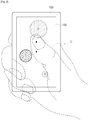
- FIGS. 1 to 5 show a graphical user interface (GUI) according to a comparative example related to the present invention.
- GUI graphical user interface
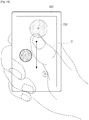
- the GUI on a touch screen 150 of a multimedia device 100 is a user interface wherein menus are made to appear and disappear by being zoomed in or out by being dragged, virtually, with the user's finger of on the touch screen 150.
- menus B, C, and D are shown in the GUI.
- the user can select one of the menus by touch.
- menu B is a menu for reproducing music stored in an embedded storage medium and the user touches menu B
- the GUI of FIG. 1 may be replaced by a GUI showing a music list.
- menu C is a menu for setting the configuration and the user touches menu C
- the GUI of FIG. 1 may be changed to a GUI showing items for setting the configuration.
- menus may have different sizes; for example, menu B may be the largest menu and menu D the smallest menu. Accordingly, menu B appears to be the closest (shallowest) to the screen, and menu D appears to be the farthest (deepest) from the screen.
- the clarity of menu C may be higher than that of menus B and D. Menu C is thus displayed most clearly. Accordingly, the user is likely to focus on menu C.
- Techniques for increasing the clarity of menu C more than menus B and D may include making menu C brighter than menus B and D, making the saturation of menu C higher than that of menus B and D, or making menu C less transparent than menus B and D.
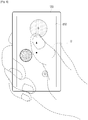
- menu B As shown in FIG. 2 , if the user U drags an area other than the menus on the touch screen 150 downwards, the GUI changes.
- the largest menu B is zoomed in, and moves outside the touch screen 150.
- menu B decreases in clarity.
- menu B increases in size, becomes blurred, moves outside the touch screen 150, and disappears from the touch screen 150.
- menu C is zoomed in, and moves towards the edge of the touch screen 150 within the limits of the touch screen 150.
- menu C decreases in clarity.
- menu C increases in size, becomes blurred, and moves towards the edge of the touch screen 150 while remaining within the limits of the touch screen 150.
- menu D is zoomed in, and moves towards the edge of the touch screen 150 within the limits of the touch screen 150.
- menu D increases in clarity.
- menu D increases in size, becomes clearer, and moves towards the edge of the touch screen 150 while remaining within the limits of the touch screen 150.
- menu E which was not previously displayed on the touch screen 150, appears on the touch screen 150.
- Menu E follows menu D in order.
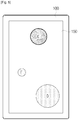
- FIG. 3 shows a GUI completing the change described above.
- menu B is removed; menu C increases in size, becomes blurred, and moves towards the edge of the touch screen 150 while remaining within the limits of the touch screen 150; menu D increases in size, is clearer, and moves towards the edge of the touch screen 150 while remaining within the limits of the touch screen 150; and menu E appears.
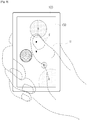
- the GUI of FIG. 3 if the user U drags an area other than the menus on the touch screen 150 downwards as shown in FIG. 4 , the GUI changes in a manner similar to that described above, so a detailed description is thus omitted.
- FIG. 5 shows a GUI in which the change has been completed.
- menu C is removed;
- menu D increases in size, becomes blurred, and moves towards the edge of the touch screen 150 while remaining within the limits of the touch screen 150;
- menu E increases in size, becomes clearer, and moves towards the edge of the touch screen 150 while remaining within the limits of the touch screen 150; and
- menu F appears.
- the GUI changes as described below.
- the largest menu B is zoomed out, and moves towards the inside of the touch screen 150 while remaining within the limits of the touch screen 150.
- menu B increases in clarity.
- menu B decreases in size, becomes clearer, and moves towards the inside of the touch screen 150 while remaining within the limits of the touch screen 150.
- menu C is zoomed out, and moves towards the inside of the touch screen 150 within the limits of the touch screen 150.
- menu C decreases in clarity.
- menu C decreases in size, is blurred, and moves towards the inside of the touch screen 150 within the limits of the touch screen 150.
- menu D moves towards the inside of the touch screen 150 while remaining within the limits of the touch screen 150, and thus disappears.
- menu D decreases in clarity.
- menu D moves towards the inside of the touch screen 150 while remaining within the limits of the touch screen 150, becomes blurred, decreases in size, and finally disappears.
- menu A which was not previously displayed on the touch screen 150, appears on the touch screen 150, is zoomed out, and moves from the outside of the touch screen 150 to the inside of the touch screen 150.
- Menu A precedes menu B in order.
- menu A increases in clarity.
- menu A appears from the outside of the touch screen 150, decreases in size, becomes clearer, and moves towards the inside of the touch screen 150.
- FIG. 7 shows a GUI where the change described above has been completed.
- menu B decreases in size, becomes clearer, and moves towards the inside of the touch screen 150 while remaining within the limits of the touch screen 150.
- Menu C decreases in size, becomes blurred, and moves towards the inside of the touch screen 150 within the limits of the touch screen 150.
- Menu D moves towards the inside of the touch screen 150, becomes blurred, decreases in size, and thus disappears.
- Menu A appears from the outside of the touch screen 150 to the inside of the touch screen 150, decreases in size, becomes clearer, and moves towards the inside of the touch screen 150.
- FIG. 8 shows a GUI according to another comparative example related to the present invention.
- the GUI of FIG. 8 is distinct from the GUI of FIG. 1 in that the GUI of FIG. 8 displays menus A and E, in addition to menus B, C, and D.
- Menu A which includes a part that is not displayed on the touch screen 150 is larger than menu B, and is shown to be the closest (shallowest) to the touch screen 150.
- Menu E is smaller than menu D, and is shown to be the farthest (deepest) from the touch screen 150.
- the clarity of menus A and E is lower than that of menus B and D, so menus A and E are shown to be the most blurred. Menus A and E cannot be selected by the user's touch.
- the GUI changes as described below.
- the largest menu A is zoomed in, and moves outside the touch screen 150.
- menu A decreases in clarity.
- menu A increases in size, becomes blurred, moves outside the touch screen 150, and disappears from the touch screen 150.
- the second largest menu B is zoomed in, and moves towards the edge of the touch screen 150 so that part of menu B extends beyond the limits of the touch screen 150.
- menu B decreases in clarity.
- menu B increases in size, becomes blurred, and moves towards the edge of the touch screen 150 so that part of menu B extends beyond the limits of the touch screen 150 and disappears.
- menu C is zoomed in, and moves towards the edge of the touch screen 150 while remaining within the limits of the touch screen 150.
- menu C decreases in clarity.
- menu C increases in size, becomes blurred, and moves towards the edge of the touch screen 150 while remaining within the limits of the touch screen 150.
- the second smallest menu D is zoomed in, and moves towards the edge of the touch screen 150 while remaining within the limits of the touch screen 150.
- menu D increases in clarity, so that menu D becomes the clearest of the menus displayed on the touch screen 150.
- menu D increases in size, is the clearest, and moves towards the edge of the touch screen 150 while remaining within the limits of the touch screen 150.
- menu E The smallest menu E is zoomed in, and moves towards the edge of the touch screen 150 while remaining within the limits of the touch screen 150.
- menu E increases in clarity.
- menu E increases in size, becomes clearer, and moves towards the edge of the touch screen 150 while remaining within the limits of the touch screen 150.
- menu F which was not displayed on the touch screen 150, appears on the touch screen 150. Menu F follows menu E in order.
- FIG. 10 shows a GUI where the change described above has been completed.
- menu A is removed and menu B is partly removed.
- Menu C increases in size, becomes blurred, and moves towards the edge of the touch screen 150 within the limits of the touch screen 150.
- Menu D increases in size, becomes the clearest, and moves towards the edge of the touch screen 150 while remaining within the limits of the touch screen 150.
- Menu E increases in size, becomes clearer, and moves towards the edge of the touch screen 150 while remaining within the limits of the touch screen 150; and menu F appears on the touch screen 150.
- GUI of FIG. 10 if the user U drags an area other than the menus on the touch screen 150 upwards, the GUI changes as shown in FIG. 8 .
- the process of changing the GUI can be inferred from FIGS. 6 and 7 and the detailed description thereof, so detailed description is omitted here.
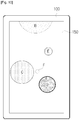
- FIG. 11 illustrates a GUI according to still another embodiment of the present invention.
- the GUI of FIG. 11 is distinct from the GUI of FIG. 1 in that the GUI of FIG. 11 displays a position guide in the center, in addition to menus B, C, and D.
- the position guide indicates the positions of menus displayed on the touch screen 150. As shown in FIG. 12 , the position guide includes marks indicating all of the menus. Marks for menus that are currently displayed on the touch screen 150 are shown to be different from marks for menus that are not currently displayed on the touch screen 150.
- marks for menus that are currently displayed on the touch screen 150 are also shown differently.
- a mark for a clearly displayed menu is also clear, and a mark for an unclearly displayed menu is also unclear.
- a mark for clearly displayed menu C is clear, and marks for unclearly displayed menus B and D are unclear.
- the marks in the position guide include an indication (A, B, C,...,I) for corresponding menus, but may be implemented without the indications.
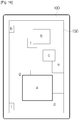
- FIG. 16 shows a type of GUI which differs from that of FIG. 1 , according to still another embodiment of the present invention. Unlike the menus as shown in FIG. 1 , the images shown in FIG. 16 are rectangular. The number of images displayed in FIG. 16 is greater than the number of menus displayed in FIG. 1 . The depth level of the images displayed in FIG. 16 is also greater than the depth level (three) of the menus displayed in FIG. 1 .
- the touched image is enlarged and fully displayed on the touch screen 150, as shown in FIG. 18 .
- the enlarged image gradually moves to the right and disappears, and a subsequent image gradually moves from the left to the right, and is finally displayed on the touch screen 150 as shown in FIG. 20 .
- the enlarged image gradually moves to the left and disappears, a previous image gradually moves from the right to the left, and is finally displayed on the touch screen 150.
- FIG. 21 shows a multimedia device 100 providing a GUI such as the GUIs described above.
- the multimedia device 100 includes a multimedia function block 110, a GUI generation unit 130, a touch screen 150, and a control unit 170.
- the multimedia device 100 may include additional and/or different units. Similarly, the functionality of two or more of the above units may be combined into a single component.
- the multimedia device 100 may be a mobile device, personal digital assistant (PDA), laptop computer, personal entertainment device, or other device.
- PDA personal digital assistant
- the multimedia function block 110 performs native functions of the multimedia device 100, such as music playback, voice recording, movie playback, picture playback, file search, word processor, and game.
- the GUI generation unit 130 generates a GUI under the control of the control unit 170, and adds the generated GUI to an image output from the multimedia function block 110.
- the touch screen 150 displays the GUI-added image output from the GUI generation unit 130, and may receive input by being touched or dragged by the user.
- the control unit 170 controls the operation of the multimedia function block 110 according to user commands input using the touch screen 150 or a manipulation unit (not shown), such as buttons, a keyboard, a mouse, a microphone, or other device to permit user input.
- the control unit 170 operates the GUI generation unit 130 to display a GUI on the touch screen 150 according to user commands. This process is described below in detail with reference to FIG. 22 .
- the control unit 170 operates the GUI generation unit 130 to display menus that can be selected by the user on the touch screen 150.
- the GUIs shown in FIGS. 1 , 8 , 11 , and 16 can be displayed on the touch screen 150 as a result of operation S210.
- the GUI shown in FIG. 16 displays images, not menus.
- control unit 170 operates the GUI generation unit 130 to remove at least one of the menus displayed on the touch screen 150 by zooming-in or zooming-out in operation S230.
- control unit 170 operates the GUI generation unit 130 to show at least one new menu, which was not previously displayed on the touch screen 150, by zoom-in or zoom-out in operation S240. Operation S240 may occur simultaneously with operation S230.
- operation S220 the user drags the touch screen 150 downwards (see FIG. 2 ) or upwards (see FIG. 6 ). If the user drags the touch screen 150 downwards in operation S220, the result of operations S230 and S240 is shown in FIG. 3 . However, if the user drags the touch screen 150 upwards in operation S220, the result of operations S230 and S240 is shown in FIG. 7 .
- the user may drag the touch screen 150 at a short distance (see FIG. 12 ) or long distance (see FIG. 14 ). If the user drags the touch screen 150 downwards at a short distance in operation S220, the result of operations S230 and S240 is shown in FIG. 13 . However, if the user drags the touch screen 150 upwards at a long distance in operation S220, the result of operations S230 and S240 is shown in FIG. 15 . According to other aspects of the invention, the process described with respect to FIG. 22 may be applied to any of the above-described GUIs.
- a GUI that maintains a certain number of menus displayed on the touch screen 150 by zooming in or out menus through being dragged by the user, a method for providing the GUI, and a multimedia device using the same have been described in detail with reference to the exemplary embodiments.
- the number of menus which are displayed on the touch screen 150 remains at three, but this is merely an example for convenience of description. However, any number of menus may be displayed on the touch screen.
- menus and images are displayed on the GUI. According to other aspects of the invention, other items in addition to, or instead of, menus or images may be displayed on the GUI.
- the menus move in three different directions (along three different axes) on the touch screen 150, but this is not intended as a limiting factor. According to other aspects of the invention, the number of axes may vary. Additionally, the number of menus disappearing from the touch screen 150 by being zoomed in or out may be the same as the number of menus newly appearing in the touch screen 150, or may be different.
- GUI may be implemented in the reverse fashion.
- menu change by zooming-in may be implemented to be continuously performed
- menu change by zooming-out is implemented to be continuously performed more than once.
- menus constituting the GUI may change by moving to the left or right.
Landscapes
- Engineering & Computer Science (AREA)
- General Engineering & Computer Science (AREA)
- Theoretical Computer Science (AREA)
- Human Computer Interaction (AREA)
- Physics & Mathematics (AREA)
- General Physics & Mathematics (AREA)
- User Interface Of Digital Computer (AREA)
Claims (14)
- Procédé pour fournir une interface utilisateur graphique (GUI) pour un dispositif multimédia, le procédé comprenant :sélectionner (210), parmi un ensemble d'éléments de GUI disponibles ayant un ordre, et afficher sur un écran du dispositif multimédia des premiers éléments de GUI des dimensions différentes et de luminosité, de saturation ou de transparence différentes, les éléments affichés pouvant être sélectionnés par un utilisateur sur l'écran; etlorsque l'utilisateur fait glisser sur une zone de GUI autre que celle où les éléments de GUI sont affichés, supprimer (S230) de l'écran au moins un des premiers éléments de GUI affichés sur l'écran en effectuant un zoom avant ou un zoom arrière de l'au moins un des premiers éléments de GUI et afficher (S240) sur l'écran au moins un deuxième élément de GUI, parmi ledit ensemble d'éléments de GUI disponibles, qui n'était pas affiché précédemment sur l'écran,de plus, simultanément à l'affichage desdits premiers éléments de GUI, afficher un guide de localisation qui montre, dans ledit ordre, des marques indiquant tous les éléments dudit ensemble d'éléments de GUI disponibles, où :- les marques pour les éléments qui sont affichés actuellement sur l'écran sont représentées comme étant différentes des marques pour les éléments qui ne sont pas affichés actuellement sur l'écran ; et- la luminosité, la saturation ou la transparence des marques pour des éléments qui sont affichés actuellement sur l'écran correspondent, respectivement, à la luminosité, la saturation ou la transparence des éléments de GUI correspondants qui sont actuellement affichés.
- Procédé selon la revendication 1, où la suppression de l'au moins un des premiers éléments de GUI et l'affichage additionnel de l'au moins un deuxième élément de GUI sont effectués simultanément.
- Procédé selon la revendication 1, où le nombre d'éléments de GUI supprimés est le même que le nombre de deuxièmes éléments de GUI.
- Procédé selon la revendication 1, où lorsque l'au moins un des premiers éléments de GUI affichés sur l'écran est supprimé de l'écran en effectuant un zoom avant, l'affichage additionnel de l'au moins un deuxième élément de GUI comprend l'affichage de l'au moins un deuxième élément de GUI en effectuant un zoom avant.
- Procédé selon la revendication 4, où :la suppression comprend le déplacement de l'au moins un des premiers éléments de GUI affichés sur l'écran en dehors de l'écran en effectuant un zoom avant et la suppression de l'au moins un des premiers éléments de GUI de l'écran; etl'affichage additionnel de l'au moins un deuxième élément de GUI qui n'est pas précédemment affiché sur l'écran comprend le déplacement de l'au moins un deuxième élément de GUI à l'intérieur de l'écran en effectuant un zoom avant et l'affichage de l'au moins un deuxième élément de GUI sur l'écran.
- Procédé selon la revendication 4, où :la suppression comprend la diminution de la luminosité, de la saturation ou de la transparence de l'au moins un des premiers éléments de GUI affichés sur l'écran lors d'un zoom avant et la suppression de l'au moins un des premiers éléments de GUI de l'écran; etl'affichage additionnel de l'au moins un deuxième élément de GUI comprend une augmentation de la luminosité, de la saturation ou de la transparence de l'au moins un deuxième élément de GUI lors d'un zoom avant etl'affichage de l'au moins un deuxième élément de GUI sur l'écran.
- Procédé selon la revendication 1, où, lorsque l'au moins un des premiers éléments de GUI affichés sur l'écran est supprimé de l'écran en effectuant un zoom arrière, l'au moins un deuxième élément de GUI qui n'est pas affiché sur l'écran est affiché en effectuant un zoom arrière.
- Procédé selon la revendication 7, où:la suppression de l'au moins un des premiers éléments de GUI affichés sur l'écran comprend le déplacement de l'au moins un des premiers éléments de GUI dans les limites de l'écran en effectuant un zoom arrière et la suppression de l'au moins un des premiers éléments de GUI de l'écran; etl'affichage additionnel de l'au moins un deuxième élément de GUI qui n'est pas affiché sur l'écran comprend le déplacement de l'au moins un deuxième élément de GUI de l'extérieur de l'écran vers l'intérieur de l'écran en effectuant un zoom arrière et l'affichage de l'au moins un deuxième élément de GUI sur l'écran.
- Procédé selon la revendication 7, où :la suppression de l'au moins un des premiers éléments de GUI affichés sur l'écran comprend une diminution de la luminosité, de la saturation ou de la transparence de l'au moins un des premiers éléments de GUI lors d'un zoom arrière et la suppression de l'au moins un des premiers éléments de GUI de l'écran; etl'affichage additionnel de l'au moins un deuxième élément de GUI qui n'est pas affiché sur l'écran comprend une augmentation de la luminosité, de la saturation ou de la transparence de l'au moins un deuxième élément de GUI lors d'un zoom arrière et l'affichage de l'au moins un deuxième élément de GUI sur l'écran.
- Procédé selon la revendication 1, où la luminosité, la saturation ou la transparence d'un élément de GUI parmi les premiers éléments de GUI affichés sur l'écran est supérieure à luminosité, la saturation ou la transparence des éléments de GUI affichés sur l'écran restants.
- Procédé selon la revendication 1, comprenant en outre :déterminer si l'utilisateur fait glisser ou non une partie de l'écran;où la suppression et l'affichage additionnel sont effectués si l'utilisateur fait glisser la partie de l'écran.
- Procédé selon la revendication 11, où le nombre d'éléments de GUI supprimés et le nombre de deuxièmes éléments de GUI affichés additionnellement sont déterminés en fonction de la distance parcourue par l'utilisateur.
- Dispositif multimédia (100) comprenant :une unité de génération de GUI (130) pour sélectionner, parmi un ensemble d'éléments de GUI disponibles ayant un ordre, et afficher des premiers éléments de GUI de dimensions différentes et de luminosité, de saturation ou de transparence différentes, les éléments affichés pouvant être sélectionnés par un utilisateur sur un écran; etune unité de contrôle (170) pour faire fonctionner l'unité de génération de GUI (130) de manière à supprimer de l'écran, lorsque l'utilisateur fait glisser sur une zone de GUI autre que celle où les éléments de GUI sont affichés, au moins un des premiers éléments de GUI affichés sur l'écran en effectuant un zoom avant ou un zoom arrière de l'au moins un des premiers éléments de GUI et en affichant sur l'écran au moins un deuxième élément de GUI, parmi ledit ensemble d'éléments de GUI disponibles, qui n'était pas affiché précédemment sur l'écran,où l'unité de contrôle (170) contrôle l'unité de génération de GUI (130) pour afficher simultanément à l'affichage desdits premiers éléments de GUI, un guide de localisation qui montre, dans ledit ordre, des marques indiquant tous les éléments dudit ensemble d'éléments de GUI disponibles, où:- les marques pour les éléments qui sont affichés actuellement sur l'écran sont représentées comme étant différentes des marques pour les éléments qui ne sont pas affichés actuellement sur l'écran; et- la luminosité, la saturation ou la transparence des marques pour les éléments qui sont affichés actuellement sur l'écran correspondent, respectivement, à la luminosité, la saturation ou la transparence des éléments de GUI correspondants qui sont actuellement affichés.
- Dispositif multimédia (100) selon la revendication 13, comprenant en outre:
un écran tactile (150) pour afficher les premiers et les deuxièmes éléments de GUI et pour permettre à l'utilisateur de manipuler les éléments de GUI.
Applications Claiming Priority (2)
| Application Number | Priority Date | Filing Date | Title |
|---|---|---|---|
| KR20070094420A KR101482080B1 (ko) | 2007-09-17 | 2007-09-17 | Gui 제공방법 및 이를 적용한 멀티미디어 기기 |
| PCT/KR2008/003335 WO2009038276A1 (fr) | 2007-09-17 | 2008-06-13 | Procédé pour fournir une interface utilisateur graphique et dispositif multimédia l'utilisant |
Publications (3)
| Publication Number | Publication Date |
|---|---|
| EP2191358A1 EP2191358A1 (fr) | 2010-06-02 |
| EP2191358A4 EP2191358A4 (fr) | 2017-02-22 |
| EP2191358B1 true EP2191358B1 (fr) | 2019-07-31 |
Family
ID=40453945
Family Applications (1)
| Application Number | Title | Priority Date | Filing Date |
|---|---|---|---|
| EP08766297.9A Active EP2191358B1 (fr) | 2007-09-17 | 2008-06-13 | Procédé pour fournir une interface utilisateur graphique et dispositif multimédia l'utilisant |
Country Status (5)
| Country | Link |
|---|---|
| US (1) | US8839106B2 (fr) |
| EP (1) | EP2191358B1 (fr) |
| KR (1) | KR101482080B1 (fr) |
| CN (1) | CN101802763B (fr) |
| WO (1) | WO2009038276A1 (fr) |
Families Citing this family (84)
| Publication number | Priority date | Publication date | Assignee | Title |
|---|---|---|---|---|
| JP5008605B2 (ja) * | 2008-05-26 | 2012-08-22 | 富士フイルム株式会社 | 画像処理装置および方法ならびにプログラム |
| KR101580259B1 (ko) * | 2008-12-11 | 2015-12-28 | 삼성전자주식회사 | Gui 제공방법 및 이를 적용한 전자장치 |
| TW201032101A (en) * | 2009-02-26 | 2010-09-01 | Qisda Corp | Electronic device controlling method |
| CN101866257B (zh) * | 2009-04-20 | 2012-11-21 | 鸿富锦精密工业(深圳)有限公司 | 触控式手持设备及其选项显示方法 |
| US8279185B2 (en) * | 2009-05-08 | 2012-10-02 | Sony Ericsson Mobile Communications Ab | Methods, devices and computer program products for positioning icons on a touch sensitive screen |
| US8438500B2 (en) * | 2009-09-25 | 2013-05-07 | Apple Inc. | Device, method, and graphical user interface for manipulation of user interface objects with activation regions |
| US8421762B2 (en) * | 2009-09-25 | 2013-04-16 | Apple Inc. | Device, method, and graphical user interface for manipulation of user interface objects with activation regions |
| US8416205B2 (en) * | 2009-09-25 | 2013-04-09 | Apple Inc. | Device, method, and graphical user interface for manipulation of user interface objects with activation regions |
| US9785342B2 (en) * | 2009-12-31 | 2017-10-10 | International Business Machines Corporation | Enhanced graphical display for hand-held devices |
| US8793611B2 (en) * | 2010-01-06 | 2014-07-29 | Apple Inc. | Device, method, and graphical user interface for manipulating selectable user interface objects |
| CN101763270B (zh) | 2010-01-28 | 2011-06-15 | 华为终端有限公司 | 组件显示处理方法和用户设备 |
| KR20120013727A (ko) | 2010-08-06 | 2012-02-15 | 삼성전자주식회사 | 디스플레이장치 및 그 제어방법 |
| US20120050335A1 (en) * | 2010-08-25 | 2012-03-01 | Universal Cement Corporation | Zooming system for a display |
| JP5593972B2 (ja) * | 2010-08-30 | 2014-09-24 | ソニー株式会社 | 情報処理装置、立体視表示方法、及びプログラム |
| JP5612459B2 (ja) * | 2010-12-24 | 2014-10-22 | 京セラ株式会社 | 携帯端末装置 |
| US9098115B2 (en) * | 2011-04-08 | 2015-08-04 | Autodesk, Inc | Physical object for intuitive navigation in a three-dimensional space |
| US9417754B2 (en) | 2011-08-05 | 2016-08-16 | P4tents1, LLC | User interface system, method, and computer program product |
| US9594729B2 (en) | 2011-08-30 | 2017-03-14 | Microsoft Technology Licensing, Llc | Content navigation and zooming on a mobile device |
| US9063637B2 (en) * | 2011-09-23 | 2015-06-23 | Microsoft Technology Licensing, Llc | Altering a view of a document on a display of a computing device |
| WO2013047541A1 (fr) * | 2011-09-28 | 2013-04-04 | シャープ株式会社 | Dispositif d'affichage et procédé d'affichage permettant d'améliorer la visibilité |
| CN103530031B (zh) * | 2012-07-06 | 2016-10-12 | 孕龙科技股份有限公司 | 显示器画面显示方式的操作方法 |
| JP2014038560A (ja) * | 2012-08-20 | 2014-02-27 | Canon Inc | 情報処理装置、情報処理方法及びプログラム |
| USD732049S1 (en) | 2012-11-08 | 2015-06-16 | Uber Technologies, Inc. | Computing device display screen with electronic summary or receipt graphical user interface |
| USD739875S1 (en) * | 2012-11-28 | 2015-09-29 | Samsung Electronics Co., Ltd. | Display screen or portion thereof with icon |
| USD741367S1 (en) * | 2012-11-28 | 2015-10-20 | Samsung Electronics Co., Ltd. | Display screen or portion thereof with icon |
| USD736219S1 (en) * | 2013-02-05 | 2015-08-11 | Samsung Electronics Co., Ltd. | Display with destination management user interface |
| USD738905S1 (en) | 2013-06-09 | 2015-09-15 | Apple Inc. | Display screen or portion thereof with animated graphical user interface |
| USD737319S1 (en) | 2013-06-09 | 2015-08-25 | Apple Inc. | Display screen or portion thereof with graphical user interface |
| USD728615S1 (en) * | 2013-06-09 | 2015-05-05 | Apple Inc. | Display screen or portion thereof with icon |
| USD746831S1 (en) | 2013-09-10 | 2016-01-05 | Apple Inc. | Display screen or portion thereof with graphical user interface |
| USD711427S1 (en) | 2013-10-22 | 2014-08-19 | Apple Inc. | Display screen or portion thereof with icon |
| KR101529886B1 (ko) * | 2013-11-06 | 2015-06-18 | 김소훈 | 제스처 기반 3d 그래픽 사용자 인터페이스 제공방법 |
| USD763306S1 (en) * | 2014-02-21 | 2016-08-09 | Samsung Electronics Co., Ltd. | Display screen or portion thereof with transitional graphical user interface |
| USD759664S1 (en) * | 2014-03-17 | 2016-06-21 | Google Inc. | Display panel portion with animated computer icon |
| USD751599S1 (en) * | 2014-03-17 | 2016-03-15 | Google Inc. | Portion of a display panel with an animated computer icon |
| USD760242S1 (en) * | 2014-03-17 | 2016-06-28 | Google Inc. | Display panel portion with animated computer icon |
| USD765093S1 (en) * | 2014-03-17 | 2016-08-30 | Google Inc. | Display panel portion with animated computer icon |
| CN103927054B (zh) | 2014-04-15 | 2017-02-01 | 华为终端有限公司 | 一种显示操作界面的方法、装置及触摸屏终端 |
| USD753678S1 (en) | 2014-06-01 | 2016-04-12 | Apple Inc. | Display screen or portion thereof with animated graphical user interface |
| USD762693S1 (en) | 2014-09-03 | 2016-08-02 | Apple Inc. | Display screen or portion thereof with graphical user interface |
| USD766926S1 (en) * | 2014-11-25 | 2016-09-20 | Microsoft Corporation | Display screen with animated graphical user interface |
| USD769306S1 (en) * | 2015-01-20 | 2016-10-18 | Microsoft Corporation | Display screen with animated graphical user interface |
| USD789393S1 (en) * | 2015-02-20 | 2017-06-13 | Google Inc. | Portion of a display panel with a graphical user interface |
| USD775185S1 (en) | 2015-03-06 | 2016-12-27 | Apple Inc. | Display screen or portion thereof with graphical user interface |
| USD786270S1 (en) * | 2015-03-13 | 2017-05-09 | Adp, Llc | Display screen or portion thereof with graphical user interface |
| US10033831B2 (en) | 2015-03-20 | 2018-07-24 | Adp, Llc | Dynamic workflow generation |
| USD759084S1 (en) * | 2015-06-04 | 2016-06-14 | Security Scorecard, Inc. | Display screen or portion thereof with graphical user interface for security to reduce risk |
| USD772269S1 (en) | 2015-06-05 | 2016-11-22 | Apple Inc. | Display screen or portion thereof with graphical user interface |
| USD880517S1 (en) | 2015-08-21 | 2020-04-07 | Sony Corporation | Display panel or screen with graphical user interface |
| USD788161S1 (en) | 2015-09-08 | 2017-05-30 | Apple Inc. | Display screen or portion thereof with graphical user interface |
| USD795918S1 (en) * | 2015-12-17 | 2017-08-29 | The Procter & Gamble Company | Display screen with icon |
| USD815142S1 (en) * | 2016-04-04 | 2018-04-10 | The Raymond Corporation | Battery display screen or portion thereof with animated graphical user interface |
| USD792893S1 (en) * | 2016-05-16 | 2017-07-25 | Google Inc. | Display screen with graphical user interface |
| USD842336S1 (en) * | 2016-05-17 | 2019-03-05 | Google Llc | Display screen with animated graphical user interface |
| US10345986B1 (en) | 2016-05-17 | 2019-07-09 | Google Llc | Information cycling in graphical notifications |
| EP4715554A2 (fr) | 2016-09-27 | 2026-03-25 | Bigfoot Biomedical, Inc. | Systèmes, dispositifs et procédés d'injection de médicament et de gestion de maladie |
| USD836769S1 (en) | 2016-12-12 | 2018-12-25 | Bigfoot Biomedical, Inc. | Insulin delivery controller |
| US11096624B2 (en) | 2016-12-12 | 2021-08-24 | Bigfoot Biomedical, Inc. | Alarms and alerts for medication delivery devices and systems |
| USD839294S1 (en) * | 2017-06-16 | 2019-01-29 | Bigfoot Biomedical, Inc. | Display screen with graphical user interface for closed-loop medication delivery |
| EP3651647A1 (fr) | 2017-07-13 | 2020-05-20 | Bigfoot Biomedical, Inc. | Affichage à échelles multiples d'informations de glycémie |
| USD848465S1 (en) | 2017-08-10 | 2019-05-14 | Jpmorgan Chase Bank, N.A. | Display screen or portion thereof with a graphical user interface |
| USD866579S1 (en) | 2017-08-22 | 2019-11-12 | Samsung Electronics Co., Ltd. | Display screen or portion thereof with graphical user interface |
| USD851111S1 (en) | 2017-09-09 | 2019-06-11 | Apple Inc. | Electronic device with graphical user interface |
| USD843442S1 (en) | 2017-09-10 | 2019-03-19 | Apple Inc. | Type font |
| US11714533B2 (en) | 2017-11-20 | 2023-08-01 | Huawei Technologies Co., Ltd. | Method and apparatus for dynamically displaying icon based on background image |
| USD871442S1 (en) * | 2017-12-15 | 2019-12-31 | Facebook, Inc. | Display screen with animated graphical user interface |
| KR101904161B1 (ko) * | 2018-03-12 | 2018-10-04 | 삼성전자 주식회사 | 디스플레이장치 및 그 제어방법 |
| USD911355S1 (en) | 2018-03-29 | 2021-02-23 | Bigfoot Biomedical, Inc. | Display screen or portion thereof with graphical user interface |
| USD879132S1 (en) | 2018-06-03 | 2020-03-24 | Apple Inc. | Electronic device with graphical user interface |
| USD938968S1 (en) | 2018-09-06 | 2021-12-21 | Apple Inc. | Electronic device with animated graphical user interface |
| USD893512S1 (en) | 2018-09-10 | 2020-08-18 | Apple Inc. | Electronic device with graphical user interface |
| USD902221S1 (en) | 2019-02-01 | 2020-11-17 | Apple Inc. | Electronic device with animated graphical user interface |
| USD900871S1 (en) | 2019-02-04 | 2020-11-03 | Apple Inc. | Electronic device with animated graphical user interface |
| USD914031S1 (en) * | 2019-04-29 | 2021-03-23 | Facebook, Inc. | Display screen with graphical user interface |
| USD910068S1 (en) | 2019-05-28 | 2021-02-09 | Apple Inc. | Display screen or portion thereof with graphical user interface |
| USD916121S1 (en) | 2019-05-28 | 2021-04-13 | Apple Inc. | Display screen or portion thereof with graphical user interface |
| USD913315S1 (en) | 2019-05-31 | 2021-03-16 | Apple Inc. | Electronic device with graphical user interface |
| USD943601S1 (en) * | 2019-06-28 | 2022-02-15 | Hitachi Energy Switzerland Ag | Display screen or portion thereof with animated cluster markers on a graphical user interface |
| USD944285S1 (en) * | 2019-06-28 | 2022-02-22 | Hitachi Energy Switzerland Ag | Display screen or portion thereof with animated cluster markers on a graphical user interface |
| USD924912S1 (en) | 2019-09-09 | 2021-07-13 | Apple Inc. | Display screen or portion thereof with graphical user interface |
| TWD213148S (zh) * | 2020-04-09 | 2021-08-11 | 仁寶電腦工業股份有限公司 | 顯示螢幕之圖形化使用者介面 |
| USD949182S1 (en) | 2020-05-27 | 2022-04-19 | Apple Inc. | Display screen or portion thereof with graphical user interface |
| USD1089249S1 (en) * | 2023-02-28 | 2025-08-19 | Huawei Technologies Co., Ltd. | Display screen or portion thereof with an animated graphical user interface |
| USD1119941S1 (en) | 2024-05-07 | 2026-03-24 | Apple Inc. | Display screen or portion thereof with graphical user interface |
Family Cites Families (13)
| Publication number | Priority date | Publication date | Assignee | Title |
|---|---|---|---|---|
| US6211856B1 (en) * | 1998-04-17 | 2001-04-03 | Sung M. Choi | Graphical user interface touch screen with an auto zoom feature |
| EP1052849B1 (fr) * | 1998-11-30 | 2011-06-15 | Sony Corporation | Boîtier décodeur et son procédé de fonctionnement |
| US6377285B1 (en) * | 1999-01-29 | 2002-04-23 | Sony Corporation | Zooming space-grid for graphical user interface |
| US7075513B2 (en) | 2001-09-04 | 2006-07-11 | Nokia Corporation | Zooming and panning content on a display screen |
| TWI238348B (en) * | 2002-05-13 | 2005-08-21 | Kyocera Corp | Portable information terminal, display control device, display control method, and recording media |
| US20040268393A1 (en) * | 2003-05-08 | 2004-12-30 | Hunleth Frank A. | Control framework with a zoomable graphical user interface for organizing, selecting and launching media items |
| JP2006091294A (ja) * | 2004-09-22 | 2006-04-06 | Matsushita Electric Ind Co Ltd | 画像の表示方法及び装置 |
| US20060109242A1 (en) * | 2004-11-19 | 2006-05-25 | Simpkins Daniel S | User interface for impaired users |
| KR20070037773A (ko) | 2005-10-04 | 2007-04-09 | 엘지전자 주식회사 | 표시기기에서 사용자 명령 입력 장치 및 방법 |
| AU2006332488A1 (en) * | 2005-12-30 | 2007-07-12 | Apple Inc. | Portable electronic device with multi-touch input |
| CN101030117A (zh) | 2006-03-02 | 2007-09-05 | 环达电脑(上海)有限公司 | 一种mp3播放器用户操作界面 |
| US7813774B2 (en) * | 2006-08-18 | 2010-10-12 | Microsoft Corporation | Contact, motion and position sensing circuitry providing data entry associated with keypad and touchpad |
| US7747968B2 (en) * | 2006-09-11 | 2010-06-29 | Apple Inc. | Content abstraction presentation along a multidimensional path |
-
2007
- 2007-09-17 KR KR20070094420A patent/KR101482080B1/ko not_active Expired - Fee Related
-
2008
- 2008-04-03 US US12/061,827 patent/US8839106B2/en not_active Expired - Fee Related
- 2008-06-13 WO PCT/KR2008/003335 patent/WO2009038276A1/fr not_active Ceased
- 2008-06-13 CN CN2008801067340A patent/CN101802763B/zh not_active Expired - Fee Related
- 2008-06-13 EP EP08766297.9A patent/EP2191358B1/fr active Active
Non-Patent Citations (1)
| Title |
|---|
| None * |
Also Published As
| Publication number | Publication date |
|---|---|
| EP2191358A4 (fr) | 2017-02-22 |
| US8839106B2 (en) | 2014-09-16 |
| US20090073132A1 (en) | 2009-03-19 |
| KR101482080B1 (ko) | 2015-01-14 |
| EP2191358A1 (fr) | 2010-06-02 |
| CN101802763A (zh) | 2010-08-11 |
| CN101802763B (zh) | 2013-12-18 |
| WO2009038276A1 (fr) | 2009-03-26 |
| KR20090029133A (ko) | 2009-03-20 |
Similar Documents
| Publication | Publication Date | Title |
|---|---|---|
| EP2191358B1 (fr) | Procédé pour fournir une interface utilisateur graphique et dispositif multimédia l'utilisant | |
| US11262908B2 (en) | Method of adjusting an UI and user terminal using the same | |
| US8386944B2 (en) | Method for providing graphical user interface and electronic device using the same | |
| US8217905B2 (en) | Method and apparatus for touchscreen based user interface interaction | |
| JP6144707B2 (ja) | アレイモードを使用したブラウザ内でのコンテンツアイテム間のナビゲート方法 | |
| US12474812B2 (en) | Screen splitting method and apparatus in multi-application scenario, and electronic device | |
| US9535600B2 (en) | Touch-sensitive device and touch-based folder control method thereof | |
| KR102004553B1 (ko) | 사용자 인터페이스에서의 작업 공간 관리 | |
| US20110016390A1 (en) | Mobile terminal to display menu information according to touch signal | |
| EP2154603A2 (fr) | Appareil, procédé et programme d'affichage | |
| US9280265B2 (en) | Input control device, input control method, and input control program for controlling display target upon receiving input on display screen of display device | |
| EP1939719A2 (fr) | Procédé pour fournir un menu, et dispositif multimédia l'utilisant | |
| US20110283212A1 (en) | User Interface | |
| US20130100051A1 (en) | Input control device, input control method, and input control program for controlling display target upon receiving input on display screen of display device | |
| US20100134432A1 (en) | Method and apparatus to provide user interface | |
| US8605219B2 (en) | Techniques for implementing a cursor for televisions | |
| CN114766015A (zh) | 用于与对应于应用程序的用户界面对象进行交互的设备、方法和图形用户界面 | |
| CN104285200B (zh) | 用于控制媒体装置中的菜单的方法和设备 | |
| EP2521025B1 (fr) | Procédé de traitement d'affichage de composants et dispositif utilisateur | |
| KR20090065919A (ko) | 메뉴 조작 시스템 및 방법 | |
| US20110141146A1 (en) | Electronic apparatus and method of controlling the same | |
| CN104081333A (zh) | 包括均描绘图形用户界面的区域的输入镜头的远程显示区 | |
| KR101474297B1 (ko) | 멀티미디어 장치 및 멀티미디어 장치에서의 사용자 인터페이스 제공방법 | |
| HK1193665B (en) | Multi-application environment | |
| HK1193661A1 (zh) | 多应用环境 |
Legal Events
| Date | Code | Title | Description |
|---|---|---|---|
| PUAI | Public reference made under article 153(3) epc to a published international application that has entered the european phase |
Free format text: ORIGINAL CODE: 0009012 |
|
| 17P | Request for examination filed |
Effective date: 20100322 |
|
| AK | Designated contracting states |
Kind code of ref document: A1 Designated state(s): AT BE BG CH CY CZ DE DK EE ES FI FR GB GR HR HU IE IS IT LI LT LU LV MC MT NL NO PL PT RO SE SI SK TR |
|
| AX | Request for extension of the european patent |
Extension state: AL BA MK RS |
|
| DAX | Request for extension of the european patent (deleted) | ||
| RAP1 | Party data changed (applicant data changed or rights of an application transferred) |
Owner name: SAMSUNG ELECTRONICS CO., LTD. |
|
| REG | Reference to a national code |
Ref country code: DE Ref legal event code: R079 Ref document number: 602008060783 Country of ref document: DE Free format text: PREVIOUS MAIN CLASS: G06F0003048000 Ipc: G06F0003048100 |
|
| RA4 | Supplementary search report drawn up and despatched (corrected) |
Effective date: 20170123 |
|
| RIC1 | Information provided on ipc code assigned before grant |
Ipc: G06F 3/0482 20130101ALI20170117BHEP Ipc: G06F 3/0481 20130101AFI20170117BHEP Ipc: G06F 3/0488 20130101ALI20170117BHEP |
|
| STAA | Information on the status of an ep patent application or granted ep patent |
Free format text: STATUS: EXAMINATION IS IN PROGRESS |
|
| 17Q | First examination report despatched |
Effective date: 20180227 |
|
| RIC1 | Information provided on ipc code assigned before grant |
Ipc: G06F 3/0481 20130101AFI20170117BHEP Ipc: G06F 3/0482 20130101ALI20170117BHEP Ipc: G06F 3/0488 20130101ALI20170117BHEP |
|
| GRAP | Despatch of communication of intention to grant a patent |
Free format text: ORIGINAL CODE: EPIDOSNIGR1 |
|
| STAA | Information on the status of an ep patent application or granted ep patent |
Free format text: STATUS: GRANT OF PATENT IS INTENDED |
|
| RIC1 | Information provided on ipc code assigned before grant |
Ipc: G06F 3/0482 20130101ALI20170117BHEP Ipc: G06F 3/0481 20130101AFI20170117BHEP Ipc: G06F 3/0488 20130101ALI20170117BHEP |
|
| INTG | Intention to grant announced |
Effective date: 20190207 |
|
| GRAS | Grant fee paid |
Free format text: ORIGINAL CODE: EPIDOSNIGR3 |
|
| GRAA | (expected) grant |
Free format text: ORIGINAL CODE: 0009210 |
|
| STAA | Information on the status of an ep patent application or granted ep patent |
Free format text: STATUS: THE PATENT HAS BEEN GRANTED |
|
| AK | Designated contracting states |
Kind code of ref document: B1 Designated state(s): AT BE BG CH CY CZ DE DK EE ES FI FR GB GR HR HU IE IS IT LI LT LU LV MC MT NL NO PL PT RO SE SI SK TR |
|
| REG | Reference to a national code |
Ref country code: CH Ref legal event code: EP Ref country code: GB Ref legal event code: FG4D |
|
| REG | Reference to a national code |
Ref country code: AT Ref legal event code: REF Ref document number: 1161624 Country of ref document: AT Kind code of ref document: T Effective date: 20190815 |
|
| REG | Reference to a national code |
Ref country code: IE Ref legal event code: FG4D |
|
| REG | Reference to a national code |
Ref country code: DE Ref legal event code: R096 Ref document number: 602008060783 Country of ref document: DE |
|
| REG | Reference to a national code |
Ref country code: NL Ref legal event code: FP |
|
| REG | Reference to a national code |
Ref country code: LT Ref legal event code: MG4D |
|
| REG | Reference to a national code |
Ref country code: AT Ref legal event code: MK05 Ref document number: 1161624 Country of ref document: AT Kind code of ref document: T Effective date: 20190731 |
|
| PG25 | Lapsed in a contracting state [announced via postgrant information from national office to epo] |
Ref country code: NO Free format text: LAPSE BECAUSE OF FAILURE TO SUBMIT A TRANSLATION OF THE DESCRIPTION OR TO PAY THE FEE WITHIN THE PRESCRIBED TIME-LIMIT Effective date: 20191031 Ref country code: SE Free format text: LAPSE BECAUSE OF FAILURE TO SUBMIT A TRANSLATION OF THE DESCRIPTION OR TO PAY THE FEE WITHIN THE PRESCRIBED TIME-LIMIT Effective date: 20190731 Ref country code: BG Free format text: LAPSE BECAUSE OF FAILURE TO SUBMIT A TRANSLATION OF THE DESCRIPTION OR TO PAY THE FEE WITHIN THE PRESCRIBED TIME-LIMIT Effective date: 20191031 Ref country code: PT Free format text: LAPSE BECAUSE OF FAILURE TO SUBMIT A TRANSLATION OF THE DESCRIPTION OR TO PAY THE FEE WITHIN THE PRESCRIBED TIME-LIMIT Effective date: 20191202 Ref country code: AT Free format text: LAPSE BECAUSE OF FAILURE TO SUBMIT A TRANSLATION OF THE DESCRIPTION OR TO PAY THE FEE WITHIN THE PRESCRIBED TIME-LIMIT Effective date: 20190731 Ref country code: FI Free format text: LAPSE BECAUSE OF FAILURE TO SUBMIT A TRANSLATION OF THE DESCRIPTION OR TO PAY THE FEE WITHIN THE PRESCRIBED TIME-LIMIT Effective date: 20190731 Ref country code: LT Free format text: LAPSE BECAUSE OF FAILURE TO SUBMIT A TRANSLATION OF THE DESCRIPTION OR TO PAY THE FEE WITHIN THE PRESCRIBED TIME-LIMIT Effective date: 20190731 Ref country code: HR Free format text: LAPSE BECAUSE OF FAILURE TO SUBMIT A TRANSLATION OF THE DESCRIPTION OR TO PAY THE FEE WITHIN THE PRESCRIBED TIME-LIMIT Effective date: 20190731 |
|
| PG25 | Lapsed in a contracting state [announced via postgrant information from national office to epo] |
Ref country code: ES Free format text: LAPSE BECAUSE OF FAILURE TO SUBMIT A TRANSLATION OF THE DESCRIPTION OR TO PAY THE FEE WITHIN THE PRESCRIBED TIME-LIMIT Effective date: 20190731 Ref country code: GR Free format text: LAPSE BECAUSE OF FAILURE TO SUBMIT A TRANSLATION OF THE DESCRIPTION OR TO PAY THE FEE WITHIN THE PRESCRIBED TIME-LIMIT Effective date: 20191101 Ref country code: LV Free format text: LAPSE BECAUSE OF FAILURE TO SUBMIT A TRANSLATION OF THE DESCRIPTION OR TO PAY THE FEE WITHIN THE PRESCRIBED TIME-LIMIT Effective date: 20190731 Ref country code: IS Free format text: LAPSE BECAUSE OF FAILURE TO SUBMIT A TRANSLATION OF THE DESCRIPTION OR TO PAY THE FEE WITHIN THE PRESCRIBED TIME-LIMIT Effective date: 20191130 |
|
| PG25 | Lapsed in a contracting state [announced via postgrant information from national office to epo] |
Ref country code: TR Free format text: LAPSE BECAUSE OF FAILURE TO SUBMIT A TRANSLATION OF THE DESCRIPTION OR TO PAY THE FEE WITHIN THE PRESCRIBED TIME-LIMIT Effective date: 20190731 |
|
| PG25 | Lapsed in a contracting state [announced via postgrant information from national office to epo] |
Ref country code: DK Free format text: LAPSE BECAUSE OF FAILURE TO SUBMIT A TRANSLATION OF THE DESCRIPTION OR TO PAY THE FEE WITHIN THE PRESCRIBED TIME-LIMIT Effective date: 20190731 Ref country code: EE Free format text: LAPSE BECAUSE OF FAILURE TO SUBMIT A TRANSLATION OF THE DESCRIPTION OR TO PAY THE FEE WITHIN THE PRESCRIBED TIME-LIMIT Effective date: 20190731 Ref country code: PL Free format text: LAPSE BECAUSE OF FAILURE TO SUBMIT A TRANSLATION OF THE DESCRIPTION OR TO PAY THE FEE WITHIN THE PRESCRIBED TIME-LIMIT Effective date: 20190731 Ref country code: RO Free format text: LAPSE BECAUSE OF FAILURE TO SUBMIT A TRANSLATION OF THE DESCRIPTION OR TO PAY THE FEE WITHIN THE PRESCRIBED TIME-LIMIT Effective date: 20190731 Ref country code: IT Free format text: LAPSE BECAUSE OF FAILURE TO SUBMIT A TRANSLATION OF THE DESCRIPTION OR TO PAY THE FEE WITHIN THE PRESCRIBED TIME-LIMIT Effective date: 20190731 |
|
| PG25 | Lapsed in a contracting state [announced via postgrant information from national office to epo] |
Ref country code: IS Free format text: LAPSE BECAUSE OF FAILURE TO SUBMIT A TRANSLATION OF THE DESCRIPTION OR TO PAY THE FEE WITHIN THE PRESCRIBED TIME-LIMIT Effective date: 20200224 Ref country code: CZ Free format text: LAPSE BECAUSE OF FAILURE TO SUBMIT A TRANSLATION OF THE DESCRIPTION OR TO PAY THE FEE WITHIN THE PRESCRIBED TIME-LIMIT Effective date: 20190731 Ref country code: SK Free format text: LAPSE BECAUSE OF FAILURE TO SUBMIT A TRANSLATION OF THE DESCRIPTION OR TO PAY THE FEE WITHIN THE PRESCRIBED TIME-LIMIT Effective date: 20190731 |
|
| REG | Reference to a national code |
Ref country code: DE Ref legal event code: R097 Ref document number: 602008060783 Country of ref document: DE |
|
| PLBE | No opposition filed within time limit |
Free format text: ORIGINAL CODE: 0009261 |
|
| STAA | Information on the status of an ep patent application or granted ep patent |
Free format text: STATUS: NO OPPOSITION FILED WITHIN TIME LIMIT |
|
| PG2D | Information on lapse in contracting state deleted |
Ref country code: IS |
|
| PG25 | Lapsed in a contracting state [announced via postgrant information from national office to epo] |
Ref country code: IS Free format text: LAPSE BECAUSE OF FAILURE TO SUBMIT A TRANSLATION OF THE DESCRIPTION OR TO PAY THE FEE WITHIN THE PRESCRIBED TIME-LIMIT Effective date: 20191030 |
|
| PGFP | Annual fee paid to national office [announced via postgrant information from national office to epo] |
Ref country code: NL Payment date: 20200521 Year of fee payment: 13 Ref country code: DE Payment date: 20200520 Year of fee payment: 13 |
|
| 26N | No opposition filed |
Effective date: 20200603 |
|
| PG25 | Lapsed in a contracting state [announced via postgrant information from national office to epo] |
Ref country code: SI Free format text: LAPSE BECAUSE OF FAILURE TO SUBMIT A TRANSLATION OF THE DESCRIPTION OR TO PAY THE FEE WITHIN THE PRESCRIBED TIME-LIMIT Effective date: 20190731 |
|
| PGFP | Annual fee paid to national office [announced via postgrant information from national office to epo] |
Ref country code: GB Payment date: 20200522 Year of fee payment: 13 |
|
| PG25 | Lapsed in a contracting state [announced via postgrant information from national office to epo] |
Ref country code: MC Free format text: LAPSE BECAUSE OF FAILURE TO SUBMIT A TRANSLATION OF THE DESCRIPTION OR TO PAY THE FEE WITHIN THE PRESCRIBED TIME-LIMIT Effective date: 20190731 |
|
| REG | Reference to a national code |
Ref country code: CH Ref legal event code: PL |
|
| PG25 | Lapsed in a contracting state [announced via postgrant information from national office to epo] |
Ref country code: LU Free format text: LAPSE BECAUSE OF NON-PAYMENT OF DUE FEES Effective date: 20200613 |
|
| REG | Reference to a national code |
Ref country code: BE Ref legal event code: MM Effective date: 20200630 |
|
| PG25 | Lapsed in a contracting state [announced via postgrant information from national office to epo] |
Ref country code: FR Free format text: LAPSE BECAUSE OF NON-PAYMENT OF DUE FEES Effective date: 20200630 Ref country code: CH Free format text: LAPSE BECAUSE OF NON-PAYMENT OF DUE FEES Effective date: 20200630 Ref country code: LI Free format text: LAPSE BECAUSE OF NON-PAYMENT OF DUE FEES Effective date: 20200630 Ref country code: IE Free format text: LAPSE BECAUSE OF NON-PAYMENT OF DUE FEES Effective date: 20200613 |
|
| PG25 | Lapsed in a contracting state [announced via postgrant information from national office to epo] |
Ref country code: BE Free format text: LAPSE BECAUSE OF NON-PAYMENT OF DUE FEES Effective date: 20200630 |
|
| REG | Reference to a national code |
Ref country code: DE Ref legal event code: R119 Ref document number: 602008060783 Country of ref document: DE |
|
| REG | Reference to a national code |
Ref country code: NL Ref legal event code: MM Effective date: 20210701 |
|
| GBPC | Gb: european patent ceased through non-payment of renewal fee |
Effective date: 20210613 |
|
| PG25 | Lapsed in a contracting state [announced via postgrant information from national office to epo] |
Ref country code: GB Free format text: LAPSE BECAUSE OF NON-PAYMENT OF DUE FEES Effective date: 20210613 Ref country code: DE Free format text: LAPSE BECAUSE OF NON-PAYMENT OF DUE FEES Effective date: 20220101 |
|
| PG25 | Lapsed in a contracting state [announced via postgrant information from national office to epo] |
Ref country code: NL Free format text: LAPSE BECAUSE OF NON-PAYMENT OF DUE FEES Effective date: 20210701 Ref country code: MT Free format text: LAPSE BECAUSE OF FAILURE TO SUBMIT A TRANSLATION OF THE DESCRIPTION OR TO PAY THE FEE WITHIN THE PRESCRIBED TIME-LIMIT Effective date: 20190731 Ref country code: CY Free format text: LAPSE BECAUSE OF FAILURE TO SUBMIT A TRANSLATION OF THE DESCRIPTION OR TO PAY THE FEE WITHIN THE PRESCRIBED TIME-LIMIT Effective date: 20190731 |