EP2192478A2 - Intuitives Dateitransferverfahren - Google Patents
Intuitives Dateitransferverfahren Download PDFInfo
- Publication number
- EP2192478A2 EP2192478A2 EP09176578A EP09176578A EP2192478A2 EP 2192478 A2 EP2192478 A2 EP 2192478A2 EP 09176578 A EP09176578 A EP 09176578A EP 09176578 A EP09176578 A EP 09176578A EP 2192478 A2 EP2192478 A2 EP 2192478A2
- Authority
- EP
- European Patent Office
- Prior art keywords
- source
- file transfer
- object icon
- destination
- intuitive
- Prior art date
- Legal status (The legal status is an assumption and is not a legal conclusion. Google has not performed a legal analysis and makes no representation as to the accuracy of the status listed.)
- Withdrawn
Links
Images






Classifications
-
- G—PHYSICS
- G06—COMPUTING OR CALCULATING; COUNTING
- G06F—ELECTRIC DIGITAL DATA PROCESSING
- G06F13/00—Interconnection of, or transfer of information or other signals between, memories, input/output devices or central processing units
-
- G—PHYSICS
- G06—COMPUTING OR CALCULATING; COUNTING
- G06F—ELECTRIC DIGITAL DATA PROCESSING
- G06F3/00—Input arrangements for transferring data to be processed into a form capable of being handled by the computer; Output arrangements for transferring data from processing unit to output unit, e.g. interface arrangements
- G06F3/01—Input arrangements or combined input and output arrangements for interaction between user and computer
- G06F3/048—Interaction techniques based on graphical user interfaces [GUI]
- G06F3/0484—Interaction techniques based on graphical user interfaces [GUI] for the control of specific functions or operations, e.g. selecting or manipulating an object, an image or a displayed text element, setting a parameter value or selecting a range
- G06F3/0486—Drag-and-drop
-
- G—PHYSICS
- G06—COMPUTING OR CALCULATING; COUNTING
- G06F—ELECTRIC DIGITAL DATA PROCESSING
- G06F3/00—Input arrangements for transferring data to be processed into a form capable of being handled by the computer; Output arrangements for transferring data from processing unit to output unit, e.g. interface arrangements
- G06F3/01—Input arrangements or combined input and output arrangements for interaction between user and computer
- G06F3/048—Interaction techniques based on graphical user interfaces [GUI]
- G06F3/0487—Interaction techniques based on graphical user interfaces [GUI] using specific features provided by the input device, e.g. functions controlled by the rotation of a mouse with dual sensing arrangements, or of the nature of the input device, e.g. tap gestures based on pressure sensed by a digitiser
- G06F3/0488—Interaction techniques based on graphical user interfaces [GUI] using specific features provided by the input device, e.g. functions controlled by the rotation of a mouse with dual sensing arrangements, or of the nature of the input device, e.g. tap gestures based on pressure sensed by a digitiser using a touch-screen or digitiser, e.g. input of commands through traced gestures
Definitions
- the present invention relates to transferring of files and in particular to an intuitive file transfer method.
- the conventional man-machine interface is designed to make a computer an easily operating tool that helps a user to complete a desired task, and thus, in the respect of the use thereof, the design must be easy to learn, easy to operate and allowing for precise control of progress of the desired task or data processing.
- a good man-machine interface must be designed to provide excellent interaction with the users in order to improve efficiency, quality and even pleasure of using the computer.
- a user can select a file or a file folder to be moved through clicking and the selected file or file folder to be moved is moved by dragging to a destination device.
- movement of files or file folders can also be done with the so called “click lock”, which makes file movement easier.
- the dragging operation can be done without constantly holding down a mouser button.
- an objective of the present invention is to provide an intuitive file transfer method, which is operated with intuitive file transfer programs for direct transmission of source data associated with an object icon selected by a user to a selected destination device.
- Another objective of the present invention is to provide a user with an operation for identifying a file to be transferred in an intuitive and easily-operating manner.
- the solution adopted in the present invention to overcome the problems of the conventional techniques comprises operating intuitive file transfer programs in accordance with the preset invention to carry out automatic detection of the selection of an object icon in a display area of the source device by a user operating a pointing device, either indirectly with a mouse controlling a cursor or directly with finger touching and to identify the source data with which the object icon is associated.
- the intuitive file transfer programs may further detect a predetermined pointing operation carried out by a user that moves the object icon to a designated boundary of the display area through dragging or that moves the object icon to an unoccupied location in the display area and identify the operation of copying and transferring of the source data associated with the object icon.
- the source data associated with the selected object icon can be transmitted to a storage device of the destination device.
- the technical solution provided by the present invention allows for copy and transfer of selected files or file folders to a selected destination device without additionally employing function keys, such as Ctrl key plus a character key "C", or without additionally pulling down a menu for working with the right mouse button for execution of the function of copying, whereby the intuitive file transfer method in accordance with the present invention may directly transmit source data associated with an object icon of selected file or file folder to a selected destination device.
- function keys such as Ctrl key plus a character key "C”
- To copy or transfer the selected file or file folder by moving the associated object icon by dragging to a boundary of a display area or moving to an unoccupied location in the display area is an intuitive manner of operation of moving the file or file folder out of the source device, which complies with the recognition and behavior of a user, providing a function of simply identifying file transferring and learning of the operation of transferring files.
- the system of the present invention comprises a source device 1, a destination device 2, and a data transmission device 3.
- the source device 1 is set in connection with the destination device 2 through the data transmission device 3.
- the data transmission device 3 comprises a wired transmission port 31 connected to the source device 1 and a wired transmission port 32 connected to the destination device 2 and a transmission line 33 connecting between the wired transmission ports 31, 32 for transmission of data from the source device 1 to the destination device 2.
- FIG 2 shows a system block diagram of the source device of the embodiment shown in Figure 1 .
- the source device 1 comprises a screen cursor control device 11 serving as an input device and transmitting a trace signal to a micro-controller 12 through an interface circuit 111.
- a display screen 13 receives an image signal from the micro-controller 12 through a display interface 131 and displays the image signal on the screen.
- the micro-controller 12 is connected to a random access memory 14, a storage device 15 and a wired transmission interface 16.
- the storage device 15 stores an intuitive file transfer program 151 and source data 152.
- the wired transmission interface 16 is in connection with the wired transmission port 31.
- the destination device of the embodiment of Figure 1 has the same system architecture as the source device shown in the system block diagram of Figure 2 .
- Step 101 both the source device and the destination device are started up and system initialization is completed (Step 101) and a wired data transmission device, such as a USB (Universal Serial Bus) transmission cable is connected between the wired transmission port of the source device and the wired transmission port of the destination device to establish synchronized connection (Step 102).
- a wired data transmission device such as a USB (Universal Serial Bus) transmission cable
- the source device and the destination device are loaded with intuitive file transfer programs in storage devices thereof and the programs are executed in the random access memories connected to the micro-controllers (Step 103).
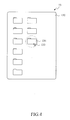
- the intuitive file transfer programs start and detect an object icon 134 to be transferred, as indicated by a phantom line circle of Figure 4 , selected by a user by operating a screen cursor control device, such as a computer mouse or a track ball, to control a screen cursor 133 for clicking on a display area 132 of the display screen 13 (Step 104).
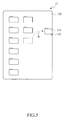
- the intuitive file transfer programs also detect a pointing operation performed by the user, such as dragging the object icon 134 (see Figure 5 ) by the computer mouse along a dragging trace D to a designated boundary of the display area 132 (Step 105).
- a pointing operation performed by the user such as dragging the object icon 134 (see Figure 5 ) by the computer mouse along a dragging trace D to a designated boundary of the display area 132 (Step 105).
- the intuitive file transfer programs generate an additional dialog window for confirmation of performing transfer of the source data that are associated with the selected object icon (Step 106).
- the intuitive file transfer programs transmit the source data, such as files or file folders, which are associated with the object icon and stored in the source device through the wired data transmission device connected between the source device and the destination device to the storage device of the destination device (Step 107). If the confirmation is denied, then the flow skips Step 107 and ends.
- FIG. 6 a flow chart of the intuitive file transfer method in accordance with a second embodiment of the present invention is shown.
- the second embodiment most of the steps are identical to the counterpart steps of the embodiment shown in Figure 3 and for simplicity and consistency, those identical steps will be designated with the same reference numerals.
- Step 105 is performed to have the intuitive file transfer programs detecting a user using a mouse to drag an object icon to be transferred to a designated boundary of the display area, but in the flow of the second embodiment (as shown in Figure 6 ), Step 105a replaces the original Step 105 and is performed to have the intuitive file transfer programs detecting a moving trace M (see Figure 7 ) along which a user moves an object icon 134 to be transferred to an unoccupied location in the display area by using a computer mouse to control a screen cursor 133.
- Figure 8 shows a system block diagram for wireless transfer with an intuitive file transfer method in accordance with the present invention.
- the system of the present invention comprises a source device 1a, a destination device 2a, and a data transmission device 3a and the source device 1 a is set in connection with the destination device 2a with the data transmission device 3a.
- the data transmission device 3a comprises a wireless transmission port 31 a connected to the source device 1 a and a wireless transmission port 32a connected to the destination device 2a for transmitting data from the source device 1 a to the destination device 2a.
- FIG 9 shows a system block diagram of the source device of the embodiment shown in Figure 8 .
- the source device 1 a comprises a micro-controller 12 connected to an operation interface 111a, a display interface 131, a random access memory 14, a storage device 15 and a wireless transmission interface 17.
- the storage device 15 stores an intuitive file transfer program 151 and source data 152.
- the wireless transmission interface 17 is set in connection with the wireless transmission device 31 a.
- a touch screen 18 is composed of a touch panel 181 that is composed of upper and lower touch layers and a display screen 182, which are respectively connected to the micro-controller 12 by the operation interface 111 a and the display interface 131.
- the touch screen 18, upon touched, generates a touch signal that is transmitted to the micro-controller 12 through the operation interface 111 a and the display screen 182 receives through the display interface 131 an image signal generated by the micro-controller 12 and displays the image signal on the screen.
- the destination device of the embodiment of Figure 8 has the same system architecture as the source device shown in the system block diagram of Figure 9 .
- Step 201 both the source device and the destination device are started up and system initialization is completed (Step 201) and connection between the source device and the destination device is established through the wireless data transmission devices connected respectively thereto so as to establish synchronized connection (Step 202).
- the source device and the destination device are loaded with intuitive file transfer programs in storage devices thereof and the programs are executed in the random access memories connected to the micro-controllers (Step 203).
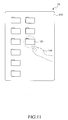
- the intuitive file transfer programs start and detect an object icon 185 to be transferred, as indicated by a phantom line circle of Figure 11 in a display area 183 of the touch screen 18, selected by a user by operating a pointing device, such as the user's finger 184 or a stylus, to touch the object icon (Step 204).
- the intuitive file transfer programs also detect a pointing operation performed by the user, such as the user's finger touching and moving on the touch screen 18 to drag the object icon 185 (see Figure 12 ) along a dragging trace D to a designated boundary of the display area 183 (Step 205).
- a pointing operation performed by the user such as the user's finger touching and moving on the touch screen 18 to drag the object icon 185 (see Figure 12 ) along a dragging trace D to a designated boundary of the display area 183 (Step 205).
- the intuitive file transfer programs generate an additional dialog window for confirmation of performing transfer of the source data that are associated with the selected object icon (Step 206).
- the intuitive file transfer programs in accordance with the present invention transmit the source data, such as files or file folders, which are associated with the object icon through connection established with wireless transmission protocols between the wireless data transmission devices to the storage device of the destination device (Step 207). If the confirmation is denied, then the flow skips Step 207 and ends.
- FIG. 13 a flow chart of an intuitive file transfer method in accordance with a fourth embodiment of the present invention is shown.
- the fourth embodiment most of the steps are identical to the counterpart steps of the embodiment shown in Figure 10 and for simplicity and consistency, those identical steps will be designated with the same reference numerals.
- Step 205 is performed to have the intuitive file transfer programs detecting a user touching his or her finger to the touch screen 18 to drag an object icon to be transferred to a designated boundary of the display area 183, but in the flow of the fourth embodiment (as shown in Figure 13 ) Step 205a replaces the original Step 205 and is performed to have the intuitive file transfer programs detecting a pointing operation that sets a moving trace M (see Figure 14 ) along which a user touches his or her finger 184 on the touch screen 18 to move an object icon 185 to be transferred to an unoccupied location on the display area 183.
- Figure 15 shows a system block diagram for wireless transfer in a piconet with an intuitive file transfer method in accordance with the present invention.
- the system of the present invention comprises a source device 1a, destination devices 4, 5 and a data transmission device 3b and the source device 1 a is set in connection with the destination devices 4, 5 with the data transmission device 3b.
- the data transmission device 3b comprises a wireless transmission port 31 a connected to the source device 1 a and a wireless transmission port 34, 35 connected to each of the destination devices 4, 5 for transmitting data from the source device 1 a to a target device, such as the destination device 4 or the destination device 5.
- Step 301 both the source device and the destination devices are started up and system initialization is completed (Step 301) and a piconet is established through the wireless data transmission devices connected to the source device and the destination devices so as to establish synchronized connection (Step 302).
- the source device and the destination devices are loaded with intuitive file transfer programs in storage devices thereof and the programs are executed in the random access memories connected to the micro-controllers (Step 303).
- the intuitive file transfer programs start and detect an object icon 185 to be transferred in a display area of a touch screen selected by a user touching his or her finger to the object icon (Step 304).
- the intuitive file transfer programs also detect a pointing operation performed by the user, such as the user's finger touching and moving on the touch screen to drag the object icon to a designated boundary of the display area (Step 305).
- a pointing operation performed by the user such as the user's finger touching and moving on the touch screen to drag the object icon to a designated boundary of the display area (Step 305).
- the intuitive file transfer programs generate an additional dialog window that shows a list of destination devices for selection of a desired one or ones of the destination devices by the user (Step 306).
- the intuitive file transfer programs After the selection of the desired destination device(s) the intuitive file transfer programs generate a further additional dialog window for confirmation of performing transfer of the source data that are associated with the selected object icon to the destination devices selected by the user (Step 307).
- the intuitive file transfer programs in accordance with the present invention transmit the source data of the source device, such as files or file folders, which are associated with the object icon through the piconet established among the wireless data transmission devices to the storage device(s) of the selected destination device(s) (Step 308). If the confirmation is denied, then the flow skips Step 308 and ends.
Landscapes
- Engineering & Computer Science (AREA)
- Theoretical Computer Science (AREA)
- General Engineering & Computer Science (AREA)
- Physics & Mathematics (AREA)
- General Physics & Mathematics (AREA)
- Human Computer Interaction (AREA)
- User Interface Of Digital Computer (AREA)
- Information Retrieval, Db Structures And Fs Structures Therefor (AREA)
Applications Claiming Priority (1)
| Application Number | Priority Date | Filing Date | Title |
|---|---|---|---|
| CN200810219482.4A CN101751286B (zh) | 2008-11-28 | 2008-11-28 | 直觉化档案传输方法 |
Publications (2)
| Publication Number | Publication Date |
|---|---|
| EP2192478A2 true EP2192478A2 (de) | 2010-06-02 |
| EP2192478A3 EP2192478A3 (de) | 2011-12-21 |
Family
ID=41697868
Family Applications (1)
| Application Number | Title | Priority Date | Filing Date |
|---|---|---|---|
| EP09176578A Withdrawn EP2192478A3 (de) | 2008-11-28 | 2009-11-20 | Intuitives Dateitransferverfahren |
Country Status (3)
| Country | Link |
|---|---|
| US (1) | US8762872B2 (de) |
| EP (1) | EP2192478A3 (de) |
| CN (1) | CN101751286B (de) |
Cited By (5)
| Publication number | Priority date | Publication date | Assignee | Title |
|---|---|---|---|---|
| WO2012025870A1 (en) * | 2010-08-27 | 2012-03-01 | Nokia Corporation | A method, apparatus, computer program and user interface for data transfer between two devices |
| EP2464082A1 (de) * | 2010-12-07 | 2012-06-13 | Samsung Electronics Co., Ltd. | Anzeigevorrichtung und Steuerungsverfahren dafür |
| EP2682854A1 (de) * | 2012-07-04 | 2014-01-08 | Huawei Device Co., Ltd. | Verfahren und Endgerätevorrichtung zur benutzerschnittstellenbasierten Dateiverarbeitung |
| EP2732364A4 (de) * | 2011-07-11 | 2015-06-24 | Samsung Electronics Co Ltd | Verfahren und vorrichtung zur steuerung von inhalten mit graphischen objekten |
| EP2808773A4 (de) * | 2012-01-26 | 2015-12-16 | Panasonic Corp | Mobiles endgerät, fernsehsendungsempfänger und vorrichtungsverknüpfungsverfahren |
Families Citing this family (31)
| Publication number | Priority date | Publication date | Assignee | Title |
|---|---|---|---|---|
| US20110239114A1 (en) * | 2010-03-24 | 2011-09-29 | David Robbins Falkenburg | Apparatus and Method for Unified Experience Across Different Devices |
| US9110509B2 (en) * | 2010-07-28 | 2015-08-18 | VIZIO Inc. | System, method and apparatus for controlling presentation of content |
| US8924858B2 (en) * | 2010-11-01 | 2014-12-30 | Massachusetts Institute Of Technology | Touch-based system for transferring data |
| CN102546353A (zh) * | 2010-12-08 | 2012-07-04 | 鸿富锦精密工业(深圳)有限公司 | 文件传输系统及方法 |
| CN102566805A (zh) * | 2010-12-17 | 2012-07-11 | 英华达(南京)科技有限公司 | 文件传输方法及具有文件传输功能的通信系统 |
| CN105704841B (zh) * | 2010-12-28 | 2019-03-08 | 联想(北京)有限公司 | 一种电子设备间交换信息的方法和电子设备 |
| US8554897B2 (en) * | 2011-01-24 | 2013-10-08 | Lg Electronics Inc. | Data sharing between smart devices |
| TW201235928A (en) * | 2011-02-22 | 2012-09-01 | Acer Inc | Handheld devices, electronic devices, and data transmission methods and computer program products thereof |
| US8788947B2 (en) * | 2011-06-14 | 2014-07-22 | LogMeln, Inc. | Object transfer method using gesture-based computing device |
| USD691163S1 (en) * | 2011-08-22 | 2013-10-08 | Hon Hai Precision Industry Co., Ltd. | Electronic device with graphical user interface |
| CN102999182B (zh) * | 2011-09-19 | 2016-03-16 | 宝德科技股份有限公司 | 具无线储存及转发能力的触控笔的无线传输方法及其系统 |
| US9265074B2 (en) | 2011-10-06 | 2016-02-16 | Qualcomm Incorporated | Pen-based content transfer system and method thereof |
| CN103092487A (zh) * | 2011-10-27 | 2013-05-08 | 腾讯科技(深圳)有限公司 | 上传和下载文件的方法及装置 |
| US20130125016A1 (en) * | 2011-11-11 | 2013-05-16 | Barnesandnoble.Com Llc | System and method for transferring content between devices |
| US9733887B2 (en) * | 2012-05-19 | 2017-08-15 | Wise Balls, Llc | Wireless transfer device and methods |
| US20140040762A1 (en) * | 2012-08-01 | 2014-02-06 | Google Inc. | Sharing a digital object |
| TW201416871A (zh) * | 2012-10-17 | 2014-05-01 | Wistron Corp | 資料傳輸裝置和方法 |
| TWI540442B (zh) | 2012-10-25 | 2016-07-01 | 緯創資通股份有限公司 | 資料傳輸系統、資料傳輸方法與行動電子裝置 |
| AU350323S (en) * | 2013-01-04 | 2013-08-23 | Samsung Electronics Co Ltd | Display Screen For An Electronic Device |
| USD708202S1 (en) * | 2013-01-21 | 2014-07-01 | Fuhu Holdings, Inc. | Display screen or a portion thereof with graphical user interface |
| CN103944934A (zh) * | 2013-01-21 | 2014-07-23 | 联想(北京)有限公司 | 一种信息传输方法、电子设备及服务器 |
| CN104216544A (zh) * | 2013-05-31 | 2014-12-17 | 宏碁股份有限公司 | 电子装置及其触控操作方法 |
| CN104423712A (zh) * | 2013-09-10 | 2015-03-18 | 上海本星电子科技有限公司 | 触摸设备数据传输系统 |
| USD810094S1 (en) * | 2014-08-19 | 2018-02-13 | Sony Corporation | Display panel or screen with an icon or graphical user interface |
| US10673940B2 (en) | 2014-10-21 | 2020-06-02 | International Business Machines Corporation | Pointing device router for smooth collaboration between devices |
| JP6478601B2 (ja) * | 2014-12-04 | 2019-03-06 | キヤノン株式会社 | 情報処理装置、情報処理方法 |
| USD940200S1 (en) * | 2020-07-20 | 2022-01-04 | Beijing Kongming Technology Co., Ltd. | Display screen or portion thereof with a graphical user interface |
| USD946039S1 (en) * | 2021-01-13 | 2022-03-15 | Deere & Company | Display screen or portion thereof with graphical interface |
| USD946051S1 (en) * | 2021-01-13 | 2022-03-15 | Deere & Company | Display screen or portion thereof with icon |
| USD946049S1 (en) * | 2021-01-13 | 2022-03-15 | Deere & Company | Display screen or portion thereof with graphical interface |
| TWD220086S (zh) * | 2021-06-23 | 2022-07-21 | 鼎新電腦股份有限公司 | 電腦程式產品之圖形化使用者介面 |
Family Cites Families (20)
| Publication number | Priority date | Publication date | Assignee | Title |
|---|---|---|---|---|
| EP0626635B1 (de) * | 1993-05-24 | 2003-03-05 | Sun Microsystems, Inc. | Graphische Benutzerschnittstelle mit Verfahren zur Schnittstellebildung mit fernsteuernden Einrichtungen |
| US5764873A (en) * | 1994-04-14 | 1998-06-09 | International Business Machines Corporation | Lazy drag of graphical user interface (GUI) objects |
| US5694563A (en) * | 1994-12-13 | 1997-12-02 | Microsoft Corporation | Method and system for transferring data to common destinations using a common destination list |
| US5845282A (en) * | 1995-08-07 | 1998-12-01 | Apple Computer, Inc. | Method and apparatus for remotely accessing files from a desktop computer using a personal digital assistant |
| US6820094B1 (en) * | 1997-10-08 | 2004-11-16 | Scansoft, Inc. | Computer-based document management system |
| US6545669B1 (en) | 1999-03-26 | 2003-04-08 | Husam Kinawi | Object-drag continuity between discontinuous touch-screens |
| US6757698B2 (en) * | 1999-04-14 | 2004-06-29 | Iomega Corporation | Method and apparatus for automatically synchronizing data from a host computer to two or more backup data storage locations |
| CN100565327C (zh) * | 2000-05-31 | 2009-12-02 | 精工爱普生株式会社 | 投影机及其控制方法 |
| US20030132967A1 (en) * | 2002-01-15 | 2003-07-17 | Ram Gangadharan | System and method for a drag and drop interface for transfer of multiple files between a web enabled device and a web server |
| EP1481221B1 (de) * | 2002-03-01 | 2010-11-17 | TeleCommunication Systems, Inc. | Verfahren und vorrichtung zum senden, empfangen und planen von ortsrelevanten informationen |
| US20040044724A1 (en) * | 2002-08-27 | 2004-03-04 | Bell Cynthia S. | Apparatus and methods to exchange menu information among processor-based devices |
| US7376696B2 (en) * | 2002-08-27 | 2008-05-20 | Intel Corporation | User interface to facilitate exchanging files among processor-based devices |
| US7650575B2 (en) * | 2003-03-27 | 2010-01-19 | Microsoft Corporation | Rich drag drop user interface |
| US20050091595A1 (en) * | 2003-10-24 | 2005-04-28 | Microsoft Corporation | Group shared spaces |
| JP4738805B2 (ja) | 2004-12-16 | 2011-08-03 | 株式会社リコー | 画面共有システム、画面共有方法、画面共有プログラム |
| US20060241864A1 (en) | 2005-04-22 | 2006-10-26 | Outland Research, Llc | Method and apparatus for point-and-send data transfer within an ubiquitous computing environment |
| JP2007104153A (ja) * | 2005-10-03 | 2007-04-19 | Sony Corp | 画像制御装置 |
| JP4621157B2 (ja) | 2006-03-09 | 2011-01-26 | 富士フイルム株式会社 | 携帯型画像通信システムならびにそのシステムを構成する送信装置および受信装置ならびにそれらの制御方法 |
| JP2008257442A (ja) * | 2007-04-04 | 2008-10-23 | Sharp Corp | 電子掲示装置 |
| US8863007B2 (en) * | 2009-04-03 | 2014-10-14 | International Business Machines Corporation | Programmatic information transfer |
-
2008
- 2008-11-28 CN CN200810219482.4A patent/CN101751286B/zh active Active
-
2009
- 2009-11-12 US US12/591,170 patent/US8762872B2/en active Active
- 2009-11-20 EP EP09176578A patent/EP2192478A3/de not_active Withdrawn
Cited By (10)
| Publication number | Priority date | Publication date | Assignee | Title |
|---|---|---|---|---|
| WO2012025870A1 (en) * | 2010-08-27 | 2012-03-01 | Nokia Corporation | A method, apparatus, computer program and user interface for data transfer between two devices |
| EP2464082A1 (de) * | 2010-12-07 | 2012-06-13 | Samsung Electronics Co., Ltd. | Anzeigevorrichtung und Steuerungsverfahren dafür |
| US9282167B2 (en) | 2010-12-07 | 2016-03-08 | Samsung Electronics Co., Ltd. | Display device and control method thereof |
| EP2732364A4 (de) * | 2011-07-11 | 2015-06-24 | Samsung Electronics Co Ltd | Verfahren und vorrichtung zur steuerung von inhalten mit graphischen objekten |
| RU2617384C2 (ru) * | 2011-07-11 | 2017-04-24 | Самсунг Электроникс Ко., Лтд. | Способ и устройство для управления контентом, используя графический объект |
| US9727225B2 (en) | 2011-07-11 | 2017-08-08 | Samsung Electronics Co., Ltd | Method and apparatus for controlling content using graphical object |
| EP2808773A4 (de) * | 2012-01-26 | 2015-12-16 | Panasonic Corp | Mobiles endgerät, fernsehsendungsempfänger und vorrichtungsverknüpfungsverfahren |
| US9226015B2 (en) | 2012-01-26 | 2015-12-29 | Panasonic Intellectual Property Management Co., Ltd. | Mobile terminal, television broadcast receiver, and device linkage method |
| US9491501B2 (en) | 2012-01-26 | 2016-11-08 | Panasonic Intellectual Property Management Co., Ltd. | Mobile terminal, television broadcast receiver, and device linkage method |
| EP2682854A1 (de) * | 2012-07-04 | 2014-01-08 | Huawei Device Co., Ltd. | Verfahren und Endgerätevorrichtung zur benutzerschnittstellenbasierten Dateiverarbeitung |
Also Published As
| Publication number | Publication date |
|---|---|
| CN101751286A (zh) | 2010-06-23 |
| US20100138743A1 (en) | 2010-06-03 |
| EP2192478A3 (de) | 2011-12-21 |
| US8762872B2 (en) | 2014-06-24 |
| CN101751286B (zh) | 2015-05-13 |
Similar Documents
| Publication | Publication Date | Title |
|---|---|---|
| US8762872B2 (en) | Intuitive file transfer method | |
| US11157691B2 (en) | Natural quick function gestures | |
| EP3385824B1 (de) | Mobile vorrichtung und bedienungsverfahrenssteuerung, die zur verwendung von berühren und ziehen verfügbar ist | |
| RU2505848C2 (ru) | Виртуальная тактильная панель | |
| JP4809558B2 (ja) | ハイレベルアクティブペンマトリックス | |
| EP1979804B1 (de) | Gestik mit einer mehrpunkt-erfassungsanordnung | |
| US8355007B2 (en) | Methods for use with multi-touch displays for determining when a touch is processed as a mouse event | |
| US20110216015A1 (en) | Apparatus and method for directing operation of a software application via a touch-sensitive surface divided into regions associated with respective functions | |
| EP3491506B1 (de) | Systeme und verfahren für eine berührungsbildschirm-benutzerschnittstelle für ein kollaboratives bearbeitungswerkzeug | |
| US20080036743A1 (en) | Gesturing with a multipoint sensing device | |
| CN116601586A (zh) | 一种虚拟键盘的处理方法以及相关设备 | |
| WO2022143198A1 (zh) | 一种应用界面的处理方法以及相关设备 | |
| JP2011507075A (ja) | 指トリガ型センサ付マウス | |
| WO2022143579A1 (zh) | 一种反馈方法以及相关设备 | |
| CN102023787A (zh) | 操作触控屏幕的方法、定义触控手势的方法及其电子装置 | |
| JP2015050755A (ja) | 情報処理装置、制御方法、及びプログラム | |
| WO2022143607A1 (zh) | 一种应用界面的处理方法以及相关设备 | |
| KR101436805B1 (ko) | 터치 스크린 디스플레이에서의 다중 객체 선택 방법 및 장치 | |
| JP5963663B2 (ja) | オブジェクト選択装置、方法およびプログラム | |
| CN101799727A (zh) | 多点触控接口的讯号处理装置、方法及使用者接口图像的选取方法 | |
| AU2016238971B2 (en) | Gesturing with a multipoint sensing device | |
| JP2015102946A (ja) | 情報処理装置、情報処理装置の制御方法、およびプログラム | |
| AU2014201419B2 (en) | Gesturing with a multipoint sensing device | |
| HK1124676A (en) | Gesturing with a multipoint sensing device | |
| HK1124676B (en) | Gesturing with a multipoint sensing device |
Legal Events
| Date | Code | Title | Description |
|---|---|---|---|
| PUAI | Public reference made under article 153(3) epc to a published international application that has entered the european phase |
Free format text: ORIGINAL CODE: 0009012 |
|
| AK | Designated contracting states |
Kind code of ref document: A2 Designated state(s): AT BE BG CH CY CZ DE DK EE ES FI FR GB GR HR HU IE IS IT LI LT LU LV MC MK MT NL NO PL PT RO SE SI SK SM TR |
|
| AX | Request for extension of the european patent |
Extension state: AL BA RS |
|
| PUAL | Search report despatched |
Free format text: ORIGINAL CODE: 0009013 |
|
| AK | Designated contracting states |
Kind code of ref document: A3 Designated state(s): AT BE BG CH CY CZ DE DK EE ES FI FR GB GR HR HU IE IS IT LI LT LU LV MC MK MT NL NO PL PT RO SE SI SK SM TR |
|
| AX | Request for extension of the european patent |
Extension state: AL BA RS |
|
| RIC1 | Information provided on ipc code assigned before grant |
Ipc: G06F 3/048 20060101AFI20111116BHEP |
|
| 17P | Request for examination filed |
Effective date: 20120621 |
|
| STAA | Information on the status of an ep patent application or granted ep patent |
Free format text: STATUS: THE APPLICATION IS DEEMED TO BE WITHDRAWN |
|
| 18D | Application deemed to be withdrawn |
Effective date: 20140603 |