EP2199897A2 - Dispositif électronique doté d'un écran tactile et procédé de changement d'écran de données - Google Patents
Dispositif électronique doté d'un écran tactile et procédé de changement d'écran de données Download PDFInfo
- Publication number
- EP2199897A2 EP2199897A2 EP20090180182 EP09180182A EP2199897A2 EP 2199897 A2 EP2199897 A2 EP 2199897A2 EP 20090180182 EP20090180182 EP 20090180182 EP 09180182 A EP09180182 A EP 09180182A EP 2199897 A2 EP2199897 A2 EP 2199897A2
- Authority
- EP
- European Patent Office
- Prior art keywords
- time data
- touch
- gesture
- display block
- display
- Prior art date
- Legal status (The legal status is an assumption and is not a legal conclusion. Google has not performed a legal analysis and makes no representation as to the accuracy of the status listed.)
- Ceased
Links
Images




Classifications
-
- G—PHYSICS
- G06—COMPUTING OR CALCULATING; COUNTING
- G06F—ELECTRIC DIGITAL DATA PROCESSING
- G06F3/00—Input arrangements for transferring data to be processed into a form capable of being handled by the computer; Output arrangements for transferring data from processing unit to output unit, e.g. interface arrangements
- G06F3/01—Input arrangements or combined input and output arrangements for interaction between user and computer
- G06F3/048—Interaction techniques based on graphical user interfaces [GUI]
- G06F3/0487—Interaction techniques based on graphical user interfaces [GUI] using specific features provided by the input device, e.g. functions controlled by the rotation of a mouse with dual sensing arrangements, or of the nature of the input device, e.g. tap gestures based on pressure sensed by a digitiser
- G06F3/0488—Interaction techniques based on graphical user interfaces [GUI] using specific features provided by the input device, e.g. functions controlled by the rotation of a mouse with dual sensing arrangements, or of the nature of the input device, e.g. tap gestures based on pressure sensed by a digitiser using a touch-screen or digitiser, e.g. input of commands through traced gestures
-
- G—PHYSICS
- G04—HOROLOGY
- G04G—ELECTRONIC TIME-PIECES
- G04G21/00—Input or output devices integrated in time-pieces
- G04G21/08—Touch switches specially adapted for time-pieces
-
- G—PHYSICS
- G04—HOROLOGY
- G04G—ELECTRONIC TIME-PIECES
- G04G5/00—Setting, i.e. correcting or changing, the time-indication
- G04G5/04—Setting, i.e. correcting or changing, the time-indication by setting each of the displayed values, e.g. date, hour, independently
-
- G—PHYSICS
- G04—HOROLOGY
- G04G—ELECTRONIC TIME-PIECES
- G04G9/00—Visual time or date indication means
- G04G9/02—Visual time or date indication means by selecting desired characters out of a number of characters or by selecting indicating elements the position of which represent the time, e.g. by using multiplexing techniques
- G04G9/025—Visual time or date indication means by selecting desired characters out of a number of characters or by selecting indicating elements the position of which represent the time, e.g. by using multiplexing techniques provided with date indication
-
- G—PHYSICS
- G06—COMPUTING OR CALCULATING; COUNTING
- G06F—ELECTRIC DIGITAL DATA PROCESSING
- G06F1/00—Details not covered by groups G06F3/00 - G06F13/00 and G06F21/00
- G06F1/16—Constructional details or arrangements
- G06F1/1613—Constructional details or arrangements for portable computers
- G06F1/1626—Constructional details or arrangements for portable computers with a single-body enclosure integrating a flat display, e.g. Personal Digital Assistants [PDAs]
-
- G—PHYSICS
- G06—COMPUTING OR CALCULATING; COUNTING
- G06F—ELECTRIC DIGITAL DATA PROCESSING
- G06F1/00—Details not covered by groups G06F3/00 - G06F13/00 and G06F21/00
- G06F1/16—Constructional details or arrangements
- G06F1/1613—Constructional details or arrangements for portable computers
- G06F1/1633—Constructional details or arrangements of portable computers not specific to the type of enclosures covered by groups G06F1/1615 - G06F1/1626
- G06F1/1637—Details related to the display arrangement, including those related to the mounting of the display in the housing
- G06F1/1643—Details related to the display arrangement, including those related to the mounting of the display in the housing the display being associated to a digitizer, e.g. laptops that can be used as penpads
-
- G—PHYSICS
- G06—COMPUTING OR CALCULATING; COUNTING
- G06F—ELECTRIC DIGITAL DATA PROCESSING
- G06F3/00—Input arrangements for transferring data to be processed into a form capable of being handled by the computer; Output arrangements for transferring data from processing unit to output unit, e.g. interface arrangements
- G06F3/01—Input arrangements or combined input and output arrangements for interaction between user and computer
- G06F3/03—Arrangements for converting the position or the displacement of a member into a coded form
- G06F3/041—Digitisers, e.g. for touch screens or touch pads, characterised by the transducing means
-
- G—PHYSICS
- G06—COMPUTING OR CALCULATING; COUNTING
- G06F—ELECTRIC DIGITAL DATA PROCESSING
- G06F3/00—Input arrangements for transferring data to be processed into a form capable of being handled by the computer; Output arrangements for transferring data from processing unit to output unit, e.g. interface arrangements
- G06F3/01—Input arrangements or combined input and output arrangements for interaction between user and computer
- G06F3/03—Arrangements for converting the position or the displacement of a member into a coded form
- G06F3/041—Digitisers, e.g. for touch screens or touch pads, characterised by the transducing means
- G06F3/0412—Digitisers structurally integrated in a display
-
- G—PHYSICS
- G06—COMPUTING OR CALCULATING; COUNTING
- G06F—ELECTRIC DIGITAL DATA PROCESSING
- G06F3/00—Input arrangements for transferring data to be processed into a form capable of being handled by the computer; Output arrangements for transferring data from processing unit to output unit, e.g. interface arrangements
- G06F3/01—Input arrangements or combined input and output arrangements for interaction between user and computer
- G06F3/048—Interaction techniques based on graphical user interfaces [GUI]
- G06F3/0481—Interaction techniques based on graphical user interfaces [GUI] based on specific properties of the displayed interaction object or a metaphor-based environment, e.g. interaction with desktop elements like windows or icons, or assisted by a cursor's changing behaviour or appearance
-
- G—PHYSICS
- G06—COMPUTING OR CALCULATING; COUNTING
- G06F—ELECTRIC DIGITAL DATA PROCESSING
- G06F3/00—Input arrangements for transferring data to be processed into a form capable of being handled by the computer; Output arrangements for transferring data from processing unit to output unit, e.g. interface arrangements
- G06F3/01—Input arrangements or combined input and output arrangements for interaction between user and computer
- G06F3/048—Interaction techniques based on graphical user interfaces [GUI]
- G06F3/0481—Interaction techniques based on graphical user interfaces [GUI] based on specific properties of the displayed interaction object or a metaphor-based environment, e.g. interaction with desktop elements like windows or icons, or assisted by a cursor's changing behaviour or appearance
- G06F3/0482—Interaction with lists of selectable items, e.g. menus
-
- G—PHYSICS
- G06—COMPUTING OR CALCULATING; COUNTING
- G06F—ELECTRIC DIGITAL DATA PROCESSING
- G06F3/00—Input arrangements for transferring data to be processed into a form capable of being handled by the computer; Output arrangements for transferring data from processing unit to output unit, e.g. interface arrangements
- G06F3/01—Input arrangements or combined input and output arrangements for interaction between user and computer
- G06F3/048—Interaction techniques based on graphical user interfaces [GUI]
- G06F3/0484—Interaction techniques based on graphical user interfaces [GUI] for the control of specific functions or operations, e.g. selecting or manipulating an object, an image or a displayed text element, setting a parameter value or selecting a range
- G06F3/04845—Interaction techniques based on graphical user interfaces [GUI] for the control of specific functions or operations, e.g. selecting or manipulating an object, an image or a displayed text element, setting a parameter value or selecting a range for image manipulation, e.g. dragging, rotation, expansion or change of colour
-
- G—PHYSICS
- G06—COMPUTING OR CALCULATING; COUNTING
- G06F—ELECTRIC DIGITAL DATA PROCESSING
- G06F3/00—Input arrangements for transferring data to be processed into a form capable of being handled by the computer; Output arrangements for transferring data from processing unit to output unit, e.g. interface arrangements
- G06F3/01—Input arrangements or combined input and output arrangements for interaction between user and computer
- G06F3/048—Interaction techniques based on graphical user interfaces [GUI]
- G06F3/0484—Interaction techniques based on graphical user interfaces [GUI] for the control of specific functions or operations, e.g. selecting or manipulating an object, an image or a displayed text element, setting a parameter value or selecting a range
- G06F3/0485—Scrolling or panning
-
- G—PHYSICS
- G06—COMPUTING OR CALCULATING; COUNTING
- G06F—ELECTRIC DIGITAL DATA PROCESSING
- G06F3/00—Input arrangements for transferring data to be processed into a form capable of being handled by the computer; Output arrangements for transferring data from processing unit to output unit, e.g. interface arrangements
- G06F3/01—Input arrangements or combined input and output arrangements for interaction between user and computer
- G06F3/048—Interaction techniques based on graphical user interfaces [GUI]
- G06F3/0487—Interaction techniques based on graphical user interfaces [GUI] using specific features provided by the input device, e.g. functions controlled by the rotation of a mouse with dual sensing arrangements, or of the nature of the input device, e.g. tap gestures based on pressure sensed by a digitiser
- G06F3/0488—Interaction techniques based on graphical user interfaces [GUI] using specific features provided by the input device, e.g. functions controlled by the rotation of a mouse with dual sensing arrangements, or of the nature of the input device, e.g. tap gestures based on pressure sensed by a digitiser using a touch-screen or digitiser, e.g. input of commands through traced gestures
- G06F3/04883—Interaction techniques based on graphical user interfaces [GUI] using specific features provided by the input device, e.g. functions controlled by the rotation of a mouse with dual sensing arrangements, or of the nature of the input device, e.g. tap gestures based on pressure sensed by a digitiser using a touch-screen or digitiser, e.g. input of commands through traced gestures for inputting data by handwriting, e.g. gesture or text
-
- G—PHYSICS
- G06—COMPUTING OR CALCULATING; COUNTING
- G06F—ELECTRIC DIGITAL DATA PROCESSING
- G06F3/00—Input arrangements for transferring data to be processed into a form capable of being handled by the computer; Output arrangements for transferring data from processing unit to output unit, e.g. interface arrangements
- G06F3/01—Input arrangements or combined input and output arrangements for interaction between user and computer
- G06F3/048—Interaction techniques based on graphical user interfaces [GUI]
- G06F3/0487—Interaction techniques based on graphical user interfaces [GUI] using specific features provided by the input device, e.g. functions controlled by the rotation of a mouse with dual sensing arrangements, or of the nature of the input device, e.g. tap gestures based on pressure sensed by a digitiser
- G06F3/0488—Interaction techniques based on graphical user interfaces [GUI] using specific features provided by the input device, e.g. functions controlled by the rotation of a mouse with dual sensing arrangements, or of the nature of the input device, e.g. tap gestures based on pressure sensed by a digitiser using a touch-screen or digitiser, e.g. input of commands through traced gestures
- G06F3/04886—Interaction techniques based on graphical user interfaces [GUI] using specific features provided by the input device, e.g. functions controlled by the rotation of a mouse with dual sensing arrangements, or of the nature of the input device, e.g. tap gestures based on pressure sensed by a digitiser using a touch-screen or digitiser, e.g. input of commands through traced gestures by partitioning the display area of the touch-screen or the surface of the digitising tablet into independently controllable areas, e.g. virtual keyboards or menus
-
- G—PHYSICS
- G06—COMPUTING OR CALCULATING; COUNTING
- G06F—ELECTRIC DIGITAL DATA PROCESSING
- G06F3/00—Input arrangements for transferring data to be processed into a form capable of being handled by the computer; Output arrangements for transferring data from processing unit to output unit, e.g. interface arrangements
- G06F3/14—Digital output to display device ; Cooperation and interconnection of the display device with other functional units
-
- H—ELECTRICITY
- H04—ELECTRIC COMMUNICATION TECHNIQUE
- H04M—TELEPHONIC COMMUNICATION
- H04M1/00—Substation equipment, e.g. for use by subscribers
- H04M1/72—Mobile telephones; Cordless telephones, i.e. devices for establishing wireless links to base stations without route selection
- H04M1/724—User interfaces specially adapted for cordless or mobile telephones
- H04M1/72403—User interfaces specially adapted for cordless or mobile telephones with means for local support of applications that increase the functionality
Definitions
- Exemplary embodiments of the present invention relate to a device having a touch screen and a method for changing data displayed on the touch screen of the device.
- exemplary embodiments of the present invention relate to a method for replacing time-related data displayed on the touch screen with new data according to a touch gesture or a drag gesture.
- Electronic devices can provide a user with the convenience of mobility and a rich set of services and features.
- Examples of electronic devices include a personal computer, a notebook, a mobile phone, a personal digital assistant (PDA), a smart phone, a portable multimedia player (PMP), a music player (e.g. an MP3 player), a digital multimedia broadcasting (DMB) receiver, and a car navigation system.
- PDA personal digital assistant
- PMP portable multimedia player
- music player e.g. an MP3 player
- DMB digital multimedia broadcasting
- a touch screen which can be used as a display unit and an input unit.
- Electronic devices having a touch screen may not require an additional display and other types of input units. Accordingly, a touch screen may be used in small-scale portable devices.
- a reduction in size of an electronic device may, however, restrict the capability of simultaneously displaying data on the touch screen of the device. Also, some functions executed in the device may often require many regions for displaying related data on the screen, so the graphical configuration of elements displayed on the screen may become complicated. These problems may be more serious in cases where time-related functions such as scheduling a task or outputting an alarm need to be executed.
- time-related data such as time, date, and time period
- time-related data such as time, date, and time period
- Exemplary embodiments of the present invention provide a device having a touch screen and a method for changing data displayed on the touch screen of the device.
- Exemplary embodiments of the present invention disclose a method for changing data displayed on a device.
- the method includes displaying a time data in a display block. And the display block is arranged on a touch screen.
- the method also includes detecting a touch gesture or a drag gesture on the display block.
- the method includes replacing the time data with a second time data according to the touch gesture or the drag gesture.
- Exemplary embodiments of the present invention disclose a device including a display unit including a display block to display a time data.
- the device also includes a touch sensor configured to detect a touch gesture or a drag gesture. And the touch sensor is arranged in the display block.
- the device further includes a control unit configured to control the display unit to display the time data, and configured to replace the time data in the display block with a second time data in response to detection of the touch gesture or the drag gesture.
- Exemplary embodiments of the present invention disclose a method for receiving time data currently being indicated from a display block in time data display mode and the display block may be arranged to a screen.
- the method also includes determining a value of a touch gesture or a drag gesture applied to the display block. And the value corresponds to a speed, a distance, a direction and a duration of the respective gesture and a coordinated gesture based on the touch gesture and the drag gesture.
- the method also includes replacing the time data with new time data according to the value determined by the touch gesture, the drag gesture, and the coordinated gesture.
- FIG. 1 is an exemplary view illustrating an electronic device displaying time data according to exemplary embodiments of the present invention.
- FIG. 2A and FIG. 2B are exemplary views each of which illustrate a change in time data by a touch gesture according to exemplary embodiments of the present invention.
- FIG. 3 is an exemplary view illustrating a change in time data by a touch gesture according to exemplary embodiments of the present invention.
- FIG. 4A and FIG. 4B are exemplary views each of which illustrate a change in time data by a drag gesture according to exemplary embodiments of the present invention.
- FIG. 5A and FIG. 5B are exemplary views each illustrating a change in time data by a touch gesture according to exemplary embodiments of the present invention.
- FIG. 6A is a block diagram illustrating a configuration of an electronic device according to exemplary embodiments of the present invention.
- FIG. 6B is a schematic view which illustrates touch zones in a display block of a device according to exemplary embodiments of the present invention.
- FIG. 7 is a flow diagram illustrating a method for changing time data displayed on a touch screen of an electronic device according to exemplary embodiments of the present invention.
- FIG. 8 is a flow diagram illustrating a method for changing time data according to exemplary embodiments of the present invention.
- a 'time data' may refer to data related to a date (e.g., day, month, and year), a unit of time (e.g., hour, minute, and second), an interval of time (e.g., a period, ante meridiem (A.M.), or post meridiem (P.M.)), and a day of the week.
- a date e.g., day, month, and year
- a unit of time e.g., hour, minute, and second
- an interval of time e.g., a period, ante meridiem (A.M.), or post meridiem (P.M.)
- A.M. ante meridiem
- P.M. post meridiem
- a 'display block' may refer to a virtual block of a touch screen to display the time data.
- a single display block may contain at least two touch zones, each of which can individually detect a contact and release an input tool, such as, for example, a user's finger or a stylus pen.
- a 'time data display mode' may refer to a mode in which the time data may be displayed.
- the time data display mode may include, for example, a schedule mode to manage a user's schedule, an alarm mode to establish an alarm time, and a current time display mode to exhibit and to set a current time.
- An 'electronic device' may refer to an apparatus having a touch screen and displaying, on the touch screen, a variety of data including the time data.
- the electronic device can be, for example, a personal computer, a notebook, a mobile phone (e.g., cellular handset), a cordless phone, a mobile transmitter, a stationary wireless transmitter, a personal digital assistant (PDA), a smart phone, a portable multimedia player (PMP), a music player (e.g., an MP3 player), a digital multimedia broadcasting (DMB) receiver, a car navigation system, a pager, and any other type of portable or handheld terminal.
- PDA personal digital assistant
- PMP portable multimedia player
- music player e.g., an MP3 player
- DMB digital multimedia broadcasting
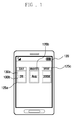
- FIG. 1 is an exemplary view illustrating an electronic device displaying time data according to exemplary embodiments of the present invention.
- the device may include a display unit 120 formed in a touch screen to output time data on the display unit 120.
- the display unit 120 may display time data such as, for example, a day, a month and a year.
- the display unit 120 may further display a number of display blocks (e.g., three display blocks 125a, 125b and 125c) on which different time data (e.g., a day, a month, and a year) can be arranged respectively.
- Each of the display blocks 125a, 125b, and 125c may have two touch zones 130a and 130b, which can be arranged, for example, at an upper part and a lower part of each of the display block 125a, 125b, and 125c.
- FIG. 1 shows a day, a month, and a year as time data
- exemplary embodiments of the present invention are not limited to time data related to a date.
- any other time data described above may be alternatively or additively displayed.
- the number of display blocks may be limited, and the touch zones may be divided widthwise or diagonally.
- the display unit 120 may change time data displayed in the selected display block under the control of a control unit 140. For example, if the first touch zone 103a detects contact and release of an input tool, such as the user's finger or a stylus pen, the display unit 120 may replace the current time data displayed in the selected display block with a following (e.g., next) time data. If the second touch zone 103b detects contact and release of the input tool, the display unit 120 may replace the currently displayed time data with a foregoing (e.g., previous) time data.
- a control unit 140 For example, if the first touch zone 103a detects contact and release of an input tool, such as the user's finger or a stylus pen, the display unit 120 may replace the current time data displayed in the selected display block with a following (e.g., next) time data. If the second touch zone 103b detects contact and release of the input tool, the display unit 120 may replace the currently displayed time data with a foregoing (e.g., previous)
- the current time data displayed in the selected display block may be replaced with a following or foregoing time data, depending on a direction of a drag gesture regardless of the location of the touch zone at which the contact and release are detected.
- an extent of a change in time data may be determined depending on duration of a touch gesture or a speed of a drag gesture applied to the first or second touch zones 130a and 130b.
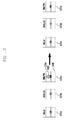
- FIG. 2A and FIG. 2B are exemplary views each of which illustrate a change in time data by a touch gesture according to exemplary embodiments of the present invention.
- the display unit 120 may output a first time data, for example, '28,' which may correspond to a day of the month as shown in the first display block 125a.
- the display unit 120 may output a second time data, for example, 'Aug,' which may correspond to a month as shown in the second display block 125b, and may output a third time data, for example, '2008,' which may correspond to a year as shown in the third display block 125c.
- the display unit 120 may replace the first time data '28' of the first display block 125a with a following first time data, for example, '29,' under the control of the control unit 140.
- the first touch zone 130a may be touched at a touch point 105 by the input tool to replace the first time data '28' with the following first time data '29.' Accordingly, a change of time data may require contact and release in the same touch zone.
- a time data may be changed even when contact and release are detected from different touch zones.
- a drag gesture may be applied from one touch zone to another. If a contact is detected in the first touch zone 130a and a release is detected in the second touch zone 130b, the display unit 120 may replace a currently displayed time data (e.g., first time data) with a following time data (e.g., following first time data).
- time data may be changed based on the starting location of a drag gesture irrespective of the finishing location of the drag gesture. For example, if a drag gesture starts from the first touch zone 130a, the display unit 120 may replace the currently displayed time data with the following time data.
- a time data may be changed based on a direction of a drag gesture irrespective of the location of the touch zone at which the contact and release are detected.
- the display unit 120 may replace the first time data '28' of the first display block 125a with a previous first time data, for example, '27,' under the control of the control unit 140.
- the display unit 120 may replace the first time data with the previous time data.
- a time data may be changed depending on a starting location or a direction of a drag gesture.
- FIG. 3 is an exemplary view which illustrates a change in time data by a touch gesture according to exemplary embodiments of the present invention.
- the display unit 120 may output a first hour time data, for example, '6,', which may correspond to an hour of a day, in the first display block 125a.
- the display unit 120 may also output a first minute time data, for example, '15,' which may correspond to a minute of an hour, in the second display block 125b, and a first interval time data, for example, 'AM,' which may correspond to a time interval (e.g., A.M./P.M.) in the third display block 125c.
- a first hour time data for example, '6,'
- the display unit 120 may also output a first minute time data, for example, '15,' which may correspond to a minute of an hour, in the second display block 125b
- a first interval time data for example, 'AM,' which may correspond to a time interval (e.g., A.M./P.M.) in the third display block 125c.
- the display unit 120 may replace the first interval time data 'AM' with a following first interval time data 'PM' under the control of the control unit 140.
- individual time data can be displayed in each display block 125a, 125b, and 125c, and one of the display blocks 125a, 125b, and 125c can be selected by a contact and release of the input tool.
- a time data being displayed in the selected display block may be replaced with the following or previous time data, as noted above, according to the location of the touch zone at which the contact and release are detected. Therefore, the change in time data may be determined according to a touch location.
- a time data may be replaced with the following or previous time data according to the direction of a drag gesture, which may be implemented by moving the input tool from one touch zone to another.
- a drag gesture may be applied to a single touch zone and a drag direction may be determined by using start and finish coordinates of the drag gesture.
- the change in time data may also be determined, at least partially, on duration of a touch gesture applied to a touch zone or a speed of the drag gesture.
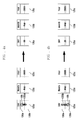
- FIG. 4A and FIG. 4B are exemplary views each of which illustrate a change in time data by a drag gesture according to exemplary embodiments of the present invention.
- the display unit 120 may output the first time data, for example, '28,' which may correspond to a day in a month, as shown in the first display block 125a.
- the display unit 120 may output the second time data 'Aug,' which may correspond to a month, as shown in the second display block 125b, and may output the third time data '2008,' which may correspond to a year, as shown in the third display block 125c.
- the extent of change in the time data may be determined according to a speed of a drag gesture.
- the speed of the drag gesture may be obtained, for example, by dividing a distance between the touch and the release of the drag gesture by a time between the touch and the release of the drag gesture.
- a drag gesture may be completed when an input tool touches 105 the first touch zone 130a in the first display block, and travels toward the second touch zone 130b as indicated by arrow 135a.
- the input tool may be released at second touch zone 130b.
- the display unit 120 may replace the time data (e.g., current time data) being displayed in the first display block 125a at the instant when the input tool touches the first touch zone 130a with following time data, depending on the downward magnitude of the drag gesture. For example, if a drag gesture having a downward direction starts and ends within the first touch zone 130a, the display unit 120 may replace the current time data with the following time data.
- control unit 140 may calculate a speed of the drag gesture. If, for example, a calculated speed of the drag gesture corresponds to a change value '2,' the display unit 120 may replace the current time data '28' with the following time data '30.'
- the control unit 140 may calculate a velocity of the drag gesture using the touch and release coordinates of the drag gesture.
- the velocity of the drag gesture can be a vector quantity having a magnitude corresponding to a drag speed and a direction corresponding to a drag direction.
- a drag gesture may be completed when the input tool touches the second touch zone 130b in the first display block 125a, moves towards the first touch zone 130a as indicated by arrow 135b, and is released from the first touch zone 130a.
- the display unit 120 may replace a current time data in the first display block 125a with the previous time data, according to the upward direction of the drag gesture.
- control unit 140 may calculate a speed of the drag gesture. For example, if the speed of the drag gesture corresponds to a change value '8,' the display unit 120 may replace the current time data, for example, '28,' with the previous time data, for example, '20.'.
- the time data can be determined according to a speed or velocity of a drag gesture.
- exemplary embodiments of the invention are not limited thereto.
- the change in time data may also be determined according to a travel distance of a drag gesture.
- the change in time data may be determined according to the duration of the touch gesture.
- a user may manipulate a relation between the touch location and a directionality of a change in time data, or a relation between the drag direction and the directionality of a change in time data.
- the touch zones 130a, 130b may be divided widthwise or diagonally in the display blocks 125a, 125b, and 125c.
- FIG. 5A and FIG. 5B are exemplary views each illustrating a change in time data by a touch gesture according to exemplary embodiments of the present invention.
- the display unit 120 may output first time data, for example, '24,' which may correspond to a day of a month, in the first display block 125a.
- the display unit 120 may also output second time data, for example, 'December,' which may correspond to a month, in the second display block 125b, and the third time data, for example, '2008,' which may correspond to a year, in the third display block 125c.
- the first touch zone 130a and the second touch zone 130b may be arranged at a left portion and a right portion of the display block (e.g., display block 125b).
- the display unit 120 may replace the second time data 'December' in the second display block 125b with a previous time data 'November' under the control of the control unit 140.
- the display unit 120 may replace the second time data 'December' in the second display block 125b with a following time data 'January' under the control of the control unit.
- time data is changed by a touch gesture or a drag gesture.
- an electronic device for executing a change in time data by a touch or drag gesture will be described with reference to FIG. 6A and FIG. 6B .
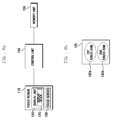
- FIG. 6A is a block diagram illustrating a configuration of an electronic device according to exemplary embodiments of the present invention.
- FIG. 6B is a schematic view illustrating a touch zone in a display block according to exemplary embodiments of the present invention.
- An electronic device may include a bus (not shown) or other communication mechanisms for communicating data, and a control unit 140 including a processor (not shown) coupled to the bus for processing information.
- the electronic device may also include memory unit 150, which may be a random access memory (RAM) or a dynamic storage device coupled to the bus for storing information and instructions to be executed by the processor.
- the memory unit 150 may also be used for storing temporary variables or intermediate information during execution of instructions by the processor.
- the memory unit 150 may be a read only memory (ROM) or other static storage device coupled to the bus for storing static information and instructions for the processor.
- the memory unit 150 may include a series of applications to operate the electronic device. Examples of suitable applications include a touch application, a pressure application, an image application, and a direction application.
- the display unit 120 may be coupled to the touch screen 120.
- the display unit 120 include, for example, a liquid crystal display, a flexible display, or active matrix display, for displaying information to the user.
- the touch screen 120 may be an input device, such as a keyboard, including alphanumeric and other keys.
- the input device may be coupled to the bus and may communicate information and command selections to the processor.
- the input device may include various types of sensors (e.g., touch sensor 130) and may include a plurality of touch zones 130a and 130b in the display block 125 for detecting user input.
- the input device may further include a cursor control, such as a mouse, a trackball, or cursor direction keys, for communicating direction information and command selections to the processor and for controlling cursor movement on the display unit 120.
- execution of the instructions contained in memory unit 150 may cause the processor to perform processes according to the instructions.
- the control unit 140 may include one or more processors in a multi-processing arrangement to execute the instructions contained in memory unit 150.
- Hard-wired circuitry may be used in place of, or in combination with, software instructions to implement one or more of the exemplary embodiments of the present invention.
- reconfigurable hardware such as Field Programmable Gate Arrays (FPGAs)
- FPGAs Field Programmable Gate Arrays
- functionality and connection topology of the FPGA logic gates may be customized at run-time, typically by programming memory look up tables.
- exemplary embodiments of the present invention are not limited to any specific combination of hardware circuitry and/or software.
- the electronic device may also include at least one communication interface unit (not shown).
- the communication interface unit may provide a two-way data communication coupling to a network link (not shown).
- the communication interface unit may send and receive electrical, electromagnetic, or optical signals that can carry digital data streams representing various types of information.
- the communication interface unit may include peripheral interface devices, such as a Universal Serial Bus (USB) interface, or a PCMCIA (Personal Computer Memory Card International Association) interface.
- USB Universal Serial Bus
- PCMCIA Personal Computer Memory Card International Association
- the processor may execute transmitted code and/or may store the transmitted code in the memory unit 150, or in other non-volatile storage.
- the electronic device may obtain application code in the form of a carrier wave.
- a "computer-readable medium” may refer to any medium that provides instructions to the processor for execution. Such a medium may be implemented in various forms, including but not limited to, non-volatile media, volatile media, and transmission media.
- Non-volatile media may include, for example, optical or magnetic disks, such as the storage device.
- Volatile media may include dynamic memory, such as main memory.
- Transmission media may include coaxial cables, copper wire and fiber optics, including the wires that comprise the bus. Transmission media can also take the form of acoustic, optical, or electromagnetic waves, such as those generated during radio frequency (RF) and infrared (IR) data communications.
- RF radio frequency
- IR infrared
- Computer-readable media include, for example, a floppy disk, a flexible disk, hard disk, magnetic tape, any other suitable magnetic medium, a compact disk read-only memory (CD-ROM), compact disc rewritable (CDRW), digital video disc (DVD), any other suitable optical medium, punch cards, optical mark sheets, any other suitable physical medium with patterns of holes or other optically recognizable indicia, a random-access memory (RAM), a programmable read-only memory (PROM), and erasable programmable read-only memory (EPROM), a FLASH-EPROM, any other memory chip or cartridge, and a carrier wave.
- a floppy disk a flexible disk, hard disk, magnetic tape, any other suitable magnetic medium
- CD-ROM compact disk read-only memory
- CDRW compact disc rewritable
- DVD digital video disc
- any other suitable optical medium punch cards, optical mark sheets, any other suitable physical medium with patterns of holes or other optically recognizable indicia
- RAM random-access memory
- the instructions for carrying out at least part of the present invention may be implemented on a magnetic disk of a remote computer.
- the remote mobile terminal may load the instructions into the memory unit 150 and may send the instructions, for example, over a telephone line using a modem.
- a modem of a local system may receive the data on a telephone line and/or may be used an infrared transmitter to convert the data to an infrared signal and may transmit the infrared signal to the electronic device.
- the electronic device may receive information and instructions provided by the infrared signal.
- the bus may provide the information and instructions to the memory unit 150, from which a processor may retrieve and execute the instructions.
- the instructions received by memory unit 150 may optionally be stored either before or after execution by the control unit 140.
- the device may include a touch screen 110, a control unit 140, and a memory unit 150.
- the touch screen 110 may include a display unit 120 and a touch sensor 130.
- the display unit 120 may be coupled to the control unit 140 and may be configured to display graphical data, on a screen.
- the data may be related to a state or operation of the device and/or may be produced by execution of functions in the device.
- the display unit 120 may display time data using at least one display block 125 (e.g., 125a, 125b, 125c) under the control of the control unit 140. Additionally, the display unit 120 may change time data of one of the display blocks 125 under the control of the control unit 140 in response to a touch gesture or a drag gesture being detected by the touch sensor 130.
- the display block 125 may include the first touch zone 130a and the second touch zone 130b.
- the first and second touch zones 130a and 130b may be arranged at an upper part and a lower part of the display block 125 , as shown in FIG. 6B , exemplary embodiment of the present invention are not limited thereto.
- the first touch zone 130a and second touch zones 130b may be divided widthwise or diagonally in the display block 125, as described above.
- the display unit 120 may use a dynamic graphical effect to provide a user with visual feedback for indicating a change in time data. For example, the display unit 120 may render a rightward turning motion and/or leftward turning motion on the display block 125 as if pages of a book are turned. In some cases, the display unit 120 may render a rightward rolling motion or a leftward rolling motion to the display block 125 as if a small cube is rotated. In general, a change in time data may be represented in any suitable manner.
- Display block 125 can be divided into a first touch zone 130a and a second touch zone 130b, which may be arranged at a left portion and a right portion of the display block 125, respectively. If a touch gesture is detected on the first touch zone 130a, the display unit 120 may replace the time data being displayed in the display block 125 at the instant the touch gesture is detected with a previous time data by the control unit 140. For example, time data displayed on the left portion corresponding to the first touch zone 130a may appear to turn and be displayed on the right portion corresponding to the second touch zone 130b. The display block 125 may then display the previous time data on the left portion.
- the touch sensor 130 may be provided near the display unit 120 and may detect a touch gesture or a drag gesture by the input tool.
- the touch sensor 130 may detect the contact or release of the input tool on a surface of the touch screen 110.
- the touch sensor 130 may determine coordinates of the contact and the release and may transmit the coordinates to the control unit 140.
- the control unit 140 may determine whether a user's input gesture is a touch event or a drag gesture.
- the control unit 140 may further determine which display block is selected and which touch zone is touched.
- the control unit 140 may also determine a direction and a distance of the drag gesture, and may calculate the speed (e.g., velocity) of the drag gesture from the contact and release coordinates.
- the control unit 140 may execute functions and operation of elements in the device. For example, when a time data display mode is selected by a user, the display unit 140 may control the display unit 120 to display a time data. A time data may be displayed in each display block 125. In addition, the control unit 140 may divide each display block 125 into a plurality of touch zones, for example, the first touch zone 130a and the second touch zone 130b.
- the control unit 140 may select a display block 125 (e.g., 125a, 125b, and 125c) at which the contact is detected. The control unit 140 may then determine which of the first touch zone 130a and second touch zone 130b in the selected display block 125 can be contacted. Furthermore, the control unit 140 may ascertain the time data displayed in the selected display block 125.
- a display block 125 e.g., 125a, 125b, and 125c
- the control unit 140 may determine a directionality of a change in the time data.
- the control unit 140 may determine whether to replace time data being displayed with the following time data or with the previous time data.
- the change directionality of time data may be determined according to a location of a touch zone on which a touch gesture is detected. For example, the contact and release on the first touch zone 130a can be regarded as a forward change, and the contact and release on the second touch zone 130b can be regarded as a backward change. Accordingly, if the first touch zone 130a is touched, the control unit 140 may replace the time data being displayed (e.g., '28') with the following time data (e.g., '29').
- the change directionality of time data may also be determined according to a direction of a drag gesture.
- a drag gesture applied from a first touch zone 130a to a second touch zone 130b can be regarded as a forward change.
- a drag gesture from the second touch zone 130b to the first touch zone 130a may be regarded as a backward change.
- a drag gesture may be detected within a single touch zone and the drag direction may be determined by using both start and finish coordinates of the drag gesture.
- the control unit 140 may further determine a change in the time data being displayed.
- the change may depend on a speed of a drag gesture.
- the drag speed may be obtained by dividing a traveled distance by a time of travel.
- the control unit 140 may determine the duration of a drag gesture from a difference between a start time of the drag gesture and a finish time of the drag gesture.
- the control unit 140 may also determine a drag distance from a difference between the start point and the finish point of the drag gesture.
- the control unit 140 may calculate a drag speed and determine a change in time data value by referring to a mapping data mapping the drag speed to the change in time data value.
- a drag distance may be 4 mm and a drag duration may be 400 ms.
- the control unit 140 may calculate the drag speed to be, for example, 0.01 mm/ms by dividing the drag distance (e.g., 4 mm) by the drag duration (e.g., 400 ms). If the drag speed (e.g., 0.01 mm/ms) corresponds to a change value of, for example '5,' the control unit 140 may replace the time data being displayed (e.g., '10') with a fifth following time data (e.g., '15') in response to the forward change.
- the change in time data may also be determined according to a duration of a touch gesture. For example, if a touch gesture is maintained for more than a predefined time, the control unit 140 may change the time data being displayed according to a period. For example, if the predefined time is, for example, three seconds and the period is, for example, 100 ms, the control unit 140 may change the time data being displayed once in 100 ms after the touch gesture is maintained for three seconds. The time data may continuously change until the touch gesture is finished, (e.g., until the contact is released).
- the memory unit 150 may store various types of application programs and data required for execution of functions in the device. For example, the memory unit 150 may store a time data to be displayed using a time data display mode, such as, for example, a schedule mode or a current time display mode. Additionally, the memory unit 150 may store mapping data to map a drag speed to a change value for a time data, as shown in TABLE 1.
- a time data display mode such as, for example, a schedule mode or a current time display mode.
- mapping data to map a drag speed to a change value for a time data, as shown in TABLE 1.
- control unit 140 may use a mapping data to determine a change in time data based on a drag speed and a drag gesture.
- Mapping data as shown in TABLE 1, is exemplary only and should not be considered as limiting exemplary embodiments of the present invention. Mapping data may be set or adjusted by the user of the device.
- FIG. 7 is a flow diagram illustrating a method for changing time data displayed on a touch screen of an electronic device according to exemplary embodiments of the present invention.
- the control unit 140 may execute the time data display mode (step 710).
- the control unit 140 may then control the display unit 120 to display a time data (step 720).
- the time data may be a time data corresponding to a time when the user selects the time data display mode and may be live time data. If the time data is related to a date, the time data can be displayed in three display blocks (e.g., 125a, 125b, and 125c) of the display unit 120 under the control of the control unit 140.
- the control unit 140 may output a time data '24' corresponding to the day in the first display block 125a, a time data 'Dec' corresponding to the month in the second display block 125b, and a time data '2008' corresponding to the year in the third display block 125c, respectively.
- control unit 140 may determine whether an input tool (e.g., a user's finger or a stylus pen) is detected on a surface of the touch screen 110 (step 730). If no touch of the input tool is detected, the process may return to step 720 and the control unit 140 may continue to display the time data.
- an input tool e.g., a user's finger or a stylus pen
- control unit 140 may determine a display block 125 at which the touch is detected, and may determine the time data displayed in the display block 125 (step 740). In step 740, the control unit 140 may also determine which touch zone in the display block 125 is touched.
- the control unit 140 may determine a directionality and a change in the time data.
- the control unit 140 may replace the time data displayed in the display block 125 with new time data which may be determined according to the determined directionality and a change (step 750).
- the directionality of the time data may be determined depending on a location (i.e., touch point) of the touch or the drag direction.
- the change in time data may be determined according to the duration of the touch or the drag speed.
- FIG. 8 is a flow diagram illustrating a process of changing time data according to exemplary embodiments of the present invention.
- the control unit 140 may determine whether the touch point can move (step 810), (i.e., whether the user's input is a touch gesture or a drag gesture). If the control unit 140 determines that the touch point can not move (e.g., if the user's input is a touch gesture), the control unit 140 may further determine whether a touch gesture is maintained for more than a predefined time (step 820).
- the control unit 140 may continuously change the time data being displayed according to a period (step 830).
- the change directionality of time data can be based on a location of the touch zone at which the touch gesture is detected, and may be determined in step 830 as described above. If the touch gesture is continuously detected on the first display block 125a displaying a time data, for example, '24,' and if the change directionality is determined as a forward change, the control unit 140 may change time data to following data (e.g., '25,' '26,' and/or '27'. If the change directionality is determined as backward change, the control unit 140 may change time data to the previous data (e.g., '23,' '22,' and '21.')
- control unit 140 may determine whether a touch gesture is released from the touch screen (step 835). If the release is detected, the control unit 140 may stop changing time data (step 840). If no release is detected, the controller 140 may return to step 830. After step 840, the control unit 140 may maintain the time data finally being displayed when changing time data is stopped (step 880).
- the control unit 140 may change the time data being displayed once (step 850).
- the change directionality of time data may be based on a location of the touch zone at which the touch gesture is detected, and may be determined as described above.
- the control unit 140 may change the time data once to the following data, for example, '25.' If the change directionality is determined as a backward change, the control unit 140 may change the time data once to the previous data, for example, '23.' The control unit 140 may then display the changed time data (step 880).
- the control unit 140 may determine whether the drag gesture is released (step 860). If the drag gesture is released, the control unit 140 may determine a drag direction and a drag speed as described above (step 865). For example, the control unit 140 may obtain the drag direction and the drag distance by using contact and release coordinates corresponding to a start point and a finish point of the drag gesture. In addition, the control unit 140 may obtain a drag time by using a start time and a finish time of the drag gesture. The control unit 140 may then calculate a drag speed by dividing the drag distance by the drag time.
- control unit 140 may change the time data by using both the drag direction and the drag speed (step 870).
- the control unit 140 may then display the changed time data (step 880).
- a touch point of a drag gesture may be detected to move from a first touch zone 130a to a second touch zone 130b in a first display block 125a displaying a time data '24,' and the drag speed may be 2.5 mm/ms.
- the control unit 140 may determine a change value by referring to a mapping data to map the drag speed range to a change value.
- the control unit 140 may replace the time data '24' being displayed in the first display block 125a with the tenth following data '3.' If the date being displayed is, for example, December 24, 2008, the second display block 125b displaying 'Dec' and the third display block 125c displaying '2008' may automatically be replaced with 'Jan' and '2009,' respectively.
- control unit 140 may change the current time data '24' to the tenth foregoing data '14.
Landscapes
- Engineering & Computer Science (AREA)
- Theoretical Computer Science (AREA)
- General Engineering & Computer Science (AREA)
- Physics & Mathematics (AREA)
- General Physics & Mathematics (AREA)
- Human Computer Interaction (AREA)
- Computer Hardware Design (AREA)
- Computer Networks & Wireless Communication (AREA)
- Signal Processing (AREA)
- User Interface Of Digital Computer (AREA)
Applications Claiming Priority (1)
| Application Number | Priority Date | Filing Date | Title |
|---|---|---|---|
| KR1020080131299A KR101545880B1 (ko) | 2008-12-22 | 2008-12-22 | 터치 스크린을 구비한 단말기 및 그 단말기의 데이터 표시 방법 |
Publications (2)
| Publication Number | Publication Date |
|---|---|
| EP2199897A2 true EP2199897A2 (fr) | 2010-06-23 |
| EP2199897A3 EP2199897A3 (fr) | 2011-11-30 |
Family
ID=41667445
Family Applications (1)
| Application Number | Title | Priority Date | Filing Date |
|---|---|---|---|
| EP20090180182 Ceased EP2199897A3 (fr) | 2008-12-22 | 2009-12-21 | Dispositif électronique doté d'un écran tactile et procédé de changement d'écran de données |
Country Status (3)
| Country | Link |
|---|---|
| US (2) | US20100156833A1 (fr) |
| EP (1) | EP2199897A3 (fr) |
| KR (1) | KR101545880B1 (fr) |
Cited By (3)
| Publication number | Priority date | Publication date | Assignee | Title |
|---|---|---|---|---|
| US20140075379A1 (en) * | 2012-09-11 | 2014-03-13 | Erich Schlaepfer | Direct character display control |
| WO2014204069A1 (fr) * | 2013-06-21 | 2014-12-24 | 주식회사 데이투라이프 | Appareil et procédé de commande d'affichage de l'emploi du temps d'un utilisateur |
| US20150186003A1 (en) * | 2013-12-30 | 2015-07-02 | Samsung Electronics Co., Ltd. | Electronic device and method for displaying user interface thereof |
Families Citing this family (44)
| Publication number | Priority date | Publication date | Assignee | Title |
|---|---|---|---|---|
| JP5494337B2 (ja) * | 2010-07-30 | 2014-05-14 | ソニー株式会社 | 情報処理装置、情報処理方法及び情報処理プログラム |
| CN101907947A (zh) * | 2010-09-01 | 2010-12-08 | 无敌科技(西安)有限公司 | 触控辨识系统及其方法 |
| KR20120062037A (ko) * | 2010-10-25 | 2012-06-14 | 삼성전자주식회사 | 전자책 단말기에서 페이지를 전환하는 방법 |
| US9363579B2 (en) * | 2010-12-22 | 2016-06-07 | Google Inc. | Video player with assisted seek |
| JP2013191113A (ja) * | 2012-03-15 | 2013-09-26 | Sony Corp | 表示制御装置、表示制御方法およびプログラム |
| KR102096070B1 (ko) | 2012-06-22 | 2020-04-14 | 삼성전자주식회사 | 터치 인식 개선 방법 및 그 전자 장치 |
| KR101475021B1 (ko) * | 2012-08-21 | 2014-12-22 | 김원섭 | 터치스크린을 구비한 단말 및 그 터치스크린 조작방법 |
| US20140298258A1 (en) * | 2013-03-28 | 2014-10-02 | Microsoft Corporation | Switch List Interactions |
| KR20140120488A (ko) * | 2013-04-03 | 2014-10-14 | 엘지전자 주식회사 | 포터블 디바이스 및 그의 제어 방법 |
| US9841884B2 (en) | 2014-02-12 | 2017-12-12 | Visteon Global Technologies, Inc. | Providing a single-action multi-mode interface |
| EP3147747A1 (fr) | 2014-06-27 | 2017-03-29 | Apple Inc. | Manipulation d'application de calendrier dans appareil avec écran tactile |
| TWI647608B (zh) | 2014-07-21 | 2019-01-11 | 美商蘋果公司 | 遠端使用者介面 |
| EP4160376A1 (fr) | 2014-08-02 | 2023-04-05 | Apple Inc. | Procede d'edition d'une interface utilisateur de cadran de montre sur une montre a affichage tactile |
| US10042515B2 (en) * | 2014-08-08 | 2018-08-07 | Rakuten, Inc. | Using genture direction to input data into multiple spin dial list boxes |
| US10452253B2 (en) | 2014-08-15 | 2019-10-22 | Apple Inc. | Weather user interface |
| EP4209872B1 (fr) | 2014-09-02 | 2025-12-17 | Apple Inc. | Interface utilisateur de téléphone |
| EP4089534A1 (fr) | 2014-09-02 | 2022-11-16 | Apple Inc. | Interface utilisateur pour la réception d'une entrée d'utilisateur |
| US10254948B2 (en) | 2014-09-02 | 2019-04-09 | Apple Inc. | Reduced-size user interfaces for dynamically updated application overviews |
| US10055121B2 (en) | 2015-03-07 | 2018-08-21 | Apple Inc. | Activity based thresholds and feedbacks |
| WO2016144385A1 (fr) | 2015-03-08 | 2016-09-15 | Apple Inc. | Partage de constructions graphiques configurables par l'utilisateur |
| US9916075B2 (en) | 2015-06-05 | 2018-03-13 | Apple Inc. | Formatting content for a reduced-size user interface |
| US10304347B2 (en) | 2015-08-20 | 2019-05-28 | Apple Inc. | Exercised-based watch face and complications |
| CN105827799B (zh) * | 2015-08-28 | 2020-03-31 | 维沃移动通信有限公司 | 一种终端设备的闹钟提醒方法及终端设备 |
| CN106020597A (zh) * | 2016-05-12 | 2016-10-12 | 北京金山安全软件有限公司 | 一种展示信息的方法、装置及电子设备 |
| US12175065B2 (en) | 2016-06-10 | 2024-12-24 | Apple Inc. | Context-specific user interfaces for relocating one or more complications in a watch or clock interface |
| DK201770423A1 (en) | 2016-06-11 | 2018-01-15 | Apple Inc | Activity and workout updates |
| USD825584S1 (en) | 2017-03-29 | 2018-08-14 | Becton, Dickinson And Company | Display screen or portion thereof with transitional graphical user interface |
| DK179412B1 (en) | 2017-05-12 | 2018-06-06 | Apple Inc | Context-Specific User Interfaces |
| CN109213413A (zh) | 2017-07-07 | 2019-01-15 | 阿里巴巴集团控股有限公司 | 一种推荐方法、装置、设备和存储介质 |
| US11327650B2 (en) | 2018-05-07 | 2022-05-10 | Apple Inc. | User interfaces having a collection of complications |
| JP6921338B2 (ja) | 2019-05-06 | 2021-08-18 | アップル インコーポレイテッドApple Inc. | 電子デバイスの制限された動作 |
| US11960701B2 (en) | 2019-05-06 | 2024-04-16 | Apple Inc. | Using an illustration to show the passing of time |
| US11131967B2 (en) | 2019-05-06 | 2021-09-28 | Apple Inc. | Clock faces for an electronic device |
| US10878782B1 (en) | 2019-09-09 | 2020-12-29 | Apple Inc. | Techniques for managing display usage |
| CN115552375A (zh) | 2020-05-11 | 2022-12-30 | 苹果公司 | 用于管理用户界面共享的用户界面 |
| US11372659B2 (en) | 2020-05-11 | 2022-06-28 | Apple Inc. | User interfaces for managing user interface sharing |
| DK202070624A1 (en) | 2020-05-11 | 2022-01-04 | Apple Inc | User interfaces related to time |
| US11694590B2 (en) | 2020-12-21 | 2023-07-04 | Apple Inc. | Dynamic user interface with time indicator |
| US11720239B2 (en) | 2021-01-07 | 2023-08-08 | Apple Inc. | Techniques for user interfaces related to an event |
| US12182373B2 (en) | 2021-04-27 | 2024-12-31 | Apple Inc. | Techniques for managing display usage |
| US11921992B2 (en) | 2021-05-14 | 2024-03-05 | Apple Inc. | User interfaces related to time |
| US12493267B2 (en) | 2022-01-24 | 2025-12-09 | Apple Inc. | User interfaces for indicating time |
| US12578975B2 (en) | 2022-09-15 | 2026-03-17 | Apple Inc. | User interfaces for indicating time |
| US12602154B2 (en) | 2024-01-18 | 2026-04-14 | Apple Inc. | User interfaces integrating hardware buttons |
Citations (5)
| Publication number | Priority date | Publication date | Assignee | Title |
|---|---|---|---|---|
| US20040100479A1 (en) * | 2002-05-13 | 2004-05-27 | Masao Nakano | Portable information terminal, display control device, display control method, and computer readable program therefor |
| US20040196267A1 (en) | 2003-04-02 | 2004-10-07 | Fujitsu Limited | Information processing apparatus operating in touch panel mode and pointing device mode |
| WO2008013350A2 (fr) * | 2006-07-27 | 2008-01-31 | Lg Electronics Inc. | Procédé de commande d'un appareil domestique à tableau tactile et appareil ménager à tableau tactile ainsi commandé |
| US20080165149A1 (en) | 2007-01-07 | 2008-07-10 | Andrew Emilio Platzer | System, Method, and Graphical User Interface for Inputting Date and Time Information on a Portable Multifunction Device |
| EP1947556A1 (fr) | 2007-01-20 | 2008-07-23 | LG Electronics Inc. | Appareil électronique mobile avec dispositif de saisie tactile et procédé d'affichage le comportant |
Family Cites Families (14)
| Publication number | Priority date | Publication date | Assignee | Title |
|---|---|---|---|---|
| US5563996A (en) * | 1992-04-13 | 1996-10-08 | Apple Computer, Inc. | Computer note pad including gesture based note division tools and method |
| US6496182B1 (en) * | 1995-06-07 | 2002-12-17 | Microsoft Corporation | Method and system for providing touch-sensitive screens for the visually impaired |
| US7312785B2 (en) | 2001-10-22 | 2007-12-25 | Apple Inc. | Method and apparatus for accelerated scrolling |
| JP4396980B2 (ja) * | 2004-10-18 | 2010-01-13 | Smk株式会社 | マイクロホン取付装置 |
| KR100877829B1 (ko) * | 2006-03-21 | 2009-01-12 | 엘지전자 주식회사 | 스크롤링 기능을 갖는 단말기 및 그 스크롤링 방법 |
| US8842074B2 (en) * | 2006-09-06 | 2014-09-23 | Apple Inc. | Portable electronic device performing similar operations for different gestures |
| KR100856222B1 (ko) * | 2007-01-04 | 2008-09-03 | 삼성전자주식회사 | 이동 단말기의 데이터 스크롤링 장치 및 방법 |
| US20080165151A1 (en) * | 2007-01-07 | 2008-07-10 | Lemay Stephen O | System and Method for Viewing and Managing Calendar Entries |
| KR101239797B1 (ko) | 2007-02-07 | 2013-03-06 | 엘지전자 주식회사 | 터치 스크린을 구비한 전자 기기 및 이를 이용한 아날로그시계 제공 방법 |
| US8327272B2 (en) * | 2008-01-06 | 2012-12-04 | Apple Inc. | Portable multifunction device, method, and graphical user interface for viewing and managing electronic calendars |
| US8341557B2 (en) * | 2008-09-05 | 2012-12-25 | Apple Inc. | Portable touch screen device, method, and graphical user interface for providing workout support |
| JP4811452B2 (ja) * | 2008-11-19 | 2011-11-09 | ソニー株式会社 | 画像処理装置、画像表示方法および画像表示プログラム |
| US8838461B2 (en) * | 2008-12-19 | 2014-09-16 | Qualcomm Incorporated | Access and management of cross-platform calendars |
| KR20100079502A (ko) * | 2008-12-31 | 2010-07-08 | 삼성전자주식회사 | 휴대 단말기의 스크롤기능 수행 장치 및 방법 |
-
2008
- 2008-12-22 KR KR1020080131299A patent/KR101545880B1/ko active Active
-
2009
- 2009-12-21 EP EP20090180182 patent/EP2199897A3/fr not_active Ceased
- 2009-12-21 US US12/643,538 patent/US20100156833A1/en not_active Abandoned
-
2016
- 2016-11-16 US US15/353,253 patent/US10031665B2/en active Active
Patent Citations (5)
| Publication number | Priority date | Publication date | Assignee | Title |
|---|---|---|---|---|
| US20040100479A1 (en) * | 2002-05-13 | 2004-05-27 | Masao Nakano | Portable information terminal, display control device, display control method, and computer readable program therefor |
| US20040196267A1 (en) | 2003-04-02 | 2004-10-07 | Fujitsu Limited | Information processing apparatus operating in touch panel mode and pointing device mode |
| WO2008013350A2 (fr) * | 2006-07-27 | 2008-01-31 | Lg Electronics Inc. | Procédé de commande d'un appareil domestique à tableau tactile et appareil ménager à tableau tactile ainsi commandé |
| US20080165149A1 (en) | 2007-01-07 | 2008-07-10 | Andrew Emilio Platzer | System, Method, and Graphical User Interface for Inputting Date and Time Information on a Portable Multifunction Device |
| EP1947556A1 (fr) | 2007-01-20 | 2008-07-23 | LG Electronics Inc. | Appareil électronique mobile avec dispositif de saisie tactile et procédé d'affichage le comportant |
Cited By (4)
| Publication number | Priority date | Publication date | Assignee | Title |
|---|---|---|---|---|
| US20140075379A1 (en) * | 2012-09-11 | 2014-03-13 | Erich Schlaepfer | Direct character display control |
| WO2014043006A1 (fr) * | 2012-09-11 | 2014-03-20 | Google Inc. | Contrôle d'affichage direct de caractères |
| WO2014204069A1 (fr) * | 2013-06-21 | 2014-12-24 | 주식회사 데이투라이프 | Appareil et procédé de commande d'affichage de l'emploi du temps d'un utilisateur |
| US20150186003A1 (en) * | 2013-12-30 | 2015-07-02 | Samsung Electronics Co., Ltd. | Electronic device and method for displaying user interface thereof |
Also Published As
| Publication number | Publication date |
|---|---|
| EP2199897A3 (fr) | 2011-11-30 |
| US10031665B2 (en) | 2018-07-24 |
| KR101545880B1 (ko) | 2015-08-21 |
| US20170068441A1 (en) | 2017-03-09 |
| US20100156833A1 (en) | 2010-06-24 |
| KR20100072789A (ko) | 2010-07-01 |
Similar Documents
| Publication | Publication Date | Title |
|---|---|---|
| US10031665B2 (en) | Electronic device having touch screen and method for changing data displayed on the touch screen | |
| KR101973631B1 (ko) | 전자 기기 및 전자 기기의 제어 방법 | |
| EP3041201B1 (fr) | Dispositif de terminal d'utilisateur et son procédé de contrôle | |
| US9952681B2 (en) | Method and device for switching tasks using fingerprint information | |
| EP3258679B1 (fr) | Terminal mobile doté d'un écran tactile double et procédé de commande de son contenu | |
| US8994678B2 (en) | Techniques for programmable button on bezel of mobile terminal | |
| KR101558211B1 (ko) | 문자 입력을 위한 유저 인터페이스 방법과 이를 이용한 이동 단말기 | |
| AU2007289019B2 (en) | Portable electronic device performing similar operations for different gestures | |
| CN104364751A (zh) | 电子设备及其控制方法和程序 | |
| US20080120568A1 (en) | Method and device for entering data using a three dimensional position of a pointer | |
| EP2752737A2 (fr) | Procédé de commande de dispositif portable utilisant un stylo électrique et dispositif portable correspondant | |
| CN111149086A (zh) | 编辑主屏幕的方法、图形用户界面及电子设备 | |
| CN103777887A (zh) | 移动终端以及操作移动终端的方法 | |
| CN105283833A (zh) | 便携式装置及其控制方法 | |
| WO2007132305A1 (fr) | Touche multifonction avec défilement | |
| US20140035853A1 (en) | Method and apparatus for providing user interaction based on multi touch finger gesture | |
| KR20160028823A (ko) | 전자 장치에서 기능 실행 방법 및 장치 | |
| CN103716453A (zh) | 移动终端以及移动终端的控制方法 | |
| CN105630307A (zh) | 在移动终端显示多个应用的装置及方法 | |
| KR20150026615A (ko) | 일정 관리 방법 및 이를 위한 휴대용 전자 장치 | |
| CN103780753A (zh) | 移动终端及其控制方法 | |
| CN103150111A (zh) | 一种输入符号的方法、装置及终端 | |
| CN113535022A (zh) | 应用图标的显示方法、装置、电子设备和可读存储介质 | |
| JP2014106806A (ja) | 情報処理装置 | |
| CN110502169B (zh) | 一种显示控制方法及终端 |
Legal Events
| Date | Code | Title | Description |
|---|---|---|---|
| PUAI | Public reference made under article 153(3) epc to a published international application that has entered the european phase |
Free format text: ORIGINAL CODE: 0009012 |
|
| AK | Designated contracting states |
Kind code of ref document: A2 Designated state(s): AT BE BG CH CY CZ DE DK EE ES FI FR GB GR HR HU IE IS IT LI LT LU LV MC MK MT NL NO PL PT RO SE SI SK SM TR |
|
| AX | Request for extension of the european patent |
Extension state: AL BA RS |
|
| PUAL | Search report despatched |
Free format text: ORIGINAL CODE: 0009013 |
|
| AK | Designated contracting states |
Kind code of ref document: A3 Designated state(s): AT BE BG CH CY CZ DE DK EE ES FI FR GB GR HR HU IE IS IT LI LT LU LV MC MK MT NL NO PL PT RO SE SI SK SM TR |
|
| AX | Request for extension of the european patent |
Extension state: AL BA RS |
|
| RIC1 | Information provided on ipc code assigned before grant |
Ipc: G06F 3/048 20060101AFI20111026BHEP |
|
| 17P | Request for examination filed |
Effective date: 20120530 |
|
| RAP1 | Party data changed (applicant data changed or rights of an application transferred) |
Owner name: SAMSUNG ELECTRONICS CO., LTD. |
|
| 17Q | First examination report despatched |
Effective date: 20121015 |
|
| STAA | Information on the status of an ep patent application or granted ep patent |
Free format text: STATUS: THE APPLICATION HAS BEEN REFUSED |
|
| 18R | Application refused |
Effective date: 20160616 |