EP2246788A1 - Verfahren, System und ein Computerprogramm zum Testen einer Benutzeroberflächenfunktionalität - Google Patents
Verfahren, System und ein Computerprogramm zum Testen einer Benutzeroberflächenfunktionalität Download PDFInfo
- Publication number
- EP2246788A1 EP2246788A1 EP09159084A EP09159084A EP2246788A1 EP 2246788 A1 EP2246788 A1 EP 2246788A1 EP 09159084 A EP09159084 A EP 09159084A EP 09159084 A EP09159084 A EP 09159084A EP 2246788 A1 EP2246788 A1 EP 2246788A1
- Authority
- EP
- European Patent Office
- Prior art keywords
- user interface
- event
- video stream
- analysis
- events
- Prior art date
- Legal status (The legal status is an assumption and is not a legal conclusion. Google has not performed a legal analysis and makes no representation as to the accuracy of the status listed.)
- Ceased
Links
Images



Classifications
-
- G—PHYSICS
- G06—COMPUTING OR CALCULATING; COUNTING
- G06F—ELECTRIC DIGITAL DATA PROCESSING
- G06F11/00—Error detection; Error correction; Monitoring
- G06F11/36—Prevention of errors by analysis, debugging or testing of software
- G06F11/3668—Testing of software
- G06F11/3672—Test management
- G06F11/3692—Test management for test results analysis
Definitions
- the present invention relates to a method, to a system and to a computer program for testing a user interface functionality.
- Devices that comprise any UI (User Interface) input/output elements need testing to make sure that the UI operates as designed.
- Testing may relate to the usability of the user interface and the functions related to it or to technical functionality of the user interface. Usability testing expects the presence of a user, because the experience of the usability is subjective.
- the functional testing on the other hand relates to the operational side of the user interface. Functional testing determines if the output that is a result of the certain action is correct or not. The testing may be based on visual events that occur in the device under testing.
- the functional testing relating to a DVD player may consists of testing the graphical menus that are presented on a display and testing the LED action on the panel of the DVD player.
- Visual event can therefore be any visual change on user interface being presented on the display or on the panel.
- This kind of testing can be implemented manually by a human that either monitors the testable object during testing or watches a video of a recorded test case.
- Manual observation may comprise e.g. imaging the test object with a video camera, watching the video and making the analysis based on watching; or monitoring the test object manually and using stopwatch for timing the events.
- the drawback that relates to the first solution is the time that is needed for monitoring and reporting. Watching the video and reporting the results take much more time than to the testing process itself. For example, monitoring and reporting of a test of 30 seconds containing multiple events will easily take one hour.
- the drawback of totally manual observation relates to observer's (i.e. a human) limited capability to detect and report the events.
- observer's i.e. a human
- human's competence of observations is two events per second at the most, and reporting the events during observations is even worse.
- the measurement cannot be easily repeated, especially within humans.
- the testing and the implementation can be made fast.
- Functional testing may be also carried out by a computer vision solution.
- a tailored application for computer vision needs to be developed using tools for the computer vision environment in question.
- each monitoring application requires an expert in computer vision who knows how to create a certain application.
- the process for tailoring the application takes more time than the monitoring/testing itself. The time needed for designing the application will increase in relation to the amount of events being monitored.
- the computer vision system requires additional development, the application provides accurate observation and reporting, and the testing is easy and fast.
- a monitor camera monitors the device under test and measures changes from ROI areas (Region Of Interest).
- ROI areas ROI Of Interest
- the ROI areas need to be configured before testing.
- the invention relates to testing a user interface functionality by detecting and timing visual events in the user interface.
- the test is carried out by analyzing a video stream.
- the invention also relates to synchronizing external signals temporally with the detected events.
- the invention can be performed by a method, a system and a computer program.
- the method comprises obtaining a video stream comprising image frames of the user interface and analyzing a part of the video stream, said part comprising a frame and one or more temporally surrounding frames for the frame.
- the analysis comprises determining whether the part of the video stream comprises change in one or more areas in the image data between the frame and the surrounding frames; defining an event based on changing and stabile situations in the user interface; acquiring a number of arbitrary external signals and relating at least one of said signals to the event.
- the analysis is repeated until a condition for finishing the analysis is met.
- the system comprises means to obtain a video stream comprising image frames of the user interface; analyzing means configured to analyze a part of the video stream, said part comprising a frame and one or more temporally surrounding frames for the frame.
- the analyzing means is further configured to determine whether the part of the video stream comprises change in one or more areas in the image data between the frame and the surrounding frames and to define an event based on changing and stabile situations in the user interface, to acquire a number of arbitrary external signals and to relate at least one of said signals to the event and to repeat the analysis until a condition for finishing the analysis is met.
- the computer program comprises code means adapted to perform - when the program is run on a computer - at least the above-mentioned method.
- the present solution comprises detecting events by means of changing and stabile situations in the user interface.
- the solution concerns defining an event by means of a change between two stabile situations, but it is appreciated that the event can be defined also in some other way that takes into account the relationship of the stabile and changing situations.
- the present solution detects the events without prior reference, only by analysis of a video captured during testing. Because of this, separate teaching and configuration step is not needed.
- the invention enables easier implementation of the testing automation and its utilization with test objects for which e.g. computer vision system has not been possible because of lack of technical skills.
- the present solution is capable of relating (synchronizing) external signals to the detected events, which has not been possible in manual observation.
- a user interface is tested in order to analyse its performance and functionality.
- the user interface can be computer-based (electrical) graphical user interface, a text-based (command line) user interface or a LED-based user interface; or mechanical appliance that has mechanically changing appearance (mechanical user interface).
- a common definition is that they all display information due to user interaction or external change in environment or input signal to the device.
- Electrical user interfaces can be found from various electronic devices. For example, device settings are usually set via a user interface (e.g. TV, DVD), device is used via user interface (computer, mobile phone, PDA) and device may give information via user interface (web sites, program guides, teletext). Led-based user information is typically used for giving information on the state of the device.
- Mechanical user interface may relate to any device that is given input (mechanically, electrically, thermally etc.), but which outputs data by mechanical means.
- a non-limiting example is a speedometer of a vehicle, that changes its appearance according to driver's input (via accelerator).
- Another example is a thermometer.
- the testing of the user interface is based on the events occurring in the UI due to using the device comprising the UI.
- the event is a change in the UI that can be realized visually.
- the change corresponds to one or more changing phenomenon in the user interface.
- the change may occur in the user interface elements, in one or more areas in the image data. Any visual output as a result from a certain input is an event.
- event can be defined by means of a stabile situation. Therefore, the "event" can be seen as a change or a transition between the stabile situations.
- the change - as already mentioned - can be effected by a user, or by an external signal.
- the motive of the present solution is to detect these visual events in the user interface (or in the instructions creating the UI), and to base an analysis on them.
- An example of a system for detecting visual events may comprise a camera for imaging an object ( i . e . the user interface) and a processing unit.
- the processing unit may comprise an analysis program and a database.
- the analysis program is configured to detect the visual events from the video being captured.
- the analysis program is also capable of storing external signals synchronized to visual events. This means that if the analysis program notices any external signal (e.g. a keystroke or turning on a LED), the analysis program is capable of synchronizing that signal to a visual event (indication that the external signal either caused the event or was a result of the event).
- the image material is analyzed both temporally and spatially.
- Visual events are detected from the video by analyzing a part of the video stream that comprises a single frame being captured at a certain time and one or more frames (temporally) surrounding the single frame, so called “surrounding frames".
- an average of the frames is determined, and the average is used in the analysis.
- the one or more frames to which the present frame is compared does not need to be immediately the previous, but may originate also from earlier time. If there is not enough change between the frames under analysis, the analysis considers the situation stabile. However, if there is change between the frames, and the amount of the change exceeds the predefined threshold value, the situation can be seen dynamic.
- Each frame of the video can be compared to one or more surrounding frames. This gives an accurate event listing. If an external signal (e.g. a keystroke, the volume of the audio signal, voltage level, etc.) changes correspondingly the analysis considers the situation as an external change.
- an external signal e.g. a keystroke, the volume of the audio signal, voltage level, etc.
- the analysis may define event boundaries by means of stabile situations just before and after the change.
- the boundaries may be defined temporally (at what time the change occurred) or spatially (where the UI elements located in the user interface before and after the change).
- the event boundaries may be then stored e.g. as a list in a result database.
- the stored list can comprise an identification (by means of which the event may be e.g. traced and classified) of a single event.
- An example of the identification is a time stamp when the situation occurred.
- Other examples of the identification are a running number, a frame number, an image or a piece of text.
- the identification can also be formed of more than one identifications (e.g. an image with a time stamp).
- the identification can also be stored for the external event.
- the form of the report (i.e. the stored list) may be created according to needs.
- the list may display the events in different ways, by showing only an event element or the images of the stabile situations (as mentioned earlier), the list may or may not indicate the time stamps. The way of how the results are provided depends on the test case.
- the previous system may be modified for different purposes.
- the system can act as a timing device that comprises the camera and the processing unit.
- the timing device detects the events in the video stream and reports the images and time stamps for the events after testing.
- the system can also act as a device for comparing an event sequence.
- a device may also comprise a camera and a processing unit. But in order to operate, the device is taught a sequence of model events (for example going through menus in the user interface) by using a known and correctly functioning apparatus. After this, a test is run and the system is capable of comparing the sequence of events being obtained from the device under test to the sequence of events previously taught to the system. After comparison, the device may report out the differences that were detected.
- the system may also comprise an external analysis device into which a video stream e.g. from an external imaging device (e.g. high speed camera) is input for analysis and reporting.
- an external analysis device e.g. from an external imaging device (e.g. high speed camera) is input for analysis and reporting.
- the analysis program 140 may comprise functions for spatial masking, for calculating the event detection factor, for event decision and for event timing.
- the analysis program 140 comprises an event detection block 143 and an event timing block 145.
- the event detection block 143 detects the events and determines which events from the detected events comprises change that exceeds the predetermined threshold.
- the event timing function 145 sets the timestamps for those events that has enough change.
- the analysis program 140 may also acquire external signal 150 via processing unit 120 which external signal is synchronized with the detected events in the event timing block 145.
- the detected events are listed 160 by the processing unit 120 and stored to the database 170.
- the analysis program 140 may also comprise a masking function for spatially masking out unwanted areas of the acquired image. This kind of masking may be useful e.g. when testing a stopwatch displaying also 1/100 seconds. In this kind of solution, when only seconds are monitored, the other irrelevant displays may be masked out. Also, if a mobile device is charged during testing, the battery indicator may be masked out.
- temporal masking may be used. This means that a certain time of a video stream may be masked out. For example if it is known that the video stream comprises a presentation of 5 minutes that is not relevant for the testing, this piece of time (5 minutes) may be masked out.
- the system does not comprise the camera as an image source, but obtains the video signal being analyzed by means of software.
- the analysis may be based on computer instructions that creates or controls the user interface and that are run from within the processing unit.
- the system performs the analysis as long as a predetermined condition for finishing the analysis is met. This means that the analysis may be performed as long as the video stream is completed, or a predetermined event is detected or a certain external signal is acquired.
- Figure 2 illustrates a program guide 210 for television 200.
- One example is a thermometer where the change occur relatively slowly.
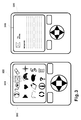
- Figure 3 illustrates a display of a mobile device 300.
- the device 300 comprises display 310 presenting a graphical user interface comprising icons for different functions (e.g. messaging 320).
- icons for different functions e.g. messaging 320.
- the user selects an icon for messaging 320, as a result of which a new user interface for creating the message is displayed on the display 300.
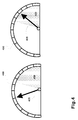
- Figure 4 illustrates a mechanical user interface, being a speedometer 400 for a vehicle.
- the area 420 is defined as speeding area.
- an alarm may be performed.
- the above-mentioned masking function may be used.
- Figure 5 illustrates an example of event detection with time stamps.
- the test case relates to a mobile device, and to the changes on its display due to keystroke "0".
- Certain mobile devices display a bookmark listing after key "0" is pressed to the full.
- the keystroke of "0" results in an external signal ( i . e . I/O event) to which detected visual events are synchronized temporally.
- the image frames presented in figure 5 illustrates the temporal process of the bookmark listing action.
- the squares 510 indicate the change that occurred on the display.
- some of the images have been defined as "PRE” and the rest of the images have been defined as "POST”.
- the image frame in question represents a stabile situation before (PRE) the change or a stabile situation after (POST) the change.
- the analysis program provides different kind of data relating to the detected events, and the way of utilizing the data depends on the situation and application.
- the report may provide a result table (as illustrated below) with a timestamp information, where each of the cells corresponds to an image in Fig. 5 having a time stamp that equals with "absolute time” in that cell.
- the time stamp of 0,00s corresponds to start of the test, i.e. when the testing application is turned on. This represents an example of an external signal.
- the time stamp of 5,79s corresponds to a time when the key "0" is pressed.
- the following timestamp information can be utilized in different ways in the report.
- the images in Fig. 5 can be used together with the following timestamp information. There are numerous ways to make the report, and this is an example of one of those.
- Timestamp information [continued] Absolute time: 0,00s Absolute time: 6,93s Time from last event: 0,00s Time from last event: 0,06s Time from last I/O event: 0,00s Time from last I/O event: 1,14s Absolute time: 5,79s Absolute time: 6,97s Time from last event: 5,79s Time from last event: 0,04s Time from last I/O event: 5,79s Time from last I/O event: 1,18s Absolute time: 6,05s Absolute time: 7,82s Time from last event: 6,05s Time from last event: 0,85s Time from last I/O event: 0,26s Time from last I/O event: 2,03s Absolute time: 6,26s Absolute time: 7,90s Time from last event: 0,21s Time from last event: 0,08s Time from last I/O event: 0,47s Time from last I/O event: 2,11s Absolute time: 6,67s Absolute time: 8,01 s Time from last event: 0,41s Time from last event: 0,11s Time from last I/O
- the technical solution of the present invention makes it possible to use the system in numerous other applications, e.g. for measuring the time needed for loading a web page, for regression testing, for service testing (e.g. measuring service access time by measuring the delay in setting up any service; measuring continuity of service by measuring connection-interruption time and the retain ability of the service connection and its performance over time from the user interface) and for measuring the latency time of the keystrokes of the mobile device, just to mention few as examples.
- service testing e.g. measuring service access time by measuring the delay in setting up any service; measuring continuity of service by measuring connection-interruption time and the retain ability of the service connection and its performance over time from the user interface
- latency time of the keystrokes of the mobile device just to mention few as examples.
Landscapes
- Engineering & Computer Science (AREA)
- Theoretical Computer Science (AREA)
- Computer Hardware Design (AREA)
- Quality & Reliability (AREA)
- Physics & Mathematics (AREA)
- General Engineering & Computer Science (AREA)
- General Physics & Mathematics (AREA)
- Debugging And Monitoring (AREA)
Priority Applications (1)
| Application Number | Priority Date | Filing Date | Title |
|---|---|---|---|
| EP09159084A EP2246788A1 (de) | 2009-04-29 | 2009-04-29 | Verfahren, System und ein Computerprogramm zum Testen einer Benutzeroberflächenfunktionalität |
Applications Claiming Priority (1)
| Application Number | Priority Date | Filing Date | Title |
|---|---|---|---|
| EP09159084A EP2246788A1 (de) | 2009-04-29 | 2009-04-29 | Verfahren, System und ein Computerprogramm zum Testen einer Benutzeroberflächenfunktionalität |
Publications (1)
| Publication Number | Publication Date |
|---|---|
| EP2246788A1 true EP2246788A1 (de) | 2010-11-03 |
Family
ID=41076868
Family Applications (1)
| Application Number | Title | Priority Date | Filing Date |
|---|---|---|---|
| EP09159084A Ceased EP2246788A1 (de) | 2009-04-29 | 2009-04-29 | Verfahren, System und ein Computerprogramm zum Testen einer Benutzeroberflächenfunktionalität |
Country Status (1)
| Country | Link |
|---|---|
| EP (1) | EP2246788A1 (de) |
Cited By (6)
| Publication number | Priority date | Publication date | Assignee | Title |
|---|---|---|---|---|
| US20130086999A1 (en) * | 2010-06-22 | 2013-04-11 | Janne Pitkanen | Apparatus and method for testing usability |
| TWI476587B (zh) * | 2011-12-01 | 2015-03-11 | Mstar Semiconductor Inc | 測試電子裝置之功能的測試方法以及測試裝置 |
| EP2951697A4 (de) * | 2013-01-31 | 2016-09-07 | Hewlett Packard Entpr Dev Lp | Erzeugung von software-testskripts aus videoinhalten |
| US20170252923A1 (en) * | 2014-09-03 | 2017-09-07 | Key Infuser | Device for interaction of an object exhibited with the aid of a robotic arm |
| CN116125181A (zh) * | 2023-03-06 | 2023-05-16 | 成都赛力斯科技有限公司 | 一种汽车智能座舱测试方法、装置及设备 |
| US12617079B2 (en) | 2024-04-03 | 2026-05-05 | SGBI Inc. | Robotics system for verification and validation of smart connected HMI devices and method thereof |
Citations (5)
| Publication number | Priority date | Publication date | Assignee | Title |
|---|---|---|---|---|
| US5157779A (en) * | 1990-06-07 | 1992-10-20 | Sun Microsystems, Inc. | User extensible testing system |
| US20020029259A1 (en) * | 2000-07-26 | 2002-03-07 | Nec Corporation | Remote operation system and remote operation method thereof |
| EP1569122A2 (de) * | 2004-01-28 | 2005-08-31 | Microsoft Corporation | Verfahren und Vorrichtung zur automatischen Bestimmung von Differenzen in einer Benutzersschnittstelle während eines Entwicklungzycluses |
| EP1569123A2 (de) * | 2004-01-28 | 2005-08-31 | Microsoft Corporation | Verfahren und Vorrichtung zur Maskierung von dynamischen Bereichen in einer Benutzerschnittstelle zur Ermöglichung des Testens der Konsistenz von Benutzerschnittstellen |
| WO2006132564A1 (en) * | 2005-06-10 | 2006-12-14 | Intel Corporation | A cognitive control framework for automatic control of application programs exposing a graphical user interface |
-
2009
- 2009-04-29 EP EP09159084A patent/EP2246788A1/de not_active Ceased
Patent Citations (5)
| Publication number | Priority date | Publication date | Assignee | Title |
|---|---|---|---|---|
| US5157779A (en) * | 1990-06-07 | 1992-10-20 | Sun Microsystems, Inc. | User extensible testing system |
| US20020029259A1 (en) * | 2000-07-26 | 2002-03-07 | Nec Corporation | Remote operation system and remote operation method thereof |
| EP1569122A2 (de) * | 2004-01-28 | 2005-08-31 | Microsoft Corporation | Verfahren und Vorrichtung zur automatischen Bestimmung von Differenzen in einer Benutzersschnittstelle während eines Entwicklungzycluses |
| EP1569123A2 (de) * | 2004-01-28 | 2005-08-31 | Microsoft Corporation | Verfahren und Vorrichtung zur Maskierung von dynamischen Bereichen in einer Benutzerschnittstelle zur Ermöglichung des Testens der Konsistenz von Benutzerschnittstellen |
| WO2006132564A1 (en) * | 2005-06-10 | 2006-12-14 | Intel Corporation | A cognitive control framework for automatic control of application programs exposing a graphical user interface |
Non-Patent Citations (1)
| Title |
|---|
| OKADA H ET AL: "GUITESTER: A LOG-BASED USABILITY TESTING TOOL FOR GRAPHICAL USER INTERFACES", IEICE TRANSACTIONS ON INFORMATION AND SYSTEMS, INFORMATION & SYSTEMS SOCIETY, TOKYO, JP, vol. E82-D, no. 6, 1 June 1999 (1999-06-01), pages 1030 - 1040, XP000849324, ISSN: 0916-8532 * |
Cited By (8)
| Publication number | Priority date | Publication date | Assignee | Title |
|---|---|---|---|---|
| US20130086999A1 (en) * | 2010-06-22 | 2013-04-11 | Janne Pitkanen | Apparatus and method for testing usability |
| TWI476587B (zh) * | 2011-12-01 | 2015-03-11 | Mstar Semiconductor Inc | 測試電子裝置之功能的測試方法以及測試裝置 |
| EP2951697A4 (de) * | 2013-01-31 | 2016-09-07 | Hewlett Packard Entpr Dev Lp | Erzeugung von software-testskripts aus videoinhalten |
| US10019346B2 (en) | 2013-01-31 | 2018-07-10 | Entit Software Llc | Generating software test script from video |
| US20170252923A1 (en) * | 2014-09-03 | 2017-09-07 | Key Infuser | Device for interaction of an object exhibited with the aid of a robotic arm |
| US10617234B2 (en) * | 2014-09-03 | 2020-04-14 | Key Infuser | Device for interaction of an object exhibited with the aid of a robotic arm |
| CN116125181A (zh) * | 2023-03-06 | 2023-05-16 | 成都赛力斯科技有限公司 | 一种汽车智能座舱测试方法、装置及设备 |
| US12617079B2 (en) | 2024-04-03 | 2026-05-05 | SGBI Inc. | Robotics system for verification and validation of smart connected HMI devices and method thereof |
Similar Documents
| Publication | Publication Date | Title |
|---|---|---|
| US10222955B2 (en) | Automatically capturing user interactions and evaluating user interfaces in software programs using field testing | |
| AU2013201418B2 (en) | Aircrew training system | |
| EP2246788A1 (de) | Verfahren, System und ein Computerprogramm zum Testen einer Benutzeroberflächenfunktionalität | |
| US9152872B2 (en) | User experience analysis system to analyze events in a computer desktop | |
| CN112835776A (zh) | 页面事件复现方法、采集方法、装置及电子设备 | |
| US20090100440A1 (en) | Display of data used for system performance analysis | |
| US9584859B2 (en) | Testing effectiveness of TV commercials to account for second screen distractions | |
| EP1452876A1 (de) | Simultane Darstellung von lokal und entfernt aufgenommenen Wellenformen | |
| CN113822273B (zh) | 一种字幕检测方法和相关装置 | |
| CN113419932B (zh) | 一种设备性能分析方法和装置 | |
| CN105138458A (zh) | 智能终端与电脑端结合录制自动化测试脚本的方法及系统 | |
| CN116012308B (zh) | 显示屏质量检测方法、设备及存储介质 | |
| US7392508B1 (en) | Software oscilloscope | |
| CN106708705A (zh) | 终端后台进程监控方法和系统 | |
| CN103645836A (zh) | 一种信息处理方法及电子设备 | |
| US10288679B2 (en) | System and method for providing temporal visualization of signal relationships in a coherent time-domain ATE test execution environment | |
| KR101194367B1 (ko) | 사용자 인터페이스의 검사 장치 및 검사 방법 | |
| US11580744B2 (en) | Information processing apparatus, information processing method, and program | |
| CN116148573A (zh) | 一种触摸屏压力检测系统与压力检测方法 | |
| KR100642516B1 (ko) | 영상신호 생성 제어장치 및 이를 포함하는 영상신호의 생성시뮬레이션 시스템 | |
| CN115357519B (zh) | 一种测试方法、装置、设备及介质 | |
| CN121579295B (zh) | 多模式强适应性的终端外设延迟测量系统和方法 | |
| RU2589329C2 (ru) | Способ контроля процессов эксплуатации сложного технического объекта и система для его осуществления | |
| Liu et al. | Screencast-based analysis of user-perceived gui responsiveness | |
| JP6935271B2 (ja) | 表示処理装置、表示装置、測定装置および表示プログラム |
Legal Events
| Date | Code | Title | Description |
|---|---|---|---|
| PUAI | Public reference made under article 153(3) epc to a published international application that has entered the european phase |
Free format text: ORIGINAL CODE: 0009012 |
|
| AK | Designated contracting states |
Kind code of ref document: A1 Designated state(s): AT BE BG CH CY CZ DE DK EE ES FI FR GB GR HR HU IE IS IT LI LT LU LV MC MK MT NL NO PL PT RO SE SI SK TR |
|
| 17P | Request for examination filed |
Effective date: 20110328 |
|
| 17Q | First examination report despatched |
Effective date: 20110502 |
|
| STAA | Information on the status of an ep patent application or granted ep patent |
Free format text: STATUS: THE APPLICATION HAS BEEN REFUSED |
|
| 18R | Application refused |
Effective date: 20160211 |