EP2249241A1 - Vorrichtung und Verfahren zur Positionierung von Menüpunkten in elliptischen Menüs - Google Patents
Vorrichtung und Verfahren zur Positionierung von Menüpunkten in elliptischen Menüs Download PDFInfo
- Publication number
- EP2249241A1 EP2249241A1 EP20100161992 EP10161992A EP2249241A1 EP 2249241 A1 EP2249241 A1 EP 2249241A1 EP 20100161992 EP20100161992 EP 20100161992 EP 10161992 A EP10161992 A EP 10161992A EP 2249241 A1 EP2249241 A1 EP 2249241A1
- Authority
- EP
- European Patent Office
- Prior art keywords
- user
- thumb
- menu
- hand
- held device
- Prior art date
- Legal status (The legal status is an assumption and is not a legal conclusion. Google has not performed a legal analysis and makes no representation as to the accuracy of the status listed.)
- Withdrawn
Links
Images


Classifications
-
- G—PHYSICS
- G06—COMPUTING OR CALCULATING; COUNTING
- G06F—ELECTRIC DIGITAL DATA PROCESSING
- G06F3/00—Input arrangements for transferring data to be processed into a form capable of being handled by the computer; Output arrangements for transferring data from processing unit to output unit, e.g. interface arrangements
- G06F3/01—Input arrangements or combined input and output arrangements for interaction between user and computer
- G06F3/048—Interaction techniques based on graphical user interfaces [GUI]
- G06F3/0481—Interaction techniques based on graphical user interfaces [GUI] based on specific properties of the displayed interaction object or a metaphor-based environment, e.g. interaction with desktop elements like windows or icons, or assisted by a cursor's changing behaviour or appearance
- G06F3/0482—Interaction with lists of selectable items, e.g. menus
-
- G—PHYSICS
- G06—COMPUTING OR CALCULATING; COUNTING
- G06F—ELECTRIC DIGITAL DATA PROCESSING
- G06F3/00—Input arrangements for transferring data to be processed into a form capable of being handled by the computer; Output arrangements for transferring data from processing unit to output unit, e.g. interface arrangements
- G06F3/01—Input arrangements or combined input and output arrangements for interaction between user and computer
- G06F3/048—Interaction techniques based on graphical user interfaces [GUI]
- G06F3/0487—Interaction techniques based on graphical user interfaces [GUI] using specific features provided by the input device, e.g. functions controlled by the rotation of a mouse with dual sensing arrangements, or of the nature of the input device, e.g. tap gestures based on pressure sensed by a digitiser
- G06F3/0488—Interaction techniques based on graphical user interfaces [GUI] using specific features provided by the input device, e.g. functions controlled by the rotation of a mouse with dual sensing arrangements, or of the nature of the input device, e.g. tap gestures based on pressure sensed by a digitiser using a touch-screen or digitiser, e.g. input of commands through traced gestures
- G06F3/04886—Interaction techniques based on graphical user interfaces [GUI] using specific features provided by the input device, e.g. functions controlled by the rotation of a mouse with dual sensing arrangements, or of the nature of the input device, e.g. tap gestures based on pressure sensed by a digitiser using a touch-screen or digitiser, e.g. input of commands through traced gestures by partitioning the display area of the touch-screen or the surface of the digitising tablet into independently controllable areas, e.g. virtual keyboards or menus
Definitions
- the present invention relates to display methods in general and to display menu items in circular menus in particular.
- Display of items or objects in menus within computerized devices plays an important role in the interface provided to users who use the computerized device. Such role is significant in the technological and commercial aspects of the computerized device, and enables efficient activation of the device and elegant browsing between the menu items.
- Iphone provides its users with the ability to browse between images or other media files or folders by moving a finger or thumb over the screen.
- Touch screens are widely used in hand-held devices, which are smaller, to allocate more room for the screen, instead of the button's area.
- the users browse menu items and activate the hand held device by a pointing device, such as the finger, thumb or pen-like pointing device used in Personal Digital Assistance (PDA) devices.
- PDA Personal Digital Assistance
- Many hand-held devices are operated single-handedly by the user. In such manner, the user holds the hand-held device with her palm, and grasps the device with the four fingers - index finger, middle finger, ring finger and the little finger. The user operates the hand-held device with her thumb. For example, selecting applications or functions, browsing menus, ringing, inputting text and the like.
- Menus may be displayed in linear manner, for example from top to bottom, or from right to left. Such linear manner requires browsing many items for reaching the desired item.
- Another way to arrange menu items is using circular menus, for example a menu in which the items surround the pointing point of the pointing device, such as a mouse.
- Submenus may extend from a desired or selected menu item, while the items of the submenu are located in the general direction of the selected item of the main menu.
- the thumb When using a touch screen in a hand held device, the thumb may interfere in browsing the items, since the thumb may appear to press more than one level of items, for example an item in the main menu and an item in a submenu.
- known menus and display methods do not address the physical patterns of the user's thumb when positioning menu items. For example, conventional circular menu, provided in 360 degrees around the pointing point, is not adapted to the thumb since it is uncomfortable to move the thumb to some directions because of the physical structure of the human's palm.
- GUI graphic user interface
- the GUI comprises a touch screen application activated by a user's thumb and a main menu that comprises one or more main options to be selected by a user using the user's thumb positioned on the screen in an area associated with a selected main option.
- the GUI further comprises one or more submenus comprising one or more secondary options to be selected by a user using the user's thumb positioned on the screen in an area associated with a selected secondary option; each submenu is associated with a main option and a second menu is displayed when a main option is selected.
- the one or more secondary options are arranged in an elliptical arrangement having a center, wherein the center of the elliptical arrangement is a function of the location of the user's thumb.
- the center of the circular arrangement is modified when the location of the user's thumb is modified.
- the one or more submenus are displayed in at least two elliptical arrangements. In some embodiments, each of the at least two elliptical arrangement is a function of the previous selection or the location of the user's thumb.
- the one or more secondary options are selected by maneuvering the user's thumb between the main menu and the one or more submenus and releasing the user's thumb when reaching a desired item.
- the options can be selected only from a menu located the farthest from the center.
- the location of the user's thumb is predetermined. In some embodiments, the location of the user's thumb can be inputted by a user of the hand-held device.
- the hand-held device may be configured to operate single-handedly.
- the method further comprises a step of deactivating a menu after receiving a selection of a menu item from the menu.
- One technical solution is a new display arrangement of menu items, a method of positioning menu items and a computer software product that implements the same.
- Arrangement of menu items according to the technical solution provides that at least some of the menu items be displayed in an elliptical manner.
- Such elliptical manner refers to an imaginary line between specific points in areas representing the menu items in the display unit of the hand-held device.
- the specific points for example the right top point of each area representing a menu item
- the result is elliptical, or a part of an elliptical outline.
- Such elliptical arrangement is adapted to the thumb's movement, as the thumb is used to navigate among menu items, select and activate them.
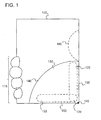
- Figure 1 shows a hand-held device, according to exemplary embodiments of the subject matter.
- the hand-held device 100 is held by the user's fingers 115, and provides its user with a touch screen application, such that functions, applications and selections are performed according to the movement of the user's thumb (shown in both 120 and 125).
- the user grasps the hand-held device 100 with the fingers 115 and uses only the thumb to operate the hand-held device 100.
- the functions, applications and other implementations are displayed to the user via an interface, for example a graphic user interface (GUI).
- GUI graphic user interface
- the thumb's range of movement is limited between an upper end 125 and a lower end 120, in order to provide the user with straightforward and accurate movement of the thumb.
- Such range of movement is circular in nature, and the center of the movement is a function of the location 128 of user's thumb.
- Such center of the movement may be a corner 145 of the hand-held device 100.
- the center may be predetermined by the developer or designer the GUI.
- the user of the hand-held device 100 may also select, determine or modify the center of the movement.
- This ergonomic display provides the user with comfortable and convenient arrangement of menu items in an area limited by the thumb's natural movement.
- the area can also be limited by borderlines 150, 152 of the hand-held device 100 and a partial perimeter 140 of a circle having a center at the corner 145 of the hand-held device 100.
- Prior art circular menus are not adapted to the movement of the thumb, are not adapted to a hand-held device, and their center is not associated with the thumb.
- menu items are arranged in an elliptical manner in an area limited by one partial perimeter and one borderline, for example an area surrounded by partial perimeter 160 and the borderline 150.
- the thumb is of a right-handed user.
- the hand-held device 100 may comprise a computerized application for providing the user with the ability to determine whether the menus are arranged in the right hand side or the left hand side of the hand-held device 100.
- Such computerized application may also enable the user to determine other settings or parameters, enlargement of items in a new menu activated upon selection of the user, number of levels in which submenus can be displayed simultaneously and the like.
- Such settings may be affected by the language or letters, media type used to display the menu items.
- Media types may be image, audio file, video file and the like.
- Figure 2 shows menu items arranged and displayed on a hand-held device, in accordance with some exemplary embodiments of the subject matter.
- Hand-held device 200 provides the user with a main menu and submenus.
- the main menu 210 comprises items 1, 2, 3 and 4.
- the items 1, 2, 3 and 4 are arranged in an elliptical manner around a corner 240 of the hand-held device 200.
- the term elliptical may refer to the fact that the center points of the areas representing each item are not located on the same line.
- Other geometrical definitions may be provided to the elliptical arrangement, for example, an imaginary line 225 passing between the areas representing the menu items 1, 2, 3 and 4 creates an elliptical shape.
- the areas refer to an area upon activation of which an item is selected.
- Such activation may be by pressing the screen by the thumb in the specific area, by positioning the thumb on the specific area for a predefined period of time, for example 1.5 seconds, or by dragging an object from the menu.
- such activation provides the user with a submenu 220 comprising menu items associated with the selected menu item.
- the submenu 220 may comprise menu items such as "contacts", “inbox”, “calendar” and the like.
- the area of the data items in the submenu 220 such as areas 3.1, 3.2 and 3.3, associated with menu item 3 of the main item 210, are larger than the area of item 3. As a result, the averaged mistakes probability when performing the selection is reduced.
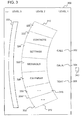
- Figure 3 shows areas representing items in a submenu and a main menu of a hand-held device operated by touch screen applications, in accordance with some exemplary embodiments of the subject matter.
- Hand-held device 300 provides the user with a main menu displayed in level 1.
- the main menu comprises the following menu items - call 302, data 304 and text 306.
- the main menu is provided in a linear manner, from top to bottom, while the rest of the levels, the menu items of the submenus, are provided in an elliptical arrangement, as disclosed in level 2 of the items displayed on the hand-held device 300.
- Level 2 comprises submenu displayed upon selection of a menu item of level 1.
- each menu item is displayed along with a title, such as the "contacts" title.
- Such title is displayed within an area associated with the menu item, for example areas 320, 322, 324, 326, 328, 330 and 332.
- Activation of an area via press or positioning of the thumb, results in activation of the menu item, and as a result, performing a command or display of another submenu associated with the selected menu item of level 2.
- Such activation may be of a submenu of level 3, such as submenu 350.
- the dashed lines show the areas associated with the submenus. Activation of the submenus may be performed by a flow comprising touching the screen, maneuvering the thumb over the screen and removing the finger in terminating the contact between the finger and the screen. This enables the user to select items in a sequential manner while receiving a constant feedback from the hand-held device 300 and reduces mistakes probability.
- the menu items of level 2 are arranged in an elliptical shape.
- Such elliptical shape comprises the areas 320, 322, 324, 326, 328, 330 and 332 and is limited by upper line 310, lower line 312, right hand line 316 and left hand line 314.
- the entire area of the menu items of the submenu displayed in level 2 is elliptical.
- This elliptical shape is at least provided by the curved line of the internal limiting line, right hand line 316.
- the internal limiting line is a line limiting an elliptically shaped menu or submenu, located between the menu items and the location 340 of the thumb. Said location may be the center of movement of the thumb.
- the internal limiting line would be left hand line 314.
- the internal limiting line is the right hand line 316 and the external limiting line is the left hand line 314.
- only one of the internal limiting line or the external limiting line is curved.
- both limiting lines are curved.
- the internal limiting line is a concatenation of two or more polygonal lines, as the angle between two concatenated lines in larger than a predetermined number of degrees, for example 120 degrees.
- the shape of the areas is a function of the shape of the limiting lines 310, 312, 314 and 316.
- the hand-held device 300 may enable the user to define the location that is the base point for positioning the menu items to be displayed.
- the location may be inputted as a number, for example the distance between the thumb's route and the hand-held device 300, the user's palm size, such as big, medium, small, and the like.
- such location may be the basis for enlarging or lessening parameters such as the area associated with each menu item, the distance between the menu items and the borderlines of the hand-held device 300, the ratio between the length and width of the elliptical shape, and other parameters desired by a person skilled in the art and.
- the length may be the distance between the top most point and lowest point of areas representing menu items in a menu or submenu.
- the width may be the distance between the right most and left most points.
- the hand-held device may enable the user to define that menus and submenus are displayed from bottom to top, right to left and the like. In some cases, the elliptical arrangement of menu items is displayed to more than one thumb, for example, when both hands touch the screen in selecting objects.
- the hand-held device 300 comprises a graphic user interface having more than one center of movement.
- some items are arranged in an elliptical manner surrounding a first center and other items are arranged in an elliptical arrangement surrounding a second center.
- the centers may be a function of the item's applicational or functional characteristics, such as the application the item runs, or depend on the user's settings.
- a submenu such as level 2 of figure 3 , may be displayed according to the selection of the item in the main menu. For example, in case the user selects the item call 302, the item of the submenu of level 2 will be displayed in a higher position than selection of the item 306 of the main menu.
- the different submenus may have different centers, according to the previous selection or the location of the thumb.
- Figure 4 shows a flow of displaying menu items in an elliptical arrangement, suit for the thumb's movement, in accordance with some exemplary embodiments of the subject matter.
- the flow relates to a hand-held device operated by touch screen applications that comprises elliptical display of menu items, as explained above.
- a new menu item is added to the menus. Such addition may be performed according to the user's desire, for example creation of a shortcut, or after installation of a new feature or application. Notification of such addition is received at a computerized module that manages the display of menu items in the hand-held device.
- the computerized application arranges the menu items associated with the newly added menu item.
- Positioning of step 410 may also include determining the location of the added in the menu. The addition of an item results in actions that are also required when removing a menu item.
- the computerized application arranges the menu after addition or removal of the menu item.
- the shape of the area that represents all menu items of the same menu is modified because of adding or removing a menu item.
- the length or width of the area or one of the limiting lines may change accordingly, for example the internal limiting line.
- the angle between the polygonal lines or the number or size of the polygonal lines may change after addition or removal of menu item.
- step 430 After the user is provided with the new menu in step 430, she selects a menu item. Selection of the menu item may be performed by maneuvering a thumb on an area representing an item located in a menu. In case the user wishes to reverse a selection, the thumb points at a menu in a lower level menu that represents the menu from which the wrong item was selected.
- step 435 the hand-held device receives the user's selection.
- the computerized application may deactivate other menu items in the menu from which a menu item was selected. For example, in figure 3 , in case the user selects data, level 2 submenu is to be opened.
- the previous menu is deactivated, to prevent mistakes by the user.
- deactivation may be implemented by removing the menu from the display, blurring the menu or by preventing access to said menu until the user maneuvers the thumb back on the display to the area representing the deactivated menu.
- step 440 the submenu is displayed to the user. In case the user points back to the item in the previous menu, the submenu is removed from the display unit and the previous menu, level 1 according to the example, is reactivated.
- the method provides for adapting the menu to the user's movement.
- the method comprises a step in which a computerized application within the hand-held device receives an indication concerning the thumb's movement or location.
- Such indication may be associated with the length of the user's thumb, may refer to the basis of the thumb's movement (as shown in figure 1 ) and the like.
- the indication may refer to the location of the thumb in the area representing an item. For example, the indication may be that the center of the thumb's movement is located below the lowest point of the hand-held device, or located 3 centimeters right or left from the hand-held device.
- the indication may be provided by the user using a receiving module in the hand-held device, a settings menu and the like.
- a sensing module of the hand-held device that detects the thumb's movement may provide the indication.
- Such indication is used for positioning menu items on the hand-held device.
- the computerized application analyzes the indication and determines properties of the menu displayed on the hand-held device. Such properties may relate to the ratio between the length and width of the menu, the shape of the internal or external limiting lines, the center around which the menu items are arranged, and the like. Then, the menu items are displayed on the hand-held device according to the properties determined upon receipt of the indication.
- the disclosed subject matter may be embodied as a system, method or computer program product. Accordingly, the disclosed subject matter may take the form of an entirely hardware embodiment, an entirely software embodiment (including firmware, resident software, micro-code, etc.) or an embodiment combining software and hardware aspects that may all generally be referred to herein as a "circuit,” "module” or “system.” Furthermore, the present invention may take the form of a computer program product embodied in any tangible medium of expression having computer-usable program code embodied in the medium.
- the computer-usable or computer-readable medium may be, for example but not limited to, an electronic, magnetic, optical, electromagnetic, infrared, or semiconductor system, apparatus, device, or propagation medium.
- the computer-readable medium would include the following: an electrical connection having one or more wires, a portable computer diskette, a hard disk, a random access memory (RAM), a read-only memory (ROM), an erasable programmable read-only memory (EPROM or Flash memory), an optical fiber, a portable compact disc read-only memory (CDROM), an optical storage device, a transmission media such as those supporting the Internet or an intranet, or a magnetic storage device.
- the computer-usable or computer-readable medium could even be paper or another suitable medium upon which the program is printed, as the program can be electronically captured, via, for instance, optical scanning of the paper or other medium, then compiled, interpreted, or otherwise processed in a suitable manner, if necessary, and then stored in a computer memory.
- a computer-usable or computer-readable medium may be any medium that can contain, store, communicate, propagate, or transport the program for use by or in connection with the instruction execution system, apparatus, or device.
- the computer-usable medium may include a propagated data signal with the computer-usable program code embodied therewith, either in baseband or as part of a carrier wave.
- the computer usable program code may be transmitted using any appropriate medium, including but not limited to wireless, wireline, optical fiber cable, RF, and the like.
- Computer program code for carrying out operations of the present invention may be written in any combination of one or more programming languages, including an object oriented programming language such as Java, Smalltalk, C++ or the like and conventional procedural programming languages, such as the "C" programming language or similar programming languages.
- the program code may execute entirely on the user's computer, partly on the user's computer, as a stand-alone software package, partly on the user's computer and partly on a remote computer or entirely on the remote computer or server.
- the remote computer may be connected to the user's computer through any type of network, including a local area network (LAN) or a wide area network (WAN), or the connection may be made to an external computer (for example, through the Internet using an Internet Service Provider).
- LAN local area network
- WAN wide area network
- Internet Service Provider for example, AT&T, MCI, Sprint, EarthLink, MSN, GTE, etc.
Landscapes
- Engineering & Computer Science (AREA)
- General Engineering & Computer Science (AREA)
- Theoretical Computer Science (AREA)
- Human Computer Interaction (AREA)
- Physics & Mathematics (AREA)
- General Physics & Mathematics (AREA)
- User Interface Of Digital Computer (AREA)
Applications Claiming Priority (1)
| Application Number | Priority Date | Filing Date | Title |
|---|---|---|---|
| US12/435,421 US20100287468A1 (en) | 2009-05-05 | 2009-05-05 | Apparatus and method for displaying menu items |
Publications (1)
| Publication Number | Publication Date |
|---|---|
| EP2249241A1 true EP2249241A1 (de) | 2010-11-10 |
Family
ID=42313750
Family Applications (1)
| Application Number | Title | Priority Date | Filing Date |
|---|---|---|---|
| EP20100161992 Withdrawn EP2249241A1 (de) | 2009-05-05 | 2010-05-05 | Vorrichtung und Verfahren zur Positionierung von Menüpunkten in elliptischen Menüs |
Country Status (2)
| Country | Link |
|---|---|
| US (1) | US20100287468A1 (de) |
| EP (1) | EP2249241A1 (de) |
Cited By (3)
| Publication number | Priority date | Publication date | Assignee | Title |
|---|---|---|---|---|
| EP2631774A1 (de) * | 2012-02-21 | 2013-08-28 | Sap Ag | Navigation auf einer tragbaren elektronischen Vorrichtung |
| EP2615533A4 (de) * | 2011-12-08 | 2014-01-01 | Huawei Tech Co Ltd | Interaktionsverfahren und interaktionsvorrichtung |
| EP2685366A3 (de) * | 2012-07-13 | 2016-04-20 | Fujitsu Ltd. | Tablett-Vorrichtung und Operationsempfangsverfahren |
Families Citing this family (23)
| Publication number | Priority date | Publication date | Assignee | Title |
|---|---|---|---|---|
| US8719729B2 (en) * | 2009-06-25 | 2014-05-06 | Ncr Corporation | User interface for a computing device |
| JP5315415B2 (ja) * | 2009-08-31 | 2013-10-16 | インターナショナル・ビジネス・マシーンズ・コーポレーション | グラフィカル・ユーザ・インターフェイス(gui)環境におけるオブジェクトに対するメニュー選択方法、コンピュータ・プログラム、コンピュータ・システム。 |
| JP5370144B2 (ja) * | 2009-12-28 | 2013-12-18 | ソニー株式会社 | 操作方向判定装置、遠隔操作システム、操作方向判定方法およびプログラム |
| US9727132B2 (en) * | 2011-07-01 | 2017-08-08 | Microsoft Technology Licensing, Llc | Multi-visor: managing applications in augmented reality environments |
| US20130024811A1 (en) * | 2011-07-19 | 2013-01-24 | Cbs Interactive, Inc. | System and method for web page navigation |
| US20130265235A1 (en) * | 2012-04-10 | 2013-10-10 | Google Inc. | Floating navigational controls in a tablet computer |
| USD730370S1 (en) | 2012-04-10 | 2015-05-26 | Google Inc. | Display screen of a communication terminal with a graphical user interface |
| JP6279553B2 (ja) | 2012-05-21 | 2018-02-14 | サムスン エレクトロニクス カンパニー リミテッド | タッチスクリーンを使用するユーザインターフェース制御方法及び装置 |
| JP6253222B2 (ja) * | 2012-07-09 | 2017-12-27 | キヤノン株式会社 | 表示制御装置、表示制御方法、及びプログラム |
| USD709898S1 (en) * | 2012-09-28 | 2014-07-29 | Nest Labs, Inc. | Display screen or portion thereof with graphical user interface |
| US20140143728A1 (en) * | 2012-11-16 | 2014-05-22 | Loopwirez, Inc. | Ergonomic thumb interface for mobile phone, smart phone, or tablet |
| JP6681134B2 (ja) * | 2013-12-03 | 2020-04-15 | 株式会社ミツトヨ | タッチパネル式タブレット型パーソナルコンピュータ、その制御方法及びコンピュータプログラム |
| US9304674B1 (en) * | 2013-12-18 | 2016-04-05 | Amazon Technologies, Inc. | Depth-based display navigation |
| US10198148B2 (en) * | 2014-01-17 | 2019-02-05 | Microsoft Technology Licensing, Llc | Radial menu user interface with entry point maintenance |
| USD704673S1 (en) * | 2014-01-25 | 2014-05-13 | Dinesh Agarwal | Curved split-screen cellphone |
| USD768204S1 (en) * | 2014-08-25 | 2016-10-04 | Samsung Electronics Co., Ltd. | Display screen or portion thereof with graphical user interface |
| CN106814958A (zh) * | 2015-12-01 | 2017-06-09 | 小米科技有限责任公司 | 功能键的触控方法及装置 |
| KR102735717B1 (ko) | 2017-01-13 | 2024-11-29 | 삼성전자주식회사 | 디스플레이장치 및 그 제어방법 |
| CN108008819A (zh) * | 2017-12-12 | 2018-05-08 | 上海爱优威软件开发有限公司 | 一种便于用户单手操作的页面变换方法及终端设备 |
| US11494052B1 (en) * | 2019-09-30 | 2022-11-08 | Snap Inc. | Context based interface options |
| USD1046903S1 (en) * | 2022-07-01 | 2024-10-15 | Igt | Display screen or a portion thereof with a graphical user interface |
| USD1119922S1 (en) * | 2022-07-01 | 2026-03-24 | Igt | Display screen or portion thereof with a graphical user interface |
| CN115729414A (zh) * | 2022-11-29 | 2023-03-03 | 长城汽车股份有限公司 | 一种菜单栏的显示控制方法、装置、存储介质及车辆 |
Citations (4)
| Publication number | Priority date | Publication date | Assignee | Title |
|---|---|---|---|---|
| US5996080A (en) * | 1995-10-04 | 1999-11-30 | Norand Corporation | Safe, virtual trigger for a portable data capture terminal |
| US20050140661A1 (en) * | 2002-01-18 | 2005-06-30 | Trigenix Limited | Graphic user interface for data processing device |
| US20070256029A1 (en) * | 2006-05-01 | 2007-11-01 | Rpo Pty Llimited | Systems And Methods For Interfacing A User With A Touch-Screen |
| US20090109187A1 (en) * | 2007-10-30 | 2009-04-30 | Kabushiki Kaisha Toshiba | Information processing apparatus, launcher, activation control method and computer program product |
Family Cites Families (5)
| Publication number | Priority date | Publication date | Assignee | Title |
|---|---|---|---|---|
| US6549219B2 (en) * | 1999-04-09 | 2003-04-15 | International Business Machines Corporation | Pie menu graphical user interface |
| US7519223B2 (en) * | 2004-06-28 | 2009-04-14 | Microsoft Corporation | Recognizing gestures and using gestures for interacting with software applications |
| KR20070006477A (ko) * | 2005-07-08 | 2007-01-11 | 삼성전자주식회사 | 가변적 메뉴 배열 방법 및 이를 이용한 디스플레이 장치 |
| US20080250349A1 (en) * | 2007-04-05 | 2008-10-09 | Hewlett-Packard Development Company, L.P. | Graphical user interface |
| KR100900295B1 (ko) * | 2008-04-17 | 2009-05-29 | 엘지전자 주식회사 | 이동 디바이스와 이동 통신 시스템의 사용자 인터페이스방법 |
-
2009
- 2009-05-05 US US12/435,421 patent/US20100287468A1/en not_active Abandoned
-
2010
- 2010-05-05 EP EP20100161992 patent/EP2249241A1/de not_active Withdrawn
Patent Citations (4)
| Publication number | Priority date | Publication date | Assignee | Title |
|---|---|---|---|---|
| US5996080A (en) * | 1995-10-04 | 1999-11-30 | Norand Corporation | Safe, virtual trigger for a portable data capture terminal |
| US20050140661A1 (en) * | 2002-01-18 | 2005-06-30 | Trigenix Limited | Graphic user interface for data processing device |
| US20070256029A1 (en) * | 2006-05-01 | 2007-11-01 | Rpo Pty Llimited | Systems And Methods For Interfacing A User With A Touch-Screen |
| US20090109187A1 (en) * | 2007-10-30 | 2009-04-30 | Kabushiki Kaisha Toshiba | Information processing apparatus, launcher, activation control method and computer program product |
Cited By (5)
| Publication number | Priority date | Publication date | Assignee | Title |
|---|---|---|---|---|
| EP2615533A4 (de) * | 2011-12-08 | 2014-01-01 | Huawei Tech Co Ltd | Interaktionsverfahren und interaktionsvorrichtung |
| US9213467B2 (en) | 2011-12-08 | 2015-12-15 | Huawei Technologies Co., Ltd. | Interaction method and interaction device |
| EP2631774A1 (de) * | 2012-02-21 | 2013-08-28 | Sap Ag | Navigation auf einer tragbaren elektronischen Vorrichtung |
| EP2685366A3 (de) * | 2012-07-13 | 2016-04-20 | Fujitsu Ltd. | Tablett-Vorrichtung und Operationsempfangsverfahren |
| US9952690B2 (en) | 2012-07-13 | 2018-04-24 | Fujitsu Limited | Tablet device, and operation receiving method |
Also Published As
| Publication number | Publication date |
|---|---|
| US20100287468A1 (en) | 2010-11-11 |
Similar Documents
| Publication | Publication Date | Title |
|---|---|---|
| EP2249241A1 (de) | Vorrichtung und Verfahren zur Positionierung von Menüpunkten in elliptischen Menüs | |
| KR102334401B1 (ko) | 콘텐츠-기반 촉각적 출력들 | |
| JP6884830B2 (ja) | 文書編集における手書きサポートを提供するデバイス及び方法 | |
| US10394320B2 (en) | System for gaze interaction | |
| US20200285379A1 (en) | System for gaze interaction | |
| EP2144150A2 (de) | Ergonomisches Handgerät | |
| EP2225628B1 (de) | Verfahren und system zur bewegung eines eingabezeigers und auswahl von objekten auf einem berührungsbildschirm anhand eines fingerzeigers | |
| US11106355B2 (en) | Drag menu | |
| CN109213418B (zh) | 在便携式装置中处理分屏视图的设备和方法 | |
| EP2608006B1 (de) | Kategoriesuchverfahren und daran angepasste mobile Vorrichtung | |
| EP2437153A2 (de) | Vorrichtung und Verfahren zum Blättern von e-Book-Seiten in einem tragbaren Endgerät | |
| EP2565770A2 (de) | Tragbare Vorrichtung und Eingabeverfahren einer tragbaren Vorrichtung | |
| EP2487579A1 (de) | Verfahren und Vorrichtung zur Bereitstellung einer grafischen Benutzeroberfläche in einem mobilen Endgerät | |
| US20120144331A1 (en) | Method for Arranging Application Windows on a Display | |
| JPH04317119A (ja) | インタラクティブオブジェクト処理装置 | |
| EP2706449B1 (de) | Verfahren zur Änderung einer Objektposition und elektronische Vorrichtung dafür | |
| KR20110041915A (ko) | 데이터 표시 방법 및 그를 수행하는 단말기 | |
| KR20180133550A (ko) | 메시징 애플리케이션 내의 옵션들 표시, 알림 할당, 메시지들 무시, 및 동시 사용자 인터페이스 표시 | |
| KR20120132663A (ko) | 캐러셀형 사용자 인터페이스 제공 방법 및 장치 | |
| WO2013052783A1 (en) | System and method for navigating menu options | |
| JP6458751B2 (ja) | 表示制御装置 | |
| US10194289B2 (en) | SMS message processing method for mobile terminal and mobile terminal | |
| WO2018156912A1 (en) | System for gaze interaction | |
| Freeman et al. | Towards usable and acceptable above-device interactions | |
| KR20160004590A (ko) | 전자 장치의 화면 표시 방법 및 전자 장치 |
Legal Events
| Date | Code | Title | Description |
|---|---|---|---|
| PUAI | Public reference made under article 153(3) epc to a published international application that has entered the european phase |
Free format text: ORIGINAL CODE: 0009012 |
|
| AK | Designated contracting states |
Kind code of ref document: A1 Designated state(s): AL AT BE BG CH CY CZ DE DK EE ES FI FR GB GR HR HU IE IS IT LI LT LU LV MC MK MT NL NO PL PT RO SE SI SK SM TR |
|
| AX | Request for extension of the european patent |
Extension state: BA ME RS |
|
| 17P | Request for examination filed |
Effective date: 20110905 |
|
| 17Q | First examination report despatched |
Effective date: 20130628 |
|
| STAA | Information on the status of an ep patent application or granted ep patent |
Free format text: STATUS: THE APPLICATION IS DEEMED TO BE WITHDRAWN |
|
| 18D | Application deemed to be withdrawn |
Effective date: 20151201 |