EP2249268A2 - Système de support de conception de mise en page, procédé et programme - Google Patents
Système de support de conception de mise en page, procédé et programme Download PDFInfo
- Publication number
- EP2249268A2 EP2249268A2 EP10250823A EP10250823A EP2249268A2 EP 2249268 A2 EP2249268 A2 EP 2249268A2 EP 10250823 A EP10250823 A EP 10250823A EP 10250823 A EP10250823 A EP 10250823A EP 2249268 A2 EP2249268 A2 EP 2249268A2
- Authority
- EP
- European Patent Office
- Prior art keywords
- equipment
- data
- editing
- unit
- layout design
- Prior art date
- Legal status (The legal status is an assumption and is not a legal conclusion. Google has not performed a legal analysis and makes no representation as to the accuracy of the status listed.)
- Withdrawn
Links
Images
















Classifications
-
- G—PHYSICS
- G06—COMPUTING OR CALCULATING; COUNTING
- G06F—ELECTRIC DIGITAL DATA PROCESSING
- G06F30/00—Computer-aided design [CAD]
- G06F30/10—Geometric CAD
- G06F30/13—Architectural design, e.g. computer-aided architectural design [CAAD] related to design of buildings, bridges, landscapes, production plants or roads
-
- G—PHYSICS
- G05—CONTROLLING; REGULATING
- G05B—CONTROL OR REGULATING SYSTEMS IN GENERAL; FUNCTIONAL ELEMENTS OF SUCH SYSTEMS; MONITORING OR TESTING ARRANGEMENTS FOR SUCH SYSTEMS OR ELEMENTS
- G05B19/00—Program-control systems
- G05B19/02—Program-control systems electric
- G05B19/418—Total factory control, i.e. centrally controlling a plurality of machines, e.g. direct or distributed numerical control [DNC], flexible manufacturing systems [FMS], integrated manufacturing systems [IMS] or computer integrated manufacturing [CIM]
- G05B19/41885—Total factory control, i.e. centrally controlling a plurality of machines, e.g. direct or distributed numerical control [DNC], flexible manufacturing systems [FMS], integrated manufacturing systems [IMS] or computer integrated manufacturing [CIM] characterised by modeling, simulation of the manufacturing system
-
- G—PHYSICS
- G06—COMPUTING OR CALCULATING; COUNTING
- G06F—ELECTRIC DIGITAL DATA PROCESSING
- G06F2111/00—Details relating to CAD techniques
- G06F2111/20—Configuration CAD, e.g. designing by assembling or positioning modules selected from libraries of predesigned modules
Definitions
- Embodiments described herein relate generally to a technique for supporting a layout design process which includes the arrangement of a building and a plurality of equipments within a layout range space of a plant and connections between the equipments, using a computer.
- layout design of various types of plant facilities is performed on a plant design enterprise side to decide, for example, the arrangement of buildings, equipments, piping, cables, and so on.
- This layout design process is performed such that the process fits various conditions relating to the design content and various professional conditions.
- a layout design support system is used, which has a unit that can edit an equipment element and equipment connection element in two-dimension or three-dimension.
- a technique exists, in which a screen for editing layout design data is displayed, and building data, equipment arrangement data, equipment connection element data, equipment connection path data, and use-specified range data, which are of five data types classified from layout design data, are edited individually and separately.
- a technique exists, in which efficiency of working processes for various equipments and piping is evaluated to decide the working content based on the evaluation result, and a technique exists, in which an automatic layout system has a unit performing a three-dimensional display process and generate a design route automatically.
- a technique exists, in which the influence of design is evaluated and the influence level can be checked, a technique exists, in which equipments, piping, and so on, are evaluated in advance for each arrangement and provided in the order of priority in accordance with the evaluation result, and a technique exists, in which an arrangement view is divided and a layout is displayed with referring to the divided arrangement view per unit.
- a technique exists, in which a layout data is displayed using actions of a human model represented in three-dimension, and a technique exists, in which building data is represented to search an optimum route.
- the conventional techniques as described above provide a system for supporting a layout design process which can intuitively and comprehensively grasp by displaying in two-dimension a concrete route designed with taking account of various conditions.
- this technique can not represent a detailed configuration of equipments, and can not recognize connections between equipments in three-dimension.
- a layout design support system has a layout editing unit which edits equipment arrangement data, equipment connection element data and the other data, and depicts the edited data, and a storage unit which storage such data.
- the storage unit stores equipment arrangement data that includes not only equipment specification data, and arrangement coordinate data and size data of each equipment, but also piece number of each piece configuring the equipment, and stores equipment connection element data that includes connection name, equipment name of upstream and downstream connection destination equipments, piece number and port of the equipments.
- the layout editing unit edits the equipment arrangement data or equipment connection element data at the level of the piece in accordance with an accepted edit instruction.
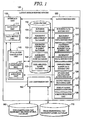
- Fig. 1 is a block diagram showing an embodiment of a layout design support system.
- a layout design support system 100 is constituted by an interface unit 110, a layout editing unit 120, a storage unit 130, an evaluation calculation unit 140, and a CAD conversion unit 150, all of which are realized on a computer.
- Each unit 110, 120, 130, 140, 150 will be described in detail below.
- the interface unit 110 is constituted by a data input unit 111 and a data output unit 112.
- the data input unit 111 is an input apparatus such as a mouse or keyboard for inputting various instructions and data into the computer in accordance with a user operation
- the data output unit 112 is an output apparatus such as a display or printer for outputting in display or other method, various data which includes data input through the data input unit 111, data stored in the storage unit 130, and results processed by the layout editing unit 120, evaluation calculation unit 140, and CAD conversion unit 150 to the user.
- the interface unit 110 is a part for performing information exchange between the computer and the user, and is typically known as a "user interface" or the like.
- the layout editing unit 120 serves as means for causing the interface unit 110 to display a layout design data editing screen, receiving an edit instruction input on the screen, and editing the layout design data in accordance with the edit instruction.
- the layout editing unit 120 uses classified data into five data types, namely building data, equipment arrangement data, equipment connection element data, equipment connection path data, and user-specified range data, and edits data belonging to each data type independently to generate layout design data.
- the "building data” relates to the base lines and arrangement of the buildings, while the “equipment arrangement data” relates to the arrangement of the equipments.
- the “equipment connection element data” and “equipment connection path data” are sub-types of “equipment connection data” relating to the physical connections between equipments.
- the “equipment connection element data” relates to the constitution of the physical connection elements (piping, cables, and so on) of the equipments, while the “equipment connection path data” relates to the constitution of auxiliary elements (racks, trenches, and so on) which form paths for the equipment connection elements.
- the "user-specified range data” relates to a range (total material amount range, CAD data conversion range, and so on) specified by the user for a particular purpose.
- the layout editing unit 120 comprises a building data editing unit 121, an equipment arrangement data editing unit 122, an equipment connection element data editing unit 123, an equipment connection path data editing unit 124, and a user-specified range data editing unit 125, each of which serves as an individual editing unit for editing data of one of the five data types, i.e. building data, equipment arrangement data, equipment connection element data, equipment connection path data, and user-specified range data, independently.
- the building data editing unit 121, equipment arrangement data editing unit 122, and equipment connection element data editing unit 123 are what characterized this embodiment, so the detail thereof is explained below, while the detailed explanation of the equipment connection path data editing unit 124 and user-specified range data editing unit 125 is omitted because the configuration thereof is the same as that of the Patent Document 1.
- the individual editing units 121 to 125 each comprise an editing control unit which causes the interface unit 110 to display an editing screen for editing data, and accepts various editing instruction from a user to edit data, and a depiction control unit which causes the interface unit 110 to display a depiction screen for depicting data, and depict the data edited by the editing control unit.
- the editing control unit displays an input/select/display field or operation image element relating to an editing subject item of the layout design data, accepts an edit instruction and data input corresponding to a user operation, and edits the layout design data in accordance with the accepted information.
- the depiction control unit depicts the edited layout design data on a depiction screen.
- an "operation image element” denotes an individual image element serving as an operation unit which performs input or selection in accordance with a user operation, such as an operation button, a cursor, an input window, and so on.
- the term "input/select/display field” or “select/display field” is a wide concept denoting a functional unit which performs input or selection and displays the content thereof in accordance with a user operation, and which includes an operation button, a cursor, an input window, and an item name display for realizing a specific function.
- the layout editing unit 120 further comprises an evaluation calculation activating unit 126, an output format switching unit 127, a display range modification unit 128, and a screen switching unit 129.
- the evaluation calculation activating unit 126 causes the evaluation calculation unit 140 to begin evaluation calculation process in accordance with an instruction input via the input/select/display field or operation image element displayed on the editing screen or depiction screen. A specific evaluation calculation process is described later.
- the output format switching unit 127 controls the CAD conversion unit 150 in accordance with an instruction input via the input/select/display field or operation image element displayed on the editing screen or depiction screen to switch the output format of the depiction screen to a two-dimensional CAD drawing or a three-dimensional CAD model.
- the display range modification unit 128, in accordance with an instruction input via the input/select/display field or operation image element displayed on the editing screen or depiction screen, switches the buildings and arrangement displayed on the depiction screen and enlarges or reduces the depiction screen through the editing control unit and depiction control unit of the individual editing units 121 to 125.
- this embodiment includes a mode in which the layout range of depiction screen is restricted in the vertical direction, so that the display range modification unit 128 contributes to the adjustment of the depiction screen in such case.
- the image switching unit 129 switches between the editing screen and depiction screen in accordance with an instruction input via the input/select/display field or operation image element displayed on the editing screen or depiction screen.
- the layout editing unit 120 is realized by the main memory of the computer, a specialized layout design editing program stored therein, a CPU controlled by the program, and so on.
- the storage unit 130 comprises a building database 131, an equipment arrangement database 132, an equipment connection element database 133, an equipment connection path database 134, and a user-specified range database 135 serving as databases for storing individually the editing results of the building data, equipment arrangement data, equipment connection element data, equipment connection path data, and user-specified range data edited by the individual editing units 121 to 125 of the layout editing unit 120.
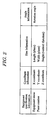
- equipment specification equipment coordinates, size and angle are set for each equipment.
- equipment specification in addition to equipment name, piece numbers of pieces configuring the equipment.
- equipment specification besides the piece numbers, detailed equipment name and building name of the building where the equipment is provided, are set.
- Z coordinate in the vertical direction is set in addition to X coordinate and Y coordinate.
- the height equivalent to the length in the vertical direction is set in addition to the length and width on a horizontal plane.
- an equipment arrangement angle is set at a prescribed rotation angle, which is equivalent to a rotation angle when the longitudinal axis of an equipment is rotated about the vertical axis passing through the arrangement coordinate point of the equipment.
- connection name connection name of the equipment connection element
- equipment name of upstream and down stream connection destination equipments piece number and port of the equipments.
- the length direction on a horizontal plane is decided based on the arrangement coordinates and angle of the equipment, and each surface size of a rectangular parallelepiped is decided based on the equipment size, so that, as shown in Fig. 3 , a rectangular parallelepiped is simulated which is constituted by six surfaces of front and back surfaces at both ends in the length direction, right and left surfaces in the width direction, and top and bottom surfaces in the vertical direction.
- each surface configuring the equipment (black-filled circle in Fig. 3 ) is used as a representative point, which is equivalent to connection part for connecting to connection element such as piping and cable as described later.
- the representative points are displayed in two-dimension, but recognized in three-dimensional for evaluation calculation.
- Examples of the specific storage formats that may be used to store the layout design data in the various databases 131 to 135 of the storage unit 130 include a spreadsheet format, a database format, and a text file format.
- any storage format may be employed for the layout design data as long as the format, such as the data field name, is appropriate for the layout editing unit 120 and can be read by the layout editing unit 120.
- the storage unit 130 is realized by various types of computer memory, an auxiliary storage apparatus, and so on.
- the evaluation calculation unit 140 performs an evaluation calculation process, including calculation of a layout design data state value or a repeated optimization calculation, using a preset algorithm, and causes the interface unit to display the obtained calculation result on a screen.
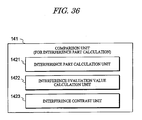
- the evaluation calculation unit 140 comprises a comparison unit 141 and an animation unit 142.
- the comparison unit 141 reads past layout design data stored in the storage unit 130 as past record data, performs an evaluation calculation on a plurality of layout design data including the past record data, and causes the interface unit 110 to display the calculation result on a screen in a comparative format such as a graph format.
- the animation unit 142 causes the interface unit 110 to perform continuous screen display of a layout diagram of log data relating to the layout design data output by the layout editing unit 120.
- the evaluation calculation unit 140 is realized by the main memory of the computer, a specialized evaluation calculation program stored therein, the CPU controlled by the program, and so on. Further, the program for realizing the evaluation calculation unit 140 may be an independent program or a part of the program for realizing the layout editing unit 120.
- the CAD conversion unit 150 uses data relating to a two-dimensional CAD equipment drawing symbol and data relating to a three-dimensional CAD equipment model to convert the layout design data into a two-dimensional CAD drawing or a three-dimensional CAD model, and causes the interface unit 110 to display the result on a screen.
- the CAD conversion unit 150 obtains the required CAD data from a two-dimensional CAD equipment drawing symbol database 160 and a three-dimensional CAD equipment model database 170, which are provided in advance on the outside of the layout design support system 100.
- CAD data may be prepared in advance within the layout design support system 100.
- the CAD conversion unit 150 is realized by the main memory of the computer, a specialized CAD conversion program stored in the main memory, the CPU controlled by the program, and so on. Further, the program for realizing the CAD conversion unit 150 may be an independent program or a part of the program for realizing the layout editing unit 120.
- the layout editing unit 120 is characterized by that a layout design process is performed with recognizing in terms of three-dimension the position relation inside a building.
- the building data editing unit 121, equipment arrangement data editing unit 122, and equipment connection element data editing unit 123, which each are notable for having such characteristics, are explained below.
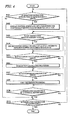
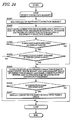
- FIG. 4 is a flowchart showing an outline of layout editing process performed by the layout design support system 100 according to this embodiment.
- operations of the interface unit 110, operation image elements displayed on the screen, and operations performed by a designer in relation thereto constitute typical interactive input/output process through the interface unit 110. Therefore, description relating to this typical interactive input/output process will hereafter be omitted where appropriate, and description will focus on the characteristic process serving as the main operations of the layout editing unit 120, evaluation calculation unit 140, CAD conversion unit 150, and so on.
- the five data types constituting the individual editing subjects are displayed on an editing screen by the layout editing unit 120, and when a selection instruction relating to a specific data type is input by a user and accepted by the layout editing unit 120 (YES in S401), the layout editing unit 120 causes the interface unit 110 to display the individual editing screen of this data type relating to the layout design of a target plant.
- the editing screen and depiction screen for individually editing data of the selected data type are displayed by the individual editing unit 121 to 125 of the selected data type through the interface unit 110 (S402).
- the individual editing unit 121 to 125 of the selected data type edits the layout design data in accordance with the edit instruction, transmits the obtained editing result to the depiction screen, where the result is reflected in the layout diagram, and stores the result in the database 131 to 135 of the selected data type (S404).
- the evaluation calculation unit 140 When an evaluation calculation instruction is input during layout editing (YES in S405), the evaluation calculation unit 140 is activated by the evaluation calculation activating unit 126 of the layout editing unit 120, and evaluation calculation process is performed by the evaluation calculation unit 140 (S406). In other words, the evaluation calculation unit 140 displays the control screen for evaluation calculation process, and in accordance with an instruction input onto the control screen, performs evaluation calculation process, including calculation of a layout design data state value or a repeated optimization calculation, using a preset algorithm. The obtained calculation result is then displayed on a screen.
- the evaluation calculation unit 140 uses the comparison unit 141 to read past layout design data stored in the storage unit 130 as past record data using the comparison unit 141, perform an evaluation calculation on a plurality of layout design data including the past record data, and display the calculation result on a screen in a comparative format such as a graph format.
- the animation unit 142 performs continuous screen display of a layout diagram of log data relating to the layout design data output by the layout editing unit 120.
- the output format switching unit 127 of the layout editing unit 120 controls the CAD conversion unit 150 to perform CAD conversion process.
- the depiction screen output format is switched to a two-dimensional CAD drawing or a three-dimensional CAD model by the CAD conversion unit 150 (S408).
- the layout editing unit 120 continues individual editing process of the selected data type (S403 to S408) until an instruction to terminate individual editing process of the selected data type is input (NO in S409).
- an individual editing process termination instruction is input (YES in S409) and a selection instruction relating to the next data type is input, individual editing process relating to the new data type is performed.
- Figs. 5A and 5B are views showing a functional configuration example of editing control units for building data in the building data editing unit 121, Fig. 5A showing a building base line data editing control unit 500a, and Fig. 5B showing an building arrangement data editing control unit 500b.
- the editing control units 500a and 500b each cause the interface unit 110 to display an editing screen for the building data, perform various display processes for supporting various operations on the displayed editing screen, and accept various inputs from a user to edit the building data.
- the building base line data editing control unit 500a so as to perform various display processes for supporting operations on a displayed editing screen for the building base line data, and accept various inputs to edit the building base line data, comprises a base line data editing select/display field 511 which displays an indication of a function for editing building base line data relating to the base line of the building, and allows the user to select the function as a switching destination function.
- the building base line data editing control unit 500a also comprises a base line name select/display field 512 which displays a base line name and allows the user to select the name or change into another name, a base line direction select/display field 513 for displaying and correcting the direction of a base line specified on the base line name select/display field 512, and a base line offset value select/display field 514 for displaying and correcting an offset position from the origin of the base line specified on the base line name select/display field 512.
- a base line name select/display field 512 which displays a base line name and allows the user to select the name or change into another name
- a base line direction select/display field 513 for displaying and correcting the direction of a base line specified on the base line name select/display field 512
- a base line offset value select/display field 514 for displaying and correcting an offset position from the origin of the base line specified on the base line name select/display field 512.
- the building base line data editing control unit 500a also comprises a base line piece number select/display field 515 which displays the piece number of a base line specified by the base line data editing select/display field 511 and changes the piece number into another number selected by the user.
- the base line piece number select/display field 515 displays a piece number, and accepts an input from the user, the base line piece number select/display field 515 set the piece number or change it into another number.
- the piece numbers used for the building arrangement data and the building base line data are the numbers given to the individual pieces which are defined within a building range or entire layout range where appropriate.
- the building arrangement data for example, it may be taken into account that a plurality of buildings each, which are provided within the entire layout range, are defined as building pieces, and that a piece number is set for each of the building pieces. It also may be taken into account that a single building is divided into a plurality of building pieces, and that a piece number is set for each of the building pieces which configures the single building.
- the building base line data it may be taken into account that a plurality of base lines each, which are disposed within a building range or the entire layout range, are defined as base line pieces, and that a piece number is set for each of the base line pieces. It also may be taken into account that the piece number of a building piece is set as a piece number for a base line which is included in the building piece. In any case of these, an building data editing process can be performed efficiently using such piece numbers.
- the building base line data editing control unit 500a further comprises, as units for correcting, adding, deleting, or moving a base line specified on the base line name select/display field 512 on the depiction screen, a base line correction unit 516, a base line addition unit 517, a base line deletion unit 518, and a base line movement unit 519, which display a correction button, a addition button, and a deletion button, and a movement button, respectively on the editing screen, and accept an input to perform various operations.
- the base line correction unit 516 when having accepted an correction input from the correction button, corrects the specified base line in accordance with the content set on the base line direction select/display field 513 and the base line offset value select/display field 514.
- the building base line data editing control unit 500a further comprises a base line update unit 520 which displays a update button on the editing screen, accepts an input to obtain data relating to the position and dimensions of the base line edited by the editing control unit 500a, and reflects these data in the building database 131 as a building base line data editing result.
- a base line update unit 520 which displays a update button on the editing screen, accepts an input to obtain data relating to the position and dimensions of the base line edited by the editing control unit 500a, and reflects these data in the building database 131 as a building base line data editing result.
- the building base line data editing control unit 500a further comprises a display range select/display field 521 which selects the entire layout range (entire site area) or the building range as the display range, and changes the display angle of the display range.
- the editing control unit 500a further comprises a vertical direction display range select/display field 522, allows the user to select as restriction values in Z direction the peak value and bottom value, and sets the display range in the vertical direction in accordance with input Z-direction range. Note that the display range select/display field 521 and vertical direction display range select/display field 522 are provided in common with the building arrangement data editing control unit 500b described below.
- the building arrangement data editing control unit 500b so as to perform various display processes for supporting operations on a displayed editing screen for the building arrangement data, and accept various inputs to edit the building arrangement data, comprises a building arrangement data editing select/display field 531 which displays an indication of a function for editing building arrangement data relating to the arrangement of the building, and allows the user to select the function as a switching destination function.
- the building arrangement data editing control unit 500b also comprises a building name select/display field 532 which displays a building name and allows the user to select the name or change into another name, a building arrangement select/display field 533 for displaying and correcting building arrangement information specified on the building name select/display field 532, and a building arrangement reference point select/display field 534 for showing whether a reference point of the building arrangement information displayed by the building arrangement select/display field 533 is at a minimum value or a maximum value of the arrangement, and correcting the reference point.
- a building name select/display field 532 which displays a building name and allows the user to select the name or change into another name
- a building arrangement select/display field 533 for displaying and correcting building arrangement information specified on the building name select/display field 532
- a building arrangement reference point select/display field 534 for showing whether a reference point of the building arrangement information displayed by the building arrangement select/display field 533 is at a minimum value or a maximum value of the arrangement
- the building arrangement data editing control unit 500b further comprises, as units for correcting, adding, deleting, or moving a building specified on the building name select/display field 532 on the depiction screen, a building correction unit 536, a building addition unit 537, and a building deletion unit 538, and a building movement unit 539, which display a correction button, a addition button, and a deletion button, and a movement button, respectively on the editing screen, and accept an input to perform various operations.
- the building correction unit 536 when having accepted an correction input from the correction button, corrects the specified building in accordance with the content set on the building arrangement select/display field 533 and the building arrangement reference point select/display field 534.
- the building arrangement data editing control unit 500b further comprises a building arrangement data update unit 540 which displays a update button on the editing screen, accepts an input to obtain data relating to the position and dimensions of the building edited by the editing control unit 500b and reflects these data in the building database 131 as a building arrangement data editing result.
- a building arrangement data update unit 540 which displays a update button on the editing screen, accepts an input to obtain data relating to the position and dimensions of the building edited by the editing control unit 500b and reflects these data in the building database 131 as a building arrangement data editing result.
- FIGS. 6A and 6B are views showing a functional configuration example of depiction control units for building data in the building data editing unit 121, Fig. 6A showing a building base line data depiction control unit 600a, and Fig. 6B showing an building arrangement data depiction control unit 600b.
- the depiction control units 600a and 600b each cause the interface unit 110 to display a depiction screen for the building data, perform various processes for depicting the building data on the displayed depiction screen.
- the building base line data depiction control unit 600a comprises a read unit 611 for reading an offset value and direction or the like of a base line for depiction use from the building database 131 of the storage unit 130.
- the building base line data depiction control unit 600a also comprises a display range decision unit 612 for deciding whether a building is set for the display range or not through the display range select/display field 521 of the editing control unit 500a.
- the depiction control unit 600a also comprises a base line decision unit 613a for deciding whether or not a base line read from the building database 131 through the read unit 611 is disposed within a building if the display range decision unit 612 has decided that the building is set for the display range.
- the depiction control unit 600a also comprises a depiction unit 614 for depicting on a depiction screen the base line layout design data generated by various processes of the editing control unit 500a.
- the depiction unit 614 depicts the base line layout design data on the depiction screen within the vertical display range (within defined by the peak and bottom values in Z direction) set by the vertical direction display range select/display field 522.
- the depiction control unit 600a comprises a selection decision unit 615 for deciding whether or not the layout-designed base line data corresponds to the base line specified by the base line data editing select/display field 511, and a display unit 616 for causing the interface unit 110 to actually display the base line on a depiction screen.
- the selection decision unit 615 has decided that the base line data corresponds to the specified base line
- the display unit 616 changes the display mode of the base line (for example, visually emphasized display by changing the color scheme).
- the base line data depiction control unit 600a has the configuration as described above, and the building arrangement data depiction control unit 600b has the same configuration as that of the depiction control unit 600a, except for the depicted data, which is not the base line data but the building data. Therefore, with regard to the configuration of the building arrangement data depiction control unit 600b, further explanation is omitted (See Fig. 6B ).
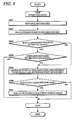
- base line display is performed in the following manner as a loop process (LOOP) executed in units of the base line records stored in the building database 131.
- LOOP loop process
- a record relating to each base line is read from the building database 131 of the storage unit 130 in record sequence by the read unit 611 of the depiction control unit 600a (S701), and then the building name registered in the base line record is read (S702). Whether the building range is specified as the display range is decided by the display range decision unit 612 (S703). When the building range is specified (YES in S703), whether the read base line is disposed within the specified building range is decided by the base line decision unit 613a (S704).
- the shape of the base line including a straight base line and label or the like is generated (S705) using the direction and offset value or the like of the read base line by the depiction unit 614.
- the shape of the base line is generated within the range defined by the peak and bottom values in the vertical direction.
- the selection decision unit 615 When the selection decision unit 615 has decided that the name of the base line corresponds to the base line name specified on the base line name select/display field 512 (YES in S706), the base line is displayed in a visually-emphasized manner, for example, on the depiction screen as described later, by the display unit 616 (S707).
- FIG. 8 a flow of display process when the building data, which are stored in the building database 131, is read and a building layout is displayed on a depiction screen by the building data depiction control unit 600b, is explained below.
- building display is performed in the following manner as a loop process (LOOP) executed in units of the building records stored in the building database 131.
- LOOP loop process
- a record relating to each building is read from the building database 131 in record sequence by the read unit 611 of the depiction control unit 600b (S801), and then the building name registered in the building record is read (S802) Whether the building range is specified as the display range is decided by the display range decision unit 612 (S803). When the building range is specified (YES in S803), whether the read building is disposed within the specified building range is decided by the building decision unit 613b (SB04).
- the shape of the building is generated (S805) using the arrangement coordinates and reference point or the like by the depiction unit 614.
- the shape of the building is generated within the range defined by the peak and bottom values in the vertical direction.
- the display range decision unit 612 has decided that the building range is not specified as the display range (NO in S803), the shape of the building is generated as is by the depiction unit 614 (S805).
- the selection decision unit 615 When the selection decision unit 615 has decided that the name of the building corresponds to the building name specified by the building name select/display field 532 (YES in S806), the building is displayed in a visually-emphasized manner, for example, on the depiction screen as described later, by the display unit 616 (S807).
- Fig. 9 shows specific screen display example of an editing screen for base line data and building data.
- This editing screen 900 corresponds to various functions of the building base line data editing control unit 500a and the building arrangement data editing control unit 500b shown in Fig. 5 , and is used to switch between a plurality of other editing screens to be described below through the use of tabs 9101 displayed in the upper end portion.
- the tabs 9101 serve as means for realizing the functions of the screen switching unit 129.
- a base line data editing select/display field 9111, a base line name select/display field 9112, a base line direction select/display field 9113, a base line offset value select/display field 9114, a base line piece number select/display field 9115, and so on are disposed in the upper portion of the left-of-center part of the editing screen 900.
- These select/display fields 9111 to 9115 serve as a building base line data editing part, and correspond respectively to the select/display fields 511 to 515 shown in Fig. 5A , with which they share the final two digits of their respective reference numerals.
- a building arrangement data editing select/display field 9131, a building name select/display field 9132, a building arrangement select/display field 9133, a building arrangement reference point select/display field 9134, a building piece number select/display field 9135,and so on are disposed in the lower portion of the left-of-center part of the editing screen 900.
- These select/display fields 9131 to 9135 serve as a building arrangement data editing part, and correspond respectively to the select/display fields 531 to 535 shown in Fig. 5B , with which they share the final two digits of their respective reference numerals.
- buttons 9116 to 9120 corresponds respectively to the units 516 to 520 for editing base line data and the units 536 to 540 for editing building arrangement data shown in Figs. 5A and 5B .
- the building data can be edited in the following manner.
- an editing mode display is switched between a building base line data editing mode and a building arrangement data editing mode.
- the base line name select/display field 9112 reads the building base line data from the building database 131 and displays the base line names on a pull-down menu.
- the base line piece number select/display field 9115 displays the piece number of the building base line data
- the base line direction select/display field 9113 and base line offset value select/display field 9114 display the base line direction and base line offset value, respectively. This information can then be modified.
- a change button is depressed on the base line name select/display field 9112 while a base line name is displayed, the base line name can be modified.
- the modification content of the base line name select/display field 9112, base line direction select/display field 9113, and base line offset value select/display field 9114, and base line piece number select/display field 9115 is confirmed as modified data by pressing the correction button 9116.
- the addition button 9117, deletion button 9118, or movement button 9119 data relating to a new base line can be added, data relating to an unnecessary base line can be deleted, and a base line can be moved on a depiction screen.
- the redraw/data update button 9120 the base lines on the depiction screen can be redrawn in accordance with the building base line data edited on the editing screen 900, and the building database 131 can be updated.
- the building name select/display field 9132 reads the building arrangement data from the building database 131 and displays the building names on a pull-down menu.
- the building piece number select/display field 9135 displays the piece number corresponding to the selected building data.
- a selection input is accepted by the building arrangement reference point select/display field 9134 as to whether to edit the building arrangement using either the minimum coordinate point or the maximum coordinate point.
- the XYZ coordinates relating to the selected coordinate point are then displayed by the building arrangement select/display field 9133. This information can then be modified.
- a change button is depressed on the building name select/display field 9132 while a building name is displayed, the building name can be changed.
- the modification content of the building name select/display field 9132, building arrangement select/display field 9133, building arrangement reference point select/display field 9134, and building piece number select/display field 9135 is confirmed as modified data by pressing the correction button 9116.
- the addition button 9117, deletion button 9118, or movement button 9119 data relating to a new building can be added, data relating to an unnecessary building can be deleted, and a building can be moved on a depiction screen.
- the redraw/data update button 9120 the buildings on the depiction screen can be redrawn in accordance with the building arrangement data edited on the editing screen 900, and the building database 131 can be updated.
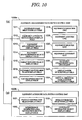
- Figs. 10A and 10B are views showing a functional configuration example of editing control units for equipment arrangement data in the equipment arrangement data editing unit 122, Fig. 10A showing an equipment arrangement data editing control unit 1000a, and Fig. 10B showing an equipment attribute data editing control unit 1000b.
- the editing control units 1000a and 1000b each cause the interface unit 110 to display an editing screen for the equipment arrangement data, perform various display processes for supporting various operations on the displayed editing screen, and accept various inputs from a user to edit the equipment arrangement data.
- the equipment arrangement data editing control unit 1000a so as to perform various display processes for supporting operations on a displayed editing screen for the equipment arrangement data, and accept various inputs to edit the equipment arrangement data, comprises an equipment name select/display field 1011 which displays an equipment name and allows the user to select the name or change into another name, and an equipment attribute editing select/display field 1012 which displays an indication of a function for editing equipment attribute data relating to the attributes of the equipment specified on the equipment name select/display field 1011, allows the user to select the function, and displays an editing screen for the equipment attribute data when the function is selected.
- an equipment name select/display field 1011 which displays an equipment name and allows the user to select the name or change into another name
- an equipment attribute editing select/display field 1012 which displays an indication of a function for editing equipment attribute data relating to the attributes of the equipment specified on the equipment name select/display field 1011, allows the user to select the function, and displays an editing screen for the equipment attribute data when the function is selected.
- the equipment arrangement data editing control unit 1000a further comprises an equipment arrangement select/display field 1013 for displaying and correcting the arrangement position and arrangement angle of the equipment specified on the equipment name select/display field 1011, an equipment shape/dimension select/display field 1014 for displaying and correcting the shape and dimensions of the equipment specified on the equipment name select/display field 1011, and a parent building select/display field 1015 for registering the name of the building to which the equipment specified on the equipment name select/display field 1011 belongs when the equipment belongs to a building.
- an equipment arrangement select/display field 1013 for displaying and correcting the arrangement position and arrangement angle of the equipment specified on the equipment name select/display field 1011
- an equipment shape/dimension select/display field 1014 for displaying and correcting the shape and dimensions of the equipment specified on the equipment name select/display field 1011
- a parent building select/display field 1015 for registering the name of the building to which the equipment specified on the equipment name select/display field 1011 belongs when the equipment belongs to
- the equipment arrangement data editing control unit 1000a also comprises an equipment piece number select/display field 1016 which displays the piece number of an equipment specified by the equipment name select/display field 1011 and changes the piece number into another number selected by the user.
- the equipment piece number select/display field 1016 displays a piece number as a part of equipment specification information including equipment name or the like, and accepts an input from the user, the equipment piece number select/display field 1016 set the piece number or change it into another number.
- the equipment piece number select/display field 1016 performs display switching into the piece number of another piece configuring the equipment.
- the equipment arrangement data editing control unit 1000a further comprises a CAD equipment select/display field 1017 for selecting the two-dimensional CAD equipment drawing symbol or three-dimensional equipment model associated with the equipment specified on the equipment name select/display field 1011, and displaying the symbol name or model name thereof.
- the CAD equipment select/display field 1017 serves as means for realizing the functions of the output format switching unit 127 on the editing screen, and by controlling the CAD conversion unit 150, a two-dimensional CAD equipment drawing symbol or a three-dimensional equipment model is displayed on the depiction screen.
- the equipment arrangement data editing control unit 1000a further comprises as units for correcting, adding, deleting, or moving an equipment specified on the equipment name select/display field 1011 on the depiction screen, an equipment correction unit 1018, an equipment addition unit 1019, an equipment deletion unit 1020, and an equipment movement unit 1021, which display a correction button, a addition button, and a deletion button, and a movement button, respectively on the editing screen, and accept an input to perform various operations.
- the equipment correction unit 1018 when having accepted a correction input from the correction button, corrects the specified equipment in accordance with the content set on the equipment attribute data editing control unit 1000b, the equipment arrangement select/display field 1013, the equipment shape/dimension select/display field 1014, and the parent building select/display field 1015.
- the equipment movement unit 1021 when having accepted an input from the movement button, moves the specified equipment on the depiction screen.
- each piece can be moved separately, or all pieces of the equipment can be moved in a lump.
- the equipment movement unit 1021 can move in a lump a group of equipments associated with a parent building specified by the parent building select/display field 1015. In other words, when a plurality of equipments are disposed in a single building which has a plurality of floors, and when the layout design requires the movement and rotation for each building, the equipment movement unit 1021 moves or rotates in a lump the equipment group associated with the building.
- an equipment connection element as described later is established, and thereby an equipment '1" of a building "A" is connected with an equipment "2" of another building "B", the equipment group of the building "A” can be moved while maintaining the connection relation.
- equipment group can be established not only by equipments disposed in a single building, but also by equipments having some relation with each other, so that, when a function of group selection is provided to the equipment attribute editing select/display field 1012, the equipments of a registered group can be moved or rotated in a lump.
- Such group is configured in accordance with, for example, system relation, design field relation, supplier relation, delivery date, and so on.
- the equipment arrangement data editing control unit 1000a further comprises an equipment arrangement data update unit 1022 which displays a update button on the editing screen, accepts an input to obtain data relating to the position and dimensions of the equipment edited by the editing control unit 1000a and reflects these data in the equipment arrangement database 132 as an equipment arrangement data editing result.
- an equipment arrangement data update unit 1022 which displays a update button on the editing screen, accepts an input to obtain data relating to the position and dimensions of the equipment edited by the editing control unit 1000a and reflects these data in the equipment arrangement database 132 as an equipment arrangement data editing result.
- the equipment arrangement data editing control unit 1000a further comprises a display range select/display field 1023 which selects the entire layout range (entire site area) or the building range as the display range, and changes the display angle of the display range.
- the editing control unit 1000a further comprises a vertical direction display range select/display field 1024, allows the user to select as restriction values in Z direction the peak value and bottom value, and sets the display range in the vertical direction in accordance with input Z-direction range.
- the equipment attribute data editing control unit 1000b so as to perform various display processes for supporting operations on a displayed editing screen for the equipment attribute data, and accept various inputs to edit the equipment attribute data, comprises a product information select/display field 1031 for displaying and correcting product information relating to the equipment specified on the equipment name select/display field 1011 such as the amount, delivery date, manufacturer, and cost.
- the equipment attribute data editing control unit 1000b further comprises an interference prohibition area information select/display field 1032 for displaying and correcting dimension information relating to the interference prohibition area, which is set with taking account of room space or restriction space according to rules for an equipment, regarding the equipment specified on the equipment name select/display field 1011, and a noise information select/display field 1033 for displaying and correcting dimension information relating to the area (referred to as "noise area” where appropriate below) affected by the noise of the equipment specified on the equipment name select/display field 1011, or information relating to the sound pressure level of the noise.
- an interference prohibition area information select/display field 1032 for displaying and correcting dimension information relating to the interference prohibition area, which is set with taking account of room space or restriction space according to rules for an equipment, regarding the equipment specified on the equipment name select/display field 1011
- a noise information select/display field 1033 for displaying and correcting dimension information relating to the area (referred to as "noise area" where appropriate below) affected by the noise
- the equipment attribute data editing control unit 1000b further comprises a constraint information select/display field 1034 for displaying and correcting constraint information required for optimization calculation of the equipment specified on the equipment name select/display field 1011.
- the equipment arrangement data update unit 1022 of the editing control unit 1000a accepts an input through the update button displayed on the editing screen by the interface unit 110, the results of the equipment arrangement data editing process performed by the editing control units 1000a and 1000b shown in Fig. 10 are stored in the equipment arrangement database 132 as updated equipment arrangement data.
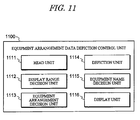
- Fig. 11 is a view showing a functional configuration example of depiction control unit 1100 for equipment arrangement data in the equipment arrangement data editing unit 122.
- the equipment arrangement data depiction control unit 1100 causes the interface unit 110 to display a depiction screen for the equipment arrangement data, performs various processes for depicting the equipment arrangement data on the displayed depiction screen.
- the equipment arrangement data depiction control unit 1100 comprises a read unit 1111 for reading a specification, arrangement coordinates, size, and so on regarding equipment arrangement for depiction use from the equipment arrangement database 132 of the storage unit 130.
- the equipment arrangement data depiction control unit 1100 also comprises a display range decision unit 1112 for deciding whether a building is set for the display range or not through the display range select/display field 1023 of the editing control unit 1000a.
- the depiction control unit 1100 also comprises an equipment arrangement decision unit 1113 for deciding whether or not an equipment read from the equipment arrangement database 132 through the read unit 1111 is disposed within a building if the display range decision unit 1112 has decided that the building is set for the display range.
- the depiction control unit 1100 also comprises a depiction unit 1114 for depicting on a depiction screen the equipment arrangement layout design data generated by various processes of the editing control units 1000a and 1000b.
- the depiction unit 1114 depicts the equipment arrangement layout design data on the depiction screen within the vertical display range (within defined by the peak and bottom values in Z direction) set by the vertical direction display range select/display field 1024.
- the depiction control unit 1100 comprises a equipment name decision unit 1115 for deciding whether or not the equipment name of an equipment depicted by the depiction unit 1114 corresponds to the equipment name specified by the equipment name select/display field 1011, and a display unit 1116 for causing the interface unit 110 to actually display the equipment on a depiction screen.
- the display unit 1116 changes the display mode of the equipment (for example, visually emphasized display by changing the color scheme).
- equipment display is performed in the following manner as a loop process (LOOP) executed in units of the equipment records stored in the equipment arrangement database 132.
- LOOP loop process
- a record relating to each equipment is read from the equipment arrangement database 132 of the storage unit 130 in record sequence by the read unit 1111 (S1201), and then the building name registered in the equipment record is read (S1202). Whether the building range is specified as the display range is decided by the display range decision unit 1112 (S1203). When the building range is specified (YES in S1203), whether the read equipment is disposed within the specified building range is decided by the equipment arrangement decision unit 1113 (S1204).
- the arrangement coordinates (white-filled circle in Fig. 3 ) and size are read from the equipment arrangement database 132, according to the arrangement coordinates, the length direction and width direction on a horizontal plane and height direction are decided using the arrangement coordinates as a reference point, so that a rectangular parallelepiped shape of the equipment is generated which has front and back surfaces at both ends in the length direction, right and left surfaces in the width direction, and top and bottom surfaces in the vertical direction.
- a rotation angle is stored as angle of the equipment, the longitudinal axis of an equipment is rotated about the vertical axis passing through the arrangement coordinate point of the equipment.
- the display range decision unit 1112 When the display range decision unit 1112 has decided that the building range is not specified as the display range (NO in S1203), the shape of the equipment is generated as is by the depiction unit 1114 (S1205).
- the equipment name decision unit 1115 When the equipment name decision unit 1115 has decided that the equipment name of the equipment corresponds to the equipment name specified by the equipment name select/display field 1011 (YES in S1206), the equipment is displayed in a visually-emphasized manner, for example, on a depiction screen by the display unit 1116.
- the area range when an interference prohibition area range or noise range area range is set which are required for study of the equipment, through the interference prohibition area information select/display field 1032 or noise information select/display field 1033, the area range also is displayed as a visible area together with the equipment by the display unit 1116.
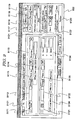
- FIG. 13 shows a specific screen display example of an editing screen 1300 for equipment arrangement data.
- This editing screen 1300 corresponds to the equipment arrangement data editing control unit 1000a shown in Fig. 10A , and is used to switch between the aforementioned building data editing screen 900 and a plurality of other editing screens to be described below through the use of tabs 1301 displayed in the upper end portion.
- an equipment name select/display field 1311 As shown in Fig. 13 , an equipment name select/display field 1311, an equipment attribute editing select/display field 1312 (detail setting), an equipment arrangement select/display field 1313, an equipment shape/dimension select/display field 1314, a parent building select/display field 1315, an equipment piece number select/display field 1316, a CAD equipment select/display field 1317, and so on are disposed in the left-of-center part of the editing screen 1300.
- These select/display fields 1311 to 1317 correspond respectively to the select/display fields 1011 to 1017 shown in Fig. 10 , with which they share the final two digits of their respective reference numerals.
- Fig. 14 is a view showing a specific screen display example of an equipment attribute data editing screen 1400.
- This editing screen 1400 corresponds to the equipment attribute data editing control unit 1000b shown in Fig. 10B , and is constituted by a sub-screen which is switched to from the main editing screen 1300 of Fig. 13 or displayed in a new window.
- an attribute information select/display field 1401 is disposed on the editing screen 1400 for inputting various attribute information not provided on the main editing screen 1300.
- the attribute information select/display field 1401 corresponds to the product information select/display field 1031, noise information select/display field 1033 (only sound pressure level information of noise), and constraint information select/display field 1034 shown in Fig. 10B .
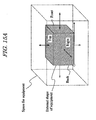
- Fig. 15A is a schematic view showing an interference prohibition area of an equipment
- Fig. 15B is a view showing a specific screen display example of an editing screen which is capable of editing both of interference prohibition area information and noise area information.
- an interference prohibition area information select/display field 1501 is shown on the editing screen 1500 of Fig. 15B .
- the interference prohibition area information select/display field 1501 is configured by a space type/rule select/display field 1511 for selecting a space type and rule name, and a numerical value setting select/display field 1512 for setting a numerical value for the selected space type.
- an interference prohibition area is selected by the space type/rule select/display field 1511 and the distance from each surface of a rectangular parallelepiped equipment is set, so that an interference prohibition area can be set in terms of three-dimension, as shown in Fig. 15A , and represented on a depiction screen.
- Fig. 15A is a view showing an interference prohibition area in terms of three-dimension.
- Such interference prohibition area is displayed on the real depiction screen in two-dimension, but can be represented in terms of three-dimension by setting the distance from the top surface and bottom surface of the area.
- the interference prohibition area is referred to as "tolerance”, which is used as meaning of a room space required for an equipment, and specifically, means a space for maintenance required for equipment maintenance, a space for bringing out an inner component, a space for accessing such as checking an instrument, or operating a valve or terminal box.
- a "rule" list is indicated in the space type/rule select/display field 1511, so that the interference area can be set for each rule.
- the space is set using rules defined according to the regulations.
- an equipment to be arranged may be of that does not come under the regulations and to which any rule is not applied, and in this case, in Fig. 15B , the check box of "use this rule" is turned to "off".
- the equipment arrangement data can be edited in the following manner.
- the equipment name select/display field 1311 on the editing screen 1300 reads the equipment arrangement data from the equipment arrangement database 132 and displays the equipment names on a pull-down menu. Subsequently, the equipment number select/display field 1316 displays the piece numbers on a pull-down menu which correspond to the equipment name specified by the equipment name select/display field 1311, and allows the user to select one of the piece numbers to set the selected piece number. Note that the initial value of the piece number is "1".
- the equipment arrangement select/display field 1313, equipment shape/dimension select/display field 1314, and parent building select/display field 1315 can display the arrangement coordinates and angle of the equipment, the shape and dimensions of the equipment, the name of the parent building, and so on, and allow the user to select for correcting the displayed items.
- the existence of a parent building indicates that when an equipment is disposed inside the parent building, the equipment moves integrally with the building.
- the color scheme of the equipments can be displayed and corrected on a color scheme select/display field 1312a associated with the equipment attribute editing select/display field 1312.
- the color scheme of the pieces can be changed as an equipment unit.
- a plurality of equipments can be registered as a group with group name on a group select/display field 1312b associated with the equipment attribute editing select/display field 1312.
- group select/display field 1312b when the group names of groups registered in the past are displayed on a pull-down menu and a group name of them are selected, the equipments of the group are highlighted on a depiction screen in a format such as display of a colored bold outline. In this case, the equipment group highlighted on the depiction screen can also be moved as a group unit.
- the importance, movability, cost, unit of cost, noise pressure level, vendor name, number of motors, number of anchor bolts, number of embedded metal fittings, and so on of the equipment can be displayed and selected to be corrected on the attribute information select/display field 1401 of the editing screen 1400.
- This information is useful when performing a simple tabulation of the amount of materials during editing of the user-specified range data.
- the CAD equipment select/display field 1317 of the editing screen 1300 converts the specified equipment into a two-dimensional CAD equipment drawing symbol or a three-dimensional equipment model in conjunction with the CAD conversion unit 150, and displays the result of the conversion.
- the CAD data may be obtained by pre-associating an equipment number used in the two-dimensional CAD equipment drawing symbol database 160 and the three-dimensional CAD equipment model database with an equipment name in the equipment arrangement data.
- the CAD data may be displayed by activating a separate application program to the application program for realizing the layout editing unit 120, or by developing a display program together with the program of the layout editing unit 120 such that the database is completely controlled.
- the designer can intuitively gain a comprehensive and clear overview of the layout design, and can avoid spatial recognition errors during subsequent layout editing work.
- the modification content of the equipment attribute data editing screen 1400, equipment arrangement select/display field 1313, equipment shape/dimension select/display field 1314, parent building select/display field 1315, equipment piece number select/display field 1316, and so on is confirmed as modified data by pressing the equipment correction button 1318.
- equipment addition button 1319 By pressing the equipment addition button 1319, equipment deletion button 1320, or equipment movement button 1321, data relating to a new equipment can be added, data relating to an unnecessary equipment can be deleted, and an equipment can be moved. Further, by pressing the redraw/equipment arrangement data update button 1322, in accordance with the equipment arrangement data edited on the editing screen 1300, the equipments can be redrawn on a depiction screen and the equipment arrangement database 132 can be updated.
- the minimum value and the maximum value in the vertical direction can be selected by the vertical direction display range select/display field 1324 of the editing screen 1300, equipments within a prescribed range in the vertical direction can be displayed. Namely, when the minimum and maximum value can be modified on the vertical direction display range select/display field 1324, the screen range to be depicted can be modified on the depiction screen described later. However, the layout in two-dimension is actually depicted on the depiction screen, so that modification of the value in the vertical direction gives no modification to the depiction image when the modified value is within the vertical direction display range.
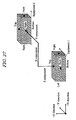
- Fig. 17 shows a layout of the equipment arrangement data when a plurality of equipments are disposed on a first floor of a building.
- the depiction screen 1700 displays a building 1720 and a plurality of equipments 1730 within an entire layout range 1710.
- a name label 1741, an arrangement point 1742, an arrangement direction arrow 1743, a piece number 1744, an interference prohibition area range 1750, a noise area range 1760, and so on are displayed in a visually-emphasized manner.
- the interference prohibition area range 1750 is determined in consideration of equipment workability and maintainability.
- the interference prohibition area range 1750 may be displayed by inputting a distance from each of the six surfaces which configures the equipment.
- the noise area range 1760 may be displayed by calculating the difference between the sound pressure level of the equipment and the sound pressure level at the contour display boundary, and calculating the distance to the boundary sound pressure level from the sectional area of the equipment, for example.
- the interference prohibition area range and noise area range are merely examples of attribute information relating to the range of the equipment, and various other attribute information may be expressed similarly in the form of equipment ranges.
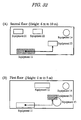
- FIG. 18 to 20 which give an example of a building with a plurality of floors
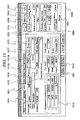
- Figs. 18 and 19 are schematic views for simulating the layout which is depicted on a depiction screen of the interface unit 110 by the depiction control unit 1100.
- a layout in two-dimension as shown in Fig. 20 is depicted.
- the first floor has a height of 0 meter and the equipments 11, 12, 13, and 14, are disposed on the floor.
- the equipment 14 is disposed on the first floor, but higher than other equipments and the upper part thereof passes through and projects above the second floor which has a height of 8 meters.
- the equipments 13 and 14 are cylinder shape tanks, while the other equipments are displayed in rectangular parallelepiped shapes.
- a depiction screen is generated by the depiction control unit 1100, as shown in Figs. 20A and 20B . That is, as shown in Fig.
- a layout is depicted in which the equipment 21, equipment 22, equipment 23, and equipment 14 are disposed.
- the equipment 14 is disposed on the first floor and projected above the second floor.
- a layout is depicted in which the equipment 11, equipment 12, equipment 13, and equipment 14 are disposed.
- Fig. 33 is a depiction screen example in consideration of the case in which the first floor equipment 14 has a height of not achieved the second floor, but a maintenance space which extends above the second floor is required for the equipment.
- an interference prohibition area is set as a room space (for example, maintenance space) extending above the second floor, in accordance with this information, the interference prohibition area is depicted within the display range by the depiction control unit 1100, even if the equipment body does not exist within the display range.
- the equipment outside the display range in the vertical direction is depicted with a specific color (stroke color, fill color) to remarkably indicate the difference by the depiction control unit 1100
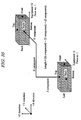
- Fig. 21A is a schematic view showing an equipment 1 configured by a plurality of rectangular parallelepiped pieces which correspond respectively to piece numbers 1 to 5.
- Fig. 21B is a depiction screen on which the equipment shown in Fig. 21A is actually displayed.
- a depiction screen actually depicted by the depiction control unit 1100 as shown in Fig. 21B , the equipment shown in Fig. 21A is represented in two-dimension and the arrangement of the pieces of piece numbers 1 to 5 is represented to be intuitively and comprehensively grasped. Note that piping or cables are to be connected with the piece of piece number 2, and this plan also is represented in two-dimension.
- each piece can be moved, rotated, or modified in size, separately, or can be moved or rotated as a single equipment 1 configured by combining the pieces.
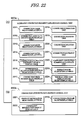
- Figs. 22A and 22B are views showing a functional configuration example of editing control units for equipment connection element data in the equipment connection element data editing unit 123, Fig. 22A showing an equipment connection element data editing control unit 2200a, and Fig. 22B showing an equipment connection attribute data editing control unit 2200b.
- the editing control units 2200a and 2200b each cause the interface unit 110 to display an editing screen for the equipment connection element data, perform various display processes for supporting various operations on the displayed editing screen, and accept various inputs from a user to edit the equipment connection element data.
- the equipment connection element data editing control unit 2200a comprises a connection name select/display field 2211 which displays a connection name and allows the user to select the name or change into another name, and a connection attribute editing select/display field 2212 which displays an indication of a function for editing connection attribute data relating to the attributes of the connection specified on the connection name select/display field 2211, allows the user to select the function, and displays an editing screen for the connection attribute data when the function is selected.
- the equipment connection element data editing control unit 2200a comprises a connection mode select/display field 2213 which displays and corrects the connection mode (piping, cable, or the like) of the connection specified on the connection name select/display field 2211, and a connection level select/display field 2214 which displays and corrects the connection level of the connection specified on the connection name select/display field 2211.
- the equipment connection element data editing control unit 2200a also comprises a connection destination equipment select/display field 2215 which displays and corrects the name of the upstream connection destination equipment and the connection port thereof, and the name of the downstream connection destination equipment and the connection port thereof, in relation to the connection specified on the connection name select/display field 2211, and an interference allowance/prohibition select/display field 2216 which allows the user to select whether an interference is allowed or not between the connection specified on the connection name select/display field 2211 and another connection.
- a connection destination equipment select/display field 2215 which displays and corrects the name of the upstream connection destination equipment and the connection port thereof, and the name of the downstream connection destination equipment and the connection port thereof, in relation to the connection specified on the connection name select/display field 2211
- an interference allowance/prohibition select/display field 2216 which allows the user to select whether an interference is allowed or not between the connection specified on the connection name select/display field 2211 and another connection.
- the equipment connection element data editing control unit 2200a also comprises a connection piece number select/display field 2217 which displays the piece numbers of the upstream connection destination equipment and down stream connection destination equipment, and sets the piece numbers when the user select it.
- the connection piece number select/display field 2217 can display the piece numbers of the upstream/downstream connection destination equipments in relation to the connection specified on the connection name select/display field 2211, and can set the piece numbers in accordance with an input from the user.
- the equipment connection element data editing control unit 2200a further comprises as units for correcting, adding, deleting, or moving an equipment connection element specified on the connection name select/display field 2211 on the depiction screen, a connection correction unit 2218, a connection addition unit 2219, a connection deletion unit 2220, and a connection movement unit 2221, which display a correction button, a addition button, and a deletion button, and a movement button, respectively on the editing screen, and accept an input to perform various operations.
- connection correction unit 2218 when having accepted a correction input from the correction button, corrects the specified equipment connection element in accordance with the content set on the connection attribute data editing control unit 2200b, the connection mode select/display field 2213, the connection level select/display field 2214, the connection destination equipment select/display field 2215, and the interference allowance/prohibition select/display field 2216.
- the connection attribute data editing control unit 2200b comprises a product information select/display field 2231 which displays and corrects product information relating to the connection specified on the connection name select/display field 2211 such as the sectional width, height, weight, and cost.
- the connection attribute data editing control unit 2200b further comprises a constraint information select/display field 2232 which displays and corrects constraint information required for optimization calculation of the connection specified on the connection name select/display field 2211.
- connection attribute data editing control unit 2200b also comprises a connection path name select/display field 2233 which displays and corrects the connection path name and control point (node) information of the connection specified on the connection name select/display field 2211.
- the equipment connection element data update unit 2222 of the editing control unit 2200a accepts an input through the update button displayed on the editing screen by the interface unit 110, the results of the equipment connection element data editing process performed by the editing control units 2200a and 2200b shown in Fig. 22 are stored in the equipment connection element database 133 as updated equipment connection element data.
- FIG. 23 is a view showing a functional configuration example of depiction control unit 2300 for equipment connection element data in the equipment connection element data editing unit 123.
- the equipment arrangement data depiction control unit 2300 causes the interface unit 110 to display a depiction screen for the equipment connection element data, performs various processes for depicting the equipment connection element data on the displayed depiction screen.
- the equipment connection element data depiction control unit 2300 comprises a read unit 2311 for reading a specification, arrangement coordinates, size, and so on regarding equipment arrangement for depiction use from the equipment connection element database 133 of the storage unit 130.
- the equipment connection element data depiction control unit 2300 also comprises a display range decision unit 2312 for deciding whether a building is set for the display range or not through the display range select/display field 2223 of the editing control unit 2200a.
- the depiction control unit 2300 also comprises an equipment connection element decision unit 2313 for deciding whether or not an equipment connection element read from the equipment connection element database 133 through the read unit 2311 is disposed within a building if the display range decision unit 2312 has decided that the building is set for the display range.
- the depiction control unit 2300 also comprises a depiction unit 2314 for depicting on a depiction screen the equipment connection element layout design data generated by various processes of the editing control units 2200a and 2200b.
- the depiction unit 2314 depicts the equipment connection element layout design data on the depiction screen within the vertical display range (within defined by the peak and bottom values in Z direction) set by the vertical direction display range select/display field 2224.
- FIG. 25 shows a specific screen display example of an editing screen 2500 for equipment arrangement data.
- This editing screen 2500 corresponds to the equipment connection element data editing control unit 2200a shown in Fig. 22A , and is used to switch between the aforementioned building data editing screen 900, equipment arrangement data editing screen 1300, and a plurality of other editing screens through the use of tabs 2501 displayed in the upper end portion.
- connection cross-section width, height, weight per unit length, cost per unit length, unit cost, and so on can be displayed and corrected on the cross-section information select/display field 2611 of the editing screen 2600. This information is useful when performing a simple tabulation of the amount of materials during editing of the user-specified range data.
- connection addition button 2519, connection deletion button 2520, or connection movement button 2521 data relating to a new equipment connection element can be added, data relating to an unnecessary equipment connection element can be deleted, and an equipment connection element can be moved.
- the redraw/equipment connection element data update button 2522 the equipment connection element on the depiction screen can be redrawn in accordance with the equipment connection element data edited on the editing screen 2500, and the equipment connection element database 133 can be updated.
- Figs. 29 to 33 give an example of a building with a plurality of floors.
- Figs. 29 to 33 are screen examples in which an equipment connection element is depicted to connect between the equipments on the depiction screen examples for equipment arrangement data shown in Figs. 18 to 20 .
- Fig. 32A is a depiction screen in which the equipment 11 of the connection starting side disposed on the first floor, is simulated on the second floor having a height of 6 to 10 meters shown in Fig. 31A .
- Fig. 32B is a depiction screen in which the equipment 23 of the connection ending side disposed on the second floor, is simulated on the first floor having a height of 0 to 5 meters shown in Fig. 31B .
- the depiction control unit 2300 can depict a connection destination equipment within a display range even if the equipment is disposed outside the display range which is set by the vertical direction display range select/display field 2224 of the editing control unit 2200a, in relation to another equipment which is connected with the connection destination equipment and disposed in one building together. That is, the equipment 11 connected with the equipment 23 is represented in Fig. 32A , and the equipment 23 connected with the equipment 11 is represented in Fig. 32B , even if the equipment is disposed outside the vertical display range set by the vertical direction display range select/display field 2224.
- the cost contrast unit 1413 contrasts the evaluation values based on the costs of each layout design data, and outputs the contrast result to the interface unit 110 through the animation unit 142 or the like. Further, the contrast result is stored in a file for each set range. Note that the distance calculation unit 1411 can make not only a calculation using XYZ components but also a calculation using merely XY components. In the latter case, position relation can be simply grasped from XY components.
- the comparison unit 141 comprises an interference part calculation unit 1421 which in relation to each layout design data of a past record data set, calculates the area of an interference part generated between equipments in two-dimension (including the area of an interference part generated between an equipment and an interference prohibition area such as room space, hereinafter the same as this), or the volume of an interference part generated between equipments in three-dimension (including the volume of an interference part generated between an equipment and an interference prohibition area such as room space, hereinafter the same as this).
- the comparison unit 141 also comprises an interference evaluation value calculation unit 1422 which adds the area or volume of an interference part between equipments calculated by the interference part calculation unit 1421 for each layout design data, to calculate as an evaluation value the total area or total volume of the interference part for each layout design data.
- the comparison unit 141 further comprises an interference contrast unit 1423 for contrasting the evaluation value for each layout design data calculated by the interference evaluation value calculation unit 1422.
- Fig. 38 is a schematic view showing the volume of an interference part between equipments when layout design data is recognized in three-dimension.
- the same process is performed as the case of calculation in two-dimension, except for calculating the volume of an interference part between equipments, so an explanation for this case is omitted.
- the interference part calculation unit 1421 converts the external shape of an equipment into a rectangular parallelepiped shape to calculate the volume of an interference part between the equipment and another equipment when the equipment has a cylinder shape.
- connections between equipments can be recognized in three-dimension, and so that, for example, evaluation calculation can be performed which calculates the total length and cost of piping and cables passing through boundary between floors.
- interference space between equipments can be recognized in three-dimension, so that interference space inside and outside a building can be calculated as an evaluation value in either case of two-dimension base and three-dimension base.
- an evaluation value of a layout having been designed can be calculated in terms of three-dimension, so that a plurality of layout candidates can be compared with each other using results of evaluation calculation according to the same standard, and a more superior layout candidate can be selected as a layout. Therefore, the present invention is suitable for design review duties of layout design.
Landscapes
- Engineering & Computer Science (AREA)
- Physics & Mathematics (AREA)
- Geometry (AREA)
- General Physics & Mathematics (AREA)
- Computer Hardware Design (AREA)
- General Engineering & Computer Science (AREA)
- Theoretical Computer Science (AREA)
- Manufacturing & Machinery (AREA)
- Structural Engineering (AREA)
- Civil Engineering (AREA)
- Architecture (AREA)
- Quality & Reliability (AREA)
- Computational Mathematics (AREA)
- Mathematical Analysis (AREA)
- Mathematical Optimization (AREA)
- Pure & Applied Mathematics (AREA)
- Evolutionary Computation (AREA)
- Automation & Control Theory (AREA)
- Management, Administration, Business Operations System, And Electronic Commerce (AREA)
- Stored Programmes (AREA)
Applications Claiming Priority (1)
| Application Number | Priority Date | Filing Date | Title |
|---|---|---|---|
| JP2009107935A JP5349127B2 (ja) | 2009-04-27 | 2009-04-27 | レイアウト設計支援システム、その制御方法及び制御プログラム |
Publications (2)
| Publication Number | Publication Date |
|---|---|
| EP2249268A2 true EP2249268A2 (fr) | 2010-11-10 |
| EP2249268A3 EP2249268A3 (fr) | 2014-07-09 |
Family
ID=42340791
Family Applications (1)
| Application Number | Title | Priority Date | Filing Date |
|---|---|---|---|
| EP10250823.1A Withdrawn EP2249268A3 (fr) | 2009-04-27 | 2010-04-23 | Système de support de conception de mise en page, procédé et programme |
Country Status (3)
| Country | Link |
|---|---|
| US (1) | US20100274536A1 (fr) |
| EP (1) | EP2249268A3 (fr) |
| JP (1) | JP5349127B2 (fr) |
Cited By (1)
| Publication number | Priority date | Publication date | Assignee | Title |
|---|---|---|---|---|
| CN111966066A (zh) * | 2020-08-18 | 2020-11-20 | 北京联合普肯工程技术股份有限公司 | 设备数据处理方法、装置和电子设备 |
Families Citing this family (19)
| Publication number | Priority date | Publication date | Assignee | Title |
|---|---|---|---|---|
| US8683367B1 (en) * | 2010-02-24 | 2014-03-25 | The Boeing Company | Method and system for differentiating among a plurality of design expressions |
| US9576068B2 (en) * | 2010-10-26 | 2017-02-21 | Good Technology Holdings Limited | Displaying selected portions of data sets on display devices |
| JP4951111B2 (ja) * | 2010-11-04 | 2012-06-13 | 株式会社東芝 | 設計支援装置、設計支援方法およびプログラム |
| WO2012123989A1 (fr) * | 2011-03-16 | 2012-09-20 | 三菱電機株式会社 | Dispositif de gestion de système de climatisation |
| KR20130063915A (ko) * | 2011-12-07 | 2013-06-17 | 한국전자통신연구원 | 실내 측위를 위한 경로 추정 방법 및 그 장치 |
| CN104008218A (zh) * | 2013-02-27 | 2014-08-27 | 河南省电力勘测设计院 | 电力工程三维一体化设计平台 |
| KR101803485B1 (ko) | 2017-02-17 | 2017-12-28 | 주식회사 마이다스아이티 | 인프라 구조물의 3차원모델 생성 시스템 및 방법 |
| JP2018067289A (ja) * | 2017-05-11 | 2018-04-26 | 富士ゼロックス株式会社 | 三次元形状データの編集装置、三次元形状データの編集プログラム、及び三次元形状データのデータ構造 |
| CN108427800A (zh) * | 2017-08-12 | 2018-08-21 | 中民筑友科技投资有限公司 | 一种装配式建筑设计图获取方法、装置及系统 |
| JP7267806B2 (ja) * | 2019-03-28 | 2023-05-02 | 株式会社管総研 | 表示処理装置、表示処理方法およびプログラム |
| CN111046470B (zh) * | 2019-12-13 | 2023-06-09 | 华能威宁风力发电有限公司 | 一种继电器室设计方法及计算机可读存储介质 |
| CN111177834B (zh) * | 2019-12-27 | 2023-02-21 | 深圳集智数字科技有限公司 | 一种楼栋自动化排布方法、装置、设备及存储介质 |
| JP7555665B2 (ja) * | 2020-06-11 | 2024-09-25 | 日東工業株式会社 | 取付判定システム |
| US20230045683A1 (en) * | 2020-09-28 | 2023-02-09 | Rakuten Symphony Singapore Pte. Ltd. | Equipment layout design support device and equipment layout design support method |
| JP7664033B2 (ja) * | 2020-10-26 | 2025-04-17 | 株式会社Lixil | 設計支援システム、設計支援装置、設計支援方法、及び設計支援プログラム |
| WO2022217689A1 (fr) * | 2021-04-13 | 2022-10-20 | 海南康泰旅游股份有限公司 | Procédé et dispositif d'entrée d'identité de touriste sur la base d'une technologie ia, et support de stockage |
| CN114004006B (zh) * | 2022-01-04 | 2022-04-19 | 深圳小库科技有限公司 | 建筑群排布方法、装置、设备及存储介质 |
| US20230418987A1 (en) * | 2022-06-28 | 2023-12-28 | Dish Wireless L.L.C. | Determination of optimal footprint dimensions for elevated structure |
| JP2026023121A (ja) * | 2024-07-31 | 2026-02-13 | 日立Geベルノバニュークリアエナジー株式会社 | 設計支援装置及び設計支援システム |
Family Cites Families (10)
| Publication number | Priority date | Publication date | Assignee | Title |
|---|---|---|---|---|
| EP0696775A1 (fr) * | 1993-04-21 | 1996-02-14 | Hitachi, Ltd. | Système de conception et de production assisté par ordinateur pour la disposition d'éléments et l'interconnexion de tuyaux |
| EP1037154A3 (fr) * | 1999-03-18 | 2003-03-05 | Hitachi, Ltd. | Méthode pour la conversion entre des données cad à trois dimensions et des données selon le standard de l'organisation international de standardisation et appareil utilisant cette méthode |
| EP1267285A3 (fr) * | 2001-06-13 | 2003-02-12 | Sumitomo Wiring Systems, Ltd. | Méthode, logiciel et système pour la conception de la table d'assemblage d'un faisceau de câbles |
| WO2003104113A2 (fr) * | 2002-06-07 | 2003-12-18 | Sankyo Seiki Mfg. Co., Ltd. | Chaines de production comprenant des palettes auto-guidees et systeme d'aide a la conception pour chaine de production |
| GB2432239A (en) * | 2005-11-15 | 2007-05-16 | Toshiba Kk | Building layout design support system |
| JP4861125B2 (ja) * | 2005-11-15 | 2012-01-25 | 株式会社東芝 | レイアウト設計支援システムと方法、およびプログラム |
| JP2007299075A (ja) * | 2006-04-27 | 2007-11-15 | Sharp Corp | 設計支援装置および設計支援方法 |
| JP4833749B2 (ja) * | 2006-06-21 | 2011-12-07 | 三建設備工業株式会社 | 配管長測定システム |
| JP4935494B2 (ja) * | 2007-05-15 | 2012-05-23 | 株式会社日立製作所 | 設計支援装置 |
| JP4940267B2 (ja) * | 2009-06-26 | 2012-05-30 | 株式会社日立製作所 | レイアウト設計支援装置、およびプログラム |
-
2009
- 2009-04-27 JP JP2009107935A patent/JP5349127B2/ja not_active Expired - Fee Related
-
2010
- 2010-04-23 EP EP10250823.1A patent/EP2249268A3/fr not_active Withdrawn
- 2010-04-26 US US12/767,334 patent/US20100274536A1/en not_active Abandoned
Non-Patent Citations (1)
| Title |
|---|
| None |
Cited By (2)
| Publication number | Priority date | Publication date | Assignee | Title |
|---|---|---|---|---|
| CN111966066A (zh) * | 2020-08-18 | 2020-11-20 | 北京联合普肯工程技术股份有限公司 | 设备数据处理方法、装置和电子设备 |
| CN111966066B (zh) * | 2020-08-18 | 2021-12-10 | 北京联合普肯工程技术股份有限公司 | 设备数据处理方法、装置和电子设备 |
Also Published As
| Publication number | Publication date |
|---|---|
| JP2010257317A (ja) | 2010-11-11 |
| JP5349127B2 (ja) | 2013-11-20 |
| US20100274536A1 (en) | 2010-10-28 |
| EP2249268A3 (fr) | 2014-07-09 |
Similar Documents
| Publication | Publication Date | Title |
|---|---|---|
| EP2249268A2 (fr) | Système de support de conception de mise en page, procédé et programme | |
| JP7423290B2 (ja) | 機械加工製品をカスタマイズするシステムおよび方法 | |
| KR100854989B1 (ko) | 레이아웃 설계 지원 시스템과 방법, 및 컴퓨터 판독가능한 기록매체 | |
| JP6668182B2 (ja) | 回路設計装置及びそれを用いた回路設計方法 | |
| KR101120897B1 (ko) | 3차원 데이터 작성 장치와 그 방법, 및 프로그램을 기록한 컴퓨터 판독 가능한 기록 매체 | |
| KR101190491B1 (ko) | 2차원 캐드 도면을 3차원 캐드 도면으로 자동 변환하는 캐드 프로그램을 이용한 구조물 설계 방법 | |
| JP5006272B2 (ja) | 電線格納部品の図面作成装置とその方法、およびプログラム | |
| JP2016209969A (ja) | 情報処理方法、および情報処理装置 | |
| WO2011095980A1 (fr) | Procédé et système pour le routage et la conception de tuyauterie comprenant le plan d'installation, l'isométrie et la nomenclature de tuyauterie | |
| US20030043177A1 (en) | Exploded view automatic creation apparatus, storage media and methods | |
| JPH0552986B2 (fr) | ||
| JP2017227977A (ja) | 構造体の設計システム、構造体の設計方法及び構造体の設計プログラム | |
| Gong et al. | A novel VR tool for collaborative planning of manufacturing process change using point cloud data | |
| US20250148139A1 (en) | Operator connection in block representation | |
| KR20130082869A (ko) | 비아이엠 정보와 연계되는 매트릭스 기반의 건설 공사 관리 장치 | |
| Ji et al. | VDAS: a virtual design and assembly system in a virtual reality environment | |
| KR101612357B1 (ko) | 2차원 도면화 방법 | |
| KR102881237B1 (ko) | 로봇의 자율주행 경로 설정을 위한 자연어 기반 맵 생성 시스템 및 방법 | |
| US20120109587A1 (en) | Method For Linking Work Attribute Information, Its System And Model Structure Of Sheet Metal Component | |
| JP7289110B2 (ja) | 構造体の設計探索装置、構造体の設計探索方法及び構造体の製造方法 | |
| CN120781574B (zh) | 基于自然语言与数据库驱动的参数化三维建模方法及系统 | |
| JP3475753B2 (ja) | 内挿補間スムージング方法、メッシュデータ編集装置及び記憶媒体 | |
| TW202141323A (zh) | 建構3維數位建築物模型的方法 | |
| JPH0934508A (ja) | 作業情報入力方法とその手段、作業計画作成手段 | |
| JP2007299075A (ja) | 設計支援装置および設計支援方法 |
Legal Events
| Date | Code | Title | Description |
|---|---|---|---|
| PUAI | Public reference made under article 153(3) epc to a published international application that has entered the european phase |
Free format text: ORIGINAL CODE: 0009012 |
|
| 17P | Request for examination filed |
Effective date: 20100507 |
|
| AK | Designated contracting states |
Kind code of ref document: A2 Designated state(s): AT BE BG CH CY CZ DE DK EE ES FI FR GB GR HR HU IE IS IT LI LT LU LV MC MK MT NL NO PL PT RO SE SI SK SM TR |
|
| AX | Request for extension of the european patent |
Extension state: AL BA ME RS |
|
| PUAL | Search report despatched |
Free format text: ORIGINAL CODE: 0009013 |
|
| AK | Designated contracting states |
Kind code of ref document: A3 Designated state(s): AT BE BG CH CY CZ DE DK EE ES FI FR GB GR HR HU IE IS IT LI LT LU LV MC MK MT NL NO PL PT RO SE SI SK SM TR |
|
| AX | Request for extension of the european patent |
Extension state: AL BA ME RS |
|
| RIC1 | Information provided on ipc code assigned before grant |
Ipc: G05B 19/418 20060101ALI20140530BHEP Ipc: G06F 17/50 20060101AFI20140530BHEP |
|
| STAA | Information on the status of an ep patent application or granted ep patent |
Free format text: STATUS: THE APPLICATION HAS BEEN WITHDRAWN |
|
| 18W | Application withdrawn |
Effective date: 20160901 |