EP2256608A2 - Appareil d'interface utilisateur et procédé pour l'interface utilisateur dans un dispositif tactile - Google Patents
Appareil d'interface utilisateur et procédé pour l'interface utilisateur dans un dispositif tactile Download PDFInfo
- Publication number
- EP2256608A2 EP2256608A2 EP10155116A EP10155116A EP2256608A2 EP 2256608 A2 EP2256608 A2 EP 2256608A2 EP 10155116 A EP10155116 A EP 10155116A EP 10155116 A EP10155116 A EP 10155116A EP 2256608 A2 EP2256608 A2 EP 2256608A2
- Authority
- EP
- European Patent Office
- Prior art keywords
- touch
- menu
- menu item
- user interface
- items
- Prior art date
- Legal status (The legal status is an assumption and is not a legal conclusion. Google has not performed a legal analysis and makes no representation as to the accuracy of the status listed.)
- Withdrawn
Links
Images






Classifications
-
- G—PHYSICS
- G06—COMPUTING OR CALCULATING; COUNTING
- G06F—ELECTRIC DIGITAL DATA PROCESSING
- G06F3/00—Input arrangements for transferring data to be processed into a form capable of being handled by the computer; Output arrangements for transferring data from processing unit to output unit, e.g. interface arrangements
- G06F3/01—Input arrangements or combined input and output arrangements for interaction between user and computer
- G06F3/048—Interaction techniques based on graphical user interfaces [GUI]
- G06F3/0481—Interaction techniques based on graphical user interfaces [GUI] based on specific properties of the displayed interaction object or a metaphor-based environment, e.g. interaction with desktop elements like windows or icons, or assisted by a cursor's changing behaviour or appearance
- G06F3/0482—Interaction with lists of selectable items, e.g. menus
-
- G—PHYSICS
- G06—COMPUTING OR CALCULATING; COUNTING
- G06F—ELECTRIC DIGITAL DATA PROCESSING
- G06F3/00—Input arrangements for transferring data to be processed into a form capable of being handled by the computer; Output arrangements for transferring data from processing unit to output unit, e.g. interface arrangements
- G06F3/01—Input arrangements or combined input and output arrangements for interaction between user and computer
- G06F3/048—Interaction techniques based on graphical user interfaces [GUI]
- G06F3/0484—Interaction techniques based on graphical user interfaces [GUI] for the control of specific functions or operations, e.g. selecting or manipulating an object, an image or a displayed text element, setting a parameter value or selecting a range
- G06F3/0486—Drag-and-drop
-
- G—PHYSICS
- G06—COMPUTING OR CALCULATING; COUNTING
- G06F—ELECTRIC DIGITAL DATA PROCESSING
- G06F3/00—Input arrangements for transferring data to be processed into a form capable of being handled by the computer; Output arrangements for transferring data from processing unit to output unit, e.g. interface arrangements
- G06F3/01—Input arrangements or combined input and output arrangements for interaction between user and computer
- G06F3/048—Interaction techniques based on graphical user interfaces [GUI]
- G06F3/0487—Interaction techniques based on graphical user interfaces [GUI] using specific features provided by the input device, e.g. functions controlled by the rotation of a mouse with dual sensing arrangements, or of the nature of the input device, e.g. tap gestures based on pressure sensed by a digitiser
-
- G—PHYSICS
- G06—COMPUTING OR CALCULATING; COUNTING
- G06F—ELECTRIC DIGITAL DATA PROCESSING
- G06F3/00—Input arrangements for transferring data to be processed into a form capable of being handled by the computer; Output arrangements for transferring data from processing unit to output unit, e.g. interface arrangements
- G06F3/01—Input arrangements or combined input and output arrangements for interaction between user and computer
- G06F3/048—Interaction techniques based on graphical user interfaces [GUI]
- G06F3/0487—Interaction techniques based on graphical user interfaces [GUI] using specific features provided by the input device, e.g. functions controlled by the rotation of a mouse with dual sensing arrangements, or of the nature of the input device, e.g. tap gestures based on pressure sensed by a digitiser
- G06F3/0488—Interaction techniques based on graphical user interfaces [GUI] using specific features provided by the input device, e.g. functions controlled by the rotation of a mouse with dual sensing arrangements, or of the nature of the input device, e.g. tap gestures based on pressure sensed by a digitiser using a touch-screen or digitiser, e.g. input of commands through traced gestures
- G06F3/04883—Interaction techniques based on graphical user interfaces [GUI] using specific features provided by the input device, e.g. functions controlled by the rotation of a mouse with dual sensing arrangements, or of the nature of the input device, e.g. tap gestures based on pressure sensed by a digitiser using a touch-screen or digitiser, e.g. input of commands through traced gestures for inputting data by handwriting, e.g. gesture or text
-
- G—PHYSICS
- G06—COMPUTING OR CALCULATING; COUNTING
- G06F—ELECTRIC DIGITAL DATA PROCESSING
- G06F3/00—Input arrangements for transferring data to be processed into a form capable of being handled by the computer; Output arrangements for transferring data from processing unit to output unit, e.g. interface arrangements
- G06F3/01—Input arrangements or combined input and output arrangements for interaction between user and computer
- G06F3/048—Interaction techniques based on graphical user interfaces [GUI]
- G06F3/0487—Interaction techniques based on graphical user interfaces [GUI] using specific features provided by the input device, e.g. functions controlled by the rotation of a mouse with dual sensing arrangements, or of the nature of the input device, e.g. tap gestures based on pressure sensed by a digitiser
- G06F3/0488—Interaction techniques based on graphical user interfaces [GUI] using specific features provided by the input device, e.g. functions controlled by the rotation of a mouse with dual sensing arrangements, or of the nature of the input device, e.g. tap gestures based on pressure sensed by a digitiser using a touch-screen or digitiser, e.g. input of commands through traced gestures
- G06F3/04886—Interaction techniques based on graphical user interfaces [GUI] using specific features provided by the input device, e.g. functions controlled by the rotation of a mouse with dual sensing arrangements, or of the nature of the input device, e.g. tap gestures based on pressure sensed by a digitiser using a touch-screen or digitiser, e.g. input of commands through traced gestures by partitioning the display area of the touch-screen or the surface of the digitising tablet into independently controllable areas, e.g. virtual keyboards or menus
Definitions
- Embodiments of the present invention relate to a user interface apparatus and method for user interface, and more particularly, to a user interface apparatus and method for user interface in a touch device where menu items displayed on a display screen may move to a position where a user's touch is generated according to assigned priorities.
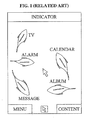
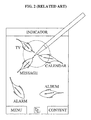
- FIG. 1 and FIG. 2 are views illustrating a user interface method according to a related art.
- a standby screen includes moving fish-shaped icons respectively related to applications such as TV, Alarm, Calendar, Album and Message.
- applications such as TV, Alarm, Calendar, Album and Message.
- the user may not identify the position of the icon related to the application to be executed. Further, the circumference of the clicked point may be disorganized, and so it may be difficult for the user to distinguish the icons from one another.
- Exemplary embodiments of the present invention provide a user interface apparatus and method for user interface in a touch device, where menu items displayed on a display screen all move to a first position where a first touch is generated.
- Exemplary embodiments of the present invention also provide a user interface apparatus and method for user interface in a touch device, where priorities are assigned to menu items based on various references such as respective frequencies of use, respective distances from the first position, and user settings, and display of the menu items at the first position is according to the assigned priorities.
- Exemplary embodiments of the present invention also provide a user interface apparatus and method for user interface in a touch device, wherein if a first touch, such as a double click, is repeatedly generated at a same position within a set period of time, a menu item with a highest priority is selectively moved to a position corresponding to the first touch, and an application associated with the menu item may be executed.
- a first touch such as a double click
- An exemplary embodiment of the present invention discloses a user interface apparatus in a touch device, which comprises a position identification unit to identify a first position where a first touch is generated on a display screen; a priority assignment unit to respectively assign priorities to menu items displayed on the display screen; and a menu item movement unit to move the menu items to the first position according to the assigned priorities in response to receiving the first touch.
- An exemplary embodiment of the present invention discloses a method for user interface in a touch device, which comprises identifying a first position where a first touch is generated on a display screen; respectively assigning priorities to menu items displayed on the display screen; and moving the menu items to the first position as a destination according to the assigned priorities in response to receiving the first touch.
- An exemplary embodiment of the present invention discloses a method for user interface in a touch device.
- the method includes identifying a first position where a first touch is generated on a display screen, determining whether the first touch is positioned on menu items displayed on the display screen, if the first touch is not positioned on the menu items, moving the menu items to the first position in response to receiving the first touch, and if the first touch is positioned on a first menu item, displaying submenu items of the first menu item, or executing an application related to the first menu item when the first touch is released from the first menu item.
- FIG. 1 and FIG. 2 are views illustrating a user interface method according to a related art.
- FIG. 3 is a view illustrating a configuration of a user interface apparatus in a touch device according to an exemplary embodiment of the present invention.
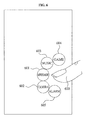
- FIG. 4 is a view illustrating an example of generating a first touch in a display screen on which menu items are displayed according to an exemplary embodiment of the present invention.
- FIG. 5 is a view illustrating an example of moving menu items to a first position where a first touch is generated according to an exemplary embodiment of the present invention.
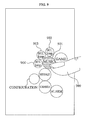
- FIG. 6 is a view illustrating menu items completely moved to a first position where a first touch is generated according to an exemplary embodiment of the present invention.
- FIG. 7 is a view illustrating an example of displaying submenus included in a menu item where a second touch is generated in connection with the menu item according to an exemplary embodiment of the present invention.
- FIG. 8 is a view illustrating an example of executing an application related to a submenu if a second touch for the submenu is released according to an exemplary embodiment of the present invention.
- FIG. 9 is a view illustrating an example of displaying a file included in a menu item where a second touch is generated in connection with the menu item according to an exemplary embodiment of the present invention.
- FIG. 10 is a view illustrating an example of returning menu items to their initial positions on a display screen according to an exemplary embodiment of the present invention.
- FIG. 11 is a view illustrating an example of moving menu items by changing a destination to a second position where a second touch is generated according to an exemplary embodiment of the present invention.
- FIG. 12 is a view illustrating an example of moving the other menu items around a menu item if a second touch is generated according to an exemplary embodiment of the present invention.
- FIG. 13 is a flowchart illustrating a user interface method in a touch device according to an exemplary embodiment of the present invention.
- FIG. 14 is a flowchart illustrating a user interface method in a touch device according to an exemplary embodiment of the present invention.
- a touch device generally used in the present disclosure is a device that may sense a touch to execute a selected instruction.
- the touch device may include a personal digital assistant (PDA), a mobile telecommunication terminal, a personal computer (PC), a TV, or an automated teller machine (ATM), which is provided with a touch screen, a touch panel, a touch pad and the like.
- PDA personal digital assistant
- PC personal computer
- ATM automated teller machine
- a menu item generally described in the present disclosure is a movable object displayed on a display screen of a touch device.
- the menu item may include a menu, an icon, or a widget, any of which may be related to an application, a data folder, state information on the touch device such as an amount of battery power remaining, and the like.
- the menu item may further include submenu items.
- the submenu items are subordinate menu items of the menu item.
- a menu item related to 'Message' may include submenu items such as 'Receiving message box', 'Sending message box', 'Configuration' and 'Spam message'.
- files in various formats such as media files 'mp4' and 'kmp', document files 'doc' and 'hwp', and a text file 'txt', which are stored in a subordinate folder of the data folder may be included.
- FIG. 3 is a view illustrating a configuration of a user interface apparatus 300 in a touch device according to an exemplary embodiment of the present invention.
- the user interface apparatus 300 includes a position identification unit 310, a priority assignment unit 320, a menu item movement unit 330, a submenu display unit 340, a file list display unit 350, an application execution unit 360, and an event determination unit 370.
- the event determination unit 370 determines whether a first touch is generated on a display screen. If it is determined that the first touch is generated, the position identification unit 310 identifies a first position where the first touch is generated on the display screen.
- one or more of the various embodiments of determining whether a first or second touch is generated on the display screen may be implemented.
- the event determination unit 370 may determine that the first touch is generated. Further, if a touch is not released and instead is dragged to another position on the display screen after the generation of the first touch, the event determination unit 370 may determine that a second touch is generated.
- the event determination unit 370 may determine that the first touch is generated.
- the event determination unit 370 may determine that the first touch is generated. In this case, the first touch is generated simply by performing the touch-release so that a further degree of freedom may be given to users.
- the position identification unit 310 will be described with reference to FIG. 4 .
- FIG. 4 is a view illustrating an example of generating a first touch in a display screen on which menu items are displayed according to an exemplary embodiment of the present invention.
- the user interface apparatus 300 in the touch device allows movable menu items such as a Message 401, a Camera 402, a Music 403, a Game 404 and an Alarm 405 to be displayed on the display screen.
- movable menu items such as a Message 401, a Camera 402, a Music 403, a Game 404 and an Alarm 405 to be displayed on the display screen.
- the position identification unit 310 may identify a first position where the first touch 400 is generated in the form of a position coordinate or pixel value.
- the priority assignment unit 320 assigns priorities to the menu items displayed on the display screen.
- the priority assignment unit 320 may assign priorities of the menu items in an order of the Message 401, the Camera 402, the Music 403, the Game 404 and the Alarm 405, based on their respective frequencies of use.
- the priority assignment unit 320 may assign priorities of the menu items in an order of the Music 403, the Alarm 405, the Camera 402, the Game 404 and the Message 401, based on distances of their respective initial positions to the first position where the first touch is generated.
- the priority assignment unit 320 may assign priorities of the menu items in an order of the Message 401, the Alarm 405, the Camera 402, the Game 404, and the Music 403, based on user settings.
- the priority assignment unit 320 may assign priorities to the menu items in comprehensive consideration of their respective frequencies of use, respective distances from the first position where the first touch 400 is generated, and/or user settings.
- the menu item movement unit 330 moves the menu items to the identified first position where the first touch 400 is generated as a destination, according to the assigned priorities.
- the menu item movement unit 330 may sequentially move the menu items with a selected time delay, based on the assigned priorities.
- menu item movement unit 330 will be described with reference to FIG. 5 and FIG. 6 .
- FIG. 5 is a view illustrating an example of moving menu items to a first position where a first touch 500 is generated according to an exemplary embodiment of the present invention.
- the menu item movement unit 330 may move the Message 501 having a highest assigned priority among the menu items to the first position where the first touch 500 is generated.
- the menu item movement unit 330 may move the Camera 502 having a next highest assigned priority to the first position where the first touch 500 is generated.
- the menu item movement unit 330 may move the Music 503 having a next highest assigned priority to the first position where the first touch 500 is generated.
- the menu item movement unit 330 may move the Game 504 having a next highest assigned priority to the first position where the first touch 500 is generated.
- the menu item movement unit 330 may move the Alarm 504 having the lowest assigned priority to the first position where the first touch 500 is generated.
- FIG. 6 is a view illustrating menu items completely moved to a first position where a first touch 600 is generated according to an exemplary embodiment of the present invention.
- the menu item movement unit 330 may move menu items being a Message 601, a Camera 602, a Music 603, a Game 604, and an Alarm 605 to the first position where the first touch 600 is generated in the order according to assigned priorities. As illustrated in FIG. 6 , the completely moved menu items may be positioned in a circular shape around the first position.
- menu items may respectively move with a time delay based on their priorities. Therefore, the user may more easily distinguish the menu items from one another even when many menu items are displayed on the display screen.
- the menu item movement unit 330 may set the movement speeds of the menu items to be different from one another, so that the menu items may reach the first position based on their priorities.
- the menu item movement unit 330 may set the movement speeds of the menu items to be different from one another, using the respective distances of their initial positions to the first position or their respective moving times or moving speeds to the first position.
- the menu item movement unit 330 may move menu items to the first position based on the movement speeds determined differently from one another. Consequently, the menu items may reach the first position in order of their assigned priorities.
- the menu item movement unit 330 may move the menu items to the first position corresponding to the assigned priorities, which will be described with reference to FIG. 5 .
- the menu item movement unit 330 may move the menu items displayed on the display screen to the first position where the first touch 500 is generated.
- the menu item movement unit 330 may move the menu items in the order of the Message 501, the Camera 502, the Music 503, the Game 504 and the Alarm 505, based on the assigned priorities.
- the completely moved menu items may be arranged in a circular shape about the first position.
- the menu item movement unit 330 may move a menu item having the highest assigned priority among the menu items to the first position, which will be described with reference to FIG. 5 .
- the menu item movement unit 330 may move the Message 501, having the highest assigned priority among the menu items displayed on the display screen, to the first position.
- the movement of an undesired menu item may be omitted, and a menu item with the highest assigned priority may be more rapidly identified.
- the application execution unit 360 may execute a menu item having the highest priority is assigned among the menu items.
- the menu item movement unit 330 may omit the movement of the menu item to the first position.
- the submenu display unit 340 may display submenu items included in the second touched menu item in connection with the second touched menu item.
- the menu item movement unit 330 may stop a menu item still in its initial position or moving toward the first position from moving any further toward the first position.
- the submenu display unit 340 may sequentially display the submenu items, based on priorities of the submenu items.
- the application execution unit 360 may execute an application related to the menu item to display the executed application on the display screen.
- the second touch may be generated if the first touch is dragged to a menu item and maintained without first releasing the first touch. This will be described in more detail with reference to FIG. 6 .
- the second touch may be generated if the first touch 600 is not released but dragged on the Message 601.
- the second touch may be a new touch generated at a second position corresponding to a menu item that is positioned during a selected time.
- the menu item may include submenu items.
- a menu item related to 'Message' may include submenu items such as 'Receiving message box', 'Sending message box', 'Configuration' and 'Spam message'.
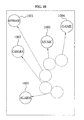
- FIG. 7 is a view illustrating an example of displaying submenus included in a menu item where a second touch 700 is generated in connection with the menu item according to an exemplary embodiment of the present invention.
- the submenu display unit 340 may display submenu items of Message 701, such as a Receiving message box 702, a Sending message box 703, a Configuration 704, and a Spam message 705, around the Message 701.
- the submenu display unit 340 may sequentially display the submenu items with a time delay based on the assigned menu priorities.
- the menu priorities refer to priorities assigned to the submenu items.
- the menu properties may be assigned based on various references such as their respective frequencies of use and user settings.
- a user may more easily reach and operate menu items and also submenu items of the menu items.
- the application execution unit 360 may execute an application related to a menu item located in a position corresponding to the display screen position where the first touch is released.
- FIG. 8 is a view illustrating an example of executing an application related to a submenu if a second touch for the submenu is released according to an exemplary embodiment of the present invention.
- the submenu display unit 340 may display submenu items of the Message 801 around the Message 801.
- the application execution unit 360 executes an application related to the Receiving message box 802 so that a user may check received messages.
- the additional submenu or documents may be displayed.
- the application execution unit 360 executes an application related to the Message 801 so that the executed application may be displayed on the display screen.
- the user may execute an application related to a menu item or a submenu item of the menu item so that menu items may be more effectively used.
- the file list display unit 350 may display a file belonging to the second touched menu item or submenu item on the display screen, in connection with the second touched menu item or submenu item.
- file in various formats such as media files 'mp4' and 'kmp', document files 'doc' and 'hwp', and a text file 'txt', which are stored in a subordinate folder of the data folder may be included.
- FIG. 9 is described relative to a second touch menu item, the description of a file list display unit may be applicable to a submenu item.
- FIG. 9 is a view illustrating an example of displaying a file included in a menu item where a second touch 900 is generated in connection with the menu item according to an exemplary embodiment of the present invention.
- the file list display unit 350 displays files 001.kmp 902, 002.kmp 903 and 003.kmp 904 on the display screen in connection with the Music 901.
- the files 001.kmp 902, 002.kmp 903, and 003.kmp 904 are subordinate to the second touched menu item, that is, the Music 901.
- a user may more easily reach and operate menu items and also files subordinate to the menu items.
- FIG. 10 is a view illustrating an example of returning menu items to their initial positions on a display screen according to an exemplary embodiment of the present invention.
- the menu item movement unit 330 may return the respective menu items completely moved to the first position where the first touch is generated to their initial positions 1001, 1002, 1003, 1004, and 1005 on the display screen.
- the menu item movement unit 330 may return the respective menu items completely moved to the first position to their initial positions 1001, 1002, 1003, 1004, and 1005 on the display screen.
- the menu item movement unit 330 may return the respective menu items to their initial positions 1001, 1002, 1003, 1004, and 1005 on the display screen.
- FIG. 11 is a view illustrating an example of moving menu items by changing a destination to a second position where a second touch is generated according to an exemplary embodiment of the present invention.
- the menu item movement unit 330 may sequentially move the menu items to the first position where the first touch 500 is generated as a destination with a selected delay time, based on respective priorities assigned to the menu items.
- the menu item movement unit 330 may move the Message 501, to which the highest priority is assigned, to the first position where the first touch 500 is generated. If the second touch 510 is generated at the second position after Message 501 is moved but before Camera 502, having the next highest assigned priority, has reached the first position, the menu item movement unit 330 may stop the movement of the Camera 502.
- the menu item movement unit 330 may sequentially move menu items 1101, 1102, 1103, 1104, and 1105 to a second position of a second touch 1100 identified by the position identification unit 310 by changing the destination to the second position.
- the menu item movement unit 330 may stop menu items moving to the first position and move the partially stopped menu items or the menu items completely moved to the first position to the second position of the second touch 1100.
- the menu item movement unit 330 may move the menu items completely moved to the first position or the menu items moving to the first position from the partially stopped position to the second position, without moving the same to initial positions on the display screen.
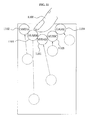
- FIG. 12 is a view illustrating an example of moving the other menu items around a menu item if a second touch is generated according to an exemplary embodiment of the present invention.
- the menu item movement unit 330 may move the other menu items except the second touched menu item to a second position of the second touch identified by the position identification unit 310 by changing the destination to the second position.
- the menu items having a destination changed to the second destination may be menu items completely moved to the first position, menu items moving to the first position and menu items that do not start the movement to the first position due to having low priorities, except the second touched menu items.
- the menu item movement unit 330 may move all the menu items except the second touched 'Message 1201' to the second position by changing their destination from the first position to the second position, which will be described with reference to FIG. 12 .
- the menu item movement unit 330 may move a Camera 1202, a Music 1203, a Game 1204, and an Alarm 1205 around the Message 1201 where the second touch 1200 is generated by changing a destination from a first position to the second position.
- the Camera 1202 and the Music 1203 have completely moved to the first position when the second touch is generated.
- the Game 1204 is moving to the first position when the second touch is generated.
- the Alarm 1205 has not yet started the movement to the first position due to having lowest priority.
- the user interface apparatus 300 in the touch device may include an input unit to sense and detect an event such as a touch, a release, or a dragged touch; an operation unit to determine movement speeds of menu items using data transmitted from the input unit; a control unit to control the movement, arrangement and execution of menu items; and an output unit to display the movement and arrangement of menu items and the execution of applications related to the menu items on a display screen.
- an input unit to sense and detect an event such as a touch, a release, or a dragged touch
- an operation unit to determine movement speeds of menu items using data transmitted from the input unit
- a control unit to control the movement, arrangement and execution of menu items
- an output unit to display the movement and arrangement of menu items and the execution of applications related to the menu items on a display screen.
- the input unit may include the event determination unit 370 to determine an event such as a touch, a release or a dragged touch, and the position identification unit 310 to detect a touched position.
- the input unit may detect the touched position and transmit information on the touched position to the operation unit.
- the operation unit may determine movement speeds of menu items distributed on the display screen, using the information on the touched position.
- the control unit may control the output unit so that the respective menu items with the determined movement speeds are moved and disposed around the touched position at different speeds.
- the treatment of the display screen may be performed by the output unit.
- the control unit may include the menu item movement unit 330 to control the movement and arrangement of menu items around a touched position, the movement of menu items to their initial positions and the like, and the application execution unit 360 to perform the execution and cancellation of applications related to menu items, the arrangement and execution of submenu items and the like.
- FIG. 13 a user interface method in a touch device will be described with reference to FIG. 13 and FIG. 14 .
- the method will be described with further reference to FIG. 3 .
- FIG. 13 is a flowchart illustrating a method for user interface in a touch device according to an exemplary embodiment of the present invention.
- the method for user interface may be implemented by the user interface apparatus 300 in the touch device according to an exemplary embodiment of the present invention.
- the user interface apparatus 300 identifies a first position where a first touch is generated on a display screen.
- the position identification unit 310 may identify a first position where the first touch 400 is generated in the form of a position coordinate or pixel value.
- the user interface apparatus 300 assigns priorities to the menu items displayed on the display screen.
- the priority assignment unit 320 may assign priorities to the menu items in comprehensive consideration of their respective frequencies of use, respective distances from the first position, and/or user settings.
- the user interface apparatus 300 move the menu items to the identified first position on the display screen according to the assigned priorities.
- the menu item movement unit 330 may sequentially move the menu items with a selected time delay, based on the assigned priorities.
- the menu items may be moved with a time delay based on their assigned priorities. Therefore, the user may more easily distinguish the menu items from one another even if many menu items are displayed on the display screen.
- the menu item movement unit 330 determines the movement speeds of the menu items to be different from one another so that the menu items may reach the first position at different times based on their assigned priorities.
- the menu item movement unit 330 may determine the movement speeds of the menu items to be different from one another, using the respective distances between their initial positions and the first position or the respective moving times of the menu items to the first position.
- the menu item movement unit 330 may move menu items to the first position based on the movement speeds determined differently from one another. Consequently, the menu items may reach the first position in the order of the assigned priorities.
- the user interface apparatus 300 determines whether a second touch is generated at any one of the menu items completely moved to the first position.
- the user interface apparatus 300 determines whether the second touched menu item has submenu items or files in operation 1350.
- the user interface apparatus 300 displays the submenu items or files belonging to the second touched menu item on the display screen in operation 1360.
- the submenu display unit 340 may sequentially display the submenu items with a time delay, based on the assigned priorities.
- the menu priorities refer to priorities assigned to the submenu items.
- the menu properties may be assigned based on various references such as their respective frequencies of use and/or user settings.
- the user may more easily reach and operate menu items and also submenu items of the menu items.
- the user interface apparatus 300 executes the application related to the touch generated at the displayed submenu item or executes a file related to the touch generated at the displayed submenu item.
- the user interface apparatus executes an application related to the menu item to display the executed application on the display screen.
- the user interface apparatus 300 If it is determined in operation 1340 that a second touch is not generated at the menu items completely moved to the first position, in operation 1390, the user interface apparatus 300 returns the menu items to their initial positions if the first touch is released, which is described with reference to FIG. 10 .
- the menu item movement unit 330 may immediately return the respective menu items completely moved to the first position to their initial positions 1001, 1002, 1003, 1004, and 1005 on the display screen.
- the menu item movement unit 330 may return the menu items to their respective initial positions 1001, 1002, 1003, 1004, and 1005 on the display screen.
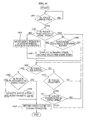
- FIG. 14 is a flowchart illustrating a user interface method in a touch device according to an exemplary embodiment of the present invention.
- the user interface method may be implemented by the user interface apparatus 300 in the touch device according to an exemplary embodiment of the present invention.
- the user interface apparatus 300 determines whether a first touch is generated on a display screen.
- the event determination unit 370 may determine that the first touch is generated. If the first touch is dragged while being maintained, the event determination unit 370 may determine that a second touch is generated.
- the event determination unit 370 may determine that the first touch is generated. Alternatively, if the first touch is generated and then released on the display screen, the event determination unit 370 may determine that the first touch is generated. Here, the user releases the first touch on the display screen, and therefore, may have improved freedom of movement.
- operation 1401 may be repeatedly performed.
- the user interface apparatus 300 determines whether the first touch is positioned on menu items in operation 1402.
- the user interface apparatus 300 moves the menu items to the first position where the first touch is generated as a destination in operation 1403.
- the user interface apparatus 300 determines whether the first touch is released.
- the user interface apparatus 300 determines whether the first touch is released on a menu item in operation 1405.
- the user interface apparatus 300 executes an application related to that menu item in operation 1406. Then, in operation 1407, the user interface apparatus 300 returns the menu items completely moved to the first position to their initial positions on the display screen.
- the user interface apparatus 300 If it is determined in operation 1405 that the first touch is not released on the menu item, in operation 1407, the user interface apparatus 300 returns the menu items completely moved to the first position to their initial positions on the display screen
- the user interface apparatus 300 determines whether the menu item has submenu items in operation 1408.
- the user interface apparatus 300 displays the submenu items belonging to the menu item around the menu item in operation 1409. The user interface apparatus 300 then determines whether the first touch is released in operation 1404.
- the user interface apparatus 300 determines whether the first touch is released in operation 1404.
- the user interface apparatus 300 determines whether the first touch is dragged in operation 1410.
- the user interface apparatus 300 determines whether the first touch is dragged on a menu item in operation 1411.
- the user interface apparatus 300 determines whether the menu item on which the first touch is dragged has submenu items in operation 1408.
- the user interface apparatus 300 determines whether the first touch is released in operation 1404.
- the user interface method in a touch device may be recorded in computer-readable media including program instructions to implement various operations when executed by a computer.
- the media may also include, alone or in combination with the program instructions, data files, data structures, and the like.
- Examples of computer-readable media include magnetic media such as hard disks, floppy disks, and magnetic tape; optical media such as CD-ROM disks and DVDs; magneto-optical media such as optical disks; and hardware devices that are specially configured to store and perform program instructions, such as read-only memory (ROM), random access memory (RAM), flash memory, and the like.
- Examples of program instructions include both machine code, such as produced by a compiler, and files containing higher level code that may be executed by the computer using an interpreter.
- the described hardware devices may be configured to act as one or more software modules in order to perform the operations of the above-described exemplary embodiments of the present invention, or vice versa.
- the convenience in selecting and operating menu items may be provided to a user, and the user may more easily distinguish the menu items from one another.
- priorities may be assigned to menu items based on various references such as their respective frequencies of use, respective distances from the first position, and/or user settings.
- the movement speeds of menu items may be different from one another, so that the menu items may approach a first position where a first touch is generated in an order corresponding to assigned priorities.
- the convenience in selecting and operating submenu items related to a second touched menu item may also be provided.
- the user may more easily execute an application related to a menu item so that menu items may be more effectively used.
- a menu item with the highest priority may be selectively moved to the position so that a user may more rapidly identify the menu item with the highest priority, and an application related to the menu item may be executed.
- a user interface apparatus includes a position identification unit to identify a first position where a first touch is generated on a display screen; a priority assignment unit to respectively assign priorities to menu items displayed on the display screen; and a menu item movement unit to move the menu items to the first position as a destination according to the assigned priorities and in response to the first touch.
- a user interface method in a touch device includes identifying a first position where a first touch is generated on a display screen, respectively assigning priorities to menu items displayed on the display screen, and moving the menu items to the first position according to the assigned priorities in response to receiving the first touch.
Landscapes
- Engineering & Computer Science (AREA)
- General Engineering & Computer Science (AREA)
- Theoretical Computer Science (AREA)
- Human Computer Interaction (AREA)
- Physics & Mathematics (AREA)
- General Physics & Mathematics (AREA)
- User Interface Of Digital Computer (AREA)
- Position Input By Displaying (AREA)
Applications Claiming Priority (1)
| Application Number | Priority Date | Filing Date | Title |
|---|---|---|---|
| KR1020090045805A KR101055924B1 (ko) | 2009-05-26 | 2009-05-26 | 터치 기기에서의 유저 인터페이스 장치 및 방법 |
Publications (2)
| Publication Number | Publication Date |
|---|---|
| EP2256608A2 true EP2256608A2 (fr) | 2010-12-01 |
| EP2256608A3 EP2256608A3 (fr) | 2013-08-07 |
Family
ID=42664787
Family Applications (1)
| Application Number | Title | Priority Date | Filing Date |
|---|---|---|---|
| EP10155116.6A Withdrawn EP2256608A3 (fr) | 2009-05-26 | 2010-03-02 | Appareil d'interface utilisateur et procédé pour l'interface utilisateur dans un dispositif tactile |
Country Status (4)
| Country | Link |
|---|---|
| US (2) | US8453055B2 (fr) |
| EP (1) | EP2256608A3 (fr) |
| KR (1) | KR101055924B1 (fr) |
| CN (1) | CN101901103B (fr) |
Cited By (4)
| Publication number | Priority date | Publication date | Assignee | Title |
|---|---|---|---|---|
| WO2011157527A1 (fr) * | 2010-06-18 | 2011-12-22 | International Business Machines Corporation | Système de menu hiérarchique contextuel sur des écrans tactiles |
| EP2490136A3 (fr) * | 2011-02-15 | 2014-02-26 | LG Electronics Inc. | Procédé de recherche de contenu et dispositif d'affichage l'utilisant |
| EP2835729A4 (fr) * | 2012-10-09 | 2015-07-01 | Zte Corp | Procédé de commande de la position d'une fenêtre flottante et terminal |
| EP3223130A1 (fr) * | 2016-03-22 | 2017-09-27 | Continental Automotive GmbH | Procédé de commande d'un dispositif d'entrée pour naviguer dans un menu hiérarchique |
Families Citing this family (92)
| Publication number | Priority date | Publication date | Assignee | Title |
|---|---|---|---|---|
| US10345996B2 (en) | 2008-10-22 | 2019-07-09 | Merge Healthcare Solutions Inc. | User interface systems and methods |
| US10768785B2 (en) * | 2008-10-22 | 2020-09-08 | Merge Healthcare Solutions Inc. | Pressure sensitive manipulation of medical image data |
| KR101055924B1 (ko) * | 2009-05-26 | 2011-08-09 | 주식회사 팬택 | 터치 기기에서의 유저 인터페이스 장치 및 방법 |
| JP5218353B2 (ja) * | 2009-09-14 | 2013-06-26 | ソニー株式会社 | 情報処理装置、表示方法及びプログラム |
| US8479107B2 (en) * | 2009-12-31 | 2013-07-02 | Nokia Corporation | Method and apparatus for fluid graphical user interface |
| US9595186B2 (en) | 2010-01-04 | 2017-03-14 | Samsung Electronics Co., Ltd. | Electronic device combining functions of touch screen and remote control and operation control method thereof |
| CN102770835B (zh) | 2010-01-20 | 2016-01-06 | 诺基亚公司 | 用于组织图形项的方法和设备 |
| US9977472B2 (en) | 2010-03-19 | 2018-05-22 | Nokia Technologies Oy | Method and apparatus for displaying relative motion of objects on graphical user interface |
| KR101651135B1 (ko) * | 2010-07-12 | 2016-08-25 | 엘지전자 주식회사 | 이동 단말기 및 그 제어 방법 |
| KR101719989B1 (ko) * | 2010-10-14 | 2017-03-27 | 엘지전자 주식회사 | 전자 장치 및 메뉴를 구성하기 위한 인터페이스 방법 |
| US20120102400A1 (en) * | 2010-10-22 | 2012-04-26 | Microsoft Corporation | Touch Gesture Notification Dismissal Techniques |
| KR20120067445A (ko) * | 2010-12-16 | 2012-06-26 | 엘지전자 주식회사 | 휴대 단말기 및 그 동작 제어방법 |
| US8797350B2 (en) | 2010-12-20 | 2014-08-05 | Dr Systems, Inc. | Dynamic customizable human-computer interaction behavior |
| JP5617603B2 (ja) * | 2010-12-21 | 2014-11-05 | ソニー株式会社 | 表示制御装置、表示制御方法、及び、プログラム |
| JP5652652B2 (ja) * | 2010-12-27 | 2015-01-14 | ソニー株式会社 | 表示制御装置および方法 |
| EP2490113B1 (fr) * | 2011-02-15 | 2016-11-23 | Lg Electronics Inc. | Procédé d'affichage et procédé de contrôle de son fonctionnement |
| KR20130052751A (ko) * | 2011-05-17 | 2013-05-23 | 삼성전자주식회사 | 단말기 및 그 단말기에서 아이콘 배열 방법 |
| US9471192B2 (en) | 2011-05-23 | 2016-10-18 | Haworth, Inc. | Region dynamics for digital whiteboard |
| US9430140B2 (en) | 2011-05-23 | 2016-08-30 | Haworth, Inc. | Digital whiteboard collaboration apparatuses, methods and systems |
| US9465434B2 (en) | 2011-05-23 | 2016-10-11 | Haworth, Inc. | Toolbar dynamics for digital whiteboard |
| US20140055400A1 (en) * | 2011-05-23 | 2014-02-27 | Haworth, Inc. | Digital workspace ergonomics apparatuses, methods and systems |
| US9671954B1 (en) * | 2011-07-11 | 2017-06-06 | The Boeing Company | Tactile feedback devices for configurable touchscreen interfaces |
| US9417754B2 (en) | 2011-08-05 | 2016-08-16 | P4tents1, LLC | User interface system, method, and computer program product |
| KR101924835B1 (ko) * | 2011-10-10 | 2018-12-05 | 삼성전자주식회사 | 터치 디바이스의 기능 운용 방법 및 장치 |
| KR101972924B1 (ko) * | 2011-11-11 | 2019-08-23 | 삼성전자주식회사 | 휴대용 기기에서 부분 영역의 터치를 이용한 전체 영역 지정을 위한 방법 및 장치 |
| USD707714S1 (en) * | 2012-02-28 | 2014-06-24 | Microsoft Corporation | Display screen with icon |
| KR20180040731A (ko) * | 2012-03-21 | 2018-04-20 | 김시환 | 스마트폰 디스플레이에서 정보 표시 방법 |
| USD719180S1 (en) * | 2012-03-30 | 2014-12-09 | Huawei Technologies Co., Ltd. | Display screen or portion thereof with graphical user interface |
| CN103379201B (zh) * | 2012-04-25 | 2016-06-15 | 中兴通讯股份有限公司 | 一种动态显示终端界面的应用的终端及方法 |
| KR101960061B1 (ko) * | 2012-05-21 | 2019-03-19 | 삼성전자주식회사 | 디바이스에서 실행되는 복수의 애플리케이션들에 대한 실행 화면들을 전환하여 디스플레이하는 방법 및 장치 |
| US9479549B2 (en) | 2012-05-23 | 2016-10-25 | Haworth, Inc. | Collaboration system with whiteboard with federated display |
| US9479548B2 (en) | 2012-05-23 | 2016-10-25 | Haworth, Inc. | Collaboration system with whiteboard access to global collaboration data |
| CN102799374A (zh) * | 2012-07-03 | 2012-11-28 | 宇龙计算机通信科技(深圳)有限公司 | 终端和应用程序的控制方法 |
| CN102841748A (zh) * | 2012-07-12 | 2012-12-26 | 深圳市邦健电子有限公司 | 带有显示屏的监视设备的菜单管理方法及处理装置 |
| US8896556B2 (en) * | 2012-07-31 | 2014-11-25 | Verizon Patent And Licensing Inc. | Time-based touch interface |
| CA2883648A1 (fr) * | 2012-09-05 | 2014-03-13 | Steve Mason | Dynamique de barres d'outils pour tableau blanc numerique |
| USD712917S1 (en) * | 2012-09-07 | 2014-09-09 | Lg Electronics Inc. | Display of mobile phone with transitional graphical user interface |
| JP6036123B2 (ja) * | 2012-10-01 | 2016-11-30 | 富士ゼロックス株式会社 | 情報表示装置及びプログラム |
| CN103415835B (zh) * | 2012-10-08 | 2016-08-03 | 华为终端有限公司 | 一种触屏装置用户界面的处理方法及触屏装置 |
| USD747353S1 (en) * | 2012-11-30 | 2016-01-12 | Lg Electronics Inc. | Multimedia terminal having transitional graphical user interface |
| US10304037B2 (en) | 2013-02-04 | 2019-05-28 | Haworth, Inc. | Collaboration system including a spatial event map |
| US11861561B2 (en) | 2013-02-04 | 2024-01-02 | Haworth, Inc. | Collaboration system including a spatial event map |
| USD736219S1 (en) * | 2013-02-05 | 2015-08-11 | Samsung Electronics Co., Ltd. | Display with destination management user interface |
| US10394434B2 (en) * | 2013-02-22 | 2019-08-27 | Samsung Electronics Co., Ltd. | Apparatus and method for recognizing proximity motion using sensors |
| US10229258B2 (en) | 2013-03-27 | 2019-03-12 | Samsung Electronics Co., Ltd. | Method and device for providing security content |
| KR102164454B1 (ko) * | 2013-03-27 | 2020-10-13 | 삼성전자주식회사 | 개인 페이지 제공 방법 및 이를 위한 디바이스 |
| WO2014157886A1 (fr) | 2013-03-27 | 2014-10-02 | Samsung Electronics Co., Ltd. | Procédé et dispositif permettant d'exécuter une application |
| KR101459552B1 (ko) * | 2013-06-19 | 2014-11-07 | 주식회사 케이티 | 디바이스의 레이아웃 영역에 객체를 표시하는 방법 및 디바이스 |
| CN104252284A (zh) * | 2013-06-26 | 2014-12-31 | 中兴通讯股份有限公司 | 文件显示方法及装置 |
| KR102138505B1 (ko) * | 2013-07-10 | 2020-07-28 | 엘지전자 주식회사 | 이동단말기 및 그 제어방법 |
| WO2015029239A1 (fr) * | 2013-08-30 | 2015-03-05 | 株式会社東芝 | Dispositif de traitement d'informations, procédé de commande d'affichage et programme |
| USD724616S1 (en) * | 2013-09-03 | 2015-03-17 | Samsung Electronics Co., Ltd. | Display screen or portion thereof with graphical user interface |
| JP2015049861A (ja) * | 2013-09-04 | 2015-03-16 | Necパーソナルコンピュータ株式会社 | 情報処理装置、制御方法、及びプログラム |
| WO2015035580A1 (fr) * | 2013-09-11 | 2015-03-19 | 东莞宇龙通信科技有限公司 | Procédé d'affichage pour écran tactile, et terminal |
| USD748119S1 (en) * | 2013-10-25 | 2016-01-26 | Microsoft Corporation | Display screen with graphical user interface |
| USD748118S1 (en) * | 2013-10-25 | 2016-01-26 | Microsoft Corporation | Display screen with graphical user interface |
| USD762682S1 (en) | 2014-01-17 | 2016-08-02 | Beats Music, Llc | Display screen or portion thereof with animated graphical user interface |
| USD750102S1 (en) * | 2014-01-30 | 2016-02-23 | Pepsico, Inc. | Display screen or portion thereof with graphical user interface |
| USD750101S1 (en) * | 2014-01-30 | 2016-02-23 | Pepsico, Inc. | Display screen or portion thereof with graphical user interface |
| JP6268526B2 (ja) * | 2014-03-17 | 2018-01-31 | オムロン株式会社 | マルチメディア装置、マルチメディア装置の制御方法、及びマルチメディア装置の制御プログラム |
| CN103927080A (zh) * | 2014-03-27 | 2014-07-16 | 小米科技有限责任公司 | 控制控件操作的方法和装置 |
| US9977566B2 (en) | 2014-06-24 | 2018-05-22 | Google Llc | Computerized systems and methods for rendering an animation of an object in response to user input |
| EP2960763A1 (fr) * | 2014-06-24 | 2015-12-30 | Google, Inc. | Systèmes et procédés informatisés de montage en cascade des animations d'élément d'interface utilisateur |
| CN104076986B (zh) * | 2014-07-25 | 2015-12-09 | 上海逗屋网络科技有限公司 | 一种用于多点触摸终端的触摸控制方法与设备 |
| GB201414781D0 (en) * | 2014-08-20 | 2014-10-01 | Jaguar Land Rover Ltd | Improvements related to user interfaces |
| GB2529703A (en) * | 2014-08-29 | 2016-03-02 | Vodafone Ip Licensing Ltd | Mobile telecommunications terminal and method of operation thereof |
| KR20160029510A (ko) * | 2014-09-05 | 2016-03-15 | 삼성전자주식회사 | 인덱스 처리 방법 및 장치 |
| CN104503681A (zh) * | 2014-12-30 | 2015-04-08 | 乐视致新电子科技(天津)有限公司 | 一种界面图标移动控制方法和装置 |
| JP2018524661A (ja) | 2015-05-06 | 2018-08-30 | ハワース, インコーポレイテッドHaworth, Inc. | 共同システムにおける仮想作業空間ビューポート・フォロー・モード |
| US10296168B2 (en) * | 2015-06-25 | 2019-05-21 | Northrop Grumman Systems Corporation | Apparatus and method for a multi-step selection interface |
| US10579213B2 (en) * | 2015-07-20 | 2020-03-03 | Facebook, Inc. | Gravity composer |
| KR20170013064A (ko) * | 2015-07-27 | 2017-02-06 | 삼성전자주식회사 | 화면 운용 방법 및 이를 지원하는 전자 장치 |
| KR102504201B1 (ko) * | 2015-08-12 | 2023-02-27 | 삼성전자 주식회사 | 전자 장치 및 이의 알림 출력 제어 방법 |
| USD784382S1 (en) * | 2015-09-02 | 2017-04-18 | Samsung Electronics Co., Ltd | Display screen or portion thereof with graphical user interface |
| KR20170038566A (ko) * | 2015-09-30 | 2017-04-07 | 엘지전자 주식회사 | 이동단말기 및 그 제어방법 |
| KR102466990B1 (ko) * | 2015-11-06 | 2022-11-14 | 삼성전자주식회사 | 복수의 화면을 표시하는 전자장치 및 그 제어 방법 |
| US10606378B2 (en) * | 2015-11-20 | 2020-03-31 | Harman International Industries, Incorporated | Dynamic reconfigurable display knobs |
| US10255023B2 (en) | 2016-02-12 | 2019-04-09 | Haworth, Inc. | Collaborative electronic whiteboard publication process |
| US10042550B2 (en) * | 2016-03-28 | 2018-08-07 | International Business Machines Corporation | Displaying virtual target window on mobile device based on directional gesture |
| US10091344B2 (en) | 2016-03-28 | 2018-10-02 | International Business Machines Corporation | Displaying virtual target window on mobile device based on user intent |
| KR102316024B1 (ko) | 2017-03-02 | 2021-10-26 | 삼성전자주식회사 | 디스플레이 장치 및 디스플레이 장치의 사용자 인터페이스 표시 방법 |
| US11934637B2 (en) | 2017-10-23 | 2024-03-19 | Haworth, Inc. | Collaboration system including markers identifying multiple canvases in multiple shared virtual workspaces |
| US11126325B2 (en) | 2017-10-23 | 2021-09-21 | Haworth, Inc. | Virtual workspace including shared viewport markers in a collaboration system |
| US12019850B2 (en) | 2017-10-23 | 2024-06-25 | Haworth, Inc. | Collaboration system including markers identifying multiple canvases in multiple shared virtual workspaces |
| WO2020176517A1 (fr) | 2019-02-25 | 2020-09-03 | Haworth, Inc. | Flux de travail basés sur un geste dans un système de collaboration |
| US11057549B2 (en) * | 2019-08-16 | 2021-07-06 | Lenovo (Singapore) Pte. Ltd. | Techniques for presenting video stream next to camera |
| CN111162943B (zh) * | 2019-12-27 | 2021-02-09 | 珠海格力电器股份有限公司 | 一种配置应用连网优先级的方法、装置及电子设备 |
| US11750672B2 (en) | 2020-05-07 | 2023-09-05 | Haworth, Inc. | Digital workspace sharing over one or more display clients in proximity of a main client |
| US11212127B2 (en) | 2020-05-07 | 2021-12-28 | Haworth, Inc. | Digital workspace sharing over one or more display clients and authorization protocols for collaboration systems |
| US11915596B2 (en) | 2020-11-11 | 2024-02-27 | Honeywell International Inc. | Methods and systems for resolving tactile user input selections |
| WO2023050079A1 (fr) * | 2021-09-28 | 2023-04-06 | 京东方科技集团股份有限公司 | Dispositif d'affichage et procédé d'affichage pour barre de menus associée |
| KR102690361B1 (ko) * | 2023-11-28 | 2024-08-05 | 한화시스템 주식회사 | 전투체계정보 제공 인터페이스 시스템 및 이의 표적 데이터 항목 표출 방법 |
Family Cites Families (31)
| Publication number | Priority date | Publication date | Assignee | Title |
|---|---|---|---|---|
| US5564004A (en) * | 1994-04-13 | 1996-10-08 | International Business Machines Corporation | Method and system for facilitating the selection of icons |
| US5848396A (en) * | 1996-04-26 | 1998-12-08 | Freedom Of Information, Inc. | Method and apparatus for determining behavioral profile of a computer user |
| US20020057285A1 (en) * | 2000-08-04 | 2002-05-16 | Nicholas James J. | Non-intrusive interactive notification system and method |
| US6633315B1 (en) * | 1999-05-20 | 2003-10-14 | Microsoft Corporation | Context-based dynamic user interface elements |
| US20030011638A1 (en) | 2001-07-10 | 2003-01-16 | Sun-Woo Chung | Pop-up menu system |
| US7254775B2 (en) * | 2001-10-03 | 2007-08-07 | 3M Innovative Properties Company | Touch panel system and method for distinguishing multiple touch inputs |
| US20060077183A1 (en) * | 2004-10-08 | 2006-04-13 | Studt Peter C | Methods and systems for converting touchscreen events into application formatted data |
| KR100672325B1 (ko) | 2005-04-27 | 2007-01-24 | 엘지전자 주식회사 | 이동통신 단말기와 포인팅 디바이스를 이용한 지향성 인터페이스 방법 |
| US7761801B2 (en) * | 2005-04-26 | 2010-07-20 | Lg Electronics Inc. | Mobile terminal providing graphic user interface and method of providing graphic user interface using the same |
| KR100672478B1 (ko) | 2005-04-26 | 2007-01-24 | 엘지전자 주식회사 | 이동통신 단말기와 메뉴 동작 제어 방법 |
| KR101183115B1 (ko) * | 2005-07-18 | 2012-09-20 | 삼성전자주식회사 | 터치 스크린 방식의 사용자 인터페이스 제공 방법 및 장치,그 장치를 포함하는 전자 기기 |
| US20100231504A1 (en) * | 2006-03-23 | 2010-09-16 | Koninklijke Philips Electronics N.V. | Hotspots for eye track control of image manipulation |
| US8564544B2 (en) * | 2006-09-06 | 2013-10-22 | Apple Inc. | Touch screen device, method, and graphical user interface for customizing display of content category icons |
| TWI327308B (en) * | 2006-10-05 | 2010-07-11 | Acer Inc | Handheld electronic apparatus with functions of intelligent remote control |
| US20080163053A1 (en) * | 2006-12-28 | 2008-07-03 | Samsung Electronics Co., Ltd. | Method to provide menu, using menu set and multimedia device using the same |
| KR100848272B1 (ko) | 2007-02-13 | 2008-07-25 | 삼성전자주식회사 | 터치 스크린을 갖는 휴대 단말기의 아이콘 표시 방법 |
| US8619038B2 (en) * | 2007-09-04 | 2013-12-31 | Apple Inc. | Editing interface |
| JP2009110286A (ja) * | 2007-10-30 | 2009-05-21 | Toshiba Corp | 情報処理装置、ランチャー起動制御プログラムおよびランチャー起動制御方法 |
| US20090122018A1 (en) | 2007-11-12 | 2009-05-14 | Leonid Vymenets | User Interface for Touchscreen Device |
| JP5241278B2 (ja) * | 2008-03-12 | 2013-07-17 | アルパイン株式会社 | タッチパネル入力装置および処理実行方法 |
| US20090327890A1 (en) * | 2008-06-26 | 2009-12-31 | Raytheon Company | Graphical user interface (gui), display module and methods for displaying and comparing skin features |
| KR20100035043A (ko) * | 2008-09-25 | 2010-04-02 | 삼성전자주식회사 | 컨텐츠 관리 방법 및 장치 |
| KR101055924B1 (ko) * | 2009-05-26 | 2011-08-09 | 주식회사 팬택 | 터치 기기에서의 유저 인터페이스 장치 및 방법 |
| KR101387270B1 (ko) * | 2009-07-14 | 2014-04-18 | 주식회사 팬택 | 터치 궤적에 따라 메뉴 정보를 표시하는 이동 단말기 |
| US8966375B2 (en) * | 2009-09-07 | 2015-02-24 | Apple Inc. | Management of application programs on a portable electronic device |
| US8972878B2 (en) * | 2009-09-21 | 2015-03-03 | Avaya Inc. | Screen icon manipulation by context and frequency of Use |
| KR20110063297A (ko) * | 2009-12-02 | 2011-06-10 | 삼성전자주식회사 | 휴대용단말기 및 그 제어방법 |
| US20110216095A1 (en) * | 2010-03-04 | 2011-09-08 | Tobias Rydenhag | Methods, Devices, and Computer Program Products Providing Multi-Touch Drag and Drop Operations for Touch-Sensitive User Interfaces |
| KR20110107939A (ko) * | 2010-03-26 | 2011-10-05 | 삼성전자주식회사 | 휴대 단말기 및 그 휴대 단말기에서 아이콘 제어 방법 |
| JP5147139B2 (ja) * | 2010-03-30 | 2013-02-20 | シャープ株式会社 | 操作機器、その操作機器を備えた電子機器および画像処理装置、ならびにその操作機器における情報表示方法 |
| KR101606727B1 (ko) * | 2010-06-25 | 2016-03-28 | 엘지전자 주식회사 | 휴대 단말기 및 그 동작 방법 |
-
2009
- 2009-05-26 KR KR1020090045805A patent/KR101055924B1/ko active Active
- 2009-11-04 US US12/612,303 patent/US8453055B2/en not_active Expired - Fee Related
-
2010
- 2010-03-02 EP EP10155116.6A patent/EP2256608A3/fr not_active Withdrawn
- 2010-03-31 CN CN2010101369458A patent/CN101901103B/zh not_active Expired - Fee Related
-
2013
- 2013-05-15 US US13/895,039 patent/US20130254693A1/en not_active Abandoned
Non-Patent Citations (1)
| Title |
|---|
| None |
Cited By (5)
| Publication number | Priority date | Publication date | Assignee | Title |
|---|---|---|---|---|
| WO2011157527A1 (fr) * | 2010-06-18 | 2011-12-22 | International Business Machines Corporation | Système de menu hiérarchique contextuel sur des écrans tactiles |
| EP2490136A3 (fr) * | 2011-02-15 | 2014-02-26 | LG Electronics Inc. | Procédé de recherche de contenu et dispositif d'affichage l'utilisant |
| US8918731B2 (en) | 2011-02-15 | 2014-12-23 | Lg Electronics Inc. | Content search method and display device using the same |
| EP2835729A4 (fr) * | 2012-10-09 | 2015-07-01 | Zte Corp | Procédé de commande de la position d'une fenêtre flottante et terminal |
| EP3223130A1 (fr) * | 2016-03-22 | 2017-09-27 | Continental Automotive GmbH | Procédé de commande d'un dispositif d'entrée pour naviguer dans un menu hiérarchique |
Also Published As
| Publication number | Publication date |
|---|---|
| CN101901103B (zh) | 2013-03-27 |
| CN101901103A (zh) | 2010-12-01 |
| US20130254693A1 (en) | 2013-09-26 |
| US8453055B2 (en) | 2013-05-28 |
| US20100306650A1 (en) | 2010-12-02 |
| KR101055924B1 (ko) | 2011-08-09 |
| KR20100127382A (ko) | 2010-12-06 |
| EP2256608A3 (fr) | 2013-08-07 |
Similar Documents
| Publication | Publication Date | Title |
|---|---|---|
| US8453055B2 (en) | User interface apparatus and method for user interface in touch device | |
| US12013996B2 (en) | Systems and methods for interacting with multiple applications that are simultaneously displayed on an electronic device with a touch-sensitive display | |
| US11782581B2 (en) | Display control method and device, electronic device and storage medium | |
| US8788979B2 (en) | Secondary actions on a notification | |
| US10503255B2 (en) | Haptic feedback assisted text manipulation | |
| US11106355B2 (en) | Drag menu | |
| US9489118B2 (en) | Drag and drop operation in a graphical user interface with size alteration of the dragged object | |
| CA2731772C (fr) | Menu contextuel graphique abrege | |
| KR102278004B1 (ko) | 터치 감응형 디스플레이를 갖는 전자 디바이스 상에 동시에 디스플레이되는 다수의 애플리케이션들과 상호작용하기 위한 시스템들 및 방법들 | |
| US20140181751A1 (en) | Device and method for providing relevant applications | |
| EP2631759A2 (fr) | Appareil et procédé de commutation d'application active | |
| CN103218107B (zh) | 用于提供与多个应用程序相关的用户界面的方法和系统 | |
| EP3336672A1 (fr) | Procédé et appareil pour la fourniture d'une interface utilisateur graphique dans un terminal mobile | |
| EP2463773A1 (fr) | Environnements de fonctionnement pour dispositifs informatiques mobiles | |
| JP6458751B2 (ja) | 表示制御装置 | |
| CN102460344A (zh) | 用于动态背景用户界面(多个界面)的系统和方法 | |
| KR20110117170A (ko) | 사용자-애플리케이션 인터페이스 | |
| JP2017532681A (ja) | 異種アプリケーションタブ | |
| KR20130105879A (ko) | 사용자 인터페이스에서의 작업 공간 관리 | |
| US9639237B2 (en) | User-customizable context menus | |
| WO2017023844A1 (fr) | Interface utilisateur pour dispositif à écran tactile en communication avec un clavier physique | |
| US20130111382A1 (en) | Data collection interaction using customized layouts | |
| JP2012008916A (ja) | 電子装置、フォルダ生成システム、フォルダ生成方法、およびフォルダ生成プログラム | |
| CA2931025A1 (fr) | Interface utilisateur pour systeme de gestion de combat tactique | |
| KR20150073047A (ko) | 플로팅 ui 제공방법 및 그 시스템 |
Legal Events
| Date | Code | Title | Description |
|---|---|---|---|
| PUAI | Public reference made under article 153(3) epc to a published international application that has entered the european phase |
Free format text: ORIGINAL CODE: 0009012 |
|
| AK | Designated contracting states |
Kind code of ref document: A2 Designated state(s): AT BE BG CH CY CZ DE DK EE ES FI FR GB GR HR HU IE IS IT LI LT LU LV MC MK MT NL NO PL PT RO SE SI SK SM TR |
|
| AX | Request for extension of the european patent |
Extension state: AL BA ME RS |
|
| RIN1 | Information on inventor provided before grant (corrected) |
Inventor name: OH, JEONG WON |
|
| PUAL | Search report despatched |
Free format text: ORIGINAL CODE: 0009013 |
|
| AK | Designated contracting states |
Kind code of ref document: A3 Designated state(s): AT BE BG CH CY CZ DE DK EE ES FI FR GB GR HR HU IE IS IT LI LT LU LV MC MK MT NL NO PL PT RO SE SI SK SM TR |
|
| AX | Request for extension of the european patent |
Extension state: AL BA ME RS |
|
| RIC1 | Information provided on ipc code assigned before grant |
Ipc: G06F 3/048 20130101AFI20130703BHEP |
|
| 17P | Request for examination filed |
Effective date: 20140205 |
|
| RBV | Designated contracting states (corrected) |
Designated state(s): AT BE BG CH CY CZ DE DK EE ES FI FR GB GR HR HU IE IS IT LI LT LU LV MC MK MT NL NO PL PT RO SE SI SK SM TR |
|
| 19U | Interruption of proceedings before grant |
Effective date: 20160317 |
|
| 19W | Proceedings resumed before grant after interruption of proceedings |
Effective date: 20170301 |
|
| RAP1 | Party data changed (applicant data changed or rights of an application transferred) |
Owner name: PANTECH INC. |
|
| 17Q | First examination report despatched |
Effective date: 20170410 |
|
| 17Q | First examination report despatched |
Effective date: 20170425 |
|
| STAA | Information on the status of an ep patent application or granted ep patent |
Free format text: STATUS: THE APPLICATION IS DEEMED TO BE WITHDRAWN |
|
| 18D | Application deemed to be withdrawn |
Effective date: 20170906 |